odometer BMW 760LI SEDAN 2007 Owners Manual
[x] Cancel search | Manufacturer: BMW, Model Year: 2007, Model line: 760LI SEDAN, Model: BMW 760LI SEDAN 2007Pages: 253, PDF Size: 8.59 MB
Page 14 of 253
Cockpit
12
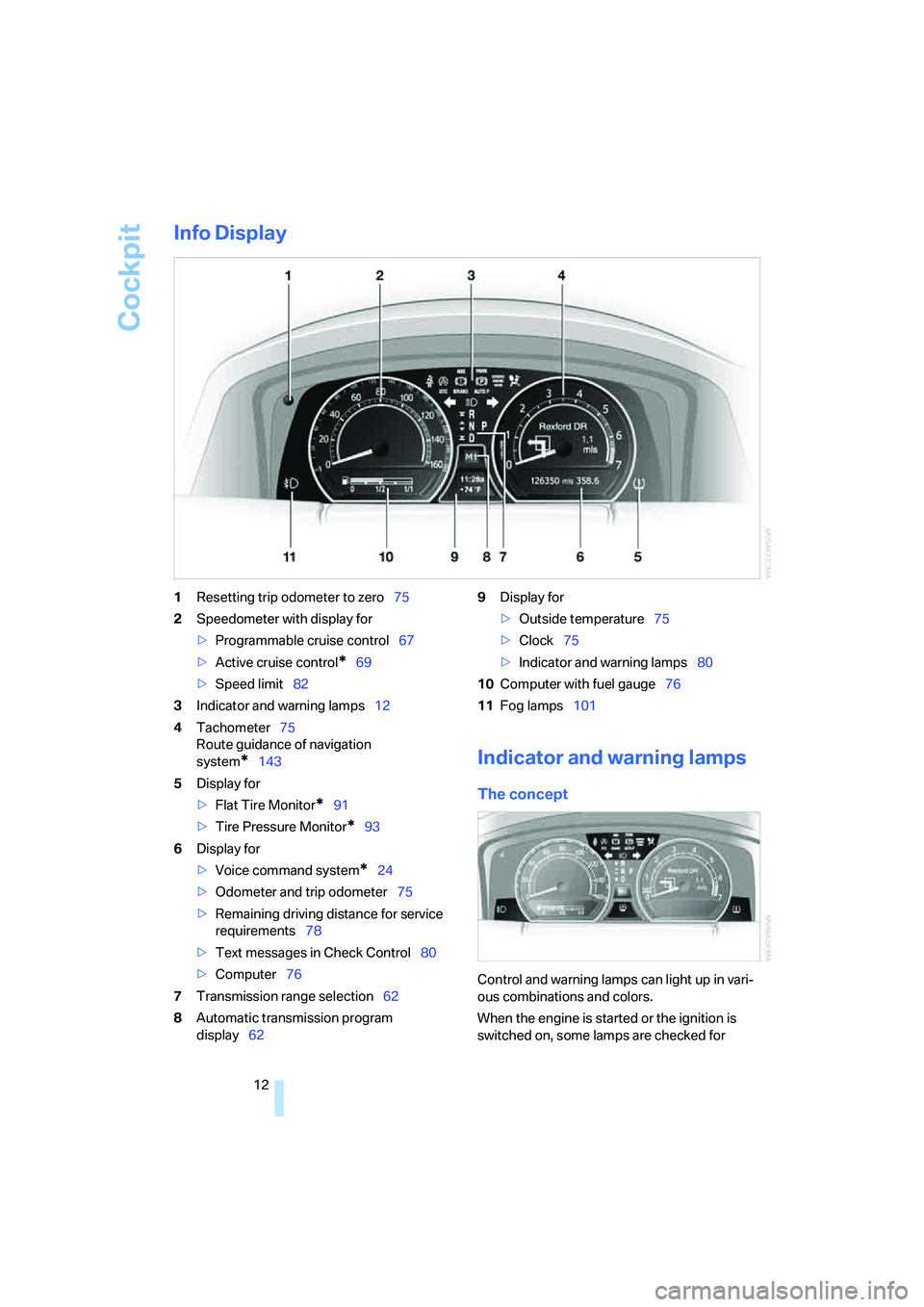
Info Display
1Resetting trip odometer to zero75
2Speedometer with display for
>Programmable cruise control67
>Active cruise control
*69
>Speed limit82
3Indicator and warning lamps12
4Tachometer75
Route guidance of navigation
system
*143
5Display for
>Flat Tire Monitor
*91
>Tire Pressure Monitor
*93
6Display for
>Voice command system
*24
>Odometer and trip odometer75
>Remaining driving distance for service
requirements78
>Text messages in Check Control80
>Computer76
7Transmission range selection62
8Automatic transmission program
display629Display for
>Outside temperature75
>Clock75
>Indicator and warning lamps80
10Computer with fuel gauge76
11Fog lamps101
Indicator and warning lamps
The concept
Control and warning lamps can light up in vari-
ous combinations and colors.
When the engine is started or the ignition is
switched on, some lamps are checked for
Page 77 of 253
Controls
75Reference
At a glance
Driving tips
Communications
Navigation
Entertainment
Mobility
Everything under control
Odometer, outside temperature display, clock
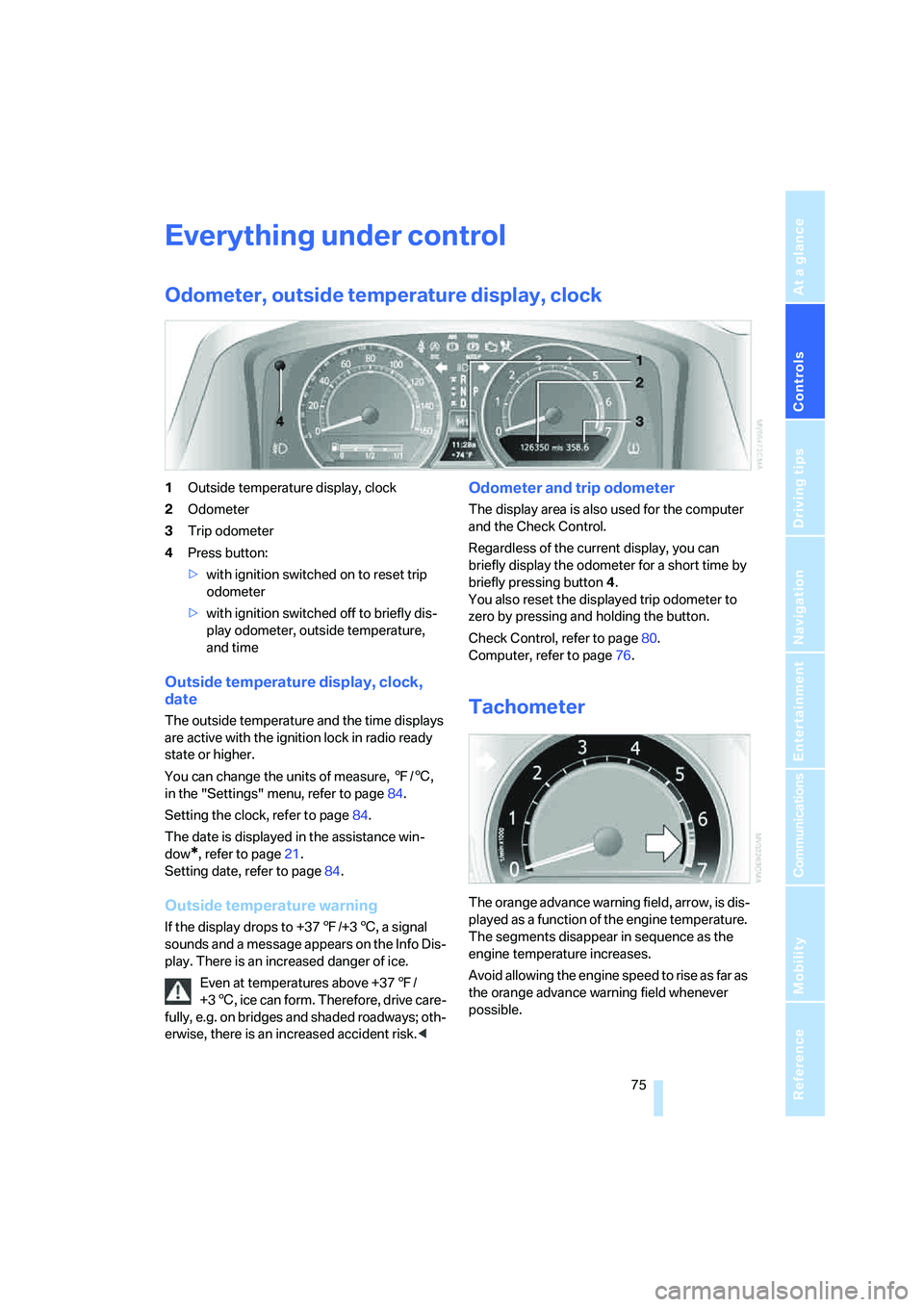
1Outside temperature display, clock
2Odometer
3Trip odometer
4Press button:
>with ignition switched on to reset trip
odometer
>with ignition switched off to briefly dis-
play odometer, outside temperature,
and time
Outside temperature display, clock,
date
The outside temperature and the time displays
are active with the ignition lock in radio ready
state or higher.
You can change the units of measure, 7/6,
in the "Settings" menu, refer to page84.
Setting the clock, refer to page84.
The date is displayed in the assistance win-
dow
*, refer to page21.
Setting date, refer to page84.
Outside temperature warning
If the display drops to +377/+36, a signal
sounds and a message appears on the Info Dis-
play. There is an increased danger of ice.
Even at temperatures above +377/
+36, ice can form. Therefore, drive care-
fully, e.g. on bridges and shaded roadways; oth-
erwise, there is an increased accident risk.<
Odometer and trip odometer
The display area is also used for the computer
and the Check Control.
Regardless of the current display, you can
briefly display the odometer for a short time by
briefly pressing button4.
You also reset the displayed trip odometer to
zero by pressing and holding the button.
Check Control, refer to page80.
Computer, refer to page76.
Tachometer
The orange advance warning field, arrow, is dis-
played as a function of the engine temperature.
The segments disappear in sequence as the
engine temperature increases.
Avoid allowing the engine speed to rise as far as
the orange advance warning field whenever
possible.
Page 78 of 253
Everything under control
76
Coolant temperature
Should the coolant, and with it the engine
become too hot, a warning lamp lights up. In
addition, a message appears on the Control
Display.
Checking coolant level, refer to page208.
Computer
Requesting functions
You can use the buttons in the turn signal lever
to display the computer information on the Info
Display.
1Info Display on left
2Info Display on right
A new function appears each time you briefly
press the button.
Displays on Info Display
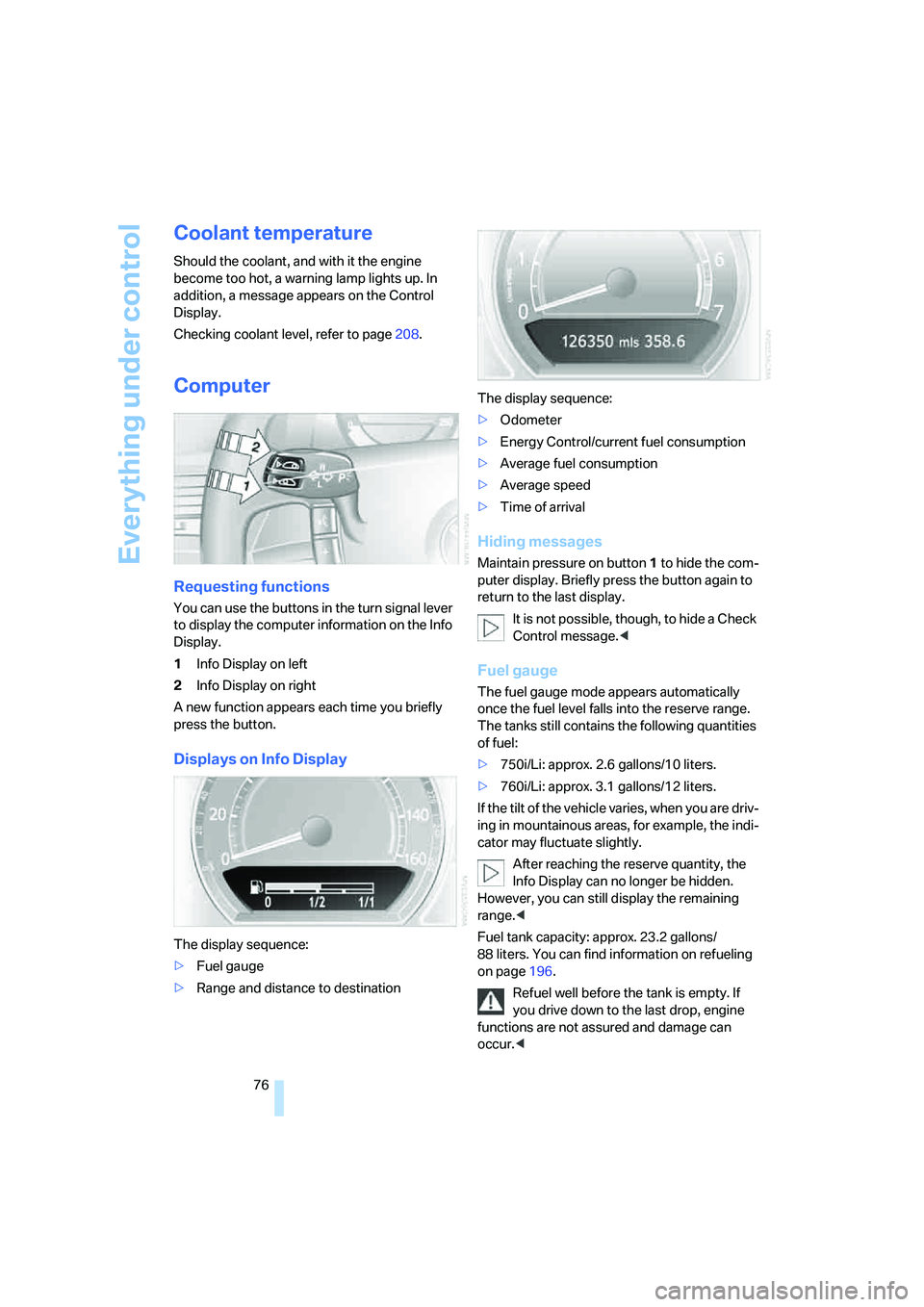
The display sequence:
>Fuel gauge
>Range and distance to destinationThe display sequence:
>Odometer
>Energy Control/current fuel consumption
>Average fuel consumption
>Average speed
>Time of arrival
Hiding messages
Maintain pressure on button1 to hide the com-
puter display. Briefly press the button again to
return to the last display.
It is not possible, though, to hide a Check
Control message.<
Fuel gauge
The fuel gauge mode appears automatically
once the fuel level falls into the reserve range.
The tanks still contains the following quantities
of fuel:
>750i/Li: approx. 2.6 gallons/10 liters.
>760i/Li: approx. 3.1 gallons/12 liters.
If the tilt of the vehicle varies, when you are driv-
ing in mountainous areas, for example, the indi-
cator may fluctuate slightly.
After reaching the reserve quantity, the
Info Display can no longer be hidden.
However, you can still display the remaining
range.<
Fuel tank capacity: approx. 23.2 gallons/
88 liters. You can find information on refueling
on page196.
Refuel well before the tank is empty. If
you drive down to the last drop, engine
functions are not assured and damage can
occur.<
Page 242 of 253
Everything from A to Z
240 Modifications, technical, refer
to For your own safety5
Monitor, refer to
– iDrive16
– rear seat screen21
Mounting for vehicle jack,
refer to Lifting vehicle215
MP3, refer to Compressed
audio files166
Multi-function steering wheel,
refer to Buttons on steering
wheel11
Multifunction switch
– refer to Turn signals/
headlamp flasher65
– refer to Wiper/washer
system65
N
"Name", navigation132
"Navigation"130,143
Navigation announcements,
refer to Switching voice
instructions on/off145
Navigation destination
– manual entry131
– selecting via map134
Navigation drive, installation
location130Navigation system130
– address book138
– adjusting volume26,145
– changing route145
– current position146
– destination input131
– destination list137
– displaying route144
– manually entering
destination address131
– navigation CD/DVD130
– recent destinations137
– route guidance in assistance
window130
– route list145
– selecting destination via
information135
– selecting destination via
map134
– selecting route criteria141
– starting route guidance143
– switching off, refer to
Terminating/continuing
route guidance143
– terminating/continuing route
guidance143
– voice instructions145
"Navi info", programmable
buttons52
Neck supports, refer to Head
restraints46
Nets, refer to Securing
cargo125
"New dest.",
navigation131,134
"New information",
BMW Assist191
New remote control for
vehicle30
"New route",
navigation141,145
"Next", navigation135
Night vision device, refer to
BMW Night Vision96
"No measurement possible at
this time", checking engine
oil level208
"None", rear seat screen
22Non-smokers' equipment
package, refer to Power
socket116
Notepad of voice command
system26
Nozzles, refer to
Ventilation107
Number of cylinders, refer to
Engine specifications224
Nylon rope, refer to Towing
and tow starting220
O
OBD socket211
Octane numbers, refer to Fuel
specifications197
Odometer75
Oil
– additives, refer to Approved
engine oils208
– approved engine oils208
– consumption, refer to
Engine oil, checking207
– level207
– topping up, refer to Adding
engine oil208
– viscosity ratings208
Oil change interval, refer to
Service requirements78
Oil consumption, refer to
Checking engine oil207
"Oil level at minimum! Add
1 quart engine oil", checking
engine oil level208
"Oil level under min.! Add
1 quart engine oil", checking
engine oil level208
"OK", DVD changer174
"ON / OFF", speed limit82
Onboard monitor, refer to
iDrive16
Onboard tool kit212
"On country", navigation136
"On dest.", navigation136
Online help, refer to Roadside
Assistance189
"On location", navigation136
Page 243 of 253
Reference 241
At a glance
Controls
Driving tips
Communications
Navigation
Entertainment
Mobility
"On town/city",
navigation136
Opening and closing
– from inside34
– from outside32
– via door lock34
– with remote control32
Oral note26
Orientation menu, refer to
Opening start menu18
Outlet slits, refer to
Ventilation107
Outside air, refer to Automatic
recirculated-air control
AUC/recirculated-air
mode105
Outside temperature
display75
– changing units of
measure84
Overview
– all around the steering
wheel10
– comfort area14
– iDrive16
– radio control152
P
"PAIRING", phone182
Panic mode33
Park Distance Control PDC86
"Parked car", parked car
ventilation109
Parked car ventilation109
– activating activation
time110
– preselecting activation
time109
– switching on and off
directly109
Parking, vehicle58
Parking aid, refer to PDC Park
Distance Control86
Parking assistant, refer to
PDC Park Distance
Control86Parking brake58
– Automatic Hold59
– manual operation59
Parking lamps100
Parking lamps/low beams100
Parking with Automatic
Hold60
Park lock, refer to Parking63
Partial distance odometer,
refer to Trip odometer75
Parts and accessories, refer to
Your individual vehicle5
Passenger airbag status
lamp96
Passenger-side exterior
mirror, tilting down51
Pathway lighting100
PDC Park Distance Control86
"PDC pic."87
Pen tray, refer to Storage
compartment in center
console115
Perimeter lighting, refer to
Interior lamps102
Permissible axle load, refer to
Weights226
Permissible gross weight,
refer to Weights226
"Perspective", navigation144
"Phone"182
Phone book185
– deleting all entries186
– deleting entry186
– displaying entry185
– on the Control Display185
– select entry186
– via iDrive185
Phone book, refer to Voice
command phone book186
– creating entry186
– deleting all entries187
– deleting entry
187
– reading entry aloud187
– selecting entry187
– updating186Phone number
– deleting individual entry187
– dialing from phone book185
– dialing via retracting
telephone keypad179
– redialing185
– Top 8 list186
Phone preparation package,
refer to Preparation package
mobile phone178
"Pict.format", DVD
changer173
"Picture", DVD
changer172,173
Pinch protection system
– glass sunroof, electric41
– power windows40
Plasters, refer to First-aid
kit219
Plastic, refer to Caring for your
vehicle brochure
Playing music tracks in
random sequence
– CD changer167
– CD player164
Pollen, refer to Microfilter/
activated-charcoal filter107
Position, refer to
– displaying current
position146
– saving current position139
Power failure217
Power output, refer to Engine
specifications224
Power rear backrests45
Power seat, rear45
Power socket116
Power windows39
– convenience operation32
– safety switch40
Precious wood, refer to Caring
for your vehicle brochure
Preparedness services, refer
to Roadside Assistance218
"Presets", radio156,161
Pressure, tires198
Pressure monitoring, tires,
refer to Flat Tire Monitor90
Page 248 of 253
Everything from A to Z
246 Tires
– age202
– breaking-in122
– changing214
– condition203
– damage203
– flat tire214
– inflation pressure198
– pressure monitoring, refer to
Flat Tire Monitor90
– pressure monitoring, refer to
TPM Tire Pressure
Monitor91
– replacing204
– run-flat tires204
– size202
– size, refer to New wheels and
tires204
– storage205
– tread203
– winter tires205
"Tires: FTM", Flat Tire
Monitor90
"Tires: TPM", Tire Pressure
Monitor92
"TITLE", DVD changer173
Tone153
– adjusting153
– resetting settings155
"Tone", tone control153
Tools, refer to Onboard tool
kit212
"TOP", DVD changer174
"Top 8", telephone186
Top 8 on phone186
– deleting entire list186
– dialing phone number186
Torque
– engine224
– lug bolts, refer to After
mounting216
Touch tone dialing180
Tow fitting220
Towing220
– tow fitting220
"Town/City", navigation132
Tow-starting221Track, refer to
Dimensions225
Traction aid, refer to DSC87
Traction control, refer to DSC
Dynamic Stability
Control87
Traffic congestion, bypassing
route sections146
Transmission, refer to
Automatic transmission with
Steptronic62
Transporting children
safely
54
"Travel information",
navigation136
Tray for pens115
Tread depth, refer to Minimum
tread depth203
"Treble", treble and bass154
Treble and bass154
Trip computer78
Triple turn signal activation65
Trip odometer75
Trunk, refer to Luggage
compartment119
Trunk lid, refer to Luggage
compartment lid35
Turning circle, refer to
Dimensions225
Turn signals65
– indicator lamp13
– replacing bulbs213
TV
– controls152
– switching on153
– volume153
Twist-and-press button, refer
to iDrive16
U
Undercoating, refer to Caring
for your vehicle brochure
Uniform Tire Quality
Grading202
"Units", changing settings84Units of measure
– average fuel
consumption84
– average speed84
– consumption84
– distance84
– temperature84
Universal remote control, refer
to Integrated universal
remote control111
"Unlock", rear seat screen22
Unlocking
– from inside34
– from outside32
– hood206
– luggage compartment
lid33,39
Unlocking without key, refer to
Comfort Access38
"UPDATE", BMW Assist192
"Update of engine oil level in
process"208
Used batteries, refer to
Disposal217
Using the phone184
V
Valve screw caps, refer to
After mounting216
Vanity mirror, illuminated52
Vehicle
– battery216
– breaking-in122
– care, refer to Caring for your
vehicle brochure
– dimensions225
– loading124
– locking from inside34
– locking from outside32
– parking58
– position, refer to Current
position146
– storage, refer to Caring for
your vehicle brochure
– washing, refer to Caring for
your vehicle brochure
– weight226