warning light BMW ACTIVEHYBRID 5 2012 Owner's Manual
[x] Cancel search | Manufacturer: BMW, Model Year: 2012, Model line: ACTIVEHYBRID 5, Model: BMW ACTIVEHYBRID 5 2012Pages: 319, PDF Size: 12.54 MB
Page 163 of 319
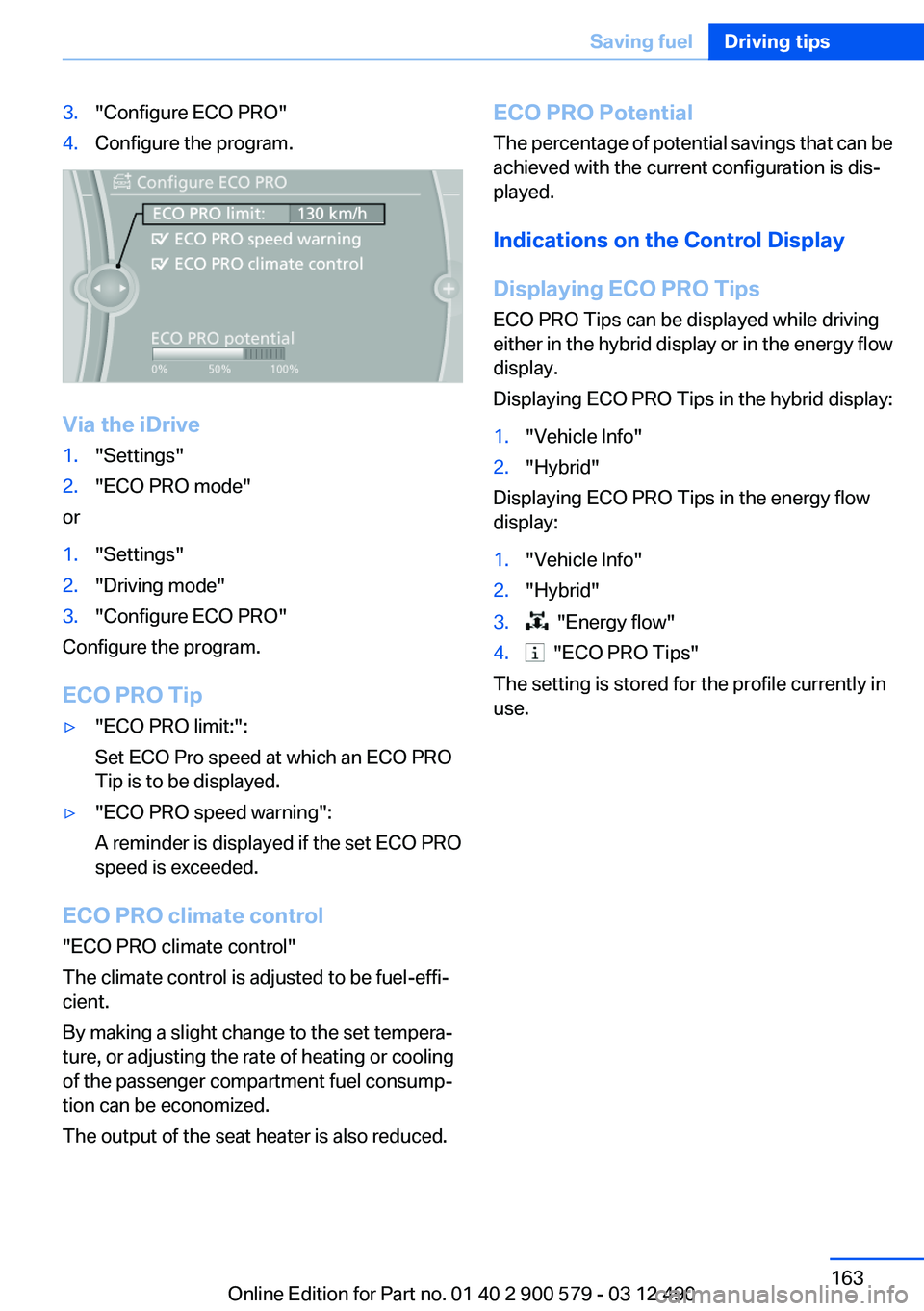
3."Configure ECO PRO"4.Configure the program.
Via the iDrive
1."Settings"2."ECO PRO mode"
or
1."Settings"2."Driving mode"3."Configure ECO PRO"
Configure the program.
ECO PRO Tip
▷"ECO PRO limit:":
Set ECO Pro speed at which an ECO PRO
Tip is to be displayed.▷"ECO PRO speed warning":
A reminder is displayed if the set ECO PRO
speed is exceeded.
ECO PRO climate control
"ECO PRO climate control"
The climate control is adjusted to be fuel-effi‐
cient.
By making a slight change to the set tempera‐
ture, or adjusting the rate of heating or cooling
of the passenger compartment fuel consump‐
tion can be economized.
The output of the seat heater is also reduced.
ECO PRO Potential
The percentage of potential savings that can be
achieved with the current configuration is dis‐
played.
Indications on the Control Display
Displaying ECO PRO Tips
ECO PRO Tips can be displayed while driving
either in the hybrid display or in the energy flow
display.
Displaying ECO PRO Tips in the hybrid display:1."Vehicle Info"2."Hybrid"
Displaying ECO PRO Tips in the energy flow
display:
1."Vehicle Info"2."Hybrid"3. "Energy flow"4. "ECO PRO Tips"
The setting is stored for the profile currently in
use.
Seite 163Saving fuelDriving tips163
Online Edition for Part no. 01 40 2 900 579 - 03 12 490
Page 274 of 319
Socket for OBD Onboard
Diagnosis
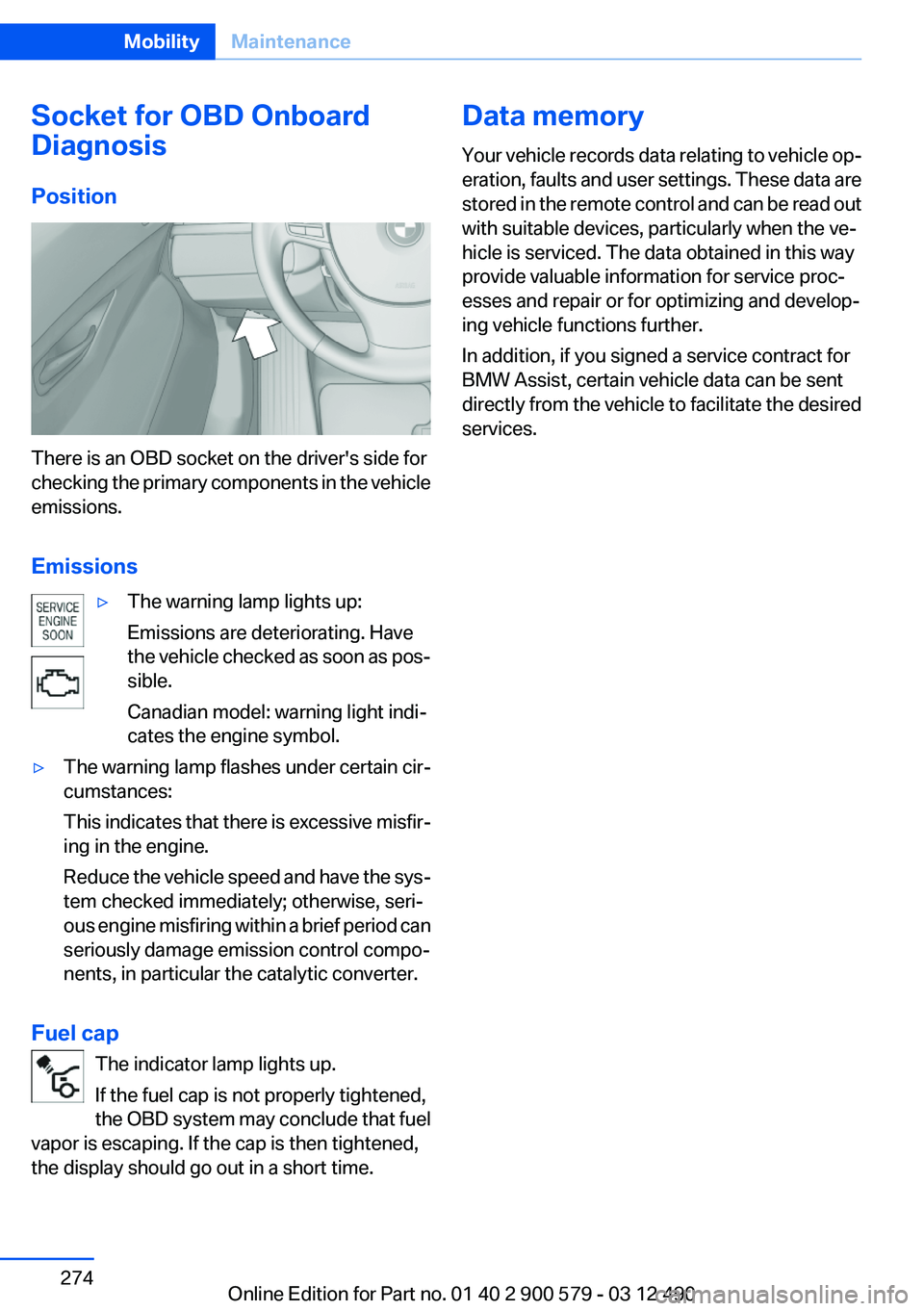
Position
There is an OBD socket on the driver's side for
checking the primary components in the vehicle
emissions.
Emissions
▷The warning lamp lights up:
Emissions are deteriorating. Have
the vehicle checked as soon as pos‐
sible.
Canadian model: warning light indi‐
cates the engine symbol.▷The warning lamp flashes under certain cir‐
cumstances:
This indicates that there is excessive misfir‐
ing in the engine.
Reduce the vehicle speed and have the sys‐
tem checked immediately; otherwise, seri‐
ous engine misfiring within a brief period can
seriously damage emission control compo‐
nents, in particular the catalytic converter.
Fuel cap
The indicator lamp lights up.
If the fuel cap is not properly tightened,
the OBD system may conclude that fuel
vapor is escaping. If the cap is then tightened,
the display should go out in a short time.
Data memory
Your vehicle records data relating to vehicle op‐
eration, faults and user settings. These data are
stored in the remote control and can be read out
with suitable devices, particularly when the ve‐
hicle is serviced. The data obtained in this way
provide valuable information for service proc‐
esses and repair or for optimizing and develop‐
ing vehicle functions further.
In addition, if you signed a service contract for
BMW Assist, certain vehicle data can be sent
directly from the vehicle to facilitate the desired
services.Seite 274MobilityMaintenance274
Online Edition for Part no. 01 40 2 900 579 - 03 12 490
Page 283 of 319
Breakdown assistanceVehicle equipment
All standard, country-specific and optional
equipment that is offered in the model series is
described in this chapter. Therefore, equipment
is also described that is not available in a vehicle,
e. g., because of the selected optional equip‐
ment or country variant. This also applies for
safety-related functions and systems.
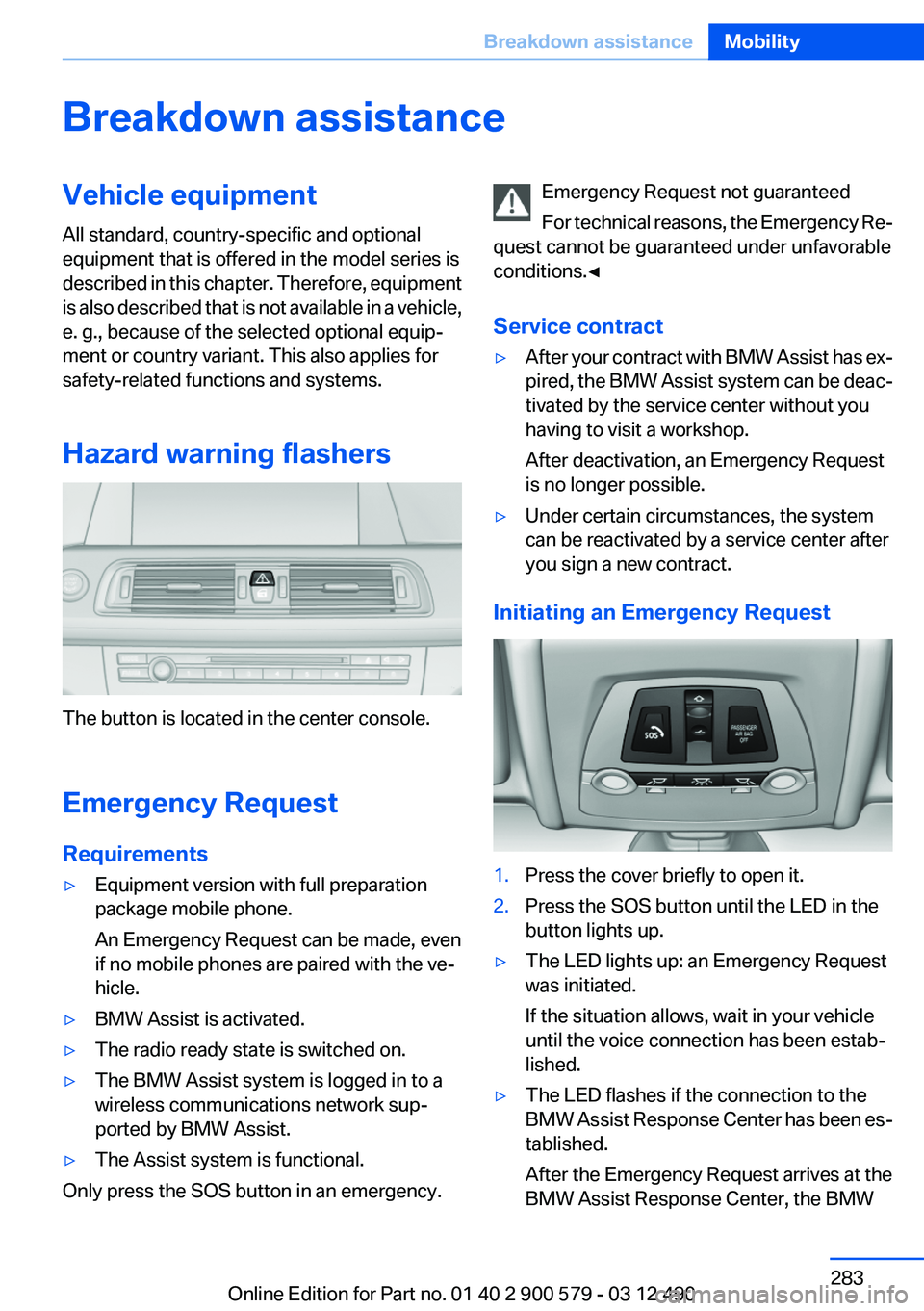
Hazard warning flashers
The button is located in the center console.
Emergency Request
Requirements
▷Equipment version with full preparation
package mobile phone.
An Emergency Request can be made, even
if no mobile phones are paired with the ve‐
hicle.▷BMW Assist is activated.▷The radio ready state is switched on.▷The BMW Assist system is logged in to a
wireless communications network sup‐
ported by BMW Assist.▷The Assist system is functional.
Only press the SOS button in an emergency.
Emergency Request not guaranteed
For technical reasons, the Emergency Re‐
quest cannot be guaranteed under unfavorable
conditions.◀
Service contract▷After your contract with BMW Assist has ex‐
pired, the BMW Assist system can be deac‐
tivated by the service center without you
having to visit a workshop.
After deactivation, an Emergency Request
is no longer possible.▷Under certain circumstances, the system
can be reactivated by a service center after
you sign a new contract.
Initiating an Emergency Request
1.Press the cover briefly to open it.2.Press the SOS button until the LED in the
button lights up.▷The LED lights up: an Emergency Request
was initiated.
If the situation allows, wait in your vehicle
until the voice connection has been estab‐
lished.▷The LED flashes if the connection to the
BMW Assist Response Center has been es‐
tablished.
After the Emergency Request arrives at the
BMW Assist Response Center, the BMWSeite 283Breakdown assistanceMobility283
Online Edition for Part no. 01 40 2 900 579 - 03 12 490
Page 286 of 319
If the first starting attempt is not successful,
wait a few minutes before making another
attempt in order to allow the discharged bat‐
tery to recharge.3.Let both engines run for several minutes.4.Disconnect the jumper cables in the reverse
order.
Check the battery and recharge if necessary.
Tow-starting and towing
Automatic transmission: transporting
your vehicle
Note
Your vehicle is not permitted to be towed.
Therefore, contact a service center in the event
of a breakdown.
Do not have the vehicle towed
Have your vehicle transported on a loading
platform only; otherwise, damage may occur.◀
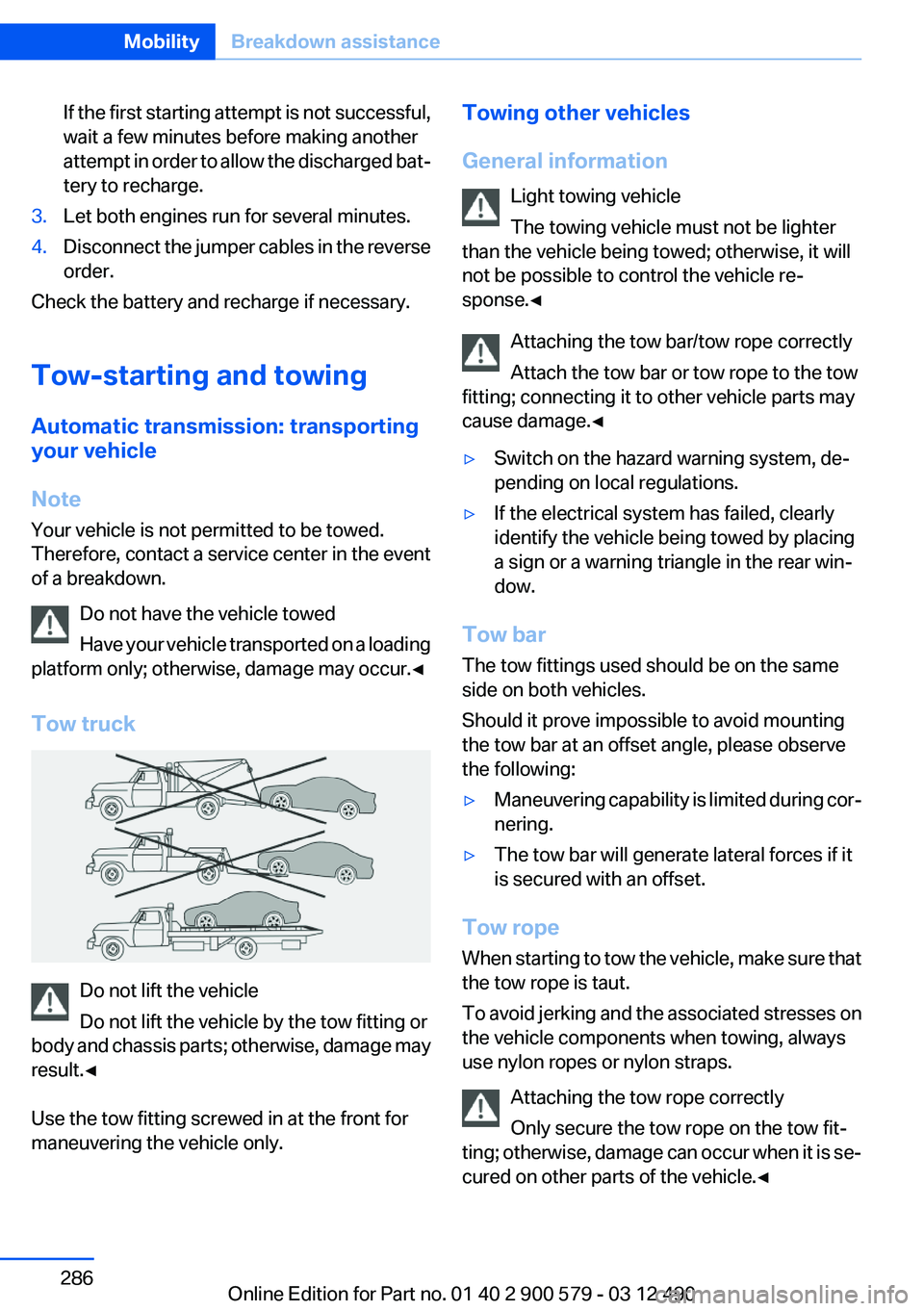
Tow truck
Do not lift the vehicle
Do not lift the vehicle by the tow fitting or
body and chassis parts; otherwise, damage may
result.◀
Use the tow fitting screwed in at the front for
maneuvering the vehicle only.
Towing other vehicles
General information Light towing vehicle
The towing vehicle must not be lighter
than the vehicle being towed; otherwise, it will
not be possible to control the vehicle re‐
sponse.◀
Attaching the tow bar/tow rope correctly
Attach the tow bar or tow rope to the tow
fitting; connecting it to other vehicle parts may
cause damage.◀▷Switch on the hazard warning system, de‐
pending on local regulations.▷If the electrical system has failed, clearly
identify the vehicle being towed by placing
a sign or a warning triangle in the rear win‐
dow.
Tow bar
The tow fittings used should be on the same
side on both vehicles.
Should it prove impossible to avoid mounting
the tow bar at an offset angle, please observe
the following:
▷Maneuvering capability is limited during cor‐
nering.▷The tow bar will generate lateral forces if it
is secured with an offset.
Tow rope
When starting to tow the vehicle, make sure that
the tow rope is taut.
To avoid jerking and the associated stresses on
the vehicle components when towing, always
use nylon ropes or nylon straps.
Attaching the tow rope correctly
Only secure the tow rope on the tow fit‐
ting; otherwise, damage can occur when it is se‐
cured on other parts of the vehicle.◀
Seite 286MobilityBreakdown assistance286
Online Edition for Part no. 01 40 2 900 579 - 03 12 490
Page 308 of 319
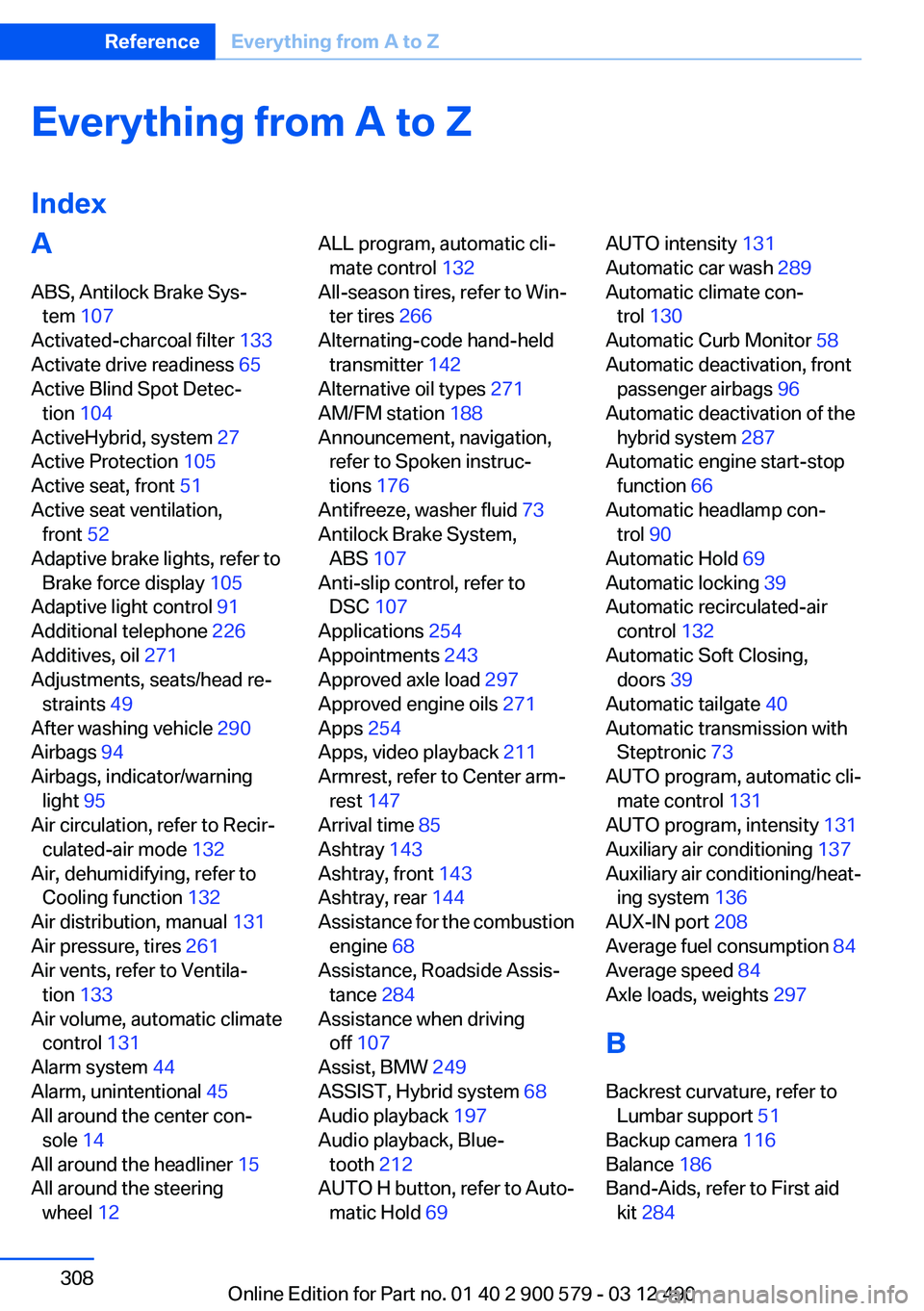
Everything from A to Z
IndexA
ABS, Antilock Brake Sys‐ tem 107
Activated-charcoal filter 133
Activate drive readiness 65
Active Blind Spot Detec‐ tion 104
ActiveHybrid, system 27
Active Protection 105
Active seat, front 51
Active seat ventilation, front 52
Adaptive brake lights, refer to Brake force display 105
Adaptive light control 91
Additional telephone 226
Additives, oil 271
Adjustments, seats/head re‐ straints 49
After washing vehicle 290
Airbags 94
Airbags, indicator/warning light 95
Air circulation, refer to Recir‐ culated-air mode 132
Air, dehumidifying, refer to Cooling function 132
Air distribution, manual 131
Air pressure, tires 261
Air vents, refer to Ventila‐ tion 133
Air volume, automatic climate control 131
Alarm system 44
Alarm, unintentional 45
All around the center con‐ sole 14
All around the headliner 15
All around the steering wheel 12 ALL program, automatic cli‐
mate control 132
All-season tires, refer to Win‐ ter tires 266
Alternating-code hand-held transmitter 142
Alternative oil types 271
AM/FM station 188
Announcement, navigation, refer to Spoken instruc‐
tions 176
Antifreeze, washer fluid 73
Antilock Brake System, ABS 107
Anti-slip control, refer to DSC 107
Applications 254
Appointments 243
Approved axle load 297
Approved engine oils 271
Apps 254
Apps, video playback 211
Armrest, refer to Center arm‐ rest 147
Arrival time 85
Ashtray 143
Ashtray, front 143
Ashtray, rear 144
Assistance for the combustion engine 68
Assistance, Roadside Assis‐ tance 284
Assistance when driving off 107
Assist, BMW 249
ASSIST, Hybrid system 68
Audio playback 197
Audio playback, Blue‐ tooth 212
AUTO H button, refer to Auto‐ matic Hold 69 AUTO intensity 131
Automatic car wash 289
Automatic climate con‐ trol 130
Automatic Curb Monitor 58
Automatic deactivation, front passenger airbags 96
Automatic deactivation of the hybrid system 287
Automatic engine start-stop function 66
Automatic headlamp con‐ trol 90
Automatic Hold 69
Automatic locking 39
Automatic recirculated-air control 132
Automatic Soft Closing, doors 39
Automatic tailgate 40
Automatic transmission with Steptronic 73
AUTO program, automatic cli‐ mate control 131
AUTO program, intensity 131
Auxiliary air conditioning 137
Auxiliary air conditioning/heat‐ ing system 136
AUX-IN port 208
Average fuel consumption 84
Average speed 84
Axle loads, weights 297
B
Backrest curvature, refer to Lumbar support 51
Backup camera 116
Balance 186
Band-Aids, refer to First aid kit 284 Seite 308ReferenceEverything from A to Z308
Online Edition for Part no. 01 40 2 900 579 - 03 12 490
Page 309 of 319
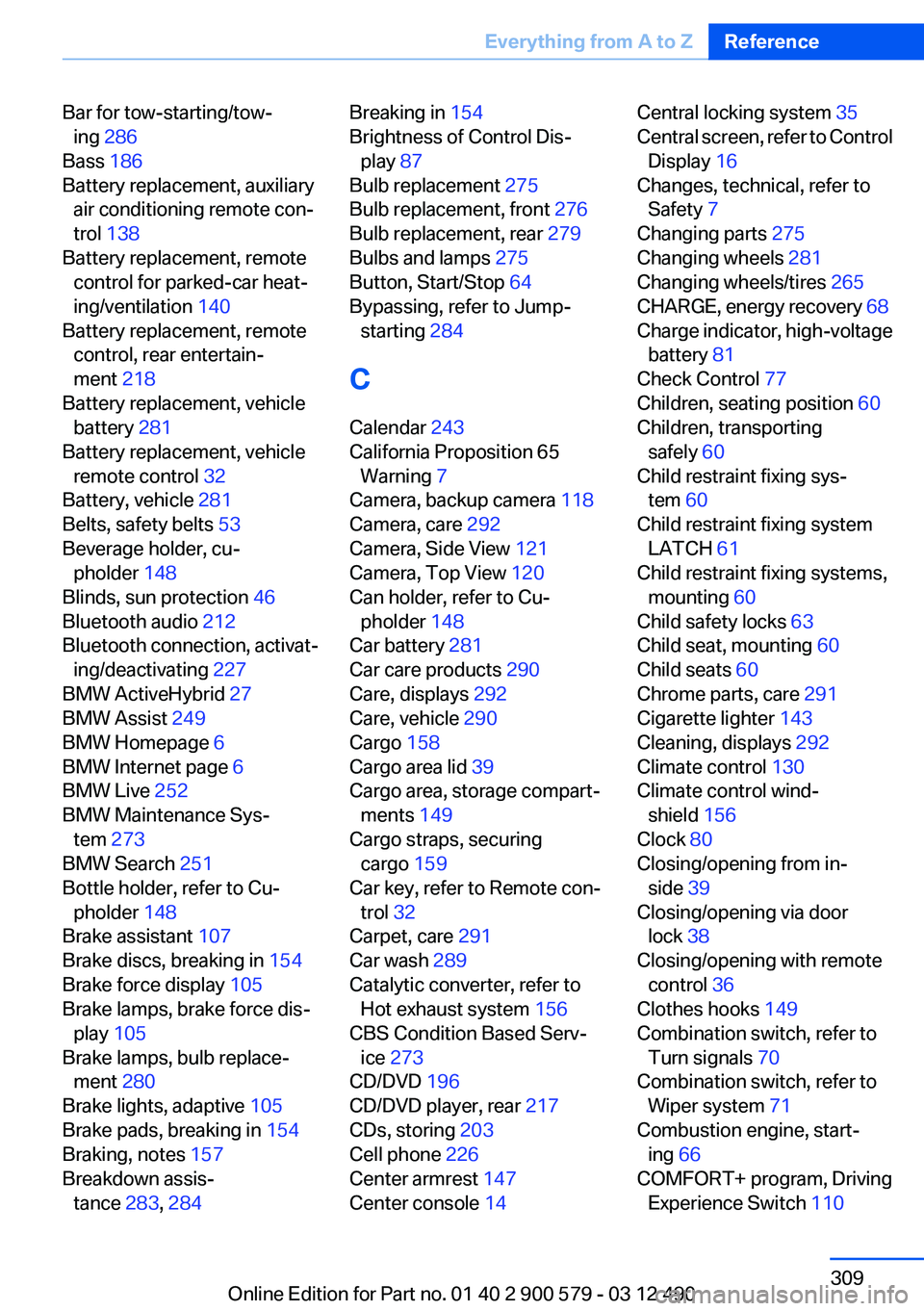
Bar for tow-starting/tow‐ing 286
Bass 186
Battery replacement, auxiliary air conditioning remote con‐
trol 138
Battery replacement, remote control for parked-car heat‐
ing/ventilation 140
Battery replacement, remote control, rear entertain‐
ment 218
Battery replacement, vehicle battery 281
Battery replacement, vehicle remote control 32
Battery, vehicle 281
Belts, safety belts 53
Beverage holder, cu‐ pholder 148
Blinds, sun protection 46
Bluetooth audio 212
Bluetooth connection, activat‐ ing/deactivating 227
BMW ActiveHybrid 27
BMW Assist 249
BMW Homepage 6
BMW Internet page 6
BMW Live 252
BMW Maintenance Sys‐ tem 273
BMW Search 251
Bottle holder, refer to Cu‐ pholder 148
Brake assistant 107
Brake discs, breaking in 154
Brake force display 105
Brake lamps, brake force dis‐ play 105
Brake lamps, bulb replace‐ ment 280
Brake lights, adaptive 105
Brake pads, breaking in 154
Braking, notes 157
Breakdown assis‐ tance 283, 284 Breaking in 154
Brightness of Control Dis‐ play 87
Bulb replacement 275
Bulb replacement, front 276
Bulb replacement, rear 279
Bulbs and lamps 275
Button, Start/Stop 64
Bypassing, refer to Jump- starting 284
C
Calendar 243
California Proposition 65 Warning 7
Camera, backup camera 118
Camera, care 292
Camera, Side View 121
Camera, Top View 120
Can holder, refer to Cu‐ pholder 148
Car battery 281
Car care products 290
Care, displays 292
Care, vehicle 290
Cargo 158
Cargo area lid 39
Cargo area, storage compart‐ ments 149
Cargo straps, securing cargo 159
Car key, refer to Remote con‐ trol 32
Carpet, care 291
Car wash 289
Catalytic converter, refer to Hot exhaust system 156
CBS Condition Based Serv‐ ice 273
CD/DVD 196
CD/DVD player, rear 217
CDs, storing 203
Cell phone 226
Center armrest 147
Center console 14 Central locking system 35
Central screen, refer to Control Display 16
Changes, technical, refer to Safety 7
Changing parts 275
Changing wheels 281
Changing wheels/tires 265
CHARGE, energy recovery 68
Charge indicator, high-voltage battery 81
Check Control 77
Children, seating position 60
Children, transporting safely 60
Child restraint fixing sys‐ tem 60
Child restraint fixing system LATCH 61
Child restraint fixing systems, mounting 60
Child safety locks 63
Child seat, mounting 60
Child seats 60
Chrome parts, care 291
Cigarette lighter 143
Cleaning, displays 292
Climate control 130
Climate control wind‐ shield 156
Clock 80
Closing/opening from in‐ side 39
Closing/opening via door lock 38
Closing/opening with remote control 36
Clothes hooks 149
Combination switch, refer to Turn signals 70
Combination switch, refer to Wiper system 71
Combustion engine, start‐ ing 66
COMFORT+ program, Driving Experience Switch 110 Seite 309Everything from A to ZReference309
Online Edition for Part no. 01 40 2 900 579 - 03 12 490
Page 312 of 319
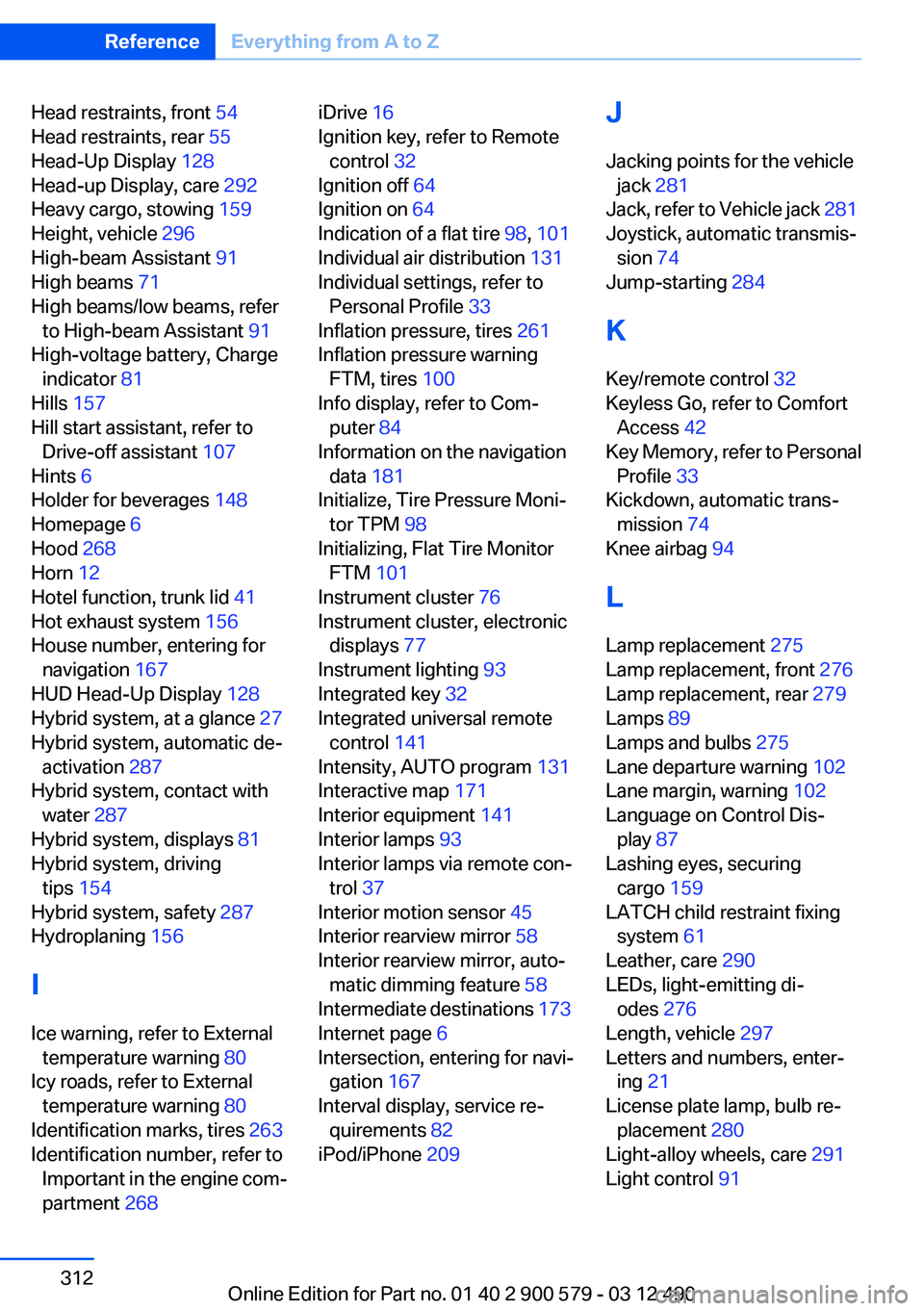
Head restraints, front 54
Head restraints, rear 55
Head-Up Display 128
Head-up Display, care 292
Heavy cargo, stowing 159
Height, vehicle 296
High-beam Assistant 91
High beams 71
High beams/low beams, refer to High-beam Assistant 91
High-voltage battery, Charge indicator 81
Hills 157
Hill start assistant, refer to Drive-off assistant 107
Hints 6
Holder for beverages 148
Homepage 6
Hood 268
Horn 12
Hotel function, trunk lid 41
Hot exhaust system 156
House number, entering for navigation 167
HUD Head-Up Display 128
Hybrid system, at a glance 27
Hybrid system, automatic de‐ activation 287
Hybrid system, contact with water 287
Hybrid system, displays 81
Hybrid system, driving tips 154
Hybrid system, safety 287
Hydroplaning 156
I
Ice warning, refer to External temperature warning 80
Icy roads, refer to External temperature warning 80
Identification marks, tires 263
Identification number, refer to Important in the engine com‐
partment 268 iDrive 16
Ignition key, refer to Remote control 32
Ignition off 64
Ignition on 64
Indication of a flat tire 98, 101
Individual air distribution 131
Individual settings, refer to Personal Profile 33
Inflation pressure, tires 261
Inflation pressure warning FTM, tires 100
Info display, refer to Com‐ puter 84
Information on the navigation data 181
Initialize, Tire Pressure Moni‐ tor TPM 98
Initializing, Flat Tire Monitor FTM 101
Instrument cluster 76
Instrument cluster, electronic displays 77
Instrument lighting 93
Integrated key 32
Integrated universal remote control 141
Intensity, AUTO program 131
Interactive map 171
Interior equipment 141
Interior lamps 93
Interior lamps via remote con‐ trol 37
Interior motion sensor 45
Interior rearview mirror 58
Interior rearview mirror, auto‐ matic dimming feature 58
Intermediate destinations 173
Internet page 6
Intersection, entering for navi‐ gation 167
Interval display, service re‐ quirements 82
iPod/iPhone 209 J
Jacking points for the vehicle jack 281
Jack, refer to Vehicle jack 281
Joystick, automatic transmis‐ sion 74
Jump-starting 284
K
Key/remote control 32
Keyless Go, refer to Comfort Access 42
Key Memory, refer to Personal Profile 33
Kickdown, automatic trans‐ mission 74
Knee airbag 94
L
Lamp replacement 275
Lamp replacement, front 276
Lamp replacement, rear 279
Lamps 89
Lamps and bulbs 275
Lane departure warning 102
Lane margin, warning 102
Language on Control Dis‐ play 87
Lashing eyes, securing cargo 159
LATCH child restraint fixing system 61
Leather, care 290
LEDs, light-emitting di‐ odes 276
Length, vehicle 297
Letters and numbers, enter‐ ing 21
License plate lamp, bulb re‐ placement 280
Light-alloy wheels, care 291
Light control 91 Seite 312ReferenceEverything from A to Z312
Online Edition for Part no. 01 40 2 900 579 - 03 12 490