AUX BMW ACTIVEHYBRID 5 2012 Owners Manual
[x] Cancel search | Manufacturer: BMW, Model Year: 2012, Model line: ACTIVEHYBRID 5, Model: BMW ACTIVEHYBRID 5 2012Pages: 319, PDF Size: 12.54 MB
Page 20 of 319
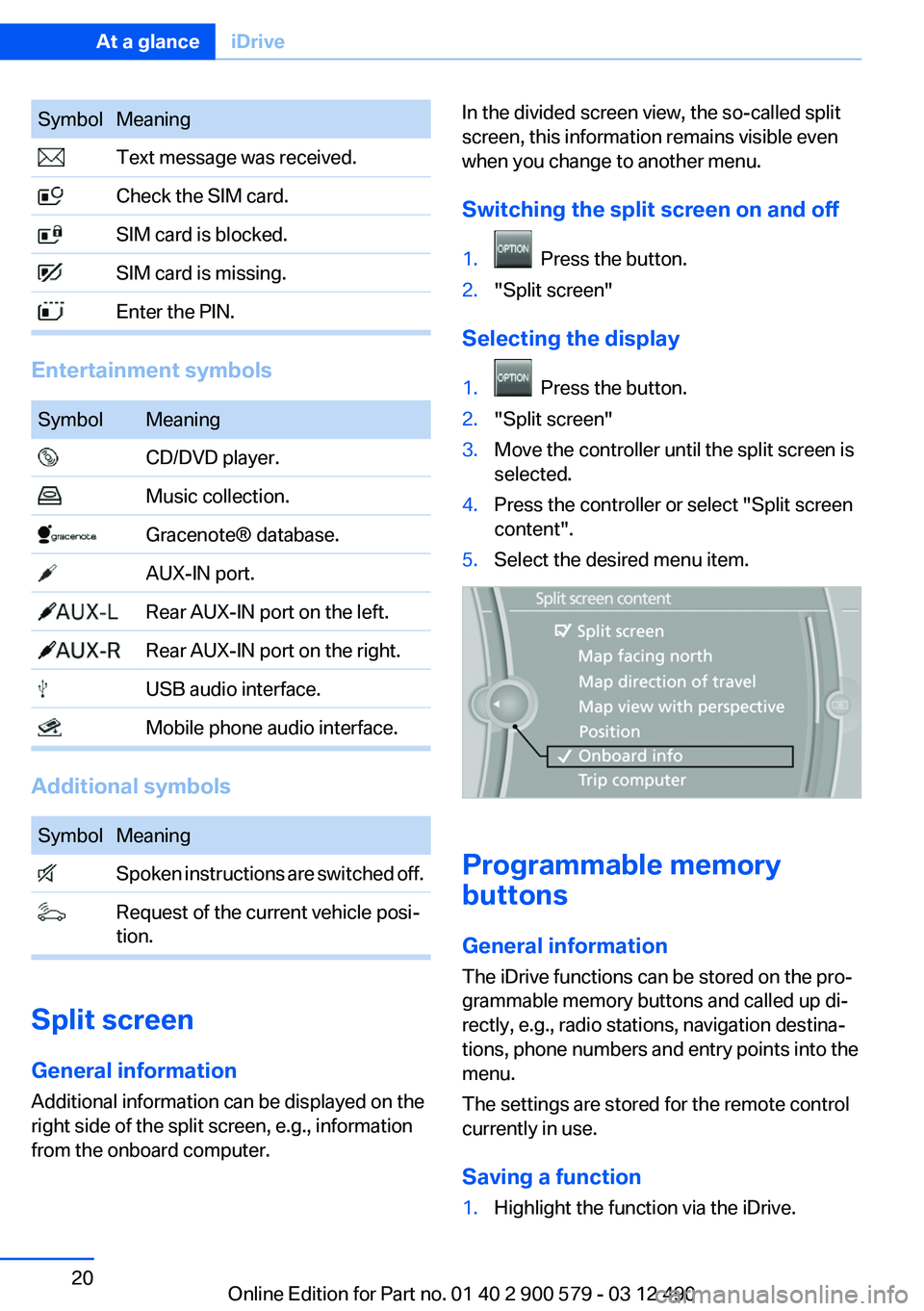
SymbolMeaning Text message was received. Check the SIM card. SIM card is blocked. SIM card is missing. Enter the PIN.
Entertainment symbols
SymbolMeaning CD/DVD player. Music collection. Gracenote® database. AUX-IN port. Rear AUX-IN port on the left. Rear AUX-IN port on the right. USB audio interface. Mobile phone audio interface.
Additional symbols
SymbolMeaning Spoken instructions are switched off. Request of the current vehicle posi‐
tion.
Split screen
General information
Additional information can be displayed on the
right side of the split screen, e.g., information
from the onboard computer.
In the divided screen view, the so-called split
screen, this information remains visible even
when you change to another menu.
Switching the split screen on and off1. Press the button.2."Split screen"
Selecting the display
1. Press the button.2."Split screen"3.Move the controller until the split screen is
selected.4.Press the controller or select "Split screen
content".5.Select the desired menu item.
Programmable memory
buttons
General information
The iDrive functions can be stored on the pro‐
grammable memory buttons and called up di‐
rectly, e.g., radio stations, navigation destina‐
tions, phone numbers and entry points into the
menu.
The settings are stored for the remote control
currently in use.
Saving a function
1.Highlight the function via the iDrive.Seite 20At a glanceiDrive20
Online Edition for Part no. 01 40 2 900 579 - 03 12 490
Page 27 of 319
BMW ActiveHybridVehicle equipment
All standard, country-specific and optional
equipment that is offered in the model series is
described in this chapter. Therefore, equipment
is also described that is not available in a vehicle,
e. g., because of the selected optional equip‐
ment or country variant. This also applies for
safety-related functions and systems.
Hybrid system
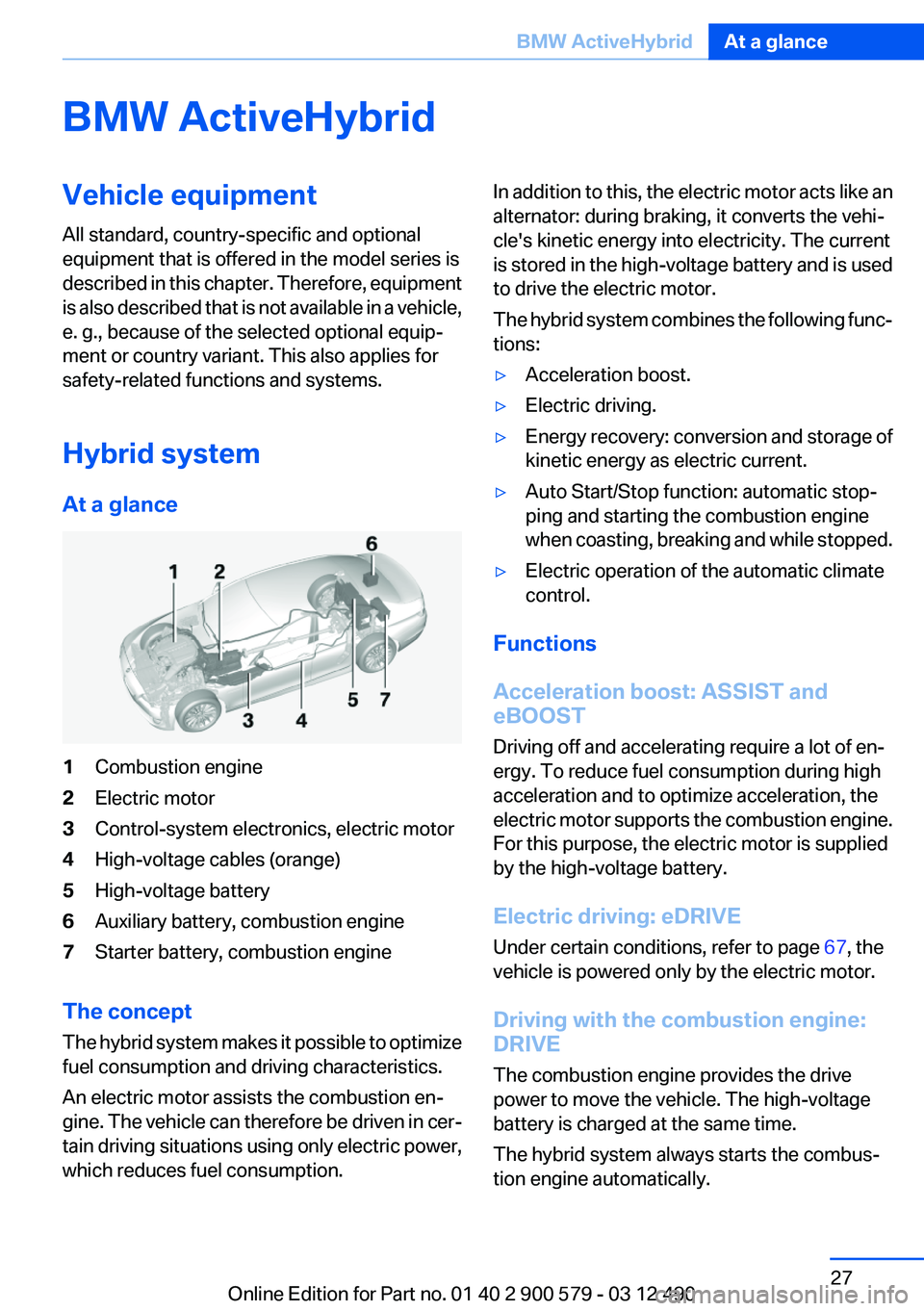
At a glance1Combustion engine2Electric motor3Control-system electronics, electric motor4High-voltage cables (orange)5High-voltage battery6Auxiliary battery, combustion engine7Starter battery, combustion engine
The concept
The hybrid system makes it possible to optimize
fuel consumption and driving characteristics.
An electric motor assists the combustion en‐
gine. The vehicle can therefore be driven in cer‐
tain driving situations using only electric power,
which reduces fuel consumption.
In addition to this, the electric motor acts like an
alternator: during braking, it converts the vehi‐
cle's kinetic energy into electricity. The current
is stored in the high-voltage battery and is used
to drive the electric motor.
The hybrid system combines the following func‐
tions:▷Acceleration boost.▷Electric driving.▷Energy recovery: conversion and storage of
kinetic energy as electric current.▷Auto Start/Stop function: automatic stop‐
ping and starting the combustion engine
when coasting, breaking and while stopped.▷Electric operation of the automatic climate
control.
Functions
Acceleration boost: ASSIST and
eBOOST
Driving off and accelerating require a lot of en‐
ergy. To reduce fuel consumption during high
acceleration and to optimize acceleration, the
electric motor supports the combustion engine.
For this purpose, the electric motor is supplied
by the high-voltage battery.
Electric driving: eDRIVE
Under certain conditions, refer to page 67, the
vehicle is powered only by the electric motor.
Driving with the combustion engine:
DRIVE
The combustion engine provides the drive
power to move the vehicle. The high-voltage
battery is charged at the same time.
The hybrid system always starts the combus‐
tion engine automatically.
Seite 27BMW ActiveHybridAt a glance27
Online Edition for Part no. 01 40 2 900 579 - 03 12 490
Page 28 of 319
Energy recovery: CHARGE
The high-voltage battery of the hybrid system is
charged through energy recovery.
The electric motor acts as a generator and con‐
verts the kinetic energy of the vehicle into elec‐
tric current.
Charging can take place in various situations:▷When the vehicle is rolling if the accelerator
is not pressed.▷During vehicle braking.
When exerting gentle pressure on the brakes,
the vehicle is only braked by the electric motor.
When the brake pedal is depressed further, the
brake system is activated additionally. This is
why only part of the brake energy is used to
charge the high-voltage battery when exerting
firm pressure on the brake.
Foresighted driving and the early reduction of
speed are important to make full use of the hy‐
brid characteristics of your vehicle.
Auto Start/Stop function
The Auto Start/Stop function, refer to
page 66, switches the combustion engine off
when coasting, braking and while the vehicle is
stopped. Convenience functions such as the
automatic climate control are supplied by the
high-voltage battery and can remain switched
on.
Auxiliary functions of the automatic
climate control
The hybrid system allows the operation of the
automatic climate control even when the com‐
bustion engine is switched off, for instance
when the combustion engine was switched off
by the Auto Start/Stop function.
▷Residual cooling, refer to page 135.▷Auxiliary air conditioning, refer to
page 137Adapting to the course of the road
When destination guidance is active, the hybrid
system uses the navigation data. This makes it
possible to switch off the combustion engine
upon reaching the destination zone even before
reaching the destination.
Pay attention to the notes in Adapting to the
course of the road, refer to page 82.
Display
The displays of the hybrid system, refer to
page 81, provide information about the cur‐
rent state of hybrid operation and show the sys‐
tem activity in a chart.
Energy-saving driving
To save energy while driving, read the following
information:▷Saving fuel, refer to page 161▷Using the hybrid system efficiently, refer to
page 154▷ECO PRO mode, refer to page 162.▷Adapting to the course of the road, refer to
page 82.
Safety information
Read the information on Safety of the hybrid
system, refer to page 287.
Seite 28At a glanceBMW ActiveHybrid28
Online Edition for Part no. 01 40 2 900 579 - 03 12 490
Page 32 of 319
Opening and closingVehicle equipment
All standard, country-specific and optional
equipment that is offered in the model series is
described in this chapter. Therefore, equipment
is also described that is not available in a vehicle,
e. g., because of the selected optional equip‐
ment or country variant. This also applies for
safety-related functions and systems.
Remote control/key
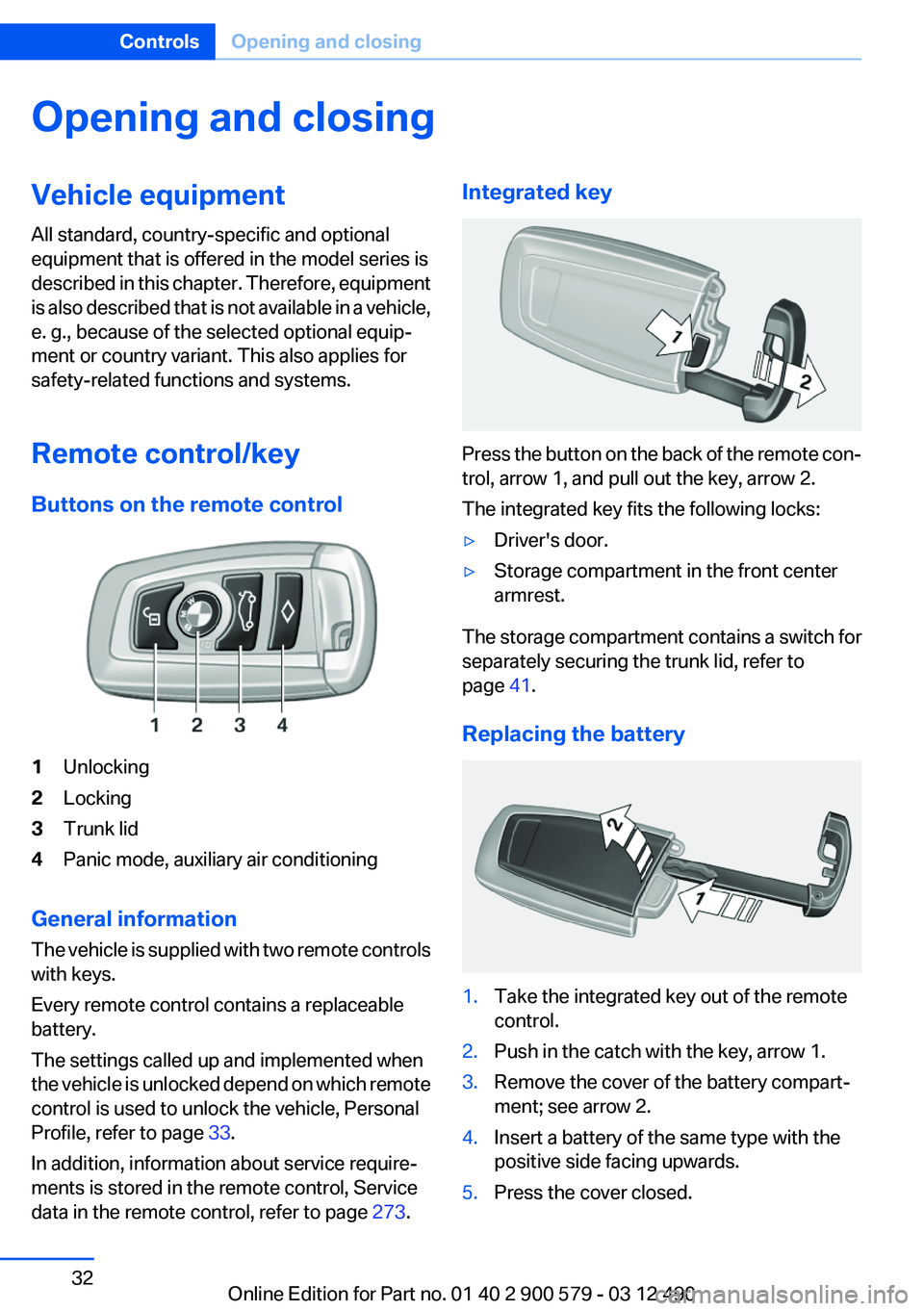
Buttons on the remote control1Unlocking2Locking3Trunk lid4Panic mode, auxiliary air conditioning
General information
The vehicle is supplied with two remote controls
with keys.
Every remote control contains a replaceable
battery.
The settings called up and implemented when
the vehicle is unlocked depend on which remote
control is used to unlock the vehicle, Personal
Profile, refer to page 33.
In addition, information about service require‐
ments is stored in the remote control, Service
data in the remote control, refer to page 273.
Integrated key
Press the button on the back of the remote con‐
trol, arrow 1, and pull out the key, arrow 2.
The integrated key fits the following locks:
▷Driver's door.▷Storage compartment in the front center
armrest.
The storage compartment contains a switch for
separately securing the trunk lid, refer to
page 41.
Replacing the battery
1.Take the integrated key out of the remote
control.2.Push in the catch with the key, arrow 1.3.Remove the cover of the battery compart‐
ment; see arrow 2.4.Insert a battery of the same type with the
positive side facing upwards.5.Press the cover closed.Seite 32ControlsOpening and closing32
Online Edition for Part no. 01 40 2 900 579 - 03 12 490
Page 136 of 319
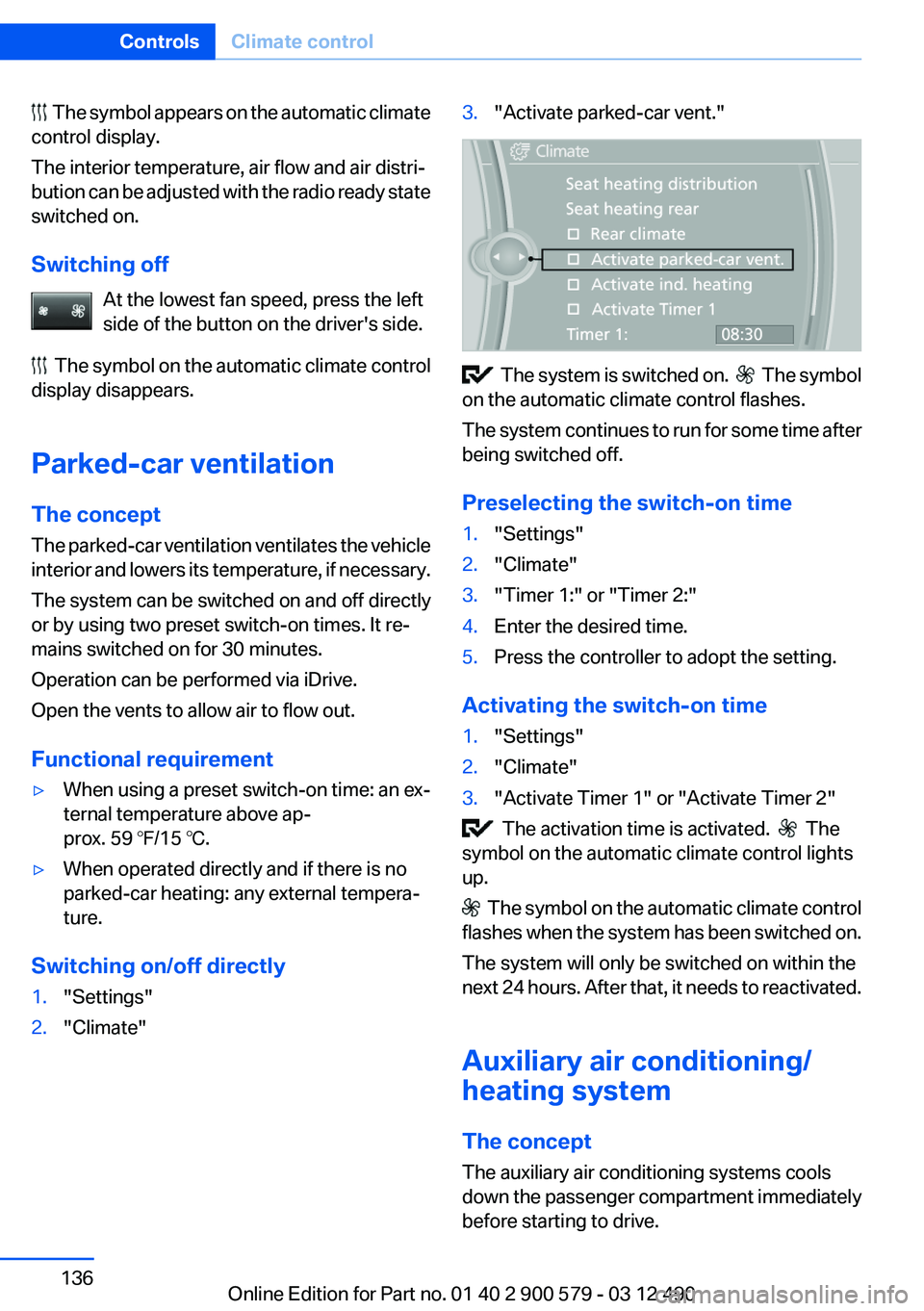
The symbol appears on the automatic climate
control display.
The interior temperature, air flow and air distri‐
bution can be adjusted with the radio ready state
switched on.
Switching off At the lowest fan speed, press the left
side of the button on the driver's side.
The symbol on the automatic climate control
display disappears.
Parked-car ventilation
The concept
The parked-car ventilation ventilates the vehicle
interior and lowers its temperature, if necessary.
The system can be switched on and off directly
or by using two preset switch-on times. It re‐
mains switched on for 30 minutes.
Operation can be performed via iDrive.
Open the vents to allow air to flow out.
Functional requirement
▷When using a preset switch-on time: an ex‐
ternal temperature above ap‐
prox. 59 ℉/15 ℃.▷When operated directly and if there is no
parked-car heating: any external tempera‐
ture.
Switching on/off directly
1."Settings"2."Climate"3."Activate parked-car vent."
The system is switched on. The symbol
on the automatic climate control flashes.
The system continues to run for some time after
being switched off.
Preselecting the switch-on time
1."Settings"2."Climate"3."Timer 1:" or "Timer 2:"4.Enter the desired time.5.Press the controller to adopt the setting.
Activating the switch-on time
1."Settings"2."Climate"3."Activate Timer 1" or "Activate Timer 2"
The activation time is activated. The
symbol on the automatic climate control lights
up.
The symbol on the automatic climate control
flashes when the system has been switched on.
The system will only be switched on within the
next 24 hours. After that, it needs to reactivated.
Auxiliary air conditioning/
heating system
The concept
The auxiliary air conditioning systems cools
down the passenger compartment immediately
before starting to drive.
Seite 136ControlsClimate control136
Online Edition for Part no. 01 40 2 900 579 - 03 12 490
Page 137 of 319
The parked-car heating warms the vehicle inte‐
rior, making snow and ice easier to remove.
Both systems can be switched on via the remote
control of the parked-car heating, depending on
the external temperature.
The parked-car heating can also be switched on
and off via the iDrive, either directly or at two
preselected switch-on times.
Controls
When the remote control for the parked-car
heating is used, it depends on the external tem‐
perature for whether the auxiliary air condition‐
ing or the parked-car heating is activated:▷External temperature below approx.
59 ℉/15 ℃: parked-car heating, refer to
page 139, is activated.▷External temperature above approx.
59 ℉/15 ℃: auxiliary air conditioning, refer
to page 137, is activated.
Auxiliary air conditioning
The concept
To cool the heated passenger compartment im‐
mediately before starting to drive, the automatic
climate control can be activated via a remote
control.
The automatic climate control reduces the inte‐
rior temperature with high cooling power for ap‐
prox. two minutes.
The auxiliary air conditioning can be switched on
or off using the remote control or the remote
control of the parked-car heating.
If it is activated using the remote control of the
parked-car heating, the parked-car ventilation is
activated for about, refer to page 136, 30 mi‐
nutes after auxiliary air conditioning.
Remote control
The concept
The remote control can be used to activate the
auxiliary air conditioning for two minutes at tem‐
peratures of 59 ℉/15 ℃ and higher.
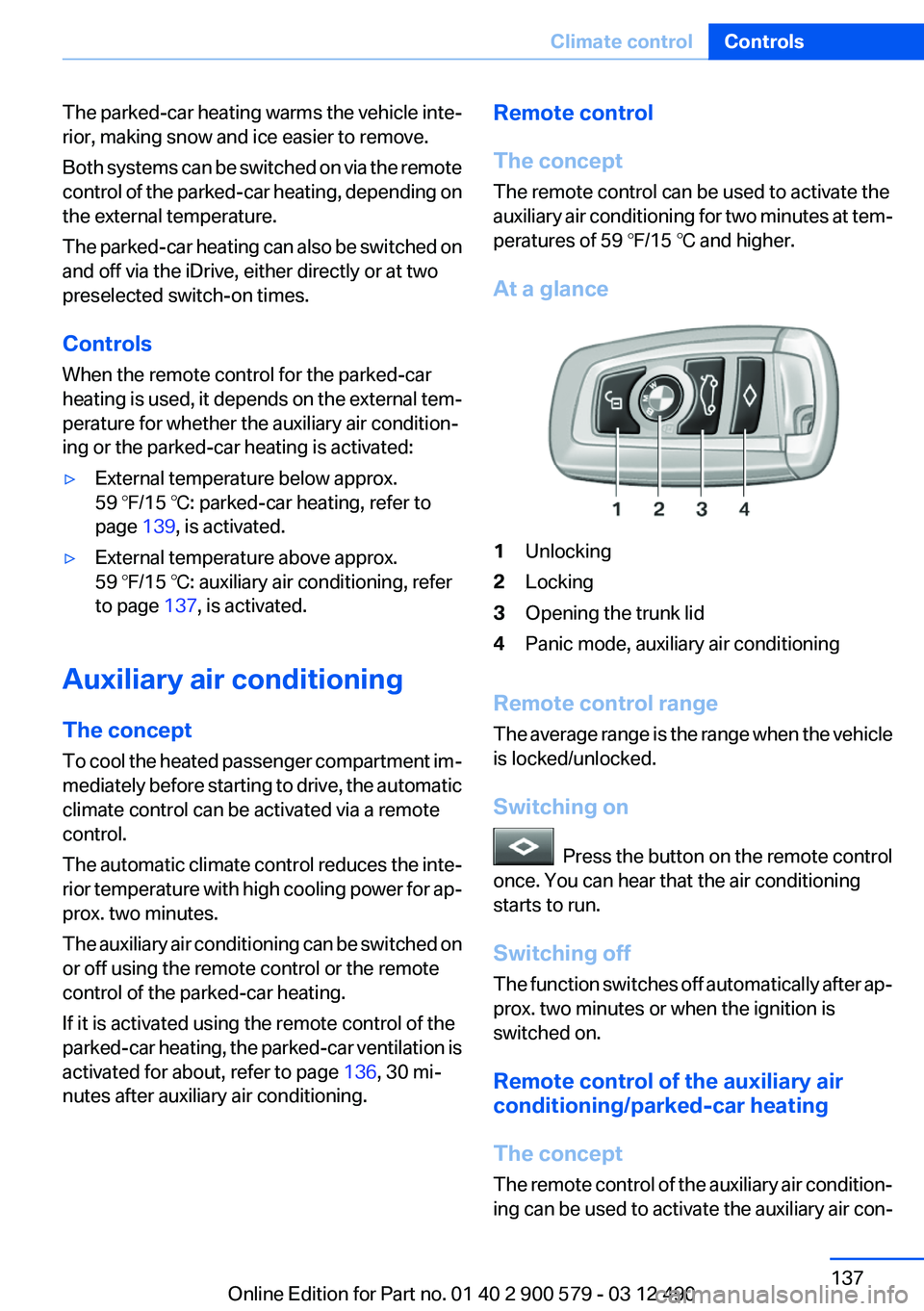
At a glance1Unlocking2Locking3Opening the trunk lid4Panic mode, auxiliary air conditioning
Remote control range
The average range is the range when the vehicle
is locked/unlocked.
Switching on
Press the button on the remote control
once. You can hear that the air conditioning
starts to run.
Switching off
The function switches off automatically after ap‐
prox. two minutes or when the ignition is
switched on.
Remote control of the auxiliary air
conditioning/parked-car heating
The concept
The remote control of the auxiliary air condition‐
ing can be used to activate the auxiliary air con‐
Seite 137Climate controlControls137
Online Edition for Part no. 01 40 2 900 579 - 03 12 490
Page 138 of 319
ditioning for two minutes at temperatures above
59 ℉/15 ℃.
When the ignition is switched off, the parked-car
ventilation is activated for approx. 30 minutes.
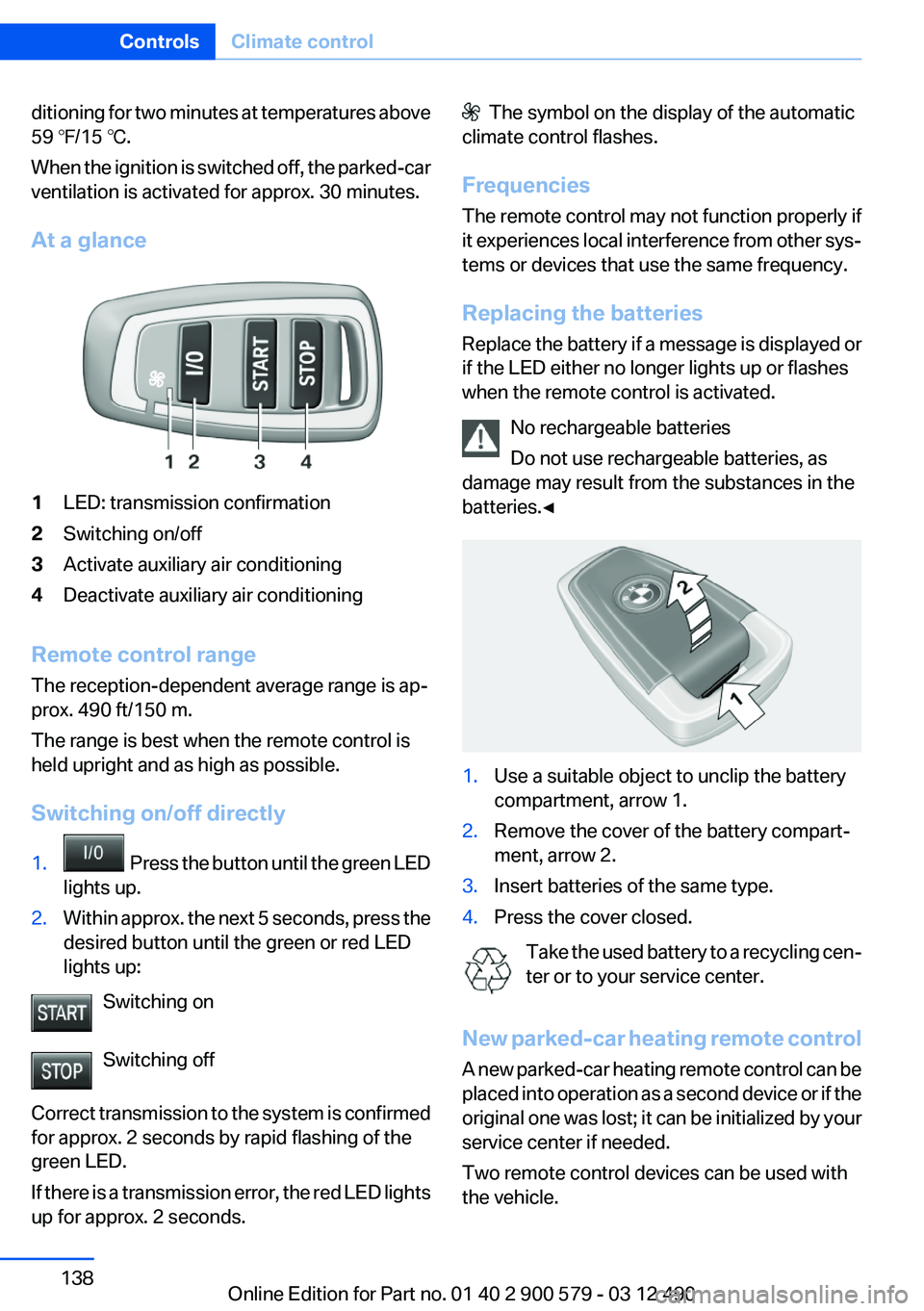
At a glance1LED: transmission confirmation2Switching on/off3Activate auxiliary air conditioning4Deactivate auxiliary air conditioning
Remote control range
The reception-dependent average range is ap‐
prox. 490 ft/150 m.
The range is best when the remote control is
held upright and as high as possible.
Switching on/off directly
1. Press the button until the green LED
lights up.2.Within approx. the next 5 seconds, press the
desired button until the green or red LED
lights up:
Switching on
Switching off
Correct transmission to the system is confirmed
for approx. 2 seconds by rapid flashing of the
green LED.
If there is a transmission error, the red LED lights
up for approx. 2 seconds.
The symbol on the display of the automatic
climate control flashes.
Frequencies
The remote control may not function properly if
it experiences local interference from other sys‐
tems or devices that use the same frequency.
Replacing the batteries
Replace the battery if a message is displayed or
if the LED either no longer lights up or flashes
when the remote control is activated.
No rechargeable batteries
Do not use rechargeable batteries, as
damage may result from the substances in the
batteries.◀1.Use a suitable object to unclip the battery
compartment, arrow 1.2.Remove the cover of the battery compart‐
ment, arrow 2.3.Insert batteries of the same type.4.Press the cover closed.
Take the used battery to a recycling cen‐
ter or to your service center.
New parked-car heating remote control
A new parked-car heating remote control can be
placed into operation as a second device or if the
original one was lost; it can be initialized by your
service center if needed.
Two remote control devices can be used with
the vehicle.
Seite 138ControlsClimate control138
Online Edition for Part no. 01 40 2 900 579 - 03 12 490
Page 140 of 319
Remote control of the parked-car
heating/auxiliary air conditioning
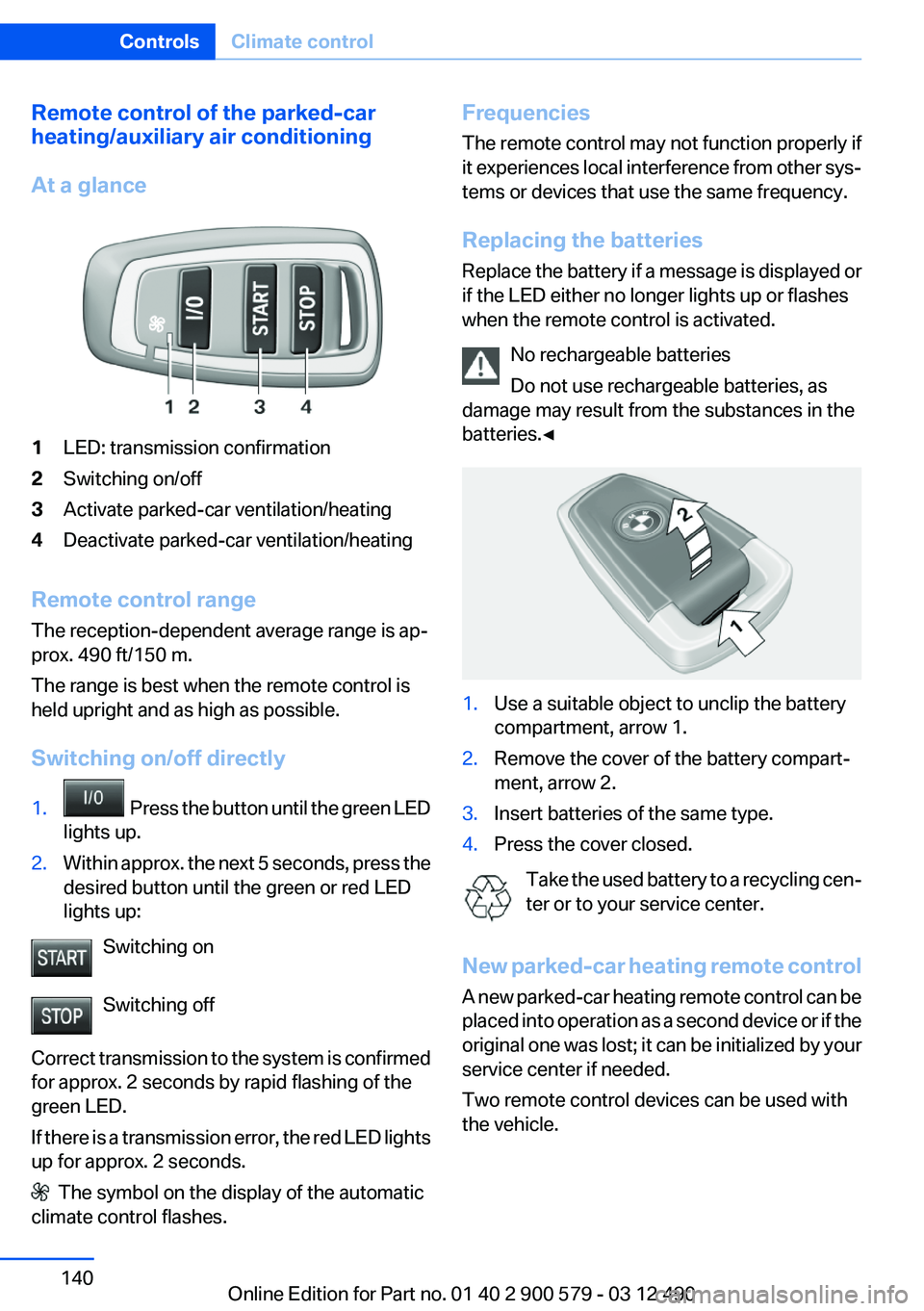
At a glance1LED: transmission confirmation2Switching on/off3Activate parked-car ventilation/heating4Deactivate parked-car ventilation/heating
Remote control range
The reception-dependent average range is ap‐
prox. 490 ft/150 m.
The range is best when the remote control is
held upright and as high as possible.
Switching on/off directly
1. Press the button until the green LED
lights up.2.Within approx. the next 5 seconds, press the
desired button until the green or red LED
lights up:
Switching on
Switching off
Correct transmission to the system is confirmed
for approx. 2 seconds by rapid flashing of the
green LED.
If there is a transmission error, the red LED lights
up for approx. 2 seconds.
The symbol on the display of the automatic
climate control flashes.
Frequencies
The remote control may not function properly if
it experiences local interference from other sys‐
tems or devices that use the same frequency.
Replacing the batteries
Replace the battery if a message is displayed or
if the LED either no longer lights up or flashes
when the remote control is activated.
No rechargeable batteries
Do not use rechargeable batteries, as
damage may result from the substances in the
batteries.◀1.Use a suitable object to unclip the battery
compartment, arrow 1.2.Remove the cover of the battery compart‐
ment, arrow 2.3.Insert batteries of the same type.4.Press the cover closed.
Take the used battery to a recycling cen‐
ter or to your service center.
New parked-car heating remote control
A new parked-car heating remote control can be
placed into operation as a second device or if the
original one was lost; it can be initialized by your
service center if needed.
Two remote control devices can be used with
the vehicle.
Seite 140ControlsClimate control140
Online Edition for Part no. 01 40 2 900 579 - 03 12 490
Page 148 of 319
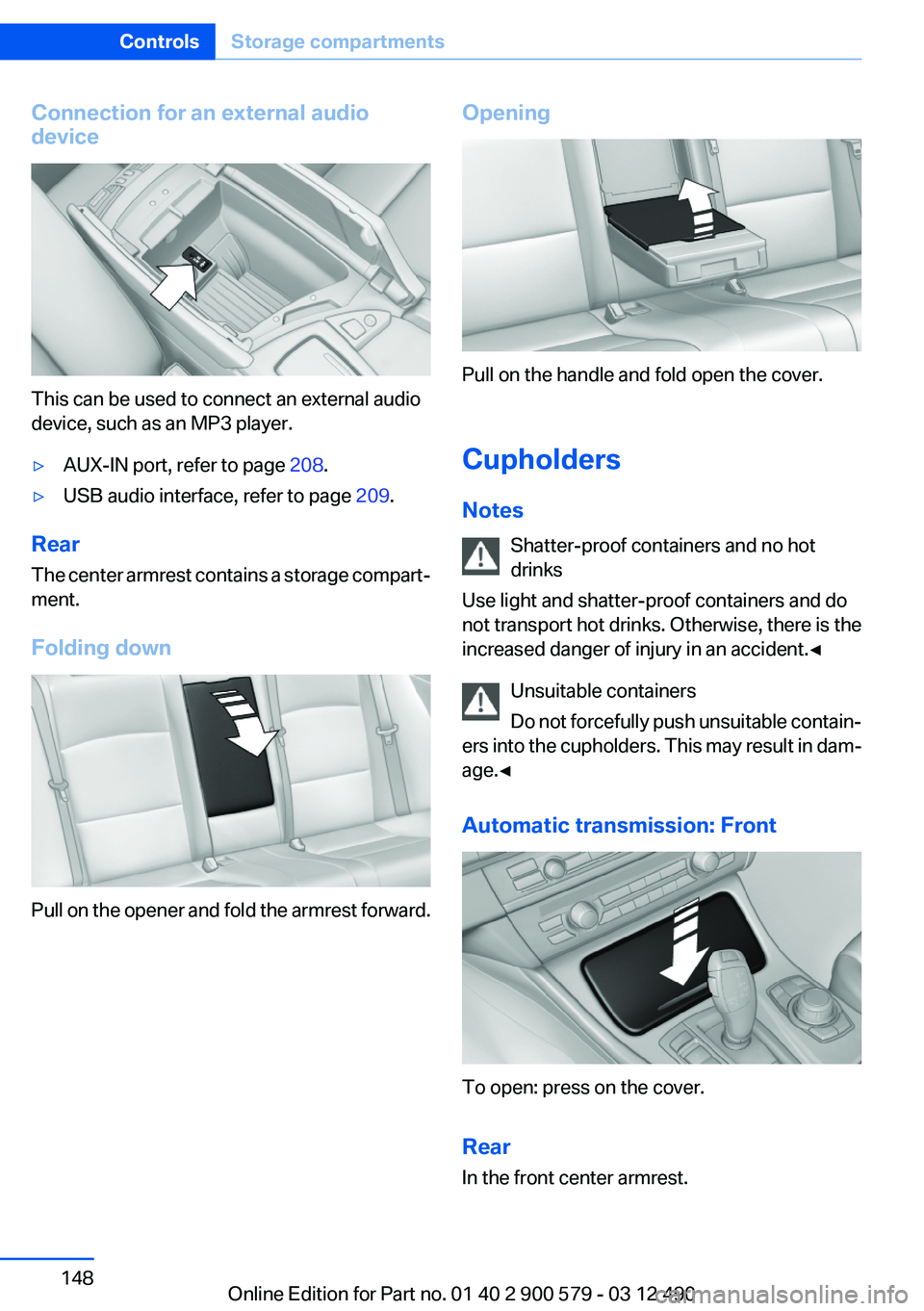
Connection for an external audio
device
This can be used to connect an external audio
device, such as an MP3 player.
▷AUX-IN port, refer to page 208.▷USB audio interface, refer to page 209.
Rear
The center armrest contains a storage compart‐
ment.
Folding down
Pull on the opener and fold the armrest forward.
Opening
Pull on the handle and fold open the cover.
Cupholders
Notes Shatter-proof containers and no hot
drinks
Use light and shatter-proof containers and do
not transport hot drinks. Otherwise, there is the
increased danger of injury in an accident.◀
Unsuitable containers
Do not forcefully push unsuitable contain‐
ers into the cupholders. This may result in dam‐
age.◀
Automatic transmission: Front
To open: press on the cover.
Rear
In the front center armrest.
Seite 148ControlsStorage compartments148
Online Edition for Part no. 01 40 2 900 579 - 03 12 490
Page 161 of 319
Saving fuelVehicle equipment
All standard, country-specific and optional
equipment that is offered in the model series is
described in this chapter. Therefore, equipment
is also described that is not available in a vehicle,
e. g., because of the selected optional equip‐
ment or country variant. This also applies for
safety-related functions and systems.
General information
Your vehicle contains advanced technology for
the reduction of fuel consumption and emis‐
sions.
Fuel consumption depends on a number of dif‐
ferent factors.
The implementation of certain measures, driv‐
ing style and regular maintenance can have an
influence on fuel consumption and on the envi‐
ronmental impact.
Remove unnecessary cargo
Additional weight increases fuel consumption.
Remove attached parts
following use
Remove auxiliary mirrors, roof or rear luggage
racks which are no longer required following
use.
Attached parts on the vehicle impair the aero‐
dynamics and increase the fuel consumption.Close the windows and glass
sunroof
Driving with the glass sunroof and windows
open results in increased air resistance and
raises fuel consumption.
Check the tire inflation
pressure regularly
Check and, if necessary, correct the tire inflation
pressure at least twice a month and before start‐
ing on a long trip.
Low tire inflation pressure increases rolling re‐
sistance and thus raises fuel consumption and
tire wear.
Drive away without delay
Do not wait for the engine to warm up while the
vehicle remains stationary. Start driving right
away, but at moderate engine speeds.
This is the fastest way for the cold engine to
reach its operating temperature.
Look well ahead when driving
Avoid unnecessary acceleration and braking.
By maintaining a suitable distance to the vehicle
driving ahead of you.
Driving smoothly and looking ahead reduces
fuel consumption.
Use coasting conditions
When approaching a red light, take your foot off
the accelerator and let the vehicle coast to a halt.
On a downhill gradient, take your foot off the ac‐
celerator and let the vehicle roll.Seite 161Saving fuelDriving tips161
Online Edition for Part no. 01 40 2 900 579 - 03 12 490