ECU BMW ACTIVEHYBRID3 2013 Owner's Manual
[x] Cancel search | Manufacturer: BMW, Model Year: 2013, Model line: ACTIVEHYBRID3, Model: BMW ACTIVEHYBRID3 2013Pages: 220, PDF Size: 5.09 MB
Page 177 of 220
Hood
Hints Working in the engine compartment
Never attempt to perform any service or
repair operations on your vehicle without the
necessary professional technical training.
If you are unfamiliar with the statutory guide‐
lines, have any work on the vehicle performed
only by a service center.
If this work is not carried out properly, there is
the danger of subsequent damage and related
safety hazards.◀
Never reach into the engine compartment
Never reach into the intermediate spaces
or gaps in the engine compartment. Otherwise,
there is risk of injury, e.g. from rotating or hot
parts.◀
Fold down wiper arm
Before opening the hood, ensure that the
wiper arms are against the windshield, or this
may result in damage.◀
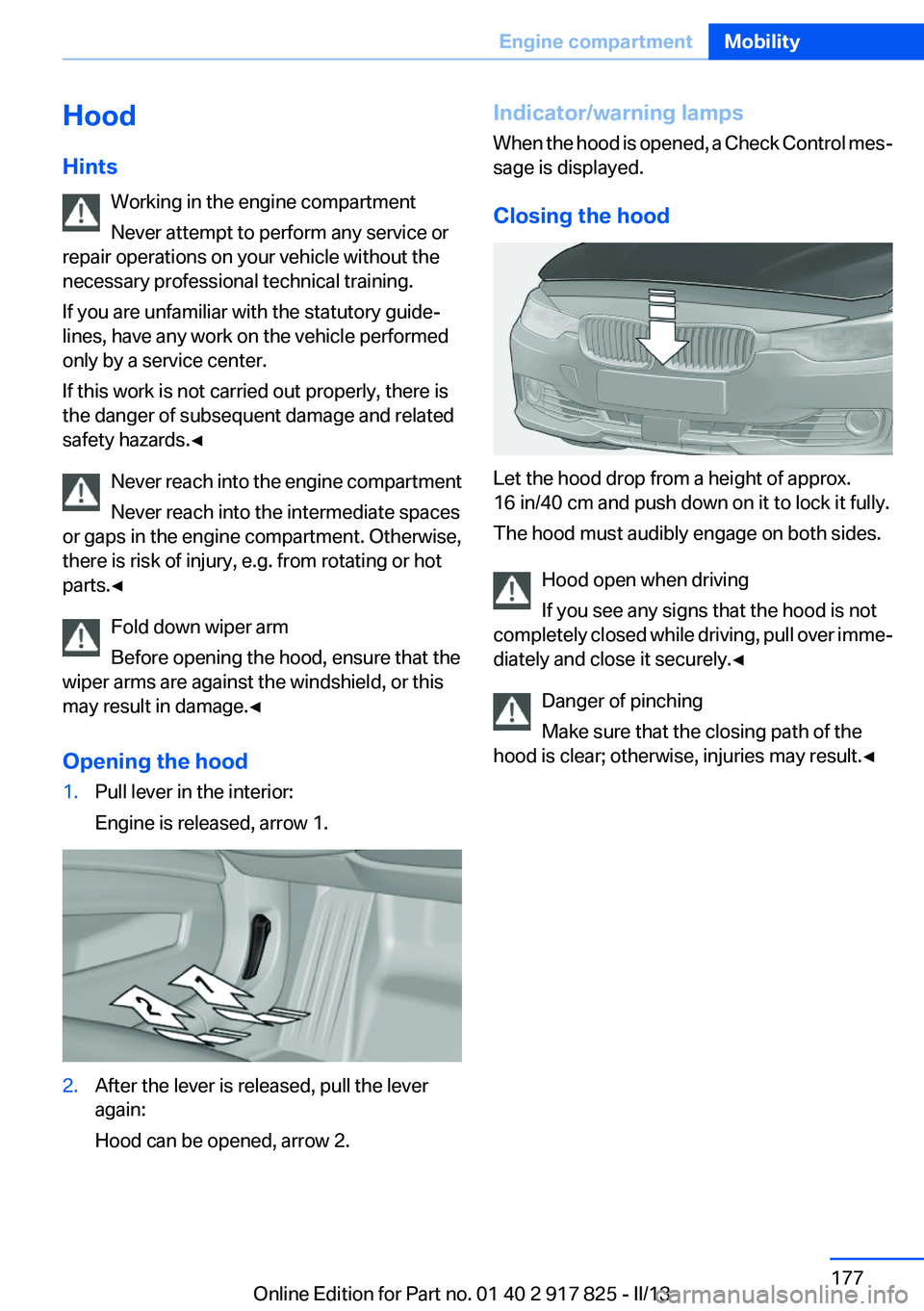
Opening the hood1.Pull lever in the interior:
Engine is released, arrow 1.2.After the lever is released, pull the lever
again:
Hood can be opened, arrow 2.Indicator/warning lamps
When the hood is opened, a Check Control mes‐
sage is displayed.
Closing the hood
Let the hood drop from a height of approx.
16 in/40 cm and push down on it to lock it fully.
The hood must audibly engage on both sides.
Hood open when driving
If you see any signs that the hood is not
completely closed while driving, pull over imme‐
diately and close it securely.◀
Danger of pinching
Make sure that the closing path of the
hood is clear; otherwise, injuries may result.◀
Seite 177Engine compartmentMobility177
Online Edition for Part no. 01 40 2 917 825 - II/13
Page 190 of 220
5.Remove the connecting line from the clip on
the bulb holder.6.Release the catch at the top on the connec‐
tor of the connecting line and remove the
connector from the bulb holder.
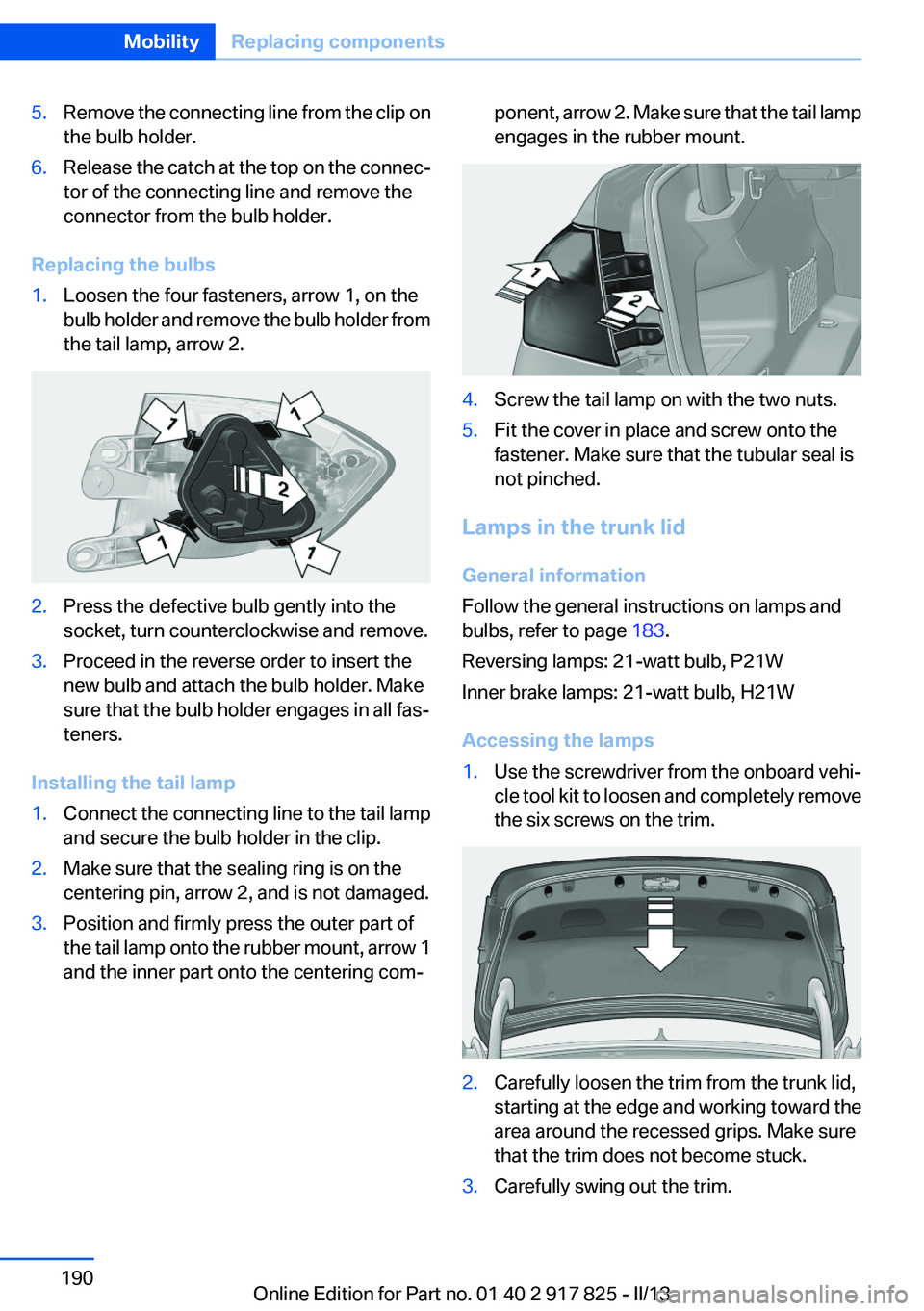
Replacing the bulbs
1.Loosen the four fasteners, arrow 1, on the
bulb holder and remove the bulb holder from
the tail lamp, arrow 2.2.Press the defective bulb gently into the
socket, turn counterclockwise and remove.3.Proceed in the reverse order to insert the
new bulb and attach the bulb holder. Make
sure that the bulb holder engages in all fas‐
teners.
Installing the tail lamp
1.Connect the connecting line to the tail lamp
and secure the bulb holder in the clip.2.Make sure that the sealing ring is on the
centering pin, arrow 2, and is not damaged.3.Position and firmly press the outer part of
the tail lamp onto the rubber mount, arrow 1
and the inner part onto the centering com‐ponent, arrow 2. Make sure that the tail lamp
engages in the rubber mount.4.Screw the tail lamp on with the two nuts.5.Fit the cover in place and screw onto the
fastener. Make sure that the tubular seal is
not pinched.
Lamps in the trunk lid
General information
Follow the general instructions on lamps and
bulbs, refer to page 183.
Reversing lamps: 21-watt bulb, P21W
Inner brake lamps: 21-watt bulb, H21W
Accessing the lamps
1.Use the screwdriver from the onboard vehi‐
cle tool kit to loosen and completely remove
the six screws on the trim.2.Carefully loosen the trim from the trunk lid,
starting at the edge and working toward the
area around the recessed grips. Make sure
that the trim does not become stuck.3.Carefully swing out the trim.Seite 190MobilityReplacing components190
Online Edition for Part no. 01 40 2 917 825 - II/13
Page 191 of 220
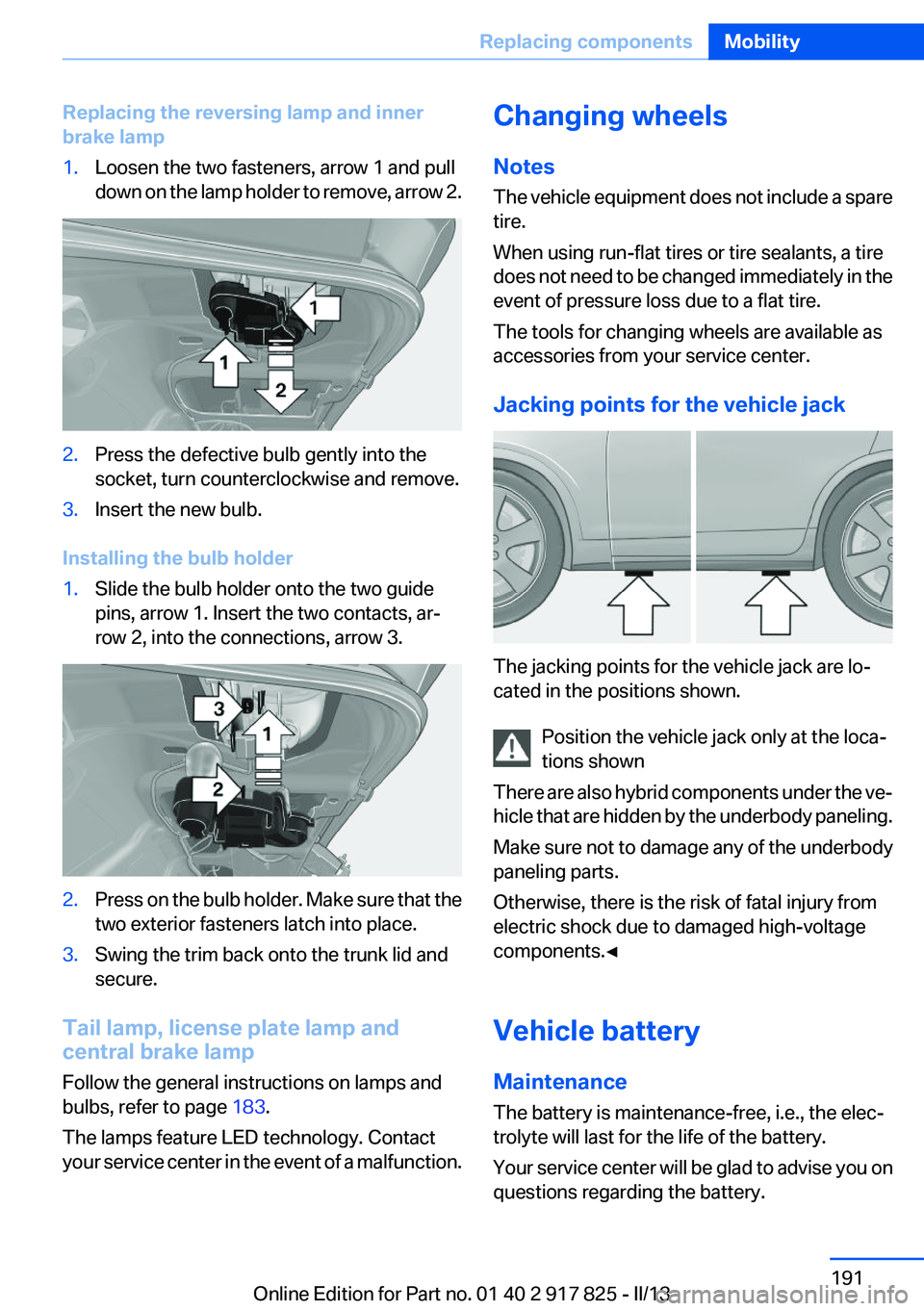
Replacing the reversing lamp and inner
brake lamp1.Loosen the two fasteners, arrow 1 and pull
down on the lamp holder to remove, arrow 2.2.Press the defective bulb gently into the
socket, turn counterclockwise and remove.3.Insert the new bulb.
Installing the bulb holder
1.Slide the bulb holder onto the two guide
pins, arrow 1. Insert the two contacts, ar‐
row 2, into the connections, arrow 3.2.Press on the bulb holder. Make sure that the
two exterior fasteners latch into place.3.Swing the trim back onto the trunk lid and
secure.
Tail lamp, license plate lamp and
central brake lamp
Follow the general instructions on lamps and
bulbs, refer to page 183.
The lamps feature LED technology. Contact
your service center in the event of a malfunction.
Changing wheels
Notes
The vehicle equipment does not include a spare
tire.
When using run-flat tires or tire sealants, a tire
does not need to be changed immediately in the
event of pressure loss due to a flat tire.
The tools for changing wheels are available as
accessories from your service center.
Jacking points for the vehicle jack
The jacking points for the vehicle jack are lo‐
cated in the positions shown.
Position the vehicle jack only at the loca‐
tions shown
There are also hybrid components under the ve‐
hicle that are hidden by the underbody paneling.
Make sure not to damage any of the underbody
paneling parts.
Otherwise, there is the risk of fatal injury from
electric shock due to damaged high-voltage
components.◀
Vehicle battery
Maintenance
The battery is maintenance-free, i.e., the elec‐
trolyte will last for the life of the battery.
Your service center will be glad to advise you on
questions regarding the battery.
Seite 191Replacing componentsMobility191
Online Edition for Part no. 01 40 2 917 825 - II/13
Page 192 of 220
Battery replacementUse approved vehicle batteries only
Only use vehicle batteries that have been
approved for your vehicle by the manufacturer;
otherwise, the vehicle could be damaged and
systems or functions may not be fully availa‐
ble.◀
After a battery replacement, have the battery
registered on the vehicle by your service center
to ensure that all comfort functions are fully
available and that any Check Control messages
are no longer displayed.
Charging the battery
Note Do not plug chargers into the socket
Do not connect battery chargers to the
factory-installed sockets in the vehicle as this
may damage the battery.◀
General information
Make sure that the battery is always sufficiently
charged to guarantee that the battery remains
usable for its full service life.
The battery may need to be charged in the fol‐
lowing cases:▷When making frequent short-distance
drives.▷If the vehicle is not used for prolonged peri‐
ods, longer than a month.
Starting aid terminals
In the vehicle, only charge the battery via the
starting aid terminals, refer to page 196, in the
engine compartment with the engine off.
Power failure
After a temporary power loss, some equipment
needs to be reinitialized.
Individual settings need to be reprogrammed:
▷Seat and mirror memory: store the positions
again.▷Time: update.▷Date: update.▷Radio station: save again.▷Navigation system: wait for the operability of
the navigation.
Disposing of old batteries
Have old batteries disposed of by your
service center or bring them to a recy‐
cling center.
Maintain the battery in an upright position for
transport and storage. Secure the battery so
that it does not tip over during transport.
Fuses
Notes Replacing fuses
Never attempt to repair a blown fuse and
do not replace a defective fuse with a substitute
of another color or amperage rating; this could
lead to a circuit overload, ultimately resulting in
a fire in the vehicle.◀
Plastic tweezers and information on the fuse
types and locations are stored in the fuse box in
the cargo area.
Seite 192MobilityReplacing components192
Online Edition for Part no. 01 40 2 917 825 - II/13
Page 198 of 220
Should it prove impossible to avoid mounting
the tow bar at an offset angle, please observe
the following:▷Maneuvering capability is limited during cor‐
nering.▷The tow bar will generate lateral forces if it
is secured with an offset.
Tow rope
When starting to tow the vehicle, make sure that
the tow rope is taut.
To avoid jerking and the associated stresses on
the vehicle components when towing, always
use nylon ropes or nylon straps.
Attaching the tow rope correctly
Only secure the tow rope on the tow fit‐
ting; otherwise, damage can occur when it is se‐
cured on other parts of the vehicle.◀
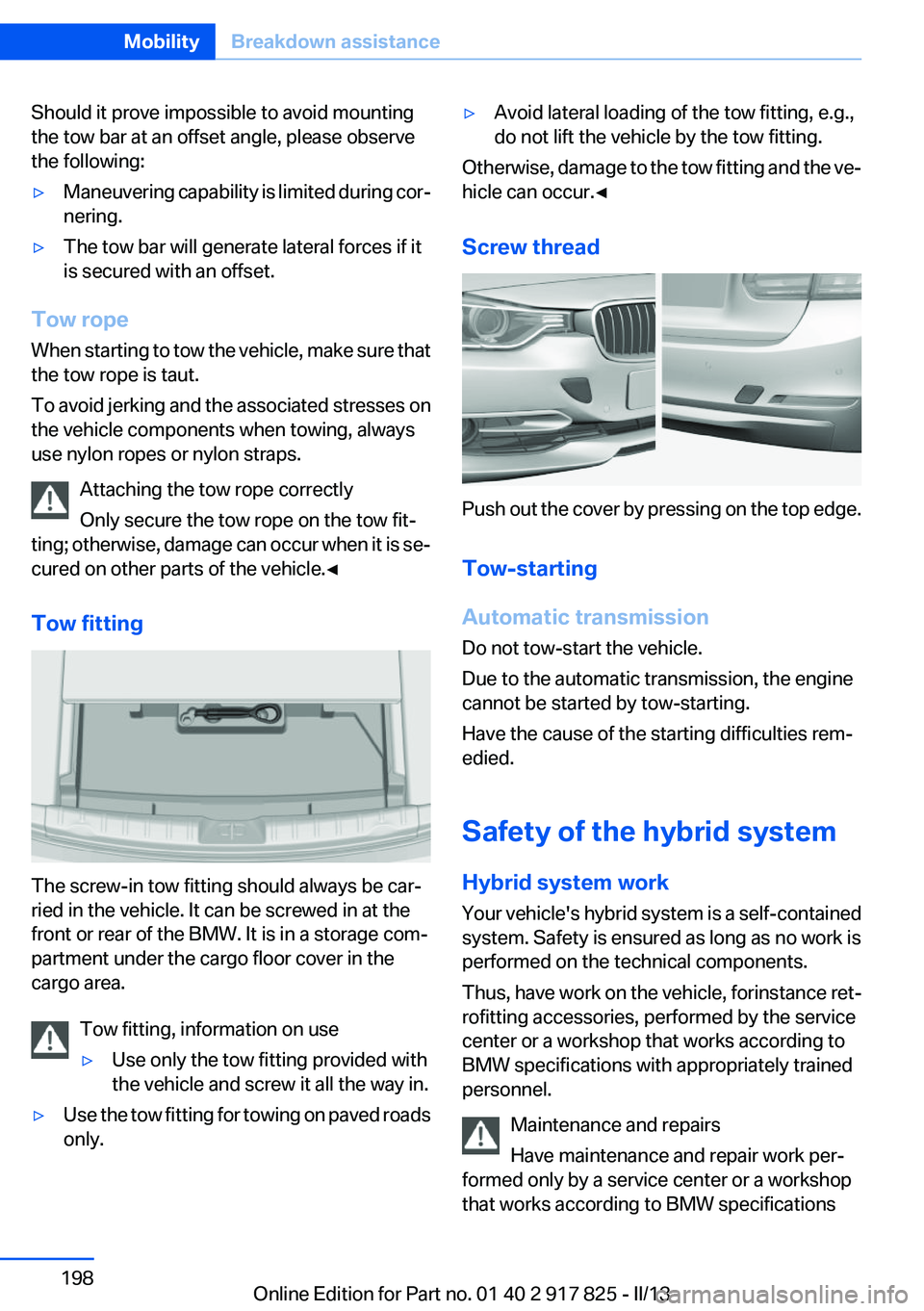
Tow fitting
The screw-in tow fitting should always be car‐
ried in the vehicle. It can be screwed in at the
front or rear of the BMW. It is in a storage com‐
partment under the cargo floor cover in the
cargo area.
Tow fitting, information on use
▷Use only the tow fitting provided with
the vehicle and screw it all the way in.▷Use the tow fitting for towing on paved roads
only.▷Avoid lateral loading of the tow fitting, e.g.,
do not lift the vehicle by the tow fitting.
Otherwise, damage to the tow fitting and the ve‐
hicle can occur.◀
Screw thread
Push out the cover by pressing on the top edge.
Tow-starting
Automatic transmission
Do not tow-start the vehicle.
Due to the automatic transmission, the engine
cannot be started by tow-starting.
Have the cause of the starting difficulties rem‐
edied.
Safety of the hybrid system
Hybrid system work
Your vehicle's hybrid system is a self-contained
system. Safety is ensured as long as no work is
performed on the technical components.
Thus, have work on the vehicle, for instance ret‐
rofitting accessories, performed by the service
center or a workshop that works according to
BMW specifications with appropriately trained
personnel.
Maintenance and repairs
Have maintenance and repair work per‐
formed only by a service center or a workshop
that works according to BMW specifications
Seite 198MobilityBreakdown assistance198
Online Edition for Part no. 01 40 2 917 825 - II/13
Page 199 of 220
with appropriately trained personnel. Other‐
wise, there is the risk of fatal injury from electric
shock due to the hybrid system's high voltage. ◀
Hybrid system: contact with water
The hybrid system is typically safe even in the
following example situations:▷Water in the footwell, for instance after a
rainstorm when the glass sunroof is open.▷Vehicle is in the water, such as in the event
of high water levels.▷Liquid escapes in the trunk.
In these cases there is no risk of injury from elec‐
tric shock. Other damage to the vehicle is pos‐
sible.
Hybrid system: automatic deactivation
If an accident occurs, the hybrid system is
switched off automatically to prevent risk of dan‐
ger to occupants and other road users.
Read the information on What to do after an ac‐
cident, refer to page 199.
What to do after an accident
General information After an accident
After an accident, do not touch any high-
voltage components such as orange colored
high-voltage cables or parts that are in contact
with exposed high-voltage cables. Otherwise,
there is the risk of fatal injury from electric shock
due to the hybrid system's high voltage.◀
Escaping fluids
Do not touch any fluids escaping from the
high-voltage battery, or the skin can sustain
chemical burns.◀
If you are involved in an accident with your ve‐
hicle, compliance with the following additional
safety precautions is required with regard to the
hybrid system.
▷Secure the crash site.▷Immediately notify rescue forces, police, or
firefighters of the fact that your vehicle is
equipped with a hybrid system.▷Engage transmission position P, apply the
parking brake, and switch off the ignition.▷Lock the vehicle after exiting.▷Do not inhale any gases escaping from the
high-voltage battery; if necessary, maintain
a safe distance from the vehicle.Seite 199Breakdown assistanceMobility199
Online Edition for Part no. 01 40 2 917 825 - II/13
Page 202 of 220
If they are very dirty, e.g., beverage stains, use a
soft sponge or microfiber cloth with a suitable
interior cleaner.
Clean the upholstery down to the seams using
large sweeping motions. Avoid rubbing the ma‐
terial vigorously.
Damage from Velcro® fasteners
Open Velcro® fasteners on pants or other
articles of clothing can damage the seat covers.
Ensure that any Velcro® fasteners are closed. ◀
Caring for special components
Light-alloy wheels
Use wheel cleaner, particularly during the winter
months. Do not use aggressive, acidic, strongly
alkaline or abrasive cleaners, or steam jets
above 140 ℉/60 ℃; follow the manufacturer's
instructions.
Chrome surfaces
Carefully clean components such as the radiator
grille or door handles with an ample supply of
water, possibly with shampoo added, particu‐
larly when they have been exposed to road salt.
Rubber components
Aside from water, treat only with rubber cleans‐
ers.
When cleaning rubber seals, do not use any sil‐
icon-containing car care products in order to
avoid damage or reduced noise damping.
Fine wood parts
Clean fine wood facing and fine wood compo‐
nents only with a moist rag. Then dry with a soft
cloth.
Plastic components
These include:▷Imitation leather surfaces.▷Headliner.▷Lamp lenses.▷Instrument cluster cover.▷Matte black spray-coated components.▷Painted parts in the interior.
Clean with a microfiber cloth.
Lightly dampen the cloth with water.
Do not soak the headliner.
Do not use cleansers that contain alcohol
or solvents
Do not use cleansers that contain alcohol or sol‐
vents, such as lacquer thinners, heavy-duty
grease removers, fuel, or such; this could lead to
surface damage.◀
Safety belts
Dirty belt straps impede the reeling action and
thus have a negative impact on safety.
Chemical cleaning
Do not clean chemically; this can destroy
the webbing.◀
Use only a mild soapy solution, with the safety
belts clipped into their buckles.
Do not allow the reels to retract the safety belts
until they are dry.
Carpets and floor mats No objects in the area around the pedals
Keep floor mats, carpets, and any other
objects out of the area of motion of the pedals;
otherwise, the function of the pedals could be
impeded while driving
Do not place additional floor mats over existing
mats or other objects.
Only use floor mats that have been approved for
the vehicle and can be properly fixed in place.
Ensure that the floor mats are securely fastened
again after they were removed for cleaning, for
example.◀
Floor mats can be removed from the passenger
compartment for cleaning.
Seite 202MobilityCare202
Online Edition for Part no. 01 40 2 917 825 - II/13
Page 211 of 220
Brake lights, adaptive 108
Brake pads, breaking in 152
Braking, notes 154
Breakdown assis‐ tance 194, 195
Breaking in 152
Brightness of Control Dis‐ play 88
Bulb replacement 183
Bulb replacement, front 184
Bulb replacement, halogen headlamps 184
Bulb replacement, rear 189
Bulb replacement, xenon headlamps 187
Bulbs and lamps 183
Button, Start/Stop 63
Bypassing, refer to Jump- starting 195
C
California Proposition 65 Warning 7
Camera, backup camera 121
Camera, care 203
Camera, Side View 125
Camera, Top View 123
Can holder, refer to Cu‐ pholder 148
Car battery 191
Car care products 201
Care, displays 203
Care, vehicle 201
Cargo 156
Cargo area, enlarging 144
Cargo area lid 41
Cargo area, storage compart‐ ments 149
Cargo straps, securing cargo 157
Car key, refer to Remote con‐ trol 34
Carpet, care 202
Car wash 200 Catalytic converter, refer to
Hot exhaust system 154
CBS Condition Based Serv‐ ice 181
CD/Multimedia, see user's manual for Navigation, Enter‐
tainment and Communica‐
tion
Center armrest 147
Center console 16
Central locking system 37
Central screen, refer to Control Display 18
Changes, technical, refer to Safety 7
Changing parts 183
Changing wheels 191
Changing wheels/tires 173
CHARGE, energy recovery 67
Charge indicator, high-voltage battery 79
Check Control 75
Children, seating position 59
Children, transporting safely 59
Child restraint fixing sys‐ tem 59
Child restraint fixing system LATCH 60
Child restraint fixing systems, mounting 59
Child safety locks 62
Child seat, mounting 59
Child seats 59
Chrome parts, care 202
Cigarette lighter 142
Cleaning, displays 203
Climate control 132
Clock 78
Closing/opening from in‐ side 41
Closing/opening via door lock 40
Closing/opening with remote control 38
Clothes hooks 148 Coasting 66
Collision warning 103
Combination switch, refer to Turn signals 68
Combination switch, refer to Wiper system 69
Combustion engine, start‐ ing 65
Comfort Access 42
COMFORT program, Dynamic Driving Control 114
Compartments in the doors 147
Compass 140
Computer 84
Condensation on win‐ dows 134
Condensation under the vehi‐ cle 155
Condition Based Service CBS 181
Confirmation signal 39
ConnectedDrive, see user's manual for Navigation, Enter‐
tainment and Communica‐
tion
Contact with water, hybrid system 199
Control Display 18
Control Display, settings 87
Controller 18, 19
Control systems, driving sta‐ bility 111
Convenient opening 38
Coolant 180
Coolant temperature 78
Cooling function 133
Cooling, maximum 133
Cooling system 180
Corrosion on brake discs 155
Cruise control 116
Cruising range 78
Cupholder 148
Current fuel consumption 81 Seite 211Everything from A to ZReference211
Online Edition for Part no. 01 40 2 917 825 - II/13
Page 212 of 220
D
Damage, tires 173
Damping control, dy‐ namic 112
Data, technical 206
Date 78
Daytime running lights 91
Deactivating drive readi‐ ness 65
Defrosting, refer to Windows, defrosting 134
Dehumidifying, air 133
Destination distance 85
Digital clock 78
Digital compass 140
Dimensions 206
Dimmable exterior mirrors 57
Dimmable interior rearview mirror 57
Direction indicator, refer to Turn signals 68
Display, electronic, instrument cluster 75
Display in windshield 126
Display lighting, refer to Instru‐ ment lighting 93
Displays 74
Displays, cleaning 203
Displays, hybrid system 79
Disposal, coolant 180
Disposal, vehicle battery 192
Distance control, refer to PDC 118
Distance to destination 85
Divided screen view, split screen 23
Door lock, refer to Remote control 34
DRIVE 66
Drive-off assistant 115
Drive-off assistant, refer to DSC 111
Drive readiness in detail 64
Drive readiness states 63 Driving experience
switch 113
Driving instructions, breaking in 152
Driving mode 113
Driving notes, general 154
Driving stability control sys‐ tems 111
Driving tips 154
Driving tips, hybrid sys‐ tem 152
Driving with the combustion engine 66
DSC Dynamic Stability Con‐ trol 111
DTC Dynamic Traction Con‐ trol 112
Dynamic Damping Con‐ trol 112
Dynamic Stability Control DSC 111
Dynamic Traction Control DTC 112
E
eBOOST 67
ECO PRO 160
ECO PRO, bonus range 161
ECO PRO display 160
ECO PRO driving mode 160
ECO PRO mode 160
ECO PRO Tip - driving instruc‐ tion 162
eDRIVE, electric driving 30
Electric drive readiness, Silent Start 64
Electric driving, eDRIVE 30
Electronic displays, instru‐ ment cluster 75
Electronic Stability Program ESP, refer to DSC 111
Emergency detection, remote control 35
Emergency release, door lock 41 Emergency release, fuel filler
flap 166
Emergency Request 194
Emergency service, refer to Roadside Assistance 195
Emergency start function, en‐ gine start 35
Emergency unlocking, trunk lid 42
Energy recovery, CHARGE 67
Engine, automatic off 65
Engine compartment 176
Engine compartment, working in 177
Engine coolant 180
Engine oil 178
Engine oil, adding 179
Engine oil additives 179
Engine oil change 179
Engine oil filler neck 179
Engine oil temperature 78
Engine oil types, alterna‐ tive 179
Engine oil types, ap‐ proved 179
Engine start during malfunc‐ tion 35
Engine start, jump-start‐ ing 195
Engine temperature 78
Entering a car wash 200
Equipment, interior 138
ESP Electronic Stability Pro‐ gram, refer to DSC 111
Exchanging wheels/tires 173
Exhaust system 154
Exterior mirror, automatic dim‐ ming feature 57
Exterior mirrors 56
External start 195
External temperature dis‐ play 78
External temperature warn‐ ing 78
Eyes for securing cargo 157 Seite 212ReferenceEverything from A to Z212
Online Edition for Part no. 01 40 2 917 825 - II/13
Page 214 of 220
Inflation pressure warningFTM, tires 101
Info display, refer to Com‐ puter 84
Initialize, Tire Pressure Moni‐ tor TPM 99
Initializing, Flat Tire Monitor FTM 102
Instrument cluster 74
Instrument cluster, electronic displays 75
Instrument lighting 93
Integrated key 34
Integrated universal remote control 138
Intensity, AUTO program 133
Interior equipment 138
Interior lamps 94
Interior lamps via remote con‐ trol 39
Interior motion sensor 45
Interior rearview mirror 57
Interior rearview mirror, auto‐ matic dimming feature 57
Interior rearview mirror, com‐ pass 140
Internet page 6
Interval display, service re‐ quirements 81
J
Jacking points for the vehicle jack 191
Jack, refer to Vehicle jack 191
Joystick, automatic transmis‐ sion 72
Jump-starting 195
K
Key/remote control 34
Keyless Go, refer to Comfort Access 42
Key Memory, refer to Personal Profile 35 Kickdown, automatic trans‐
mission 71
Knee airbag 95
L
Lamp replacement 183
Lamp replacement, front 184
Lamp replacement, rear 189
Lamps 90
Lamps and bulbs 183
Lane departure warning 105
Lane margin, warning 105
Language on Control Dis‐ play 88
Lashing eyes, securing cargo 157
LATCH child restraint fixing system 60
Leather, care 201
LEDs, light-emitting di‐ odes 184
Length, vehicle 207
Letters and numbers, enter‐ ing 24
Light-alloy wheels, care 202
Light control 92
Light-emitting diodes, LEDs 184
Lighter 142
Lighting 90
Lighting via remote control 39
Light switch 90
Load 156
Loading 156
Lock, door 40
Locking/unlocking from in‐ side 41
Locking/unlocking via door lock 40
Locking/unlocking with re‐ mote control 38
Locking, automatic 41
Locking, central 37
Lock, power window 46 Locks, doors, and win‐
dows 62
Low beams 90
Low beams, automatic, refer to High-beam Assistant 92
Lower back support 51
Luggage rack, refer to Roof- mounted luggage rack 157
Lumbar support 51
M
Maintenance 181
Maintenance require‐ ments 181
Maintenance, service require‐ ments 81
Maintenance system, BMW 181
Malfunction displays, refer to Check Control 75
Manual air distribution 134
Manual air flow 134
Manual mode, transmis‐ sion 72
Manual operation, backup camera 121
Manual operation, door lock 41
Manual operation, exterior mir‐ rors 57
Manual operation, fuel filler flap 166
Manual operation, Park Dis‐ tance Control PDC 119
Manual operation, Side View 125
Manual operation, Top View 124
Marking on approved tires 174
Marking, run-flat tires 175
Master key, refer to Remote control 34
Maximum cooling 133
Maximum speed, display 82 Seite 214ReferenceEverything from A to Z214
Online Edition for Part no. 01 40 2 917 825 - II/13