trunk BMW ACTIVEHYBRID3 2013 Owner's Manual
[x] Cancel search | Manufacturer: BMW, Model Year: 2013, Model line: ACTIVEHYBRID3, Model: BMW ACTIVEHYBRID3 2013Pages: 220, PDF Size: 5.09 MB
Page 189 of 220
Tail lamps, bulb replacement
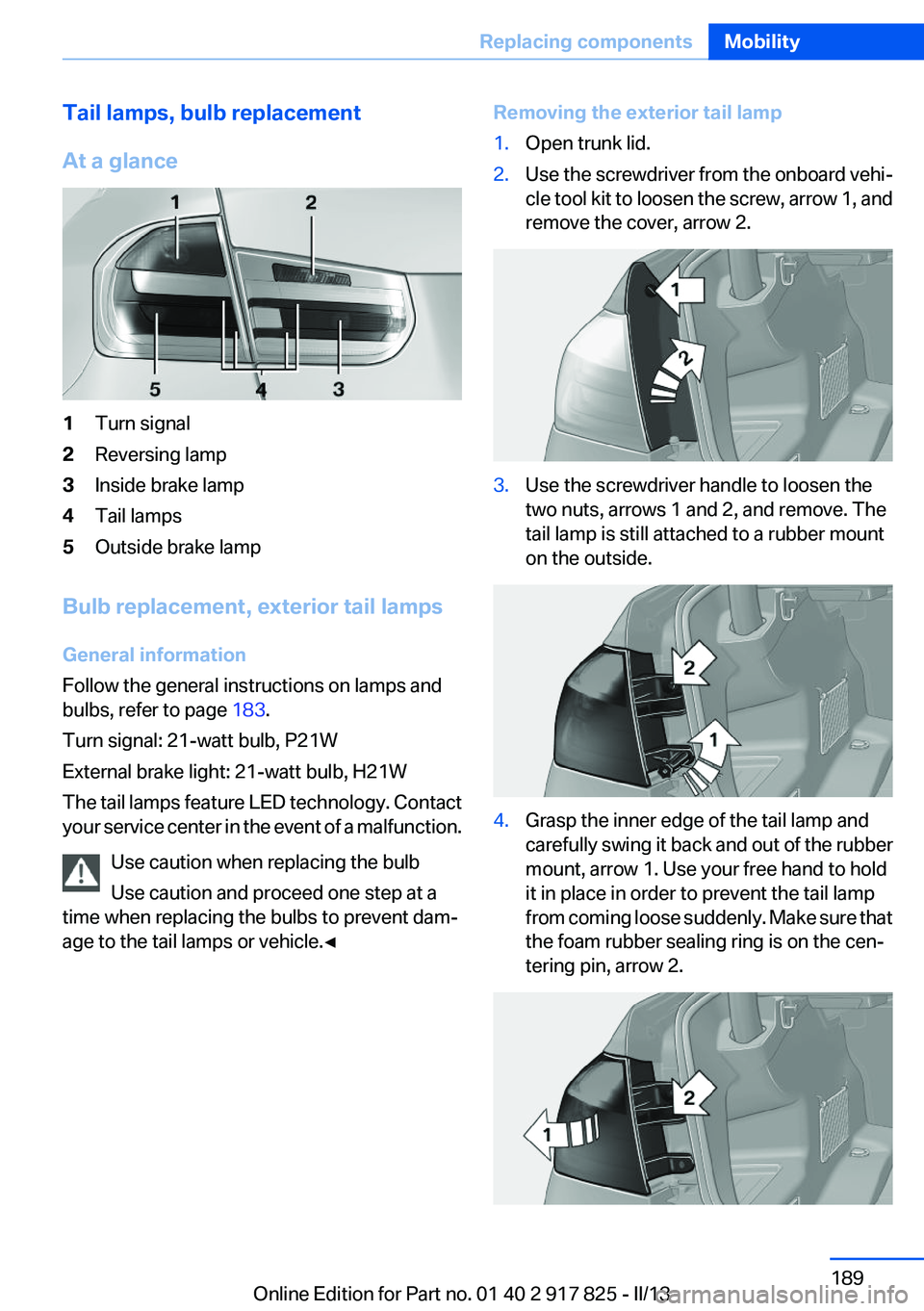
At a glance1Turn signal2Reversing lamp3Inside brake lamp4Tail lamps5Outside brake lamp
Bulb replacement, exterior tail lamps
General information
Follow the general instructions on lamps and
bulbs, refer to page 183.
Turn signal: 21-watt bulb, P21W
External brake light: 21-watt bulb, H21W
The tail lamps feature LED technology. Contact
your service center in the event of a malfunction.
Use caution when replacing the bulb
Use caution and proceed one step at a
time when replacing the bulbs to prevent dam‐
age to the tail lamps or vehicle.◀
Removing the exterior tail lamp1.Open trunk lid.2.Use the screwdriver from the onboard vehi‐
cle tool kit to loosen the screw, arrow 1, and
remove the cover, arrow 2.3.Use the screwdriver handle to loosen the
two nuts, arrows 1 and 2, and remove. The
tail lamp is still attached to a rubber mount
on the outside.4.Grasp the inner edge of the tail lamp and
carefully swing it back and out of the rubber
mount, arrow 1. Use your free hand to hold
it in place in order to prevent the tail lamp
from coming loose suddenly. Make sure that
the foam rubber sealing ring is on the cen‐
tering pin, arrow 2.Seite 189Replacing componentsMobility189
Online Edition for Part no. 01 40 2 917 825 - II/13
Page 190 of 220
5.Remove the connecting line from the clip on
the bulb holder.6.Release the catch at the top on the connec‐
tor of the connecting line and remove the
connector from the bulb holder.
Replacing the bulbs
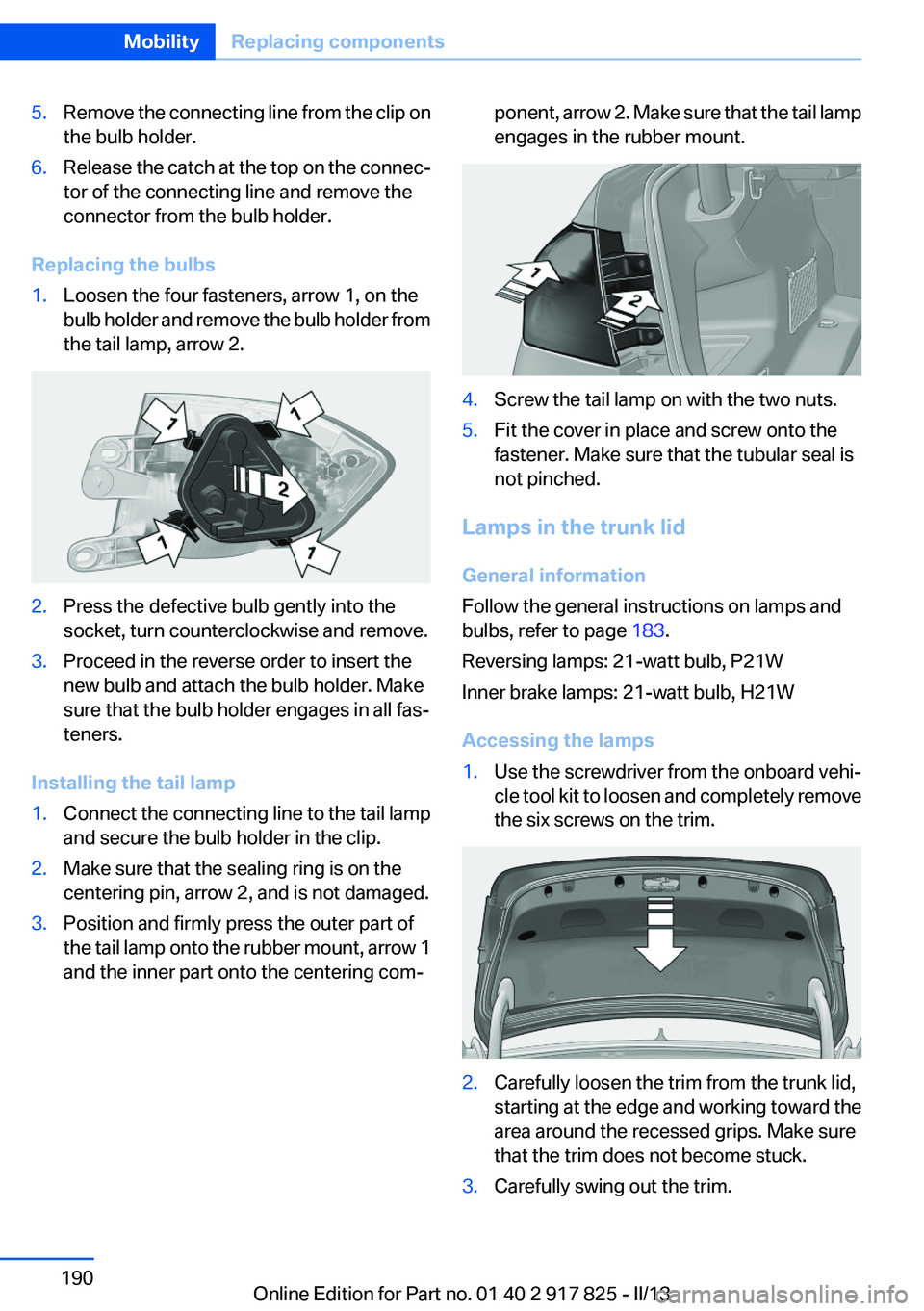
1.Loosen the four fasteners, arrow 1, on the
bulb holder and remove the bulb holder from
the tail lamp, arrow 2.2.Press the defective bulb gently into the
socket, turn counterclockwise and remove.3.Proceed in the reverse order to insert the
new bulb and attach the bulb holder. Make
sure that the bulb holder engages in all fas‐
teners.
Installing the tail lamp
1.Connect the connecting line to the tail lamp
and secure the bulb holder in the clip.2.Make sure that the sealing ring is on the
centering pin, arrow 2, and is not damaged.3.Position and firmly press the outer part of
the tail lamp onto the rubber mount, arrow 1
and the inner part onto the centering com‐ponent, arrow 2. Make sure that the tail lamp
engages in the rubber mount.4.Screw the tail lamp on with the two nuts.5.Fit the cover in place and screw onto the
fastener. Make sure that the tubular seal is
not pinched.
Lamps in the trunk lid
General information
Follow the general instructions on lamps and
bulbs, refer to page 183.
Reversing lamps: 21-watt bulb, P21W
Inner brake lamps: 21-watt bulb, H21W
Accessing the lamps
1.Use the screwdriver from the onboard vehi‐
cle tool kit to loosen and completely remove
the six screws on the trim.2.Carefully loosen the trim from the trunk lid,
starting at the edge and working toward the
area around the recessed grips. Make sure
that the trim does not become stuck.3.Carefully swing out the trim.Seite 190MobilityReplacing components190
Online Edition for Part no. 01 40 2 917 825 - II/13
Page 191 of 220
Replacing the reversing lamp and inner
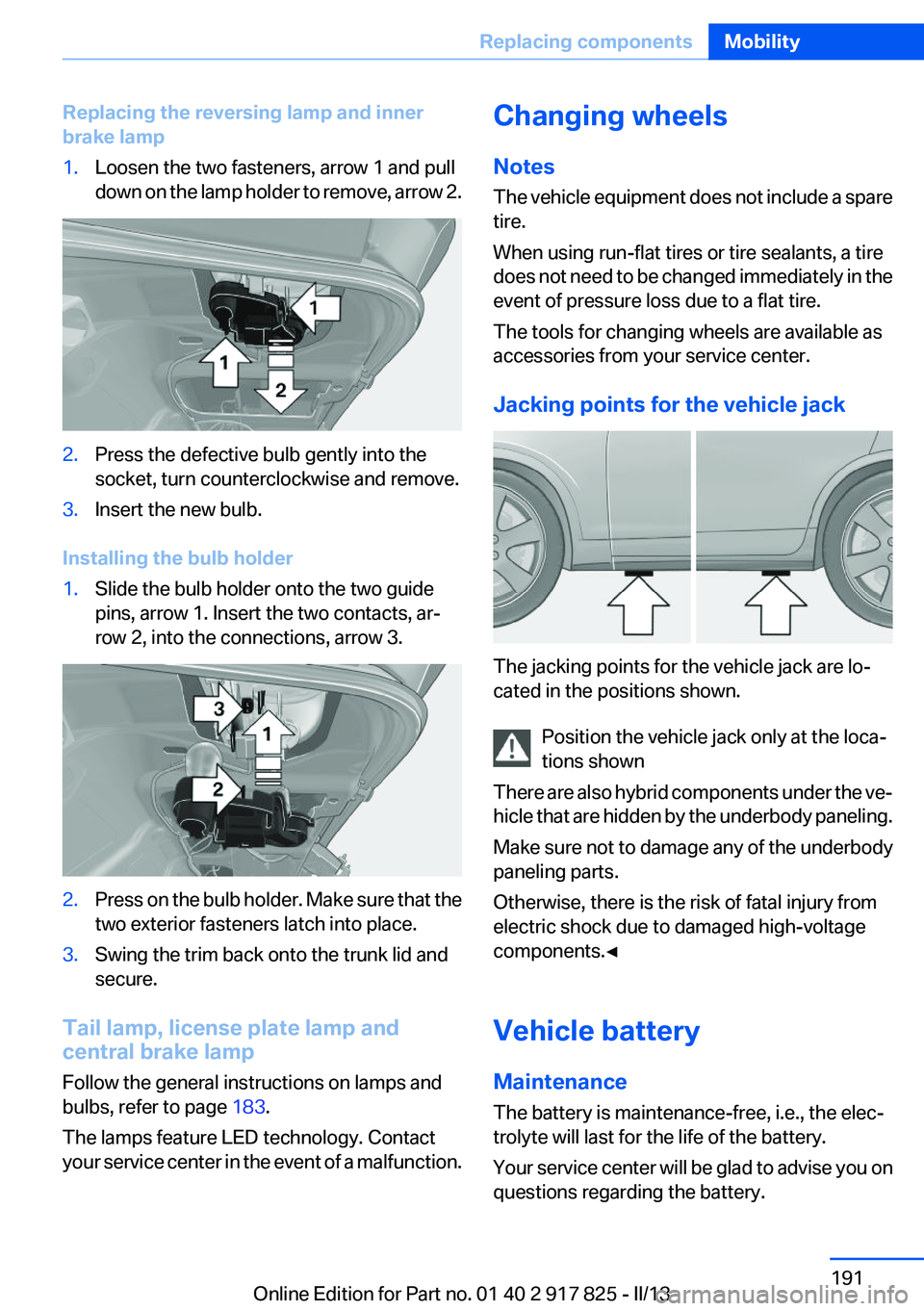
brake lamp1.Loosen the two fasteners, arrow 1 and pull
down on the lamp holder to remove, arrow 2.2.Press the defective bulb gently into the
socket, turn counterclockwise and remove.3.Insert the new bulb.
Installing the bulb holder
1.Slide the bulb holder onto the two guide
pins, arrow 1. Insert the two contacts, ar‐
row 2, into the connections, arrow 3.2.Press on the bulb holder. Make sure that the
two exterior fasteners latch into place.3.Swing the trim back onto the trunk lid and
secure.
Tail lamp, license plate lamp and
central brake lamp
Follow the general instructions on lamps and
bulbs, refer to page 183.
The lamps feature LED technology. Contact
your service center in the event of a malfunction.
Changing wheels
Notes
The vehicle equipment does not include a spare
tire.
When using run-flat tires or tire sealants, a tire
does not need to be changed immediately in the
event of pressure loss due to a flat tire.
The tools for changing wheels are available as
accessories from your service center.
Jacking points for the vehicle jack
The jacking points for the vehicle jack are lo‐
cated in the positions shown.
Position the vehicle jack only at the loca‐
tions shown
There are also hybrid components under the ve‐
hicle that are hidden by the underbody paneling.
Make sure not to damage any of the underbody
paneling parts.
Otherwise, there is the risk of fatal injury from
electric shock due to damaged high-voltage
components.◀
Vehicle battery
Maintenance
The battery is maintenance-free, i.e., the elec‐
trolyte will last for the life of the battery.
Your service center will be glad to advise you on
questions regarding the battery.
Seite 191Replacing componentsMobility191
Online Edition for Part no. 01 40 2 917 825 - II/13
Page 195 of 220
▷The LED flashes when a connection to the
BMW Response Center has been estab‐
lished.
When the emergency request is received at
the BMW Response Center, the BMW Re‐
sponse Center contacts you and takes fur‐
ther steps to help you.
Even if you are unable to respond, the BMW
Response Center can take further steps to
help you under certain circumstances.
For this purpose, data that are used to de‐
termine the necessary rescue measures,
such as the current position of the vehicle if
it can be established, are transmitted to the
BMW Response Center.▷If the LED is flashing but the BMW Response
Center cannot be heard on the hands-free
system, the hands-free system may be mal‐
functioning. However, the BMW Response
Center may still be able to hear you.
Initiating an Emergency Request
automatically
Under certain conditions, an Emergency Re‐
quest is automatically initiated immediately after
a severe accident. Automatic Collision Notifica‐
tion is not affected by pressing the SOS button.
Warning triangle
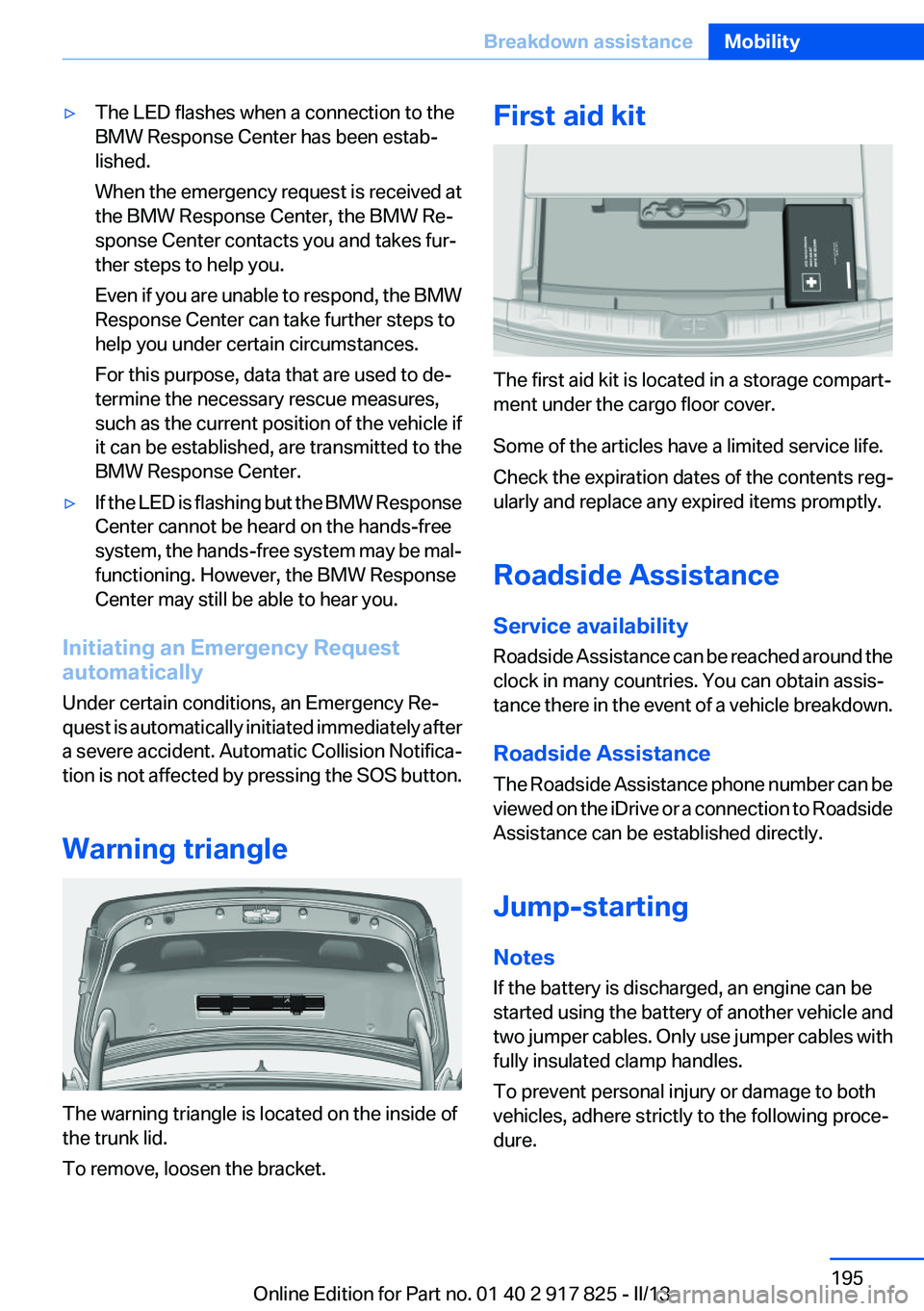
The warning triangle is located on the inside of
the trunk lid.
To remove, loosen the bracket.
First aid kit
The first aid kit is located in a storage compart‐
ment under the cargo floor cover.
Some of the articles have a limited service life.
Check the expiration dates of the contents reg‐
ularly and replace any expired items promptly.
Roadside Assistance
Service availability
Roadside Assistance can be reached around the
clock in many countries. You can obtain assis‐
tance there in the event of a vehicle breakdown.
Roadside Assistance
The Roadside Assistance phone number can be
viewed on the iDrive or a connection to Roadside
Assistance can be established directly.
Jump-starting
Notes
If the battery is discharged, an engine can be
started using the battery of another vehicle and
two jumper cables. Only use jumper cables with
fully insulated clamp handles.
To prevent personal injury or damage to both
vehicles, adhere strictly to the following proce‐
dure.
Seite 195Breakdown assistanceMobility195
Online Edition for Part no. 01 40 2 917 825 - II/13
Page 199 of 220
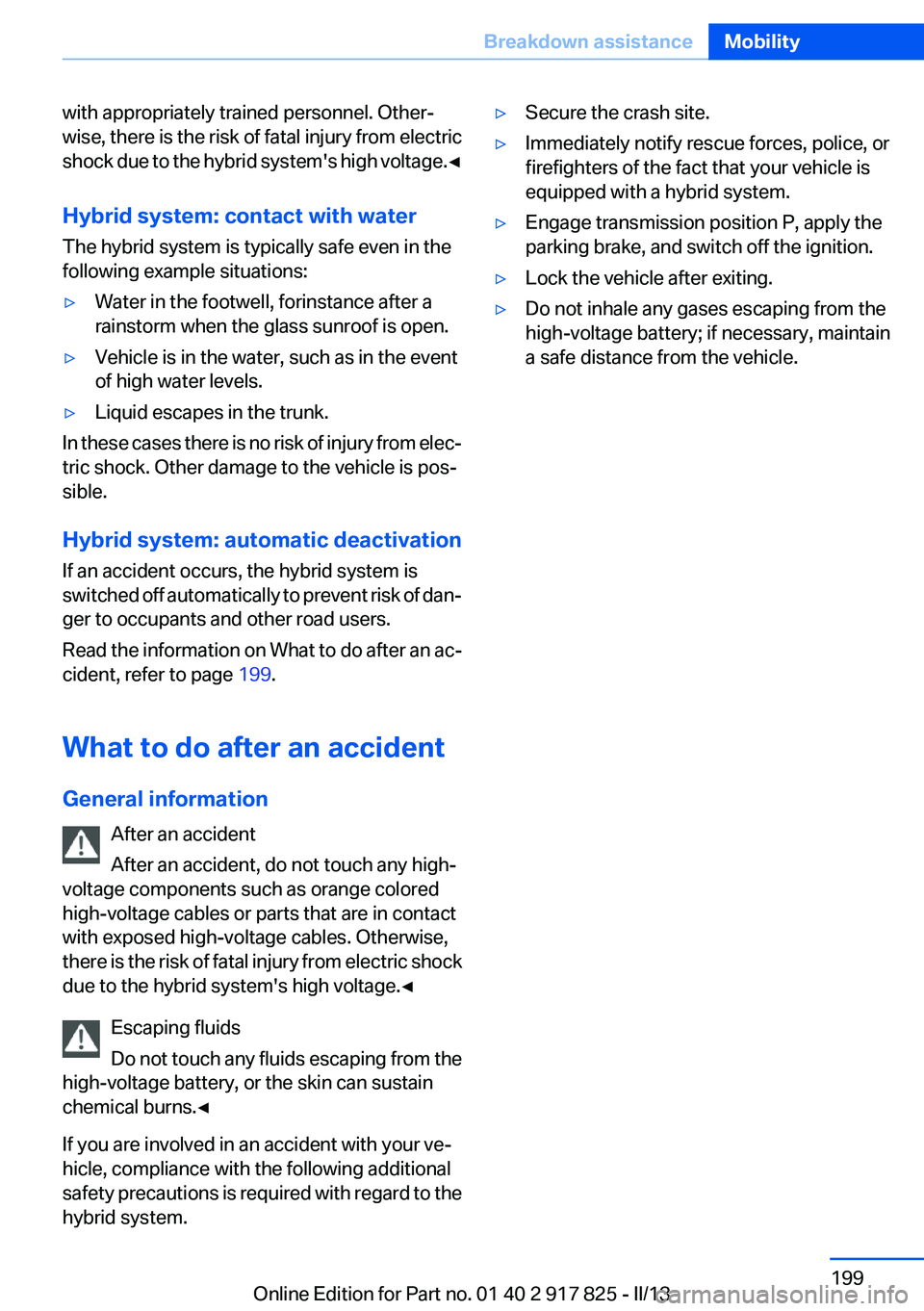
with appropriately trained personnel. Other‐
wise, there is the risk of fatal injury from electric
shock due to the hybrid system's high voltage. ◀
Hybrid system: contact with water
The hybrid system is typically safe even in the
following example situations:▷Water in the footwell, for instance after a
rainstorm when the glass sunroof is open.▷Vehicle is in the water, such as in the event
of high water levels.▷Liquid escapes in the trunk.
In these cases there is no risk of injury from elec‐
tric shock. Other damage to the vehicle is pos‐
sible.
Hybrid system: automatic deactivation
If an accident occurs, the hybrid system is
switched off automatically to prevent risk of dan‐
ger to occupants and other road users.
Read the information on What to do after an ac‐
cident, refer to page 199.
What to do after an accident
General information After an accident
After an accident, do not touch any high-
voltage components such as orange colored
high-voltage cables or parts that are in contact
with exposed high-voltage cables. Otherwise,
there is the risk of fatal injury from electric shock
due to the hybrid system's high voltage.◀
Escaping fluids
Do not touch any fluids escaping from the
high-voltage battery, or the skin can sustain
chemical burns.◀
If you are involved in an accident with your ve‐
hicle, compliance with the following additional
safety precautions is required with regard to the
hybrid system.
▷Secure the crash site.▷Immediately notify rescue forces, police, or
firefighters of the fact that your vehicle is
equipped with a hybrid system.▷Engage transmission position P, apply the
parking brake, and switch off the ignition.▷Lock the vehicle after exiting.▷Do not inhale any gases escaping from the
high-voltage battery; if necessary, maintain
a safe distance from the vehicle.Seite 199Breakdown assistanceMobility199
Online Edition for Part no. 01 40 2 917 825 - II/13
Page 212 of 220
D
Damage, tires 173
Damping control, dy‐ namic 112
Data, technical 206
Date 78
Daytime running lights 91
Deactivating drive readi‐ ness 65
Defrosting, refer to Windows, defrosting 134
Dehumidifying, air 133
Destination distance 85
Digital clock 78
Digital compass 140
Dimensions 206
Dimmable exterior mirrors 57
Dimmable interior rearview mirror 57
Direction indicator, refer to Turn signals 68
Display, electronic, instrument cluster 75
Display in windshield 126
Display lighting, refer to Instru‐ ment lighting 93
Displays 74
Displays, cleaning 203
Displays, hybrid system 79
Disposal, coolant 180
Disposal, vehicle battery 192
Distance control, refer to PDC 118
Distance to destination 85
Divided screen view, split screen 23
Door lock, refer to Remote control 34
DRIVE 66
Drive-off assistant 115
Drive-off assistant, refer to DSC 111
Drive readiness in detail 64
Drive readiness states 63 Driving experience
switch 113
Driving instructions, breaking in 152
Driving mode 113
Driving notes, general 154
Driving stability control sys‐ tems 111
Driving tips 154
Driving tips, hybrid sys‐ tem 152
Driving with the combustion engine 66
DSC Dynamic Stability Con‐ trol 111
DTC Dynamic Traction Con‐ trol 112
Dynamic Damping Con‐ trol 112
Dynamic Stability Control DSC 111
Dynamic Traction Control DTC 112
E
eBOOST 67
ECO PRO 160
ECO PRO, bonus range 161
ECO PRO display 160
ECO PRO driving mode 160
ECO PRO mode 160
ECO PRO Tip - driving instruc‐ tion 162
eDRIVE, electric driving 30
Electric drive readiness, Silent Start 64
Electric driving, eDRIVE 30
Electronic displays, instru‐ ment cluster 75
Electronic Stability Program ESP, refer to DSC 111
Emergency detection, remote control 35
Emergency release, door lock 41 Emergency release, fuel filler
flap 166
Emergency Request 194
Emergency service, refer to Roadside Assistance 195
Emergency start function, en‐ gine start 35
Emergency unlocking, trunk lid 42
Energy recovery, CHARGE 67
Engine, automatic off 65
Engine compartment 176
Engine compartment, working in 177
Engine coolant 180
Engine oil 178
Engine oil, adding 179
Engine oil additives 179
Engine oil change 179
Engine oil filler neck 179
Engine oil temperature 78
Engine oil types, alterna‐ tive 179
Engine oil types, ap‐ proved 179
Engine start during malfunc‐ tion 35
Engine start, jump-start‐ ing 195
Engine temperature 78
Entering a car wash 200
Equipment, interior 138
ESP Electronic Stability Pro‐ gram, refer to DSC 111
Exchanging wheels/tires 173
Exhaust system 154
Exterior mirror, automatic dim‐ ming feature 57
Exterior mirrors 56
External start 195
External temperature dis‐ play 78
External temperature warn‐ ing 78
Eyes for securing cargo 157 Seite 212ReferenceEverything from A to Z212
Online Edition for Part no. 01 40 2 917 825 - II/13
Page 213 of 220
F
Failure message, refer to Check Control 75
False alarm, refer to Uninten‐ tional alarm 45
Fan, refer to Air flow 134
Fault displays, refer to Check Control 75
Filler neck for engine oil 179
Fine wood, care 202
First aid kit 195
Fitting for towing, refer to Tow fitting 198
Flat tire, changing wheels 191
Flat Tire Monitor FTM 101
Flat tire, Tire Pressure Monitor TPM 98
Flat tire, warning lamp 99, 102
Flooding 154
Floor carpet, care 202
Floor mats, care 202
Fold down the rear seat back‐ rest, see Though-loading
system 144
Fold-out position, windshield wipers 70
Foot brake 154
Front airbags 95
Front fog lamps 93
Front fog lamps, front, bulb re‐ placement 188
Front lamps 184
Front passenger airbags, au‐ tomatic deactivation 97
Front passenger airbags, indi‐ cator lamp 97
FTM Flat Tire Monitor 101
Fuel cap 166
Fuel consumption, refer to Average fuel consump‐
tion 85
Fuel filler flap 166
Fuel gauge 77
Fuel quality 168 Fuel, tank capacity 208
Functions, hybrid system 30
Fuse 192
G
Garage door opener, refer to Integrated universal remote
control 138
Gasoline 168
Gasoline quality 168
Gear change, automatic trans‐ mission 72
General driving notes 154
Glass sunroof, powered 47
Glove compartment 146
Gross vehicle weight, ap‐ proved 207
H
Handbrake, refer to parking brake 67
Hand-held transmitter, alter‐ nating code 139
Hazard warning flashers 194
Head airbags 95
Headlamp control, auto‐ matic 91
Headlamp courtesy delay fea‐ ture 91
Headlamp flasher 68
Headlamp glass 184
Headlamps 184
Headlamps, care 201
Headlamp washer system 69
Headliner 17
Head restraints 49
Head restraints, front 53
Head restraints, rear 54
Head-up Display 126
Head-up Display, care 203
Heavy cargo, stowing 157
Height, vehicle 206
High-beam Assistant 92
High beams 68 High beams/low beams, refer
to High-beam Assistant 92
High-voltage battery, charge indicator 79
Hills 155
Hill start assistant, refer to Drive-off assistant 115
Hints 6
Holder for beverages 148
Homepage 6
Hood 177
Horn 14
Hotel function, trunk lid 42
Hot exhaust system 154
HUD Head-up Display 126
Hybrid system, at a glance 30
Hybrid system, automatic de‐ activation 199
Hybrid system, contact with water 199
Hybrid system, displays 79
Hybrid system, driving tips 152
Hybrid system, safety 198
Hydroplaning 154
I
Ice warning, refer to External temperature warning 78
Icy roads, refer to External temperature warning 78
Identification marks, tires 171
Identification number, refer to Important features in the en‐
gine compartment 176
iDrive 18
Ignition key, refer to Remote control 34
Ignition off 63
Ignition on 63
Indication of a flat tire 99, 102
Individual air distribution 134
Individual settings, refer to Personal Profile 35
Inflation pressure, tires 169 Seite 213Everything from A to ZReference213
Online Edition for Part no. 01 40 2 917 825 - II/13
Page 215 of 220
Maximum speed, wintertires 174
Measure, units of 88
Medical kit 195
Memory, seat, mirror 55
Menu in instrument cluster 84
Menus, operating, iDrive 18
Menus, refer to iDrive operat‐ ing concept 20
Messages, refer to Check Control 75
Microfilter 134
Minimum tread, tires 173
Mirror 56
Mirror memory 55
Mobile communication devi‐ ces in the vehicle 154
Modifications, technical, refer to Safety 7
Moisture in headlamp 184
Monitor, refer to Control Dis‐ play 18
Mounting of child restraint fix‐ ing systems 59
Multifunction steering wheel, buttons 14
N
Navigation, see user's manual for Navigation, Entertain‐
ment and Communication
Neck restraints, front, refer to Head restraints 53
Neck restraints, rear, refer to Head restraints 54
New wheels and tires 173
No Passing Information 82
Nylon rope for tow-starting/ towing 198
O
OBD Onboard Diagnos‐ tics 182 Obstacle marking, backup
camera 122
Octane rating, refer to Gaso‐ line quality 168
Odometer 78
Office, see user's manual for Navigation, Entertainment
and Communication
Oil 178
Oil, adding 179
Oil additives 179
Oil change 179
Oil change interval, service re‐ quirements 81
Oil filler neck 179
Oil types, alternative 179
Oil types, approved 179
Old batteries, disposal 192
Onboard Diagnostics OBD 182
Onboard monitor, refer to Control Display 18
Onboard vehicle tool kit 183
Opening/closing from in‐ side 41
Opening/closing via door lock 40
Opening/closing with remote control 38
Opening the trunk lid with no- touch activation 43
Operating concept, iDrive 18
Optional equipment, standard equipment 6
Outside air, refer to Automatic recirculated-air control 133
Overheating of engine, refer to Coolant temperature 78
Overtaking prohibitions 82
P
Paint, vehicle 201
Parallel parking assistant 127
Park Distance Control PDC 118 Parked-car ventilation 135
Parked vehicle, condensa‐ tion 155
Parking aid, refer to PDC 118
Parking assistant 127
Parking brake 67
Parking lamps 90
Passenger side mirror, tilting downward 57
Pathway lines, backup cam‐ era 122
PDC Park Distance Con‐ trol 118
Personal Profile 35
Pinch protection system, glass sunroof 48
Pinch protection system, win‐ dows 46
Plastic, care 202
Power failure 192
Power sunroof, glass 47
Power windows 45
Pressure, tire air pres‐ sure 169
Pressure warning FTM, tires 101
Profile, refer to Personal Pro‐ file 35
Programmable memory but‐ tons, iDrive 23
Protective function, glass sun‐ roof 48
Protective function, win‐ dows 46
Push-and-turn switch, refer to Controller 18, 19
R
Radiator fluid 180
Radio-operated key, refer to Remote control 34
Radio ready state 63
Radio, see user's manual for Navigation, Entertainment
and Communication Seite 215Everything from A to ZReference215
Online Edition for Part no. 01 40 2 917 825 - II/13
Page 217 of 220
Starting the combustion en‐gine 65
Status display, tires 98
Status information, iDrive 22
Status of Owner's Manual 7
Steering wheel, adjusting 58
Steering wheel heating 58
Steptronic, automatic trans‐ mission 71
Storage compartments 146
Storage compartments, loca‐ tions 146
Storage, tires 175
Storing the vehicle 203
Summer tires, tread 173
Supplementary text mes‐ sage 77
Surround View 120
Switch for Dynamic Driv‐ ing 113
Switch-on times, parked-car ventilation 135
Switch, refer to Cockpit 14
Symbols 6
T
Tachometer 77
Tailgate 41
Tailgate opening with no- touch activation 43
Tailgate via remote control 39
Tail lamps 189
Technical changes, refer to Safety 7
Technical data 206
Telephone, see user's manual for Navigation, Entertain‐
ment and Communication
Temperature, automatic cli‐ mate control 133
Temperature display, external temperature 78
Temperature, engine oil 78
Terminal, jump-starting 196 Text message, supplemen‐
tary 77
Theft alarm system, refer to Alarm system 44
Theft protection, refer to Cen‐ tral locking system 37
Thigh support 51
Through-loading system 144
Tilt alarm sensor 45
Time of arrival 85
Tire damage 173
Tire identification marks 171
Tire inflation pressure 169
Tire inflation pressure monitor, refer to FTM 101
Tire Pressure Monitor TPM 98
Tires, changing 173
Tires, everything on wheels and tires 169
Tires, run-flat tires 175
Tire tread 173
Tone, see user's manual for Navigation, Entertainment
and Communication
Tools 183
Top View 123
Total vehicle weight 207
Tow fitting 198
Towing 197
Tow-starting 197
TPM Tire Pressure Moni‐ tor 98
Traction control 112
TRACTION program, Dynamic Driving Control 112
Transmission, automatic 71
Transporting children safely 59
Tread, tires 173
Trip computer 86
Triple turn signal activa‐ tion 68
Trip odometer 78
Trunk lid 41 Trunk lid, emergency unlock‐
ing 42
Trunk lid, hotel function 42
Trunk lid opening with no- touch activation 43
Trunk lid via remote con‐ trol 39
Turning circle 207
Turning circle lines, backup camera 122
Turn signals, operation 68
Turn signals, rear, bulb re‐ placement 189
U
Unintentional alarm 45
Units of measure 88
Universal remote control 138
Unlock button, automatic transmission 72
Unlocking/locking from in‐ side 41
Unlocking/locking via door lock 40
Unlocking/locking with remote control 38
Updates made after the edito‐ rial deadline 7
Upholstery care 201
USB interface 143
V
Variable sport steering 112
Vehicle battery 191
Vehicle battery, replacing 192
Vehicle, breaking in 152
Vehicle care 201
Vehicle equipment 6
Vehicle identification number, refer to Identification number
in the engine compart‐
ment 176
Vehicle jack 191
Vehicle paint 201 Seite 217Everything from A to ZReference217
Online Edition for Part no. 01 40 2 917 825 - II/13