fuel BMW ACTIVEHYBRID3 2013 Owner's Guide
[x] Cancel search | Manufacturer: BMW, Model Year: 2013, Model line: ACTIVEHYBRID3, Model: BMW ACTIVEHYBRID3 2013Pages: 220, PDF Size: 5.09 MB
Page 178 of 220
Engine oilVehicle equipment
All standard, country-specific and optional
equipment that is offered in the model series is
described in this chapter. Therefore, equipment
is also described that is not available in a vehicle,
e. g., because of the selected optional equip‐
ment or country variant. This also applies for
safety-related functions and systems.
General information
Engine oil consumption depends on driving
style and driving conditions, e.g., if your driving
style is very sporty engine oil consumption will
be considerably greater.
Therefore, regularly check the engine oil level
after refueling.
Checking the oil level
electronically
Status display
The concept
The oil level is monitored electronically during
driving and shown on the Control Display.
If the oil level reaches the minimum level, a
check control message is displayed.
Requirements
Depending on the previous displays, the status
display appears when the engine is running or
after the vehicle has been driven for at least 30
minutes.
Displaying the oil level1."Vehicle Info"2."Vehicle status"3. "Engine oil level"
Oil level display messages
Different messages appear on the display de‐
pending on the oil level. Pay attention to these
messages.
If oil level is too low, immediately add 1 US
quart/liter of oil.
Take care not to add too much engine oil.
Too much engine oil
Have the vehicle checked immediately;
otherwise, surplus oil can lead to engine dam‐
age.◀
Detailed measurement
The concept
In the detailed measurement the oil level is
checked and displayed via a scale.
During the measurement, the idle speed is in‐
creased somewhat.
General information
A detailed measurement is only possible with
certain engines.
Requirements
▷Automatic transmission: selector lever in
transmission position N or P and accelerator
not depressed.▷Vehicle is on a level road and the engine is
running at operating temperature.
Performing a detailed measurement
In order to perform a detailed measurement of
the engine oil level:
1."Vehicle Info"2."Vehicle status"Seite 178MobilityEngine oil178
Online Edition for Part no. 01 40 2 917 825 - II/13
Page 182 of 220
Socket for OBD Onboard
Diagnosis
Position
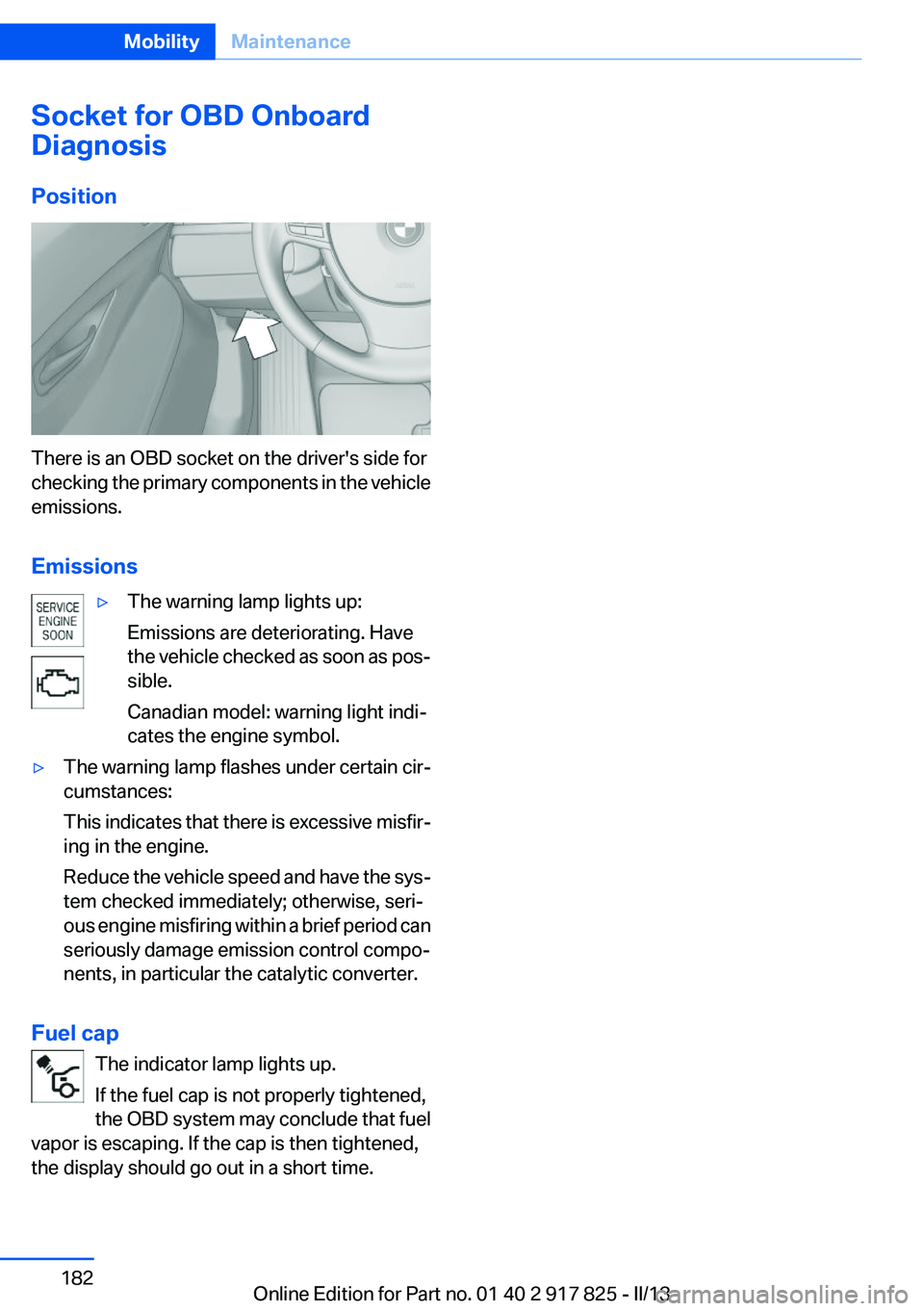
There is an OBD socket on the driver's side for
checking the primary components in the vehicle
emissions.
Emissions
▷The warning lamp lights up:
Emissions are deteriorating. Have
the vehicle checked as soon as pos‐
sible.
Canadian model: warning light indi‐
cates the engine symbol.▷The warning lamp flashes under certain cir‐
cumstances:
This indicates that there is excessive misfir‐
ing in the engine.
Reduce the vehicle speed and have the sys‐
tem checked immediately; otherwise, seri‐
ous engine misfiring within a brief period can
seriously damage emission control compo‐
nents, in particular the catalytic converter.
Fuel cap
The indicator lamp lights up.
If the fuel cap is not properly tightened,
the OBD system may conclude that fuel
vapor is escaping. If the cap is then tightened,
the display should go out in a short time.
Seite 182MobilityMaintenance182
Online Edition for Part no. 01 40 2 917 825 - II/13
Page 201 of 220
Transmission position P with the igni‐
tion off
When the ignition is switched off, position P
is engaged automatically. When in an auto‐
matic car wash, for example, ensure that the
ignition is not switched off accidentally.◀
The vehicle cannot be locked from the outside
when in transmission position N.
A signal is sounded when an attempt is made to
lock the vehicle.
Transmission position
Transmission position P is engaged automati‐
cally:
▷When the ignition is switched off.▷After approx. 15 minutes.
Headlamps
▷Do not rub dry and do not use abrasive or
caustic cleansers.▷Soak areas that have been soiled e.g. due to
insects, with shampoo and wash off with
water.▷Thaw ice with deicing spray; do not use an
ice scraper.
After washing the vehicle
After washing the vehicle, apply the brakes
briefly to dry them; otherwise, braking action can
be reduced and corrosion of the brake discs can
occur.
Completely remove all residues on the windows,
to minimize loss of visibility due to smearing and
to reduce wiper noises and wiper blade wear.
Vehicle care
Car care products
BMW recommends using cleaning and care
products from BMW, since these have been
tested and approved.
Car care and cleaning products
Follow the instructions on the container.
When cleaning the interior, open the doors or
windows.
Only use products intended for cleaning vehi‐
cles.
Cleansers can contain substances that are dan‐
gerous and harmful to your health.◀
Vehicle paint
Regular care contributes to driving safety and
value retention. Environmental influences in
areas with elevated air pollution or natural con‐
taminants, such as tree resin or pollen can affect
the vehicle's paintwork. Tailor the frequency
and extent of your car care to these influences.
Aggressive substances such as spilled fuel, oil,
grease or bird droppings must be removed im‐
mediately to prevent the finish from being al‐
tered or discolored.
Leather care
Remove dust from the leather often, using a
cloth or vacuum cleaner.
Otherwise, particles of dust and road grime
chafe in pores and folds, and lead to increased
wear and premature degradation of the leather
surface.
To guard against discoloration, such as from
clothing, provide leather care roughly every two
months.
Clean light-colored leather more frequently be‐
cause soiling on such surfaces is substantially
more visible.
Use leather care products; otherwise, dirt and
grease will gradually break down the protective
layer of the leather surface.
Suitable care products are available from the
service center.
Upholstery material care
Vacuum regularly with a vacuum cleaner.Seite 201CareMobility201
Online Edition for Part no. 01 40 2 917 825 - II/13
Page 202 of 220
If they are very dirty, e.g., beverage stains, use a
soft sponge or microfiber cloth with a suitable
interior cleaner.
Clean the upholstery down to the seams using
large sweeping motions. Avoid rubbing the ma‐
terial vigorously.
Damage from Velcro® fasteners
Open Velcro® fasteners on pants or other
articles of clothing can damage the seat covers.
Ensure that any Velcro® fasteners are closed. ◀
Caring for special components
Light-alloy wheels
Use wheel cleaner, particularly during the winter
months. Do not use aggressive, acidic, strongly
alkaline or abrasive cleaners, or steam jets
above 140 ℉/60 ℃; follow the manufacturer's
instructions.
Chrome surfaces
Carefully clean components such as the radiator
grille or door handles with an ample supply of
water, possibly with shampoo added, particu‐
larly when they have been exposed to road salt.
Rubber components
Aside from water, treat only with rubber cleans‐
ers.
When cleaning rubber seals, do not use any sil‐
icon-containing car care products in order to
avoid damage or reduced noise damping.
Fine wood parts
Clean fine wood facing and fine wood compo‐
nents only with a moist rag. Then dry with a soft
cloth.
Plastic components
These include:▷Imitation leather surfaces.▷Headliner.▷Lamp lenses.▷Instrument cluster cover.▷Matte black spray-coated components.▷Painted parts in the interior.
Clean with a microfiber cloth.
Lightly dampen the cloth with water.
Do not soak the headliner.
Do not use cleansers that contain alcohol
or solvents
Do not use cleansers that contain alcohol or sol‐
vents, such as lacquer thinners, heavy-duty
grease removers, fuel, or such; this could lead to
surface damage.◀
Safety belts
Dirty belt straps impede the reeling action and
thus have a negative impact on safety.
Chemical cleaning
Do not clean chemically; this can destroy
the webbing.◀
Use only a mild soapy solution, with the safety
belts clipped into their buckles.
Do not allow the reels to retract the safety belts
until they are dry.
Carpets and floor mats No objects in the area around the pedals
Keep floor mats, carpets, and any other
objects out of the area of motion of the pedals;
otherwise, the function of the pedals could be
impeded while driving
Do not place additional floor mats over existing
mats or other objects.
Only use floor mats that have been approved for
the vehicle and can be properly fixed in place.
Ensure that the floor mats are securely fastened
again after they were removed for cleaning, for
example.◀
Floor mats can be removed from the passenger
compartment for cleaning.
Seite 202MobilityCare202
Online Edition for Part no. 01 40 2 917 825 - II/13
Page 208 of 220
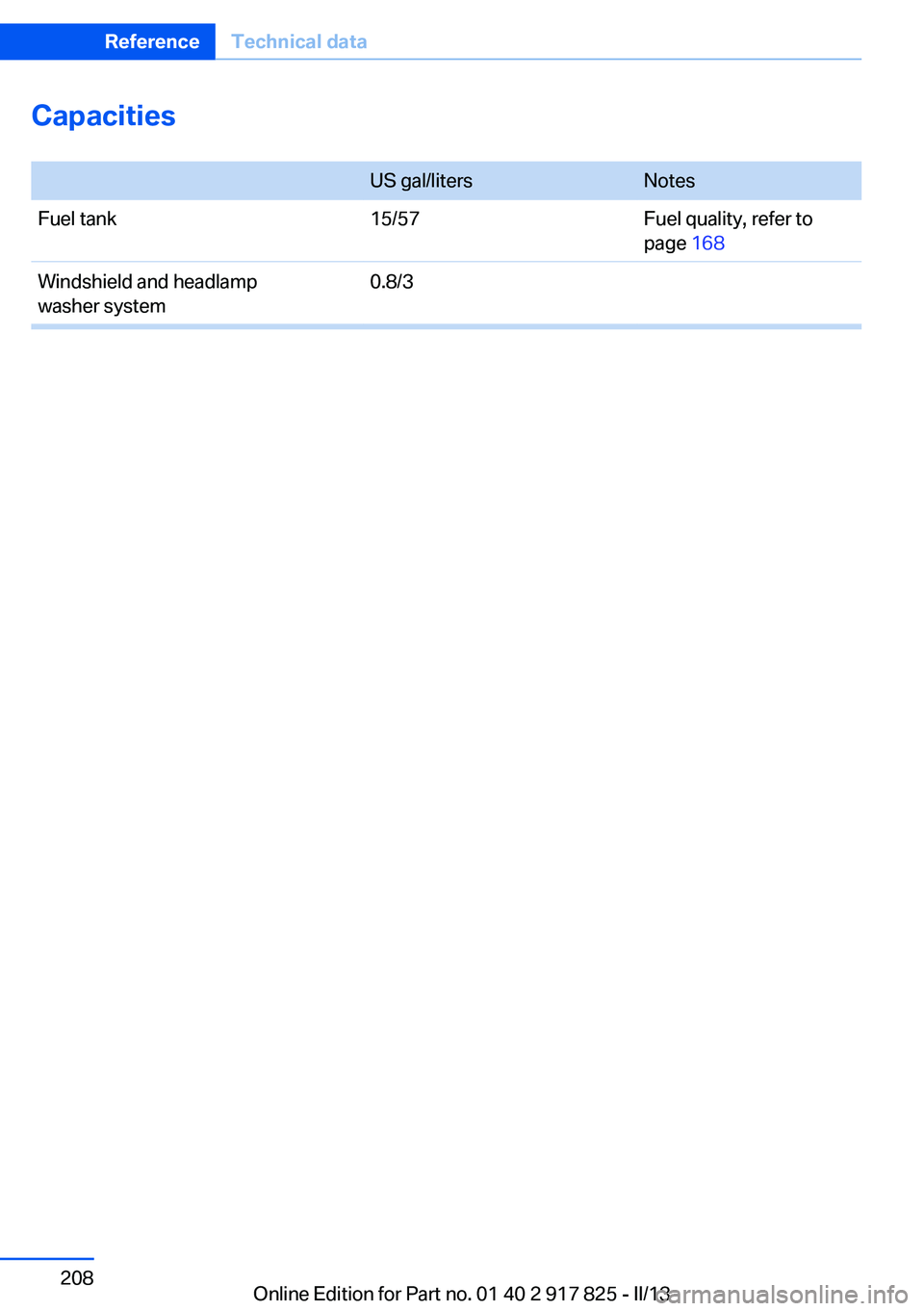
Capacities
US gal/litersNotesFuel tank15/57Fuel quality, refer to
page 168Windshield and headlamp
washer system0.8/3Seite 208ReferenceTechnical data208
Online Edition for Part no. 01 40 2 917 825 - II/13
Page 210 of 220
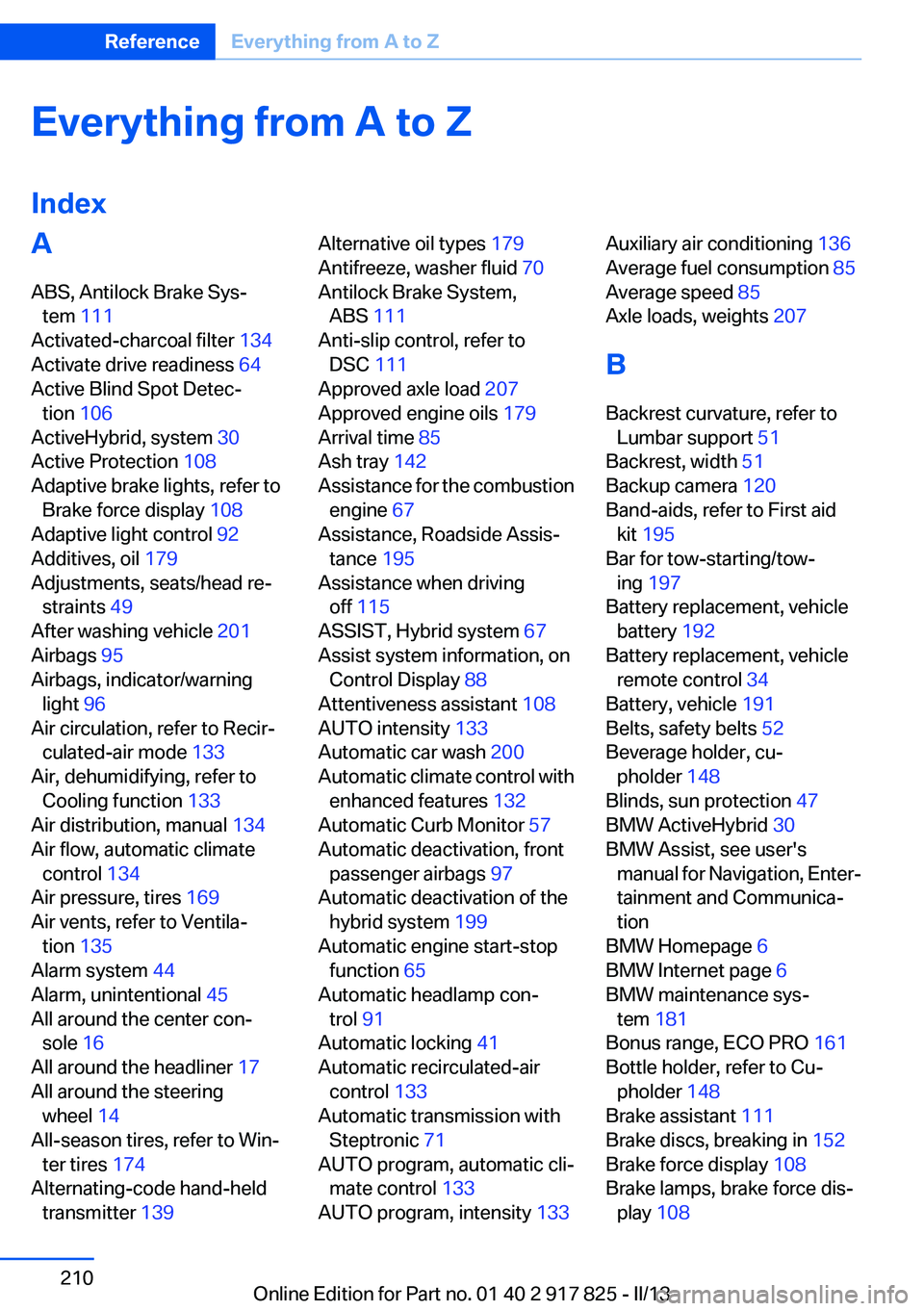
Everything from A to Z
IndexA
ABS, Antilock Brake Sys‐ tem 111
Activated-charcoal filter 134
Activate drive readiness 64
Active Blind Spot Detec‐ tion 106
ActiveHybrid, system 30
Active Protection 108
Adaptive brake lights, refer to Brake force display 108
Adaptive light control 92
Additives, oil 179
Adjustments, seats/head re‐ straints 49
After washing vehicle 201
Airbags 95
Airbags, indicator/warning light 96
Air circulation, refer to Recir‐ culated-air mode 133
Air, dehumidifying, refer to Cooling function 133
Air distribution, manual 134
Air flow, automatic climate control 134
Air pressure, tires 169
Air vents, refer to Ventila‐ tion 135
Alarm system 44
Alarm, unintentional 45
All around the center con‐ sole 16
All around the headliner 17
All around the steering wheel 14
All-season tires, refer to Win‐ ter tires 174
Alternating-code hand-held transmitter 139 Alternative oil types 179
Antifreeze, washer fluid 70
Antilock Brake System, ABS 111
Anti-slip control, refer to DSC 111
Approved axle load 207
Approved engine oils 179
Arrival time 85
Ash tray 142
Assistance for the combustion engine 67
Assistance, Roadside Assis‐ tance 195
Assistance when driving off 115
ASSIST, Hybrid system 67
Assist system information, on Control Display 88
Attentiveness assistant 108
AUTO intensity 133
Automatic car wash 200
Automatic climate control with enhanced features 132
Automatic Curb Monitor 57
Automatic deactivation, front passenger airbags 97
Automatic deactivation of the hybrid system 199
Automatic engine start-stop function 65
Automatic headlamp con‐ trol 91
Automatic locking 41
Automatic recirculated-air control 133
Automatic transmission with Steptronic 71
AUTO program, automatic cli‐ mate control 133
AUTO program, intensity 133 Auxiliary air conditioning 136
Average fuel consumption 85
Average speed 85
Axle loads, weights 207
B
Backrest curvature, refer to Lumbar support 51
Backrest, width 51
Backup camera 120
Band-aids, refer to First aid kit 195
Bar for tow-starting/tow‐ ing 197
Battery replacement, vehicle battery 192
Battery replacement, vehicle remote control 34
Battery, vehicle 191
Belts, safety belts 52
Beverage holder, cu‐ pholder 148
Blinds, sun protection 47
BMW ActiveHybrid 30
BMW Assist, see user's manual for Navigation, Enter‐
tainment and Communica‐
tion
BMW Homepage 6
BMW Internet page 6
BMW maintenance sys‐ tem 181
Bonus range, ECO PRO 161
Bottle holder, refer to Cu‐ pholder 148
Brake assistant 111
Brake discs, breaking in 152
Brake force display 108
Brake lamps, brake force dis‐ play 108 Seite 210ReferenceEverything from A to Z210
Online Edition for Part no. 01 40 2 917 825 - II/13
Page 211 of 220
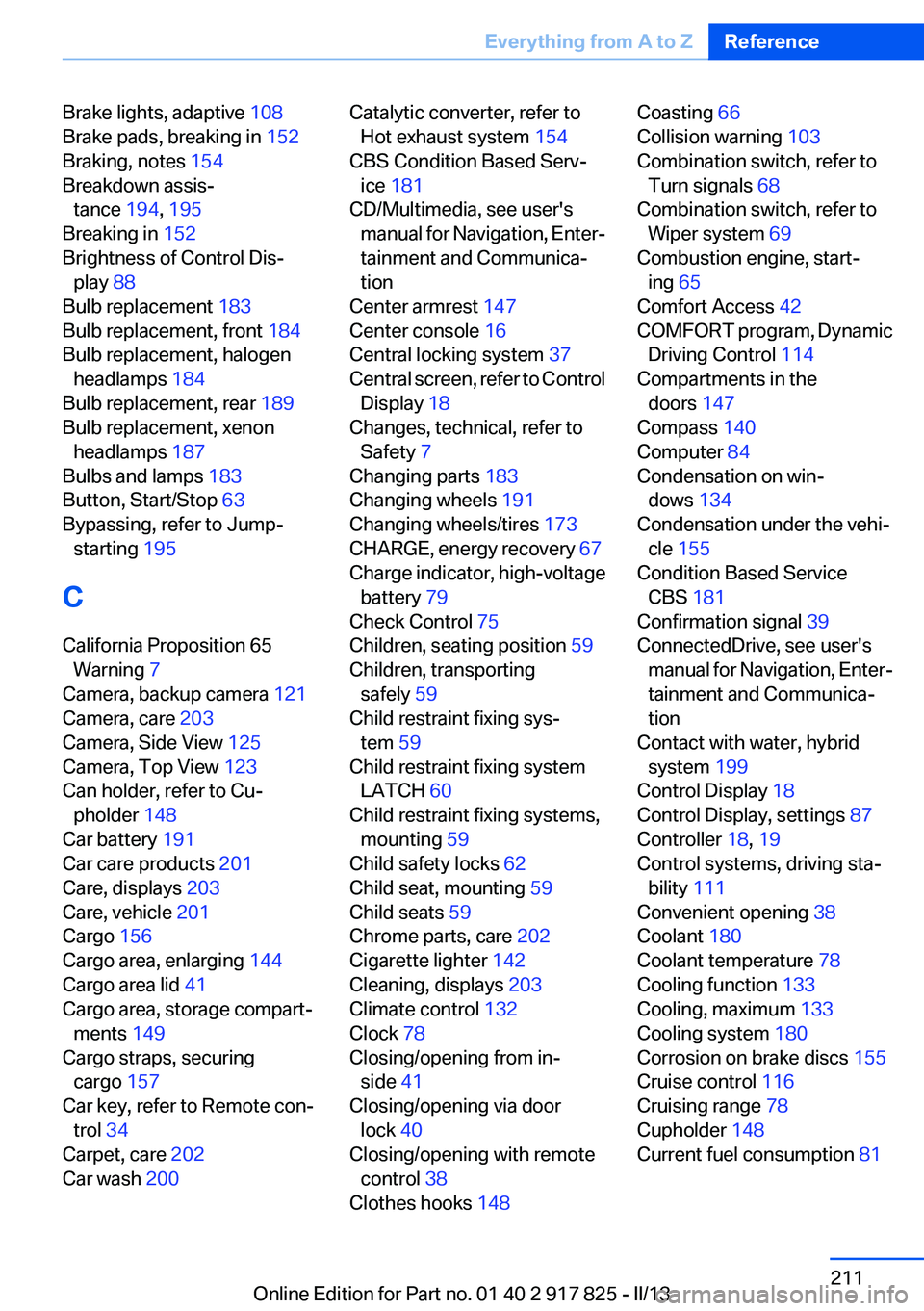
Brake lights, adaptive 108
Brake pads, breaking in 152
Braking, notes 154
Breakdown assis‐ tance 194, 195
Breaking in 152
Brightness of Control Dis‐ play 88
Bulb replacement 183
Bulb replacement, front 184
Bulb replacement, halogen headlamps 184
Bulb replacement, rear 189
Bulb replacement, xenon headlamps 187
Bulbs and lamps 183
Button, Start/Stop 63
Bypassing, refer to Jump- starting 195
C
California Proposition 65 Warning 7
Camera, backup camera 121
Camera, care 203
Camera, Side View 125
Camera, Top View 123
Can holder, refer to Cu‐ pholder 148
Car battery 191
Car care products 201
Care, displays 203
Care, vehicle 201
Cargo 156
Cargo area, enlarging 144
Cargo area lid 41
Cargo area, storage compart‐ ments 149
Cargo straps, securing cargo 157
Car key, refer to Remote con‐ trol 34
Carpet, care 202
Car wash 200 Catalytic converter, refer to
Hot exhaust system 154
CBS Condition Based Serv‐ ice 181
CD/Multimedia, see user's manual for Navigation, Enter‐
tainment and Communica‐
tion
Center armrest 147
Center console 16
Central locking system 37
Central screen, refer to Control Display 18
Changes, technical, refer to Safety 7
Changing parts 183
Changing wheels 191
Changing wheels/tires 173
CHARGE, energy recovery 67
Charge indicator, high-voltage battery 79
Check Control 75
Children, seating position 59
Children, transporting safely 59
Child restraint fixing sys‐ tem 59
Child restraint fixing system LATCH 60
Child restraint fixing systems, mounting 59
Child safety locks 62
Child seat, mounting 59
Child seats 59
Chrome parts, care 202
Cigarette lighter 142
Cleaning, displays 203
Climate control 132
Clock 78
Closing/opening from in‐ side 41
Closing/opening via door lock 40
Closing/opening with remote control 38
Clothes hooks 148 Coasting 66
Collision warning 103
Combination switch, refer to Turn signals 68
Combination switch, refer to Wiper system 69
Combustion engine, start‐ ing 65
Comfort Access 42
COMFORT program, Dynamic Driving Control 114
Compartments in the doors 147
Compass 140
Computer 84
Condensation on win‐ dows 134
Condensation under the vehi‐ cle 155
Condition Based Service CBS 181
Confirmation signal 39
ConnectedDrive, see user's manual for Navigation, Enter‐
tainment and Communica‐
tion
Contact with water, hybrid system 199
Control Display 18
Control Display, settings 87
Controller 18, 19
Control systems, driving sta‐ bility 111
Convenient opening 38
Coolant 180
Coolant temperature 78
Cooling function 133
Cooling, maximum 133
Cooling system 180
Corrosion on brake discs 155
Cruise control 116
Cruising range 78
Cupholder 148
Current fuel consumption 81 Seite 211Everything from A to ZReference211
Online Edition for Part no. 01 40 2 917 825 - II/13
Page 212 of 220
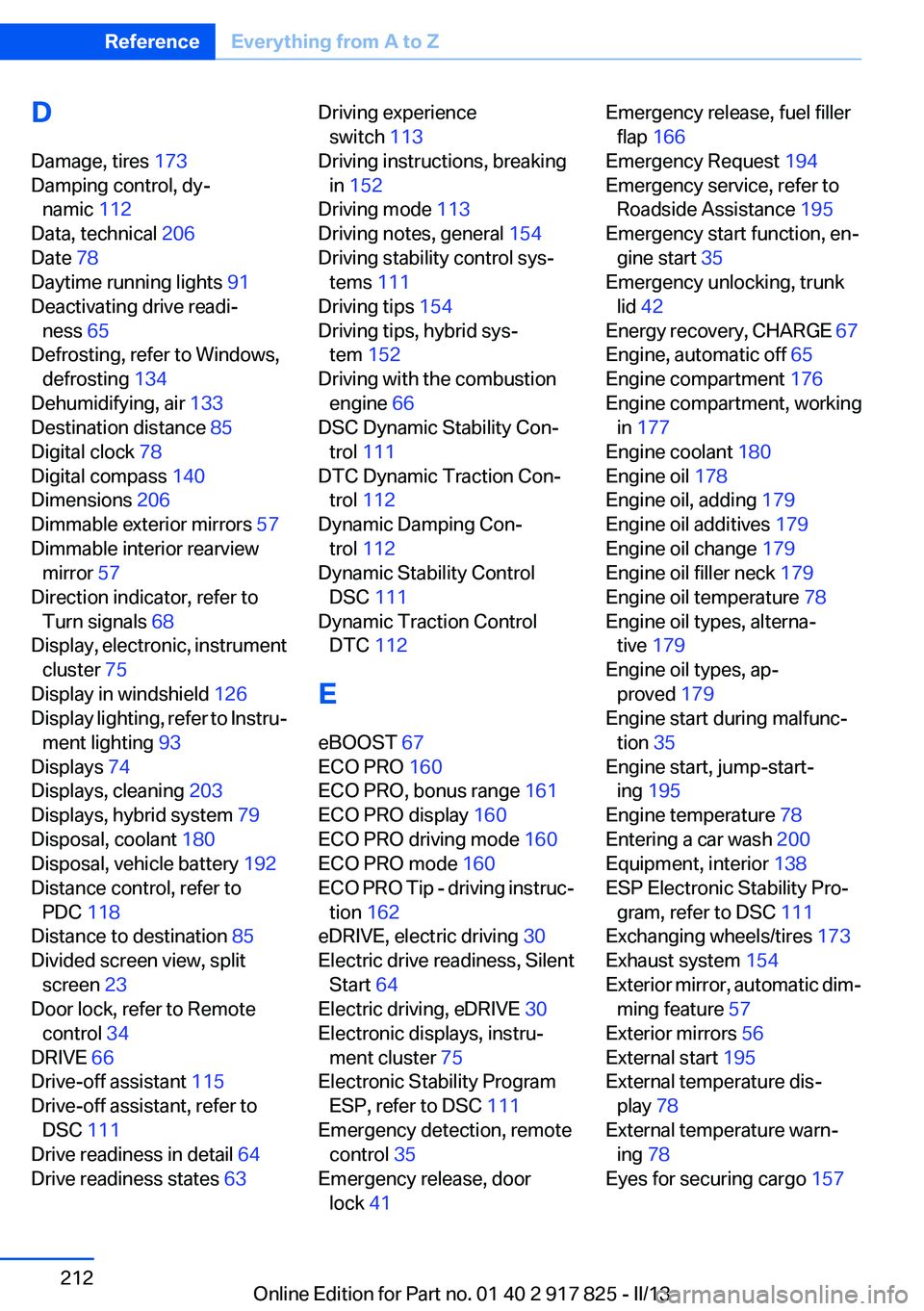
D
Damage, tires 173
Damping control, dy‐ namic 112
Data, technical 206
Date 78
Daytime running lights 91
Deactivating drive readi‐ ness 65
Defrosting, refer to Windows, defrosting 134
Dehumidifying, air 133
Destination distance 85
Digital clock 78
Digital compass 140
Dimensions 206
Dimmable exterior mirrors 57
Dimmable interior rearview mirror 57
Direction indicator, refer to Turn signals 68
Display, electronic, instrument cluster 75
Display in windshield 126
Display lighting, refer to Instru‐ ment lighting 93
Displays 74
Displays, cleaning 203
Displays, hybrid system 79
Disposal, coolant 180
Disposal, vehicle battery 192
Distance control, refer to PDC 118
Distance to destination 85
Divided screen view, split screen 23
Door lock, refer to Remote control 34
DRIVE 66
Drive-off assistant 115
Drive-off assistant, refer to DSC 111
Drive readiness in detail 64
Drive readiness states 63 Driving experience
switch 113
Driving instructions, breaking in 152
Driving mode 113
Driving notes, general 154
Driving stability control sys‐ tems 111
Driving tips 154
Driving tips, hybrid sys‐ tem 152
Driving with the combustion engine 66
DSC Dynamic Stability Con‐ trol 111
DTC Dynamic Traction Con‐ trol 112
Dynamic Damping Con‐ trol 112
Dynamic Stability Control DSC 111
Dynamic Traction Control DTC 112
E
eBOOST 67
ECO PRO 160
ECO PRO, bonus range 161
ECO PRO display 160
ECO PRO driving mode 160
ECO PRO mode 160
ECO PRO Tip - driving instruc‐ tion 162
eDRIVE, electric driving 30
Electric drive readiness, Silent Start 64
Electric driving, eDRIVE 30
Electronic displays, instru‐ ment cluster 75
Electronic Stability Program ESP, refer to DSC 111
Emergency detection, remote control 35
Emergency release, door lock 41 Emergency release, fuel filler
flap 166
Emergency Request 194
Emergency service, refer to Roadside Assistance 195
Emergency start function, en‐ gine start 35
Emergency unlocking, trunk lid 42
Energy recovery, CHARGE 67
Engine, automatic off 65
Engine compartment 176
Engine compartment, working in 177
Engine coolant 180
Engine oil 178
Engine oil, adding 179
Engine oil additives 179
Engine oil change 179
Engine oil filler neck 179
Engine oil temperature 78
Engine oil types, alterna‐ tive 179
Engine oil types, ap‐ proved 179
Engine start during malfunc‐ tion 35
Engine start, jump-start‐ ing 195
Engine temperature 78
Entering a car wash 200
Equipment, interior 138
ESP Electronic Stability Pro‐ gram, refer to DSC 111
Exchanging wheels/tires 173
Exhaust system 154
Exterior mirror, automatic dim‐ ming feature 57
Exterior mirrors 56
External start 195
External temperature dis‐ play 78
External temperature warn‐ ing 78
Eyes for securing cargo 157 Seite 212ReferenceEverything from A to Z212
Online Edition for Part no. 01 40 2 917 825 - II/13
Page 213 of 220
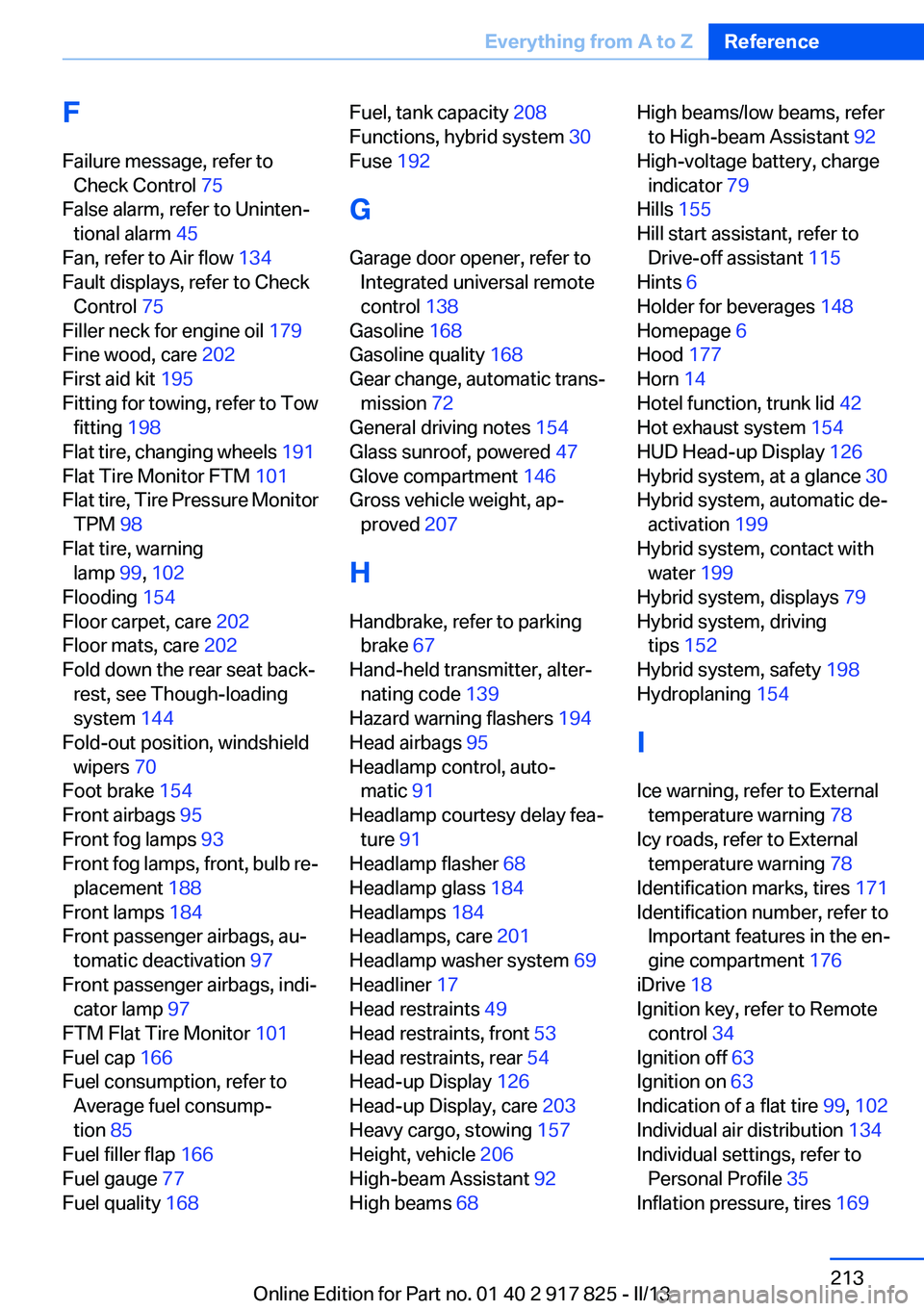
F
Failure message, refer to Check Control 75
False alarm, refer to Uninten‐ tional alarm 45
Fan, refer to Air flow 134
Fault displays, refer to Check Control 75
Filler neck for engine oil 179
Fine wood, care 202
First aid kit 195
Fitting for towing, refer to Tow fitting 198
Flat tire, changing wheels 191
Flat Tire Monitor FTM 101
Flat tire, Tire Pressure Monitor TPM 98
Flat tire, warning lamp 99, 102
Flooding 154
Floor carpet, care 202
Floor mats, care 202
Fold down the rear seat back‐ rest, see Though-loading
system 144
Fold-out position, windshield wipers 70
Foot brake 154
Front airbags 95
Front fog lamps 93
Front fog lamps, front, bulb re‐ placement 188
Front lamps 184
Front passenger airbags, au‐ tomatic deactivation 97
Front passenger airbags, indi‐ cator lamp 97
FTM Flat Tire Monitor 101
Fuel cap 166
Fuel consumption, refer to Average fuel consump‐
tion 85
Fuel filler flap 166
Fuel gauge 77
Fuel quality 168 Fuel, tank capacity 208
Functions, hybrid system 30
Fuse 192
G
Garage door opener, refer to Integrated universal remote
control 138
Gasoline 168
Gasoline quality 168
Gear change, automatic trans‐ mission 72
General driving notes 154
Glass sunroof, powered 47
Glove compartment 146
Gross vehicle weight, ap‐ proved 207
H
Handbrake, refer to parking brake 67
Hand-held transmitter, alter‐ nating code 139
Hazard warning flashers 194
Head airbags 95
Headlamp control, auto‐ matic 91
Headlamp courtesy delay fea‐ ture 91
Headlamp flasher 68
Headlamp glass 184
Headlamps 184
Headlamps, care 201
Headlamp washer system 69
Headliner 17
Head restraints 49
Head restraints, front 53
Head restraints, rear 54
Head-up Display 126
Head-up Display, care 203
Heavy cargo, stowing 157
Height, vehicle 206
High-beam Assistant 92
High beams 68 High beams/low beams, refer
to High-beam Assistant 92
High-voltage battery, charge indicator 79
Hills 155
Hill start assistant, refer to Drive-off assistant 115
Hints 6
Holder for beverages 148
Homepage 6
Hood 177
Horn 14
Hotel function, trunk lid 42
Hot exhaust system 154
HUD Head-up Display 126
Hybrid system, at a glance 30
Hybrid system, automatic de‐ activation 199
Hybrid system, contact with water 199
Hybrid system, displays 79
Hybrid system, driving tips 152
Hybrid system, safety 198
Hydroplaning 154
I
Ice warning, refer to External temperature warning 78
Icy roads, refer to External temperature warning 78
Identification marks, tires 171
Identification number, refer to Important features in the en‐
gine compartment 176
iDrive 18
Ignition key, refer to Remote control 34
Ignition off 63
Ignition on 63
Indication of a flat tire 99, 102
Individual air distribution 134
Individual settings, refer to Personal Profile 35
Inflation pressure, tires 169 Seite 213Everything from A to ZReference213
Online Edition for Part no. 01 40 2 917 825 - II/13
Page 214 of 220
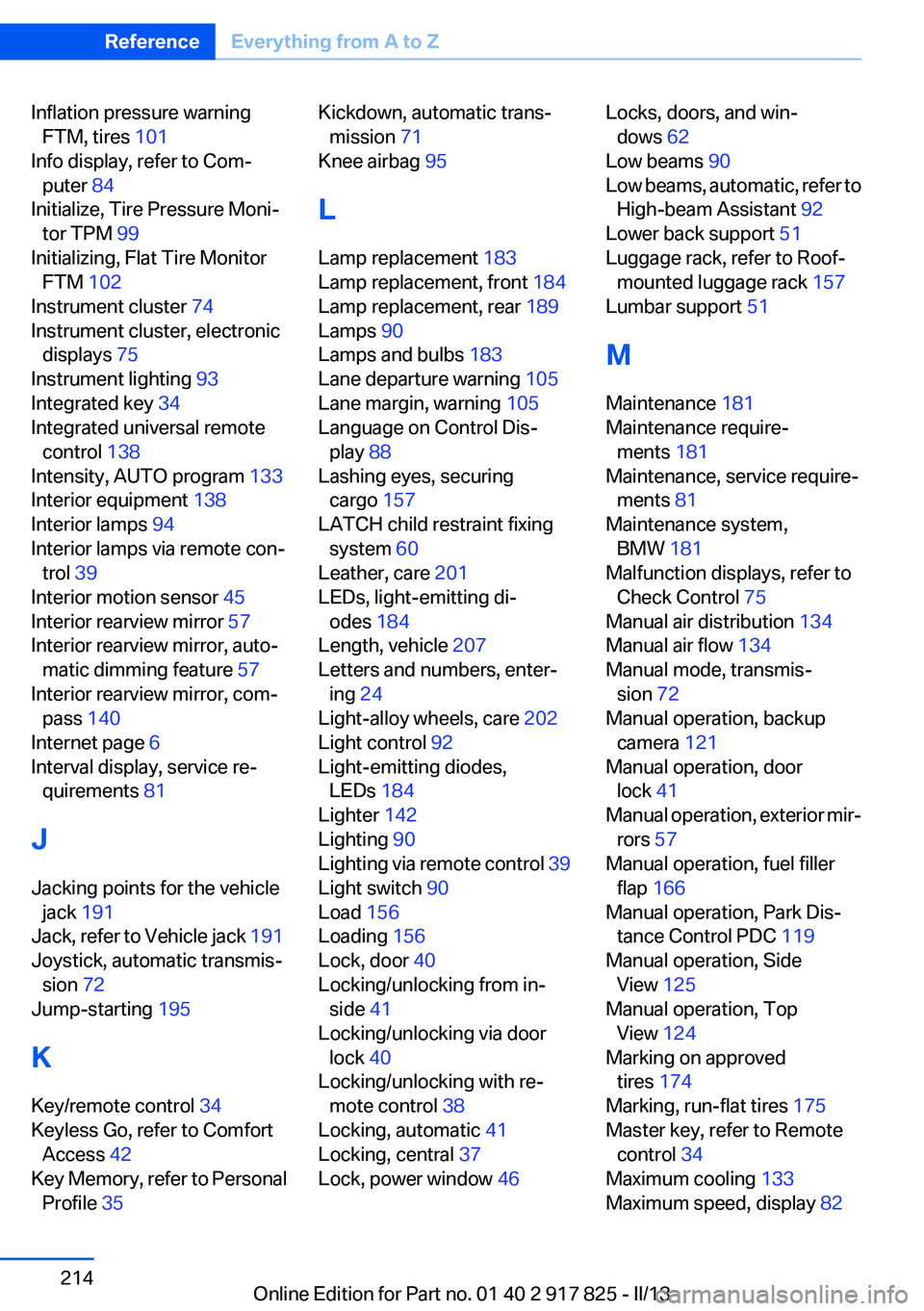
Inflation pressure warningFTM, tires 101
Info display, refer to Com‐ puter 84
Initialize, Tire Pressure Moni‐ tor TPM 99
Initializing, Flat Tire Monitor FTM 102
Instrument cluster 74
Instrument cluster, electronic displays 75
Instrument lighting 93
Integrated key 34
Integrated universal remote control 138
Intensity, AUTO program 133
Interior equipment 138
Interior lamps 94
Interior lamps via remote con‐ trol 39
Interior motion sensor 45
Interior rearview mirror 57
Interior rearview mirror, auto‐ matic dimming feature 57
Interior rearview mirror, com‐ pass 140
Internet page 6
Interval display, service re‐ quirements 81
J
Jacking points for the vehicle jack 191
Jack, refer to Vehicle jack 191
Joystick, automatic transmis‐ sion 72
Jump-starting 195
K
Key/remote control 34
Keyless Go, refer to Comfort Access 42
Key Memory, refer to Personal Profile 35 Kickdown, automatic trans‐
mission 71
Knee airbag 95
L
Lamp replacement 183
Lamp replacement, front 184
Lamp replacement, rear 189
Lamps 90
Lamps and bulbs 183
Lane departure warning 105
Lane margin, warning 105
Language on Control Dis‐ play 88
Lashing eyes, securing cargo 157
LATCH child restraint fixing system 60
Leather, care 201
LEDs, light-emitting di‐ odes 184
Length, vehicle 207
Letters and numbers, enter‐ ing 24
Light-alloy wheels, care 202
Light control 92
Light-emitting diodes, LEDs 184
Lighter 142
Lighting 90
Lighting via remote control 39
Light switch 90
Load 156
Loading 156
Lock, door 40
Locking/unlocking from in‐ side 41
Locking/unlocking via door lock 40
Locking/unlocking with re‐ mote control 38
Locking, automatic 41
Locking, central 37
Lock, power window 46 Locks, doors, and win‐
dows 62
Low beams 90
Low beams, automatic, refer to High-beam Assistant 92
Lower back support 51
Luggage rack, refer to Roof- mounted luggage rack 157
Lumbar support 51
M
Maintenance 181
Maintenance require‐ ments 181
Maintenance, service require‐ ments 81
Maintenance system, BMW 181
Malfunction displays, refer to Check Control 75
Manual air distribution 134
Manual air flow 134
Manual mode, transmis‐ sion 72
Manual operation, backup camera 121
Manual operation, door lock 41
Manual operation, exterior mir‐ rors 57
Manual operation, fuel filler flap 166
Manual operation, Park Dis‐ tance Control PDC 119
Manual operation, Side View 125
Manual operation, Top View 124
Marking on approved tires 174
Marking, run-flat tires 175
Master key, refer to Remote control 34
Maximum cooling 133
Maximum speed, display 82 Seite 214ReferenceEverything from A to Z214
Online Edition for Part no. 01 40 2 917 825 - II/13