climate control BMW ACTIVEHYBRID5 2013 User Guide
[x] Cancel search | Manufacturer: BMW, Model Year: 2013, Model line: ACTIVEHYBRID5, Model: BMW ACTIVEHYBRID5 2013Pages: 224, PDF Size: 4.96 MB
Page 141 of 224
2. Press the right side of the button on
the driver's side.
is shown on the display of the automatic cli‐
mate control.
The interior temperature, air volume and air dis‐
tribution can be adjusted with the ignition
switched on.
Switching off
At the lowest fan speed, press the left side of the
button on the driver's side.
on the display of the automatic climate control
goes out.
Switching the system on/off
Switching off
▷Complete system: Press and hold the left button on
the driver's side until the control
clicks off.▷On the front passenger side:
Press and hold the left button on
the front passenger side.
Switching on
Press any button except:
▷ALL program.▷Rear window defroster.▷Left side of Air volume button.▷Seat heating.▷Seat ventilation.
Microfilter/activated-charcoal filter
The microfilter removes dust and pollen from
the incoming air.
The activated-charcoal filter removes gaseous
pollutants from the outside air that enters the
vehicle.
This combined filter should be replaced during
scheduled maintenance, refer to page 188, of
your vehicle.
Ventilation
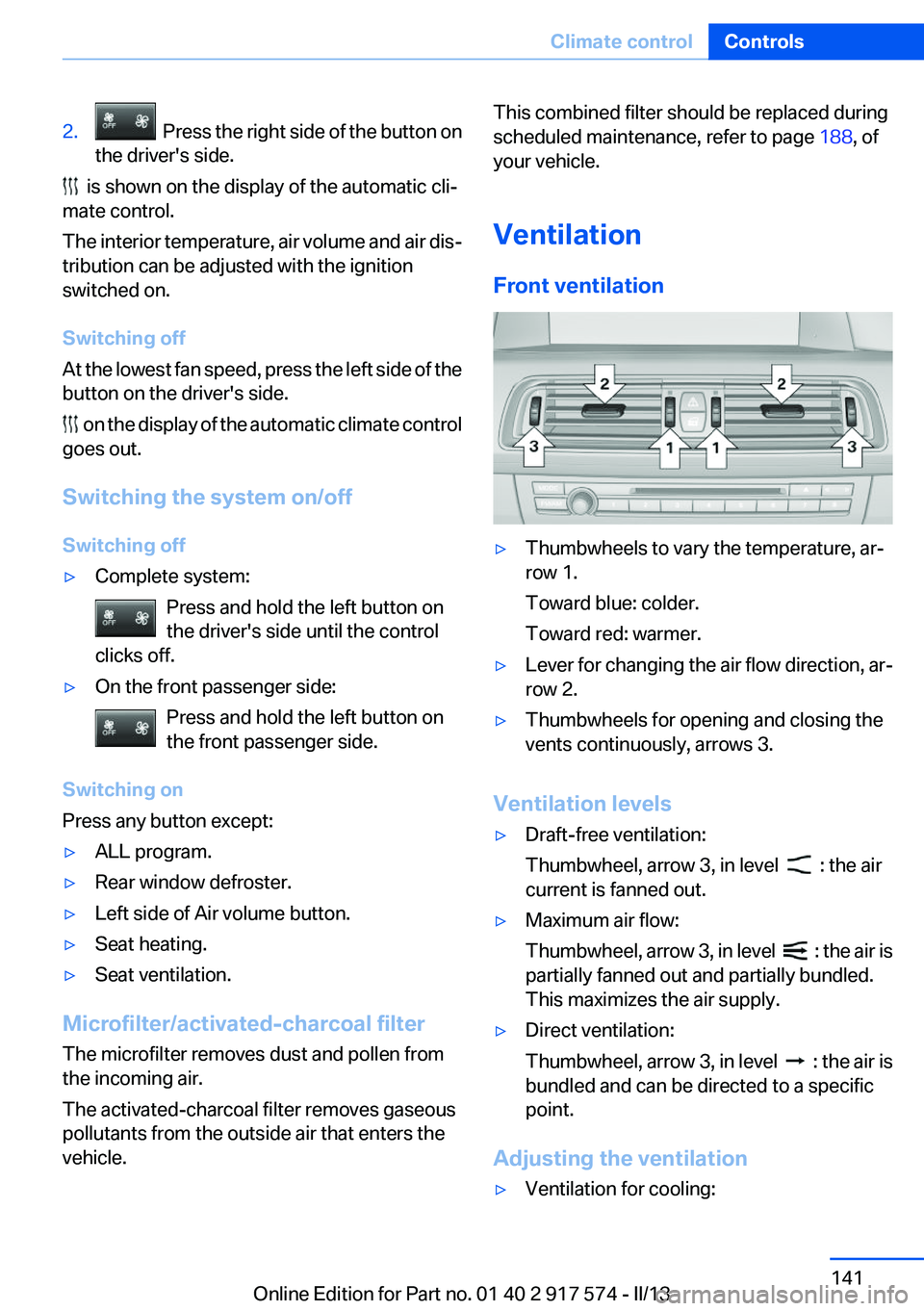
Front ventilation▷Thumbwheels to vary the temperature, ar‐
row 1.
Toward blue: colder.
Toward red: warmer.▷Lever for changing the air flow direction, ar‐
row 2.▷Thumbwheels for opening and closing the
vents continuously, arrows 3.
Ventilation levels
▷Draft-free ventilation:
Thumbwheel, arrow 3, in level
: the air
current is fanned out.
▷Maximum air flow:
Thumbwheel, arrow 3, in level
: the air is
partially fanned out and partially bundled.
This maximizes the air supply.
▷Direct ventilation:
Thumbwheel, arrow 3, in level
: the air is
bundled and can be directed to a specific
point.
Adjusting the ventilation
▷Ventilation for cooling:Seite 141Climate controlControls141
Online Edition for Part no. 01 40 2 917 574 - II/13
Page 142 of 224
Adjust the vent to direct the air in your di‐
rection, such as if the vehicle interior is hot
from the sun.▷Draft-free ventilation:
Adjust the vent to let the air flow past you.
Ventilation in rear, center
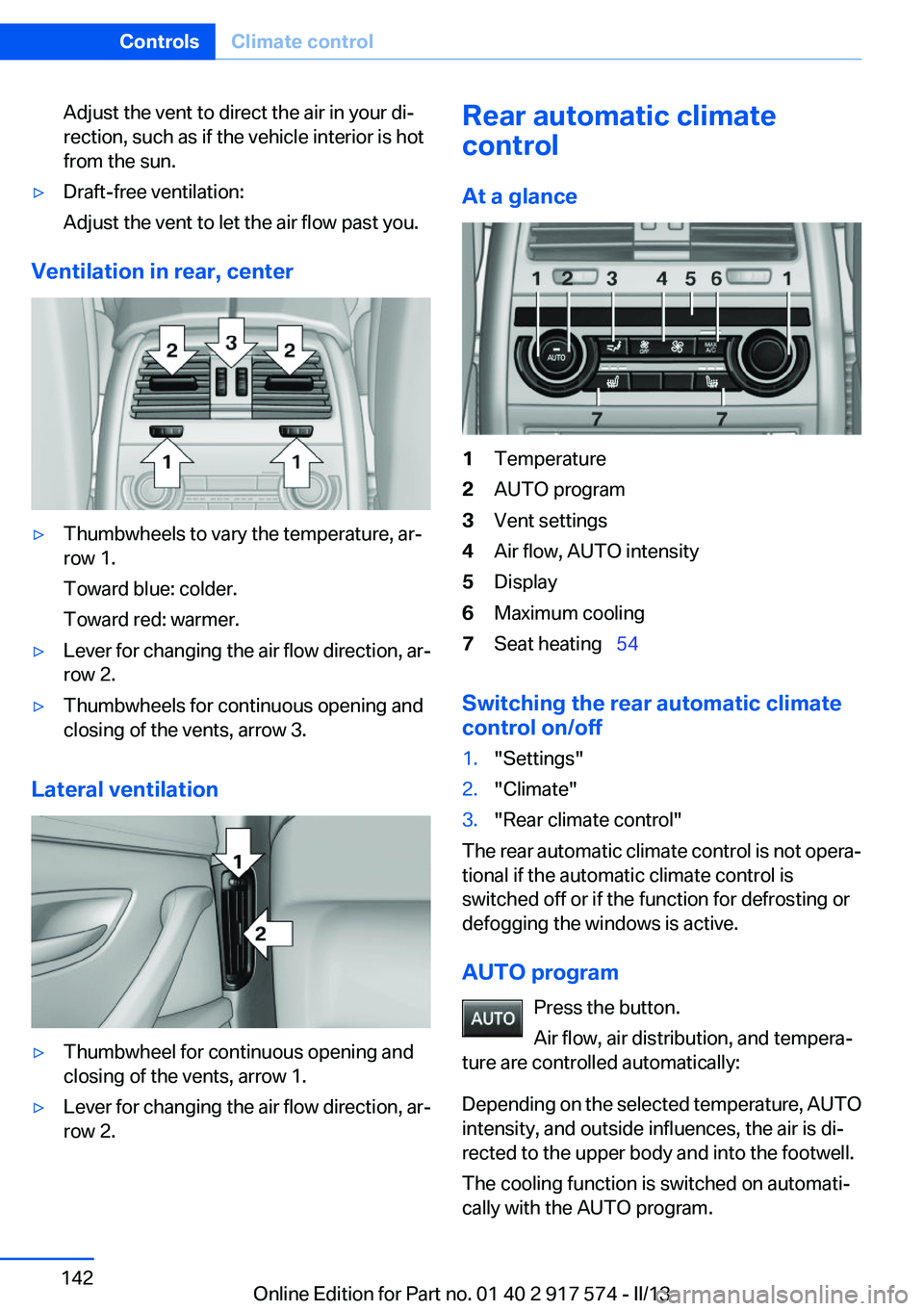
▷Thumbwheels to vary the temperature, ar‐
row 1.
Toward blue: colder.
Toward red: warmer.▷Lever for changing the air flow direction, ar‐
row 2.▷Thumbwheels for continuous opening and
closing of the vents, arrow 3.
Lateral ventilation
▷Thumbwheel for continuous opening and
closing of the vents, arrow 1.▷Lever for changing the air flow direction, ar‐
row 2.Rear automatic climate
control
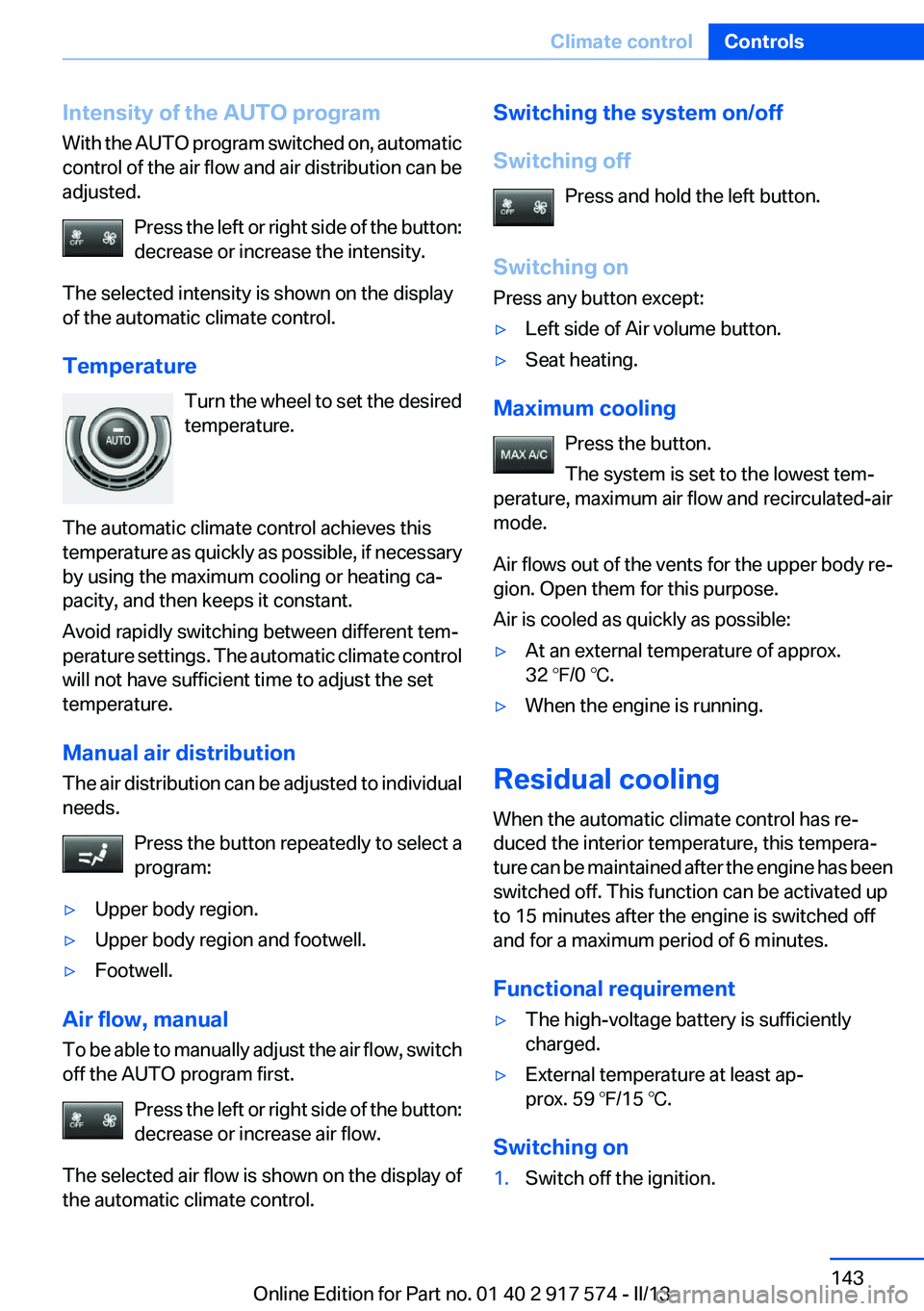
At a glance1Temperature2AUTO program3Vent settings4Air flow, AUTO intensity5Display6Maximum cooling7Seat heating 54
Switching the rear automatic climate
control on/off
1."Settings"2."Climate"3."Rear climate control"
The rear automatic climate control is not opera‐
tional if the automatic climate control is
switched off or if the function for defrosting or
defogging the windows is active.
AUTO program Press the button.
Air flow, air distribution, and tempera‐
ture are controlled automatically:
Depending on the selected temperature, AUTO
intensity, and outside influences, the air is di‐
rected to the upper body and into the footwell.
The cooling function is switched on automati‐
cally with the AUTO program.
Seite 142ControlsClimate control142
Online Edition for Part no. 01 40 2 917 574 - II/13
Page 143 of 224
Intensity of the AUTO program
With the AUTO program switched on, automatic
control of the air flow and air distribution can be
adjusted.
Press the left or right side of the button:
decrease or increase the intensity.
The selected intensity is shown on the display
of the automatic climate control.
Temperature Turn the wheel to set the desired
temperature.
The automatic climate control achieves this
temperature as quickly as possible, if necessary
by using the maximum cooling or heating ca‐
pacity, and then keeps it constant.
Avoid rapidly switching between different tem‐
perature settings. The automatic climate control
will not have sufficient time to adjust the set
temperature.
Manual air distribution
The air distribution can be adjusted to individual
needs.
Press the button repeatedly to select a
program:▷Upper body region.▷Upper body region and footwell.▷Footwell.
Air flow, manual
To be able to manually adjust the air flow, switch
off the AUTO program first.
Press the left or right side of the button:
decrease or increase air flow.
The selected air flow is shown on the display of
the automatic climate control.
Switching the system on/off
Switching off Press and hold the left button.
Switching on
Press any button except:▷Left side of Air volume button.▷Seat heating.
Maximum cooling
Press the button.
The system is set to the lowest tem‐
perature, maximum air flow and recirculated-air
mode.
Air flows out of the vents for the upper body re‐
gion. Open them for this purpose.
Air is cooled as quickly as possible:
▷At an external temperature of approx.
32 ℉/0 ℃.▷When the engine is running.
Residual cooling
When the automatic climate control has re‐
duced the interior temperature, this tempera‐
ture can be maintained after the engine has been
switched off. This function can be activated up
to 15 minutes after the engine is switched off
and for a maximum period of 6 minutes.
Functional requirement
▷The high-voltage battery is sufficiently
charged.▷External temperature at least ap‐
prox. 59 ℉/15 ℃.
Switching on
1.Switch off the ignition.Seite 143Climate controlControls143
Online Edition for Part no. 01 40 2 917 574 - II/13
Page 144 of 224
2.Press the right side of the button on the driv‐
er's side.
The symbol appears on the automatic climate
Control Display.
The interior temperature, air flow and air distri‐
bution can be adjusted with the radio ready state
switched on.
Switching off Press and hold the left button.
The symbol on the automatic climate Control
Display disappears.
Parked-car ventilation
The concept
The parked-car ventilation ventilates the vehicle
interior and lowers its temperature, if necessary.
The system can be switched on and off directly
or by using two preset switch-on times. It re‐
mains switched on for 30 minutes.
Operation can be performed via iDrive.
Open the vents to allow air to flow out.
Functional requirement
▷When using a preset switch-on time: an ex‐
ternal temperature above ap‐
prox. 59 ℉/15 ℃.▷When operated directly and if there is no
parked-car heating: any external tempera‐
ture.
Switching on/off directly
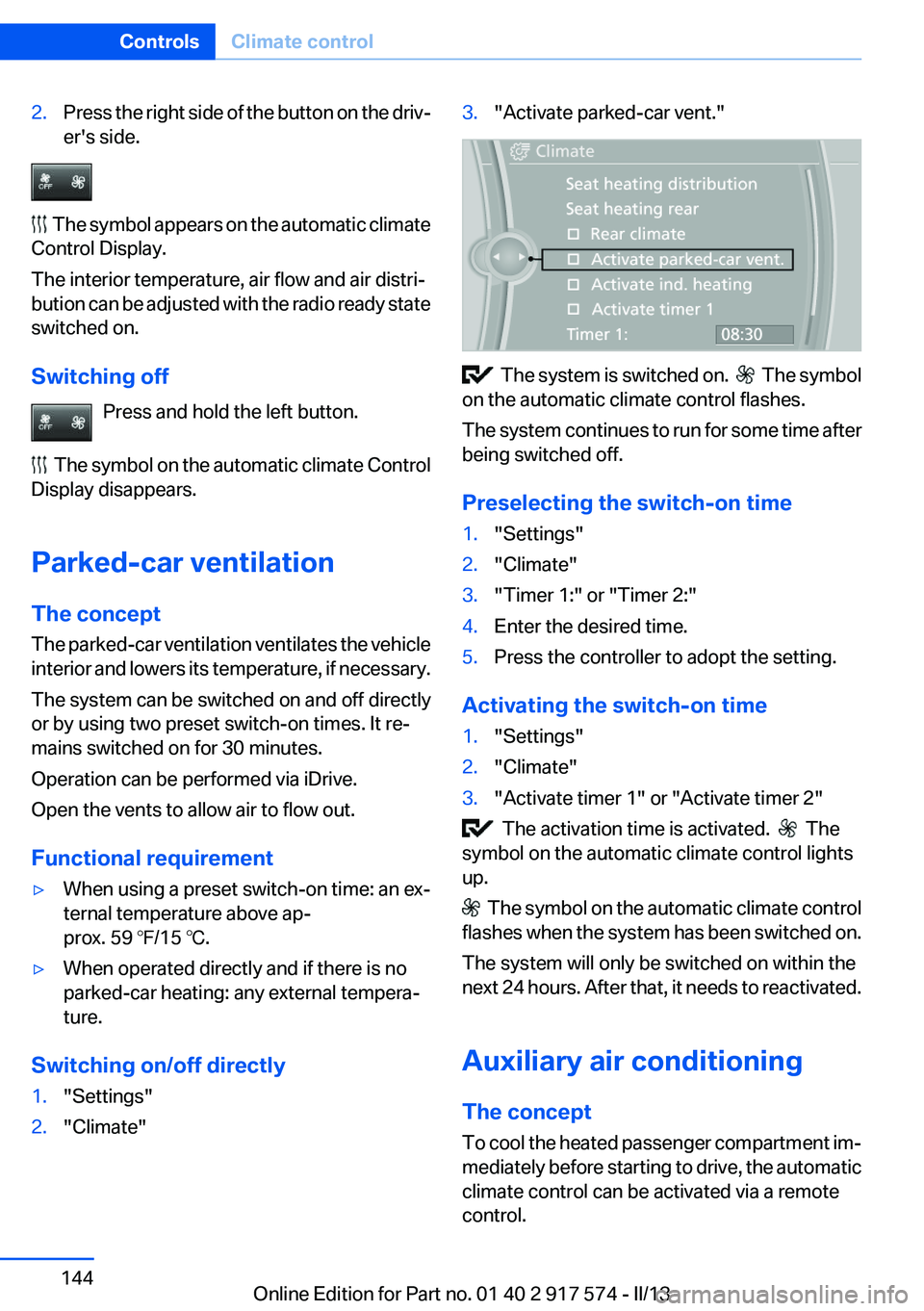
1."Settings"2."Climate"3."Activate parked-car vent."
The system is switched on. The symbol
on the automatic climate control flashes.
The system continues to run for some time after
being switched off.
Preselecting the switch-on time
1."Settings"2."Climate"3."Timer 1:" or "Timer 2:"4.Enter the desired time.5.Press the controller to adopt the setting.
Activating the switch-on time
1."Settings"2."Climate"3."Activate timer 1" or "Activate timer 2"
The activation time is activated. The
symbol on the automatic climate control lights
up.
The symbol on the automatic climate control
flashes when the system has been switched on.
The system will only be switched on within the
next 24 hours. After that, it needs to reactivated.
Auxiliary air conditioning
The concept
To cool the heated passenger compartment im‐
mediately before starting to drive, the automatic
climate control can be activated via a remote
control.
Seite 144ControlsClimate control144
Online Edition for Part no. 01 40 2 917 574 - II/13
Page 145 of 224
The automatic climate control reduces the inte‐
rior temperature with high cooling power for ap‐
prox. two minutes.
Remote control
The concept
The remote control can be used to activate the
auxiliary air conditioning for two minutes de‐
pending on the charge level of the battery and
from an external temperature of
about 59 ℉/15 ℃.
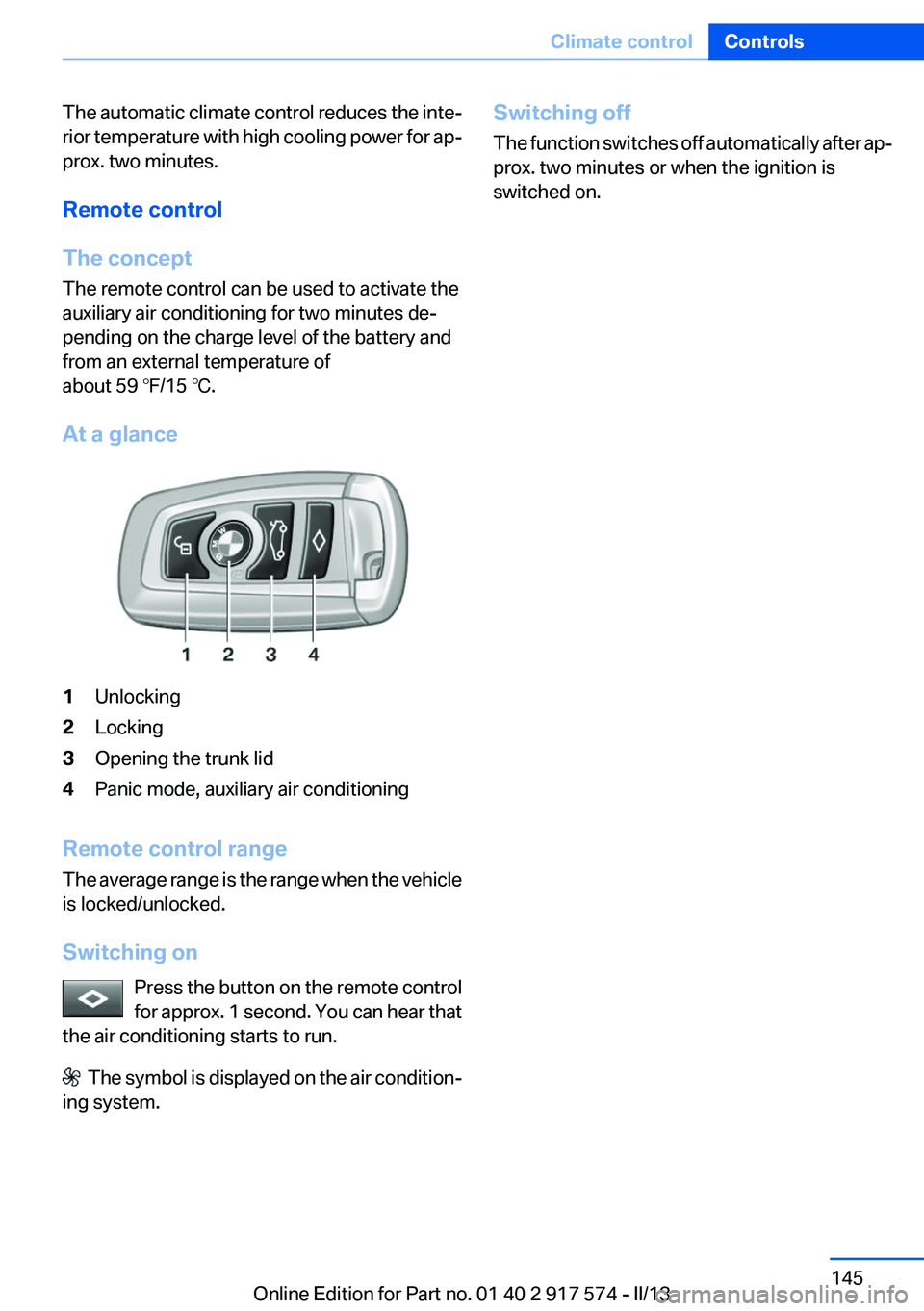
At a glance1Unlocking2Locking3Opening the trunk lid4Panic mode, auxiliary air conditioning
Remote control range
The average range is the range when the vehicle
is locked/unlocked.
Switching on Press the button on the remote control
for approx. 1 second. You can hear that
the air conditioning starts to run.
The symbol is displayed on the air condition‐
ing system.
Switching off
The function switches off automatically after ap‐
prox. two minutes or when the ignition is
switched on.Seite 145Climate controlControls145
Online Edition for Part no. 01 40 2 917 574 - II/13
Page 160 of 224
3.Press and hold down brake pedal.4.Use the accelerator pedal to maintain an en‐
gine speed of approx. 2,000 rpm.
After a few minutes, the high-voltage battery is
fully charged again.
The battery charge indicator in the instrument
cluster, refer to page 84, is used to check the
status.
General driving notes
Closing the trunk lid Drive with the trunk lid closed
Only drive with the tailgate closed; other‐
wise, in the event of an accident or braking or
evasive maneuvers, passengers or other road
users may be injured or the vehicle may be dam‐
aged. In addition, exhaust fumes may enter the
passenger compartment.◀
If driving with the tailgate open cannot be
avoided:
▷Close all windows and the glass sunroof.▷Greatly increase the blower speed.▷Drive moderately.
Hot exhaust system
Hot exhaust system
High temperatures are generated in the
exhaust system.
Do not remove the heat shields installed and
never apply undercoating to them. When driv‐
ing, standing at idle and while parking, take care
to avoid possible contact between the hot ex‐
haust system and any highly flammable materi‐
als such as hay, leaves, grass, etc. Such contact
could lead to a fire, and with it the risk of serious
personal injury as well as property damage.
Do not touch hot exhaust pipes; otherwise, there
is the danger of getting burned.◀
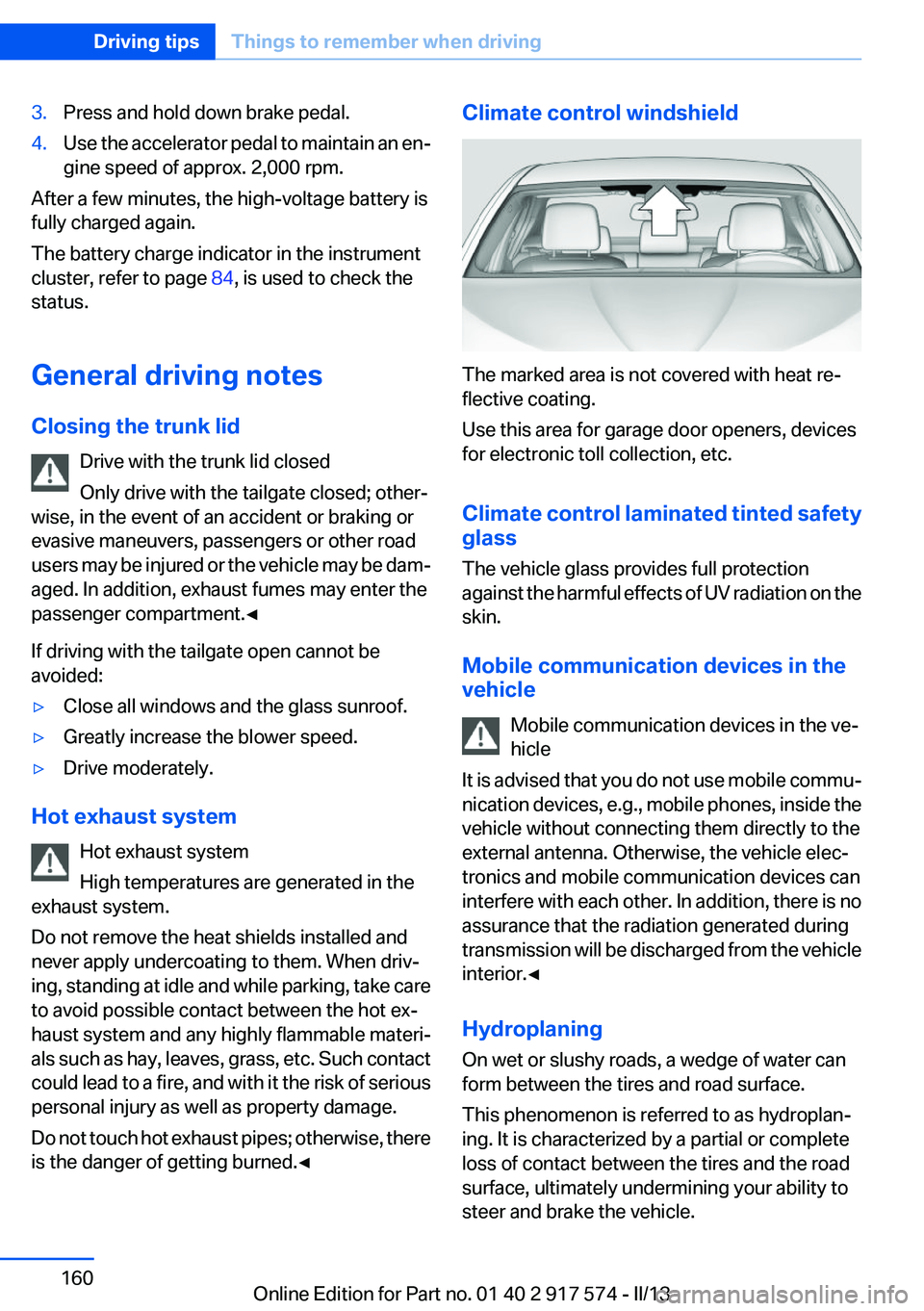
Climate control windshield
The marked area is not covered with heat re‐
flective coating.
Use this area for garage door openers, devices
for electronic toll collection, etc.
Climate control laminated tinted safety
glass
The vehicle glass provides full protection
against the harmful effects of UV radiation on the
skin.
Mobile communication devices in the
vehicle
Mobile communication devices in the ve‐
hicle
It is advised that you do not use mobile commu‐
nication devices, e.g., mobile phones, inside the
vehicle without connecting them directly to the
external antenna. Otherwise, the vehicle elec‐
tronics and mobile communication devices can
interfere with each other. In addition, there is no
assurance that the radiation generated during
transmission will be discharged from the vehicle
interior.◀
Hydroplaning
On wet or slushy roads, a wedge of water can
form between the tires and road surface.
This phenomenon is referred to as hydroplan‐
ing. It is characterized by a partial or complete
loss of contact between the tires and the road
surface, ultimately undermining your ability to
steer and brake the vehicle.
Seite 160Driving tipsThings to remember when driving160
Online Edition for Part no. 01 40 2 917 574 - II/13
Page 162 of 224
Should corrosion form on the brake discs, the
brakes will tend to respond with a pulsating ef‐
fect that generally cannot be corrected.
Condensation under the parked vehicle
When using the automatic climate control, con‐
densation water develops that exits underneath
the vehicle.
Traces of water under the vehicle like this are
normal.Seite 162Driving tipsThings to remember when driving162
Online Edition for Part no. 01 40 2 917 574 - II/13
Page 167 of 224
Braking longer will charge the high-voltage bat‐
tery more.
Use coasting conditions
When approaching a red light, take your foot off
the accelerator and let the vehicle coast to a halt.
On a downhill gradient, take your foot off the ac‐
celerator and let the vehicle roll.
The flow of fuel is interrupted while coasting.
Switch off the engine during
longer stops
Switch off the engine during longer stops, e.g.,
at traffic lights, railroad crossings or in traffic
congestion.
Switch off any functions that
are not currently needed
Functions such as seat heating and the rear win‐
dow defroster require a lot of energy and con‐
sume additional fuel, especially in city and stop-
and-go traffic.
Therefore, switch off these functions if they are
not actually needed.
Have maintenance carried out
Have vehicles maintained regularly to achieve
optimal vehicle economy and operating life.
Have the maintenance carried out by your serv‐
ice center.
Please also note the BMW Maintenance Sys‐
tem, refer to page 188.ECO PRO
The concept
ECO PRO supports a driving style that saves on
fuel consumption. For this purpose, the engine
control and comfort functions, e. g. the climate
control output, are adjusted.
eDRIVE electric driving, refer to page 69, and the
Coasting, refer to page 69, driving status is be‐
coming possible more and more often.
In addition, context-sensitive instructions can
be displayed that assist in driving in a manner
that optimizes fuel consumption.
The extension of the range that is achieved as a
result can be displayed in the instrument cluster.
At a glance
The system includes the following
EfficientDynamics functions and displays:▷ECO PRO bonus range, refer to page 168▷ECO PRO tips driving instruction, refer to
page 169▷ECO PRO climate control, refer to
page 168
Activating ECO PRO
Press button repeatedly until ECO PRO
is displayed in the instrument cluster.
Configuring ECO PRO
Via the Driving Dynamics Control
1.Activate ECO PRO.2."Configure ECO PRO"Seite 167Saving fuelDriving tips167
Online Edition for Part no. 01 40 2 917 574 - II/13
Page 168 of 224
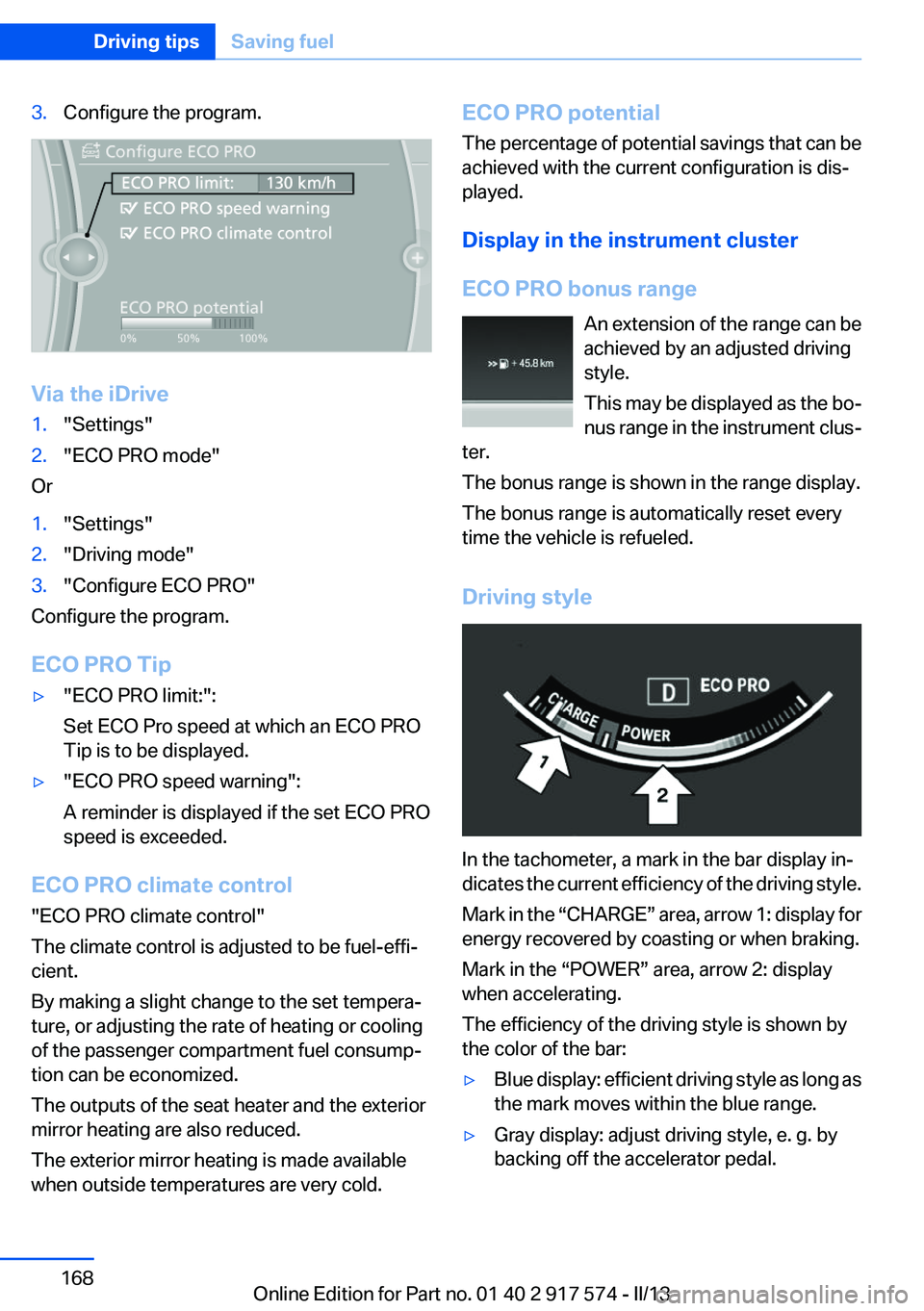
3.Configure the program.
Via the iDrive
1."Settings"2."ECO PRO mode"
Or
1."Settings"2."Driving mode"3."Configure ECO PRO"
Configure the program.
ECO PRO Tip
▷"ECO PRO limit:":
Set ECO Pro speed at which an ECO PRO
Tip is to be displayed.▷"ECO PRO speed warning":
A reminder is displayed if the set ECO PRO
speed is exceeded.
ECO PRO climate control
"ECO PRO climate control"
The climate control is adjusted to be fuel-effi‐
cient.
By making a slight change to the set tempera‐
ture, or adjusting the rate of heating or cooling
of the passenger compartment fuel consump‐
tion can be economized.
The outputs of the seat heater and the exterior
mirror heating are also reduced.
The exterior mirror heating is made available
when outside temperatures are very cold.
ECO PRO potential
The percentage of potential savings that can be
achieved with the current configuration is dis‐
played.
Display in the instrument cluster
ECO PRO bonus range An extension of the range can be
achieved by an adjusted driving
style.
This may be displayed as the bo‐
nus range in the instrument clus‐
ter.
The bonus range is shown in the range display.
The bonus range is automatically reset every
time the vehicle is refueled.
Driving style
In the tachometer, a mark in the bar display in‐
dicates the current efficiency of the driving style.
Mark in the “CHARGE” area, arrow 1: display for
energy recovered by coasting or when braking.
Mark in the “POWER” area, arrow 2: display
when accelerating.
The efficiency of the driving style is shown by
the color of the bar:
▷Blue display: efficient driving style as long as
the mark moves within the blue range.▷Gray display: adjust driving style, e. g. by
backing off the accelerator pedal.Seite 168Driving tipsSaving fuel168
Online Edition for Part no. 01 40 2 917 574 - II/13
Page 214 of 224
Everything from A to Z
IndexA
ABS, Antilock Brake Sys‐ tem 117
Activated-charcoal filter 141
Activate drive readiness 67
Active Blind Spot Detec‐ tion 113
ActiveHybrid, system 29
Active Protection 115
Active seat, front 53
Active seat ventilation, front 54
Adaptive brake lights, refer to Brake force display 115
Adaptive light control 96
Additives, oil 185
Adjustments, seats/head re‐ straints 51
After washing vehicle 205
Airbags 99
Airbags, indicator/warning light 100
Air circulation, refer to Recir‐ culated-air mode 140
Air, dehumidifying, refer to Cooling function 140
Air distribution, manual 139
Air flow, automatic climate control 139
Air pressure, tires 175
Air vents, refer to Ventila‐ tion 141
Alarm system 46
Alarm, unintentional 47
All around the center con‐ sole 16
All around the headliner 17
All around the steering wheel 14 ALL program, automatic cli‐
mate control 140
All-season tires, refer to Win‐ ter tires 180
Alternating-code hand-held transmitter 147
Alternative oil types 185
Ambient light 98
Antifreeze, washer fluid 75
Antilock Brake System, ABS 117
Anti-slip control, refer to DSC 117
Approved axle load 211
Approved engine oils 185
Armrest, refer to Center arm‐ rest 153
Arrival time 90
Ashtray 148
Ashtray, front 148
Ashtray, rear 149
Assistance for the combustion engine 70
Assistance, Roadside Assis‐ tance 199
Assistance when driving off 117
ASSIST, Hybrid system 70
AUTO H button, refer to Auto‐ matic Hold 71
AUTO intensity 139
Automatic car wash 204
Automatic climate con‐ trol 138
Automatic Curb Monitor 60
Automatic deactivation, front passenger airbags 101
Automatic deactivation of the hybrid system 203
Automatic engine start-stop function 68 Automatic headlamp con‐
trol 95
Automatic Hold 71
Automatic locking 41
Automatic recirculated-air control 140
Automatic Soft Closing, doors 41
Automatic tailgate 42
Automatic transmission with Steptronic 76
AUTO program, automatic cli‐ mate control 139
AUTO program, intensity 139
Auxiliary air conditioning 144
Average fuel consumption 89
Average speed 89
Axle loads, weights 211
B
Backrest curvature, refer to Lumbar support 53
Backup camera 126
Band-aids, refer to First aid kit 199
Bar for tow-starting/tow‐ ing 201
Battery replacement, vehicle battery 196
Battery replacement, vehicle remote control 35
Battery, vehicle 196
Belts, safety belts 55
Beverage holder, cu‐ pholder 154
Blinds, sun protection 48
BMW ActiveHybrid 29
BMW Assist, see user's manual for Navigation, Enter‐Seite 214ReferenceEverything from A to Z214
Online Edition for Part no. 01 40 2 917 574 - II/13