mirror BMW ACTIVEHYBRID5 2013 Owner's Manual
[x] Cancel search | Manufacturer: BMW, Model Year: 2013, Model line: ACTIVEHYBRID5, Model: BMW ACTIVEHYBRID5 2013Pages: 224, PDF Size: 4.96 MB
Page 146 of 224
Interior equipmentVehicle equipment
All standard, country-specific and optional
equipment that is offered in the model series is
described in this chapter. Therefore, equipment
is also described that is not available in a vehicle,
e. g., because of the selected optional equip‐
ment or country variant. This also applies for
safety-related functions and systems.
Integrated universal remote
control
The concept
The integrated universal remote control can op‐
erate up to 3 functions of remote-controlled sys‐
tems such as garage door drives or lighting sys‐
tems. The integrated universal remote control
replaces up to 3 different hand-held transmit‐
ters. To operate the remote control, the buttons
on the interior rearview mirror must be program‐
med with the desired functions. The hand-held
transmitter for the particular system is required
in order to program the remote control.
During programming
During programming and before activat‐
ing a device using the integrated universal re‐
mote control, ensure that there are no people,
animals, or objects in the range of movement of
the remote-controlled device; otherwise, there
is a risk of injury or damage.
Also follow the safety instructions of the hand-
held transmitter.◀
Before selling the vehicle, delete the stored
functions for the sake of security.
Compatibility If this symbol is printed on the packaging
or in the instructions of the system to be
controlled, the system is generally com‐patible with the integrated universal remote
control.
If you have any questions, please contact:▷Your service center.▷www.homelink.com on the Internet.
HomeLink is a registered trademark of Johnson
Controls, Inc.
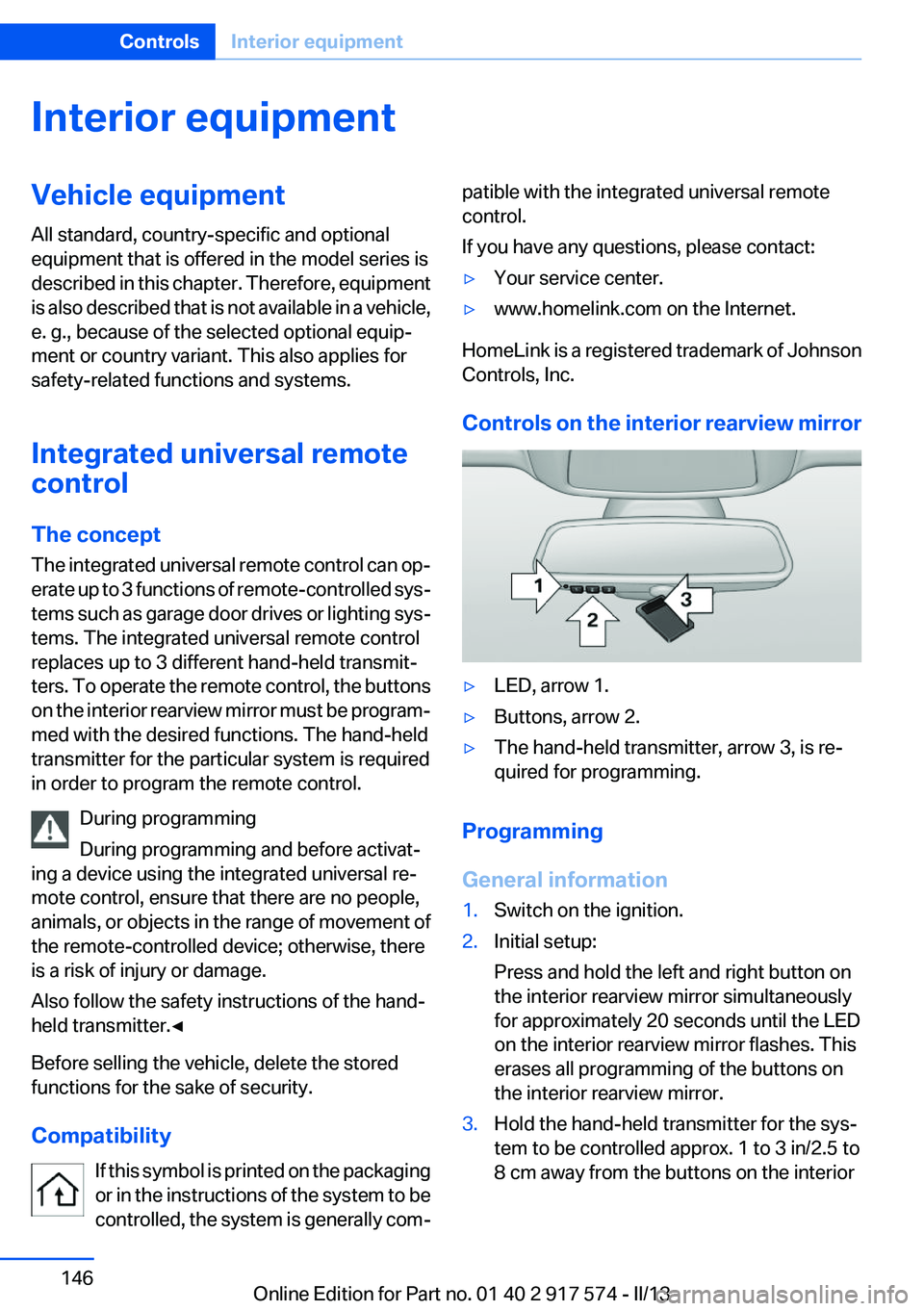
Controls on the interior rearview mirror
▷LED, arrow 1.▷Buttons, arrow 2.▷The hand-held transmitter, arrow 3, is re‐
quired for programming.
Programming
General information
1.Switch on the ignition.2.Initial setup:
Press and hold the left and right button on
the interior rearview mirror simultaneously
for approximately 20 seconds until the LED
on the interior rearview mirror flashes. This
erases all programming of the buttons on
the interior rearview mirror.3.Hold the hand-held transmitter for the sys‐
tem to be controlled approx. 1 to 3 in/2.5 to
8 cm away from the buttons on the interiorSeite 146ControlsInterior equipment146
Online Edition for Part no. 01 40 2 917 574 - II/13
Page 147 of 224
rearview mirror. The required distance de‐
pends on the manual transmitter.4.Simultaneously press and hold the button of
the desired function on the hand-held trans‐
mitter and the button to be programmed on
the interior rearview mirror. The LED on the
interior rearview mirror will begin flashing
slowly.5.Release both buttons as soon as the LED
flashes more rapidly. When the LED is flash‐
ing faster, this indicates that the button on
the interior rearview mirror has been pro‐
grammed.
If the LED does not flash faster after at least
60 seconds, change the distance between
the interior rearview mirror and the hand-
held transmitter and repeat the step. Several
more attempts at different distances may be
necessary. Wait at least 15 seconds be‐
tween attempts.
Canada: if programming with the hand-held
transmitter was interrupted, hold down the
interior rearview mirror button and repeat‐
edly press and release the hand-held trans‐
mitter button for 2 seconds.6.To program other functions on other but‐
tons, repeat steps 3 to 5.
The systems can be controlled using the interior
rearview mirror buttons.
Special feature of the alternating-code
wireless system
If you are unable to operate the system after re‐
peated programming, please check if the sys‐
tem to be controlled features an alternating-
code system.
Read the system's operating manual, or press
the programmed button on the interior rearview
mirror longer. If the LED on the interior rearview
mirror starts flashing rapidly and then stays lit
constantly for 2 seconds, the system features
an alternating-code system. Flashing and con‐
tinuous illumination of the LED will repeat for
approximately 20 seconds.
For systems with an alternating-code system,
the integrated universal remote control and the
system also have to be synchronized.
Please read the operating manual of the system
being set up for information on how to syn‐
chronize the system.
Synchronizing is easier with the aid of a second
person.
To synchronize:1.Park the vehicle within range of the remote-
controlled system.2.Program the relevant button on the interior
rearview mirror as described.3.Locate and press the synchronizing button
on the system being programmed. You have
approx. 30 seconds for the next step.4.Hold down the programmed button on the
interior rearview mirror for approximately
3 seconds and then release it. If necessary,
repeat this work step up to three times in or‐
der to finish synchronization. Once synchro‐
nization is complete, the programmed func‐
tion will be carried out.
Reprogramming individual buttons
1.Switch on the ignition.2.Press and hold the interior rearview mirror
button to be programmed.3.As soon as the interior rearview mirror LED
starts flashing slowly, hold the hand-held
transmitter for the system to be controlled
approx. 1 to 3 in/2.5 to 8 cm away from the
buttons on the interior rearview mirror. The
required distance depends on the manual
transmitter.4.Likewise, press and hold the button of the
desired function on the hand-held transmit‐
ter.5.Release both buttons as soon as the interior
rearview mirror LED flashes more rapidly.
When the LED is flashing faster, this indi‐
cates that the button on the interior rearview
mirror has been programmed. The systemSeite 147Interior equipmentControls147
Online Edition for Part no. 01 40 2 917 574 - II/13
Page 148 of 224
can then be controlled by the button on the
interior rearview mirror.
If the LED does not flash faster after at least
60 seconds, change the distance and repeat
the step. Several more attempts at different
distances may be necessary. Wait at least
15 seconds between attempts.
Canada: if programming with the hand-held
transmitter was interrupted, hold down the
interior rearview mirror button and repeat‐
edly press and release the hand-held trans‐
mitter button for 2 seconds.
Controls
Before operation
Before operating a system using the
integrated universal remote control, ensure that
there are no people, animals, or objects within
the range of movement of the remote-controlled
system; otherwise, there is a risk of injury or
damage.
Also follow the safety instructions of the hand-
held transmitter.◀
The system, such as the garage door, can be
operated using the button on the interior rear‐
view mirror while the engine is running or when
the ignition is started. To do this, hold down the
button within receiving range of the system until
the function is activated. The interior rearview
mirror LED stays lit while the wireless signal is
being transmitted.
Deleting stored functions
Press and hold the left and right button on the
interior rearview mirror simultaneously for ap‐
proximately 20 seconds until the LED flashes
rapidly. All stored functions are deleted. The
functions cannot be deleted individually.
Ashtray/cigarette lighter
Automatic transmission: Front
Opening
Press on the cover.
Emptying
Take out the insert.
Lighter
Press on the cover. Push in the lighter.
The lighter can be removed as
soon as it pops back out.
Danger of burns
Only hold the hot lighter by its knob; oth‐
erwise, there is the danger of getting burned.
Switch off the ignition and take the remote con‐
trol with you when leaving the vehicle so that
children cannot use the lighter and burn them‐
selves.◀
Seite 148ControlsInterior equipment148
Online Edition for Part no. 01 40 2 917 574 - II/13
Page 166 of 224
Saving fuelVehicle equipment
All standard, country-specific and optional
equipment that is offered in the model series is
described in this chapter. Therefore, equipment
is also described that is not available in a vehicle,
e. g., because of the selected optional equip‐
ment or country variant. This also applies for
safety-related functions and systems.
General information
Your vehicle contains advanced technology for
the reduction of fuel consumption and emis‐
sions.
Fuel consumption depends on a number of dif‐
ferent factors.
The implementation of certain measures, driv‐
ing style and regular maintenance can have an
influence on fuel consumption and on the envi‐
ronmental impact.
Remove unnecessary cargo
Additional weight increases fuel consumption.
Remove attached parts
following use
Remove auxiliary mirrors, roof or rear luggage
racks which are no longer required following
use.
Attached parts on the vehicle impair the aero‐
dynamics and increase the fuel consumption.Close the windows and glass
sunroof
Driving with the glass sunroof and windows
open results in increased air resistance and
raises fuel consumption.
Tires
General information
Tires can affect consumption values in various
ways, for instance consumption can be influ‐
enced by the size of the tires.
Check the tire inflation pressure
regularly
Check and, if necessary, correct the tire inflation
pressure at least twice a month and before start‐
ing on a long trip.
Low tire inflation pressure increases rolling re‐
sistance and thus raises fuel consumption and
tire wear.
Drive away without delay
Do not wait for the engine to warm up while the
vehicle remains stationary. Start driving right
away, but at moderate engine speeds.
This is the fastest way for the cold engine to
reach its operating temperature.
Look well ahead when driving
Avoid unnecessary acceleration and braking.
By maintaining a suitable distance to the vehicle
driving ahead of you.
Driving smoothly and looking ahead reduces
fuel consumption.Seite 166Driving tipsSaving fuel166
Online Edition for Part no. 01 40 2 917 574 - II/13
Page 168 of 224
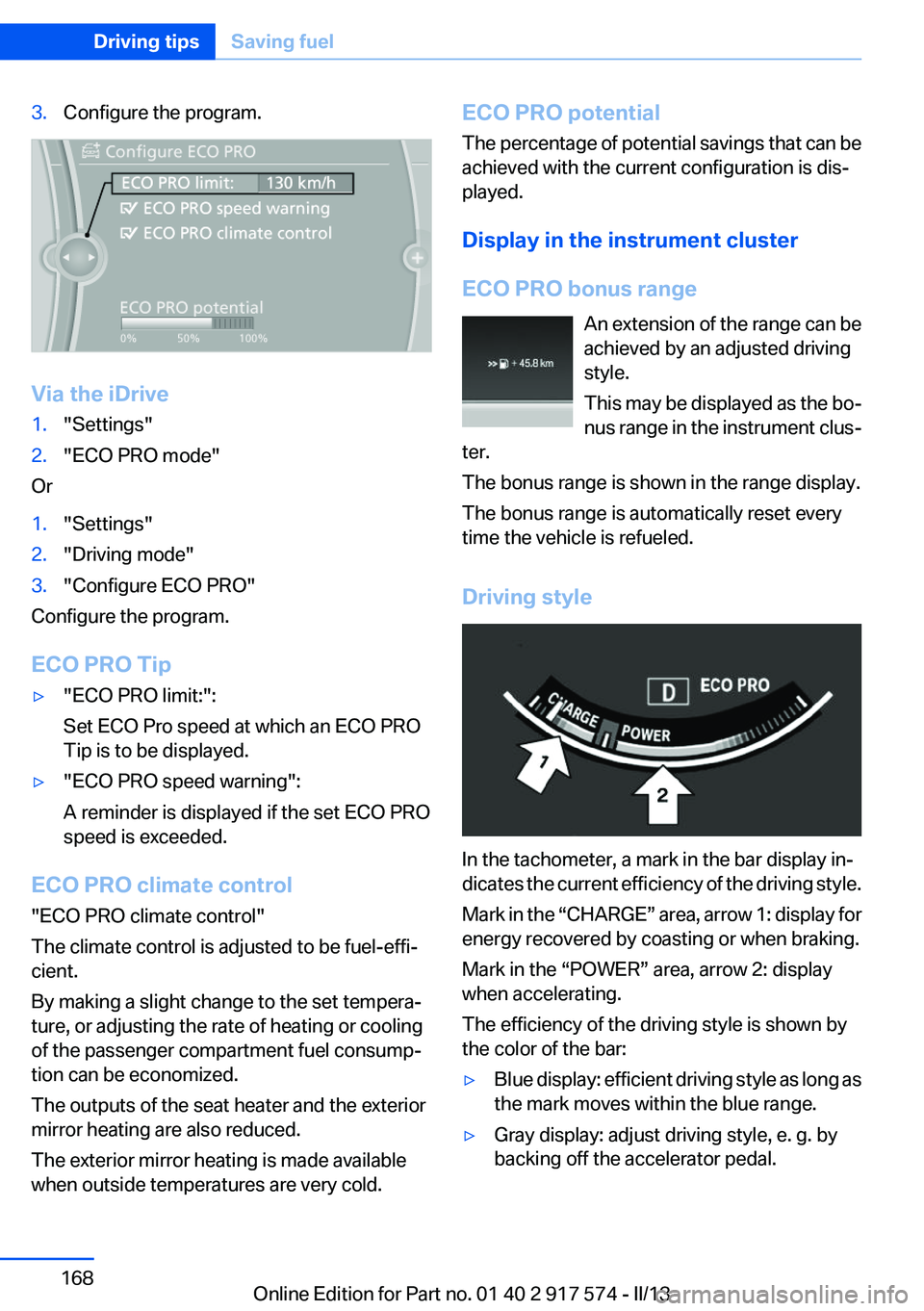
3.Configure the program.
Via the iDrive
1."Settings"2."ECO PRO mode"
Or
1."Settings"2."Driving mode"3."Configure ECO PRO"
Configure the program.
ECO PRO Tip
▷"ECO PRO limit:":
Set ECO Pro speed at which an ECO PRO
Tip is to be displayed.▷"ECO PRO speed warning":
A reminder is displayed if the set ECO PRO
speed is exceeded.
ECO PRO climate control
"ECO PRO climate control"
The climate control is adjusted to be fuel-effi‐
cient.
By making a slight change to the set tempera‐
ture, or adjusting the rate of heating or cooling
of the passenger compartment fuel consump‐
tion can be economized.
The outputs of the seat heater and the exterior
mirror heating are also reduced.
The exterior mirror heating is made available
when outside temperatures are very cold.
ECO PRO potential
The percentage of potential savings that can be
achieved with the current configuration is dis‐
played.
Display in the instrument cluster
ECO PRO bonus range An extension of the range can be
achieved by an adjusted driving
style.
This may be displayed as the bo‐
nus range in the instrument clus‐
ter.
The bonus range is shown in the range display.
The bonus range is automatically reset every
time the vehicle is refueled.
Driving style
In the tachometer, a mark in the bar display in‐
dicates the current efficiency of the driving style.
Mark in the “CHARGE” area, arrow 1: display for
energy recovered by coasting or when braking.
Mark in the “POWER” area, arrow 2: display
when accelerating.
The efficiency of the driving style is shown by
the color of the bar:
▷Blue display: efficient driving style as long as
the mark moves within the blue range.▷Gray display: adjust driving style, e. g. by
backing off the accelerator pedal.Seite 168Driving tipsSaving fuel168
Online Edition for Part no. 01 40 2 917 574 - II/13
Page 197 of 224
▷When making frequent short-distance
drives.▷If the vehicle is not used for prolonged peri‐
ods, longer than a month.
Starting aid terminals
In the vehicle, only charge the battery via the
starting aid terminals, refer to page 200, in the
engine compartment with the engine off.
Power failure
After a temporary power loss, some equipment
needs to be reinitialized.
Individual settings need to be reprogrammed:
▷Seat, mirror, and steering wheel memory:
store the positions again.▷Time: update.▷Date: update.▷Radio station: save again.▷Navigation system: wait for the operability of
the navigation.
Disposing of old batteries
Have old batteries disposed of by your
service center or bring them to a recy‐
cling center.
Maintain the battery in an upright position for
transport and storage. Secure the battery so
that it does not tip over during transport.
Fuses
Notes Replacing fuses
Never attempt to repair a blown fuse and
do not replace a defective fuse with a substitute
of another color or amperage rating; this could
lead to a circuit overload, ultimately resulting in
a fire in the vehicle.◀
Plastic tweezers and information on the fuse
types and locations are stored in the fuse box in
the cargo area.
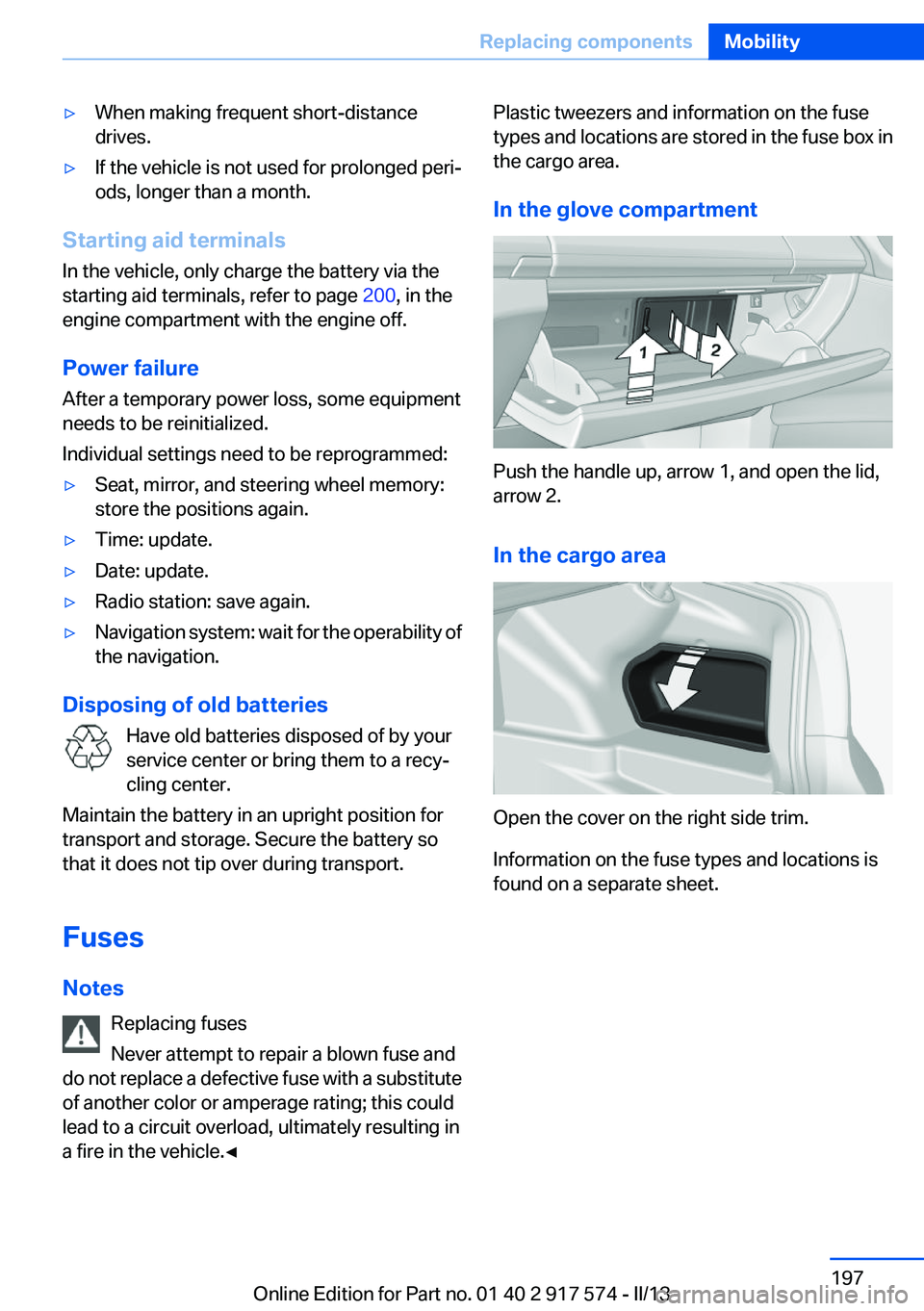
In the glove compartment
Push the handle up, arrow 1, and open the lid,
arrow 2.
In the cargo area
Open the cover on the right side trim.
Information on the fuse types and locations is
found on a separate sheet.
Seite 197Replacing componentsMobility197
Online Edition for Part no. 01 40 2 917 574 - II/13
Page 204 of 224
CareVehicle equipment
All standard, country-specific and optional
equipment that is offered in the model series is
described in this chapter. Therefore, equipment
is also described that is not available in a vehicle,
e. g., because of the selected optional equip‐
ment or country variant. This also applies for
safety-related functions and systems.
Car washes
Hints Steam jets or high-pressure washers
When using steam jets or high-pressure
washers, hold them a sufficient distance away
and use a maximum temperature of
140 ℉/60 ℃.
Ensure that a distance of at least 31.5 in‐
ches/80 cm from the glass sunroof is maintained
at all times. Holding them too close or using ex‐
cessively high pressures or temperatures can
cause damage or preliminary damage that may
then lead to long-term damage.
Follow the user's manual for the high-pressure
washer.◀
Cleaning sensors/cameras with high-
pressure washers
When using high-pressure washers, do not
spray the exterior sensors and cameras, e.g.,
Park Distance Control, for extended periods of
time and only from a distance of at least
12 in/30 cm.◀
Regularly remove foreign items such as leaves
in the area below the windshield when the hood
is raised.
Wash your vehicle frequently, particularly in win‐
ter.Intense soiling and road salt can damage the ve‐
hicle.
Automatic car washes
Notes
Note the following:▷Give preference to cloth car washes or those
that use soft brushes in order to avoid paint
damage.▷Make sure that the wheels and tires are not
damaged by the transport mechanisms.▷Fold in the exterior mirrors; otherwise, they
may be damaged, depending on the width of
the vehicle.▷Deactivate the rain sensor, refer to
page 74,to avoid unintentional wiper activa‐
tion.▷In some cases, an unintentional alarm can be
triggered by the interior motion sensor of the
alarm system. Follow the instructions on
avoiding an unintentional alarm, refer to
page 47.
Guide rails in car washes
Avoid car washes with guide rails higher
than 4 in/10 cm; otherwise, the vehicle body
could be damaged.◀
Before driving into a car wash
In order to ensure that the vehicle can roll in a car
wash, take the following steps:
Automatic transmission:
1.Release parking brake, refer to page 70, and
deactivate Automatic Hold, refer to
page 71.2.Drive into the car wash.3.Depress the brake pedal as needed.Seite 204MobilityCare204
Online Edition for Part no. 01 40 2 917 574 - II/13
Page 210 of 224
Technical dataVehicle equipment
All standard, country-specific and optional
equipment that is offered in the model series is
described in this chapter. Therefore, equipmentis also described that is not available in a vehicle,
e. g., because of the selected optional equip‐
ment or country variant. This also applies for
safety-related functions and systems.
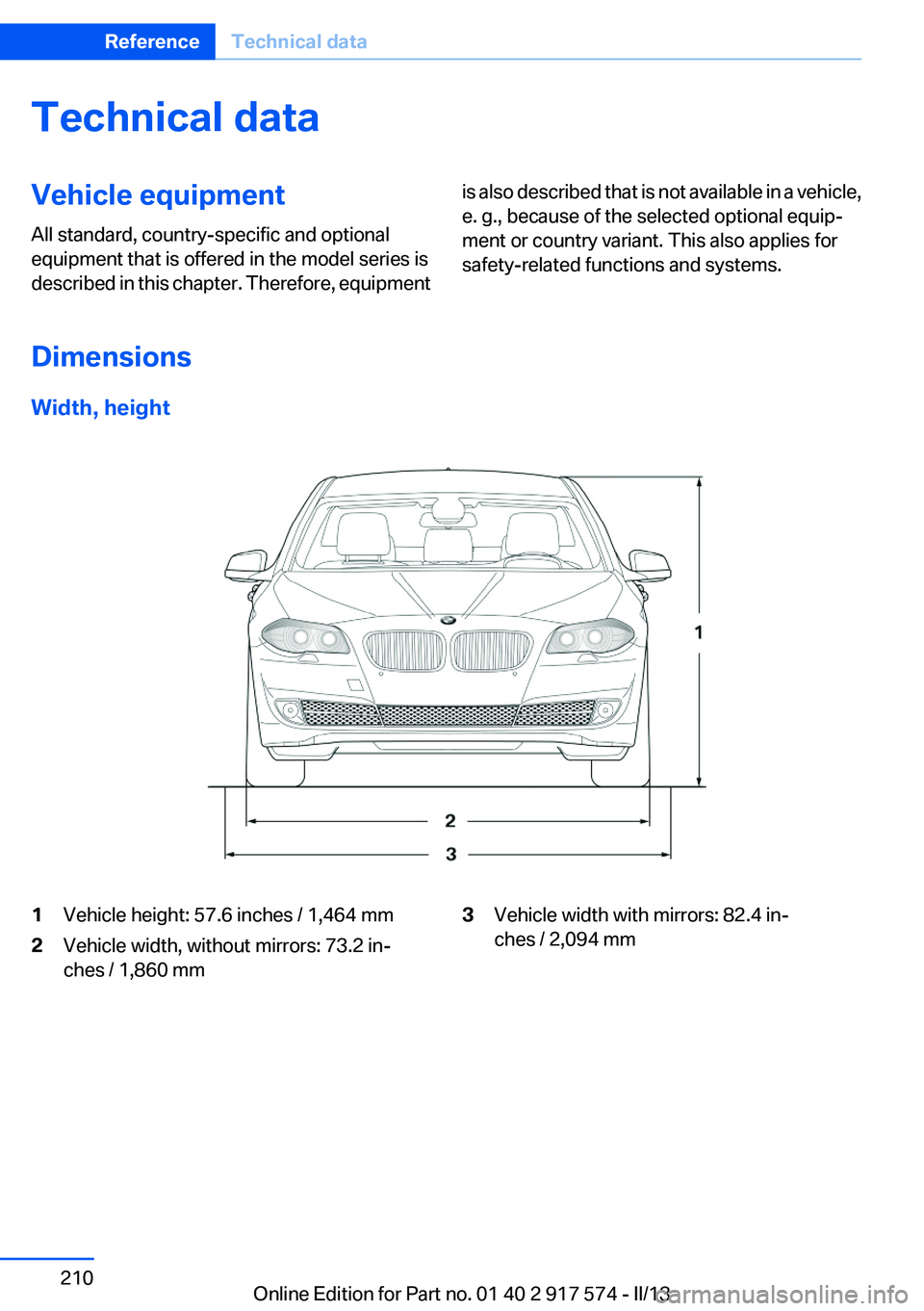
Dimensions
Width, height
1Vehicle height: 57.6 inches / 1,464 mm2Vehicle width, without mirrors: 73.2 in‐
ches / 1,860 mm3Vehicle width with mirrors: 82.4 in‐
ches / 2,094 mmSeite 210ReferenceTechnical data210
Online Edition for Part no. 01 40 2 917 574 - II/13
Page 216 of 224
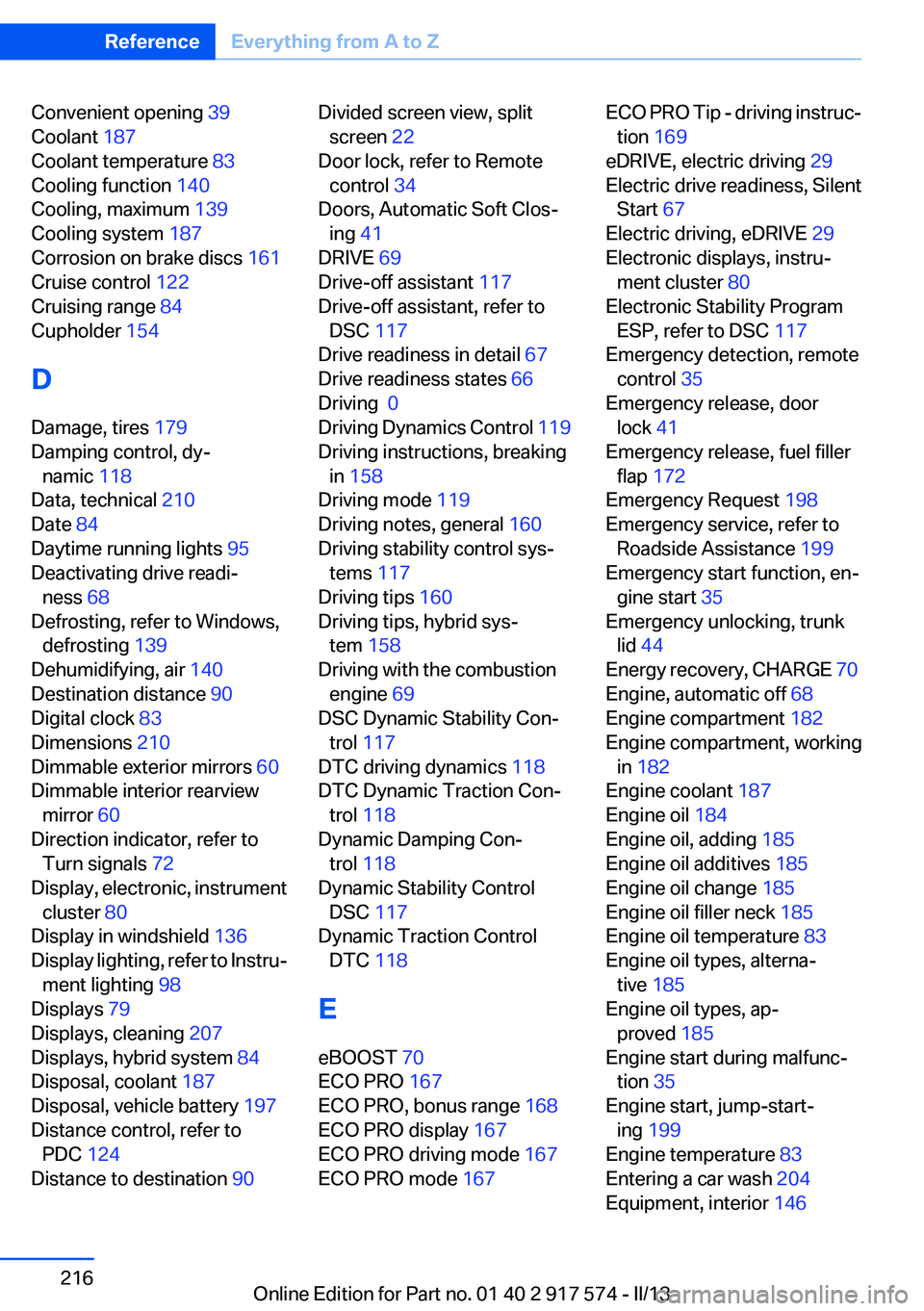
Convenient opening 39
Coolant 187
Coolant temperature 83
Cooling function 140
Cooling, maximum 139
Cooling system 187
Corrosion on brake discs 161
Cruise control 122
Cruising range 84
Cupholder 154
D
Damage, tires 179
Damping control, dy‐ namic 118
Data, technical 210
Date 84
Daytime running lights 95
Deactivating drive readi‐ ness 68
Defrosting, refer to Windows, defrosting 139
Dehumidifying, air 140
Destination distance 90
Digital clock 83
Dimensions 210
Dimmable exterior mirrors 60
Dimmable interior rearview mirror 60
Direction indicator, refer to Turn signals 72
Display, electronic, instrument cluster 80
Display in windshield 136
Display lighting, refer to Instru‐ ment lighting 98
Displays 79
Displays, cleaning 207
Displays, hybrid system 84
Disposal, coolant 187
Disposal, vehicle battery 197
Distance control, refer to PDC 124
Distance to destination 90 Divided screen view, split
screen 22
Door lock, refer to Remote control 34
Doors, Automatic Soft Clos‐ ing 41
DRIVE 69
Drive-off assistant 117
Drive-off assistant, refer to DSC 117
Drive readiness in detail 67
Drive readiness states 66
Driving 0
Driving Dynamics Control 119
Driving instructions, breaking in 158
Driving mode 119
Driving notes, general 160
Driving stability control sys‐ tems 117
Driving tips 160
Driving tips, hybrid sys‐ tem 158
Driving with the combustion engine 69
DSC Dynamic Stability Con‐ trol 117
DTC driving dynamics 118
DTC Dynamic Traction Con‐ trol 118
Dynamic Damping Con‐ trol 118
Dynamic Stability Control DSC 117
Dynamic Traction Control DTC 118
E
eBOOST 70
ECO PRO 167
ECO PRO, bonus range 168
ECO PRO display 167
ECO PRO driving mode 167
ECO PRO mode 167 ECO PRO Tip - driving instruc‐
tion 169
eDRIVE, electric driving 29
Electric drive readiness, Silent Start 67
Electric driving, eDRIVE 29
Electronic displays, instru‐ ment cluster 80
Electronic Stability Program ESP, refer to DSC 117
Emergency detection, remote control 35
Emergency release, door lock 41
Emergency release, fuel filler flap 172
Emergency Request 198
Emergency service, refer to Roadside Assistance 199
Emergency start function, en‐ gine start 35
Emergency unlocking, trunk lid 44
Energy recovery, CHARGE 70
Engine, automatic off 68
Engine compartment 182
Engine compartment, working in 182
Engine coolant 187
Engine oil 184
Engine oil, adding 185
Engine oil additives 185
Engine oil change 185
Engine oil filler neck 185
Engine oil temperature 83
Engine oil types, alterna‐ tive 185
Engine oil types, ap‐ proved 185
Engine start during malfunc‐ tion 35
Engine start, jump-start‐ ing 199
Engine temperature 83
Entering a car wash 204
Equipment, interior 146 Seite 216ReferenceEverything from A to Z216
Online Edition for Part no. 01 40 2 917 574 - II/13
Page 217 of 224
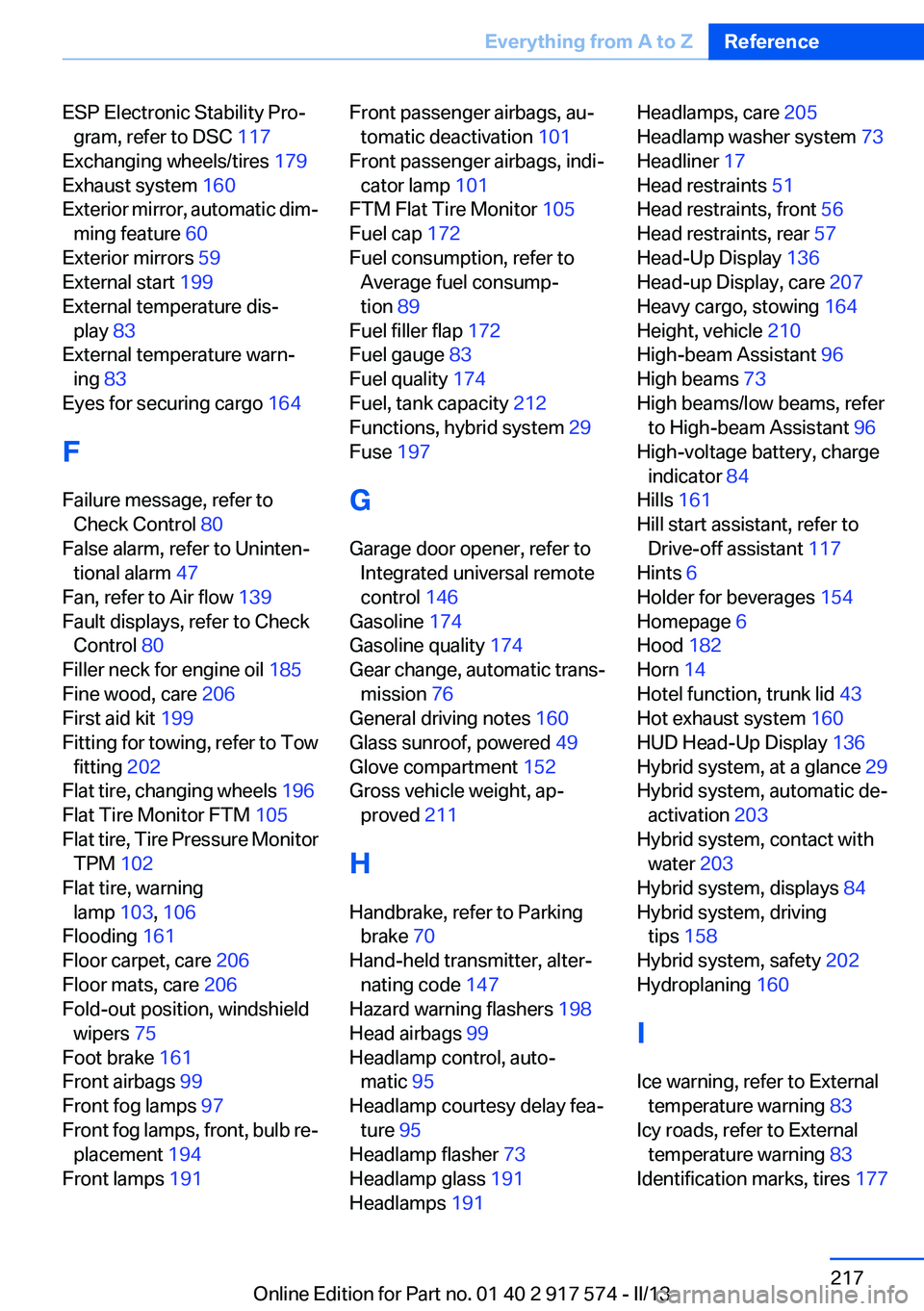
ESP Electronic Stability Pro‐gram, refer to DSC 117
Exchanging wheels/tires 179
Exhaust system 160
Exterior mirror, automatic dim‐ ming feature 60
Exterior mirrors 59
External start 199
External temperature dis‐ play 83
External temperature warn‐ ing 83
Eyes for securing cargo 164
F
Failure message, refer to Check Control 80
False alarm, refer to Uninten‐ tional alarm 47
Fan, refer to Air flow 139
Fault displays, refer to Check Control 80
Filler neck for engine oil 185
Fine wood, care 206
First aid kit 199
Fitting for towing, refer to Tow fitting 202
Flat tire, changing wheels 196
Flat Tire Monitor FTM 105
Flat tire, Tire Pressure Monitor TPM 102
Flat tire, warning lamp 103, 106
Flooding 161
Floor carpet, care 206
Floor mats, care 206
Fold-out position, windshield wipers 75
Foot brake 161
Front airbags 99
Front fog lamps 97
Front fog lamps, front, bulb re‐ placement 194
Front lamps 191 Front passenger airbags, au‐
tomatic deactivation 101
Front passenger airbags, indi‐ cator lamp 101
FTM Flat Tire Monitor 105
Fuel cap 172
Fuel consumption, refer to Average fuel consump‐
tion 89
Fuel filler flap 172
Fuel gauge 83
Fuel quality 174
Fuel, tank capacity 212
Functions, hybrid system 29
Fuse 197
G
Garage door opener, refer to Integrated universal remote
control 146
Gasoline 174
Gasoline quality 174
Gear change, automatic trans‐ mission 76
General driving notes 160
Glass sunroof, powered 49
Glove compartment 152
Gross vehicle weight, ap‐ proved 211
H
Handbrake, refer to Parking brake 70
Hand-held transmitter, alter‐ nating code 147
Hazard warning flashers 198
Head airbags 99
Headlamp control, auto‐ matic 95
Headlamp courtesy delay fea‐ ture 95
Headlamp flasher 73
Headlamp glass 191
Headlamps 191 Headlamps, care 205
Headlamp washer system 73
Headliner 17
Head restraints 51
Head restraints, front 56
Head restraints, rear 57
Head-Up Display 136
Head-up Display, care 207
Heavy cargo, stowing 164
Height, vehicle 210
High-beam Assistant 96
High beams 73
High beams/low beams, refer to High-beam Assistant 96
High-voltage battery, charge indicator 84
Hills 161
Hill start assistant, refer to Drive-off assistant 117
Hints 6
Holder for beverages 154
Homepage 6
Hood 182
Horn 14
Hotel function, trunk lid 43
Hot exhaust system 160
HUD Head-Up Display 136
Hybrid system, at a glance 29
Hybrid system, automatic de‐ activation 203
Hybrid system, contact with water 203
Hybrid system, displays 84
Hybrid system, driving tips 158
Hybrid system, safety 202
Hydroplaning 160
I
Ice warning, refer to External temperature warning 83
Icy roads, refer to External temperature warning 83
Identification marks, tires 177 Seite 217Everything from A to ZReference217
Online Edition for Part no. 01 40 2 917 574 - II/13