wheel BMW ACTIVEHYBRID5 2013 Service Manual
[x] Cancel search | Manufacturer: BMW, Model Year: 2013, Model line: ACTIVEHYBRID5, Model: BMW ACTIVEHYBRID5 2013Pages: 224, PDF Size: 4.96 MB
Page 135 of 224
▷ " Parking Assistant" Select the symbol on
the Control Display.▷Press the button.
Interrupting automatically
The system is interrupted automatically in the
following situations:
▷If the driver grasps the steering wheel or if
he takes over steering.▷If a gear is selected that does not match the
instruction on the Control Display.▷If a turn signal is activated in the opposite
direction to the desired side for parking.▷If the vehicle speed exceeds approx.
6 mph/10 km/h.▷On snow-covered or slippery road surfaces
if necessary.▷If doors are open.▷If a maximum number of parking attempts or
the time taken for parking is exceeded.
A Check Control message is displayed.
Resume
An interrupted parking procedure can be con‐
tinued if necessary.
Follow the instructions on the Control Display to
do this.
System limits
No parking assistance
The parking assistant does not offer assistance
in the following situations:
▷In tight curves.
Functional limitations
The system may not be fully functional in the
following situations:
▷When sensors are dirty or iced over.▷In heavy fog, rain or snowfall.▷On bumpy road surfaces such as gravel
roads.▷When leaves or snow has collected in the
parking space.
Limits of ultrasonic measurement
The detection of objects can reach the physical
limits of ultrasonic measurement, e.g., in the fol‐
lowing circumstances:
▷With tow bars and trailer hitches.▷With thin or wedge-shaped objects.▷With elevated, protruding objects such as
ledges or cargo.▷With objects with corners and sharp edges.▷With objects with a fine surface structure,
such as fences.
Low objects already displayed, e.g., curbs, can
move into the blind area of the sensors before or
after a continuous tone sounds.
High, protruding objects such as ledges may not
be detected.
The parking assistant may identify parking
spaces that are not suitable for parking.
Malfunction
A Check Control message is displayed.
The parking assistant failed. Have the system
checked.
Seite 135Driving comfortControls135
Online Edition for Part no. 01 40 2 917 574 - II/13
Page 139 of 224
Climate control functions in detail
Manual air distribution Press the button repeatedly to select a
program:▷Upper body region.▷Upper body region and footwell.▷Footwell.▷Windows and footwell: driver's side only.▷Windows, upper body region and footwell:
driver's side only.
If the windows are fogged over, press the AUTO
button on the driver's side to utilize the conden‐
sation sensor.
Temperature Turn the wheel to set the desired
temperature.
The automatic climate control achieves this
temperature as quickly as possible, if necessary
with the maximum cooling or heating capacity,
and then keeps it constant.
Avoid rapidly switching between different tem‐
perature settings. The automatic climate control
will not have sufficient time to adjust the set
temperature.
AUTO program Press the button.
Air flow, air distribution, and tempera‐
ture are controlled automatically.
Depending on the selected temperature, AUTO
intensity, and outside influences, the air is di‐
rected to the windshield, side windows, upper
body, and into the footwell.
The cooling function, refer to page 140, is
switched on automatically with the AUTO pro‐
gram.
At the same time, a condensation sensor con‐
trols the program so as to prevent window con‐
densation as much as possible.
Intensity of the AUTO program
With the AUTO program switched on, automatic
control of the air flow and air distribution can be
adjusted.
Press the left or right side of the button:
decrease or increase the intensity.
The selected intensity is shown on the display
of the automatic climate control.
Air flow, manual
To be able to manually adjust the air flow, switch
off the AUTO program first.
Press the left or right side of the button:
decrease or increase air flow.
The selected air flow is shown on the display of
the automatic climate control.
The air flow of the automatic climate control may
be reduced automatically to save battery power.
Defrosting windows and removing
condensation
Press the button.
Ice and condensation are quickly re‐
moved from the windshield and the front side
windows.
The air flow can be adjusted when the program
is active.
If the windows are fogged over, you can also
switch on the cooling function or press the
AUTO button to utilize the condensation sensor.
Maximum cooling Press the button.
The system is set to the lowest tem‐
perature, maximum air flow and recirculated-air
mode.Seite 139Climate controlControls139
Online Edition for Part no. 01 40 2 917 574 - II/13
Page 141 of 224
2. Press the right side of the button on
the driver's side.
is shown on the display of the automatic cli‐
mate control.
The interior temperature, air volume and air dis‐
tribution can be adjusted with the ignition
switched on.
Switching off
At the lowest fan speed, press the left side of the
button on the driver's side.
on the display of the automatic climate control
goes out.
Switching the system on/off
Switching off
▷Complete system: Press and hold the left button on
the driver's side until the control
clicks off.▷On the front passenger side:
Press and hold the left button on
the front passenger side.
Switching on
Press any button except:
▷ALL program.▷Rear window defroster.▷Left side of Air volume button.▷Seat heating.▷Seat ventilation.
Microfilter/activated-charcoal filter
The microfilter removes dust and pollen from
the incoming air.
The activated-charcoal filter removes gaseous
pollutants from the outside air that enters the
vehicle.
This combined filter should be replaced during
scheduled maintenance, refer to page 188, of
your vehicle.
Ventilation
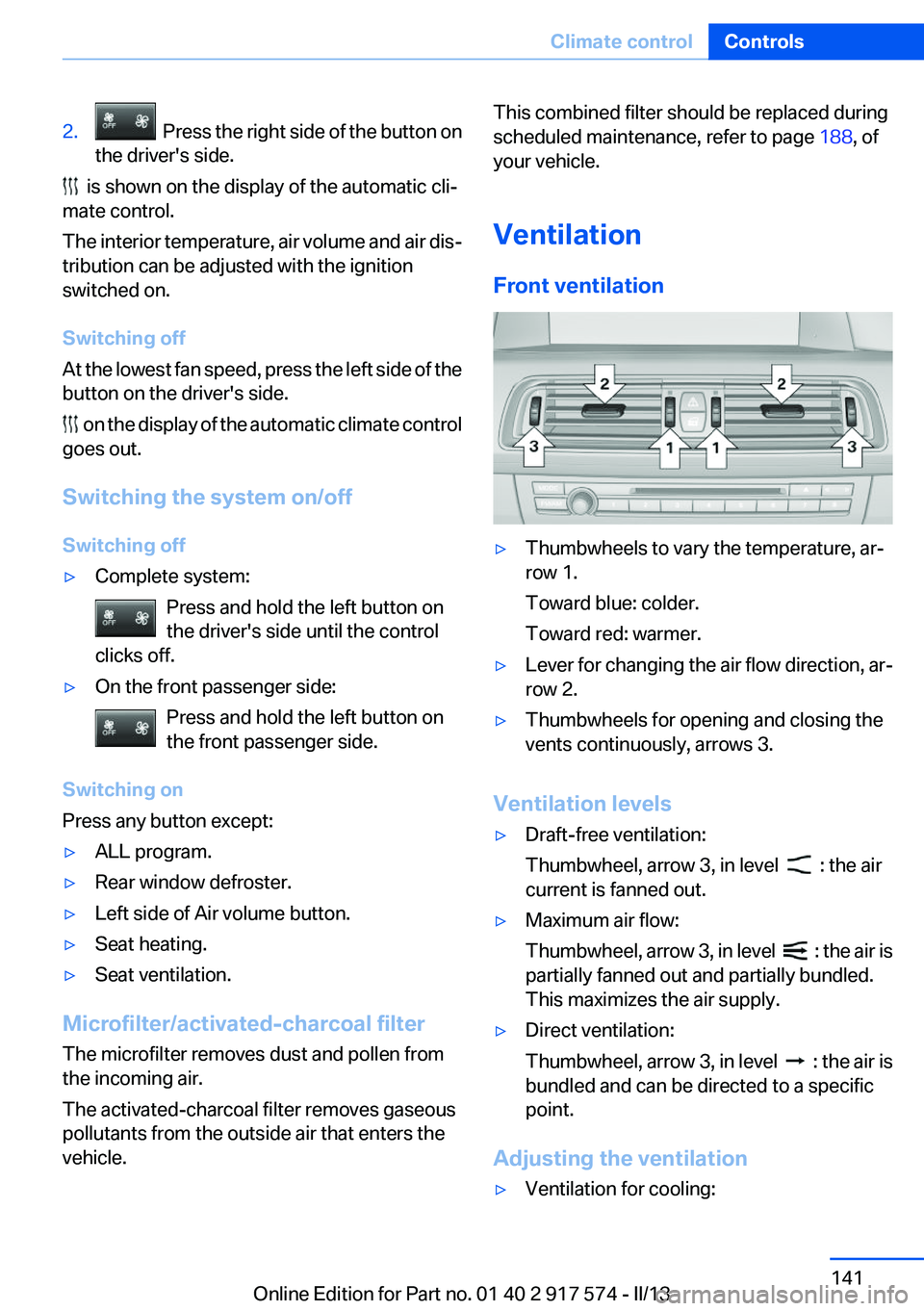
Front ventilation▷Thumbwheels to vary the temperature, ar‐
row 1.
Toward blue: colder.
Toward red: warmer.▷Lever for changing the air flow direction, ar‐
row 2.▷Thumbwheels for opening and closing the
vents continuously, arrows 3.
Ventilation levels
▷Draft-free ventilation:
Thumbwheel, arrow 3, in level
: the air
current is fanned out.
▷Maximum air flow:
Thumbwheel, arrow 3, in level
: the air is
partially fanned out and partially bundled.
This maximizes the air supply.
▷Direct ventilation:
Thumbwheel, arrow 3, in level
: the air is
bundled and can be directed to a specific
point.
Adjusting the ventilation
▷Ventilation for cooling:Seite 141Climate controlControls141
Online Edition for Part no. 01 40 2 917 574 - II/13
Page 142 of 224
Adjust the vent to direct the air in your di‐
rection, such as if the vehicle interior is hot
from the sun.▷Draft-free ventilation:
Adjust the vent to let the air flow past you.
Ventilation in rear, center
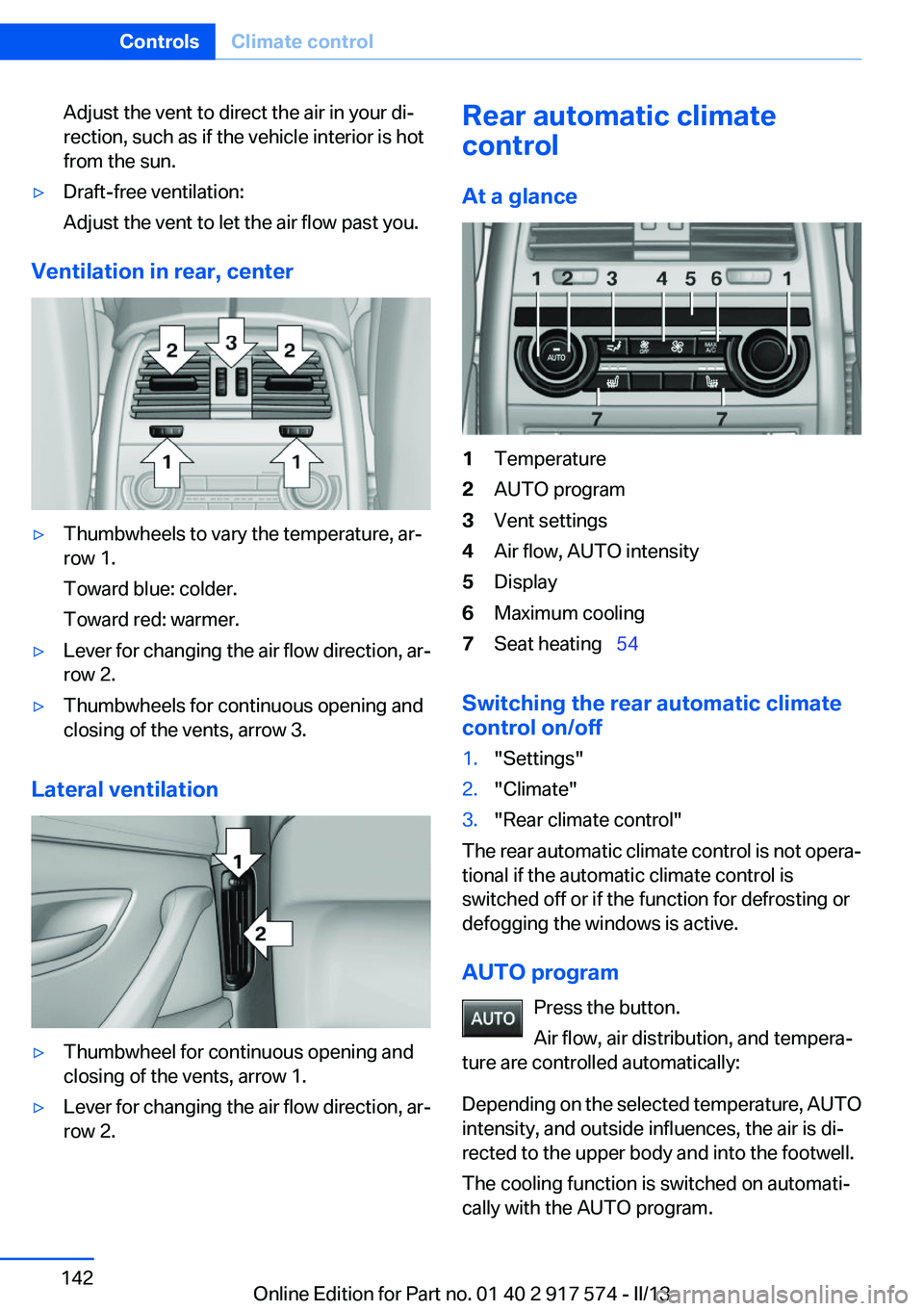
▷Thumbwheels to vary the temperature, ar‐
row 1.
Toward blue: colder.
Toward red: warmer.▷Lever for changing the air flow direction, ar‐
row 2.▷Thumbwheels for continuous opening and
closing of the vents, arrow 3.
Lateral ventilation
▷Thumbwheel for continuous opening and
closing of the vents, arrow 1.▷Lever for changing the air flow direction, ar‐
row 2.Rear automatic climate
control
At a glance1Temperature2AUTO program3Vent settings4Air flow, AUTO intensity5Display6Maximum cooling7Seat heating 54
Switching the rear automatic climate
control on/off
1."Settings"2."Climate"3."Rear climate control"
The rear automatic climate control is not opera‐
tional if the automatic climate control is
switched off or if the function for defrosting or
defogging the windows is active.
AUTO program Press the button.
Air flow, air distribution, and tempera‐
ture are controlled automatically:
Depending on the selected temperature, AUTO
intensity, and outside influences, the air is di‐
rected to the upper body and into the footwell.
The cooling function is switched on automati‐
cally with the AUTO program.
Seite 142ControlsClimate control142
Online Edition for Part no. 01 40 2 917 574 - II/13
Page 143 of 224
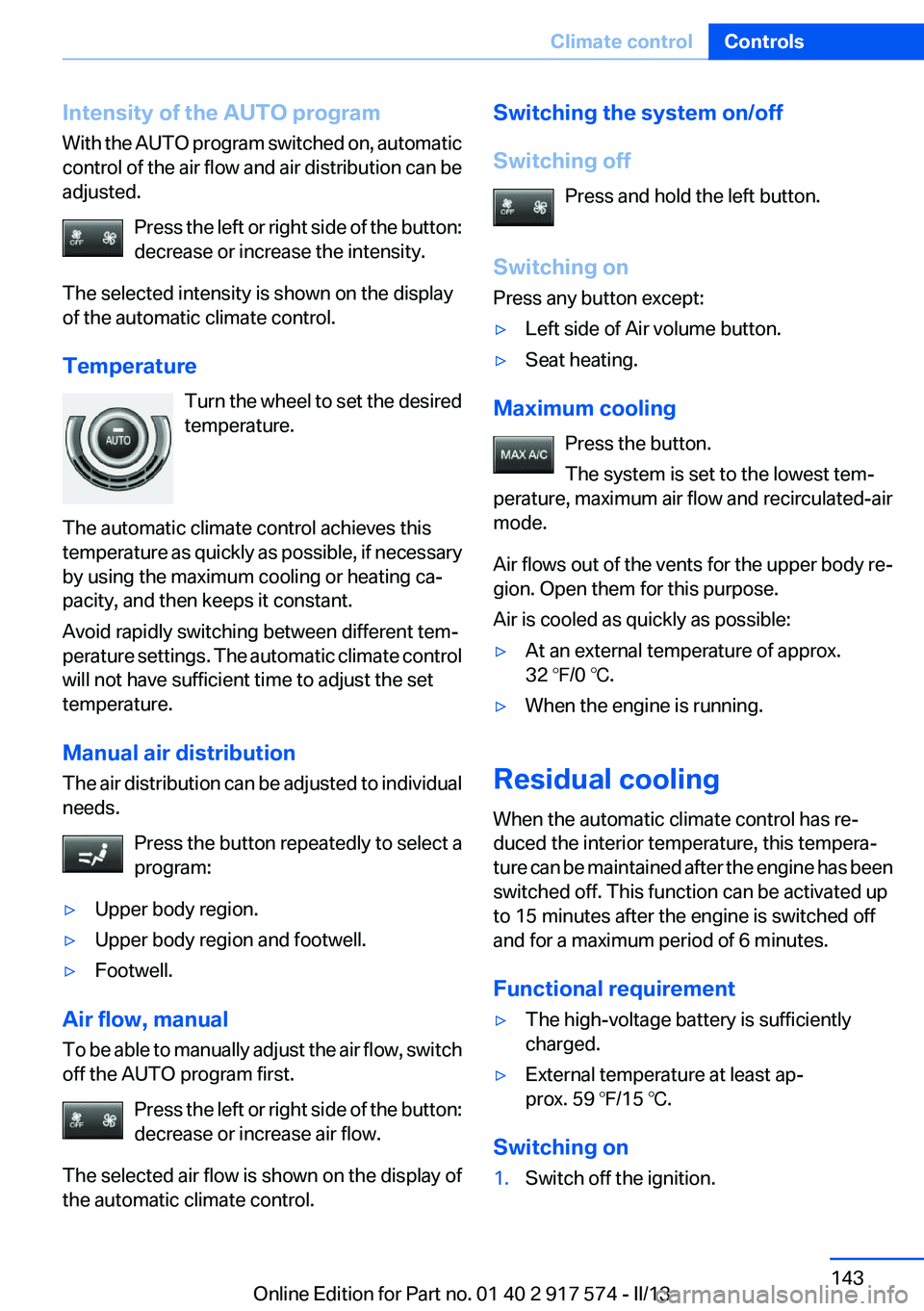
Intensity of the AUTO program
With the AUTO program switched on, automatic
control of the air flow and air distribution can be
adjusted.
Press the left or right side of the button:
decrease or increase the intensity.
The selected intensity is shown on the display
of the automatic climate control.
Temperature Turn the wheel to set the desired
temperature.
The automatic climate control achieves this
temperature as quickly as possible, if necessary
by using the maximum cooling or heating ca‐
pacity, and then keeps it constant.
Avoid rapidly switching between different tem‐
perature settings. The automatic climate control
will not have sufficient time to adjust the set
temperature.
Manual air distribution
The air distribution can be adjusted to individual
needs.
Press the button repeatedly to select a
program:▷Upper body region.▷Upper body region and footwell.▷Footwell.
Air flow, manual
To be able to manually adjust the air flow, switch
off the AUTO program first.
Press the left or right side of the button:
decrease or increase air flow.
The selected air flow is shown on the display of
the automatic climate control.
Switching the system on/off
Switching off Press and hold the left button.
Switching on
Press any button except:▷Left side of Air volume button.▷Seat heating.
Maximum cooling
Press the button.
The system is set to the lowest tem‐
perature, maximum air flow and recirculated-air
mode.
Air flows out of the vents for the upper body re‐
gion. Open them for this purpose.
Air is cooled as quickly as possible:
▷At an external temperature of approx.
32 ℉/0 ℃.▷When the engine is running.
Residual cooling
When the automatic climate control has re‐
duced the interior temperature, this tempera‐
ture can be maintained after the engine has been
switched off. This function can be activated up
to 15 minutes after the engine is switched off
and for a maximum period of 6 minutes.
Functional requirement
▷The high-voltage battery is sufficiently
charged.▷External temperature at least ap‐
prox. 59 ℉/15 ℃.
Switching on
1.Switch off the ignition.Seite 143Climate controlControls143
Online Edition for Part no. 01 40 2 917 574 - II/13
Page 171 of 224
Mobility
To ensure that you remain mobile at all times, this chapter supplies you with important information
on the topics of fuels and lubricants, wheels and tires, service, maintenance, and Roadside Assistance.Online Edition for Part no. 01 40 2 917 574 - II/13
Page 175 of 224
Wheels and tiresVehicle equipment
All standard, country-specific and optional
equipment that is offered in the model series is
described in this chapter. Therefore, equipment
is also described that is not available in a vehicle,
e. g., because of the selected optional equip‐
ment or country variant. This also applies for
safety-related functions and systems.
Tire inflation pressure
Safety information
The tire characteristics and tire inflation pres‐
sure influence the following:▷The service life of the tires.▷Road safety.▷Driving comfort.
Checking the pressure
Only check the tire inflation pressure when the
tires are cold. This means after driving no more
than 1.25 miles/2 km or when the vehicle has
been parked for at least 2 hours. When the tires
are warm, the tire inflation pressure is higher.
Check the tire inflation pressure regularly
Regularly check the tire inflation pressure
and correct it as needed: at least twice a month
and before a long trip. If you fail to observe this
precaution, you may be driving on tires with in‐
correct tire pressures, a condition that may not
only compromise your vehicle's driving stability,
but also lead to tire damage and the risk of an
accident.◀
After correcting the tire inflation pressure:
▷Reinitialize the Flat Tire Monitor.▷Reinitialize the Tire Pressure Monitor.Pressure specifications
The tire inflation pressure table, refer to
page 176, contains all pressure specifications
for the specified tire sizes at the ambient tem‐
perature. Pressure specifications apply to ap‐
proved tire sizes and recommended tire brands.
This information can be obtained from your
service center.
To identify the correct tire inflation pressure,
please note the following:▷Tire sizes of your vehicle.▷Maximum permitted driving speed.
Tire inflation pressures up to 100 mph/
160 km/h
For speeds of up to 100 mph/160 km/h and for
optimum driving comfort, note the pressure val‐
ues in the tire inflation pressure table, refer to
page 176, and adjust as necessary.
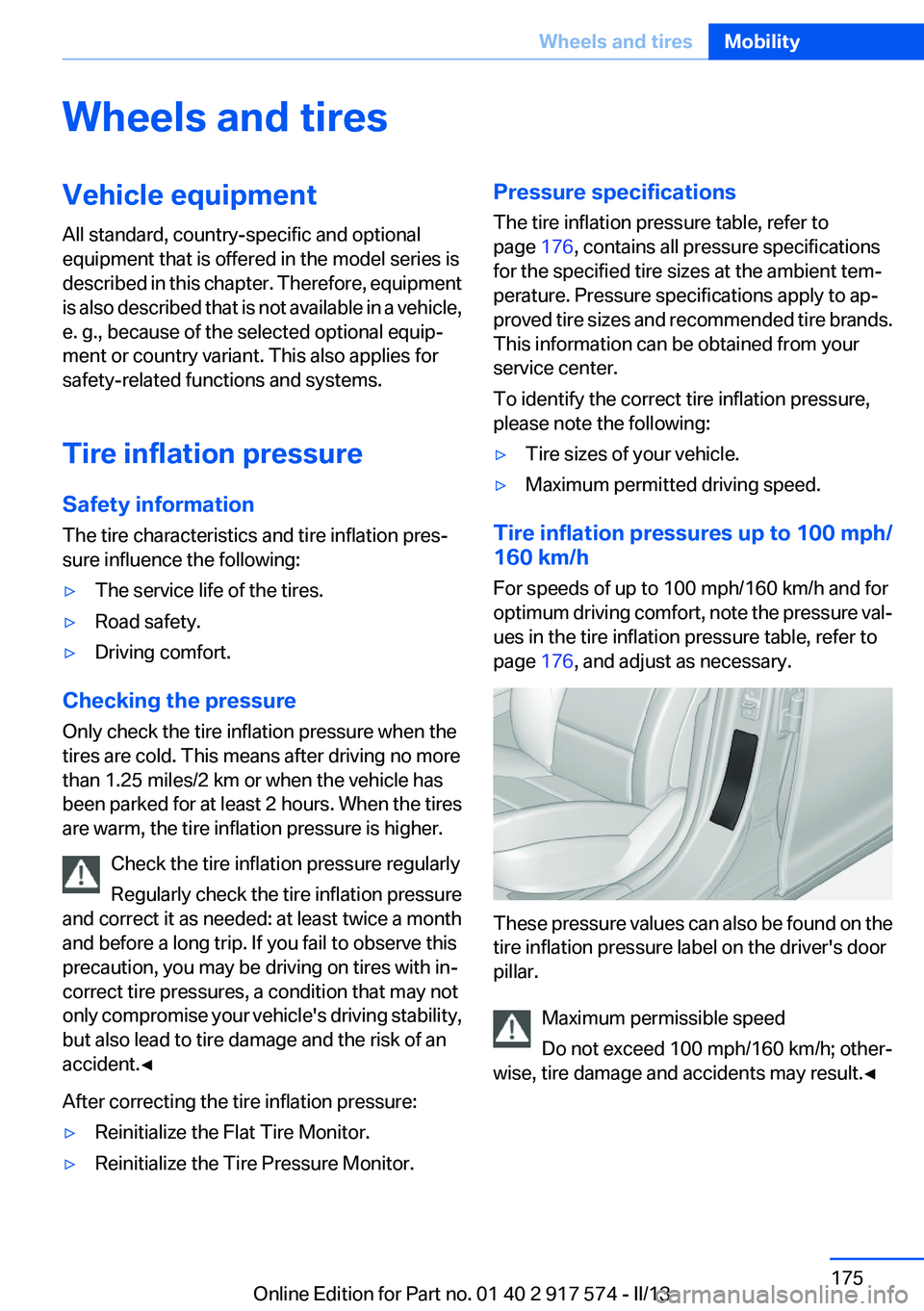
These pressure values can also be found on the
tire inflation pressure label on the driver's door
pillar.
Maximum permissible speed
Do not exceed 100 mph/160 km/h; other‐
wise, tire damage and accidents may result.◀
Seite 175Wheels and tiresMobility175
Online Edition for Part no. 01 40 2 917 574 - II/13
Page 176 of 224
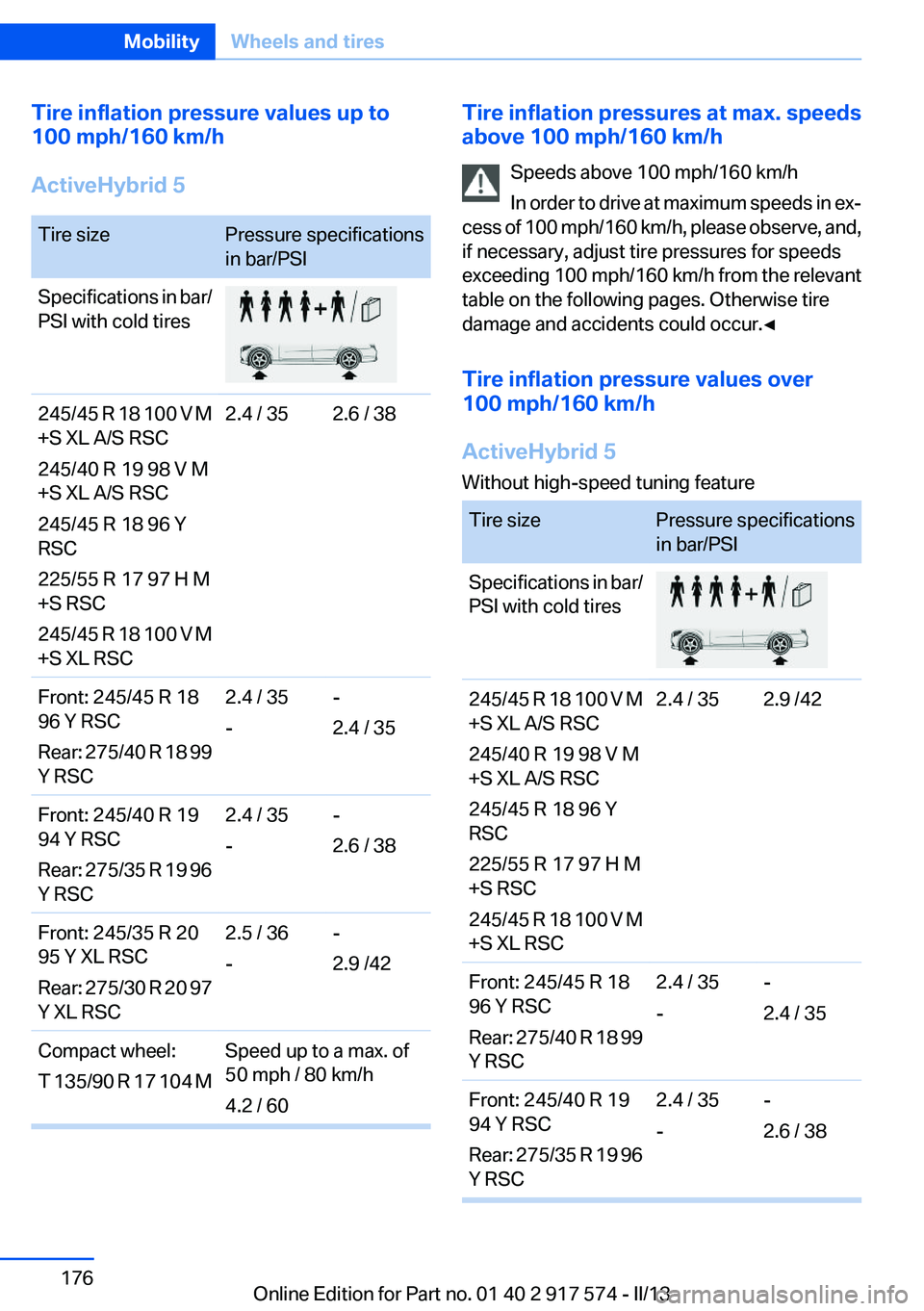
Tire inflation pressure values up to
100 mph/160 km/h
ActiveHybrid 5Tire sizePressure specifications
in bar/PSISpecifications in bar/
PSI with cold tires245/45 R 18 100 V M
+S XL A/S RSC
245/40 R 19 98 V M
+S XL A/S RSC
245/45 R 18 96 Y
RSC
225/55 R 17 97 H M
+S RSC
245/45 R 18 100 V M
+S XL RSC2.4 / 352.6 / 38Front: 245/45 R 18
96 Y RSC
Rear: 275/40 R 18 99
Y RSC2.4 / 35
--
2.4 / 35Front: 245/40 R 19
94 Y RSC
Rear: 275/35 R 19 96
Y RSC2.4 / 35
--
2.6 / 38Front: 245/35 R 20
95 Y XL RSC
Rear: 275/30 R 20 97
Y XL RSC2.5 / 36
--
2.9 /42Compact wheel:
T 135/90 R 17 104 MSpeed up to a max. of
50 mph / 80 km/h
4.2 / 60Tire inflation pressures at max. speeds
above 100 mph/160 km/h
Speeds above 100 mph/160 km/h
In order to drive at maximum speeds in ex‐
cess of 100 mph/160 km/h, please observe, and,
if necessary, adjust tire pressures for speeds
exceeding 100 mph/160 km/h from the relevant
table on the following pages. Otherwise tire
damage and accidents could occur.◀
Tire inflation pressure values over
100 mph/160 km/h
ActiveHybrid 5
Without high-speed tuning featureTire sizePressure specifications
in bar/PSISpecifications in bar/
PSI with cold tires245/45 R 18 100 V M
+S XL A/S RSC
245/40 R 19 98 V M
+S XL A/S RSC
245/45 R 18 96 Y
RSC
225/55 R 17 97 H M
+S RSC
245/45 R 18 100 V M
+S XL RSC2.4 / 352.9 /42Front: 245/45 R 18
96 Y RSC
Rear: 275/40 R 18 99
Y RSC2.4 / 35
--
2.4 / 35Front: 245/40 R 19
94 Y RSC
Rear: 275/35 R 19 96
Y RSC2.4 / 35
--
2.6 / 38Seite 176MobilityWheels and tires176
Online Edition for Part no. 01 40 2 917 574 - II/13
Page 177 of 224
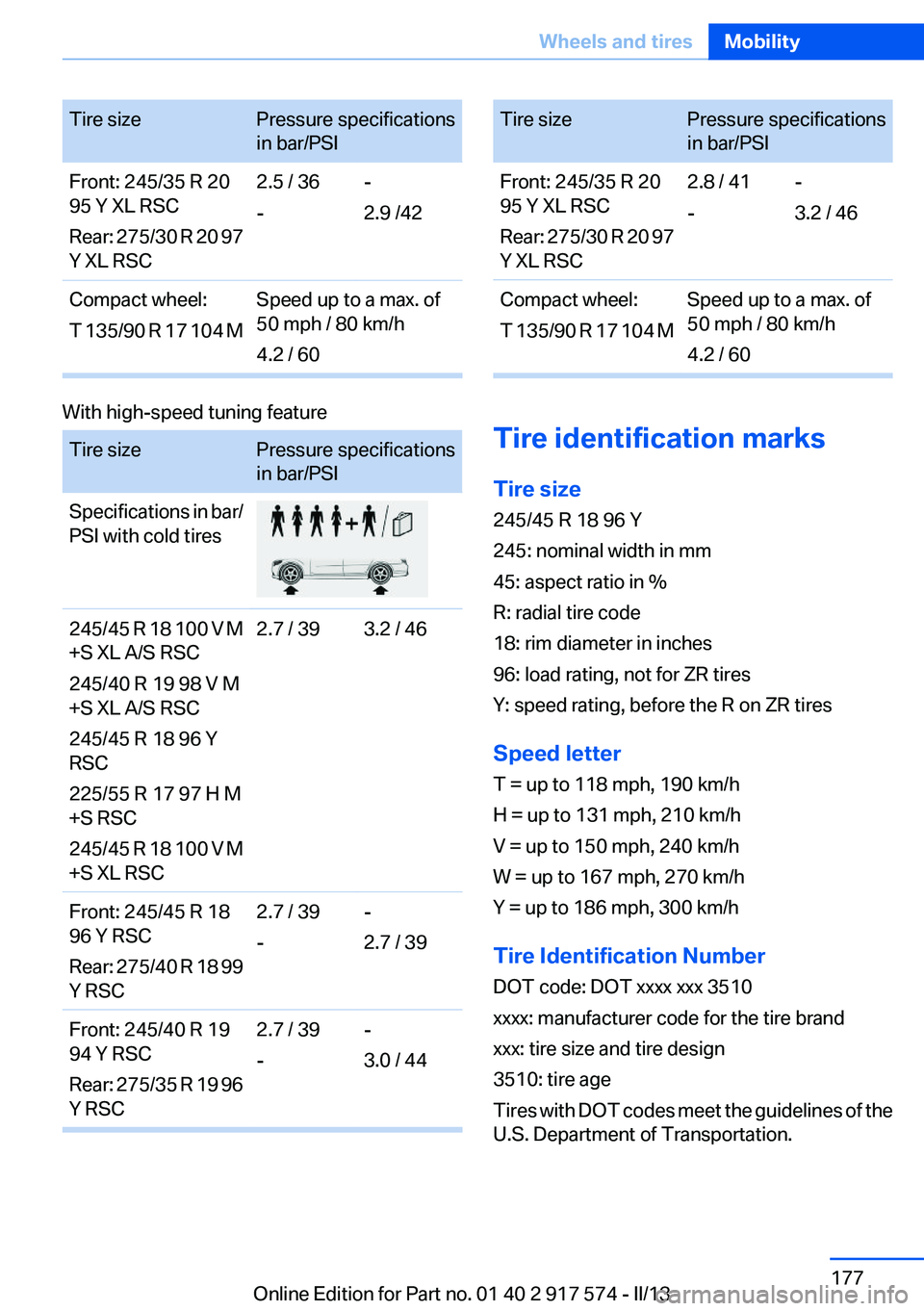
Tire sizePressure specifications
in bar/PSIFront: 245/35 R 20
95 Y XL RSC
Rear: 275/30 R 20 97
Y XL RSC2.5 / 36
--
2.9 /42Compact wheel:
T 135/90 R 17 104 MSpeed up to a max. of
50 mph / 80 km/h
4.2 / 60
With high-speed tuning feature
Tire sizePressure specifications
in bar/PSISpecifications in bar/
PSI with cold tires245/45 R 18 100 V M
+S XL A/S RSC
245/40 R 19 98 V M
+S XL A/S RSC
245/45 R 18 96 Y
RSC
225/55 R 17 97 H M
+S RSC
245/45 R 18 100 V M
+S XL RSC2.7 / 393.2 / 46Front: 245/45 R 18
96 Y RSC
Rear: 275/40 R 18 99
Y RSC2.7 / 39
--
2.7 / 39Front: 245/40 R 19
94 Y RSC
Rear: 275/35 R 19 96
Y RSC2.7 / 39
--
3.0 / 44Tire sizePressure specifications
in bar/PSIFront: 245/35 R 20
95 Y XL RSC
Rear: 275/30 R 20 97
Y XL RSC2.8 / 41
--
3.2 / 46Compact wheel:
T 135/90 R 17 104 MSpeed up to a max. of
50 mph / 80 km/h
4.2 / 60
Tire identification marks
Tire size
245/45 R 18 96 Y
245: nominal width in mm
45: aspect ratio in %
R: radial tire code
18: rim diameter in inches
96: load rating, not for ZR tires
Y: speed rating, before the R on ZR tires
Speed letter
T = up to 118 mph, 190 km/h
H = up to 131 mph, 210 km/h
V = up to 150 mph, 240 km/h
W = up to 167 mph, 270 km/h
Y = up to 186 mph, 300 km/h
Tire Identification Number
DOT code: DOT xxxx xxx 3510
xxxx: manufacturer code for the tire brand
xxx: tire size and tire design
3510: tire age
Tires with DOT codes meet the guidelines of the
U.S. Department of Transportation.
Seite 177Wheels and tiresMobility177
Online Edition for Part no. 01 40 2 917 574 - II/13
Page 178 of 224
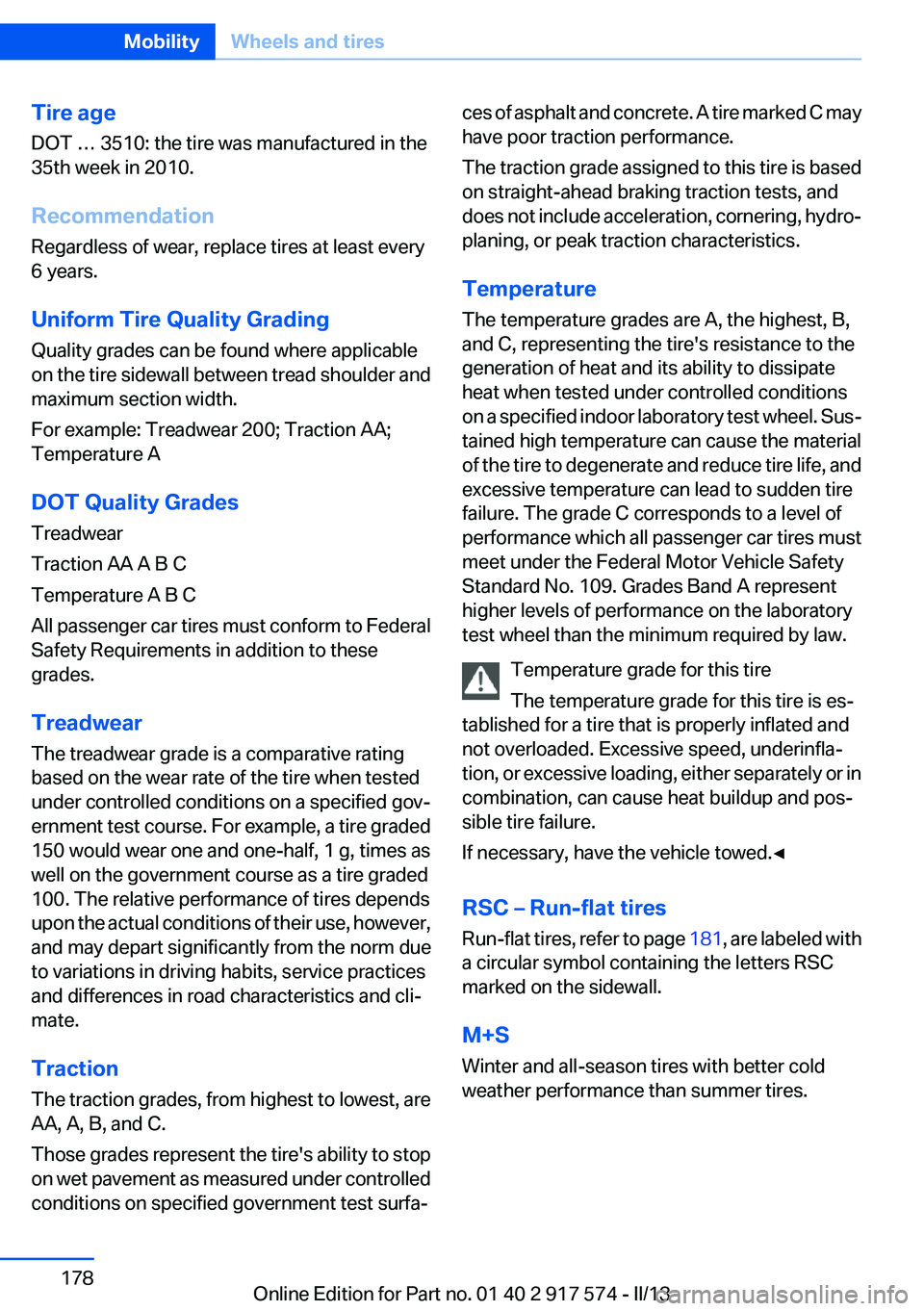
Tire age
DOT … 3510: the tire was manufactured in the
35th week in 2010.
Recommendation
Regardless of wear, replace tires at least every
6 years.
Uniform Tire Quality Grading
Quality grades can be found where applicable
on the tire sidewall between tread shoulder and
maximum section width.
For example: Treadwear 200; Traction AA;
Temperature A
DOT Quality Grades
Treadwear
Traction AA A B C
Temperature A B C
All passenger car tires must conform to Federal
Safety Requirements in addition to these
grades.
Treadwear
The treadwear grade is a comparative rating
based on the wear rate of the tire when tested
under controlled conditions on a specified gov‐
ernment test course. For example, a tire graded
150 would wear one and one-half, 1 g, times as
well on the government course as a tire graded
100. The relative performance of tires depends
upon the actual conditions of their use, however,
and may depart significantly from the norm due
to variations in driving habits, service practices
and differences in road characteristics and cli‐
mate.
Traction
The traction grades, from highest to lowest, are
AA, A, B, and C.
Those grades represent the tire's ability to stop
on wet pavement as measured under controlled
conditions on specified government test surfa‐ces of asphalt and concrete. A tire marked C may
have poor traction performance.
The traction grade assigned to this tire is based
on straight-ahead braking traction tests, and
does not include acceleration, cornering, hydro‐
planing, or peak traction characteristics.
Temperature
The temperature grades are A, the highest, B,
and C, representing the tire's resistance to the
generation of heat and its ability to dissipate
heat when tested under controlled conditions
on a specified indoor laboratory test wheel. Sus‐
tained high temperature can cause the material
of the tire to degenerate and reduce tire life, and
excessive temperature can lead to sudden tire
failure. The grade C corresponds to a level of
performance which all passenger car tires must
meet under the Federal Motor Vehicle Safety
Standard No. 109. Grades Band A represent
higher levels of performance on the laboratory
test wheel than the minimum required by law.
Temperature grade for this tire
The temperature grade for this tire is es‐
tablished for a tire that is properly inflated and
not overloaded. Excessive speed, underinfla‐
tion, or excessive loading, either separately or in
combination, can cause heat buildup and pos‐
sible tire failure.
If necessary, have the vehicle towed.◀
RSC – Run-flat tires
Run-flat tires, refer to page 181, are labeled with
a circular symbol containing the letters RSC
marked on the sidewall.
M+S
Winter and all-season tires with better cold
weather performance than summer tires.Seite 178MobilityWheels and tires178
Online Edition for Part no. 01 40 2 917 574 - II/13