battery BMW ACTIVEHYBRID5 2013 Owners Manual
[x] Cancel search | Manufacturer: BMW, Model Year: 2013, Model line: ACTIVEHYBRID5, Model: BMW ACTIVEHYBRID5 2013Pages: 224, PDF Size: 4.96 MB
Page 6 of 224
NotesThe hybrid system of your
BMW
Your BMW is a hybrid vehicle. In addition to the
combustion engine, your vehicle features a
high-voltage system that consists of an electric
motor and a high-voltage battery among other
things.
This combination permits a particularly efficient
fuel utilization.
Using this Owner's Manual
The fastest way to find information on a partic‐
ular topic is by using the index.
An initial overview of the vehicle is provided in
the first chapter.
Updates made after the editorial
deadline
Any updates made after the editorial deadline for
the Owner's Manuals are located in the appen‐
dix of the printed quick reference for the vehicle.
User's manual for Navigation,
Entertainment, Communication
The topics of Navigation, Entertainment, Com‐
munication and the short commands of the
voice activation system are described in a sep‐
arate user's manual, which is also included with
the onboard literature.
Additional sources of information
Should you have any questions, your service
center will be glad to advise you at any time.
Information on BMW, e.g., on technology, is
available on the Internet: bmwusa.com.Symbols
Indicates precautions that must be followed
precisely in order to avoid the possibility of per‐
sonal injury and serious damage to the vehicle.
◄ Marks the end of a specific item of informa‐
tion.
"..." Identifies Control Display texts used to se‐
lect individual functions.
›...‹ Verbal instructions to use with the voice ac‐
tivation system.
››...‹‹ Identifies the answers generated by the
voice activation system.
Refers to measures that can be taken to help
protect the environment.
Symbols on vehicle components
Indicates that you should consult the rele‐
vant section of this Owner's Manual for infor‐
mation on a particular part or assembly.
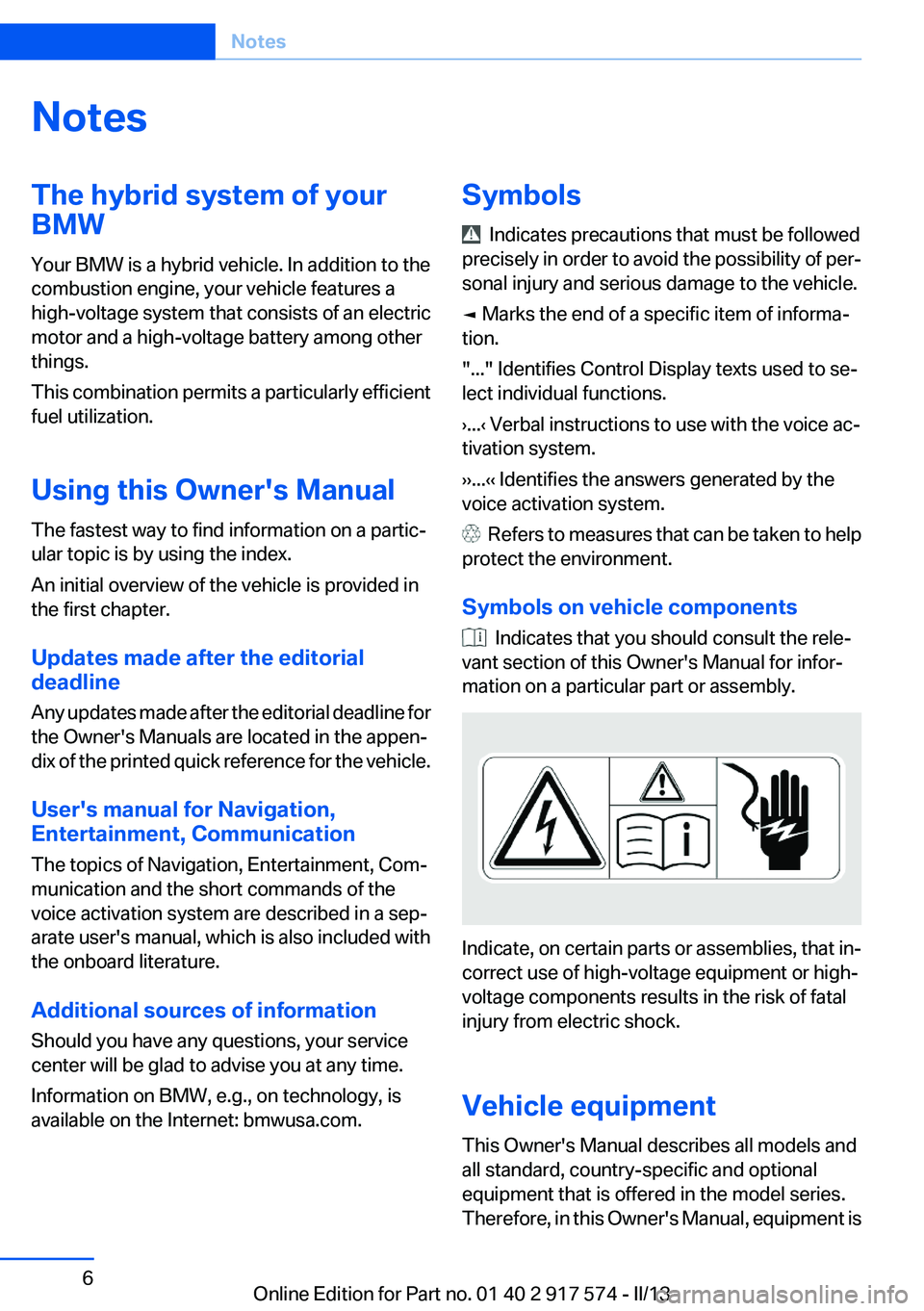
Indicate, on certain parts or assemblies, that in‐
correct use of high-voltage equipment or high-
voltage components results in the risk of fatal
injury from electric shock.
Vehicle equipment
This Owner's Manual describes all models and
all standard, country-specific and optional
equipment that is offered in the model series.
Therefore, in this Owner's Manual, equipment is
Seite 6Notes6
Online Edition for Part no. 01 40 2 917 574 - II/13
Page 8 of 224
productive harm. In addition, certain fluids
contained in vehicles and certain products of
component wear contain or emit chemicals
known to the State of California to cause cancer
and birth defects or other reproductive harm.
Battery posts, terminals and related accessories
contain lead and lead compounds. Wash your
hands after handling. Used engine oil contains
chemicals that have caused cancer in laboratory
animals. Always protect your skin by washing
thoroughly with soap and water.
Service and warranty
We recommend that you read this publication
thoroughly. Your vehicle is covered by the fol‐
lowing warranties:▷New Vehicle Limited Warranty.▷Rust Perforation Limited Warranty.▷Federal Emissions System Defect Warranty.▷Federal Emissions Performance Warranty.▷California Emission Control System Limited
Warranty.
Detailed information about these warranties is
listed in the Service and Warranty Information
Booklet for US models or in the Warranty and
Service Guide Booklet for Canadian models.
Your vehicle has been specifically adapted and
designed to meet the particular operating con‐
ditions and homologation requirements in your
country and continental region in order to deliver
the full driving pleasure while the vehicle is op‐
erated under those conditions. If you wish to op‐
erate your vehicle in another country or region,
you may be required to adapt your vehicle to
meet different prevailing operating conditions
and homologation requirements. You should
also be aware of any applicable warranty limita‐
tions or exclusions for such country or region. In
such case, please contact Customer Relations
for further information.
Maintenance
Maintain the vehicle regularly to sustain the road
safety, operational reliability and the New Vehi‐
cle Limited Warranty.
Specifications for required maintenance meas‐
ures:▷BMW Maintenance system▷Service and Warranty Information Booklet
for US models▷Warranty and Service Guide Booklet for
Canadian models
If the vehicle is not maintained according to
these specifications, this could result in serious
damage to the vehicle. Such damage is not cov‐
ered by the BMW New Vehicle Limited War‐
ranty.
Data memory
Many electronic components on your vehicle
are equipped with data memories that tempo‐
rarily or permanently store technical information
about the condition of the vehicle, events and
faults. This technical information generally
documents the state of a component, a module,
a system or the environment:
▷Operating states of system components, fill
levels for instance.▷Status messages for the vehicle and from its
individual components, e.g., wheel rotation
speed/ vehicle speed, deceleration, trans‐
verse acceleration.▷Malfunctions and faults in important system
components, e.g., lights and brakes.▷Responses by the vehicle to special situa‐
tions, e.g., deployment of an airbag, engage‐
ment of stability control systems.▷Ambient conditions, such as temperature.
This data is purely technical in nature and is used
to detect and correct faults and to optimize ve‐
hicle functions. Motion profiles over routes trav‐
eled cannot be created from this data. When
Seite 8Notes8
Online Edition for Part no. 01 40 2 917 574 - II/13
Page 29 of 224
BMW ActiveHybridVehicle equipment
All standard, country-specific and optional
equipment that is offered in the model series is
described in this chapter. Therefore, equipment
is also described that is not available in a vehicle,
e. g., because of the selected optional equip‐
ment or country variant. This also applies for
safety-related functions and systems.
Hybrid system
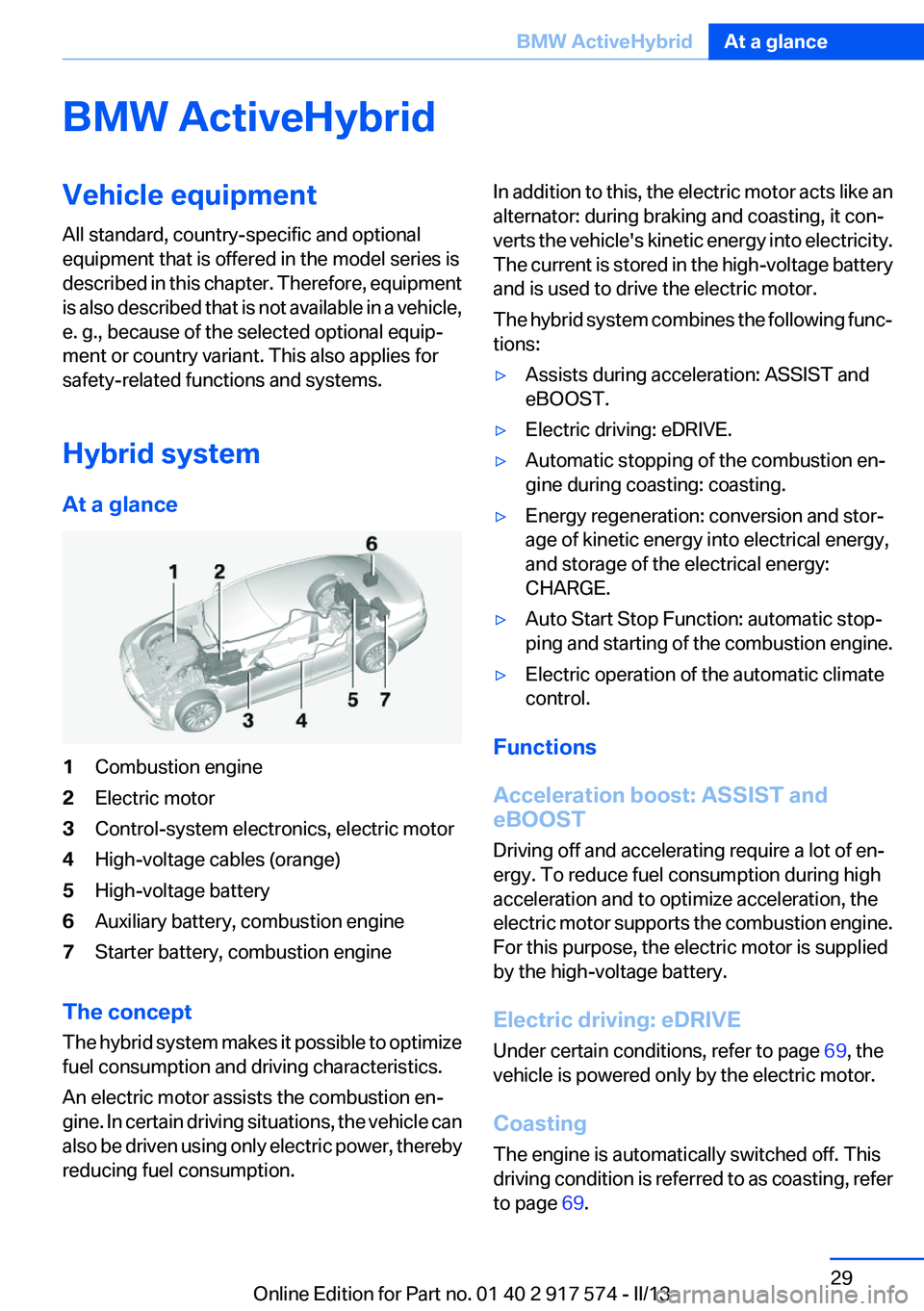
At a glance1Combustion engine2Electric motor3Control-system electronics, electric motor4High-voltage cables (orange)5High-voltage battery6Auxiliary battery, combustion engine7Starter battery, combustion engine
The concept
The hybrid system makes it possible to optimize
fuel consumption and driving characteristics.
An electric motor assists the combustion en‐
gine. In certain driving situations, the vehicle can
also be driven using only electric power, thereby
reducing fuel consumption.
In addition to this, the electric motor acts like an
alternator: during braking and coasting, it con‐
verts the vehicle's kinetic energy into electricity.
The current is stored in the high-voltage battery
and is used to drive the electric motor.
The hybrid system combines the following func‐
tions:▷Assists during acceleration: ASSIST and
eBOOST.▷Electric driving: eDRIVE.▷Automatic stopping of the combustion en‐
gine during coasting: coasting.▷Energy regeneration: conversion and stor‐
age of kinetic energy into electrical energy,
and storage of the electrical energy:
CHARGE.▷Auto Start Stop Function: automatic stop‐
ping and starting of the combustion engine.▷Electric operation of the automatic climate
control.
Functions
Acceleration boost: ASSIST and
eBOOST
Driving off and accelerating require a lot of en‐
ergy. To reduce fuel consumption during high
acceleration and to optimize acceleration, the
electric motor supports the combustion engine.
For this purpose, the electric motor is supplied
by the high-voltage battery.
Electric driving: eDRIVE
Under certain conditions, refer to page 69, the
vehicle is powered only by the electric motor.
Coasting
The engine is automatically switched off. This
driving condition is referred to as coasting, refer
to page 69.
Seite 29BMW ActiveHybridAt a glance29
Online Edition for Part no. 01 40 2 917 574 - II/13
Page 30 of 224
Driving with the combustion engine:
DRIVE
The combustion engine provides the drive
power to move the vehicle. If necessary, the
high-voltage battery is charged at the same
time.
The hybrid system always starts the combus‐
tion engine automatically.
Energy recovery: CHARGE
The high-voltage battery of the hybrid system is
charged through energy recovery.
The electric motor acts as a generator and con‐
verts the kinetic energy of the vehicle into elec‐
tric current.
Charging can take place in various situations:▷When the vehicle is coasting if the acceler‐
ator is not pressed.▷During vehicle braking.
When exerting gentle pressure on the brakes,
the vehicle is only braked by the electric motor.
When the brake pedal is depressed further, the
brake system is activated additionally. This is
why only part of the brake energy is used to
charge the high-voltage battery when exerting
firm pressure on the brake.
Foresighted driving and the early reduction of
speed are important to make full use of the hy‐
brid characteristics of your vehicle.
Auto Start/Stop function
The Auto Start/Stop function, refer to
page 68, switches the combustion engine off
when coasting, braking and while the vehicle is
stopped. Convenience functions such as the
automatic climate control are supplied by the
high-voltage battery and can remain switched
on.
Auxiliary functions of the automatic
climate control
The hybrid system makes it possible to operate
the automatic climate control even with the
combustion engine switched off. In this way, the
interior of the vehicle can be cooled for example
during a break in the journey by residual cooling
or even before the trip by auxiliary air condition‐
ing.▷Residual cooling, refer to page 143.▷Auxiliary air conditioning, refer to
page 144
Adapting to the course of the road
When destination guidance is active, the hybrid
system uses the navigation data. This makes it
possible to switch off the combustion engine
upon reaching the destination zone even before
reaching the destination.
Pay attention to the notes in Adapting to the
course of the road, refer to page 86.
Display
The displays of the hybrid system, refer to
page 84, provide information about the cur‐
rent state of hybrid operation and show the sys‐
tem activity in a chart.
Energy-saving driving
To save energy while driving, read the following
information:
▷Saving fuel, refer to page 166▷Using the hybrid system efficiently, refer to
page 158▷ECO PRO mode, refer to page 167.
Safety information
Read the information on Safety of the hybrid
system, refer to page 202.
Seite 30At a glanceBMW ActiveHybrid30
Online Edition for Part no. 01 40 2 917 574 - II/13
Page 34 of 224
Opening and closingVehicle equipment
All standard, country-specific and optional
equipment that is offered in the model series is
described in this chapter. Therefore, equipment
is also described that is not available in a vehicle,
e. g., because of the selected optional equip‐
ment or country variant. This also applies for
safety-related functions and systems.
Remote control/key
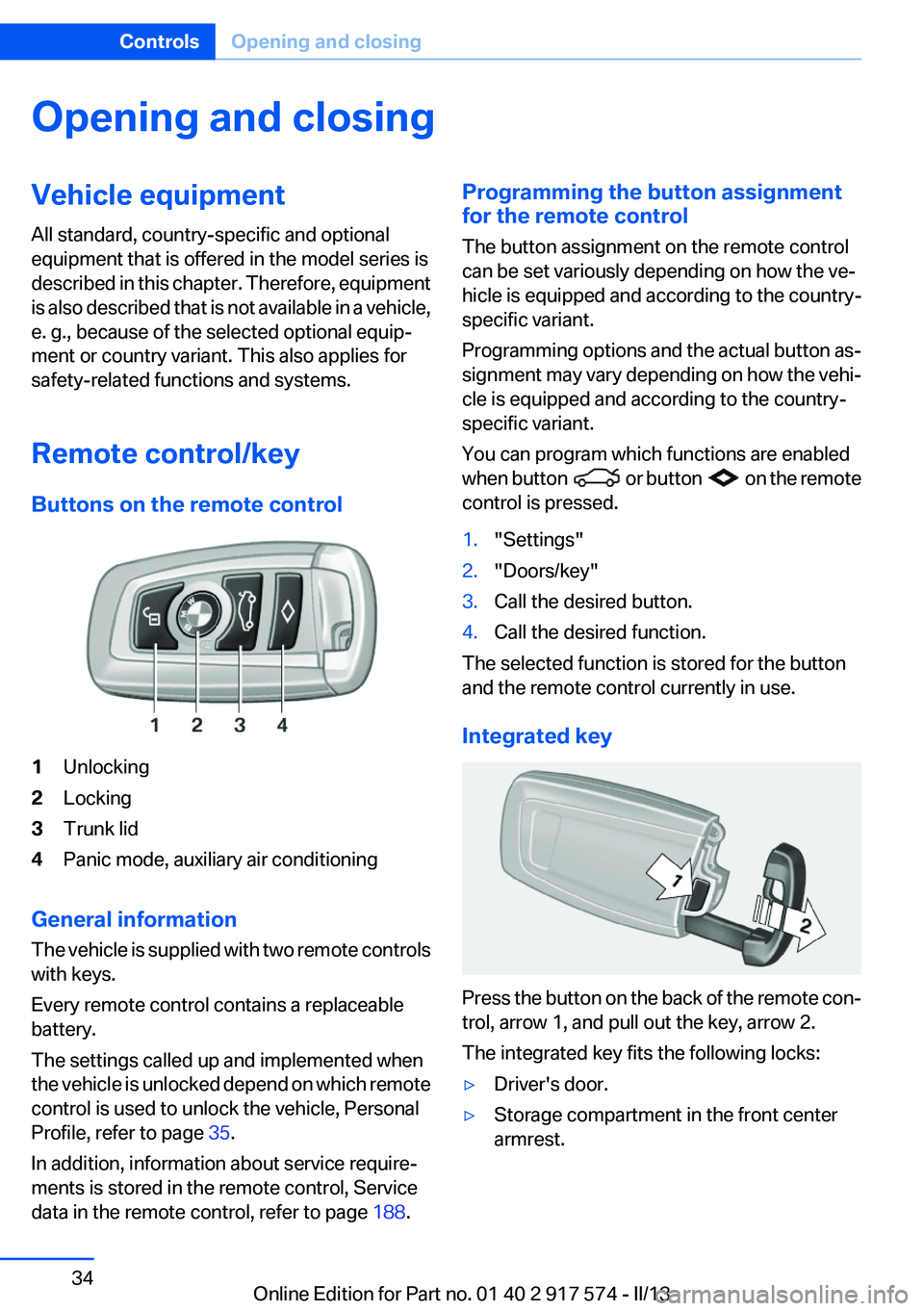
Buttons on the remote control1Unlocking2Locking3Trunk lid4Panic mode, auxiliary air conditioning
General information
The vehicle is supplied with two remote controls
with keys.
Every remote control contains a replaceable
battery.
The settings called up and implemented when
the vehicle is unlocked depend on which remote
control is used to unlock the vehicle, Personal
Profile, refer to page 35.
In addition, information about service require‐
ments is stored in the remote control, Service
data in the remote control, refer to page 188.
Programming the button assignment
for the remote control
The button assignment on the remote control
can be set variously depending on how the ve‐
hicle is equipped and according to the country-
specific variant.
Programming options and the actual button as‐
signment may vary depending on how the vehi‐
cle is equipped and according to the country-
specific variant.
You can program which functions are enabled
when button
or button on the remote
control is pressed.
1."Settings"2."Doors/key"3.Call the desired button.4.Call the desired function.
The selected function is stored for the button
and the remote control currently in use.
Integrated key
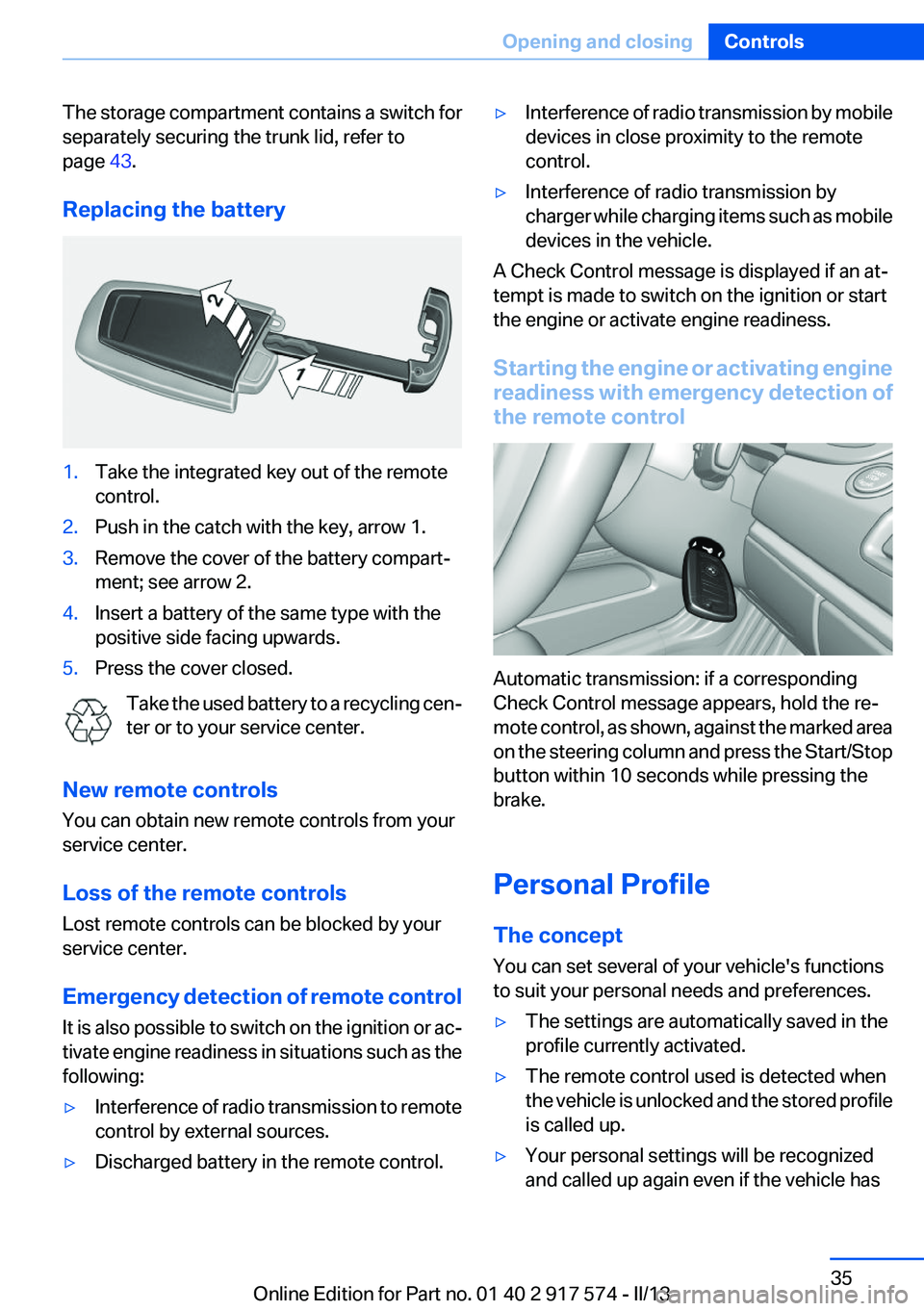
Press the button on the back of the remote con‐
trol, arrow 1, and pull out the key, arrow 2.
The integrated key fits the following locks:
▷Driver's door.▷Storage compartment in the front center
armrest.Seite 34ControlsOpening and closing34
Online Edition for Part no. 01 40 2 917 574 - II/13
Page 35 of 224
The storage compartment contains a switch for
separately securing the trunk lid, refer to
page 43.
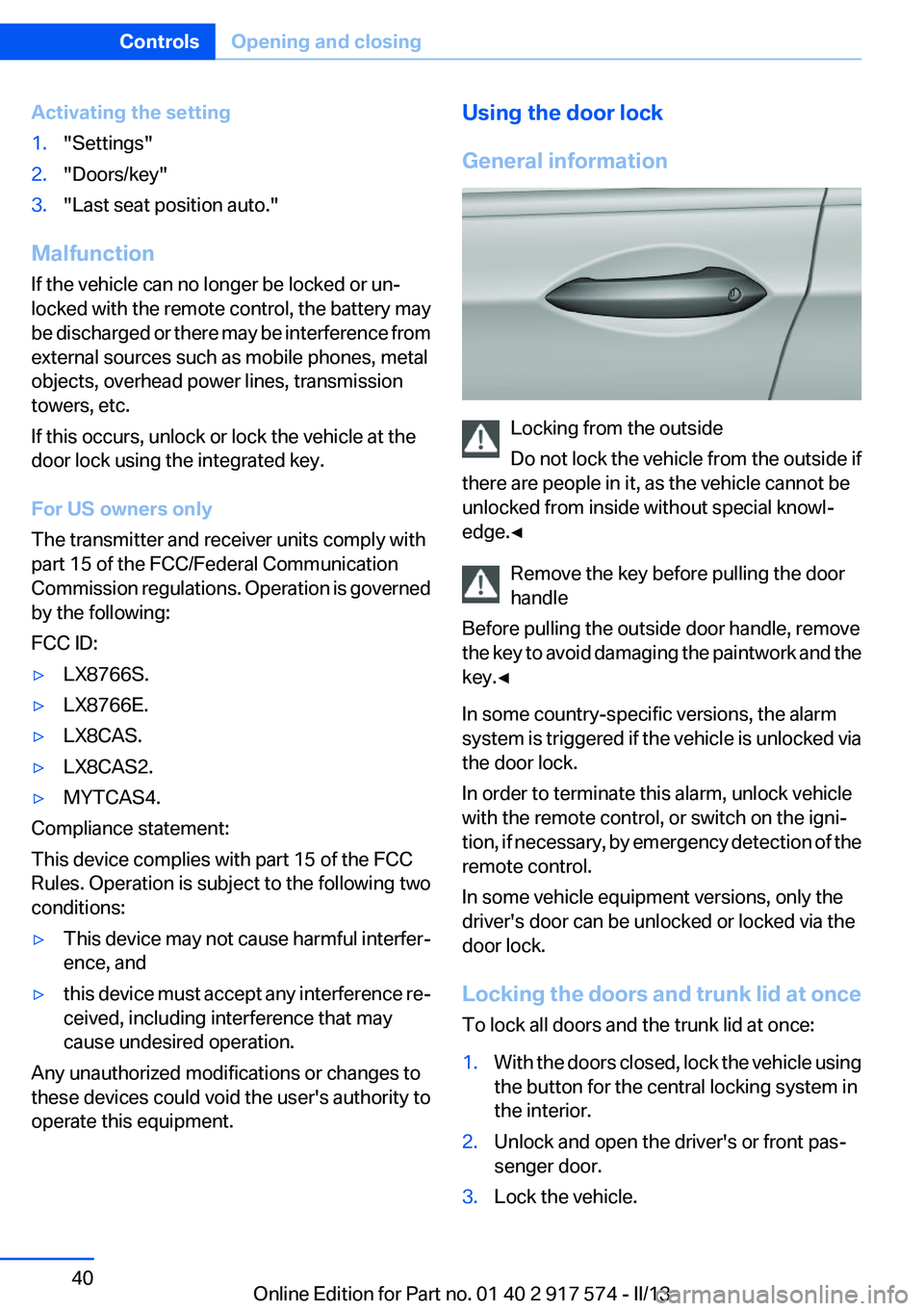
Replacing the battery1.Take the integrated key out of the remote
control.2.Push in the catch with the key, arrow 1.3.Remove the cover of the battery compart‐
ment; see arrow 2.4.Insert a battery of the same type with the
positive side facing upwards.5.Press the cover closed.
Take the used battery to a recycling cen‐
ter or to your service center.
New remote controls
You can obtain new remote controls from your
service center.
Loss of the remote controls
Lost remote controls can be blocked by your
service center.
Emergency detection of remote control
It is also possible to switch on the ignition or ac‐
tivate engine readiness in situations such as the
following:
▷Interference of radio transmission to remote
control by external sources.▷Discharged battery in the remote control.▷Interference of radio transmission by mobile
devices in close proximity to the remote
control.▷Interference of radio transmission by
charger while charging items such as mobile
devices in the vehicle.
A Check Control message is displayed if an at‐
tempt is made to switch on the ignition or start
the engine or activate engine readiness.
Starting the engine or activating engine
readiness with emergency detection of
the remote control
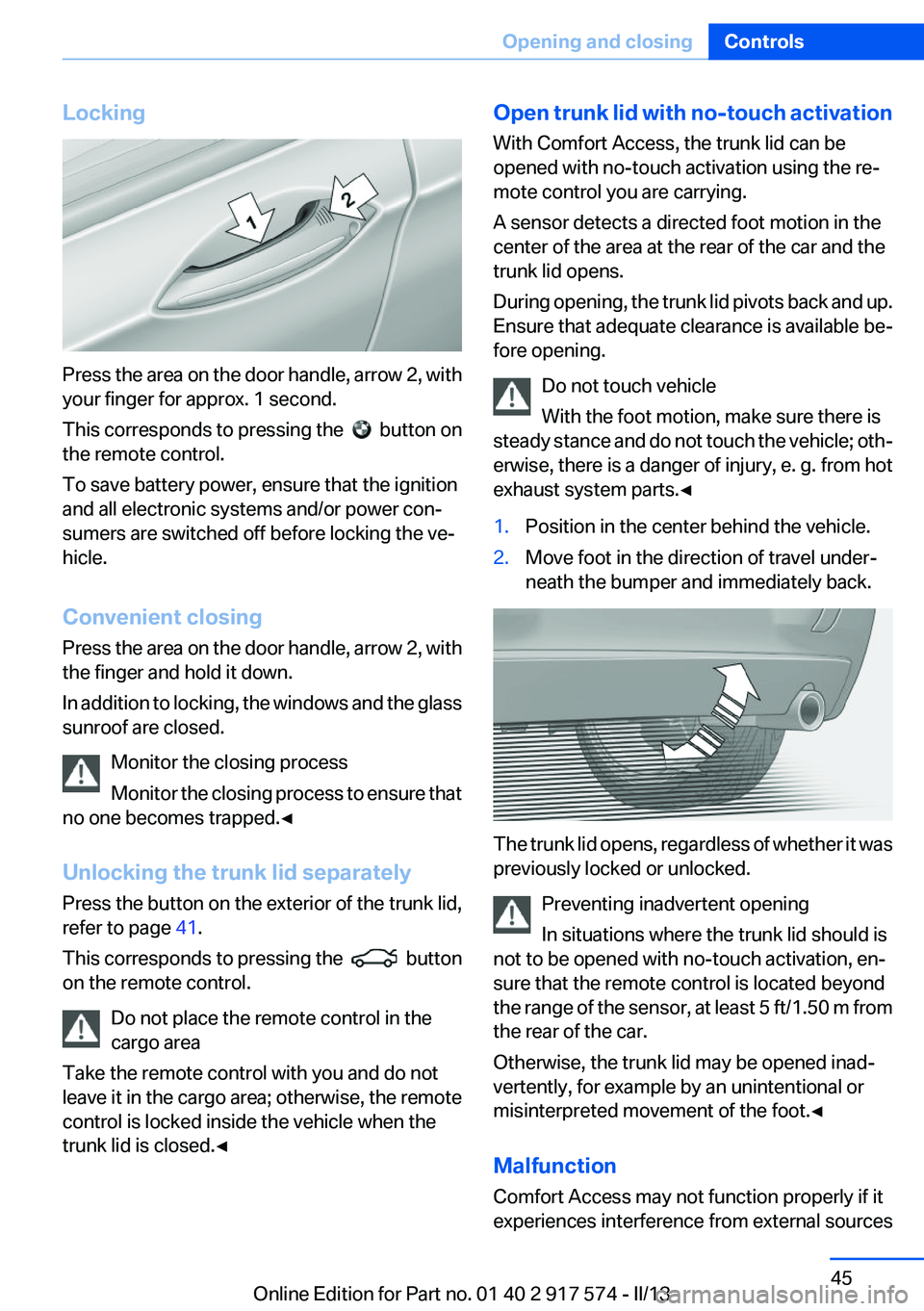
Automatic transmission: if a corresponding
Check Control message appears, hold the re‐
mote control, as shown, against the marked area
on the steering column and press the Start/Stop
button within 10 seconds while pressing the
brake.
Personal Profile
The concept
You can set several of your vehicle's functions
to suit your personal needs and preferences.
▷The settings are automatically saved in the
profile currently activated.▷The remote control used is detected when
the vehicle is unlocked and the stored profile
is called up.▷Your personal settings will be recognized
and called up again even if the vehicle hasSeite 35Opening and closingControls35
Online Edition for Part no. 01 40 2 917 574 - II/13
Page 40 of 224
Activating the setting1."Settings"2."Doors/key"3."Last seat position auto."
Malfunction
If the vehicle can no longer be locked or un‐
locked with the remote control, the battery may
be discharged or there may be interference from
external sources such as mobile phones, metal
objects, overhead power lines, transmission
towers, etc.
If this occurs, unlock or lock the vehicle at the
door lock using the integrated key.
For US owners only
The transmitter and receiver units comply with
part 15 of the FCC/Federal Communication
Commission regulations. Operation is governed
by the following:
FCC ID:
▷LX8766S.▷LX8766E.▷LX8CAS.▷LX8CAS2.▷MYTCAS4.
Compliance statement:
This device complies with part 15 of the FCC
Rules. Operation is subject to the following two
conditions:
▷This device may not cause harmful interfer‐
ence, and▷this device must accept any interference re‐
ceived, including interference that may
cause undesired operation.
Any unauthorized modifications or changes to
these devices could void the user's authority to
operate this equipment.
Using the door lock
General information
Locking from the outside
Do not lock the vehicle from the outside if
there are people in it, as the vehicle cannot be
unlocked from inside without special knowl‐
edge.◀
Remove the key before pulling the door
handle
Before pulling the outside door handle, remove
the key to avoid damaging the paintwork and the
key.◀
In some country-specific versions, the alarm
system is triggered if the vehicle is unlocked via
the door lock.
In order to terminate this alarm, unlock vehicle
with the remote control, or switch on the igni‐
tion, if necessary, by emergency detection of the
remote control.
In some vehicle equipment versions, only the
driver's door can be unlocked or locked via the
door lock.
Locking the doors and trunk lid at once
To lock all doors and the trunk lid at once:
1.With the doors closed, lock the vehicle using
the button for the central locking system in
the interior.2.Unlock and open the driver's or front pas‐
senger door.3.Lock the vehicle.Seite 40ControlsOpening and closing40
Online Edition for Part no. 01 40 2 917 574 - II/13
Page 45 of 224
Locking
Press the area on the door handle, arrow 2, with
your finger for approx. 1 second.
This corresponds to pressing the
button on
the remote control.
To save battery power, ensure that the ignition
and all electronic systems and/or power con‐
sumers are switched off before locking the ve‐
hicle.
Convenient closing
Press the area on the door handle, arrow 2, with
the finger and hold it down.
In addition to locking, the windows and the glass
sunroof are closed.
Monitor the closing process
Monitor the closing process to ensure that
no one becomes trapped.◀
Unlocking the trunk lid separately
Press the button on the exterior of the trunk lid,
refer to page 41.
This corresponds to pressing the
button
on the remote control.
Do not place the remote control in the
cargo area
Take the remote control with you and do not
leave it in the cargo area; otherwise, the remote
control is locked inside the vehicle when the
trunk lid is closed.◀
Open trunk lid with no-touch activation
With Comfort Access, the trunk lid can be
opened with no-touch activation using the re‐
mote control you are carrying.
A sensor detects a directed foot motion in the
center of the area at the rear of the car and the
trunk lid opens.
During opening, the trunk lid pivots back and up.
Ensure that adequate clearance is available be‐
fore opening.
Do not touch vehicle
With the foot motion, make sure there is
steady stance and do not touch the vehicle; oth‐
erwise, there is a danger of injury, e. g. from hot
exhaust system parts.◀1.Position in the center behind the vehicle.2.Move foot in the direction of travel under‐
neath the bumper and immediately back.
The trunk lid opens, regardless of whether it was
previously locked or unlocked.
Preventing inadvertent opening
In situations where the trunk lid should is
not to be opened with no-touch activation, en‐
sure that the remote control is located beyond
the range of the sensor, at least 5 ft/1.50 m from
the rear of the car.
Otherwise, the trunk lid may be opened inad‐
vertently, for example by an unintentional or
misinterpreted movement of the foot.◀
Malfunction
Comfort Access may not function properly if it
experiences interference from external sources
Seite 45Opening and closingControls45
Online Edition for Part no. 01 40 2 917 574 - II/13
Page 46 of 224
such as mobile phones, metal objects, overhead
power lines, transmission towers, etc.
In this case, open or close the vehicle using the
buttons on the remote control or use the
integrated key in the door lock.
If there is a malfunction, open the trunk lid with
the remote control button or with the button on
the trunk lid.
Alarm system
The concept
The vehicle alarm system responds to:▷Opening of a door, the hood or the trunk lid.▷Movements in the vehicle.▷Changes in the vehicle tilt, e.g., during at‐
tempts to steal a wheel or when towing the
car.▷Interruptions in battery voltage.
The alarm system briefly indicates tampering:
▷By sounding an acoustic alarm.▷By switching on the hazard warning system.▷By flashing the high beams.
Arming and disarming the alarm
system
General information
When you lock or unlock the vehicle, either with
the remote control, Comfort Access or at the
door lock the alarm system is armed or disarmed
at the same time.
Door lock and armed alarm system
Unlocking via the door lock will trigger the alarm
on some country-specific versions.
In order to terminate this alarm, unlock vehicle
with the remote control or switch on the ignition,
if necessary, by emergency detection of the re‐
mote control.
Trunk lid and armed alarm system
The trunk lid can be opened even when the
alarm system is armed.
Press the button on the remote control
for approx. 1 second.
With Comfort Access the trunk lid opens with
no-touch activation, refer to page 45.
After the trunk lid is closed, it is locked and
monitored again if the doors are locked. The
hazard warning system flashes once.
In some vehicle equipment variants, the trunk lid
can only be opened using the remote control if
the vehicle was unlocked first.
Panic mode
You can trigger the alarm system if you find
yourself in a dangerous situation.
Press the button on the remote control
for at least 3 seconds.
To switch off the alarm: press any button.
Switching off the alarm▷Unlock the vehicle using the remote control.▷With Comfort Access: If you are carrying the
remote control with you, pull on the driver
side or front passenger side door handle.
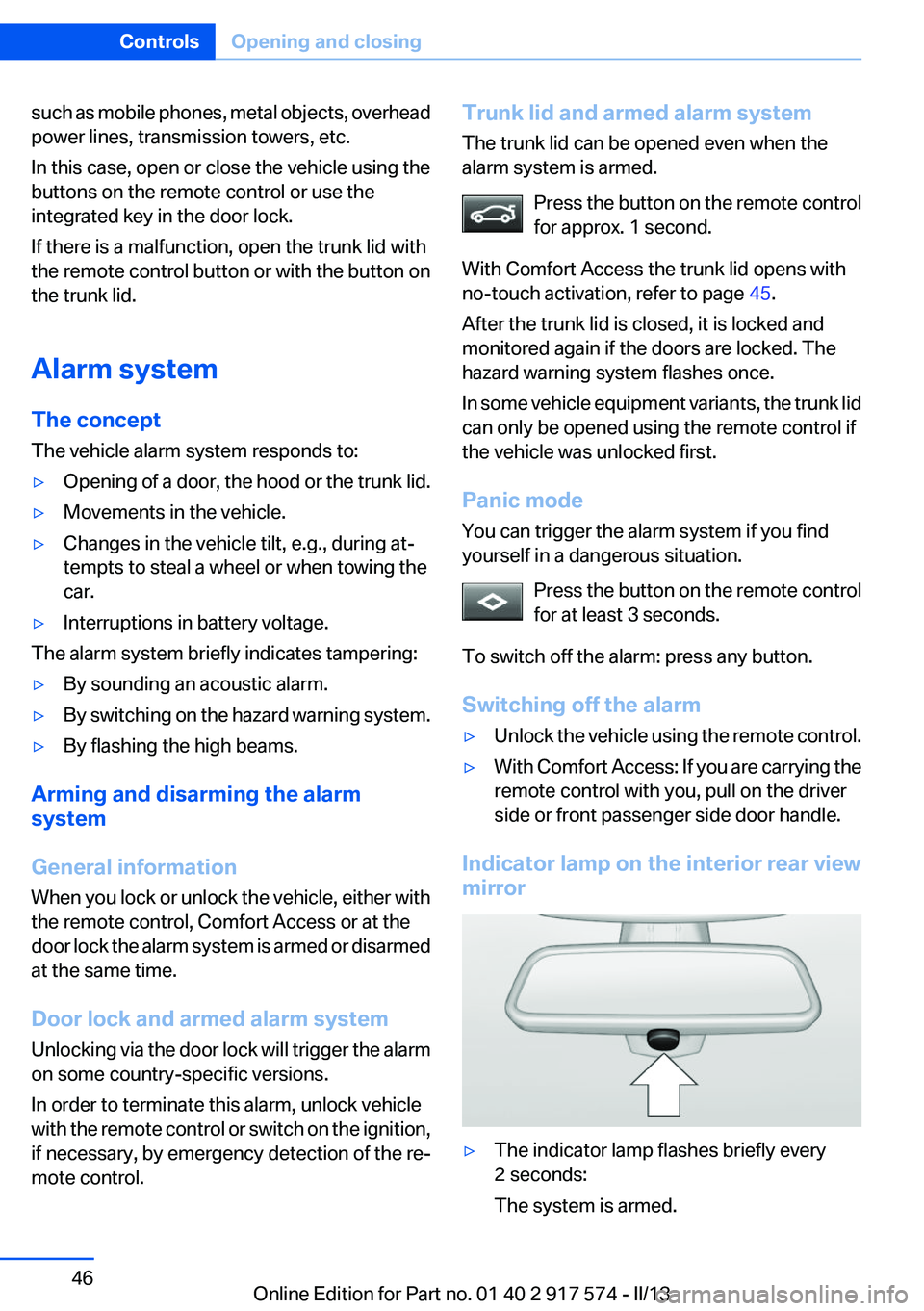
Indicator lamp on the interior rear view
mirror
▷The indicator lamp flashes briefly every
2 seconds:
The system is armed.Seite 46ControlsOpening and closing46
Online Edition for Part no. 01 40 2 917 574 - II/13
Page 59 of 224
Calling up settingsDo not retrieve the memory while driving
Do not retrieve the memory setting while
driving, as an unexpected movement of the seat
or steering wheel could result in an accident.◀
Comfort function1.Open the driver's door.2.Switch off the ignition.3.Briefly press the desired button 1 or 2.
The corresponding seat position is performed
automatically.
The procedure stops when a switch for adjust‐
ing the seat or one of the buttons is pressed.
Safety mode
1.Close the driver's door or switch on the ig‐
nition.2.Press and hold the desired button 1 or 2 until
the adjustment procedure is completed.
Calling up of a seat position
deactivated
After a brief period, the calling up of stored seat
positions is deactivated to save battery power.
To reactivate calling up of a seat position:
▷Open or close the door or trunk lid.▷Press a button on the remote control.▷Press the Start/Stop button.Mirrors
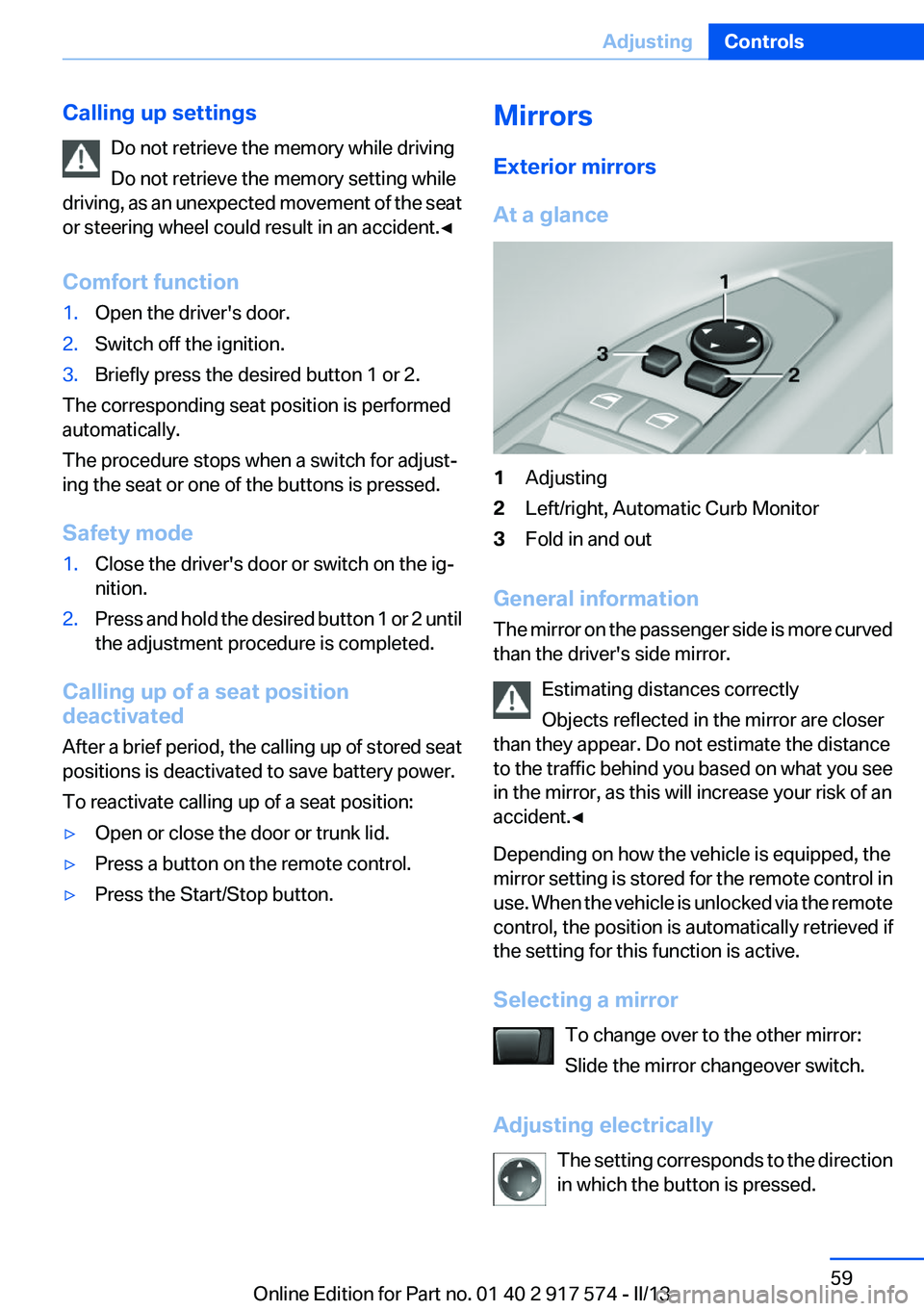
Exterior mirrors
At a glance1Adjusting2Left/right, Automatic Curb Monitor3Fold in and out
General information
The mirror on the passenger side is more curved
than the driver's side mirror.
Estimating distances correctly
Objects reflected in the mirror are closer
than they appear. Do not estimate the distance
to the traffic behind you based on what you see
in the mirror, as this will increase your risk of an
accident.◀
Depending on how the vehicle is equipped, the
mirror setting is stored for the remote control in
use. When the vehicle is unlocked via the remote
control, the position is automatically retrieved if
the setting for this function is active.
Selecting a mirror To change over to the other mirror:
Slide the mirror changeover switch.
Adjusting electrically The setting corresponds to the direction
in which the button is pressed.
Seite 59AdjustingControls59
Online Edition for Part no. 01 40 2 917 574 - II/13