towing BMW ACTIVEHYBRID5 2013 Owners Manual
[x] Cancel search | Manufacturer: BMW, Model Year: 2013, Model line: ACTIVEHYBRID5, Model: BMW ACTIVEHYBRID5 2013Pages: 224, PDF Size: 4.96 MB
Page 46 of 224
such as mobile phones, metal objects, overhead
power lines, transmission towers, etc.
In this case, open or close the vehicle using the
buttons on the remote control or use the
integrated key in the door lock.
If there is a malfunction, open the trunk lid with
the remote control button or with the button on
the trunk lid.
Alarm system
The concept
The vehicle alarm system responds to:▷Opening of a door, the hood or the trunk lid.▷Movements in the vehicle.▷Changes in the vehicle tilt, e.g., during at‐
tempts to steal a wheel or when towing the
car.▷Interruptions in battery voltage.
The alarm system briefly indicates tampering:
▷By sounding an acoustic alarm.▷By switching on the hazard warning system.▷By flashing the high beams.
Arming and disarming the alarm
system
General information
When you lock or unlock the vehicle, either with
the remote control, Comfort Access or at the
door lock the alarm system is armed or disarmed
at the same time.
Door lock and armed alarm system
Unlocking via the door lock will trigger the alarm
on some country-specific versions.
In order to terminate this alarm, unlock vehicle
with the remote control or switch on the ignition,
if necessary, by emergency detection of the re‐
mote control.
Trunk lid and armed alarm system
The trunk lid can be opened even when the
alarm system is armed.
Press the button on the remote control
for approx. 1 second.
With Comfort Access the trunk lid opens with
no-touch activation, refer to page 45.
After the trunk lid is closed, it is locked and
monitored again if the doors are locked. The
hazard warning system flashes once.
In some vehicle equipment variants, the trunk lid
can only be opened using the remote control if
the vehicle was unlocked first.
Panic mode
You can trigger the alarm system if you find
yourself in a dangerous situation.
Press the button on the remote control
for at least 3 seconds.
To switch off the alarm: press any button.
Switching off the alarm▷Unlock the vehicle using the remote control.▷With Comfort Access: If you are carrying the
remote control with you, pull on the driver
side or front passenger side door handle.
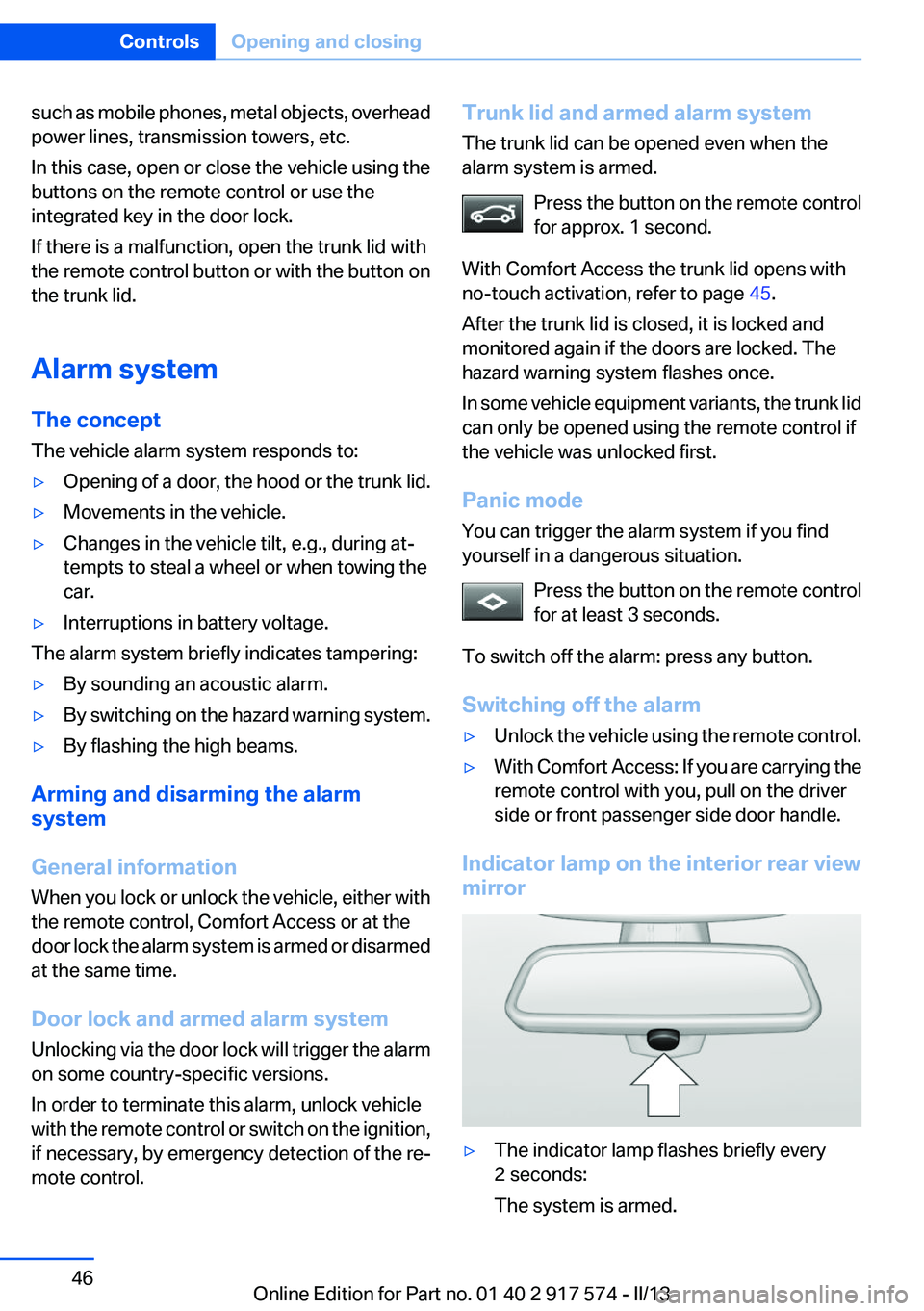
Indicator lamp on the interior rear view
mirror
▷The indicator lamp flashes briefly every
2 seconds:
The system is armed.Seite 46ControlsOpening and closing46
Online Edition for Part no. 01 40 2 917 574 - II/13
Page 87 of 224
3.Open "Options".4."Last Service Request"
Speed limit detection with No
Passing Information
The concept
Speed limit detection
Speed limit detection uses a symbol in the
shape of a traffic sign to display the currently
detected speed limit. The camera at the base of
the interior rearview mirror detects traffic signs
at the edge of the road as well as variable over‐
head sign posts. Traffic signs with extra symbols
for wet road conditions, etc. are also detected
and compared with vehicle interior data, such as
for the rain sensor, and are displayed depending
on the situation. The system takes into account
the information stored in the navigation system
and also displays speed limits present on routes
without signs.
No Passing Information
No Passing Information in the instrument cluster
displays the beginnings and ends of no passing
zones detected by the camera. The system ac‐
counts for only the beginnings and ends of No
Passing zones marked by signs.
No display is shown:
▷In countries where No Passing zones are
primarily identified with road markings.▷On routes without signage.▷Where there are railroad crossings, highway
markings or other situations where no sig‐
nage is present, but passing would not be
permitted.
Hints
Speed limits when towing a trailer are not
shown.
Personal judgment
The system cannot serve as a substitute
for the driver's personal judgment of the traffic
situation.
The system assists the driver and does not re‐
place the human eye.◀
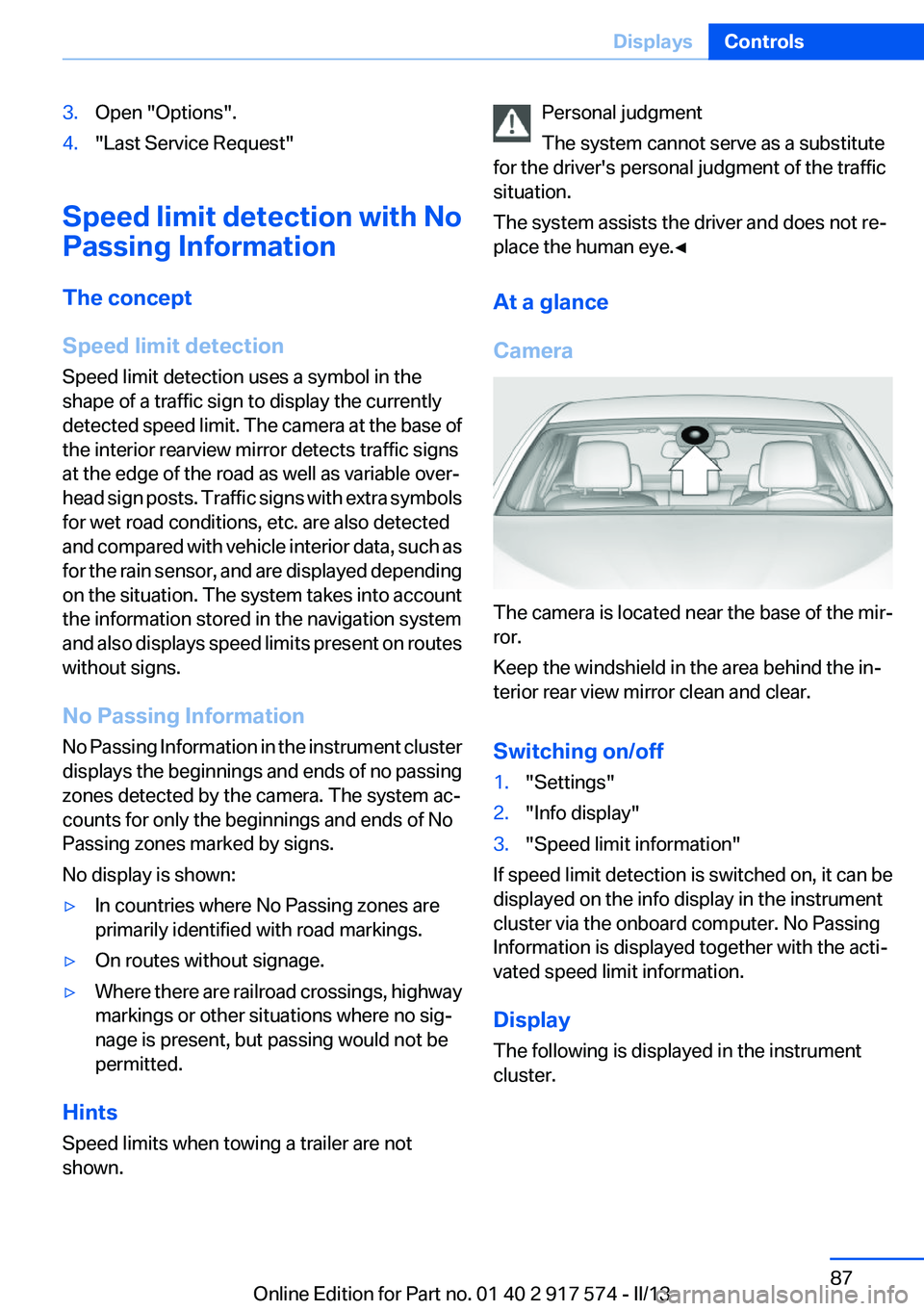
At a glance
Camera
The camera is located near the base of the mir‐
ror.
Keep the windshield in the area behind the in‐
terior rear view mirror clean and clear.
Switching on/off
1."Settings"2."Info display"3."Speed limit information"
If speed limit detection is switched on, it can be
displayed on the info display in the instrument
cluster via the onboard computer. No Passing
Information is displayed together with the acti‐
vated speed limit information.
Display
The following is displayed in the instrument
cluster.
Seite 87DisplaysControls87
Online Edition for Part no. 01 40 2 917 574 - II/13
Page 164 of 224
Stowing cargo▷The cover of the high-voltage battery is lo‐
cated in the trunk. Do not remove the cover
to stow luggage.▷Cover sharp edges and corners on the
cargo.▷Heavy cargo: stow as far forward as possi‐
ble, directly behind and at the bottom of the
rear passenger seat backrests.▷Very heavy cargo: when the rear seat is not
occupied, secure each of the outer safety
belts in the opposite buckle.
Securing cargo
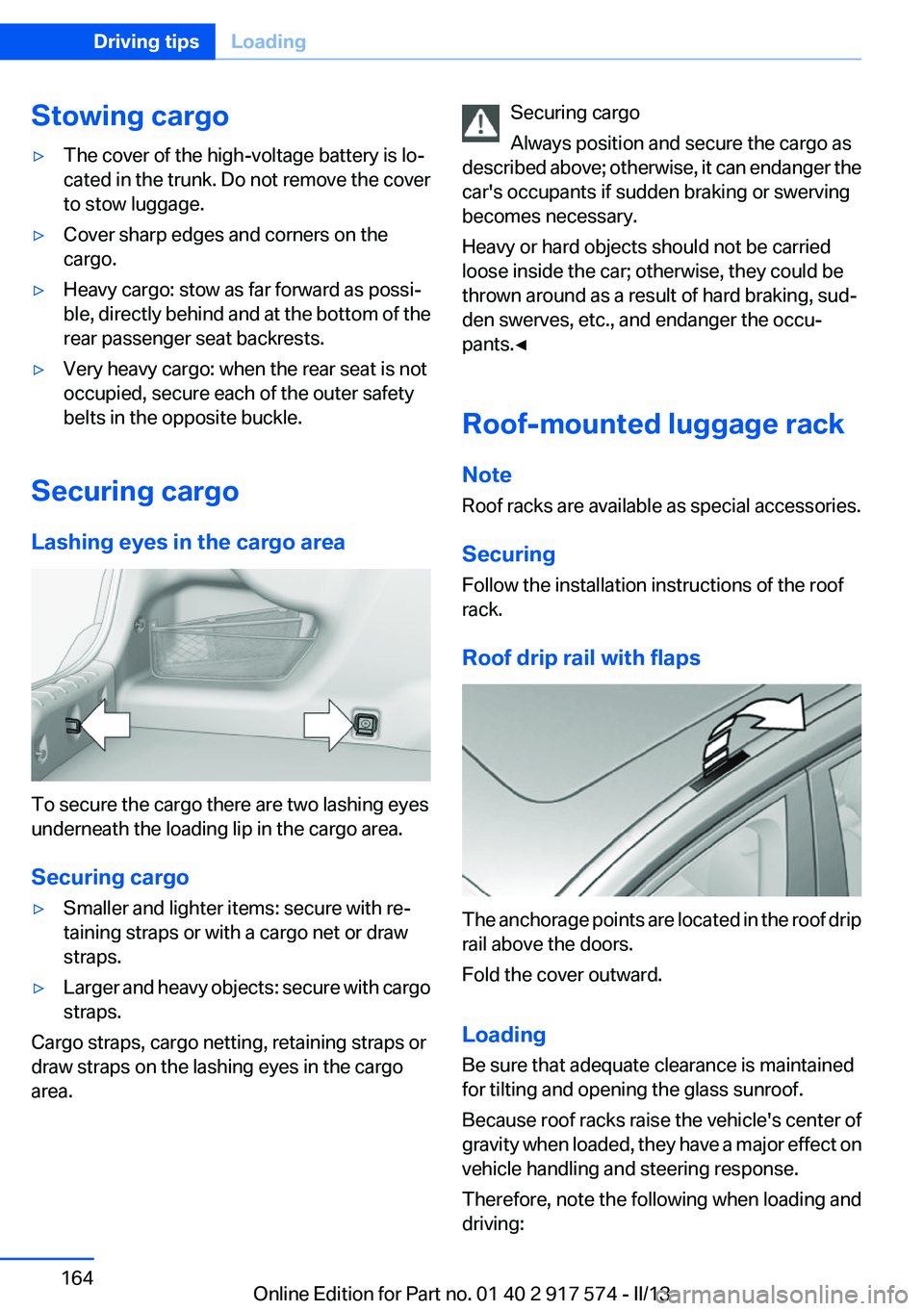
Lashing eyes in the cargo area
To secure the cargo there are two lashing eyes
underneath the loading lip in the cargo area.
Securing cargo
▷Smaller and lighter items: secure with re‐
taining straps or with a cargo net or draw
straps.▷Larger and heavy objects: secure with cargo
straps.
Cargo straps, cargo netting, retaining straps or
draw straps on the lashing eyes in the cargo
area.
Securing cargo
Always position and secure the cargo as
described above; otherwise, it can endanger the
car's occupants if sudden braking or swerving
becomes necessary.
Heavy or hard objects should not be carried
loose inside the car; otherwise, they could be
thrown around as a result of hard braking, sud‐
den swerves, etc., and endanger the occu‐
pants.◀
Roof-mounted luggage rack
Note
Roof racks are available as special accessories.
Securing
Follow the installation instructions of the roof
rack.
Roof drip rail with flaps
The anchorage points are located in the roof drip
rail above the doors.
Fold the cover outward.
Loading
Be sure that adequate clearance is maintained
for tilting and opening the glass sunroof.
Because roof racks raise the vehicle's center of
gravity when loaded, they have a major effect on
vehicle handling and steering response.
Therefore, note the following when loading and
driving:
Seite 164Driving tipsLoading164
Online Edition for Part no. 01 40 2 917 574 - II/13
Page 201 of 224
corresponding engine or body ground of the
vehicle to be started.
Starting the engine
Never use spray fluids to start the engine.
1.Start the engine of the assisting vehicle and
let it run for several minutes at an increased
idle speed.2.Start the engine of the vehicle being started
in the usual way.
If the first starting attempt is not successful,
wait a few minutes before making another
attempt in order to allow the discharged bat‐
tery to recharge.3.Let both engines run for several minutes.4.Disconnect the jumper cables in the reverse
order.
Check the battery and recharge if necessary.
Tow-starting and towing
Automatic transmission: transporting
your vehicle
Note
Your vehicle is not permitted to be towed.
Therefore, contact a service center in the event
of a breakdown.
Do not have the vehicle towed
Have your vehicle transported on a loading
platform only; otherwise, damage may occur.◀
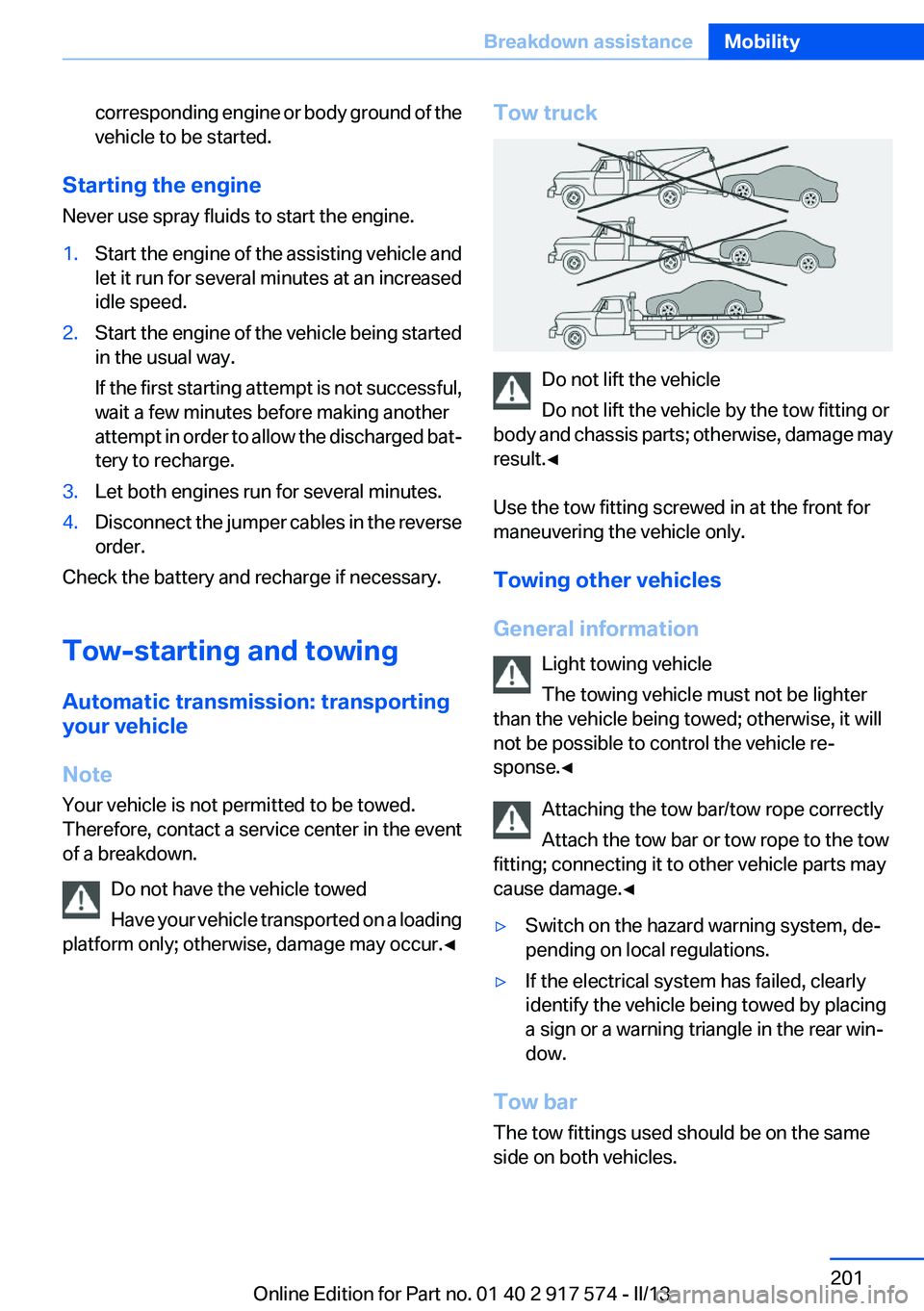
Tow truck
Do not lift the vehicle
Do not lift the vehicle by the tow fitting or
body and chassis parts; otherwise, damage may
result.◀
Use the tow fitting screwed in at the front for
maneuvering the vehicle only.
Towing other vehicles
General information Light towing vehicle
The towing vehicle must not be lighter
than the vehicle being towed; otherwise, it will
not be possible to control the vehicle re‐
sponse.◀
Attaching the tow bar/tow rope correctly
Attach the tow bar or tow rope to the tow
fitting; connecting it to other vehicle parts may
cause damage.◀
▷Switch on the hazard warning system, de‐
pending on local regulations.▷If the electrical system has failed, clearly
identify the vehicle being towed by placing
a sign or a warning triangle in the rear win‐
dow.
Tow bar
The tow fittings used should be on the same
side on both vehicles.
Seite 201Breakdown assistanceMobility201
Online Edition for Part no. 01 40 2 917 574 - II/13
Page 202 of 224
Should it prove impossible to avoid mounting
the tow bar at an offset angle, please observe
the following:▷Maneuvering capability is limited during cor‐
nering.▷The tow bar will generate lateral forces if it
is secured with an offset.
Tow rope
When starting to tow the vehicle, make sure that
the tow rope is taut.
To avoid jerking and the associated stresses on
the vehicle components when towing, always
use nylon ropes or nylon straps.
Attaching the tow rope correctly
Only secure the tow rope on the tow fit‐
ting; otherwise, damage can occur when it is se‐
cured on other parts of the vehicle.◀
Tow fitting
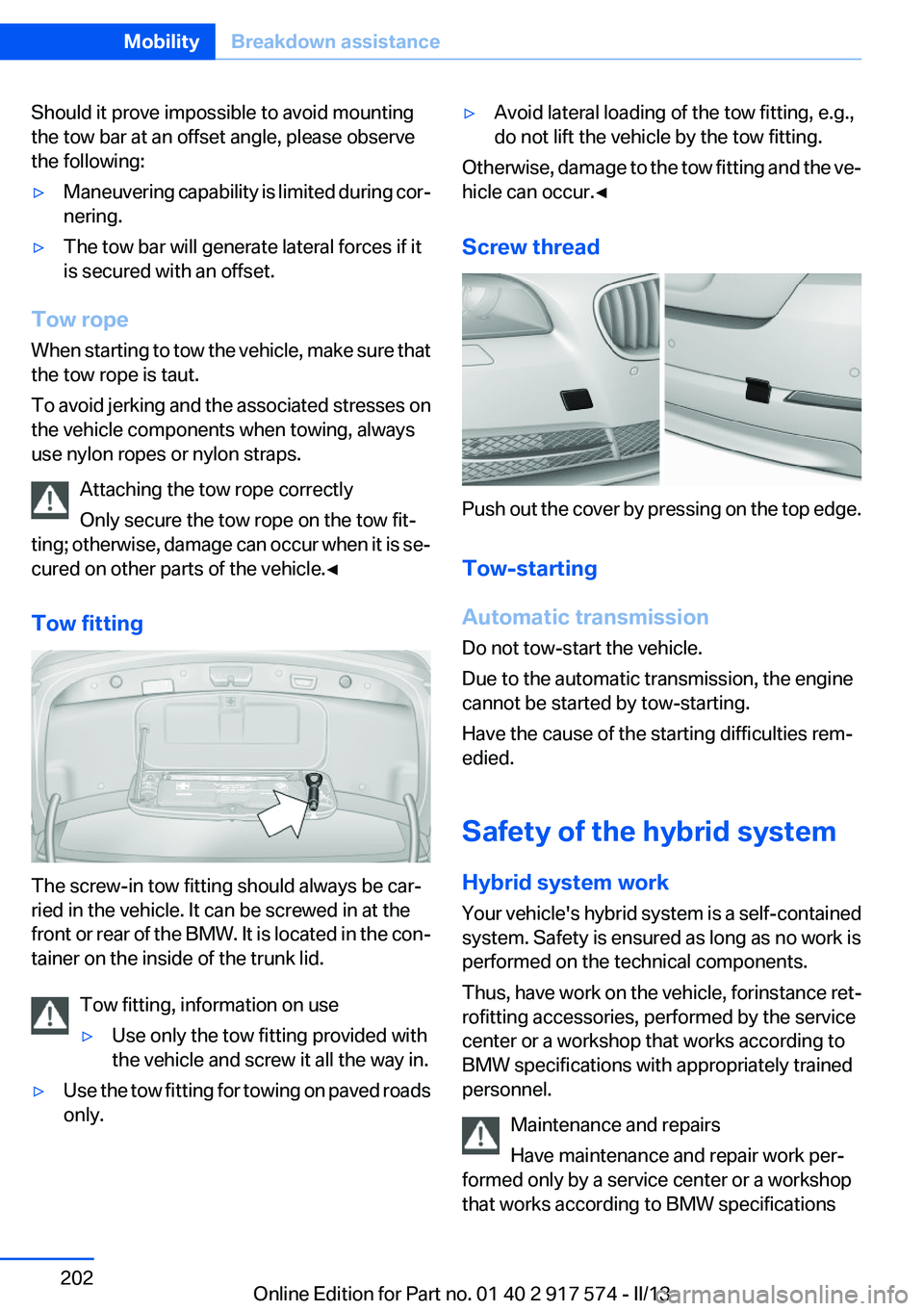
The screw-in tow fitting should always be car‐
ried in the vehicle. It can be screwed in at the
front or rear of the BMW. It is located in the con‐
tainer on the inside of the trunk lid.
Tow fitting, information on use
▷Use only the tow fitting provided with
the vehicle and screw it all the way in.▷Use the tow fitting for towing on paved roads
only.▷Avoid lateral loading of the tow fitting, e.g.,
do not lift the vehicle by the tow fitting.
Otherwise, damage to the tow fitting and the ve‐
hicle can occur.◀
Screw thread
Push out the cover by pressing on the top edge.
Tow-starting
Automatic transmission
Do not tow-start the vehicle.
Due to the automatic transmission, the engine
cannot be started by tow-starting.
Have the cause of the starting difficulties rem‐
edied.
Safety of the hybrid system
Hybrid system work
Your vehicle's hybrid system is a self-contained
system. Safety is ensured as long as no work is
performed on the technical components.
Thus, have work on the vehicle, for instance ret‐
rofitting accessories, performed by the service
center or a workshop that works according to
BMW specifications with appropriately trained
personnel.
Maintenance and repairs
Have maintenance and repair work per‐
formed only by a service center or a workshop
that works according to BMW specifications
Seite 202MobilityBreakdown assistance202
Online Edition for Part no. 01 40 2 917 574 - II/13
Page 217 of 224
ESP Electronic Stability Pro‐gram, refer to DSC 117
Exchanging wheels/tires 179
Exhaust system 160
Exterior mirror, automatic dim‐ ming feature 60
Exterior mirrors 59
External start 199
External temperature dis‐ play 83
External temperature warn‐ ing 83
Eyes for securing cargo 164
F
Failure message, refer to Check Control 80
False alarm, refer to Uninten‐ tional alarm 47
Fan, refer to Air flow 139
Fault displays, refer to Check Control 80
Filler neck for engine oil 185
Fine wood, care 206
First aid kit 199
Fitting for towing, refer to Tow fitting 202
Flat tire, changing wheels 196
Flat Tire Monitor FTM 105
Flat tire, Tire Pressure Monitor TPM 102
Flat tire, warning lamp 103, 106
Flooding 161
Floor carpet, care 206
Floor mats, care 206
Fold-out position, windshield wipers 75
Foot brake 161
Front airbags 99
Front fog lamps 97
Front fog lamps, front, bulb re‐ placement 194
Front lamps 191 Front passenger airbags, au‐
tomatic deactivation 101
Front passenger airbags, indi‐ cator lamp 101
FTM Flat Tire Monitor 105
Fuel cap 172
Fuel consumption, refer to Average fuel consump‐
tion 89
Fuel filler flap 172
Fuel gauge 83
Fuel quality 174
Fuel, tank capacity 212
Functions, hybrid system 29
Fuse 197
G
Garage door opener, refer to Integrated universal remote
control 146
Gasoline 174
Gasoline quality 174
Gear change, automatic trans‐ mission 76
General driving notes 160
Glass sunroof, powered 49
Glove compartment 152
Gross vehicle weight, ap‐ proved 211
H
Handbrake, refer to Parking brake 70
Hand-held transmitter, alter‐ nating code 147
Hazard warning flashers 198
Head airbags 99
Headlamp control, auto‐ matic 95
Headlamp courtesy delay fea‐ ture 95
Headlamp flasher 73
Headlamp glass 191
Headlamps 191 Headlamps, care 205
Headlamp washer system 73
Headliner 17
Head restraints 51
Head restraints, front 56
Head restraints, rear 57
Head-Up Display 136
Head-up Display, care 207
Heavy cargo, stowing 164
Height, vehicle 210
High-beam Assistant 96
High beams 73
High beams/low beams, refer to High-beam Assistant 96
High-voltage battery, charge indicator 84
Hills 161
Hill start assistant, refer to Drive-off assistant 117
Hints 6
Holder for beverages 154
Homepage 6
Hood 182
Horn 14
Hotel function, trunk lid 43
Hot exhaust system 160
HUD Head-Up Display 136
Hybrid system, at a glance 29
Hybrid system, automatic de‐ activation 203
Hybrid system, contact with water 203
Hybrid system, displays 84
Hybrid system, driving tips 158
Hybrid system, safety 202
Hydroplaning 160
I
Ice warning, refer to External temperature warning 83
Icy roads, refer to External temperature warning 83
Identification marks, tires 177 Seite 217Everything from A to ZReference217
Online Edition for Part no. 01 40 2 917 574 - II/13
Page 219 of 224
Manual operation, doorlock 41
Manual operation, exterior mir‐ rors 60
Manual operation, fuel filler flap 172
Manual operation, Park Dis‐ tance Control PDC 125
Manual operation, Side View 131
Manual operation, Top View 129
Marking on approved tires 180
Marking, run-flat tires 181
Massage seat, front 53
Master key, refer to Remote control 34
Maximum cooling 139
Maximum speed, display 87
Maximum speed, winter tires 180
Measure, units of 92
Medical kit 199
Memory for seat, mirrors, steering wheel 58
Menu in instrument cluster 88
Menus, operating, iDrive 18
Menus, refer to iDrive operat‐ ing concept 19
Messages, refer to Check Control 80
Microfilter 141
Minimum tread, tires 179
Mirror 59
Mirror memory 58
Mobile communication devi‐ ces in the vehicle 160
Modifications, technical, refer to Safety 7
Moisture in headlamp 191
Monitor, refer to Control Dis‐ play 18
Mounting of child restraint fix‐ ing systems 62 Multifunction steering wheel,
buttons 14
N
Navigation, see user's manual for Navigation, Entertain‐
ment and Communication
Neck restraints, front, refer to Head restraints 56
Neck restraints, rear, refer to Head restraints 57
New wheels and tires 179
Night Vision with pedestrian detection 109
No Passing Information 87
Nylon rope for tow-starting/ towing 202
O
OBD Onboard Diagnos‐ tics 189
Obstacle marking, backup camera 128
Octane rating, refer to Gaso‐ line quality 174
Odometer 83
Office, see user's manual for Navigation, Entertainment
and Communication
Oil 184
Oil, adding 185
Oil additives 185
Oil change 185
Oil change interval, service re‐ quirements 86
Oil filler neck 185
Oil types, alternative 185
Oil types, approved 185
Old batteries, disposal 197
Onboard Diagnostics OBD 189
Onboard monitor, refer to Control Display 18
Onboard vehicle tool kit 190 Opening/closing from in‐
side 41
Opening/closing via door lock 40
Opening/closing with remote control 38
Opening the trunk lid with no- touch activation 45
Operating concept, iDrive 18
Optional equipment, standard equipment 6
Outside air, refer to Automatic recirculated-air control 140
Overheating of engine, refer to Coolant temperature 83
Overtaking prohibitions 87
P
Paint, vehicle 205
Parallel parking assistant 132
Park Distance Control PDC 124
Parked-car ventilation 144
Parked vehicle, condensa‐ tion 162
Parking aid, refer to PDC 124
Parking assistant 132
Parking brake 70
Parking lamps 94
Parking with Auto Hold 71
Passenger side mirror, tilting downward 60
Pathway lines, backup cam‐ era 127
PDC Park Distance Con‐ trol 124
Pedestrian detection, refer to Night Vision 109
People detection, refer to Night Vision 109
Personal Profile 35
Pinch protection system, glass sunroof 50
Pinch protection system, win‐ dows 48 Seite 219Everything from A to ZReference219
Online Edition for Part no. 01 40 2 917 574 - II/13
Page 221 of 224
Silent Start, electric drive read‐iness 67
Sitting safely 51
Size 210
Slide/tilt glass roof 49
Smallest turning circle 211
Smoker's package 148
Snow chains 181
Socket 149
Socket, OBD Onboard Diag‐ nostics 189
SOS button 198
Spare fuse 197
Speaker lighting 98
Specified engine oil types 185
Speed, average 89
Speed limit detection, on‐ board computer 90
Speed limiter, display 87
Speed Limit Information 87
Speed limit in the com‐ puter 90
Split screen 22
SPORT+ - program, Dynamic Driving Control 119
Sport automatic transmis‐ sion 78
SPORT program, Dynamic Driving Control 120
Sport program, transmis‐ sion 77
Stability control systems 117
Start/Stop button 66
Start function during malfunc‐ tion 35
Starting the combustion en‐ gine 68
Status display, tires 102
Status information, iDrive 21
Status of Owner's Manual 7
Steering wheel, adjusting 61
Steering wheel heating 61
Steering wheel memory 58
Steptronic, automatic trans‐ mission 76 Storage compartment, remote
control 154
Storage compartments 152
Storage compartments, loca‐ tions 152
Storage, tires 181
Storing the vehicle 207
Summer tires, tread 179
Supplementary text mes‐ sage 82
Surround View 126
Suspension settings 119
Switch for Dynamic Driving Control 119
Switch-on times, parked-car ventilation 144
Switch, refer to Cockpit 14
Symbols 6
T
Tachometer 83
Tail and brake lamps 195
Tailgate 41
Tailgate, automatic 42
Tailgate opening with no- touch activation 45
Tailgate via remote control 39
Tail lamps 194
Tail lamps, bulb replace‐ ment 195
Technical changes, refer to Safety 7
Technical data 210
Telephone, see user's manual for Navigation, Entertain‐
ment and Communication
Temperature, automatic cli‐ mate control 139
Temperature display, external temperature 83
Temperature, engine oil 83
Terminal, jump-starting 200
Text message, supplemen‐ tary 82 Theft alarm system, refer to
Alarm system 46
Theft protection, refer to Cen‐ tral locking system 38
Thermal camera, refer to Night Vision 109
Tilt alarm sensor 47
Time of arrival 90
Tire damage 179
Tire identification marks 177
Tire inflation pressure 175
Tire inflation pressure monitor, refer to FTM 105
Tire Pressure Monitor TPM 102
Tires, changing 179
Tires, everything on wheels and tires 175
Tires, run-flat tires 181
Tire tread 179
Tone, see user's manual for Navigation, Entertainment
and Communication
Tools 190
Top View 129
Total vehicle weight 211
Tow fitting 202
Towing 201
Tow-starting 201
TPM Tire Pressure Moni‐ tor 102
Traction control 118
Transmission, automatic 76
Transporting children safely 62
Tread, tires 179
Trip computer 90
Triple turn signal activa‐ tion 73
Trip odometer 83
Trunk lid 41
Trunk lid, automatic 42
Trunk lid, emergency unlock‐ ing 44
Trunk lid, hotel function 43 Seite 221Everything from A to ZReference221
Online Edition for Part no. 01 40 2 917 574 - II/13