Front seat BMW I3 2014 I01 User Guide
[x] Cancel search | Manufacturer: BMW, Model Year: 2014, Model line: I3, Model: BMW I3 2014 I01Pages: 230, PDF Size: 29.93 MB
Page 90 of 230
also be activated if objects are placed on the
front passenger seat.
Make sure that the safety belts are positioned
correctly.
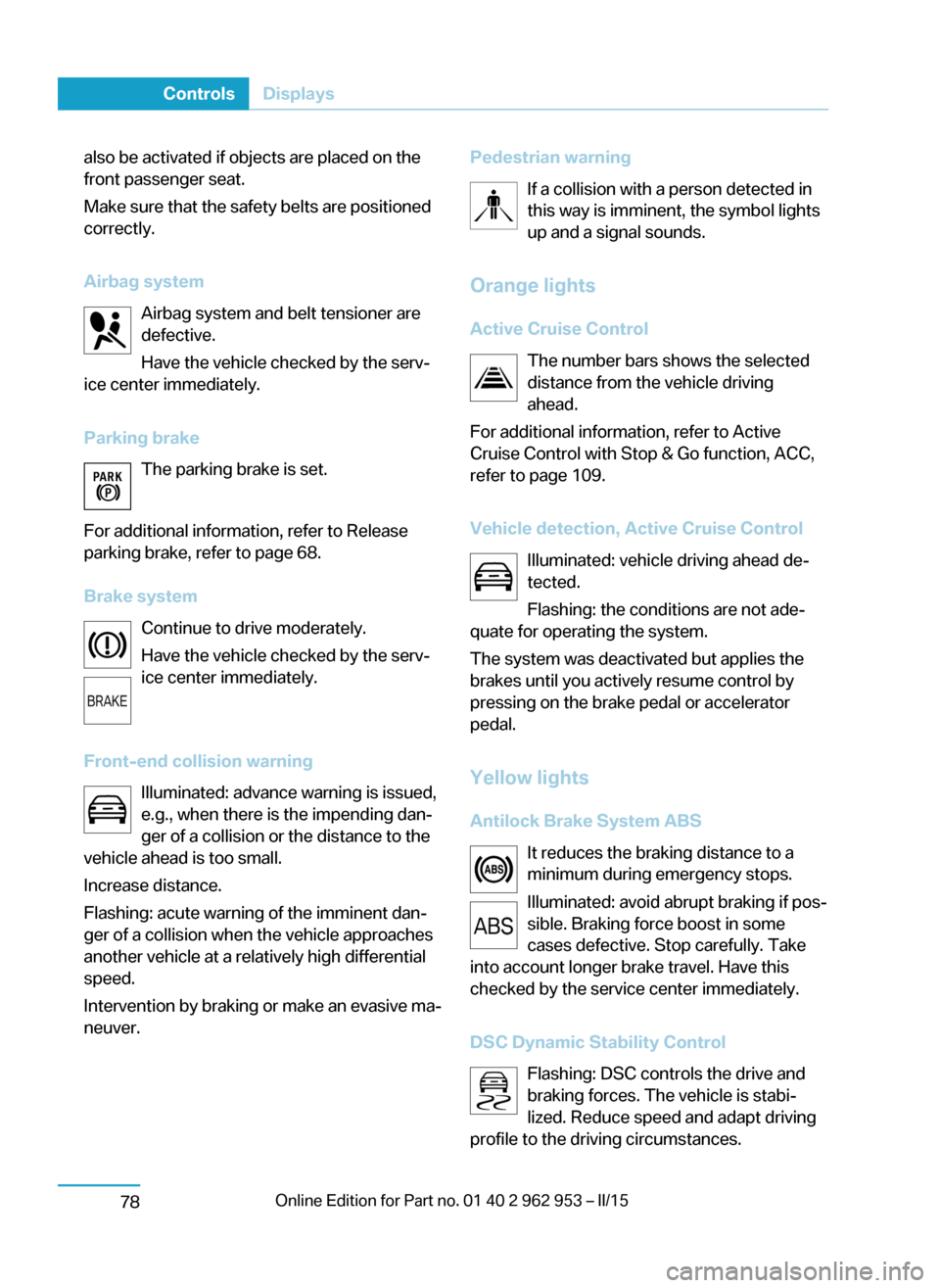
Airbag system Airbag system and belt tensioner are
defective.
Have the vehicle checked by the serv‐
ice center immediately.
Parking brake The parking brake is set.
For additional information, refer to Release
parking brake, refer to page 68.
Brake system Continue to drive moderately.
Have the vehicle checked by the serv‐
ice center immediately.
Front-end collision warning Illuminated: advance warning is issued,
e.g., when there is the impending dan‐
ger of a collision or the distance to the
vehicle ahead is too small.
Increase distance.
Flashing: acute warning of the imminent dan‐
ger of a collision when the vehicle approaches
another vehicle at a relatively high differential
speed.
Intervention by braking or make an evasive ma‐
neuver.Pedestrian warning
If a collision with a person detected in
this way is imminent, the symbol lights
up and a signal sounds.
Orange lights
Active Cruise Control The number bars shows the selected
distance from the vehicle driving
ahead.
For additional information, refer to Active
Cruise Control with Stop & Go function, ACC,
refer to page 109.
Vehicle detection, Active Cruise Control Illuminated: vehicle driving ahead de‐
tected.
Flashing: the conditions are not ade‐
quate for operating the system.
The system was deactivated but applies the
brakes until you actively resume control by
pressing on the brake pedal or accelerator
pedal.
Yellow lights
Antilock Brake System ABS It reduces the braking distance to a
minimum during emergency stops.
Illuminated: avoid abrupt braking if pos‐
sible. Braking force boost in some
cases defective. Stop carefully. Take
into account longer brake travel. Have this
checked by the service center immediately.
DSC Dynamic Stability Control Flashing: DSC controls the drive and
braking forces. The vehicle is stabi‐
lized. Reduce speed and adapt driving
profile to the driving circumstances.Seite 76ControlsDisplays78
Page 105 of 230
Protective action
Airbags are not triggered in every impact situa‐
tion, e.g., in less severe accidents or rear-end
collisions.
Information on how to ensure the optimal
protective effect of the airbags▷Keep at a distance from the airbags.▷Always grasp the steering wheel on the
steering wheel rim, holding your hands at
the 3 o'clock and 9 o'clock positions, to
keep the risk of injury to your hands or
arms as low as possible when the airbag is
triggered.▷There should be no person, animals, or ob‐
jects between an airbag and a person.▷Do not use the cover of the front airbag on
the front passenger side as a storage area.▷Dashboard and windshield on the front
passenger side must stay clear - do not at‐
tach adhesive labels or coverings and do
not attach brackets or cables, e. g., for GPS
devices or' mobile phones.▷Make sure that the front passenger is sit‐
ting correctly, i.e., keeps his or her feet and
legs in the footwell; otherwise, leg injuries
might occur when front airbag is activated.▷Do not place slip covers, seat cushions or
other objects on the front passenger seat
that are not approved specifically for seats
with integrated side airbags.▷Do not hang pieces of clothing, such as
jackets, over the backrests.▷Make sure that occupants keep their heads
away from the side airbag and do not rest
against the head airbag; otherwise, injuries
might occur when airbag is activated.▷Do not remove the airbag system.▷Do not remove the steering wheel.▷Do not apply adhesive materials to the air‐
bag cover panels, do not cover them or
modify them in any way.▷Never modify either the individual compo‐
nents or the wiring in the airbag system.
This also applies to steering wheel covers,
the dashboard, the seats, the roof pillars
and the sides of the roofliner.◀
Even when you follow all instructions very
closely, injury from contact with the airbags
cannot be ruled out in certain situations.
The ignition and inflation noise may lead to
short-term and, in most cases, temporary
hearing impairment in sensitive individuals.
Malfunction, deactivation and after de‐
ploying the airbags
Do not touch the individual components imme‐
diately after the system has been triggered;
otherwise, you may risk burns.
Only have the airbags checked, repaired or dis‐
mantled and the airbag generator scrapped by
the service center or an authorized repair shop
for handling explosives.
Non-professional attempts to service the sys‐
tem could lead to failure in an emergency or
unintentional activation of the airbag - both
may lead to injury.◀
Warnings and information on the airbags are also found on the sun visors.
Functional readiness of the airbag
system
With operating readiness turned on
warning light in the instrument cluster
lights up briefly indicating airbag sys‐
tem and belt tension are functional.
Airbag system malfunctioning
▷Warning lamp does not come on when op‐
erating readiness is turned on.▷The warning lamp lights up continuously.
In case of a malfunction have airbag sys‐
tem checked immediately.
In case of a malfunction have airbag system
checked immediately; otherwise, there is a risk
Seite 91SafetyControls93
Page 106 of 230
that the system does not function as expected
in case of a severe accident.◀
Automatic deactivation of the front-
seat passenger airbags
The system reads if the front passenger seat is
occupied by measuring the human body's re‐
sistance.
Front, knee and side airbag on the front pas‐
senger's side are either activated or deacti‐
vated.
Leave feet in the footwell
Make sure that the front passenger
keeps his or her feet in the footwell; otherwise,
proper functioning of the front passenger air‐
bag might not be assured.◀
Child restraint fixing system in the front
passenger seat
Before transporting a child on the front pas‐
senger seat, refer to the safety notes and in‐
structions for children on the front passenger
seat, see Children.◀
Malfunction of the automatic
deactivation system
When transporting older children and adults,
the front-seat passenger airbags may be deac‐
tivated in certain sitting positions. In this case,
the indicator lamp for the front-seat passenger
airbags lights up.
In this case, change the sitting position so that
the front-seat passenger airbags are activated
and the indicator lamp goes out.
If it is not possible to activate the airbags, have
the person sit in the rear.
To enable correct recognition of the occupied
seat cushion▷Do not attach covers, cushions, ball mats
or other items to the front passenger seat
unless they are specifically recommended
by your vehicle's manufacturer.▷Do not place any electronic devices on the
passenger seat if a child restraint system is
to be installed on it.▷Do not place objects under the seat that
could press against the seat from below.▷No moisture in or on the seat.
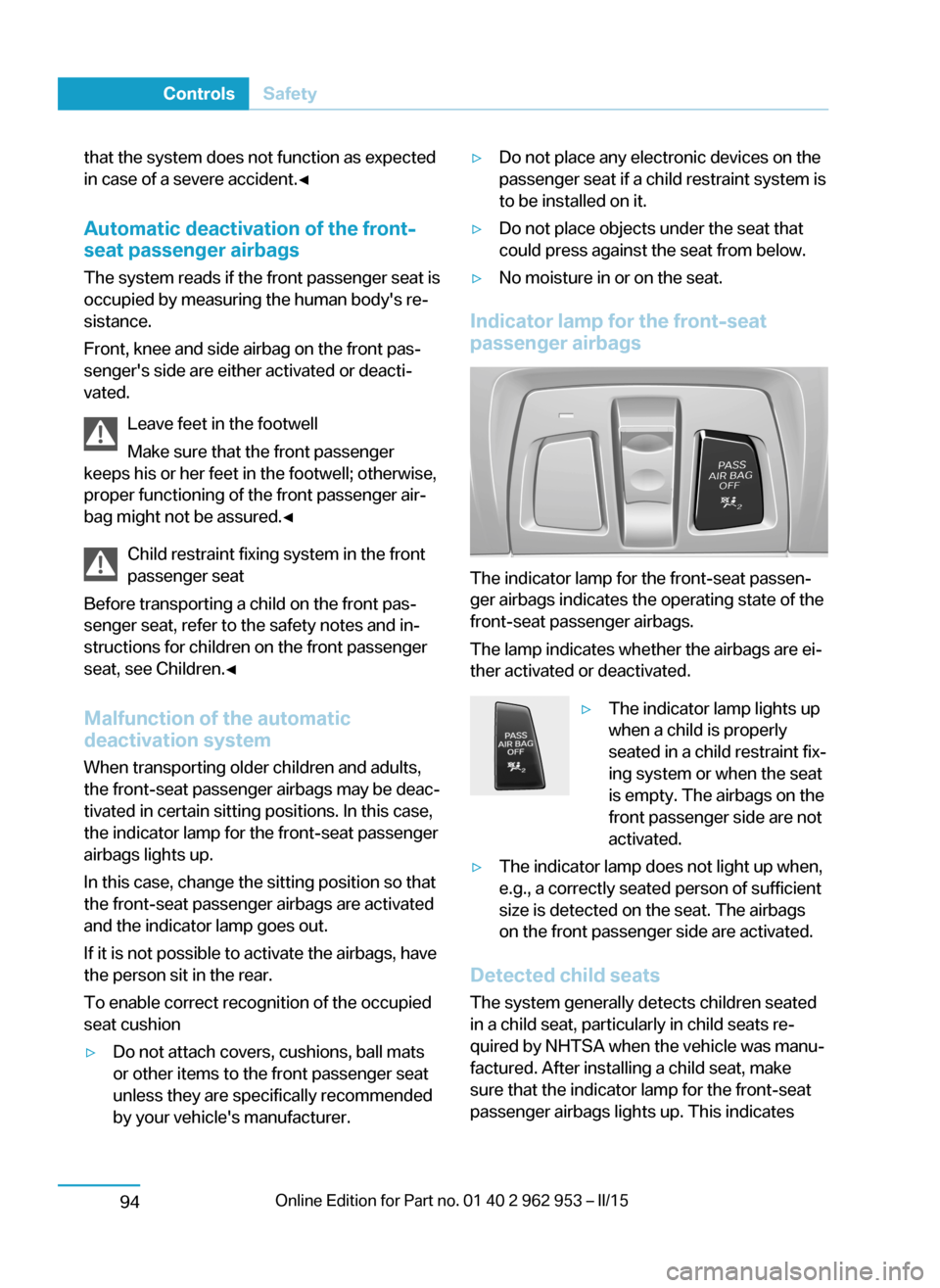
Indicator lamp for the front-seat
passenger airbags
The indicator lamp for the front-seat passen‐
ger airbags indicates the operating state of the
front-seat passenger airbags.
The lamp indicates whether the airbags are ei‐
ther activated or deactivated.
▷The indicator lamp lights up
when a child is properly
seated in a child restraint fix‐
ing system or when the seat
is empty. The airbags on the
front passenger side are not
activated.▷The indicator lamp does not light up when,
e.g., a correctly seated person of sufficient
size is detected on the seat. The airbags
on the front passenger side are activated.
Detected child seats
The system generally detects children seated
in a child seat, particularly in child seats re‐
quired by NHTSA when the vehicle was manu‐ factured. After installing a child seat, make
sure that the indicator lamp for the front-seat
passenger airbags lights up. This indicates
Seite 92ControlsSafety94
Page 107 of 230
that the child seat has been detected and the
front-seat passenger airbags are not activated.
Strength of the driver's and front-seat
passenger airbag
The explosive power that activates driver's/
front passenger's airbags very much depends
on the positions of the driver's/front passeng‐
er's seat.
With a respective message appearing on Con‐
trol Display calibrate the front seats to keep
the accuracy of this function over the long-
term.
Calibrating the front seats A corresponding message appears on the
Control Display.1.Press the reel and move the respective
seat all the way forward.2.Press the reel forward again. The seat still
moves forward slightly.3.Readjust the seat to the desired position.
The calibration procedure is completed when
the message on the Control Display disap‐
pears.
If the message continues to be displayed, re‐
peat the calibration.
If the message does not disappear after a re‐
peat calibration, have the system checked as
soon as possible.
Unobstructed area of movement
Ensure that the area of movement of the
seats is unobstructed to avoid personal injury
or damage to objects.◀
Tire Pressure Monitor TPM The concept
The system monitors tire inflation pressure in
the four mounted tires. The system warns you
if there is a significant loss of pressure in one
or more tires. For this purpose, sensors in the
tire valves measure the tire inflation pressure
and tire temperature.
Hints Tire damage due to external factors
Sudden tire damage caused by external
circumstances cannot be recognized in ad‐
vance.◀
With use of the system observe further infor‐
mation found under Tire inflation pressure, re‐
fer to page 170.
Functional requirements The system must have been reset with the
correct tire inflation pressure; otherwise, relia‐
ble signaling of tire inflation pressure loss is
not assured.
Reset the system after each adjustment of the
tire inflation pressure and after every tire or
wheel change.
Always use wheels with TPM electronics to
ensure that the system will operate properly.
Status display The current status of the Tire Pressure Moni‐
tor TPM can be displayed on the Control Dis‐
play, e.g., whether or not the TPM is active.1."Vehicle info"2."Vehicle status"3. "Tire Pressure Monitor (TPM)"
The status is displayed.
Status control display Tire and system status are indicated by the
color of the wheels and a text message on the
Control Display.
All wheels green System is active and will issue a warning rela‐
tive to the tire inflation pressures stored during
the last reset.
Seite 93SafetyControls95
Page 147 of 230
Sockets
General information
The lighter socket can be used as a socket for
electrical equipment when operating and drive
readiness are activated.
Note
The total load of all sockets must not exceed
140 watts at 12 volts.
Do not damage the socket by using unsuitable
connectors.
Front center console
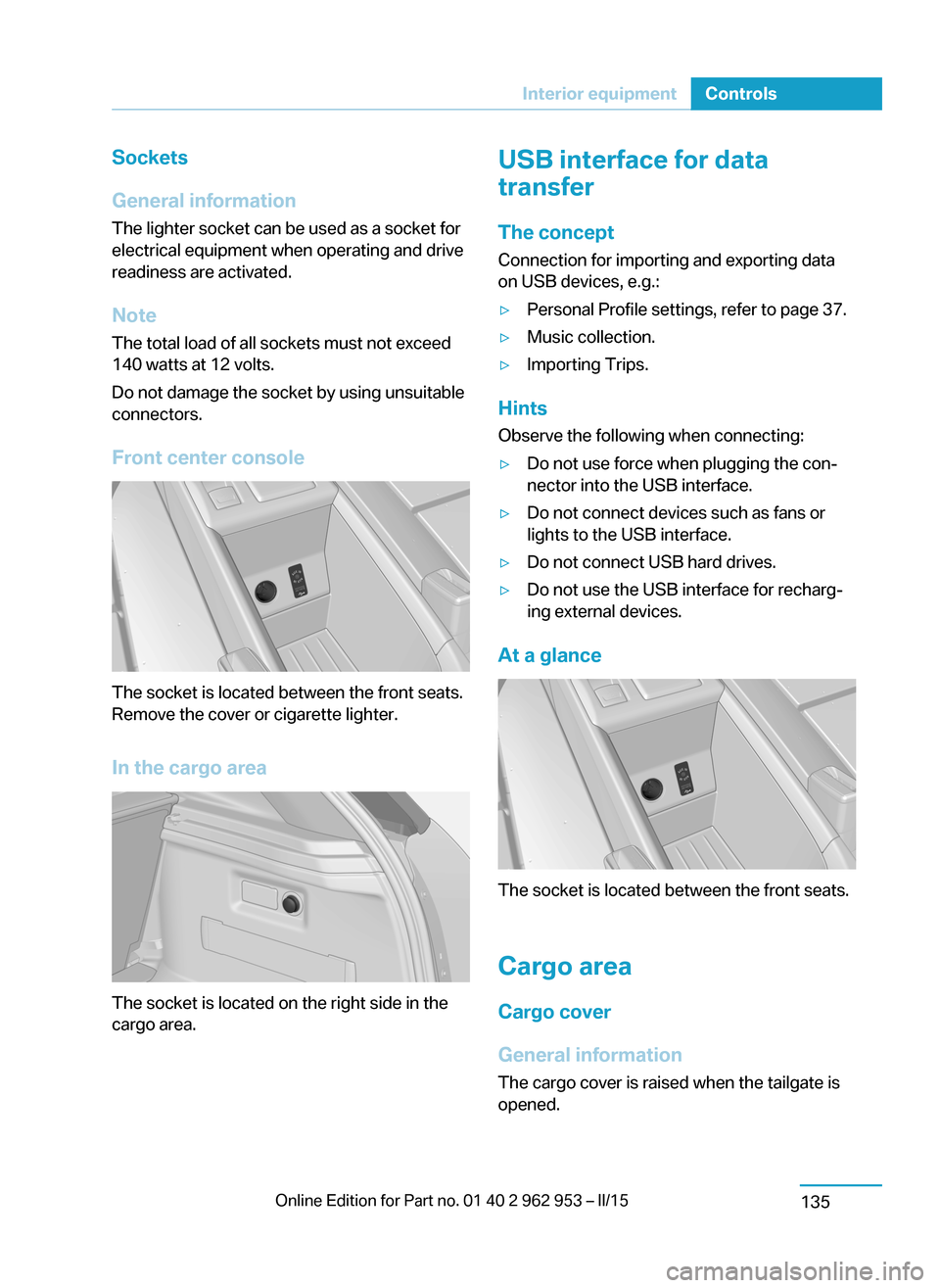
The socket is located between the front seats.
Remove the cover or cigarette lighter.
In the cargo area
The socket is located on the right side in the
cargo area.
USB interface for data
transfer
The concept Connection for importing and exporting data
on USB devices, e.g.:▷Personal Profile settings, refer to page 37.▷Music collection.▷Importing Trips.
Hints
Observe the following when connecting:
▷Do not use force when plugging the con‐
nector into the USB interface.▷Do not connect devices such as fans or
lights to the USB interface.▷Do not connect USB hard drives.▷Do not use the USB interface for recharg‐
ing external devices.
At a glance
The socket is located between the front seats.
Cargo area
Cargo cover
General information The cargo cover is raised when the tailgate is
opened.
Seite 133Interior equipmentControls135
Page 148 of 230
NoteDo not deposit heavy objects
Do not deposit heavy or hard objects on
the cargo cover. Otherwise, they may pose a
risk to occupants, such as during braking and
evasive maneuvers.◀
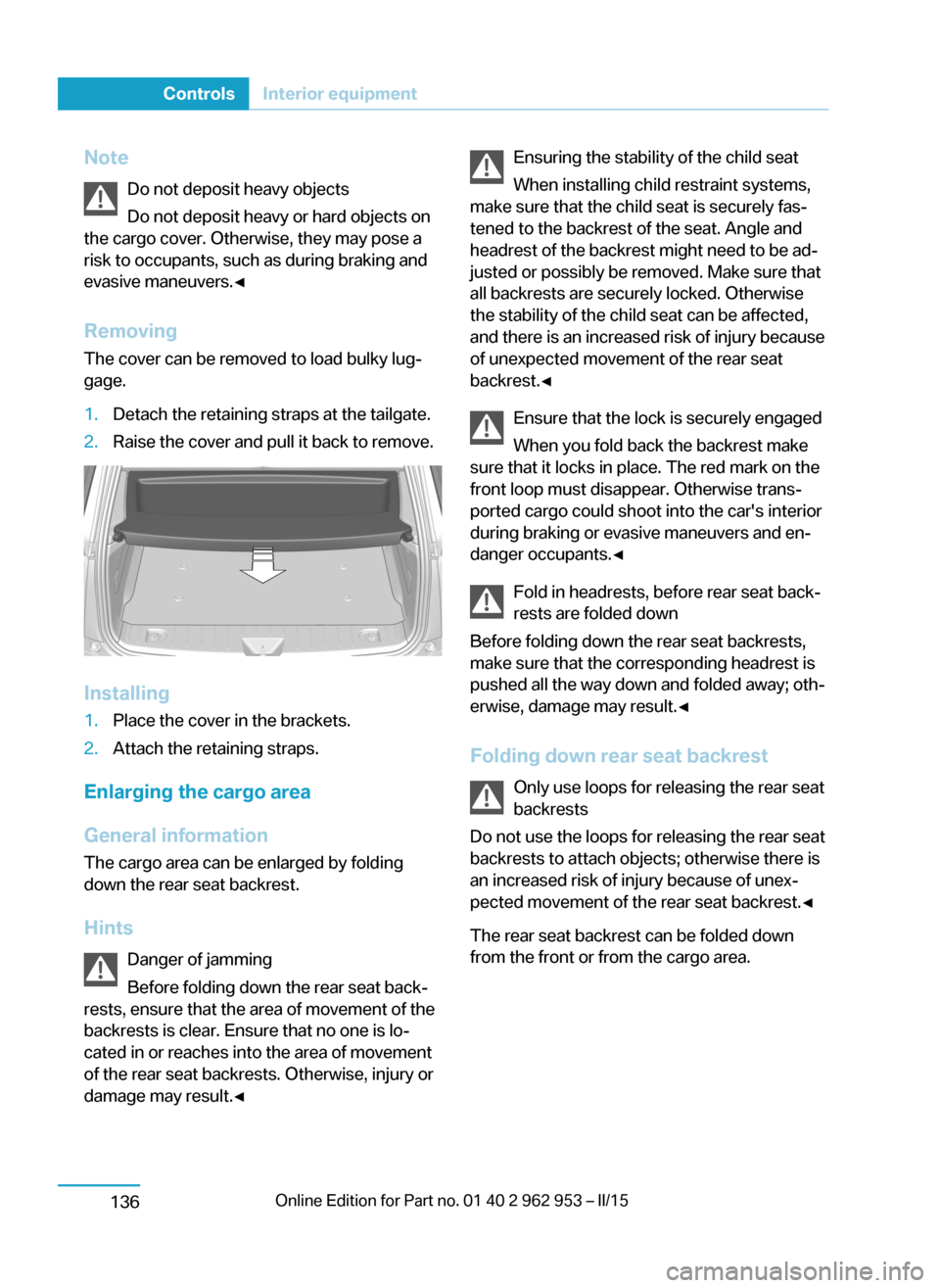
Removing The cover can be removed to load bulky lug‐
gage.1.Detach the retaining straps at the tailgate.2.Raise the cover and pull it back to remove.
Installing
1.Place the cover in the brackets.2.Attach the retaining straps.
Enlarging the cargo area
General information
The cargo area can be enlarged by folding
down the rear seat backrest.
Hints Danger of jamming
Before folding down the rear seat back‐
rests, ensure that the area of movement of the
backrests is clear. Ensure that no one is lo‐
cated in or reaches into the area of movement
of the rear seat backrests. Otherwise, injury or
damage may result.◀
Ensuring the stability of the child seat
When installing child restraint systems,
make sure that the child seat is securely fas‐
tened to the backrest of the seat. Angle and
headrest of the backrest might need to be ad‐
justed or possibly be removed. Make sure that
all backrests are securely locked. Otherwise
the stability of the child seat can be affected,
and there is an increased risk of injury because
of unexpected movement of the rear seat
backrest.◀
Ensure that the lock is securely engaged
When you fold back the backrest make
sure that it locks in place. The red mark on the
front loop must disappear. Otherwise trans‐
ported cargo could shoot into the car's interior
during braking or evasive maneuvers and en‐
danger occupants.◀
Fold in headrests, before rear seat back‐
rests are folded down
Before folding down the rear seat backrests,
make sure that the corresponding headrest is
pushed all the way down and folded away; oth‐
erwise, damage may result.◀
Folding down rear seat backrest Only use loops for releasing the rear seat
backrests
Do not use the loops for releasing the rear seat backrests to attach objects; otherwise there is
an increased risk of injury because of unex‐
pected movement of the rear seat backrest.◀
The rear seat backrest can be folded down
from the front or from the cargo area.Seite 134ControlsInterior equipment136
Page 149 of 230
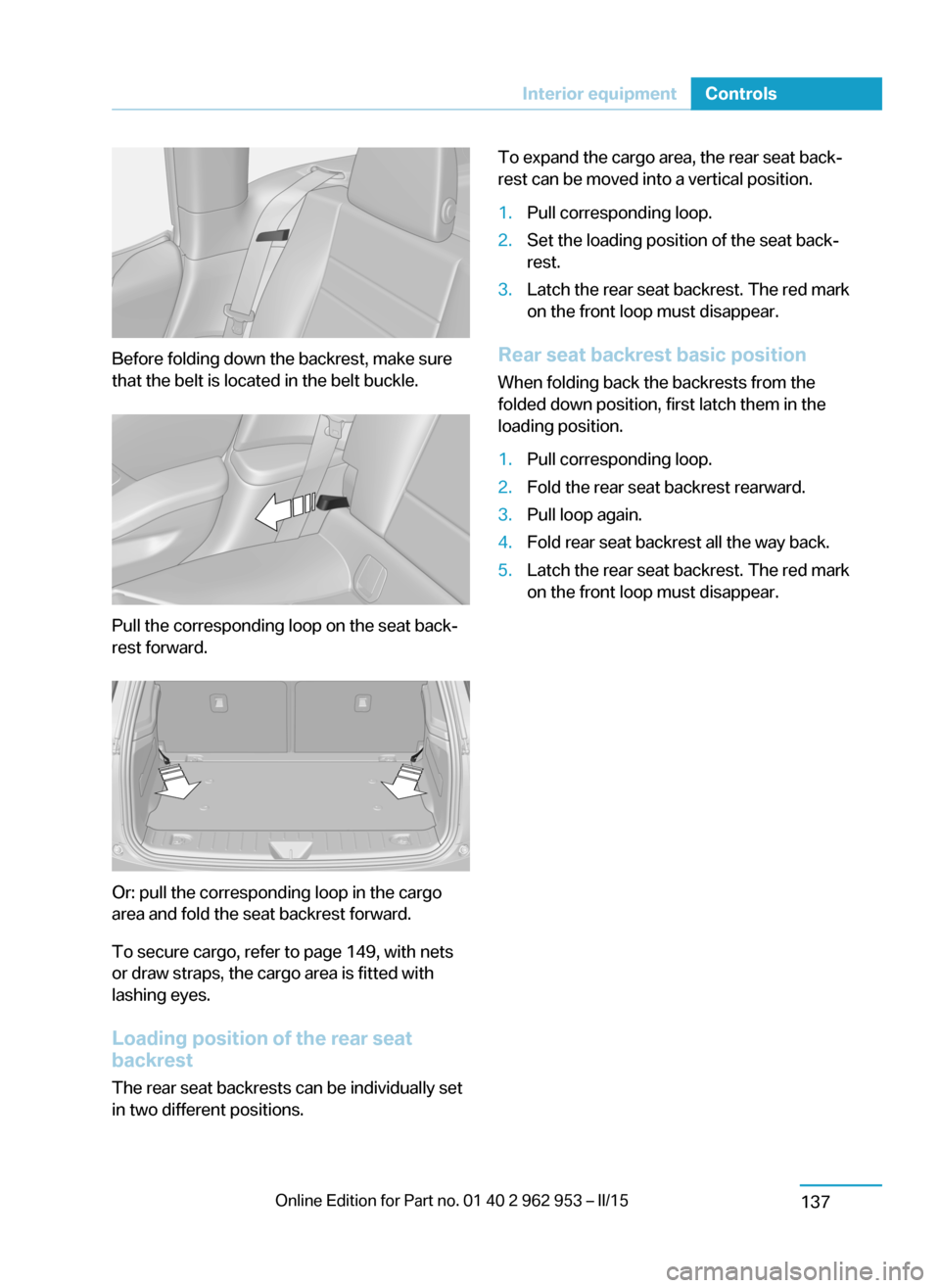
Before folding down the backrest, make sure
that the belt is located in the belt buckle.
Pull the corresponding loop on the seat back‐
rest forward.
Or: pull the corresponding loop in the cargo
area and fold the seat backrest forward.
To secure cargo, refer to page 149, with nets
or draw straps, the cargo area is fitted with
lashing eyes.
Loading position of the rear seat
backrest
The rear seat backrests can be individually set
in two different positions.
To expand the cargo area, the rear seat back‐
rest can be moved into a vertical position.1.Pull corresponding loop.2.Set the loading position of the seat back‐
rest.3.Latch the rear seat backrest. The red mark
on the front loop must disappear.
Rear seat backrest basic position
When folding back the backrests from the
folded down position, first latch them in the
loading position.
1.Pull corresponding loop.2.Fold the rear seat backrest rearward.3.Pull loop again.4.Fold rear seat backrest all the way back.5.Latch the rear seat backrest. The red mark
on the front loop must disappear.Seite 135Interior equipmentControls137
Page 150 of 230
Storage compartmentsVehicle features and optionsThis chapter describes all standard, country-
specific and optional features offered with the
series. It also describes features that are not
necessarily available in your car, e. g., due to
the selected options or country versions. This
also applies to safety-related functions and
systems.
Hints No loose objects in the car's interior
Do not stow any objects in the car's inte‐
rior without securing them; otherwise, they
may present a danger to occupants e.g., during
braking and evasive maneuvers.◀
Do not place anti-slip mats on the dash‐
board
Do not place anti-slip mats on the dashboard.
The mat materials could damage the dash‐
board.◀
Storage compartments The following storage compartments are avail‐
able in the vehicle interior:▷Glove compartment on the front passenger
side, refer to page 138.▷Storage compartment between the front
seats behind the cupholder.▷Storage compartment in the front center
armrest, refer to page 139.▷Compartments in the front doors, refer to
page 138.▷Storage compartment between the rear
seats.Glove compartment
Front passenger side
Note Close the glove compartment again im‐
mediately
Close the glove compartment immediately af‐
ter use while driving; otherwise, injury may oc‐
cur during accidents.◀
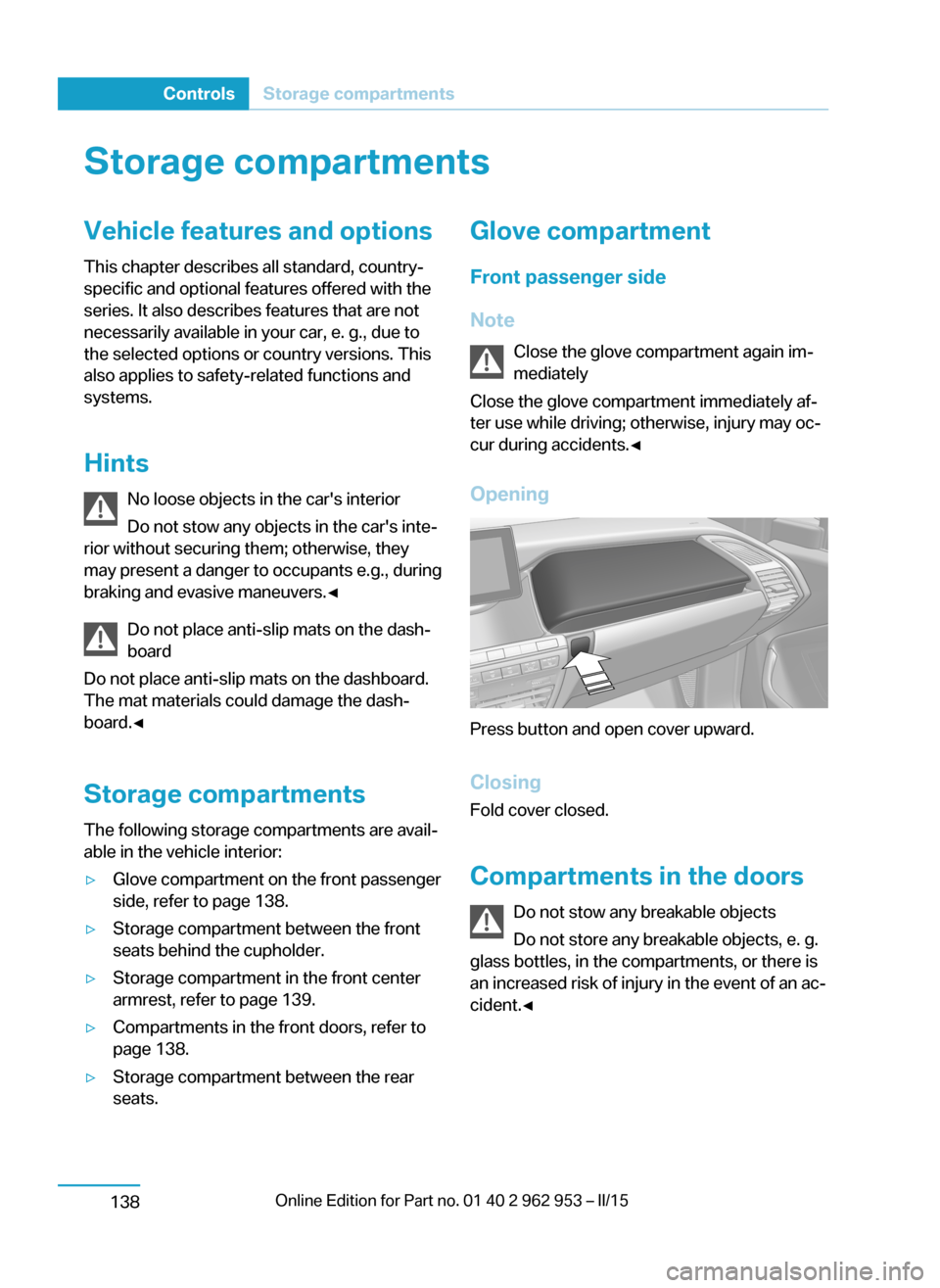
Opening
Press button and open cover upward.
ClosingFold cover closed.
Compartments in the doors Do not stow any breakable objects
Do not store any breakable objects, e. g.
glass bottles, in the compartments, or there is
an increased risk of injury in the event of an ac‐
cident.◀
Seite 136ControlsStorage compartments138
Page 151 of 230
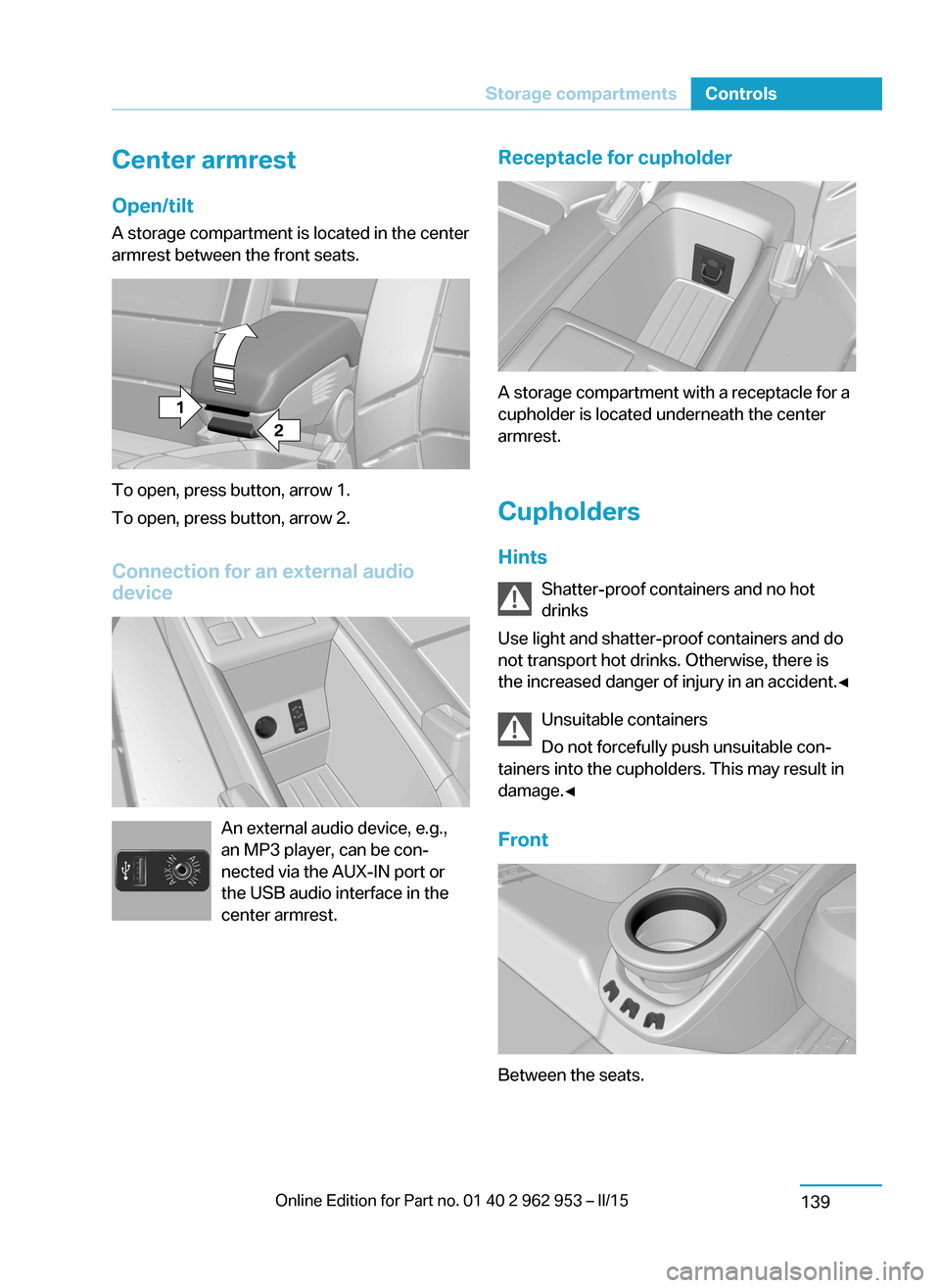
Center armrest
Open/tilt
A storage compartment is located in the center
armrest between the front seats.
To open, press button, arrow 1.
To open, press button, arrow 2.
Connection for an external audio
device
An external audio device, e.g.,
an MP3 player, can be con‐
nected via the AUX-IN port or
the USB audio interface in the
center armrest.
Receptacle for cupholder
A storage compartment with a receptacle for a
cupholder is located underneath the center
armrest.
Cupholders
Hints Shatter-proof containers and no hot
drinks
Use light and shatter-proof containers and do
not transport hot drinks. Otherwise, there is
the increased danger of injury in an accident.◀
Unsuitable containers
Do not forcefully push unsuitable con‐
tainers into the cupholders. This may result in
damage.◀
Front
Between the seats.
Seite 137Storage compartmentsControls139
Page 220 of 230
Everything from A to Z
IndexA ABS, Antilock Brake Sys‐ tem 106
ACC, Active Cruise Control with Stop & Go 109
Accelerator pedal posi‐ tions 66
AC quick charging cable, see Level 2 charging cable 158
Activated-charcoal filter 132
Active Cruise Control with Stop & Go, ACC 109
Adjustments, seats/head re‐ straints 51
Adjustments, steering wheel 57
After washing vehicle 199
Airbags 92
Airbags, indicator/warning light 93
Air circulation, refer to Recir‐ culated-air mode 128, 131
Air conditioner 127
Air, dehumidifying, refer to Cooling function 128, 130
Air distribution, manual 128, 130
Air flow, air conditioner 128
Air flow, automatic climate control 131
Air pressure, tires 170
Air vents, refer to Ventila‐ tion 132
Alarm system 46
Alarm, unintentional 47
All around the center con‐ sole 16
All around the roofliner 17
All around the steering wheel 14 All-season tires, refer to Win‐ter tires 174
Antifreeze, washer fluid 72
Antilock Brake System, ABS 106
Anti-slip control, refer to DSC 106
Approved axle load 205
Ash tray 134
Assistance, Roadside Assis‐ tance 194
Assistance when driving off 108
Assist system, refer to Intelli‐ gent Safety 99
AUTO intensity 131
Automatic car wash 198
Automatic climate con‐ trol 129
Automatic cornering adjust‐ ment 56
Automatic Cruise Control with Stop & Go 109
Automatic Curb Monitor 55
Automatic deactivation, front- seat passenger airbags 94
Automatic deactivation of the high-voltage system 196
Automatic headlight con‐ trol 90
Automatic locking 46
Automatic recirculated-air control 131
AUTO program, automatic cli‐ mate control 130
AUTO program, intensity 131
Average fuel consumption 86
Average speed 86
Axle loads, weights 205 B
Backup charging 164
Band-aids, refer to First aid kit 194
Bar for tow-starting/ towing 195
Battery, 12 volt 191
Battery replacement, vehicle battery 191
Battery replacement, vehicle remote control 36
Battery state indicator 76
Battery, vehicle 191
Being pulled, referred to Tow‐ ing 194
Belts, safety belts 53
Beverage holder, cu‐ pholder 139
BMW Assist 6
BMW eDRIVE 31
BMW maintenance sys‐ tem 185
Body work, see Working on the vehicle 196
Bottle holder, refer to Cu‐ pholders 139
Brake assistant 106
Brake discs, break-in 144
Brake pads, break-in 144
Braking, hints 146
Breakdown assis‐ tance 193, 194
Break-in 144
Brightness of Control Dis‐ play 88
Bulb replacement 187
Bulb replacement, front 188
Bulb replacement, tail lights 190
Bulbs and lamps 187 Seite 206ReferenceEverything from A to Z208