Snow BMW I3 2014 I01 User Guide
[x] Cancel search | Manufacturer: BMW, Model Year: 2014, Model line: I3, Model: BMW I3 2014 I01Pages: 230, PDF Size: 29.93 MB
Page 144 of 230
Switching the system on/off
Switch off Press and hold the left button until the
control switches off.
Switching on
Press any button except▷Rear window defroster.▷Seat heating.
Microfilter/activated-charcoal filter
In external and recirculated air mode the mi‐
crofilter/activated charcoal filter filters dust,
pollen, and gaseous pollutants out of the air.
This filter should be replaced during scheduled
maintenance, refer to page 185, of your vehi‐
cle.
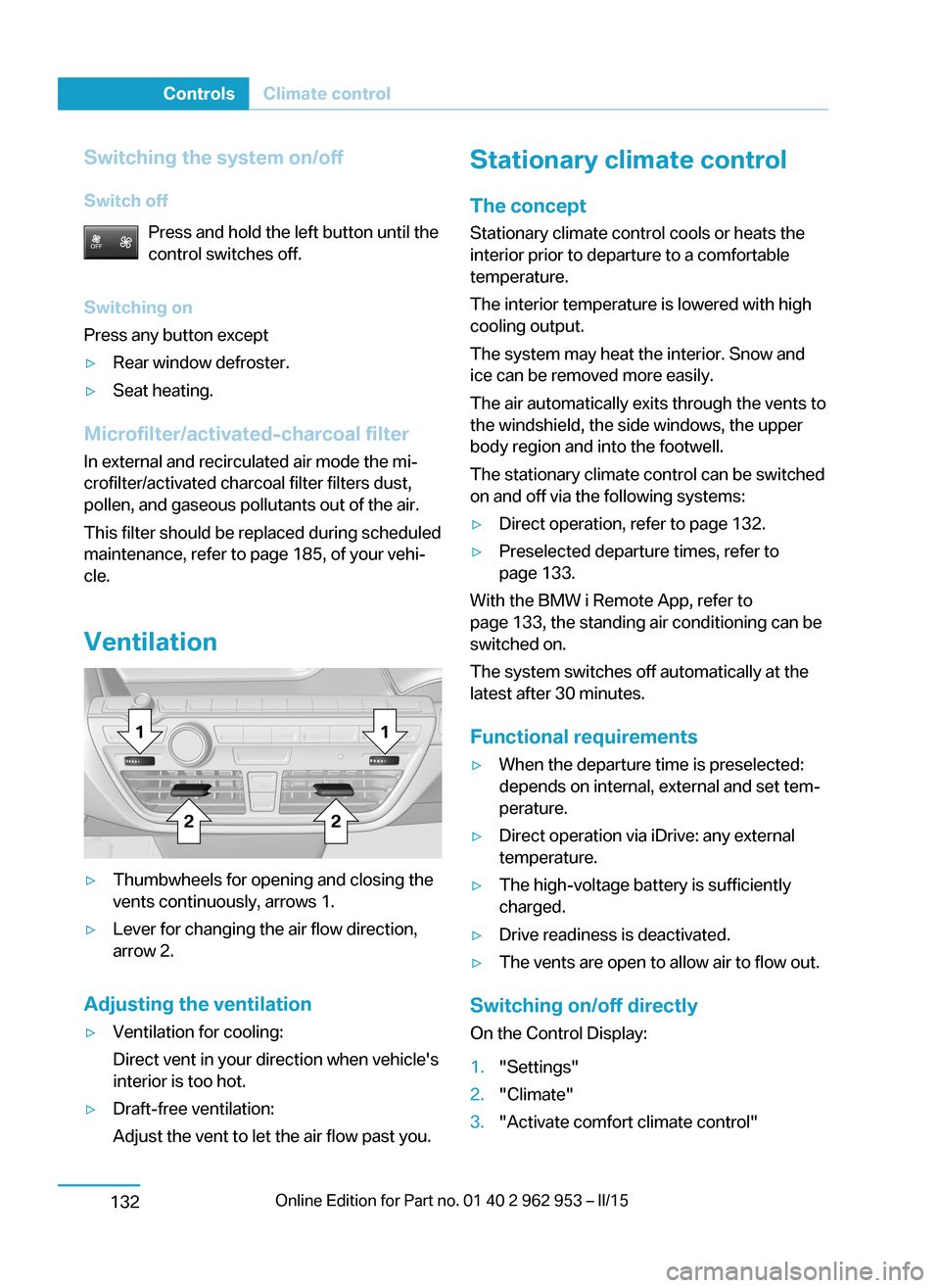
Ventilation
▷Thumbwheels for opening and closing the
vents continuously, arrows 1.▷Lever for changing the air flow direction,
arrow 2.
Adjusting the ventilation
▷Ventilation for cooling:
Direct vent in your direction when vehicle's
interior is too hot.▷Draft-free ventilation:
Adjust the vent to let the air flow past you.Stationary climate control
The concept Stationary climate control cools or heats the
interior prior to departure to a comfortable
temperature.
The interior temperature is lowered with high
cooling output.
The system may heat the interior. Snow and
ice can be removed more easily.
The air automatically exits through the vents to
the windshield, the side windows, the upper
body region and into the footwell.
The stationary climate control can be switched
on and off via the following systems:▷Direct operation, refer to page 132.▷Preselected departure times, refer to
page 133.
With the BMW i Remote App, refer to
page 133, the standing air conditioning can be
switched on.
The system switches off automatically at the
latest after 30 minutes.
Functional requirements
▷When the departure time is preselected:
depends on internal, external and set tem‐
perature.▷Direct operation via iDrive: any external
temperature.▷The high-voltage battery is sufficiently
charged.▷Drive readiness is deactivated.▷The vents are open to allow air to flow out.
Switching on/off directly
On the Control Display:
1."Settings"2."Climate"3."Activate comfort climate control"Seite 130ControlsClimate control132
Page 190 of 230
Continuing the tripDo not exceed the maximum permissible
speed of 50 mph/80 km/h.
Reinitialize the Flat Tire Monitor.
Reinitialize the Tire Pressure Monitor.
Replace the defective tire and the sealant con‐
tainer of the Mobility System as soon as possi‐
ble.
Snow chains Fine-link snow chains
Only certain types of fine-link snow chains
have been tested by the manufacturer of the
vehicle, classified as road-safe and approved.
Information about the approved snow chains
are available from the service center.
Use
Use only in pairs on the rear wheels, equipped
with the tires of the following size:▷155/70 R 19
Follow the snow chain manufacturer's instruc‐
tions.
Make sure that the snow chains are always
sufficiently tight. Retighten as needed accord‐
ing to the chain manufacturer's instructions.
Do not initialize the Flat Tire Monitor after
mounting snow chains, as doing so may result
in incorrect readings.
Do not initialize the Tire Pressure Monitor after
mounting snow chains, as doing so may result
in incorrect readings.
When driving with snow chains, briefly activate
Dynamic Traction Control if needed.
Maximum speed with snow chains Do not exceed a speed of 30 mph/50 km/hwhen using snow chains.
Seite 176MobilityWheels and tires178
Page 226 of 230
Range Extender, mainte‐nance run 67
Rearview camera 120
Rearview mirror 55
Rear window de‐ froster 128, 131
Recirculated-air filter 132
Recirculated-air mode 128, 131
Recommended fuel grade 168
Recommended tire brands 174
Refueling 165
Remaining range 82
Remote control/key 36
Remote control, malfunc‐ tion 40
Replacement fuse 192
Replacing wheels/tires 173
Reporting safety defects 10
RES button 112
RES button, see Camera- based cruise control,
ACC 109
RES button, see Cruise con‐ trol 115
Reserve warning, refer to Range 82
Reset, Tire Pressure Monitor TPM 96
Retaining straps, securing cargo 149
Retreaded tires 174
Roadside parking lights 90
RON recommended fuel grade 168
Roofliner 17
Rope for tow-starting/ towing 195
Rubber components, care 200
S Safe braking 146 Safety 7
Safety belt reminder for driv‐ er's seat and front passen‐
ger seat 53
Safety belts 53
Safety belts, care 200
Safety of the high-voltage system 196
Safety systems, airbags 92
Screen, refer to Control Dis‐ play 18
Screw thread, see screw thread for tow fitting, screw
thread for tow fitting 196
Sealant 174
Seat belts, refer to Safety belts 53
Seat heating, front 52
Seating position for chil‐ dren 58
Seats 51
Secondary lights, rear 190
Selection list in instrument cluster 84
Sensors, care 201
Service and warranty 8
Service requirements, Condi‐ tion Based Service
CBS 185
Service requirements, dis‐ play 82
Service, Roadside Assis‐ tance 194
Services, ConnectedDrive 6
SET button, see Camera- based cruise control,
ACC 109
SET button, see Cruise con‐ trol 115
Settings, locking/unlock‐ ing 45
Settings, mirrors 55
Settings on Control Dis‐ play 87
Side airbags 92
Signaling, horn 14 Signals when unlocking 46
Sitting safely 51
Size 204
Slide/tilt glass roof 49
Smallest turning radius 204
Snow chains 178
Socket 134
Socket, OBD Onboard Diag‐ nostics 186
SOS button 193
Spare fuse 192
Speed, average 86
Speed limit detection, com‐ puter 86
Speed limiter, display 83
Speed Limit Information 83
Speed warning 86
Split screen 23
Stability control systems 106
Standard charging cable, see Level 1 charging cable 157
Standard charging, see Level 1 Charging 161
Standing air conditioning, re‐ mote control 46
Start/Stop button 62
Start function during malfunc‐ tion 37
Stationary climate con‐ trol 132
Status control display, tires 95
Status information, iDrive 22
Status of Owner's Manual 7
Steering wheel, adjusting 57
Storage compartments 138
Storage compartments, loca‐ tions 138
Storage, tires 174
Storing the vehicle 201
Summer tires, tread 172
Sun visor 134
Supplementary text mes‐ sage 80
Switch for Dynamic Driv‐ ing 107 Seite 212ReferenceEverything from A to Z214