interior lights BMW I3 2014 I01 User Guide
[x] Cancel search | Manufacturer: BMW, Model Year: 2014, Model line: I3, Model: BMW I3 2014 I01Pages: 230, PDF Size: 29.93 MB
Page 103 of 230
Interior lights
General information
The interior lights, footwell lights, access lights
and courtesy lights are controlled automati‐
cally.
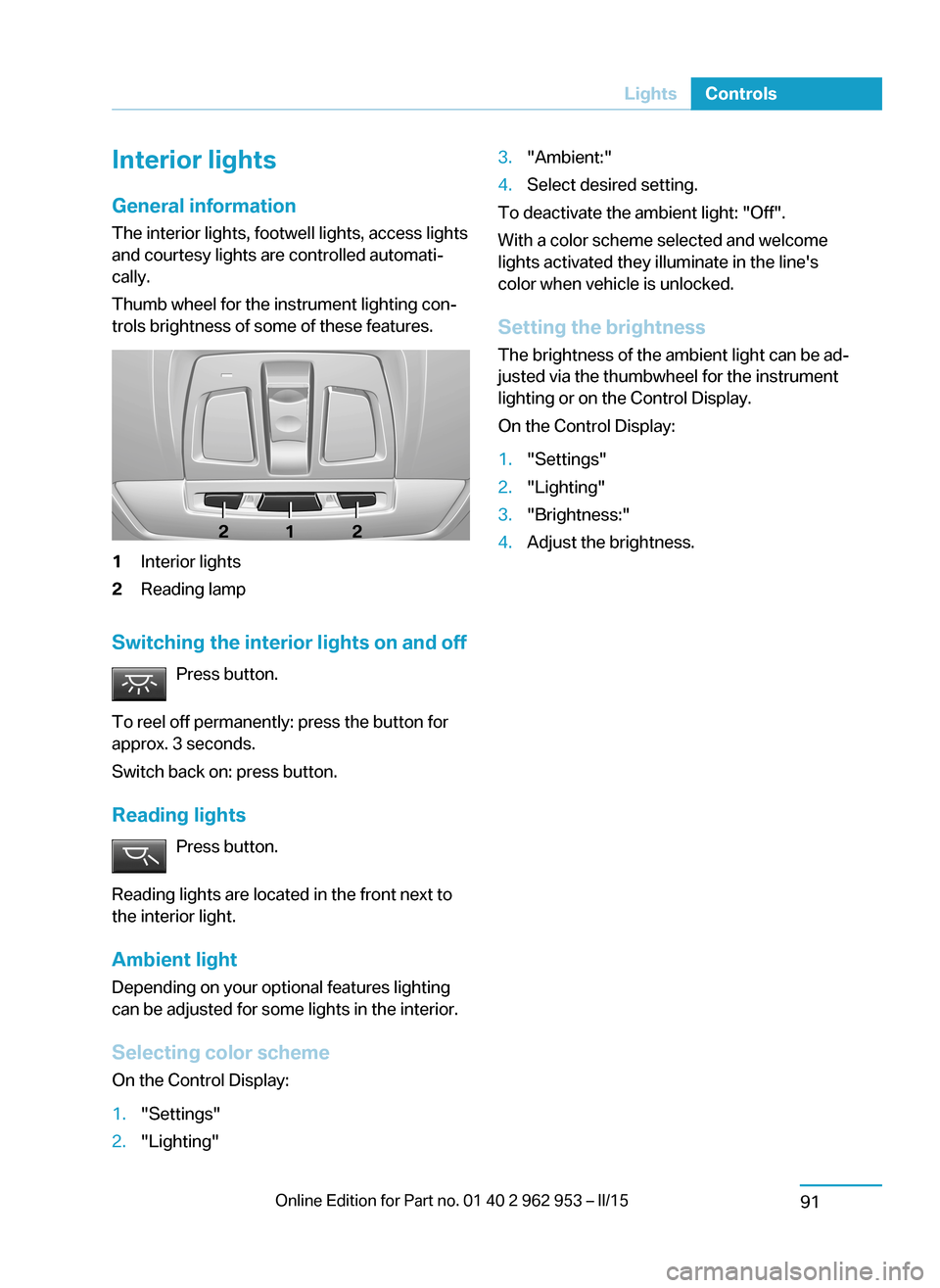
Thumb wheel for the instrument lighting con‐ trols brightness of some of these features.1Interior lights2Reading lamp
Switching the interior lights on and off
Press button.
To reel off permanently: press the button for
approx. 3 seconds.
Switch back on: press button.
Reading lights Press button.
Reading lights are located in the front next to
the interior light.
Ambient light Depending on your optional features lighting
can be adjusted for some lights in the interior.
Selecting color scheme On the Control Display:
1."Settings"2."Lighting"3."Ambient:"4.Select desired setting.
To deactivate the ambient light: "Off".
With a color scheme selected and welcome
lights activated they illuminate in the line's
color when vehicle is unlocked.
Setting the brightness The brightness of the ambient light can be ad‐
justed via the thumbwheel for the instrument
lighting or on the Control Display.
On the Control Display:
1."Settings"2."Lighting"3."Brightness:"4.Adjust the brightness.Seite 89LightsControls91
Page 122 of 230
Before leaving the vehicle, secure it
against moving on its own.
Before leaving the vehicle, set the parking
brake and reel off drive readiness. Otherwise,
the vehicle may begin to move.◀
At a glance
Buttons on the steering wheelPress but‐
tonFunctionCruise control on/off, interrupt‐
ing, refer to page 110.Store/maintain speed, refer to
page 111.Resume speed, refer to
page 112.Adjust distance, refer to
page 112.Rocker reel:
Maintain, store, change speed,
refer to page 111.
Buttons are arranged according to vehicle's
series, optional features and country specifica‐
tions.
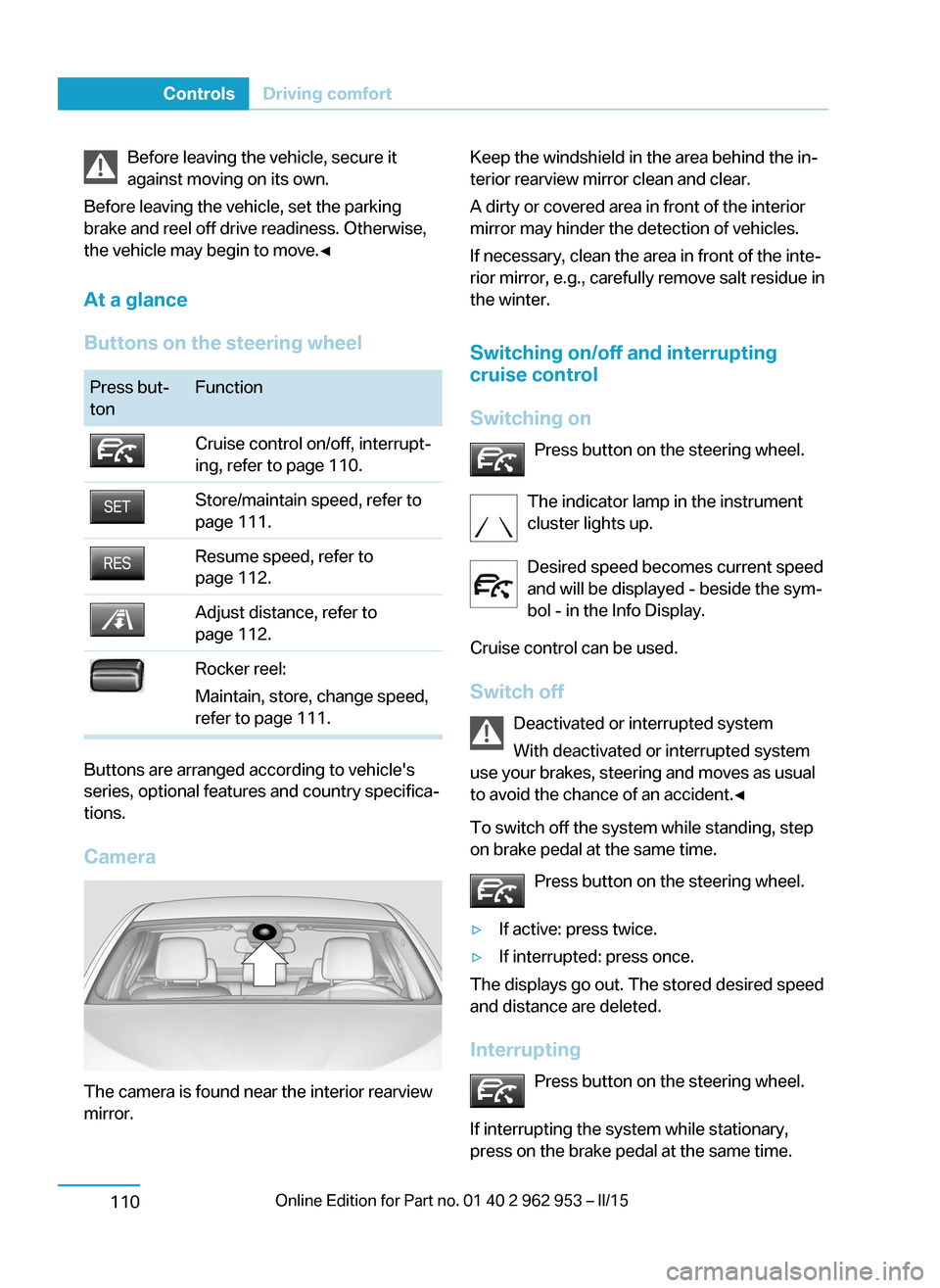
Camera
The camera is found near the interior rearview
mirror.
Keep the windshield in the area behind the in‐
terior rearview mirror clean and clear.
A dirty or covered area in front of the interior
mirror may hinder the detection of vehicles.
If necessary, clean the area in front of the inte‐
rior mirror, e.g., carefully remove salt residue in
the winter.
Switching on/off and interrupting
cruise control
Switching on Press button on the steering wheel.
The indicator lamp in the instrument
cluster lights up.
Desired speed becomes current speed
and will be displayed - beside the sym‐
bol - in the Info Display.
Cruise control can be used.
Switch off Deactivated or interrupted system
With deactivated or interrupted system
use your brakes, steering and moves as usual
to avoid the chance of an accident.◀
To switch off the system while standing, step
on brake pedal at the same time.
Press button on the steering wheel.▷If active: press twice.▷If interrupted: press once.
The displays go out. The stored desired speed
and distance are deleted.
Interrupting Press button on the steering wheel.
If interrupting the system while stationary,
press on the brake pedal at the same time.
Seite 108ControlsDriving comfort110
Page 147 of 230
Sockets
General information
The lighter socket can be used as a socket for
electrical equipment when operating and drive
readiness are activated.
Note
The total load of all sockets must not exceed
140 watts at 12 volts.
Do not damage the socket by using unsuitable
connectors.
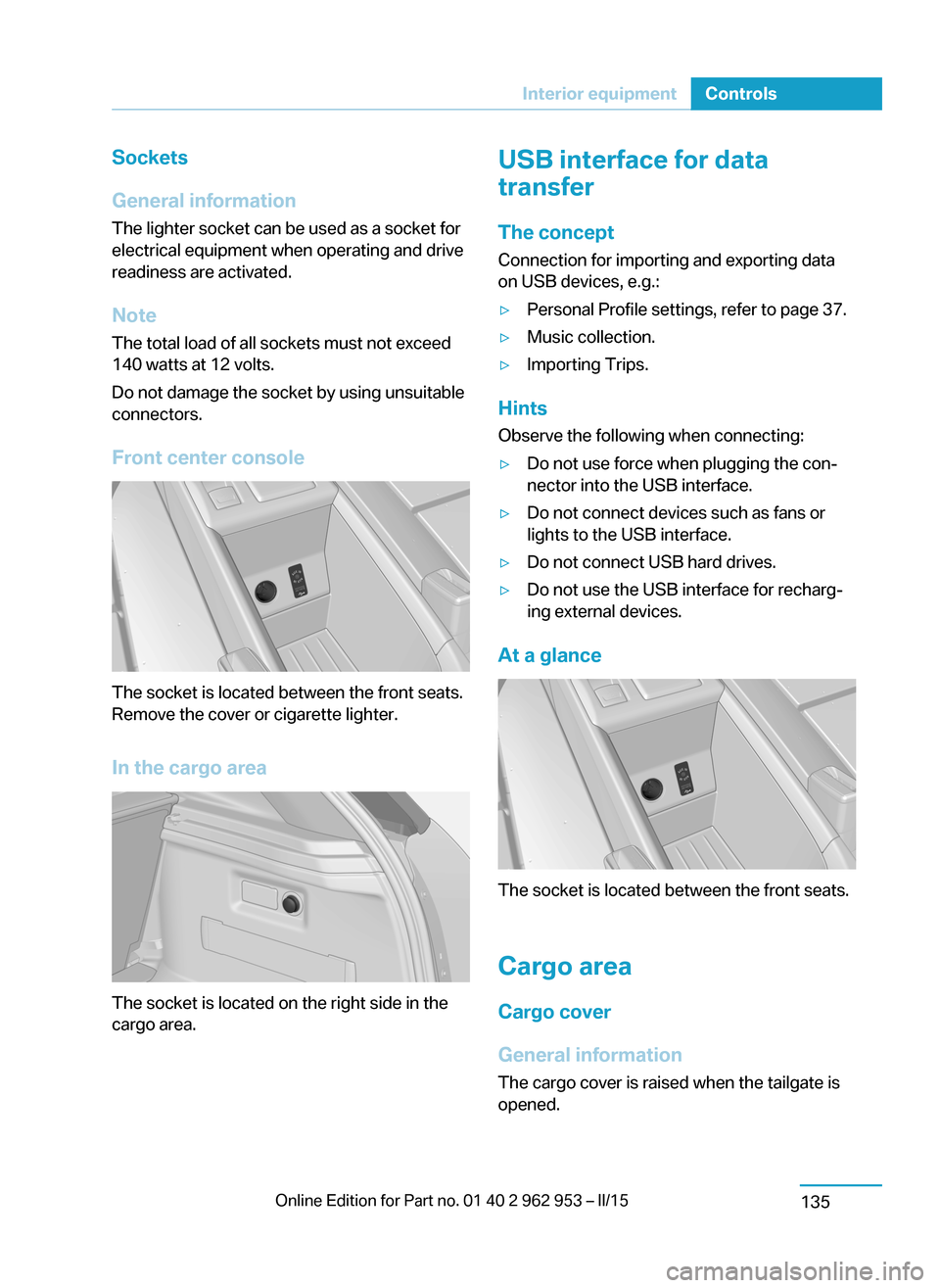
Front center console
The socket is located between the front seats.
Remove the cover or cigarette lighter.
In the cargo area
The socket is located on the right side in the
cargo area.
USB interface for data
transfer
The concept Connection for importing and exporting data
on USB devices, e.g.:▷Personal Profile settings, refer to page 37.▷Music collection.▷Importing Trips.
Hints
Observe the following when connecting:
▷Do not use force when plugging the con‐
nector into the USB interface.▷Do not connect devices such as fans or
lights to the USB interface.▷Do not connect USB hard drives.▷Do not use the USB interface for recharg‐
ing external devices.
At a glance
The socket is located between the front seats.
Cargo area
Cargo cover
General information The cargo cover is raised when the tailgate is
opened.
Seite 133Interior equipmentControls135
Page 157 of 230
The accelerator pedal pointer is within the
CHARGE range.
Efficient energy recovery:▷The accelerator pedal moves to the left
within the blue range of the CHARGE dis‐
play, arrow 1.▷The energy use while driving can be opti‐
mized by efficient acceleration.
Efficient acceleration:
▷The accelerator pedal moves to the right
within the blue range of the ePOWER dis‐
play, arrow 2.▷Use deceleration during coasting as often
as possible for energy recovery.
Brake according to traffic and circum‐
stances
Brake in accordance with the traffic conditions,
or there is the risk of accident.◀
Discharge of the high-voltage battery
Longer idle periods can reduce the charge
state of the high-voltage battery.
Do not allow the vehicle to sit idle for ex‐
tended periods with a low charging state
Before storing the vehicle for an extended pe‐
riod, check the battery charge indicator to en‐
sure that the high-voltage battery is fully
charged. During the idle period, connect the
vehicle to a charging station at a suitable
charging location. If necessary, the high-volt‐
age battery will be charged automatically.
Make sure that the charging process takes
place. Regularly check the charging state.
Don't allow battery charge status to drop too
low - it will damage the battery.◀
General driving notes
Closing the tailgate Drive with the tailgate closed
Only drive with the tailgate closed; other‐
wise, in the event of an accident or braking and
evasive maneuvers, passengers and other traf‐
fic may be injured, and the vehicle may be
damaged. Moreover, exhaust gases can get
into the vehicle interior and the lights in the
tailgate cannot be recognized.◀
If driving with the tailgate open cannot be
avoided:▷Close all windows and the glass sunroof.▷Greatly increase the air flow from the vents.▷Drive moderately.
Hot exhaust system
Hot exhaust system
High temperatures are generated in the
exhaust system.
Do not remove the heat shields installed and
never apply undercoating to them. Make sure
that flammable materials, e. g. hay, leaves,
grass, etc. do not come in contact with the hot
exhaust system while driving, while in idle po‐
sition mode, or when parked. Such contact
could lead to a fire, resulting in an increased
risk of serious personal injury as well as prop‐
erty damage.
Do not touch hot exhaust pipes; otherwise,
there is a danger of getting burned.◀
Mobile communication devices in the
vehicle
Mobile communication devices in the ve‐
hicle
It is not recommended to use mobile phones,
such as mobile phones, in the vehicle interior
without a direct connection to an external aer‐
ial. Otherwise, the vehicle's electronics and
mobile communication devices can interfere
Seite 143Things to remember when drivingDriving tips145
Page 211 of 230
Guide rails in car washes
Avoid car washes with guide rails higher
than 4 in/10 cm; otherwise, the vehicle body
could be damaged.◀
Before driving into a car wash In order to ensure that the vehicle can roll in a
car wash, take the following steps:1.Drive into the car wash.2.Engage selector lever position N.3.Remove foot from brake pedal.4.Press the Start/Stop button.
In this way, operating readiness remains
switched on, and a Check-Control mes‐
sage is displayed.
To activate drive readiness:
1.Depress the brake pedal.2.Press the Start/Stop button.
Pressing the Start/Stop button without step‐
ping on the brake turns operating readiness
off.
Selector lever position Selector lever position P is engaged automati‐
cally:
▷With operating readiness turned off.▷After approx. 15 minutes.
Headlights
▷Do not rub dry and do not use abrasive or
acidic cleansers.▷Soak areas that have been dirtied e. g.,
from insects, with shampoo and wash off
with water.▷Thaw ice with de-icing spray; do not use an
ice scraper.
After washing the vehicle
After washing the vehicle, apply the brakes
briefly to dry them; otherwise, braking action
can be reduced and corrosion of the brake
discs can occur.
Completely remove all residues on the win‐
dows, to minimize loss of visibility due to
smearing and to reduce wiper noises and
wiper blade wear.
Vehicle care Car care productsBMW recommends using care and cleaning
products from BMW, since these have been
tested and approved.
Car care and cleaning products
Follow the instructions on the container.
When cleaning the interior, open the doors or
windows.
Only use products intended for cleaning vehi‐
cles.
Cleansers can contain substances that are
dangerous and harmful to your health.◀
Vehicle paint
Regular care contributes to driving safety and
value retention. Environmental influences in
areas with elevated air pollution or natural con‐
taminants, such as tree resin or pollen can af‐
fect the vehicle's paintwork. Tailor the fre‐
quency and extent of your car care to these
influences.
Aggressive substances such as spilled fuel, oil,
grease or bird droppings, must be removed im‐
mediately to prevent the finish from being al‐
tered or discolored.
Leather care
Remove dust from the leather often, using a
cloth or vacuum cleaner.
Otherwise, particles of dust and road grime
chafe in pores and folds, and lead to increased wear and premature degradation of the leather
surface.Seite 197CareMobility199
Page 222 of 230
Data, technical 204
Daytime running lights 90
Defrosting, refer to Windows, defrosting 128, 131
Dehumidifying, air 128, 130
Deleting personal data 24
Deletion of personal data 24
Departure times, stationary climate control 133
Digital clock 82
Dimensions 204
Dimmable exterior mirrors 56
Dimmable interior rearview mirror 57
Direction indicator, refer to Turn signals 69
Display for performance and energy recovery 76
Display lighting, refer to In‐ strument lighting 90
Displays 74
Displays, cleaning 201
Displays, eDRIVE system 75
Displays, high-voltage sys‐ tem 75
Disposal, coolant 184
Disposal, vehicle battery 191
Distance control, refer to PDC 117
Divided screen view, split screen 23
Door lock 41
Door lock, refer to Remote control 36
Drive display 76
Drive-off assistant 108
Drive-off assistant, refer to DSC 106
Drive readiness in detail 63
Drive readiness, switching off 65
Drive readiness, switching on 63
Driving Dynamics Con‐ trol 107
Driving in detail 66 Driving instructions, break- in 144
Driving instructions, eDRIVE drive system 144
Driving mode 107
Driving notes, general 145
Driving, refer to drive readi‐ ness in detail 63
Driving stability control sys‐ tems 106
Driving, Start/Stop button 62
Driving style analysis 153
Driving tips 145
DSC Dynamic Stability Con‐ trol 106
DTC Dynamic Traction Con‐ trol 107
Dynamic Stability Control DSC 106
Dynamic Traction Control DTC 107
E
ECO PRO 151
ECO PRO+ 151
ECO PRO display 151
ECO PRO driving mode 151
ECO PRO driving style analy‐ sis 153
ECO PRO mode 151
ECO PRO Tip - driving in‐ struction 152
eDRIVE drive system, driving instructions 144
eDRIVE, electric driving, see BMW eDRIVE 31
eDrive system, at a glance 31
eDRIVE system, displays 75
EfficientDynamics 152
Electric driving 66
Electric driving, see BMW eDRIVE 31
Electric range 82
Electronic Stability Program ESP, refer to DSC 106 Emergency charging, refer toBackup charging 164
Emergency detection, remote control 37
Emergency release, fuel filler flap 166
Emergency Request 193
Emergency service, refer to Roadside Assistance 194
Emergency start function, en‐ gine start 37
Emergency unlocking, trans‐ mission lock 65
Energy Control 86
Energy recovery, display‐ ing 76
Energy recovery, driving sta‐ bility control systems 106
Engine coolant 183
Engine oil 181
Engine oil, adding 182
Engine start during malfunc‐ tion 37
Engine start, jump-start‐ ing 194
Entering a car wash 198
Error displays, see Check Control 77
ESP Electronic Stability Pro‐ gram, refer to DSC 106
Exchanging wheels/tires 173
Exhaust system 145
Exterior mirror, automatic dimming feature 56
Exterior mirrors 55
External start 194
External temperature dis‐ play 81
External temperature warn‐ ing 81
Eyes for securing cargo 149
F
Failure message, see Check Control 77 Seite 208ReferenceEverything from A to Z210
Page 224 of 230
Individual settings, refer toPersonal Profile 37
Inflation pressure, tires 170
Inflation pressure warning FTM, tires 98
Info display, refer to Com‐ puter 85
Initialize, Tire Pressure Moni‐ tor TPM 96
Initializing, Flat Tire Monitor FTM 98
Instrument cluster 74
Instrument lighting 90
Integrated key 36
Integrated Owner's Manual in the vehicle 29
Intelligent Emergency Re‐ quest 193
Intelligent Safety 99
Intensity, AUTO pro‐ gram 131
Interior lights 91
Interior lights via remote con‐ trol 39
Interior motion sensor 47
Interior rearview mirror, auto‐ matic dimming feature 57
Interior rearview mirror, man‐ ually dimmable 56
Interval display, service re‐ quirements 82
J Jacking points for the vehicle jack 191
Jump-starting 194
Jump starting, refer to Backup charging 164
K
Key/remote control 36
Keyless Go, refer to Comfort Access 44 Key Memory, refer to Per‐sonal Profile 37
Knee airbag 92
L
Lamp replacement, front 188
Lamp replacement, see Bulb replacement 187
Language on Control Dis‐ play 87
Lashing eyes, securing cargo 149
LATCH child restraint sys‐ tem 59
Leather, care 199
LED headlights, bulb replace‐ ment 189
LEDs, light-emitting di‐ odes 188
Length, vehicle 204
Letters and numbers, enter‐ ing 24
Level 1 Charging 161
Level 1 charging cable 157
Level 2 Charging 162
Level 2 charging cable 158
Light alloy wheels, care 200
Light-emitting diodes, LEDs 188
Lighter 134
Lighting 89
Lighting via remote con‐ trol 39
Light reel 89
Lights 89
Load 149
Loading 148
Lock, door 41
Locking/unlocking via door lock 41
Locking/unlocking with re‐ mote control 39
Locking, automatic 46
Locking, settings 45
Locking via tailgate 43 Longer idle phases 201
Long idle times and long-term vehicle storage 201
Long-term vehicle stor‐ age 201
Low beams 89
M
Maintaining charging state, see Range Extender 67
Maintenance 185
Maintenance require‐ ments 185
Maintenance, service require‐ ments 82
Maintenance system, BMW 185
Make-up mirror 134
Malfunction displays, see Check Control 77
Manual air distribu‐ tion 128, 130
Manual air flow 128, 131
Manual operation, door lock 41
Manual operation, exterior mirrors 55
Manual operation, fuel filler flap 166
Manual operation, Park Dis‐ tance Control PDC 118
Manual operation, rearview camera 120
Marking on approved tires 174
Master key, refer to Remote control 36
Maximum cooling 131
Maximum speed, display 83
Maximum speed, winter tires 174
Measure, units of 88
Medical kit 194
Menu, EfficientDynamics 152 Seite 210ReferenceEverything from A to Z212