maintenance BMW I3 2014 I01 User Guide
[x] Cancel search | Manufacturer: BMW, Model Year: 2014, Model line: I3, Model: BMW I3 2014 I01Pages: 230, PDF Size: 29.93 MB
Page 163 of 230
Switch off any functions that
are not currently needed
Functions such as the rear window defroster
require a lot of energy and reduce the range,
especially in city and stop-and-go traffic.
Reel off these functions if they are not needed.
The ECO PRO and ECO PRO+ driving pro‐
grams support the energy-conserving use of
comfort features. They automatically perform a
partial or complete deactivation of these func‐
tions.
Have maintenance carried
out
Have vehicles maintained regularly to achieve
optimal vehicle efficiency and operating life.
The maintenance should be carried out by
your service center.
ECO PRO and ECO PRO+ The concept
ECO PRO and ECO PRO+ support an efficient
driving style. To this end, the control of the
drive is optimized for moderate acceleration,
and adapted to lighting and comfort features,
such as climate control output. Some vehicle
functions cannot be used during activated
drive mode ECO PRO and ECO PRO+.
In addition, context-sensitive instructions can
be displayed that assist in driving efficiently.
At a glance With ECO PRO and ECO PRO+ different set‐
tings are made in the respective mode.
ECO PRO▷Reduce heat output or heating cycle for ex‐
terior mirror, rear window and seat heating.▷What reduces the the cooling and heating
output of the climate control system.▷The speed is limited to an adjustable maxi‐
mum value between 50 mph/80 km/h and
80 mph/130 km/h. To intentionally exceed
the speed limit, press the accelerator pedal
all the way down.
ECO PRO+
The cooling and heating output of the climate
control system are additionally deactivated on
ECO PRO+ activation.
The low beams are dimmed.
The maximum speed is limited to
55 mph/90 km/h. In special situations, the
speed limit can be consciously exceeded by applying the accelerator pedal.
Activate ECO PRO and ECO PRO+ Press button repeatedly until ECO
PRO or ECO PRO+ is displayed in the
instrument cluster.
Configuring ECO PRO
Via the Driving Dynamics Control
1.Activate ECO PRO.2."Configure ECO PRO"3.Configure the program.
Via the iDrive
1."Settings"2."ECO PRO mode"
Or
1."Settings"2."Driving mode"3."Configure ECO PRO"
Configure the program.
ECO PRO Tip
▷"Limit at:":Seite 149Increase rangeDriving tips151
Page 167 of 230
Mobility
In order to always ensure your mobility, you will find important information on operating fluids,wheels and tires, maintenance and Roadside Assistance in the following.
Page 197 of 230
MaintenanceVehicle features and options
This chapter describes all standard, country-
specific and optional features offered with the
series. It also describes features that are not
necessarily available in your car, e. g., due to
the selected options or country versions. This
also applies to safety-related functions and
systems.
BMW maintenance system
The maintenance system indicates required
maintenance measures, and thereby provides
support in maintaining road safety and the op‐
erational reliability of the vehicle.
Note Maintenance and repairs
Have maintenance and repair work per‐
formed only by a service center or a workshop
that works according to BMW specifications
with appropriately trained personnel. Other‐
wise, there is the risk of fatal injury from elec‐
trocution due to the high-voltage system's
high voltage.◀
Condition Based Service
CBS
Sensors and special algorithms take into ac‐
count the driving conditions of your vehicle.
Based on this, Condition Based Service recog‐
nizes the maintenance requirements.
The system makes it possible to adapt the
amount of maintenance corresponding to your
user profile.Detailed information on service requirements,
refer to page 82, can be displayed on the Con‐
trol Display.
For service data Information on the required maintenance is
continuously stored in the remote control. Your service center will read out this data and
suggest the right array of service procedures for your vehicle.
Therefore, hand your service specialist the re‐
mote control with which the vehicle was driven
most recently.
Storage periods
Storage periods during which the vehicle bat‐
tery was disconnected are not taken into ac‐
count.
If this occurs, have a service center update the
time-dependent maintenance procedures,
such as checking brake fluid and, if needed,
changing the engine oil and the microfilter/
activated-charcoal filter.
Service and Warranty
Information Booklet for US
models and Warranty and
Service Guide Booklet for
Canadian models
Please consult your Service and Warranty In‐
formation Booklet for US models and Warranty
and Service Guide Booklet for Canadian mod‐
els for additional information on service re‐
quirements.
Maintenance and repair should be performed
by your service center. Make sure to have reg‐
ular maintenance procedures recorded in the
vehicle's Service and Warranty Information
Booklet for US models, and in the WarrantySeite 183MaintenanceMobility185
Page 198 of 230
and Service Guide Booklet for Canadian mod‐
els. These entries are proof of regular mainte‐
nance.
Socket for OBD Onboard
Diagnosis
Note Socket for Onboard DiagnosisThe socket for onboard diagnostics may
only be used by the service center or a work‐
shop that operates in accordance with the
specifications of the vehicle manufacturer with
correspondingly trained personnel and other
authorized persons. Otherwise, use may result
in operating problems for the vehicle.◀
Position
Located on the driver's side is an OBD socket
for reading the vehicle data. On vehicles with
Range Extender, additional components are
checked that are critical for its emissions mix.
Emissions
Applies to vehicles with Range Extender.
▷The warning lamp lights up:
Emissions are deteriorating. Have
the vehicle checked as soon as
possible.▷The warning lamp flashes under certain
circumstances:This indicates that there is excessive mis‐
firing in the engine.
Reduce the vehicle speed and have the
system checked immediately; otherwise,
serious engine misfiring within a brief pe‐
riod can seriously damage emission con‐
trol components, in particular the catalytic
converter.Seite 184MobilityMaintenance186
Page 203 of 230
Changing wheels
Hints
Which is why no spare tire is available.
The tools for changing wheels are available as
accessories from your service center.
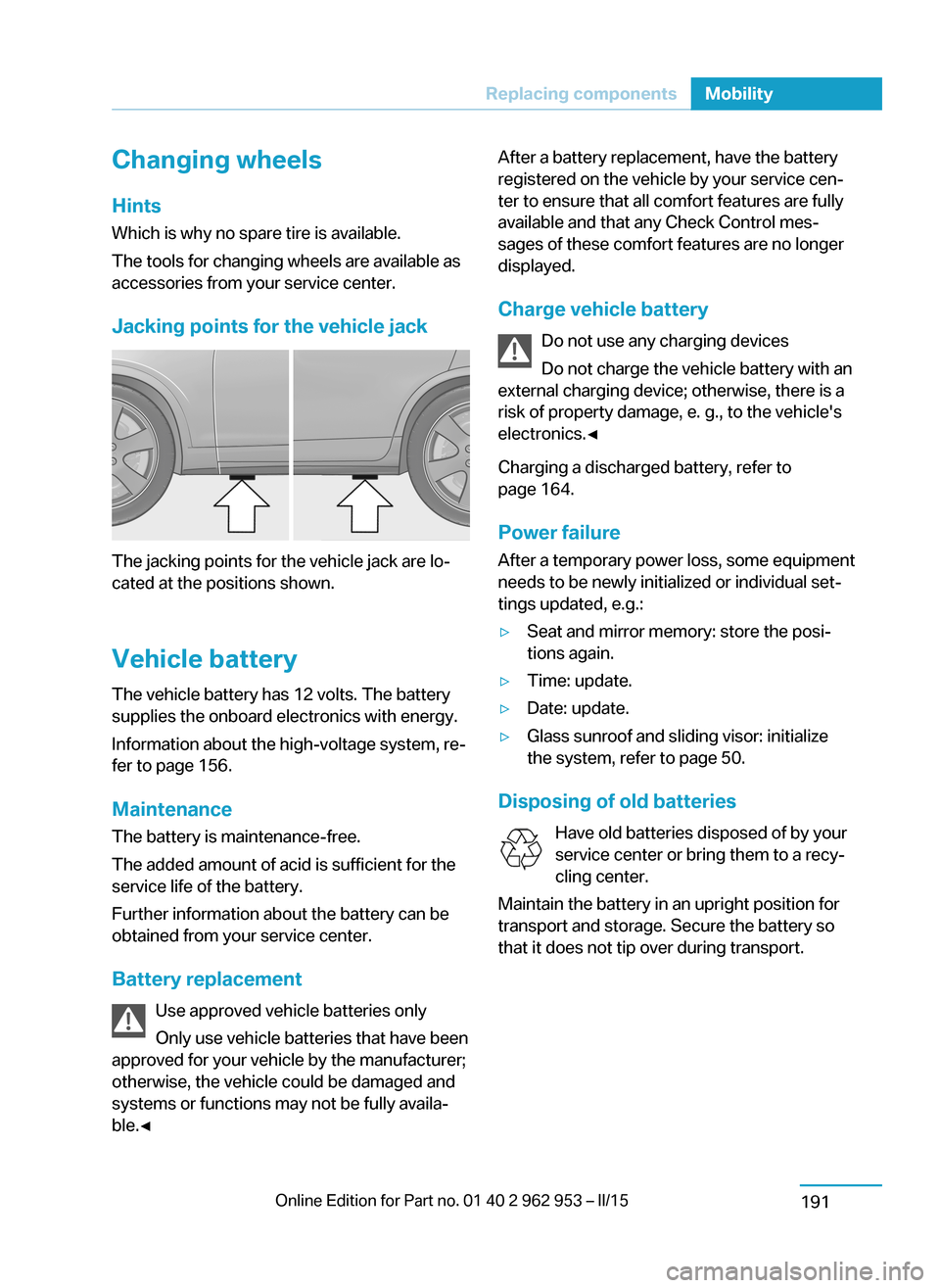
Jacking points for the vehicle jack
The jacking points for the vehicle jack are lo‐
cated at the positions shown.
Vehicle battery The vehicle battery has 12 volts. The battery
supplies the onboard electronics with energy.
Information about the high-voltage system, re‐
fer to page 156.
Maintenance
The battery is maintenance-free.
The added amount of acid is sufficient for the
service life of the battery.
Further information about the battery can be
obtained from your service center.
Battery replacement Use approved vehicle batteries only
Only use vehicle batteries that have been
approved for your vehicle by the manufacturer;
otherwise, the vehicle could be damaged and
systems or functions may not be fully availa‐
ble.◀
After a battery replacement, have the battery
registered on the vehicle by your service cen‐
ter to ensure that all comfort features are fully
available and that any Check Control mes‐
sages of these comfort features are no longer
displayed.
Charge vehicle battery Do not use any charging devices
Do not charge the vehicle battery with an
external charging device; otherwise, there is a
risk of property damage, e. g., to the vehicle's
electronics.◀
Charging a discharged battery, refer to
page 164.
Power failure
After a temporary power loss, some equipment
needs to be newly initialized or individual set‐
tings updated, e.g.:▷Seat and mirror memory: store the posi‐
tions again.▷Time: update.▷Date: update.▷Glass sunroof and sliding visor: initialize
the system, refer to page 50.
Disposing of old batteries
Have old batteries disposed of by your
service center or bring them to a recy‐
cling center.
Maintain the battery in an upright position for
transport and storage. Secure the battery so
that it does not tip over during transport.
Seite 189Replacing componentsMobility191
Page 208 of 230
Tow fitting
The screw-in tow fitting should always be car‐
ried in the vehicle.
The tow fitting can be screwed in at the front
or rear of the BMW.
The tow fitting is located in the storage com‐
partment under the hood.
Tow fitting, information on use▷Use only the tow fitting provided with
the vehicle and screw it all the way in.▷Use the tow fitting for towing on paved
roads only.▷Use tow fitting located in the front only for
positioning the vehicle.▷Avoid lateral loading of the tow fitting, e.g.,
do not lift the vehicle by the tow fitting.
Otherwise, damage to the tow fitting and the
vehicle can occur.◀
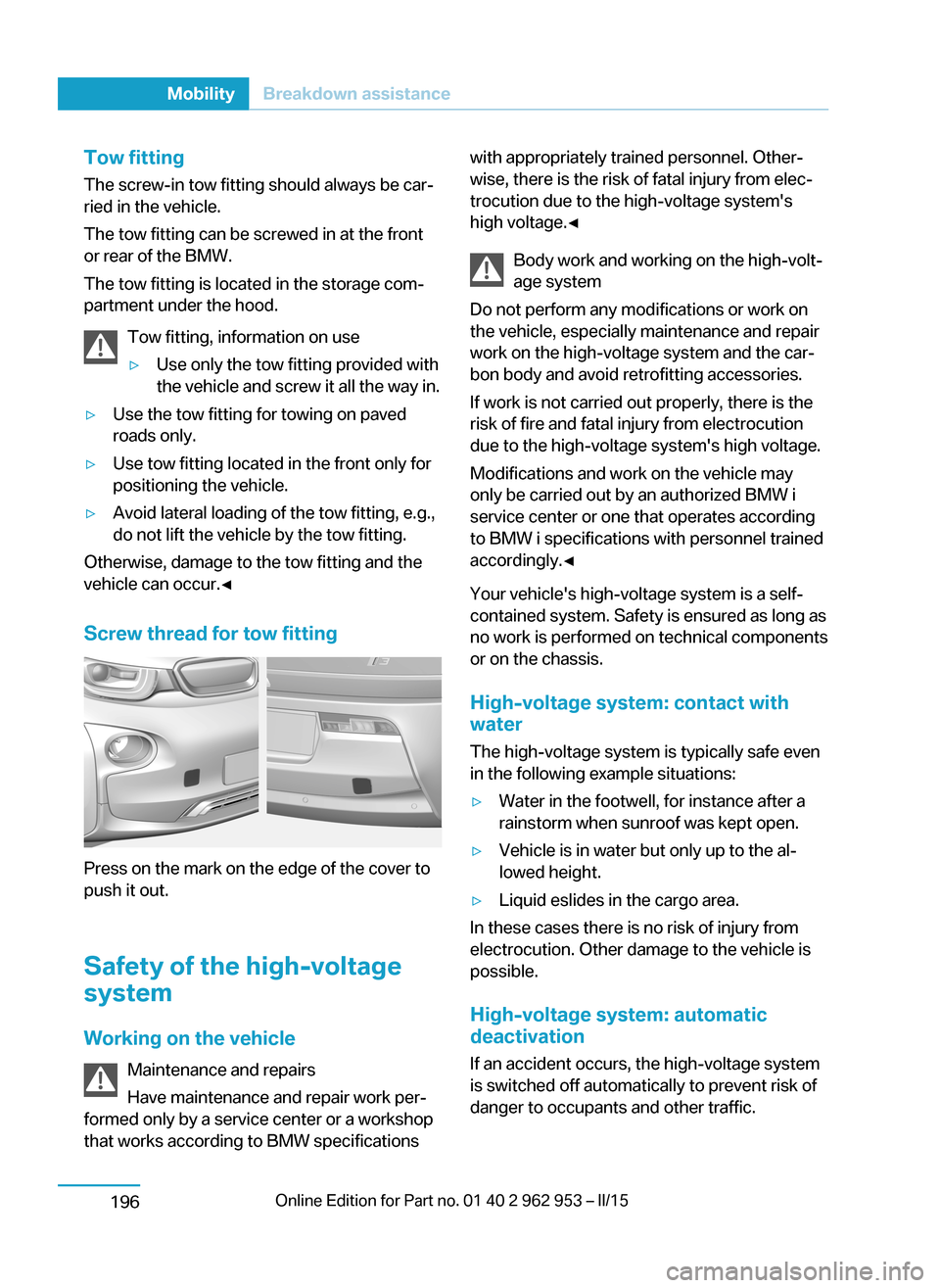
Screw thread for tow fitting
Press on the mark on the edge of the cover to
push it out.
Safety of the high-voltage
system
Working on the vehicle Maintenance and repairs
Have maintenance and repair work per‐
formed only by a service center or a workshop
that works according to BMW specifications
with appropriately trained personnel. Other‐
wise, there is the risk of fatal injury from elec‐
trocution due to the high-voltage system's
high voltage.◀
Body work and working on the high-volt‐
age system
Do not perform any modifications or work on
the vehicle, especially maintenance and repair
work on the high-voltage system and the car‐
bon body and avoid retrofitting accessories.
If work is not carried out properly, there is the
risk of fire and fatal injury from electrocution
due to the high-voltage system's high voltage.
Modifications and work on the vehicle may
only be carried out by an authorized BMW i
service center or one that operates according
to BMW i specifications with personnel trained
accordingly.◀
Your vehicle's high-voltage system is a self-
contained system. Safety is ensured as long as
no work is performed on technical components
or on the chassis.
High-voltage system: contact with
water
The high-voltage system is typically safe even
in the following example situations:▷Water in the footwell, for instance after a
rainstorm when sunroof was kept open.▷Vehicle is in water but only up to the al‐
lowed height.▷Liquid eslides in the cargo area.
In these cases there is no risk of injury from
electrocution. Other damage to the vehicle is
possible.
High-voltage system: automatic
deactivation
If an accident occurs, the high-voltage system
is switched off automatically to prevent risk of
danger to occupants and other traffic.
Seite 194MobilityBreakdown assistance196
Page 220 of 230
Everything from A to Z
IndexA ABS, Antilock Brake Sys‐ tem 106
ACC, Active Cruise Control with Stop & Go 109
Accelerator pedal posi‐ tions 66
AC quick charging cable, see Level 2 charging cable 158
Activated-charcoal filter 132
Active Cruise Control with Stop & Go, ACC 109
Adjustments, seats/head re‐ straints 51
Adjustments, steering wheel 57
After washing vehicle 199
Airbags 92
Airbags, indicator/warning light 93
Air circulation, refer to Recir‐ culated-air mode 128, 131
Air conditioner 127
Air, dehumidifying, refer to Cooling function 128, 130
Air distribution, manual 128, 130
Air flow, air conditioner 128
Air flow, automatic climate control 131
Air pressure, tires 170
Air vents, refer to Ventila‐ tion 132
Alarm system 46
Alarm, unintentional 47
All around the center con‐ sole 16
All around the roofliner 17
All around the steering wheel 14 All-season tires, refer to Win‐ter tires 174
Antifreeze, washer fluid 72
Antilock Brake System, ABS 106
Anti-slip control, refer to DSC 106
Approved axle load 205
Ash tray 134
Assistance, Roadside Assis‐ tance 194
Assistance when driving off 108
Assist system, refer to Intelli‐ gent Safety 99
AUTO intensity 131
Automatic car wash 198
Automatic climate con‐ trol 129
Automatic cornering adjust‐ ment 56
Automatic Cruise Control with Stop & Go 109
Automatic Curb Monitor 55
Automatic deactivation, front- seat passenger airbags 94
Automatic deactivation of the high-voltage system 196
Automatic headlight con‐ trol 90
Automatic locking 46
Automatic recirculated-air control 131
AUTO program, automatic cli‐ mate control 130
AUTO program, intensity 131
Average fuel consumption 86
Average speed 86
Axle loads, weights 205 B
Backup charging 164
Band-aids, refer to First aid kit 194
Bar for tow-starting/ towing 195
Battery, 12 volt 191
Battery replacement, vehicle battery 191
Battery replacement, vehicle remote control 36
Battery state indicator 76
Battery, vehicle 191
Being pulled, referred to Tow‐ ing 194
Belts, safety belts 53
Beverage holder, cu‐ pholder 139
BMW Assist 6
BMW eDRIVE 31
BMW maintenance sys‐ tem 185
Body work, see Working on the vehicle 196
Bottle holder, refer to Cu‐ pholders 139
Brake assistant 106
Brake discs, break-in 144
Brake pads, break-in 144
Braking, hints 146
Breakdown assis‐ tance 193, 194
Break-in 144
Brightness of Control Dis‐ play 88
Bulb replacement 187
Bulb replacement, front 188
Bulb replacement, tail lights 190
Bulbs and lamps 187 Seite 206ReferenceEverything from A to Z208
Page 224 of 230
Individual settings, refer toPersonal Profile 37
Inflation pressure, tires 170
Inflation pressure warning FTM, tires 98
Info display, refer to Com‐ puter 85
Initialize, Tire Pressure Moni‐ tor TPM 96
Initializing, Flat Tire Monitor FTM 98
Instrument cluster 74
Instrument lighting 90
Integrated key 36
Integrated Owner's Manual in the vehicle 29
Intelligent Emergency Re‐ quest 193
Intelligent Safety 99
Intensity, AUTO pro‐ gram 131
Interior lights 91
Interior lights via remote con‐ trol 39
Interior motion sensor 47
Interior rearview mirror, auto‐ matic dimming feature 57
Interior rearview mirror, man‐ ually dimmable 56
Interval display, service re‐ quirements 82
J Jacking points for the vehicle jack 191
Jump-starting 194
Jump starting, refer to Backup charging 164
K
Key/remote control 36
Keyless Go, refer to Comfort Access 44 Key Memory, refer to Per‐sonal Profile 37
Knee airbag 92
L
Lamp replacement, front 188
Lamp replacement, see Bulb replacement 187
Language on Control Dis‐ play 87
Lashing eyes, securing cargo 149
LATCH child restraint sys‐ tem 59
Leather, care 199
LED headlights, bulb replace‐ ment 189
LEDs, light-emitting di‐ odes 188
Length, vehicle 204
Letters and numbers, enter‐ ing 24
Level 1 Charging 161
Level 1 charging cable 157
Level 2 Charging 162
Level 2 charging cable 158
Light alloy wheels, care 200
Light-emitting diodes, LEDs 188
Lighter 134
Lighting 89
Lighting via remote con‐ trol 39
Light reel 89
Lights 89
Load 149
Loading 148
Lock, door 41
Locking/unlocking via door lock 41
Locking/unlocking with re‐ mote control 39
Locking, automatic 46
Locking, settings 45
Locking via tailgate 43 Longer idle phases 201
Long idle times and long-term vehicle storage 201
Long-term vehicle stor‐ age 201
Low beams 89
M
Maintaining charging state, see Range Extender 67
Maintenance 185
Maintenance require‐ ments 185
Maintenance, service require‐ ments 82
Maintenance system, BMW 185
Make-up mirror 134
Malfunction displays, see Check Control 77
Manual air distribu‐ tion 128, 130
Manual air flow 128, 131
Manual operation, door lock 41
Manual operation, exterior mirrors 55
Manual operation, fuel filler flap 166
Manual operation, Park Dis‐ tance Control PDC 118
Manual operation, rearview camera 120
Marking on approved tires 174
Master key, refer to Remote control 36
Maximum cooling 131
Maximum speed, display 83
Maximum speed, winter tires 174
Measure, units of 88
Medical kit 194
Menu, EfficientDynamics 152 Seite 210ReferenceEverything from A to Z212