Range BMW I3 2014 I01 Workshop Manual
[x] Cancel search | Manufacturer: BMW, Model Year: 2014, Model line: I3, Model: BMW I3 2014 I01Pages: 230, PDF Size: 29.93 MB
Page 180 of 230
FuelVehicle features and optionsThis chapter describes all standard, country-
specific and optional features offered with the
series. It also describes features that are not
necessarily available in your car, e. g., due to
the selected options or country versions. This
also applies to safety-related functions and
systems.
Fuel recommendation
Note General fuel quality
Even fuels that conform to the specifica‐
tions can be of low quality. This may cause en‐
gine problems, for instance poor engine start-
up behavior, poor handling and/or poor
performance. Switch gas stations or use a
brand name fuel with a higher octane rating.◀
Gasoline
For the best fuel efficiency, the gasoline
should be sulfur-free or very low in sulfur con‐
tent.
Fuels that are marked on the gas pump as con‐
taining metal must not be used.
Refuel only with unleaded gasoline with‐
out metallic additives.
Do not refuel with any leaded gasoline or gaso‐
line with metallic additives, e. g. manganese or
iron, as this can cause permanent damage to
the catalytic converter and other compo‐
nents.◀
Fuels with a maximum ethanol content of
10 %, i. e., E10, may be used for refueling.
Ethanol should satisfy the following quality
standards:
US: ASTM 4806–xxCAN: CGSB-3.511–xx
xx: comply with the current standard in each
case.
Do not use a fuel with a higher percent‐
age of ethanol
Do not use a fuel with a higher ethanol per‐
centage than recommended or one with other
types of alcohol, e.g. M5 to M100; otherwise
this could damage the engine and fuel supply
system.◀
Recommended fuel grade BMW recommends AKI 91.
Minimum fuel grade
BMW recommends AKI 89.
Minimum fuel grade
Do not use any gasoline below the mini‐
mum fuel grade as this may impair engine per‐
formance.◀
Fuel supply in winter Depending on the region, many gas stations
sell fuel that has been customized to winter or
summer conditions.
Fuel that is available in winter helps make a
cold start easier, e. g.
The manufacturer of the vehicle recommends
filling the tank with the corresponding fuel at
the start of winter to ensure the operational re‐
liability of the Range Extender at low tempera‐
tures.Seite 166MobilityFuel168
Page 191 of 230
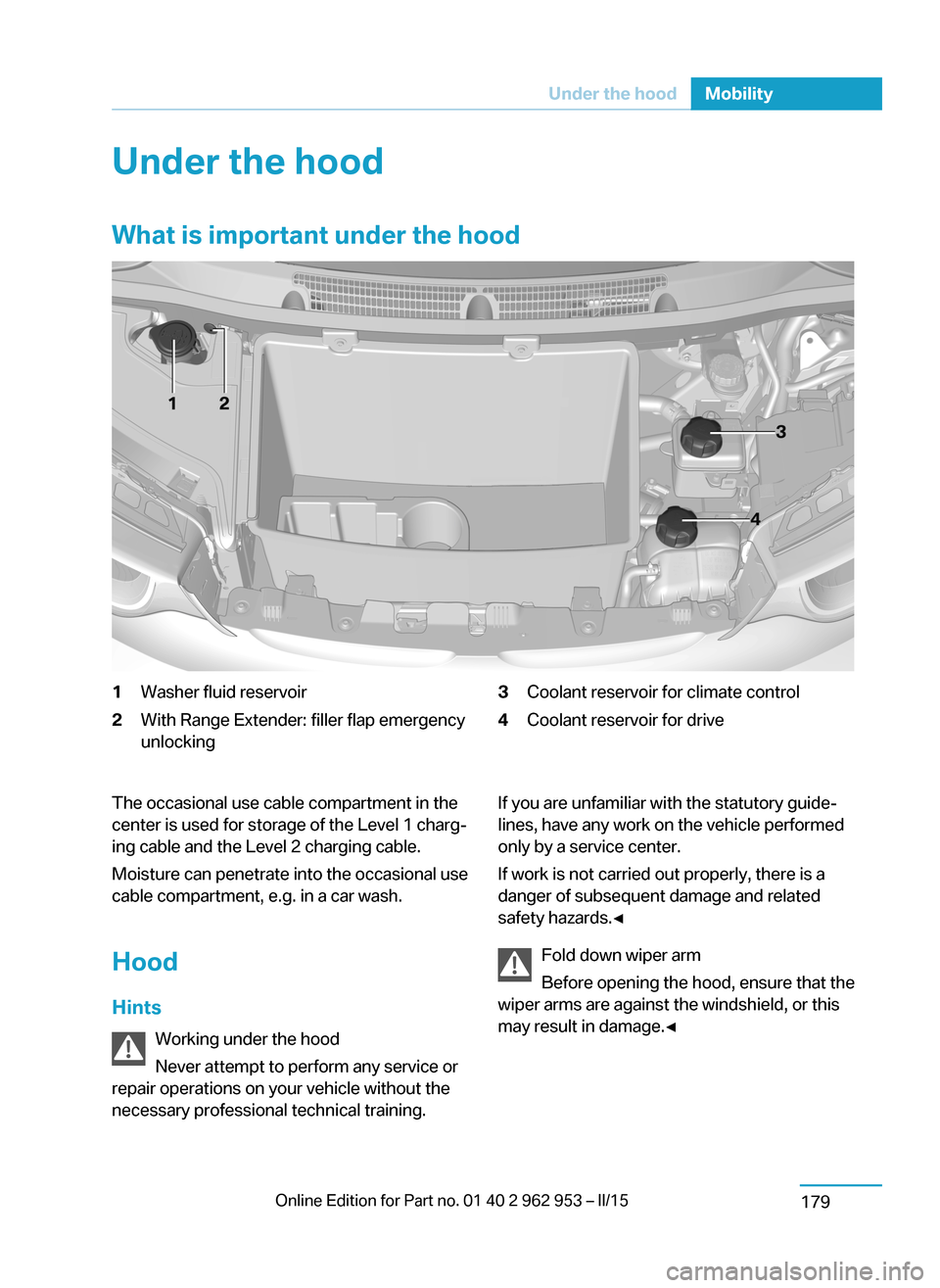
Under the hoodWhat is important under the hood1Washer fluid reservoir2With Range Extender: filler flap emergency
unlocking3Coolant reservoir for climate control4Coolant reservoir for driveThe occasional use cable compartment in the
center is used for storage of the Level 1 charg‐
ing cable and the Level 2 charging cable.
Moisture can penetrate into the occasional use
cable compartment, e.g. in a car wash.
Hood Hints Working under the hood
Never attempt to perform any service or
repair operations on your vehicle without the
necessary professional technical training.If you are unfamiliar with the statutory guide‐
lines, have any work on the vehicle performed
only by a service center.
If work is not carried out properly, there is a
danger of subsequent damage and related
safety hazards.◀
Fold down wiper arm
Before opening the hood, ensure that the
wiper arms are against the windshield, or this
may result in damage.◀Seite 177Under the hoodMobility179
Page 193 of 230
Engine oilVehicle features and options
This chapter describes all standard, country-
specific and optional features offered with the
series. It also describes features that are not
necessarily available in your car, e. g., due to
the selected options or country versions. This
also applies to safety-related functions and
systems.
General information
Engine oil consumption depends on the fre‐
quency of Range Extender use. Therefore,
regularly check the engine oil level after refuel‐
ing.
Checking the oil level
Note Check the engine oil level with Range Extender
warmed up to operating temperature.
After switching off the Range Extender, wait
several minutes before checking the oil level
so that the engine oil can collect in the oil pan.
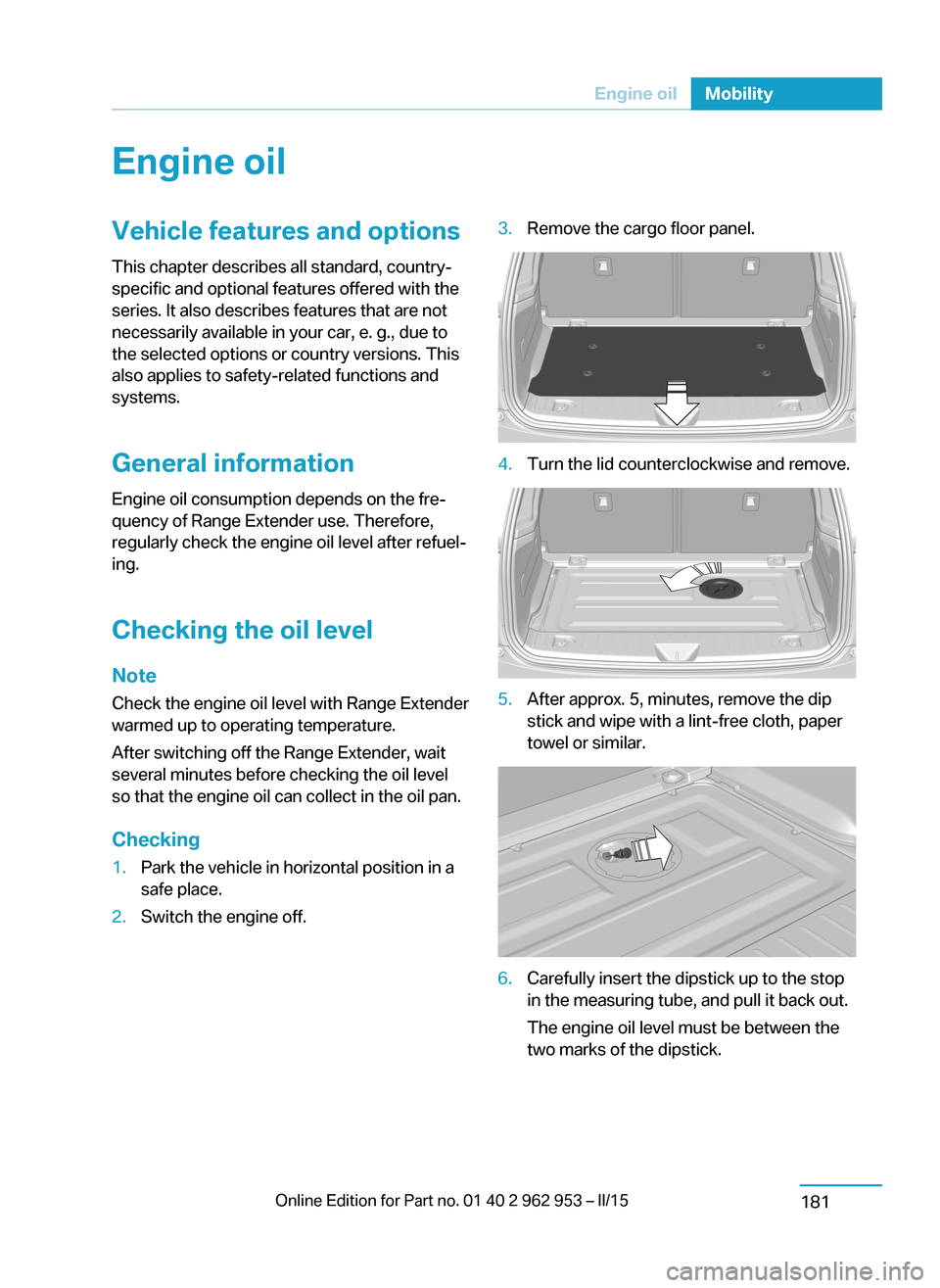
Checking1.Park the vehicle in horizontal position in a
safe place.2.Switch the engine off.3.Remove the cargo floor panel.4.Turn the lid counterclockwise and remove.5.After approx. 5, minutes, remove the dip
stick and wipe with a lint-free cloth, paper
towel or similar.6.Carefully insert the dipstick up to the stop
in the measuring tube, and pull it back out.
The engine oil level must be between the
two marks of the dipstick.Seite 179Engine oilMobility181
Page 198 of 230
and Service Guide Booklet for Canadian mod‐
els. These entries are proof of regular mainte‐
nance.
Socket for OBD Onboard
Diagnosis
Note Socket for Onboard DiagnosisThe socket for onboard diagnostics may
only be used by the service center or a work‐
shop that operates in accordance with the
specifications of the vehicle manufacturer with
correspondingly trained personnel and other
authorized persons. Otherwise, use may result
in operating problems for the vehicle.◀
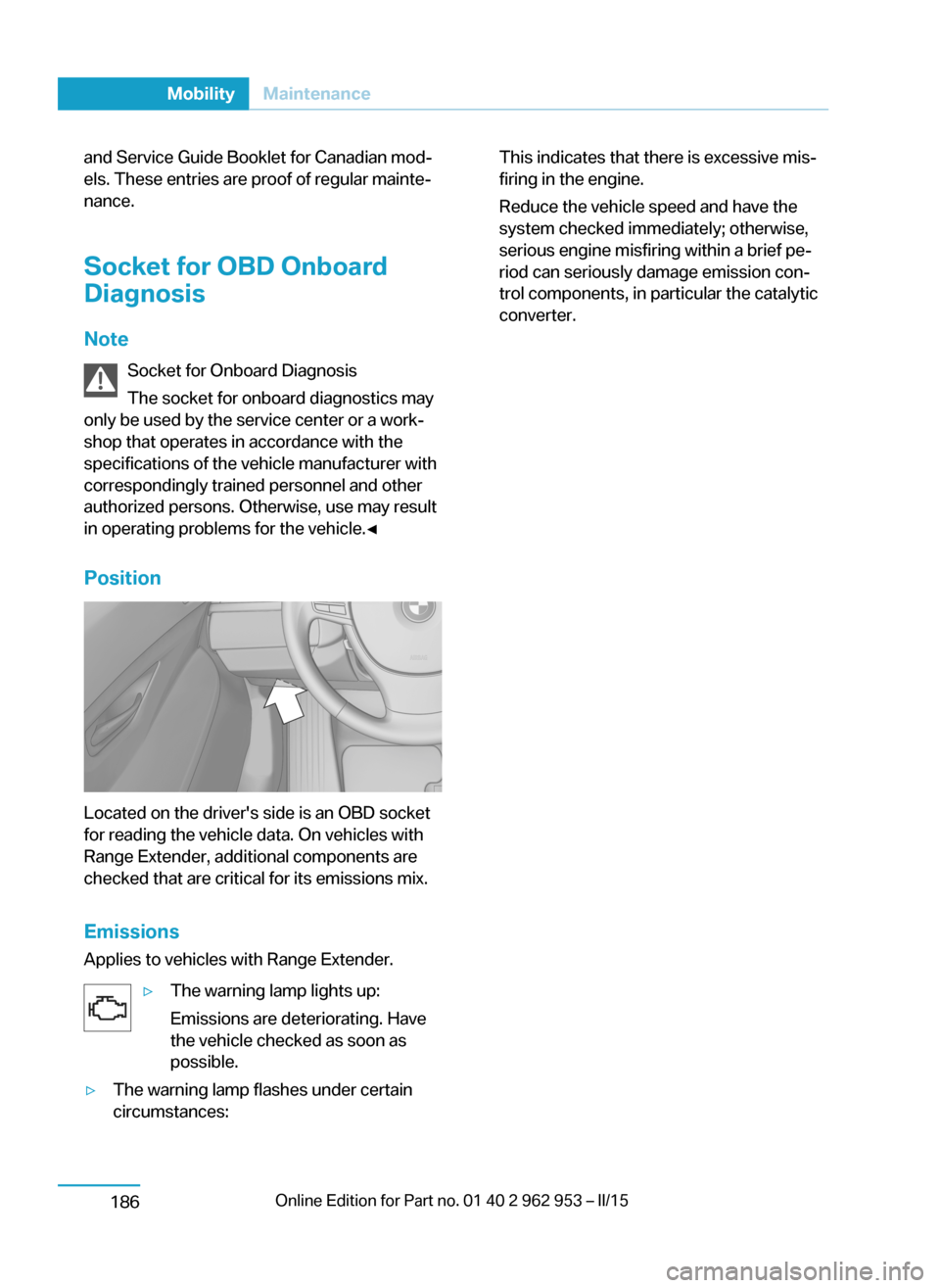
Position
Located on the driver's side is an OBD socket
for reading the vehicle data. On vehicles with
Range Extender, additional components are
checked that are critical for its emissions mix.
Emissions
Applies to vehicles with Range Extender.
▷The warning lamp lights up:
Emissions are deteriorating. Have
the vehicle checked as soon as
possible.▷The warning lamp flashes under certain
circumstances:This indicates that there is excessive mis‐
firing in the engine.
Reduce the vehicle speed and have the
system checked immediately; otherwise,
serious engine misfiring within a brief pe‐
riod can seriously damage emission con‐
trol components, in particular the catalytic
converter.Seite 184MobilityMaintenance186
Page 209 of 230
Read the information on What to do after an
accident, refer to page 197.
What to do after an accident
Hints After an accident
After an accident, do not touch any high-
voltage components such as orange colored
high-voltage cables or parts that are in contact
with exposed high-voltage cables. Otherwise,
there is the risk of fatal injury from electrocu‐
tion due to the system's high voltage.◀
Esliding fluids
Do not touch any fluids esliding from the
high-voltage battery, or the skin can sustain
chemical burns.◀
General information
If you are involved in an accident with your ve‐
hicle, compliance with the following additional
safety precautions is required with regard to
the high-voltage system:▷Secure the crash site.▷Immediately notify rescue forces, police, or
firefighters of the fact that your vehicle is
equipped with a high-voltage system.▷Engage selector lever position P, set the
parking brake and reel off operating and
drive readiness.▷Lock the vehicle after exiting.▷Do not inhale any gases esliding from the
high-voltage battery; if needed, maintain a
safe distance from the vehicle.Seite 195Breakdown assistanceMobility197
Page 213 of 230
Use only a mild soapy solution, with the safety
belts clipped into their buckles.
Do not allow the reels to retract the safety
belts until they are dry.
Carpets and floor mats No objects in the area around the pedals
Keep floor mats, carpets, and any other
objects out of the pedal area; otherwise, the
function of the pedals could be impeded while
driving and create the risk of an accident.
Do not place additional floor mats over existing
mats or other objects.
Only use floor mats that have been approved
for the vehicle and can be properly attached to
floor.
Ensure that the floor mats are securely fas‐
tened again after they were removed for clean‐
ing, e.g.◀
Floor mats can be removed from the car's inte‐
rior for cleaning.
If the floor carpets are very dirty, clean with a
microfiber cloth and water or a textile cleaner.
To prevent matting of the carpet, rub back and
forth in the direction of travel only.
Sensors/cameras
To clean sensors and cameras, use a cloth
moistened with a small amount of glass
cleaner.
Displays/monitors Cleaning displays and screens
Do not use any chemical or household
cleaning agents; otherwise, surfaces can be af‐
fected.◀
Keeping out moisture
Keep all fluids and moisture away from
the unit; otherwise, electrical components can
be damaged.◀Avoid pressure
Avoid pressing too hard when cleaning
and do not use abrasive materials; otherwise,
damage can result.◀
Clean with a clean, antistatic microfiber cloth.
Long idle times and long-term vehicle
storage
Do not allow the vehicle to sit idle for ex‐
tended periods with a low charging state
Before storing the vehicle for an extended pe‐
riod, check the battery charge indicator to en‐
sure that the high-voltage battery is fully
charged. For longer idle times, park the vehicle
with a charging plug plugged into a suitable
power source. Regularly check charging state.
Otherwise, the high-voltage battery can be
damaged when there is excessive discharge.◀
For idle phases that last several weeks, park
the vehicle with a fully charged battery if possi‐
ble.
Do not park the vehicle for longer than 14 days
if the electric range is less than 6 mls, approx.
10 km.
With storage times of up to three months, if
possible plug the vehicle into a suitable power
source or park it in a nearly fully charged state.
Note The service center can advise you on what to
consider when storing the vehicle for longer
than three months.Seite 199CareMobility201
Page 217 of 230
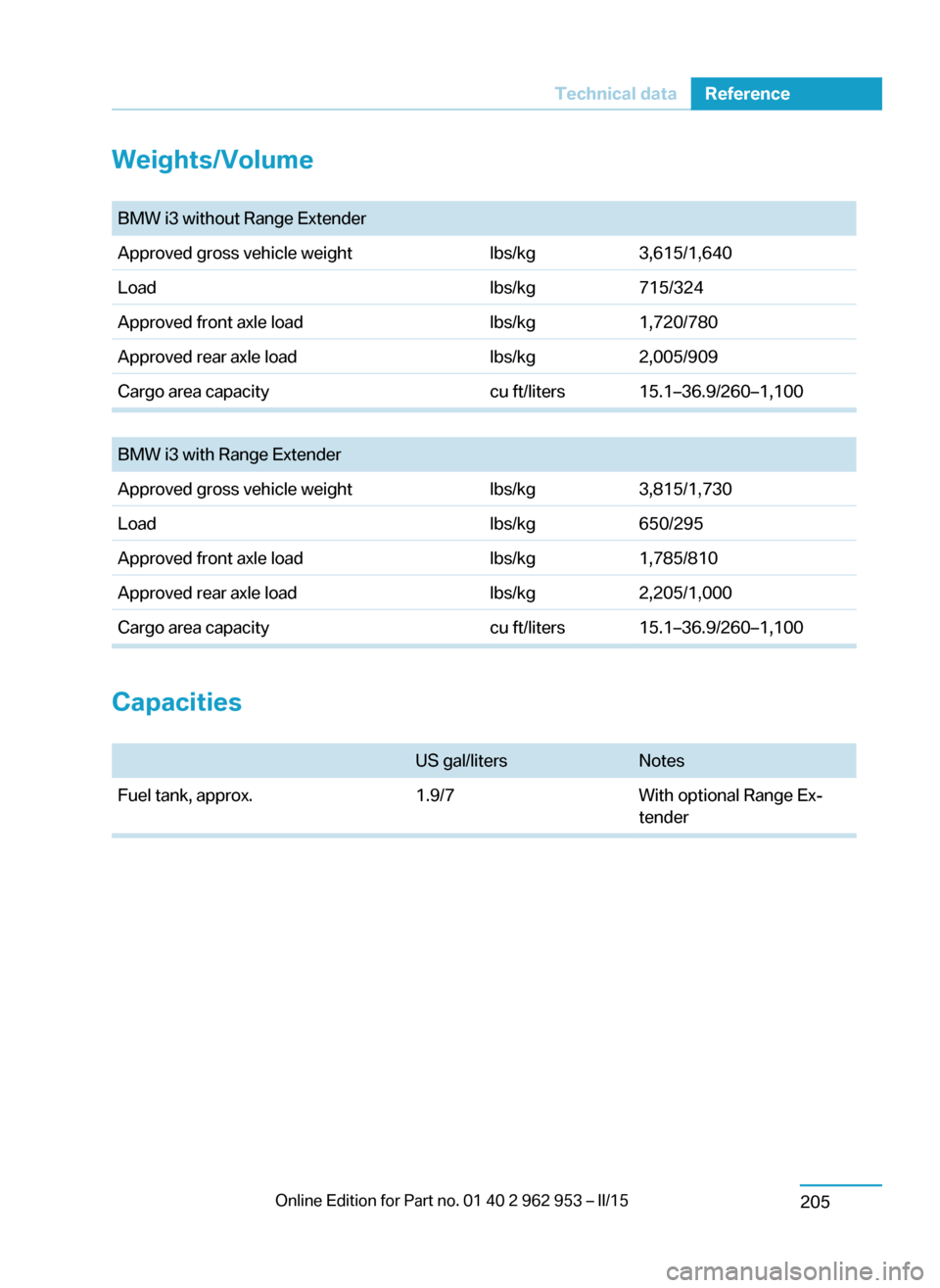
Weights/Volume BMW i3 without Range ExtenderApproved gross vehicle weightlbs/kg3,615/1,640Loadlbs/kg715/324Approved front axle loadlbs/kg1,720/780Approved rear axle loadlbs/kg2,005/909Cargo area capacitycu ft/liters15.1–36.9/260–1,100
BMW i3 with Range ExtenderApproved gross vehicle weightlbs/kg3,815/1,730Loadlbs/kg650/295Approved front axle loadlbs/kg1,785/810Approved rear axle loadlbs/kg2,205/1,000Cargo area capacitycu ft/liters15.1–36.9/260–1,100
Capacities
US gal/litersNotesFuel tank, approx.1.9/7With optional Range Ex‐
tenderSeite 203Technical dataReference205
Page 221 of 230
Button, RES 112
Button, Start/Stop 62
Bypassing, refer to Jump- starting 194
C
California Proposition 65 Warning 8
Camera-based Cruise Con‐ trol 109
Camera, care 201
Camera, rearview cam‐ era 120
Can holder, refer to Cuphold‐ ers 139
Car battery 191
Car care products 199
Care, displays 201
Care, vehicle 199
Cargo 148
Cargo area 135
Cargo area, enlarging 136
Cargo area, storage compart‐ ments 140
Cargo cover 135
Cargo, securing 149
Cargo straps, securing cargo 149
Car key, refer to Remote con‐ trol 36
Carpet, care 201
Car wash 198
Catalytic converter, refer to Hot exhaust system 145
CBS Condition Based Serv‐ ice 185
Center armrest 139
Center console 16
Central locking system 42
Central screen, refer to Con‐ trol Display 18
Changes, technical, refer to Safety 7
Changing wheels 191
Changing wheels/tires 173 Charging battery, see Vehicle charging 156
Charging, refer to Charging vehicle 156
Charging, refer to Vehicle charging 156
Charging screen 75
Charging state indicator, high-voltage battery 76
Charging status, see display of the charging status 160
Charging vehicle 156
Charging vehicle, refer to Ve‐ hicle charging 156
Chassis number, see vehicle identification number 10
Check Control 77
Check engine oil 181
Check oil level 181
Children, seating position 58
Children, transporting safely 58
Child restraint fixing sys‐ tem 58
Child restraint fixing system LATCH 59
Child restraint fixing systems, mounting 58
Child seat, mounting 58
Child seats 58
Chrome parts, care 200
Cigarette lighter 134
Cleaning displays 201
Climate control 127, 129
Clock 82
Closing/opening via door lock 41
Closing/opening with remote control 39
Clothes hooks 140
Coasting 67
Combination reel, refer to Turn signals 69
Combination reel, refer to Wiper system 70
Comfort Access 44 COMFORT program, Dy‐ namic Driving Control 107
Compartments in the doors 138
Compressor 174
Computer 85
Condensation on win‐ dows 128, 131
Condensation under the vehi‐ cle 147
Condition Based Service CBS 185
Confirmation signal 46
ConnectedDrive 6
ConnectedDrive Services 6
Connecting electrical devi‐ ces 134
Contact with water, high-volt‐ age system 196
Control Display 18
Control Display, settings 87
Controller 18
Control systems, driving sta‐ bility 106
Convenient opening with the remote control 39
Coolant 183
Coolant temperature 81
Cooling function 128, 130
Cooling, maximum 131
Cooling system 183
Corrosion on brake discs 146
Cosmetic mirror 134
Cruise control 115
Cruise control, active with Stop & Go 109
Cruise control, refer to Cam‐ era-based Cruise Con‐
trol 109
Cruising range 82
Cupholders 139
Current fuel consumption 86
D
Damage, tires 173 Seite 207Everything from A to ZReference209
Page 222 of 230
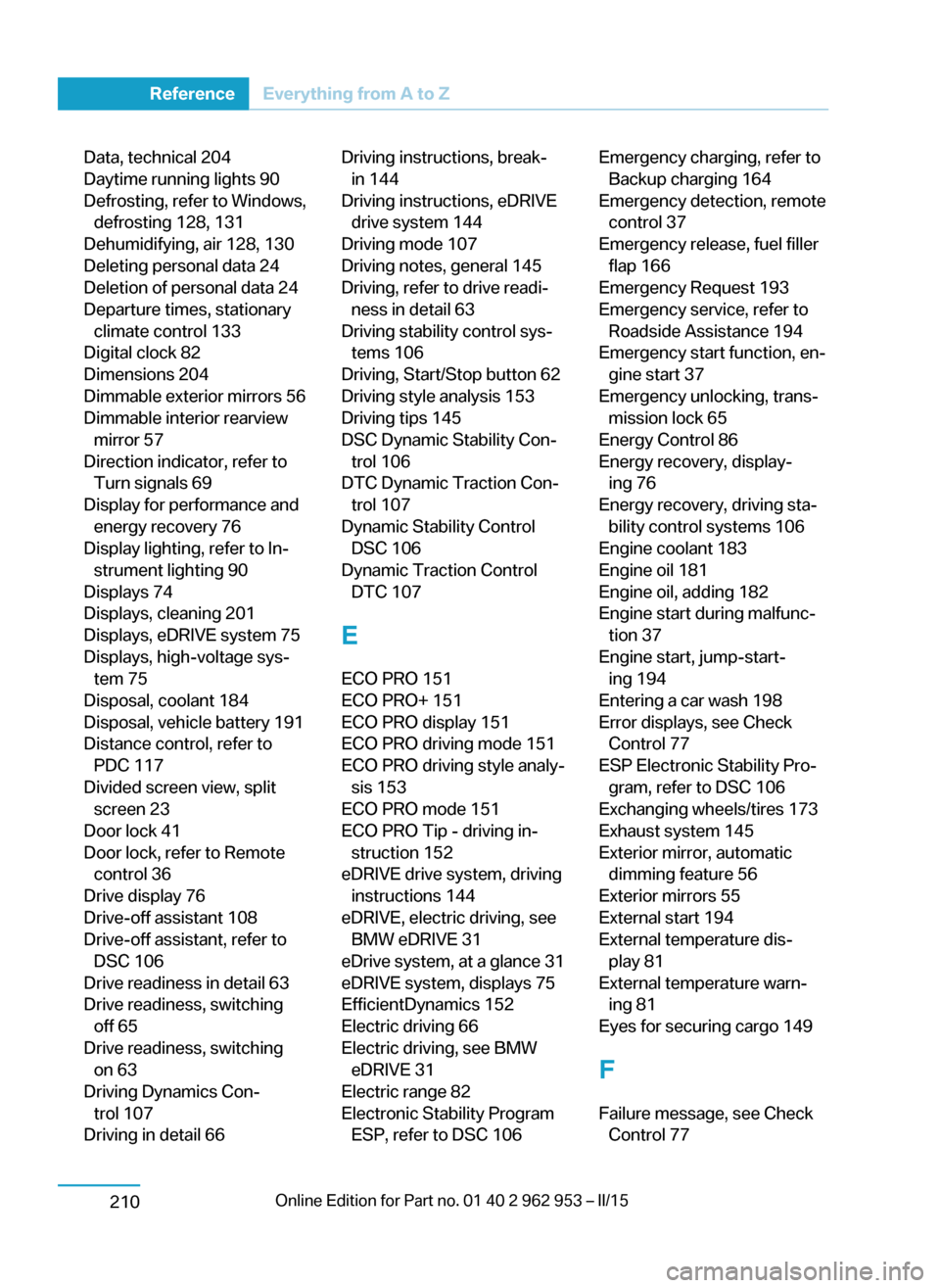
Data, technical 204
Daytime running lights 90
Defrosting, refer to Windows, defrosting 128, 131
Dehumidifying, air 128, 130
Deleting personal data 24
Deletion of personal data 24
Departure times, stationary climate control 133
Digital clock 82
Dimensions 204
Dimmable exterior mirrors 56
Dimmable interior rearview mirror 57
Direction indicator, refer to Turn signals 69
Display for performance and energy recovery 76
Display lighting, refer to In‐ strument lighting 90
Displays 74
Displays, cleaning 201
Displays, eDRIVE system 75
Displays, high-voltage sys‐ tem 75
Disposal, coolant 184
Disposal, vehicle battery 191
Distance control, refer to PDC 117
Divided screen view, split screen 23
Door lock 41
Door lock, refer to Remote control 36
Drive display 76
Drive-off assistant 108
Drive-off assistant, refer to DSC 106
Drive readiness in detail 63
Drive readiness, switching off 65
Drive readiness, switching on 63
Driving Dynamics Con‐ trol 107
Driving in detail 66 Driving instructions, break- in 144
Driving instructions, eDRIVE drive system 144
Driving mode 107
Driving notes, general 145
Driving, refer to drive readi‐ ness in detail 63
Driving stability control sys‐ tems 106
Driving, Start/Stop button 62
Driving style analysis 153
Driving tips 145
DSC Dynamic Stability Con‐ trol 106
DTC Dynamic Traction Con‐ trol 107
Dynamic Stability Control DSC 106
Dynamic Traction Control DTC 107
E
ECO PRO 151
ECO PRO+ 151
ECO PRO display 151
ECO PRO driving mode 151
ECO PRO driving style analy‐ sis 153
ECO PRO mode 151
ECO PRO Tip - driving in‐ struction 152
eDRIVE drive system, driving instructions 144
eDRIVE, electric driving, see BMW eDRIVE 31
eDrive system, at a glance 31
eDRIVE system, displays 75
EfficientDynamics 152
Electric driving 66
Electric driving, see BMW eDRIVE 31
Electric range 82
Electronic Stability Program ESP, refer to DSC 106 Emergency charging, refer toBackup charging 164
Emergency detection, remote control 37
Emergency release, fuel filler flap 166
Emergency Request 193
Emergency service, refer to Roadside Assistance 194
Emergency start function, en‐ gine start 37
Emergency unlocking, trans‐ mission lock 65
Energy Control 86
Energy recovery, display‐ ing 76
Energy recovery, driving sta‐ bility control systems 106
Engine coolant 183
Engine oil 181
Engine oil, adding 182
Engine start during malfunc‐ tion 37
Engine start, jump-start‐ ing 194
Entering a car wash 198
Error displays, see Check Control 77
ESP Electronic Stability Pro‐ gram, refer to DSC 106
Exchanging wheels/tires 173
Exhaust system 145
Exterior mirror, automatic dimming feature 56
Exterior mirrors 55
External start 194
External temperature dis‐ play 81
External temperature warn‐ ing 81
Eyes for securing cargo 149
F
Failure message, see Check Control 77 Seite 208ReferenceEverything from A to Z210
Page 223 of 230
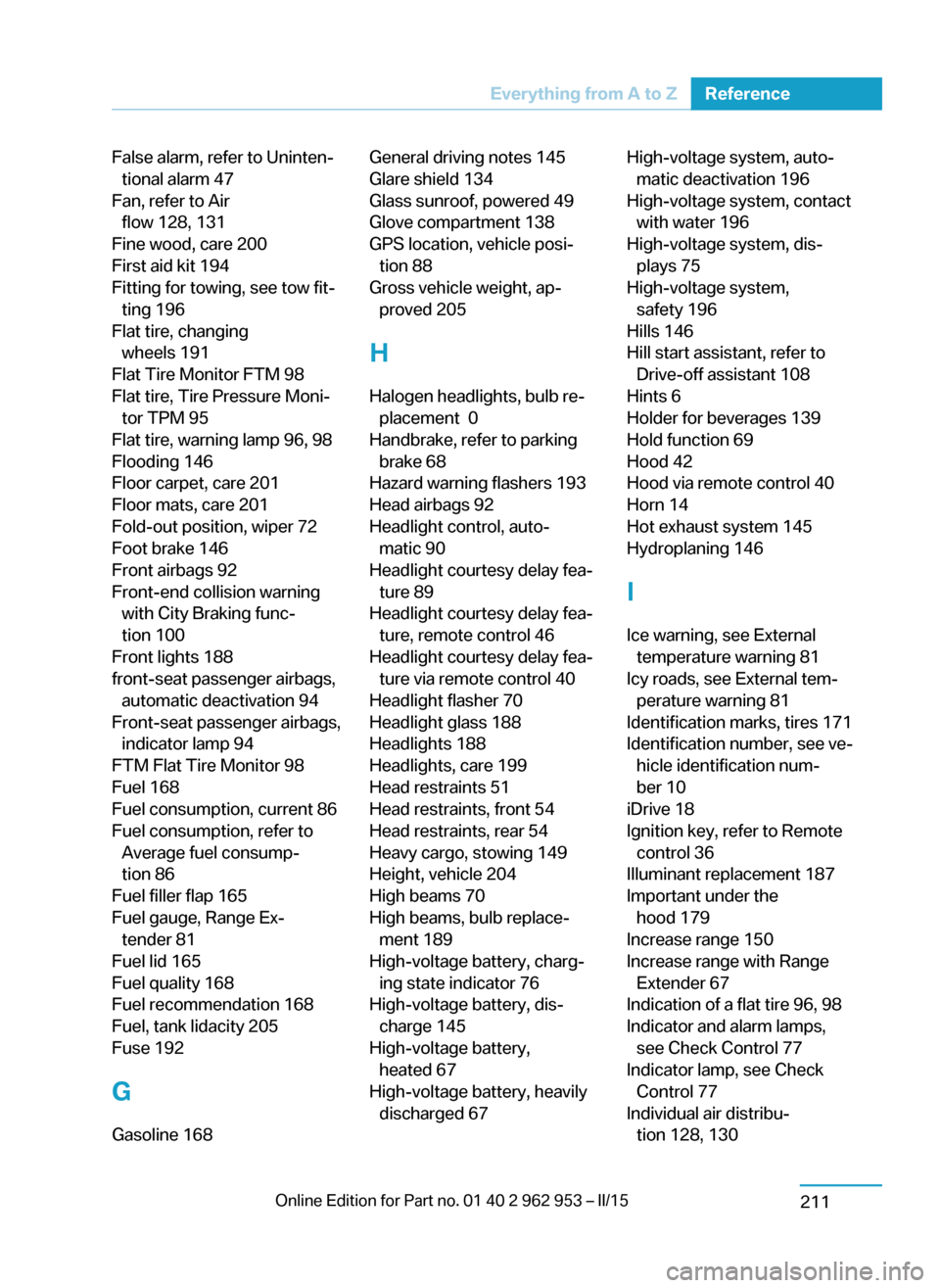
False alarm, refer to Uninten‐tional alarm 47
Fan, refer to Air flow 128, 131
Fine wood, care 200
First aid kit 194
Fitting for towing, see tow fit‐ ting 196
Flat tire, changing wheels 191
Flat Tire Monitor FTM 98
Flat tire, Tire Pressure Moni‐ tor TPM 95
Flat tire, warning lamp 96, 98
Flooding 146
Floor carpet, care 201
Floor mats, care 201
Fold-out position, wiper 72
Foot brake 146
Front airbags 92
Front-end collision warning with City Braking func‐
tion 100
Front lights 188
front-seat passenger airbags, automatic deactivation 94
Front-seat passenger airbags, indicator lamp 94
FTM Flat Tire Monitor 98
Fuel 168
Fuel consumption, current 86
Fuel consumption, refer to Average fuel consump‐
tion 86
Fuel filler flap 165
Fuel gauge, Range Ex‐ tender 81
Fuel lid 165
Fuel quality 168
Fuel recommendation 168
Fuel, tank lidacity 205
Fuse 192
G
Gasoline 168 General driving notes 145
Glare shield 134
Glass sunroof, powered 49
Glove compartment 138
GPS location, vehicle posi‐ tion 88
Gross vehicle weight, ap‐ proved 205
H
Halogen headlights, bulb re‐ placement 0
Handbrake, refer to parking brake 68
Hazard warning flashers 193
Head airbags 92
Headlight control, auto‐ matic 90
Headlight courtesy delay fea‐ ture 89
Headlight courtesy delay fea‐ ture, remote control 46
Headlight courtesy delay fea‐ ture via remote control 40
Headlight flasher 70
Headlight glass 188
Headlights 188
Headlights, care 199
Head restraints 51
Head restraints, front 54
Head restraints, rear 54
Heavy cargo, stowing 149
Height, vehicle 204
High beams 70
High beams, bulb replace‐ ment 189
High-voltage battery, charg‐ ing state indicator 76
High-voltage battery, dis‐ charge 145
High-voltage battery, heated 67
High-voltage battery, heavily discharged 67 High-voltage system, auto‐matic deactivation 196
High-voltage system, contact with water 196
High-voltage system, dis‐ plays 75
High-voltage system, safety 196
Hills 146
Hill start assistant, refer to Drive-off assistant 108
Hints 6
Holder for beverages 139
Hold function 69
Hood 42
Hood via remote control 40
Horn 14
Hot exhaust system 145
Hydroplaning 146
I Ice warning, see External temperature warning 81
Icy roads, see External tem‐ perature warning 81
Identification marks, tires 171
Identification number, see ve‐ hicle identification num‐
ber 10
iDrive 18
Ignition key, refer to Remote control 36
Illuminant replacement 187
Important under the hood 179
Increase range 150
Increase range with Range Extender 67
Indication of a flat tire 96, 98
Indicator and alarm lamps, see Check Control 77
Indicator lamp, see Check Control 77
Individual air distribu‐ tion 128, 130 Seite 209Everything from A to ZReference211