tailgate BMW I3 2015 I01 User Guide
[x] Cancel search | Manufacturer: BMW, Model Year: 2015, Model line: I3, Model: BMW I3 2015 I01Pages: 236, PDF Size: 17.6 MB
Page 140 of 236
Changes to the parking space
Changes to the parking space after it was
measured are not taken into account by the
system.
Therefore, always be alert and ready to inter‐
vene; otherwise, there is the risk of an acci‐
dent.◀
Transporting cargo
Cargo that extends beyond the perimeter
of the vehicle is not taken into account by the
system during the parking procedure.
Therefore, always be alert and ready to inter‐
vene; otherwise, there is the risk of an acci‐
dent.◀
Curbs
The parking assistant may steer the vehi‐
cle over or onto curb if need be.
Therefore, always be alert and ready to inter‐
vene; otherwise, the wheels, tires, or the vehi‐
cle may become damaged.◀
Requirements
For measuring parking spaces▷Maximum speed while driving forward ap‐
prox. 22 mph/35 km/h.▷Maximum distance to row of parked vehi‐
cles: 5 ft/1.5 m.
Suitable parking space
▷Gap between two objects with a minimum
length of approx. 5 ft/1.5 m.▷Min. length of gap between two objects:
your vehicle's length plus approx.
4 ft/1.2 m.▷Minimum depth: approx. 5 ft/1.5 m.
Regarding the parking procedure
▷Doors and tailgate closed.▷Parking brake released.▷Driver's safety belt fastened.Overview
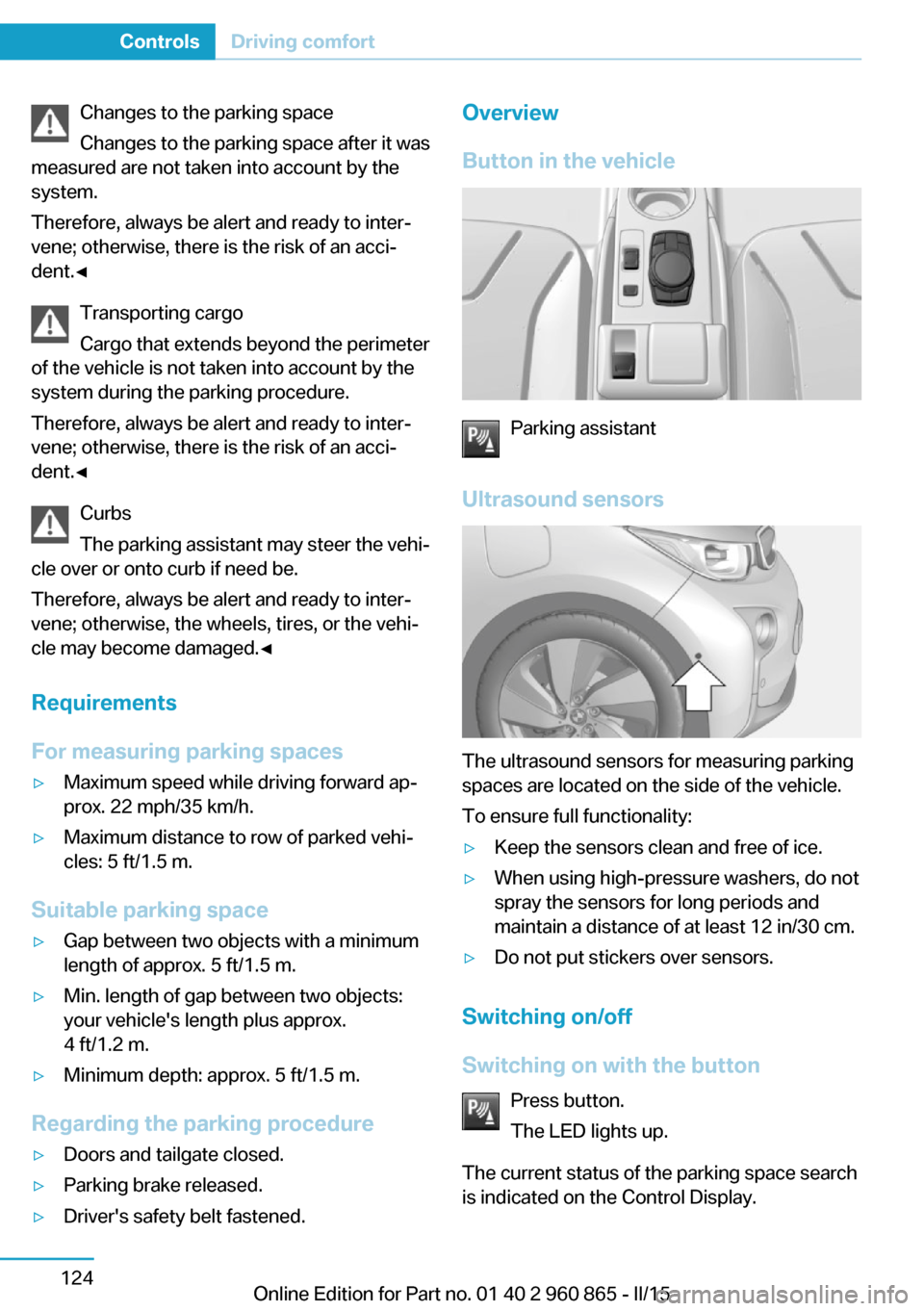
Button in the vehicle
Parking assistant
Ultrasound sensors
The ultrasound sensors for measuring parking
spaces are located on the side of the vehicle.
To ensure full functionality:
▷Keep the sensors clean and free of ice.▷When using high-pressure washers, do not
spray the sensors for long periods and
maintain a distance of at least 12 in/30 cm.▷Do not put stickers over sensors.
Switching on/off
Switching on with the button Press button.
The LED lights up.
The current status of the parking space search
is indicated on the Control Display.
Seite 124ControlsDriving comfort124
Online Edition for Part no. 01 40 2 960 865 - II/15
Page 142 of 236
Interrupting automaticallyThe system is interrupted automatically in the
following situations:▷If the driver grasps the steering wheel or if
he takes over steering.▷Possible on snow-covered or slippery road
surfaces.▷When there are obstacles that are hard to
overcome, such as curbs.▷When there are obstacles that suddenly
arise.▷If the Park Distance Control PDC displays
clearances that are too small.▷If a maximum number of parking attempts
or the time taken for parking is exceeded.▷When switching to another function on the
Control Display.▷When the button is released.▷If the tailgate is open.▷If doors are open.▷When setting the parking brake.▷During acceleration.▷When braking.▷When unfastening the driver's safety belt.
A Check Control message is displayed.
Resume An interrupted parking procedure can be con‐
tinued if needed.
Follow the instructions on the Control Display
to do this.
System limits
No parking assistance
The parking assistant does not offer assis‐
tance in the following situations:
▷In tight curves.Functional limitations
The system may not be fully functional in the
following situations:▷On bumpy road surfaces such as gravel
roads.▷On slippery ground.▷On steep uphill or downhill grades.▷With accumulations of leaves/snow in the
parking space.
Limits of ultrasonic measurement
Ultrasonic measuring might not function under
the following circumstances:
▷For small children and animals.▷For persons with certain clothing, e.g.
coats.▷With external interference of the ultra‐
sound, e.g. from passing vehicles or loud
machines.▷When sensors are dirty, iced over, dam‐
aged or out of position.▷Under certain weather conditions such as
high relative humidity, rain, snowfall, ex‐
treme heat or strong wind.▷With tow bars and trailer couplings of other
vehicles.▷With thin or wedge-shaped objects.▷With moving objects.▷With elevated, protruding objects such as
ledges or cargo.▷With objects with corners and sharp edges.▷With objects with a fine surface structure
such as fences.▷For objects with porous surfaces.
Low objects already displayed, e.g., curbs, can
move into the blind area of the sensors before
or after a continuous tone sounds.
The parking assistant may identify parking
spaces that are not suitable for parking.
Seite 126ControlsDriving comfort126
Online Edition for Part no. 01 40 2 960 865 - II/15
Page 157 of 236
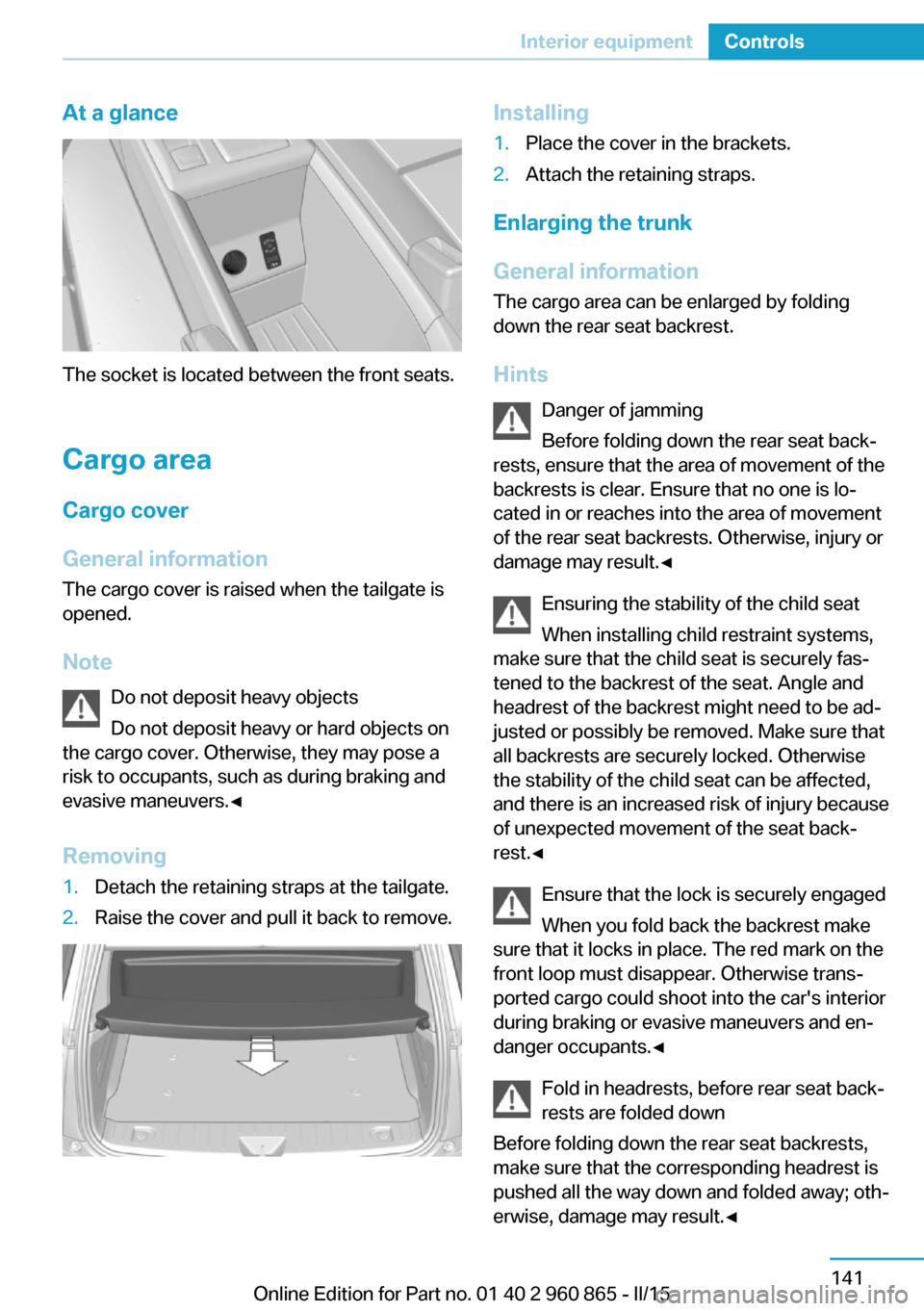
At a glance
The socket is located between the front seats.
Cargo area
Cargo cover
General information The cargo cover is raised when the tailgate is
opened.
Note Do not deposit heavy objects
Do not deposit heavy or hard objects on
the cargo cover. Otherwise, they may pose a
risk to occupants, such as during braking and
evasive maneuvers.◀
Removing
1.Detach the retaining straps at the tailgate.2.Raise the cover and pull it back to remove.Installing1.Place the cover in the brackets.2.Attach the retaining straps.
Enlarging the trunk
General information
The cargo area can be enlarged by folding
down the rear seat backrest.
Hints Danger of jamming
Before folding down the rear seat back‐
rests, ensure that the area of movement of the
backrests is clear. Ensure that no one is lo‐
cated in or reaches into the area of movement
of the rear seat backrests. Otherwise, injury or
damage may result.◀
Ensuring the stability of the child seat
When installing child restraint systems,
make sure that the child seat is securely fas‐
tened to the backrest of the seat. Angle and
headrest of the backrest might need to be ad‐
justed or possibly be removed. Make sure that
all backrests are securely locked. Otherwise
the stability of the child seat can be affected,
and there is an increased risk of injury because
of unexpected movement of the seat back‐
rest.◀
Ensure that the lock is securely engaged
When you fold back the backrest make
sure that it locks in place. The red mark on the
front loop must disappear. Otherwise trans‐
ported cargo could shoot into the car's interior
during braking or evasive maneuvers and en‐
danger occupants.◀
Fold in headrests, before rear seat back‐
rests are folded down
Before folding down the rear seat backrests,
make sure that the corresponding headrest is
pushed all the way down and folded away; oth‐
erwise, damage may result.◀
Seite 141Interior equipmentControls141
Online Edition for Part no. 01 40 2 960 865 - II/15
Page 165 of 236
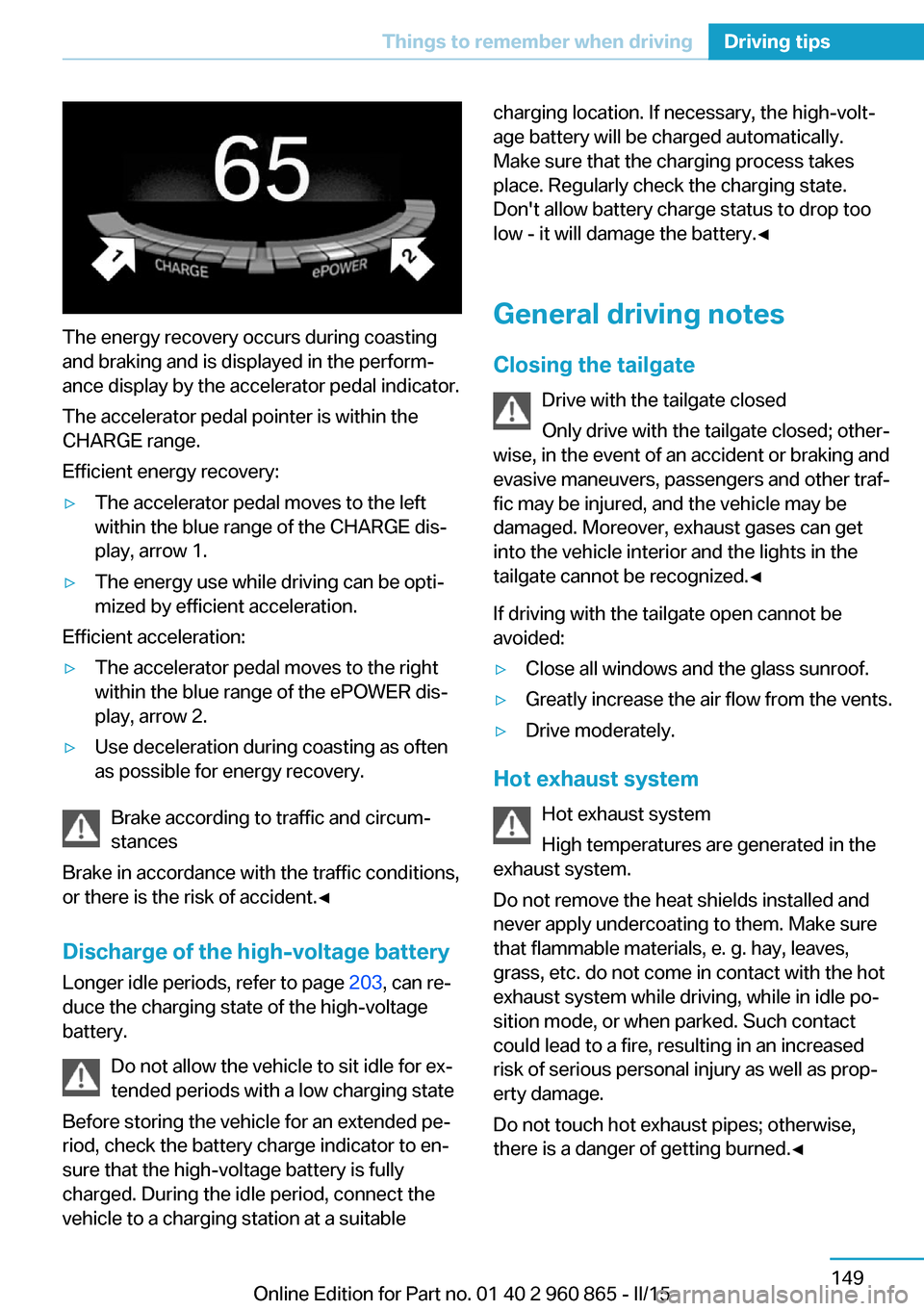
The energy recovery occurs during coasting
and braking and is displayed in the perform‐
ance display by the accelerator pedal indicator.
The accelerator pedal pointer is within the
CHARGE range.
Efficient energy recovery:
▷The accelerator pedal moves to the left
within the blue range of the CHARGE dis‐
play, arrow 1.▷The energy use while driving can be opti‐
mized by efficient acceleration.
Efficient acceleration:
▷The accelerator pedal moves to the right
within the blue range of the ePOWER dis‐
play, arrow 2.▷Use deceleration during coasting as often
as possible for energy recovery.
Brake according to traffic and circum‐
stances
Brake in accordance with the traffic conditions,
or there is the risk of accident.◀
Discharge of the high-voltage battery
Longer idle periods, refer to page 203, can re‐
duce the charging state of the high-voltage
battery.
Do not allow the vehicle to sit idle for ex‐
tended periods with a low charging state
Before storing the vehicle for an extended pe‐
riod, check the battery charge indicator to en‐
sure that the high-voltage battery is fully
charged. During the idle period, connect the
vehicle to a charging station at a suitable
charging location. If necessary, the high-volt‐
age battery will be charged automatically.
Make sure that the charging process takes
place. Regularly check the charging state.
Don't allow battery charge status to drop too
low - it will damage the battery.◀
General driving notes
Closing the tailgate Drive with the tailgate closed
Only drive with the tailgate closed; other‐
wise, in the event of an accident or braking and
evasive maneuvers, passengers and other traf‐
fic may be injured, and the vehicle may be
damaged. Moreover, exhaust gases can get
into the vehicle interior and the lights in the
tailgate cannot be recognized.◀
If driving with the tailgate open cannot be
avoided:▷Close all windows and the glass sunroof.▷Greatly increase the air flow from the vents.▷Drive moderately.
Hot exhaust system
Hot exhaust system
High temperatures are generated in the
exhaust system.
Do not remove the heat shields installed and
never apply undercoating to them. Make sure
that flammable materials, e. g. hay, leaves,
grass, etc. do not come in contact with the hot
exhaust system while driving, while in idle po‐
sition mode, or when parked. Such contact
could lead to a fire, resulting in an increased
risk of serious personal injury as well as prop‐
erty damage.
Do not touch hot exhaust pipes; otherwise,
there is a danger of getting burned.◀
Seite 149Things to remember when drivingDriving tips149
Online Edition for Part no. 01 40 2 960 865 - II/15
Page 209 of 236
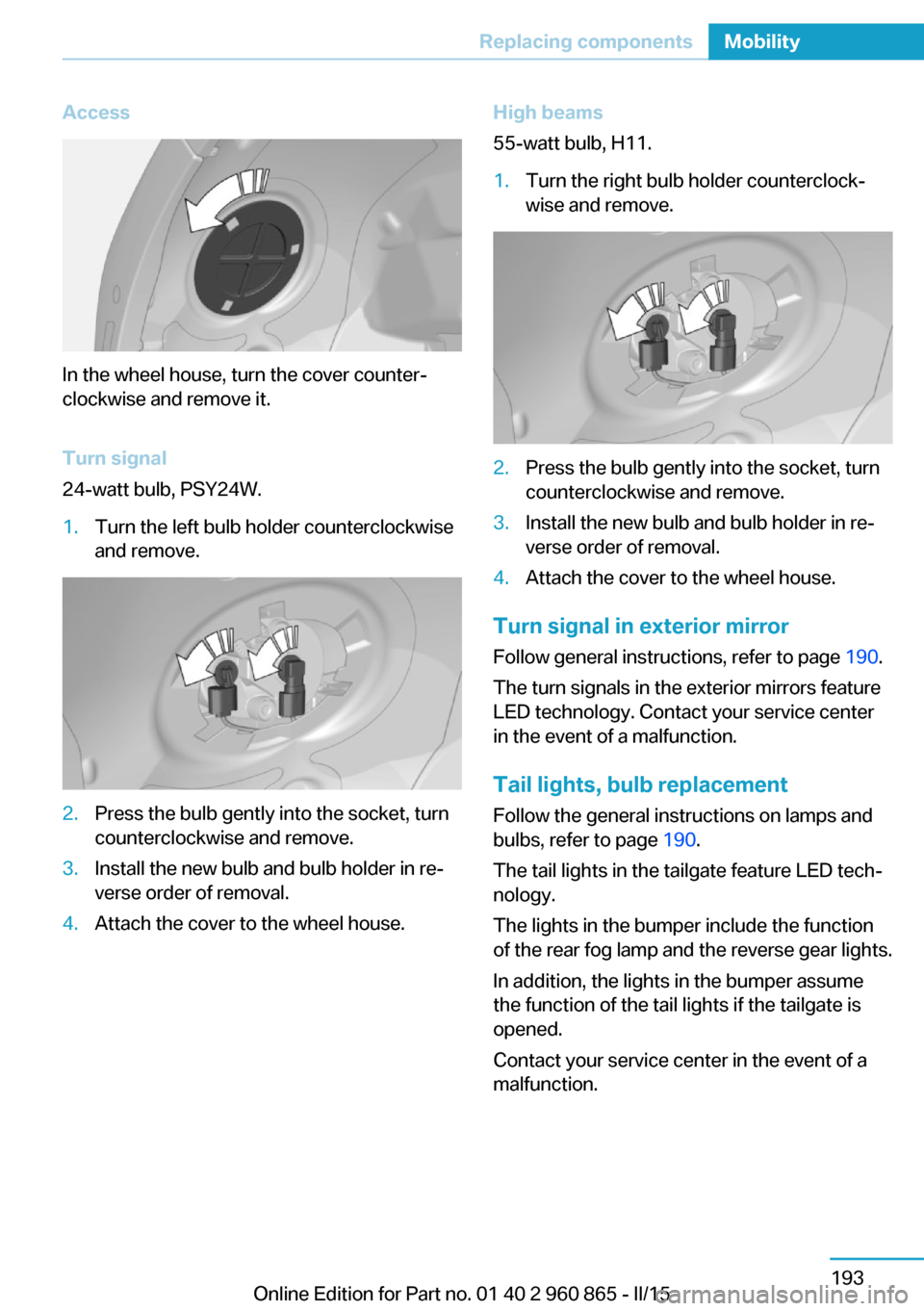
Access
In the wheel house, turn the cover counter‐
clockwise and remove it.
Turn signal
24-watt bulb, PSY24W.
1.Turn the left bulb holder counterclockwise
and remove.2.Press the bulb gently into the socket, turn
counterclockwise and remove.3.Install the new bulb and bulb holder in re‐
verse order of removal.4.Attach the cover to the wheel house.High beams
55-watt bulb, H11.1.Turn the right bulb holder counterclock‐
wise and remove.2.Press the bulb gently into the socket, turn
counterclockwise and remove.3.Install the new bulb and bulb holder in re‐
verse order of removal.4.Attach the cover to the wheel house.
Turn signal in exterior mirror
Follow general instructions, refer to page 190.
The turn signals in the exterior mirrors feature
LED technology. Contact your service center
in the event of a malfunction.
Tail lights, bulb replacement
Follow the general instructions on lamps and
bulbs, refer to page 190.
The tail lights in the tailgate feature LED tech‐
nology.
The lights in the bumper include the function
of the rear fog lamp and the reverse gear lights.
In addition, the lights in the bumper assume
the function of the tail lights if the tailgate is
opened.
Contact your service center in the event of a
malfunction.
Seite 193Replacing componentsMobility193
Online Edition for Part no. 01 40 2 960 865 - II/15
Page 213 of 236
When the emergency request is received
at the BMW Response Center, the BMW
Response Center contacts you and takes
further steps to help you.
Even if you are unable to respond, the
BMW Response Center can take further
steps to help you under certain circum‐
stances.
For this, data are transmitted to the BMW
Response Center which serve to deter‐
mine the necessary rescue measures. E. g.
the current position of the vehicle, if it can
be established.▷If the LED is flashing green, but the BMW
Response Center can no longer be heard
via the speaker, you can nevertheless still
be heard at the BMW Response Center.
Initiating an Emergency Request
automatically
Under certain conditions, an Emergency Re‐
quest is automatically initiated immediately af‐
ter a severe accident. Automatic Collision Noti‐
fication is not affected by pressing the SOS
button.
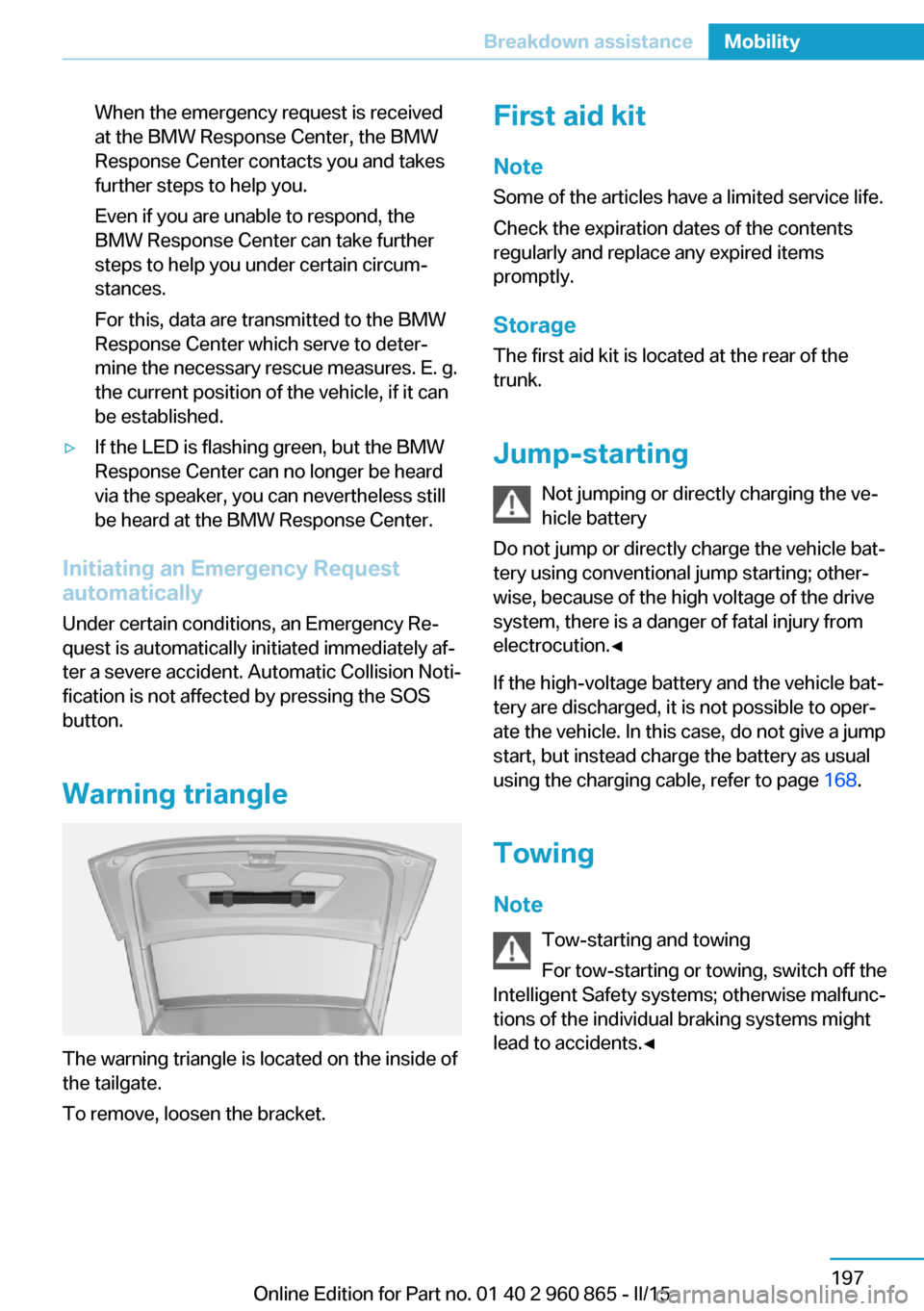
Warning triangle
The warning triangle is located on the inside of
the tailgate.
To remove, loosen the bracket.
First aid kit
Note
Some of the articles have a limited service life.
Check the expiration dates of the contents
regularly and replace any expired items
promptly.
StorageThe first aid kit is located at the rear of the
trunk.
Jump-starting Not jumping or directly charging the ve‐
hicle battery
Do not jump or directly charge the vehicle bat‐
tery using conventional jump starting; other‐
wise, because of the high voltage of the drive
system, there is a danger of fatal injury from
electrocution.◀
If the high-voltage battery and the vehicle bat‐
tery are discharged, it is not possible to oper‐
ate the vehicle. In this case, do not give a jump
start, but instead charge the battery as usual
using the charging cable, refer to page 168.
Towing
Note Tow-starting and towing
For tow-starting or towing, switch off the
Intelligent Safety systems; otherwise malfunc‐
tions of the individual braking systems might
lead to accidents.◀Seite 197Breakdown assistanceMobility197
Online Edition for Part no. 01 40 2 960 865 - II/15
Page 224 of 236
Seite 208ReferenceAppendix208
Online Edition for Part no. 01 40 2 960 865 - II/15
Appendix
Any updates to the Owner's Manual of the ve‐
hicle are listed here.
Correction to the Owner's
Manual
Opposite to the description in this Owner's
Manual, the following changes were imple‐
mented after the editorial deadline:
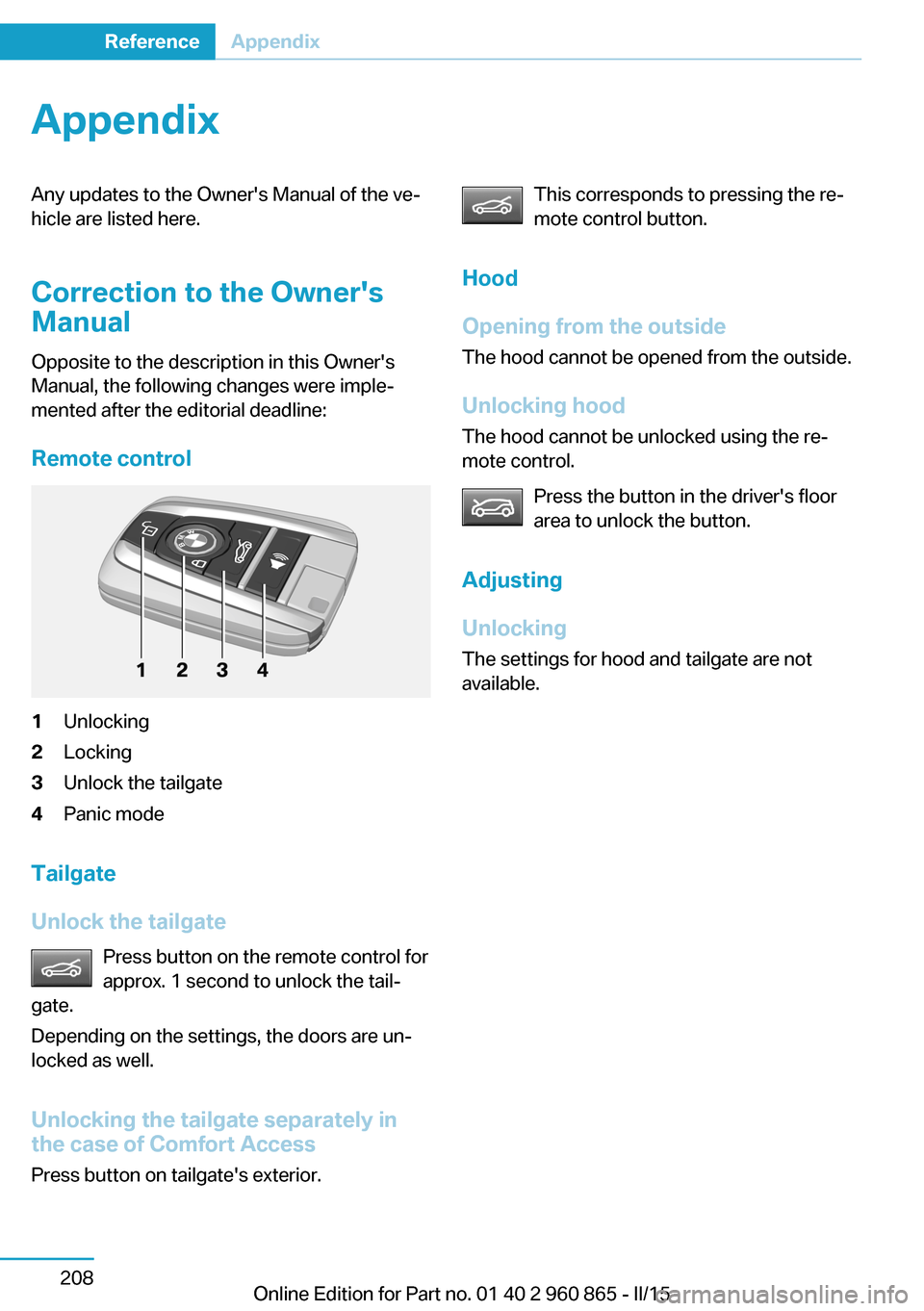
Remote control
1Unlocking
2Locking
3Unlock the tailgate
4Panic mode
Tailgate
Unlock the tailgate
Press button on the remote control for
approx. 1 second to unlock the tail‐
gate.
Depending on the settings, the doors are un‐
locked as well.
Unlocking the tailgate separately in
the case of Comfort Access
Press button on tailgate's exterior.
This corresponds to pressing the re‐
mote control button.
Hood
Opening from the outside
The hood cannot be opened from the outside.
Unlocking hood
The hood cannot be unlocked using the re‐
mote control.
Press the button in the driver's floor
area to unlock the button.
Adjusting
Unlocking
The settings for hood and tailgate are not
available.
Page 230 of 236
Icy roads, see External tem‐perature warning 82
Identification marks, tires 174
Identification number, see ve‐ hicle identification num‐
ber 10
iDrive 18
Ignition key, refer to Remote control 38
Illuminant replacement 190
Important under the hood 182
Increase range 154
Increase range with Range Extender 69
Indication of a flat tire 97, 99
Indicator and alarm lamps, see Check Control 78
Indicator lamp, see Check Control 78
Individual air distribu‐ tion 129, 131
Individual settings, refer to Personal Profile 39
Inflation pressure, tires 173
Inflation pressure warning FTM, tires 99
Info display, refer to On- Board computer 86
Initialize, Tire Pressure Moni‐ tor TPM 97
Initializing, Flat Tire Monitor FTM 99
Instrument cluster 75
Instrument lighting 91
Integrated key 38
Integrated Owner's Manual in the vehicle 29
Intelligent Emergency Re‐ quest 196
Intelligent Safety 100
Intensity, AUTO pro‐ gram 132
Interior equipment 135
Interior lights 91 Interior lights during unlock‐
ing 41
Interior lights with the vehicle locked 42
Interior motion sensor 50
Interior rearview mirror, auto‐ matic dimming feature 58
Interior rearview mirror, com‐ pass 137
Interior rearview mirror, man‐ ually dimmable 58
Internet page 6
Interval display, service re‐ quirements 83
Interval mode 73
J Jacking points for the vehicle jack 194
Jump-starting 197
Jump starting, refer to Backup charging 168
K
Key/remote control 38
Keyless Go, refer to Comfort Access 46
Key Memory, refer to Per‐ sonal Profile 39
Knee airbag 94
L
Lamp replacement, front 191
Lamp replacement, see Bulb replacement 190
Language on Control Dis‐ play 88
Lashing eyes, securing cargo 153
LATCH child restraint sys‐ tem 61
Leather, care 201 LED headlights, bulb replace‐
ment 192
LEDs, light-emitting di‐ odes 191
Length, vehicle 206
Letters and numbers, enter‐ ing 24
Level 1 Charging 165
Level 1 charging cable 162
Level 2 Charging 166
Level 2 charging cable 162
Light alloy wheels, care 202
Light-emitting diodes, LEDs 191
Lighter 139
Lighting 90
Lights 90
Light switch 90
Load 153
Loading 152
Lock, door 43
Locking/unlocking via door lock 43
Locking/unlocking with re‐ mote control 41
Locking, automatic 48
Locking, settings 48
Locking via tailgate 46
Longer idle phases 203
Long idle times and long-term vehicle storage 203
Long-term vehicle stor‐ age 203
Low beams 90
M
Maintaining charging state, refer to Range Extender 69
Maintenance 188
Maintenance require‐ ments 188
Maintenance, service require‐ ments 83
Maintenance system, BMW 188 Seite 214ReferenceEverything from A to Z214
Online Edition for Part no. 01 40 2 960 865 - II/15
Page 233 of 236
Slide/tilt glass roof 51
Smallest turning radius 206
Snow chains 181
Socket 139
Socket, OBD Onboard Diag‐ nostics 189
SOS button 196
Spare fuse 194
Speed, average 87
Speed limit detection, on- board computer 87
Speed limiter, display 84
Speed Limit Information 84
Speed warning 87
Split screen 23
Stability control systems 107
Standard charging cable, see Level 1 charging cable 162
Standard charging, see Level 1 Charging 165
Standing air conditioning, re‐ mote control 48
Start/Stop button 64
Start function during malfunc‐ tion 39
Stationary climate con‐ trol 133
Status control display, tires 97
Status information, iDrive 22
Status of Owner's Manual 7
Steering wheel, adjusting 59
Storage compartments 143
Storage compartments, loca‐ tions 143
Storage, tires 177
Storing the vehicle 203
Summer tires, tread 175
Sun visor 139
Supplementary text mes‐ sage 81
Switch for Dynamic Driv‐ ing 108
Switching on, drive readi‐ ness 65
Switch off, drive readiness 67 Switch, refer to Cockpit 14
Symbols 6
Symbols in the status field 22
T Tailgate closing 46
Tailgate opening 45
Tailgate via remote con‐ trol 42
Tail lights, bulb replace‐ ment 193
Tank unlocking, refer to Tank vent 169
Tank vent 169
Technical changes, refer to Safety 7
Technical data 206
Telephone 6
Temperature, air condi‐ tioner 129
Temperature, automatic cli‐ mate control 131
Temperature display for ex‐ ternal temperature 82
Text message, supplemen‐ tary 81
Theft alarm system, refer to Alarm system 49
Tilt alarm sensor 49
Tire damage 176
Tire identification marks 174
Tire inflation pressure 173
Tire inflation pressure moni‐ tor, refer to FTM 99
Tire Pressure Monitor TPM 96
Tires, changing 176
Tire sealant 178
Tires, everything on wheels and tires 173
Tire tread 175
Tone 6
Total vehicle weight 207
Touchpad 21
Tow fitting 199 Towing 197
Tow lug, see Tow fitting 199
TPM Tire Pressure Moni‐ tor 96
Traction control 108
TRACTION, driving dynam‐ ics 108
Transmission lock, electronic unlocking 67
Transporting children safely 60
Tread, tires 175
Trip computer 87
Triple turn signal activa‐ tion 71
Trip odometer 82
Turning circle lines, rearview camera 122
Turning radius 206
Turn signal, bulb replace‐ ment 192
Turn signals, operation 71
U Unintentional alarm 50
Units of measure 89
Universal remote control 135
Unlocking/locking via door lock 43
Unlocking/locking with re‐ mote control 41
Unlocking, settings 48
Updates made after the edito‐ rial deadline 7
Upholstery care 202
USB interface 140
V Vanity mirror 139
Vehicle battery 194
Vehicle battery, replac‐ ing 194
Vehicle, break-in 148
Vehicle care 201 Seite 217Everything from A to ZReference217
Online Edition for Part no. 01 40 2 960 865 - II/15