service BMW I3 2015 I01 Service Manual
[x] Cancel search | Manufacturer: BMW, Model Year: 2015, Model line: I3, Model: BMW I3 2015 I01Pages: 236, PDF Size: 17.6 MB
Page 210 of 236
Changing wheels
Hints
Which is why no spare tire is available.
The tools for changing wheels are available as
accessories from your service center.
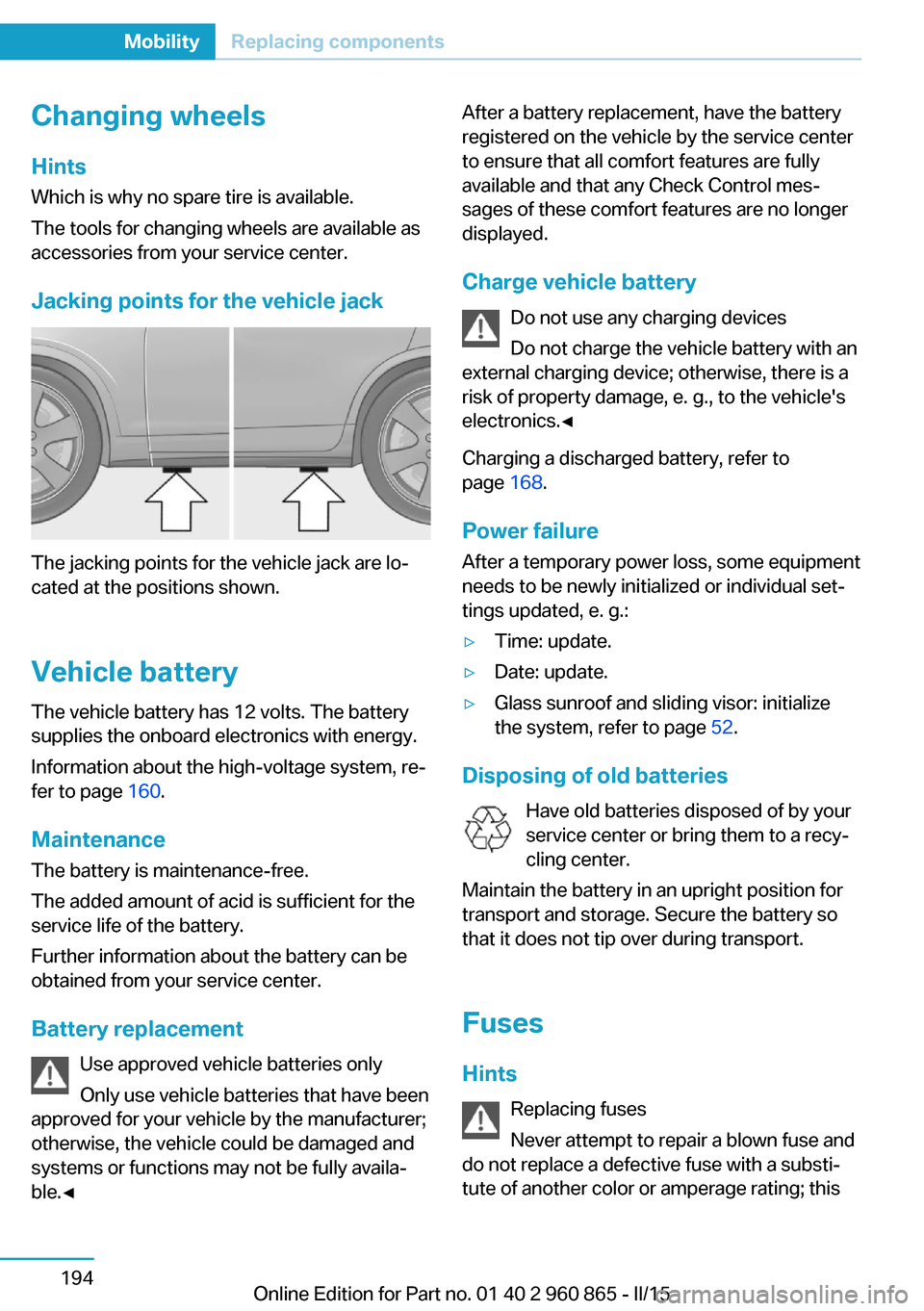
Jacking points for the vehicle jack
The jacking points for the vehicle jack are lo‐
cated at the positions shown.
Vehicle battery The vehicle battery has 12 volts. The battery
supplies the onboard electronics with energy.
Information about the high-voltage system, re‐
fer to page 160.
Maintenance
The battery is maintenance-free.
The added amount of acid is sufficient for the
service life of the battery.
Further information about the battery can be
obtained from your service center.
Battery replacement Use approved vehicle batteries only
Only use vehicle batteries that have been
approved for your vehicle by the manufacturer;
otherwise, the vehicle could be damaged and
systems or functions may not be fully availa‐
ble.◀
After a battery replacement, have the battery
registered on the vehicle by the service center
to ensure that all comfort features are fully
available and that any Check Control mes‐
sages of these comfort features are no longer
displayed.
Charge vehicle battery Do not use any charging devices
Do not charge the vehicle battery with an
external charging device; otherwise, there is a
risk of property damage, e. g., to the vehicle's
electronics.◀
Charging a discharged battery, refer to
page 168.
Power failure
After a temporary power loss, some equipment
needs to be newly initialized or individual set‐
tings updated, e. g.:▷Time: update.▷Date: update.▷Glass sunroof and sliding visor: initialize
the system, refer to page 52.
Disposing of old batteries
Have old batteries disposed of by your
service center or bring them to a recy‐
cling center.
Maintain the battery in an upright position for
transport and storage. Secure the battery so
that it does not tip over during transport.
Fuses Hints Replacing fuses
Never attempt to repair a blown fuse and
do not replace a defective fuse with a substi‐
tute of another color or amperage rating; this
Seite 194MobilityReplacing components194
Online Edition for Part no. 01 40 2 960 865 - II/15
Page 213 of 236
When the emergency request is received
at the BMW Response Center, the BMW
Response Center contacts you and takes
further steps to help you.
Even if you are unable to respond, the
BMW Response Center can take further
steps to help you under certain circum‐
stances.
For this, data are transmitted to the BMW
Response Center which serve to deter‐
mine the necessary rescue measures. E. g.
the current position of the vehicle, if it can
be established.▷If the LED is flashing green, but the BMW
Response Center can no longer be heard
via the speaker, you can nevertheless still
be heard at the BMW Response Center.
Initiating an Emergency Request
automatically
Under certain conditions, an Emergency Re‐
quest is automatically initiated immediately af‐
ter a severe accident. Automatic Collision Noti‐
fication is not affected by pressing the SOS
button.
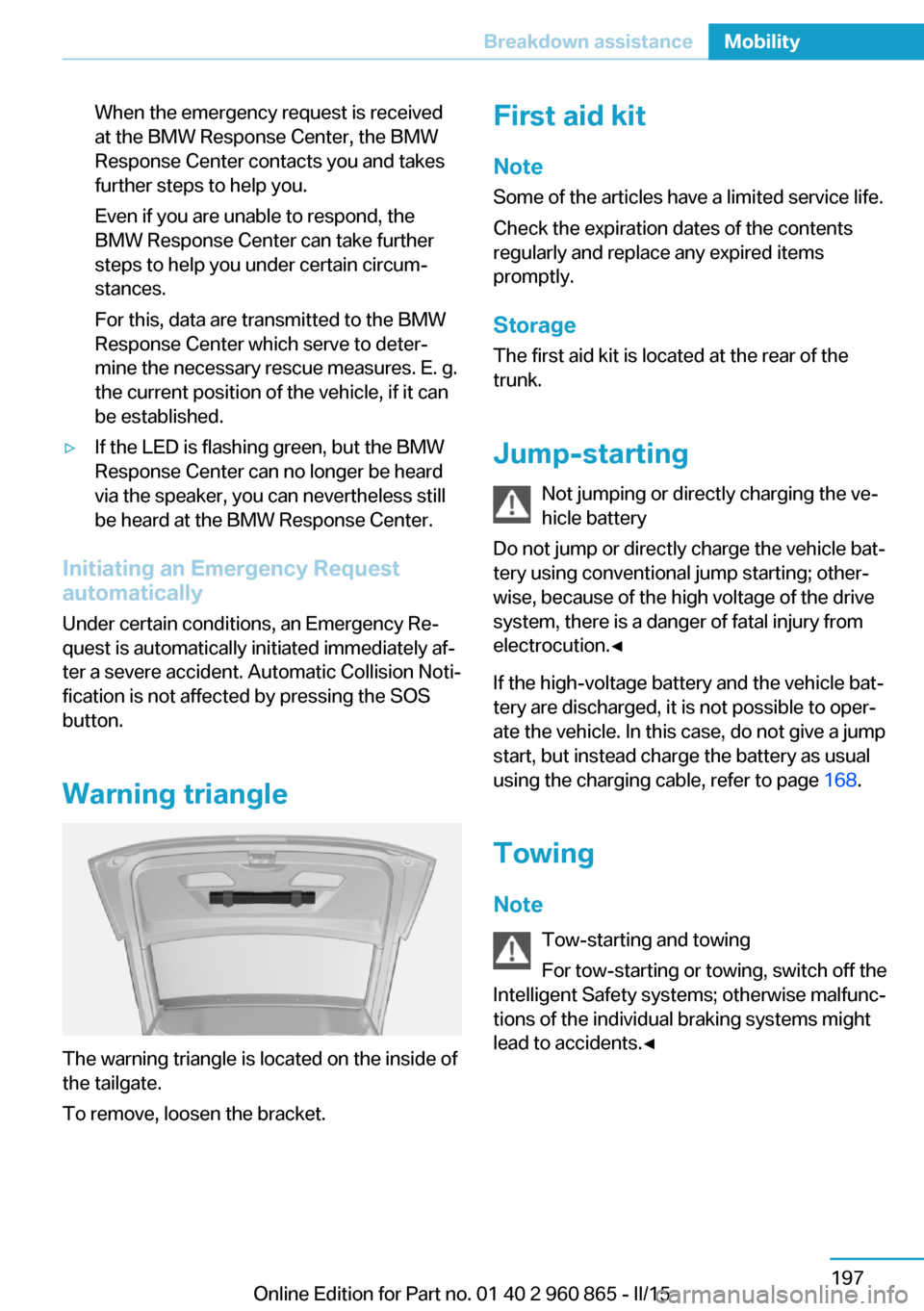
Warning triangle
The warning triangle is located on the inside of
the tailgate.
To remove, loosen the bracket.
First aid kit
Note
Some of the articles have a limited service life.
Check the expiration dates of the contents
regularly and replace any expired items
promptly.
StorageThe first aid kit is located at the rear of the
trunk.
Jump-starting Not jumping or directly charging the ve‐
hicle battery
Do not jump or directly charge the vehicle bat‐
tery using conventional jump starting; other‐
wise, because of the high voltage of the drive
system, there is a danger of fatal injury from
electrocution.◀
If the high-voltage battery and the vehicle bat‐
tery are discharged, it is not possible to oper‐
ate the vehicle. In this case, do not give a jump
start, but instead charge the battery as usual
using the charging cable, refer to page 168.
Towing
Note Tow-starting and towing
For tow-starting or towing, switch off the
Intelligent Safety systems; otherwise malfunc‐
tions of the individual braking systems might
lead to accidents.◀Seite 197Breakdown assistanceMobility197
Online Edition for Part no. 01 40 2 960 865 - II/15
Page 214 of 236
Transporting your vehicle
Note Your vehicle is not permitted to be towed.
Therefore, contact a service center in the
event of a breakdown.
Do not have the vehicle towed
Have your vehicle transported on a load‐
ing platform only; otherwise, damage may oc‐
cur.◀
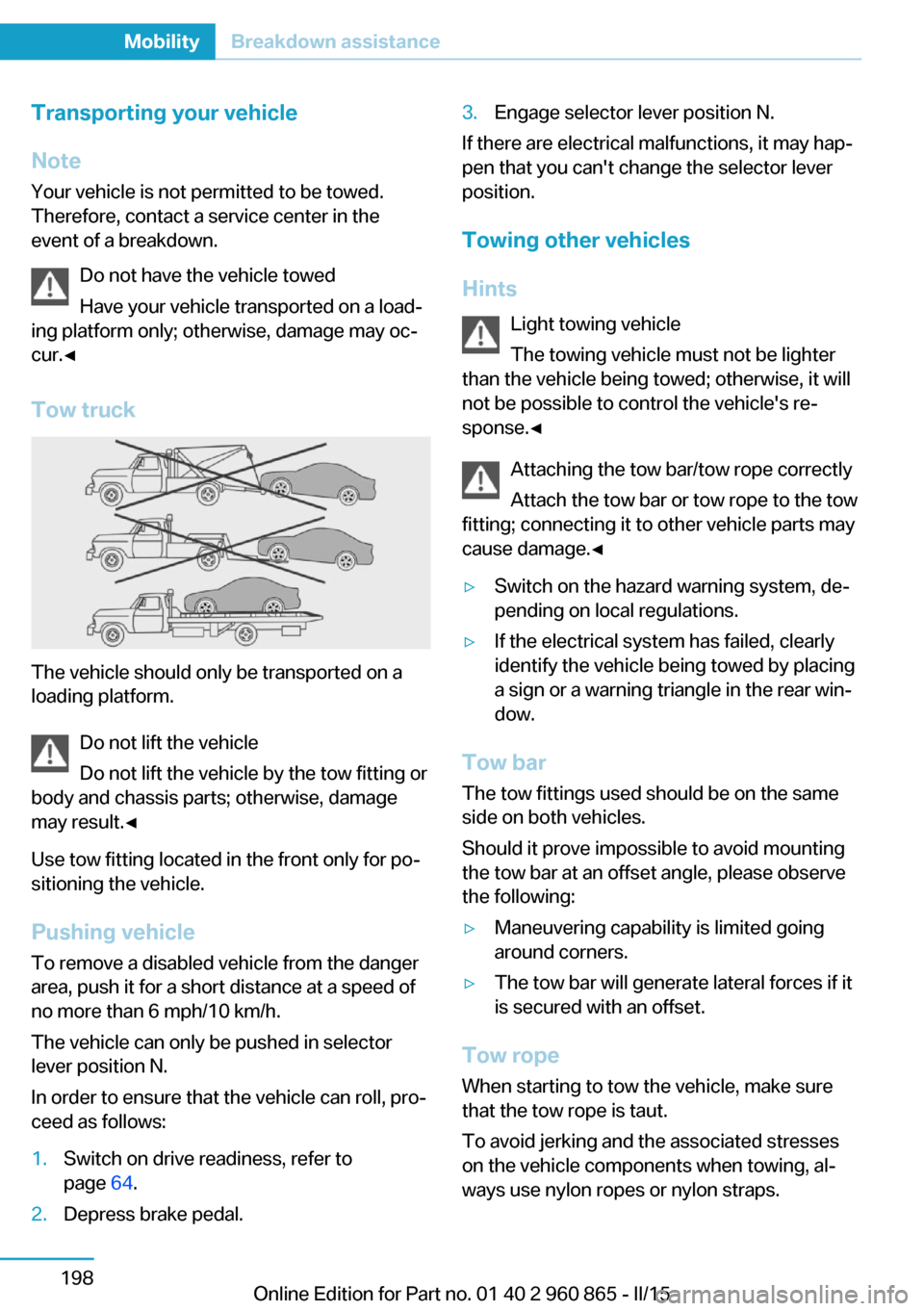
Tow truck
The vehicle should only be transported on a
loading platform.
Do not lift the vehicle
Do not lift the vehicle by the tow fitting or
body and chassis parts; otherwise, damage
may result.◀
Use tow fitting located in the front only for po‐
sitioning the vehicle.
Pushing vehicle To remove a disabled vehicle from the danger
area, push it for a short distance at a speed of
no more than 6 mph/10 km/h.
The vehicle can only be pushed in selector
lever position N.
In order to ensure that the vehicle can roll, pro‐
ceed as follows:
1.Switch on drive readiness, refer to
page 64.2.Depress brake pedal.3.Engage selector lever position N.
If there are electrical malfunctions, it may hap‐
pen that you can't change the selector lever
position.
Towing other vehicles
Hints Light towing vehicle
The towing vehicle must not be lighter
than the vehicle being towed; otherwise, it will
not be possible to control the vehicle's re‐
sponse.◀
Attaching the tow bar/tow rope correctly
Attach the tow bar or tow rope to the tow
fitting; connecting it to other vehicle parts may
cause damage.◀
▷Switch on the hazard warning system, de‐
pending on local regulations.▷If the electrical system has failed, clearly
identify the vehicle being towed by placing
a sign or a warning triangle in the rear win‐
dow.
Tow bar
The tow fittings used should be on the same
side on both vehicles.
Should it prove impossible to avoid mounting
the tow bar at an offset angle, please observe
the following:
▷Maneuvering capability is limited going
around corners.▷The tow bar will generate lateral forces if it
is secured with an offset.
Tow rope
When starting to tow the vehicle, make sure
that the tow rope is taut.
To avoid jerking and the associated stresses
on the vehicle components when towing, al‐
ways use nylon ropes or nylon straps.
Seite 198MobilityBreakdown assistance198
Online Edition for Part no. 01 40 2 960 865 - II/15
Page 218 of 236
Otherwise, particles of dust and road grime
chafe in pores and folds, and lead to increased
wear and premature degradation of the leather
surface.
To guard against discoloration, such as from
clothing, provide leather care roughly every
two months.
Clean light-colored leather more frequently be‐
cause soiling on such surfaces is substantially
more visible.
Use leather care products; otherwise, dirt and
grease will gradually break down the protective
layer of the leather surface.
Suitable care products are available from the
service center.
Upholstery material care Vacuum regularly with a vacuum cleaner.
If upholstery is very dirty, e.g., with beverage
stains, use a soft sponge or microfiber cloth
with a suitable interior cleaner.
Clean the upholstery down to the seams using
large sweeping motions. Avoid rubbing the
material vigorously.
Damage from Velcro® fasteners
Open Velcro® fasteners on pants or
other articles of clothing can damage the seat
covers. Ensure that any Velcro® fasteners are
closed.◀
Caring for special components
Light-alloy wheels When cleaning the vehicle, use only neutral
wheel cleaners having a pH value from 5 to 9.
Do not use abrasive cleaning agents or steam
jets above 140 ℉/60 ℃. Follow the manufac‐
turer's instructions.
Aggressive, acidic or alkaline cleaning agents
can destroy the protective layer of adjacent
components, such as the brake disk.Chrome surfaces
Carefully clean components such as the radia‐
tor grille or door handles with an ample supply
of water, possibly with shampoo added, partic‐
ularly when they have been exposed to road
salt.
Rubber components
Aside from water, treat only with rubber
cleansers.
When cleaning rubber seals, do not use any
silicon-containing car care products in order to
avoid damage or noises.
Fine wood partsClean fine wood facing and fine wood compo‐
nents only with a moist rag. Then dry with a
soft cloth.
Plastic components
These include:▷Imitation leather surfaces.▷Roofliner.▷Lamp lenses.▷Instrument cluster cover.▷Matt black spray-coated components.▷Painted parts in the interior.▷Carbon parts in the interior.
Clean with a microfiber cloth.
Dampen cloth lightly with water.
Do not soak the roofliner.
No cleansers that contain alcohol or sol‐
vents
Do not use cleansers that contain alcohol or
solvents, such as lacquer thinners, heavy-duty
grease removers, fuel, or such; this could lead
to surface damage.◀
Safety belts
Dirty belt straps impede the reeling action and
thus have a negative impact on safety.
Seite 202MobilityCare202
Online Edition for Part no. 01 40 2 960 865 - II/15
Page 219 of 236
Chemical cleaning
Do not clean chemically; this can destroy
the webbing.◀
Use only a mild soapy solution, with the safety
belts clipped into their buckles.
Do not allow the reels to retract the safety
belts until they are dry.
Carpets and floor mats No objects in the area around the pedals
Keep floor mats, carpets, and any other
objects out of the pedal area; otherwise, the
function of the pedals could be impeded while
driving and create the risk of an accident.
Do not place additional floor mats over existing
mats or other objects.
Only use floor mats that have been approved
for the vehicle and can be properly attached to
floor.
Ensure that the floor mats are securely fas‐
tened again after they were removed for clean‐
ing, e.g.◀
Floor mats can be removed from the car's inte‐
rior for cleaning.
If the floor carpets are very dirty, clean with a
microfiber cloth and water or a textile cleaner.
To prevent matting of the carpet, rub back and
forth in the direction of travel only.
Sensor/camera lenses
To clean sensors and camera lenses, use a
cloth moistened with a small amount of glass
detergent.
Displays/monitors Cleaning displays and screens
Do not use any chemical or household
cleaning agents; otherwise, surfaces can be af‐
fected.◀Keeping out moisture
Keep all fluids and moisture away from
the unit; otherwise, electrical components can
be damaged.◀
Avoid pressure
Avoid pressing too hard when cleaning
and do not use abrasive materials; otherwise,
damage can result.◀
Clean with a clean, antistatic microfiber cloth.
Long idle times and long-term vehicle
storage
Do not allow the vehicle to sit idle for ex‐
tended periods with a low charging state
Before storing the vehicle for an extended pe‐
riod, check the battery charge indicator to en‐
sure that the high-voltage battery is fully
charged. For longer idle times, park the vehicle
with a charging plug plugged into a suitable
power source. Regularly check charging state.
Otherwise, the high-voltage battery can be
damaged when there is excessive discharge.◀
For idle phases that last several weeks, park
the vehicle with a fully charged battery if possi‐
ble.
Do not park the vehicle for longer than 14 days
if the electric range is less than 6 mls, approx.
10 km.
With storage times of up to three months, if
possible plug the vehicle into a suitable power
source or park it in a nearly fully charged state.
Note The service center can advise you on what to
consider when storing the vehicle for longer
than three months.Seite 203CareMobility203
Online Edition for Part no. 01 40 2 960 865 - II/15
Page 222 of 236
Technical dataVehicle features and options
This chapter describes all standard, country-
specific and optional features offered with the
series. It also describes features that are not
necessarily available in your car, e. g., due tothe selected options or country versions. This
also applies to safety-related functions and
systems. The respectively applicable country
provisions must be observed when using the
respective features and systems.
Note
The technical data and specifications in this
Owner's Manual are used as guidance values.
The vehicle-specific data can deviate from this,
for example, due to the selected special equip‐
ment, country version or country-specific
measurement method. Detailed values can befound in the approval documents, on informa‐
tion signs on the vehicle or can be obtained
from the service center.
The information in the vehicle documents al‐
ways has priority.
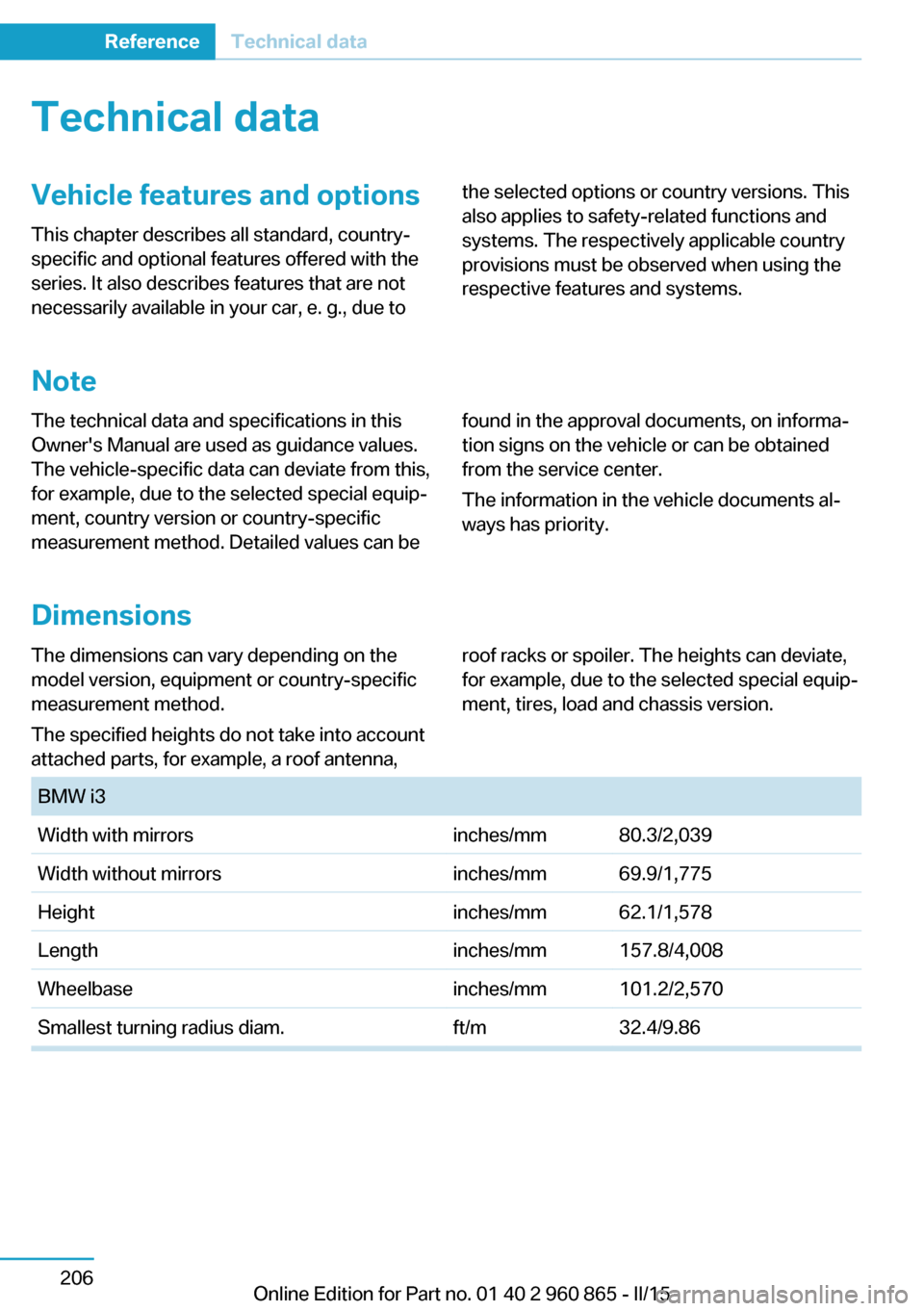
Dimensions
The dimensions can vary depending on the
model version, equipment or country-specific
measurement method.
The specified heights do not take into account
attached parts, for example, a roof antenna,roof racks or spoiler. The heights can deviate,
for example, due to the selected special equip‐
ment, tires, load and chassis version. BMW i3Width with mirrorsinches/mm80.3/2,039 Width without mirrorsinches/mm69.9/1,775Heightinches/mm62.1/1,578Lengthinches/mm157.8/4,008Wheelbaseinches/mm101.2/2,570Smallest turning radius diam.ft/m32.4/9.86Seite 206ReferenceTechnical data206
Online Edition for Part no. 01 40 2 960 865 - II/15
Page 227 of 236
Bulb replacement, taillights 193
Bulbs and lamps 190
Button, RES 113
Button, Start/Stop 64
Bypassing, refer to Jump- starting 197
C
California Proposition 65 Warning 8
Camera-based Cruise Con‐ trol 110
Camera lenses, care 203
Camera, rearview cam‐ era 121
Car battery 194
Car care products 201
Care, displays 203
Care, vehicle 201
Cargo 152
Cargo area 141
Cargo area, enlarging 141
Cargo area, storage compart‐ ments 145
Cargo cover 141
Cargo, securing 153
Cargo straps, securing cargo 153
Car key, refer to Remote con‐ trol 38
Carpet, care 203
Car wash 200
Catalytic converter, refer to Hot exhaust system 149
CBS Condition Based Serv‐ ice 188
Center armrest 143
Center console 16
Central locking system 44
Central screen, refer to Con‐ trol Display 18
Changes, technical, refer to Safety 7
Changing wheels 194 Changing wheels/tires 176
Charging battery, see Vehicle charging 160
Charging, refer to Charging vehicle 160
Charging, refer to Vehicle charging 160
Charging screen 76
Charging state indicator, high-voltage battery 77
Charging status, see display of the charging status 164
Charging vehicle 160
Charging vehicle, refer to Ve‐ hicle charging 160
Chassis number, see vehicle identification number 10
Check Control 78
Check engine oil 184
Check oil level 184
Children, seating position 60
Children, transporting safely 60
Child restraint fixing sys‐ tem 60
Child restraint fixing system LATCH 61
Child restraint fixing systems, mounting 60
Child seat, mounting 60
Child seats 60
Chrome parts, care 202
Cigarette lighter 139
Cleaning displays 203
Climate control 128, 130
Clock 83
Closing/opening via door lock 43
Closing/opening with remote control 41
Clothes hooks 145
Coasting 69
Combination reel, refer to Turn signals 71
Combination switch, refer to Wiper system 72 Comfort Access 46
COMFORT program, Dy‐ namic Driving Control 108
Compartments in the doors 145
Compass 137
Compressor 178
Computer, refer to On-board computer 86
Condensation on win‐ dows 129, 132
Condensation under the vehi‐ cle 151
Condition Based Service CBS 188
Confirmation signal 48
ConnectedDrive 6
ConnectedDrive Services 6
Connecting electrical devi‐ ces 139
Contact with water, high-volt‐ age system 34
Control Display 18
Control Display, settings 88
Controller 18
Control systems, driving sta‐ bility 107
Convenient opening with the remote control 41
Coolant 186
Coolant temperature 82
Cooling function 129, 131
Cooling, maximum 132
Cooling system 186
Corrosion on brake discs 151
Cosmetic mirror 139
Courtesy lamps during un‐ locking 41
Courtesy lamps with the vehi‐ cle locked 42
Cruise control 116
Cruise control, active with Stop & Go 110
Cruise control, refer to Cam‐ era-based Cruise Con‐
trol 110 Seite 211Everything from A to ZReference211
Online Edition for Part no. 01 40 2 960 865 - II/15
Page 230 of 236
Icy roads, see External tem‐perature warning 82
Identification marks, tires 174
Identification number, see ve‐ hicle identification num‐
ber 10
iDrive 18
Ignition key, refer to Remote control 38
Illuminant replacement 190
Important under the hood 182
Increase range 154
Increase range with Range Extender 69
Indication of a flat tire 97, 99
Indicator and alarm lamps, see Check Control 78
Indicator lamp, see Check Control 78
Individual air distribu‐ tion 129, 131
Individual settings, refer to Personal Profile 39
Inflation pressure, tires 173
Inflation pressure warning FTM, tires 99
Info display, refer to On- Board computer 86
Initialize, Tire Pressure Moni‐ tor TPM 97
Initializing, Flat Tire Monitor FTM 99
Instrument cluster 75
Instrument lighting 91
Integrated key 38
Integrated Owner's Manual in the vehicle 29
Intelligent Emergency Re‐ quest 196
Intelligent Safety 100
Intensity, AUTO pro‐ gram 132
Interior equipment 135
Interior lights 91 Interior lights during unlock‐
ing 41
Interior lights with the vehicle locked 42
Interior motion sensor 50
Interior rearview mirror, auto‐ matic dimming feature 58
Interior rearview mirror, com‐ pass 137
Interior rearview mirror, man‐ ually dimmable 58
Internet page 6
Interval display, service re‐ quirements 83
Interval mode 73
J Jacking points for the vehicle jack 194
Jump-starting 197
Jump starting, refer to Backup charging 168
K
Key/remote control 38
Keyless Go, refer to Comfort Access 46
Key Memory, refer to Per‐ sonal Profile 39
Knee airbag 94
L
Lamp replacement, front 191
Lamp replacement, see Bulb replacement 190
Language on Control Dis‐ play 88
Lashing eyes, securing cargo 153
LATCH child restraint sys‐ tem 61
Leather, care 201 LED headlights, bulb replace‐
ment 192
LEDs, light-emitting di‐ odes 191
Length, vehicle 206
Letters and numbers, enter‐ ing 24
Level 1 Charging 165
Level 1 charging cable 162
Level 2 Charging 166
Level 2 charging cable 162
Light alloy wheels, care 202
Light-emitting diodes, LEDs 191
Lighter 139
Lighting 90
Lights 90
Light switch 90
Load 153
Loading 152
Lock, door 43
Locking/unlocking via door lock 43
Locking/unlocking with re‐ mote control 41
Locking, automatic 48
Locking, settings 48
Locking via tailgate 46
Longer idle phases 203
Long idle times and long-term vehicle storage 203
Long-term vehicle stor‐ age 203
Low beams 90
M
Maintaining charging state, refer to Range Extender 69
Maintenance 188
Maintenance require‐ ments 188
Maintenance, service require‐ ments 83
Maintenance system, BMW 188 Seite 214ReferenceEverything from A to Z214
Online Edition for Part no. 01 40 2 960 865 - II/15
Page 231 of 236
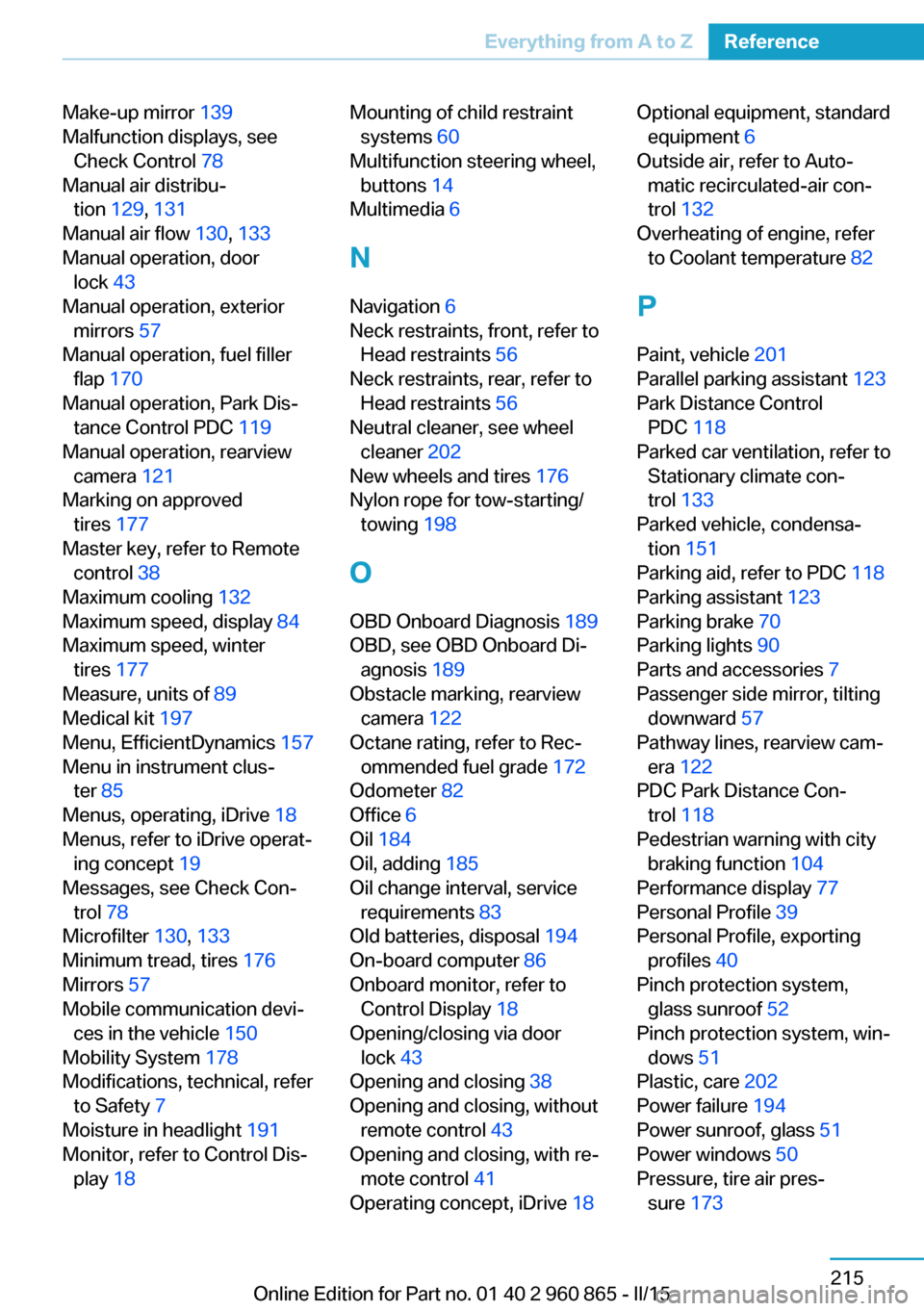
Make-up mirror 139
Malfunction displays, see Check Control 78
Manual air distribu‐ tion 129, 131
Manual air flow 130, 133
Manual operation, door lock 43
Manual operation, exterior mirrors 57
Manual operation, fuel filler flap 170
Manual operation, Park Dis‐ tance Control PDC 119
Manual operation, rearview camera 121
Marking on approved tires 177
Master key, refer to Remote control 38
Maximum cooling 132
Maximum speed, display 84
Maximum speed, winter tires 177
Measure, units of 89
Medical kit 197
Menu, EfficientDynamics 157
Menu in instrument clus‐ ter 85
Menus, operating, iDrive 18
Menus, refer to iDrive operat‐ ing concept 19
Messages, see Check Con‐ trol 78
Microfilter 130, 133
Minimum tread, tires 176
Mirrors 57
Mobile communication devi‐ ces in the vehicle 150
Mobility System 178
Modifications, technical, refer to Safety 7
Moisture in headlight 191
Monitor, refer to Control Dis‐ play 18 Mounting of child restraint
systems 60
Multifunction steering wheel, buttons 14
Multimedia 6
N
Navigation 6
Neck restraints, front, refer to Head restraints 56
Neck restraints, rear, refer to Head restraints 56
Neutral cleaner, see wheel cleaner 202
New wheels and tires 176
Nylon rope for tow-starting/ towing 198
O OBD Onboard Diagnosis 189
OBD, see OBD Onboard Di‐ agnosis 189
Obstacle marking, rearview camera 122
Octane rating, refer to Rec‐ ommended fuel grade 172
Odometer 82
Office 6
Oil 184
Oil, adding 185
Oil change interval, service requirements 83
Old batteries, disposal 194
On-board computer 86
Onboard monitor, refer to Control Display 18
Opening/closing via door lock 43
Opening and closing 38
Opening and closing, without remote control 43
Opening and closing, with re‐ mote control 41
Operating concept, iDrive 18 Optional equipment, standard
equipment 6
Outside air, refer to Auto‐ matic recirculated-air con‐
trol 132
Overheating of engine, refer to Coolant temperature 82
P Paint, vehicle 201
Parallel parking assistant 123
Park Distance Control PDC 118
Parked car ventilation, refer to Stationary climate con‐
trol 133
Parked vehicle, condensa‐ tion 151
Parking aid, refer to PDC 118
Parking assistant 123
Parking brake 70
Parking lights 90
Parts and accessories 7
Passenger side mirror, tilting downward 57
Pathway lines, rearview cam‐ era 122
PDC Park Distance Con‐ trol 118
Pedestrian warning with city braking function 104
Performance display 77
Personal Profile 39
Personal Profile, exporting profiles 40
Pinch protection system, glass sunroof 52
Pinch protection system, win‐ dows 51
Plastic, care 202
Power failure 194
Power sunroof, glass 51
Power windows 50
Pressure, tire air pres‐ sure 173 Seite 215Everything from A to ZReference215
Online Edition for Part no. 01 40 2 960 865 - II/15
Page 232 of 236
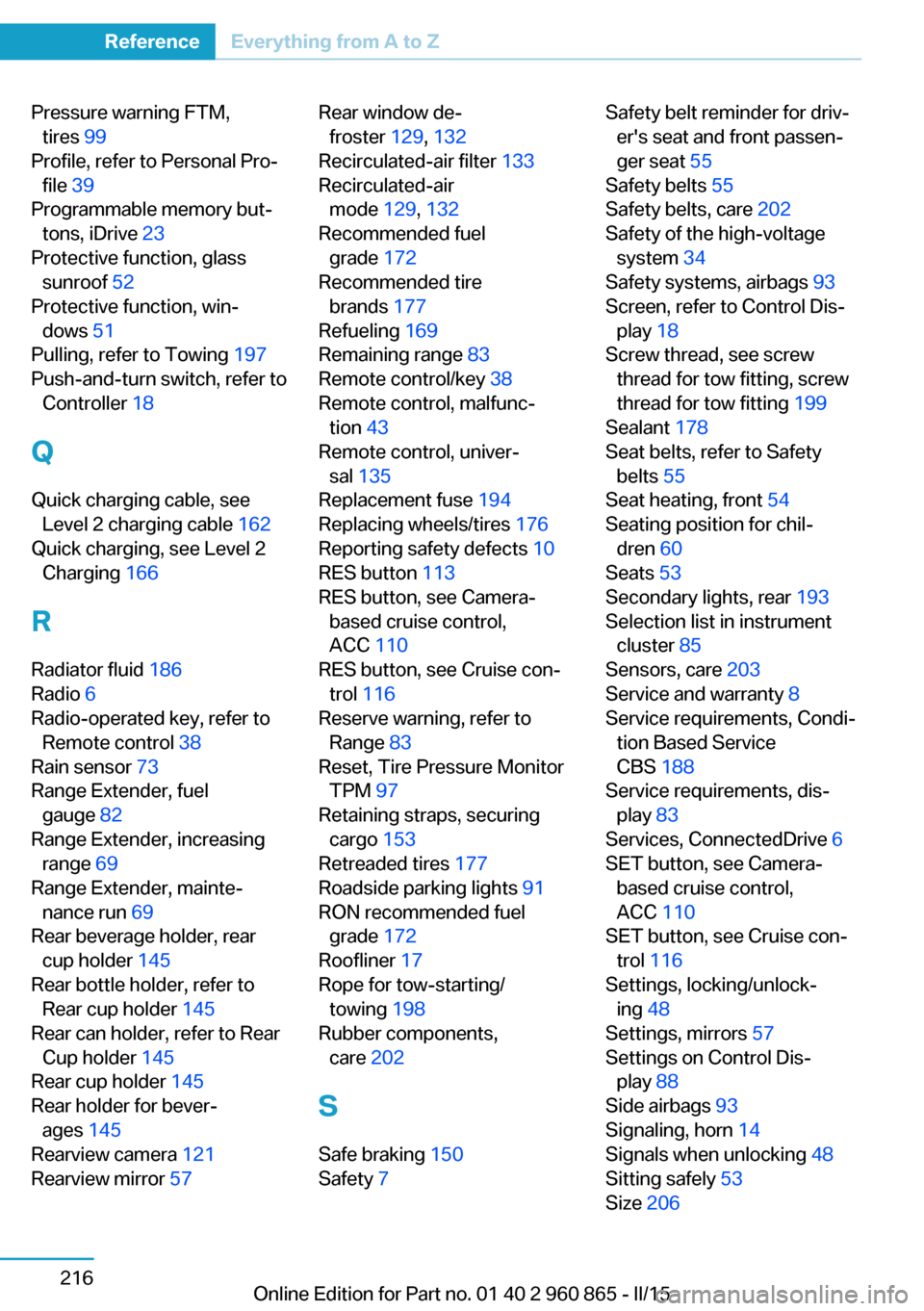
Pressure warning FTM,tires 99
Profile, refer to Personal Pro‐ file 39
Programmable memory but‐ tons, iDrive 23
Protective function, glass sunroof 52
Protective function, win‐ dows 51
Pulling, refer to Towing 197
Push-and-turn switch, refer to Controller 18
Q Quick charging cable, see Level 2 charging cable 162
Quick charging, see Level 2 Charging 166
R Radiator fluid 186
Radio 6
Radio-operated key, refer to Remote control 38
Rain sensor 73
Range Extender, fuel gauge 82
Range Extender, increasing range 69
Range Extender, mainte‐ nance run 69
Rear beverage holder, rear cup holder 145
Rear bottle holder, refer to Rear cup holder 145
Rear can holder, refer to Rear Cup holder 145
Rear cup holder 145
Rear holder for bever‐ ages 145
Rearview camera 121
Rearview mirror 57 Rear window de‐
froster 129, 132
Recirculated-air filter 133
Recirculated-air mode 129, 132
Recommended fuel grade 172
Recommended tire brands 177
Refueling 169
Remaining range 83
Remote control/key 38
Remote control, malfunc‐ tion 43
Remote control, univer‐ sal 135
Replacement fuse 194
Replacing wheels/tires 176
Reporting safety defects 10
RES button 113
RES button, see Camera- based cruise control,
ACC 110
RES button, see Cruise con‐ trol 116
Reserve warning, refer to Range 83
Reset, Tire Pressure Monitor TPM 97
Retaining straps, securing cargo 153
Retreaded tires 177
Roadside parking lights 91
RON recommended fuel grade 172
Roofliner 17
Rope for tow-starting/ towing 198
Rubber components, care 202
S
Safe braking 150
Safety 7 Safety belt reminder for driv‐
er's seat and front passen‐
ger seat 55
Safety belts 55
Safety belts, care 202
Safety of the high-voltage system 34
Safety systems, airbags 93
Screen, refer to Control Dis‐ play 18
Screw thread, see screw thread for tow fitting, screw
thread for tow fitting 199
Sealant 178
Seat belts, refer to Safety belts 55
Seat heating, front 54
Seating position for chil‐ dren 60
Seats 53
Secondary lights, rear 193
Selection list in instrument cluster 85
Sensors, care 203
Service and warranty 8
Service requirements, Condi‐ tion Based Service
CBS 188
Service requirements, dis‐ play 83
Services, ConnectedDrive 6
SET button, see Camera- based cruise control,
ACC 110
SET button, see Cruise con‐ trol 116
Settings, locking/unlock‐ ing 48
Settings, mirrors 57
Settings on Control Dis‐ play 88
Side airbags 93
Signaling, horn 14
Signals when unlocking 48
Sitting safely 53
Size 206 Seite 216ReferenceEverything from A to Z216
Online Edition for Part no. 01 40 2 960 865 - II/15