tow BMW I8 2014 I12 User Guide
[x] Cancel search | Manufacturer: BMW, Model Year: 2014, Model line: I8, Model: BMW I8 2014 I12Pages: 216, PDF Size: 12.45 MB
Page 167 of 216
Settings are stored. When you change charg‐
ing locations you also might need to change
the setting for charging.
Set the charge current strength at other
household sockets to "Low".
Stopping charging process The charging operation can be stopped at any
time by removing the charging cable and con‐
tinued at a later time by connecting the charg‐
ing cable in order to use other loads on the
power connection or to prevent simultaneous
high power from multiple loads.
The charging operation is interrupted when the
vehicle is unlocked and automatically resumed
after a brief time or when it is locked.
Continue charging operation If the charging operation is interrupted, e.g.,
through a temporary power failure, the charg‐
ing operation is automatically continued after
the interruption.
Terminating charging process1.Removing the charging cable from the ve‐
hicle, refer to page 148.2.Stow the charging cable as required.3.Close the charging port flap.4.Lock vehicle if it is unlocked.
Displays in the instrument
cluster
The charging state indicator light shows the
charging state of the high-voltage battery in
the instrument cluster, if operating readiness is
turned on. If all segments are filled, the high-
voltage battery is fully charged.
Even if no segments are filled, the high-voltage
system is still under high voltage.
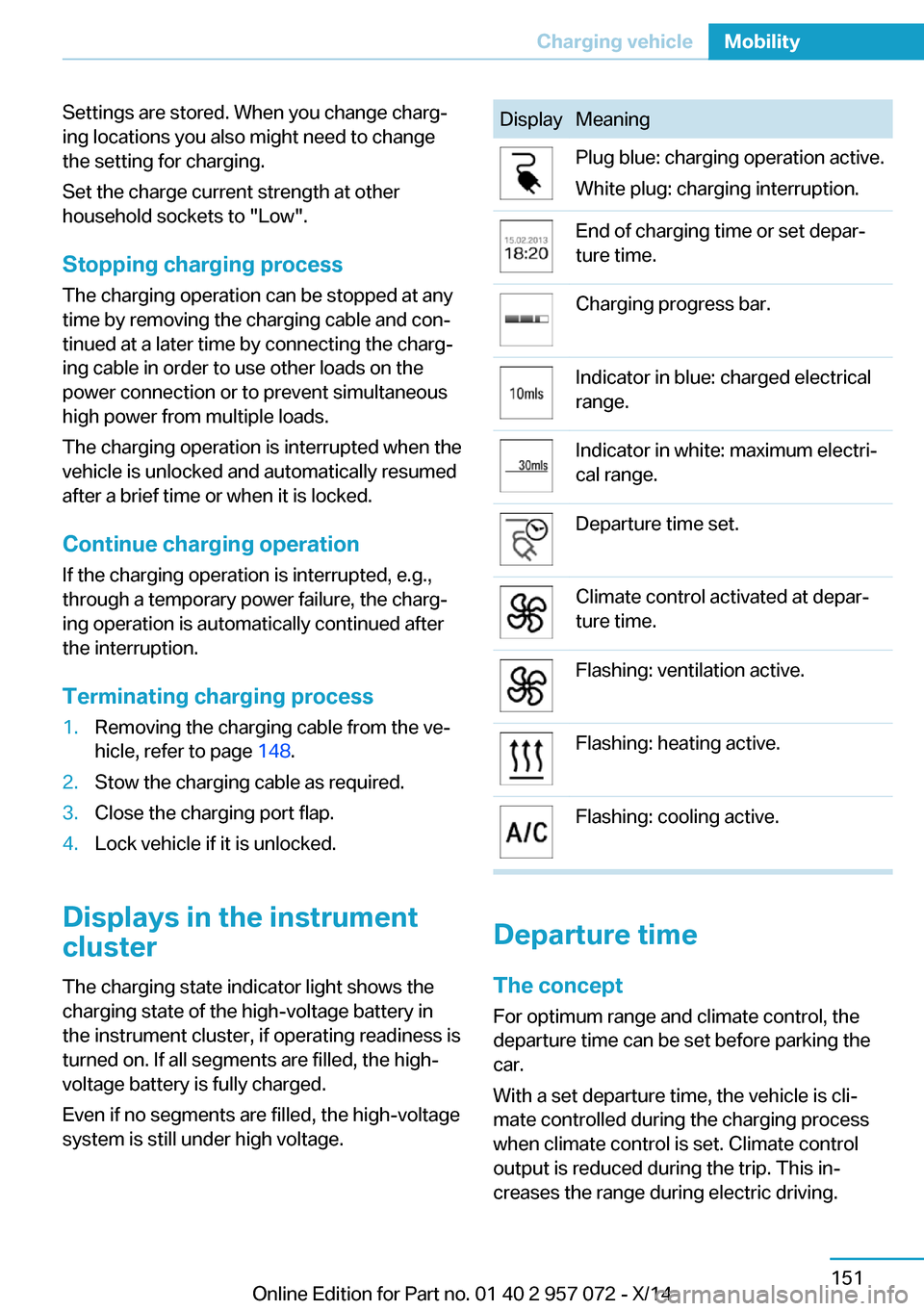
DisplayMeaningPlug blue: charging operation active.
White plug: charging interruption.End of charging time or set depar‐
ture time.Charging progress bar.Indicator in blue: charged electrical
range.Indicator in white: maximum electri‐
cal range.Departure time set.Climate control activated at depar‐
ture time.Flashing: ventilation active.Flashing: heating active.Flashing: cooling active.
Departure time
The concept For optimum range and climate control, the
departure time can be set before parking the
car.
With a set departure time, the vehicle is cli‐
mate controlled during the charging process
when climate control is set. Climate control
output is reduced during the trip. This in‐
creases the range during electric driving.
Seite 151Charging vehicleMobility151
Online Edition for Part no. 01 40 2 957 072 - X/14
Page 178 of 216
A represent higher levels of performance on
the laboratory test wheel than the minimum re‐
quired by law.
Temperature grade for this tire
The temperature grade for this tire is es‐
tablished for a tire that is properly inflated and
not overloaded. Excessive speed, underinfla‐
tion, or excessive loading, either separately or
in combination, can cause heat buildup and
possible tire failure.
If necessary, have the vehicle towed.◀
M+S
Winter and all-season tires with better cold
weather performance than summer tires.
Tire tread Summer tires Do not drive with a tire tread depth of less than
0.12 in/3 mm.
There is an increased danger of hydroplaning if
the tire tread depth is less than 0.12 in/3 mm.
Winter tires
Do not drive with a tire tread depth of less than
0.16 in/4 mm.
Below a tread depth of 0.16 in/4 mm, tires are
less suitable for winter operation.Minimum tread depth
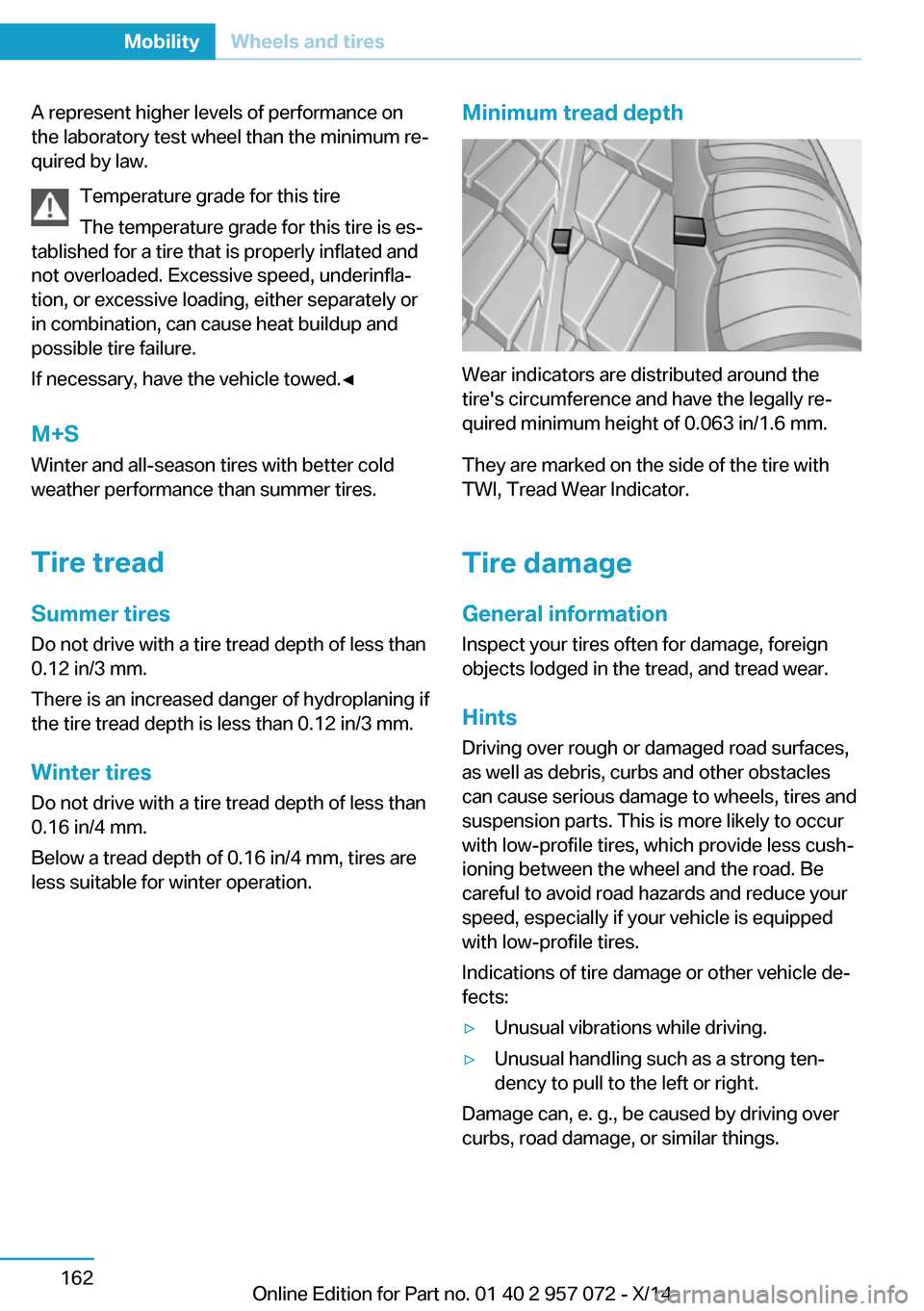
Wear indicators are distributed around the
tire's circumference and have the legally re‐
quired minimum height of 0.063 in/1.6 mm.
They are marked on the side of the tire with
TWI, Tread Wear Indicator.
Tire damage
General information
Inspect your tires often for damage, foreign
objects lodged in the tread, and tread wear.
Hints
Driving over rough or damaged road surfaces,
as well as debris, curbs and other obstacles
can cause serious damage to wheels, tires and
suspension parts. This is more likely to occur
with low-profile tires, which provide less cush‐
ioning between the wheel and the road. Be
careful to avoid road hazards and reduce your
speed, especially if your vehicle is equipped
with low-profile tires.
Indications of tire damage or other vehicle de‐
fects:
▷Unusual vibrations while driving.▷Unusual handling such as a strong ten‐
dency to pull to the left or right.
Damage can, e. g., be caused by driving over
curbs, road damage, or similar things.
Seite 162MobilityWheels and tires162
Online Edition for Part no. 01 40 2 957 072 - X/14
Page 179 of 216
In case of tire damage
If there are indications of tire damage, re‐
duce your speed immediately and have the
rims and tires checked right away; otherwise,
there is the increased risk of an accident.
Drive carefully to the nearest service center.
Have the vehicle towed or transported there.
Otherwise, tire damage can become life threat‐
ening for vehicle occupants and also other traf‐
fic.◀
Repair of tire damage
For safety reasons, the manufacturer of
your vehicle recommends that you do not have
damaged tires repaired; they should be re‐
placed. Otherwise, damage can occur as a re‐
sult.◀
Changing wheels and tires
Mounting Information on mounting tires
Have mounting and balancing performed
only by a service center.
If work is not carried out properly, there is a
danger of subsequent damage and related
safety hazards.◀
Wheel and tire combination
You can ask the service center about the right
wheel/tire combination and wheel rim versions
for the vehicle.
Incorrect wheel and tire combinations impair
the function of a variety of systems such as
ABS or DSC.
To maintain good handling and vehicle re‐
sponse, use only tires with a single tread con‐
figuration from a single manufacturer.
Following tire damage, have the original wheel
and tire combination remounted on the vehicle
as soon as possible.Approved wheels and tires
You should only use wheels and tires
that have been approved by the vehicle manu‐
facturer for your vehicle type; otherwise, e.g.,
despite having the same official size ratings,
variations can lead to chassis contact and with
it, the risk of severe accidents
The manufacturer of your vehicle cannot eval‐
uate non-approved wheels and tires to deter‐
mine if they are suited for use, and therefore
cannot guarantee the operating safety of the
vehicle.◀
Recommended tire brands
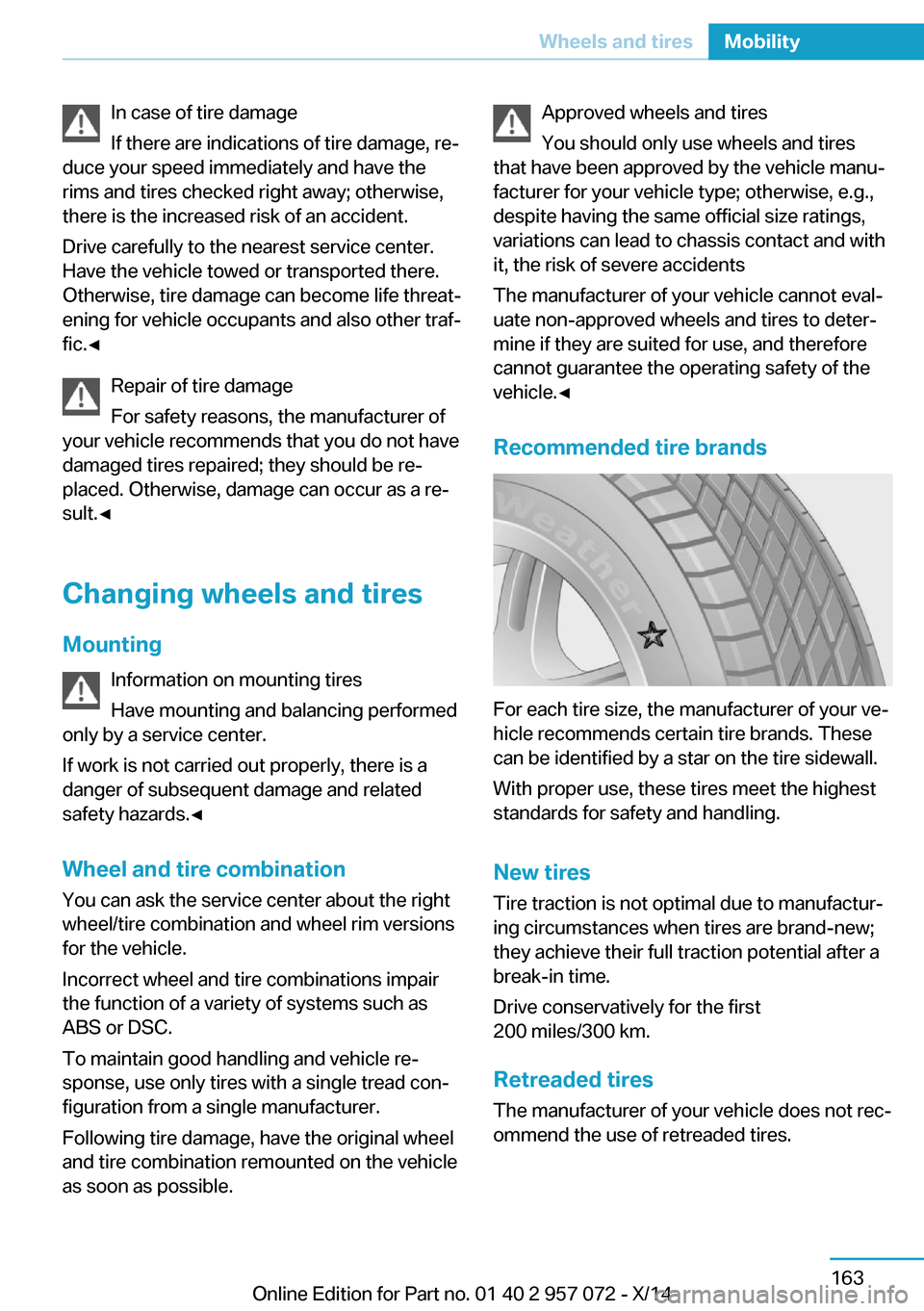
For each tire size, the manufacturer of your ve‐
hicle recommends certain tire brands. These
can be identified by a star on the tire sidewall.
With proper use, these tires meet the highest
standards for safety and handling.
New tires Tire traction is not optimal due to manufactur‐
ing circumstances when tires are brand-new;
they achieve their full traction potential after a
break-in time.
Drive conservatively for the first
200 miles/300 km.
Retreaded tires
The manufacturer of your vehicle does not rec‐
ommend the use of retreaded tires.
Seite 163Wheels and tiresMobility163
Online Edition for Part no. 01 40 2 957 072 - X/14
Page 188 of 216
Replacing componentsVehicle features and optionsThis chapter describes all standard, country-
specific and optional features offered with the
series. It also describes features that are not
necessarily available in your car, e. g., due to
the selected options or country versions. This
also applies to safety-related functions and
systems.
Wiper blade replacement
General information Do not fold down the wipers without
wiper blades
Do not fold down the wipers if wiper blades
have not been installed; this may damage the
windshield.◀
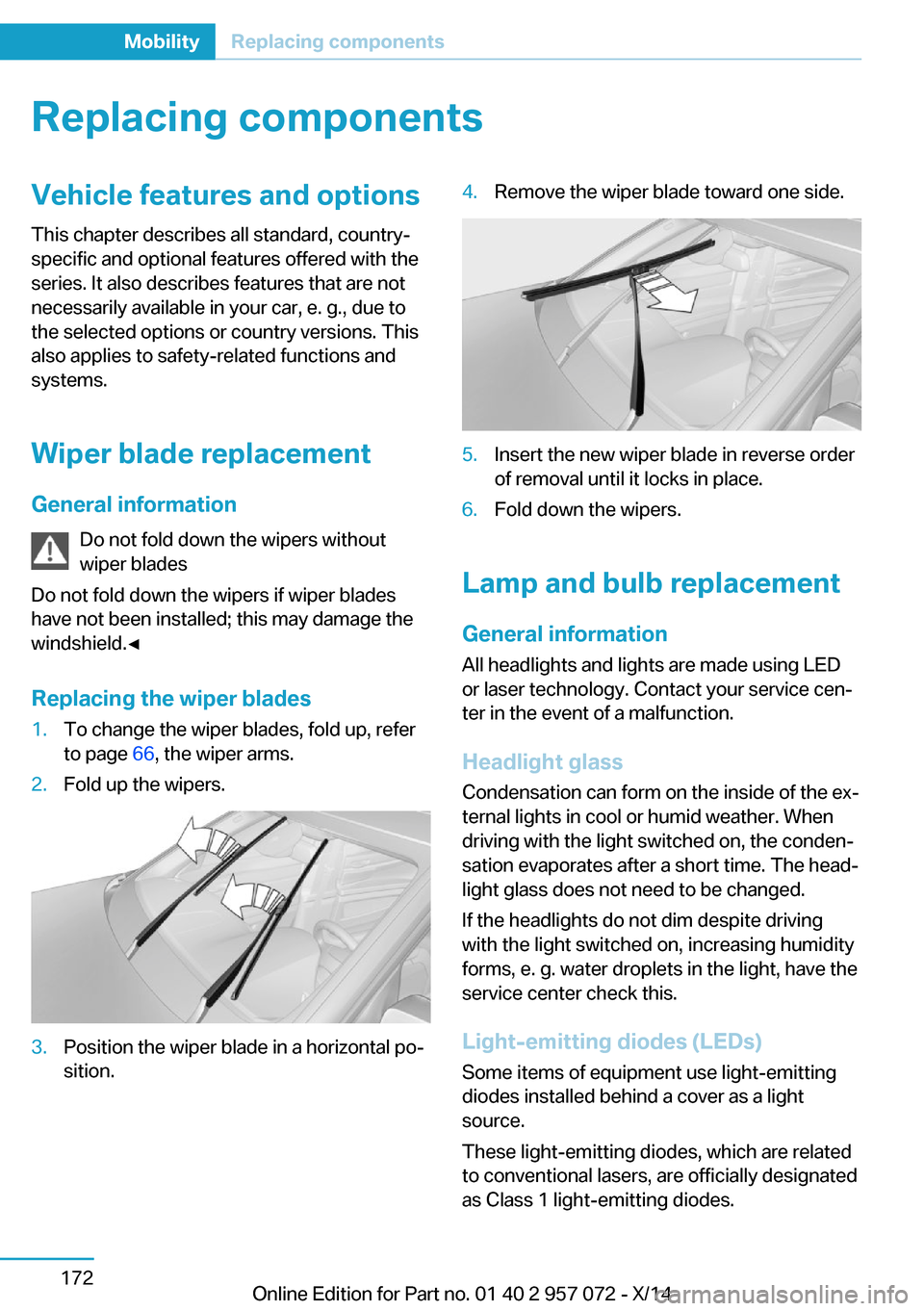
Replacing the wiper blades1.To change the wiper blades, fold up, refer
to page 66, the wiper arms.2.Fold up the wipers.3.Position the wiper blade in a horizontal po‐
sition.4.Remove the wiper blade toward one side.5.Insert the new wiper blade in reverse order
of removal until it locks in place.6.Fold down the wipers.
Lamp and bulb replacement
General information
All headlights and lights are made using LED
or laser technology. Contact your service cen‐
ter in the event of a malfunction.
Headlight glass
Condensation can form on the inside of the ex‐
ternal lights in cool or humid weather. When
driving with the light switched on, the conden‐
sation evaporates after a short time. The head‐
light glass does not need to be changed.
If the headlights do not dim despite driving
with the light switched on, increasing humidity
forms, e. g. water droplets in the light, have the
service center check this.
Light-emitting diodes (LEDs)
Some items of equipment use light-emitting
diodes installed behind a cover as a light
source.
These light-emitting diodes, which are related
to conventional lasers, are officially designated
as Class 1 light-emitting diodes.
Seite 172MobilityReplacing components172
Online Edition for Part no. 01 40 2 957 072 - X/14
Page 193 of 216
Tow-starting and towingTransporting your vehicle
Note
Your vehicle is not permitted to be towed.
Therefore, contact a service center in the
event of a breakdown.
Do not have the vehicle towed
Have your vehicle transported on a load‐
ing platform only; otherwise, damage may oc‐
cur.◀
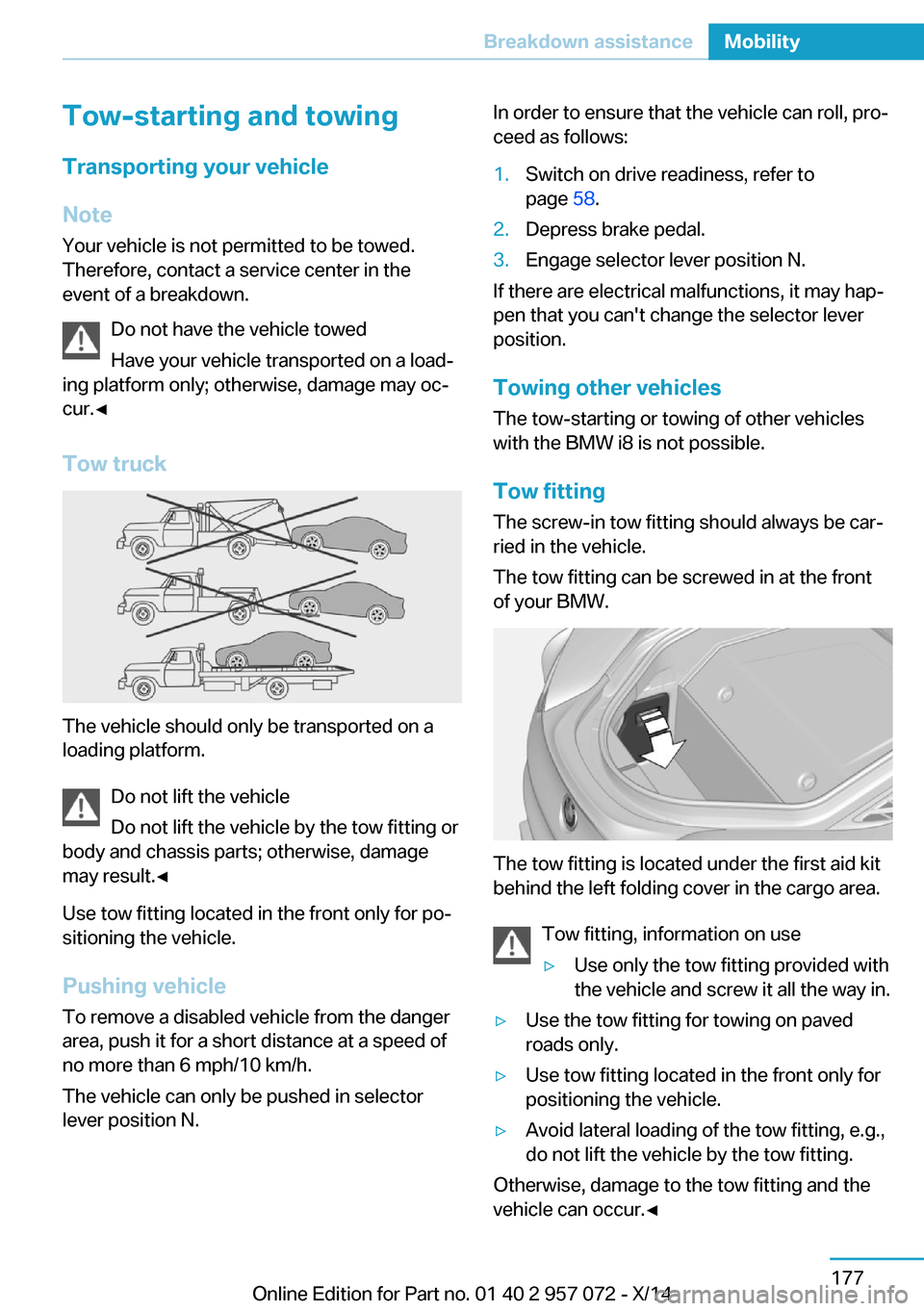
Tow truck
The vehicle should only be transported on a
loading platform.
Do not lift the vehicle
Do not lift the vehicle by the tow fitting or
body and chassis parts; otherwise, damage
may result.◀
Use tow fitting located in the front only for po‐
sitioning the vehicle.
Pushing vehicle To remove a disabled vehicle from the danger
area, push it for a short distance at a speed of
no more than 6 mph/10 km/h.
The vehicle can only be pushed in selector
lever position N.
In order to ensure that the vehicle can roll, pro‐
ceed as follows:1.Switch on drive readiness, refer to
page 58.2.Depress brake pedal.3.Engage selector lever position N.
If there are electrical malfunctions, it may hap‐
pen that you can't change the selector lever
position.
Towing other vehicles The tow-starting or towing of other vehicles
with the BMW i8 is not possible.
Tow fitting The screw-in tow fitting should always be car‐
ried in the vehicle.
The tow fitting can be screwed in at the front
of your BMW.
The tow fitting is located under the first aid kit
behind the left folding cover in the cargo area.
Tow fitting, information on use
▷Use only the tow fitting provided with
the vehicle and screw it all the way in.▷Use the tow fitting for towing on paved
roads only.▷Use tow fitting located in the front only for
positioning the vehicle.▷Avoid lateral loading of the tow fitting, e.g.,
do not lift the vehicle by the tow fitting.
Otherwise, damage to the tow fitting and the
vehicle can occur.◀
Seite 177Breakdown assistanceMobility177
Online Edition for Part no. 01 40 2 957 072 - X/14
Page 194 of 216
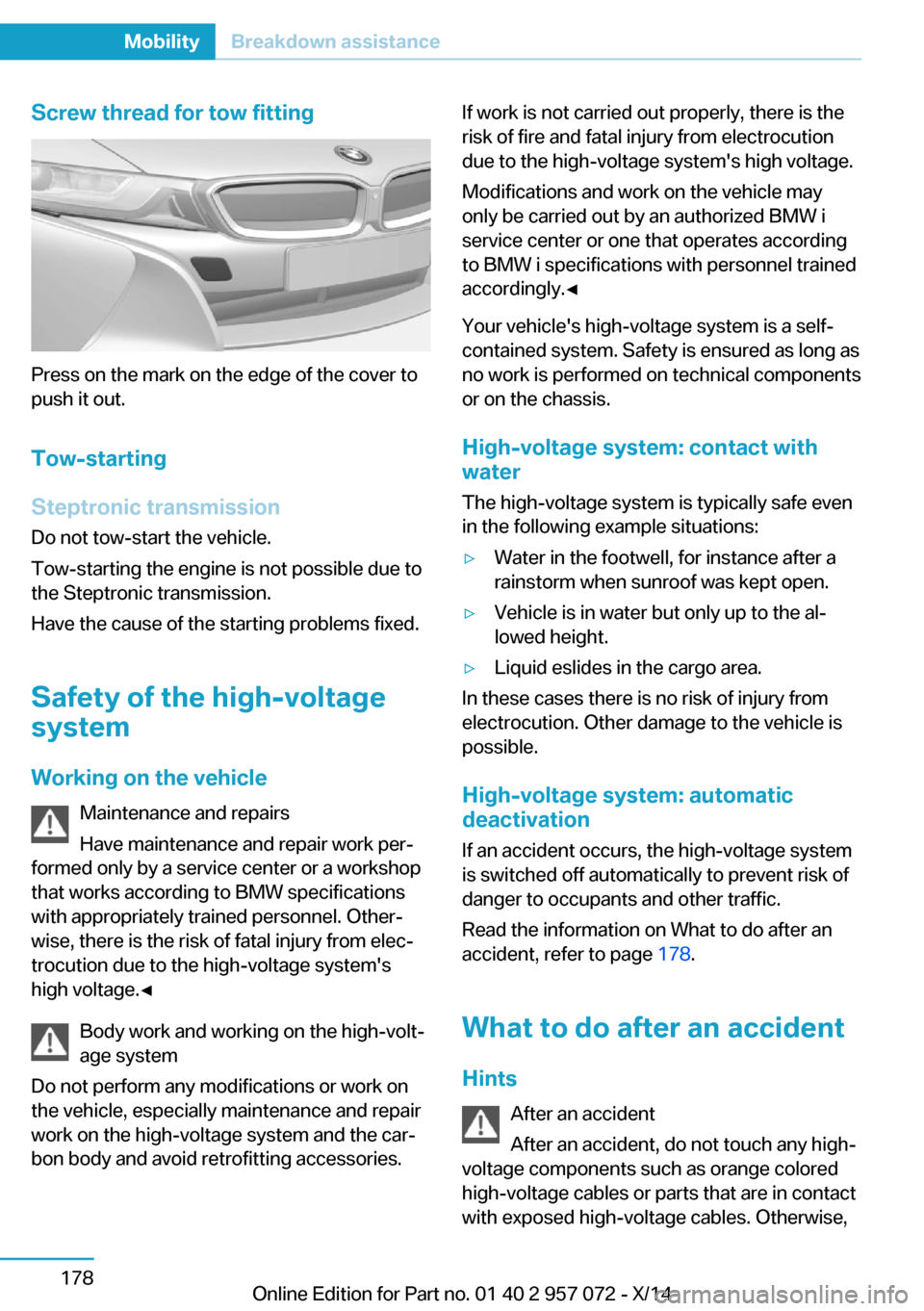
Screw thread for tow fitting
Press on the mark on the edge of the cover to
push it out.
Tow-starting
Steptronic transmission
Do not tow-start the vehicle.
Tow-starting the engine is not possible due to
the Steptronic transmission.
Have the cause of the starting problems fixed.
Safety of the high-voltage
system
Working on the vehicle Maintenance and repairs
Have maintenance and repair work per‐
formed only by a service center or a workshop
that works according to BMW specifications
with appropriately trained personnel. Other‐
wise, there is the risk of fatal injury from elec‐
trocution due to the high-voltage system's
high voltage.◀
Body work and working on the high-volt‐
age system
Do not perform any modifications or work on
the vehicle, especially maintenance and repair
work on the high-voltage system and the car‐
bon body and avoid retrofitting accessories.
If work is not carried out properly, there is the
risk of fire and fatal injury from electrocution
due to the high-voltage system's high voltage.
Modifications and work on the vehicle may
only be carried out by an authorized BMW i
service center or one that operates according
to BMW i specifications with personnel trained
accordingly.◀
Your vehicle's high-voltage system is a self-
contained system. Safety is ensured as long as
no work is performed on technical components
or on the chassis.
High-voltage system: contact with
water
The high-voltage system is typically safe even
in the following example situations:▷Water in the footwell, for instance after a
rainstorm when sunroof was kept open.▷Vehicle is in water but only up to the al‐
lowed height.▷Liquid eslides in the cargo area.
In these cases there is no risk of injury from
electrocution. Other damage to the vehicle is
possible.
High-voltage system: automatic
deactivation
If an accident occurs, the high-voltage system
is switched off automatically to prevent risk of
danger to occupants and other traffic.
Read the information on What to do after an
accident, refer to page 178.
What to do after an accident Hints After an accident
After an accident, do not touch any high-
voltage components such as orange colored
high-voltage cables or parts that are in contact
with exposed high-voltage cables. Otherwise,
Seite 178MobilityBreakdown assistance178
Online Edition for Part no. 01 40 2 957 072 - X/14
Page 209 of 216
F
Failure message, see Check Control 76
False alarm, refer to Uninten‐ tional alarm 46
Fan, refer to Air flow 122
Filler neck for engine oil 167
First aid kit 176
Fitting for towing, see tow fit‐ ting 177
Flat tire, changing wheels 173
Flat tire, Tire Pressure Moni‐ tor TPM 96
Flat tire, warning lamp 97
Flooding 136
Floor carpet, care 182
Floor mats, care 182
Fold-out position, wiper 66
Foot brake 136
Front airbags 93
Front-end collision warning with City Braking func‐
tion 99
front-seat passenger airbags, automatic deactivation 95
Front-seat passenger airbags, indicator lamp 95
Fuel 157
Fuel consumption, current 84
Fuel consumption, refer to Average fuel consump‐
tion 84
Fuel filler flap 154
Fuel gauge 79
Fuel lid 154
Fuel quality 157
Fuel recommendation 157
Fuel, tank lidacity 187
Fuse 174 G
Garage door opener, refer to Universal Integrated Remote
Control 125
Gasoline 157
Gear change, Steptronic Sport transmission 68
Gear shift indicator 81
Gearshift, see Steptronic Sport transmission 67
General driving notes 135
Glare shield 127
Glove compartment 130
GPS location, vehicle posi‐ tion 87
Gross vehicle weight, ap‐ proved 187
H
Handbrake, refer to parking brake 63
Hand-held transmitter, alter‐ nating code 126
Hazard warning flashers 175
Head airbags 93
Headlight control, auto‐ matic 90
Headlight courtesy delay fea‐ ture 89
Headlight courtesy delay fea‐ ture, remote control 45
Headlight courtesy delay fea‐ ture via remote control 40
Headlight flasher 65
Headlight glass 172
Headlights, care 181
Head restraints 48
Head restraints, front 51
Head-up Display 87
Head-up Display, care 183
Heavy cargo, stowing 139
Height, vehicle 186
High-beam Assistant 91
High beams 65 High beams/low beams, refer
to High-beam Assistant 91
High-voltage battery, charg‐ ing state indicator 74
High-voltage battery, dis‐ charge 135
High-voltage system, auto‐ matic deactivation 178
High-voltage system, contact with water 178
High-voltage system, safety 178
Hills 137
Hill start assistant, refer to Drive-off assistant 108
Hints 6
Holder for beverages 131
Hood 42
Horn 14
Hot exhaust system 136
HUD Head-up Display 87
Hybrid system, adapting to the course of the road 76
Hybrid system, displays 74
Hydroplaning 136
I
Ice warning, see External temperature warning 80
Icy roads, see External tem‐ perature warning 80
Identification marks, tires 160
Identification number, see ve‐ hicle identification num‐
ber 10
iDrive 18
Ignition key, refer to Remote control 36
Increase range 140
Indication of a flat tire 97
Indicator and alarm lamps, see Check Control 76
Indicator lamp, see Check Control 76
Individual air distribution 122 Seite 193Everything from A to ZReference193
Online Edition for Part no. 01 40 2 957 072 - X/14
Page 212 of 216
Refueling 154
Remaining range 80
Remote control/key 36
Remote control, malfunc‐ tion 40
Remote control, univer‐ sal 125
Replacement fuse 174
Replacing wheels/tires 163
Reporting safety defects 10
RES button, see Cruise con‐ trol 109
Reserve warning, refer to Range 80
Reset, Tire Pressure Monitor TPM 97
Retreaded tires 163
Roadside parking lights 90
RON recommended fuel grade 157
Roofliner 17
Rubber components, care 182
S Safe braking 136
Safety 7
Safety belt reminder for driv‐ er's seat and front passen‐
ger seat 50
Safety belts 50
Safety belts, care 182
Safety of the high-voltage system 178
Safety systems, airbags 93
SAVE Battery, maintaining charging state 61
Screen, refer to Control Dis‐ play 18
Screw thread, see screw thread for tow fitting, screw
thread for tow fitting 178
Seat belts, refer to Safety belts 50
Seat heating, front 49 Seating position for chil‐
dren 54
Seats 48
Selection list in instrument cluster 83
Selector lever, Steptronic Sport transmission 68
Sensors, care 183
Service and warranty 8
Service requirements, Condi‐ tion Based Service
CBS 170
Service requirements, dis‐ play 80
Service, Roadside Assis‐ tance 176
Services, ConnectedDrive 6
SET button, see Cruise con‐ trol 109
Settings, locking/unlock‐ ing 44
Settings, mirrors 51
Settings on Control Dis‐ play 85
Shift paddles on the steering wheel 69
Side airbags 93
Side View 118
Signaling, horn 14
Signals when unlocking 45
Silent Start, electric drive readiness 60
Sitting safely 48
Size 186
Smallest turning radius 186
Snow chains 164
Socket 127
Socket, OBD Onboard Diag‐ nostics 171
SOS button 175
Spare fuse 174
Specified engine oil types 167
Speed, average 84
Speed limit detection, com‐ puter 84 Speed limiter, display 82
Speed Limit Information 82
Speed warning 85
Split screen 23
Sport program, transmis‐ sion 69
Stability control systems 105
Standard charging cable, see Level 1 charging cable 147
Standard charging, see Level 1 Charging 150
Standing air conditioning, re‐ mote control 45
Start/Stop button 58
Start function during malfunc‐ tion 37
Starting the combustion en‐ gine 60
Stationary climate con‐ trol 123
Status control display, tires 96
Status information, iDrive 22
Status of Owner's Manual 7
Steering wheel, adjusting 53
Steptronic Sport transmis‐ sion 67
Storage compartments 130
Storage compartments, loca‐ tions 130
Storage, tires 164
Storing the vehicle 183
Summer tires, tread 162
Sun visor 127
Supplementary text mes‐ sage 78
Surround View 113
Switch for Dynamic Driv‐ ing 107
Switch, refer to Cockpit 14
Symbols 6
Symbols in the status field 22
SYNC program, automatic cli‐ mate control 121 Seite 196ReferenceEverything from A to Z196
Online Edition for Part no. 01 40 2 957 072 - X/14
Page 213 of 216
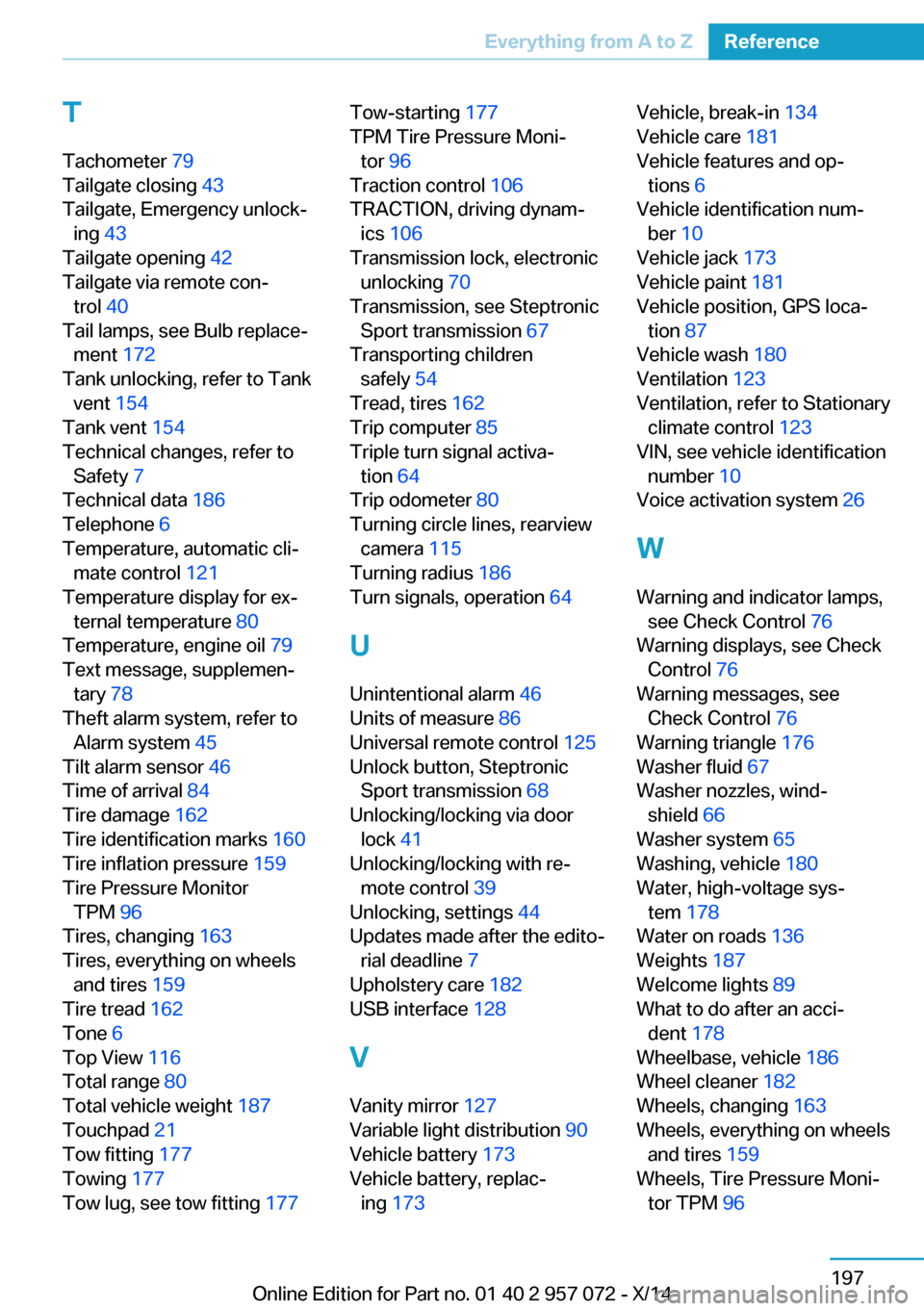
T
Tachometer 79
Tailgate closing 43
Tailgate, Emergency unlock‐ ing 43
Tailgate opening 42
Tailgate via remote con‐ trol 40
Tail lamps, see Bulb replace‐ ment 172
Tank unlocking, refer to Tank vent 154
Tank vent 154
Technical changes, refer to Safety 7
Technical data 186
Telephone 6
Temperature, automatic cli‐ mate control 121
Temperature display for ex‐ ternal temperature 80
Temperature, engine oil 79
Text message, supplemen‐ tary 78
Theft alarm system, refer to Alarm system 45
Tilt alarm sensor 46
Time of arrival 84
Tire damage 162
Tire identification marks 160
Tire inflation pressure 159
Tire Pressure Monitor TPM 96
Tires, changing 163
Tires, everything on wheels and tires 159
Tire tread 162
Tone 6
Top View 116
Total range 80
Total vehicle weight 187
Touchpad 21
Tow fitting 177
Towing 177
Tow lug, see tow fitting 177 Tow-starting 177
TPM Tire Pressure Moni‐ tor 96
Traction control 106
TRACTION, driving dynam‐ ics 106
Transmission lock, electronic unlocking 70
Transmission, see Steptronic Sport transmission 67
Transporting children safely 54
Tread, tires 162
Trip computer 85
Triple turn signal activa‐ tion 64
Trip odometer 80
Turning circle lines, rearview camera 115
Turning radius 186
Turn signals, operation 64
U Unintentional alarm 46
Units of measure 86
Universal remote control 125
Unlock button, Steptronic Sport transmission 68
Unlocking/locking via door lock 41
Unlocking/locking with re‐ mote control 39
Unlocking, settings 44
Updates made after the edito‐ rial deadline 7
Upholstery care 182
USB interface 128
V Vanity mirror 127
Variable light distribution 90
Vehicle battery 173
Vehicle battery, replac‐ ing 173 Vehicle, break-in 134
Vehicle care 181
Vehicle features and op‐ tions 6
Vehicle identification num‐ ber 10
Vehicle jack 173
Vehicle paint 181
Vehicle position, GPS loca‐ tion 87
Vehicle wash 180
Ventilation 123
Ventilation, refer to Stationary climate control 123
VIN, see vehicle identification number 10
Voice activation system 26
W Warning and indicator lamps, see Check Control 76
Warning displays, see Check Control 76
Warning messages, see Check Control 76
Warning triangle 176
Washer fluid 67
Washer nozzles, wind‐ shield 66
Washer system 65
Washing, vehicle 180
Water, high-voltage sys‐ tem 178
Water on roads 136
Weights 187
Welcome lights 89
What to do after an acci‐ dent 178
Wheelbase, vehicle 186
Wheel cleaner 182
Wheels, changing 163
Wheels, everything on wheels and tires 159
Wheels, Tire Pressure Moni‐ tor TPM 96 Seite 197Everything from A to ZReference197
Online Edition for Part no. 01 40 2 957 072 - X/14