bulb BMW M ROADSTER COUPE 2001 Owners Manual
[x] Cancel search | Manufacturer: BMW, Model Year: 2001, Model line: M ROADSTER COUPE, Model: BMW M ROADSTER COUPE 2001Pages: 171, PDF Size: 1.98 MB
Page 12 of 171

Contents
Owner service procedures
Advanced technology
Technical data
Replacement procedures:
Onboard tool kit128
Windshield wiper blades128
Lamps and bulbs129
Master key with battery-
powered lamp134
Changing a wheel135
Repairing a flat tire135
Battery140
Fuses142
In case of electrical
malfunction:
Power convertible top143
Fuel filler door143
Assistance, giving and
receiving:
Jump-starting144
Towing the vehicle145Airbags150
Radio reception150
Dynamic Stability Control
(DSC)151
Safety belt tensioner151
Interior rearview mirror with
automatic dimming
feature152
Limited slip differential153Engine specifications156
Dimensions157
Weights158
Capacities159
Electrical system160
Drive belts160
ProCarManuals.com
Page 127 of 171
Overview
Controls and features
Operation, care
and maintenance
Owner service procedures
Technical data
Index Advanced technology
127n
IndexDataTechnologyRepairsCar careControlsOverview
Replacement procedures:
Onboard tool kit128
Windshield wiper blades128
Lamps and bulbs129
Master key with battery-
powered lamp134
Changing a wheel135
Repairing a flat tire135
Battery140
Fuses142
In case of electrical
malfunction:
Power convertible top143
Fuel filler door143
Assistance, giving and
receiving:
Jump-starting144
Towing the vehicle145
Repairs
ProCarManuals.com
Page 129 of 171
129n
IndexDataTechnologyRepairsCar careControlsOverview
Lamps and bulbsThe lamps and bulbs make essential
contributions to the safety of your
vehicle. Therefore, comply fully with the
following instructions during bulb
replacement. If you are not familiar with
any of the procedures, consult your
BMW center.
Do not touch the glass portion of
a new bulb with your bare hands
since even small amounts of impurities
burn into the surface and reduce the
service life of the bulb. Use a clean
cloth, paper napkin, or a similar mate-
rial, or hold the bulb by its metallic
base.<
A replacement bulb set is available from
your BMW center.
Before performing any work on
the electrical system, switch off
the affected accessories or disconnect
the cable from the negative terminal of
the battery. Failure to do so could result
in short circuits in the electrical system.
To prevent injuries and damage,
comply with any instructions provided
by the bulb manufacturer.<
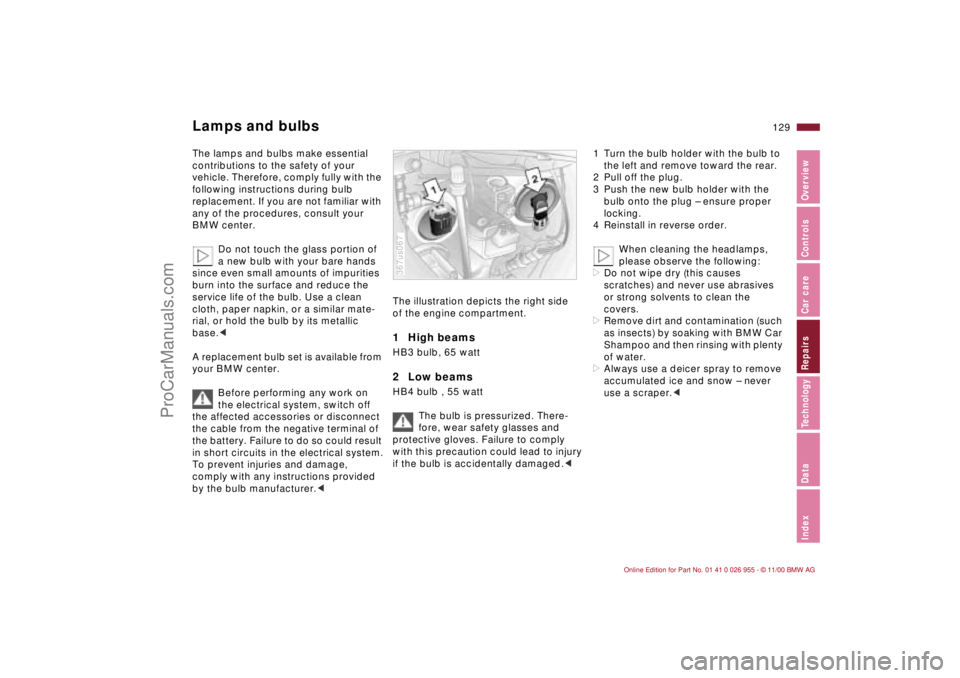
The illustration depicts the right side
of the engine compartment.1 High beams HB3 bulb, 65 watt2 Low beams HB4 bulb , 55 watt
The bulb is pressurized. There-
fore, wear safety glasses and
protective gloves. Failure to comply
with this precaution could lead to injury
if the bulb is accidentally damaged.< 367us067
1 Turn the bulb holder with the bulb to
the left and remove toward the rear.
2 Pull off the plug.
3 Push the new bulb holder with the
bulb onto the plug – ensure proper
locking.
4 Reinstall in reverse order.
When cleaning the headlamps,
please observe the following:
>Do not wipe dry (this causes
scratches) and never use abrasives
or strong solvents to clean the
covers.
>Remove dirt and contamination (such
as insects) by soaking with BMW Car
Shampoo and then rinsing with plenty
of water.
>Always use a deicer spray to remove
accumulated ice and snow – never
use a scraper.<
ProCarManuals.com
Page 130 of 171
130n
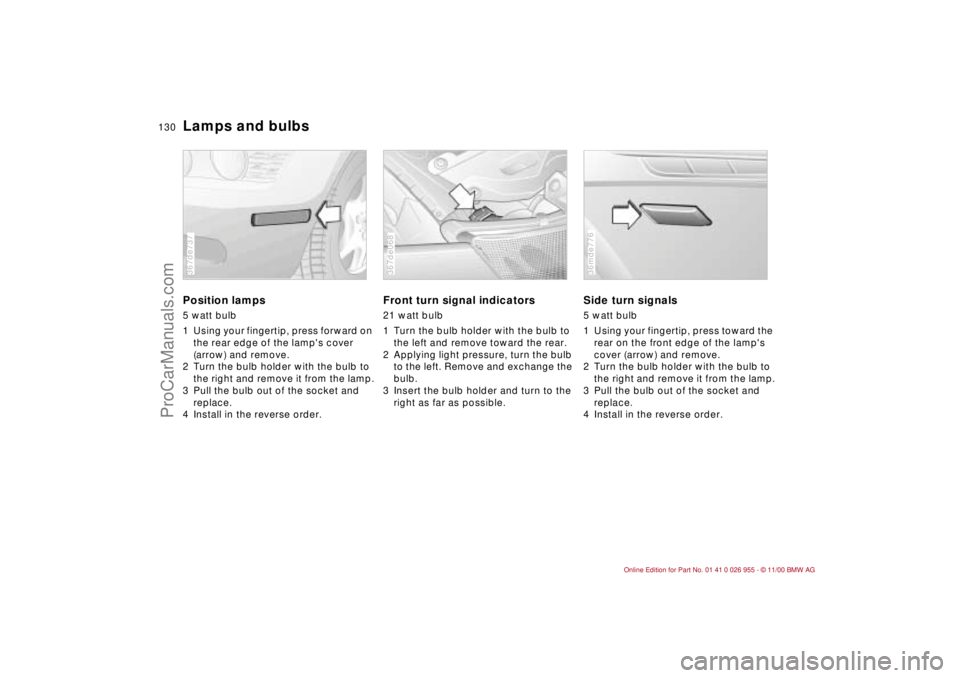
Lamps and bulbsPosition lamps5 watt bulb
1 Using your fingertip, press forward on
the rear edge of the lamp's cover
(arrow) and remove.
2 Turn the bulb holder with the bulb to
the right and remove it from the lamp.
3 Pull the bulb out of the socket and
replace.
4 Install in the reverse order.367de737
Front turn signal indicators21 watt bulb
1 Turn the bulb holder with the bulb to
the left and remove toward the rear.
2 Applying light pressure, turn the bulb
to the left. Remove and exchange the
bulb.
3 Insert the bulb holder and turn to the
right as far as possible.367de068
Side turn signals5 watt bulb
1 Using your fingertip, press toward the
rear on the front edge of the lamp's
cover (arrow) and remove.
2 Turn the bulb holder with the bulb to
the right and remove it from the lamp.
3 Pull the bulb out of the socket and
replace.
4 Install in the reverse order.36mde776
ProCarManuals.com
Page 131 of 171
131n
IndexDataTechnologyRepairsCar careControlsOverview
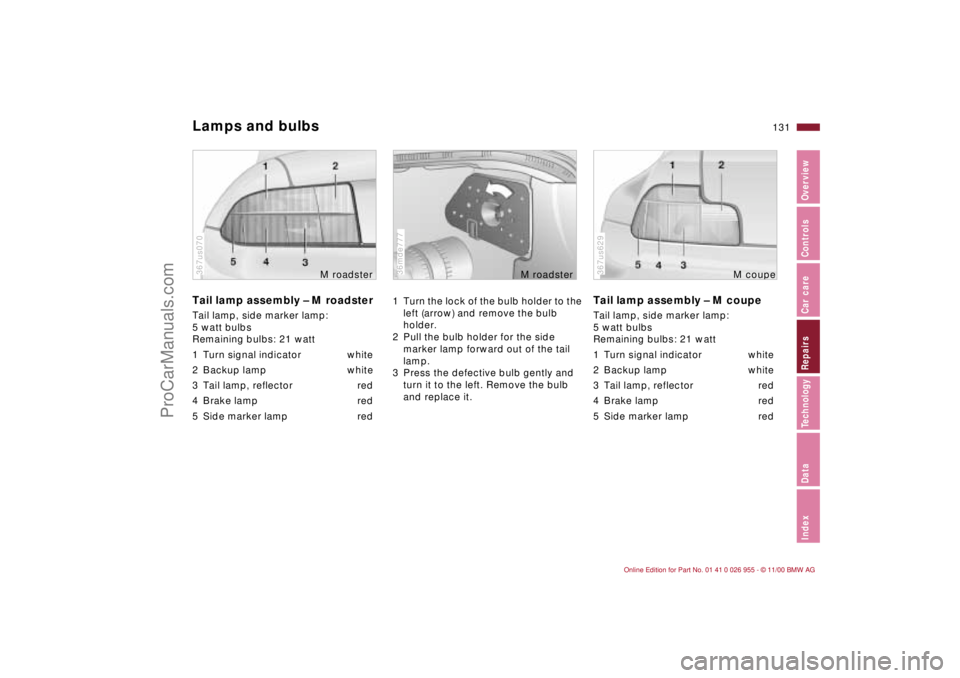
Lamps and bulbsTail lamp assembly – M roadsterTail lamp, side marker lamp:
5 watt bulbs
Remaining bulbs: 21 watt
1 Turn signal indicator white
2 Backup lamp white
3 Tail lamp, reflector red
4 Brake lamp red
5 Side marker lamp red367us070
M roadster
1 Turn the lock of the bulb holder to the
left (arrow) and remove the bulb
holder.
2 Pull the bulb holder for the side
marker lamp forward out of the tail
lamp.
3 Press the defective bulb gently and
turn it to the left. Remove the bulb
and replace it.36mde777
M roadster
Tail lamp assembly – M coupeTail lamp, side marker lamp:
5 watt bulbs
Remaining bulbs: 21 watt
1 Turn signal indicator white
2 Backup lamp white
3 Tail lamp, reflector red
4 Brake lamp red
5 Side marker lamp red367us629
M coupe
ProCarManuals.com
Page 132 of 171
132n
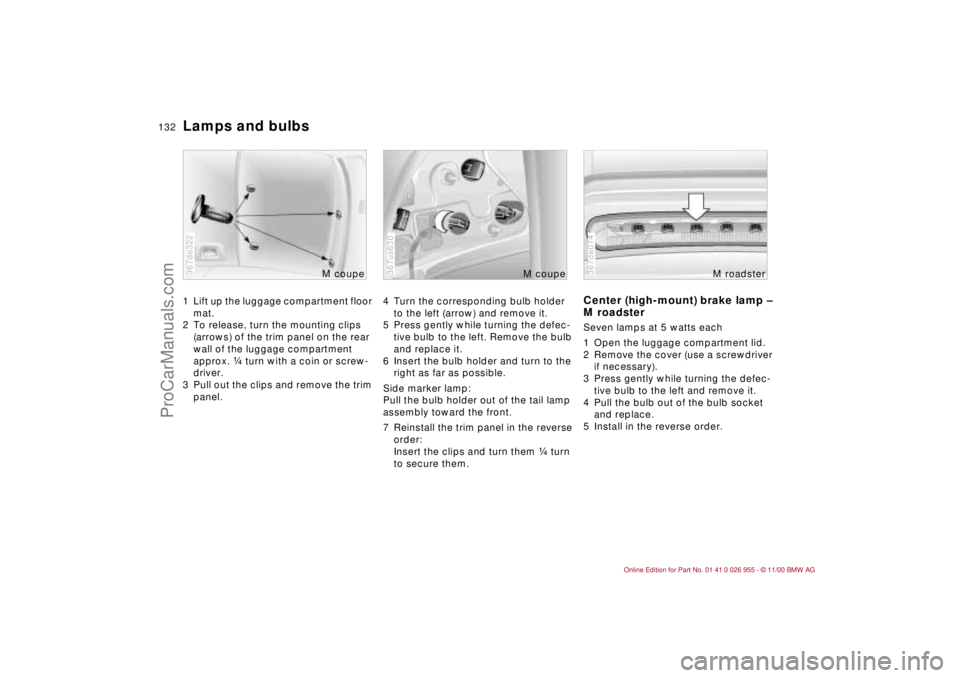
Lamps and bulbs1 Lift up the luggage compartment floor
mat.
2 To release, turn the mounting clips
(arrows) of the trim panel on the rear
wall of the luggage compartment
approx. f turn with a coin or screw-
driver.
3 Pull out the clips and remove the trim
panel.367de322
M coupe
4 Turn the corresponding bulb holder
to the left (arrow) and remove it.
5 Press gently while turning the defec-
tive bulb to the left. Remove the bulb
and replace it.
6 Insert the bulb holder and turn to the
right as far as possible.
Side marker lamp:
Pull the bulb holder out of the tail lamp
assembly toward the front.
7 Reinstall the trim panel in the reverse
order:
Insert the clips and turn them f turn
to secure them.367us630
M coupe
Center (high-mount) brake lamp –
M roadsterSeven lamps at 5 watts each
1 Open the luggage compartment lid.
2 Remove the cover (use a screwdriver
if necessary).
3 Press gently while turning the defec-
tive bulb to the left and remove it.
4 Pull the bulb out of the bulb socket
and replace.
5 Install in the reverse order.367de074
M roadster
ProCarManuals.com
Page 133 of 171
133n
IndexDataTechnologyRepairsCar careControlsOverview
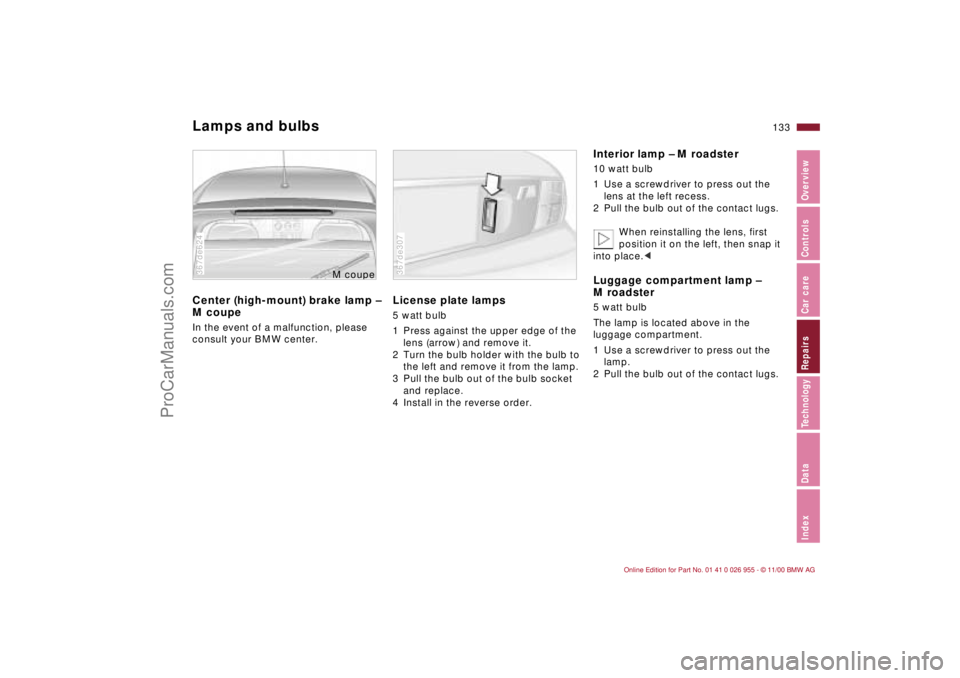
Lamps and bulbsCenter (high-mount) brake lamp –
M coupeIn the event of a malfunction, please
consult your BMW center.367de624
M cou
pe
License plate lamps5 watt bulb
1 Press against the upper edge of the
lens (arrow) and remove it.
2 Turn the bulb holder with the bulb to
the left and remove it from the lamp.
3 Pull the bulb out of the bulb socket
and replace.
4 Install in the reverse order.367de307
Interior lamp – M roadster10 watt bulb
1 Use a screwdriver to press out the
lens at the left recess.
2 Pull the bulb out of the contact lugs.
When reinstalling the lens, first
position it on the left, then snap it
into place.< Luggage compartment lamp –
M roadster5 watt bulb
The lamp is located above in the
luggage compartment.
1 Use a screwdriver to press out the
lamp.
2 Pull the bulb out of the contact lugs.
ProCarManuals.com
Page 134 of 171
134n
Lamps and bulbs Master key with battery-powered lampInterior lamps – M coupeFront:
15 watt bulb
1 Use a screwdriver to press out the
lamp at the left recess.
2 Press back the plastic tab on the
reflector, open the reflector and
replace the bulb.
Rear:
10 watt bulb
1 Use a screwdriver to press out the
lamp at the side recess.
2 Press back the plastic tab on the
reflector, open the reflector and
replace the bulb.Reading lamps – M coupe10 watt bulbs
1 Use a screwdriver to press out the
lamp at the left recess.
2 Press gently while turning the defec-
tive bulb to the left. Remove the bulb
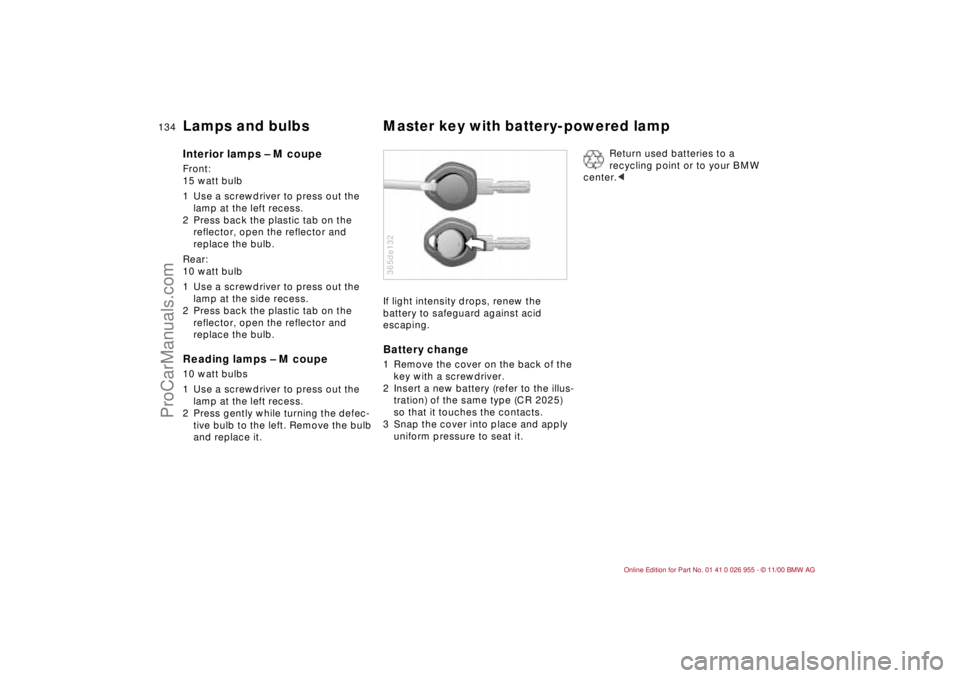
and replace it.If light intensity drops, renew the
battery to safeguard against acid
escaping.
Battery change1 Remove the cover on the back of the
key with a screwdriver.
2 Insert a new battery (refer to the illus-
tration) of the same type (CR 2025)
so that it touches the contacts.
3 Snap the cover into place and apply
uniform pressure to seat it.365de132
Return used batteries to a
recycling point or to your BMW
center.<
ProCarManuals.com
Page 164 of 171
Everything from A to ZAABS (Antilock Brake
System)89
Accessories6
Adding
brake fluid112t
engine coolant112t
engine oil109
washer fluid108t
Additional storage areas78
Adjusting
backrest47
mirrors47
seat46
washer nozzles108t
Air conditioner74
Air distribution74
Air outlets72
ventilation73
Air pressure26, 98
checking26t
Air vents72
Airbags21, 51, 122, 150
Airflow rate74
Antenna95
Antifreeze112
Antifreeze protection,
radiator93, 112, 112t
Antilock Brake System
(ABS)89
Anti-theft protection32Approved gross vehicle
weight158
Aquaplaning87, 98
Ashtray79
Automatic car washes115
Automatic cruise control61
Automatic dimming, interior
rearview mirror48
Automatic rear window
washer59
Automatic windshield
washer108
Axle weights158
BBackrest, adjusting47
Backup lamps58
bulb replacement131t
Battery140, 160
capacity160
charge condition141
charging141
discharged144
disposal141t
removal and
installation142
Battery change, keys134t
Battery safety terminal142
Beverage holder79
BMW High Performance
Synthetic Oil110
Body-cavity protectant118Brake fluid112
adding112t
disposal113t
Brake hydraulic system20
Brake lamps, bulb replace-
ment131t
Brake pads22, 92
Brake system92
add brake fluid112t
brake fluid112
fluid level92
Brakes
malfunctions92
winter road conditions93
Break-in procedure86
Bulb replacement129t
Bulbs and lamps129
CCalifornia Proposition
65 Warning124
Capacities159
Car care
exterior115
interior120
Car keys30
Car radio
reception95, 150
refer also to the separate
Owner's Manual
Car wash systems115, 117Care
exterior119
interior120
leather121
paint119
upholstery materials121
windows and glass120
Cargo loading82
Caring for the vehicle
finish119
Cassette mode, refer to the
Radio Owner's Manual
Catalytic converter88
CBC (Cornering Brake
Control)90
Cellular phone95
refer also to the separate
Owner's Manual
Central locking system32
Charge condition of the
battery141t
Charge indicator lamp20
Charging the battery141t
Chassis number113
Checking oil level109t
Checking tire
pressure26t, 98
Child restraint system53
installation54
M coupe with tether
strap54
Child seat53
ProCarManuals.com
Page 166 of 171
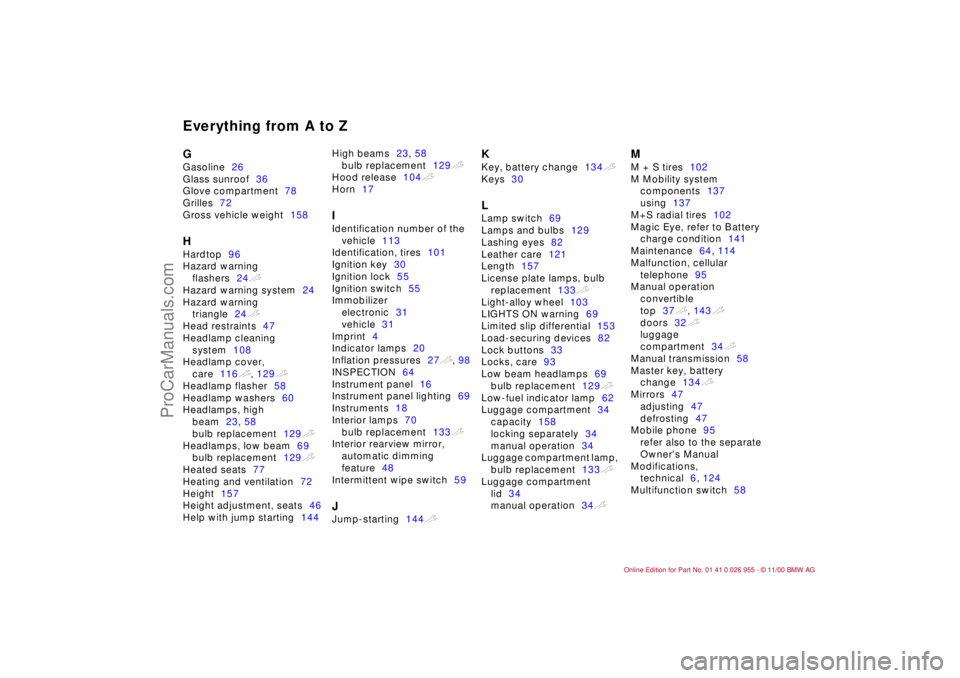
Everything from A to ZGGasoline26
Glass sunroof36
Glove compartment78
Grilles72
Gross vehicle weight158HHardtop96
Hazard warning
flashers24t
Hazard warning system24
Hazard warning
triangle24t
Head restraints47
Headlamp cleaning
system108
Headlamp cover,
care116t, 129t
Headlamp flasher58
Headlamp washers60
Headlamps, high
beam23, 58
bulb replacement129t
Headlamps, low beam69
bulb replacement129t
Heated seats77
Heating and ventilation72
Height157
Height adjustment, seats46
Help with jump starting144High beams23, 58
bulb replacement129t
Hood release104t
Horn17
IIdentification number of the
vehicle113
Identification, tires101
Ignition key30
Ignition lock55
Ignition switch55
Immobilizer
electronic31
vehicle31
Imprint4
Indicator lamps20
Inflation pressures27t, 98
INSPECTION64
Instrument panel16
Instrument panel lighting69
Instruments18
Interior lamps70
bulb replacement133t
Interior rearview mirror,
automatic dimming
feature48
Intermittent wipe switch59JJump-starting144t
KKey, battery change134t
Keys30LLamp switch69
Lamps and bulbs129
Lashing eyes82
Leather care121
Length157
License plate lamps, bulb
replacement133t
Light-alloy wheel103
LIGHTS ON warning69
Limited slip differential153
Load-securing devices82
Lock buttons33
Locks, care93
Low beam headlamps69
bulb replacement129t
Low-fuel indicator lamp62
Luggage compartment34
capacity158
locking separately34
manual operation34
Luggage compartment lamp,
bulb replacement133t
Luggage compartment
lid34
manual operation34t
MM + S tires102
M Mobility system
components137
using137
M+S radial tires102
Magic Eye, refer to Battery
charge condition141
Maintenance64, 114
Malfunction, cellular
telephone95
Manual operation
convertible
top37t, 143t
doors32t
luggage
compartment34t
Manual transmission58
Master key, battery
change134t
Mirrors47
adjusting47
defrosting47
Mobile phone95
refer also to the separate
Owner's Manual
Modifications,
technical6, 124
Multifunction switch58
ProCarManuals.com