check engine BMW M2 2016 User Guide
[x] Cancel search | Manufacturer: BMW, Model Year: 2016, Model line: M2, Model: BMW M2 2016Pages: 220, PDF Size: 4.71 MB
Page 124 of 220
As soon as the malfunction due to other ultra‐
sound sources is no longer present, the sys‐
tem is again fully functional.
Malfunction
A Check Control message is displayed.
The range of the sensors is shown as a shaded
area on the Control Display.
PDC has failed. Have the system checked.
Rearview camera The concept
The rearview camera provides assistance in
parking and maneuvering backwards. The area
behind the vehicle is shown on the Control
Display.
Information WARNING
The system does not relieve from the
personal responsibility to correctly assess the
traffic situation. There is risk of an accident.
Adjust the driving style to the traffic condi‐
tions. Watch traffic and vehicle surroundings
closely and actively intervene in the respective
situations.◀Overview
Camera
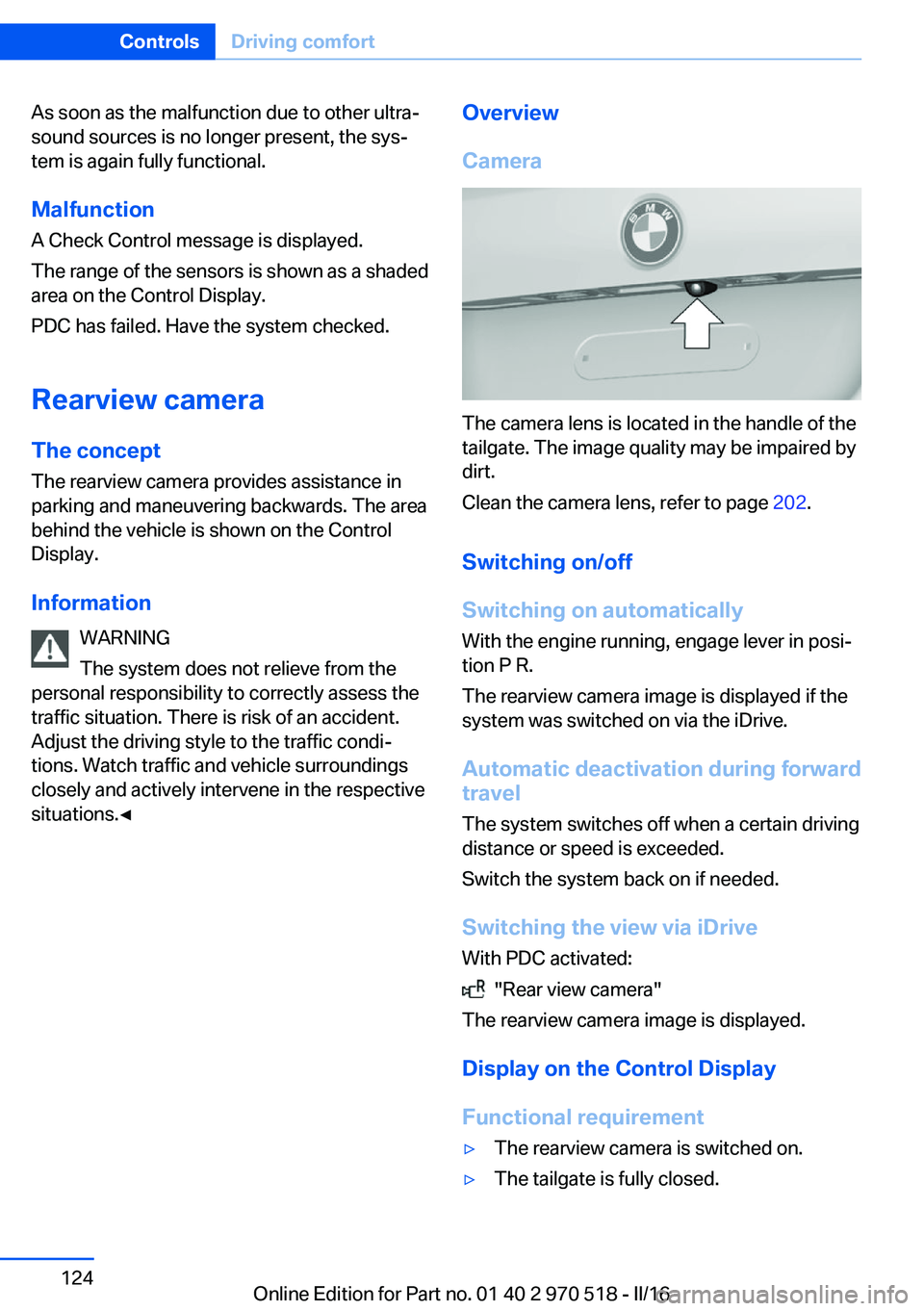
The camera lens is located in the handle of the
tailgate. The image quality may be impaired by
dirt.
Clean the camera lens, refer to page 202.
Switching on/off
Switching on automatically With the engine running, engage lever in posi‐
tion P R.
The rearview camera image is displayed if the
system was switched on via the iDrive.
Automatic deactivation during forward
travel
The system switches off when a certain driving
distance or speed is exceeded.
Switch the system back on if needed.
Switching the view via iDrive With PDC activated:
"Rear view camera"
The rearview camera image is displayed.
Display on the Control Display
Functional requirement
▷The rearview camera is switched on.▷The tailgate is fully closed.Seite 124ControlsDriving comfort124
Online Edition for Part no. 01 40 2 970 518 - II/16
Page 152 of 220
Things to remember when drivingVehicle features and options
This chapter describes all standard, country-
specific and optional features offered with the
series. It also describes features that are not
necessarily available in your car, e. g., due to
the selected options or country versions. This
also applies to safety-related functions and
systems. The respectively applicable country
provisions must be observed when using the
respective features and systems.
Breaking-in period General information
Moving parts need time to adjust to one an‐
other (break-in time).
The following instructions will help accomplish
a long vehicle life and good efficiency.
During break-in, do not use the Launch Con‐
trol.
Information WARNING
Due to new parts and components,
safety and driver assistance systems can react
with a delay. There is risk of an accident. After
installing new parts or with a new vehicle, drive
conservatively and intervene early if necessary.
Observe the break-in procedures of the re‐
spective parts and components.◀
Engine, transmission, and axle drive
Up to 1,200 miles/2,000 km
Drive at varying engine and road speeds, but
do not exceed 5,500 rpm and
106 mph/170 km/h.
Avoid full load or kickdown under all circum‐
stances.At 1,200 miles/2,000 km
Have drive-in checkup maintenance per‐
formed.
From 1,200 miles/2,000 km to
3,100 miles/5,000 km
The engine and road speed can gradually be
increased to a constant speed of
137 mph/220 km/h.
Use the maximum speed of 155 mph/250 km/h
only briefly, for example, when passing.
Tires Tire traction is not optimal due to manufactur‐
ing circumstances when tires are brand-new;
they achieve their full traction potential after a
break-in time.
Drive conservatively for the first
200 miles/300 km.
Brake system
Brakes require an initial break-in period of ap‐
prox. 300 miles/500 km to achieve optimal per‐
formance between brake discs and brake
pads. Drive moderately during this break-in pe‐
riod.
Clutch The function of the clutch reaches its optimal
level only after a distance driven of approx.
300 miles/500 km. During this break-in period,
engage the clutch gently.
Following part replacement
The same break-in procedures should be ob‐
served if any of the components above-men‐
tioned have to be renewed in the course of the
vehicle's operating life.Seite 152Driving tipsThings to remember when driving152
Online Edition for Part no. 01 40 2 970 518 - II/16
Page 159 of 220
Saving fuelVehicle features and optionsThis chapter describes all standard, country-
specific and optional features offered with the
series. It also describes features that are not
necessarily available in your car, e. g., due to
the selected options or country versions. This
also applies to safety-related functions and
systems. The respectively applicable country
provisions must be observed when using the
respective features and systems.
General information Your vehicle contains advanced technology for
the reduction of fuel consumption and emis‐
sions.
Fuel consumption depends on a number of dif‐
ferent factors.
Carrying out certain measures, such as a mod‐
erate driving style and regular maintenance,
can influence fuel consumption and the envi‐
ronmental impact.
Remove unnecessary cargo
Additional weight increases fuel consumption.
Remove attached parts
following use
Remove roof-mounted luggage racks which
are no longer required following use.
Attached parts on the vehicle impair the aero‐
dynamics and increase the fuel consumption.Close the windows and glass
sunroof
Driving with the glass sunroof and windows
open results in increased air resistance and
thereby reduces the range.
Tires
General information Tires can affect fuel consumption in various
ways, e.g., tire size may influence fuel con‐
sumption.
Check the tire inflation pressure
regularly
Check and, if needed, correct the tire inflation
pressure at least twice a month and before
starting on a long trip.
Low tire inflation pressure increases rolling re‐
sistance and thus raises fuel consumption and
tire wear.
Drive away immediately
Do not wait for the engine to warm-up while
the vehicle remains stationary. Start driving
right away, but at moderate engine speeds.
This is the quickest way of warming the cold
engine up to operating temperature.
Look well ahead when
driving
Avoid unnecessary acceleration and braking.
By maintaining a suitable distance to the vehi‐
cle driving ahead of you.
Driving smoothly and proactively reduces fuel
consumption.Seite 159Saving fuelDriving tips159
Online Edition for Part no. 01 40 2 970 518 - II/16
Page 178 of 220
WARNING
The engine compartment accommo‐
dates moving components. Certain compo‐
nents in the engine compartment can also
move with the vehicle switched off, e.g., the ra‐
diator fan. There is a a risk of injury. Do not
reach into the area of moving parts. Keep arti‐
cles of clothing and hair away from moving
parts.◀
WARNING
There are protruding parts, e.g., locking
hook, on the inside of the hood. There is a a
risk of injury. If the hood is open, pay attention
to protruding parts and keep these areas
clear.◀
WARNING
An incorrectly locked hood can open
while driving and restrict visibility. There is risk
of an accident. Stop immediately and correctly
close the hood.◀
WARNING
Body parts can be jammed when open‐
ing and closing the hood. There is a a risk of in‐
jury. Make sure that the area of movement of
the hood is clear during opening and closing.◀
ATTENTION
Folded-away wipers can be jammed
when the hood is opened. There is a risk of damage to property. Make sure that the wipers
with the wiper blades mounted are folded
down onto the windshield before opening the
hood.◀
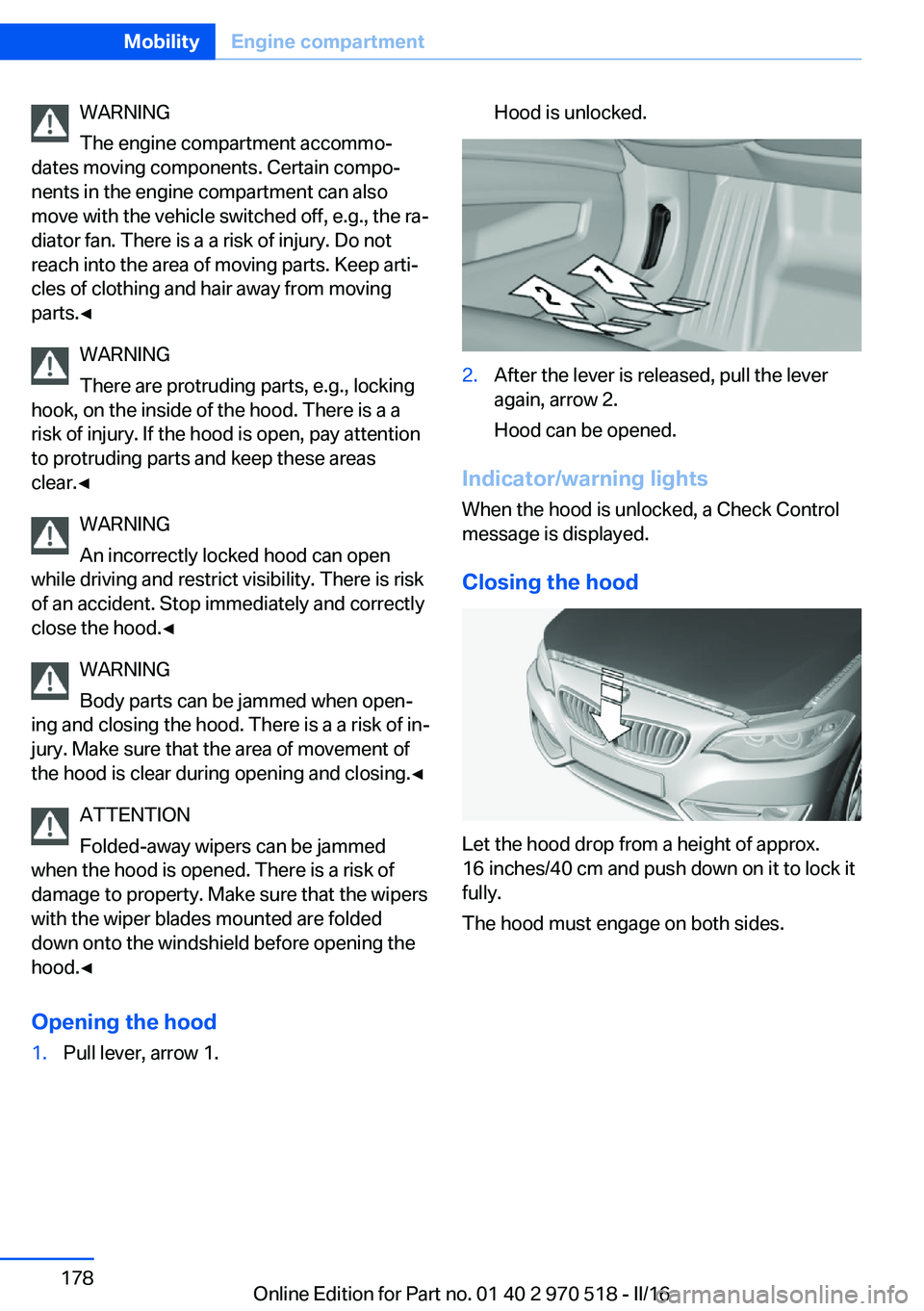
Opening the hood1.Pull lever, arrow 1.Hood is unlocked.2.After the lever is released, pull the lever
again, arrow 2.
Hood can be opened.
Indicator/warning lights
When the hood is unlocked, a Check Control
message is displayed.
Closing the hood
Let the hood drop from a height of approx.
16 inches/40 cm and push down on it to lock it
fully.
The hood must engage on both sides.
Seite 178MobilityEngine compartment178
Online Edition for Part no. 01 40 2 970 518 - II/16
Page 179 of 220
Engine oilVehicle features and options
This chapter describes all standard, country-
specific and optional features offered with the
series. It also describes features that are not
necessarily available in your car, e. g., due to
the selected options or country versions. This
also applies to safety-related functions and
systems. The respectively applicable country
provisions must be observed when using the
respective features and systems.
General information The engine oil consumption is dependent on
the driving style and driving conditions.
The engine oil consumption can increase in
the following situations, for example:▷Sporty driving style.▷Break-in of the engine.▷Idling of the engine.▷With use of engine oil types that are classi‐
fied as not suitable.
Therefore, regularly check the engine oil level
after refueling.
When a dynamic driving style is used, such as
when cornering fast, the system is unable to
measure the engine oil level. With this driving
style, measure the engine oil level using a de‐
tailed measurement, refer to page 180.
The vehicle is equipped with electronic oil
measurement.
The electronic oil measurement has two meas‐
uring principles:
▷Status display.▷Detailed measurement.Electronic oil measurement
Status display
The concept
The engine oil level is monitored electronically
while driving and shown on the Control Dis‐
play.
If the engine oil level reaches the minimum
level, a check control message is displayed.
Requirements
A current measured value is available after ap‐
prox. 30 minutes of driving. During a shorter
trip, the status of the last, sufficiently long trip
is displayed.
With frequent short-distance trips, regularly
perform a detailed measurement.
Displaying the engine oil level
About iDrive:1."Vehicle info"2."Vehicle status"3. "Engine oil level"
The engine oil level is displayed.
Engine oil level display messages
Different messages appear on the display de‐
pending on the engine oil level. Pay attention
to these messages.
If the engine oil level is too low within the next
125 miles/200 km, add engine oil.
ATTENTION
Too low of an engine oil level causes en‐
gine damage. There is a risk of damage to
property. Immediately add engine oil.◀
Take care not to add too much engine oil.
Seite 179Engine oilMobility179
Online Edition for Part no. 01 40 2 970 518 - II/16
Page 180 of 220
ATTENTION
Too much engine oil can damage the en‐
gine or the catalytic converter. There is a risk
of damage to property. Do not add too much
engine oil. When too much engine oil is added,
have oil level corrected by a dealer’s service
center or another qualified service center or re‐
pair shop.◀
Detailed measurement
The concept In the detailed measurement the engine oil
level is checked when the vehicle is stationary,
and displayed via a scale.
If the engine oil level reaches the minimum
level, a check control message is displayed.
During the measurement, the idle speed is in‐
creased somewhat.
Requirements▷Vehicle is parked in a horizontal position.▷Manual transmission: shift lever in neutral
position, clutch and accelerator pedals not
depressed.▷M Double clutch transmission: selector
lever in selector lever position N and accel‐
erator pedal not depressed.▷Engine is running and is at operating tem‐
perature.
Performing a detailed measurement
In order to perform a detailed measurement of
the engine oil level:
1."Vehicle info"2."Vehicle status"3. "Measure engine oil level"4."Start measurement"
The engine oil level is checked and displayed
via a scale.
Time: approx. 1 minute.
Adding engine oil
Information WARNING
Operating materials, e.g., oils, greases,
coolants, fuels, can contain harmful ingredi‐
ents. There is a risk of injury or danger to life.
Observe the instructions on the containers.
Avoid the contact of articles of clothing, skin or
eyes with operating materials. Do not refill op‐
erating materials into different bottles. Store
operating materials out of reach of children.◀
ATTENTION
Too low of an engine oil level causes en‐
gine damage. There is a risk of damage to
property.
Add engine oil within the next
125 miles/200 km.◀
ATTENTION
Too much engine oil can damage the en‐
gine or the catalytic converter. There is a risk
of damage to property. Do not add too much
engine oil. When too much engine oil is added,
have oil level corrected by a dealer’s service
center or another qualified service center or re‐
pair shop.◀
General information Only add engine oil when the message is dis‐
played in the instrument cluster. The quantity
to be added is indicated in the message dis‐
played in the instrument cluster.
Switch off the ignition and safely park the vehi‐
cle before engine oil is added.
Take care not to add too much engine oil.
Overview The oil filler neck is located in the engine com‐
partment, refer to page 177.Seite 180MobilityEngine oil180
Online Edition for Part no. 01 40 2 970 518 - II/16
Page 182 of 220
CoolantVehicle features and optionsThis chapter describes all standard, country-
specific and optional features offered with the
series. It also describes features that are not
necessarily available in your car, e. g., due to
the selected options or country versions. This
also applies to safety-related functions and
systems. The respectively applicable country
provisions must be observed when using the
respective features and systems.
Information WARNING
With the engine hot and the cooling sys‐
tem open, coolant can escape and lead to
scalding. There is a a risk of injury. Only open
the cooling system with the engine cooled
down.◀
WARNING
Additives are harmful and incorrect addi‐
tives can damage the engine. There is a risk of
injury and risk of property damage. Do not al‐
low additives to come into contact with skin,
eyes or articles of clothing. Use suitable addi‐
tives only.◀
Coolant consists of water and additives.
Not all commercially available additives are
suitable for the vehicle. Information about suit‐
able additives is available from a dealer’s serv‐
ice center or another qualified service center or
repair shop.Coolant level
Checking1.Let the engine cool.2.Turn the lid of the coolant reservoir slightly
counterclockwise to allow any excess
pressure to dissipate, then open it.3.Open the coolant reservoir lid.4.The coolant level is correct if it lies be‐
tween the minimum and maximum marks
in the filler neck.Seite 182MobilityCoolant182
Online Edition for Part no. 01 40 2 970 518 - II/16
Page 184 of 220
MaintenanceVehicle features and options
This chapter describes all standard, country-
specific and optional features offered with the
series. It also describes features that are not
necessarily available in your car, e. g., due to
the selected options or country versions. This
also applies to safety-related functions and
systems. The respectively applicable country
provisions must be observed when using the
respective features and systems.
BMW maintenance system The maintenance system indicates required
maintenance measures, and thereby provides
support in maintaining road safety and the op‐
erational reliability of the vehicle.
In some cases scopes and intervals may vary
according to the country-specific version. Re‐
placement work, spare parts, fuels and lubri‐
cants and wear materials are calculated sepa‐
rately. Further information is available from a
dealer’s service center or another qualified
service center or repair shop.
Condition Based ServiceCBS
Sensors and special algorithms take into ac‐
count the driving conditions of the vehicle.
Based on this, Condition Based Service recog‐
nizes the maintenance requirements.
The system makes it possible to adapt the
amount of maintenance corresponding to your
user profile.
Information on service requirements can be
displayed on the Control Display.Service data in the remote control
Information on the required maintenance is
continuously stored in the remote control. The dealer’s service center can read this data out
and suggest a maintenance scope for the vehi‐
cle.
Therefore, hand the service advisor the remote
control with which the vehicle was driven most
recently.
Storage periods Storage periods during which the vehicle bat‐
tery was disconnected are not taken into ac‐
count.
If this occurs, have a dealer's service center or
another qualified service center or repair shop
update the time-dependent maintenance pro‐
cedures, such as checking brake fluid and, if
necessary, changing the engine oil and the mi‐
crofilter/activated-charcoal filter.
Service and WarrantyInformation Booklet for US
models and Warranty and
Service Guide Booklet for
Canadian models
Please consult your Service and Warranty In‐
formation Booklet for US models and Warranty
and Service Guide Booklet for Canadian mod‐
els for additional information on service re‐
quirements.
The manufacturer of your vehicle recommends
that maintenance and repair be performed by a
dealer’s service center or another qualified
service center or repair shop. Records of regu‐
lar maintenance and repair work should be re‐
tained.Seite 184MobilityMaintenance184
Online Edition for Part no. 01 40 2 970 518 - II/16
Page 185 of 220
Socket for OBD Onboard
Diagnosis
Information ATTENTION
The socket for Onboard Diagnosis is an
intricate component intended to be used in
conjunction with specialized equipment to
check the vehicle’s primary emissions system.
Improper use of the socket for Onboard Diag‐
nosis, or contact with the socket for Onboard
Diagnosis for other than its intended purpose,
can cause vehicle malfunctions and creates
risks of personal and property damage. Given
the foregoing, the manufacture of your vehicle
strongly recommends that access to the
socket for Onboard Diagnosis be limited to a
dealer's service center or another qualified
service center or repair shop or other persons
that have the specialized training and equip‐
ment for purposes of properly utilizing the
socket for Onboard Diagnosis.◀
Position
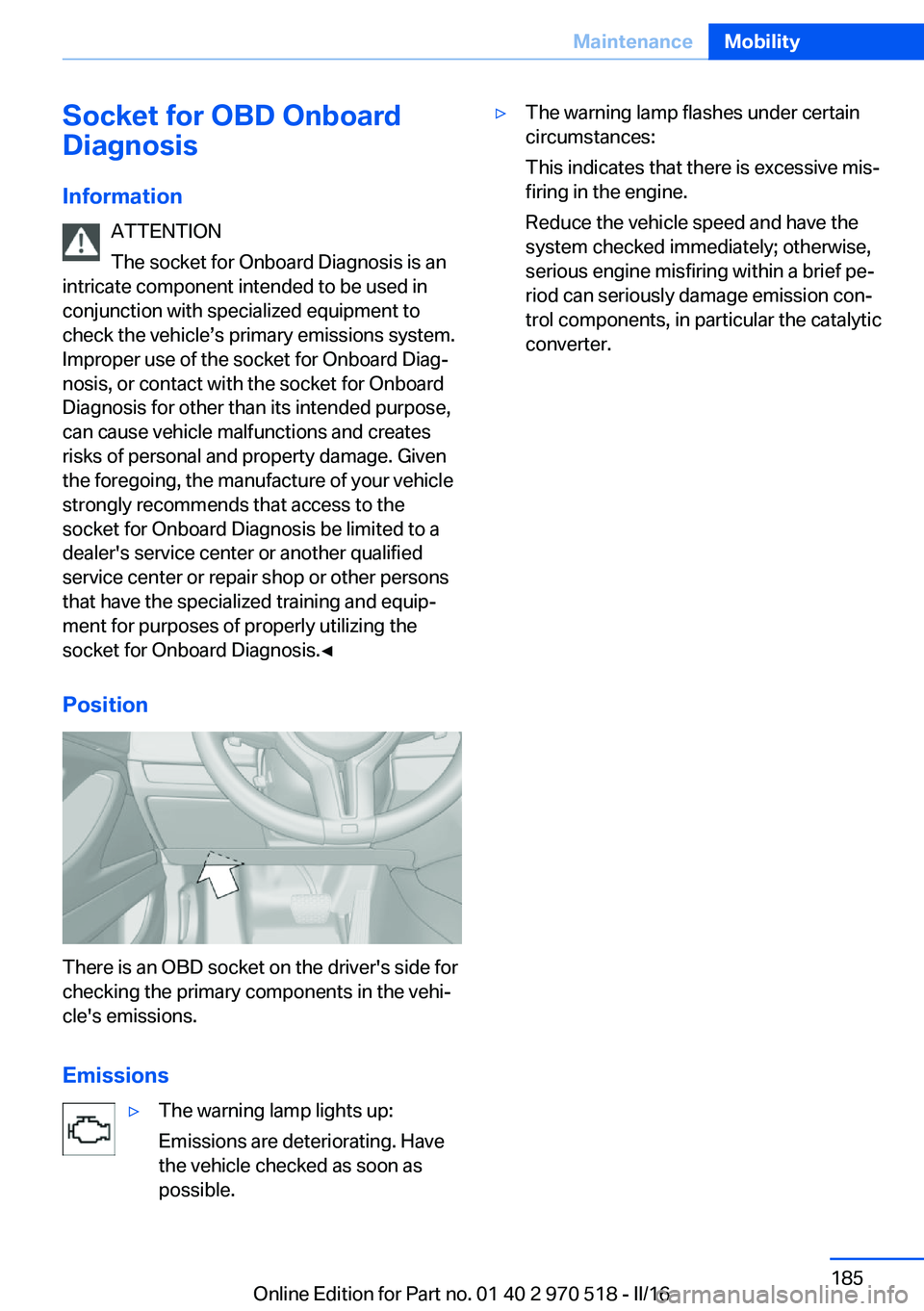
There is an OBD socket on the driver's side for
checking the primary components in the vehi‐
cle's emissions.
Emissions
▷The warning lamp lights up:
Emissions are deteriorating. Have
the vehicle checked as soon as
possible.▷The warning lamp flashes under certain
circumstances:
This indicates that there is excessive mis‐
firing in the engine.
Reduce the vehicle speed and have the
system checked immediately; otherwise,
serious engine misfiring within a brief pe‐
riod can seriously damage emission con‐
trol components, in particular the catalytic
converter.Seite 185MaintenanceMobility185
Online Edition for Part no. 01 40 2 970 518 - II/16
Page 191 of 220
Check Control messages of these comfort fea‐
tures are no longer displayed.
Charging the battery
General information
Make sure that the battery is always suffi‐
ciently charged to guarantee that the battery
remains usable for its full service life.
The battery may need to be charged in the fol‐
lowing cases:▷When making frequent short-distance
drives.▷If the vehicle is not used for more than a
month.
Information
ATTENTION
Battery chargers for the vehicle battery
can work with high voltages and currents,
which means that the 12 volt on-board net‐
work can be overloaded or damaged. There is
a risk of damage to property. Only connect
battery chargers for the vehicle battery to the
starting aid terminals in the engine compart‐
ment.◀
Starting aid terminals In the vehicle, only charge the battery via the
starting aid terminals, refer to page 195, in the
engine compartment with the engine off.
Power failure After a power loss, some equipment needs to
be newly initialized or individual settings up‐
dated, for example:
▷Seat and mirror memory: store the posi‐
tions again.▷Time: update.▷Date: update.▷Glass sunroof and sliding visor: initialize
the system, refer to page 48.Disposing of old batteries
Have old batteries disposed of by a
dealer’s service center or another
qualified service center or repair shop
or take them to a collection point.
Maintain the battery in an upright position for
transport and storage. Secure the battery so
that it does not tip over during transport.
Fuses Information WARNING
Incorrect and repaired fuses can overload
electrical lines and components. There is risk
of fire. Never attempt to repair a blown fuse.
Do not replace a nonworking fuse with a sub‐
stitute of another color or amperage rating.◀
Plastic tweezers and information on the fuse
types and locations are stored in the fuse box
in the cargo area.
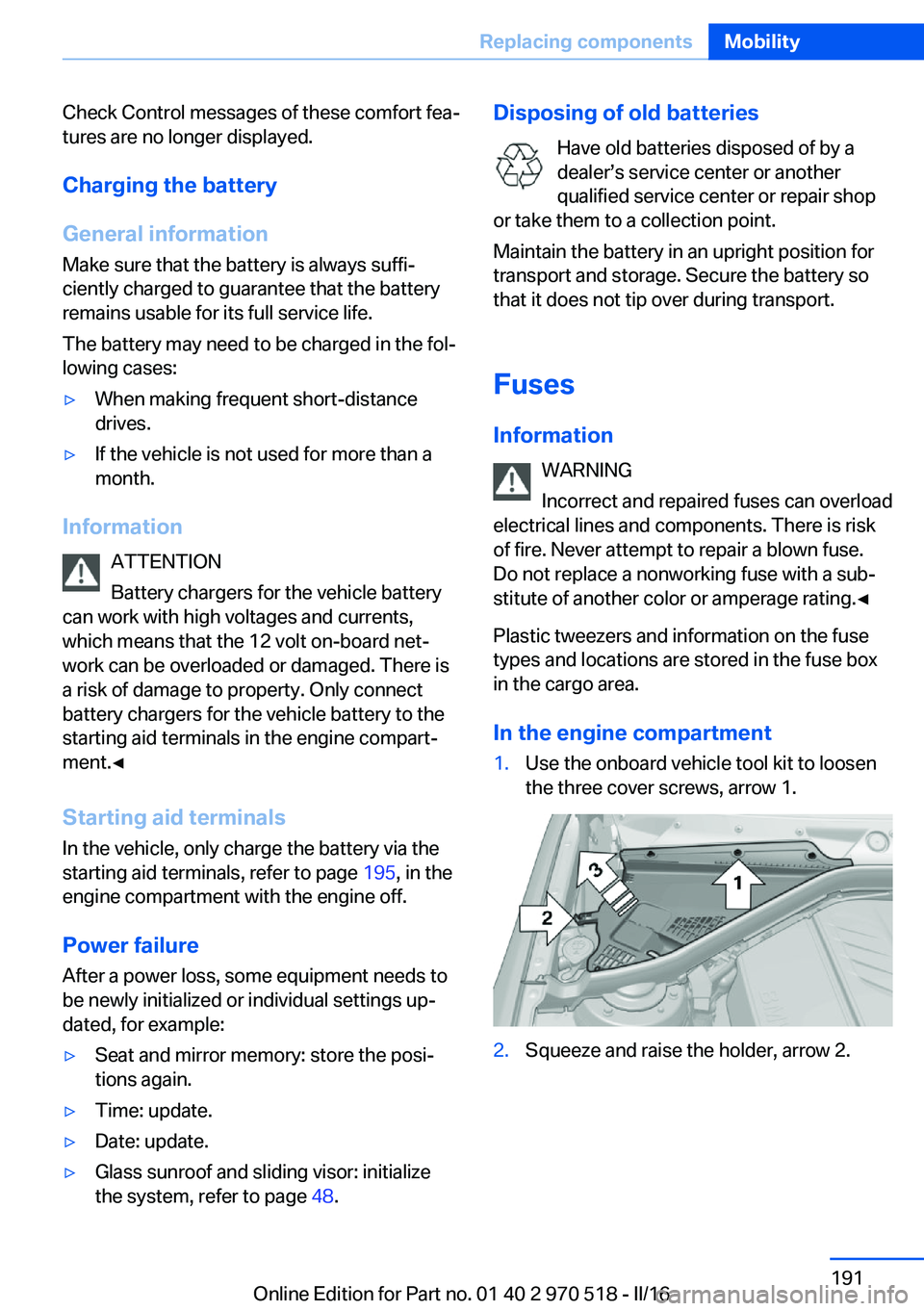
In the engine compartment1.Use the onboard vehicle tool kit to loosen
the three cover screws, arrow 1.2.Squeeze and raise the holder, arrow 2.Seite 191Replacing componentsMobility191
Online Edition for Part no. 01 40 2 970 518 - II/16