sensor BMW M2 2016 User Guide
[x] Cancel search | Manufacturer: BMW, Model Year: 2016, Model line: M2, Model: BMW M2 2016Pages: 220, PDF Size: 4.71 MB
Page 127 of 220
Climate controlVehicle features and options
This chapter describes all standard, country-
specific and optional features offered with the
series. It also describes features that are not
necessarily available in your car, e. g., due tothe selected options or country versions. This
also applies to safety-related functions and
systems. The respectively applicable country
provisions must be observed when using the
respective features and systems.
Automatic climate control
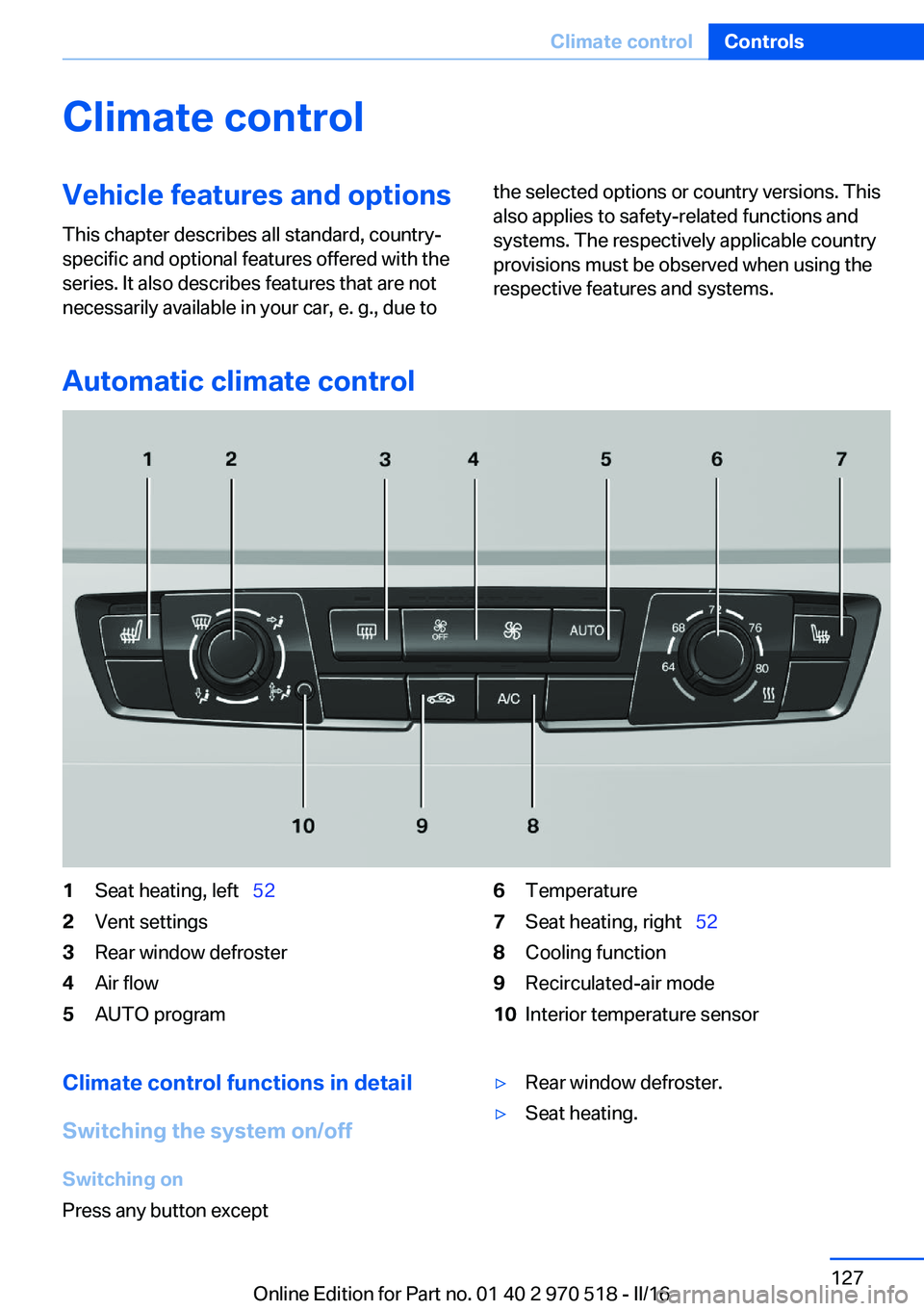
1Seat heating, left 522Vent settings3Rear window defroster4Air flow5AUTO program6Temperature7Seat heating, right 528Cooling function9Recirculated-air mode10Interior temperature sensorClimate control functions in detail
Switching the system on/off
Switching on
Press any button except▷Rear window defroster.▷Seat heating.Seite 127Climate controlControls127
Online Edition for Part no. 01 40 2 970 518 - II/16
Page 130 of 220
7Seat heating, right 528Cooling function9Automatic recirculated-air control/recircu‐
lated-air mode10Air distribution, right11Air flow, AUTO intensity12Air distribution, left13Rear window defroster14Interior temperature sensor — always keep
clear15Defrosts windows and removes condensa‐
tionClimate control functions in detail
Switching the system on/off
Switching on
Press any button except▷Rear window defroster.▷Seat heating.
Switching off
Press the left button for the minimum
speed.
Temperature Turn the ring to set the desired
temperature.
The automatic climate control reaches this
temperature as quickly as possible, if needed
by increasing the cooling or heating output,
and then keeps it constant.
Do not rapidly switch between different tem‐
perature settings. Otherwise, the automatic cli‐
mate control will not have sufficient time to ad‐
just the set temperature.
Cooling function The air in the car's interior will be cooled and
dehumidified and, depending on the tempera‐
ture setting, warmed again.
The car's interior can only be cooled with the
engine running.
Press button.
Air conditioning is switched on or off.
Depending on the weather, the windshield and
side windows may fog up briefly when the en‐
gine is started.
The cooling function is switched on automati‐
cally with the AUTO program.
When using the automatic climate control,
condensation water, refer to page 154, devel‐
ops that exits underneath the vehicle.
Maximum cooling Press button.
The system is set to the lowest tem‐
perature, optimum air flow and recirculated-air
mode.
Air flows out of the vents to the upper body re‐
gion. The vents need to be open for this.
The function is available above an external
temperature of approx. 32 ℉/0 ℃ And with the engine running.
Adjust air flow with the program active.
AUTO program Press button.
Air flow, air distribution and tempera‐
ture are controlled automatically.
Depending on the selected temperature,
AUTO intensity program and outside influen‐
ces, the air is directed to the windshield, side
windows, upper body, and into the floor area.Seite 130ControlsClimate control130
Online Edition for Part no. 01 40 2 970 518 - II/16
Page 131 of 220
The cooling function, refer to page 130, is
switched on automatically with the AUTO pro‐
gram.
At the same time, a condensation sensor con‐
trols the program so as to prevent window
condensation as much as possible.
Intensity of the AUTO program
With the AUTO program activated, the auto‐
matic intensity control can be changed.
Press the left or right side of the but‐
ton: decrease or increase intensity.
The selected intensity is shown on the display
of the automatic climate control.
Automatic recirculated-air control/
recirculated-air mode
You may respond to unpleasant odors or pollu‐
tants in the immediate environment by tempo‐
rarily suspending the supply of outside air. The
system then recirculates the air currently
within the vehicle.
Press button repeatedly to select an
operating mode:▷LEDs off: outside air flows in continuously.▷Left LED on, automatic recirculated-air
control: a sensor detects pollutants in the
outside air and shuts off automatically.▷Right LED on, recirculated-air mode: the
supply of outside air into the vehicle is per‐
manently blocked.
Recirculated-air mode switches off automati‐
cally at low external temperatures after a cer‐
tain amount of time in order to avoid window
fogging.
With constant recirculated-air mode, the air
quality in the car's interior deteriorates and the
fogging of the windows increases.
If the windows are fogged over, switch off the
recirculated-air mode and press the AUTO
button to utilize the condensation sensor.
Make sure that air can flow to the windshield.
Air flow, manual
To manually adjust air flow turn off AUTO pro‐
gram first.
Press the left or right side of the but‐
ton: decrease or increase air flow.
The selected air flow is shown on the display of
the automatic climate control.
The air flow of the automatic climate control
may be reduced automatically to save battery
power.
Manual air distribution Press button repeatedly to select a
program:▷Upper body region.▷Upper body region and floor area.▷Floor area.▷Windows and floor area: driver's side only.▷Windows, upper body region and floor
area: driver's side only.
If the windows are fogged over, press the
AUTO button to utilize the condensation sen‐
sor.
Defrosts windows and removes
condensation
Press button.
Ice and condensation are quickly re‐
moved from the windshield and the front side
windows.
For this purpose, point the side vents onto the
side windows as needed.
Adjust air flow with the program active.
If the windows are fogged over, you can also
switch on the cooling function or press the
AUTO button to utilize the condensation sen‐
sor.
Seite 131Climate controlControls131
Online Edition for Part no. 01 40 2 970 518 - II/16
Page 184 of 220
MaintenanceVehicle features and options
This chapter describes all standard, country-
specific and optional features offered with the
series. It also describes features that are not
necessarily available in your car, e. g., due to
the selected options or country versions. This
also applies to safety-related functions and
systems. The respectively applicable country
provisions must be observed when using the
respective features and systems.
BMW maintenance system The maintenance system indicates required
maintenance measures, and thereby provides
support in maintaining road safety and the op‐
erational reliability of the vehicle.
In some cases scopes and intervals may vary
according to the country-specific version. Re‐
placement work, spare parts, fuels and lubri‐
cants and wear materials are calculated sepa‐
rately. Further information is available from a
dealer’s service center or another qualified
service center or repair shop.
Condition Based ServiceCBS
Sensors and special algorithms take into ac‐
count the driving conditions of the vehicle.
Based on this, Condition Based Service recog‐
nizes the maintenance requirements.
The system makes it possible to adapt the
amount of maintenance corresponding to your
user profile.
Information on service requirements can be
displayed on the Control Display.Service data in the remote control
Information on the required maintenance is
continuously stored in the remote control. The dealer’s service center can read this data out
and suggest a maintenance scope for the vehi‐
cle.
Therefore, hand the service advisor the remote
control with which the vehicle was driven most
recently.
Storage periods Storage periods during which the vehicle bat‐
tery was disconnected are not taken into ac‐
count.
If this occurs, have a dealer's service center or
another qualified service center or repair shop
update the time-dependent maintenance pro‐
cedures, such as checking brake fluid and, if
necessary, changing the engine oil and the mi‐
crofilter/activated-charcoal filter.
Service and WarrantyInformation Booklet for US
models and Warranty and
Service Guide Booklet for
Canadian models
Please consult your Service and Warranty In‐
formation Booklet for US models and Warranty
and Service Guide Booklet for Canadian mod‐
els for additional information on service re‐
quirements.
The manufacturer of your vehicle recommends
that maintenance and repair be performed by a
dealer’s service center or another qualified
service center or repair shop. Records of regu‐
lar maintenance and repair work should be re‐
tained.Seite 184MobilityMaintenance184
Online Edition for Part no. 01 40 2 970 518 - II/16
Page 199 of 220
CareVehicle features and optionsThis chapter describes all standard, country-
specific and optional features offered with the
series. It also describes features that are not
necessarily available in your car, e. g., due to
the selected options or country versions. This
also applies to safety-related functions and
systems. The respectively applicable country
provisions must be observed when using the
respective features and systems.
Car washes General information
Regularly remove foreign objects such as
leaves in the area below the windshield when
the hood is raised.
Wash your vehicle frequently, particularly in
winter. Intense soiling and road salt can dam‐
age the vehicle.
Steam blaster and high-pressure
washer
Information ATTENTION
When cleaning with high-pressure wash‐
ers, components can be damaged due to the
pressure or temperatures being too high.
There is a risk of damage to property. Maintain
sufficient distance and do not spray too long
continuously. Follow the operating instructions
for the high-pressure washer.◀
Distances and temperature▷Maximum temperature: 140 ℉/60 ℃.▷Minimum distance from sensors, cameras,
seals: 12 inches/30 cm.▷Minimum distance from glass sunroof:
31.5 in/80 cm.
Automatic car washes
Information CAUTION
Water can penetrate in the windshield
area due to high-pressure washers. There is a
risk of property damage. Avoid high-pressure
washers.◀
ATTENTION
Improper use of automatic vehicle
washes can cause damage to the vehicle.
There is a risk of damage to property. Informa‐
tion the following instructions:
▷Give preference to cloth vehicle washes or
those that use soft brushes in order to
avoid paint damage.▷Avoid vehicle washes with guide rails
higher than 4 in/10 cm to avoid damage to
the chassis.▷Observe the tire width of the guide rail to
avoid damage to tires and rims.▷Fold in exterior mirrors to avoid damage to
the exterior mirrors.▷Deactivate rain sensor, if necessary, to
avoid damage to the wiper system.◀
In some cases, an unintentional alarm can be
triggered by the interior motion sensor of the
alarm system. Follow the instructions on
avoiding an unintentional alarm, refer to
page 45.
Before driving into a car wash In order to ensure that the vehicle can roll in a
car wash, take the following steps:
Seite 199CareMobility199
Online Edition for Part no. 01 40 2 970 518 - II/16
Page 202 of 220
▷Instrument cluster cover.▷Matt black spray-coated components.▷Painted parts in the interior.
Safety belts
Dirty belt straps impede the reeling action and
thus have a negative impact on safety.
WARNING
Chemical cleansers can destroy the
safety belt webbing. Missing protective effect
of the safety belts. There is a risk of injury or
danger to life. Use only a mild soapy solution
for cleaning the safety belts.◀
Use only a mild soapy solution, with the safety
belts clipped into their buckles.
Do not allow the switchs to retract the safety
belts until they are dry.
Carpets and floor mats WARNING
Objects in the driver's floor area can limit
the pedal distance or block a depressed pedal.
There is risk of an accident. Stow objects in
the vehicle such that they are secured and
cannot enter into the driver's floor area. Use
floor mats that are suitable for the vehicle and
can be safely attached to the floor. Do not use
loose floor mats and do not layer several floor
mats. Make sure that there is sufficient clear‐
ance for the pedals. Ensure that the floor mats
are securely fastened again after they were re‐
moved, e.g., for cleaning.◀
Floor mats can be removed from the car's inte‐
rior for cleaning.
If the floor carpets are very dirty, clean with a
microfiber cloth and water or a textile cleaner.
To prevent matting of the carpet, rub back and
forth in the direction of travel only.
Sensor/camera lenses
To clean sensors and camera lenses, use a
cloth moistened with a small amount of glass
detergent.
Displays/screens ATTENTION
Chemical cleansers, moisture or fluids of
any kind can damage the surface of displays
and screens. There is a risk of damage to prop‐
erty. Clean with a clean, antistatic microfiber
cloth.◀
ATTENTION
The surface of displays can be damaged
with improper cleaning. There is a risk of dam‐
age to property. Avoid pressure that is too high
and do not use any scratching materials.◀
Clean with a clean, antistatic microfiber cloth.
Long-term vehicle storage When the vehicle is shut down for longer than
three months, special measures must be
taken. Further information is available from a
dealer’s service center or another qualified
service center or repair shop.Seite 202MobilityCare202
Online Edition for Part no. 01 40 2 970 518 - II/16
Page 214 of 220
Intensity, AUTO pro‐gram 131
Interior equipment 134
Interior lights 96
Interior lights during unlock‐ ing 38
Interior lights with the vehicle locked 38
Interior mirror, automatic dim‐ ming feature 59
Interior mirror, compass 136
Interior mirror, manually dim‐ mable 59
Interior motion sensor 45
Internet page 6
Interval display, service re‐ quirements 85
Interval mode 72
J Jacking points for the vehicle jack 190
Jump-starting 194
K
Key/remote control 34
Keyless Go, see Comfort Ac‐ cess 41
Key Memory, see Personal Profile 36
Knee airbag 99
L Label on recommended tires 172
Lamp replacement 186
Lamp replacement, front 187
Lamp replacement, rear 189
Lane departure warning 111
Lane margin, warning 111
Language on Control Dis‐ play 92 Lashing eyes, securing
cargo 157
LATCH child restraint fixing system 63
Launch Control 78
Leather, care 201
LEDs, light-emitting di‐ odes 187
Letters and numbers, enter‐ ing 25
Light 93
Light-alloy wheels, care 201
Light control 95
Light-emitting diodes, LEDs 187
Lighting 93
Lights and bulbs 186
Light switch 93
Load 157
Loading 156
Lock, door 39
Locking/unlocking via door lock 39
Locking/unlocking with re‐ mote control 37
Locking, automatic 43
Locking, settings 43
Locking via tailgate 41
Low beams 93
Low beams, automatic, see High-beam Assistant 95
Lower back support 51
Low Speed Assistant 75
Luggage rack, see Roof- mounted luggage rack 158
Lumbar support 51
M
Maintenance 184
Maintenance require‐ ments 184
Maintenance, service require‐ ments 85
Maintenance system, BMW 184 Make-up mirror 138
Malfunction displays, see Check Control 80
Manual air distribu‐ tion 129, 131
Manual air flow 128, 131
Manual operation, door lock 39
Manual operation, exterior mirrors 58
Manual transmission 74
Master key, see Remote con‐ trol 34
Maximum cooling 130
Maximum speed, display 86
Maximum speed, winter tires 172
M Compound brake 150
M differential, active 116
MDM, M Dynamic Mode 115
M double-clutch transmis‐ sion 75
M Dynamic Mode MDM 115
Measurement, units of 92
Medical kit 194
Memory, seat, mirror 56
Menu EfficientDynamics 85
Menu in instrument clus‐ ter 88
Menus, operating, iDrive 18
Menus, see iDrive operating concept 20
Messages, see Check Con‐ trol 80
Microfilter 129, 132
Minimum tread, tires 171
Mirror 57
Mirror memory 56
Mobile communication devi‐ ces in the vehicle 153
Mobility System 173
Modifications, technical, see Own Safety 7
Moisture in headlight 187
Monitor, see Control Dis‐ play 18 Seite 214ReferenceEverything from A to Z214
Online Edition for Part no. 01 40 2 970 518 - II/16
Page 215 of 220
Mounting of child restraintsystems 62
M technology 150
Multifunction steering wheel, buttons 14
Multimedia 6
N
Navigation 6
Neck restraints, front, see Head restraints 54
Neck restraints, rear, see Head restraints 55
Neutral cleaner, see wheel cleaner 201
New wheels and tires 171
O OBD Onboard Diagnosis 185
OBD, see OBD Onboard Di‐ agnosis 185
Obstacle marking, rearview camera 125
Octane rating, see Recom‐ mended fuel grade 167
Odometer 83
Office 6
Oil 179
Oil, adding 180
Oil additives 181
Oil change 181
Oil change interval, service requirements 85
Oil filler neck 180
Oil types, alternative 181
Oil types, suitable 181
Old batteries, disposal 191
Onboard computer 88
Onboard computer, see On‐ board computer 88
Onboard monitor, see Control Display 18
Onboard vehicle tool kit 186 Opening/closing via door
lock 39
Opening and closing 34
Opening and closing, without remote control 39
Opening and closing, with re‐ mote control 37
Operating concept, iDrive 18
Optional equipment 7
Outside air, see Automatic re‐ circulated-air control 131
Own Safety 7
P
Paint, vehicle 200
Park Distance Control PDC 121
Parked-car ventilation 132
Parked vehicle, condensa‐ tion 154
Parking aid, see PDC 121
Parking brake 70
Parking lights 93
Parts and accessories 8
Passenger side mirror, tilting downward 58
Pathway lines, rearview cam‐ era 125
PDC Park Distance Con‐ trol 121
Personal Profile 36
Personal Profile, exporting profiles 37
Personal Profile, importing profiles 37
Person warning with City light braking function 109
Pinch protection system, glass sunroof 48
Pinch protection system, win‐ dows 46
Plastic, care 201
Power failure 191
Power sunroof, glass 47
Power windows 45 Prescribed engine oil
types 181
Pressure, tire air pres‐ sure 168
Pressure warning, tires 104
Preventing Auto Start Stop 69
Profile, see Personal Pro‐ file 36
Programmable memory but‐ tons, iDrive 24
Protective function, glass sunroof 48
Protective function, win‐ dows 46
Push-and-turn switch, see Controller 19
R Racetrack operation 150
Radiator fluid 182
Radio 6
Radio-operated key, see Re‐ mote control 34
Radio ready state 65
Rain sensor 72
Ratchet straps, securing cargo 157
Rear lights 189
Rear socket 139
Rearview camera 124
Rearview mirror 57
Rear window de‐ froster 129, 132
Recirculated-air filter 132
Recirculated-air mode 128, 131
Recommended fuel grade 167
Recommended tire brands 172
Refueling 164
Remaining range 84
Remote control/key 34 Seite 215Everything from A to ZReference215
Online Edition for Part no. 01 40 2 970 518 - II/16
Page 216 of 220
Remote control, malfunc‐tion 39
Remote control, univer‐ sal 134
Replacement fuse 191
Replacing parts 186
Replacing wheels/tires 171
Reporting safety malfunc‐ tions 10
RES button, see Cruise con‐ trol 119
Reserve warning, see Range 84
Reset, Tire Pressure Monitor TPM 102
Retreaded tires 172
Roadside parking lights 93
RON recommended fuel grade 167
Roofliner 17
Roof load capacity 207
Roof-mounted luggage rack 158
Rubber components, care 201
S Safe braking 153
Safety belt reminder for driv‐ er's seat and front passen‐
ger seat 54
Safety belts 53
Safety belts, care 202
Safety systems, airbags 98
Saving fuel 159
Screen, see Control Dis‐ play 18
Screwdriver, see Onboard ve‐ hicle tool kit 186
Sealant 173
Seat and mirror memory 56
Seat belts, see Safety belts 53
Seat heating, front 52 Seating position for chil‐
dren 61
Seats 49
Securing cargo 157
Selection list in instrument cluster 88
Selector lever 75
Selector lever position 75
Sensors, care 202
Sequential mode 76
Service and warranty 8
Service requirements, Condi‐ tion Based Service
CBS 184
Service requirements, dis‐ play 85
Service, Roadside Assis‐ tance 194
Services, ConnectedDrive 6
Servotronic 116
SET button, see Cruise con‐ trol 119
Settings, locking/unlock‐ ing 43
Settings on Control Dis‐ play 91
Settings, storing for seat, mir‐ ror 56
Side airbags 98
Signaling, horn 14
Signals when unlocking 43
Sitting safely 49
Size 206
Slide/tilt glass roof 47
Snow chains 176
Socket 138
Socket, OBD Onboard Diag‐ nostics 185
SOS button 193
Spare fuse 191
Speed, average 89
Speed limit detection 86
Speed limit detection, com‐ puter 90
Speed limits, display 86
Speed warning 90 Split screen 24
SPORT+ - program, Dynamic Driving Control 117
Sport displays, torque dis‐ play, performance dis‐
play 90
SPORT program, Dynamic Driving Control 117
Stability control systems 114
Standard equipment 7
Start/stop, automatic func‐ tion 67
Start/Stop button 65
Start function during malfunc‐ tion 35
Starting the engine 66
Status control display, tires 102
Status of Owner's Manual 7
Steering assistance 116
Steering wheel, adjusting 59
Steering wheel heating 60
Stopping the engine 67
Storage compartment in the rear 145
Storage compartments 143
Storage, tires 172
Storing the vehicle 202
Suitable engine oil types 181
Summer tires, tread 171
Sun visor 138
Supplementary text mes‐ sages 82
Switch for Dynamic Driv‐ ing 116
Switch, see Cockpit 14
Symbols 6
Symbols in the status field 23
T Tachometer 83
Tailgate closing 41
Tailgate, emergency unlock‐ ing 41
Tailgate, hotel function 41 Seite 216ReferenceEverything from A to Z216
Online Edition for Part no. 01 40 2 970 518 - II/16
Page 217 of 220
Tailgate opening 40
Tailgate via remote con‐ trol 38
Tail lamps 189
Technical changes, see Own Safety 7
Technical data 206
Technology, BMW M 150
Telephone 6
Temperature, automatic cli‐ mate control 128, 130
Temperature display for ex‐ ternal temperature 84
Temperature, engine 89
Terminal, starting aid 195
Text messages, supplemen‐ tary 82
Theft alarm system, see Alarm system 44
Thigh support 51
Through-loading system 141
Tilt alarm sensor 45
Time of arrival 90
Tire damage 171
Tire identification marks 169
Tire inflation pressure 168
Tire inflation pressure moni‐ tor, see FTM 104
Tire Pressure Monitor TPM 101
Tire repair kit, see Mobility System 173
Tires, changing 171
Tire sealant, see Mobility System 173
Tires, everything on wheels and tires 168
Tire tread 171
Tone 6
Tool 186
Total vehicle weight 207
Touchpad 21
Towing 196
Tow-starting 196
TPM Tire Pressure Moni‐ tor 101 Transmission, manual trans‐
mission 74
Transporting children safely 61
Tread, tires 171
Triple turn signal activa‐ tion 70
Trip odometer 83
Trip onboard computer 90
Trip recorder, see Trip odom‐ eter 83
Turning circle lines, rearview camera 125
Turn signals, operation 70
Turn signals, rear, bulb re‐ placement 189
U
Unintentional alarm 45
Units of measurement 92
Universal remote control 134
Unlocking/locking via door lock 39
Unlocking/locking with re‐ mote control 37
Unlocking, settings 43
Updates made after the edito‐ rial deadline 7
Upholstery care 201
USB interface, general infor‐ mation 139
USB port, see USB inter‐ face 139
V
Vanity mirror 138
Vehicle battery 190
Vehicle battery, replac‐ ing 190
Vehicle, break-in 152
Vehicle care 200
Vehicle care products 200
Vehicle features and op‐ tions 7 Vehicle identification num‐
ber 10
Vehicle jack 190
Vehicle paint 200
Vehicle position, GPS loca‐ tion 92
Vehicle storage 202
Vehicle wash 199
Ventilation 132
Ventilation, see Parked-car ventilation 132
VIN, see Vehicle identification number 10
Voice activation system 27
W Warning and indicator lamps, see Check Control 80
Warning displays, see Check Control 80
Warning messages, see Check Control 80
Warning triangle 194
Warranty 7
Washer fluid 73
Washer nozzles, wind‐ shield 73
Washer system 71
Washing, vehicle 199
Water on roads 153
Weights 207
Welcome lamps during un‐ locking 38
Welcome lights 94
Wheel cleaner 201
Wheels, changing 171
Wheels, everything on wheels and tires 168
Wheels, Flat Tire Monitor FTM 104
Wheels, Tire Pressure Moni‐ tor TPM 101
Window defroster, rear 129, 132
Windows, powered 45 Seite 217Everything from A to ZReference217
Online Edition for Part no. 01 40 2 970 518 - II/16