battery BMW M3 2008 User Guide
[x] Cancel search | Manufacturer: BMW, Model Year: 2008, Model line: M3, Model: BMW M3 2008Pages: 266, PDF Size: 8.85 MB
Page 101 of 266
Controls
99Reference
At a glance
Driving tips
Communications
Navigation
Entertainment
Mobility
it off while also increasing the air flow rate as
required.
The recirculated-air mode should not be used
continuously for lengthy periods, otherwise the
quality of the air inside the car will gradually
deteriorate.<
Via the button on the steering wheel
You can switch quickly between the recircu-
lated-air mode and the previous mode using an
individually programmable button
on the steer-
ing wheel, refer to page47.
Residual heat
The heat stored in the engine is
used to heat the passenger com-
partment, e.g. while stopped at a
school to pick up a child.
The function can be switched on when the fol-
lowing conditions are met:
>Up to 15 minutes after the engine has been
switched off
>While the engine is at operating tempera-
ture
>As long as battery voltage is sufficient
>At an outside temperature below 777/
256
The LED is lit when the function is on.
As of radio readiness, you can set the interior
temperature, the air flow rate and the air distri-
bution.
Defrosting windows and removing
condensation
Quickly removes ice and conden-
sation from the windshield and
front side windows.
Switch on the cooling function as well.
Switching cooling function on/off
The cooling function cools and
dehumidifies the incoming air
before reheating it as required,
according to the temperature setting. This
function is only available while the engine is
running.The cooling function helps prevent condensa-
tion on the windows or removes it quickly.
Depending on the weather, the windshield may
fog over briefly when the engine is started.
The cooling function is automatically switched
on along with the AUTO program.
Rear window defroster
The defroster is switched off auto-
matically after a certain time.
Depending on your vehicle's
equipment, the upper wires serve as an antenna
and are not part of the rear window defroster.
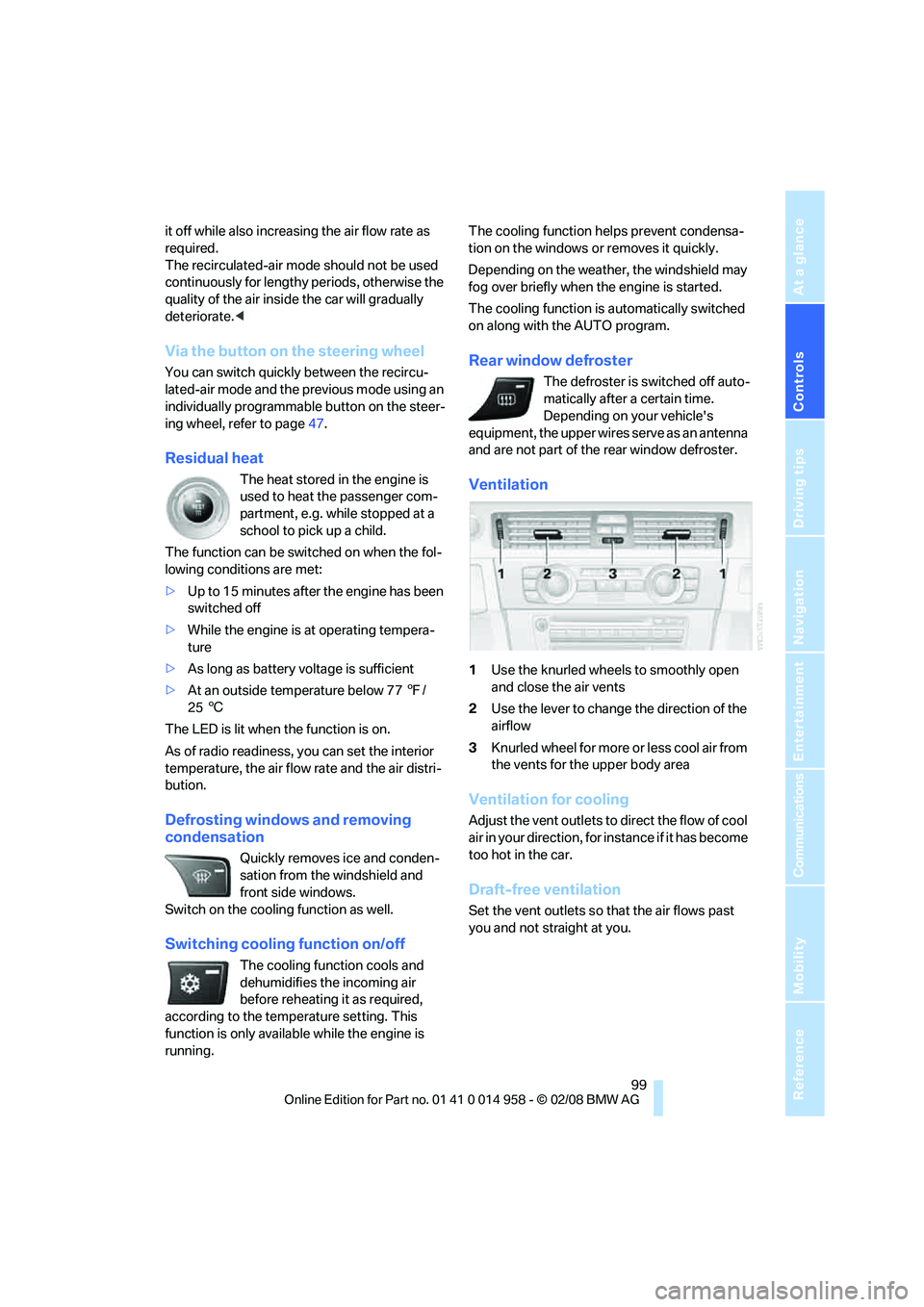
Ventilation
1Use the knurled wheels to smoothly open
and close the air vents
2Use the lever to change the direction of the
airflow
3Knurled wheel for more or less cool air from
the vents for the upper body area
Ventilation for cooling
Adjust the vent outlets to direct the flow of cool
air in your direction, for instance if it has become
too hot in the car.
Draft-free ventilation
Set the vent outlets so that the air flows past
you and not straight at you.
Page 102 of 266
Climate
100
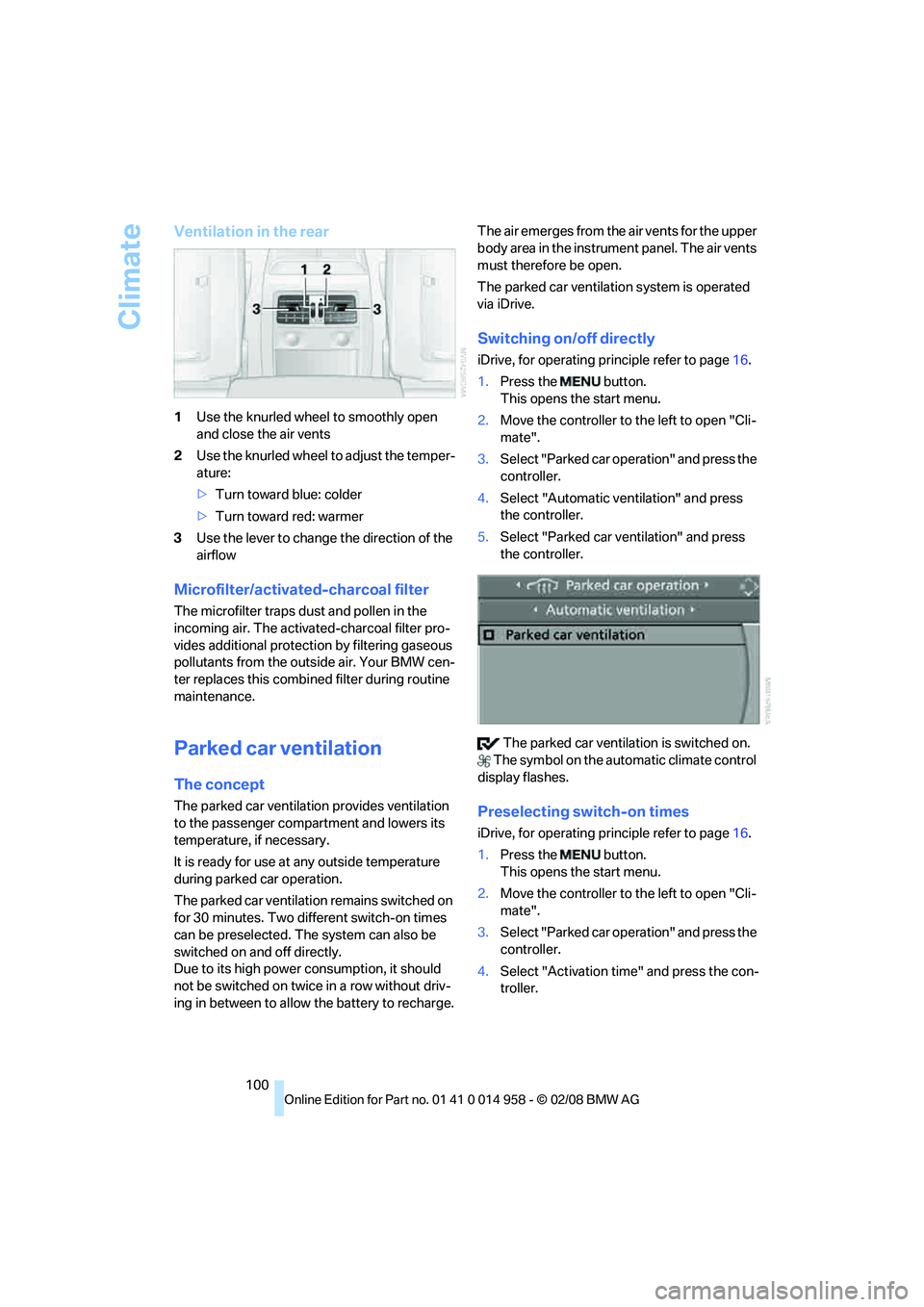
Ventilation in the rear
1Use the knurled wheel to smoothly open
and close the air vents
2Use the knurled wheel to adjust the temper-
ature:
>Turn toward blue: colder
>Turn toward red: warmer
3Use the lever to change the direction of the
airflow
Microfilter/activated-charcoal filter
The microfilter traps dust and pollen in the
incoming air. The activated-charcoal filter pro-
vides additional protection by filtering gaseous
pollutants from the outside air. Your BMW cen-
ter replaces this combined filter during routine
maintenance.
Parked car ventilation
The concept
The parked car ventilation provides ventilation
to the passenger compartment and lowers its
temperature, if necessary.
It is ready for use at any outside temperature
during parked car operation.
The parked car ventilation remains switched on
for 30 minutes. Two different switch-on times
can be preselected. The system can also be
switched on and off directly.
Due to its high power consumption, it should
not be switched on twice in a row without driv-
ing in between to allow the battery to recharge.The air emerges from the air vents for the upper
body area in the instrument panel. The air vents
must therefore be open.
The parked car ventilation system is operated
via iDrive.
Switching on/off directly
iDrive, for operating principle refer to page16.
1.Press the button.
This opens the start menu.
2.Move the controller to the left to open "Cli-
mate".
3.Select "Parked car operation" and press the
controller.
4.Select "Automatic ventilation" and press
the controller.
5.Select "Parked car ventilation" and press
the controller.
The parked car ventilation is switched on.
The symbol on the automatic climate control
display flashes.
Preselecting switch-on times
iDrive, for operating principle refer to page16.
1.Press the button.
This opens the start menu.
2.Move the controller to the left to open "Cli-
mate".
3.Select "Parked car operation" and press the
controller.
4.Select "Activation time" and press the con-
troller.
Page 150 of 266
What to do if …
148
What to do if …
What to do if …
>a navigation DVD is inserted, but an instruc-
tion to insert the DVD appears on the Con-
trol Display?
The navigation DVD may not be the correct
DVD for the navigation system. This infor-
mation is indicated on the DVD label.
>you request the current position of your
vehicle, but do not receive a precise dis-
play?
The system is unable to receive enough
GPS signals at your current position due to
obstructions, your current position is not
yet available on your navigation DVD, or the
system is in the process of calculating your
current position. As a rule, reception is
guaranteed when you are in the open.
>the destination guidance does not accept a
destination?
The data of the destination is not stored on
the navigation DVD that is loaded. Choose a
destination as close as possible to the orig-
inal one.
>the destination guidance does not accept
an address without the street name?
On the navigation DVD, no downtown area
can be determined for the city or town
entered. Enter any street, or a destination
such as the railway station in the selected
town, and then start the destination guid-
ance.
>you want to enter a destination for the des-
tination guidance, but it is not possible to
select the letters for your desired entry?
The data of the destination is not stored on
the navigation DVD that is loaded. In this
case, the system will not offer you any let-
ters to choose from. Choose a destination
as close as possible to the original one.
>the system stops furnishing directions on
which way to turn as you approach intersec-
tions?
You are driving in an area that has not yet
been completely recorded on the naviga-tion DVD. Instead of an arrow indicating a
turn, you will see an arrow which indicates
the general direction of your planned route.
Or you have left the recommended route
and the system requires a few seconds to
calculate a new recommended route.
>the navigation system does not react to
entries?
If the battery was disconnected, it takes
about 10 minutes before the system is once
again operational.
Page 180 of 266

Telephoning
178
Telephoning
The concept
Your BMW is equipped with a full mobile phone
preparation package. After pairing a suitable
mobile phone with the vehicle once, you can
operate the mobile phone via iDrive, the buttons
on the steering wheel or via voice commands.
Once a mobile phone has been paired with your
vehicle, it is automatically recognized as soon
as it is inside the vehicle while the engine is run-
ning or the ignition is switched on. You can
store the pairing data for up to four mobile
phones simultaneously. If several mobile
phones are detected at the same time, the
mobile phone last paired can be operated via
the vehicle.
Using the telephone inside
the vehicle
Using the snap-in adapter*
The so-called snap-in adapter, a holder for
mobile phones, allows you to charge the mobile
phone's battery and connect the mobile phone
to your vehicle's outside antenna. This ensures
better network reception and consistent repro-
duction quality. Please contact your
BMW center to find out for which mobile
phones there are snap-in adapters available.
For your safety
A car phone makes life more convenient in
many ways, and can even save lives in an emer-
gency. While you should consult your mobile
phone's separate Owner's Manual for a detailed
description of safety precautions and informa-
tion, we request that you direct your particular
attention to the following:
Only make entries when the traffic situa-
tion allows you to do so. Do not hold the
mobile phone in your hand while you are driving;
use the hands-free system instead. If you do
not observe this precaution, your being dis-tracted can endanger vehicle occupants and
other road users.<
Suitable mobile phones
Please ask your BMW center which mobile
phones with Bluetooth interface are supported
by the mobile phone preparation package and
which mobile phones are compatible with the
snap-in adapter. By virtue of their particular
software versions, these mobile phones sup-
port the functions described in this Owner's
Manual. Malfunctions may occur with other
mobile phones.
Care instructions
Important information on this subject can be
found in the separate mobile phone Owner's
Manual.
Operating options
You can operate the mobile phone* using:
>Buttons on the steering wheel, refer to
page10
>iDrive, refer to page183
>Voice commands, refer to page189
>Programmable memory keys, refer to
page21
Avoid operating a mobile phone recognized by
the vehicle via the mobile phone's keypad, oth-
erwise malfunctions may result.
Making phone calls with the
BMW Assist system*: BMW Assist
calls
You can use the BMW Assist System via the
hands-free unit for BMW Assist calls.
*
Page 193 of 266
191
Entertainment
Reference
At a glance
Controls
Driving tips Communications
Navigation
Mobility
Notes
Important for voice commands
For voice commands, bear in mind the follow-
ing:
>Pronounce the commands smoothly and at
normal volume, avoiding excessive empha-
ses and pauses.
>Keep the doors, windows and glass roof
closed to prevent interference from outside
noise.
>Avoid ambient noise in the vehicle while
speaking.
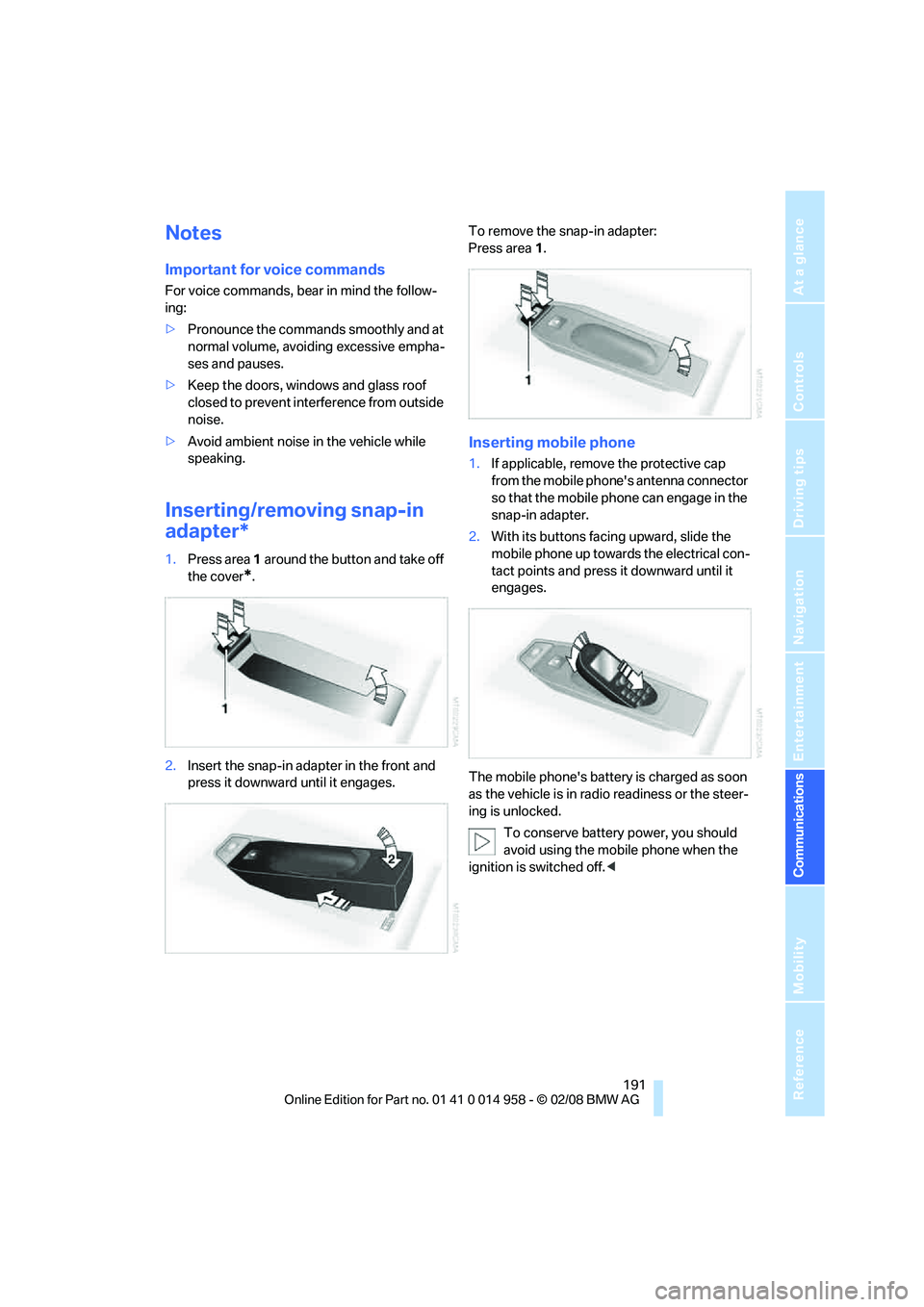
Inserting/removing snap-in
adapter*
1.Press area 1 around the button and take off
the cover
*.
2.Insert the snap-in adapter in the front and
press it downward until it engages.To remove the snap-in adapter:
Press area 1.
Inserting mobile phone
1.If applicable, remove the protective cap
from the mobile phone's antenna connector
so that the mobile phone can engage in the
snap-in adapter.
2.With its buttons facing upward, slide the
mobile phone up towards the electrical con-
tact points and press it downward until it
engages.
The mobile phone's battery is charged as soon
as the vehicle is in radio readiness or the steer-
ing is unlocked.
To conserve battery power, you should
avoid using the mobile phone when the
ignition is switched off.<
Page 230 of 266
Replacing components
228 4.Adjust the tire inflation pressure to 29 psi/
200 kPa. With the ignition switched on, pro-
ceed as follows:
>To increase the inflation pressure:
Switch on the compressor, position I. To
check the current inflation pressure set-
ting, briefly switch off the compressor.
Do not let the compressor run for
more than 10 minutes, otherwise the
device will overheat and may be dam-
aged.<
>To reduce the inflation pressure: turn
screw 8 on the pressure gauge.
If the inflation pressure is not maintained,
drive the vehicle a second time, refer to
Distributing the sealant. Then repeat steps 1 to
4.
Use of the M Mobility System may be ineffec-
tual for tire damage larger than approx. 0.16 in/
4 mm. Please contact the nearest BMW center,
refer to page230, or a workshop that works
according to BMW repair procedures with cor-
respondingly trained personnel if the tire can-
not be made roadworthy with the M Mobility
System.<
The tire inflation pressure must be at least
29 psi/200 kPa. If it is not, do not continue
driving.<
Continuing your trip
Do not exceed the maximum allowable
speed of 50 mph/80 km/h to avoid the risk
of an accident.<
Reinitialize the Flat Tire Monitor, refer to
page85 for more information.
Have the faulty tire and the sealant bottle of the
M Mobility System replaced as soon as possi-
ble.<
Changing wheels
The tools for changing wheels are avail-
able as optional accessories from your
BMW center.<
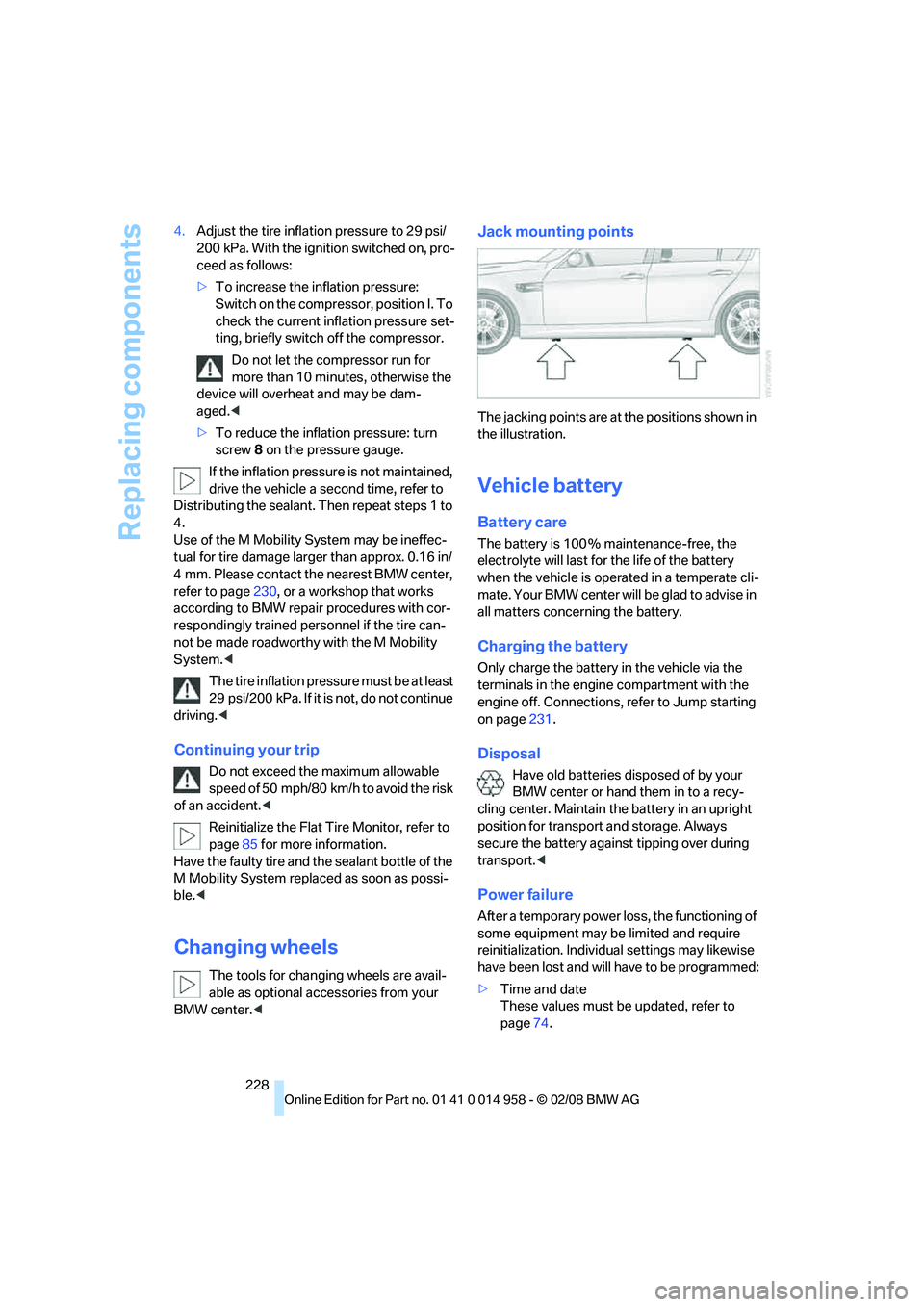
Jack mounting points
The jacking points are at the positions shown in
the illustration.
Vehicle battery
Battery care
The battery is 100 % maintenance-free, the
electrolyte will last for the life of the battery
when the vehicle is operated in a temperate cli-
ma te. Your BM W center will be glad to advise in
all matters concerning the battery.
Charging the battery
Only charge the battery in the vehicle via the
terminals in the engine compartment with the
engine off. Connections, refer to Jump starting
on page231.
Disposal
Have old batteries disposed of by your
BMW center or hand them in to a recy-
cling center. Maintain the battery in an upright
position for transport and storage. Always
secure the battery against tipping over during
transport.<
Power failure
After a temporary power loss, the functioning of
some equipment may be limited and require
reinitialization. Individual settings may likewise
have been lost and will have to be programmed:
>Time and date
These values must be updated, refer to
page74.
Page 233 of 266
Mobility
231Reference
At a glance
Controls
Driving tips
Communications
Navigation
Entertainment
First aid pouch*
Some of the articles contained in the first aid
pouch have a limited service life. Therefore,
check the expiration dates of the contents reg-
ularly and replace any items in good time, if nec-
essary.
The first aid pouch is located on the right-hand
side of the cargo bay in a storage area.
Warning triangle*
The warning triangle is located on the left-hand
side of the cargo bay. Press the tab to take it
out.
Jump starting
If the car's own battery is flat, your BMW's
engine can be started by connecting two
jumper cables to another vehicle's battery. You
can also use the same method to help start
another vehicle. Only use jumper cables with
fully-insulated clamp handles.
Do not touch any electrically live parts
when the engine is running, or a fatal acci-
dent may occur. Carefully adhere to the follow-ing sequence, both to prevent damage to one or
both vehicles, and to guard against possible
personal injuries.<
Preparation
1.Check whether the battery of the other
vehicle has a voltage of 12 volts and
approximately the same capacitance in Ah.
This information can be found on the bat-
tery.
2.Switch off the engine of the assisting vehi-
cle.
3.Switch off any consumers in both vehicles.
There must not be any contact between
the bodies of the two vehicles, otherwise
there is a danger of shorting.<
Connecting jumper cables
Connect the jumper cables in the correct
order, so that no sparks which could
cause injury occur.<
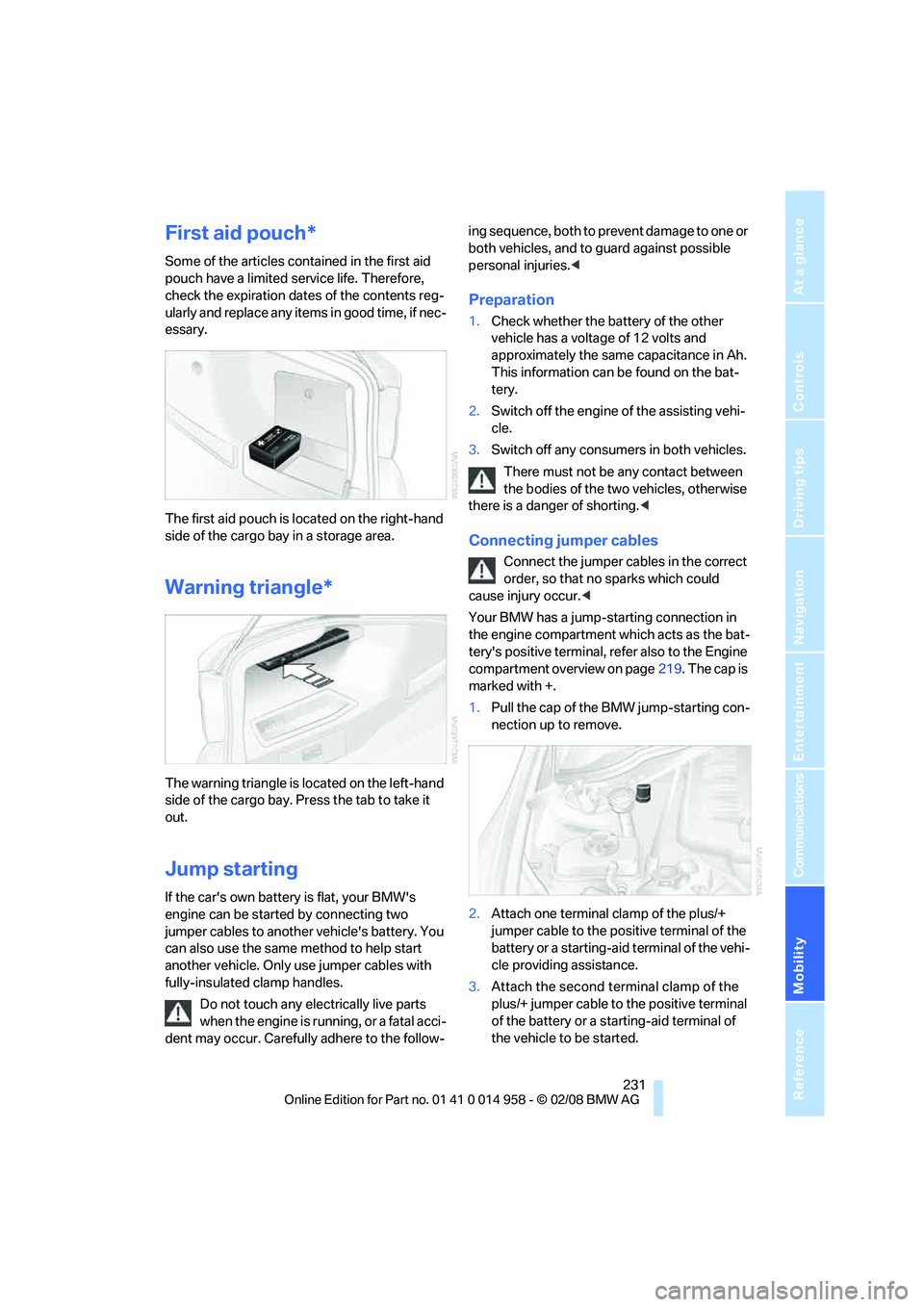
Your BMW has a jump-starting connection in
the engine compartment which acts as the bat-
tery's positive terminal, refer also to the Engine
compartment overview on page219. The cap is
marked with +.
1.Pull the cap of the BMW jump-starting con-
nection up to remove.
2.Attach one terminal clamp of the plus/+
jumper cable to the positive terminal of the
battery or a starting-aid terminal of the vehi-
cle providing assistance.
3.Attach the second terminal clamp of the
plus/+ jumper cable to the positive terminal
of the battery or a starting-aid terminal of
the vehicle to be started.
Page 234 of 266
Giving and receiving assistance
232 4.Attach one terminal clamp of the minus/–
jumper cable to the negative terminal of the
battery or to an engine or body ground of
the assisting vehicle.
Your BMW has a special nut as body ground
or negative pole.
5.Attach the second terminal clamp of the
minus/– jumper cable to the negative termi-
nal of the battery or to the engine or body
ground of the vehicle to be started.
Starting the engine
1.Start the engine of the donor vehicle and
allow it to run for a few minutes at slightly
increased idle speed.
2.Start the engine on the other vehicle in the
usual way.
If the first start attempt is not successful,
wait a few minutes before another attempt
in order to allow the discharged battery to
recharge.
3.Let the engines run for a few minutes.
4.Disconnect the jumper cables by reversing
the above connecting sequence.
If necessary, have the battery checked and
recharged.
Never use spray fluids to start the
engine.<
Tow-starting, towing away
Observe the applicable laws and regula-
tions for tow-starting and towing vehi-
cles.
towed.<
Using a tow fitting
The screw-in tow fitting must always be carried
in the car. It can be screwed in at the front or
rear of the BMW.
It is stored in the onboard tool kit underneath
the cover on the right-hand side of the cargo
bay, refer to page223.
Use only the tow fitting provided with the
vehicle and screw it all the way in. Use the
tow fitting for towing on paved roads only. Avoid
lateral loading of the tow fitting, e.g. do not lift
the vehicle by the tow fitting. Otherwise the tow
fitting and the vehicle could be damaged.<
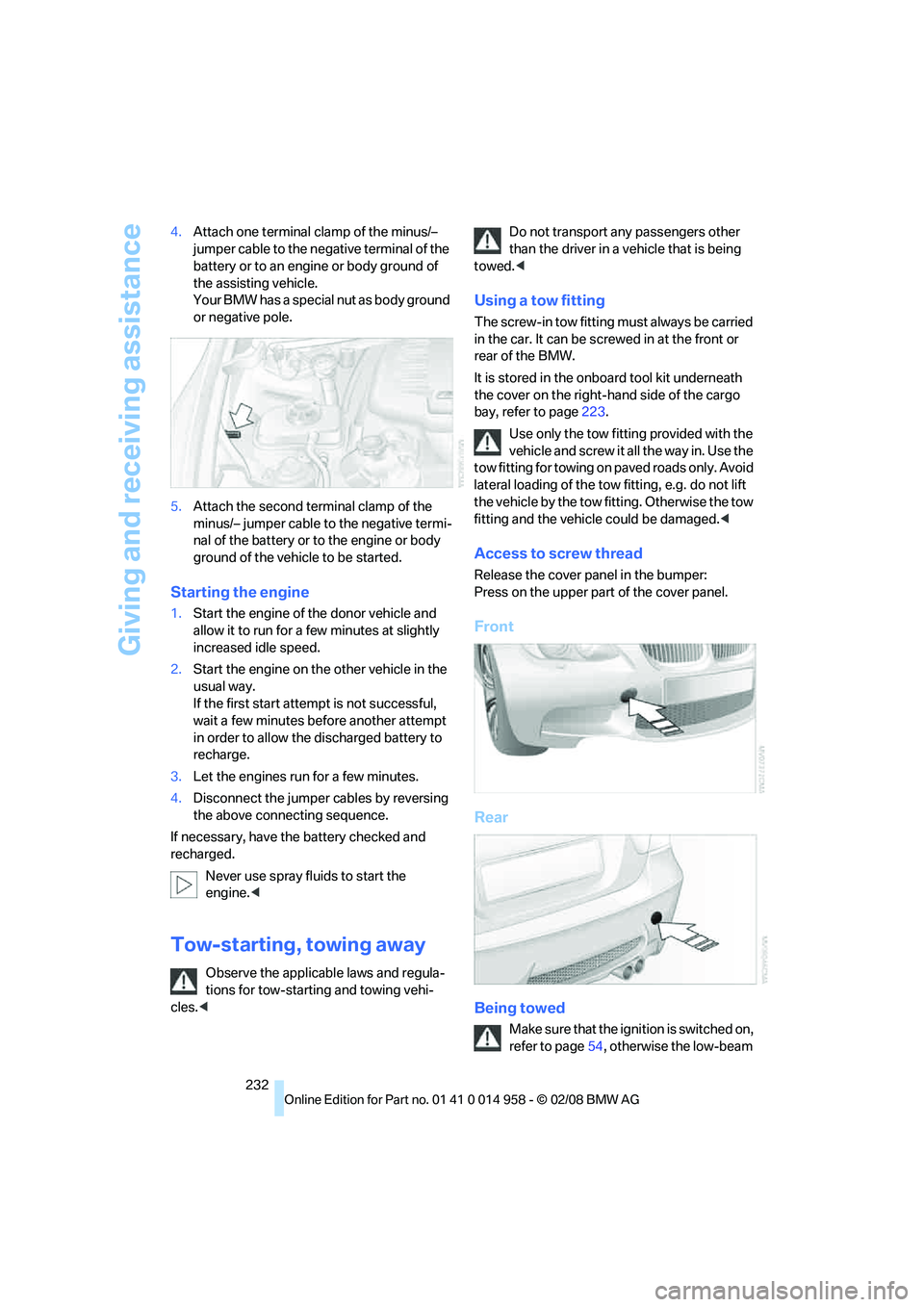
Access to screw thread
Release the cover panel in the bumper:
Press on the upper part of the cover panel.
Front
Rear
Being towed
Make sure that the ignition is switched on,
refer to page54, otherwise the low-beam
Page 249 of 266
Reference 247
At a glance
Controls
Driving tips
Communications
Navigation
Entertainment
Mobility
Automatic climate control96
– automatic air distribution98
– settings via iDrive97
Automatic curb monitor46
"Automatic programs" with
automatic climate control98
Automatic recirculated-air
control AUC98
Automatic station search157
Automatic transmission with
Steptronic
– towing232
– tow-starting232
"Automatic ventilation"100
AUTO program for automatic
climate control98
"Auto Request"195
"Autostore"
– on the radio158
"AUX"152,171,173
– AUX-In port171
– USB-audio interface172
AUX-In port171
Average fuel consumption69
– setting the units71
"Avoid ferries" in
navigation137
"Avoid highways" in
navigation137
Avoid highways in
navigation137
Avoiding unintentional
alarms35
"Avoid tollroads" in
navigation137
Axle loads, refer to
Weights240
"A - Z"185,186
B
Backrest contour, refer to
Lumbar support41
Backrests, refer to Seat
adjustment41
Backrest width adjustment42
Back seats
– refer to Rear seats42Backup lamps
– replacing bulb225,226
Backup lamps, refer to Tail
lamps225
Balance, tone control153
Band-aids, refer to First-aid
pouch231
Bar, refer to Towing
methods233
Base plate for telephone or
mobile phone
– refer to Snap-in adapter in
the center armrest storage
compartment106
Bass, tone control153
Bass sounds, refer to Treble
and bass153
Battery228
– charging228
– disposal37,228
– jump starting231
– remote control28
– temporary power failure228
Battery renewal
– remote control37
– remote control for vehicle36
Being towed232
Belts, refer to Safety belts44
Belt tensioner, refer to Safety
belts44
Beverage holders, refer to
Cup holders107
Blower, refer to Air flow
rate98
Bluetooth, refer to separate
Owner's Manual
BMW
– car shampoo216
"BMW
Assist"194,195,196,197
BMW Assist
– activating198
– Concierge service197
– contacting BMW Customer
Relations196
– Roadside Assistance194
– services offered193
– TeleServices195
"BMW Contact"188"BMW Contact
Numbers"188
BMW Homepage4
BMW Maintenance
System212
"BMW Service settings"199
BMW Teleservice Call
– automatic195
– manual195
BMW TeleServices195
– displaying196
– updating196
BMW webpage4
Bottle holders, refer to Cup
holders107
Brake assist82
Brake fluid, refer to Service
requirements72
Brake Force Display89
Brake lamps
– replacing bulb225,226
– two-stage89
Brake pads114
– breaking in114
Brake rotors115
– brakes114
– breaking in114
Brakes
– ABS82
– BMW Maintenance
System212
– breaking in114
– parking brake56
– service requirements72
Brakes, refer to Braking
safely115
Brake system114
– BMW Maintenance
System212
– breaking in114
– disc brakes115
Breakdown services, refer to
Roadside Assistance230
Breaking in the clutch114
Breaking in the differential,
refer to Engine and
differential114
Break-in period114
Page 250 of 266
Everything from A - Z
248 Brightness of the Control
Display80
"Brightness" on the Control
Display80
Bulb changing, refer to Lamps
and bulbs223
Button for starting the engine,
refer to Start/stop button54
Buttons on the steering
wheel11
C
California Proposition 65
warning6
"Call"186,197
Call
– accepting184
– displaying accepted186
– ending185
– missed186
– starting185
Calling
– from phone book185
– from Top 8 list186
– redialing186
Can holders, refer to Cup
holders107
Capacities241
Capacity of the cargo bay240
Car battery, refer to Vehicle
battery228
Car care, refer to Care214
"Car Data"69Care214
– automatic car washes214
– care products214
– carpets216
– CD/DVD drives216
– chrome parts215
– displays216
– exterior214
– fine wood parts216
– headlamps215
– high-pressure washer214
– interior216
– leather216
– light-alloy wheels215
– paintwork215
– plastic parts216
– rubber seals215
– safety belts216
– sensors and cameras216
– upholstery and cloth
trim216
– washing the car
manually215
– windows215
– wiper blades215
Cargo, securing117
Cargo bay
– capacity240
– convenient access36
– folding up the floor
panel110
– lamp, refer to Interior
lamps95
– opening from inside33
– opening from outside
33
Cargo loading
– securing cargo117
– stowing cargo117
– vehicle116
Car jack
– jacking points228
Car key, refer to Remote
control28
Car phone178
– installation location, refer to
Center armrest106
– refer to Mobile phone178
– refer to separate Owner's
ManualCar radio, refer to Radio156
Car shampoo216
Car wash
– before driving into56
Catalytic converter, refer to
Hot exhaust system114
"Categories" for satellite
radio163
CBS Condition Based
Service212
"CD"152,165
CD changer165
– compressed audio files165
– controls152
– fast forward/reverse169
– installation location169
– playing a track167
– random order168
– repeating a track168
– selecting a CD165
– selecting a track166
– switching on/off152
– tone control153
– volume153
CD player165
– compressed audio files165
– controls152
– fast forward/reverse169
– playing a track167
– random order168
– repeating a track168
– selecting a track166
– switching on/off152
– tone control153
– volume153
Center armrest106
Center brake lamp, replacing
bulb226
Center console, refer to
Around the center
console14
"Central locking"
30
Central locking
– from inside32
– from outside29
Central locking system29
– convenient access35
– hotel function33