rear entertainment BMW M3 2008 Owner's Manual
[x] Cancel search | Manufacturer: BMW, Model Year: 2008, Model line: M3, Model: BMW M3 2008Pages: 266, PDF Size: 8.85 MB
Page 231 of 266
Mobility
229Reference
At a glance
Controls
Driving tips
Communications
Navigation
Entertainment
>Radio
In some cases, stations may have to be
stored again, refer to page158.
>Navigation system
Operability must be waited for, refer to
page124.
>Glass roof
It may happen that the roof can only be
raised. The system must be initialized.
Please contact your BMW center.
>Seat and mirror memory
The positions must be stored again, refer to
page43.
>Inside rearview mirror with digital compass
The system must be calibrated, refer to
page104.
Fuses
Never attempt to repair a blown fuse and
do not replace a defective fuse with a sub-
stitute of another color or amperage rating, oth-
erwise this could lead to a circuit overload, ulti-
mately resulting in a fire in the vehicle.<
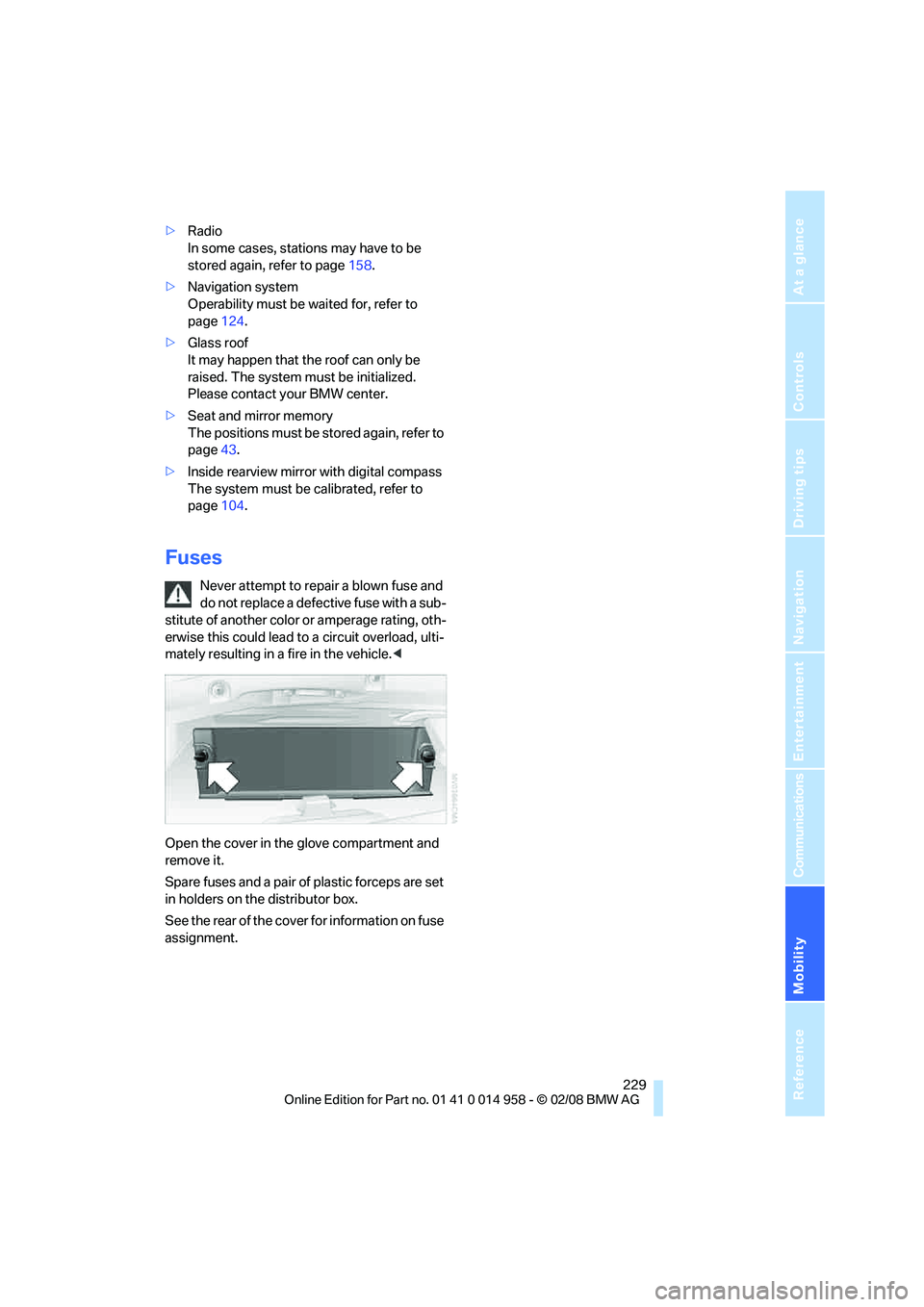
Open the cover in the glove compartment and
remove it.
Spare fuses and a pair of plastic forceps are set
in holders on the distributor box.
See the rear of the cover for information on fuse
assignment.
Page 235 of 266
Mobility
233Reference
At a glance
Controls
Driving tips
Communications
Navigation
Entertainment
headlamps, tail lamps, turn signal indicators and
windshield wipers may be unavailable.
Power steering assistance is not available when
the engine is not running. Thus, braking and
steering will require increased effort.<
Manual transmission
Gearshift lever in neutral position.
M dual clutch transmission with
Drivelogic
Ensure that the parking lock P is not
engaged as the rear wheels will otherwise
be blocked.
When using the car wash function, refer to
page56, note that the parking lock P is
engaged automatically after approx. 30 min-
utes, blocking the rear wheels.
If an electrical malfunction occurs or if towing
takes longer than approx. 20 minutes, manually
release the parking lock, refer to page59.<
When towing, do not exceed a maximum
speed of 30 mph/50 km/h and a maxi-
mum distance of 30 miles/50 km, otherwise the
transmission can be damaged.<
BMW recommends transporting the vehicle on
a tow truck with a flat bed.
Towing methods
Do not lift the vehicle by a tow fitting or
body and chassis parts, otherwise dam-
age may result.<
With a tow bar
The towing vehicle must not be lighter
than the towed vehicle, otherwise it may
be impossible to maintain control.<
The tow fittings used should be on the same
side on both vehicles. Should it prove impossi-
ble to avoid mounting the tow bar at an angle,
please observe the following:
>Clearance and maneuvering capability will
be sharply limited during cornering.
>The tow bar will generate lateral forces if it is
attached offset.Attach the tow bar to the tow fittings only,
as attaching it to other parts of the vehicle
could result in damage.<
With a tow rope
When starting off in the towing vehicle, make
sure that the tow rope is taut.
To avoid jerking and the associated
stresses on vehicle components when
towing, always use nylon ropes or nylon straps.
Attach the tow rope to the tow fittings only, as
attaching it to other parts of the vehicle could
result in damage.<
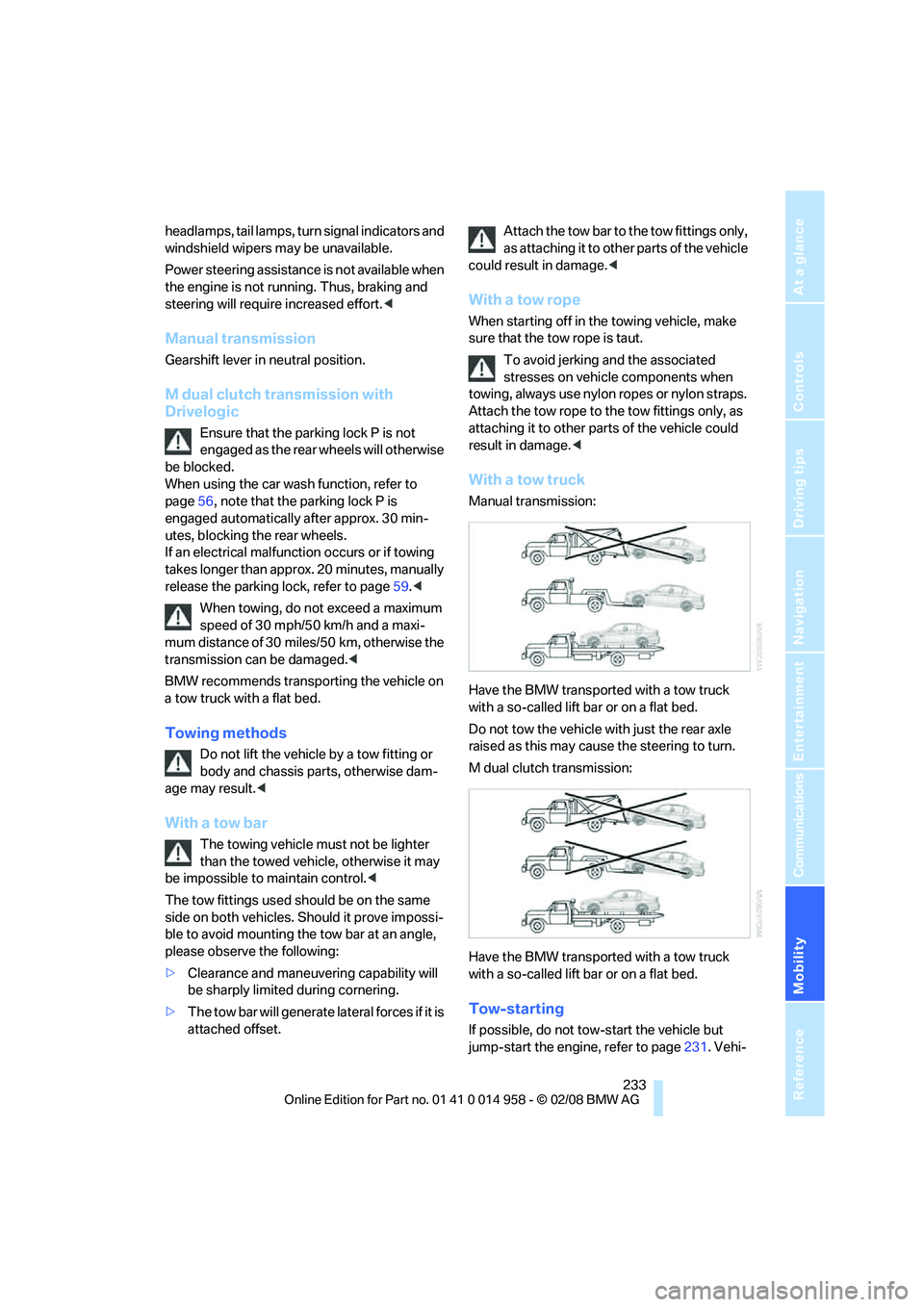
With a tow truck
Manual transmission:
Have the BMW transported with a tow truck
with a so-called lift bar or on a flat bed.
Do not tow the vehicle with just the rear axle
raised as this may cause the steering to turn.
M dual clutch transmission:
Have the BMW transported with a tow truck
with a so-called lift bar or on a flat bed.
Tow-starting
If possible, do not tow-start the vehicle but
jump-start the engine, refer to page231. Vehi-
Page 249 of 266
Reference 247
At a glance
Controls
Driving tips
Communications
Navigation
Entertainment
Mobility
Automatic climate control96
– automatic air distribution98
– settings via iDrive97
Automatic curb monitor46
"Automatic programs" with
automatic climate control98
Automatic recirculated-air
control AUC98
Automatic station search157
Automatic transmission with
Steptronic
– towing232
– tow-starting232
"Automatic ventilation"100
AUTO program for automatic
climate control98
"Auto Request"195
"Autostore"
– on the radio158
"AUX"152,171,173
– AUX-In port171
– USB-audio interface172
AUX-In port171
Average fuel consumption69
– setting the units71
"Avoid ferries" in
navigation137
"Avoid highways" in
navigation137
Avoid highways in
navigation137
Avoiding unintentional
alarms35
"Avoid tollroads" in
navigation137
Axle loads, refer to
Weights240
"A - Z"185,186
B
Backrest contour, refer to
Lumbar support41
Backrests, refer to Seat
adjustment41
Backrest width adjustment42
Back seats
– refer to Rear seats42Backup lamps
– replacing bulb225,226
Backup lamps, refer to Tail
lamps225
Balance, tone control153
Band-aids, refer to First-aid
pouch231
Bar, refer to Towing
methods233
Base plate for telephone or
mobile phone
– refer to Snap-in adapter in
the center armrest storage
compartment106
Bass, tone control153
Bass sounds, refer to Treble
and bass153
Battery228
– charging228
– disposal37,228
– jump starting231
– remote control28
– temporary power failure228
Battery renewal
– remote control37
– remote control for vehicle36
Being towed232
Belts, refer to Safety belts44
Belt tensioner, refer to Safety
belts44
Beverage holders, refer to
Cup holders107
Blower, refer to Air flow
rate98
Bluetooth, refer to separate
Owner's Manual
BMW
– car shampoo216
"BMW
Assist"194,195,196,197
BMW Assist
– activating198
– Concierge service197
– contacting BMW Customer
Relations196
– Roadside Assistance194
– services offered193
– TeleServices195
"BMW Contact"188"BMW Contact
Numbers"188
BMW Homepage4
BMW Maintenance
System212
"BMW Service settings"199
BMW Teleservice Call
– automatic195
– manual195
BMW TeleServices195
– displaying196
– updating196
BMW webpage4
Bottle holders, refer to Cup
holders107
Brake assist82
Brake fluid, refer to Service
requirements72
Brake Force Display89
Brake lamps
– replacing bulb225,226
– two-stage89
Brake pads114
– breaking in114
Brake rotors115
– brakes114
– breaking in114
Brakes
– ABS82
– BMW Maintenance
System212
– breaking in114
– parking brake56
– service requirements72
Brakes, refer to Braking
safely115
Brake system114
– BMW Maintenance
System212
– breaking in114
– disc brakes115
Breakdown services, refer to
Roadside Assistance230
Breaking in the clutch114
Breaking in the differential,
refer to Engine and
differential114
Break-in period114
Page 255 of 266
Reference 253
At a glance
Controls
Driving tips
Communications
Navigation
Entertainment
Mobility
Heating and ventilation, refer
to Climate96
Heating while at a standstill,
refer to Using residual
heat99
Heavy loads, refer to Stowing
cargo117
Height, refer to
Dimensions239
Height adjustment
– seats41
– steering wheel46
High beams94
– headlamp flasher94
– indicator lamp13
High Definition Radio159
High-pressure
washer214,215
High water, refer to Driving
through water115
Highways, refer to Route
criteria137
Hills115
Holders for cups107
Home address136
"Home address" in
navigation137
Homepage BMW4
Hood218
Hooks for shopping bags109
Horn10,11
Hotel function33
Hot exhaust system114
"Hour memo"76
"House number" in
destination entry129
Hydraulic brake assist, refer to
Brake assist82
Hydroplaning115
I
IBOC, refer to High Definition
Radio159
Ice warning, refer to Outside
temperature warning67
ID3 tag, refer to Information
about the track167Identification marks, tire
coding208
iDrive16
– adjusting brightness80
– assistance window20
– automatic climate control97
– changing language79
– changing units of measure
and display format71
– confirming selection or
entry19
– controls16
– displays, menus17
– menu guidance17
– operating principle16
– overview16
– selecting a menu item19
– setting the date and time74
– start menu17
– status information20
– switching menu pages19
– symbols18
iDrive operating principle16
Ignition54
– switched off55
– switched on54
Ignition key, refer to Remote
control28
Ignition key position 1, refer to
Radio readiness54
Ignition key position 2, refer to
Ignition on54
Ignition lock54
i menu18
Imprint2
Indicator and warning
lamps13
– MDrive49
– M Dynamic Mode83
– Tire Pressure Monitor
TPM88
Individual air distribution97
Individually programmable
buttons on steering
wheel47
Inflation pressure, refer to Tire
inflation pressure206Inflation pressure monitoring,
refer to Tire Pressure
Monitor TPM86
Information
– on another location132
– on country132
– on current position132
– on destination location132
Information menu, refer to
i menu18
"Information on
destination"134
"Info sources"73
Initializing
– after power failure228
– compass, refer to Digital
compass, calibrating104
– Flat Tire Monitor FTM85
– glass roof39
"Input map"131
Installation location
– CD changer169
– navigation DVD drive124
– telephone106
Instructions for navigation
system, refer to Voice
instructions142
Instrument cluster12
Instrument lighting94
Instrument panel, refer to
Cockpit10
Integrated key28
Integrated universal remote
control102
Interesting destination for
navigation132
"Interim time"79
Interior lamps95
– remote control30
Interior motion sensor35
Interior rearview mirror46
– automatic dimming
feature46
– compass104
Intermittent mode of the
wipers64
Page 257 of 266
Reference 255
At a glance
Controls
Driving tips
Communications
Navigation
Entertainment
Mobility
M dual clutch transmission
with Drivelogic57
– kick-down58
– Launch Control62
– neutral58
– reverse gear58
– sequential mode58
– Shift Lights61
– shiftlock58
– tow-starting234
– unlocking transmission lock
manually59
"M Dynamic Mode"83
M Dynamic Mode MDM82
– indicator lamp83
Measurements, refer to
Dimensions239
Memory, refer to Seat and
mirror memory43
M Engine Dynamics
Control63
MENU button16
Menus
– Control Display17
Menus, refer to iDrive16
Message list, traffic
information144
Microfilter
– BMW Maintenance
System212
– for automatic climate
control100
Microfilter/activated-charcoal
filter
– BMW Maintenance
System212
Microphone
– telephone14
– voice input14
Mirror dimming feature46
Mirrors45
– automatic curb monitor46
– exterior mirrors45
– heating46
– interior rearview mirror46
– memory, refer to Seat and
mirror memory43
"Missed calls"186
Missed calls186M Mobility Set226
Mobile phone
– accepted calls186
– adjusting volume183
– calling185
– ending call185
– installation location, refer to
Center armrest106
– missed calls186
– operation via iDrive183
– redialing186
– refer to separate Owner's
Manual
– Top 8186
– touch tone dialing188
Mobile phone, installation
location, refer to Center
armrest106
Mobile phone, refer to the
separate Owner's Manual
Modifications, technical, refer
to For your own safety5
Monitor, refer to iDrive
controls16
Monitoring system for tire
pressures, refer to Flat Tire
Monitor84
"Monitor on / off"47
Most recent mobile phone
numbers186
MP3, refer to Compressed
audio files165
"M settings"48,49
Multifunctional steering
wheel, refer to Buttons on
the steering wheel11
Multifunction switch
– refer to Turn signals/
headlamp flasher63
– refer to Wiper system64
Multimedia screen, refer to
iDrive16
Music tracks, refer to
Tracks166
"Mute on / off"47
N
"Navigation"126,132Navigation announcements,
refer to Switching voice
instructions on/off142
Navigation drive, location124
Navigation DVD124
– drive152
Navigation system124
– address book134
– changing a route143
– destination entry126
– destination guidance in
assistance window124
– destination list133
– displaying current
position147
– entering a destination
manually126,130
– last destinations133
– navigation DVD124
– opening126
– route display140
– route list142
– searching for a special
destination132
– selecting destination using
information132
– selecting destination via
map131
– selecting route criteria137
– starting destination
guidance139
– switching off, refer to
Terminating/continuing
destination guidance139
– terminating/continuing
destination guidance139
– voice instructions142
– volume adjustment143
"Navigation voice
instructions"125
"Navigation voice
instructions" via buttons on
the steering wheel47
Neck support, refer to Head
restraints42
Nets, refer to Storage
compartments106
Neutral58
Page 259 of 266
Reference 257
At a glance
Controls
Driving tips
Communications
Navigation
Entertainment
Mobility
Pressure monitoring of tires,
refer to Tire Pressure
Monitor TPM86
Programmable buttons on the
steering wheel11
Programmable memory
keys21
Protection function, refer to
Pinch protection system
– glass roof, electric38
– windows37
Providing medical assistance,
refer to First aid pouch231
Puncture
– Flat Tire Monitor84
R
Radio
– autostore157
– controls152
– High Definition Radio159
– listening to stations156
– sampling stations157
– satellite radio162
– selecting a
waveband152,156
– selecting the frequency
manually157
– station search157
– stations with best
reception157
– storing stations158
– switching on/off152
– tone control153
– volume153
Radio-operated key, refer to
Remote control28
Radio position, refer to Radio
readiness54
Radio readiness54
– switched off55
– switched on54
Rain sensor64
"Random", refer to Random
play168
"Random all" for audio
mode169"Random directory" for audio
mode169
Random play168
"RDS" Radio Data
System159
Reading lamps95
Rear lamps, refer to Tail
lamps225
– replacing bulb225,226
Rear seats
– adjusting head restraints42
– folding down backrests108
– folding head restraint down
and up43
Rear turn signals
– replacing bulb225
Rear ventilation100
Rearview mirror, refer to
Mirrors45
Rear window blind, refer to
Roller sun blinds105
Rear window defroster99
Rear window safety switch38
"Received calls"186
Receiving level of mobile
phone, refer to Status
information20
Recirculated-air mode98
Recirculation of air, refer to
Recirculated-air mode98
Reclining seat, refer to
Backrest41
Recording times, refer to
Stopwatch79
"Redial" on the mobile
phone186
Refueling204
Releasing
– hood218
Remaining distance, refer to
Cruising range69Remote control28
– battery renewal36
– convenient access35
– garage door opener102
– luggage compartment lid30
– malfunction31,36
– removing from the ignition
lock54
– service data212
"Repeat directory" for audio
mode168
"Repeat" for audio mode168
"Repeat track" for audio
mode168
Replacement remote
control28
Replacing bulbs, refer to
Lamps and bulbs223
Replacing tires209
Replacing tires, refer to New
wheels and tires209
Reporting safety defects6
Reserve warning, refer to Fuel
gauge68
"Reset"85,87
– tone settings155
Reset, refer to Resetting tone
settings155
"Reset" for stopwatch79
"Reset to default" for
MDrive48
Residual heat99
Restraint systems
– for children51
– refer to Safety belts44
Reverse
– CD changer169
– CD player169
Reverse gear58
– manual transmission57
Road map141
"Roadside Assistance"194
Roadside
Assistance194,230
Roadside parking lamps94
Roadworthiness test, refer to
Service requirements72
Roller blind
– sun blinds105
Page 263 of 266
Reference 261
At a glance
Controls
Driving tips
Communications
Navigation
Entertainment
Mobility
Towing232
– with manual
transmission233
– with M dual clutch
transmission233
Towing and tow-starting232
Towing methods233
Town/city for destination127
"Town / City" in destination
entry127
Tow rope233
Tow-starting232,233
"TPM"87
TPM, refer to Tire Pressure
Monitor86
Tracks
– random play sequence168
– sampling, Scan167
– searching for167
Traction control, refer to
Dynamic Stability Control
DSC82
Traffic information for
navigation
– calling up144
– display on route map145
– during destination
guidance146
– switching on/off143
– symbols146
"Traffic Info settings"144
Traffic jam
– displaying traffic
information143
– driving around146
Transmission
– Drivelogic60
– Launch Control62
– manual transmission56
– reverse gear58
– Shift Lights61
– unlocking transmission lock
manually59
Transmission lock, unlocking
manually59
Transporting children
safely51
Transport securing devices,
refer to Securing cargo117Tread depth, refer to Minimum
tire tread209
Treble, refer to Treble and
bass153
Treble, tone control153
"Trip computer"70
Trip computer70
Trip-distance counter, refer to
Trip odometer67
"Triple turn signal"64
Triple turn signal activation63
Trip odometer67
Trunk lid, refer to Luggage
compartment lid33
Turning circle, refer to
Dimensions239
Turn signal indicators
– indicator/warning lamp12
– triple turn signal63
Turn signals63
Tying down loads, refer to
Cargo loading117
U
"Unchanged"48,61
Uniform Tire Quality Grading/
UTQR208
"Units"71
Units
– average consumption71
– temperature71
Universal garage door opener,
refer to Integrated universal
remote control102
Universal mobile phone
preparation package, refer
to separate Owner's Manual
Universal remote control102
Unlatching, refer to
Unlocking35
"Unlock button"30
Unlocking
– from inside32
– from outside29
– luggage compartment lid36
– without remote control, refer
to Convenient access35
"Update services"196,198USB-audio interface172
"USB" for audio
mode171,173
V
Vehicle
– battery228
– breaking in114
– cargo loading116
– Identification Number, refer
to Engine compartment219
– measurements, refer to
Dimensions239
– parking55
– weight240
"Vehicle / Tires" for
unlocking30
Vehicle jack228
Vehicle position, refer to
Displaying current
position147
Vehicle storage217
Ventilation99
– draft-free99
– in the rear100
Ventilation, refer to Climate96
Ventilation while at a
standstill100
Vents, refer to Ventilation99
"Vent settings"97
Voice commands
– overview23
– short commands242
Voice instructions from
navigation system142
– muting47,143
– repeating47,143
– switching on/off142
– volume143
Voice phone book190
Volume152
– audio sources152
– fuel tank, refer to
Capacities241
– mobile phone183
– speed-dependent
control153
– voice instructions143