navigation system BMW M3 2008 Workshop Manual
[x] Cancel search | Manufacturer: BMW, Model Year: 2008, Model line: M3, Model: BMW M3 2008Pages: 266, PDF Size: 8.85 MB
Page 215 of 266
Mobility
213Reference
At a glance
Controls
Driving tips
Communications
Navigation
Entertainment
Socket for On-Board
Diagnosis OBD
Primary components that make up exhaust
emissions can be checked by a device via the
OBD socket.
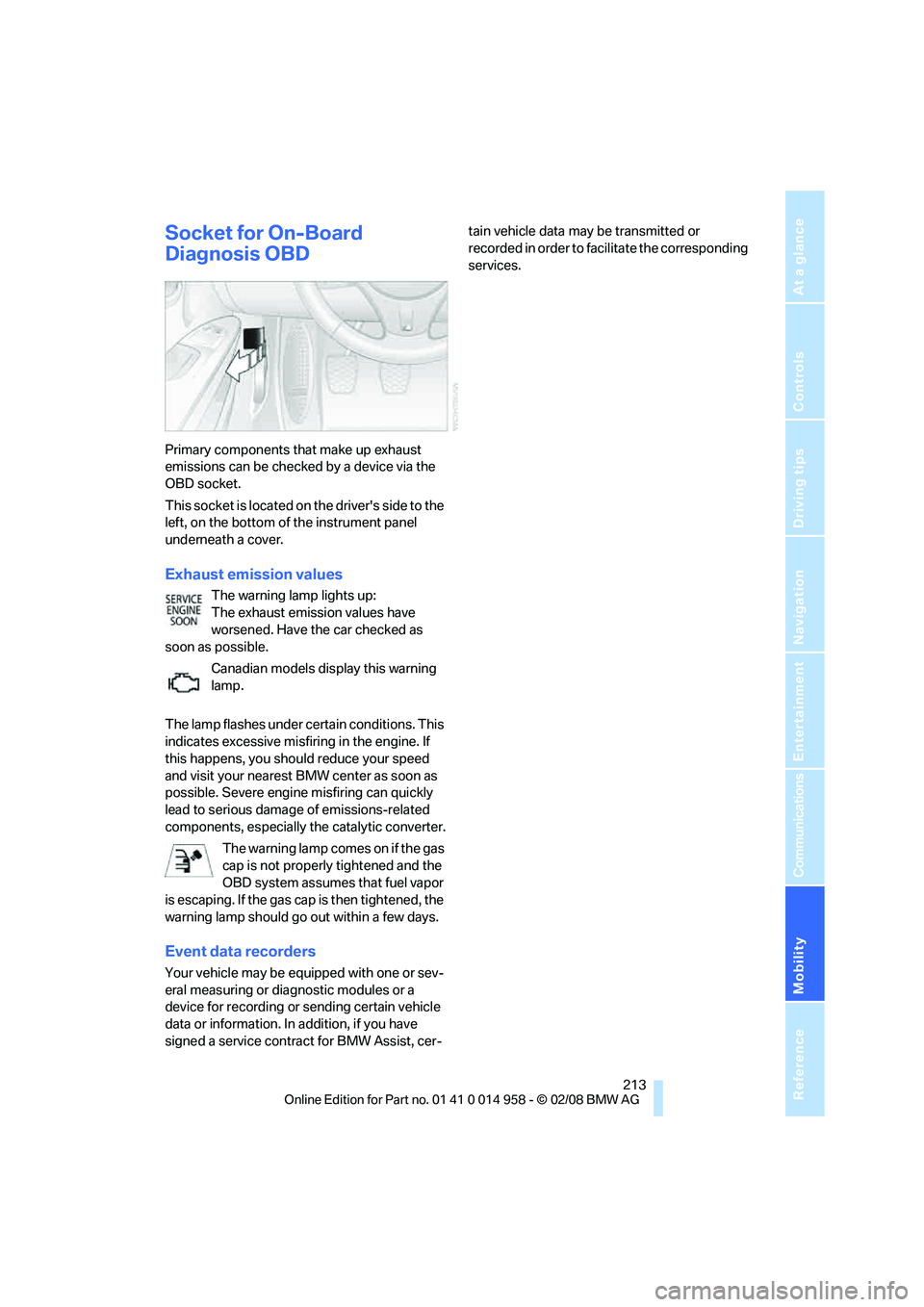
This socket is located on the driver's side to the
left, on the bottom of the instrument panel
underneath a cover.
Exhaust emission values
The warning lamp lights up:
The exhaust emission values have
worsened. Have the car checked as
soon as possible.
Canadian models display this warning
lamp.
The lamp flashes under certain conditions. This
indicates excessive misfiring in the engine. If
this happens, you should reduce your speed
and visit your nearest BMW center as soon as
possible. Severe engine misfiring can quickly
lead to serious damage of emissions-related
components, especially the catalytic converter.
The warning lamp comes on if the gas
cap is not properly tightened and the
OBD system assumes that fuel vapor
is escaping. If the gas cap is then tightened, the
warning lamp should go out within a few days.
Event data recorders
Your vehicle may be equipped with one or sev-
eral measuring or diagnostic modules or a
device for recording or sending certain vehicle
data or information. In addition, if you have
signed a service contract for BMW Assist, cer-tain vehicle data may be transmitted or
recorded in order to facilitate the corresponding
services.
Page 221 of 266

Mobility
219Reference
At a glance
Controls
Driving tips
Communications
Navigation
Entertainment
Important parts of the engine compartment
1Expansion tank for coolant, refer to
page222
2Washer fluid filler neck for headlamp clean-
ing system and window washer system,
refer to page653Jump-starting connection, refer to
page231
4Filler neck for engine oil, refer to Adding
engine oil
Engine oil
The engine oil consumption is dependent on
driving style and driving conditions.
Checking oil level
Your car is equipped with an electronic oil-level
monitor.
The oil level can be displayed when the engine
is warm. Continuous short distance travel or a
very sporty driving style may make measure-
ment impossible.
Display in the instrument cluster
1Oil level
2Maximum mark
3Minimum mark
4Computer button
Page 223 of 266

Mobility
221Reference
At a glance
Controls
Driving tips
Communications
Navigation
Entertainment
4.Select "Service Info" and press the control-
ler.
5.If necessary, move the highlight marker to
the uppermost field. Turn the controller
until "Service requirements" is selected and
press the controller.
6.If necessary, move the highlight marker to
the second field from the top. Turn the con-
troller until "Engine oil level" is selected and
press the controller. The oil level is dis-
played.
Possible messages
>"Engine oil level O.K."
>"No measurement available: Updating
engine oil level measurement..."
The engine oil level is measured. This can
take about 1 minute if the car is at a stand-
still on a level surface and the engine is run-
ning, or about 5 minutes while the car is
moving.
If engine oil was added, it can take up to
30 minutes to get an oil level reading.
>"Oil level at the minimum! Refill with 1 quart
of engine oil."
Add engine oil as soon as possible, but no
more than 1 US quart/1 liter, refer also to
Adding engine oil below. Add at least
0.5 US quart/0.5 liters, otherwise the oil-
level monitor will be unable to display the
new value reliably.
If the oil level is below the minimum value,
add engine oil immediately to avoid engine
damage.
>"Engine oil level too high"Have the vehicle checked immedi-
ately, otherwise the excess oil may
lead to engine damage.<
>"Please observe recalculated service inter-
val for engine oil"
Do not add engine oil. Before resuming your
trip, note the newly calculated distance
remaining to the next oil service, refer to
page72. Have the system checked as soon
as possible.
Adding engine oil
Do not add 1 US quart/1 liter of engine oil until a
corresponding message is shown on the Con-
trol Display.
Add oil within the next 125 miles/200 km,
otherwise the engine could be damaged.
Add no more than 1 US quart/1 liter of oil, oth-
erwise too much engine oil can lead to engine
damage. Add at least 0.5 US quart/0.5 liters,
otherwise the oil-level monitor will be unable to
display the new value reliably.<
Keep oils, greases, etc. out of the reach of
children and comply with the relevant
warnings on the containers. Otherwise, health
hazards may result.<
Oil change
Have oil changed only at your BMW center or at
a workshop that works according to BMW
repair procedures with correspondingly trained
personnel.
Specified engine oils
The quality of the engine oil selected has critical
significance for the operation and service life of
an engine. BMW continuously approves spe-
Page 225 of 266
Mobility
223Reference
At a glance
Controls
Driving tips
Communications
Navigation
Entertainment
Replacing components
Onboard tool kit
The onboard tool kit is stored in a compartment
on the right-hand side of the cargo bay.
Remove the cover.
Wiper blades
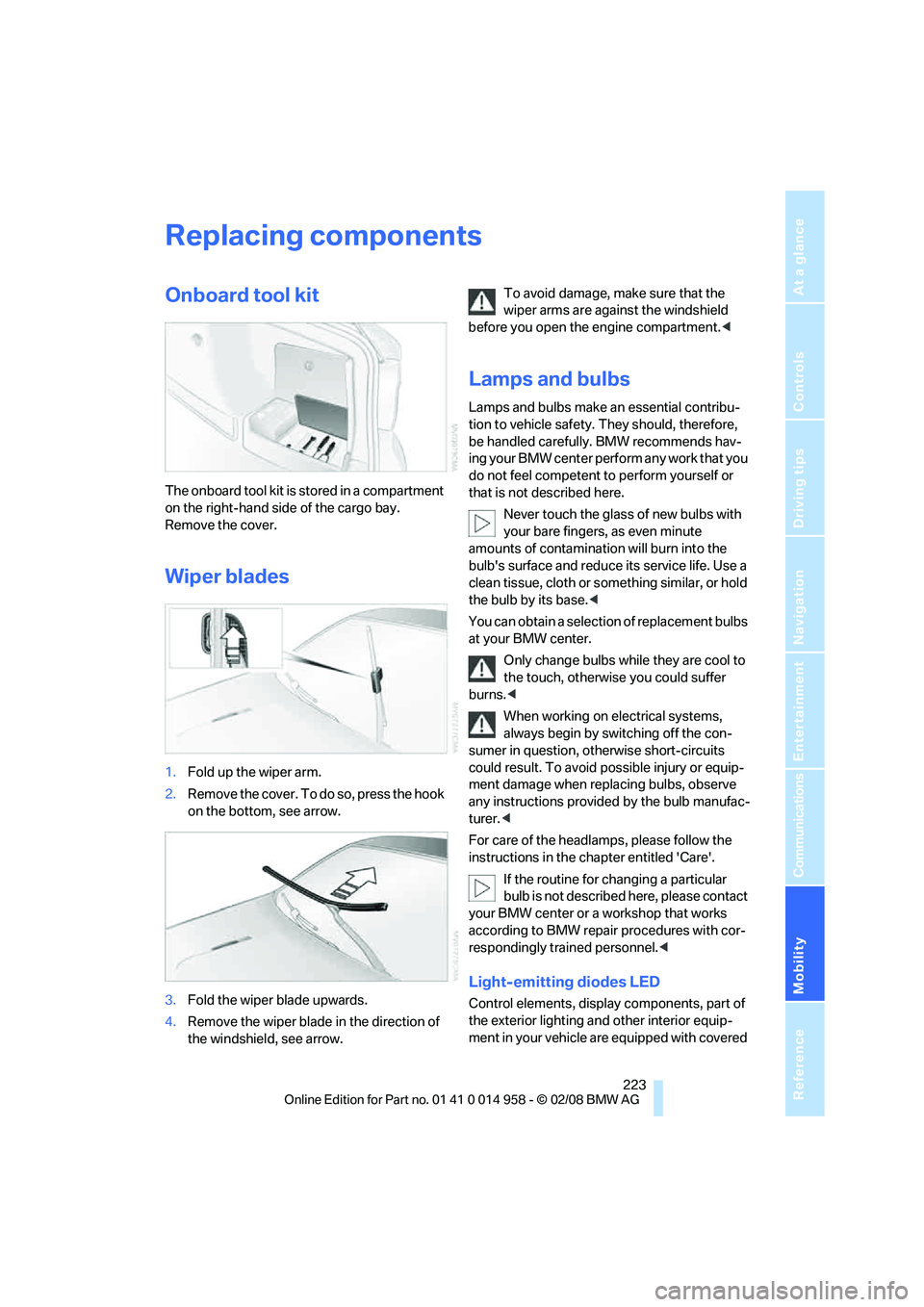
1.Fold up the wiper arm.
2.Remove the cover. To do so, press the hook
on the bottom, see arrow.
3.Fold the wiper blade upwards.
4.Remove the wiper blade in the direction of
the windshield, see arrow.To avoid damage, make sure that the
wiper arms are against the windshield
before you open the engine compartment.<
Lamps and bulbs
Lamps and bulbs make an essential contribu-
tion to vehicle safety. They should, therefore,
be handled carefully. BMW recommends hav-
ing your BMW center perform any work that you
do not feel competent to perform yourself or
that is not described here.
Never touch the glass of new bulbs with
your bare fingers, as even minute
amounts of contamination will burn into the
bulb's surface and reduce its service life. Use a
clean tissue, cloth or something similar, or hold
the bulb by its base.<
You can obtain a selection of replacement bulbs
at your BMW center.
Only change bulbs while they are cool to
the touch, otherwise you could suffer
burns.<
When working on electrical systems,
always begin by switching off the con-
sumer in question, otherwise short-circuits
could result. To avoid possible injury or equip-
ment damage when replacing bulbs, observe
any instructions provided by the bulb manufac-
turer.<
For care of the headlamps, please follow the
instructions in the chapter entitled 'Care'.
If the routine for changing a particular
bulb is not described here, please contact
your BMW center or a workshop that works
according to BMW repair procedures with cor-
respondingly trained personnel.<
Light-emitting diodes LED
Control elements, display components, part of
the exterior lighting and other interior equip-
ment in your vehicle are equipped with covered
Page 229 of 266
Mobility
227Reference
At a glance
Controls
Driving tips
Communications
Navigation
Entertainment
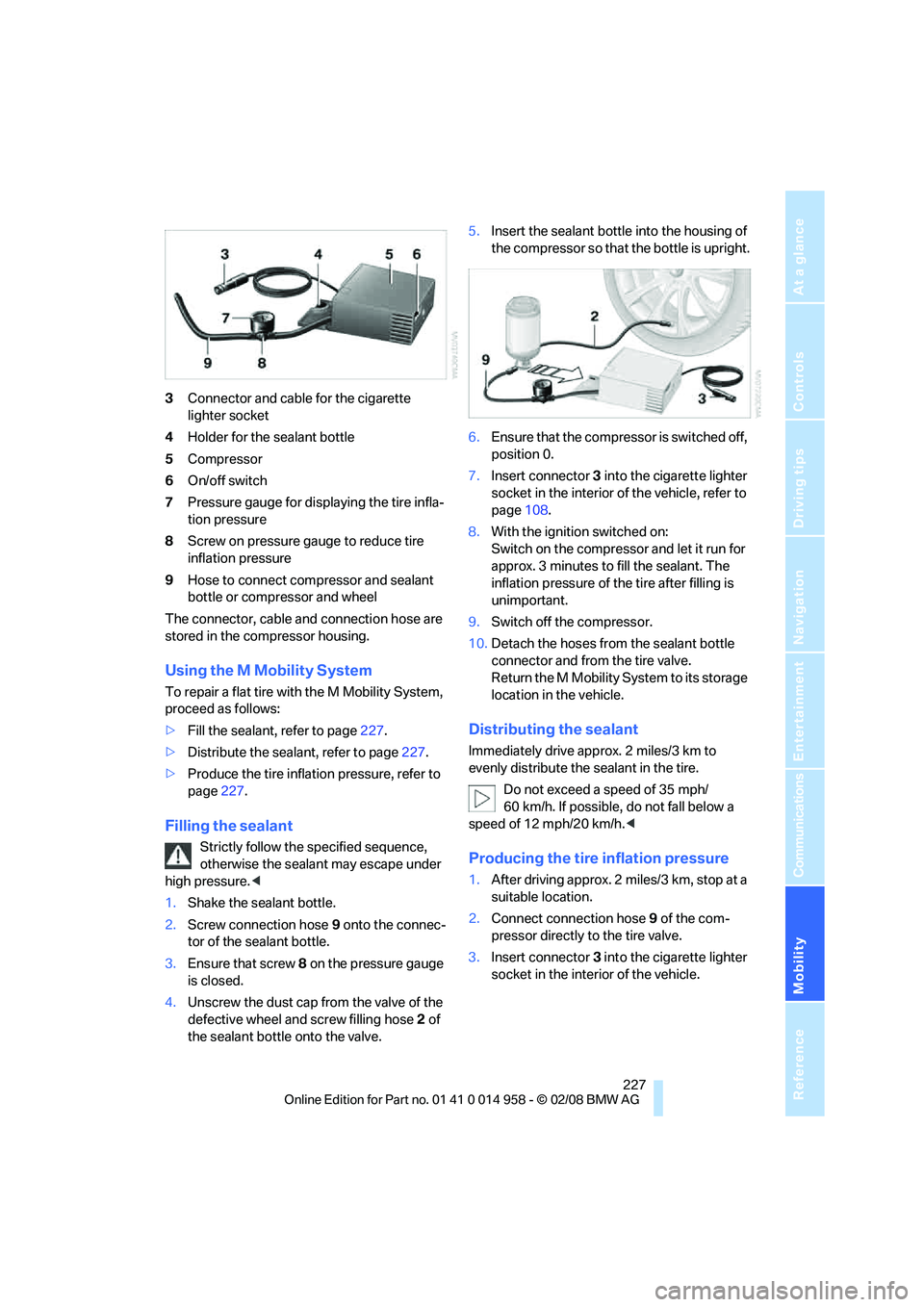
3Connector and cable for the cigarette
lighter socket
4Holder for the sealant bottle
5Compressor
6On/off switch
7Pressure gauge for displaying the tire infla-
tion pressure
8Screw on pressure gauge to reduce tire
inflation pressure
9Hose to connect compressor and sealant
bottle or compressor and wheel
The connector, cable and connection hose are
stored in the compressor housing.
Using the M Mobility System
To repair a flat tire with the M Mobility System,
proceed as follows:
>Fill the sealant, refer to page227.
>Distribute the sealant, refer to page227.
>Produce the tire inflation pressure, refer to
page227.
Filling the sealant
Strictly follow the specified sequence,
otherwise the sealant may escape under
high pressure.<
1.Shake the sealant bottle.
2.Screw connection hose 9 onto the connec-
tor of the sealant bottle.
3.Ensure that screw 8 on the pressure gauge
is closed.
4.Unscrew the dust cap from the valve of the
defective wheel and screw filling hose 2 of
the sealant bottle onto the valve.5.Insert the sealant bottle into the housing of
the compressor so that the bottle is upright.
6.Ensure that the compressor is switched off,
position 0.
7.Insert connector 3 into the cigarette lighter
socket in the interior of the vehicle, refer to
page108.
8.With the ignition switched on:
Switch on the compressor and let it run for
approx. 3 minutes to fill the sealant. The
inflation pressure of the tire after filling is
unimportant.
9.Switch off the compressor.
10.Detach the hoses from the sealant bottle
connector and from the tire valve.
Return the M Mobility System to its storage
location in the vehicle.
Distributing the sealant
Immediately drive approx. 2 miles/3 km to
evenly distribute the sealant in the tire.
Do not exceed a speed of 35 mph/
60 km/h. If possible, do not fall below a
speed of 12 mph/20 km/h.<
Producing the tire inflation pressure
1.After driving approx. 2 miles/3 km, stop at a
suitable location.
2.Connect connection hose9 of the com-
pressor directly to the tire valve.
3.Insert connector 3 into the cigarette lighter
socket in the interior of the vehicle.
Page 231 of 266
Mobility
229Reference
At a glance
Controls
Driving tips
Communications
Navigation
Entertainment
>Radio
In some cases, stations may have to be
stored again, refer to page158.
>Navigation system
Operability must be waited for, refer to
page124.
>Glass roof
It may happen that the roof can only be
raised. The system must be initialized.
Please contact your BMW center.
>Seat and mirror memory
The positions must be stored again, refer to
page43.
>Inside rearview mirror with digital compass
The system must be calibrated, refer to
page104.
Fuses
Never attempt to repair a blown fuse and
do not replace a defective fuse with a sub-
stitute of another color or amperage rating, oth-
erwise this could lead to a circuit overload, ulti-
mately resulting in a fire in the vehicle.<
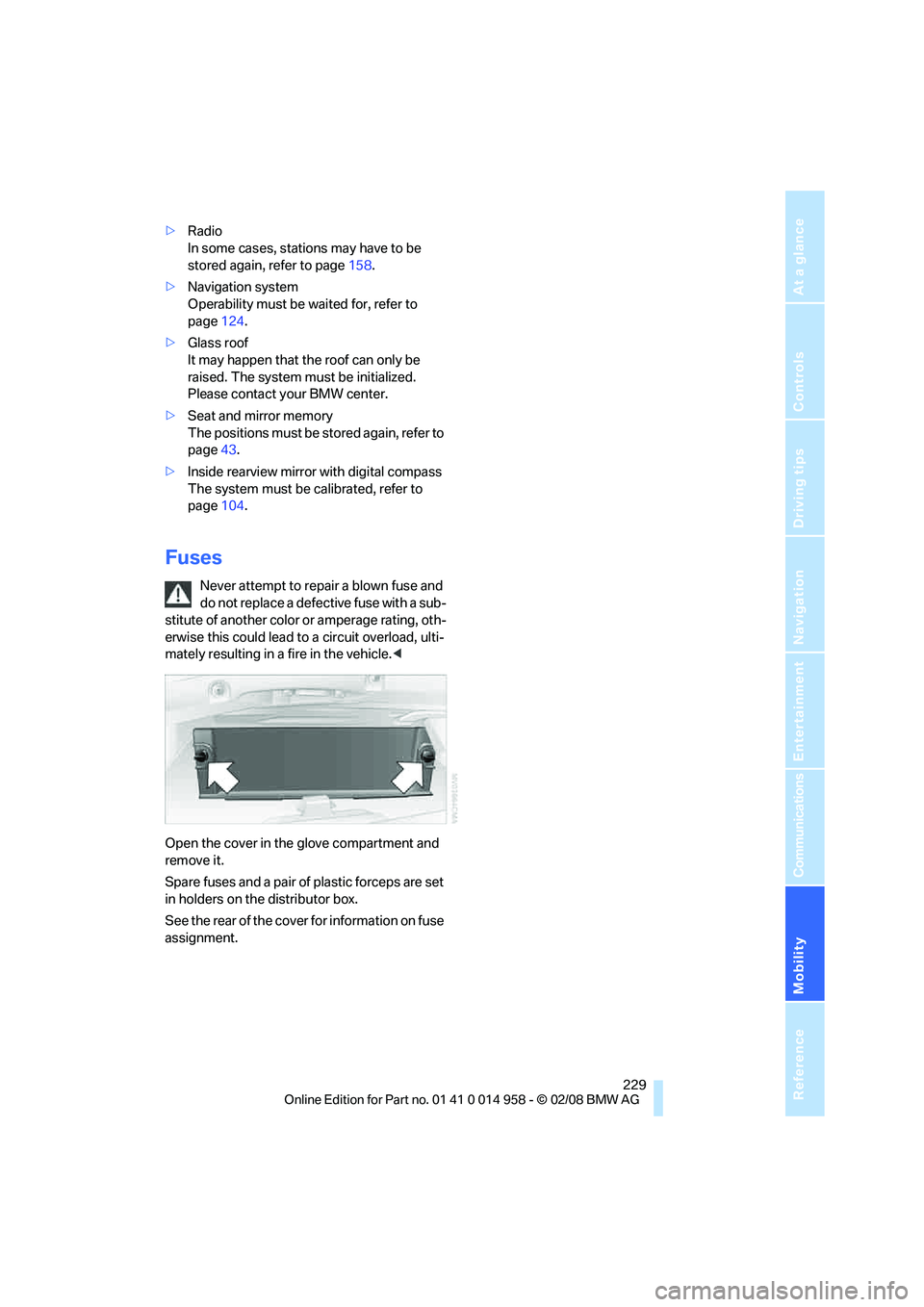
Open the cover in the glove compartment and
remove it.
Spare fuses and a pair of plastic forceps are set
in holders on the distributor box.
See the rear of the cover for information on fuse
assignment.
Page 243 of 266
Reference 241
At a glance
Controls
Driving tips
Communications
Navigation
Entertainment
Mobility
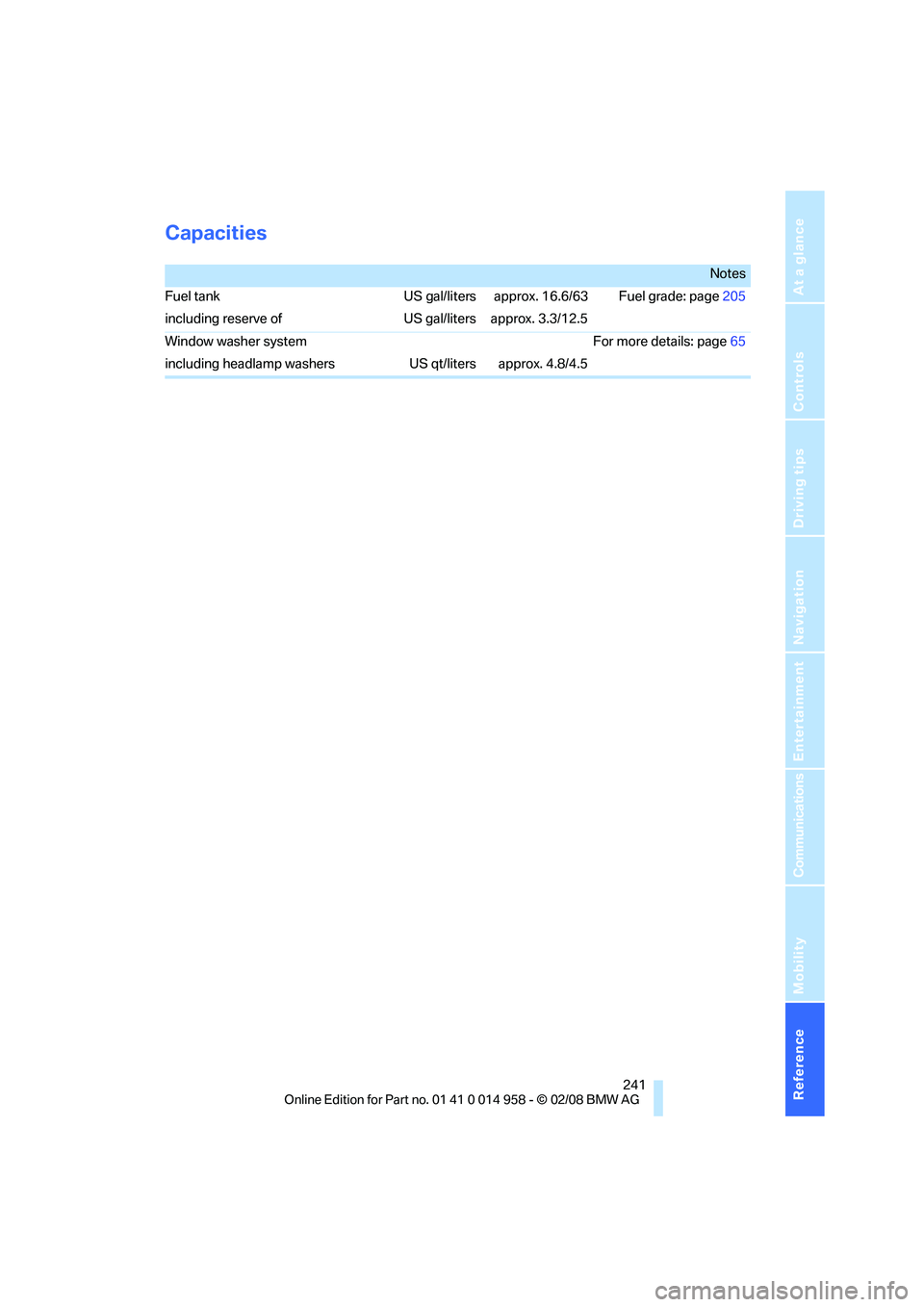
Capacities
Notes
Fuel tank US gal/liters approx. 16.6/63 Fuel grade: page205
including reserve of US gal/liters approx. 3.3/12.5
Window washer system For more details: page65
including headlamp washers US qt/liters approx. 4.8/4.5
Page 248 of 266
Everything from A - Z
246
Everything from A - Z
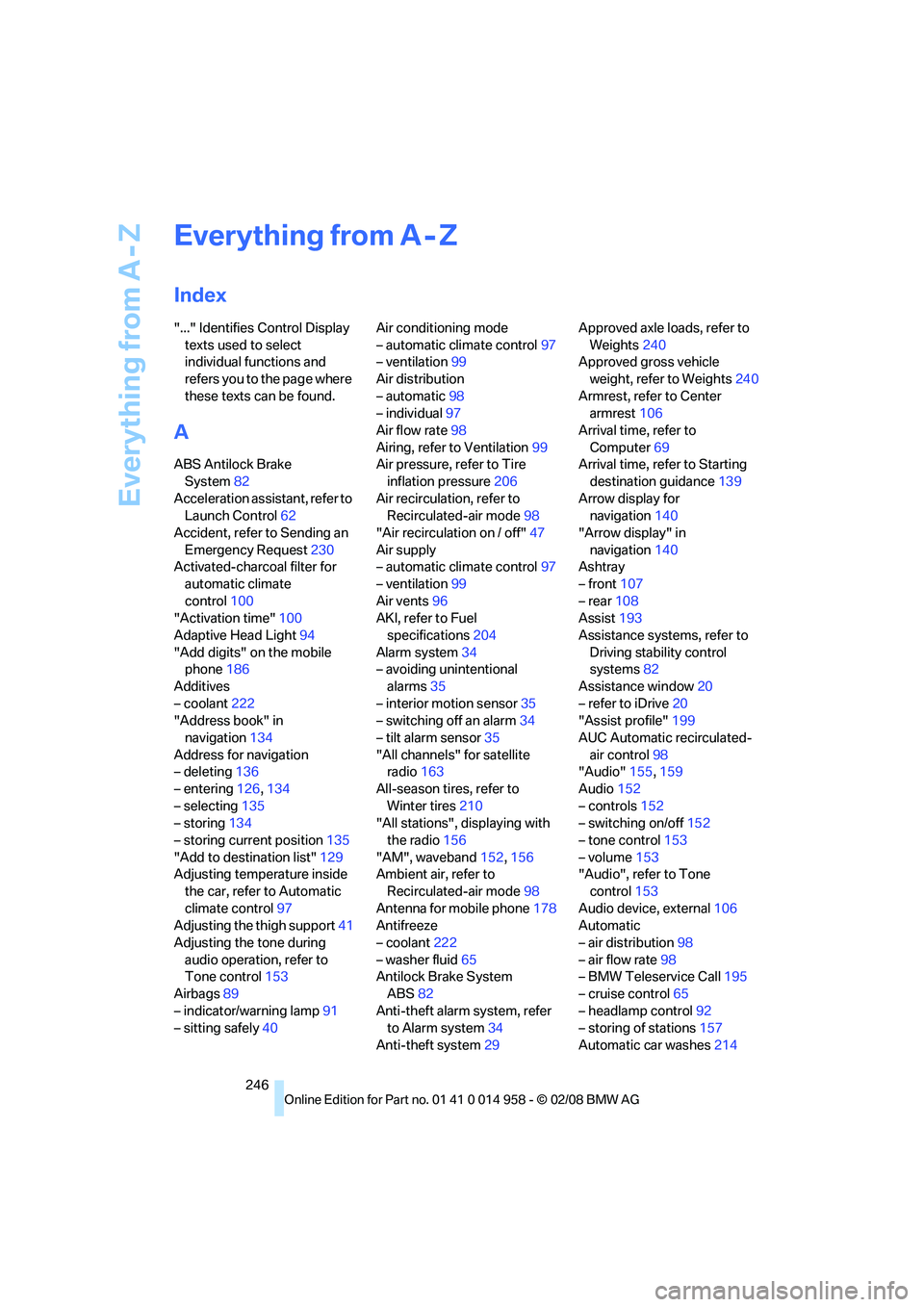
Index
"..." Identifies Control Display
texts used to select
individual functions and
refers you to the page where
these texts can be found.
A
ABS Antilock Brake
System82
Acceleration assistant, refer to
Launch Control62
Accident, refer to Sending an
Emergency Request230
Activated-charcoal filter for
automatic climate
control100
"Activation time"100
Adaptive Head Light94
"Add digits" on the mobile
phone186
Additives
– coolant222
"Address book" in
navigation134
Address for navigation
– deleting136
– entering126,134
– selecting135
– storing134
– storing current position135
"Add to destination list"129
Adjusting temperature inside
the car, refer to Automatic
climate control97
Adjusting the thigh support41
Adjusting the tone during
audio operation, refer to
Tone control153
Airbags89
– indicator/warning lamp91
– sitting safely40Air conditioning mode
– automatic climate control97
– ventilation99
Air distribution
– automatic98
– individual97
Air flow rate98
Airing, refer to Ventilation99
Air pressure, refer to Tire
inflation pressure206
Air recirculation, refer to
Recirculated-air mode98
"Air recirculation on / off"47
Air supply
– automatic climate control97
– ventilation99
Air vents96
AKI, refer to Fuel
specifications204
Alarm system34
– avoiding unintentional
alarms35
– interior motion sensor35
– switching off an alarm34
– tilt alarm sensor35
"All channels" for satellite
radio163
All-season tires, refer to
Winter tires
210
"All stations", displaying with
the radio156
"AM", waveband152,156
Ambient air, refer to
Recirculated-air mode98
Antenna for mobile phone178
Antifreeze
– coolant222
– washer fluid65
Antilock Brake System
ABS82
Anti-theft alarm system, refer
to Alarm system34
Anti-theft system29Approved axle loads, refer to
Weights240
Approved gross vehicle
weight, refer to Weights240
Armrest, refer to Center
armrest106
Arrival time, refer to
Computer69
Arrival time, refer to Starting
destination guidance139
Arrow display for
navigation140
"Arrow display" in
navigation140
Ashtray
– front107
– rear108
Assist193
Assistance systems, refer to
Driving stability control
systems82
Assistance window20
– refer to iDrive20
"Assist profile"199
AUC Automatic recirculated-
air control98
"Audio"155,159
Audio152
– controls152
– switching on/off152
– tone control153
– volume153
"Audio", refer to Tone
control153
Audio device, external106
Automatic
– air distribution98
– air flow rate98
– BMW Teleservice Call195
– cruise control65
– headlamp control92
– storing of stations157
Automatic car washes214
Page 249 of 266
Reference 247
At a glance
Controls
Driving tips
Communications
Navigation
Entertainment
Mobility
Automatic climate control96
– automatic air distribution98
– settings via iDrive97
Automatic curb monitor46
"Automatic programs" with
automatic climate control98
Automatic recirculated-air
control AUC98
Automatic station search157
Automatic transmission with
Steptronic
– towing232
– tow-starting232
"Automatic ventilation"100
AUTO program for automatic
climate control98
"Auto Request"195
"Autostore"
– on the radio158
"AUX"152,171,173
– AUX-In port171
– USB-audio interface172
AUX-In port171
Average fuel consumption69
– setting the units71
"Avoid ferries" in
navigation137
"Avoid highways" in
navigation137
Avoid highways in
navigation137
Avoiding unintentional
alarms35
"Avoid tollroads" in
navigation137
Axle loads, refer to
Weights240
"A - Z"185,186
B
Backrest contour, refer to
Lumbar support41
Backrests, refer to Seat
adjustment41
Backrest width adjustment42
Back seats
– refer to Rear seats42Backup lamps
– replacing bulb225,226
Backup lamps, refer to Tail
lamps225
Balance, tone control153
Band-aids, refer to First-aid
pouch231
Bar, refer to Towing
methods233
Base plate for telephone or
mobile phone
– refer to Snap-in adapter in
the center armrest storage
compartment106
Bass, tone control153
Bass sounds, refer to Treble
and bass153
Battery228
– charging228
– disposal37,228
– jump starting231
– remote control28
– temporary power failure228
Battery renewal
– remote control37
– remote control for vehicle36
Being towed232
Belts, refer to Safety belts44
Belt tensioner, refer to Safety
belts44
Beverage holders, refer to
Cup holders107
Blower, refer to Air flow
rate98
Bluetooth, refer to separate
Owner's Manual
BMW
– car shampoo216
"BMW
Assist"194,195,196,197
BMW Assist
– activating198
– Concierge service197
– contacting BMW Customer
Relations196
– Roadside Assistance194
– services offered193
– TeleServices195
"BMW Contact"188"BMW Contact
Numbers"188
BMW Homepage4
BMW Maintenance
System212
"BMW Service settings"199
BMW Teleservice Call
– automatic195
– manual195
BMW TeleServices195
– displaying196
– updating196
BMW webpage4
Bottle holders, refer to Cup
holders107
Brake assist82
Brake fluid, refer to Service
requirements72
Brake Force Display89
Brake lamps
– replacing bulb225,226
– two-stage89
Brake pads114
– breaking in114
Brake rotors115
– brakes114
– breaking in114
Brakes
– ABS82
– BMW Maintenance
System212
– breaking in114
– parking brake56
– service requirements72
Brakes, refer to Braking
safely115
Brake system114
– BMW Maintenance
System212
– breaking in114
– disc brakes115
Breakdown services, refer to
Roadside Assistance230
Breaking in the clutch114
Breaking in the differential,
refer to Engine and
differential114
Break-in period114
Page 251 of 266
Reference 249
At a glance
Controls
Driving tips
Communications
Navigation
Entertainment
Mobility
Changes, technical, refer to
For your own safety5
Changing bulbs, refer to
Lamps and bulbs223
Changing the language on the
Control Display79
Changing the measurement
units on the Control
Display71
Changing wheels228
Chassis number, refer to
Engine compartment219
Check Control77
"Check Control
messages"78
Check Gas Cap204
Child-restraint fixing system
LATCH52
Child-restraint systems51
Child-safety lock53
Child seats, refer to
Transporting children
safely51
Chrome parts216
Chrome polish216
Cigarette lighter, refer to
Lighter107
Cleaning headlamps64
– washer fluid65
Cleaning your BMW, refer to
Care214
"Climate"97
Clock67
– 12h/24h format76
– setting time74
Closing
– from inside32
– from outside29
Clothes hooks106
Cockpit10
Cold start, refer to Starting the
engine55
Combined instrument, refer to
Instrument cluster12
Comfort access, refer to
Convenient access35
Comfort area, refer to Around
the center console14
"Comfort" with EDC84"Communication"184,194,1
95,196,197
Compact disc, refer to
– CD changer165
– CD player165
Compartment for remote
control, refer to Ignition
lock54
Compass
104
Computer68
– displays on Control
Display69
– hour signal75
Computer, refer to iDrive16
"Concert hall" for Tone
control154
"Concierge"197
Concierge service197
Condensation, refer to When
the vehicle is parked116
Condition Based Service
CBS212
Configuring settings, refer to
Personal Profile28
Confirmation signals for
locking/unlocking the
vehicle31
Connecting vacuum cleaner,
refer to Connecting
electrical appliances108
Consumption, refer to
Average consumption69
Consumption indicator, refer
to Average consumption69
"Continue guidance to
destination?"140
Control Center, refer to
iDrive16
Control Display
– brightness80
– changing the language79
– switching off/on21
Control Display, refer to
iDrive16
Controller, refer to iDrive16
Controls and displays10
Control unit, refer to iDrive16
Convenient access35
– replacing the battery36Convenient operation
– glass roof30
– glass roof with convenient
access36
– windows30
– windows with convenient
access36
Coolant222
– checking level222
Coolant temperature68
Cooling, maximum98
Cooling fluid, refer to
Coolant222
Cooling system, refer to
Coolant222
Copyright2
Corner-illuminating lamps,
refer to Adaptive Head
Light94
Cornering lamps, refer to
Adaptive Head Light94
Correct tires210
Courtesy lamps, refer to
Interior lamps95
Cross-hairs in navigation131
Cruise control65
Cruising range69
Cup holders107
Curb weight, refer to
Weights240
"Current position"147
Current position
– displaying147
– entering135
– storing135
"Customer
Relations"188,196
D
Dashboard, refer to
Cockpit10
Dashboard, refer to
Instrument cluster12
Dashboard lighting, refer to
Instrument lighting94