remote start BMW M3 2009 User Guide
[x] Cancel search | Manufacturer: BMW, Model Year: 2009, Model line: M3, Model: BMW M3 2009Pages: 246, PDF Size: 11.68 MB
Page 68 of 246
Everything under control
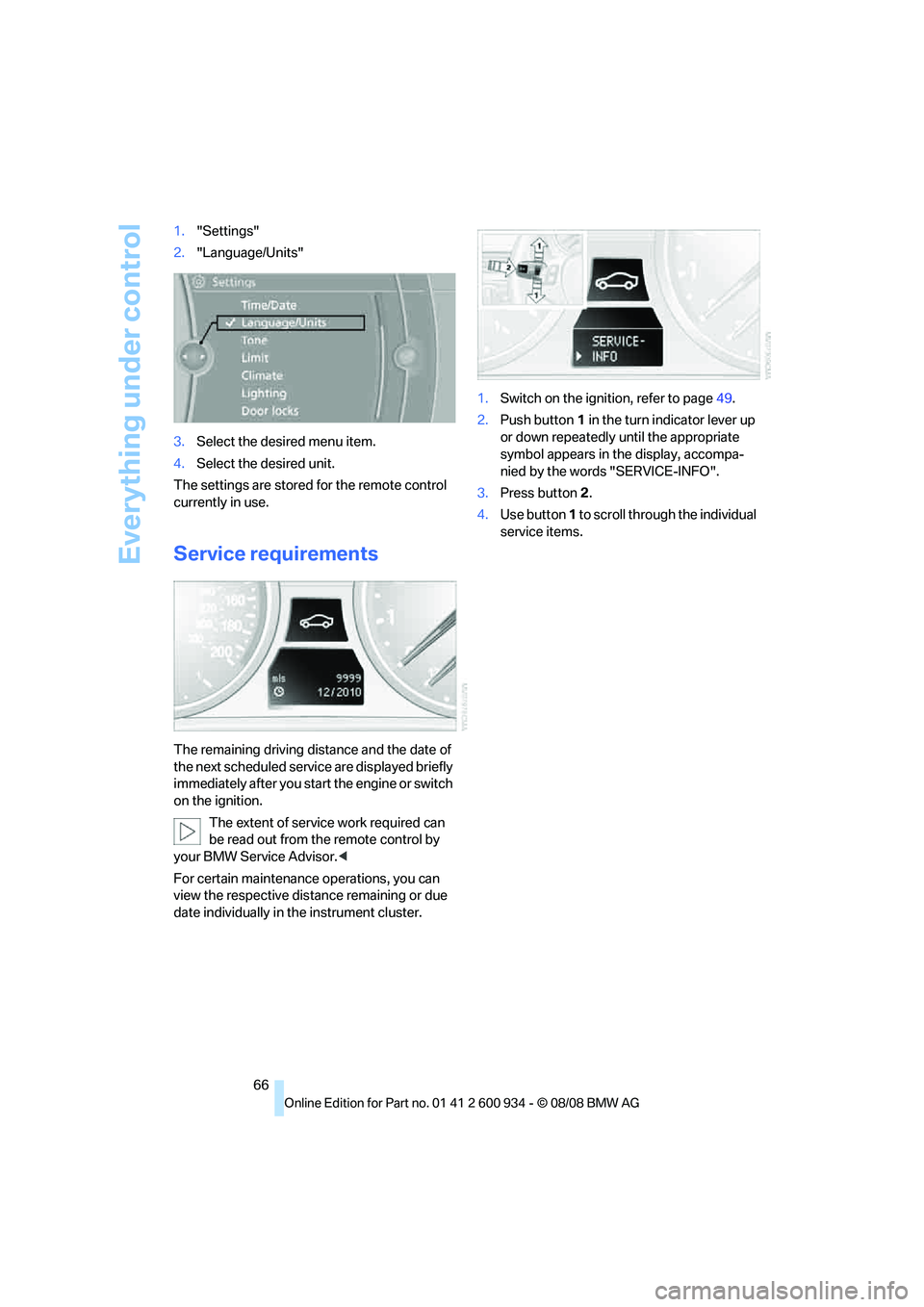
66 1."Settings"
2."Language/Units"
3.Select the desired menu item.
4.Select the desired unit.
The settings are stored for the remote control
currently in use.
Service requirements
The remaining driving distance and the date of
the next scheduled service are displayed briefly
immediately after you start the engine or switch
on the ignition.
The extent of service work required can
be read out from the remote control by
your BMW Service Advisor.<
For certain maintenance operations, you can
view the respective distance remaining or due
date individually in the instrument cluster.1.Switch on the ignition, refer to page49.
2.Push button 1 in the turn indicator lever up
or down repeatedly until the appropriate
symbol appears in the display, accompa-
nied by the words "SERVICE-INFO".
3.Press button 2.
4.Use button 1 to scroll through the individual
service items.
ba8_E90M3_cic.book Seite 66 Dienstag, 19. August 2008 11:51 11
Page 80 of 246
Technology for driving comfort and safety
78 >"Sport": both LEDs light up.
Each time the engine is started, the program set
for the remote control in use is active, refer to M
Key settings on page45.
You can also set and call up your preferred
program via MDrive, refer to page44.
Drive-off assistant
The drive-off assistant enables you to drive off
smoothly on uphill gradients. It is not necessary
to use the parking brake for this.
1.Hold the car in place by depressing the
brake.
2.Release the brake and drive off without
delay.
The drive-off assistant holds the car in
place for approx. 2 seconds after the
brake is released. Drive off without delay after
releasing the brake. Otherwise, the drive-off
assistant will no longer hold the car in place
after approx. 2 seconds and the car will start to
roll backwards.<
Flat Tire Monitor FTM*
The concept
The Flat Tire Monitor detects pressure loss in a
tire by comparing the rotating speeds of the
individual tires while moving.
In the event of pressure loss, the rolling circum-
ference changes and, thus, the rotating speed
of the affected wheel. This change is detected
and is reported as a flat tire.
Functional requirement
In order to assure the reliable reporting of a flat
tire, the system must be initialized for the cor-
rect tire inflation pressure.
The system must be reinitialized each
time a tire inflation pressure has been cor-
rected or a wheel or tire has been changed.<
System limitations
The Flat Tire Monitor is unable to warn
the driver of sudden, severe tire damage
caused by external factors, nor can it identify
the gradual loss of pressure that will inevitably
occur in all four tires over a lengthy period of
time.<
In the following situations, the system could be
delayed or malfunction:
>System has not been initialized
>Driving on snowy or slippery road surface
>Performance-oriented style of driving: slip
in the drive wheels, high lateral acceleration
>Snow chains are attached
Initializing the system
The initialization is completed during driv-
ing, which can be interrupted at any time.
When driving resumes, the initialization is con-
tinued automatically.
Do not initialize the system while snow chains
are attached.<
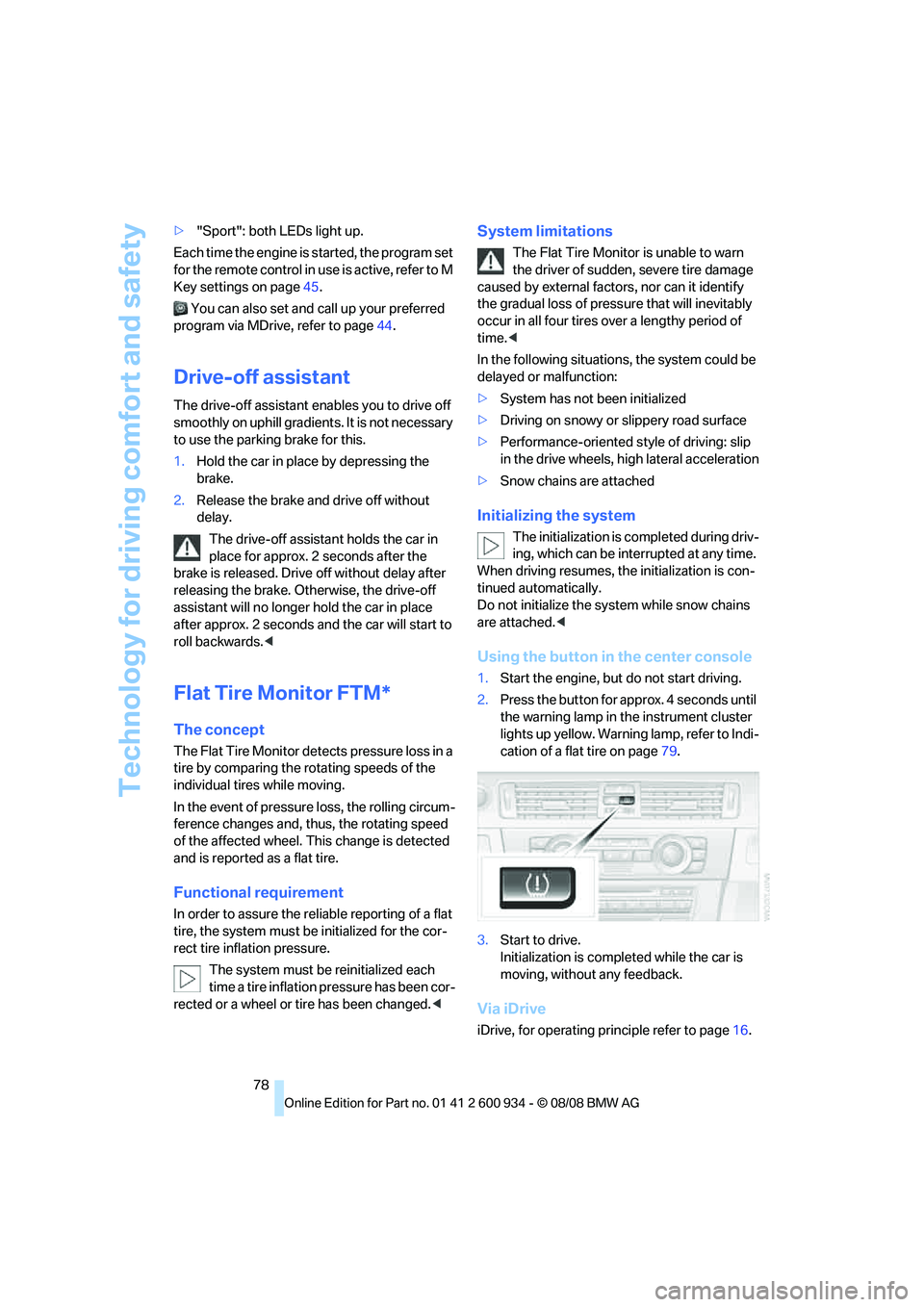
Using the button in the center console
1.Start the engine, but do not start driving.
2.Press the button for approx. 4 seconds until
the warning lamp in the instrument cluster
lights up yellow. Warning lamp, refer to Indi-
cation of a flat tire on page79.
3.Start to drive.
Initialization is completed while the car is
moving, without any feedback.
Via iDrive
iDrive, for operating principle refer to page16.
ba8_E90M3_cic.book Seite 78 Dienstag, 19. August 2008 11:51 11
Page 96 of 246

Practical interior accessories
94
Practical interior accessories
Integrated universal remote
control*
The concept
The integrated universal remote control can
replace as many as three hand-held transmit-
ters for various remote-controlled devices,
such as garage doors and gates or lighting sys-
tems. The integrated universal remote control
registers and stores signals from the original
hand-held transmitters.
The signal of an original hand-held transmitter
can be programmed on one of the three mem-
ory buttons1. After this, the programmed
memory button1 will operate the system in
question. The LED2 flashes to confirm trans-
mission of the signal.
Should you sell your vehicle one day, be sure to
delete the stored programs beforehand for your
safety, refer to page95.
To prevent possible damage or injury,
before programming or using the inte-
grated universal remote control, always inspect
the immediate area to make certain that no peo-
ple, animals or objects are within the pivoting or
travel range of the device being operated. Com-
ply also with the safety instructions supplied
with the original hand-held transmitter.<
Checking compatibility
If this symbol appears on the package
or in the instructions supplied with the
original hand-held transmitter, you can
assume that the radio remote control device will
be compatible with the integrated universal
remote control.
For additional information, please contact your
BMW center or call: 1-800-355-3515.
You can also obtain information on the Internet
at:
www.bmwusa.com or
www.homelink.com. HomeLink is a registered trademark of Johnson
Controls, Inc.<
Programming
1Memory buttons
2LED
Fixed-code hand-held transmitters
1.Switch on the ignition, refer to page49.
2.When starting operation for the first time:
Press the left and right memory buttons1
for approx. 20 seconds until the LED2
flashes rapidly. The three memory buttons
are cleared.
3.Hold the original hand-held transmitter at a
distance of approx. 4 to 12 in/10 to 30 cm
from the memory buttons1.
The required distance between the
hand-held transmitter and the mem-
ory buttons1 depends on the system of the
respective original hand-held transmitter
used.<
4.Simultaneously press the transmit key on
the original hand-held transmitter and the
desired memory button 1 on the integrated
universal remote control. The LED 2 flashes
slowly at first. As soon as the LED2 flashes
rapidly, release both buttons. If the LED2
does not flash rapidly after approx. 15 sec-
onds, alter the distance and repeat this
step.
5.To program other original hand-held trans-
mitters, repeat steps 3 and 4.
ba8_E90M3_cic.book Seite 94 Dienstag, 19. August 2008 11:51 11
Page 129 of 246
Navigation
Driving tips
127Reference
At a glance
Controls
Communications
Entertainment
Mobility
Destination guidance
Starting destination
guidance
1."Navigation"
2."Enter address"
3.Select the destination.
4."Start guidance"
After the route is calculated, the route is dis-
played in the map on the Control Display.
Terminating destination
guidance
1."Navigation"
2."Map"
3.Select the symbol
Continuing destination
guidance
If the destination was not reached at the end of
the last trip, the system asks whether it should
continue destination guidance.
Select "Resume guidance" or "Stop guidance".
Route criteria
General information
You can influence the calculated route by
choosing certain route criteria. You can change
the route criteria as often as you like during des-
tination entry or during destination guidance.
The route is planned according to fixed rules.
The type of road is taken into account, e.g.
whether it is a highway or a winding road. As a
result, the routes recommended by the naviga-
tion system may not always be the same ones
that you would choose based on personal expe-
rience.The settings are stored for the remote control
currently in use.
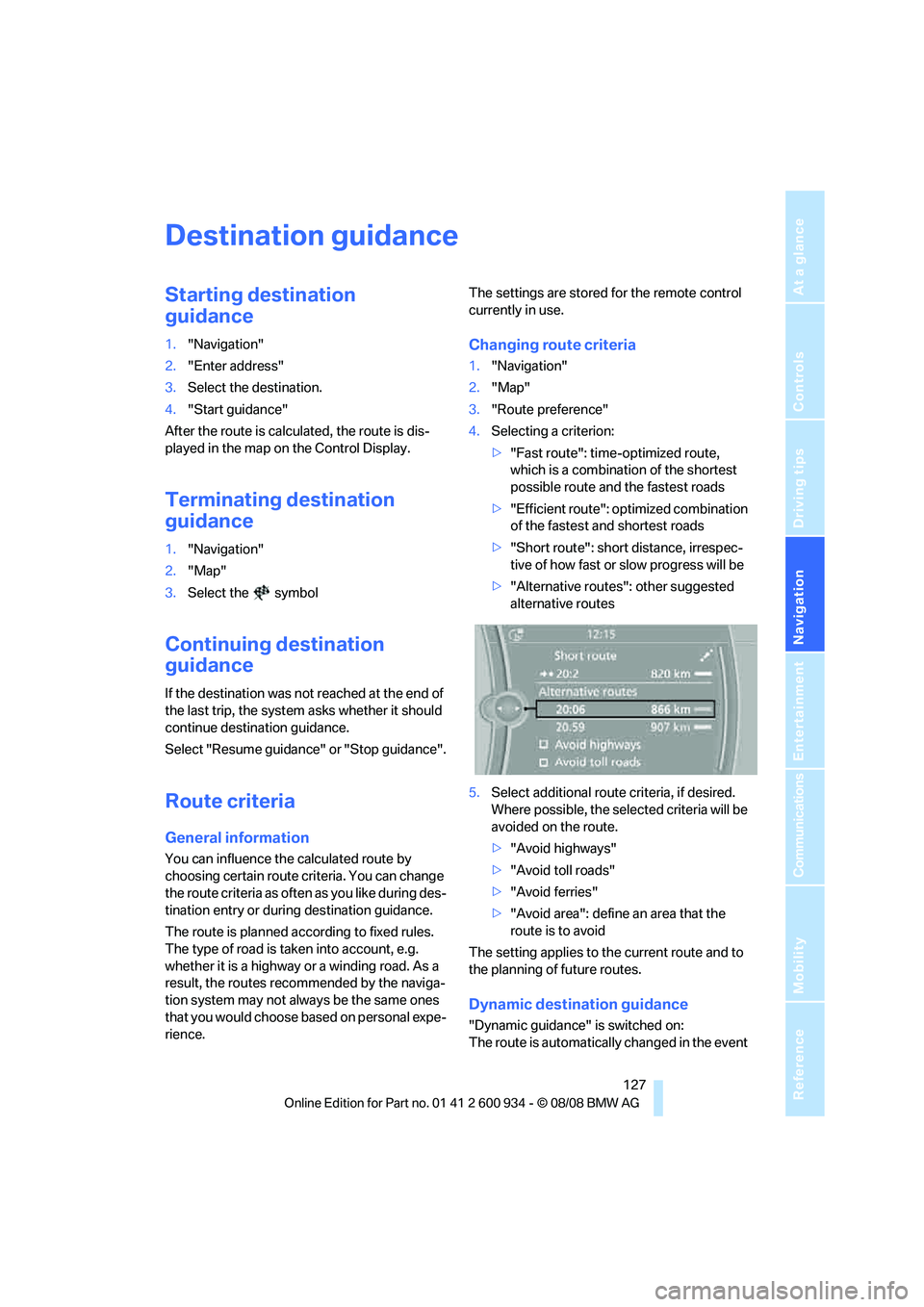
Changing route criteria
1."Navigation"
2."Map"
3."Route preference"
4.Selecting a criterion:
>"Fast route": time-optimized route,
which is a combination of the shortest
possible route and the fastest roads
>"Efficient route": optimized combination
of the fastest and shortest roads
>"Short route": short distance, irrespec-
tive of how fast or slow progress will be
>"Alternative routes": other suggested
alternative routes
5.Select additional route criteria, if desired.
Where possible, the selected criteria will be
avoided on the route.
>"Avoid highways"
>"Avoid toll roads"
>"Avoid ferries"
>"Avoid area": define an area that the
route is to avoid
The setting applies to the current route and to
the planning of future routes.
Dynamic destination guidance
"Dynamic guidance" is switched on:
The route is automatically changed in the event
ba8_E90M3_cic.book Seite 127 Dienstag, 19. August 2008 11:51 11
Page 131 of 246
Navigation
Driving tips
129Reference
At a glance
Controls
Communications
Entertainment
Mobility
1."Navigation"
2."Map"
3.Select the symbol
The voice instructions are switched on.
For rapid access, the feature can be stored on a
programmable memory key, refer to page20.
Repeating a voice instruction
1."Navigation"
2."Map"
3.Select the symbol twice.
Adjusting volume for voice instructions
The volume can be adjusted only while a voice
instruction is being issued.
1.Have the last voice instruction repeated, if
necessary.
2.Turn the button during the voice instruction
to select the desired volume.
The setting is stored for the remote control cur-
rently in use.
Map display
Map display
You can have your current position displayed on
a map. After starting the destination guidance,
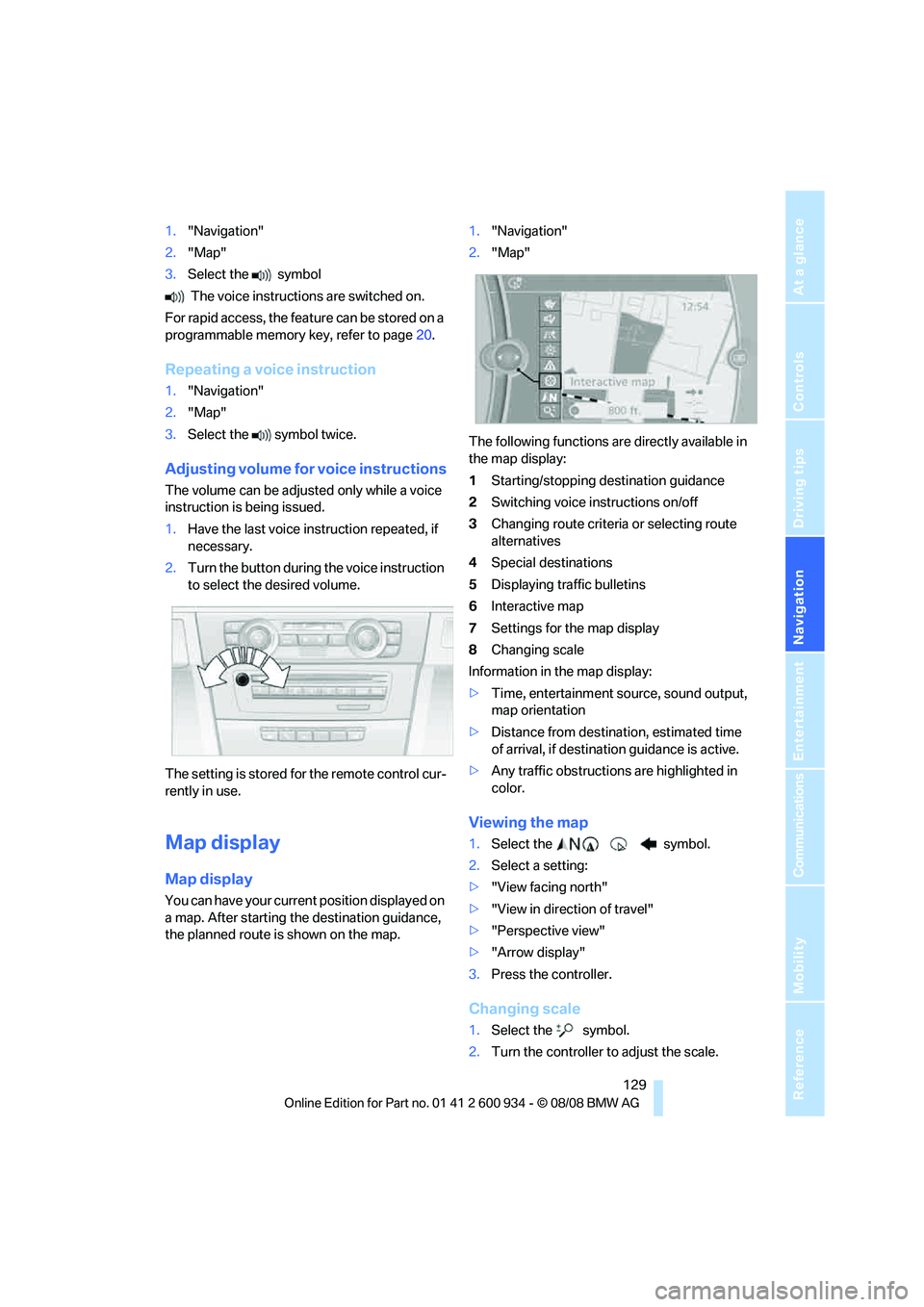
the planned route is shown on the map.1."Navigation"
2."Map"
The following functions are directly available in
the map display:
1Starting/stopping destination guidance
2Switching voice instructions on/off
3Changing route criteria or selecting route
alternatives
4Special destinations
5Displaying traffic bulletins
6Interactive map
7Settings for the map display
8Changing scale
Information in the map display:
>Time, entertainment source, sound output,
map orientation
>Distance from destination, estimated time
of arrival, if destination guidance is active.
>Any traffic obstructions are highlighted in
color.
Viewing the map
1.Select the symbol.
2.Select a setting:
>"View facing north"
>"View in direction of travel"
>"Perspective view"
>"Arrow display"
3.Press the controller.
Changing scale
1.Select the symbol.
2.Turn the controller to adjust the scale.
ba8_E90M3_cic.book Seite 129 Dienstag, 19. August 2008 11:51 11
Page 165 of 246
163
Entertainment
Reference
At a glance
Controls
Driving tips Communications
Navigation
Mobility
>Bluetooth is activated in the vehicle, refer to
page164, and on the mobile phone.
>Depending on the mobile phone, some
default settings may be necessary for the
mobile phone: e. g. using the following
menu items:
>Bluetooth switched on
>Connection must be allowed without
requiring further confirmation
>Reconnection
>Depending on the mobile phone type, the
power-saving mode setting, for example,
may result in a paired mobile phone not
being detected by the vehicle.
>For pairing purposes, define any 4 to 16-
digit number as a Bluetooth passkey,
e.g. 25081107. A long and complex number
offers the best protection against unautho-
rized access. This Bluetooth passkey is no
longer required after pairing is successful.
>The ignition is switched on.
Pair the mobile phone with the vehicle
only when the car is stationary, to avoid
endangering the car's occupants and other
road users by being distracted.<
Switch on ignition
1.Insert remote control all the way into the
ignition lock.
2.Switch on ignition without operating the
brake or clutch or pressing the start/stop
button.
Preparation via iDrive
iDrive, for operating principle refer to page16.
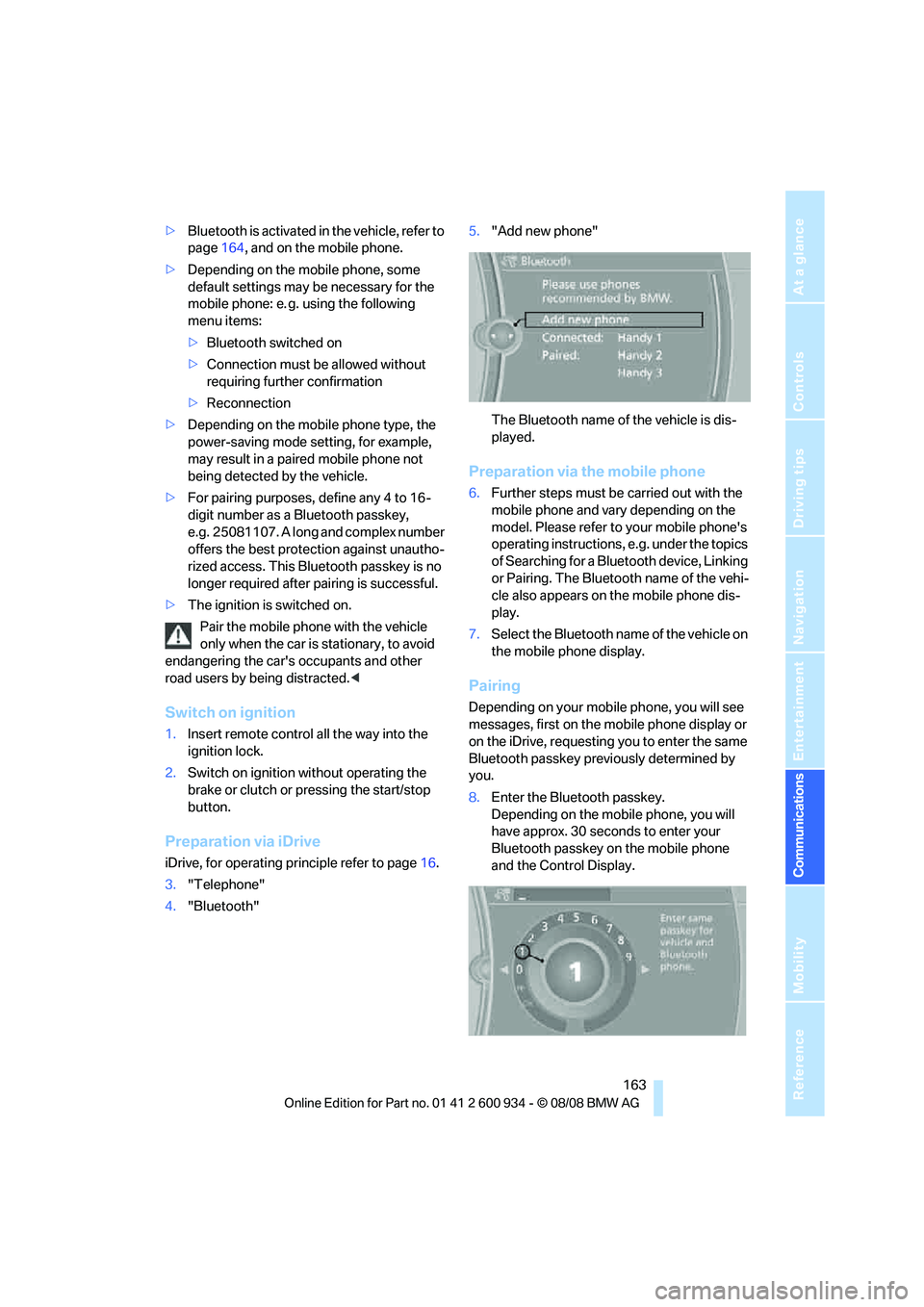
3."Telephone"
4."Bluetooth"5."Add new phone"
The Bluetooth name of the vehicle is dis-
played.
Preparation via the mobile phone
6.Further steps must be carried out with the
mobile phone and vary depending on the
model. Please refer to your mobile phone's
operating instructions, e.g. under the topics
of Searching for a Bluetooth device, Linking
or Pairing. The Bluetooth name of the vehi-
cle also appears on the mobile phone dis-
play.
7.Select the Bluetooth name of the vehicle on
the mobile phone display.
Pairing
Depending on your mobile phone, you will see
messages, first on the mobile phone display or
on the iDrive, requesting you to enter the same
Bluetooth passkey previously determined by
you.
8.Enter the Bluetooth passkey.
Depending on the mobile phone, you will
have approx. 30 seconds to enter your
Bluetooth passkey on the mobile phone
and the Control Display.
ba8_E90M3_cic.book Seite 163 Dienstag, 19. August 2008 11:51 11
Page 231 of 246
Reference 229
At a glance
Controls
Driving tips
Communications
Navigation
Entertainment
Mobility
B
Backrest contour, refer to
Lumbar support38
Backrests, refer to Seat
adjustment38
Backrest width adjustment39
Back seats
– refer to Rear seats39
Backup lamps
– replacing bulb205,206
Backup lamps, refer to Tail
lamps205
Band-aids, refer to First-aid
pouch211
Bar, refer to Towing
methods213
Base plate for telephone or
mobile phone
– refer to Snap-in adapter171
– refer to Snap-in adapter in
the center armrest storage
compartment98
Bass, tone setting136
Battery208
– charging208
– disposal34,208
– jump starting211
– remote control26
– temporary power failure209
Battery for mobile phone171
Battery renewal
– remote control34
– remote control for vehicle34
Being towed212
Belts, refer to Safety belts41
Belt tensioner, refer to Safety
belts41
Beverage holders, refer to
Cup holders99
Blower, refer to Air flow
rate91
Bluetooth, activating/
deactivating164
Bluetooth, refer to separate
Owner's Manual
BMW
– car shampoo201
BMW Assist, activating176BMW Assist175
BMW center180
BMW Homepage4
BMW Maintenance
System197
BMW Search176
BMW webpage4
Bottle holders, refer to Cup
holders99
Brake assist76
Brake fluid, refer to Service
requirements66
Brake force display82
Brake lamps
– replacing bulb205,206
Brake lights
– brake force display82
Brake pads106
– breaking in106
Brake rotors107
– brakes106
– breaking in106
Brakes
– ABS76
– BMW Maintenance
System197
– brake force display82
– breaking in106
– parking brake51
– service requirements66
Brakes, refer to Braking
safely107
Brake system106
– BMW Maintenance
System197
– breaking in106
– disc brakes107
Breakdown services, refer to
Roadside Assistance210
Breaking in the clutch106
Breaking in the differential,
refer to Engine and
differential106
Break-in period106
Brightness of the Control
Display73
Bulb changing, refer to Lamps
and bulbs203Button for starting the engine,
refer to Start/stop button49
Buttons on the steering
wheel11
C
California Proposition 65
warning6
Call
– accepting165
– ending166
– rejecting166
Calling, refer to Phone
numbers, dialing166
Can holders, refer to Cup
holders99
Capacities220
Capacity of the cargo bay220
Car battery, refer to Vehicle
battery208
Car care, refer to Care199
Care199
– automatic car washes199
– care products199
– carpets201
– CD/DVD drives201
– chrome parts200
– displays201
– exterior199
– fine wood parts201
– headlamps200
– high-pressure washer199
– interior201
– leather201
– light-alloy wheels200
– paintwork200
– plastic parts201
– rubber seals200
– safety belts201
– sensors and cameras201
– upholstery and cloth
trim201
– washing the car
manually200
– windows200
– wiper blades200
Cargo, securing109
ba8_E90M3_cic.book Seite 229 Dienstag, 19. August 2008 11:51 11
Page 232 of 246
Everything from A - Z
230 Cargo bay
– capacity220
– convenient access33
– folding up the floor
panel101
– lamp, refer to Interior
lamps87
– opening from inside30
– opening from outside30
Cargo loading
– securing cargo109
– stowing cargo109
– vehicle108
Car jack
– jacking points208
Car key, refer to Remote
control26
Car phone
– installation location, refer to
Center armrest98
– refer to separate Owner's
Manual
Car phone, refer to
Telephone162
Car radio, refer to Radio139
Car shampoo201
Car wash
– before entering51
Catalytic converter, refer to
Hot exhaust system106
CBS Condition Based
Service197
CD, audio playback144
CD changer144
– controls136
– fast forward/reverse146
– installation location148
– random play sequence145
– selecting a track144
– switching on/off136
– tone control136
– volume136CD player144
– controls136
– fast forward/reverse146
– random play sequence145
– selecting a track144
– switching on/off136
– tone control136
– volume136
Center armrest98
Center brake lamp, replacing
bulb206
Center console, refer to
Around the center
console14
Central locking
– from inside29
– from outside27
Central locking system27
– convenient access32
– hotel function31
Changes, technical, refer to
For your own safety5
Changing bulbs, refer to
Lamps and bulbs203
Changing gears54
Changing the language on the
Control Display73
Changing the measurement
units on the Control
Display65
Changing wheels208
Chassis number, refer to
Engine compartment193
Check Control70
Check Gas Cap184
Child-restraint fixing system
LATCH47
Child-restraint systems46
Child-safety lock48
Child seats, refer to
Transporting children
safely46
Chrome parts201
Chrome polish201
Cigarette lighter, refer to
Lighter99
Cleaning headlamps59
– washer fluid60Cleaning your BMW, refer to
Care199
Clock62
– 12h/24h mode69
– setting the time and date69
– setting time68
Closing
– from inside29
– from outside27
Clothes hooks98
Cockpit10
Cold start, refer to Starting the
engine50
Combined instrument, refer to
Instrument cluster12
Comfort access, refer to
Convenient access32
Comfort area, refer to Around
the center console14
Compartment for remote
control, refer to Ignition
lock49
Compass96
Computer63
– displays on Control
Display64
Computer, refer to iDrive16
Concierge service175
Condensation, refer to When
the vehicle is parked108
Condition Based Service
CBS197
Configuring settings, refer to
Personal Profile
26
Confirmation signals for
locking/unlocking the
vehicle28
Congestion
– refer to Route, bypassing
sections128
Connecting vacuum cleaner,
refer to Connecting
electrical appliances100
Consumption, refer to
Average consumption64
Consumption indicator, refer
to Average consumption64
Control Center, refer to
iDrive16
ba8_E90M3_cic.book Seite 230 Dienstag, 19. August 2008 11:51 11
Page 233 of 246
Reference 231
At a glance
Controls
Driving tips
Communications
Navigation
Entertainment
Mobility
Control Display
– brightness73
– changing the language73
– switching off/on19
Control Display, refer to
iDrive16
Controller, refer to iDrive16
Controls and displays10
Control unit, refer to iDrive16
Convenient access32
– replacing the battery34
Convenient operation
– glass roof28
– glass roof with convenient
access33
– windows28
– windows with convenient
access33
Coolant196
– checking level196
Coolant temperature63
Cooling, maximum90
Cooling fluid, refer to
Coolant196
Cooling system, refer to
Coolant196
Copyright2
Corner-illuminating lamps,
refer to Adaptive Head
Light86
Cornering lamps, refer to
Adaptive Head Light86
Correct tires190
Country codes DVD146
Courtesy lamps, refer to
Interior lamps87
Criteria for route127
Cross-hairs in navigation122
Cruise control60
Cruising range64
Cup holders99
Curb weight, refer to
Weights220
Current playback of music
collection152
Current position
– displaying133
Customer Relations179D
Dashboard, refer to
Cockpit10
Dashboard, refer to
Instrument cluster12
Dashboard lighting, refer to
Instrument lighting87
Data, technical218
– dimensions219
– engine218
– weights220
Data transfer180
Date
– date format70
– setting69
Daytime running lamps86
Deactivating front passenger
airbags83
Deadlocking, refer to
Locking28
Defect
– door lock29
– fuel filler door184
– glass roof36
Destination, entering by town/
city name117
Destination address
– entering117,123
Destination for navigation
– entering by voice123
– entering via map122
– entry117
– home address120
– manual entry117
Destination guidance127
– bypassing a route
section128
– changing specified
route127
– continuing127
– starting127
– voice instructions128
– volume of voice
instructions129
Digital clock62
Digital compass96
Digital radio, refer to High
Definition Radio140Dimensions219
Directional indicators, refer to
Turn signals58
Direction instructions, refer to
Voice instructions128
Directory for navigation, refer
to Address book119
Displacement, refer to Engine
data218
Display, refer to iDrive
controls16
Display lighting, refer to
Instrument lighting87
Displays
– on the Control Display16
Displays, refer to Instrument
cluster12
Displays and controls10
Disposal
– coolant196
– remote control battery34
– vehicle battery208
Distance remaining to service,
refer to Service
requirements66
Distance warning, refer to
Park Distance Control
PDC75
Door key, refer to Remote
control26
Door lock29
Doors, emergency
operation29
DOT Quality Grades188
Draft-free ventilation92
Drinks holders, refer to Cup
holders99
Drivelogic55
Drive mode53
Drive-off assistance, refer to
Dynamic Stability Control
DSC76
Drive-off assistant78
Drive position, engaging, refer
to Selector lever
positions52
Drive programs, refer to
Drivelogic55
ba8_E90M3_cic.book Seite 231 Dienstag, 19. August 2008 11:51 11
Page 234 of 246
Everything from A - Z
232 Driving lamps, refer to Parking
lamps/low beams85
Driving notes106
Driving off on hills, refer to
Drive-off assistant78
Driving stability control
systems76
Driving through water107
Driving tips, refer to Driving
notes106
Dry air, refer to Cooling
function91
DSC Dynamic Stability
Control76
DVD
– country codes146
– settings147
– video playback146
DVD menu147
DVD video146
Dynamic Stability Control
DSC
– indicator/warning lamp77
– M Dynamic Mode MDM76
E
EDC, refer to Electronic
Damper Control77
Eject button, refer to Buttons
on the CD player136
Electric
– seat adjustment38
Electrical malfunction
– door lock29
– driver's door29
– fuel filler door184
– glass roof36
– M dual clutch transmission
with Drivelogic54
Electric seat38
Electric seat adjustment38
Electric steering wheel lock
– with convenient access33
Electronic brake-force
distribution76
Electronic Damper Control
EDC77
Electronic oil level check193Electronic Stability Program
ESP, refer to Dynamic
Stability Control DSC76
Emergency operation
– fuel filler door, manual
release184
Emergency operation, refer to
Closing manually
– glass roof36
Emergency operation, refer to
Manual operation
– door lock29
Emergency release
– luggage compartment lid
from inside31
Emergency Request210
Emergency services, refer to
Roadside Assistance210
Engine
– breaking in106
– data218
– overheated, refer to Coolant
temperature63
– speed218
– starting50
– starting, convenient
access32
– switching off50
Engine compartment193
Engine coolant, refer to
Coolant196
Engine oil
– adding195
– BMW Maintenance
System197
– checking level193
– intervals between changes,
refer to Service
requirements66
– possible displays194
Engine output, refer to Engine
data218
Engine speed, refer to Engine
data
218
Engine starting, refer to
Starting the engine50
Entry lamps, refer to Interior
lamps87
Entry map for destination122Equalizer, tone setting137
Error messages, refer to
Check Control70
Event data recorders198
Exhaust system, refer to Hot
exhaust system106
Exterior mirrors42
– adjusting42
– automatic dimming
feature43
– automatic heating43
– folding in and out42
External audio device98
Eyes
– for tow-starting and towing
away212
– for tying down loads109
F
Failure messages, refer to
Check Control70
Failure of an electrical
consumer209
False alarm
– avoiding unintentional
alarm32
– switching off an alarm32
Fastening safety belts, refer to
Safety belts41
Fastest route for
navigation127
Fast forward
– CD changer146
– CD player146
Filter
– refer to Microfilter/activated-
charcoal filter for automatic
climate control92
First aid pouch211
Fixture for remote control,
refer to Ignition lock49
Flash when locking/
unlocking28
Flat tire
– Tire Pressure Monitor
TPM79
Flat tire, repairing206
ba8_E90M3_cic.book Seite 232 Dienstag, 19. August 2008 11:51 11