display BMW M3 2009 Owner's Manual
[x] Cancel search | Manufacturer: BMW, Model Year: 2009, Model line: M3, Model: BMW M3 2009Pages: 246, PDF Size: 11.68 MB
Page 56 of 246
Driving
54 resistance point. This provides maximum accel-
eration.
P Park
P engages automatically when you switch
off the engine unless N is engaged and
the remote control remains in the ignition lock,
refer to page49. As soon as you remove the
remote control from the ignition lock, P
engages regardless of the position of the selec-
tor lever.<
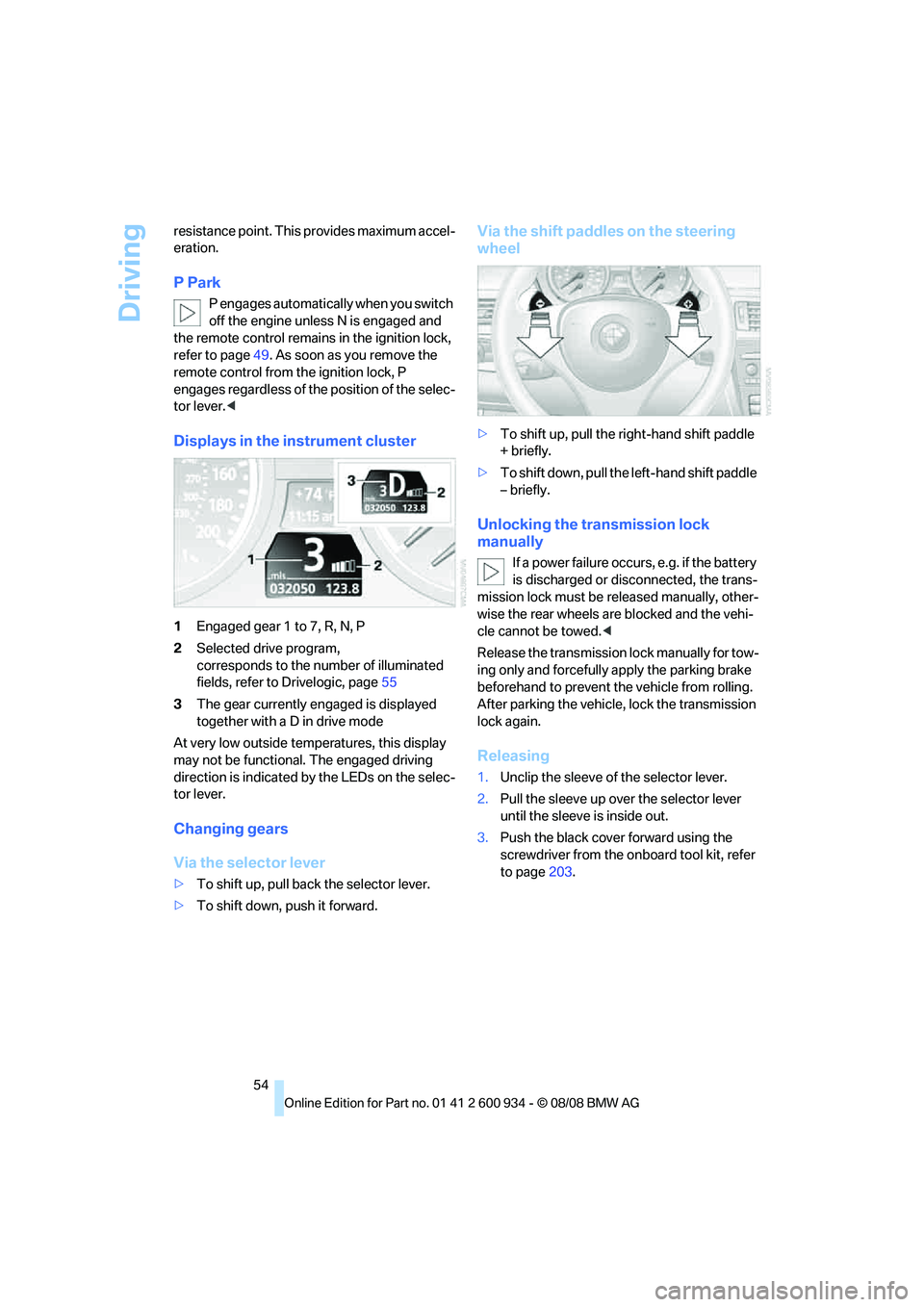
Displays in the instrument cluster
1Engaged gear 1 to 7, R, N, P
2Selected drive program,
corresponds to the number of illuminated
fields, refer to Drivelogic, page55
3The gear currently engaged is displayed
together with a D in drive mode
At very low outside temperatures, this display
may not be functional. The engaged driving
direction is indicated by the LEDs on the selec-
tor lever.
Changing gears
Via the selector lever
>To shift up, pull back the selector lever.
>To shift down, push it forward.
Via the shift paddles on the steering
wheel
>To shift up, pull the right-hand shift paddle
+ briefly.
>To shift down, pull the left-hand shift paddle
– briefly.
Unlocking the transmission lock
manually
If a power failure occurs, e.g. if the battery
is discharged or disconnected, the trans-
mission lock must be released manually, other-
wise the rear wheels are blocked and the vehi-
cle cannot be towed.<
Release the transmission lock manually for tow-
ing only and forcefully apply the parking brake
beforehand to prevent the vehicle from rolling.
After parking the vehicle, lock the transmission
lock again.
Releasing
1.Unclip the sleeve of the selector lever.
2.Pull the sleeve up over the selector lever
until the sleeve is inside out.
3.Push the black cover forward using the
screwdriver from the onboard tool kit, refer
to page203.
ba8_E90M3_cic.book Seite 54 Dienstag, 19. August 2008 11:51 11
Page 57 of 246
Controls
55Reference
At a glance
Driving tips
Communications
Navigation
Entertainment
Mobility
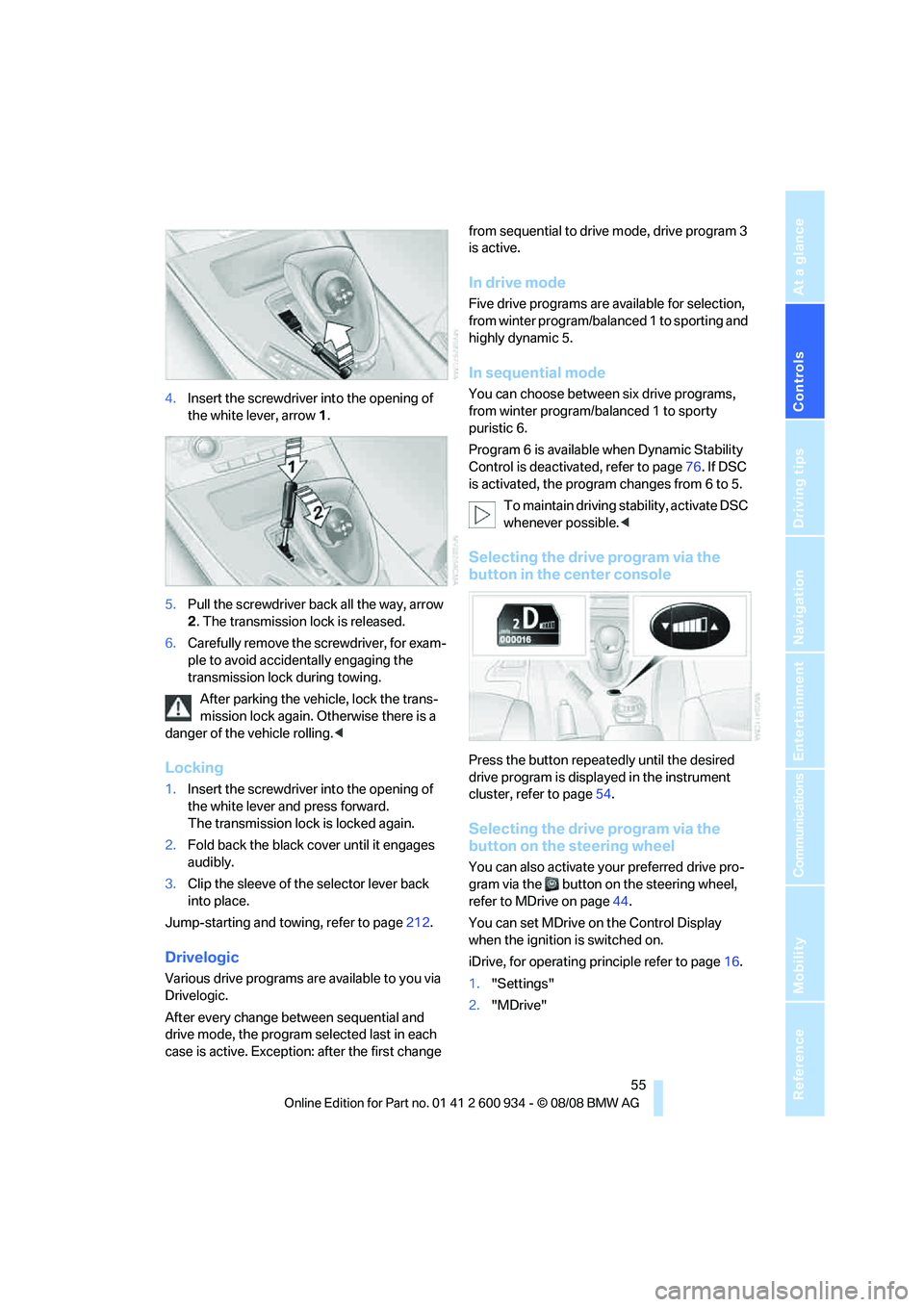
4.Insert the screwdriver into the opening of
the white lever, arrow 1.
5.Pull the screwdriver back all the way, arrow
2. The transmission lock is released.
6.Carefully remove the screwdriver, for exam-
ple to avoid accidentally engaging the
transmission lock during towing.
After parking the vehicle, lock the trans-
mission lock again. Otherwise there is a
danger of the vehicle rolling.<
Locking
1.Insert the screwdriver into the opening of
the white lever and press forward.
The transmission lock is locked again.
2.Fold back the black cover until it engages
audibly.
3.Clip the sleeve of the selector lever back
into place.
Jump-starting and towing, refer to page212.
Drivelogic
Various drive programs are available to you via
Drivelogic.
After every change between sequential and
drive mode, the program selected last in each
case is active. Exception: after the first change from sequential to drive mode, drive program 3
is active.
In drive mode
Five drive programs are available for selection,
from winter program/balanced 1 to sporting and
highly dynamic 5.
In sequential mode
You can choose between six drive programs,
from winter program/balanced 1 to sporty
puristic 6.
Program 6 is available when Dynamic Stability
Control is deactivated, refer to page76. If DSC
is activated, the program changes from 6 to 5.
To maintain driving stability, activate DSC
whenever possible.<
Selecting the drive program via the
button in the center console
Press the button repeatedly until the desired
drive program is displayed in the instrument
cluster, refer to page54.
Selecting the drive program via the
button on the steering wheel
You can also activate your preferred drive pro-
gram via the button on the steering wheel,
refer to MDrive on page44.
You can set MDrive on the Control Display
when the ignition is switched on.
iDrive, for operating principle refer to page16.
1."Settings"
2."MDrive"
ba8_E90M3_cic.book Seite 55 Dienstag, 19. August 2008 11:51 11
Page 58 of 246
Driving
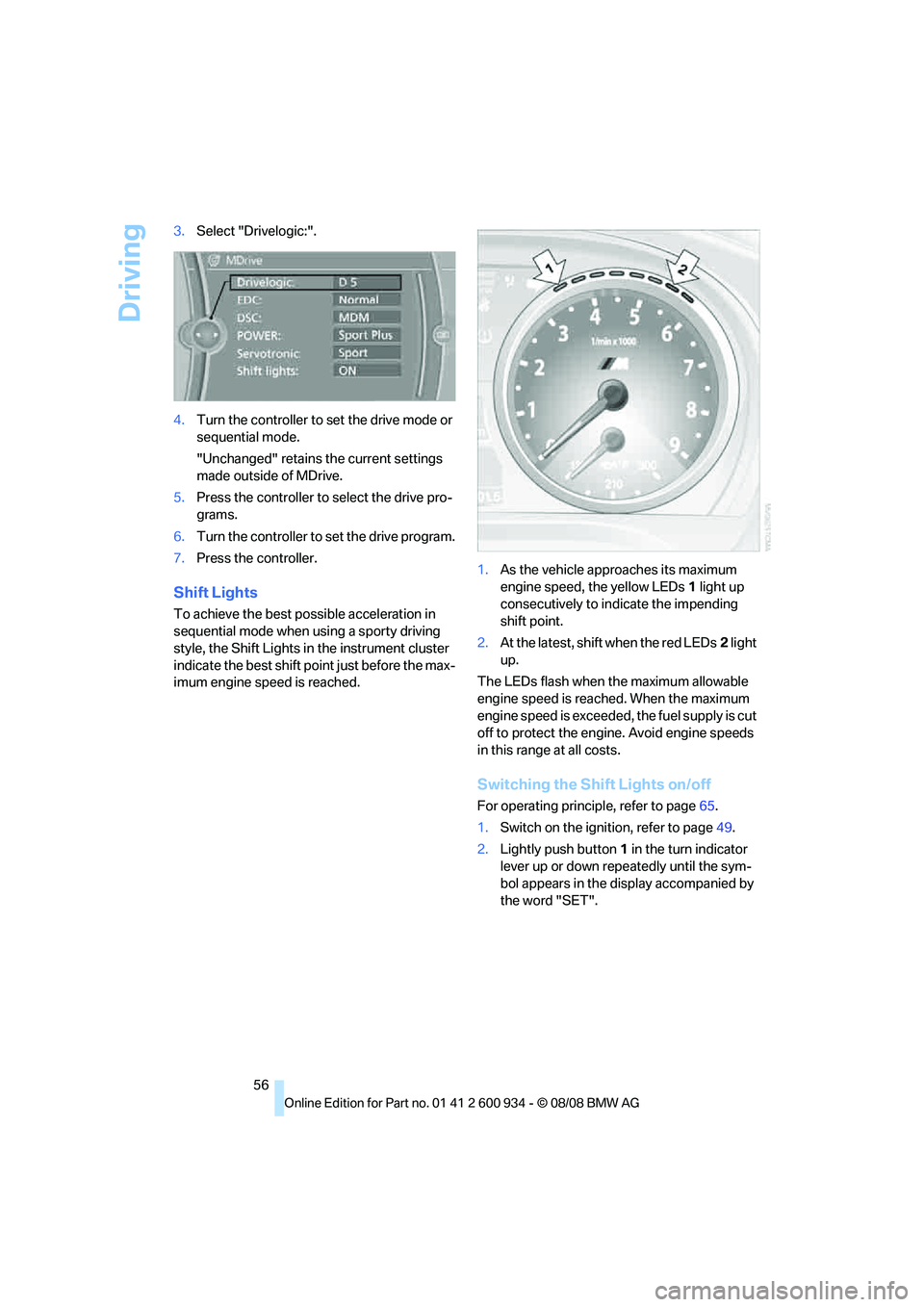
56 3.Select "Drivelogic:".
4.Turn the controller to set the drive mode or
sequential mode.
"Unchanged" retains the current settings
made outside of MDrive.
5.Press the controller to select the drive pro-
grams.
6.Turn the controller to set the drive program.
7.Press the controller.
Shift Lights
To achieve the best possible acceleration in
sequential mode when using a sporty driving
style, the Shift Lights in the instrument cluster
indicate the best shift point just before the max-
imum engine speed is reached.1.As the vehicle approaches its maximum
engine speed, the yellow LEDs1 light up
consecutively to indicate the impending
shift point.
2.At the latest, shift when the red LEDs2 light
up.
The LEDs flash when the maximum allowable
engine speed is reached. When the maximum
engine speed is exceeded, the fuel supply is cut
off to protect the engine. Avoid engine speeds
in this range at all costs.
Switching the Shift Lights on/off
For operating principle, refer to page65.
1.Switch on the ignition, refer to page49.
2.Lightly push button1 in the turn indicator
lever up or down repeatedly until the sym-
bol appears in the display accompanied by
the word "SET".
ba8_E90M3_cic.book Seite 56 Dienstag, 19. August 2008 11:51 11
Page 62 of 246
Driving
60 When the vehicle lighting system is switched
on, the headlamps are cleaned at regular and
appropriate intervals.
Do not use the washers if there is any
danger that the fluid will freeze on the
windshield. If you do, your vision could be
obscured. Antifreeze should therefore be
added to the fluid, refer to Washer fluid.
Do not use the washers when the washer fluid
reservoir is empty, otherwise you will damage
the washer pump.<
Windshield washer nozzles
The windshield washer nozzles are heated
automatically while the engine is running or the
ignition is switched on.
Washer fluid
Washer fluid antifreeze is flammable.
Therefore, keep it away from ignition
sources and only store it in the closed original
container that is kept out of reach of children,
otherwise there is a risk of personal injury.
Comply with the instructions on the con-
tainer.<
Washer fluid filler neck
Only refill washer fluid when the engine is
cool to avoid contact with hot engine
parts. Otherwise, fluid spills constitute a fire
hazard and a risk to personal safety.<
All washer nozzles are supplied with washer
fluid by the same reservoir.
Fill with water and, if required, with a washer
antifreeze, according to manufacturer's recom-
mendations.Mix the water and antifreeze before filling
the washer fluid reservoir to make sure
the correct concentration is maintained.<
Capacity
Approx. 4.8 US quarts/4.5 liters.
Cruise control
The concept
Cruise control is available for use at speeds of
approx. 20 mph or 30 km/h. The car then stores
and maintains the speed that you specify using
the lever on the steering column.
Do not use cruise control when driving at
constant speed is prevented by adverse
conditions, e.g. winding roads, dense traffic or
poor road conditions due to, e.g. snow, rain, ice
or loose surfaces. Otherwise you could lose
control of the vehicle and cause an accident as a
result.<
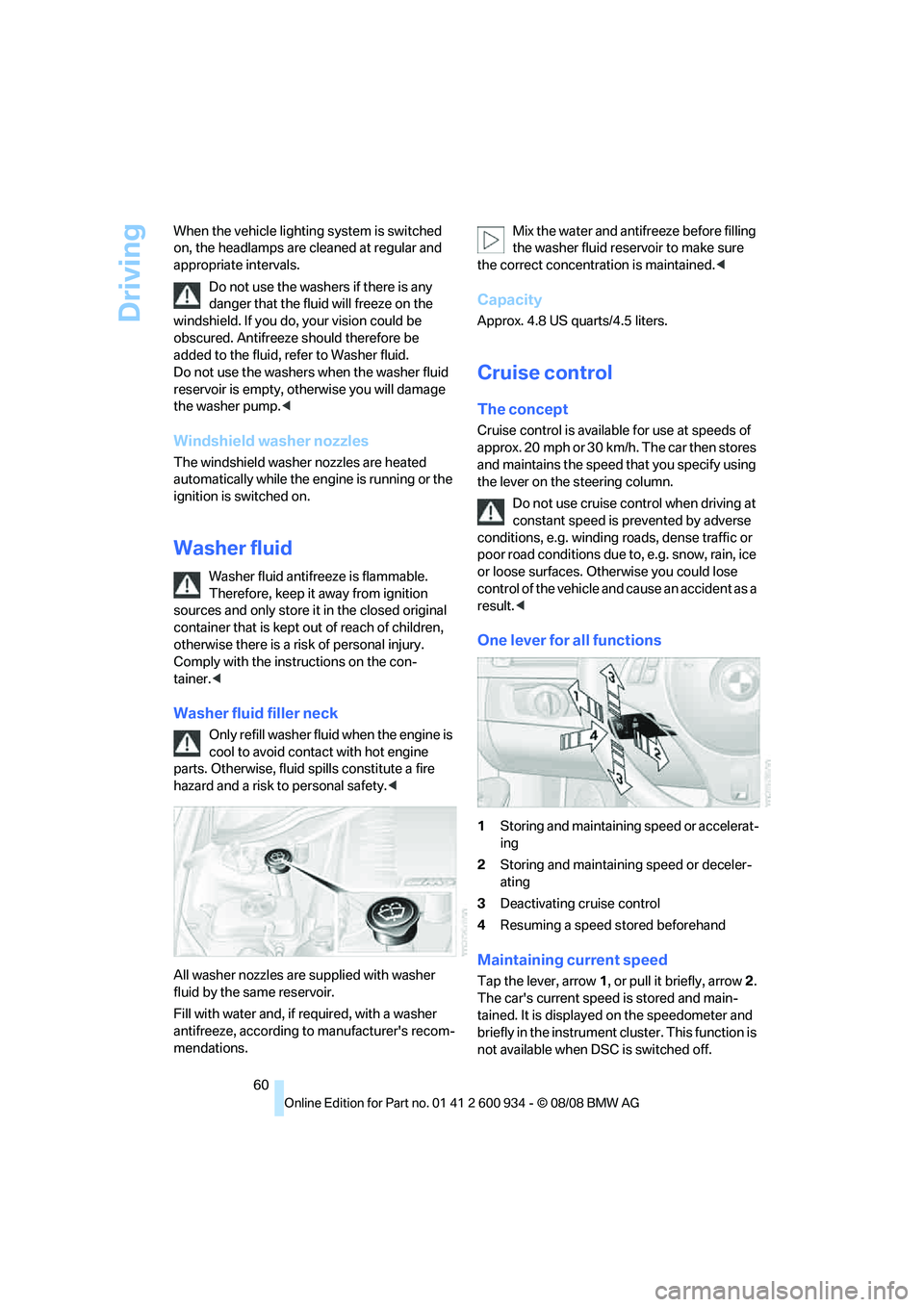
One lever for all functions
1Storing and maintaining speed or accelerat-
ing
2Storing and maintaining speed or deceler-
ating
3Deactivating cruise control
4Resuming a speed stored beforehand
Maintaining current speed
Tap the lever, arrow 1, or pull it briefly, arrow 2.
The car's current speed is stored and main-
tained. It is displayed on the speedometer and
briefly in the instrument cluster. This function is
not available when DSC is switched off.
ba8_E90M3_cic.book Seite 60 Dienstag, 19. August 2008 11:51 11
Page 63 of 246
Controls
61Reference
At a glance
Driving tips
Communications
Navigation
Entertainment
Mobility
On uphill gradients, it may prove impossible to
maintain the set speed if current engine power
output is insufficient. If engine braking power is
insufficient on a downhill grade, the stored
speed may be exceeded.
Increasing desired speed
Repeatedly press the lever to the resistance
point or beyond, arrow1, until the desired
speed is reached.
>Each time the lever is pressed lightly to the
resistance point, the desired speed is
increased by approx. 1 mph or 1 km/h.
>Each time the lever is pressed beyond the
resistance point, the desired speed is
increased by up to 5 mph or 10 km/h.
The system stores and maintains the speed.
Accelerating using the lever
Accelerate slightly, increase speed steadily:
Press the lever to the resistance point, arrow 1,
until the desired speed is reached.
Accelerate strongly, increase speed in intervals
of 10:
Press the lever beyond the resistance point,
arrow 1, until the desired speed is reached.
The vehicle accelerates without pressure on
the accelerator pedal. The system stores and
maintains the speed.
Decreasing speed
Repeatedly pull the lever to the resistance point
or beyond, arrow 2, until the desired speed is
displayed.
>Each time the lever is pulled to the resis-
tance point, the desired speed is decreased
by approx. 1 mph or 1 km/h.
>Each time the lever is pulled beyond the
resistance point, the desired speed is
re duc e d by up to 5 mph or 10 k m/h until the
minimum speed of 20 mph or 30 km/h is
achieved.
The system stores and maintains the speed.
Deactivating cruise control
Tap the lever upwards or downwards, arrow3.
The displays on the speedometer disappear.
In addition, the system is automatically deacti-
vated:
>When you brake the vehicle
>When you shift or depress the clutch
>When you deactivate DSC
>When DSC or ABS is intervening
Cruise control is not deactivated by depressing
the accelerator pedal. Once the accelerator
pedal is released, the stored speed is achieved
again and maintained.
Resuming a speed stored beforehand
Press the button, arrow4.
The stored speed is resumed and maintained.
When the ignition is switched off, the stored
speed value is cleared and can no longer be
called up.
Displays in the instrument cluster
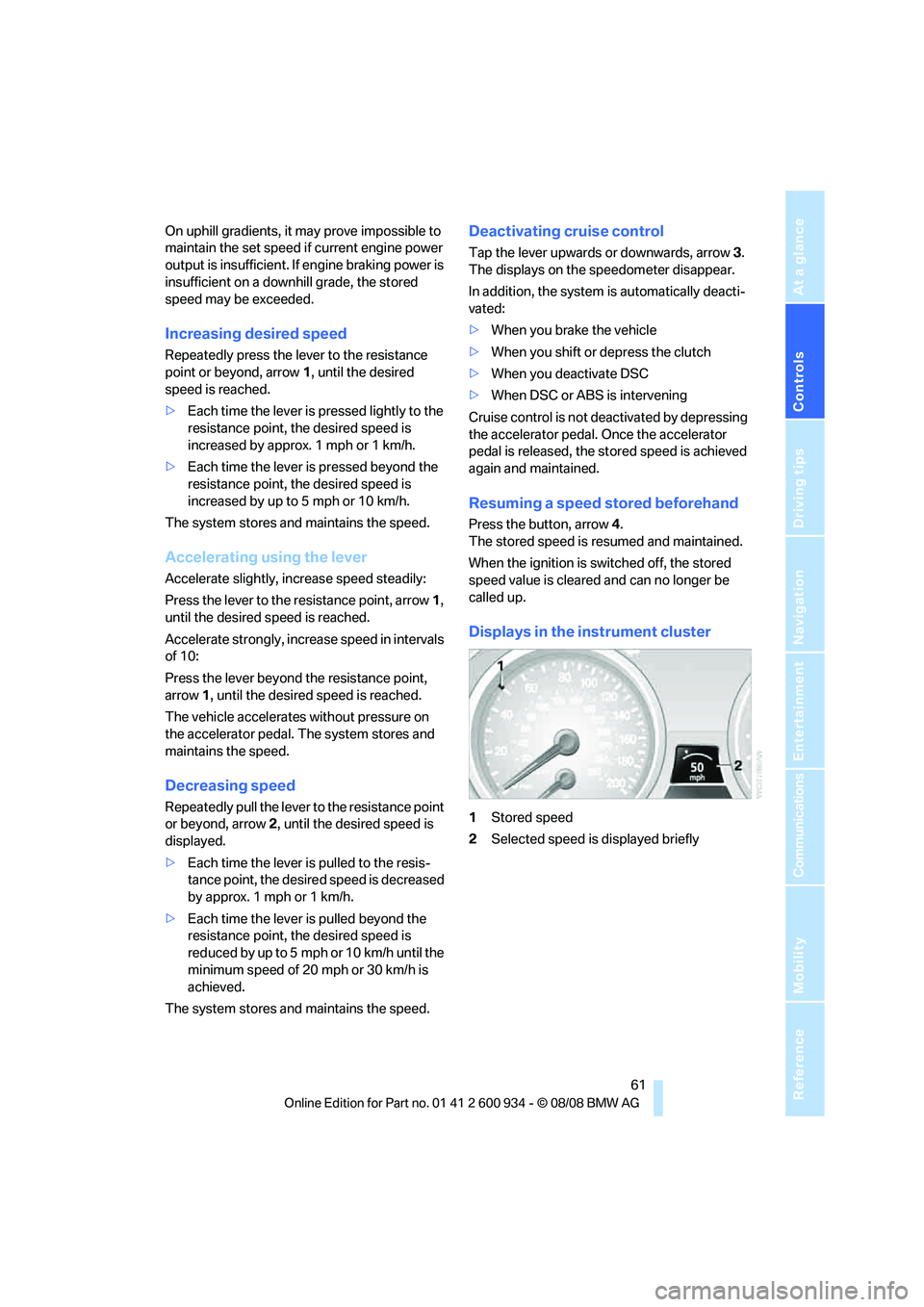
1Stored speed
2Selected speed is displayed briefly
ba8_E90M3_cic.book Seite 61 Dienstag, 19. August 2008 11:51 11
Page 64 of 246
Everything under control
62
Everything under control
Odometer, outside
temperature display, clock
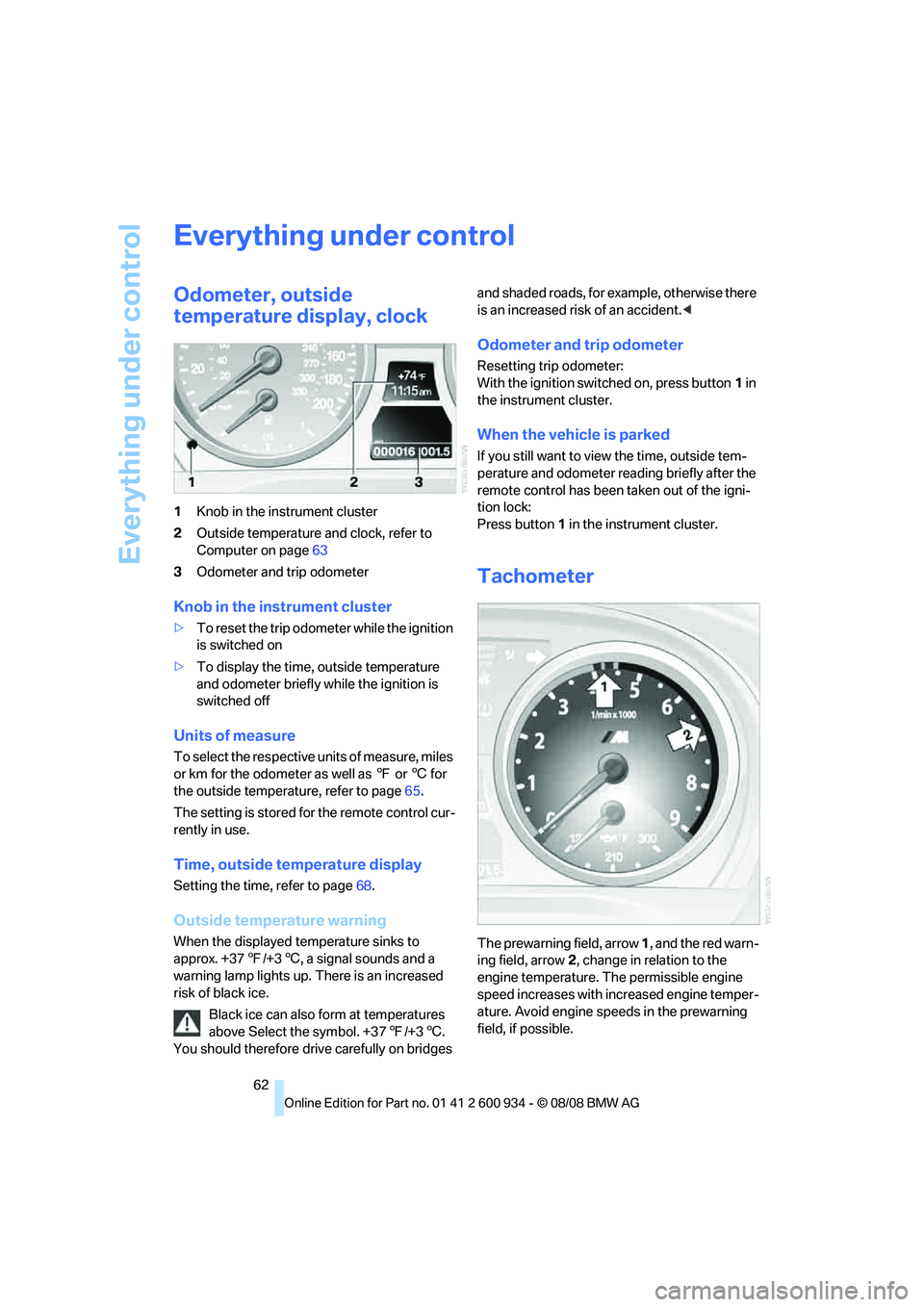
1Knob in the instrument cluster
2Outside temperature and clock, refer to
Computer on page63
3Odometer and trip odometer
Knob in the instrument cluster
>To reset the trip odometer while the ignition
is switched on
>To display the time, outside temperature
and odometer briefly while the ignition is
switched off
Units of measure
To select the respective units of measure, miles
or km for the odometer as well as 7 or 6 for
the outside temperature, refer to page65.
The setting is stored for the remote control cur-
rently in use.
Time, outside temperature display
Setting the time, refer to page68.
Outside temperature warning
When the displayed temperature sinks to
approx. +377/+36, a signal sounds and a
warning lamp lights up. There is an increased
risk of black ice.
Black ice can also form at temperatures
above Select the symbol. +377/+36.
You should therefore drive carefully on bridges and shaded roads, for example, otherwise there
is an increased risk of an accident.<
Odometer and trip odometer
Resetting trip odometer:
With the ignition switched on, press button1 in
the instrument cluster.
When the vehicle is parked
If you still want to view the time, outside tem-
perature and odometer reading briefly after the
remote control has been taken out of the igni-
tion lock:
Press button 1 in the instrument cluster.
Tachometer
The prewarning field, arrow 1, and the red warn-
ing field, arrow2, change in relation to the
engine temperature. The permissible engine
speed increases with increased engine temper-
ature. Avoid engine speeds in the prewarning
field, if possible.
ba8_E90M3_cic.book Seite 62 Dienstag, 19. August 2008 11:51 11
Page 65 of 246
Controls
63Reference
At a glance
Driving tips
Communications
Navigation
Entertainment
Mobility
Never drive at engine speeds in the red warning
field. In this range, the engine speed is limited to
protect the engine.
Coolant temperature
A warning lamp will come on if the coolant, and
therefore the engine, becomes too hot. In addi-
tion, a message will appear on the Control Dis-
play.
Check coolant level, refer to page196.
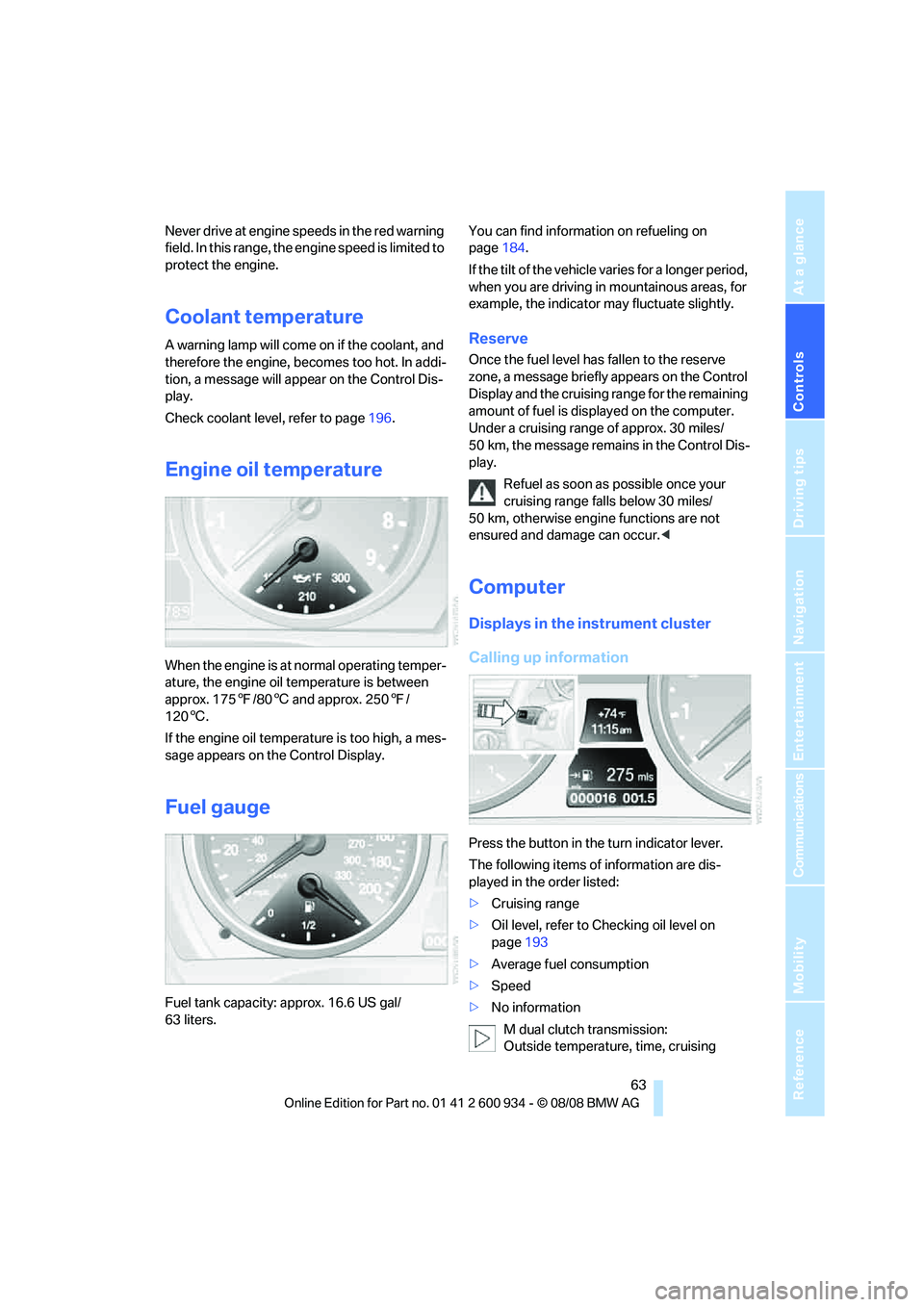
Engine oil temperature
When the engine is at normal operating temper-
ature, the engine oil temperature is between
approx. 1757/806 and approx. 2507/
1206.
If the engine oil temperature is too high, a mes-
sage appears on the Control Display.
Fuel gauge
Fuel tank capacity: approx. 16.6 US gal/
63 liters.You can find information on refueling on
page184.
If the tilt of the vehicle varies for a longer period,
when you are driving in mountainous areas, for
example, the indicator may fluctuate slightly.
Reserve
Once the fuel level has fallen to the reserve
zone, a message briefly appears on the Control
Display and the cruising range for the remaining
amount of fuel is displayed on the computer.
Under a cruising range of approx. 30 miles/
50 km, the message remains in the Control Dis-
play.
Refuel as soon as possible once your
cruising range falls below 30 miles/
50 km, otherwise engine functions are not
ensured and damage can occur.<
Computer
Displays in the instrument cluster
Calling up information
Press the button in the turn indicator lever.
The following items of information are dis-
played in the order listed:
>Cruising range
>Oil level, refer to Checking oil level on
page193
>Average fuel consumption
>Speed
>No information
M dual clutch transmission:
Outside temperature, time, cruising
ba8_E90M3_cic.book Seite 63 Dienstag, 19. August 2008 11:51 11
Page 66 of 246
Everything under control
64 range, oil level, average fuel consumption and
speed appear in the top display.<
To set the corresponding units of measure,
refer to Units of measure on page65.
Cruising range
Displays the estimated cruising range available
with the remaining fuel. The range is calculated
on the basis of the way the car has been driven
over the last 18 miles/30 km and the amount of
fuel currently in the tank.
Refuel as soon as possible once your
cruising range falls below 30 miles/
50 km, otherwise engine functions are not
ensured and damage can occur.<
Average fuel consumption
The average fuel consumption is calculated for
the time during which the engine is running.
You can have the average consumption for
another trip displayed, refer to Displays on the
Control Display below.
To reset average fuel consumption: press the
button in the turn indicator lever for approx.
2seconds.
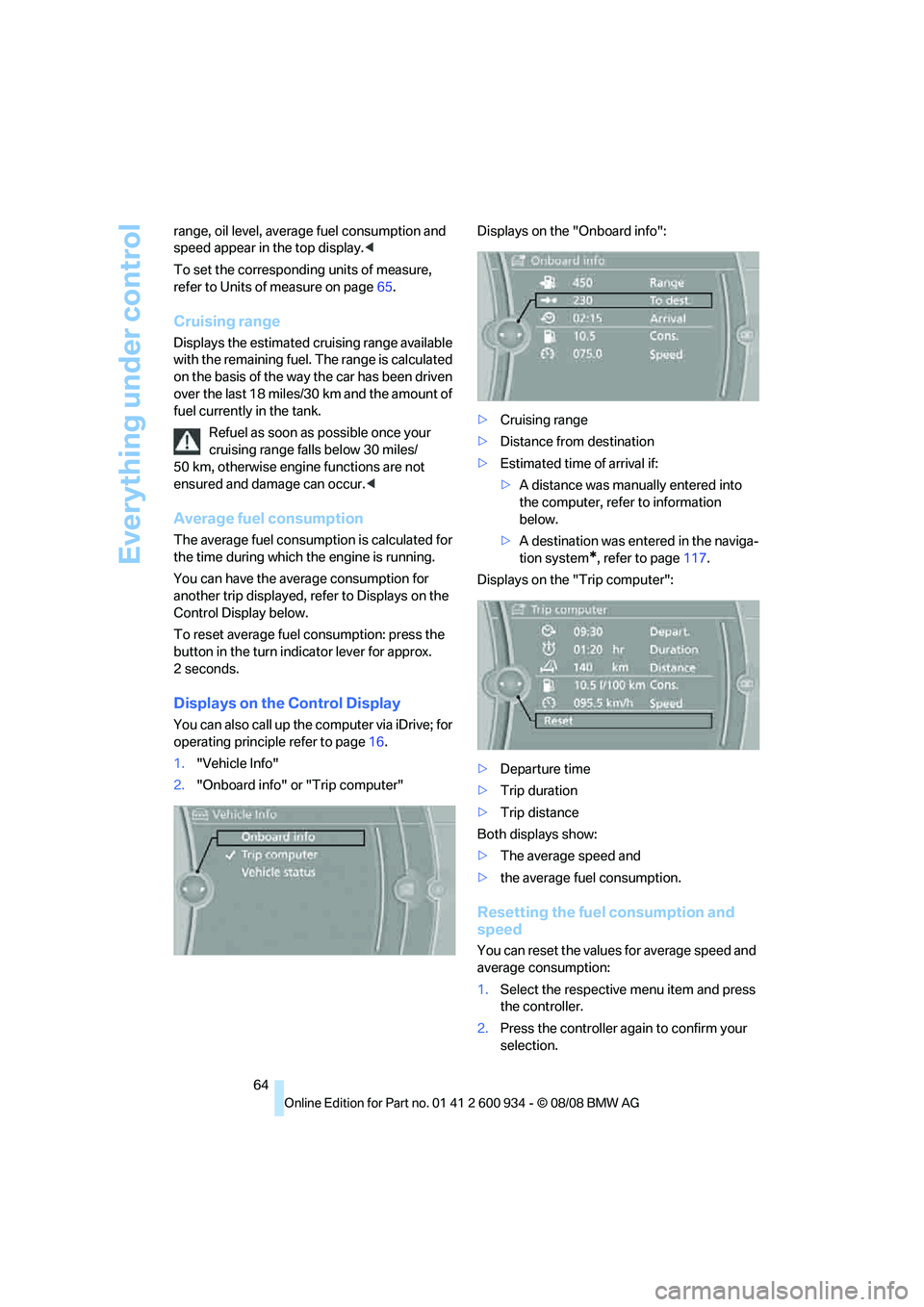
Displays on the Control Display
You can also call up the computer via iDrive; for
operating principle refer to page16.
1."Vehicle Info"
2."Onboard info" or "Trip computer"Displays on the "Onboard info":
>Cruising range
>Distance from destination
>Estimated time of arrival if:
>A distance was manually entered into
the computer, refer to information
below.
>A destination was entered in the naviga-
tion system
*, refer to page117.
Displays on the "Trip computer":
>Departure time
>Trip duration
>Trip distance
Both displays show:
>The average speed and
>the average fuel consumption.
Resetting the fuel consumption and
speed
You can reset the values for average speed and
average consumption:
1.Select the respective menu item and press
the controller.
2.Press the controller again to confirm your
selection.
ba8_E90M3_cic.book Seite 64 Dienstag, 19. August 2008 11:51 11
Page 67 of 246
Controls
65Reference
At a glance
Driving tips
Communications
Navigation
Entertainment
Mobility
Resetting the Trip computer
1."Vehicle Info"
2."Trip computer"3.Select
>"Reset" all values are reset
>"Automatically reset" all values are reset
approx. 4 hours after the engine is
switched off
Settings and information
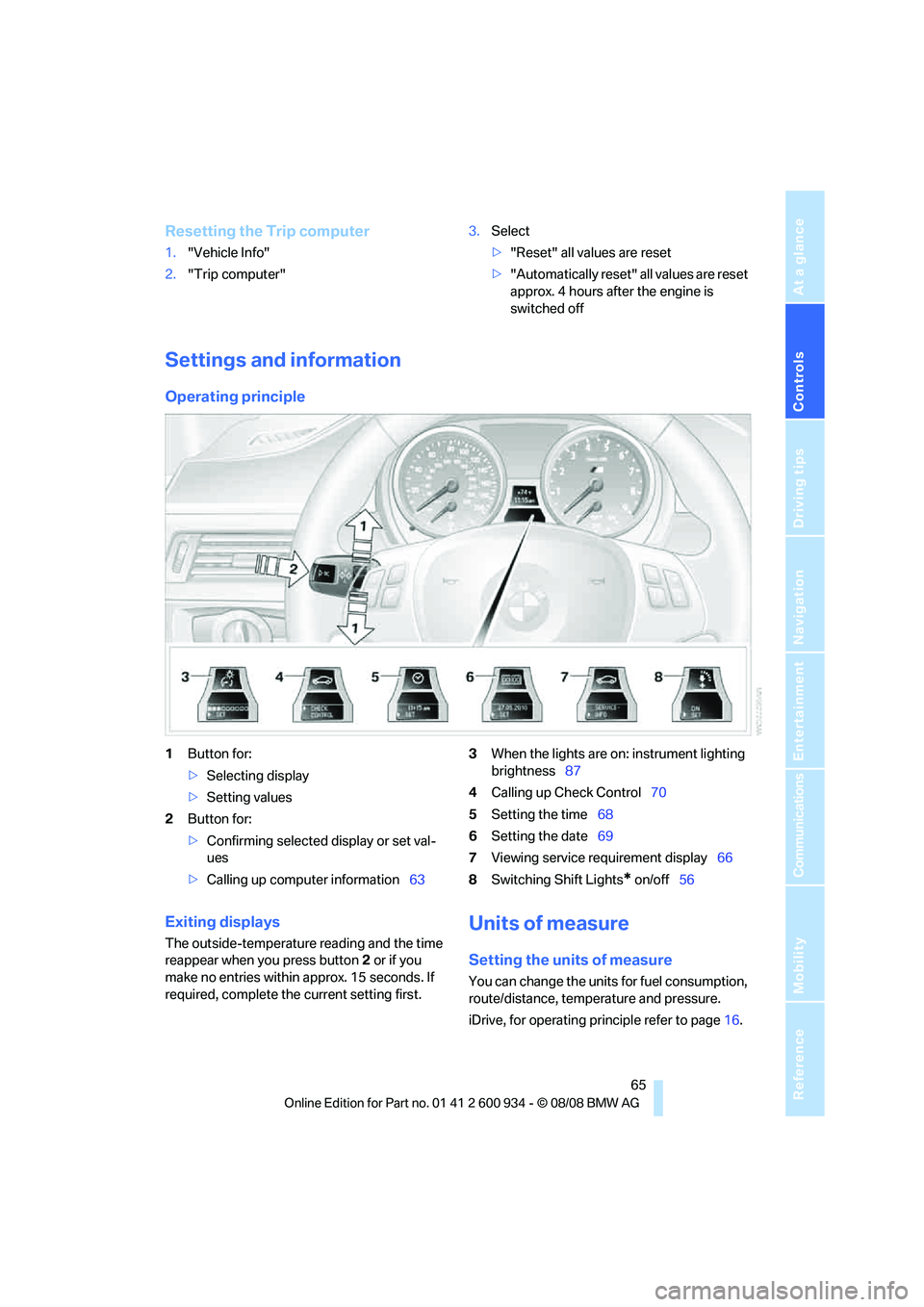
Operating principle
1Button for:
>Selecting display
>Setting values
2Button for:
>Confirming selected display or set val-
ues
>Calling up computer information633When the lights are on: instrument lighting
brightness87
4Calling up Check Control70
5Setting the time68
6Setting the date69
7Viewing service requirement display66
8Switching Shift Lights
* on/off56
Exiting displays
The outside-temperature reading and the time
reappear when you press button2 or if you
make no entries within approx. 15 seconds. If
required, complete the current setting first.
Units of measure
Setting the units of measure
You can change the units for fuel consumption,
route/distance, temperature and pressure.
iDrive, for operating principle refer to page16.
ba8_E90M3_cic.book Seite 65 Dienstag, 19. August 2008 11:51 11
Page 68 of 246
Everything under control
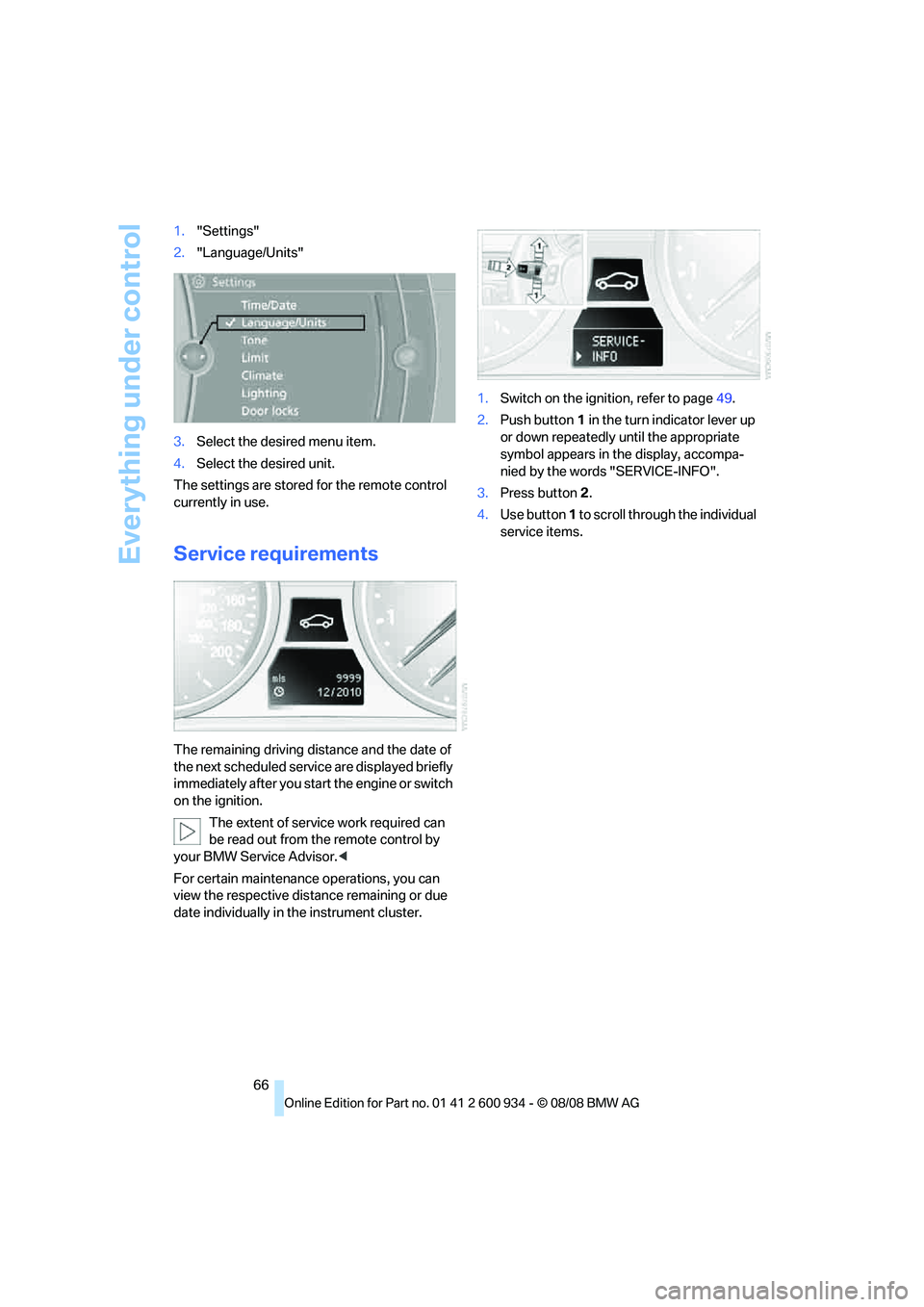
66 1."Settings"
2."Language/Units"
3.Select the desired menu item.
4.Select the desired unit.
The settings are stored for the remote control
currently in use.
Service requirements
The remaining driving distance and the date of
the next scheduled service are displayed briefly
immediately after you start the engine or switch
on the ignition.
The extent of service work required can
be read out from the remote control by
your BMW Service Advisor.<
For certain maintenance operations, you can
view the respective distance remaining or due
date individually in the instrument cluster.1.Switch on the ignition, refer to page49.
2.Push button 1 in the turn indicator lever up
or down repeatedly until the appropriate
symbol appears in the display, accompa-
nied by the words "SERVICE-INFO".
3.Press button 2.
4.Use button 1 to scroll through the individual
service items.
ba8_E90M3_cic.book Seite 66 Dienstag, 19. August 2008 11:51 11