navigation system BMW M3 2009 Workshop Manual
[x] Cancel search | Manufacturer: BMW, Model Year: 2009, Model line: M3, Model: BMW M3 2009Pages: 246, PDF Size: 11.68 MB
Page 197 of 246
Mobility
195Reference
At a glance
Controls
Driving tips
Communications
Navigation
Entertainment
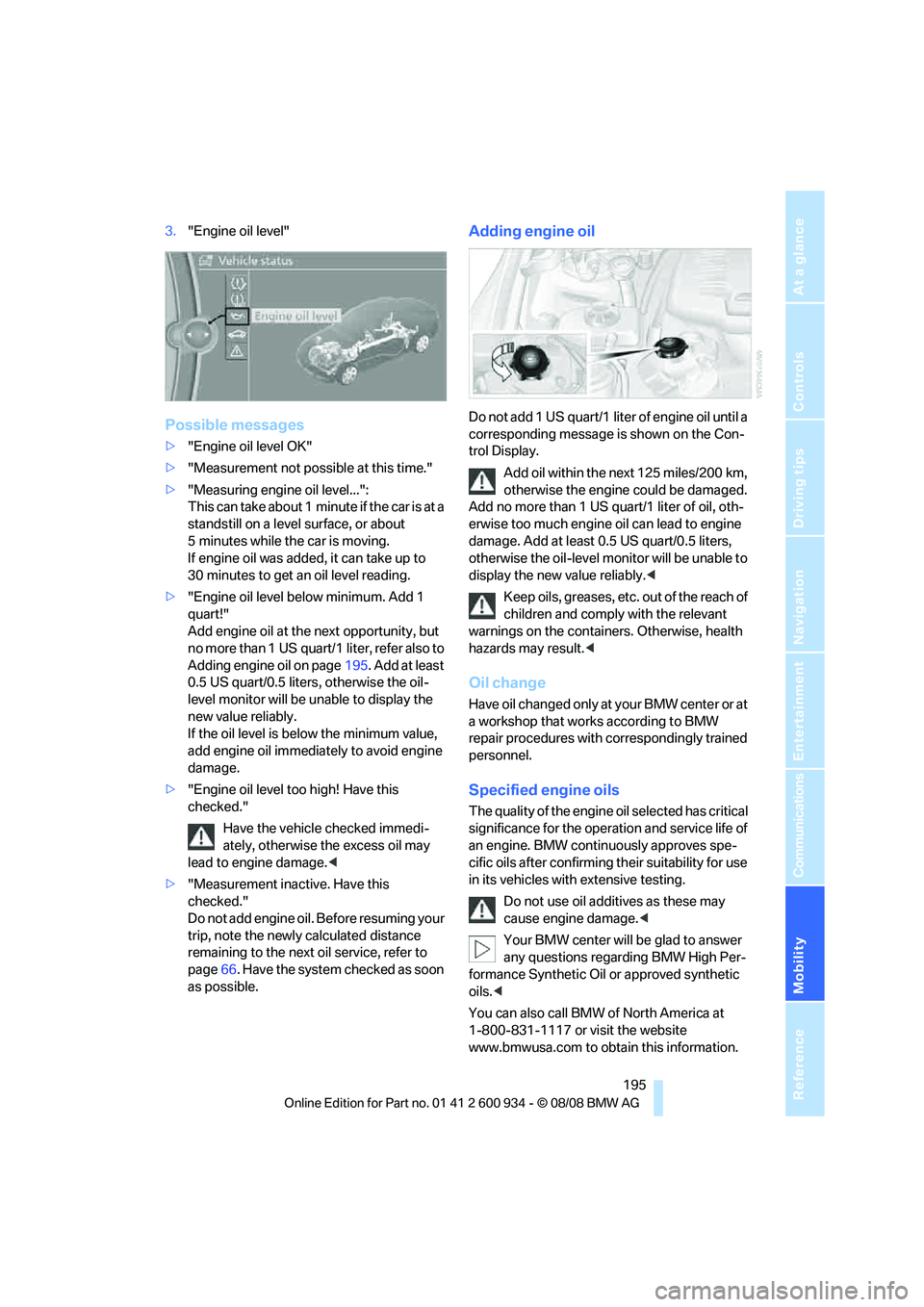
3."Engine oil level"
Possible messages
>"Engine oil level OK"
>"Measurement not possible at this time."
>"Measuring engine oil level...":
This can take about 1 minute if the car is at a
standstill on a level surface, or about
5 minutes while the car is moving.
If engine oil was added, it can take up to
30 minutes to get an oil level reading.
>"Engine oil level below minimum. Add 1
quart!"
Add engine oil at the next opportunity, but
no more than 1 US quart/1 liter, refer also to
Adding engine oil on page195. Add at least
0.5 US quart/0.5 liters, otherwise the oil-
level monitor will be unable to display the
new value reliably.
If the oil level is below the minimum value,
add engine oil immediately to avoid engine
damage.
>"Engine oil level too high! Have this
checked."
Have the vehicle checked immedi-
ately, otherwise the excess oil may
lead to engine damage.<
>"Measurement inactive. Have this
checked."
Do not add engine oil. Before resuming your
trip, note the newly calculated distance
remaining to the next oil service, refer to
page66. Have the system checked as soon
as possible.
Adding engine oil
Do not add 1 US quart/1 liter of engine oil until a
corresponding message is shown on the Con-
trol Display.
Add oil within the next 125 miles/200 km,
otherwise the engine could be damaged.
Add no more than 1 US quart/1 liter of oil, oth-
erwise too much engine oil can lead to engine
damage. Add at least 0.5 US quart/0.5 liters,
otherwise the oil-level monitor will be unable to
display the new value reliably.<
Keep oils, greases, etc. out of the reach of
children and comply with the relevant
warnings on the containers. Otherwise, health
hazards may result.<
Oil change
Have oil changed only at y our B MW c ente r o r a t
a workshop that works according to BMW
repair procedures with correspondingly trained
personnel.
Specified engine oils
The quality of the engine oil selected has critical
significance for the operation and service life of
an engine. BMW continuously approves spe-
cific oils after confirming their suitability for use
in its vehicles with extensive testing.
Do not use oil additives as these may
cause engine damage.<
Your BMW center will be glad to answer
any questions regarding BMW High Per-
formance Synthetic Oil or approved synthetic
oils.<
You can also call BMW of North America at
1-800-831-1117 or visit the website
www.bmwusa.com to obtain this information.
ba8_E90M3_cic.book Seite 195 Dienstag, 19. August 2008 11:51 11
Page 199 of 246
Mobility
197Reference
At a glance
Controls
Driving tips
Communications
Navigation
Entertainment
Maintenance
BMW Maintenance System
The BMW Maintenance System supports the
preservation of the traffic and operating safety
of your BMW. The objective is to optimize
efforts with respect to minimal vehicle mainte-
nance costs.
If and when you come to sell your BMW, a com-
prehensive record of servicing will prove a sig-
nificant benefit.
Condition Based Service CBS
Sensors and special algorithms take the differ-
ent driving conditions of your BMW into
account. Condition Based Service uses this to
determine the current and future service
requirements. By letting you define a service
and maintenance regimen that reflects your
own individual requirements, the system builds
the basis for trouble-free driving.
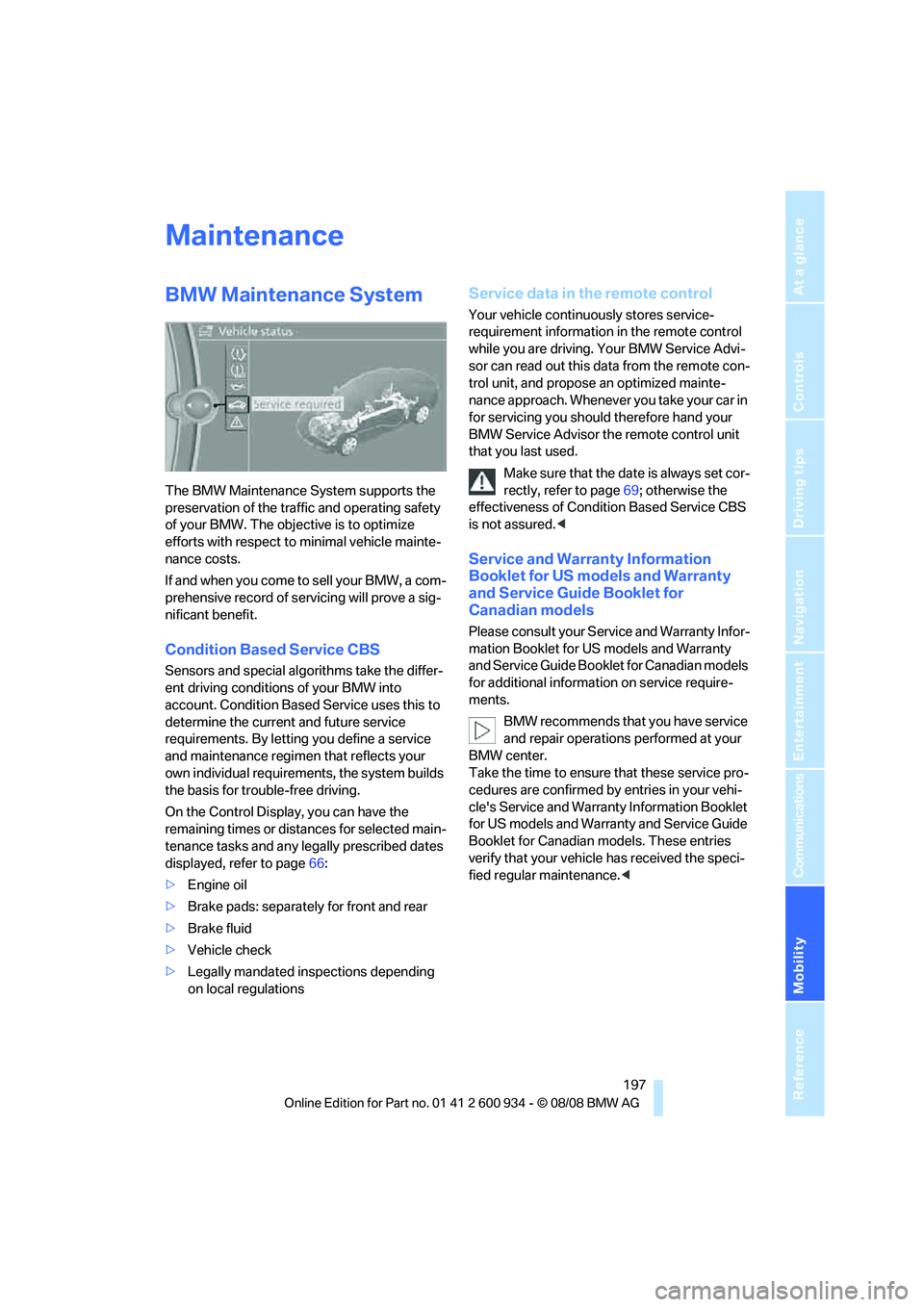
On the Control Display, you can have the
remaining times or distances for selected main-
tenance tasks and any legally prescribed dates
displayed, refer to page66:
>Engine oil
>Brake pads: separately for front and rear
>Brake fluid
>Vehicle check
>Legally mandated inspections depending
on local regulations
Service data in the remote control
Your vehicle continuously stores service-
requirement information in the remote control
while you are driving. Your BMW Service Advi-
sor can read out this data from the remote con-
trol unit, and propose an optimized mainte-
nance approach. Whenever you take your car in
for servicing you should therefore hand your
BMW Service Advisor the remote control unit
that you last used.
Make sure that the date is always set cor-
rectly, refer to page69; otherwise the
effectiveness of Condition Based Service CBS
is not assured.<
Service and Warranty Information
Booklet for US models and Warranty
and Service Guide Booklet for
Canadian models
Please consult your Service and Warranty Infor-
mation Booklet for US models and Warranty
and Service Guide Booklet for Canadian models
for additional information on service require-
ments.
BMW recommends that you have service
and repair operations performed at your
BMW center.
Take the time to ensure that these service pro-
cedures are confirmed by entries in your vehi-
cle's Service and Warranty Information Booklet
for US models and Warranty and Service Guide
Booklet for Canadian models. These entries
verify that your vehicle has received the speci-
fied regular maintenance.<
ba8_E90M3_cic.book Seite 197 Dienstag, 19. August 2008 11:51 11
Page 205 of 246
Mobility
203Reference
At a glance
Controls
Driving tips
Communications
Navigation
Entertainment
Replacing components
Onboard tool kit
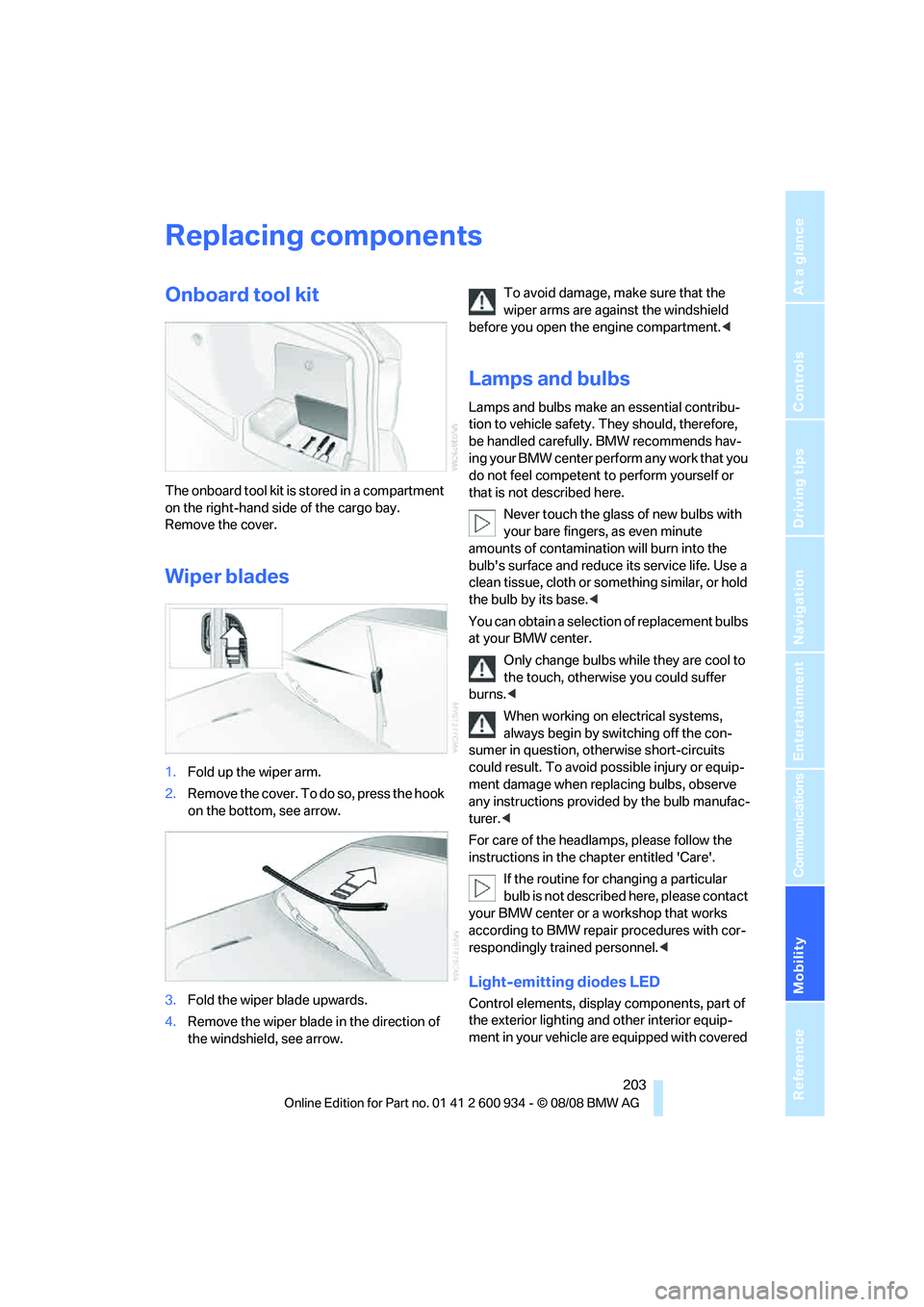
The onboard tool kit is stored in a compartment
on the right-hand side of the cargo bay.
Remove the cover.
Wiper blades
1.Fold up the wiper arm.
2.Remove the cover. To do so, press the hook
on the bottom, see arrow.
3.Fold the wiper blade upwards.
4.Remove the wiper blade in the direction of
the windshield, see arrow.To avoid damage, make sure that the
wiper arms are against the windshield
before you open the engine compartment.<
Lamps and bulbs
Lamps and bulbs make an essential contribu-
tion to vehicle safety. They should, therefore,
be handled carefully. BMW recommends hav-
ing your BMW center perform any work that you
do not feel competent to perform yourself or
that is not described here.
Never touch the glass of new bulbs with
your bare fingers, as even minute
amounts of contamination will burn into the
bulb's surface and reduce its service life. Use a
clean tissue, cloth or something similar, or hold
the bulb by its base.<
You can obtain a selection of replacement bulbs
at your BMW center.
Only change bulbs while they are cool to
the touch, otherwise you could suffer
burns.<
When working on electrical systems,
always begin by switching off the con-
sumer in question, otherwise short-circuits
could result. To avoid possible injury or equip-
ment damage when replacing bulbs, observe
any instructions provided by the bulb manufac-
turer.<
For care of the headlamps, please follow the
instructions in the chapter entitled 'Care'.
If the routine for changing a particular
bulb is not described here, please contact
your BMW center or a workshop that works
according to BMW repair procedures with cor-
respondingly trained personnel.<
Light-emitting diodes LED
Control elements, display components, part of
the exterior lighting and other interior equip-
ment in your vehicle are equipped with covered
ba8_E90M3_cic.book Seite 203 Dienstag, 19. August 2008 11:51 11
Page 209 of 246
Mobility
207Reference
At a glance
Controls
Driving tips
Communications
Navigation
Entertainment
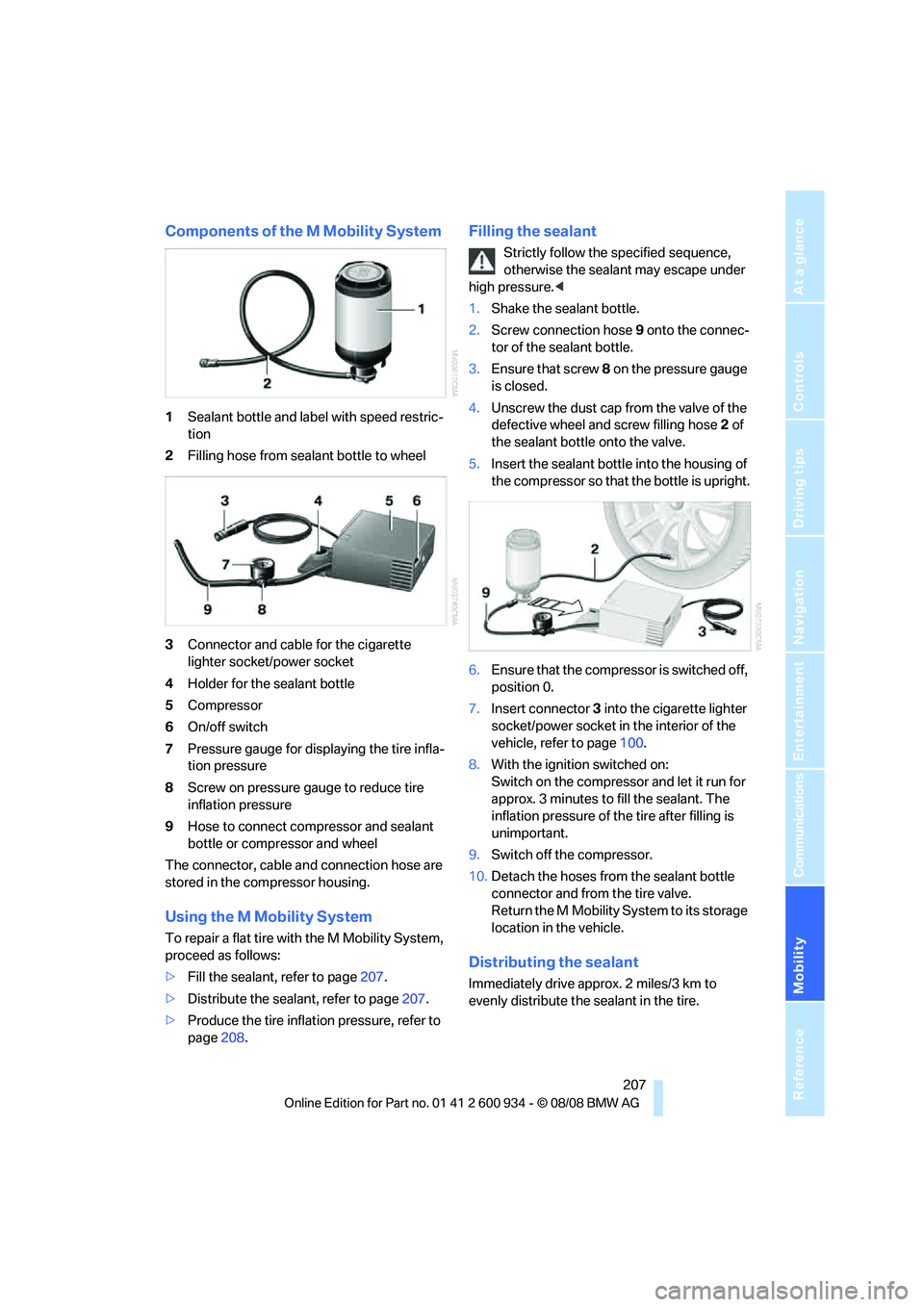
Components of the M Mobility System
1Sealant bottle and label with speed restric-
tion
2Filling hose from sealant bottle to wheel
3Connector and cable for the cigarette
lighter socket/power socket
4Holder for the sealant bottle
5Compressor
6On/off switch
7Pressure gauge for displaying the tire infla-
tion pressure
8Screw on pressure gauge to reduce tire
inflation pressure
9Hose to connect compressor and sealant
bottle or compressor and wheel
The connector, cable and connection hose are
stored in the compressor housing.
Using the M Mobility System
To repair a flat tire with the M Mobility System,
proceed as follows:
>Fill the sealant, refer to page207.
>Distribute the sealant, refer to page207.
>Produce the tire inflation pressure, refer to
page208.
Filling the sealant
Strictly follow the specified sequence,
otherwise the sealant may escape under
high pressure.<
1.Shake the sealant bottle.
2.Screw connection hose 9 onto the connec-
tor of the sealant bottle.
3.Ensure that screw 8 on the pressure gauge
is closed.
4.Unscrew the dust cap from the valve of the
defective wheel and screw filling hose 2 of
the sealant bottle onto the valve.
5.Insert the sealant bottle into the housing of
the compressor so that the bottle is upright.
6.Ensure that the compressor is switched off,
position 0.
7.Insert connector 3 into the cigarette lighter
socket/power socket in the interior of the
vehicle, refer to page100.
8.With the ignition switched on:
Switch on the compressor and let it run for
approx. 3 minutes to fill the sealant. The
inflation pressure of the tire after filling is
unimportant.
9.Switch off the compressor.
10.Detach the hoses from the sealant bottle
connector and from the tire valve.
Return the M Mobility System to its storage
location in the vehicle.
Distributing the sealant
Immediately drive approx. 2 miles/3 km to
evenly distribute the sealant in the tire.
ba8_E90M3_cic.book Seite 207 Dienstag, 19. August 2008 11:51 11
Page 211 of 246
Mobility
209Reference
At a glance
Controls
Driving tips
Communications
Navigation
Entertainment
secure the battery against tipping over during
transport.<
Power failure
After a temporary power loss, the functioning of
some equipment may be limited and require
reinitialization. Individual settings may likewise
have been lost and will have to be programmed:
>Time and date
These values must be updated, refer to
page68.
>Radio
In some cases, stations may have to be
stored again, refer to page139.
>Navigation system
Operability must be waited for, refer to
page116.
>Glass roof
It may happen that the roof can only be
raised. The system must be initialized.
Please contact your BMW center.
>Seat and mirror memory
The positions must be stored again, refer to
page40.
>Inside rearview mirror with digital compass
The system must be calibrated, refer to
page96.
Fuses
Never attempt to repair a blown fuse and
do not replace a defective fuse with a sub-
stitute of another color or amperage rating, oth-
erwise this could lead to a circuit overload, ulti-
mately resulting in a fire in the vehicle.
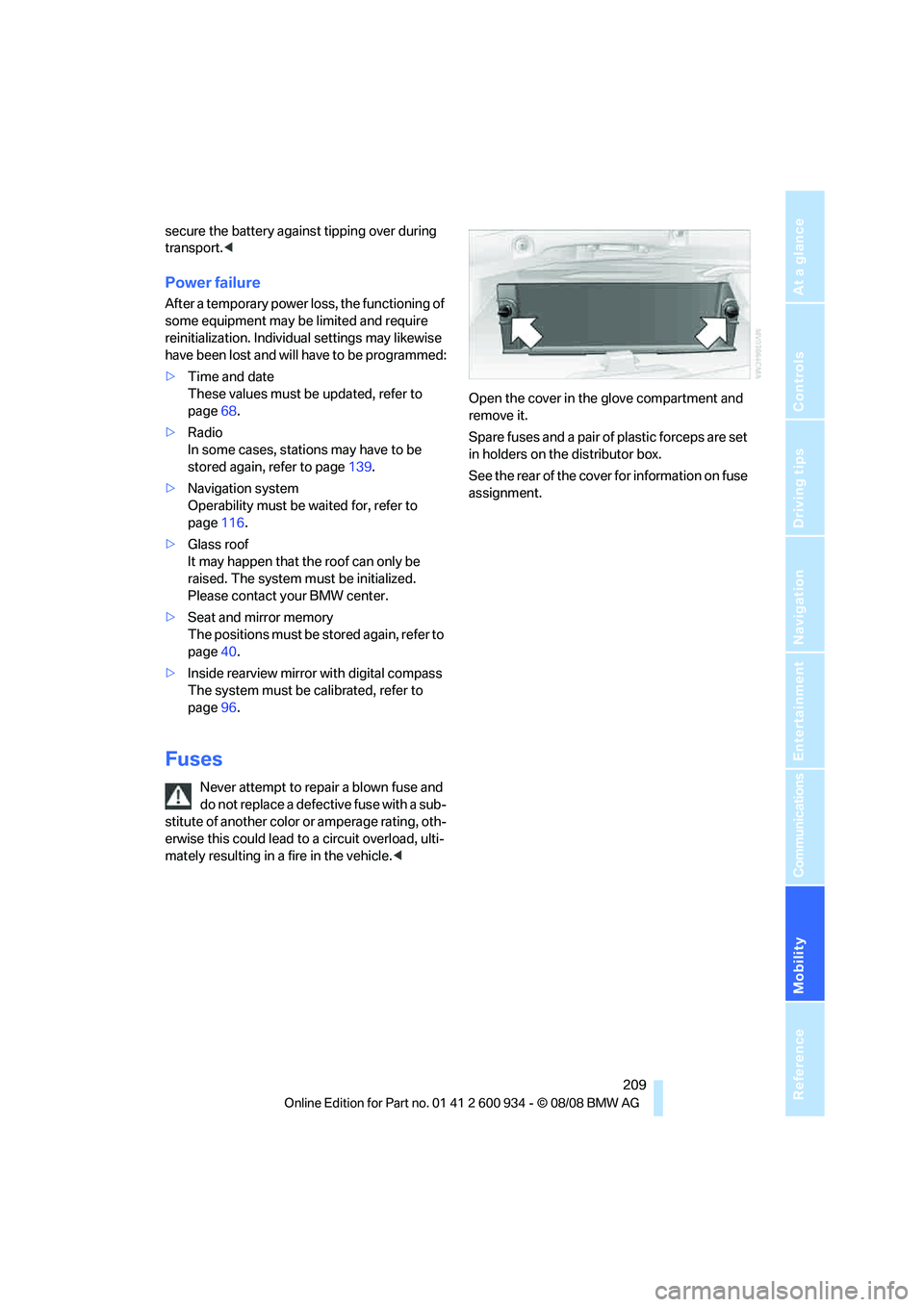
Spare fuses and a pair of plastic forceps are set
in holders on the distributor box.
See the rear of the cover for information on fuse
assignment.
ba8_E90M3_cic.book Seite 209 Dienstag, 19. August 2008 11:51 11
Page 223 of 246
Reference 221
At a glance
Controls
Driving tips
Communications
Navigation
Entertainment
Mobility
Short commands for the voice activation
system
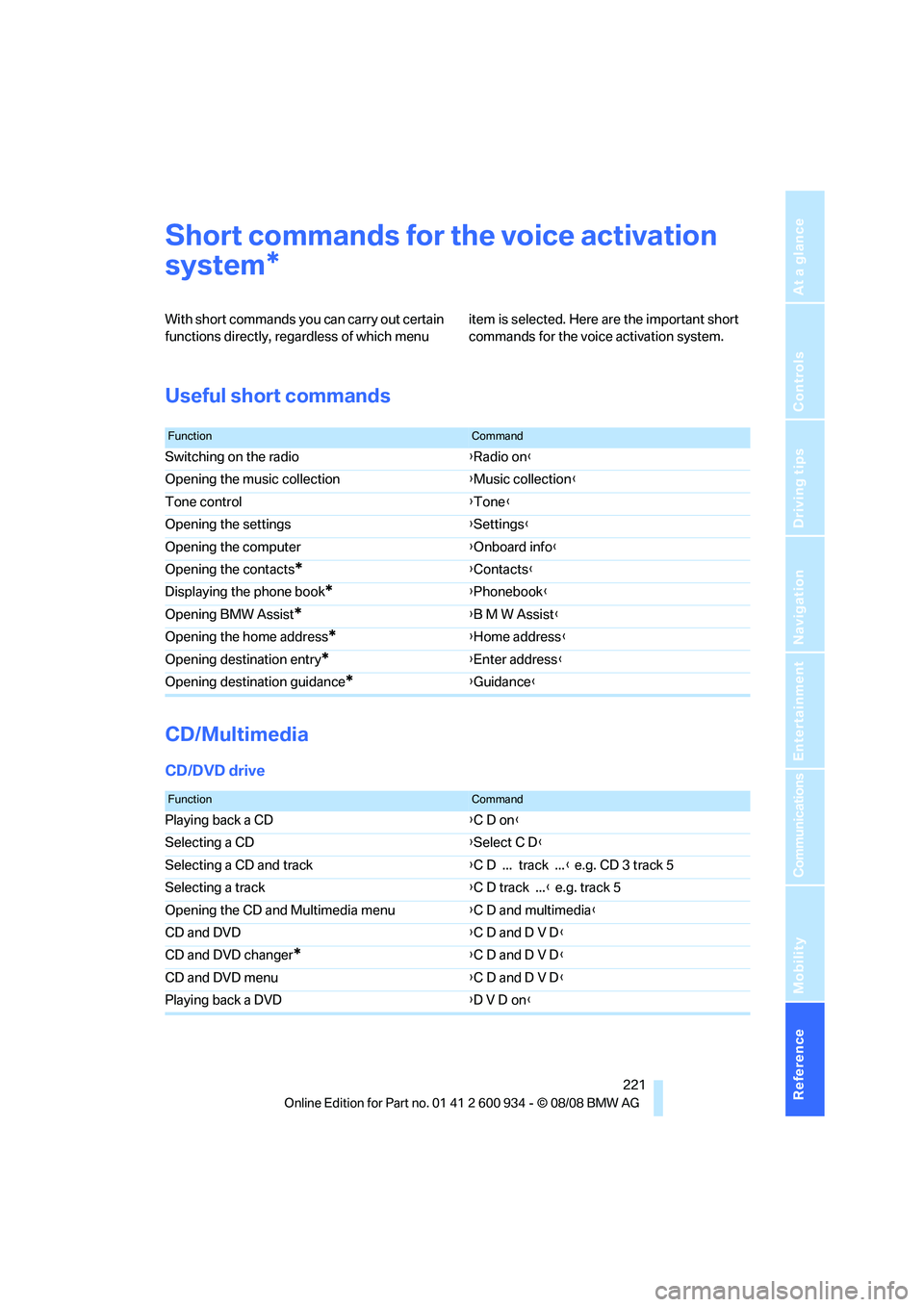
With short commands you can carry out certain
functions directly, regardless of which menu item is selected. Here are the important short
commands for the voice activation system.
Useful short commands
CD/Multimedia
CD/DVD drive
*
FunctionCommand
Switching on the radio{Radio on}
Opening the music collection{Music collection}
Tone control{Tone}
Opening the settings{Settings}
Opening the computer{Onboard info}
Opening the contacts
*{Contacts}
Displaying the phone book
*{Phonebook}
Opening BMW Assist
*{B M W Assist}
Opening the home address
*{Home address}
Opening destination entry
*{Enter address}
Opening destination guidance
*{Guidance}
FunctionCommand
Playing back a CD{C D on}
Selecting a CD{Select C D}
Selecting a CD and track{C D ... track ...} e.g. CD 3 track 5
Selecting a track{C D track ...} e.g. track 5
Opening the CD and Multimedia menu{C D and multimedia}
CD and DVD{C D and D V D}
CD and DVD changer
*{C D and D V D}
CD and DVD menu{C D and D V D}
Playing back a DVD{D V D on}
ba8_E90M3_cic.book Seite 221 Dienstag, 19. August 2008 11:51 11
Page 226 of 246
Short commands for the voice activation system
224
Navigation
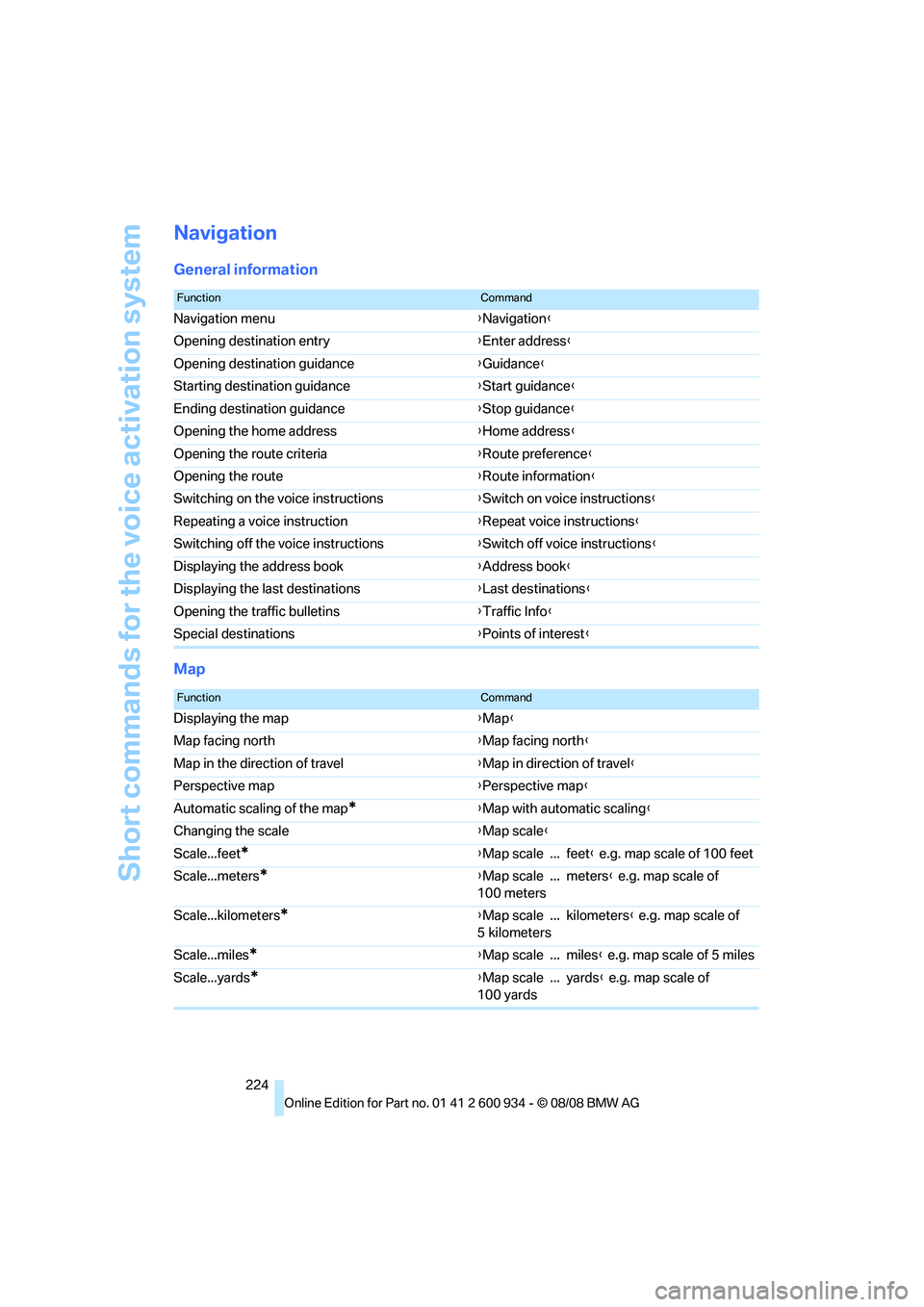
General information
Map
FunctionCommand
Navigation menu{Navigation}
Opening destination entry{Enter address}
Opening destination guidance{Guidance}
Starting destination guidance{Start guidance}
Ending destination guidance{Stop guidance}
Opening the home address{Home address}
Opening the route criteria{Route preference}
Opening the route{Route information}
Switching on the voice instructions{Switch on voice instructions}
Repeating a voice instruction{Repeat voice instructions}
Switching off the voice instructions{Switch off voice instructions}
Displaying the address book{Address book}
Displaying the last destinations{Last destinations}
Opening the traffic bulletins{Traffic Info}
Special destinations{Points of interest}
FunctionCommand
Displaying the map{Map}
Map facing north{Map facing north}
Map in the direction of travel{Map in direction of travel}
Perspective map{Perspective map}
Automatic scaling of the map
*{Map with automatic scaling}
Changing the scale{Map scale}
Scale...feet
*{Map scale ... feet} e.g. map scale of 100 feet
Scale...meters
*{Map scale ... meters} e.g. map scale of
100 meters
Scale...kilometers
*{Map scale ... kilometers} e.g. map scale of
5 kilometers
Scale...miles
*{Map scale ... miles} e.g. map scale of 5 miles
Scale...yards
*{Map scale ... yards} e.g. map scale of
100 yards
ba8_E90M3_cic.book Seite 224 Dienstag, 19. August 2008 11:51 11
Page 230 of 246
Everything from A - Z
228
Everything from A - Z
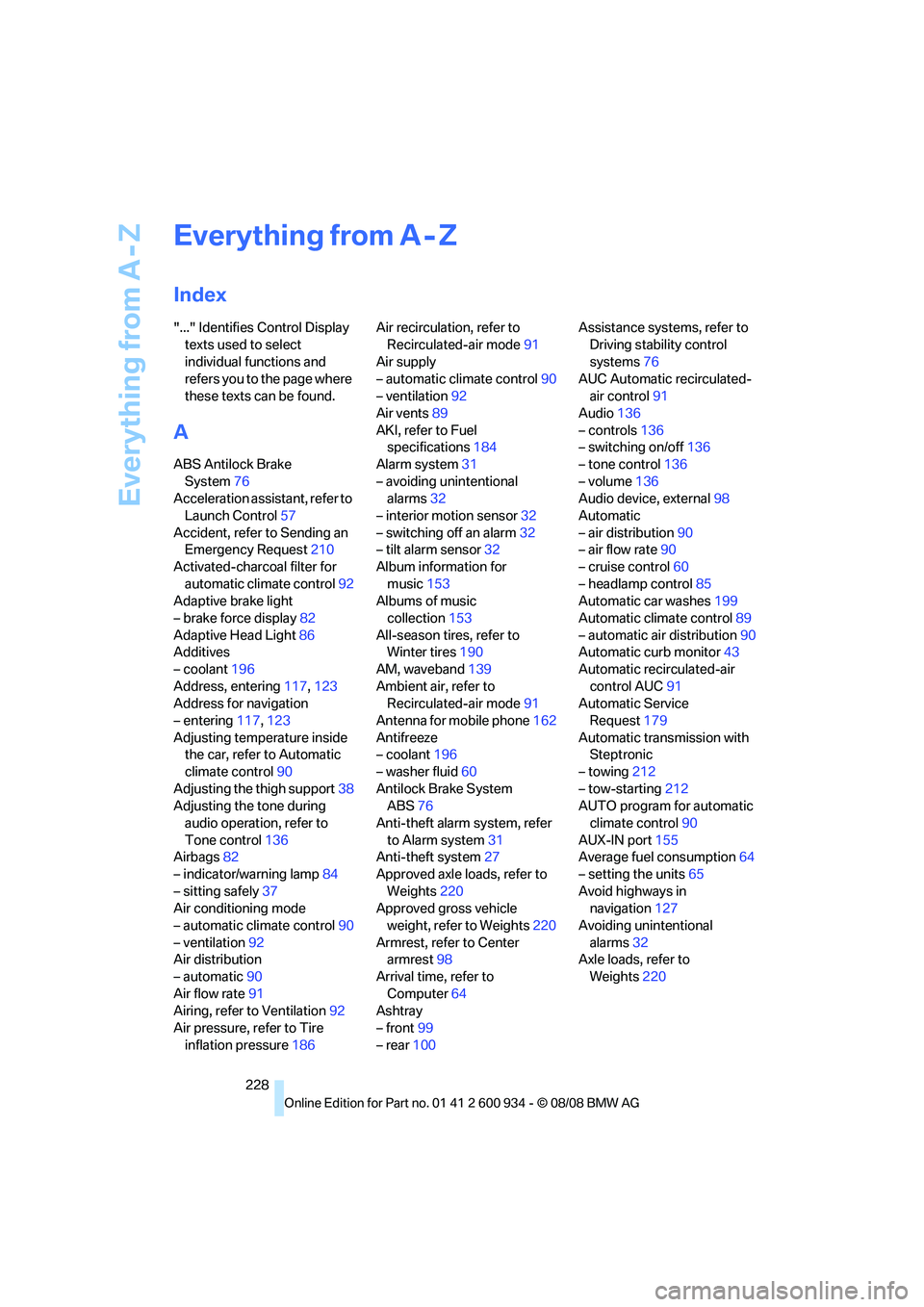
Index
"..." Identifies Control Display
texts used to select
individual functions and
refers you to the page where
these texts can be found.
A
ABS Antilock Brake
System76
Acceleration assistant, refer to
Launch Control57
Accident, refer to Sending an
Emergency Request210
Activated-charcoal filter for
automatic climate control92
Adaptive brake light
– brake force display82
Adaptive Head Light86
Additives
– coolant196
Address, entering117,123
Address for navigation
– entering117,123
Adjusting temperature inside
the car, refer to Automatic
climate control90
Adjusting the thigh support38
Adjusting the tone during
audio operation, refer to
Tone control136
Airbags82
– indicator/warning lamp84
– sitting safely37
Air conditioning mode
– automatic climate control90
– ventilation92
Air distribution
– automatic90
Air flow rate91
Airing, refer to Ventilation92
Air pressure, refer to Tire
inflation pressure186Air recirculation, refer to
Recirculated-air mode91
Air supply
– automatic climate control90
– ventilation92
Air vents89
AKI, refer to Fuel
specifications184
Alarm system31
– avoiding unintentional
alarms32
– interior motion sensor32
– switching off an alarm32
– tilt alarm sensor32
Album information for
music153
Albums of music
collection153
All-season tires, refer to
Winter tires190
AM, waveband139
Ambient air, refer to
Recirculated-air mode91
Antenna for mobile phone162
Antifreeze
– coolant196
– washer fluid60
Antilock Brake System
ABS
76
Anti-theft alarm system, refer
to Alarm system31
Anti-theft system27
Approved axle loads, refer to
Weights220
Approved gross vehicle
weight, refer to Weights220
Armrest, refer to Center
armrest98
Arrival time, refer to
Computer64
Ashtray
– front99
– rear100Assistance systems, refer to
Driving stability control
systems76
AUC Automatic recirculated-
air control91
Audio136
– controls136
– switching on/off136
– tone control136
– volume136
Audio device, external98
Automatic
– air distribution90
– air flow rate90
– cruise control60
– headlamp control85
Automatic car washes199
Automatic climate control89
– automatic air distribution90
Automatic curb monitor43
Automatic recirculated-air
control AUC91
Automatic Service
Request179
Automatic transmission with
Steptronic
– towing212
– tow-starting212
AUTO program for automatic
climate control90
AUX-IN port155
Average fuel consumption64
– setting the units65
Avoid highways in
navigation127
Avoiding unintentional
alarms32
Axle loads, refer to
Weights220
ba8_E90M3_cic.book Seite 228 Dienstag, 19. August 2008 11:51 11
Page 231 of 246
Reference 229
At a glance
Controls
Driving tips
Communications
Navigation
Entertainment
Mobility
B
Backrest contour, refer to
Lumbar support38
Backrests, refer to Seat
adjustment38
Backrest width adjustment39
Back seats
– refer to Rear seats39
Backup lamps
– replacing bulb205,206
Backup lamps, refer to Tail
lamps205
Band-aids, refer to First-aid
pouch211
Bar, refer to Towing
methods213
Base plate for telephone or
mobile phone
– refer to Snap-in adapter171
– refer to Snap-in adapter in
the center armrest storage
compartment98
Bass, tone setting136
Battery208
– charging208
– disposal34,208
– jump starting211
– remote control26
– temporary power failure209
Battery for mobile phone171
Battery renewal
– remote control34
– remote control for vehicle34
Being towed212
Belts, refer to Safety belts41
Belt tensioner, refer to Safety
belts41
Beverage holders, refer to
Cup holders99
Blower, refer to Air flow
rate91
Bluetooth, activating/
deactivating164
Bluetooth, refer to separate
Owner's Manual
BMW
– car shampoo201
BMW Assist, activating176BMW Assist175
BMW center180
BMW Homepage4
BMW Maintenance
System197
BMW Search176
BMW webpage4
Bottle holders, refer to Cup
holders99
Brake assist76
Brake fluid, refer to Service
requirements66
Brake force display82
Brake lamps
– replacing bulb205,206
Brake lights
– brake force display82
Brake pads106
– breaking in106
Brake rotors107
– brakes106
– breaking in106
Brakes
– ABS76
– BMW Maintenance
System197
– brake force display82
– breaking in106
– parking brake51
– service requirements66
Brakes, refer to Braking
safely107
Brake system106
– BMW Maintenance
System197
– breaking in106
– disc brakes107
Breakdown services, refer to
Roadside Assistance210
Breaking in the clutch106
Breaking in the differential,
refer to Engine and
differential106
Break-in period106
Brightness of the Control
Display73
Bulb changing, refer to Lamps
and bulbs203Button for starting the engine,
refer to Start/stop button49
Buttons on the steering
wheel11
C
California Proposition 65
warning6
Call
– accepting165
– ending166
– rejecting166
Calling, refer to Phone
numbers, dialing166
Can holders, refer to Cup
holders99
Capacities220
Capacity of the cargo bay220
Car battery, refer to Vehicle
battery208
Car care, refer to Care199
Care199
– automatic car washes199
– care products199
– carpets201
– CD/DVD drives201
– chrome parts200
– displays201
– exterior199
– fine wood parts201
– headlamps200
– high-pressure washer199
– interior201
– leather201
– light-alloy wheels200
– paintwork200
– plastic parts201
– rubber seals200
– safety belts201
– sensors and cameras201
– upholstery and cloth
trim201
– washing the car
manually200
– windows200
– wiper blades200
Cargo, securing109
ba8_E90M3_cic.book Seite 229 Dienstag, 19. August 2008 11:51 11
Page 233 of 246
Reference 231
At a glance
Controls
Driving tips
Communications
Navigation
Entertainment
Mobility
Control Display
– brightness73
– changing the language73
– switching off/on19
Control Display, refer to
iDrive16
Controller, refer to iDrive16
Controls and displays10
Control unit, refer to iDrive16
Convenient access32
– replacing the battery34
Convenient operation
– glass roof28
– glass roof with convenient
access33
– windows28
– windows with convenient
access33
Coolant196
– checking level196
Coolant temperature63
Cooling, maximum90
Cooling fluid, refer to
Coolant196
Cooling system, refer to
Coolant196
Copyright2
Corner-illuminating lamps,
refer to Adaptive Head
Light86
Cornering lamps, refer to
Adaptive Head Light86
Correct tires190
Country codes DVD146
Courtesy lamps, refer to
Interior lamps87
Criteria for route127
Cross-hairs in navigation122
Cruise control60
Cruising range64
Cup holders99
Curb weight, refer to
Weights220
Current playback of music
collection152
Current position
– displaying133
Customer Relations179D
Dashboard, refer to
Cockpit10
Dashboard, refer to
Instrument cluster12
Dashboard lighting, refer to
Instrument lighting87
Data, technical218
– dimensions219
– engine218
– weights220
Data transfer180
Date
– date format70
– setting69
Daytime running lamps86
Deactivating front passenger
airbags83
Deadlocking, refer to
Locking28
Defect
– door lock29
– fuel filler door184
– glass roof36
Destination, entering by town/
city name117
Destination address
– entering117,123
Destination for navigation
– entering by voice123
– entering via map122
– entry117
– home address120
– manual entry117
Destination guidance127
– bypassing a route
section128
– changing specified
route127
– continuing127
– starting127
– voice instructions128
– volume of voice
instructions129
Digital clock62
Digital compass96
Digital radio, refer to High
Definition Radio140Dimensions219
Directional indicators, refer to
Turn signals58
Direction instructions, refer to
Voice instructions128
Directory for navigation, refer
to Address book119
Displacement, refer to Engine
data218
Display, refer to iDrive
controls16
Display lighting, refer to
Instrument lighting87
Displays
– on the Control Display16
Displays, refer to Instrument
cluster12
Displays and controls10
Disposal
– coolant196
– remote control battery34
– vehicle battery208
Distance remaining to service,
refer to Service
requirements66
Distance warning, refer to
Park Distance Control
PDC75
Door key, refer to Remote
control26
Door lock29
Doors, emergency
operation29
DOT Quality Grades188
Draft-free ventilation92
Drinks holders, refer to Cup
holders99
Drivelogic55
Drive mode53
Drive-off assistance, refer to
Dynamic Stability Control
DSC76
Drive-off assistant78
Drive position, engaging, refer
to Selector lever
positions52
Drive programs, refer to
Drivelogic55
ba8_E90M3_cic.book Seite 231 Dienstag, 19. August 2008 11:51 11