brake light BMW M3 2010 User Guide
[x] Cancel search | Manufacturer: BMW, Model Year: 2010, Model line: M3, Model: BMW M3 2010Pages: 196, PDF Size: 5.78 MB
Page 146 of 196
Care
144 water penetration. Follow the operating instruc-
tions of the high-pressure washer.<
When using high-pressure washers, do
not spray against the sensors and cam-
eras, e.g. of the Park Distance Control or Rear
View Camera, for an extended period and main-
tain a distance of at least 1 ft/30 cm.<
Manual car wash
When washing the vehicle by hand, use large
quantities of water and car shampoo if neces-
sary. Clean the vehicle with a sponge or wash-
ing brush, applying light pressure only.
Before cleaning the windshield, deacti-
vate the rain sensor or switch off the igni-
tion to prevent unintentional activation of the
wipers.<
Observe local regulations pertaining to
washing vehicles by hand.<
Headlamps
Do not rub them dry and do not use abrasive or
corrosive cleaning agents.
Loosen dirt, e.g. insects, with shampoo or
insect remover and wash away with copious
quantities of water.
Thaw ice with a windshield deicer and do not
use an ice scraper.
Windows
Clean the inside and outside surfaces of the
windows and the mirrors with window cleaner.
Do not clean the mirrors with cleaners
containing quartz.<
Paintwork care
Regular care contributes to value retention and
protects the paintwork against the long-term
effects of damaging substances.
Region-specific environmental influences can
damage the vehicle paintwork. Therefore, it is
important to adapt the frequency and scope of
car care accordingly.
Immediately remove aggressive materials such
as spilled fuel, oil, grease, brake fluid, tree sap or bird droppings to prevent damage to the paint-
work.
Repairing paintwork damage
Immediately repair scratches or similar
damage, such as that caused by stones
hitting the vehicle, where necessary to prevent
rusting.<
BMW recommends having paintwork damage
repaired by a professional paint repair work-
shop according to BMW specifications using
original BMW paint materials.
Preservation
A preservation treatment is necessary when
water no longer beads off the clean paintwork
surface. Only use products for paintwork pres-
ervation that contain carnauba or synthetic
waxes.
Rubber seals
Treat only with water or rubber care products.
Do not use silicon-containing care prod-
ucts on rubber seals; otherwise, noise
and damage could occur.<
Chrome parts
Carefully clean vehicle parts such as the radia-
tor grill, door handles or window frames with
copious quantities of water and a shampoo
additive, especially when roads are treated with
deicing salt. For additional treatment, use a
chrome polish.
Light-alloy wheels
For technical reasons, dust is generated during
braking that is deposited on the light-alloy
wheels. Remove the dust regularly using acid-
free rim cleaner.
Do not use aggressive, acidic, strongly
alkaline and abrasive cleaning agents or
steam jets over 1407/606; otherwise, dam-
age may occur.<
Page 162 of 196
Indicator and warning lamps
160
Indicator and warning lamps
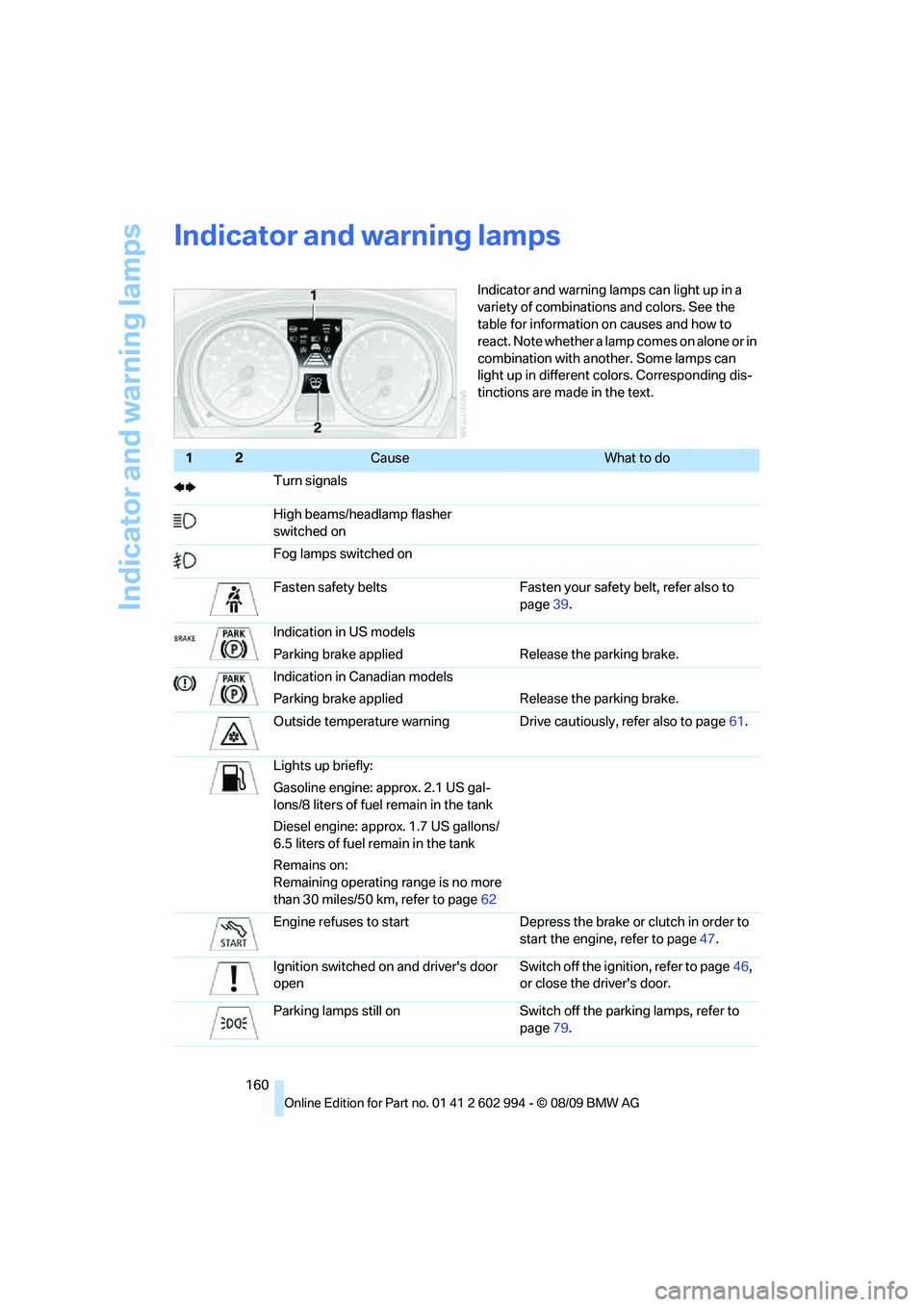
Indicator and warning lamps can light up in a
variety of combinations and colors. See the
table for information on causes and how to
react. Note whether a lamp comes on alone or in
combination with another. Some lamps can
light up in different colors. Corresponding dis-
tinctions are made in the text.
12Cause What to do
Turn signals
High beams/headlamp flasher
switched on
Fog lamps switched on
Fasten safety belts Fasten your safety belt, refer also to
page39.
Indication in US models
Parking brake applied Release the parking brake.
Indication in Canadian models
Parking brake applied Release the parking brake.
Outside temperature warning Drive cautiously, refer also to page61.
Lights up briefly:
Gasoline engine: approx. 2.1 US gal-
lons/8 liters of fuel remain in the tank
Diesel engine: approx. 1.7 US gallons/
6.5 liters of fuel remain in the tank
Remains on:
Remaining operating range is no more
than 30 miles/50 km, refer to page62
Engine refuses to start Depress the brake or clutch in order to
start the engine, refer to page47.
Ignition switched on and driver's door
openSwitch off the ignition, refer to page46,
or close the driver's door.
Parking lamps still on Switch off the parking lamps, refer to
page79.
Page 163 of 196
Reference
At a glance
Controls
Driving tips
Mobility
161
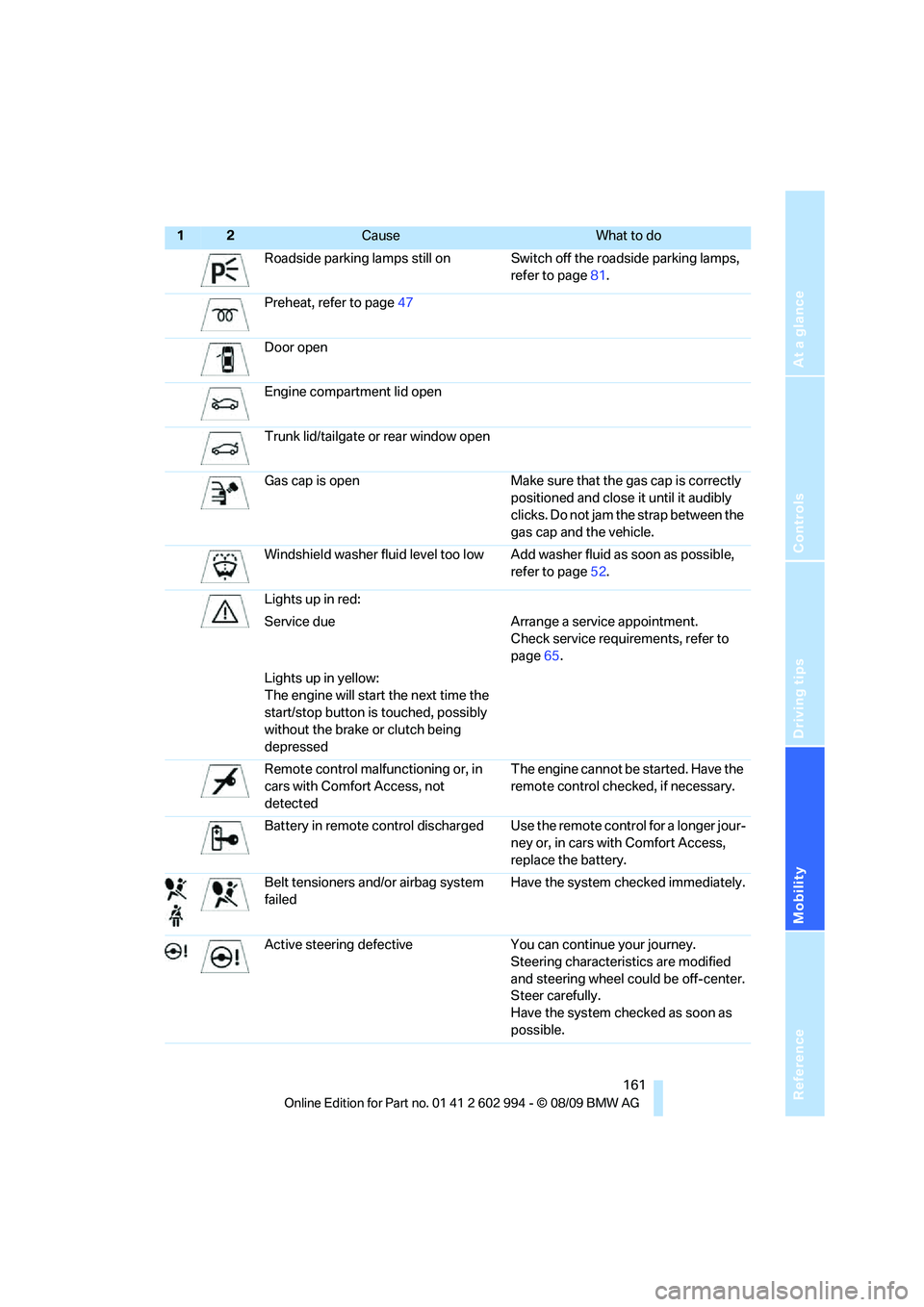
Roadside parking lamps still on Switch off the roadside parking lamps,
refer to page81.
Preheat, refer to page47
Door open
Engine compartment lid open
Trunk lid/tailgate or rear window open
Gas cap is open Make sure that the gas cap is correctly
positioned and close it until it audibly
clicks. Do not jam the strap between the
gas cap and the vehicle.
Windshield washer fluid level too low Add washer fluid as soon as possible,
refer to page52.
Lights up in red:
Service due Arrange a service appointment.
Check service requirements, refer to
page65.
Lights up in yellow:
The engine will start the next time the
start/stop button is touched, possibly
without the brake or clutch being
depressed
Remote control malfunctioning or, in
cars with Comfort Access, not
detectedThe engine cannot be started. Have the
remote control checked, if necessary.
Battery in remote control discharged Use the remote control for a longer jour-
ney or, in cars with Comfort Access,
replace the battery.
Belt tensioners and/or airbag system
failedHave the system checked immediately.
Active steering defective You can continue your journey.
Steering characteristics are modified
and steering wheel could be off-center.
Steer carefully.
Have the system checked as soon as
possible.
12Cause What to do
Page 165 of 196
Reference
At a glance
Controls
Driving tips
Mobility
163
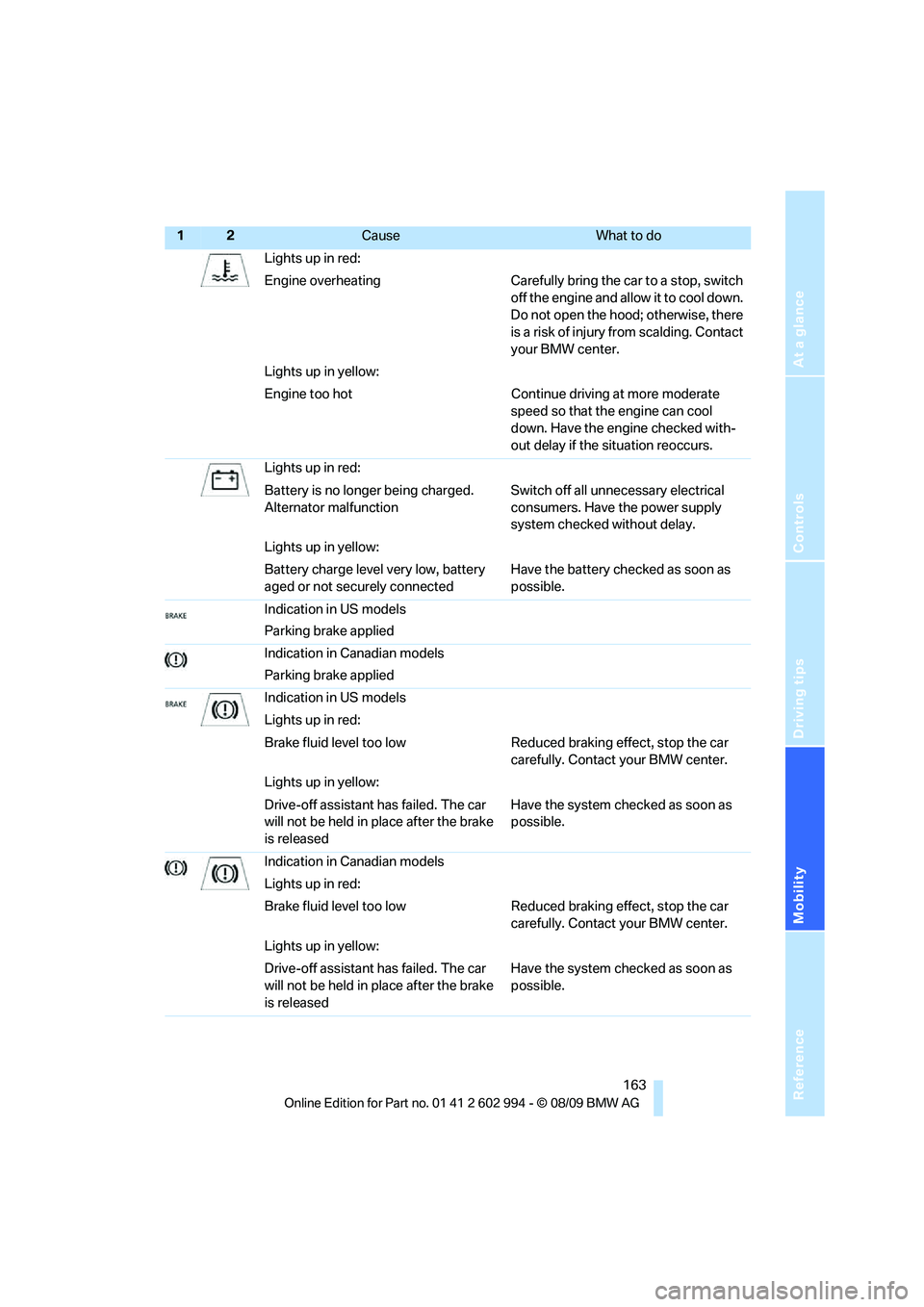
Lights up in red:
Engine overheating Carefully bring the car to a stop, switch
off the engine and allow it to cool down.
Do not open the hood; otherwise, there
is a risk of injury from scalding. Contact
your BMW center.
Lights up in yellow:
Engine too hot Continue driving at more moderate
speed so that the engine can cool
down. Have the engine checked with-
out delay if the situation reoccurs.
Lights up in red:
Battery is no longer being charged.
Alternator malfunctionSwitch off all unnecessary electrical
consumers. Have the power supply
system checked without delay.
Lights up in yellow:
Battery charge level very low, battery
aged or not securely connectedHave the battery checked as soon as
possible.
Indication in US models
Parking brake applied
Indication in Canadian models
Parking brake applied
Indication in US models
Lights up in red:
Brake fluid level too low Reduced braking effect, stop the car
carefully. Contact your BMW center.
Lights up in yellow:
Drive-off assistant has failed. The car
will not be held in place after the brake
is releasedHave the system checked as soon as
possible.
Indication in Canadian models
Lights up in red:
Brake fluid level too low Reduced braking effect, stop the car
carefully. Contact your BMW center.
Lights up in yellow:
Drive-off assistant has failed. The car
will not be held in place after the brake
is releasedHave the system checked as soon as
possible.
12Cause What to do
Page 166 of 196
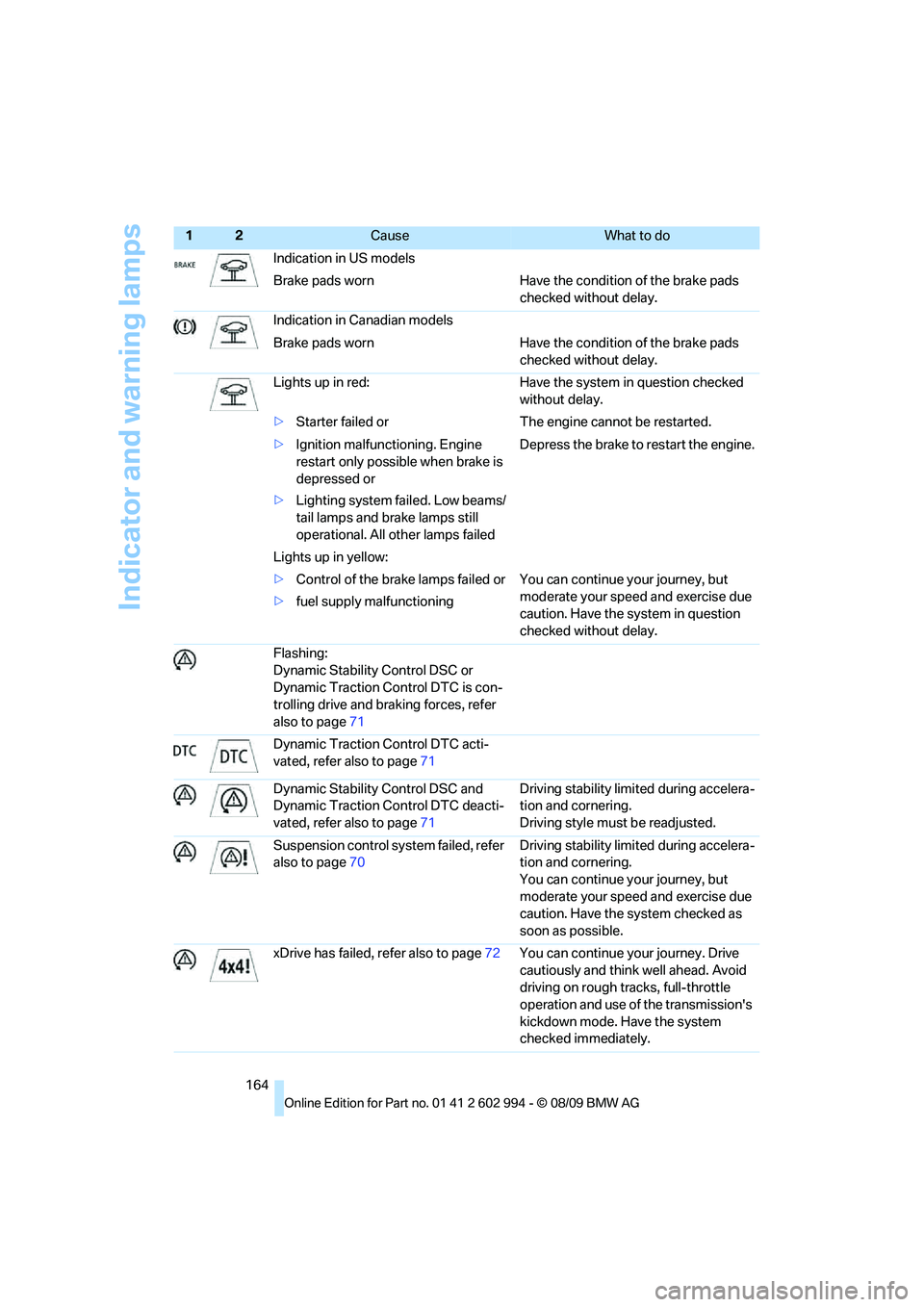
Indicator and warning lamps
164Indication in US models
Brake pads worn Have the condition of the brake pads
checked without delay.
Indication in Canadian models
Brake pads worn Have the condition of the brake pads
checked without delay.
Lights up in red: Have the system in question checked
without delay.
>Starter failed or The engine cannot be restarted.
>Ignition malfunctioning. Engine
restart only possible when brake is
depressed or
>Lighting system failed. Low beams/
tail lamps and brake lamps still
operational. All other lamps failedDepress the brake to restart the engine.
Lights up in yellow:
>Control of the brake lamps failed or
>fuel supply malfunctioning You can continue your journey, but
moderate your speed and exercise due
caution. Have the system in question
checked without delay.
Flashing:
Dynamic Stability Control DSC or
Dynamic Traction Control DTC is con-
trolling drive and braking forces, refer
also to page71
Dynamic Traction Control DTC acti-
vated, refer also to page71
Dynamic Stability Control DSC and
Dynamic Traction Control DTC deacti-
vated, refer also to page71Driving stability limited during accelera-
tion and cornering.
Driving style must be readjusted.
Suspension control system failed, refer
also to page70Driving stability limited during accelera-
tion and cornering.
You can continue your journey, but
moderate your speed and exercise due
caution. Have the system checked as
soon as possible.
xDrive has failed, refer also to page72You can continue your journey. Drive
cautiously and think well ahead. Avoid
driving on rough tracks, full-throttle
operation and use of the transmission's
kickdown mode. Have the system
checked immediately.
12Cause What to do
Page 169 of 196
Reference
At a glance
Controls
Driving tips
Mobility
167
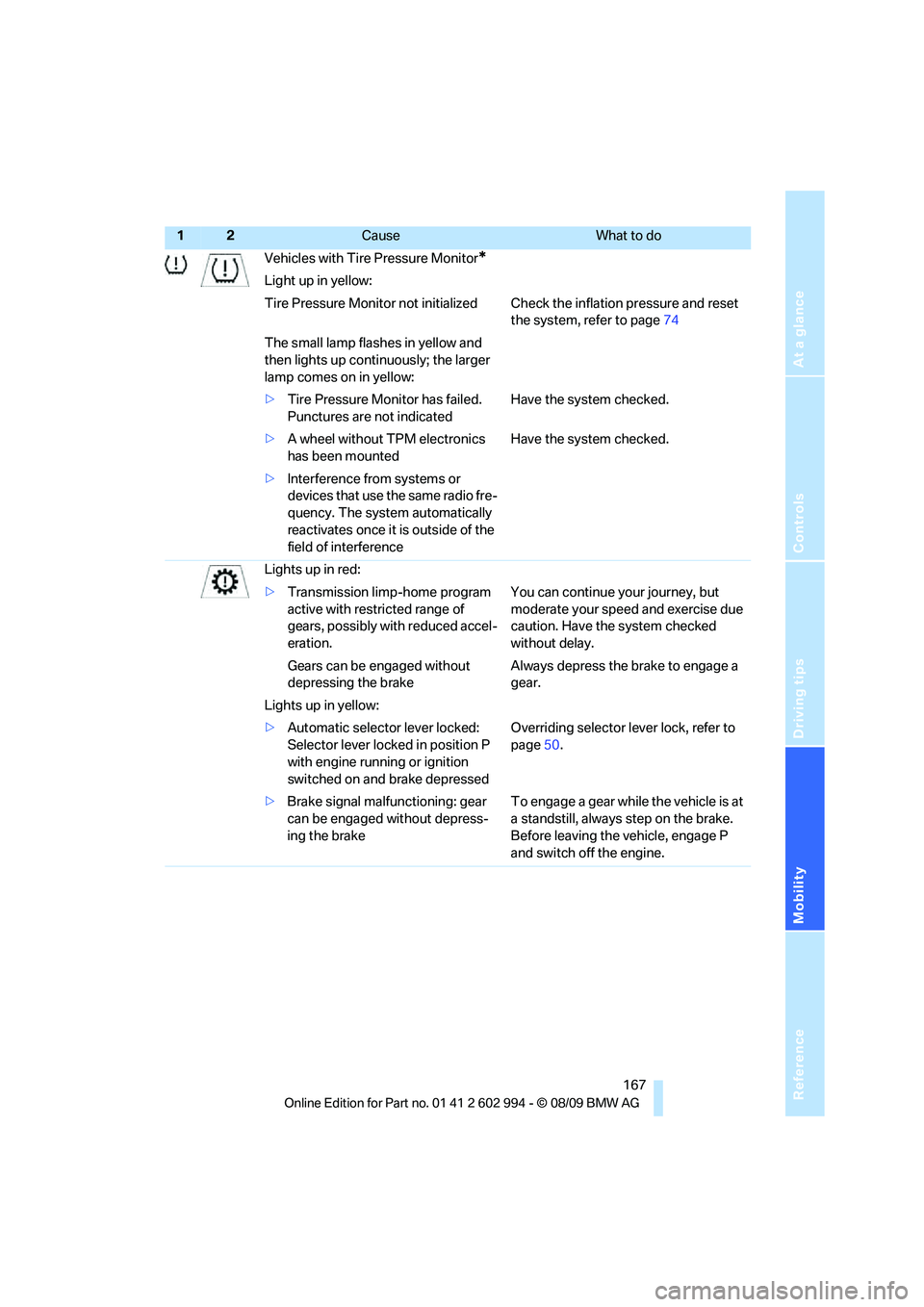
Vehicles with Tire Pressure Monitor*
Light up in yellow:
Tire Pressure Monitor not initialized Check the inflation pressure and reset
the system, refer to page74
The small lamp flashes in yellow and
then lights up continuously; the larger
lamp comes on in yellow:
>Tire Pressure Monitor has failed.
Punctures are not indicatedHave the system checked.
>A wheel without TPM electronics
has been mountedHave the system checked.
>Interference from systems or
devices that use the same radio fre-
quency. The system automatically
reactivates once it is outside of the
field of interference
Lights up in red:
>Transmission limp-home program
active with restricted range of
gears, possibly with reduced accel-
eration.You can continue your journey, but
moderate your speed and exercise due
caution. Have the system checked
without delay.
Gears can be engaged without
depressing the brakeAlways depress the brake to engage a
gear.
Lights up in yellow:
>Automatic selector lever locked:
Selector lever locked in position P
with engine running or ignition
switched on and brake depressedOverriding selector lever lock, refer to
page50.
>Brake signal malfunctioning: gear
can be engaged without depress-
ing the brakeTo engage a gear while the vehicle is at
a standstill, always step on the brake.
Before leaving the vehicle, engage P
and switch off the engine.
12Cause What to do
Page 170 of 196
Indicator and warning lamps
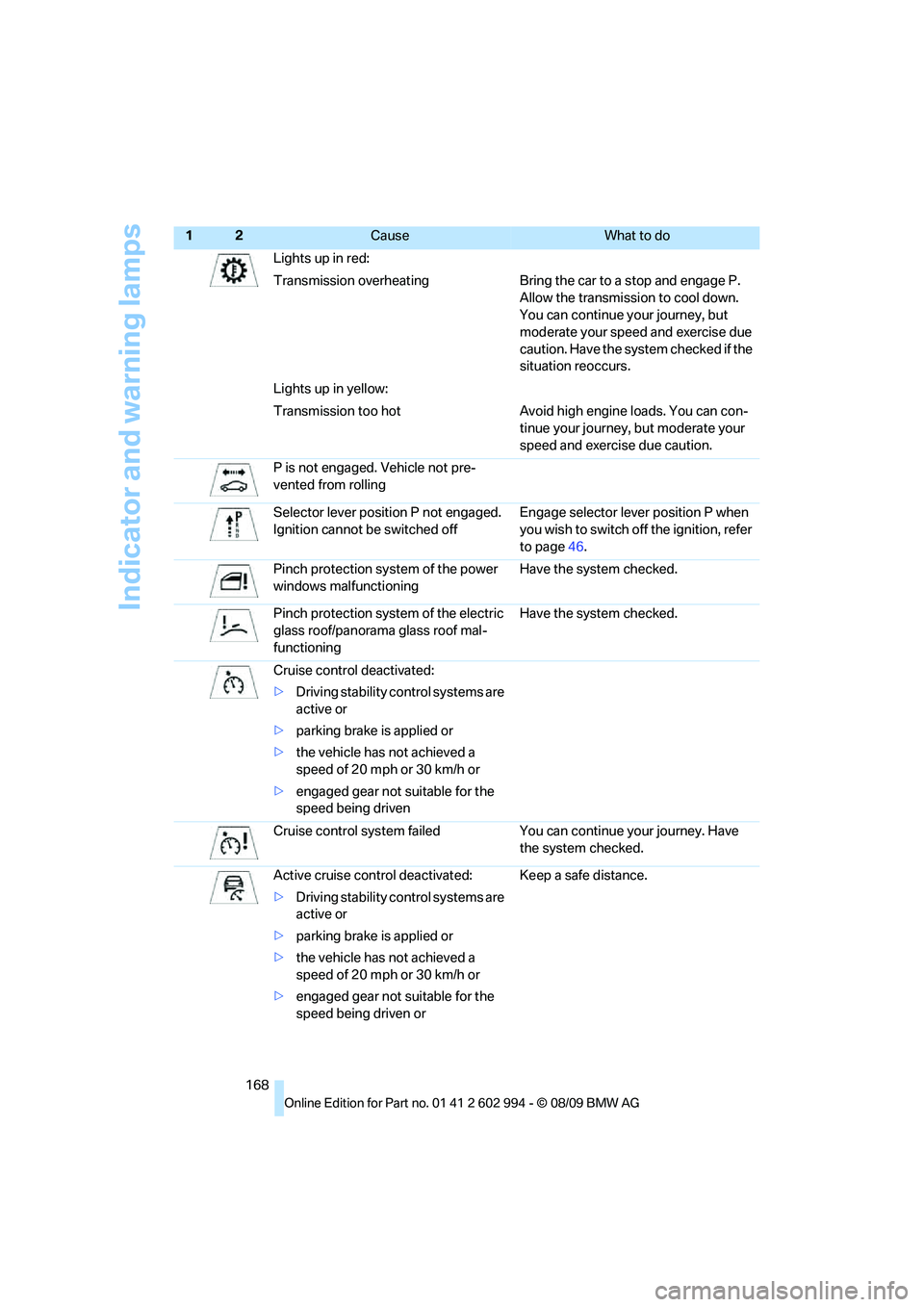
168Lights up in red:
Transmission overheating Bring the car to a stop and engage P.
Allow the transmission to cool down.
You can continue your journey, but
moderate your speed and exercise due
caution. Have the system checked if the
situation reoccurs.
Lights up in yellow:
Transmission too hot Avoid high engine loads. You can con-
tinue your journey, but moderate your
speed and exercise due caution.
P is not engaged. Vehicle not pre-
vented from rolling
Selector lever position P not engaged.
Ignition cannot be switched offEngage selector lever position P when
you wish to switch off the ignition, refer
to page46.
Pinch protection system of the power
windows malfunctioningHave the system checked.
Pinch protection system of the electric
glass roof/panorama glass roof mal-
functioningHave the system checked.
Cruise control deactivated:
>Driving stability control systems are
active or
>parking brake is applied or
>the vehicle has not achieved a
speed of 20 mph or 30 km/h or
>engaged gear not suitable for the
speed being driven
Cruise control system failed You can continue your journey. Have
the system checked.
Active cruise control deactivated:
>Driving stability control systems are
active or
>parking brake is applied or
>the vehicle has not achieved a
speed of 20 mph or 30 km/h or
>engaged gear not suitable for the
speed being driven orKeep a safe distance.
12Cause What to do
Page 182 of 196
Everything from A to Z
180
Everything from A to Z
Index
A
ABS Antilock Brake
System70
ACC, refer to Active cruise
control55
Accident, refer to Sending an
Emergency Request155
Activated-charcoal filter for
automatic climate control90
Active cruise control55
– indicator lamps57
– malfunction58
– selecting distance56
– sensor58
Active steering76
Adaptive brake light
– Brake Force Display76
Adaptive light control81
Additives
– coolant139
Adjusting temperature inside
the car, refer to Air
conditioner85
Adjusting temperature inside
the car, refer to Automatic
climate control87
Adjusting the thigh support34
Airbags77
– indicator/warning lamp78
– sitting safely33
Air conditioner84
Air conditioning mode
– air conditioner85
– automatic climate control87
– ventilation86,89
Air distribution
– automatic88
– individual85
– manual85
Airing, refer to
Ventilation86,89Air outlets, refer to Air
vents84
Air pressure, refer to Tire
inflation pressure119
Air recirculation, refer to
Recirculated-air
mode85,88
Air supply
– air conditioner85
– automatic climate control87
– ventilation86,89
Air vents84
Air volume85,88
AKI, refer to Fuel
specifications115
Alarm system
25
– avoiding unintentional
alarms26
– interior motion sensor26
– switching off an alarm26
– tilt alarm sensor26
ALL program88
All-season tires, refer to
Winter tires135
All-wheel drive, refer to
xDrive71
Ambient air, refer to
Recirculated-air
mode85,88
Antifreeze
– coolant139
– washer fluid52
Antilock Brake System
ABS70
Anti-theft alarm system, refer
to Alarm system25
Anti-theft system19
Approved axle loads, refer to
Weights177
Approved gross vehicle
weight, refer to Weights177
Armrest, refer to Center
armrest95Ashtray96
Assistance systems, refer to
Driving stability control
systems70
AUC Automatic recirculated-
air control88
Audio device, external95
Automatic
– air distribution88
– air volume88
– cruise control53,55
– headlamp control79
Automatic car washes143
Automatic climate control84
– automatic air distribution88
Automatic curb monitor40
Automatic high beams and
low beams, refer to High-
beam assistant81
Automatic recirculated-air
control AUC88
Automatic transmission with
Steptronic48
– interlock48,49
– overriding selector lever
lock50
– shiftlock, refer to Changing
selector lever position49
– sport program49
– towing157
– tow-starting157
AUTO program for automatic
climate control88
AUX-IN
– port95
Average fuel consumption63
– setting the units64
Average speed63
Avoiding unintentional
alarms26
Axle loads, refer to
Weights177
Page 183 of 196
Reference
At a glance
Controls
Driving tips
Mobility
181
B
Backrest contour, refer to
Lumbar support35
Backrests, refer to Seat
adjustment34
Backrest width adjustment35
Back seats
– refer to Rear seats36
Backup lamps
– replacing bulb151,152
Band-aids, refer to First aid
pouch155
Bar, refer to Towing
methods158
Base plate for telephone or
mobile phone
– refer to Snap-in adapter in
the center armrest storage
compartment95
Battery153
– charging153
– disposal28,153
– jump-starting156
– remote control18
– replacing153
– temporary power failure153
Battery renewal
– remote control28
– remote control for vehicle28
Being towed158
Belts, refer to Safety belts38
Belt tensioner, refer to Safety
belts38
Beverage holders, refer to
Cupholders95
Blower, refer to Air
volume85,88
Bluetooth, refer to separate
Owner's Manual
BMW
– car shampoo145
BMW Advanced Diesel116
BMW Homepage4
BMW Maintenance
System141
BMW webpage4
Bottle holders, refer to
Cupholders95Brake Assist, refer to Dynamic
Brake Control DBC70
Brake fluid, refer to Service
requirements65
Brake Force Display76
Brake lamps
– Brake Force Display76
– replacing bulb151,152
Brake pads106
– breaking in106
Brake rotors108
– brakes
106
– breaking in106
Brakes
– ABS70
– BMW Maintenance
System141
– Brake Force Display76
– breaking in106
– parking brake48
– service requirements65
Brakes, refer to Braking
safely108
Brake system106
– BMW Maintenance
System141
– breaking in106
– disc brakes108
Breakdown services, refer to
Roadside Assistance155
Breaking in the clutch106
Breaking in the differential,
refer to Engine and
differential106
Break-in period106
Bulb changing, refer to Lamps
and bulbs147
Button for starting the engine,
refer to Start/stop button46
Buttons on the steering
wheel11
C
California Proposition 65
warning5
Can holders, refer to
Cupholders95
Capacities178Capacity of the cargo area177
Car battery, refer to Vehicle
battery153
Car care, refer to Care143
Care143
– automatic car washes143
– care products143
– carpets145
– CD/DVD drives146
– chrome parts144
– displays145
– exterior143
– fine wood parts145
– headlamps144
– high-pressure washer143
– interior145
– leather145
– light-alloy wheels144
– paintwork144
– plastic parts145
– rubber seals144
– safety belts145
– sensors and cameras145
– upholstery and cloth
trim145
– washing the car
manually144
– windows144
Cargo, securing110
Cargo area98
– capacity177
– Comfort Access27
– folding up the floor
panel101
– lamp, refer to Interior
lamps83
– opening from inside23
– opening from outside23
– partition net99
– roller cover98
Cargo area lid, refer to Trunk
lid/tailgate23
Cargo area net, refer to
Partition net99
Cargo loading109
– securing cargo110
– stowing cargo109
– vehicle109
Page 184 of 196
Everything from A to Z
182 Car jack
– jacking points153
Car key, refer to Integrated
key/remote control18
Car phone
– installation location, refer to
Center armrest95
– refer to separate Owner's
Manual
Car shampoo145
Catalytic converter, refer to
Hot exhaust system107
Center armrest95
Center brake lamp
– replacing bulb152
Center console, refer to
Around the center
console14
Central locking
– from inside22
– from outside19
Central locking system19
– Comfort Access26
– hotel function24
– setting unlocking
characteristics19
Changes, technical, refer to
For your own safety5
Changing bulbs, refer to
Lamps and bulbs147
Changing wheels153
Chassis number, refer to
Engine compartment137
Check Control67
Child restraint fixing system
LATCH43
Child restraint systems42
Child safety locks45
Child seats, refer to
Transporting children
safely42
Chrome parts145
Chrome polish145
Cigarette lighter, refer to
Lighter96
Cleaning headlamps52
– washer fluid53
Cleaning your BMW, refer to
Care143Clock61
– 12h/24h format64
– setting time67
Closing
– from inside22
– from outside19
Clothes hooks95
Cockpit10
Cold start, refer to Starting the
engine47
Combined instrument, refer to
Instrument cluster12
Comfort Access26
– replacing the battery28
Comfort access, refer to
Comfort Access26
Comfort area, refer to Around
the center console14
Compartment for remote
control, refer to Ignition
lock46
Compass93
Computer63
Condensation, refer to When
the vehicle is parked109
Condition Based Service
CBS141
Configuring settings, refer to
Personal Profile18
Confirmation signals for
locking/unlocking the
vehicle20
Connecting vacuum cleaner,
refer to Connecting
electrical appliances96
Consumption, refer to
Average consumption63
Consumption display
– average consumption63
– Energy Control62
Controls and displays10
Convenient operation
– glass roof20
– windows20
Coolant139
– checking level140
Coolant temperature62
Cooling, maximum87Cooling fluid, refer to
Coolant139
Cooling system, refer to
Coolant139
Copyright2
Corner-illuminating lamps
– replacing bulbs148
Corner-illuminating lamps,
refer to Adaptive light
control81
Cornering lamps, refer to
Adaptive light control81
Correct tires134
Courtesy lamps, refer to
Interior lamps83
Cruise control53
– active55
– malfunction54
Cruising range63
Cupholders95
Curb weight, refer to
Weights177
Current fuel consumption,
refer to Energy Control62
D
Dashboard, refer to
Cockpit10
Dashboard, refer to
Instrument cluster12
Dashboard lighting, refer to
Instrument lighting82
Data, technical174
– capacities178
– dimensions175
– engine174
– weights177
Date
– setting67
Daytime running lights80
– replacing bulbs148
DBC Dynamic Brake
Control70
Deactivating front passenger
airbags77
Deadlocking, refer to
Locking20