seat adjustment BMW M3 2010 Owners Manual
[x] Cancel search | Manufacturer: BMW, Model Year: 2010, Model line: M3, Model: BMW M3 2010Pages: 196, PDF Size: 5.78 MB
Page 35 of 196
Reference
At a glance
Controls
Driving tips
Mobility
33
Adjustments
Sitting safely
The ideal sitting position can make a vital con-
tribution to relaxed, fatigue-free driving. In con-
junction with the safety belts, the head
restraints and the airbags, the seated position
has a major influence on your safety in the event
of an accident. To ensure that the safety sys-
tems operate with optimal efficiency, we
strongly urge you to observe the instructions
contained in the following section.
For additional information on transporting chil-
dren safely, refer to page42.
Airbags
Always maintain an adequate distance
between yourself and the airbags. Always
grip the steering wheel on the rim, with your
hands in the 3 o'clock and 9 o'clock positions,
to minimize the risk of injury to the hands or
arms in the event of the airbag being triggered
off.
No one and nothing should come between the
airbags and the seat occupant.
Do not use the cover of the front airbag on the
front passenger side as a storage area. Make
sure that the front passenger is sitting correctly,
e.g. not resting feet or legs on the dashboard;
otherwise, leg injuries can occur if the front air-
bag deploys.
Make sure that passengers keep their heads
away from the side airbag and do not lean
against the cover of the head airbag; otherwise,
serious injuries can result if the airbag
deploys.<
Even if you follow all the instructions, injuries
resulting from contact with airbags cannot be
fully excluded, depending on the circum-
stances. The ignition and inflation noise may
provoke a mild hearing loss in extremely sensi-
tive individuals. This effect is usually only tem-
porary.
For airbag locations and additional information
on airbags, refer to page77.
Head restraint
A correctly adjusted head restraint reduces the
risk of neck injury in the event of an accident.
Adjust the head restraint in such a way
that its center is at approx. ear level. Oth-
erwise, there is an increased risk of injury in the
event of an accident.<
Head restraints, refer to page35.
Safety belt
Before every drive, make sure that all occupants
wear their safety belts. Airbags complement the
safety belt as an additional safety device, but
they do not represent a substitute.
Your vehicle has five seats, each of which is
equipped with a safety belt.
Never allow more than one person to
wear a single safety belt. Never allow
infants or small children to ride in a passenger's
lap. Make sure that the belt in the lap area sits
low across the hips and does not press against
the abdomen.
The safety belt must not rest against the throat,
run across sharp edges, pass over hard or frag-
ile objects or be pinched. Fasten the safety belt
so that it sits as snugly as possible against the
lap and shoulder without being twisted. Other-
wise, the belt could slide over your hips and
injure your abdomen in the event of a frontal
collision.
Avoid wearing bulky clothing and regularly pull
the belt in the upper-body area taut; otherwise,
its restraining effect could be impaired.
Sports Wagon: if the rear center safety belt is
used, the wider backrest must be locked in
place, refer to page99. Otherwise, the safety
belt will have no restraining effect.<
Safety belts, refer to page38.
Page 36 of 196
Adjustments
34
Seats
Note before adjusting
Never attempt to adjust your seat while
the vehicle is moving. The seat could
respond with unexpected movement, and the
ensuing loss of vehicle control could lead to an
accident.
On the front passenger seat as well, do not
incline the backrest too far to the rear while the
vehicle is being driven; otherwise, there is a
danger in the event of an accident of sliding
under the safety belt, eliminating the protection
normally provided by the belt.<
Comply with the instructions on head restraint
height on page35, and on damaged safety
belts on page39.
Manual adjustment
Observe the adjustment instructions on
page34 to ensure the best possible per-
sonal protection.<
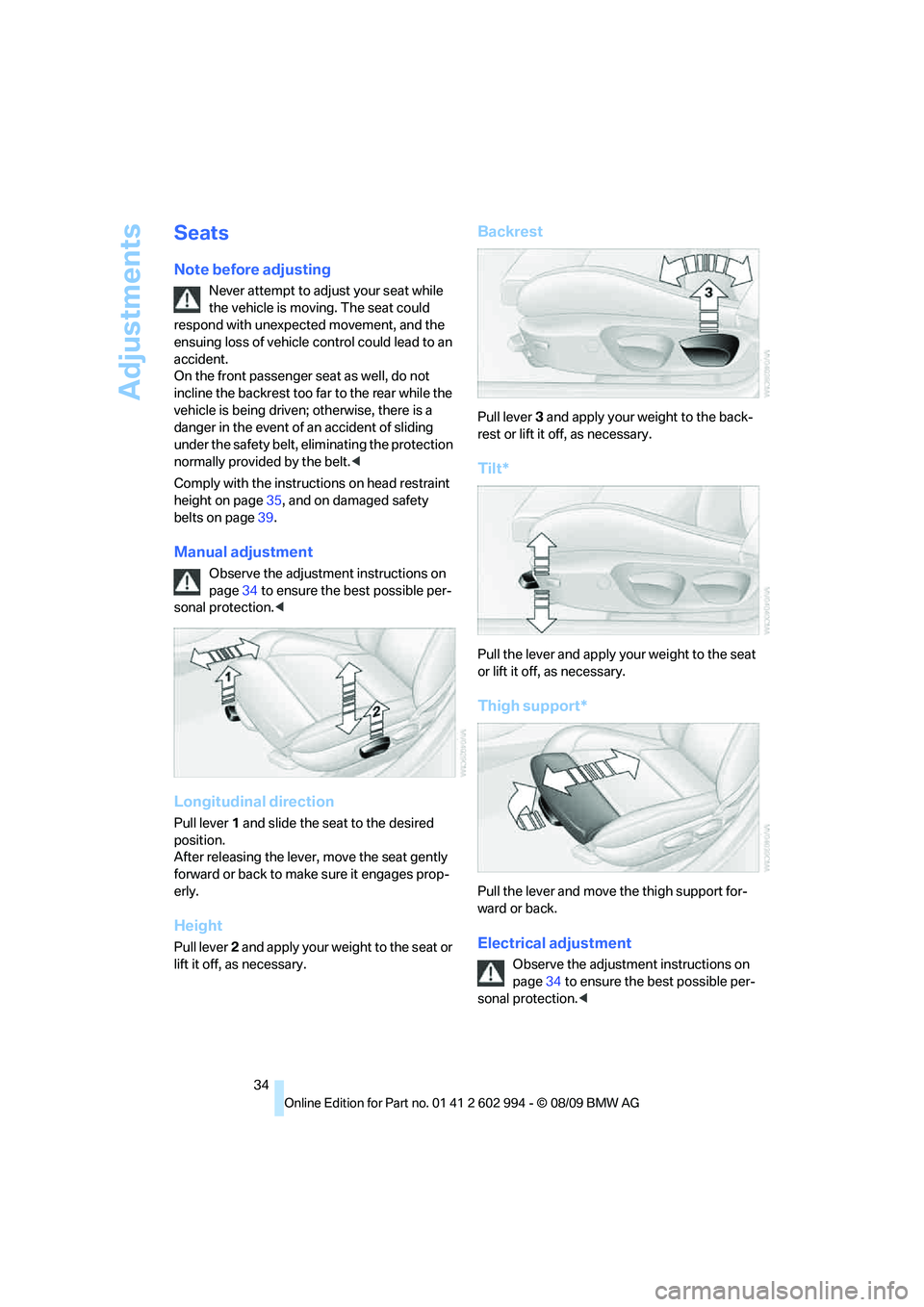
Longitudinal direction
Pull lever 1 and slide the seat to the desired
position.
After releasing the lever, move the seat gently
forward or back to make sure it engages prop-
erly.
Height
Pull lever 2 and apply your weight to the seat or
lift it off, as necessary.
Backrest
Pull lever 3 and apply your weight to the back-
rest or lift it off, as necessary.
Tilt*
Pull the lever and apply your weight to the seat
or lift it off, as necessary.
Thigh support*
Pull the lever and move the thigh support for-
ward or back.
Electrical adjustment
Observe the adjustment instructions on
page34 to ensure the best possible per-
sonal protection.<
Page 38 of 196
Adjustments
36
Front active head restraints
In a rear collision of a sufficient strength, the
active head restraint reduces the distance to
the head.
Do not use seat or head restraint covers
that could impair the function of the active
head restraint. Otherwise, the protective func-
tion of the active head restraint will not be
ensured and its full potential in reducing the risk
of injury in the event of a rear collision may not
be realized.
In the event of malfunctions, deactivation or
triggering of the active head restraints, have the
testing, repair and removal executed only by a
BMW center or a workshop that works accord-
ing to repair procedures of BMW with corre-
spondingly trained personnel and that has the
required explosives licenses. Unprofessional
attempts to work on the system could lead to
failure in an emergency or to undesired airbag
activation, either of which could result in per-
sonal injury.<
For technical reasons, the head restraint
cannot be removed.<
Front seats
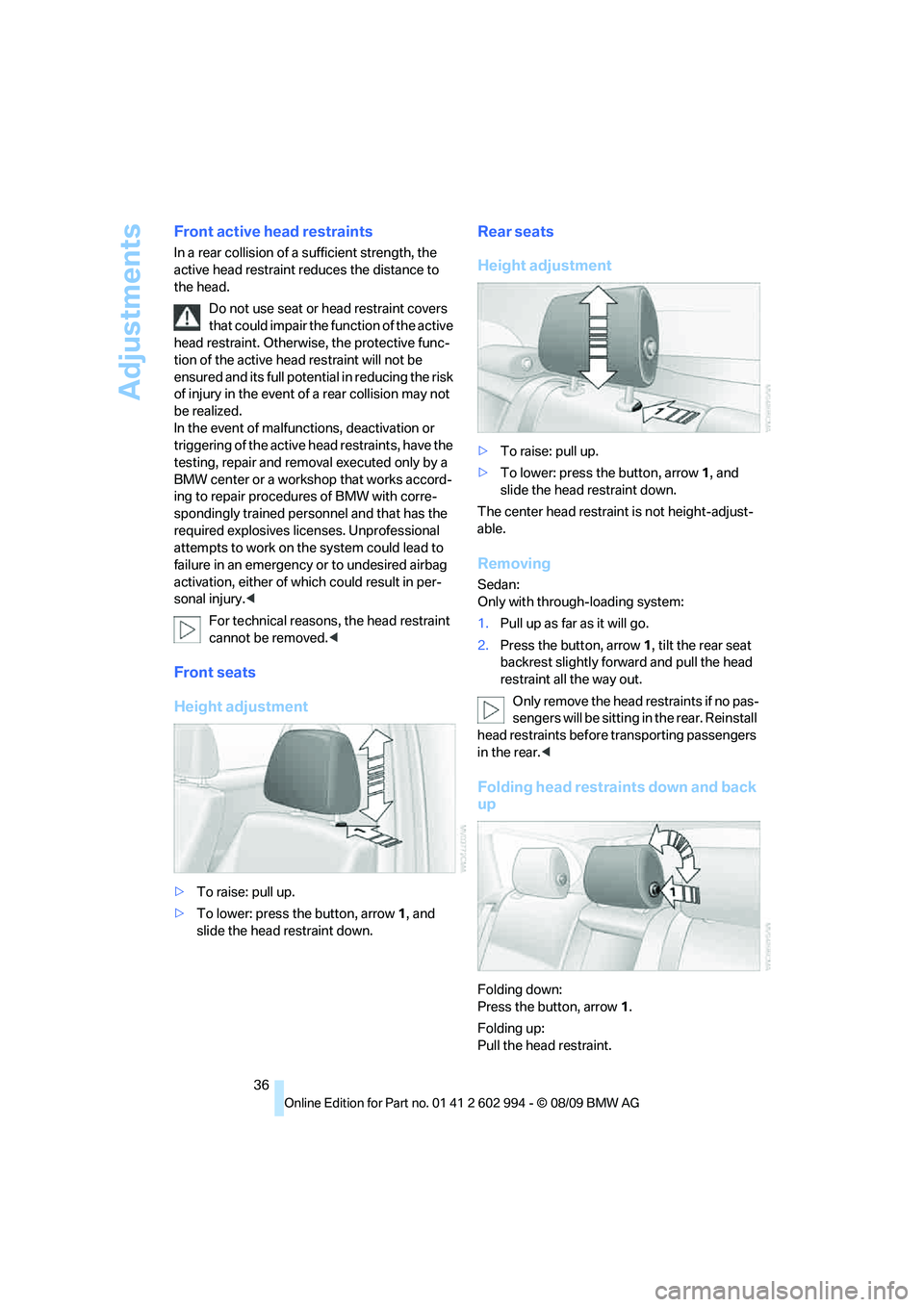
Height adjustment
>To raise: pull up.
>To lower: press the button, arrow1, and
slide the head restraint down.
Rear seats
Height adjustment
>To raise: pull up.
>To lower: press the button, arrow1, and
slide the head restraint down.
The center head restraint is not height-adjust-
able.
Removing
Sedan:
Only with through-loading system:
1.Pull up as far as it will go.
2.Press the button, arrow 1, tilt the rear seat
backrest slightly forward and pull the head
restraint all the way out.
O nly remove the head restraints if no pas-
sengers will be sitting in the rear. Reinstall
head restraints before transporting passengers
in the rear.<
Folding head restraints down and back
up
Folding down:
Press the button, arrow1.
Folding up:
Pull the head restraint.
Page 39 of 196
Reference
At a glance
Controls
Driving tips
Mobility
37
Depending on the equipment version, it may be
possible to fold down the outer rear head
restraints as well.
Only fold the head restraints down if no
passengers will be sitting in the rear. Fold
up the head restraints before transporting pas-
sengers in the rear.<
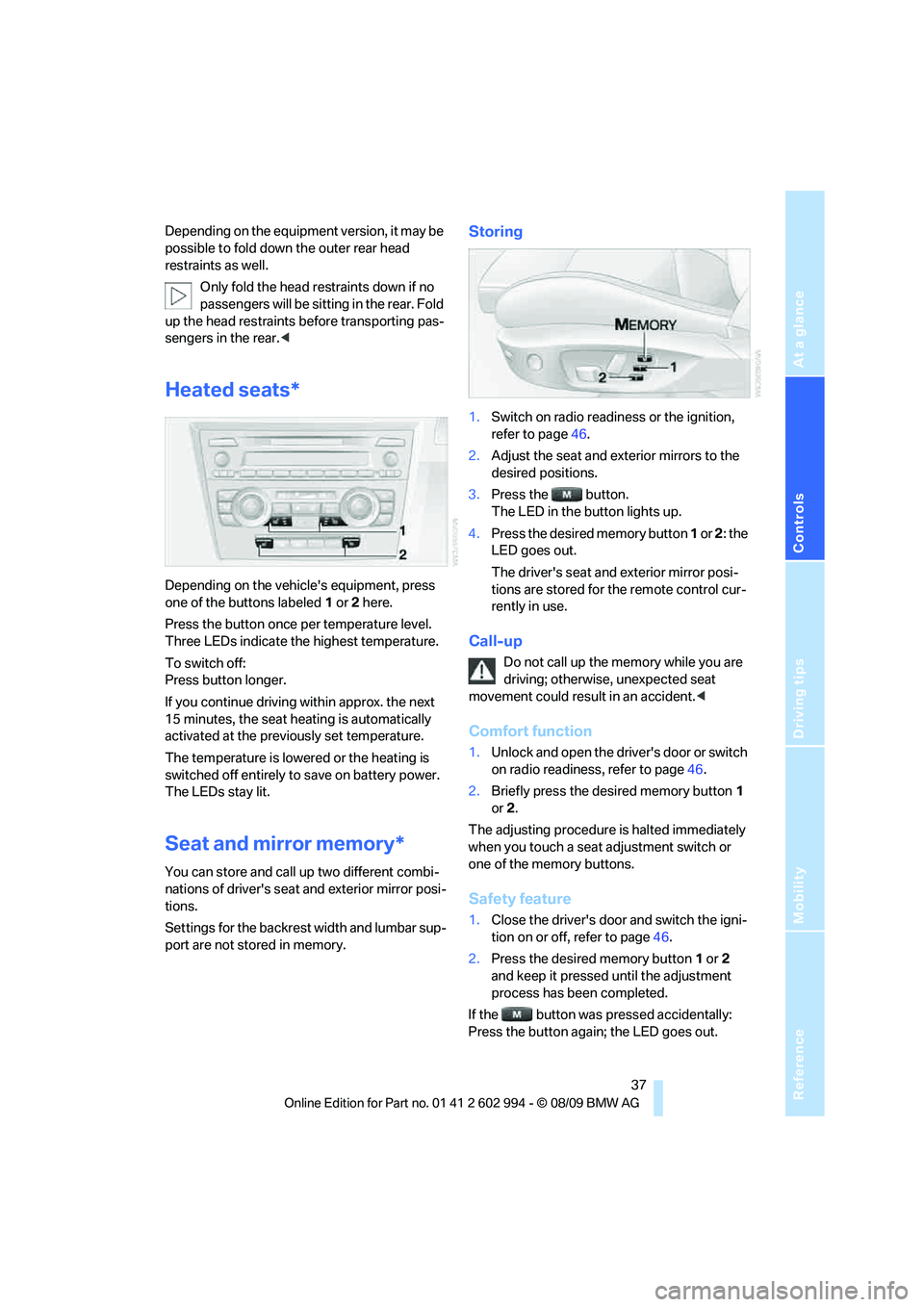
Heated seats*
Depending on the vehicle's equipment, press
one of the buttons labeled1 or 2 here.
Press the button once per temperature level.
Three LEDs indicate the highest temperature.
To switch off:
Press button longer.
If you continue driving within approx. the next
15 minutes, the seat heating is automatically
activated at the previously set temperature.
The temperature is lowered or the heating is
switched off entirely to save on battery power.
The LEDs stay lit.
Seat and mirror memory*
You can store and call up two different combi-
nations of driver's seat and exterior mirror posi-
tions.
Settings for the backrest width and lumbar sup-
port are not stored in memory.
Storing
1.Switch on radio readiness or the ignition,
refer to page46.
2.Adjust the seat and exterior mirrors to the
desired positions.
3.Press the button.
The LED in the button lights up.
4.Press the desired memory button 1 or 2: the
LED goes out.
The driver's seat and exterior mirror posi-
tions are stored for the remote control cur-
rently in use.
Call-up
Do not call up the memory while you are
driving; otherwise, unexpected seat
movement could result in an accident.<
Comfort function
1.Unlock and open the driver's door or switch
on radio readiness, refer to page46.
2.Briefly press the desired memory button1
or 2.
The adjusting procedure is halted immediately
when you touch a seat adjustment switch or
one of the memory buttons.
Safety feature
1.Close the driver's door and switch the igni-
tion on or off, refer to page46.
2.Press the desired memory button1 or2
and keep it pressed until the adjustment
process has been completed.
If the button was pressed accidentally:
Press the button again; the LED goes out.
Page 40 of 196
Adjustments
38
Call-up with the remote control
The driver's seat position last set is stored for
the remote control currently in use.
You can select whether or not the seat is reset
to that position automatically.
When this Personal Profile function is
used, first make sure that the footwell
behind the driver's seat is free of obstacles.
Failure to do so could cause injury to persons or
damage to objects as a result of a rearward
movement of the seat.<
The adjusting procedure is halted immediately
when you touch a seat adjustment switch or
one of the memory buttons.
Activating/deactivating automatic call-
up
For operating principle refer to page64.
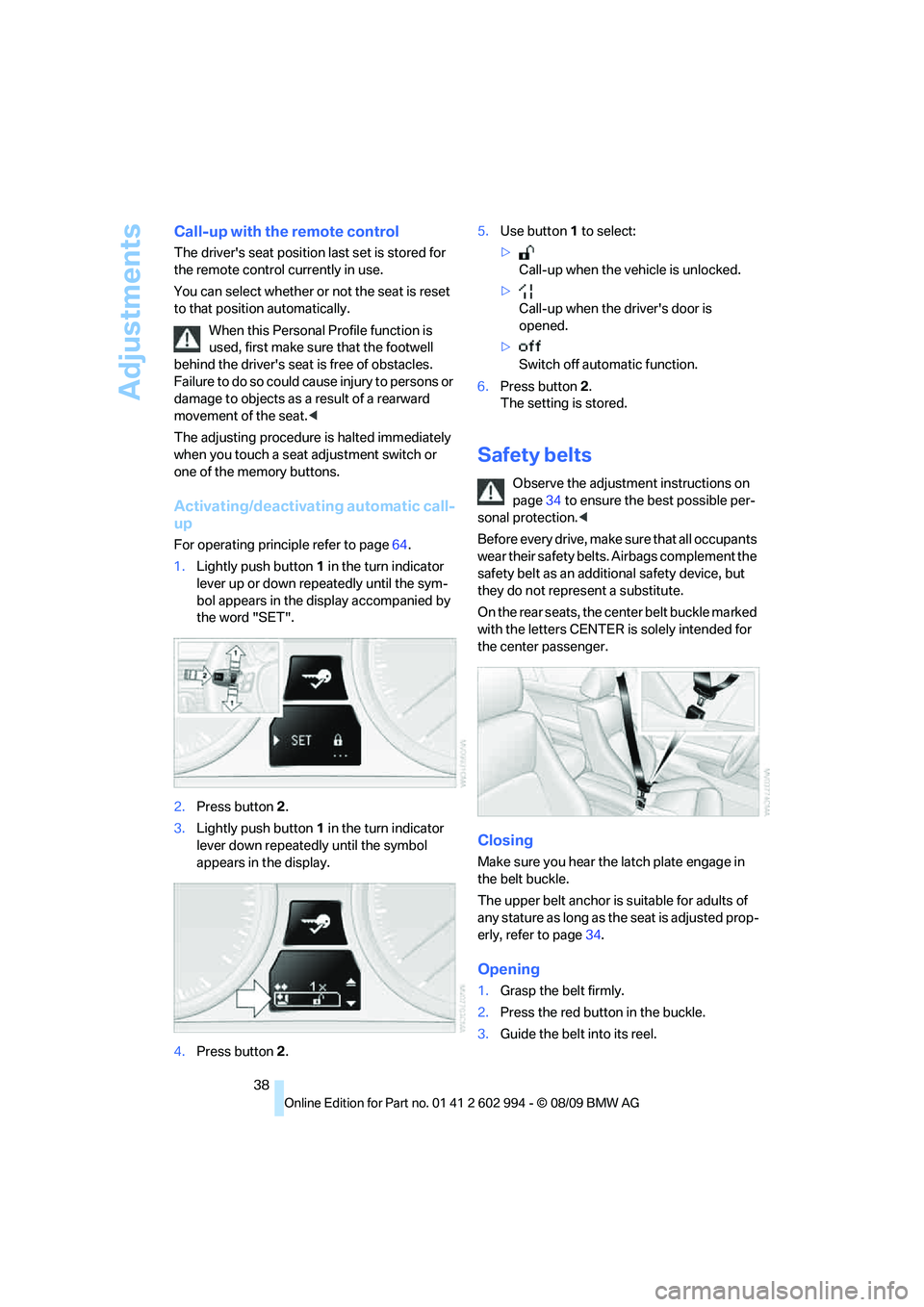
1.Lightly push button1 in the turn indicator
lever up or down repeatedly until the sym-
bol appears in the display accompanied by
the word "SET".
2.Press button 2.
3.Lightly push button1 in the turn indicator
lever down repeatedly until the symbol
appears in the display.
4.Press button 2.5.Use button 1 to select:
>
Call-up when the vehicle is unlocked.
>
Call-up when the driver's door is
opened.
>
Switch off automatic function.
6.Press button 2.
The setting is stored.
Safety belts
Observe the adjustment instructions on
page34 to ensure the best possible per-
sonal protection.<
Before every drive, make sure that all occupants
wear their safety belts. Airbags complement the
safety belt as an additional safety device, but
they do not represent a substitute.
On the rear seats, the center belt buckle marked
with the letters CENTER is solely intended for
the center passenger.
Closing
Make sure you hear the latch plate engage in
the belt buckle.
The upper belt anchor is suitable for adults of
any stature as long as the seat is adjusted prop-
erly, refer to page34.
Opening
1.Grasp the belt firmly.
2.Press the red button in the buckle.
3.Guide the belt into its reel.
Page 41 of 196
Reference
At a glance
Controls
Driving tips
Mobility
39
"Fasten safety belts" reminder for
driver's and front passenger seat
The indicator lamps light up and an
acoustic signal sounds. Check
whether the safety belt has been fas-
tened correctly.
The "Fa sten safety belts " reminder is iss ued a s
long as the driver's safety belt has not been fas-
tened. The "Fasten safety belts" reminder is
also activated at road speeds above approx.
5 mph or 8 km/h if the front passenger safety
belt is not fastened, if objects are placed on the
front passenger seat, or if driver or front pas-
senger unfasten their safety belts.
Damage to safety belts
If the safety belts are damaged or
stressed in an accident: have the belt sys-
tem, including any belt tensioners or child
restraint systems, replaced and the belt
anchors checked. Have this work done only by
your BMW center or at a workshop that works
according to BMW repair procedures with cor-
respondingly trained personnel. Otherwise, it is
not guaranteed that the safety devices will func-
tion properly.<
Rear center safety belt
With through-loading system*:
Before using the center rear seat, release the
latch plate from the fixture on the rear window
shelf and insert it into the belt lock of the center
safety belt. Make sure you hear the latch plate
engage.
Mirrors
Exterior mirrors
The front passenger's mirror is more con-
vex than the driver's mirror. The objects
seen in the mirror are closer than they appear.
Do not gauge your distance from traffic behind
you on the basis of what you see in the mirror;
otherwise, there is an increased risk of an acci-
dent.<
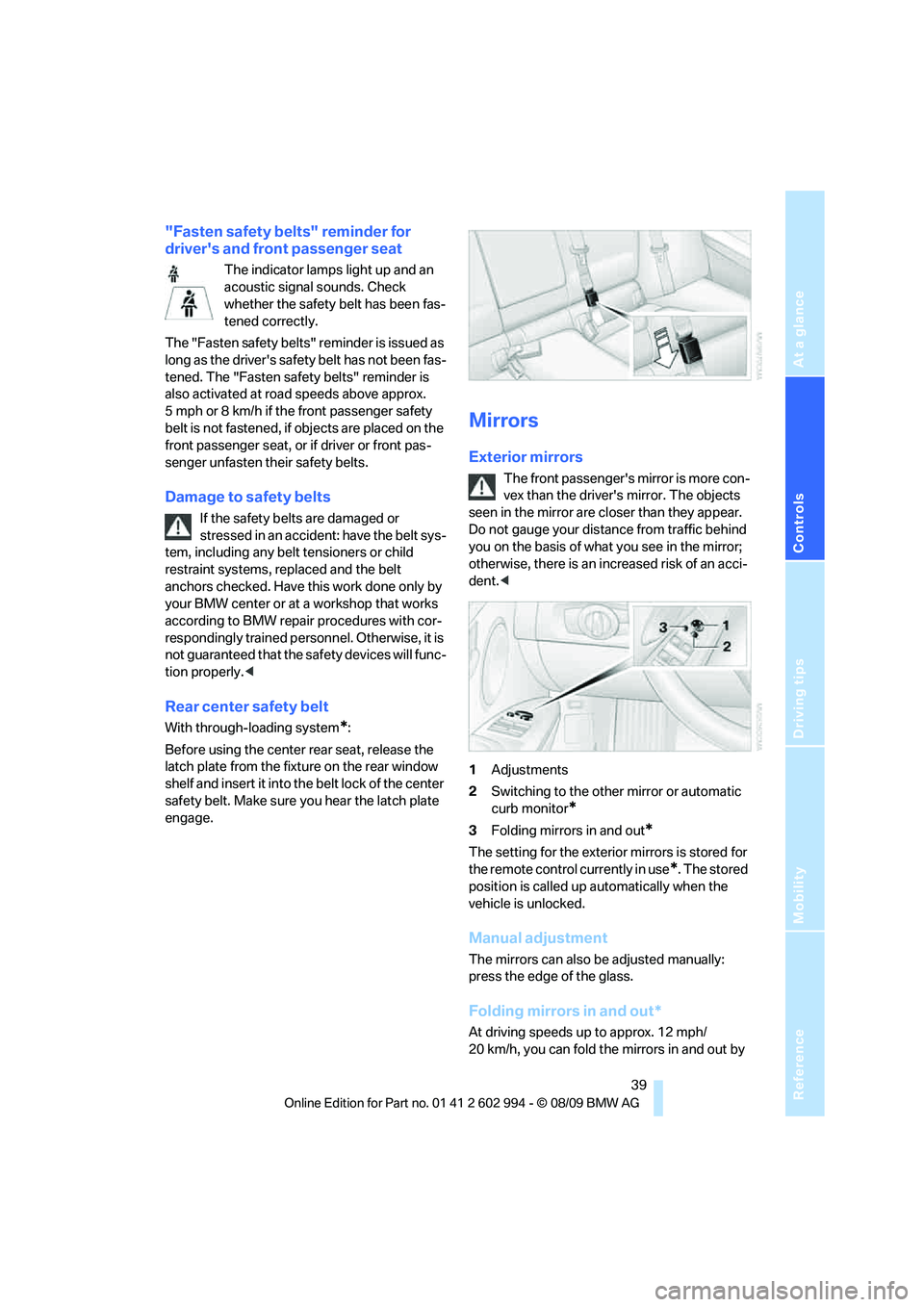
1Adjustments
2Switching to the other mirror or automatic
curb monitor
*
3Folding mirrors in and out*
The setting for the exterior mirrors is stored for
the remote control currently in use
*. The stored
position is called up automatically when the
vehicle is unlocked.
Manual adjustment
The mirrors can also be adjusted manually:
press the edge of the glass.
Folding mirrors in and out*
At driving speeds up to approx. 12 mph/
20 km/h, you can fold the mirrors in and out by
Page 79 of 196
Reference
At a glance
Controls
Driving tips
Mobility
77
Airbags
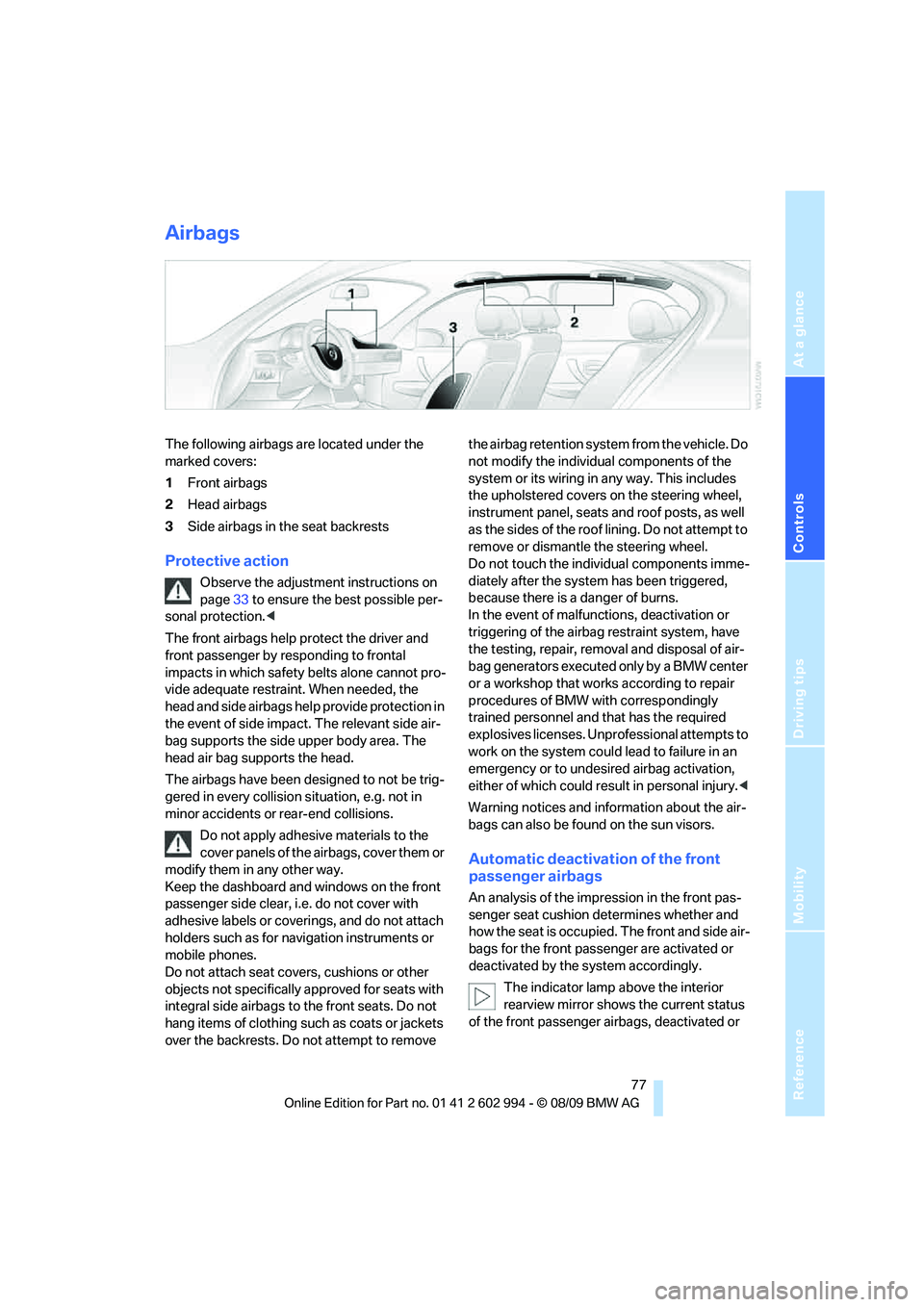
The following airbags are located under the
marked covers:
1Front airbags
2Head airbags
3Side airbags in the seat backrests
Protective action
Observe the adjustment instructions on
page33 to ensure the best possible per-
sonal protection.<
The front airbags help protect the driver and
front passenger by responding to frontal
impacts in which safety belts alone cannot pro-
vide adequate restraint. When needed, the
head and side airbags help provide protection in
the event of side impact. The relevant side air-
bag supports the side upper body area. The
head air bag supports the head.
The airbags have been designed to not be trig-
gered in every collision situation, e.g. not in
minor accidents or rear-end collisions.
Do not apply adhesive materials to the
cover panels of the airbags, cover them or
modify them in any other way.
Keep the dashboard and windows on the front
passenger side clear, i.e. do not cover with
adhesive labels or coverings, and do not attach
holders such as for navigation instruments or
mobile phones.
Do not attach seat covers, cushions or other
objects not specifically approved for seats with
integral side airbags to the front seats. Do not
hang items of clothing such as coats or jackets
over the backrests. Do not attempt to remove the airbag retention system from the vehicle. Do
not modify the individual components of the
system or its wiring in any way. This includes
the upholstered covers on the steering wheel,
instrument panel, seats and roof posts, as well
as the sides of the roof lining. Do not attempt to
remove or dismantle the steering wheel.
Do not touch the individual components imme-
diately after the system has been triggered,
because there is a danger of burns.
In the event of malfunctions, deactivation or
triggering of the airbag restraint system, have
the testing, repair, removal and disposal of air-
bag generators executed only by a BMW center
or a workshop that works according to repair
procedures of BMW with correspondingly
trained personnel and that has the required
explosives licenses. Unprofessional attempts to
work on the system could lead to failure in an
emergency or to undesired airbag activation,
either of which could result in personal injury.<
Warning notices and information about the air-
bags can also be found on the sun visors.
Automatic deactivation of the front
passenger airbags
An analysis of the impression in the front pas-
senger seat cushion determines whether and
how the seat is occupied. The front and side air-
bags for the front passenger are activated or
deactivated by the system accordingly.
The indicator lamp above the interior
rearview mirror shows the current status
of the front passenger airbags, deactivated or
Page 89 of 196
Reference
At a glance
Controls
Driving tips
Mobility
87
Automatic climate control*
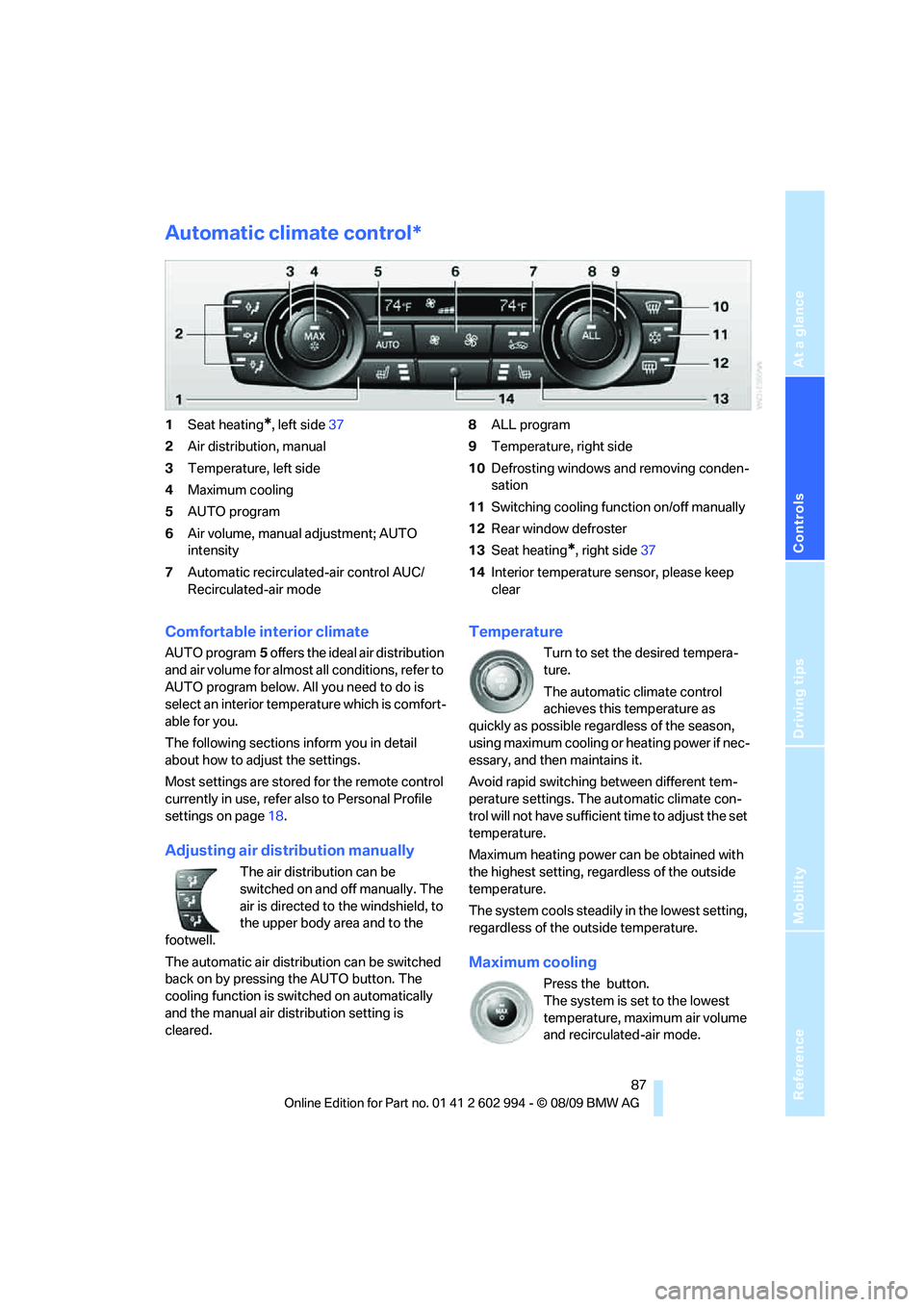
1Seat heating*, left side37
2Air distribution, manual
3Temperature, left side
4Maximum cooling
5AUTO program
6Air volume, manual adjustment; AUTO
intensity
7Automatic recirculated-air control AUC/
Recirculated-air mode8ALL program
9Temperature, right side
10Defrosting windows and removing conden-
sation
11Switching cooling function on/off manually
12Rear window defroster
13Seat heating
*, right side37
14Interior temperature sensor, please keep
clear
Comfortable interior climate
AUTO program5 offers the ideal air distribution
and air volume for almost all conditions, refer to
AUTO program below. All you need to do is
select an interior temperature which is comfort-
able for you.
The following sections inform you in detail
about how to adjust the settings.
Most settings are stored for the remote control
currently in use, refer also to Personal Profile
settings on page18.
Adjusting air distribution manually
The air distribution can be
switched on and off manually. The
air is directed to the windshield, to
the upper body area and to the
footwell.
The automatic air distribution can be switched
back on by pressing the AUTO button. The
cooling function is switched on automatically
and the manual air distribution setting is
cleared.
Temperature
Turn to set the desired tempera-
ture.
The automatic climate control
achieves this temperature as
quickly as possible regardless of the season,
using maximum cooling or heating power if nec-
essary, and then maintains it.
Avoid rapid switching between different tem-
perature settings. The automatic climate con-
trol will not have sufficient time to adjust the set
temperature.
Maximum heating power can be obtained with
the highest setting, regardless of the outside
temperature.
The system cools steadily in the lowest setting,
regardless of the outside temperature.
Maximum cooling
Press the button.
The system is set to the lowest
temperature, maximum air volume
and recirculated-air mode.
Page 183 of 196
Reference
At a glance
Controls
Driving tips
Mobility
181
B
Backrest contour, refer to
Lumbar support35
Backrests, refer to Seat
adjustment34
Backrest width adjustment35
Back seats
– refer to Rear seats36
Backup lamps
– replacing bulb151,152
Band-aids, refer to First aid
pouch155
Bar, refer to Towing
methods158
Base plate for telephone or
mobile phone
– refer to Snap-in adapter in
the center armrest storage
compartment95
Battery153
– charging153
– disposal28,153
– jump-starting156
– remote control18
– replacing153
– temporary power failure153
Battery renewal
– remote control28
– remote control for vehicle28
Being towed158
Belts, refer to Safety belts38
Belt tensioner, refer to Safety
belts38
Beverage holders, refer to
Cupholders95
Blower, refer to Air
volume85,88
Bluetooth, refer to separate
Owner's Manual
BMW
– car shampoo145
BMW Advanced Diesel116
BMW Homepage4
BMW Maintenance
System141
BMW webpage4
Bottle holders, refer to
Cupholders95Brake Assist, refer to Dynamic
Brake Control DBC70
Brake fluid, refer to Service
requirements65
Brake Force Display76
Brake lamps
– Brake Force Display76
– replacing bulb151,152
Brake pads106
– breaking in106
Brake rotors108
– brakes
106
– breaking in106
Brakes
– ABS70
– BMW Maintenance
System141
– Brake Force Display76
– breaking in106
– parking brake48
– service requirements65
Brakes, refer to Braking
safely108
Brake system106
– BMW Maintenance
System141
– breaking in106
– disc brakes108
Breakdown services, refer to
Roadside Assistance155
Breaking in the clutch106
Breaking in the differential,
refer to Engine and
differential106
Break-in period106
Bulb changing, refer to Lamps
and bulbs147
Button for starting the engine,
refer to Start/stop button46
Buttons on the steering
wheel11
C
California Proposition 65
warning5
Can holders, refer to
Cupholders95
Capacities178Capacity of the cargo area177
Car battery, refer to Vehicle
battery153
Car care, refer to Care143
Care143
– automatic car washes143
– care products143
– carpets145
– CD/DVD drives146
– chrome parts144
– displays145
– exterior143
– fine wood parts145
– headlamps144
– high-pressure washer143
– interior145
– leather145
– light-alloy wheels144
– paintwork144
– plastic parts145
– rubber seals144
– safety belts145
– sensors and cameras145
– upholstery and cloth
trim145
– washing the car
manually144
– windows144
Cargo, securing110
Cargo area98
– capacity177
– Comfort Access27
– folding up the floor
panel101
– lamp, refer to Interior
lamps83
– opening from inside23
– opening from outside23
– partition net99
– roller cover98
Cargo area lid, refer to Trunk
lid/tailgate23
Cargo area net, refer to
Partition net99
Cargo loading109
– securing cargo110
– stowing cargo109
– vehicle109
Page 185 of 196
Reference
At a glance
Controls
Driving tips
Mobility
183
Defect
– door lock22
– fuel filler flap114
– glass roof30
– panorama glass roof32
Defogging windows86
Defrost, windows86
Defrosting windows and
removing condensation
– air conditioner86
Defrosting windshield, refer to
Defrosting windows86
Defrost position, refer to
Defrosting windows86
Diesel exhaust fluid117
Diesel fuel115
Diesel particulate filter107
Digital clock61
Digital compass93
Dimensions175
Dipstick, engine oil137
Directional indicators, refer to
Turn signals50
Displacement, refer to Engine
data174
Display lighting, refer to
Instrument lighting82
Displays, refer to Instrument
cluster12
Displays and controls10
Disposal
– coolant139
– remote control battery28
– vehicle battery153
Distance control, refer to
Active cruise control55
Distance remaining to service,
refer to Service
requirements65
Distance warning, refer to
Park Distance Control
PDC69
Door key, refer to Remote
control with integrated
key18
Door lock21
Doors, emergency
operation22
DOT Quality Grades132Draft-free ventilation86,89
Drinks holders, refer to
Cupholders95
Drive-off assistance, refer to
Dynamic Stability Control
DSC70
Drive-off assistant72
Driving lamps, refer to Parking
lamps/low beams79
Driving notes106
Driving off on hills, refer to
Drive-off assistant72
Driving stability control
systems70
Driving through water
108
Driving tips, refer to Driving
notes106
Dry air, refer to Cooling
function89
DSC Dynamic Stability
Control70
DTC Dynamic Traction
Control70
– indicator/warning lamp70
Dynamic Brake Control
DBC70
Dynamic Stability Control
DSC70
– indicator/warning lamp70
Dynamic Traction Control
DTC
– indicator/warning lamp71
E
EBV Electronic brake-force
distribution70
Electrical malfunction
– door lock22
– driver's door22
– fuel filler flap114
– glass roof30
– panorama glass roof32
– trunk lid24
Electric seat adjustment34
Electric steering wheel lock
– with Comfort Access27
Electronic brake-force
distribution EBV70Electronic oil level check138
Electronic Stability Program
ESP, refer to Dynamic
Stability Control DSC70
Emergency actuation,
automatic transmission,
refer to Overriding selector
lever lock50
Emergency operation
– fuel filler flap, manual
release114
Emergency operation, refer to
Closing manually
– glass roof30
– panorama glass roof32
Emergency operation, refer to
Manual operation
– door lock22
Emergency release
– trunk lid from inside24
Emergency Request155
Emergency services, refer to
Roadside Assistance155
Energy, saving
– saving fuel106
Energy-conscious driving,
refer to Energy Control62
Energy Control62
Engine
– breaking in106
– data174
– overheated, refer to Coolant
temperature62
– speed174
– starting47
– starting, Comfort Access26
– switching off47
Engine compartment137
Engine coolant, refer to
Coolant139