buttons BMW M3 2011 User Guide
[x] Cancel search | Manufacturer: BMW, Model Year: 2011, Model line: M3, Model: BMW M3 2011Pages: 278, PDF Size: 8.18 MB
Page 156 of 278
On/off and tone
154
On/off and tone
The following audio and video sources share
the same control elements and adjustments:
>Radio
>CD/DVD player
>CD changer
*
>Video*
>External devices, e.g. MP3 player
Controls
The audio and video sources can be controlled
using the:
>Buttons near the CD/DVD player
>iDrive
>Buttons on the steering wheel, refer to
page10
>Programmable memory keys, refer to
page20
>Voice activation system
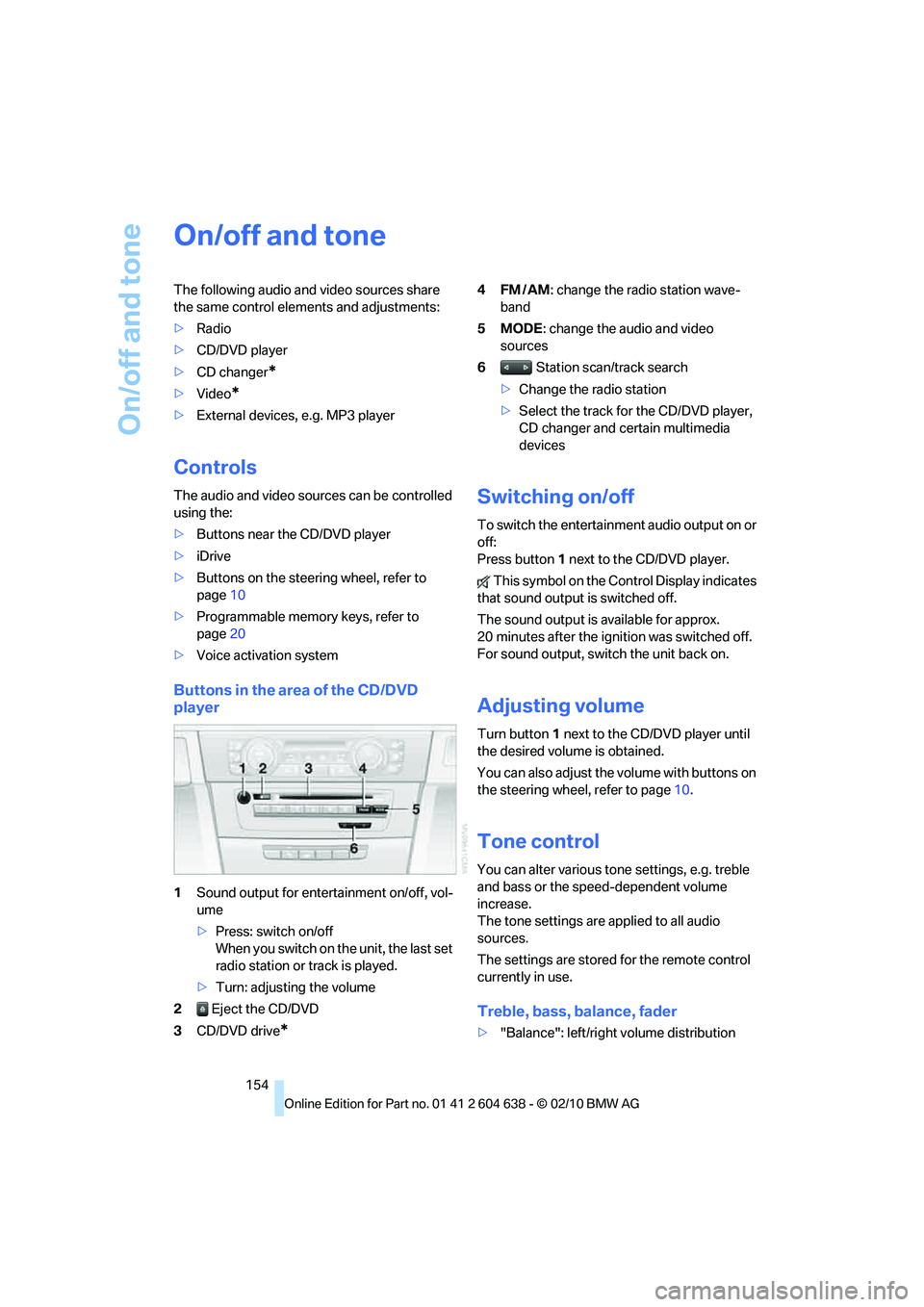
Buttons in the area of the CD/DVD
player
1Sound output for entertainment on/off, vol-
ume
>Press: switch on/off
When you switch on the unit, the last set
radio station or track is played.
>Turn: adjusting the volume
2 Eject the CD/DVD
3CD/DVD drive
*
4FM/AM: change the radio station wave-
band
5MODE: change the audio and video
sources
6 Station scan/track search
>Change the radio station
>Select the track for the CD/DVD player,
CD changer and certain multimedia
devices
Switching on/off
To switch the entertainment audio output on or
off:
Press button1 next to the CD/DVD player.
This symbol on the Control Display indicates
that sound output is switched off.
The sound output is available for approx.
20 minutes after the ignition was switched off.
For sound output, switch the unit back on.
Adjusting volume
Turn button1 next to the CD/DVD player until
the desired volume is obtained.
You can also adjust the volume with buttons on
the steering wheel, refer to page10.
Tone control
You can alter various tone settings, e.g. treble
and bass or the speed-dependent volume
increase.
The tone settings are applied to all audio
sources.
The settings are stored for the remote control
currently in use.
Treble, bass, balance, fader
>"Balance": left/right volume distribution
Page 159 of 278
Navigation
Entertainment
Driving tips
157Reference
At a glance
Controls
Communications
Mobility
Radio
Your radio is designed for reception of the fol-
lowing stations:
>FM and AM
>HD Radio
*
>Satellite radio*
Selecting a station
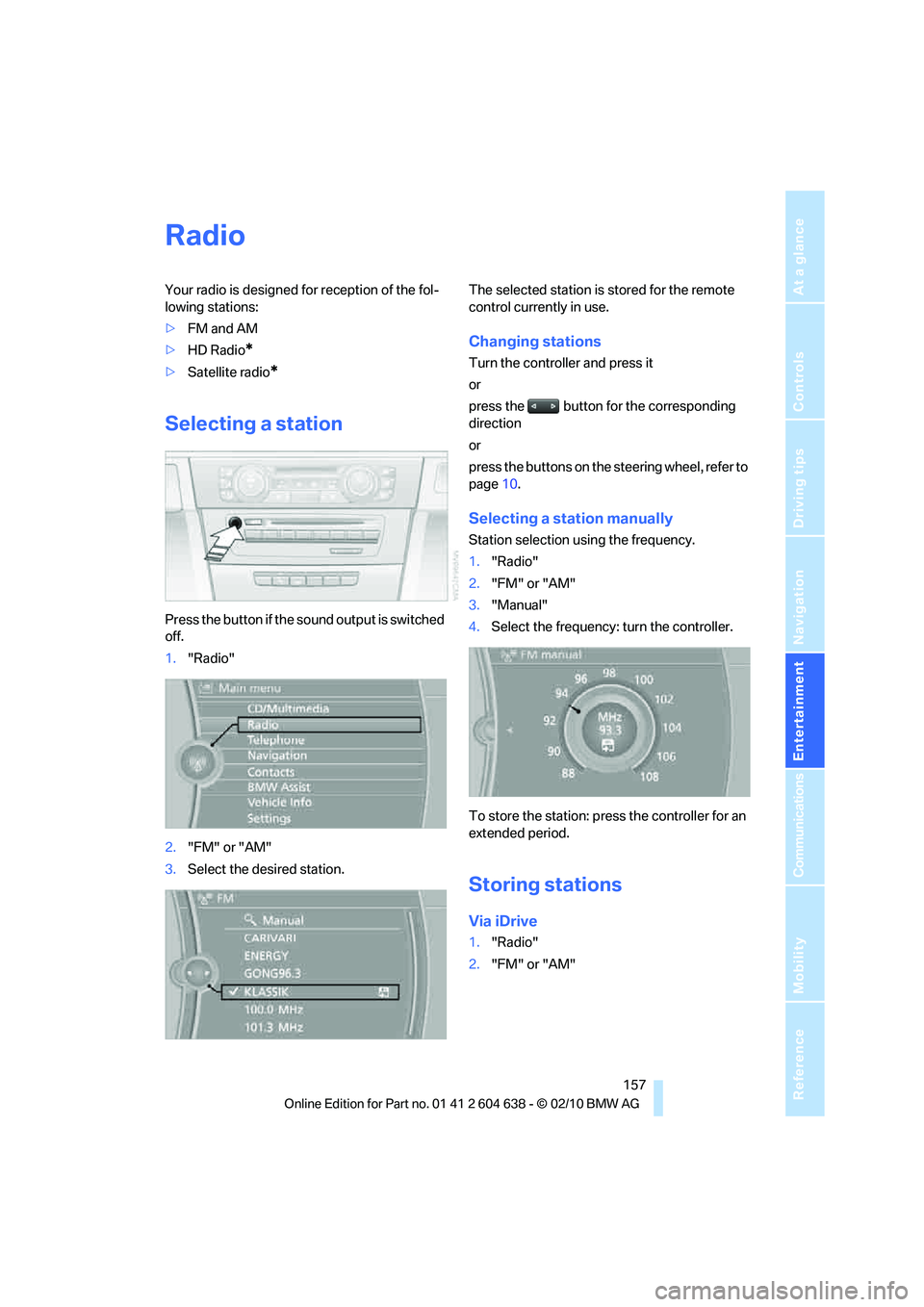
Press the button if the sound output is switched
off.
1."Radio"
2."FM" or "AM"
3.Select the desired station.The selected station is stored for the remote
control currently in use.
Changing stations
Turn the controller and press it
or
press the button for the corresponding
direction
or
press the buttons on the steering wheel, refer to
page10.
Selecting a station manually
Station selection using the frequency.
1."Radio"
2."FM" or "AM"
3."Manual"
4.Select the frequency: turn the controller.
To store the station: press the controller for an
extended period.
Storing stations
Via iDrive
1."Radio"
2."FM" or "AM"
Page 162 of 278
Satellite radio
160
Satellite radio
General information
The channels are offered in predefined pack-
ages. The packages must be enabled by tele-
phone.
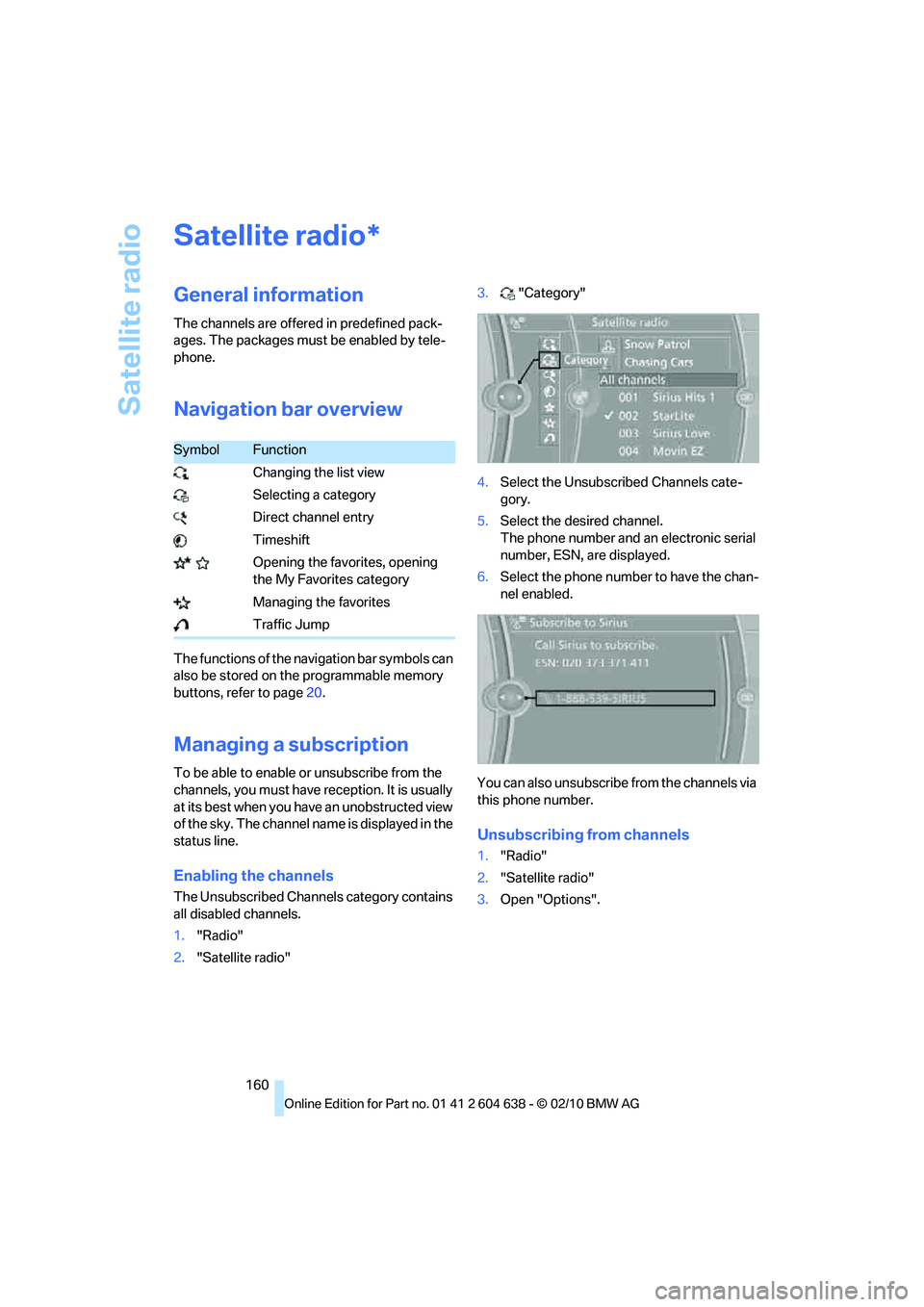
Navigation bar overview
The functions of the navigation bar symbols can
also be stored on the programmable memory
buttons, refer to page20.
Managing a subscription
To be able to enable or unsubscribe from the
channels, you must have reception. It is usually
at its best when you have an unobstructed view
of the sky. The channel name is displayed in the
status line.
Enabling the channels
The Unsubscribed Channels category contains
all disabled channels.
1."Radio"
2."Satellite radio"3."Category"
4.Select the Unsubscribed Channels cate-
gory.
5.Select the desired channel.
The phone number and an electronic serial
number, ESN, are displayed.
6.Select the phone number to have the chan-
nel enabled.
You can also unsubscribe from the channels via
this phone number.
Unsubscribing from channels
1."Radio"
2."Satellite radio"
3.Open "Options".
*
SymbolFunction
Changing the list view
Selecting a category
Direct channel entry
Timeshift
Opening the favorites, opening
the My Favorites category
Managing the favorites
Traffic Jump
Page 186 of 278
Telephone
184
Telephone
The concept
Your BMW is equipped with a full preparation
package mobile phone. After pairing a suitable
mobile phone with the vehicle once, you can
operate the mobile phone via the iDrive, the
buttons on the steering wheel or using voice
commands
*.
Once a mobile phone has been paired with your
vehicle, it is automatically recognized as soon
as it is inside the vehicle while the engine is run-
ning or the ignition is switched on. You can
store the pairing data for up to four mobile
phones simultaneously. If several mobile
phones are detected at the same time, the
mobile phone last paired can be operated via
the vehicle.
Using the telephone inside
the vehicle
Using the snap-in adapter*
The so-called snap-in adapter, a holder for
mobile phones, allows you to charge the mobile
phone's battery and connect the mobile phone
to your vehicle's outside antenna. This ensures
better network reception and consistent repro-
duction quality. Please contact your
BMW center to find out for which mobile
phones there are snap-in adapters available.
For your safety
A car phone makes life more convenient in
many ways, and can even save lives in an emer-
gency. While you should consult your mobile
phone's separate operating instructions for a
detailed description of safety precautions and
information, we request that you direct your
particular attention to the following:
Only make entries when the traffic situa-
tion allows you to do so. Do not hold the
mobile phone in your hand while you are driving;
use the hands-free system instead. If you do not observe this precaution, your being dis-
tracted can endanger vehicle occupants and
other road users.<
Suitable mobile phones
Please ask your BMW center which mobile
phones with Bluetooth interface are supported
by the mobile phone preparation package and
which mobile phones are compatible with the
snap-in adapter. By virtue of their particular
software versions, these mobile phones sup-
port the functions described in this Owner's
Manual. Malfunctions may occur with other
mobile phones.
Operating options
You can operate the mobile phone using:
>Buttons on the steering wheel, refer to
page10
>iDrive, refer to page16
>Voice commands
*, refer to page192
>Programmable memory keys, refer to
page20
Avoid operating a mobile phone recognized by
the vehicle via the mobile phone's keypad; oth-
erwise, malfunctions may result.
Start-up
Pairing the mobile phone with the
vehicle
The following prerequisites must be met:
>Compatible mobile phone: the mobile
phone is supported by the full preparation
package mobile phone. You can obtain
information on the Internet at:
www.bmw.com/bluetooth
>The mobile phone is ready to operate.
*
Page 197 of 278

195
Entertainment
Reference
At a glance
Controls
Driving tips Communications
Navigation
Mobility
Inserting/removing the
snap-in adapter*
1.Press button1 and remove the cover.
2.Insert the snap-in adapter in the front and
press it downward until it engages.
To remove the snap-in adapter:
Press button 1.
Inserting mobile phone
1.If applicable, remove the protective cap
from the mobile phone's antenna connector
so that the mobile phone can engage in the
snap-in adapter.
2.With its buttons facing upward, slide the
mobile phone up towards the electrical con-
tact points and press it downward until it
engages.
The mobile phone's battery is charged as soon
as the vehicle is in radio readiness or the steer-
ing is unlocked.
To conserve vehicle battery power, you
should avoid using the mobile phone
when the ignition is switched off.<
Removing mobile phone
Press the button.
Page 261 of 278
Reference 259
At a glance
Controls
Driving tips
Communications
Navigation
Entertainment
Mobility
AUX-IN
– port115
AUX-IN port177
Available services202
Average fuel consumption77
– setting the units80
Average speed77
Avoid highways in
navigation144
Avoiding unintentional
alarms33
Axle loads, refer to
Weights249
B
Backrest contour, refer to
Lumbar support44
Backrests, refer to Seat
adjustment43
Backrest width adjustment44
Back seats
– refer to Rear seats46
Bag holder119
Band-aids, refer to First aid
pouch239
Bar, refer to Towing
methods242
Base plate for telephone or
mobile phone
– refer to Snap-in adapter195
– refer to Snap-in adapter in
the center armrest storage
compartment115
Bass, tone setting154
Battery237
– charging237
– disposal35,237
– jump-starting239
– remote control26
– replacing237
– temporary power failure237
Battery for mobile phone195
Battery renewal
– remote control35
– remote control for vehicle35
Being towed241
Belt hand-over49
– pinch protection system50Belts, refer to Safety belts49
Belt tensioner, refer to Safety
belts49
Beverage holders, refer to
Cupholders116
Black ice, refer to Outside
temperature warning75
Blinds, refer to Roller sun
blinds114
Blower, refer to Air
volume108
Bluetooth, activating/
deactivating187
BMW
– car shampoo232
BMW Assist198
BMW Assist,
activating200,202
BMW Homepage4
BMW Maintenance
System227
BMW Search200
BMW webpage4
Bottle holders, refer to
Cupholders116
Brake Assist, refer to Dynamic
Brake Control DBC89
Brake fluid, refer to Service
requirements80
Brake Force Display97
Brake lamps
– Brake Force Display97
Brake pads126
– breaking in126
Brake rotors128
– brakes126
– breaking in126
Brakes
– ABS89
– BMW Maintenance
System227
– Brake Force Display97
– breaking in126
– parking brake57
– service requirements80
Brakes, refer to Braking
safely128Brake system126
– BMW Maintenance
System227
– breaking in126
– disc brakes128
Breakdown services, refer to
Roadside Assistance238
Breaking in the clutch126
Breaking in the differential,
refer to Engine and
differential126
Break-in period126
Brightness of the Control
Display87
Bulb changing, refer to Lamps
and bulbs233
Button for starting the engine,
refer to Start/stop button55
Buttons on the steering
wheel11
C
California Proposition 65
warning6
Call
– accepting188
– ending188
– rejecting188
Calling, refer to Phone
numbers, dialing188
Calling, refer to Telephone
owner's manual
Can holders, refer to
Cupholders116
Capacities250
Capacity of the cargo area249
Car battery, refer to Vehicle
battery237
Car care, refer to Care229
Page 264 of 278
Everything from A to Z
262 Directory for navigation, refer
to Address book137
Displacement, refer to Engine
data246
Display, refer to iDrive
controls16
Display lighting, refer to
Instrument lighting105
Displays
– on the Control Display16
Displays, refer to Instrument
cluster12
Displays and controls10
Disposal
– coolant226
– remote control battery35
– vehicle battery237
Distance remaining to service,
refer to Service
requirements80
Distance warning, refer to
Park Distance Control
PDC88
Door key, refer to Remote
control with integrated
key26
Door lock29
Doors, emergency
operation30
DOT Quality Grades218
Draft-free ventilation109
Drinks holders, refer to
Cupholders116
Drive mode61
Drive-off assistance, refer to
Dynamic Stability Control
DSC89
Drive-off assistant92
Driving dynamics control62
Driving lamps, refer to Parking
lamps/low beams101
Driving notes126
Driving off on hills, refer to
Drive-off assistant92
Driving stability control
systems89
Driving through water128
Driving tips, refer to Driving
notes126Dry air, refer to Cooling
function108
DSC Dynamic Stability
Control89
DTC Dynamic Traction
Control90
– indicator/warning lamp90
DVD
– country codes167
– settings168
– video playback167
DVD menu168
DVD player, refer to CD
player165
DVD video167
Dynamic Brake Control
DBC89
Dynamic destination
guidance145
Dynamic Stability Control
DSC89
– indicator/warning lamp90
Dynamic Traction Control
DTC
– indicator/warning lamp90
E
EBV Electronic brake-force
distribution89
Eject button, refer to Buttons
on the CD/DVD player154
Electrical defect
– 7-gear Sports automatic
transmission with double
clutch63
Electrical malfunction
– door lock30
– driver's door30
– fuel filler flap206
– glass roof38
Electric seat adjustment44
Electric steering wheel lock
– with Comfort Access34
Electronic brake-force
distribution EBV89
Electronic oil level check223Electronic Stability Program
ESP, refer to Dynamic
Stability Control DSC89
Emergency actuation,
automatic transmission,
refer to Overriding selector
lever lock59
Emergency operation
– fuel filler flap, manual
release206
Emergency operation, refer to
Closing manually
– glass roof38
Emergency operation, refer to
Manual operation
– door lock30
Emergency release
– trunk lid from inside32
Emergency Request238
Emergency services, refer to
Roadside Assistance238
Energy, saving
– saving fuel126
Engine
– breaking in126
– data246
– overheated, refer to Coolant
temperature76
– speed246
– starting56
– starting, Comfort Access33
– switching off56
Engine compartment223
Engine coolant, refer to
Coolant226
Engine oil
– adding225
– alternative oil types225
– BMW Maintenance
System227
– capacity250
– checking level223
– intervals between changes,
refer to Service
requirements80
Engine output, refer to Engine
data246
Page 267 of 278
Reference 265
At a glance
Controls
Driving tips
Communications
Navigation
Entertainment
Mobility
Instructions for navigation
system, refer to Voice
instructions146
Instrument cluster12
Instrument combination, refer
to Instrument cluster12
Instrument lighting105
Instrument panel, refer to
Cockpit10
Integrated key26
Integrated universal remote
control111
Interactive map141
Interior lamps105
– remote control28
Interior motion sensor33
Interior rearview mirror51
– automatic dimming
feature51
– compass113
Interlock, refer to Disengaging
the remote control58
Intermittent mode of the
wipers65
Intersection, entering,
navigation136
iPod, connecting, refer to
AUX-IN port177
iPod, connecting, refer to USB
audio interface178
J
Jacking points236
Joystick, refer to iDrive16
Jumpering, refer to Jump-
starting239
Jump-starting239
K
Key, refer to Integrated key/
remote control26
Keyless go, refer to Comfort
Access33
Keyless opening and closing,
refer to Comfort Access33
Key Memory, refer to Personal
Profile26Kickdown58
– automatic transmission with
Steptronic58
Knock control207
L
Lamps
– automatic headlamp
control101
– parking lamps/low
beams101
Lamps and bulbs, replacing
bulbs233
Lap-and-shoulder belt, refer
to Safety belts49
Lashing eyes, refer to
Securing cargo130
Last destinations138
LATCH child restraint fixing
system53
Launch Control64
Leather care231
LED Light-emitting
diodes233
Length, refer to
Dimensions247
License plate lamp, replacing
bulb235
Light
– high-beam assistant103
Light-alloy wheels231
Light-emitting diodes
LED233
Lighter117
– connecting electrical
appliances118
Lighting
– instruments105
– lamps and bulbs233
– vehicle, refer to Lamps101
Light switch101
Limit, refer to Speed limit86
Load129
Load securing equipment,
refer to Securing cargo130
Lock buttons, doors, refer to
Locking31Locking
– adjusting confirmation
signal29
– from inside31
– from outside28
– without remote control, refer
to Comfort Access33
Locking and unlocking doors
– confirmation signals29
– from inside30
– from outside27
Low beam control, refer to
High-beam assistant103
Low-beam headlamps101
– automatic101
Lower back support, refer to
Lumbar support44
Luggage rack, refer to Roof-
mounted luggage rack131
Lumbar support44
M
M+S tires, refer to Winter
tires221
Maintenance, refer to Service
Booklet
Maintenance system227
Malfunction
– automatic transmission with
Steptronic59
– tires93
Malfunction warnings, refer to
Check Control84
Manual car wash230
Manually unlocking parking
lock63
Manual mode, automatic
transmission with
Steptronic59
Manual operation
– door lock30
– driver's door30
– fuel filler flap206
– glass roof38
– parking lock63
– parking lock, automatic
transmission59
Page 268 of 278
Everything from A to Z
266 Manual transmission57
Map for navigation
– changing scale147
– entering destination140
Map view146
Master key, refer to Remote
control with integrated
key26
Maximum cooling107
Maximum speed
– with winter tires221
Measurements, refer to
Dimensions247
Memory, refer to Seat and
mirror memory48
MENU button16
Menus, refer to iDrive16
Messages191
Messages from the concierge
service191
Microfilter
– BMW Maintenance
System227
– for automatic climate
control109
Microfilter/activated-charcoal
filter
– BMW Maintenance
System227
Microphone
– telephone14
– voice commands14
Mirror dimming feature51
Mirrors50
– automatic curb monitor50
– exterior mirrors50
– heating50
– interior rearview mirror51
– memory, refer to Seat and
mirror memory48
Mirrors, folding in before
entering a car wash50Mobile phone
– adjusting volume187
– connecting, refer to Mobile
phone, pairing184
– installation location, refer to
Center armrest115
– operation via iDrive187
– pairing184
– refer to separate Owner's
Manual
Mobile phone, installation
location, refer to Center
armrest115
Mobile phone, refer to
Telephone184
Mobile phone, refer to the
separate Owner's Manual
Modifications, technical, refer
to For your own safety5
Monitor, refer to iDrive
controls16
Monitoring system for tire
pressures, refer to Flat Tire
Monitor92
MP3 player, connecting, refer
to AUX-IN port
177
MP3 player, connecting, refer
to USB audio interface178
Multi-channel playback155
Multifunctional steering
wheel, refer to Buttons on
the steering wheel11
Multifunction switch
– refer to Turn signals/
headlamp flasher64
– refer to Wiper system65
Multimedia screen, refer to
iDrive16
Music, managing175
Music collection172
– backup176
– deleting176
– random sequence175
– restoring176
Music player, connecting,
refer to AUX-IN port177Music player, connecting,
refer to USB audio
interface178
Music search173
My Info191
N
Navigation
– starting destination
guidance after entering a
destination137
– storing current position137
– voice activation141
Navigation announcements,
refer to Switching voice
instructions on/off146
Navigation data134
Navigation system134
– address book137
– bypassing a route
section145
– continuing destination
guidance144
– destination entry135
– dynamic destination
guidance145
– entering a destination by
voice141
– entering a destination
manually135
– frequently asked
questions151
– gas station
recommendations146
– planning a trip142
– route list145
– selecting destination via
map140
– selecting route criteria144
– special destinations139
– starting destination
guidance144
– terminating destination
guidance144
– traffic bulletins148
– voice instructions146
– volume adjustment146
Page 269 of 278
Reference 267
At a glance
Controls
Driving tips
Communications
Navigation
Entertainment
Mobility
Neck support, refer to Head
restraints45
Nets, refer to Storage
compartments116
Neutral61
New tires220
Next Service indicator, refer to
Condition Based Service
CBS227
North-facing map146
Nozzles106
Number of cylinders, refer to
Engine data246
Nylon rope, refer to Tow
rope242
O
OBD socket, refer to Socket
for Onboard Diagnosis228
Octane ratings, refer to Fuel
specifications207
Odometer75
Oil, refer to Engine oil223
Oil consumption223
Oil level223
Old batteries, refer to
Disposal237
Onboard vehicle tool kit233
Opening and closing
– Comfort Access33
– from inside30
– from outside27
– using the door lock29
– using the remote control27
Options, selecting for
navigation144
Orientation menu, refer to
Start menu17
Outlets
– refer to Ventilation109
Output, refer to Engine
data246
Outside-air mode
– automatic climate
control108Outside temperature
display75
– changing unit of measure80
– in computer80
Outside temperature
warning75
Overheated engine, refer to
Coolant temperature76
Overriding selector lever
lock59
Overview
– radio control154
P
Paintwork care230
Park assistant, refer to Park
Distance Control88
Park Distance Control PDC88
Parked car ventilation110
– preselecting switch-on
times110
– switching on and off
directly110
Parking
– vehicle56
Parking aid, refer to Park
Distance Control PDC88
Parking brake57
– indicator lamp57
Parking lamps101
– replacing bulbs234
Parking lamps/low beams101
Passenger side mirror tilt
function50
Pathway lighting102
Personal Profile26
Phone book187
Phone numbers
– dialing188
Pinch protection system
– glass roof, electric37
– windows36
Playing music173
Polish232
Pollen
– refer to Microfilter/activated-
charcoal filter for automatic
climate control109Power failure237
Power windows36
Power windows, refer to
Windows35
Pressure, tires208
Pressure monitoring, tires92
– Flat Tire Monitor92
Pressure monitoring of tires,
refer to Tire Pressure
Monitor TPM94
Programmable buttons on the
steering wheel11
Protection function, refer to
Pinch protection system
– glass roof, electric37
– windows36
Providing medical assistance,
refer to First aid pouch239
Puncture
– Flat Tire Monitor92
R
Radio
– controls154
– HD Radio158
– satellite radio160
– selecting waveband157
– storing stations157
– switching on/off154
– tone control154
– volume154
Radio position, refer to Radio
readiness55
Radio readiness55
– switched off56
– switched on55
Radio-remote key, refer to
Remote control with
integrated key26
Rain sensor65
Random sequence
– external devices180
– music collection175
Reading lamps105
Rear lamps, refer to Tail
lamps235