AUX BMW M3 2012 User Guide
[x] Cancel search | Manufacturer: BMW, Model Year: 2012, Model line: M3, Model: BMW M3 2012Pages: 314, PDF Size: 7.72 MB
Page 226 of 314
225
Office
Communications
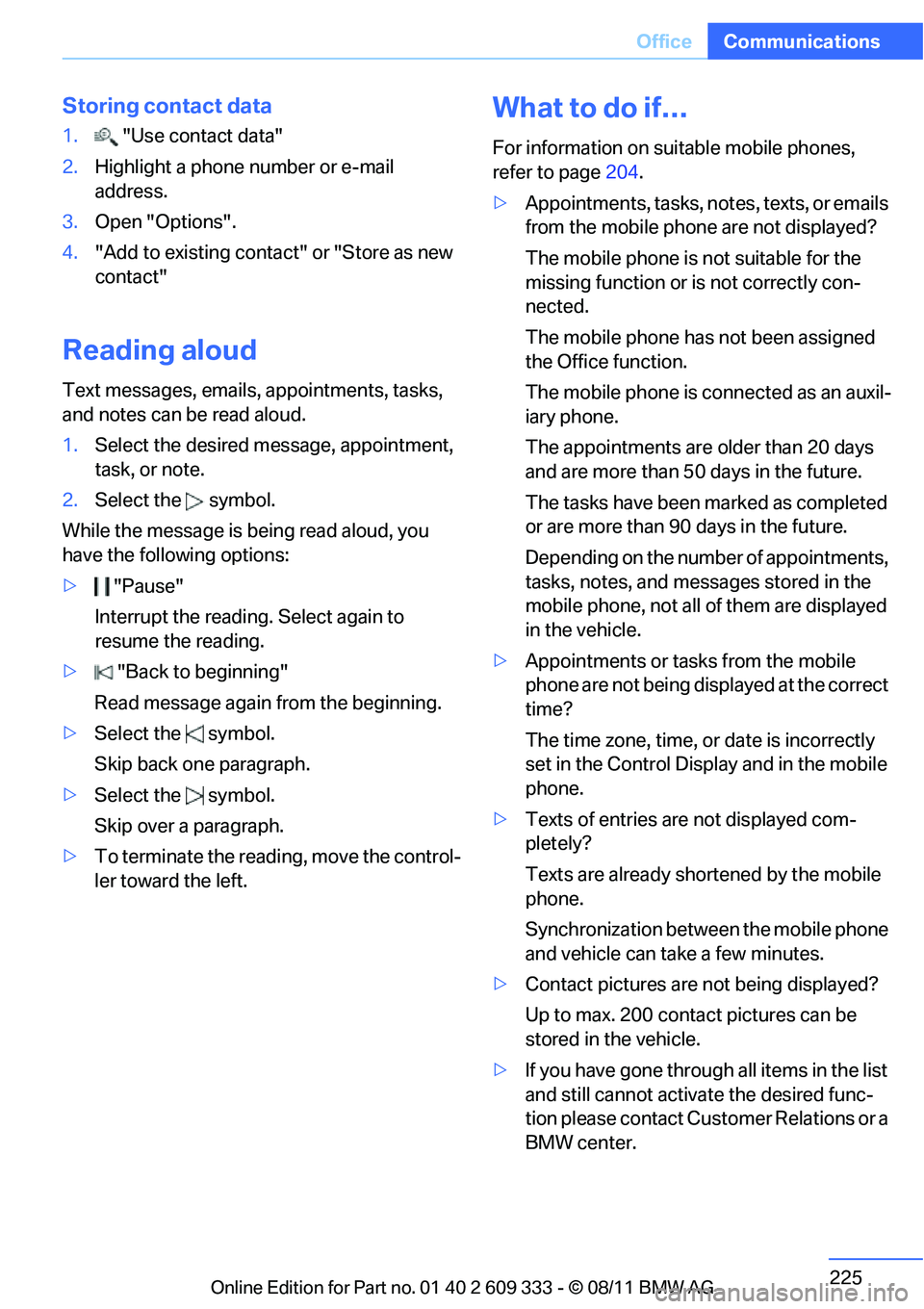
Storing contact data
1.
"Use contact data"
2. Highlight a phone number or e-mail
address.
3. Open "Options".
4. "Add to existing contac t" or "Store as new
contact"
Reading aloud
Text messages, emails, appointments, tasks,
and notes can be read aloud.
1. Select the desired message, appointment,
task, or note.
2. Select the symbol.
While the message is being read aloud, you
have the following options:
> "Pause"
Interrupt the reading. Select again to
resume the reading.
> "Back to beginning"
Read message again from the beginning.
> Select the symbol.
Skip back one paragraph.
> Select the symbol.
Skip over a paragraph.
> To terminate the reading, move the control-
ler toward the left.
What to do if…
For information on suitable mobile phones,
refer to page 204.
> Appointments, tasks, notes, texts, or emails
from the mobile phone are not displayed?
The mobile phone is not suitable for the
missing function or is not correctly con-
nected.
The mobile phone has not been assigned
the Office function.
The mobile phone is co nnected as an auxil-
iary phone.
The appointments are older than 20 days
and are more than 50 days in the future.
The tasks have been marked as completed
or are more than 90 days in the future.
Depending on the number of appointments,
tasks, notes, and messages stored in the
mobile phone, not all of them are displayed
in the vehicle.
> Appointments or tasks from the mobile
phone are not being displayed at the correct
time?
The time zone, time, or date is incorrectly
set in the Control Disp lay and in the mobile
phone.
> Texts of entries are not displayed com-
pletely?
Texts are already shortened by the mobile
phone.
Synchronization between the mobile phone
and vehicle can take a few minutes.
> Contact pictures are not being displayed?
Up to max. 200 contact pictures can be
stored in the vehicle.
> If you have gone throug h all items in the list
and still cannot activate the desired func-
tion please contact Customer Relations or a
BMW center.
Online Edition for Part no. 01 40 2 609 333 - \251 08/11 BMW AG
Page 292 of 314
291
Short commands for the voice activation system
Reference
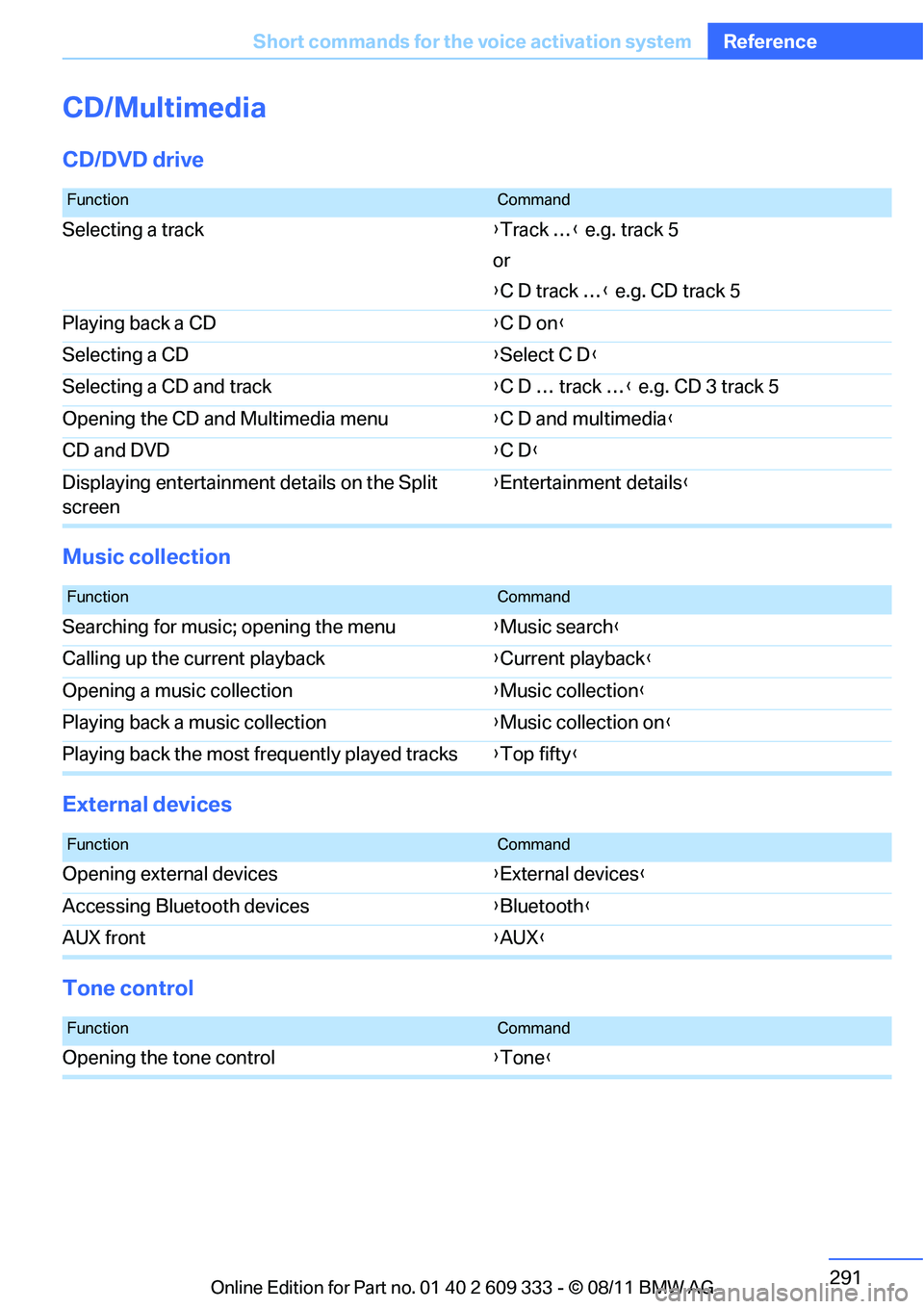
CD/Multimedia
CD/DVD drive
Music collection
External devices
Tone control
FunctionCommand
Selecting a track
{Track … } e.g. track 5
or
{ C D track … } e.g. CD track 5
Playing back a CD {C D on }
Selecting a CD {Select C D }
Selecting a CD and track {C D … track … } e.g. CD 3 track 5
Opening the CD and Multimedia menu {C D and multimedia }
CD and DVD {C D }
Displaying entertainment details on the Split
screen {
Entertainment details }
FunctionCommand
Searching for music; opening the menu {Music search }
Calling up the current playback {Current playback}
Opening a music collection {Music collection }
Playing back a music collection {Music collection on }
Playing back the most frequently played tracks {Top fifty }
FunctionCommand
Opening external devices {External devices }
Accessing Bluetooth devices {Bluetooth }
AUX front {AUX }
FunctionCommand
Opening the tone control {Tone }
Online Edition for Part no. 01 40 2 609 333 - \251 08/11 BMW AG
Page 300 of 314
299
Everything from A to Z
Reference
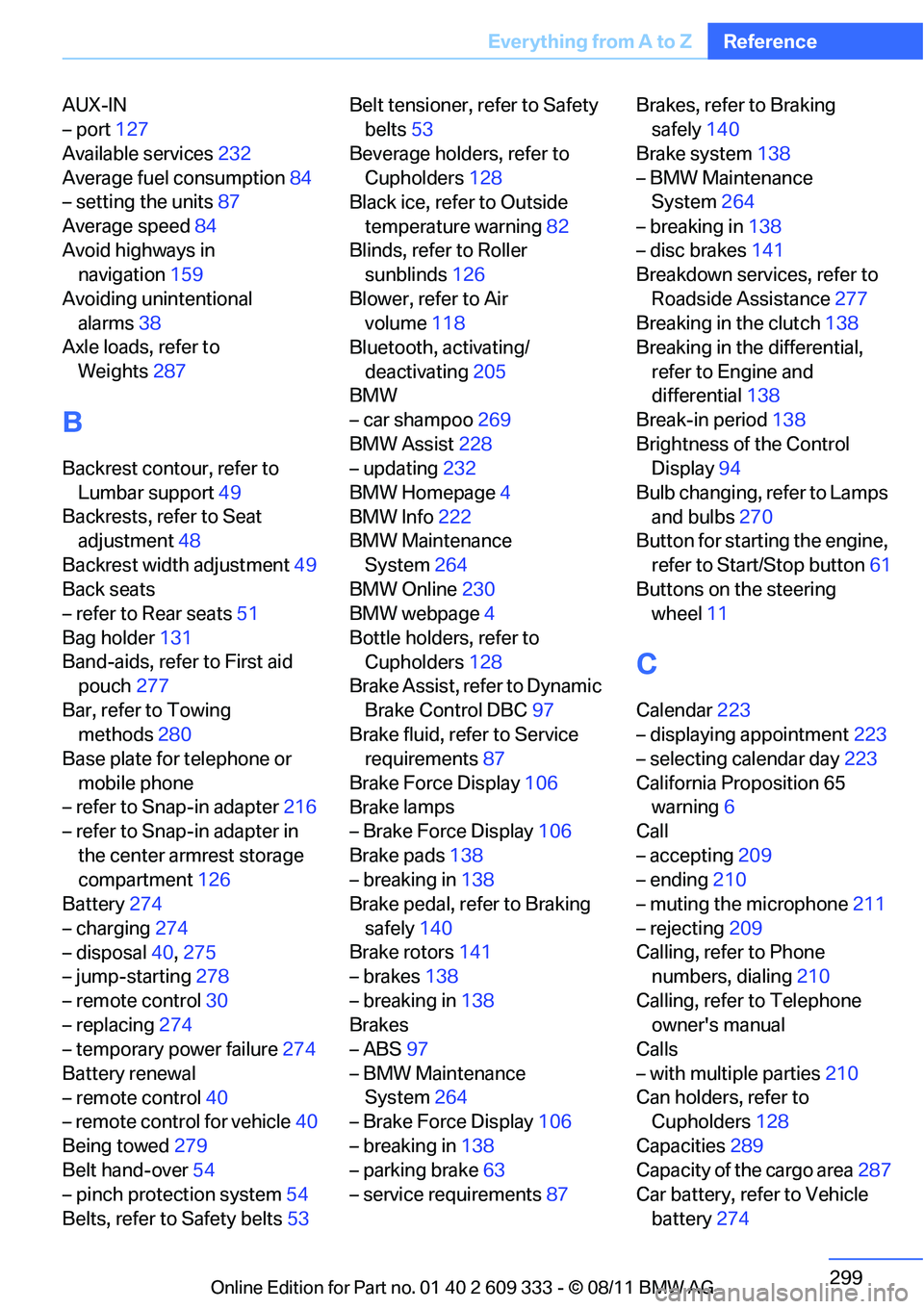
AUX-IN
– port
127
Available services 232
Average fuel consumption 84
– setting the units 87
Average speed 84
Avoid highways in navigation 159
Avoiding unintentional alarms 38
Axle loads, refer to
Weights 287
B
Backrest contour, refer to
Lumbar support 49
Backrests, refer to Seat adjustment 48
Backrest width adjustment 49
Back seats
– refer to Rear seats 51
Bag holder 131
Band-aids, refer to First aid pouch 277
Bar, refer to Towing methods 280
Base plate for telephone or
mobile phone
– refer to Snap-in adapter 216
– refer to Snap-in adapter in
the center armrest storage
compartment 126
Battery 274
– charging 274
– disposal 40,275
– jump-starting 278
– remote control 30
– replacing 274
– temporary power failure 274
Battery renewal
– remote control 40
– remote control for vehicle 40
Being towed 279
Belt hand-over 54
– pinch protection system 54
Belts, refer to Safety belts 53Belt tensioner,
refer to Safety
belts 53
Beverage holders, refer to Cupholders 128
Black ice, refer to Outside
temperature warning 82
Blinds, refer to Roller sunblinds 126
Blower, refer to Air volume 118
Bluetooth, activating/
deactivating 205
BMW
– car shampoo 269
BMW Assist 228
– updating 232
BMW Homepage 4
BMW Info 222
BMW Maintenance
System 264
BMW Online 230
BMW webpage 4
Bottle holders, refer to Cupholders 128
Brake Assist, refer to Dynamic
Brake Control DBC 97
Brake fluid, refer to Service requirements 87
Brake Force Display 106
Bra
ke lamps
– Brake Force Display 106
Brake pads 138
– breaking in 138
Brake pedal, refer to Braking
safely 140
Brake rotors 141
– brakes 138
– breaking in 138
Brakes
– ABS 97
– BMW Maintenance System 264
– Brake Force Display 106
– breaking in 138
– parking brake 63
– service requirements 87Brakes, refer to Braking
safely 140
Brake system 138
– BMW Maintenance System 264
– breaking in 138
– disc brakes 141
Breakdown services, refer to
Roadside Assistance 277
Breaking in the clutch 138
Breaking in the differential,
refer to Engine and
differential 138
Break-in period 138
Brightness of the Control Display 94
Bulb changing, refer to Lamps and bulbs 270
Button for starting the engine,
refer to Start/Stop button 61
Buttons on the steering wheel 11
C
Calendar 223
– displaying appointment 223
– selecting calendar day 223
California Proposition 65 warning 6
Call
– accepting 209
– ending 210
– muting the microphone 211
– rejecting 209
Calling, refer to Phone numbers, dialing 210
Calling, refer to Telephone owner's manual
Calls
– with multiple parties 210
Can holders, refer to Cupholders 128
Capacities 289
Capacity of the cargo area 287
Car battery, refer to Vehicle
battery 274
Online Edition for Part no. 01 40 2 609 333 - \251 08/11 BMW AG