buttons BMW M3 2012 User Guide
[x] Cancel search | Manufacturer: BMW, Model Year: 2012, Model line: M3, Model: BMW M3 2012Pages: 314, PDF Size: 7.72 MB
Page 124 of 314
123
Practical interior accessories
Controls
3.
Hold the hand-held transmitter of the
device to be controlled approx. 1 in/2.5 cm
to 3 in/8 cm away from the buttons on the
inside mirror.
The required distance depends on the
hand-held transmitter.
4. Simultaneously press and hold the button
of the desired function on the hand-held
transmitter and the button to be pro-
grammed on the inside mirror.
The LED on the inside mirror will flash
slowly at first.
5. As soon as the LED flashes rapidly, release
both buttons. The rapid flashing indicates
that the button on the inside mirror has
been programmed.
If the LED does not flash rapidly within
60 seconds, change the distance between
the inside mirror and the hand-held trans-
mitter and repeat this step. This may
require several attemp ts. Allow at least
15 seconds between attempts.
6. To program additional functions on the
other buttons of the inside mirror, repeat
steps 3 through 5.
The buttons on the inside mirror can be used to
operate the devices if the ignition is switched
on.
Special procedure with alternating-
code systems
If the device fails to func tion even after repeated
programming, check whether the device to be
controlled uses an alte rnating-code system.
To do so, either read the instructions for the
device or hold down the programmed button on
the inside mirror. If the LED on the inside mirror
flashes quickly at first and then remains lit for
2 seconds, the device uses an alternating-code
system. The LED flashes and lights up repeat-
edly for approx. 20 seconds.
In devices with an alternating-code system, the
Integrated universal re mote control and the
device must also be synchronized. For information about synchronizing can also
be found in the operating instructions for the
device to be set.
Programming will be easier with the aid of a
second person.
Synchronizing:
1.
Park your vehicle with in the range of the
remote-controlled device.
2. Program the Integrated universal remote
control as described above.
3. Locate and press the synchronization but-
ton on the device to be set. You have
approx. 30 seconds to perform the next
step.
4. Hold down the programmed button on the
inside mirror for approx. 3 seconds and then
release it. Repeat this operation, up to three
times if necessary, to complete the syn-
chronization. If the synchronization has
succeeded, the programmed function is
performed.
Reprogramming individual buttons
1. Switch on the ignition.
2. Hold the hand-held transmitter of the
device to be controlled approx. 1 in/2.5 cm
bis 3 in/8 cm away from the buttons on the
inside mirror.
The required distance depends on the
hand-held transmitter.
3. Press the desired button on the inside mir-
ror.
4. If the LED on the inside mirror flashes
slowly after approx. 20 seconds, press the
transmit key of the hand-held transmitter.
5. As soon as the LED flashes rapidly, release
both buttons.
If the LED does not flash rapidly after
approx. 60 seconds, alter the distance and
repeat the step.
Canada: if the LED does not flash rapidly
after approx. 60 seconds, alter the distance
and repeat this step or, if the programming
Online Edition for Part no. 01 40 2 609 333 - \251 08/11 BMW AG
Page 125 of 314
124
ControlsPractical interior accessories
by means of the hand-held transmitter was
interrupted, hold down the button on the
inside mirror and then press and release the
button on the hand-hel d transmitter several
times, holding it down for 2 seconds each
time.
Operation
To prevent possible damage or injury,
before programming or using the inte-
grated universal remote control to operate a
device, always inspect the immediate area to
make certain that no people, animals or objects
are within the pivoting or travel range of the
device being operated.
Also follow the safety in structions supplied with
the hand-held transmitter. <
The button on the inside mirror can be used to
operate the device, for example the garage
door, if the engine is running or the ignition is
switched on. To do so, within the reception
range of the device, press the button of the
device until the function is triggered. The LED
on the inside mirror remains lit during transmis-
sion of the radio signal.
Deleting stored functions
Simultaneously hold down the right and left
buttons on the inside mi rror for approx. 20 sec-
onds until the LED on the inside mirror flashes
rapidly. All stored functions are deleted. The
functions cannot be deleted individually.
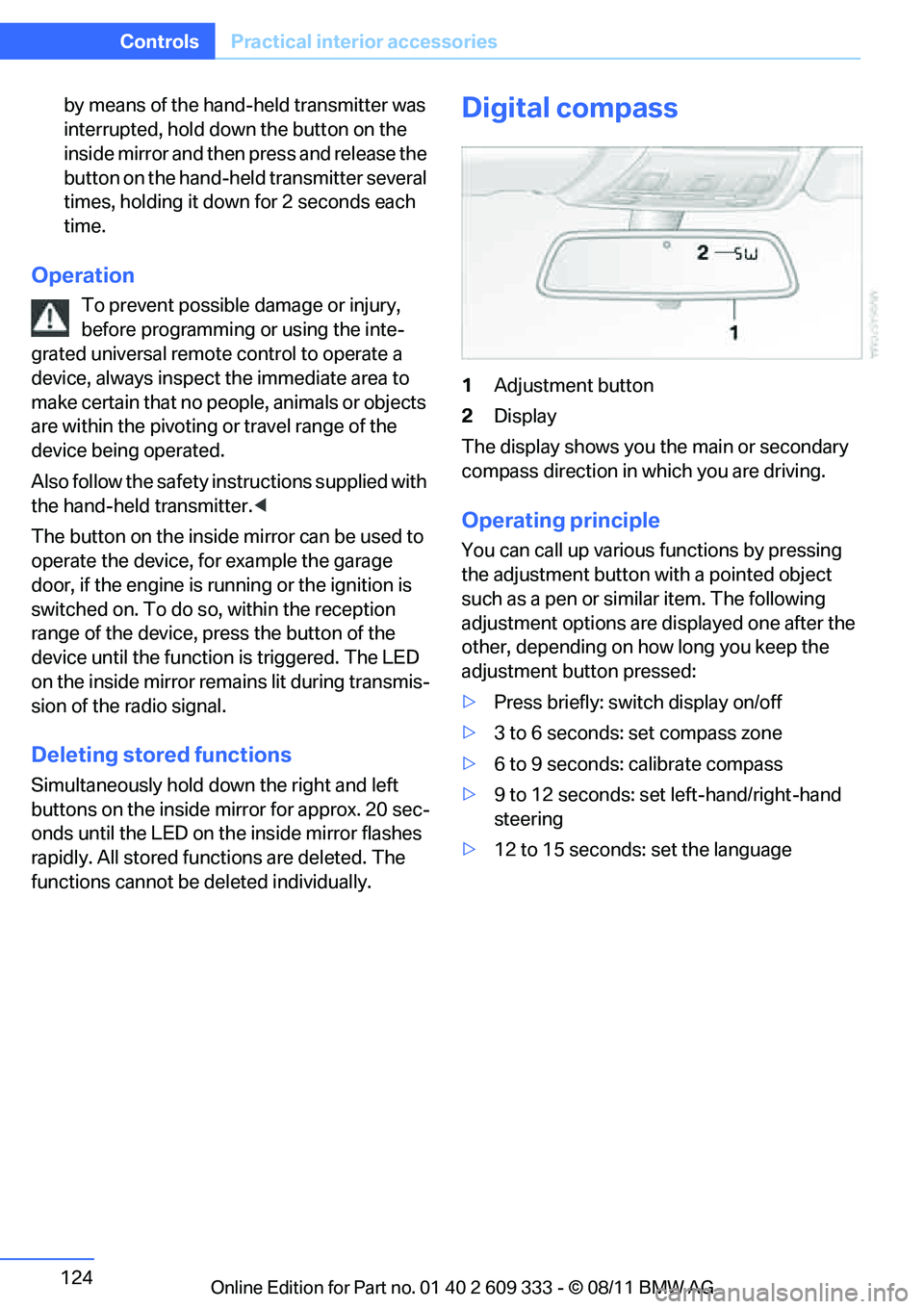
Digital compass
1 Adjustment button
2 Display
The display shows you the main or secondary
compass direction in which you are driving.
Operating principle
You can call up various functions by pressing
the adjustment button with a pointed object
such as a pen or similar item. The following
adjustment options are displayed one after the
other, depending on how long you keep the
adjustment button pressed:
> Press briefly: switch display on/off
> 3 to 6 seconds: set compass zone
> 6 to 9 seconds: calibrate compass
> 9 to 12 seconds: set left-hand/right-hand
steering
> 12 to 15 seconds: set the language
Online Edition for Part no. 01 40 2 609 333 - \251 08/11 BMW AG
Page 171 of 314
170
EntertainmentOn/off and tone
On/off and tone
Vehicle equipment
In this chapter, all pr oduction, country, and
optional equipment that is offered in the model
range is described. Equipment is also described
that is not available because of, for example,
selected options or country version. This also
applies to safety related functions and systems.
General information
The following audio and video sources share
the same control elements and adjustments:
> Radio
> CD/DVD player
> CD changer
> Video
> External devices, e.g. MP3 player
Controls
The audio and video sources can be controlled
using the:
>Buttons near th e CD/DVD player
> iDrive
> Buttons on the steering wheel, refer to
page 11
> Programmable memory keys, refer to
page 23
> Voice activation system
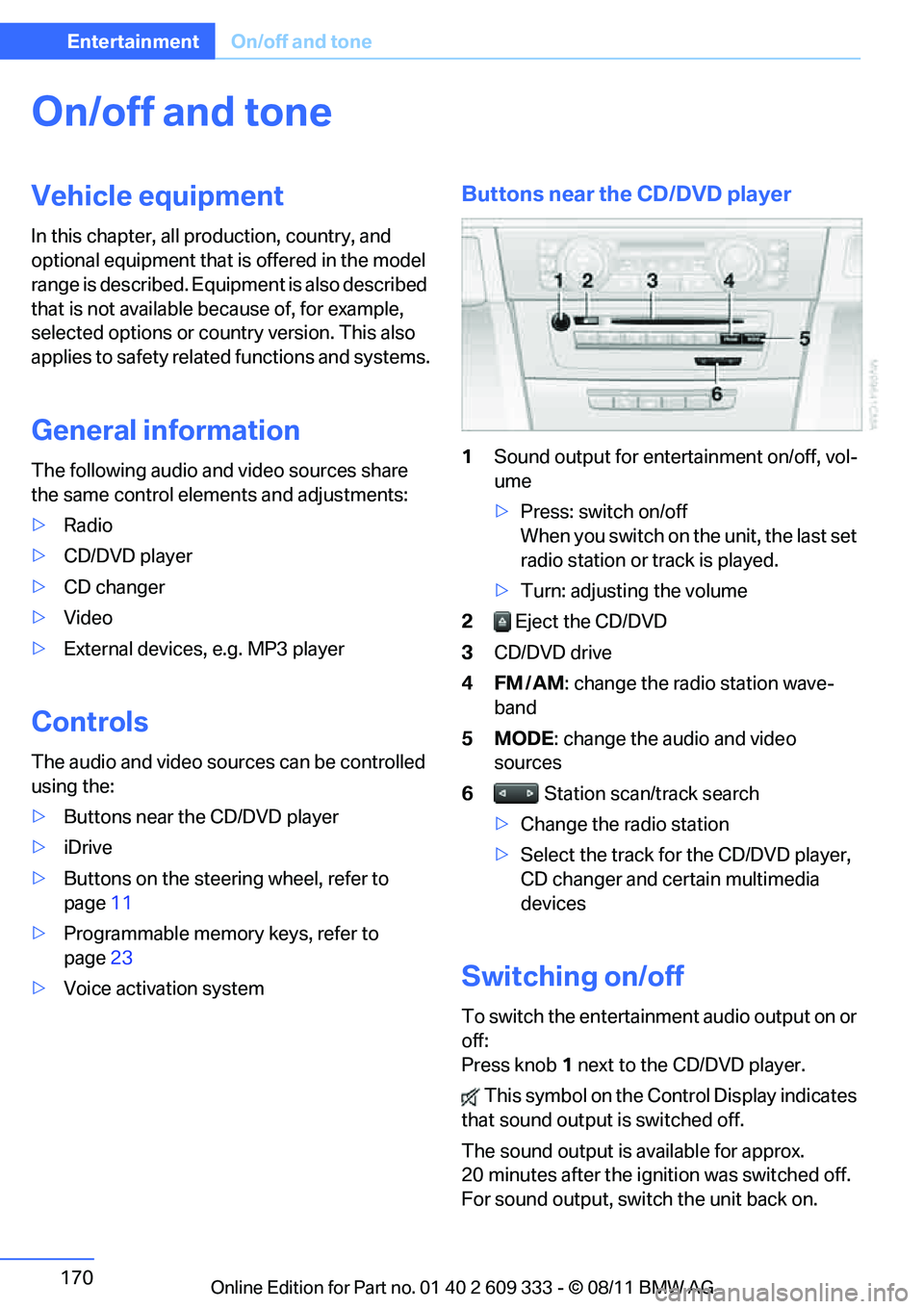
Buttons near the CD/DVD player
1Sound output for entertainment on/off, vol-
ume
>Press: switch on/off
When you switch on the unit, the last set
radio station or track is played.
> Turn: adjusting the volume
2 Eject the CD/DVD
3 CD/DVD drive
4FM/AM : change the radio station wave-
band
5MODE : change the audio and video
sources
6 Station scan/track search
> Change the radio station
> Select the track for the CD/DVD player,
CD changer and certain multimedia
devices
Switching on/off
To switch the entertainment audio output on or
off:
Press knob 1 next to the CD/DVD player.
This symbol on the Co ntrol Display indicates
that sound output is switched off.
The sound output is available for approx.
20 minutes after the ignition was switched off.
For sound output, switch the unit back on.
Online Edition for Part no. 01 40 2 609 333 - \251 08/11 BMW AG
Page 172 of 314
171
On/off and tone
Entertainment
Adjusting volume
Turn knob
1 next to the CD/DVD player until the
desired volume is obtained.
You can also adjust the volume with buttons on
the steering wheel, refer to page 11.
Setting tone controls
You can alter various tone settings, e.g. treble
and bass or the speed-dependent volume
increase.
The tone settings are set for all audio sources at
once.
The settings are stored for the remote control
currently in use.
Treble, bass, balance, fader
> "Treble": treble adjustment.
> "Bass": bass adjustment.
> "Balance": left/right volume distribution
> "Fader": front/rear volume distribution
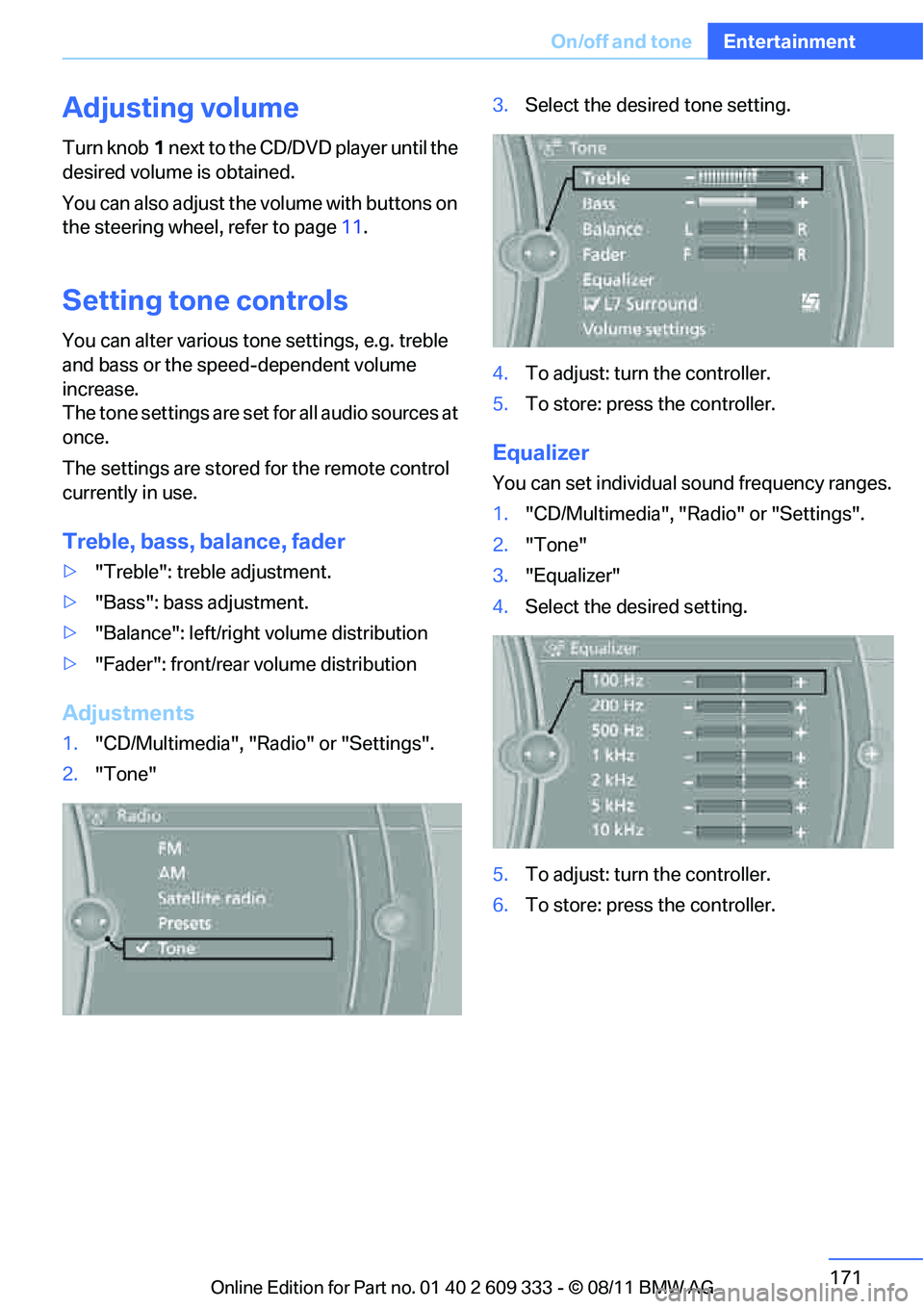
Adjustments
1."CD/Multimedia", "Radio" or "Settings".
2. "Tone" 3.
Select the desired tone setting.
4. To adjust: turn the controller.
5. To store: press the controller.
Equalizer
You can set individual sound frequency ranges.
1."CD/Multimedia", "Radio" or "Settings".
2. "Tone"
3. "Equalizer"
4. Select the desired setting.
5. To adjust: turn the controller.
6. To store: press the controller.
Online Edition for Part no. 01 40 2 609 333 - \251 08/11 BMW AG
Page 174 of 314
173
Radio
Entertainment
Radio
Vehicle equipment
In this chapter, all production, country, and
optional equipment that is offered in the model
range is described. Equipment is also described
that is not available because of, for example,
selected options or coun
try version. This also
applies to safety related functions and systems.
General information
Your radio is designed for reception of the fol-
lowing stations:
> FM and AM
> HD Radio
> Satellite radio
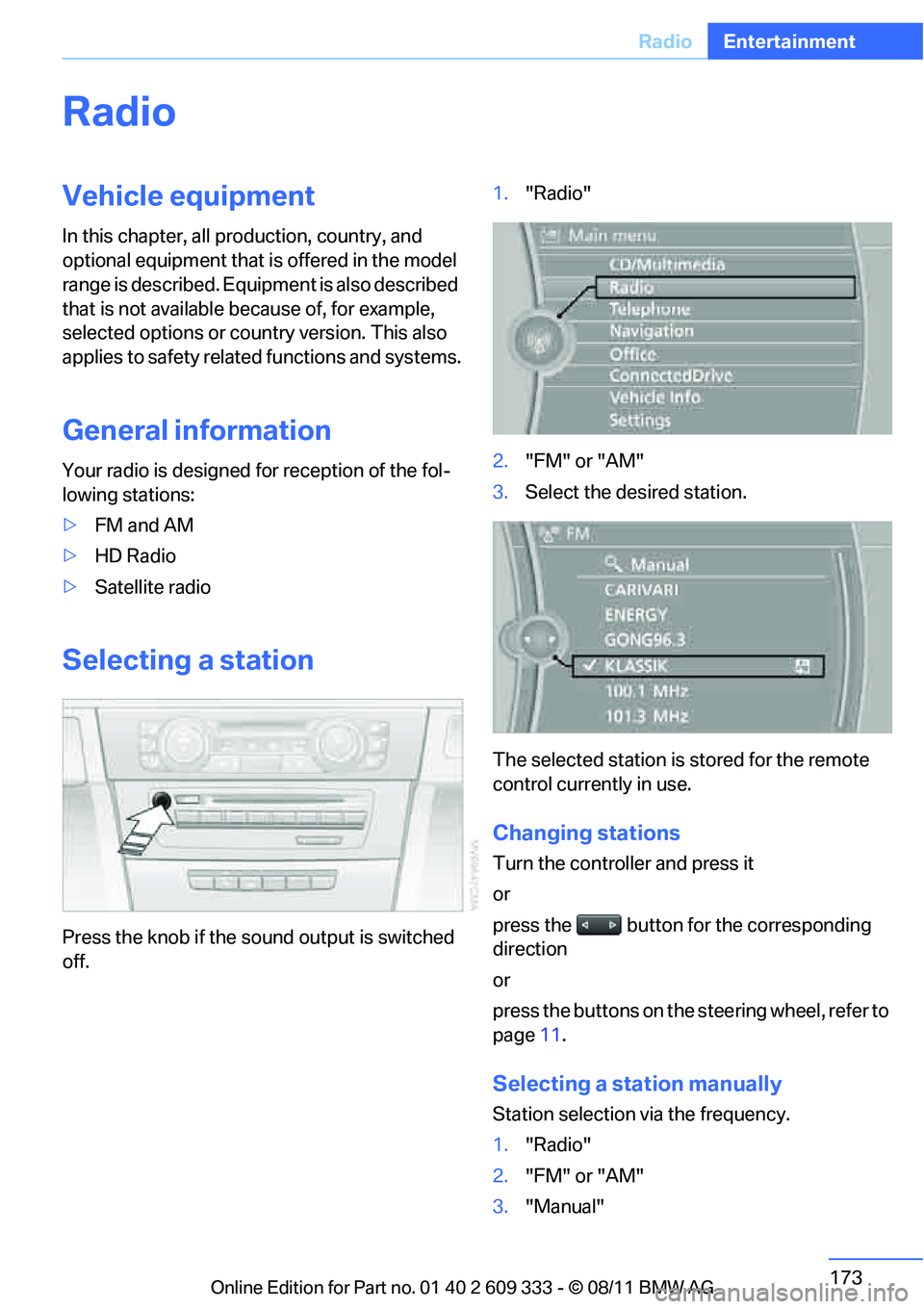
Selecting a station
Press the knob if the sound output is switched
off. 1.
"Radio"
2. "FM" or "AM"
3. Select the desired station.
The selected station is stored for the remote
control currently in use.
Changing stations
Turn the controller and press it
or
press the button for the corresponding
direction
or
press the buttons on the steering wheel, refer to
page 11.
Selecting a station manually
Station selection via the frequency.
1. "Radio"
2. "FM" or "AM"
3. "Manual"
Online Edition for Part no. 01 40 2 609 333 - \251 08/11 BMW AG
Page 177 of 314
176
EntertainmentSatellite radio
Satellite radio
Vehicle equipment
In this chapter, all pr oduction, country, and
optional equipment that is offered in the model
range is described. Equipment is also described
that is not available because of, for example,
selected options or country version. This also
applies to safety related functions and systems.
General information
The channels are offered in fixed packages.
Packages must be activated by telephone.
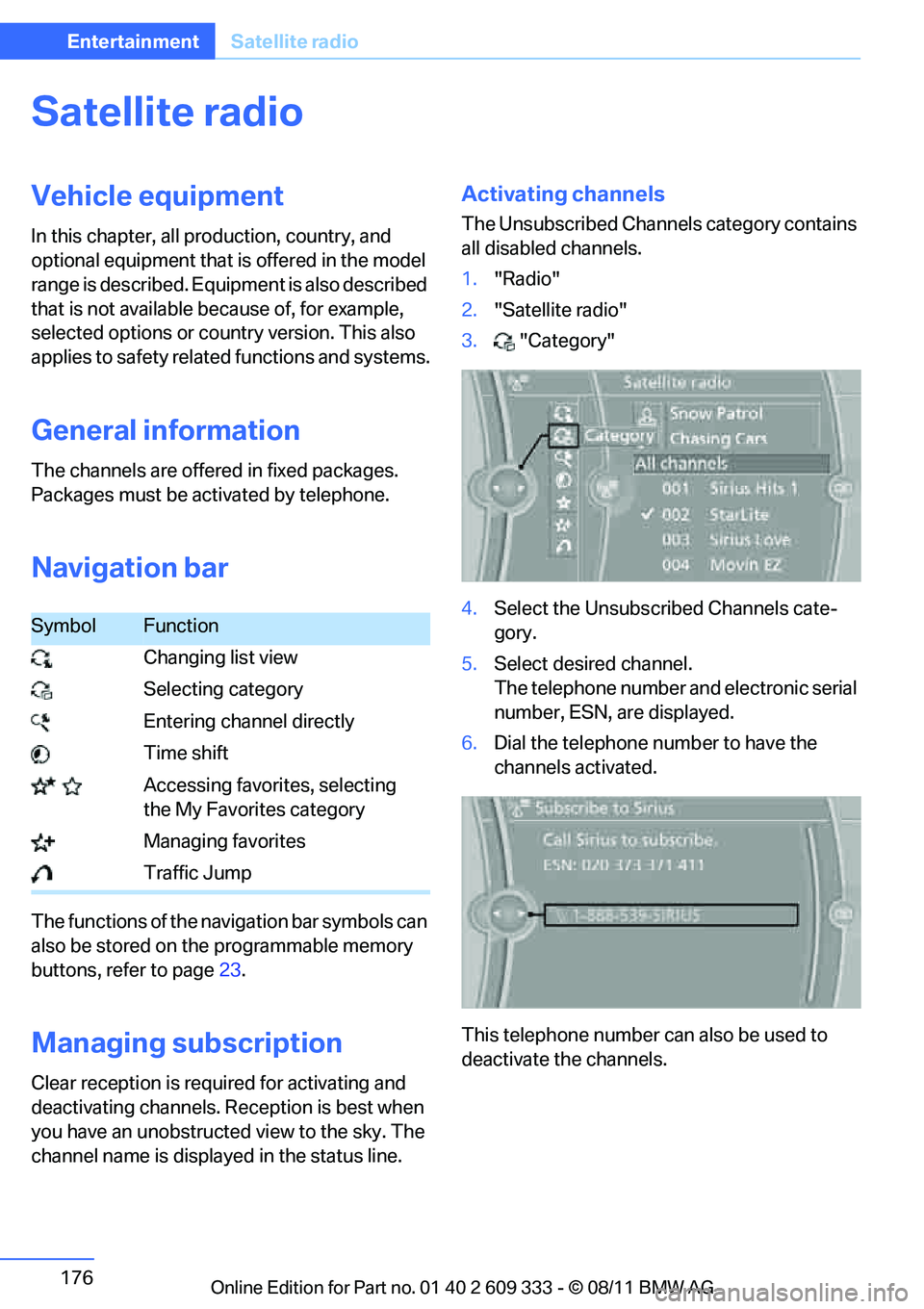
Navigation bar
The functions of the navigation bar symbols can
also be stored on the programmable memory
buttons, refer to page 23.
Managing subscription
Clear reception is required for activating and
deactivating channels. Re ception is best when
you have an unobstructed view to the sky. The
channel name is displa yed in the status line.
Activating channels
The Unsubscribed Channels category contains
all disabled channels.
1."Radio"
2. "Satellite radio"
3. "Category"
4. Select the Unsubscribed Channels cate-
gory.
5. Select desired channel.
The telephone number and electronic serial
number, ESN, are displayed.
6. Dial the telephone nu mber to have the
channels activated.
This telephone number can also be used to
deactivate the channels.
SymbolFunction
Changing list view
Selecting category
Entering channel directly
Time shift
Accessing favorites, selecting the My Favorites category
Managing favorites
Traffic Jump
Online Edition for Part no. 01 40 2 609 333 - \251 08/11 BMW AG
Page 205 of 314
204
CommunicationsTe l e p h o n e
Telephone
Vehicle equipment
In this chapter, all production, country, and
optional equipment that is offered in the model
range is described. Equipment is also described
that is not available because of, for example,
selected options or country version. This also
applies to safety related functions and systems.
Overview
The concept
Mobile phones or other external devices, e.g.
audio players, can be connected to the vehicle
via Bluetooth.
Bluetooth® is a registered trademark of Blue-
tooth® SIG, Inc.
After being paired once, when the ignition is
switched on, these devices are automatically
detected as soon as they are present in the
vehicle and can be controlled via iDrive, by the
buttons on the steering wheel, and by voice.
Depending on whether they are functioning as a
telephone and/or as an audio source, external
devices can be used via the vehicle. The tele-
phone functions will be described below. Oper-
ation of audio functions, refer to page 197.
Up to four external devices can be paired.
It may be necessary for some functions to be
activated by the mobile phone provider or ser-
vice provider. Only make entries when traffic conditions
permit. Do not hold the mobile phone in
your hand while you are driving; use the hands-
free system instead. Otherwise, you may
endanger vehicle occupants and other road
users. <
Snap-in adapter
The snap-in adapter makes it possible:
>Accommodate the mobile phone.
> Recharge its battery.
> Connect it to an external antenna of the
vehicle.
This assures a better network connection
and constant sound quality.
Suitable mobile phones
For precise information about which mobile
phones and external devices with a Bluetooth
interface are supported by the mobile phone
preparation, go to www.bmwusa.com/
bluetooth.
Displaying vehicl e identification
number and software part number
Checking which mobile phones are supported
by the mobile phone pr eparation requires the
vehicle identification number and software part
number. The software ve rsion of the mobile
phone may also be required.
1. "Telephone"
2. Open "Options".
3. "Bluetooth® info"
4. "Display system information"
With a certain software version, these suitable
mobile phones support the vehicle functions
described below.
With other mobile phones or software versions,
malfunctions may occur.
A mobile phone that is connected to the vehicle
should not be operated via the mobile phone
keypad; otherwise, ma lfunctions may occur.
It is possible to perform a software update, refer
to page 201.
Online Edition for Part no. 01 40 2 609 333 - \251 08/11 BMW AG
Page 217 of 314
216
CommunicationsTe l e p h o n e
Snap-in adapter
General information
Detailed information on snap-in adapters that
compatibly support mobile phone functions can
be found at your BMW center.
Notes
At high temperatures, the charging function of
the mobile phone may be limited and some
functions may no longer be carried out.
When using the mobile phone via the vehicle,
follow the operating instructions of the mobile
phone.
Installation location
In the center armrest.
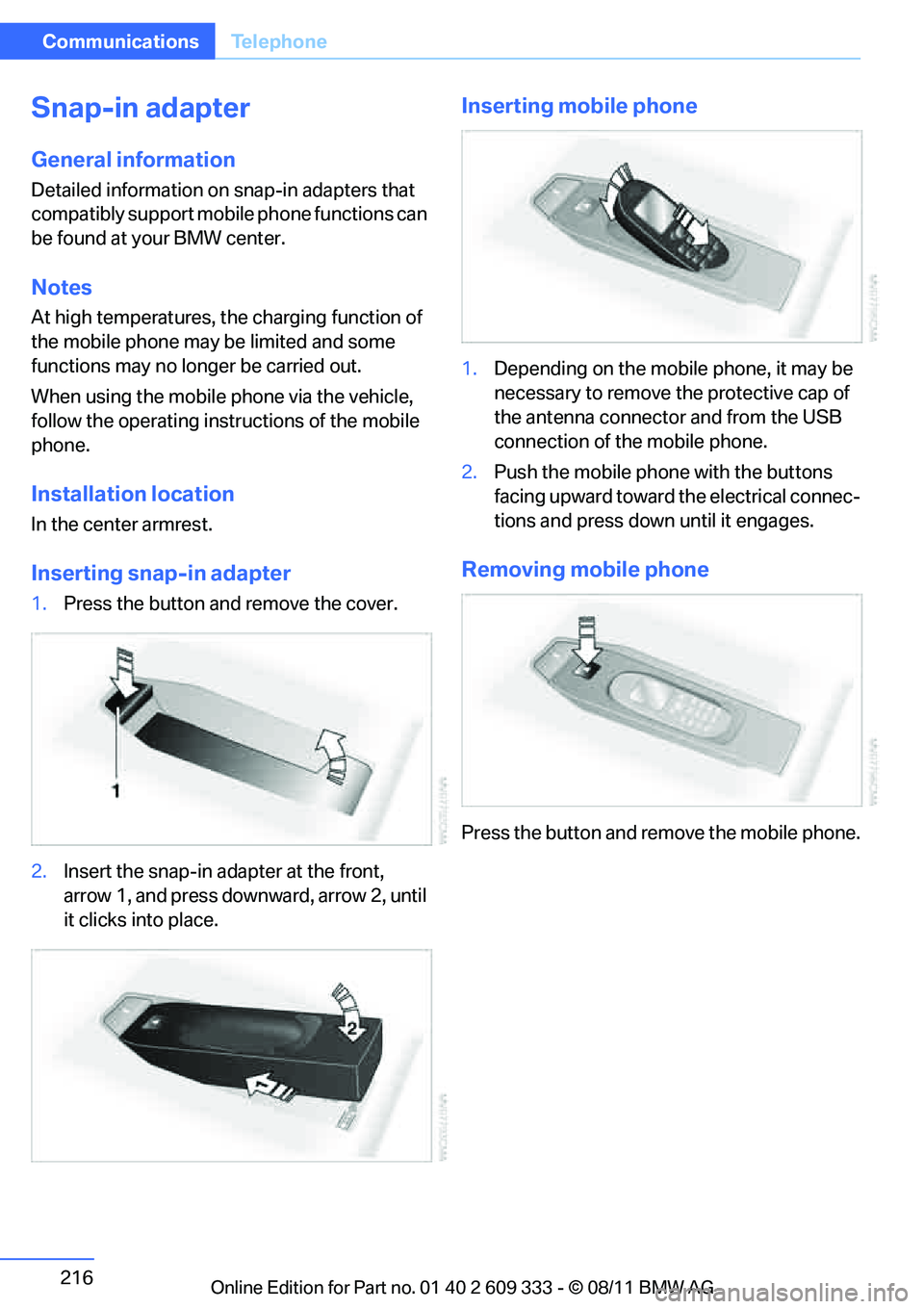
Inserting snap-in adapter
1.Press the button and remove the cover.
2. Insert the snap-in adapter at the front,
arrow 1, and press downward, arrow 2, until
it clicks into place.
Inserting mobile phone
1.Depending on the mobile phone, it may be
necessary to remove th e protective cap of
the antenna connector and from the USB
connection of the mobile phone.
2. Push the mobile phone with the buttons
facing upward toward the electrical connec-
tions and press down until it engages.
Removing mobile phone
Press the button and remove the mobile phone.
Online Edition for Part no. 01 40 2 609 333 - \251 08/11 BMW AG
Page 300 of 314
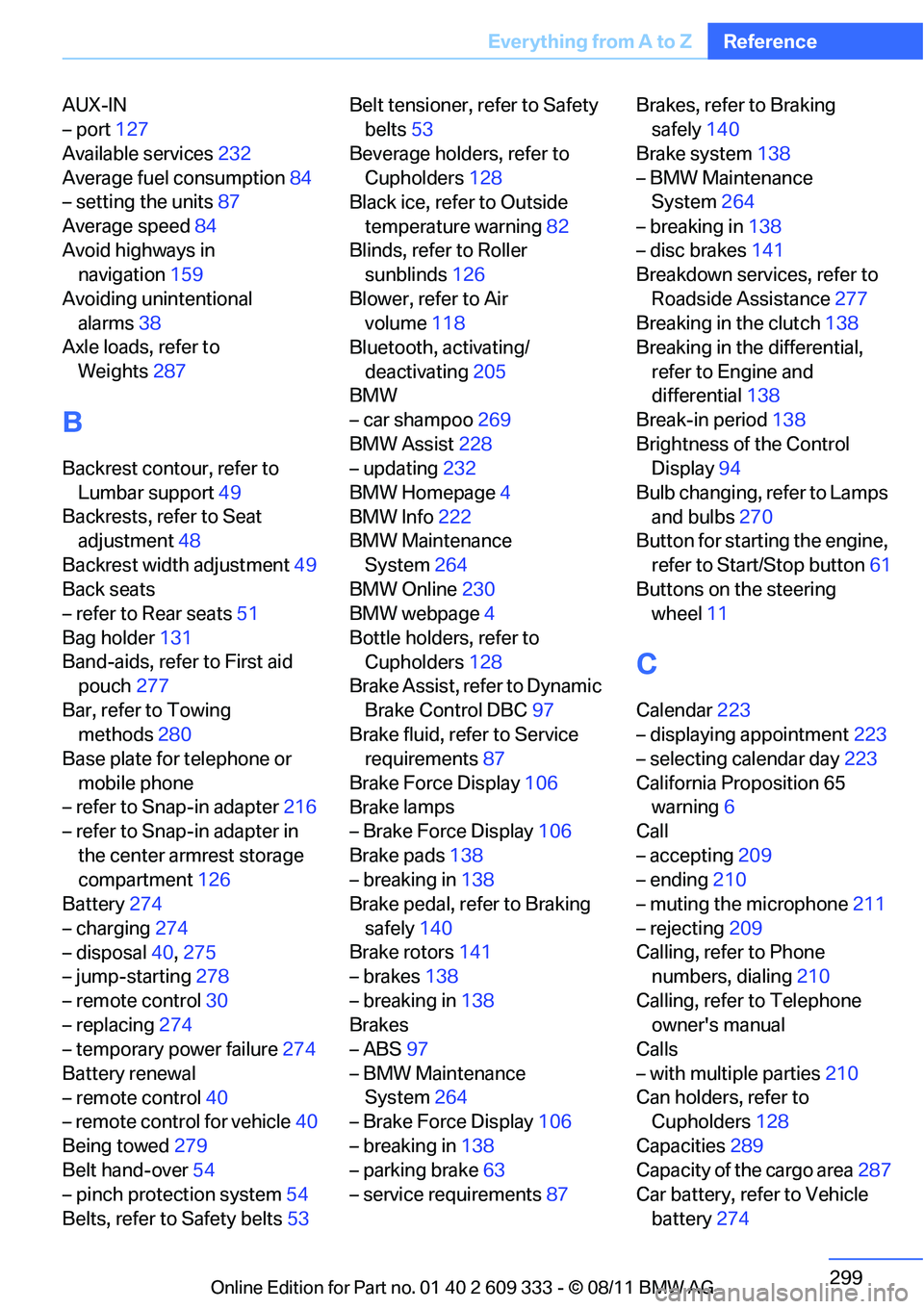
299
Everything from A to Z
Reference
AUX-IN
– port
127
Available services 232
Average fuel consumption 84
– setting the units 87
Average speed 84
Avoid highways in navigation 159
Avoiding unintentional alarms 38
Axle loads, refer to
Weights 287
B
Backrest contour, refer to
Lumbar support 49
Backrests, refer to Seat adjustment 48
Backrest width adjustment 49
Back seats
– refer to Rear seats 51
Bag holder 131
Band-aids, refer to First aid pouch 277
Bar, refer to Towing methods 280
Base plate for telephone or
mobile phone
– refer to Snap-in adapter 216
– refer to Snap-in adapter in
the center armrest storage
compartment 126
Battery 274
– charging 274
– disposal 40,275
– jump-starting 278
– remote control 30
– replacing 274
– temporary power failure 274
Battery renewal
– remote control 40
– remote control for vehicle 40
Being towed 279
Belt hand-over 54
– pinch protection system 54
Belts, refer to Safety belts 53Belt tensioner,
refer to Safety
belts 53
Beverage holders, refer to Cupholders 128
Black ice, refer to Outside
temperature warning 82
Blinds, refer to Roller sunblinds 126
Blower, refer to Air volume 118
Bluetooth, activating/
deactivating 205
BMW
– car shampoo 269
BMW Assist 228
– updating 232
BMW Homepage 4
BMW Info 222
BMW Maintenance
System 264
BMW Online 230
BMW webpage 4
Bottle holders, refer to Cupholders 128
Brake Assist, refer to Dynamic
Brake Control DBC 97
Brake fluid, refer to Service requirements 87
Brake Force Display 106
Bra
ke lamps
– Brake Force Display 106
Brake pads 138
– breaking in 138
Brake pedal, refer to Braking
safely 140
Brake rotors 141
– brakes 138
– breaking in 138
Brakes
– ABS 97
– BMW Maintenance System 264
– Brake Force Display 106
– breaking in 138
– parking brake 63
– service requirements 87Brakes, refer to Braking
safely 140
Brake system 138
– BMW Maintenance System 264
– breaking in 138
– disc brakes 141
Breakdown services, refer to
Roadside Assistance 277
Breaking in the clutch 138
Breaking in the differential,
refer to Engine and
differential 138
Break-in period 138
Brightness of the Control Display 94
Bulb changing, refer to Lamps and bulbs 270
Button for starting the engine,
refer to Start/Stop button 61
Buttons on the steering wheel 11
C
Calendar 223
– displaying appointment 223
– selecting calendar day 223
California Proposition 65 warning 6
Call
– accepting 209
– ending 210
– muting the microphone 211
– rejecting 209
Calling, refer to Phone numbers, dialing 210
Calling, refer to Telephone owner's manual
Calls
– with multiple parties 210
Can holders, refer to Cupholders 128
Capacities 289
Capacity of the cargo area 287
Car battery, refer to Vehicle
battery 274
Online Edition for Part no. 01 40 2 609 333 - \251 08/11 BMW AG
Page 306 of 314
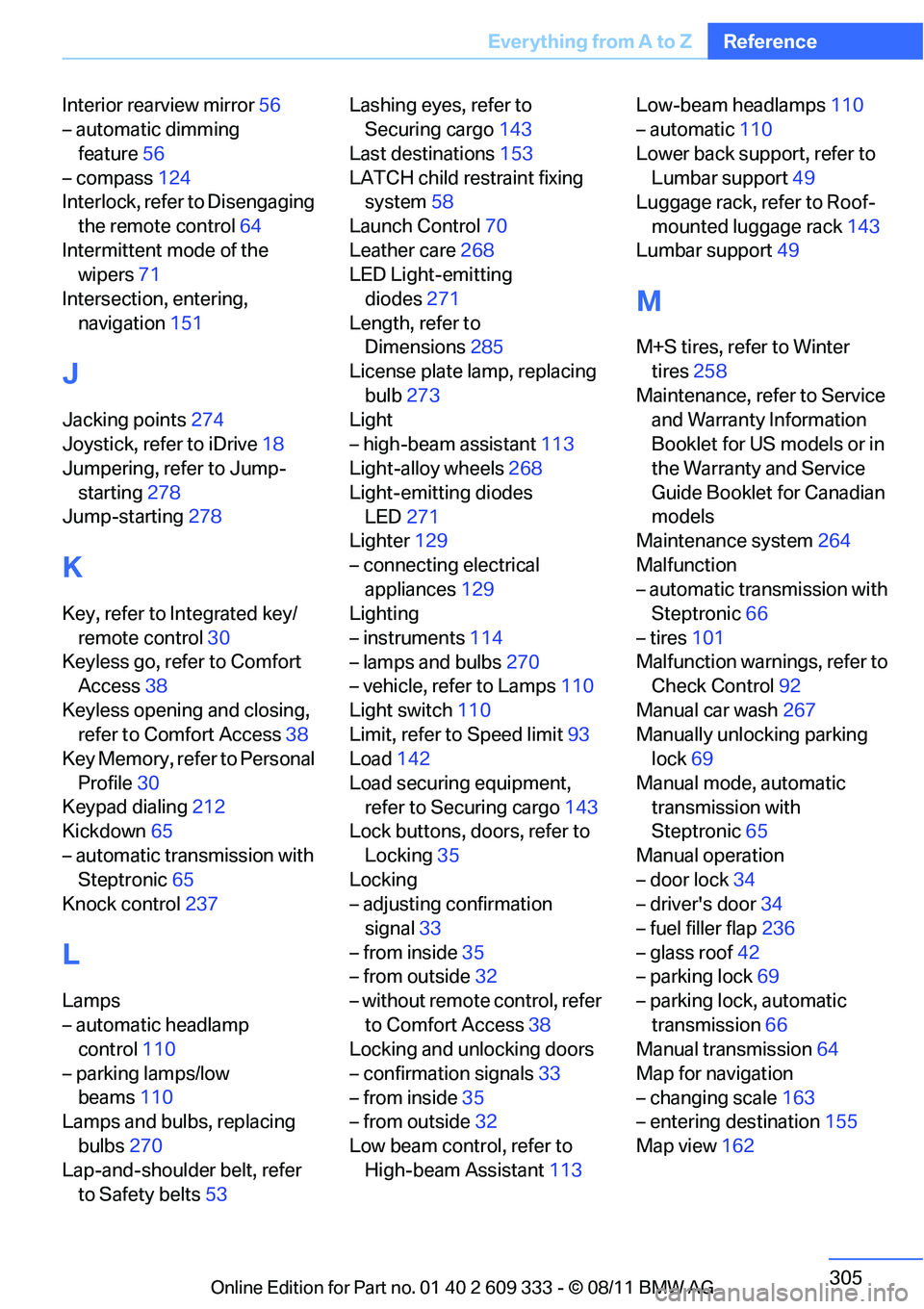
305
Everything from A to Z
Reference
Interior rearview mirror
56
– automatic dimming
feature 56
– compass 124
Interlock, refer to Disengaging
the remote control 64
Intermittent mode of the wipers 71
Intersection, entering, navigation 151
J
Jacking points 274
Joystick, refer to iDrive 18
Jumpering, refer to Jump-
starting 278
Jump-starting 278
K
Key, refer to Integrated key/
remote control 30
Keyless go, refer to Comfort Access 38
Keyless opening and closing, refer to Comfort Access 38
Key Memory, refer to Personal
Profile 30
Keypad dialing 212
Kickdown 65
– automatic transmission with Steptronic 65
Knock control 237
L
Lamps
– automatic headlamp
control 110
– parking lamps/low beams 110
Lamps and bulbs, replacing
bulbs 270
Lap-and-shoulder belt, refer to Safety belts 53 Lashing eyes, refer to
Securing cargo 143
Last destinations 153
LATCH child restraint fixing system 58
Launch Control 70
Leather care 268
LED Light-emitting
diodes 271
Length, refer to Dimensions 285
License plate lamp, replacing bulb 273
Light
– high-beam assistant 113
Light-alloy wheels 268
Light-emitting diodes LED 271
Lighter 129
– connecting electrical appliances 129
Lighting
– instruments 114
– lamps and bulbs 270
– vehicle, refer to Lamps 110
Light switch 110
Limit, refer to Speed limit 93
Load 142
Load securing equipment, refer to Securing cargo 143
Lock buttons, doors, refer to
Locking 35
Locking
– adjusting confirmation
signal 33
– from inside 35
– from outside 32
– without remote control, refer to Comfort Access 38
Locking and unlocking doors
– confirmation signals 33
– from inside 35
– from outside 32
Low beam control, refer to High-beam Assistant 113Low-beam headlamps
110
– automatic 110
Lower back support, refer to Lumbar support 49
Luggage rack, refer to Roof-
mounted luggage rack 143
Lumbar support 49
M
M+S tires, refer to Winter
tires 258
Maintenance, refer to Service and Warranty Information
Booklet for US models or in
the Warranty and Service
Guide Booklet for Canadian
models
Maintenance system 264
Malfunction
– automatic transmission with Steptronic 66
– tires 101
Malfunction warnings, refer to Check Control 92
Manual car wash 267
Manually unlocking parking lock 69
Manual mode, automatic transmission with
Steptronic 65
Manual operation
– door lock 34
– driver's door 34
– fuel filler flap 236
– glass roof 42
– parking lock 69
– parking lock, automatic transmission 66
Manual transmission 64
Map for navigation
– changing scale 163
– entering destination 155
Map view 162
Online Edition for Part no. 01 40 2 609 333 - \251 08/11 BMW AG