maintenance BMW M3 CONVERTIBLE 2002 E46 Owner's Guide
[x] Cancel search | Manufacturer: BMW, Model Year: 2002, Model line: M3 CONVERTIBLE, Model: BMW M3 CONVERTIBLE 2002 E46Pages: 159, PDF Size: 2.19 MB
Page 59 of 159
59n
OverviewControlsMaintenanceRepairsDataIndex
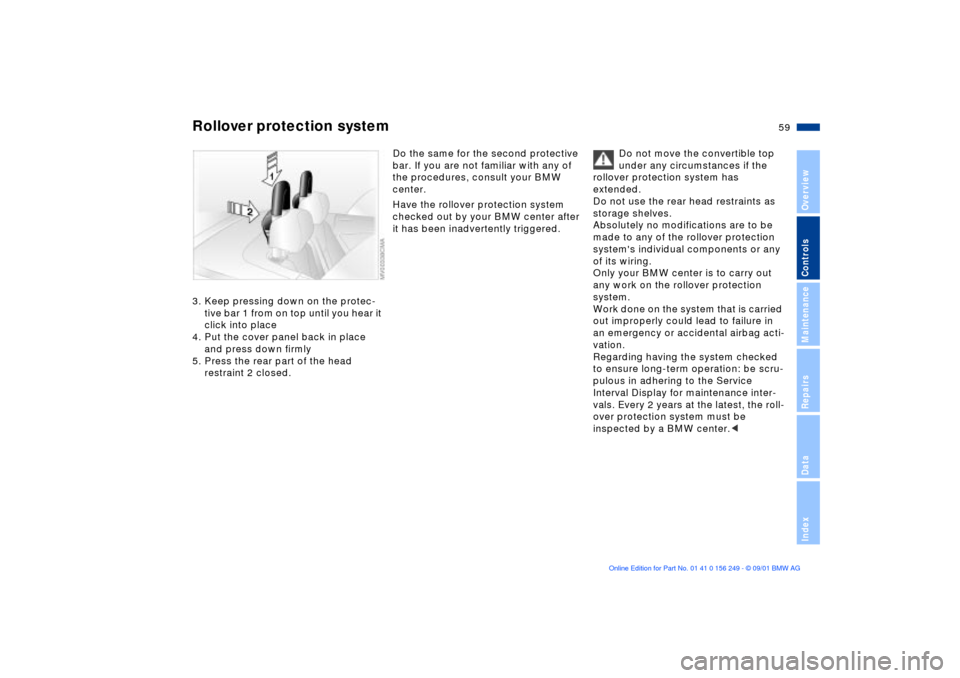
Rollover protection system3. Keep pressing down on the protec-
tive bar 1 from on top until you hear it
click into place
4. Put the cover panel back in place
and press down firmly
5. Press the rear part of the head
restraint 2 closed.
Do the same for the second protective
bar. If you are not familiar with any of
the procedures, consult your BMW
center.
Have the rollover protection system
checked out by your BMW center after
it has been inadvertently triggered.Do not move the convertible top
under any circumstances if the
rollover protection system has
extended.
Do not use the rear head restraints as
storage shelves.
Absolutely no modifications are to be
made to any of the rollover protection
system's individual components or any
of its wiring.
Only your BMW center is to carry out
any work on the rollover protection
system.
Work done on the system that is carried
out improperly could lead to failure in
an emergency or accidental airbag acti-
vation.
Regarding having the system checked
to ensure long-term operation: be scru-
pulous in adhering to the Service
Interval Display for maintenance inter-
vals. Every 2 years at the latest, the roll-
over protection system must be
inspected by a BMW center.<
Page 61 of 159
61n
OverviewControlsMaintenanceRepairsDataIndex
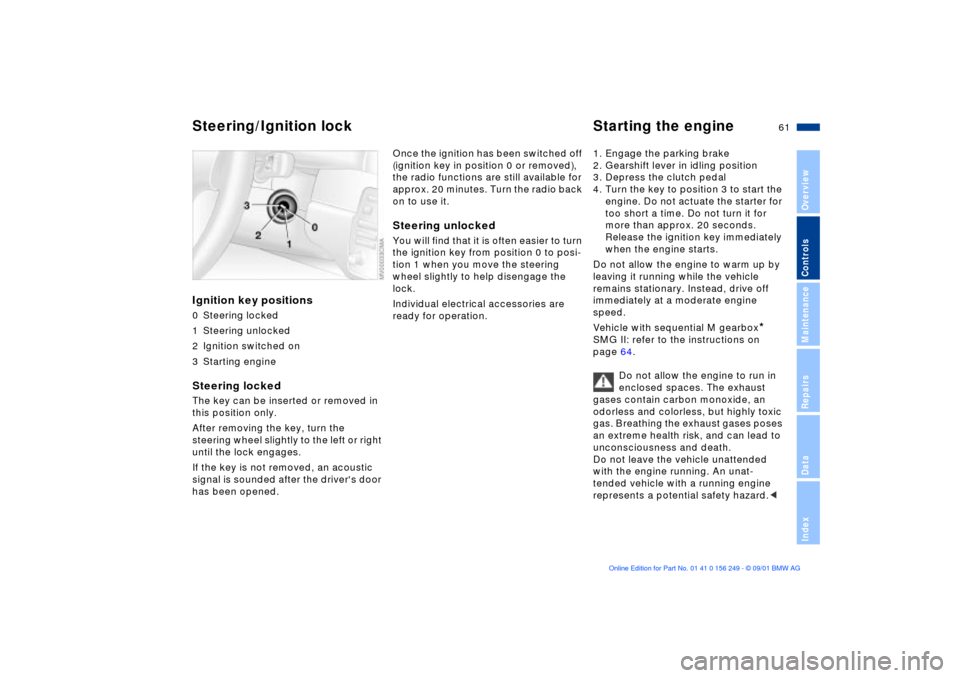
Ignition key positions0 Steering locked
1 Steering unlocked
2 Ignition switched on
3 Starting engineSteering locked The key can be inserted or removed in
this position only.
After removing the key, turn the
steering wheel slightly to the left or right
until the lock engages.
If the key is not removed, an acoustic
signal is sounded after the driver's door
has been opened.
Once the ignition has been switched off
(ignition key in position 0 or removed),
the radio functions are still available for
approx. 20 minutes. Turn the radio back
on to use it.Steering unlocked You will find that it is often easier to turn
the ignition key from position 0 to posi-
tion 1 when you move the steering
wheel slightly to help disengage the
lock.
Individual electrical accessories are
ready for operation. 1. Engage the parking brake
2. Gearshift lever in idling position
3. Depress the clutch pedal
4. Turn the key to position 3 to start the
engine. Do not actuate the starter for
too short a time. Do not turn it for
more than approx. 20 seconds.
Release the ignition key immediately
when the engine starts.
Do not allow the engine to warm up by
leaving it running while the vehicle
remains stationary. Instead, drive off
immediately at a moderate engine
speed.
Vehicle with sequential M gearbox
*
SMG II: refer to the instructions on
page 64.
Do not allow the engine to run in
enclosed spaces. The exhaust
gases contain carbon monoxide, an
odorless and colorless, but highly toxic
gas. Breathing the exhaust gases poses
an extreme health risk, and can lead to
unconsciousness and death.
Do not leave the vehicle unattended
with the engine running. An unat-
tended vehicle with a running engine
represents a potential safety hazard.<
Steering/Ignition lock Starting the engine
Page 63 of 159
63n
OverviewControlsMaintenanceRepairsDataIndex
Parking brake Manual transmission The parking brake is designed primarily
to prevent the vehicle from rolling when
it is parked. It operates against the rear
wheels. To engageThe lever engages automatically, the
indicator lamp in the instrument cluster
comes on when the ignition key is in
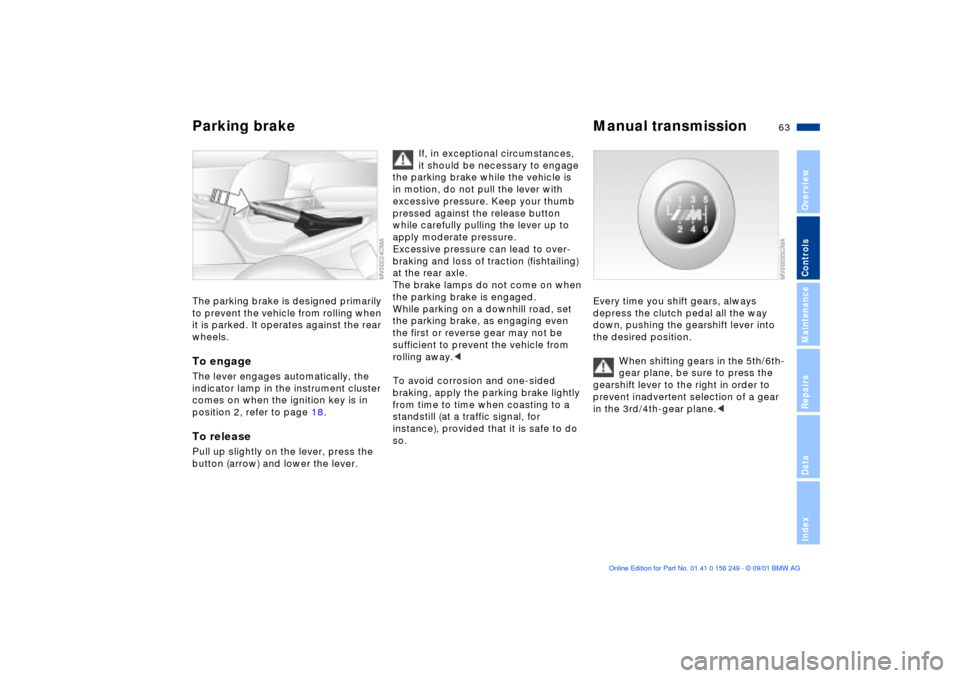
position 2, refer to page 18.To releasePull up slightly on the lever, press the
button (arrow) and lower the lever.
If, in exceptional circumstances,
it should be necessary to engage
the parking brake while the vehicle is
in motion, do not pull the lever with
excessive pressure. Keep your thumb
pressed against the release button
while carefully pulling the lever up to
apply moderate pressure.
Excessive pressure can lead to over-
braking and loss of traction (fishtailing)
at the rear axle.
The brake lamps do not come on when
the parking brake is engaged.
While parking on a downhill road, set
the parking brake, as engaging even
the first or reverse gear may not be
sufficient to prevent the vehicle from
rolling away.<
To avoid corrosion and one-sided
braking, apply the parking brake lightly
from time to time when coasting to a
standstill (at a traffic signal, for
instance), provided that it is safe to do
so.
Every time you shift gears, always
depress the clutch pedal all the way
down, pushing the gearshift lever into
the desired position.
When shifting gears in the 5th/6th-
gear plane, be sure to press the
gearshift lever to the right in order to
prevent inadvertent selection of a gear
in the 3rd/4th-gear plane.<
Page 65 of 159
65n
OverviewControlsMaintenanceRepairsDataIndex
Sequential M gearbox
* SMG II
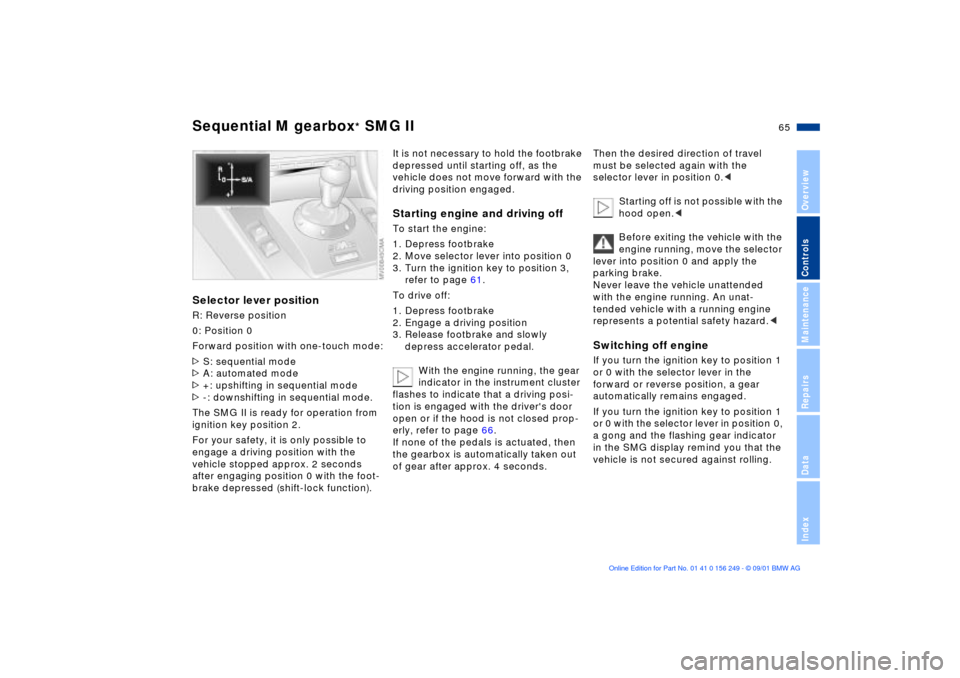
Selector lever positionR: Reverse position
0: Position 0
Forward position with one-touch mode:
>S: sequential mode
>A: automated mode
>+: upshifting in sequential mode
>-: downshifting in sequential mode.
The SMG II is ready for operation from
ignition key position 2.
For your safety, it is only possible to
engage a driving position with the
vehicle stopped approx. 2 seconds
after engaging position 0 with the foot-
brake depressed (shift-lock function).
It is not necessary to hold the footbrake
depressed until starting off, as the
vehicle does not move forward with the
driving position engaged.Starting engine and driving offTo start the engine:
1. Depress footbrake
2. Move selector lever into position 0
3. Turn the ignition key to position 3,
refer to page 61.
To drive off:
1. Depress footbrake
2. Engage a driving position
3. Release footbrake and slowly
depress accelerator pedal.
With the engine running, the gear
indicator in the instrument cluster
flashes to indicate that a driving posi-
tion is engaged with the driver's door
open or if the hood is not closed prop-
erly, refer to page 66.
If none of the pedals is actuated, then
the gearbox is automatically taken out
of gear after approx. 4 seconds.
Then the desired direction of travel
must be selected again with the
selector lever in position 0.<
Starting off is not possible with the
hood open.<
Before exiting the vehicle with the
engine running, move the selector
lever into position 0 and apply the
parking brake.
Never leave the vehicle unattended
with the engine running. An unat-
tended vehicle with a running engine
represents a potential safety hazard.
forward or reverse position, a gear
automatically remains engaged.
If you turn the ignition key to position 1
or 0 with the selector lever in position 0,
a gong and the flashing gear indicator
in the SMG display remind you that the
vehicle is not secured against rolling.
Page 67 of 159
67n
OverviewControlsMaintenanceRepairsDataIndex
Sequential M gearbox
* SMG II
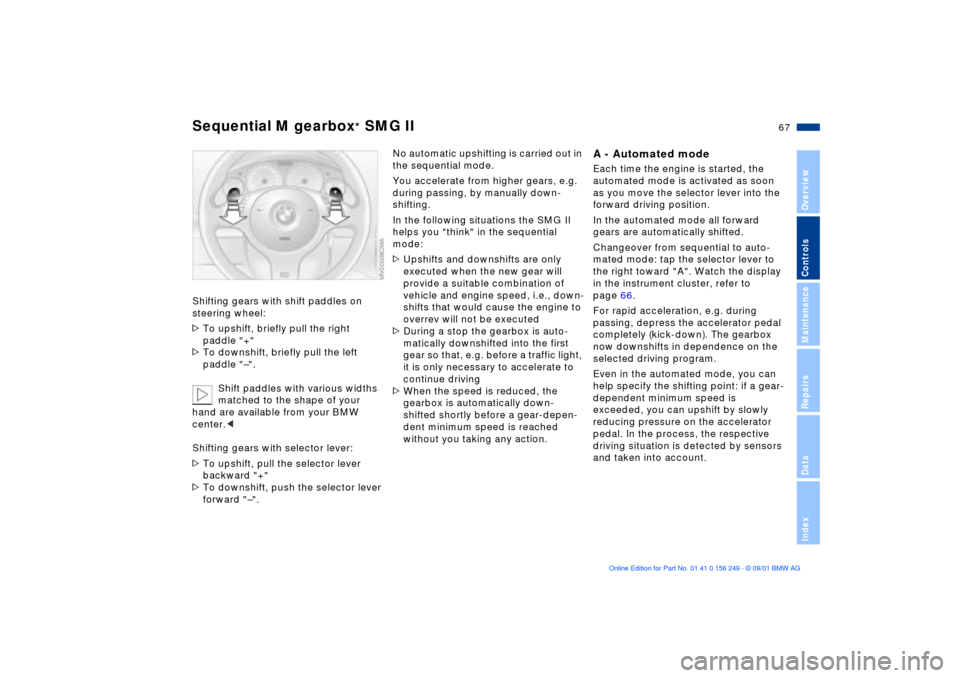
Shifting gears with shift paddles on
steering wheel:
>To upshift, briefly pull the right
paddle "+"
>To downshift, briefly pull the left
paddle "Ð".
Shift paddles with various widths
matched to the shape of your
hand are available from your BMW
center.<
Shifting gears with selector lever:
>To upshift, pull the selector lever
backward "+"
>To downshift, push the selector lever
forward "Ð".
No automatic upshifting is carried out in
the sequential mode.
You accelerate from higher gears, e.g.
during passing, by manually down-
shifting.
In the following situations the SMG II
helps you "think" in the sequential
mode:
>Upshifts and downshifts are only
executed when the new gear will
provide a suitable combination of
vehicle and engine speed, i.e., down-
shifts that would cause the engine to
overrev will not be executed
>During a stop the gearbox is auto-
matically downshifted into the first
gear so that, e.g. before a traffic light,
it is only necessary to accelerate to
continue driving
>When the speed is reduced, the
gearbox is automatically down-
shifted shortly before a gear-depen-
dent minimum speed is reached
without you taking any action.
A - Automated modeEach time the engine is started, the
automated mode is activated as soon
as you move the selector lever into the
forward driving position.
In the automated mode all forward
gears are automatically shifted.
Changeover from sequential to auto-
mated mode: tap the selector lever to
the right toward "A". Watch the display
in the instrument cluster, refer to
page 66.
For rapid acceleration, e.g. during
passing, depress the accelerator pedal
completely (kick-down). The gearbox
now downshifts in dependence on the
selected driving program.
Even in the automated mode, you can
help specify the shifting point: if a gear-
dependent minimum speed is
exceeded, you can upshift by slowly
reducing pressure on the accelerator
pedal. In the process, the respective
driving situation is detected by sensors
and taken into account.
Page 69 of 159
69n
OverviewControlsMaintenanceRepairsDataIndex
Sequential M gearbox
* SMG II
The vehicle may roll slightly before
it is held by the gradient assis-
tance after releasing the footbrake.
Two seconds after the footbrake is
released, the vehicle begins to roll, as it
is no longer held with the gradient
assistance.<
The gradient assistance must be reacti-
vated before each use.
Indicator lamp
The transmission indicator lamp
in the instrument cluster goes
out after the engine is started.
>If it does not go out, or if it lights up
during driving, a fault has occurred.
The available functions may be
limited under certain circumstances.
Drive carefully and with the Dynamic
Stability Control (DSC) activated.
Have the system checked by the
nearest BMW center
>If the indicator lamp flashes while
driving, the system is overloaded.
Avoid high loads until the indicator
lamp goes out again permanently.
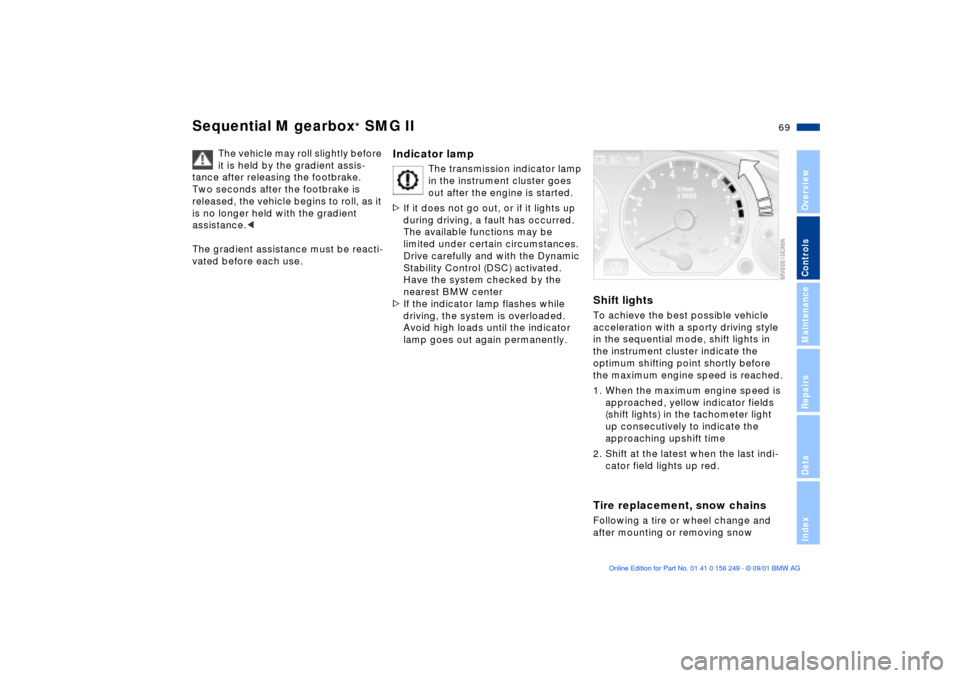
Shift lightsTo achieve the best possible vehicle
acceleration with a sporty driving style
in the sequential mode, shift lights in
the instrument cluster indicate the
optimum shifting point shortly before
the maximum engine speed is reached.
1. When the maximum engine speed is
approached, yellow indicator fields
(shift lights) in the tachometer light
up consecutively to indicate the
approaching upshift time
2. Shift at the latest when the last indi-
cator field lights up red.Tire replacement, snow chainsFollowing a tire or wheel change and
after mounting or removing snow
Page 71 of 159
71n
OverviewControlsMaintenanceRepairsDataIndex
Washer/Wiper system/Rain sensor
*
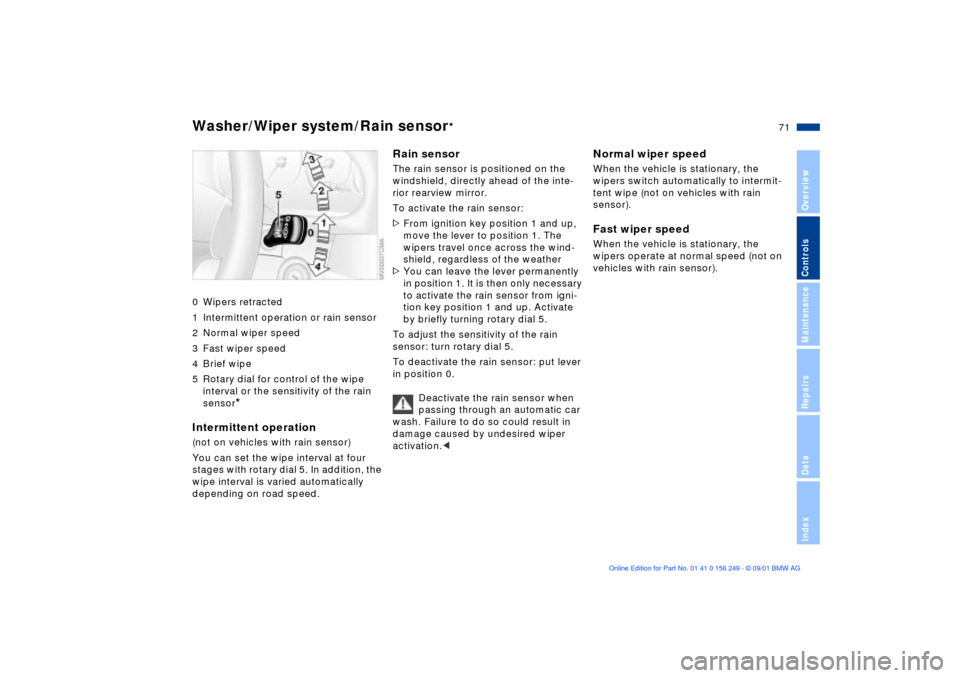
0 Wipers retracted
1 Intermittent operation or rain sensor
2 Normal wiper speed
3 Fast wiper speed
4 Brief wipe
5 Rotary dial for control of the wipe
interval or the sensitivity of the rain
sensor
*
Intermittent operation(not on vehicles with rain sensor)
You can set the wipe interval at four
stages with rotary dial 5. In addition, the
wipe interval is varied automatically
depending on road speed.
Rain sensor
The rain sensor is positioned on the
windshield, directly ahead of the inte-
rior rearview mirror.
To activate the rain sensor:
>From ignition key position 1 and up,
move the lever to position 1. The
wipers travel once across the wind-
shield, regardless of the weather
>You can leave the lever permanently
in position 1. It is then only necessary
to activate the rain sensor from igni-
tion key position 1 and up. Activate
by briefly turning rotary dial 5.
To adjust the sensitivity of the rain
sensor: turn rotary dial 5.
To deactivate the rain sensor: put lever
in position 0.
Deactivate the rain sensor when
passing through an automatic car
wash. Failure to do so could result in
damage caused by undesired wiper
activation.<
Normal wiper speedWhen the vehicle is stationary, the
wipers switch automatically to intermit-
tent wipe (not on vehicles with rain
sensor).Fast wiper speedWhen the vehicle is stationary, the
wipers operate at normal speed (not on
vehicles with rain sensor).
Page 73 of 159
73n
OverviewControlsMaintenanceRepairsDataIndex
Cruise control Starting at about 20 mph (30 km/h), you
can maintain and store any vehicle
speed that you specify.
You can use cruise control, whenever
the system is active while the engine is
running.
To activate the systemFrom ignition key position 2:
Press the button and the indicator lamp
in the instrument cluster (refer to
page 20) will come on. You can now
use the cruise control.
Do not use cruise control on
twisting roads, when high traffic
density prevents driving at a constant
speed, when the road surface is slick
(snow, rain, ice), or when the road
surface is loose (rocks, sand).
ment cluster goes out.
Cruise control is also deactivated when
the ignition key is in position 0.
The speed stored in memory is deleted.
To store and maintain speed
or to acceleratePress button (+) briefly.
The system stores and maintains the
current vehicle speed. Every time you
tap the button, the speed increases by
0.6 mph (1 km/h).
Press and hold button (+).
The vehicle accelerates without pres-
sure on the accelerator pedal. When
you release the button, the system
stores and maintains the current speed.
If, on a downhill gradient, the
engine braking effect is not suffi-
cient, the controlled speed may be
exceeded. Speed can drop on uphill
grades if the engine output is insuffi-
cient.<
Page 75 of 159
75n
OverviewControlsMaintenanceRepairsDataIndex
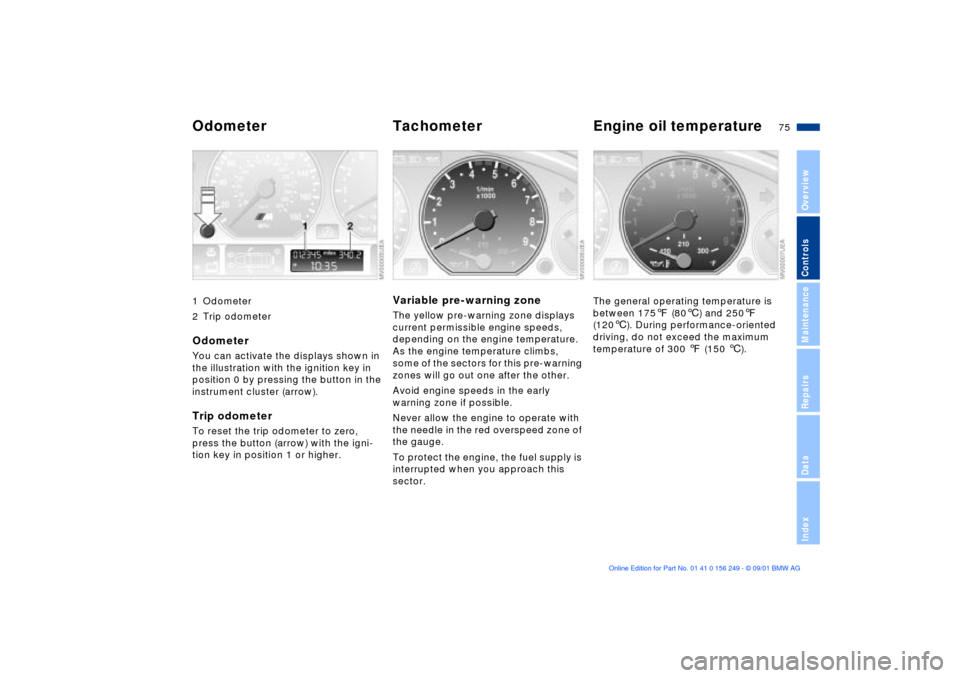
1 Odometer
2 Trip odometerOdometerYou can activate the displays shown in
the illustration with the ignition key in
position 0 by pressing the button in the
instrument cluster (arrow).Trip odometerTo reset the trip odometer to zero,
press the button (arrow) with the igni-
tion key in position 1 or higher.
Variable pre-warning zoneThe yellow pre-warning zone displays
current permissible engine speeds,
depending on the engine temperature.
As the engine temperature climbs,
some of the sectors for this pre-warning
zones will go out one after the other.
Avoid engine speeds in the early
warning zone if possible.
Never allow the engine to operate with
the needle in the red overspeed zone of
the gauge.
To protect the engine, the fuel supply is
interrupted when you approach this
sector.
The general operating temperature is
between 1757 (806) and 2507
(1206). During performance-oriented
driving, do not exceed the maximum
temperature of 300 7 (150 6).
Odometer Tachometer Engine oil temperature
Page 77 of 159
77n
OverviewControlsMaintenanceRepairsDataIndex
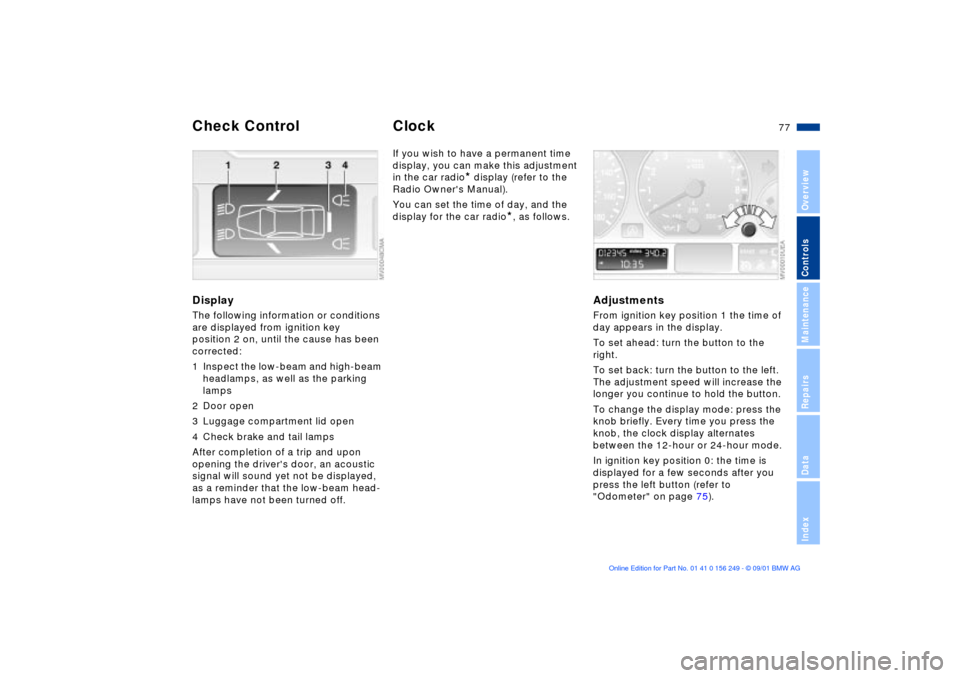
DisplayThe following information or conditions
are displayed from ignition key
position 2 on, until the cause has been
corrected:
1 Inspect the low-beam and high-beam
headlamps, as well as the parking
lamps
2 Door open
3 Luggage compartment lid open
4 Check brake and tail lamps
After completion of a trip and upon
opening the driver's door, an acoustic
signal will sound yet not be displayed,
as a reminder that the low-beam head-
lamps have not been turned off.
If you wish to have a permanent time
display, you can make this adjustment
in the car radio
* display (refer to the
Radio Owner's Manual).
You can set the time of day, and the
display for the car radio
*, as follows.
Adjustments From ignition key position 1 the time of
day appears in the display.
To set ahead: turn the button to the
right.
To set back: turn the button to the left.
The adjustment speed will increase the
longer you continue to hold the button.
To change the display mode: press the
knob briefly. Every time you press the
knob, the clock display alternates
between the 12-hour or 24-hour mode.
In ignition key position 0: the time is
displayed for a few seconds after you
press the left button (refer to
"Odometer" on page 75).
Check Control
Clock