tow BMW M3 CONVERTIBLE 2003 E46 Owner's Manual
[x] Cancel search | Manufacturer: BMW, Model Year: 2003, Model line: M3 CONVERTIBLE, Model: BMW M3 CONVERTIBLE 2003 E46Pages: 166, PDF Size: 4.29 MB
Page 3 of 166
Thank you for deciding on a BMW M3 convertible.
Thorough familiarity with your vehicle will provide you with enhanced control and
security when you drive it. Therefore, we have one request:
Read the information contained in this Owner's Manual before driving your new
BMW M3 convertible for the first time. It contains important information on vehicle
operation that will enable you to make full use of the advanced technical equipment
of your BMW M3 convertible. In addition, you will receive information on vehicle
maintenance to help ensure operating and traffic safety as well as the best possible
value retention of your BMW.
For more detailed information refer to the Supplemental Manuals.
BMW M also makes decisive contributions toward greater safety in traffic through
its BMW driver training.
This Owner's Manual should be considered a permanent part of this vehicle. It
should stay with the vehicle when sold to provide the next owner with important
operating, safety and maintenance information.
We wish you an enjoyable driving experience.
BMW M
handbook.book Page 3 Tuesday, July 30, 2002 9:28 AM
Page 10 of 166
Contents
Owner service procedures
Replacement procedures:
Onboard tool kit134
Windshield wiper blades134
Lamps and bulbs135
Repairing a flat tire139
Battery143
Fuses144
Giving and receiving
assistance:
Jump-starting145
Towing the vehicle146
Technical data
Engine data150
Dimensions151
Weights152
Capacities153
Index
Everything from A to Z156
handbook.book Page 10 Tuesday, July 30, 2002 9:28 AM
Page 37 of 166
37
Luggage compartmentTo fold up and secure the floor
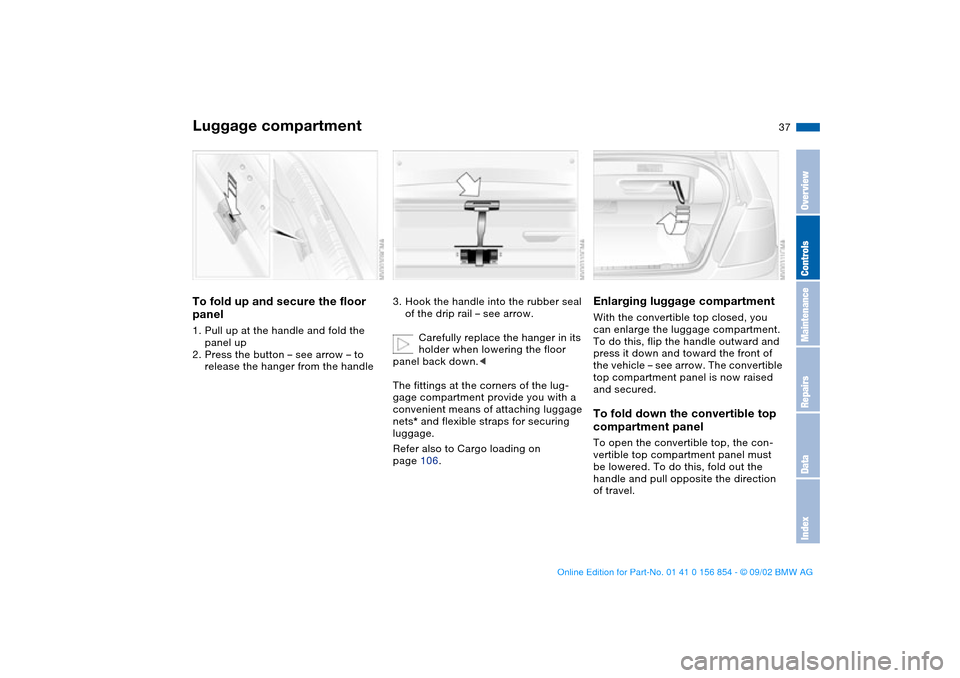
panel1. Pull up at the handle and fold the
panel up
2. Press the button – see arrow – to
release the hanger from the handle
3. Hook the handle into the rubber seal
of the drip rail – see arrow.
Carefully replace the hanger in its
holder when lowering the floor
panel back down.<
The fittings at the corners of the lug-
gage compartment provide you with a
convenient means of attaching luggage
nets* and flexible straps for securing
luggage.
Refer also to Cargo loading on
page 106.
Enlarging luggage compartmentWith the convertible top closed, you
can enlarge the luggage compartment.
To do this, flip the handle outward and
press it down and toward the front of
the vehicle – see arrow. The convertible
top compartment panel is now raised
and secured.To fold down the convertible top
compartment panelTo open the convertible top, the con-
vertible top compartment panel must
be lowered. To do this, fold out the
handle and pull opposite the direction
of travel.
OverviewControlsMaintenanceRepairsDataIndex
handbook.book Page 37 Tuesday, July 30, 2002 9:28 AM
Page 38 of 166
38
When opening the convertible top,
refer to page 41, make sure that
the luggage compartment is set up for
this, otherwise you may damage some-
thing.<
Alarm system*The conceptThe vehicle alarm system responds:
>When a door, the hood or the lug-
gage compartment lid are opened
>To movement inside the vehicle –
interior motion sensor
>Altering the vehicle tilt, e.g. as would
occur while attempting to steal the
wheels or tow the vehicle – tilt alarm
sensor system
>To interruption of battery voltage.
The system responds to unauthorized
vehicle entry and attempted theft by
simultaneously activating the following:
>Sounding an acoustic alarm for
30 seconds
>Activating the hazard warning flash-
ers for approx. five minutes
>Flashing the high beams on and off in
rhythm with the hazard warning flash-
ers.To arm and disarm the alarm
systemWhen the vehicle is locked or unlocked
by using a key or with the remote con-
trol, the alarm system is also simulta-
neously armed or disarmed.You can have a signal set as
acknowledgment for both arming
and disarming the alarm.<
You can also open the luggage com-
partment lid when the system is armed
by pressing the button of the remote
control, refer to page 32. When it is
closed, the lid is once again secured.
Luggage compartment
handbook.book Page 38 Tuesday, July 30, 2002 9:28 AM
Page 43 of 166
43
4. Press and hold the corresponding
button for convertible top operation.
The red indicator lamp will light up
while the convertible top is in motion.
It goes out as soon as the opening or
closing operation has been com-
pleted.
If the red indicator lamp flashes after
the button is released, then the
opening or closing operation is not
yet completed. The sequence can be
continued in the desired direction by
pressing this button.
If the yellow indicator lamp lights up
continuously with the button
pressed, then the convertible top
compartment panel is raised and the
convertible top cannot be moved,
refer to step 2.
The automatic sequence will be
interrupted immediately if you
release the button that operates the
top. The sequence can be continued in
the desired direction by pressing this
button.<
During convertible top operation
the rear window moves toward the
passenger compartment. To prevent
injuries, make sure that the closing path
of the convertible top is unobstructed.<
When operating the convertible top, the
windows will lower slightly when you
press the button, and after the opening
or closing operation has finished, they
will go back up, if you keep holding the
button down for more than 2 seconds
after the indicator lamp has gone out.
The luggage compartment lid cannot be
opened while the convertible top is in
motion.
Do not close the side power win-
dows using the buttons if the con-
vertible top operation has been inter-
rupted.<
If the convertible top has been
stored in the convertible top com-
partment for longer periods, e.g. during
the winter months while the hardtop is
being used, it may be necessary to
manually support the first automatic
closing operation: if the convertible top
should halt right before the closing
phase is completed, press against the
front part of the convertible top frame
from the outside to help the closing
process along. Keep pressing the but-
ton while doing so until the top starts
up again on its own.<
Operate the convertible top manu-
ally in emergency situations only
to avoid causing damage due to incor-
rect operation.<
If the opening or closing operation
is interrupted, the convertible top
remains in the respective position for
15 minutes, and the sequence can be
continued in the desired direction with
the button. After that, the convertible
top can be moved again and, if it is an
emergency situation, you may have to
help the top along manually. This can
also be done in ignition key position 0.
In certain cases, the luggage compart-
ment lid cannot be opened if the open-
ing or closing operation has been inter-
rupted.<
Convenience operation from the
driver's door lockRefer to page 33.
Convertible top
OverviewControlsMaintenanceRepairsDataIndex
handbook.book Page 43 Tuesday, July 30, 2002 9:28 AM
Page 46 of 166
46
Wind deflector*With the convertible top open, the wind
deflector keeps air movement in the
passenger compartment to a minimum,
thus providing you with a pleasant
drive, even at higher speeds. The wind
deflector comes in a protective sleeve,
and because of its slim dimensions, can
be easily stored in the luggage com-
partment.Installation1. Remove wind deflector from the pro-
tective sleeve
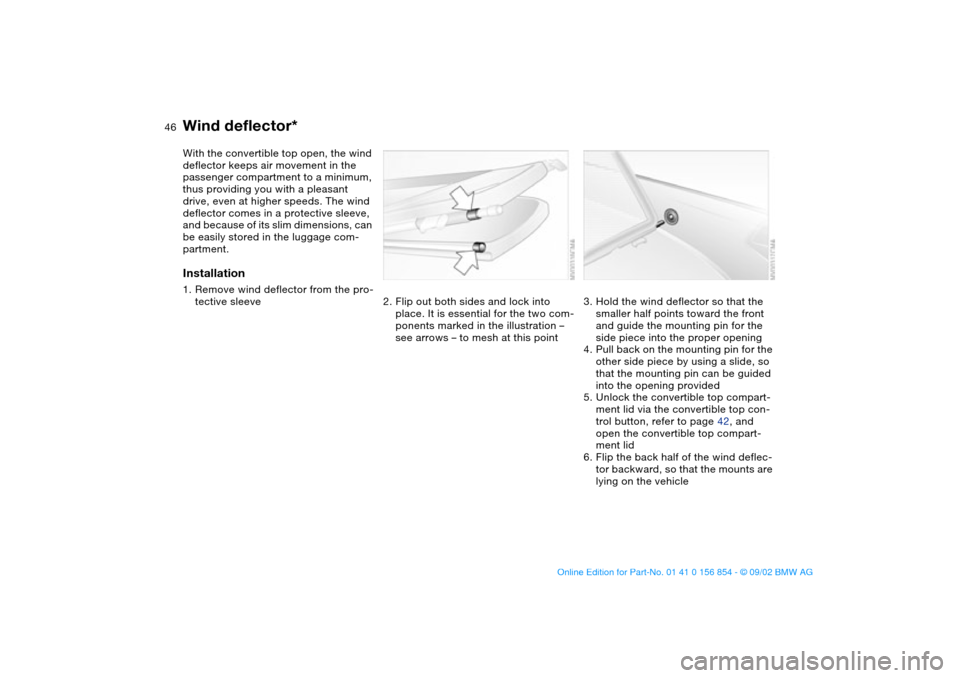
2. Flip out both sides and lock into
place. It is essential for the two com-
ponents marked in the illustration –
see arrows – to mesh at this point
3. Hold the wind deflector so that the
smaller half points toward the front
and guide the mounting pin for the
side piece into the proper opening
4. Pull back on the mounting pin for the
other side piece by using a slide, so
that the mounting pin can be guided
into the opening provided
5. Unlock the convertible top compart-
ment lid via the convertible top con-
trol button, refer to page 42, and
open the convertible top compart-
ment lid
6. Flip the back half of the wind deflec-
tor backward, so that the mounts are
lying on the vehicle
handbook.book Page 46 Tuesday, July 30, 2002 9:28 AM
Page 63 of 166
63
Rollover protection system In the event of an accident or some
other critical driving situation – extreme
tilting in the longitudinal or transverse
axis, loss of contact with the ground –
the rollover protection system will be
automatically activated. The protective
bars located in the rear head restraints
extend within fractions of a second.
In addition to the integrated rollover bar
in the windshield frame, the rollover
protection system affords all the vehicle
occupants necessary headroom.
Always keep the travel path for the
rollover protection system free
and clear. Under no circumstances
should you cover the head restraints.
In the event of less serious accidents,
the safety belt will protect you and,
depending on the severity of the acci-
dent, so will the safety belt tensioner
and the multi-stage airbag restraint sys-
tem as well.<
If, after being automatically triggered,
the protective function is not needed,
then the rollover protection system can
be lowered back into place. No special
tool is needed for this.
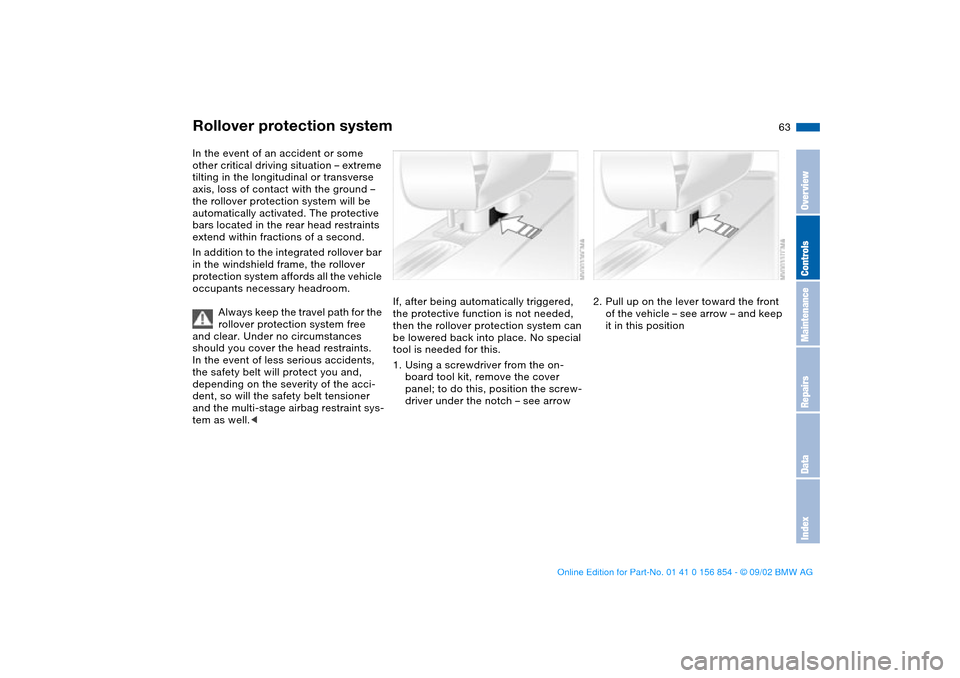
1. Using a screwdriver from the on-
board tool kit, remove the cover
panel; to do this, position the screw-
driver under the notch – see arrow
2. Pull up on the lever toward the front
of the vehicle – see arrow – and keep
it in this position
OverviewControlsMaintenanceRepairsDataIndex
handbook.book Page 63 Tuesday, July 30, 2002 9:28 AM
Page 72 of 166
72
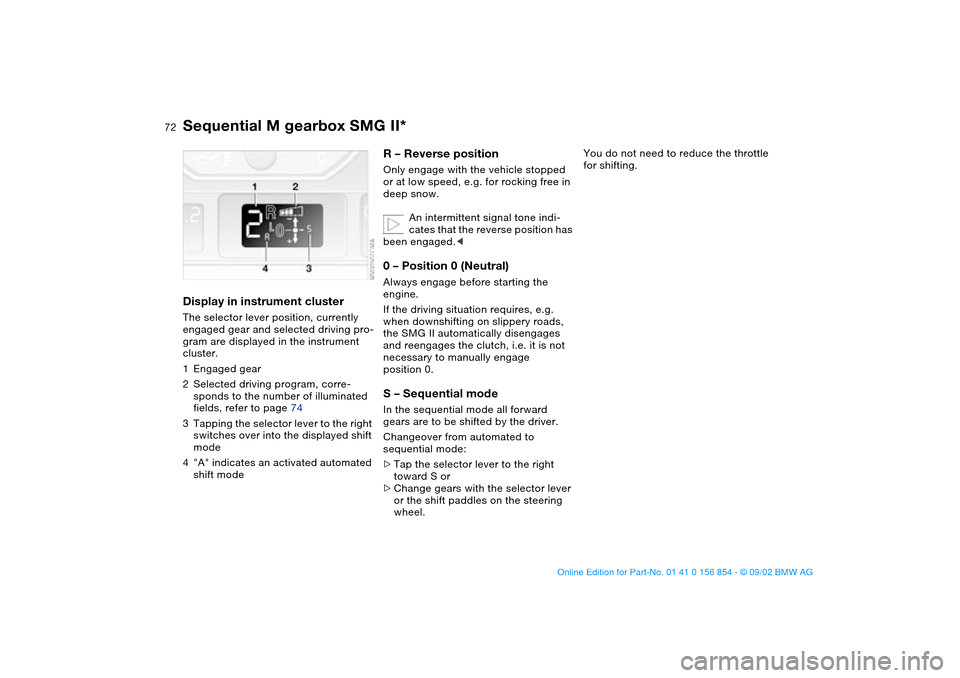
Display in instrument clusterThe selector lever position, currently
engaged gear and selected driving pro-
gram are displayed in the instrument
cluster.
1Engaged gear
2Selected driving program, corre-
sponds to the number of illuminated
fields, refer to page 74
3Tapping the selector lever to the right
switches over into the displayed shift
mode
4"A" indicates an activated automated
shift mode
R – Reverse positionOnly engage with the vehicle stopped
or at low speed, e.g. for rocking free in
deep snow.
An intermittent signal tone indi-
cates that the reverse position has
been engaged.<0 – Position 0 (Neutral)Always engage before starting the
engine.
If the driving situation requires, e.g.
when downshifting on slippery roads,
the SMG II automatically disengages
and reengages the clutch, i.e. it is not
necessary to manually engage
position 0.S – Sequential modeIn the sequential mode all forward
gears are to be shifted by the driver.
Changeover from automated to
sequential mode:
>Tap the selector lever to the right
toward S or
>Change gears with the selector lever
or the shift paddles on the steering
wheel.
You do not need to reduce the throttle
for shifting.
Sequential M gearbox SMG II*
handbook.book Page 72 Tuesday, July 30, 2002 9:28 AM
Page 73 of 166
73
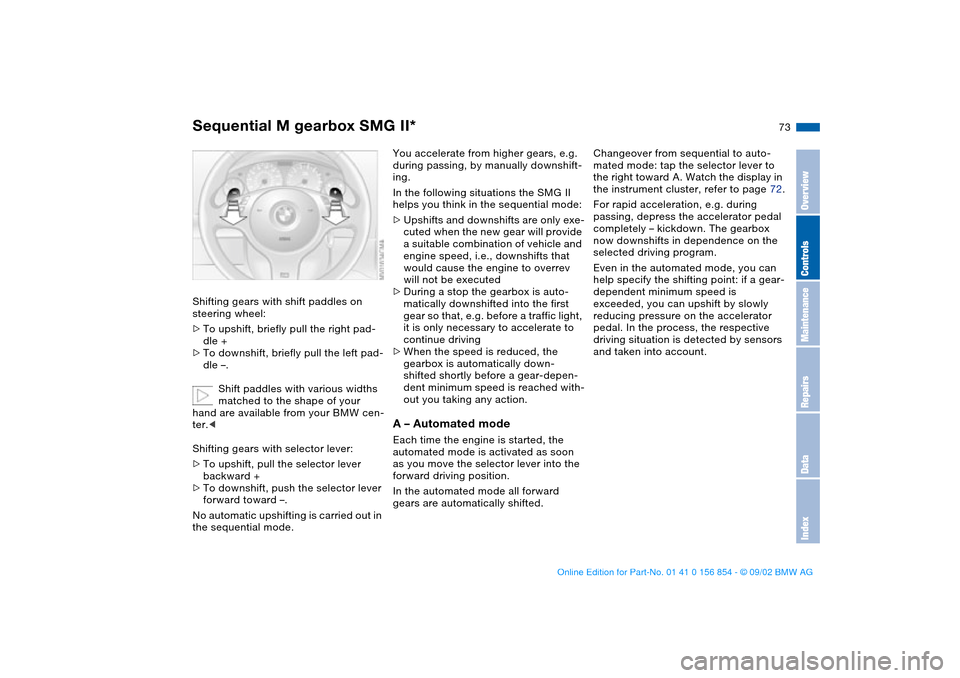
Shifting gears with shift paddles on
steering wheel:
>To upshift, briefly pull the right pad-
dle +
>To downshift, briefly pull the left pad-
dle –.
Shift paddles with various widths
matched to the shape of your
hand are available from your BMW cen-
ter.<
Shifting gears with selector lever:
>To upshift, pull the selector lever
backward +
>To downshift, push the selector lever
forward toward –.
No automatic upshifting is carried out in
the sequential mode.
You accelerate from higher gears, e.g.
during passing, by manually downshift-
ing.
In the following situations the SMG II
helps you think in the sequential mode:
>Upshifts and downshifts are only exe-
cuted when the new gear will provide
a suitable combination of vehicle and
engine speed, i.e., downshifts that
would cause the engine to overrev
will not be executed
>During a stop the gearbox is auto-
matically downshifted into the first
gear so that, e.g. before a traffic light,
it is only necessary to accelerate to
continue driving
>When the speed is reduced, the
gearbox is automatically down-
shifted shortly before a gear-depen-
dent minimum speed is reached with-
out you taking any action.A – Automated modeEach time the engine is started, the
automated mode is activated as soon
as you move the selector lever into the
forward driving position.
In the automated mode all forward
gears are automatically shifted.Changeover from sequential to auto-
mated mode: tap the selector lever to
the right toward A. Watch the display in
the instrument cluster, refer to page 72.
For rapid acceleration, e.g. during
passing, depress the accelerator pedal
completely – kickdown. The gearbox
now downshifts in dependence on the
selected driving program.
Even in the automated mode, you can
help specify the shifting point: if a gear-
dependent minimum speed is
exceeded, you can upshift by slowly
reducing pressure on the accelerator
pedal. In the process, the respective
driving situation is detected by sensors
and taken into account.
Sequential M gearbox SMG II*
OverviewControlsMaintenanceRepairsDataIndex
handbook.book Page 73 Tuesday, July 30, 2002 9:28 AM
Page 86 of 166
86Technology for safety and driving convenience
Park Distance Control (PDC)*The conceptPDC assists you when you back into a
parking space. Acoustic signals alert
you to the momentary distance to an
object behind your vehicle. To do this,
four ultrasonic sensors in the rear
bumper measure the distance to the
nearest object. The range for the sen-
sors located at both rear corners ends
approx. 2 ft/60 cm behind the bumpers.
The range for the two middle sensors is
slightly less than 5 ft/1.50 m.
PDC is a parking aid that can
identify objects if they are
approached slowly, as is generally the
case when parking. Avoid driving
towards objects rapidly; due to underly-
ing physical principles, the system may
otherwise alert you too late for you to
take evasive steps.<
The system is activated automatically
about one second after you engage
reverse with the ignition key in
position 2.
Let this short period elapse before
driving backwards.<
PDC is deactivated when you shift back
out of Reverse.
You can have a signal set to con-
firm that the PDC has been acti-
vated.<
Acoustic signalsThe distance to the nearest object is
indicated by a tone sounding at various
intervals. As the distance between vehi-
cle and object decreases, the intervals
between the tones become shorter. A
continuous tone indicates the pres-
ence of an object less than 1 ft/30 cm
away.
The warning signal is canceled after
approx. three seconds if the distance to
the object remains constant during this
time – if you are moving parallel to
a wall, for instance.
System malfunctions will be indicated
by a continuous high-pitched tone
when the system is activated the first
time. Please have your BMW center
resolve the problem.
PDC does not remove the driver's
personal responsibility for evaluat-
ing the distance between the vehicle
and any objects. Even when sensors
are involved, there is a blind spot in
which objects cannot be detected. This
applies especially in those cases where
the system approaches the physical
limits of ultrasonic measurement, as
occurs with tow bars and trailer cou-
plings, and in the vicinity of thin or
wedge-shaped objects. Moreover, low
objects that have already been
detected – such as a curb edge – can
disappear out of the detection range of
the sensors before a continuous tone
sounds.
Loud sources of sound from outside or
inside the vehicle could drown out the
PDC signal tone.<
Keep the sensors clean and free
of ice or snow in order to ensure
that they will continue to operate effec-
tively.
Do not apply high pressure spray to the
sensors for a prolonged period of time.
Always maintain a distance of more
than 4 in/10 cm.<
handbook.book Page 86 Tuesday, July 30, 2002 9:28 AM