unlock BMW M3 CONVERTIBLE 2008 E93 User Guide
[x] Cancel search | Manufacturer: BMW, Model Year: 2008, Model line: M3 CONVERTIBLE, Model: BMW M3 CONVERTIBLE 2008 E93Pages: 172, PDF Size: 5.29 MB
Page 42 of 172
Adjustments
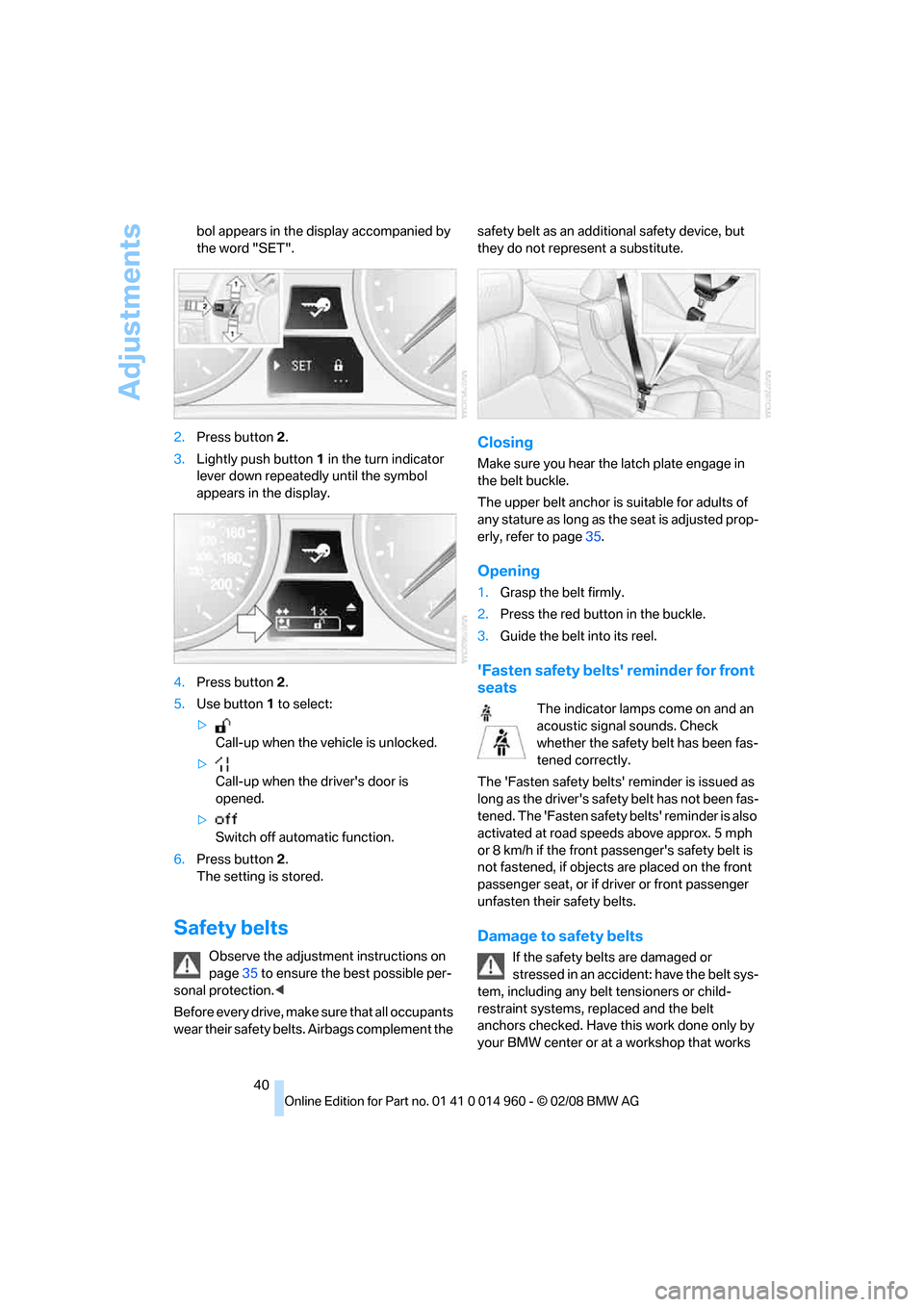
40 bol appears in the display accompanied by
the word "SET".
2.Press button 2.
3.Lightly push button1 in the turn indicator
lever down repeatedly until the symbol
appears in the display.
4.Press button 2.
5.Use button 1 to select:
>
Call-up when the vehicle is unlocked.
>
Call-up when the driver's door is
opened.
>
Switch off automatic function.
6.Press button 2.
The setting is stored.
Safety belts
Observe the adjustment instructions on
page35 to ensure the best possible per-
sonal protection.<
Before every drive, make sure that all occupants
wear their safety belts. Airbags complement the safety belt as an additional safety device, but
they do not represent a substitute.
Closing
Make sure you hear the latch plate engage in
the belt buckle.
The upper belt anchor is suitable for adults of
any stature as long as the seat is adjusted prop-
erly, refer to page35.
Opening
1.Grasp the belt firmly.
2.Press the red button in the buckle.
3.Guide the belt into its reel.
'Fasten safety belts' reminder for front
seats
The indicator lamps come on and an
acoustic signal sounds. Check
whether the safety belt has been fas-
tened correctly.
The 'Fasten safety belts' reminder is issued as
long as the driver's safety belt has not been fas-
tened. The 'Fasten safety belts' reminder is also
activated at road speeds above approx. 5 mph
or 8 km/h if the front passenger's safety belt is
not fastened, if objects are placed on the front
passenger seat, or if driver or front passenger
unfasten their safety belts.
Damage to safety belts
If the safety belts are damaged or
stressed in an accident: have the belt sys-
tem, including any belt tensioners or child-
restraint systems, replaced and the belt
anchors checked. Have this work done only by
your BMW center or at a workshop that works
Page 43 of 172
Reference
At a glance
Controls
Driving tips
Mobility
41
according to BMW repair procedures with cor-
respondingly trained personnel. Otherwise, it is
not guaranteed that the safety devices will func-
tion properly.<
Coupe: belt hand-over
The concept
The belt hand-over makes it easier for you to
fasten your safety belt. When you close the
door and switch on radio readiness or the igni-
tion, the belt hand-over extends automatically
and presents the safety belt in a position that is
convenient for fastening it around you. After
you have fastened your safety belt, the belt
hand-over retracts to its original position.
Even if you have not yet fastened your safety
belt, the belt hand-over will retract if you:
>Wait for more than approx. one minute
>Open the corresponding door
>Start to drive.
Closing the respective door reactivates the belt
hand-over if the ignition or radio-readiness is
on.
Front passenger's seat
The belt hand-over will extend only if the seat is
occupied and after the front passenger's door is
closed.
Pinch protection system
If the belt hand-over encounters resistance on
moving in or out, it moves back slightly in the
opposite direction and stops in this position. To
reactivate the belt hand-over: open and close
the door or switch the ignition off and on.Although there is a pinch protection sys-
tem, always check that the maneuvering
area of the belt hand-over is clear. Otherwise it
cannot be ensured that the system will stop
moving in certain extreme situations.<
Mirrors
Exterior mirrors
The front passenger's mirror is more con-
vex than the driver's mirror. The objects
seen in the mirror are closer than they appear.
Do not gauge your distance from traffic behind
you on the basis of what you see in the mirror;
otherwise there is an increased risk of an acci-
dent.<
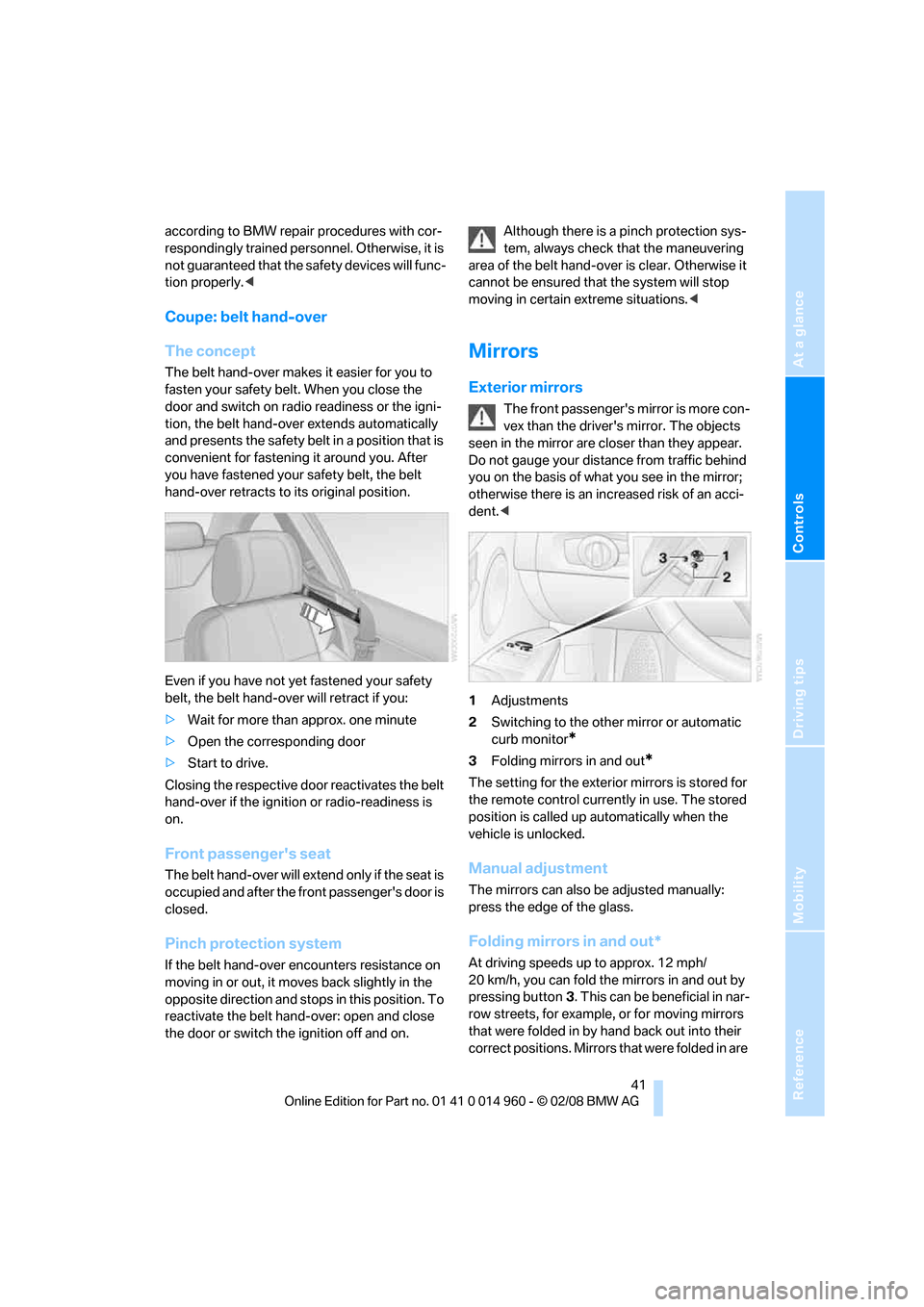
1Adjustments
2Switching to the other mirror or automatic
curb monitor
*
3Folding mirrors in and out*
The setting for the exterior mirrors is stored for
the remote control currently in use. The stored
position is called up automatically when the
vehicle is unlocked.
Manual adjustment
The mirrors can also be adjusted manually:
press the edge of the glass.
Folding mirrors in and out*
At driving speeds up to approx. 12 mph/
20 km/h, you can fold the mirrors in and out by
pressing button3. This can be beneficial in nar-
row streets, for example, or for moving mirrors
that were folded in by hand back out into their
correct positions. Mirrors that were folded in are
Page 47 of 172
Reference
At a glance
Controls
Driving tips
Mobility
45
3.Allow the belt strap to retract and pull it taut
against the child-restraint system.
The safety belt is locked.
To unlock the safety belt
1.Open the belt buckle.
2.Remove the child-restraint system.
3.Allow the safety belt strap to retract all the
way.
LATCH child-restraint fixing
system
LATCH: Lower Anchors and Tethers for CHil-
dren.
To install and use the LATCH child
restraint system, follow the operating and
safety instructions provided by the manufac-
turer of the system, otherwise the protective
function of the seat may be compromised.<
Before installing the child seat, pull the belt out
of the area for the child-restraint fixing system.
Ensure that both lower LATCH anchors
are correctly engaged and that the child
restraint system is resting firmly against the
backrest, otherwise the protective function of
the seat may be compromised.<
The anchor points for the lower LATCH
anchors are located behind the labeled protec-
tive caps.
Coupe: child-restraint system with
tether strap
Use the top tether anchors to secure
child-restraint systems only, otherwise
the anchors could be damaged.
Coupe: placement of the tether strap
Make sure the upper retaining strap does
not run over sharp edges and is not
twisted as it passes to the top anchor. Other-
wise the strap will not properly secure the child-
restraint system in the event of an accident.<
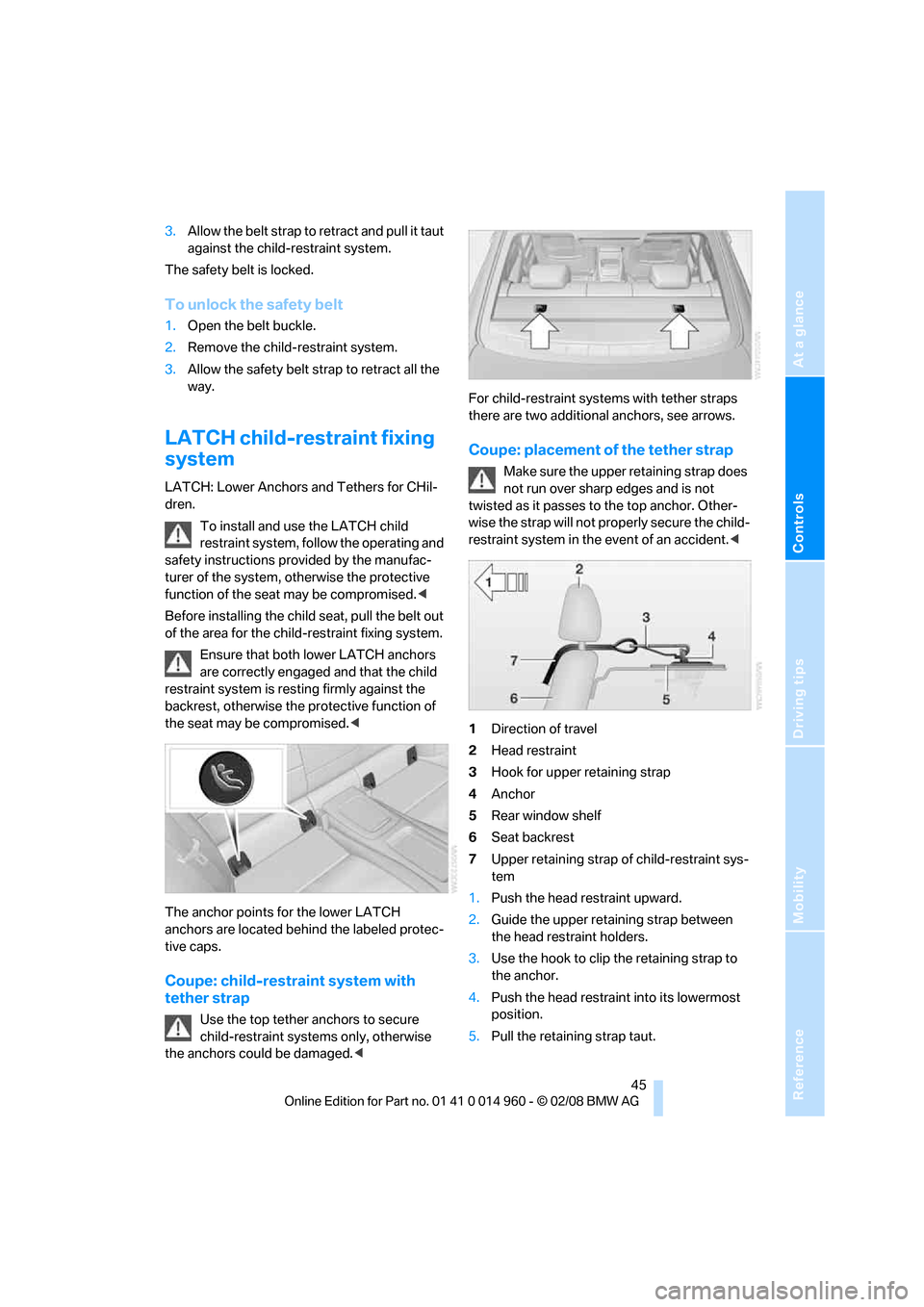
1Direction of travel
2Head restraint
3Hook for upper retaining strap
4Anchor
5Rear window shelf
6Seat backrest
7Upper retaining strap of child-restraint sys-
tem
1.Push the head restraint upward.
2.Guide the upper retaining strap between
the head restraint holders.
3.Use the hook to clip the retaining strap to
the anchor.
4.Push the head restraint into its lowermost
position.
5.Pull the retaining strap taut.
Page 53 of 172
Reference
At a glance
Controls
Driving tips
Mobility
51
P Park
P engages automatically when you switch
off the engine unless N is engaged and
the remote control remains in the ignition lock,
refer to page46. As soon as you remove the
remote control from the ignition lock, P
engages regardless of the position of the selec-
tor lever.<
Displays in the instrument cluster
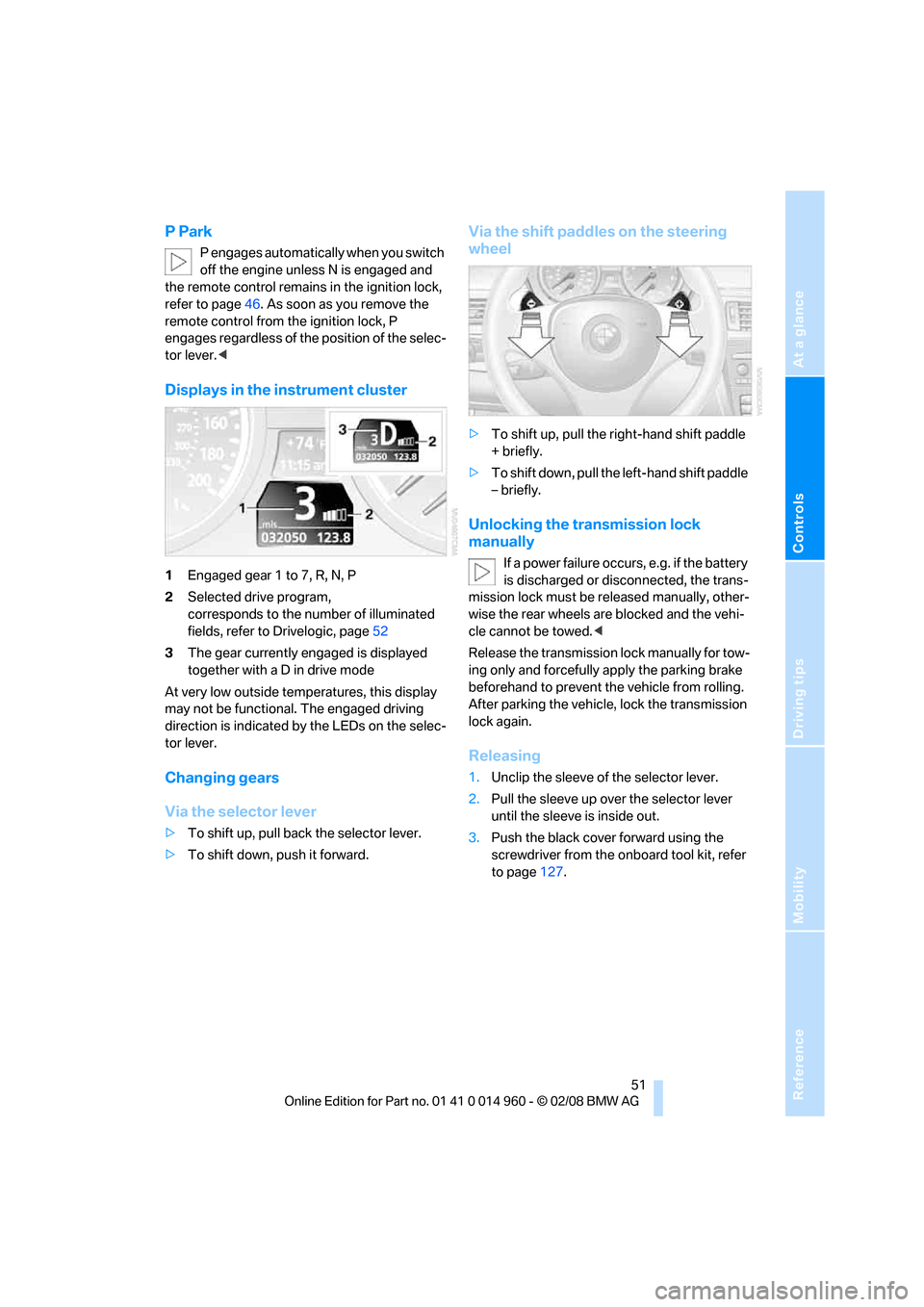
1Engaged gear 1 to 7, R, N, P
2Selected drive program,
corresponds to the number of illuminated
fields, refer to Drivelogic, page52
3The gear currently engaged is displayed
together with a D in drive mode
At very low outside temperatures, this display
may not be functional. The engaged driving
direction is indicated by the LEDs on the selec-
tor lever.
Changing gears
Via the selector lever
>To shift up, pull back the selector lever.
>To shift down, push it forward.
Via the shift paddles on the steering
wheel
>To shift up, pull the right-hand shift paddle
+ briefly.
>To shift down, pull the left-hand shift paddle
– briefly.
Unlocking the transmission lock
manually
If a power failure occurs, e.g. if the battery
is discharged or disconnected, the trans-
mission lock must be released manually, other-
wise the rear wheels are blocked and the vehi-
cle cannot be towed.<
Release the transmission lock manually for tow-
ing only and forcefully apply the parking brake
beforehand to prevent the vehicle from rolling.
After parking the vehicle, lock the transmission
lock again.
Releasing
1.Unclip the sleeve of the selector lever.
2.Pull the sleeve up over the selector lever
until the sleeve is inside out.
3.Push the black cover forward using the
screwdriver from the onboard tool kit, refer
to page127.
Page 64 of 172
Everything under control
62 8Setting formats and units of measure,
resetting to factory settings62
9Adjusting settings
>Confirmation signals when locking and
unlocking the vehicle21
>Response during unlocking
procedure19
>Automatic locking23
>Pathway lighting76
>Daytime running lamps77
>Triple turn signal activation55
>Seat memory39
10Switching Shift Lights
* on/off53
Exiting displays
The outside-temperature reading and the time
reappear when you press button2 or if you
make no entries within approx. 15 seconds. If
required, complete the current setting first.
Formats and units of measure
You can set formats and units of measure.
1.Switch on the ignition, refer to page46.
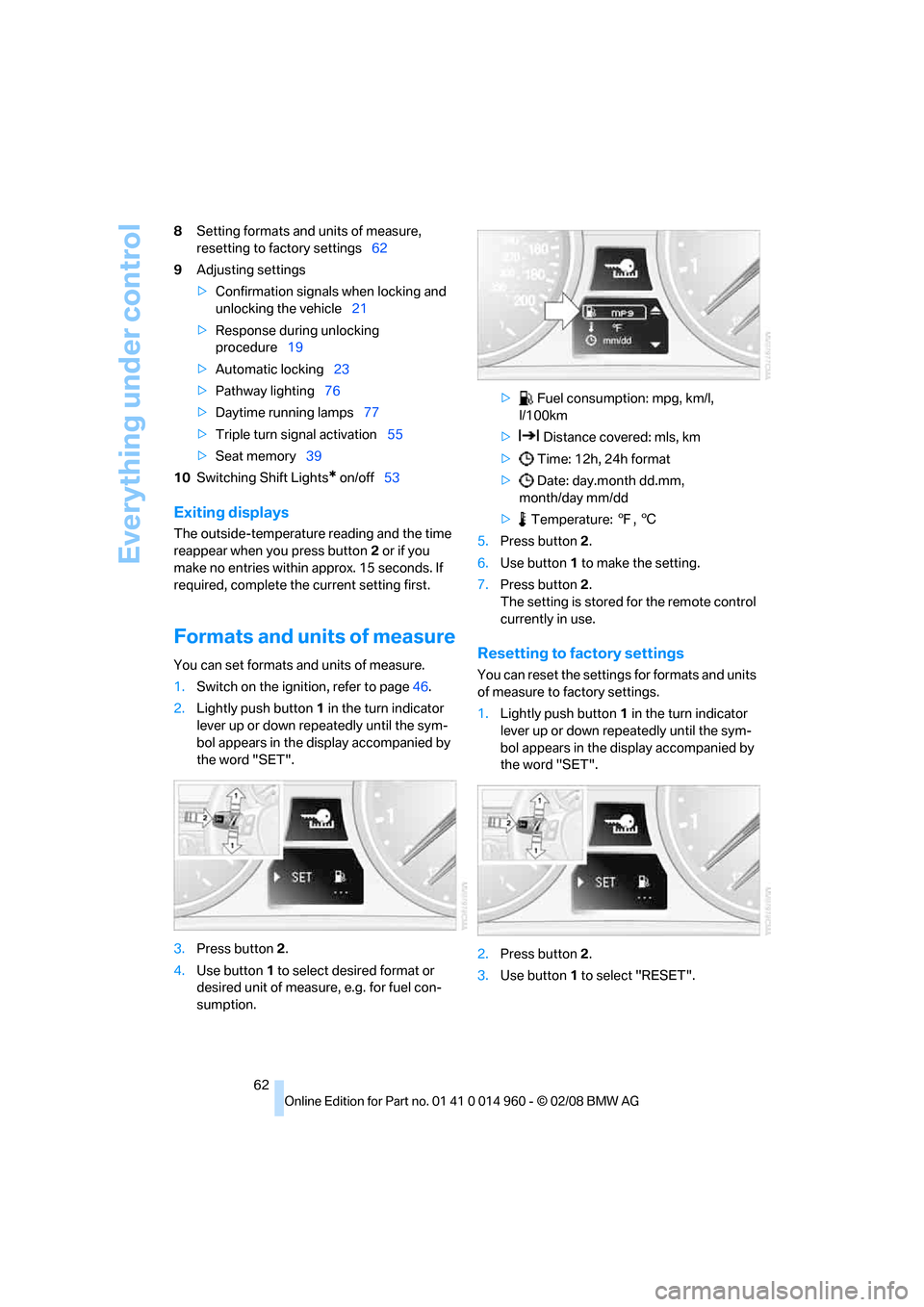
2.Lightly push button1 in the turn indicator
lever up or down repeatedly until the sym-
bol appears in the display accompanied by
the word "SET".
3.Press button 2.
4.Use button 1 to select desired format or
desired unit of measure, e.g. for fuel con-
sumption.> Fuel consumption: mpg, km/l,
l/100km
> Distance covered: mls, km
> Time: 12h, 24h format
> Date: day.month dd.mm,
month/day mm/dd
> Temperature: 7, 6
5.Press button 2.
6.Use button 1 to make the setting.
7.Press button 2.
The setting is stored for the remote control
currently in use.Resetting to factory settings
You can reset the settings for formats and units
of measure to factory settings.
1.Lightly push button1 in the turn indicator
lever up or down repeatedly until the sym-
bol appears in the display accompanied by
the word "SET".
2.Press button 2.
3.Use button1 to select "RESET".
Page 78 of 172
Lamps
76
Lamps
Parking lamps/low beams
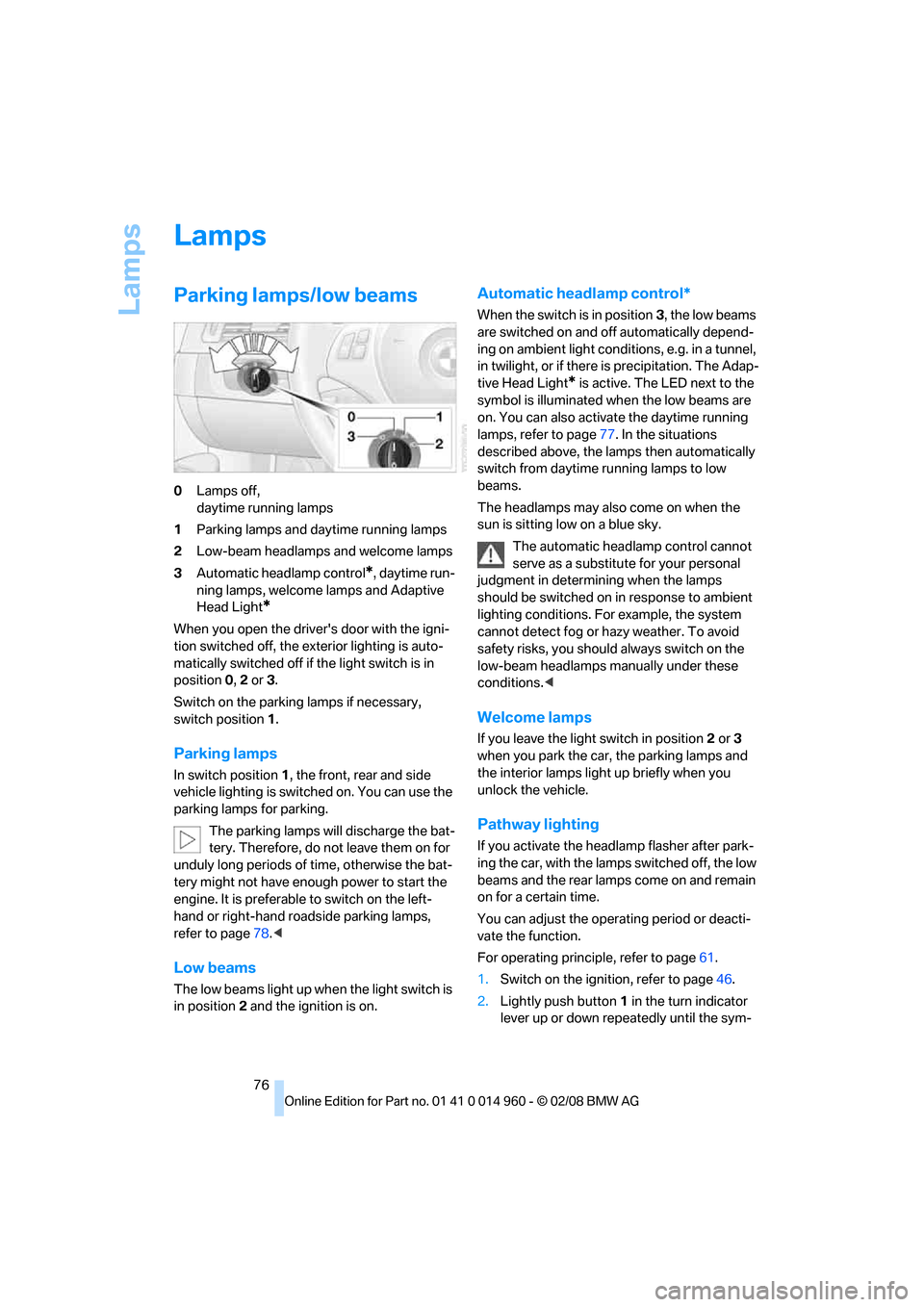
0Lamps off,
daytime running lamps
1Parking lamps and daytime running lamps
2Low-beam headlamps and welcome lamps
3Automatic headlamp control
*, daytime run-
ning lamps, welcome lamps and Adaptive
Head Light
*
When you open the driver's door with the igni-
tion switched off, the exterior lighting is auto-
matically switched off if the light switch is in
position 0, 2 or 3.
Switch on the parking lamps if necessary,
switch position 1.
Parking lamps
In switch position1, the front, rear and side
vehicle lighting is switched on. You can use the
parking lamps for parking.
The parking lamps will discharge the bat-
tery. Therefore, do not leave them on for
unduly long periods of time, otherwise the bat-
tery might not have enough power to start the
engine. It is preferable to switch on the left-
hand or right-hand roadside parking lamps,
refer to page78.<
Low beams
The low beams light up when the light switch is
in position 2 and the ignition is on.
Automatic headlamp control*
When the switch is in position3, the low beams
are switched on and off automatically depend-
ing on ambient light conditions, e.g. in a tunnel,
in twilight, or if there is precipitation. The Adap-
tive Head Light
* is active. The LED next to the
symbol is illuminated when the low beams are
on. You can also activate the daytime running
lamps, refer to page77. In the situations
described above, the lamps then automatically
switch from daytime running lamps to low
beams.
The headlamps may also come on when the
sun is sitting low on a blue sky.
The automatic headlamp control cannot
serve as a substitute for your personal
judgment in determining when the lamps
should be switched on in response to ambient
lighting conditions. For example, the system
cannot detect fog or hazy weather. To avoid
safety risks, you should always switch on the
low-beam headlamps manually under these
conditions.<
Welcome lamps
If you leave the light switch in position 2 or 3
when you park the car, the parking lamps and
the interior lamps light up briefly when you
unlock the vehicle.
Pathway lighting
If you activate the headlamp flasher after park-
ing the car, with the lamps switched off, the low
beams and the rear lamps come on and remain
on for a certain time.
You can adjust the operating period or deacti-
vate the function.
For operating principle, refer to page61.
1.Switch on the ignition, refer to page46.
2.Lightly push button1 in the turn indicator
lever up or down repeatedly until the sym-
Page 93 of 172
Reference
At a glance
Controls
Driving tips
Mobility
91
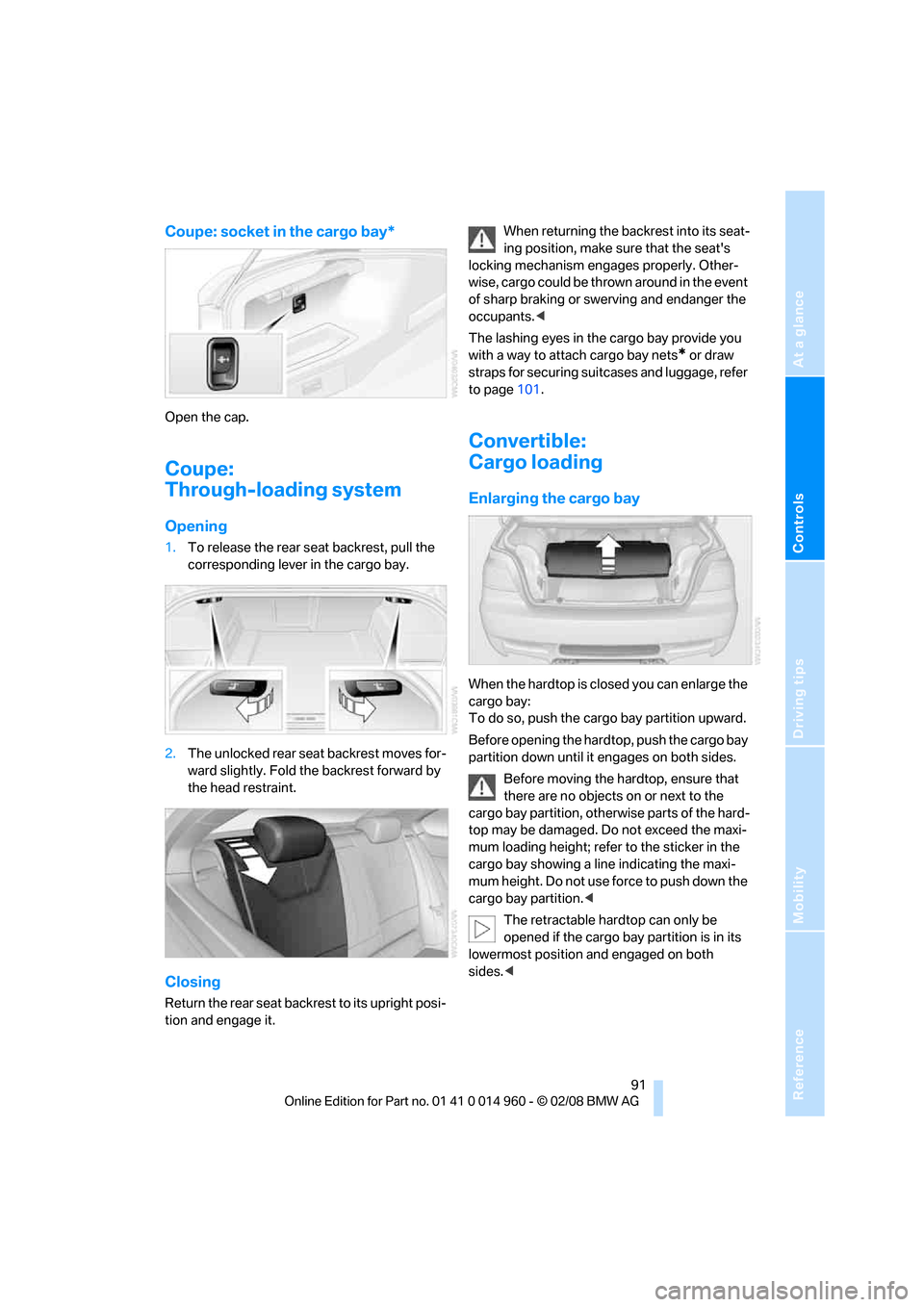
Coupe: socket in the cargo bay*
Open the cap.
Coupe:
Through-loading system
Opening
1.To release the rear seat backrest, pull the
corresponding lever in the cargo bay.
2.The unlocked rear seat backrest moves for-
ward slightly. Fold the backrest forward by
the head restraint.
Closing
Return the rear seat backrest to its upright posi-
tion and engage it.When returning the backrest into its seat-
ing position, make sure that the seat's
locking mechanism engages properly. Other-
wise, cargo could be thrown around in the event
of sharp braking or swerving and endanger the
occupants.<
The lashing eyes in the cargo bay provide you
with a way to attach cargo bay nets
* or draw
straps for securing suitcases and luggage, refer
to page101.
Convertible:
Cargo loading
Enlarging the cargo bay
When the hardtop is closed you can enlarge the
cargo bay:
To do so, push the cargo bay partition upward.
Before opening the hardtop, push the cargo bay
partition down until it engages on both sides.
Before moving the hardtop, ensure that
there are no objects on or next to the
cargo bay partition, otherwise parts of the hard-
top may be damaged. Do not exceed the maxi-
mum loading height; refer to the sticker in the
cargo bay showing a line indicating the maxi-
mum height. Do not use force to push down the
cargo bay partition.<
The retractable hardtop can only be
opened if the cargo bay partition is in its
lowermost position and engaged on both
sides.<
Page 94 of 172
Practical interior accessories
92
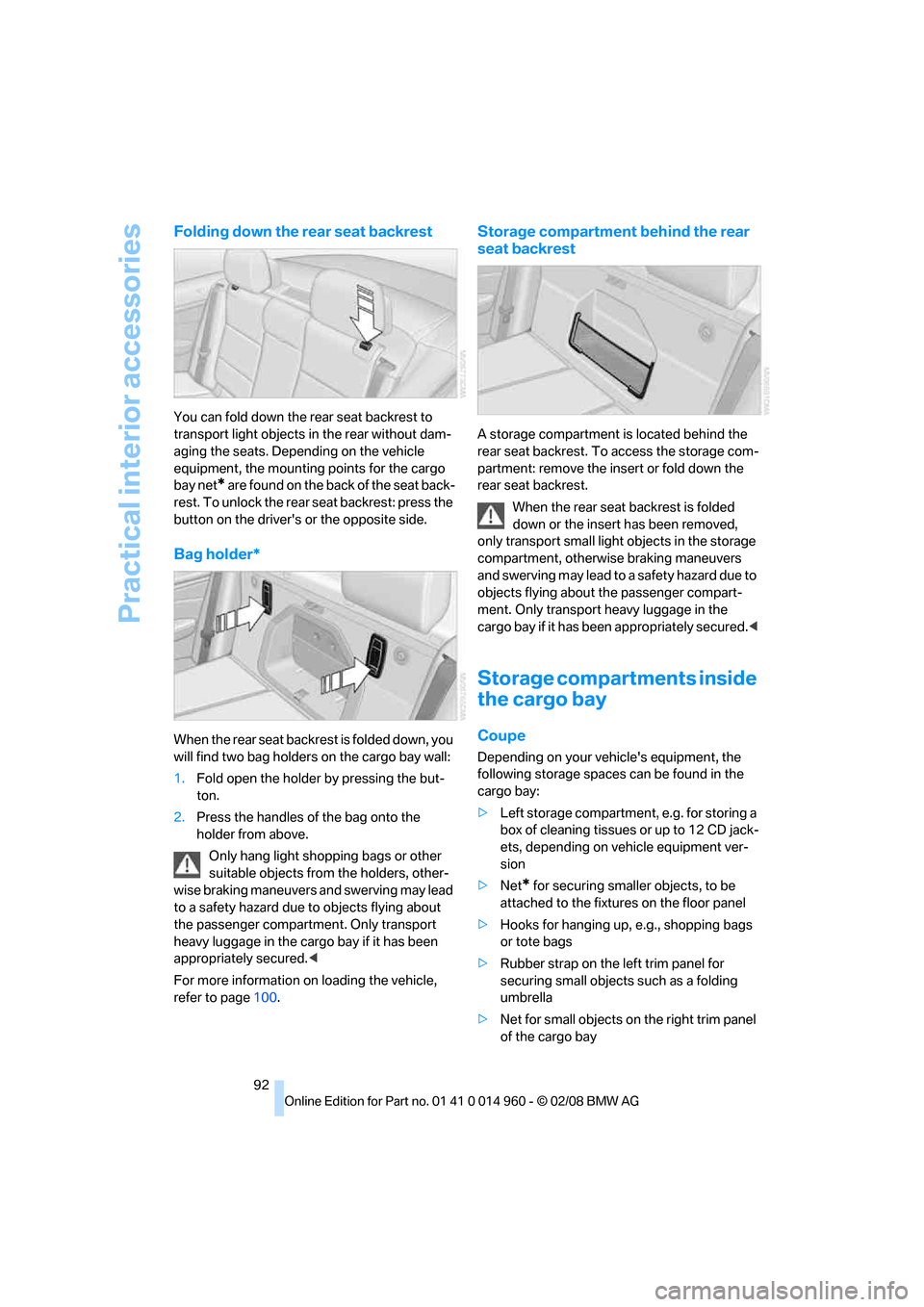
Folding down the rear seat backrest
You can fold down the rear seat backrest to
transport light objects in the rear without dam-
aging the seats. Depending on the vehicle
equipment, the mounting points for the cargo
bay net
* are found on the back of the seat back-
rest. To unlock the rear seat backrest: press the
button on the driver's or the opposite side.
Bag holder*
When the rear seat backrest is folded down, you
will find two bag holders on the cargo bay wall:
1.Fold open the holder by pressing the but-
ton.
2.Press the handles of the bag onto the
holder from above.
Only hang light shopping bags or other
suitable objects from the holders, other-
wise braking maneuvers and swerving may lead
to a safety hazard due to objects flying about
the passenger compartment. Only transport
heavy luggage in the cargo bay if it has been
appropriately secured.<
For more information on loading the vehicle,
refer to page100.
Storage compartment behind the rear
seat backrest
A storage compartment is located behind the
rear seat backrest. To access the storage com-
partment: remove the insert or fold down the
rear seat backrest.
When the rear seat backrest is folded
down or the insert has been removed,
only transport small light objects in the storage
compartment, otherwise braking maneuvers
and swerving may lead to a safety hazard due to
objects flying about the passenger compart-
ment. Only transport heavy luggage in the
cargo bay if it has been appropriately secured.<
Storage compartments inside
the cargo bay
Coupe
Depending on your vehicle's equipment, the
following storage spaces can be found in the
cargo bay:
>Left storage compartment, e.g. for storing a
box of cleaning tissues or up to 12 CD jack-
ets, depending on vehicle equipment ver-
sion
>Net
* for securing smaller objects, to be
attached to the fixtures on the floor panel
>Hooks for hanging up, e.g., shopping bags
or tote bags
>Rubber strap on the left trim panel for
securing small objects such as a folding
umbrella
>Net for small objects on the right trim panel
of the cargo bay
Page 132 of 172
Replacing components
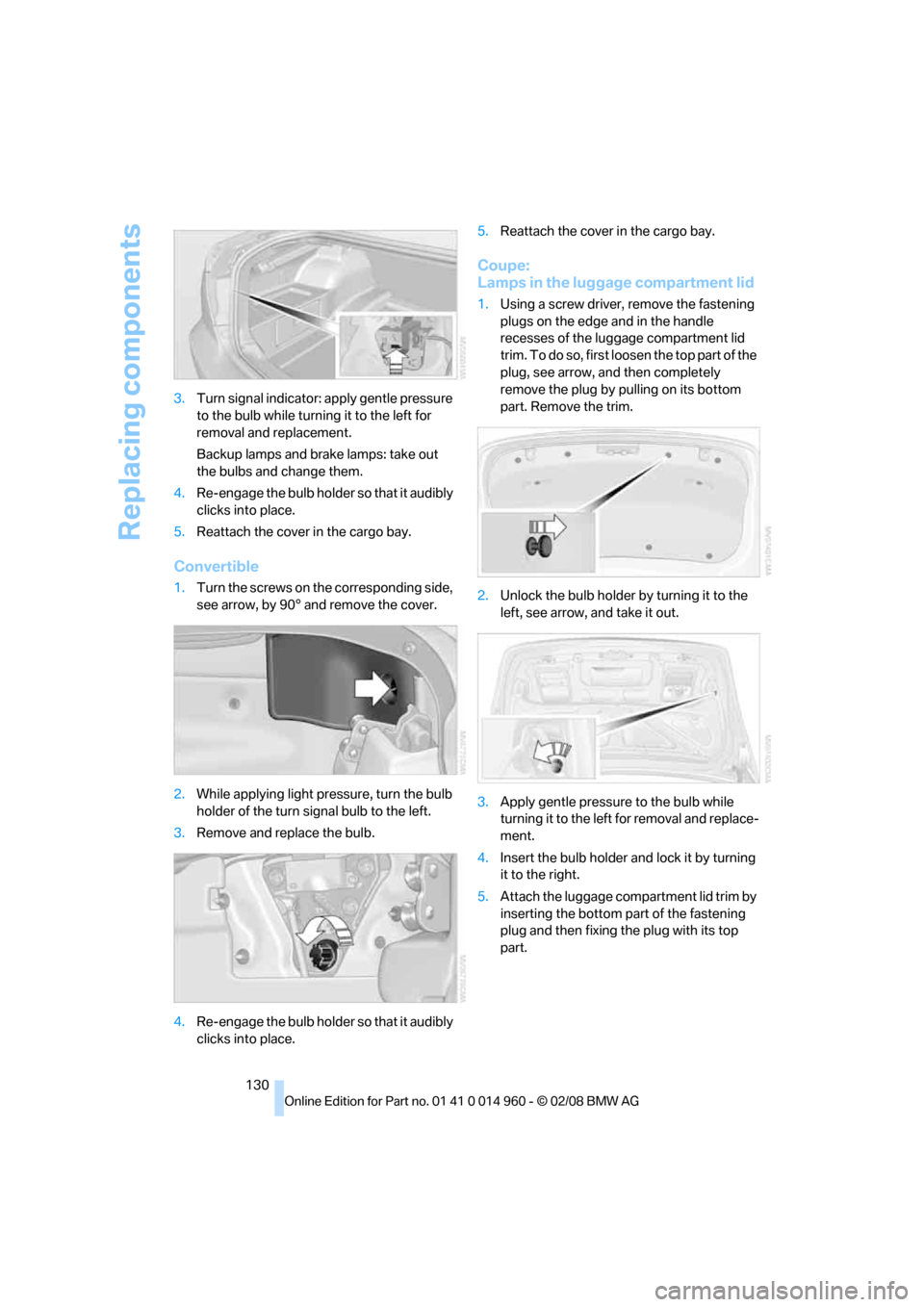
130 3.Turn signal indicator: apply gentle pressure
to the bulb while turning it to the left for
removal and replacement.
Backup lamps and brake lamps: take out
the bulbs and change them.
4.Re-engage the bulb holder so that it audibly
clicks into place.
5.Reattach the cover in the cargo bay.
Convertible
1.Turn the screws on the corresponding side,
see arrow, by 90° and remove the cover.
2.While applying light pressure, turn the bulb
holder of the turn signal bulb to the left.
3.Remove and replace the bulb.
4.Re-engage the bulb holder so that it audibly
clicks into place.5.Reattach the cover in the cargo bay.
Coupe:
Lamps in the luggage compartment lid
1.Using a screw driver, remove the fastening
plugs on the edge and in the handle
recesses of the luggage compartment lid
trim. To do so, first loosen the top part of the
plug, see arrow, and then completely
remove the plug by pulling on its bottom
part. Remove the trim.
2.Unlock the bulb holder by turning it to the
left, see arrow, and take it out.
3.Apply gentle pressure to the bulb while
turning it to the left for removal and replace-
ment.
4.Insert the bulb holder and lock it by turning
it to the right.
5.Attach the luggage compartment lid trim by
inserting the bottom part of the fastening
plug and then fixing the plug with its top
part.
Page 160 of 172
Everything from A to Z
158 Child-restraint fixing system
LATCH45
Child-restraint systems44
Child seats, refer to
Transporting children
safely44
Chrome parts125
Chrome polish125
Cigarette lighter, refer to
Lighter90
Cleaning headlamps56
– washer fluid57
Cleaning your BMW, refer to
Care123
Clock59
– 12h/24h format62
– setting time64
Closing
– from inside23
– from outside19
Clothes hooks89
Cockpit10
Cold start, refer to Starting the
engine47
Combined instrument, refer to
Instrument cluster12
Comfort access, refer to
Convenient access27
Comfort area, refer to Around
the center console14
"Comfort" with EDC69
Compartment for remote
control, refer to Ignition
lock46
Compass86
Computer60
Condensation, refer to When
the vehicle is parked100
Condition Based Service
CBS121
Configuring settings, refer to
Personal Profile18
Confirmation signals for
locking/unlocking the
vehicle21
Connecting vacuum cleaner,
refer to Connecting
electrical appliances90Consumption, refer to
Average consumption61
Consumption indicator, refer
to Average consumption61
Controls and displays10
Convenient access27
– replacing the battery28
Convenient loading in
convertible21
Convenient operation
– glass roof20
– glass roof with convenient
access27
– retractable hardtop20
– windows20
– windows with convenient
access27
Convertible
– bag holder92
– convenient loading21
– enlarging cargo bay91
– folding down rear
backrest92
– retractable hardtop31
– rollover protection
system74
– securing cargo101
Coolant119
– checking level119
Coolant temperature60
Cooling, maximum81
Cooling fluid, refer to
Coolant119
Cooling system, refer to
Coolant119
Copyright2
Corner-illuminating lamps,
refer to Adaptive Head
Light77
Cornering lamps, refer to
Adaptive Head Light77
Correct tires114
Courtesy lamps, refer to
Interior lamps79
Cruise control57
Cruising range61
Cup holders89
Curb weight, refer to
Weights155
D
Dashboard, refer to
Cockpit10
Dashboard, refer to
Instrument cluster12
Dashboard lighting, refer to
Instrument lighting78
Data, technical152
– dimensions153
– engine152
– weights155
Date
– setting64
Daytime running lamps77
Deactivating front passenger
airbags73
Deadlocking, refer to
Locking20
Defect
– door lock22
– fuel filler door108
– glass roof30
Digital clock59
Digital compass86
Dimensions153
Directional indicators, refer to
Turn signals55
Displacement, refer to Engine
data152
Display lighting, refer to
Instrument lighting78
Displays, refer to Instrument
cluster12
Displays and controls10
Disposal
– coolant119
– remote control battery28
– vehicle battery133
Distance remaining to service,
refer to Service
requirements63
Distance warning, refer to
Park Distance Control
PDC67
Door key, refer to Remote
control18
Door lock22