change wheel BMW M3 CONVERTIBLE 2009 E93 User Guide
[x] Cancel search | Manufacturer: BMW, Model Year: 2009, Model line: M3 CONVERTIBLE, Model: BMW M3 CONVERTIBLE 2009 E93Pages: 256, PDF Size: 12.03 MB
Page 89 of 256
Controls
87Reference
At a glance
Driving tips
Communications
Navigation
Entertainment
Mobility
1.Reduce your speed and carefully stop the
car. Avoid sudden braking and steering
maneuvers.
2.If all four wheels are shown in yellow, iden-
tify the damaged wheel on the vehicle.
3.Repair the flat tire with the M Mobility Sys-
tem, refer to page217.
Have the tire replaced by a BMW center or a
workshop that is informed in the handling of
TPM and that works according to BMW repair
procedures with correspondingly trained per-
sonnel.
Malfunction
The small warning lamp flashes in
yellow and then lights up continu-
ously; the larger warning lamp comes
on in yellow. On the Control Display,
the wheels are shown in gray and a message
appears. No punctures can be detected.
This type of message is shown in the following
situations:
>If there is a malfunction
Have the system checked.
>If a wheel without TPM electronics has
been mounted
>If TPM is temporarily malfunctioning due to
other systems or devices using the same
radio frequency.
Message for unsuccessful system
reset
The warning lamp lights up yellow. A
message appears on the Control Dis-
play. The system is not reset after a
tire has been changed, for example.
Check the tire inflation pressure and reset the
system, refer to page86.
Declaration according to NHTSA/
FMVSS 138
Tire Pressure Monitoring Systems
Each tire should be checked monthly when cold
and inflated to the inflation pressure recom-
mended by the vehicle manufacturer on the
vehicle placard or tire inflation pressure label. If your vehicle has tires of a different size than the
size indicated on the vehicle placard or tire infla-
tion pressure label, you should determine the
proper tire inflation pressure for those tires. As
an added safety feature, your vehicle has been
equipped with a tire pressure monitoring sys-
tem, TPMS, that illuminates a low tire pressure
telltale when one or more of your tires are signif-
icantly under-inflated. Accordingly, when the
low tire pressure telltale illuminates, you should
stop and check your tires as soon as possible,
and inflate them to the proper pressure. Driving
on a significantly underinflated tire causes the
tire to overheat and can lead to tire failure.
Underinflation also reduces fuel efficiency and
tire tread life, and may affect the vehicle’s han-
dling and stopping ability. Please note that the
TPMS is not a substitute for proper tire mainte-
nance, and it is the driver’s responsibility to
maintain correct tire pressure, even if underin-
flation has not reached the level at which the
TPMS low tire pressure telltale illuminates.
The TPMS malfunction indicator is combined
with the low tire pressure telltale. When the sys-
tem detects a malfunction, the telltale will flash
for approximately one minute and then remain
continuously lit. This sequence will continue
upon subsequent vehicle startups as long as
the malfunction exists. When the malfunction
indicator is illuminated, the system may not be
able to detect or signal low tire pressure as
intended. TPMS malfunctions may occur for a
variety of reasons, including the installation of
replacement or alternate tires or wheels on the
vehicle that prevent the TPMS from functioning
properly. Always check the TPMS malfunction
telltale after replacing one or more tires or
wheels on your vehicle to ensure that the
replacement or alternate tires and wheels allow
the TPMS to continue to function properly.
Servotronic
The concept
"Servotronic" varies the steering force required
to turn the wheels as a function of the speed at
which you are driving.
ba8_E9293M3_cic.book Seite 87 Dienstag, 19. August 2008 12:01 12
Page 91 of 256
Controls
89Reference
At a glance
Driving tips
Communications
Navigation
Entertainment
Mobility
objects not specifically approved for seats with
integral side airbags to the front seats. Do not
hang items of clothing such as coats or jackets
over the backrests. Do not attempt to remove
the airbag retention system from the vehicle. Do
not modify the individual components of the
system or its wiring in any way. This includes
the upholstered covers on the steering wheel,
instrument panel, seats and roof posts, as well
as the sides of the roof lining. Do not attempt to
remove or dismantle the steering wheel.
Do not touch the individual components imme-
diately after the system has been triggered,
because there is a danger of burns.
In the event of malfunctions, deactivation or
triggering of the airbag restraint system, have
the testing, repair, removal and disposal of air-
bag generators executed only by a BMW center
or a workshop that works according to repair
procedures of BMW with correspondingly
trained personnel and that has the required
explosives licenses. Unprofessional attempts to
work on the system could lead to failure in an
emergency or to undesired airbag activation,
either of which could result in personal injury.<
Warning notices and information about the air-
bags can also be found on the sun visors.
Automatic deactivation of the front
passenger airbags
An analysis of the impression in the front pas-
senger seat cushion determines whether and
how the seat is occupied. The front and side air-
bags for the front passenger are activated or
deactivated by the system accordingly.
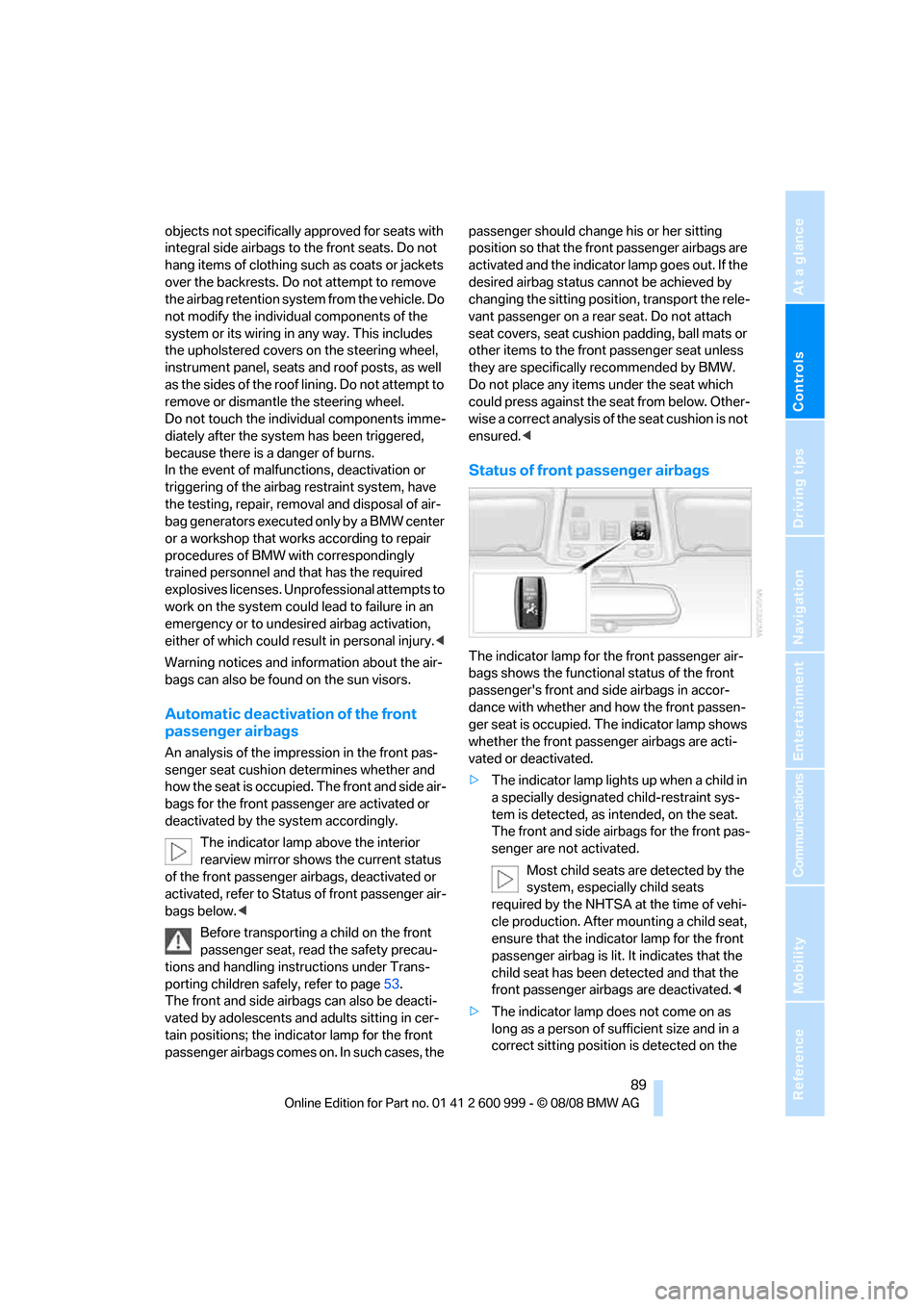
The indicator lamp above the interior
rearview mirror shows the current status
of the front passenger airbags, deactivated or
activated, refer to Status of front passenger air-
bags below.<
Before transporting a child on the front
passenger seat, read the safety precau-
tions and handling instructions under Trans-
porting children safely, refer to page53.
The front and side airbags can also be deacti-
vated by adolescents and adults sitting in cer-
tain positions; the indicator lamp for the front
passenger airbags comes on. In such cases, the passenger should change his or her sitting
position so that the front passenger airbags are
activated and the indicator lamp goes out. If the
desired airbag status cannot be achieved by
changing the sitting position, transport the rele-
vant passenger on a rear seat. Do not attach
seat covers, seat cushion padding, ball mats or
other items to the front passenger seat unless
they are specifically recommended by BMW.
Do not place any items under the seat which
could press against the seat from below. Other-
wise a correct analysis of the seat cushion is not
ensured.<
Status of front passenger airbags
The indicator lamp for the front passenger air-
bags shows the functional status of the front
passenger's front and side airbags in accor-
dance with whether and how the front passen-
ger seat is occupied. The indicator lamp shows
whether the front passenger airbags are acti-
vated or deactivated.
>The indicator lamp lights up when a child in
a specially designated child-restraint sys-
tem is detected, as intended, on the seat.
The front and side airbags for the front pas-
senger are not activated.
Most child seats are detected by the
system, especially child seats
required by the NHTSA at the time of vehi-
cle production. After mounting a child seat,
ensure that the indicator lamp for the front
passenger airbag is lit. It indicates that the
child seat has been detected and that the
front passenger airbags are deactivated.<
>The indicator lamp does not come on as
long as a person of sufficient size and in a
correct sitting position is detected on the
ba8_E9293M3_cic.book Seite 89 Dienstag, 19. August 2008 12:01 12
Page 101 of 256
Controls
99Reference
At a glance
Driving tips
Communications
Navigation
Entertainment
Mobility
Defrosting windows and removing
condensation
Quickly removes ice and conden-
sation from the windshield and
front side windows.
Switch on the cooling function as well.
Switching cooling function on/off
The cooling function cools and
dehumidifies the incoming air
before reheating it as required,
according to the temperature setting. This
function is only available while the engine is
running.
The cooling function helps prevent condensa-
tion on the windows or removes it quickly.
Depending on the weather, the windshield may
fog over briefly when the engine is started.
Pressing the AUTO button automatically
switches on the cooling function.
Rear window defroster
The defroster is switched off auto-
matically after a certain time.
Depending on your vehicle's
equipment, the upper wires serve as an antenna
and are not part of the rear window defroster.
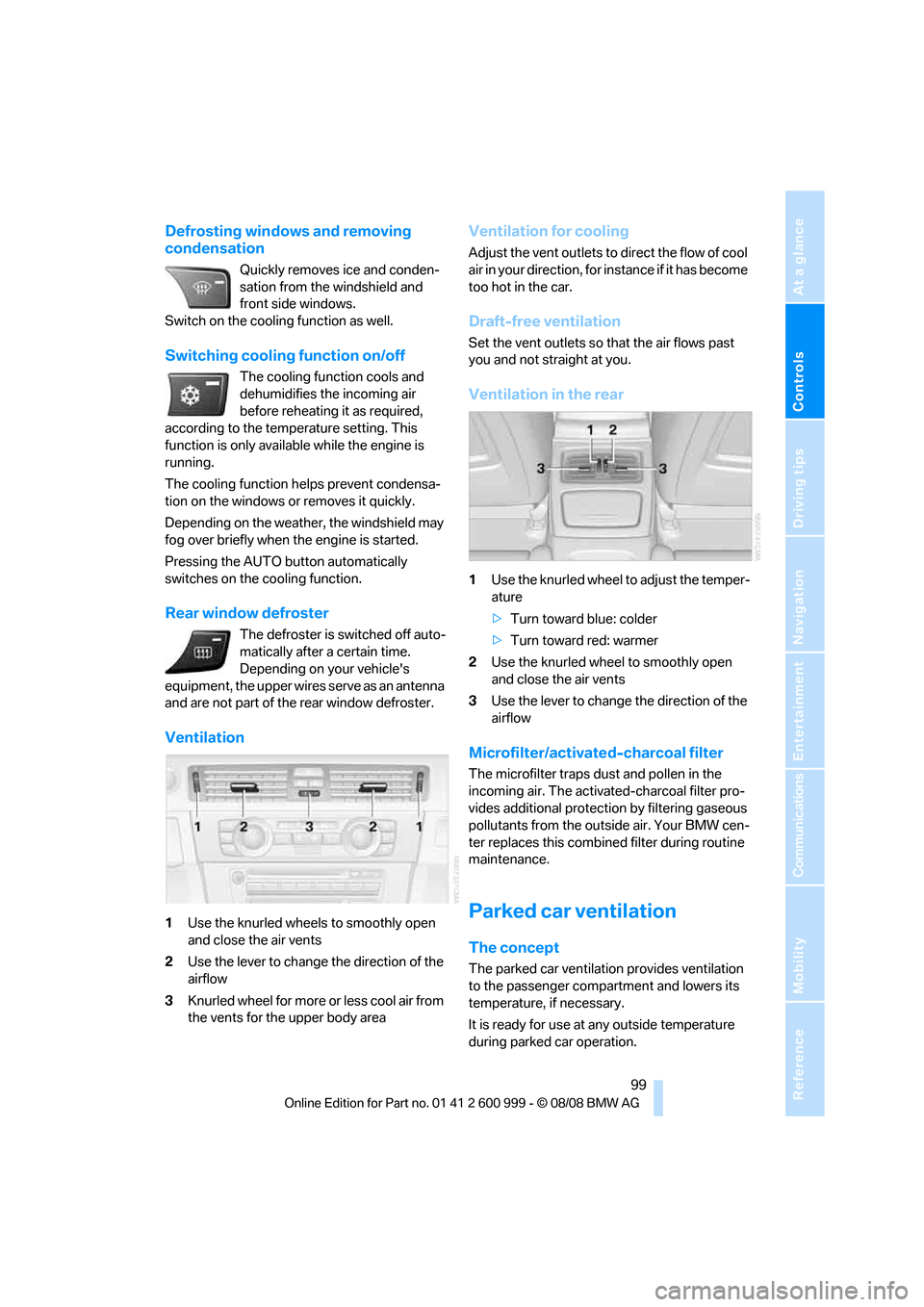
Ventilation
1Use the knurled wheels to smoothly open
and close the air vents
2Use the lever to change the direction of the
airflow
3Knurled wheel for more or less cool air from
the vents for the upper body area
Ventilation for cooling
Adjust the vent outlets to direct the flow of cool
air in your direction, for instance if it has become
too hot in the car.
Draft-free ventilation
Set the vent outlets so that the air flows past
you and not straight at you.
Ventilation in the rear
1Use the knurled wheel to adjust the temper-
ature
>Turn toward blue: colder
>Turn toward red: warmer
2Use the knurled wheel to smoothly open
and close the air vents
3Use the lever to change the direction of the
airflow
Microfilter/activated-charcoal filter
The microfilter traps dust and pollen in the
incoming air. The activated-charcoal filter pro-
vides additional protection by filtering gaseous
pollutants from the outside air. Your BMW cen-
ter replaces this combined filter during routine
maintenance.
Parked car ventilation
The concept
The parked car ventilation provides ventilation
to the passenger compartment and lowers its
temperature, if necessary.
It is ready for use at any outside temperature
during parked car operation.
ba8_E9293M3_cic.book Seite 99 Dienstag, 19. August 2008 12:01 12
Page 148 of 256
On/off and tone
146
On/off and tone
The following audio and video sources share
the same control elements and adjustments:
>Radio
>CD player
>CD changer
*
>Video
>External devices, e.g. MP3 player
Controls
The audio and video sources can be controlled
using the:
>Buttons near the CD player
>iDrive
>Buttons on the steering wheel, refer to
page10
>Programmable memory keys, refer to
page20
>Voice activation system
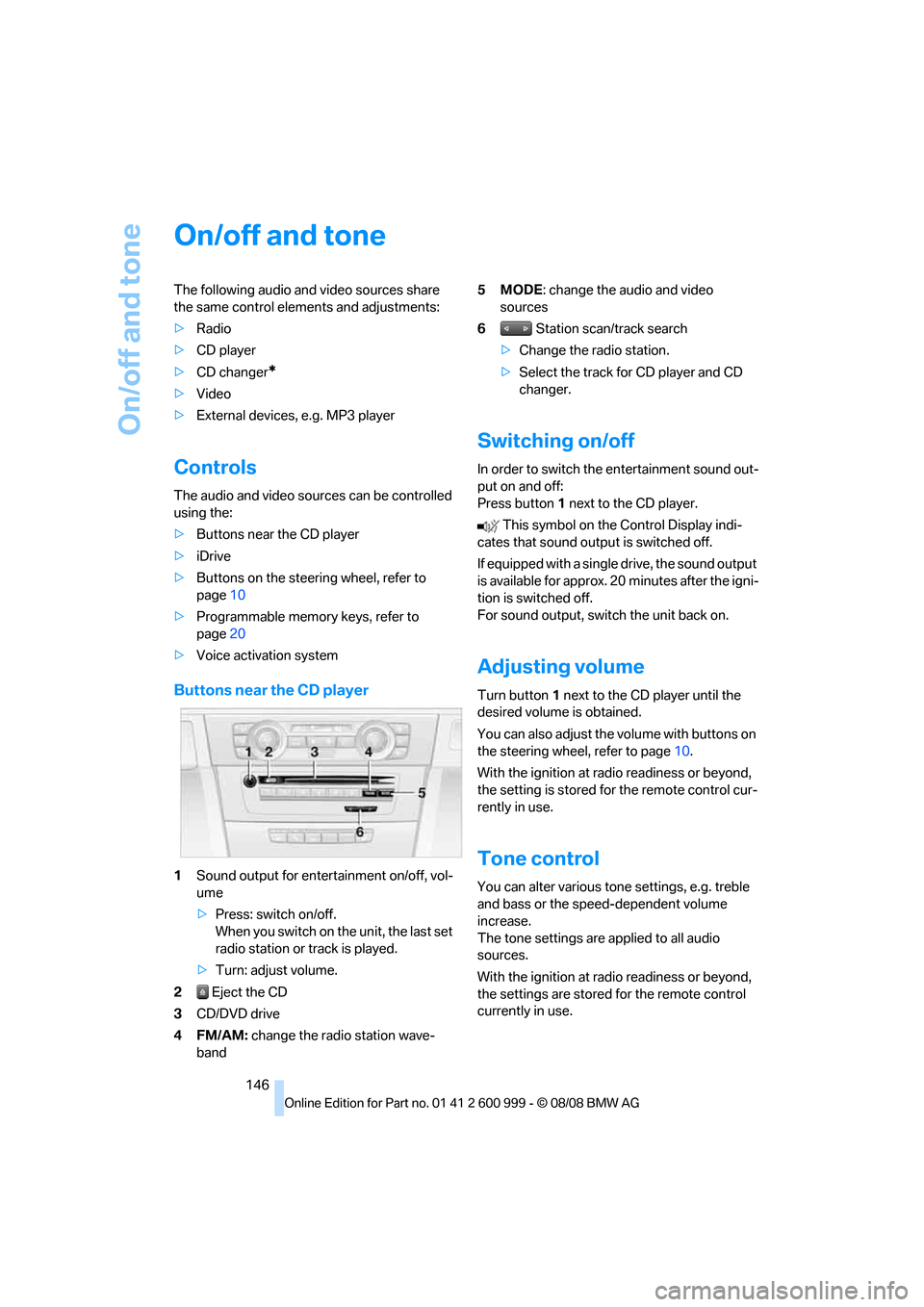
Buttons near the CD player
1Sound output for entertainment on/off, vol-
ume
>Press: switch on/off.
When you switch on the unit, the last set
radio station or track is played.
>Turn: adjust volume.
2 Eject the CD
3CD/DVD drive
4FM/AM: change the radio station wave-
band5MODE: change the audio and video
sources
6 Station scan/track search
>Change the radio station.
>Select the track for CD player and CD
changer.
Switching on/off
In order to switch the entertainment sound out-
put on and off:
Press button1 next to the CD player.
This symbol on the Control Display indi-
cates that sound output is switched off.
If equipped with a single drive, the sound output
is available for approx. 20 minutes after the igni-
tion is switched off.
For sound output, switch the unit back on.
Adjusting volume
Turn button1 next to the CD player until the
desired volume is obtained.
You can also adjust the volume with buttons on
the steering wheel, refer to page10.
With the ignition at radio readiness or beyond,
the setting is stored for the remote control cur-
rently in use.
Tone control
You can alter various tone settings, e.g. treble
and bass or the speed-dependent volume
increase.
The tone settings are applied to all audio
sources.
With the ignition at radio readiness or beyond,
the settings are stored for the remote control
currently in use.
ba8_E9293M3_cic.book Seite 146 Dienstag, 19. August 2008 12:01 12
Page 217 of 256
Mobility
215Reference
At a glance
Controls
Driving tips
Communications
Navigation
Entertainment
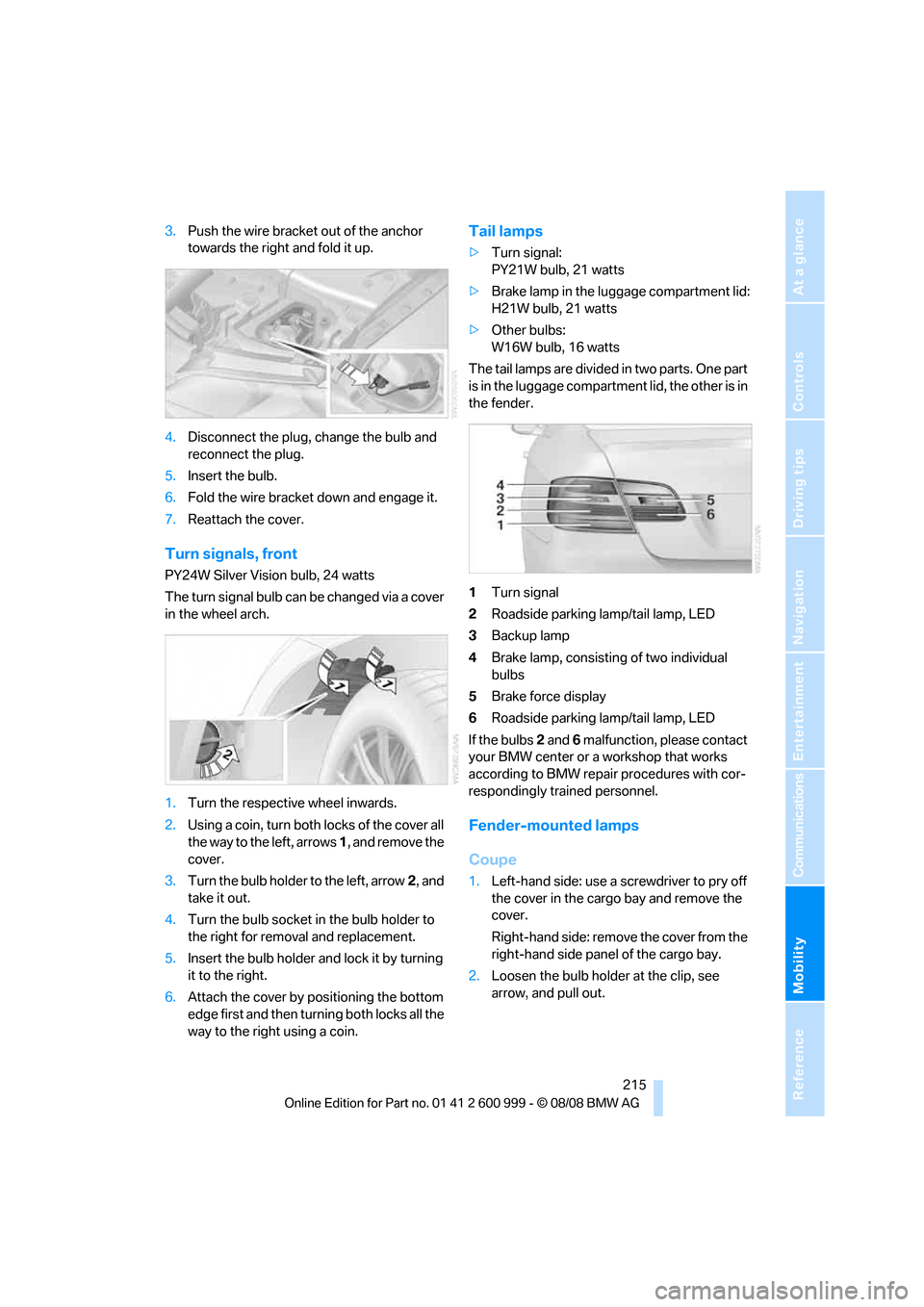
3.Push the wire bracket out of the anchor
towards the right and fold it up.
4.Disconnect the plug, change the bulb and
reconnect the plug.
5.Insert the bulb.
6.Fold the wire bracket down and engage it.
7.Reattach the cover.
Turn signals, front
PY24W Silver Vision bulb, 24 watts
The turn signal bulb can be changed via a cover
in the wheel arch.
1.Turn the respective wheel inwards.
2.Using a coin, turn both locks of the cover all
the way to the left, arrows 1, and remove the
cover.
3.Turn the bulb holder to the left, arrow2, and
take it out.
4.Turn the bulb socket in the bulb holder to
the right for removal and replacement.
5.Insert the bulb holder and lock it by turning
it to the right.
6.Attach the cover by positioning the bottom
edge first and then turning both locks all the
way to the right using a coin.
Tail lamps
>Turn signal:
PY21W bulb, 21 watts
>Brake lamp in the luggage compartment lid:
H21W bulb, 21 watts
>Other bulbs:
W16W bulb, 16 watts
The tail lamps are divided in two parts. One part
is in the luggage compartment lid, the other is in
the fender.
1Turn signal
2Roadside parking lamp/tail lamp, LED
3Backup lamp
4Brake lamp, consisting of two individual
bulbs
5Brake force display
6Roadside parking lamp/tail lamp, LED
If the bulbs 2 and 6 malfunction, please contact
your BMW center or a workshop that works
according to BMW repair procedures with cor-
respondingly trained personnel.
Fender-mounted lamps
Coupe
1.Left-hand side: use a screwdriver to pry off
the cover in the cargo bay and remove the
cover.
Right-hand side: remove the cover from the
right-hand side panel of the cargo bay.
2.Loosen the bulb holder at the clip, see
arrow, and pull out.
ba8_E9293M3_cic.book Seite 215 Dienstag, 19. August 2008 12:01 12
Page 241 of 256
Reference 239
At a glance
Controls
Driving tips
Communications
Navigation
Entertainment
Mobility
B
Backrest contour, refer to
Lumbar support43
Backrests, refer to Seat
adjustment43
Backrest width adjustment44
Back seats
– refer to Rear seats45
Backup lamps
– replacing bulb215
Backup lamps, refer to Tail
lamps215
Bag holder109
Band-aids, refer to First-aid
pouch222
Bar, refer to Towing
methods224
Base plate for telephone or
mobile phone
– refer to Snap-in adapter181
– refer to Snap-in adapter in
the center armrest storage
compartment105
Bass, tone setting146
Battery219
– charging219
– disposal35,219
– jump starting222
– remote control26
– temporary power failure220
Battery for mobile phone181
Battery renewal
– remote control35
– remote control for vehicle35
Being towed224
Belt hand-over48
Belts, refer to Safety belts47
Belt tensioner, refer to Safety
belts47
Beverage holders, refer to
Cup holders106
Blinds, refer to Roller sun
blinds104
Blower, refer to Air flow
rate98
Bluetooth, activating/
deactivating174Bluetooth, refer to separate
Owner's Manual
BMW
– car shampoo211
BMW Assist, activating186
BMW Assist185
BMW center190
BMW Homepage4
BMW Maintenance
System207
BMW Search186
BMW webpage4
Bottle holders, refer to Cup
holders106
Brake assist82
Brake fluid, refer to Service
requirements72
Brake force display88
– bulb change216
Brake lamps
– replacing bulb215
Brake lights
– brake force display88
Brake pads116
– breaking in116
Brake rotors117
– brakes116
– breaking in116
Brakes
– ABS82
– BMW Maintenance
System207
– brake force display88
– breaking in116
– parking brake57
– service requirements72
Brakes, refer to Braking
safely117
Brake system116
– BMW Maintenance
System207
– breaking in116
– disc brakes117
Breakdown services, refer to
Roadside Assistance221
Breaking in the clutch116
Breaking in the differential,
refer to Engine and
differential116Break-in period116
Brightness of the Control
Display79
Bulb changing, refer to Lamps
and bulbs213
Button for starting the engine,
refer to Start/stop button55
Buttons on the steering
wheel11
C
California Proposition 65
warning6
Call
– accepting175
– ending176
– rejecting176
Calling, refer to Phone
numbers, dialing176
Can holders, refer to Cup
holders106
Capacities231
Capacity of the cargo bay231
Car battery, refer to Vehicle
battery219
Car care, refer to Care209
ba8_E9293M3_cic.book Seite 239 Dienstag, 19. August 2008 12:01 12
Page 242 of 256
Everything from A - Z
240 Care209
– automatic car washes209
– care products209
– carpets211
– CD/DVD drives212
– chrome parts210
– displays211
– exterior209
– fine wood parts211
– headlamps210
– high-pressure washer209
– interior211
– leather211
– light-alloy wheels211
– paintwork210
– plastic parts211
– retractable hardtop210
– rubber seals210
– safety belts211
– sensors and cameras211
– upholstery and cloth
trim211
– washing the car
manually210
– windows210
– wiper blades210
Cargo, securing119
Cargo bay
– capacity231
– convenient access34
– folding up the floor
panel110
– lamp, refer to Interior
lamps94
– opening from inside31
– opening from outside31
Cargo loading
– securing cargo119
– stowing cargo119
– vehicle118
Car jack
– jacking points219
Car key, refer to Remote
control26
Car phone
– installation location, refer to
Center armrest105
– refer to separate Owner's
ManualCar phone, refer to
Telephone172
Car radio, refer to Radio149
Car shampoo211
Car wash
– before entering57
Catalytic converter, refer to
Hot exhaust system116
CBS Condition Based
Service
207
CD, audio playback154
CD changer154
– controls146
– fast forward/reverse156
– installation location158
– random play sequence155
– selecting a track154
– switching on/off146
– tone control146
– volume146
CD player154
– controls146
– fast forward/reverse156
– random play sequence155
– selecting a track154
– switching on/off146
– tone control146
– volume146
Center armrest105
Center brake lamp
– replacing bulb217
Center console, refer to
Around the center
console14
Central locking
– from inside30
– from outside27
Central locking system27
– convenient access34
– hotel function31
Changes, technical, refer to
For your own safety5
Changing bulbs, refer to
Lamps and bulbs213
Changing gears60
Changing the language on the
Control Display79Changing the measurement
units on the Control
Display71
Changing wheels219
Chassis number, refer to
Engine compartment203
Check Control76
Child-restraint fixing system
LATCH54
Child-restraint systems53
Child seats, refer to
Transporting children
safely53
Chrome parts211
Chrome polish211
Cigarette lighter, refer to
Lighter107
Cleaning headlamps65
– washer fluid66
Cleaning your BMW, refer to
Care209
Clock
68
– 12h/24h mode75
– setting the time and date75
– setting time74
Closing
– from inside30
– from outside27
Clothes hooks106
Cockpit10
Cold start, refer to Starting the
engine56
Combined instrument, refer to
Instrument cluster12
Comfort access, refer to
Convenient access34
Comfort area, refer to Around
the center console14
Compartment for remote
control, refer to Ignition
lock55
Compass103
Computer69
– displays on Control
Display70
Computer, refer to iDrive16
Concierge service185
Condensation, refer to When
the vehicle is parked118
ba8_E9293M3_cic.book Seite 240 Dienstag, 19. August 2008 12:01 12
Page 244 of 256
Everything from A - Z
242 Displacement, refer to Engine
data228
Display, refer to iDrive
controls16
Display lighting, refer to
Instrument lighting94
Displays
– on the Control Display16
Displays, refer to Instrument
cluster12
Displays and controls10
Disposal
– coolant206
– remote control battery35
– vehicle battery219
Distance remaining to service,
refer to Service
requirements72
Distance warning, refer to
Park Distance Control
PDC81
Door key, refer to Remote
control26
Door lock30
Doors, emergency
operation30
DOT Quality Grades198
Draft-free ventilation99
Drinks holders, refer to Cup
holders106
Drivelogic61
Drive mode59
Drive-off assistance, refer to
Dynamic Stability Control
DSC82
Drive-off assistant84
Drive position, engaging, refer
to Selector lever
positions58
Drive programs, refer to
Drivelogic61
Driving lamps, refer to Parking
lamps/low beams92
Driving notes116
Driving off on hills, refer to
Drive-off assistant84
Driving stability control
systems82
Driving through water117Driving tips, refer to Driving
notes116
Dry air, refer to Cooling
function99
DSC Dynamic Stability
Control82
DVD
– country codes156
– settings157
– video playback156
DVD menu157
DVD video156
Dynamic Stability Control
DSC
– indicator/warning lamp83
– M Dynamic Mode MDM82
E
EDC, refer to Electronic
Damper Control83
Eject button, refer to Buttons
on the CD player146
Electric
– seat adjustment43
Electrical malfunction
– door lock30
– driver's door30
– fuel filler door194
– glass roof37
– M dual clutch transmission
with Drivelogic60
Electric seat43
Electric seat adjustment43
Electric steering wheel lock
– with convenient access34
Electronic brake-force
distribution82
Electronic Damper Control
EDC83
Electronic oil level check203
Electronic Stability Program
ESP, refer to Dynamic
Stability Control DSC82
Emergency operation
– fuel filler door, manual
release194Emergency operation, refer to
Closing manually
– glass roof37
Emergency operation, refer to
Manual operation
– door lock30
Emergency release
– luggage compartment lid
from inside32
Emergency Request221
Emergency services, refer to
Roadside Assistance221
Engine
– breaking in116
– data228
– overheated, refer to Coolant
temperature69
– speed228
– starting56
– starting, convenient
access34
– switching off56
Engine compartment203
Engine coolant, refer to
Coolant206
Engine oil
– adding205
– BMW Maintenance
System207
– checking level203
– intervals between changes,
refer to Service
requirements72
– possible displays204
Engine output, refer to Engine
data228
Engine speed, refer to Engine
data228
Engine starting, refer to
Starting the engine56
Entry lamps, refer to Interior
lamps94
Entry map for destination132
Equalizer, tone setting147
Error messages, refer to
Check Control76
Event data recorders208
Exhaust system, refer to Hot
exhaust system116
ba8_E9293M3_cic.book Seite 242 Dienstag, 19. August 2008 12:01 12
Page 246 of 256
Everything from A - Z
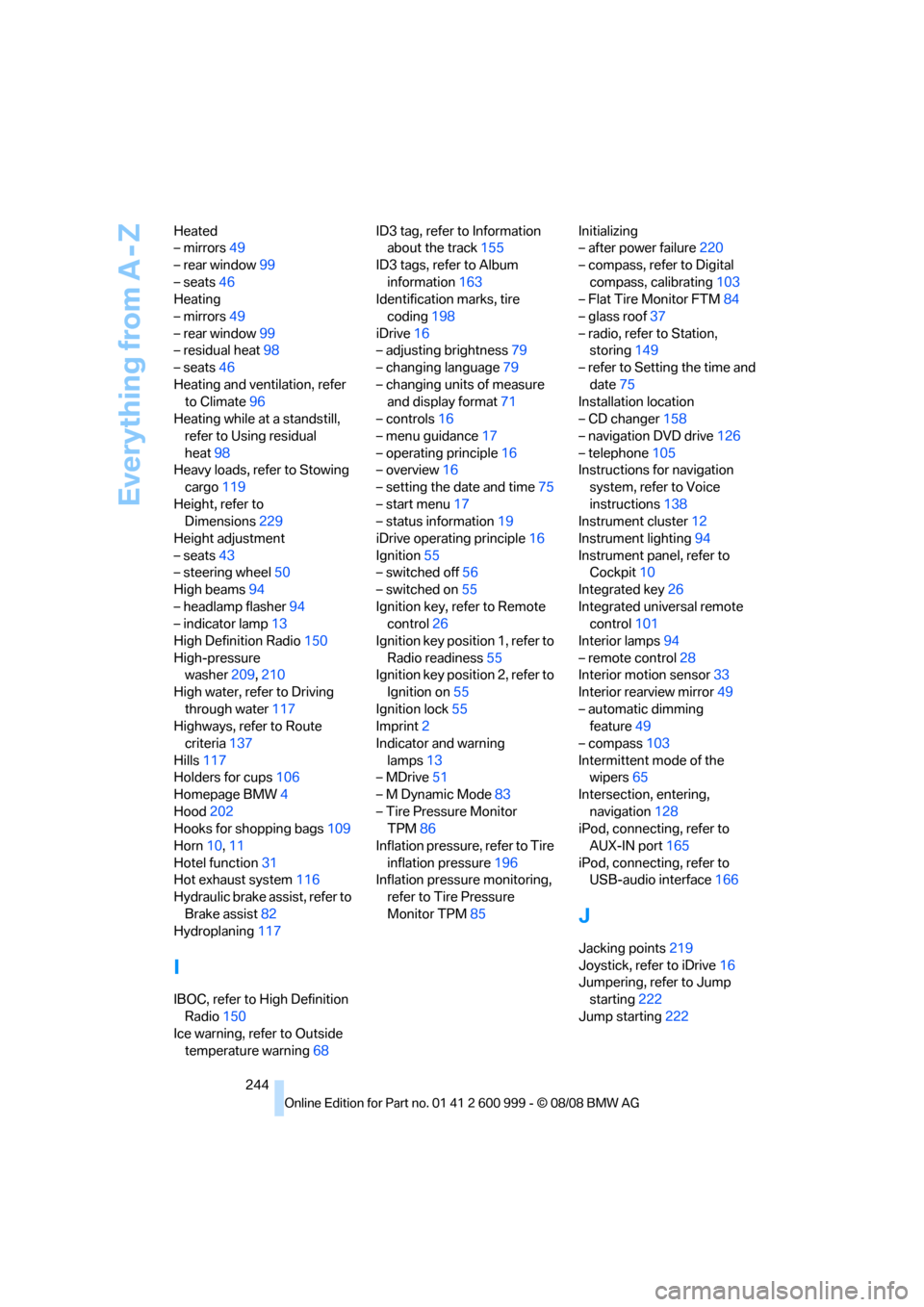
244 Heated
– mirrors49
– rear window99
– seats46
Heating
– mirrors49
– rear window99
– residual heat98
– seats46
Heating and ventilation, refer
to Climate96
Heating while at a standstill,
refer to Using residual
heat98
Heavy loads, refer to Stowing
cargo119
Height, refer to
Dimensions229
Height adjustment
– seats43
– steering wheel50
High beams94
– headlamp flasher94
– indicator lamp13
High Definition Radio150
High-pressure
washer209,210
High water, refer to Driving
through water117
Highways, refer to Route
criteria137
Hills117
Holders for cups106
Homepage BMW4
Hood202
Hooks for shopping bags109
Horn10,11
Hotel function31
Hot exhaust system116
Hydraulic brake assist, refer to
Brake assist82
Hydroplaning117
I
IBOC, refer to High Definition
Radio150
Ice warning, refer to Outside
temperature warning68ID3 tag, refer to Information
about the track155
ID3 tags, refer to Album
information163
Identification marks, tire
coding198
iDrive16
– adjusting brightness79
– changing language79
– changing units of measure
and display format71
– controls16
– menu guidance17
– operating principle16
– overview16
– setting the date and time75
– start menu17
– status information19
iDrive operating principle16
Ignition55
– switched off56
– switched on55
Ignition key, refer to Remote
control26
Ignition key position 1, refer to
Radio readiness55
Ignition key position 2, refer to
Ignition on55
Ignition lock55
Imprint2
Indicator and warning
lamps13
– MDrive51
– M Dynamic Mode83
– Tire Pressure Monitor
TPM86
Inflation pressure, refer to Tire
inflation pressure196
Inflation pressure monitoring,
refer to Tire Pressure
Monitor TPM85Initializing
– after power failure220
– compass, refer to Digital
compass, calibrating103
– Flat Tire Monitor FTM84
– glass roof37
– radio, refer to Station,
storing149
– refer to Setting the time and
date75
Installation location
– CD changer158
– navigation DVD drive126
– telephone105
Instructions for navigation
system, refer to Voice
instructions138
Instrument cluster12
Instrument lighting94
Instrument panel, refer to
Cockpit10
Integrated key26
Integrated universal remote
control101
Interior lamps94
– remote control28
Interior motion sensor33
Interior rearview mirror49
– automatic dimming
feature49
– compass103
Intermittent mode of the
wipers65
Intersection, entering,
navigation128
iPod, connecting, refer to
AUX-IN port165
iPod, connecting, refer to
USB-audio interface166
J
Jacking points219
Joystick, refer to iDrive16
Jumpering, refer to Jump
starting222
Jump starting222
ba8_E9293M3_cic.book Seite 244 Dienstag, 19. August 2008 12:01 12
Page 249 of 256
Reference 247
At a glance
Controls
Driving tips
Communications
Navigation
Entertainment
Mobility
P
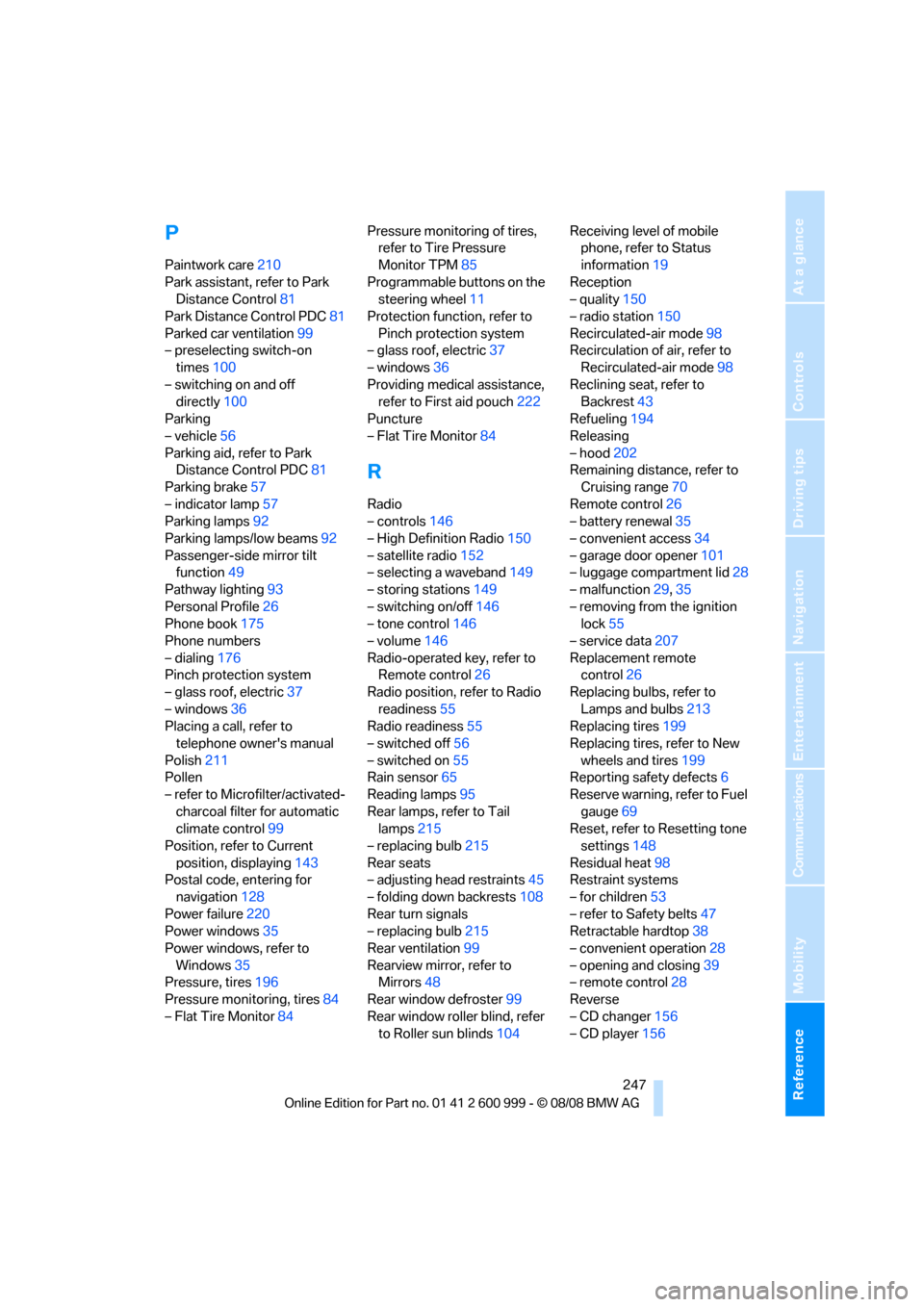
Paintwork care210
Park assistant, refer to Park
Distance Control81
Park Distance Control PDC81
Parked car ventilation99
– preselecting switch-on
times100
– switching on and off
directly100
Parking
– vehicle56
Parking aid, refer to Park
Distance Control PDC81
Parking brake57
– indicator lamp57
Parking lamps92
Parking lamps/low beams92
Passenger-side mirror tilt
function49
Pathway lighting93
Personal Profile26
Phone book175
Phone numbers
– dialing176
Pinch protection system
– glass roof, electric37
– windows36
Placing a call, refer to
telephone owner's manual
Polish211
Pollen
– refer to Microfilter/activated-
charcoal filter for automatic
climate control99
Position, refer to Current
position, displaying143
Postal code, entering for
navigation128
Power failure220
Power windows35
Power windows, refer to
Windows35
Pressure, tires196
Pressure monitoring, tires84
– Flat Tire Monitor84Pressure monitoring of tires,
refer to Tire Pressure
Monitor TPM85
Programmable buttons on the
steering wheel11
Protection function, refer to
Pinch protection system
– glass roof, electric37
– windows36
Providing medical assistance,
refer to First aid pouch222
Puncture
– Flat Tire Monitor84
R
Radio
– controls146
– High Definition Radio150
– satellite radio152
– selecting a waveband149
– storing stations149
– switching on/off146
– tone control146
– volume146
Radio-operated key, refer to
Remote control26
Radio position, refer to Radio
readiness55
Radio readiness55
– switched off56
– switched on55
Rain sensor65
Reading lamps95
Rear lamps, refer to Tail
lamps215
– replacing bulb215
Rear seats
– adjusting head restraints45
– folding down backrests108
Rear turn signals
– replacing bulb215
Rear ventilation99
Rearview mirror, refer to
Mirrors48
Rear window defroster99
Rear window roller blind, refer
to Roller sun blinds104Receiving level of mobile
phone, refer to Status
information19
Reception
– quality150
– radio station150
Recirculated-air mode98
Recirculation of air, refer to
Recirculated-air mode98
Reclining seat, refer to
Backrest43
Refueling194
Releasing
– hood202
Remaining distance, refer to
Cruising range70
Remote control26
– battery renewal35
– convenient access34
– garage door opener101
– luggage compartment lid28
– malfunction29,35
– removing from the ignition
lock55
– service data207
Replacement remote
control
26
Replacing bulbs, refer to
Lamps and bulbs213
Replacing tires199
Replacing tires, refer to New
wheels and tires199
Reporting safety defects6
Reserve warning, refer to Fuel
gauge69
Reset, refer to Resetting tone
settings148
Residual heat98
Restraint systems
– for children53
– refer to Safety belts47
Retractable hardtop38
– convenient operation28
– opening and closing39
– remote control28
Reverse
– CD changer156
– CD player156
ba8_E9293M3_cic.book Seite 247 Dienstag, 19. August 2008 12:01 12