ABS BMW M3 CONVERTIBLE 2011 User Guide
[x] Cancel search | Manufacturer: BMW, Model Year: 2011, Model line: M3 CONVERTIBLE, Model: BMW M3 CONVERTIBLE 2011Pages: 174, PDF Size: 2.68 MB
Page 147 of 174
147
Mobile Service*To establish contact with the BMW
Group's Mobile Service:
Press button 2 for at least 2 seconds.
The indicator lamp above the buttons
lights up. As soon as a telephone con-
nection has been set up with the Mobile
Service, the indicator lamp flashes.
Depending on the country you are in,
your vehicle's current location will also
be transmitted if your vehicle is
equipped with an activated BMW Assist
function.
Jump-startingWhen your battery is discharged, you
can use two jumper cables to start your
vehicle with power from the battery in a
second vehicle. You can also use the
same method to help start another
vehicle. Use only jumper cables with
fully insulated handles on the terminal
clamps.
Do not touch high-voltage wiring
and cables on a running engine.
Contact with components carrying high
voltage can be harmful or fatal.
Carefully observe the following instruc-
tions to avoid personal injury and/or
damage to one or both vehicles.
approximately the same capacity –
measured in Ah. This information is
provided on the battery
2. Stop the engine of the support vehi-
cle
3. Switch off all consumers in both
vehicles.
Make absolutely certain that there
is no contact between the body-
work of the two vehicles, otherwise
there is a short circuit hazard.<
Connecting the jumper cables
Be sure to connect the jumper
cables in the right order; other-
wise there is a risk of injury due to
sparks being created near the battery.<
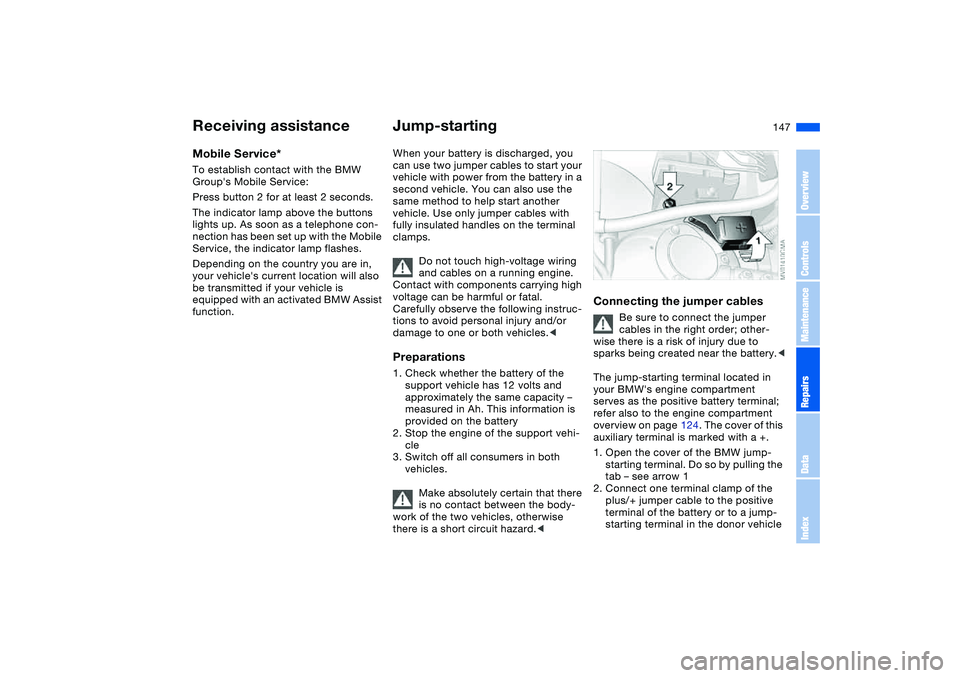
The jump-starting terminal located in
your BMW's engine compartment
serves as the positive battery terminal;
refer also to the engine compartment
overview on page 124. The cover of this
auxiliary terminal is marked with a +.
1. Open the cover of the BMW jump-
starting terminal. Do so by pulling the
tab – see arrow 1
2. Connect one terminal clamp of the
plus/+ jumper cable to the positive
terminal of the battery or to a jump-
starting terminal in the donor vehicle
Receiving assistance
OverviewControlsMaintenanceRepairsDataIndex
Page 160 of 174
Everything from A to ZA
ABS Antilock Brake
System 113
indicator lamp 19
Accessories, refer to For
your own safety 6
Accident, refer to Emer-
gency call 146
Activated-charcoal filter 98
Adaptive brake lamp, refer
to Brake force display 89
Adding brake fluid 129
Additional sources of infor-
mation 4
Air conditioning mode
automatic climate
control 96
Air distribution
automatic climate
control 96
individual 96
Air outlets, refer to Ventila-
tion 94
Air pressure, refer to Tire
inflation pressure 116
Air recirculation, refer to
Recirculated-air mode 97
Air supply
automatic climate
control 96
Air, drying, refer to Air con-
ditioning mode 96Airbags 55
deactivating 55
indicator lamp 18, 57
safe seating position 46
Airing out, refer to Ventila-
tion 94
AKI, refer to Fuel specifica-
tions 25
Alarm system 36
avoiding unintentional
alarms 37
All-season tires, refer to
Winter tires 120
Alternative oils 127
Antifreeze
coolant 128
washer fluid 126
Antilock Brake System
(ABS) 113
indicator lamp 19
Anti-theft system 28
Anti-theft warning system,
refer to Alarm system 36
Approved axle loads, refer
to Weights 156
Approved gross weight,
refer to Weights 156
Armrest 99
Artificial leather, refer to the
Caring for your vehicle
brochureAshtray
front 100
rear 101
Assistant systems, refer to
Dynamic Stability Control
(DSC) 86
AUC Automatic recircu-
lated-air control 97
AUTO program 96
Automatic
cruise control 77
headlamp control 90
Automatic air distribution,
refer to AUTO program 96
Automatic air supply, refer
to AUTO program 96
Automatic car wash, refer to
the Caring for your vehicle
brochure
Automatic climate control 94
Automatic curb monitor 52
Automatic dimming, interior
rearview mirror 53
Automatic recirculated-air
control (AUC) 97
Automatic windshield
washer, refer to Rain sen-
sor 76
Average fuel
consumption 84
Average speed 84Avoiding unintentional
alarms 37
Axle loads, refer to
Weights 156
B
Backrest
unlocking 49
Backrest, refer to Seat
adjustment 47
Backup lamps 69
bulb replacement 139
Bandages, refer to First-aid
kit 23
Bar, for towing 149
Battery 144
charge 144
disposal 145
indicator lamp 18
jump-starting 147
remote control 28, 29
Battery charge current 18
Battery charge indicator
lamp 18
Belts, refer to Safety
belts 50
Beverage holders 100
Blower
automatic climate
control 96
BMW Maintenance
System 130
Page 161 of 174
Everything from A to Z
161
BMW sports seat 47
Bore, refer to Engine
data 154
Bottle holders, see Bever-
age holders 100
Brake fluid 129
indicator lamp 18, 129
level 129
Brake force display 89
Brake lamps
bulb replacement 139
indicator lamp, defective
lamp 81
Brake lamps, refer to Brake
force display 89
Brake pads
brake fluid level 18, 129
breaking in 110
Brake rotors
breaking in 110
Brake system
brake pads, indicator
lamp 19
Brake wear warning
indicator lamp 19Brakes
ABS 113
brake fluid 129
brake force display 89
brake pads 112
breaking in 110
driving notes 111
indicator/warning lamp
18, 19
parking brake 68
Break-in procedures 110
Bridging, refer to Jump-
starting 147
Bulb replacement 137
Bulb replacement, refer to
Lamps and bulbs 137
Buttons in steering wheel 22
C
California Proposition 65
warning 6
Can holders, see Beverage
holders 100
Capacities 157
Car battery 144
Car care, refer to the Caring
for your vehicle brochure
Car keys, refer to Keys 28
Car phone hookup
microphone 100
Car radio, refer to the
Owner's Manual for RadioCar telephone, refer to the
separate Owner's Manual
Car vacuum cleaner, con-
necting 101
Car wash, refer to the Caring
for your vehicle brochure
Carpet care, refer to the
Caring for your vehicle
brochure
Cassette operation, refer to
the Owner's Manual for
Radio/Onboard Computer
CBC Cornering Brake Con-
trol 113
warning lamp 19
CD changer, refer to the
Owner's Manual for
Radio/Onboard Computer
CD operation, refer to the
Owner's Manual for
Radio/Onboard Computer
Center armrest
front 99
Center high-mount brake
lamp
bulb replacement 140
Central locking system 28
button 32
passenger
compartment 32
Check Control 81Check Gas Cap
indicator lamp 19
Child seats, refer to Child-
restraint systems 58
Child-restraint mounting
system LATCH 60
Child-restraint systems 58
Cigarette lighter 100
Cleaning chrome parts, refer
to the Caring for your vehi-
cle brochure
Cleaning light alloy wheels,
refer to the Caring for your
vehicle brochure
Cleaning position, convert-
ible top 44
Cleaning the vehicle, refer to
the Caring for your vehicle
brochure
Cleaning windshield 77
Clock 82
12-/24-hour mode 82
setting, refer also to the
Owner's Manual for
Radio/Onboard Computer
Closing
from inside 32
from outside 29
Clutch
breaking in 110
Cockpit 14
OverviewControlsMaintenanceRepairsDataIndex