audio BMW M3 CONVERTIBLE 2012 User Guide
[x] Cancel search | Manufacturer: BMW, Model Year: 2012, Model line: M3 CONVERTIBLE, Model: BMW M3 CONVERTIBLE 2012Pages: 255, PDF Size: 6.32 MB
Page 153 of 255
152
EntertainmentBMW Professional radio
File systems
Popular file systems for USB devices are sup-
ported. The format FAT 32 is recommended.
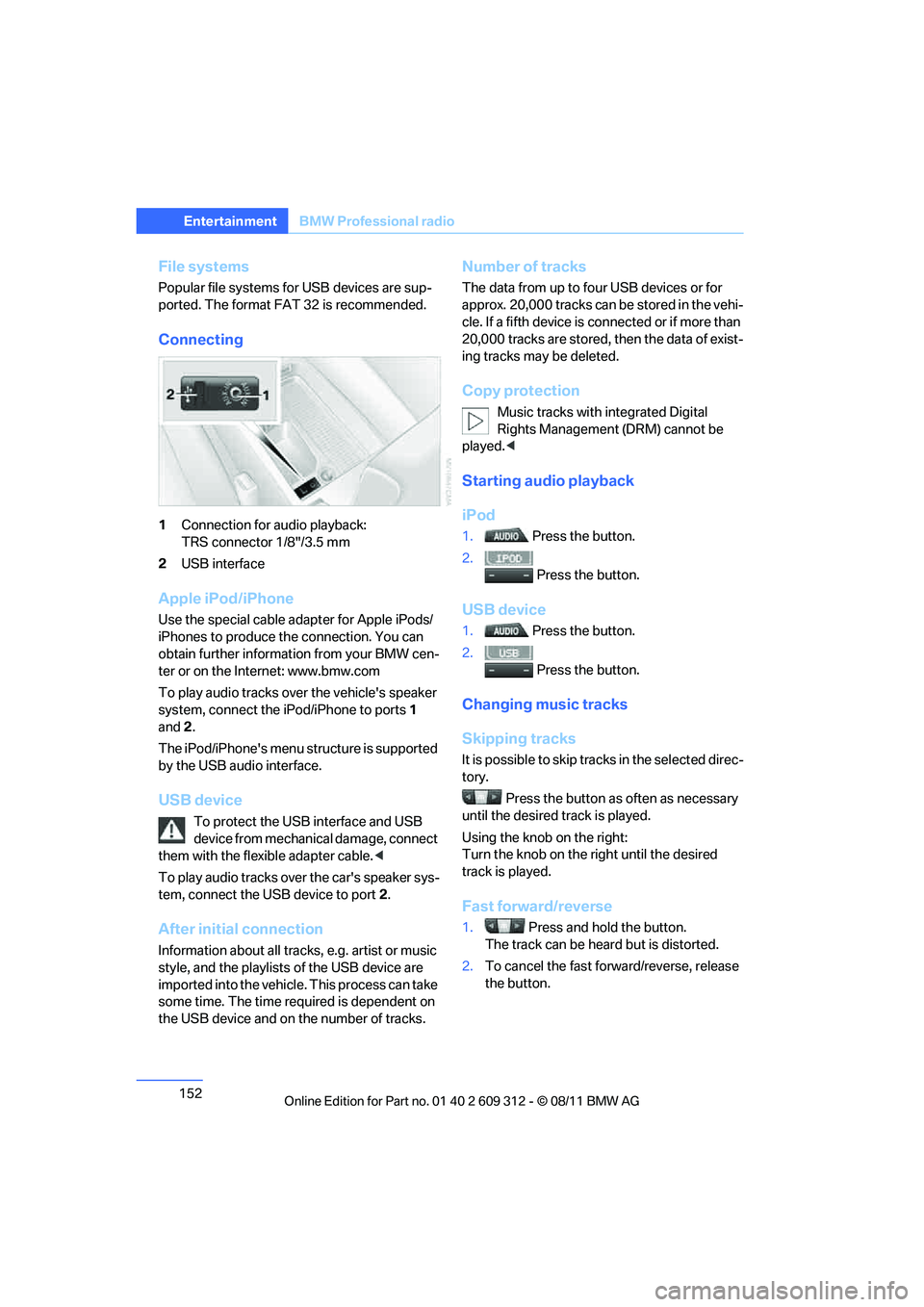
Connecting
1Connection for audio playback:
TRS connector 1/8"/3.5 mm
2 USB interface
Apple iPod/iPhone
Use the special cable adapter for Apple iPods/
iPhones to produce the connection. You can
obtain further informat ion from your BMW cen-
ter or on the Internet: www.bmw.com
To play audio tracks over the vehicle's speaker
system, connect the iPod/iPhone to ports 1
and 2.
The iPod/iPhone's menu structure is supported
by the USB audio interface.
USB device
To protect the USB interface and USB
device from mechanical damage, connect
them with the flexible adapter cable. <
To play audio tracks over the car's speaker sys-
tem, connect the USB device to port 2.
After initial connection
Information about all tracks, e.g. artist or music
style, and the playlists of the USB device are
imported into the vehicle. This process can take
some time. The time required is dependent on
the USB device and on the number of tracks.
Number of tracks
The data from up to four USB devices or for
approx. 20,000 tracks can be stored in the vehi-
cle. If a fifth device is connected or if more than
20,000 tracks are stored, then the data of exist-
ing tracks may be deleted.
Copy protection
Music tracks with integrated Digital
Rights Management (DRM) cannot be
played. <
Starting audio playback
iPod
1. Press the button.
2. Press the button.
USB device
1. Press the button.
2. Press the button.
Changing music tracks
Skipping tracks
It is possible to skip tr acks in the selected direc-
tory.
Press the button as often as necessary
until the desired track is played.
Using the knob on the right:
Turn the knob on the right until the desired
track is played.
Fast forward/reverse
1. Press and hold the button.
The track can be hear d but is distorted.
2. To cancel the fast forward/reverse, release
the button.
Online Edition for Part no. 01 40 2 609 312 - \251 08/11 BMW AG
Page 154 of 255
153
BMW Professional radio
Entertainment
Random order
Press the button.
The current track is played to the end.
Then the tracks in the current directory are
played back in random order.
To terminate the random generator:
Press the button.
Selecting a track
Select the desired list, e.g., "LIST":
1. Press the button.
2. If necessary, use the knob on the right to
select the desired directory.
> : press the knob on the right to open a
directory.
> : press the knob on the right to close
a directory.
3. Select additional directories if desired.
4. Highlight the desired track and press the
knob on the right.
You can browse through the directories during
playback.
To change to th e current track:
Press the button.
Track display
If information about the currently selected track
has been stored, it can be displayed.
Press the button.
Adjusting volume
The volume of the sound output depends on
the audio device. If this volume differs markedly
from the volume of the ot her audio sources, it is
advisable to adjust the volumes. 1.
Press the button.
2. Turn the knob on the right until the desired
volume is set and then press the knob.
Displaying the file structure of the USB
device
The entire file structure of the USB device can
be displayed, for example directories without
music files.
Press the button.
Notes
Do not expose the audio device to extreme
environmental conditions , e.g. very high tem-
peratures, refer to the op erating instructions of
the audio device.
Depending on the config uration of the audio
files, for example bi t rates higher than
256 Kbit/s, it is not always possible to ensure
proper playback in every case.
Information on connection
> The connected audio device is supplied
with a max. power of 500 mA if supported
by the device. For this reason, do not addi-
tionally connect the de vice to a charging
socket in the vehicle; otherwise, it may not
be possible to ensure proper playback.
> Do not use force when plugging the con-
nector into the USB interface.
> Do not connect devices such as fans or
lamps to the USB audio interface.
> Do not connect USB hard drives.
> Do not use the USB audio interface to
recharge external devices.
Online Edition for Part no. 01 40 2 609 312 - \251 08/11 BMW AG
Page 166 of 255
165
Te l e p h o n e
Communications
Deleting an entry from the voice phone
book
You can delete any entry from the voice phone
book.
Deleting all entries from the voice
phone book
Adjusting volume
Turn the knob on the le
ft during the announce-
ment.
> The volume remains the same, even if the
volume of other audio sources is changed.
> The volume is stored for the remote control
currently in use.
BMW phone numbers
It is possible to store phone numbers for several
BMW services without having BMW Assist acti-
vated. As soon as BMW Assist is activated, the
services of BMW Assist are available, refer to
page 167. >
"Road Assist": BMW Group Mobile Service,
if you require assistance in the event of a
breakdown.
> "Service": your BMW center, for example
when you wish to schedule a service
appointment.
> "Customer Relations": Customer Relations,
for information about your vehicle.
Displaying phone numbers
1.Switch on radio readiness or ignition.
2. Press the button.
3. Press the button.
4. Turn the knob on the right until the desired
phone number is displayed.
Snap-in adapter
General information
Detailed information on snap-in adapters that
compatibly support mobile phone functions can
be found at your BMW center.
Notes
At high temperatures, the charging function of
the mobile phone may be limited and some
functions may no longer be carried out.
When using the mobile phone via the vehicle,
follow the instructions given in the owner's
manual for the mobile phone.
1.
{Delete name }.
2. Say the name when prompted by the
system.
3. Confirm request: {Yes }
1. {Delete phonebook }.
The dialog for deleting phone book is
opened.
2. Confirm request: {Yes }
3. Confirm request again: {Yes }
Online Edition for Part no. 01 40 2 609 312 - \251 08/11 BMW AG
Page 241 of 255
240
ReferenceEverything from A to Z
Everything from A to Z
Index
A
ABS Antilock Brake
System 90
ACC, refer to Active Cruise Control 71
Acceleration assistant, refer to Launch Control 66
Accessories, refer to Vehicle
equipment 5
Accident, refer to Sending an Emergency Request 214
Activated-charcoal filter for automatic climate
control 115
Active Cruise Control 71
– indicator lamp 74
– malfunction 75
– selecting distance 73
– sensor 75
Active steering 97
Adaptive brake lamp
– Brake Force Display 98
Adaptive Light Control 105
Additives
– coolant 200
– engine oil 200
Adjusting temperature inside the car, refer to Air
conditioner 110
Adjusting temperature inside the car, refer to Automatic
climate control 112
Adjusting the thigh support 44
Airbags 99
– indicator/warning lamp 101
– sitting safely 42
Air conditioner 109 Air conditioning mode
– air conditioner
110
– automatic climate
control 112
– ventilation 111,114
Air distribution
– automatic 113
– individual 110
– manual 110
Airing, refer to Ventilation 111,114
Air outlets, refer to Air
vents 110
Air pressure, refer to Tire inflation pressure 177
Air recirculation, refer to Recirculated air
mode 110,113
Air supply
– air conditioner 110
– automatic climate control 112
– ventilation 111,114
Air vents 110
Air volume 110,11
3
AKI, refer to Fuel grade 175
Alarm system 32
– avoiding unintentional alarms 33
– interior motion sensor 33
– switching off an alarm 32
– tilt alarm sensor 33
ALL program 114
All-season tires, refer to Winter tires 196
All-wheel drive, refer to xDrive 92 Ambient air, refer to
Recirculated air
mode 110,113
AM waveband 144
Antifreeze
– coolant 200
– washer fluid 69
Antilock Brake System ABS 90
Anti-theft alarm system, refer to Alarm system 32
Approved axle loads, refer to
Weights 237
Approved engine oils 200
Approved gross vehicle
weight, refer to Weights 237
Armrest, refer to Center armrest 120
Ashtray 122
Assist systems, refer to
Driving stability control 90
AUC Automatic recirculated air control 113
Audio device, external 121
Automatic
– air distribution 113
– air volume 113
– cruise control 69,71
– headlamp control 103
Automatic car washes 204
Automatic climate control 109
Automatic curb monitor 51
Automatic high beams and low beams, refer to High-
beam Assistant 106
Automatic recirculated air control AUC 113
Automatic station search 144
Automatic station storage 144
Online Edition for Part no. 01 40 2 609 312 - \251 08/11 BMW AG
Page 244 of 255
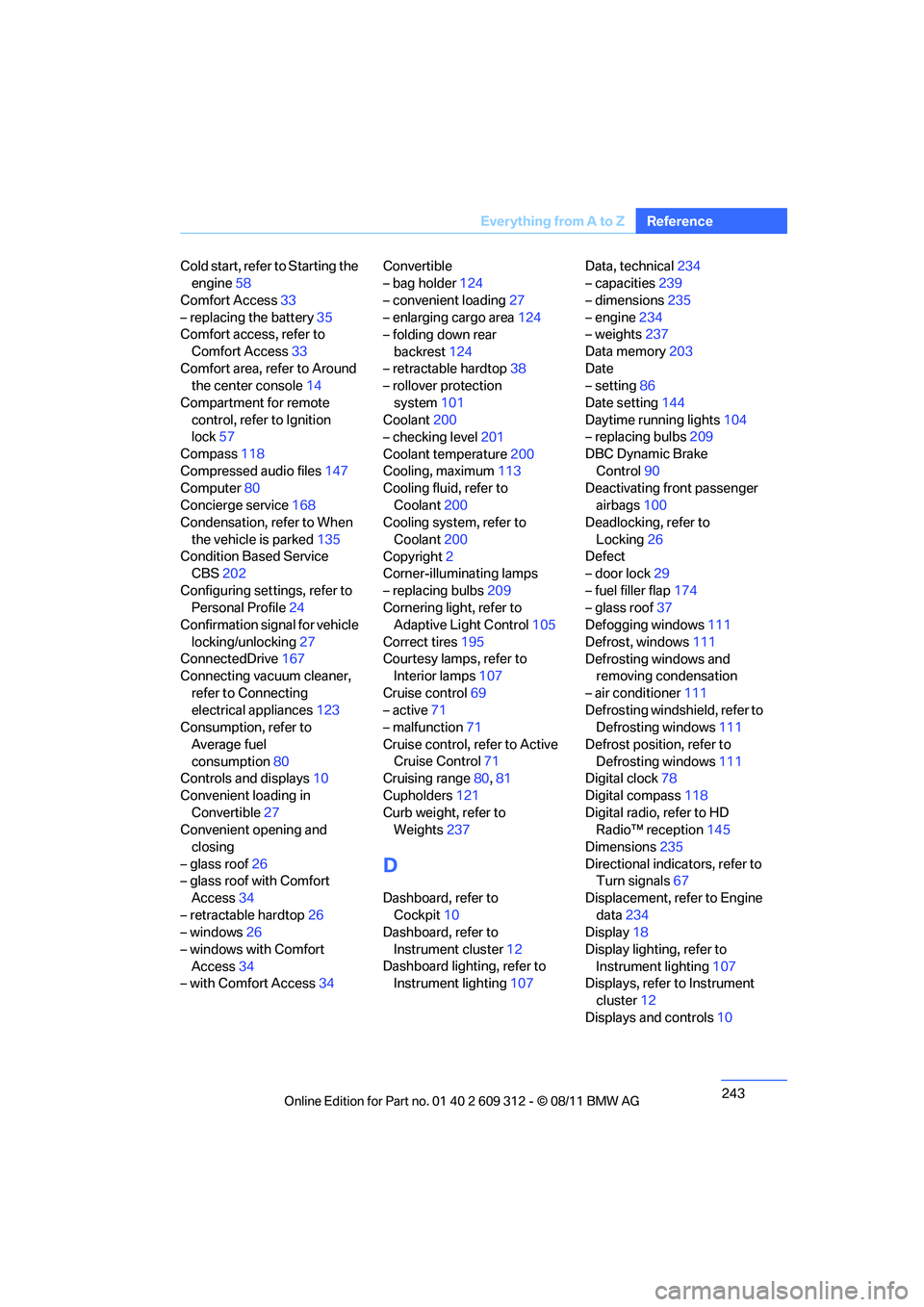
243
Everything from A to Z
Reference
Cold start, refer to Starting the
engine 58
Comfort Access 33
– replacing the battery 35
Comfort access, refer to
Comfort Access 33
Comfort area, refer to Around the center console 14
Compartment for remote control, refer to Ignition
lock 57
Compass 118
Compressed audio files 147
Computer 80
Concierge service 168
Condensation, refer to When
the vehicle is parked 135
Condition Based Service CBS 202
Configuring settings, refer to Personal Profile 24
Confirmation signal for vehicle
locking/unlocking 27
ConnectedDrive 167
Connecting vacuum cleaner,
refer to Connecting
electrical appliances 123
Consumption, refer to
Average fuel
consumption 80
Controls and displays 10
Convenient loading in Convertible 27
Convenient opening and
closing
– glass roof 26
– glass roof with Comfort
Access 34
– retractable hardtop 26
– windows 26
– windows with Comfort Access 34
– with Comfort Access 34Convertible
– bag holder
124
– convenient loading 27
– enlarging cargo area 124
– folding down rear
backrest 124
– retractable hardtop 38
– rollover protection
system 101
Coolant 200
– checking level 201
Coolant temperature 200
Cooling, maximum 113
Cooling fluid, refer to
Coolant 200
Cooling system, refer to
Coolant 200
Copyright 2
Corner-illuminating lamps
– replacing bulbs 209
Cornering light, refer to
Adaptive Light C
ontrol105
Correct tires 195
Courtesy lamps, refer to Interior lamps 107
Cruise control 69
– active 71
– malfunction 71
Cruise control, refer to Active Cruise Control 71
Cruising range 80,81
Cupholders 121
Curb weight, refer to Weights 237
D
Dashboard, refer to
Cockpit 10
Dashboard, refer to
Instrument cluster 12
Dashboard lighting, refer to Instrument lighting 107Data, technical
234
– capacities 239
– dimensions 235
– engine 234
– weights 237
Data memory 203
Date
– setting 86
Date setting 144
Daytime running lights 104
– replacing bulbs 209
DBC Dynamic Brake Control 90
Deactivating front passenger
airbags 100
Deadlocking, refer to
Locking 26
Defect
– door lock 29
– fuel filler flap 174
– glass roof 37
Defogging windows 111
Defrost, windows 111
Defrosting windows and removing condensation
– air conditioner 111
Defrosting windshield, refer to Defrosting windows 111
Defrost position, refer to Defrosting windows 111
Digital clock 78
Digital compass 118
Digital radio, refer to HD Radio™ reception 145
Dimensions 235
Directional indicators, refer to Turn signals 67
Displacement, refer to Engine data 234
Display 18
Display lighting, refer to Instrument lighting 107
Displays, refer to Instrument
cluster 12
Displays and controls 10
Online Edition for Part no. 01 40 2 609 312 - \251 08/11 BMW AG
Page 245 of 255
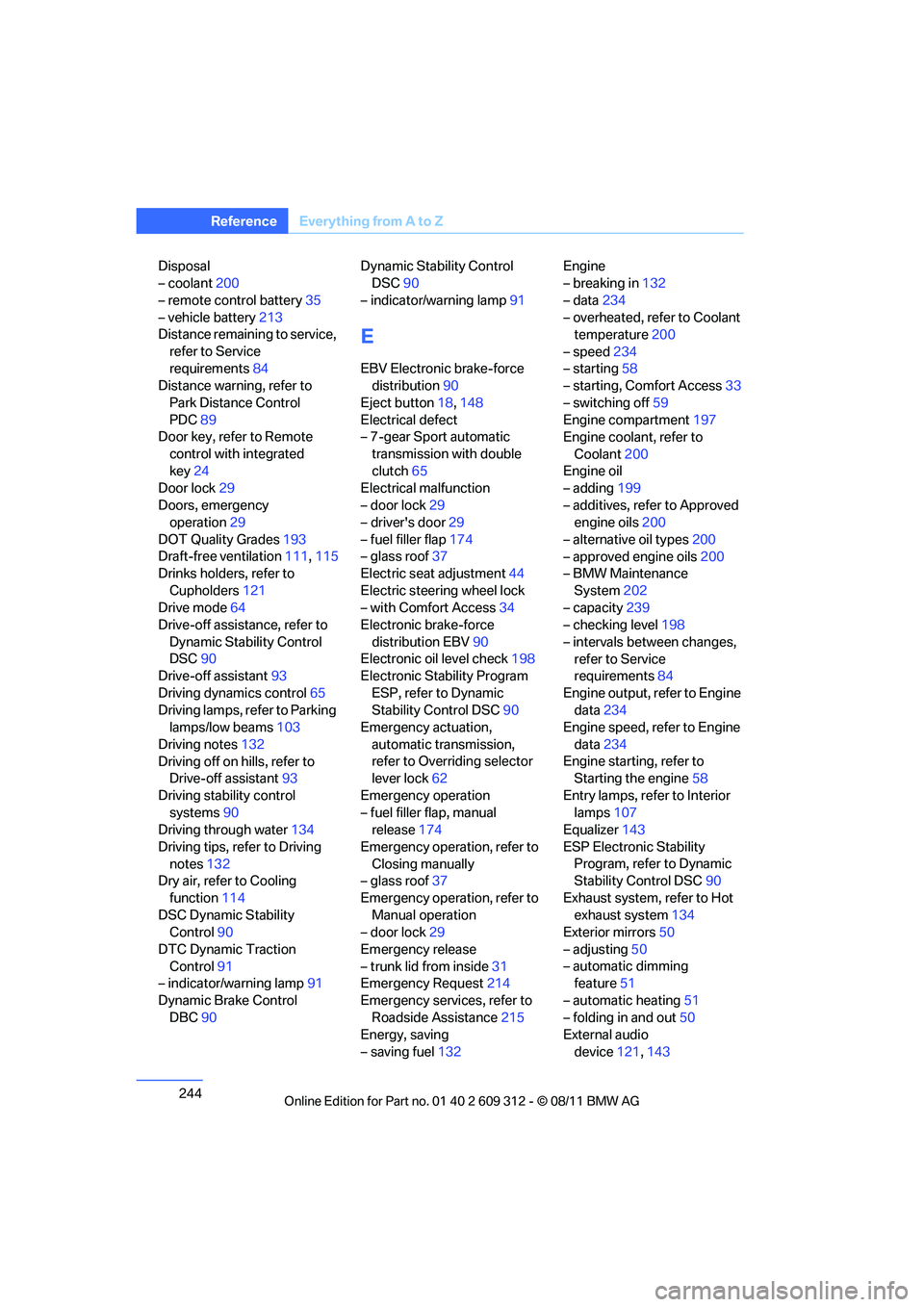
244
ReferenceEverything from A to Z
Disposal
– coolant200
– remote control battery 35
– vehicle battery 213
Distance remaining to service,
refer to Service
requirements 84
Distance warning, refer to
Park Distance Control
PDC 89
Door key, refer to Remote
control with integrated
key 24
Door lock 29
Doors, emergency operation 29
DOT Quality Grades 193
Draft-free ventilation 111,115
Drinks holders, refer to
Cupholders 121
Drive mode 64
Drive-off assistance, refer to
Dynamic Stability Control
DSC 90
Drive-off assistant 93
Driving dynamics control 65
Driving lamps, refer to Parking lamps/low beams 103
Driving notes 132
Driving off on hills, refer to Drive-off assistant 93
Driving stability control systems 90
Driving through water 134
Driving tips, refer to Driving notes 132
Dry air, refer to Cooling
function 114
DSC Dynamic Stability Control 90
DTC Dynamic Traction Control 91
– indicator/warning lamp 91
Dynamic Brake Control DBC 90 Dynamic Stability Control
DSC 90
– indicator/warning lamp 91
E
EBV Electronic brake-force
distribution 90
Eject button 18,148
Electrical defect
– 7-gear Sport automatic
transmission with double
clutch 65
Electrical malfunction
– door lock 29
– driver's door 29
– fuel filler flap 174
– glass roof 37
Electric seat adjustment 44
Electric steering wheel lock
– with Comfort Access 34
Electronic brake-force
distribution EBV 90
Electronic oil level check 198
Electronic Stability Program
ESP, refer to Dynamic
Stability Control DSC 90
Emergency actuation,
automatic transmission,
refer to Overriding selector
lever lock 62
Emergency operation
– fuel filler flap, manual release 174
Emergency operation, refer to Closing manually
– glass roof 37
Emergency operation, refer to Manual operation
– door lock 29
Emergency release
– trunk lid from inside 31
Emergency Request 214
Emergency services, refer to Roadside Assistance 215
Energy, saving
– saving fuel 132 Engine
– breaking in
132
– data 234
– overheated, refer to Coolant temperature 200
– speed 234
– starting 58
– starting, Comfort Access 33
– switching off 59
Engine compartment 197
Engine coolant, refer to
Coolant 200
Engine oil
– adding 199
– additives, refer to Approved engine oils 200
– alternative oil types 200
– approved engine oils 200
– BMW Maintenance
System 202
– capacity 239
– checking level 198
– intervals between changes, refer to Service
requirements 84
Engine output, refer to Engine data 234
Engine speed, ref
er to Engine
data 234
Engine starting, refer to Starting the engine 58
Entry lamps, refer to Interior lamps 107
Equalizer 143
ESP Electronic Stability Program, refer to Dynamic
Stability Control DSC 90
Exhaust system, refer to Hot exhaust system 134
Exterior mirrors 50
– adjusting 50
– automatic dimming feature 51
– automatic heating 51
– folding in and out 50
External audio
device 121,143
Online Edition for Part no. 01 40 2 609 312 - \251 08/11 BMW AG
Page 253 of 255
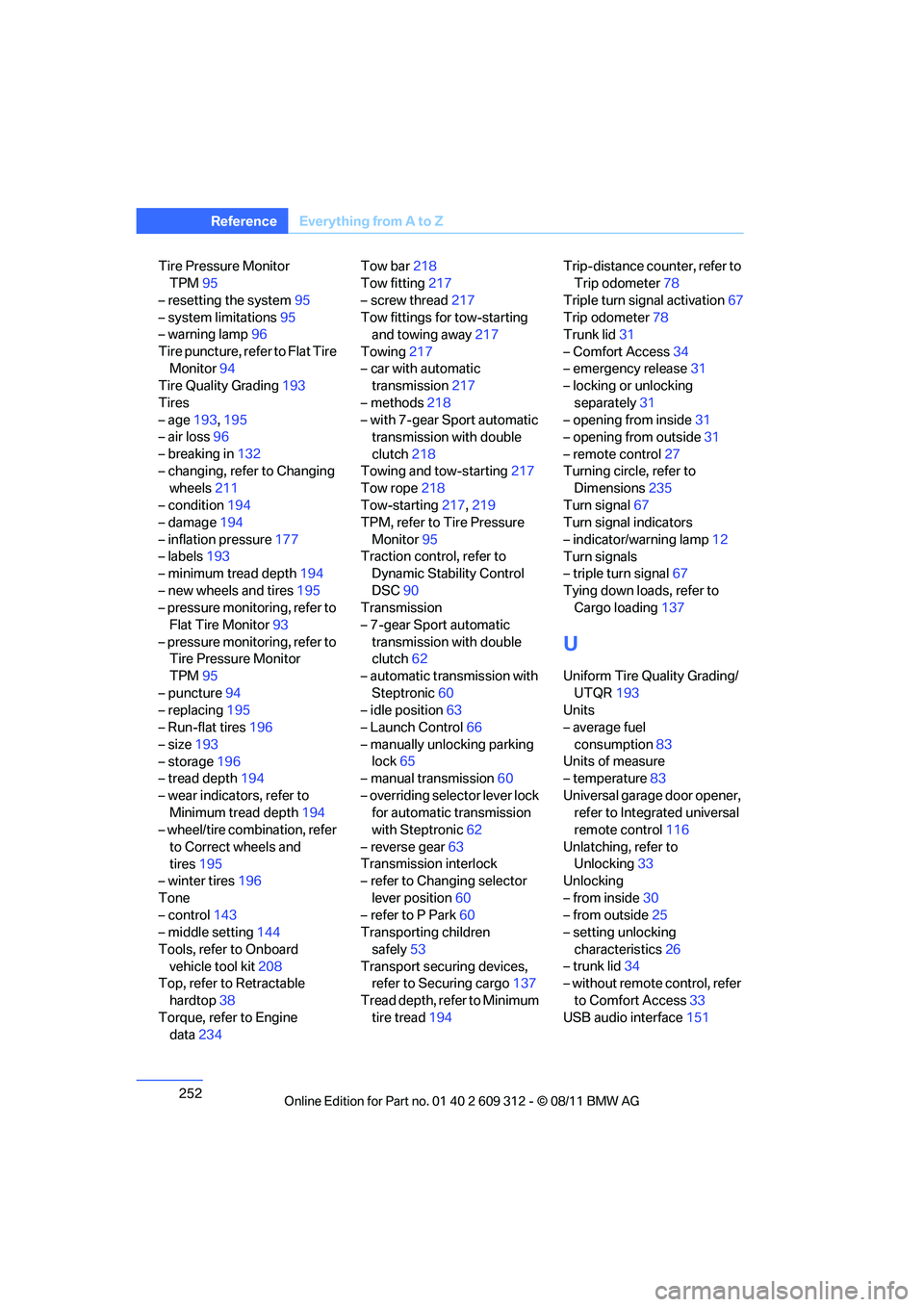
252
ReferenceEverything from A to Z
Tire Pressure Monitor
TPM 95
– resetting the system 95
– system limitations 95
– warning lamp 96
Tire puncture, refer to Flat Tire Monitor 94
Tire Quality Grading 193
Tires
– age 193,195
– air loss 96
– breaking in 132
– changing, refer to Changing wheels 211
– condition 194
– damage 194
– inflation pressure 177
– labels 193
– minimum tread depth 194
– new wheels and tires 195
– pressure monitoring, refer to Flat Tire Monitor 93
– pressure monitoring, refer to Tire Pressure Monitor
TPM 95
– puncture 94
– replacing 195
– Run-flat tires 196
– size 193
– storage 196
– tread depth 194
– wear indicators, refer to Minimum tread depth 194
– wheel/tire combination, refer
to Correct wheels and
tires 195
– winter tires 196
Tone
– control 143
– middle setting 144
Tools, refer to Onboard vehicle tool kit 208
Top, refer to Retractable
hardtop 38
Torque, refer to Engine data 234 Tow bar
218
Tow fitting 217
– screw thread 217
Tow fittings for tow-starting and towing away 217
Towing 217
– car with automatic transmission 217
– methods 218
– with 7-gear Sport automatic transmission with double
clutch 218
Towing and tow-starting 217
Tow rope 218
Tow-s
tarting 217,219
TPM, refer to Tire Pressure
Monitor 95
Traction control, refer to Dynamic Stability Control
DSC 90
Transmission
– 7-gear Sport automatic
transmission with double
clutch 62
– automatic transmission with
Steptronic 60
– idle position 63
– Launch Control 66
– manually unlocking parking lock 65
– manual transmission 60
– overriding selector lever lock for automatic transmission
with Steptronic 62
– reverse gear 63
Transmission interlock
– refer to Changing selector
lever position 60
– refer to P Park 60
Transporting children
safely 53
Transport securing devices, refer to Securing cargo 137
Tread depth, refer to Minimum tire tread 194 Trip-distance coun
ter, refer to
Trip odometer 78
Triple turn signal activation 67
Trip odometer 78
Trunk lid 31
– Comfort Access 34
– emergency release 31
– locking or unlocking
separately 31
– opening from inside 31
– opening from outside 31
– remote control 27
Turning circle, refer to Dimensions 235
Turn signal 67
Turn signal indicators
– indicator/warning lamp 12
Turn signals
– triple turn signal 67
Tying down loads, refer to Cargo loading 137
U
Uniform Tire Quality Grading/
UTQR 193
Units
– average fuel
consumption 83
Units of measure
– temperature 83
Universal garage door opener, refer to Integrated universal
remote control 116
Unlatching, refer to Unlocking 33
Unlocking
– from inside 30
– from outside 25
– setting unlocking
characteristics 26
– trunk lid 34
– without remote control, refer
to Comfort Access 33
USB audio interface 151
Online Edition for Part no. 01 40 2 609 312 - \251 08/11 BMW AG