change time BMW M3 CONVERTIBLE 2012 User Guide
[x] Cancel search | Manufacturer: BMW, Model Year: 2012, Model line: M3 CONVERTIBLE, Model: BMW M3 CONVERTIBLE 2012Pages: 255, PDF Size: 6.32 MB
Page 115 of 255
114
ControlsClimate
The recirculated air mode should not be
used over an extended period of time;
otherwise, the air quality inside the car will dete-
riorate continuously. <
Via the button on the steering wheel
You can switch quickly between the recircu-
lated air mode and the previous mode using a
button on the steering wheel, refer to page 11.
ALL program
Press the button.
The current temperature setting
on the driver's side is transferred to
the front passenger side.
If the temperature setting on the driver's side is
changed, the temperature on the front passen-
ger side is changed as well.
The program is switched off when the setting is
adjusted on the front passenger side or the but-
ton is pressed again.
Defrosting windows and removing
condensation
Press the button.
Quickly removes ice and conden-
sation from the windshield and
front side windows.
For this purpose, also switch on the cooling
function.
Switching cooling function on/off
The passenger compartment can only be
cooled while the engine is running.
Press the button.
The air is cooled and dehumidified
and – depending on the tempera-
ture setting – warmed again.
Depending on the weather, the windshield may
fog up briefly when the engine is started.
Pressing the AUTO button automatically
switches on the cooling function.
Rear window defroster
Press the button.
The defroster is switched off auto-
matically after a certain time.
Depending on your vehicle's equipment, the
upper wires serve as an antenna and are not
part of the rear window defroster.
Switching the system on/off
Switching off
With the blower at its lowest set-
ting, press the left side of the but-
ton to switch off the automatic cli-
mate control.
All displays are cleared except for the rear win-
dow defroster if it is switched on.
The outside air supply is blocked when
the automatic climate control is switched
off. If the air quality deteriorates or the window
fogs over, switch the system back on and
increase the air volume. <
Switching on
Press any button except the ALL or the rear
window defroster button to reactivate the auto-
matic climate control.
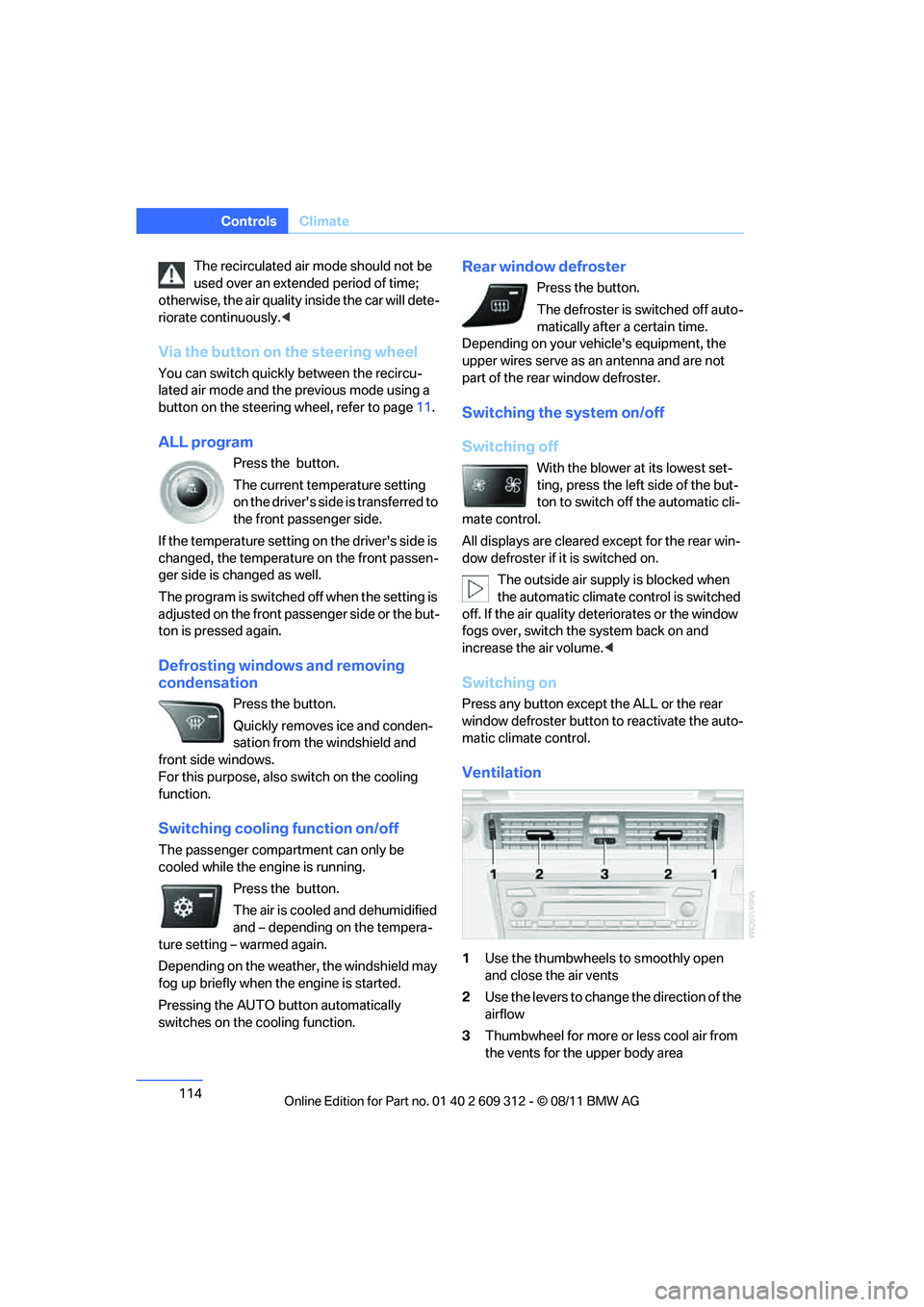
Ventilation
1 Use the thumbwheels to smoothly open
and close the air vents
2 Use the levers to change the direction of the
airflow
3 Thumbwheel for more or less cool air from
the vents for the upper body area
Online Edition for Part no. 01 40 2 609 312 - \251 08/11 BMW AG
Page 118 of 255
117
Practical interior accessories
Controls
3.
Hold the hand-held transmitter of the
device to be controlled approx. 1 in/2.5 cm
to 3 in/8 cm away from the buttons on the
inside mirror.
The required distance depends on the
hand-held transmitter.
4. Simultaneously press and hold the button
of the desired function on the hand-held
transmitter and the button to be pro-
grammed on the inside mirror.
The LED on the inside mirror will flash
slowly at first.
5. As soon as the LED flashes rapidly, release
both buttons. The rapid flashing indicates
that the button on the inside mirror has
been programmed.
If the LED does not flash rapidly within
60 seconds, change the distance between
the inside mirror and the hand-held trans-
mitter and repeat this step. This may
require several attemp ts. Allow at least
15 seconds between attempts.
6. To program additional functions on the
other buttons of the inside mirror, repeat
steps 3 through 5.
The buttons on the inside mirror can be used to
operate the devices if the ignition is switched
on.
Special procedure with alternating-
code systems
If the device fails to func tion even after repeated
programming, check whether the device to be
controlled uses an alte rnating-code system.
To do so, either read the instructions for the
device or hold down the programmed button on
the inside mirror. If the LED on the inside mirror
flashes quickly at first and then remains lit for
2 seconds, the device uses an alternating-code
system. The LED flashes and lights up repeat-
edly for approx. 20 seconds.
In devices with an alternating-code system, the
Integrated universal re mote control and the
device must also be synchronized. For information about synchronizing can also
be found in the operating instructions for the
device to be set.
Programming will be easier with the aid of a
second person.
Synchronizing:
1.
Park your vehicle with in the range of the
remote-controlled device.
2. Program the Integrated universal remote
control as described above.
3. Locate and press the synchronization but-
ton on the device to be set. You have
approx. 30 seconds to perform the next
step.
4. Hold down the programmed button on the
inside mirror for approx. 3 seconds and then
release it. Repeat this operation, up to three
times if necessary, to complete the syn-
chronization. If the synchronization has
succeeded, the programmed function is
performed.
Reprogramming individual buttons
1. Switch on the ignition.
2. Hold the hand-held transmitter of the
device to be controlled approx. 1 in/2.5 cm
bis 3 in/8 cm away from the buttons on the
inside mirror.
The required distance depends on the
hand-held transmitter.
3. Press the desired button on the inside mir-
ror.
4. If the LED on the inside mirror flashes
slowly after approx. 20 seconds, press the
transmit key of the hand-held transmitter.
5. As soon as the LED flashes rapidly, release
both buttons.
If the LED does not flash rapidly after
approx. 60 seconds, alter the distance and
repeat the step.
Online Edition for Part no. 01 40 2 609 312 - \251 08/11 BMW AG
Page 210 of 255
209
Replacing components
Mobility
When working on electrical systems,
always begin by switching off the con-
sumer in question; otherwise, short-circuits
could result. To avoid possible injury or equip-
ment damage when replacing bulbs, observe
any instructions provided by the bulb manufac-
turer. <
For care of the headla mps, please follow the
instructions in the ch apter entitled 'Care'.
To replace lamps not described here,
please contact your BMW center. <
Light-emitting diodes LED
Light-emitting diodes installed behind translu-
cent lenses serve as the light source for many of
the controls, displays, and equipment in your
vehicle. These light-emitting diodes, which
operate using a concept similar to that applied
in conventional lasers, are officially designated
as Class 1 light-emitting diodes.
Do not remove the co vers or expose the
eyes directly to the unfiltered light source
for several hours; otherw ise, this could cause
irritation of the retina. <
Headlight lenses
In cool or humid weather, condensation may
form on the interior of outside lamps. The con-
densation will disappear after a short time when
driving with the headlamps switched on. The
headlamp glasses do not need to be changed.
If the headlamps do not defrost despite driving
with the headlamps switch ed on, and additional
moisture builds up, for example water droplets
in the lamps, have them checked by your BMW
center.
Xenon lamps
These bulbs have a very lo ng service life and are
highly unlikely to fail. If a xenon lamp fails never-
theless, switch on the fog lamps and continue
the journey with great ca re, provided that local
legislation does not prohibit this. Have all work on the xenon lamp system,
including bulb replacements, performed
only by your BMW center . Due to high voltage,
there is a risk of fatal injury if work on the xenon
lamps is carried out improperly. <
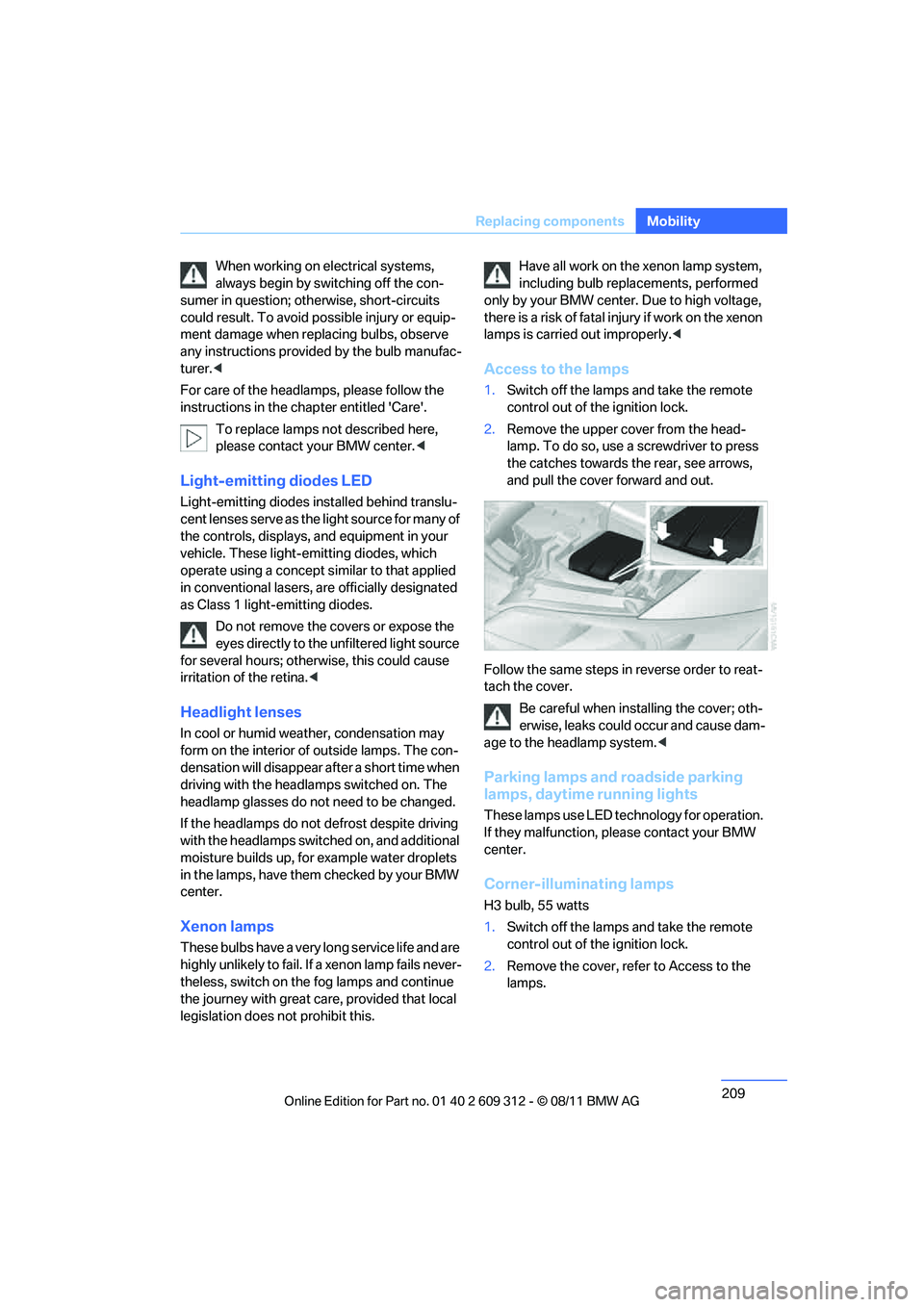
Access to the lamps
1.Switch off the lamps and take the remote
control out of the ignition lock.
2. Remove the upper co ver from the head-
lamp. To do so, use a screwdriver to press
the catches towards the rear, see arrows,
and pull the cover forward and out.
Follow the same steps in reverse order to reat-
tach the cover. Be careful when inst alling the cover; oth-
erwise, leaks could occur and cause dam-
age to the headlamp system.<
Parking lamps and roadside parking
lamps, daytime running lights
These lamps use LED technology for operation.
If they malfunction, please contact your BMW
center.
Corner-illuminating lamps
H3 bulb, 55 watts
1. Switch off the lamps and take the remote
control out of the ignition lock.
2. Remove the cover, re fer to Access to the
lamps.
Online Edition for Part no. 01 40 2 609 312 - \251 08/11 BMW AG
Page 232 of 255
231
Indicator and warning lamps
Mobility
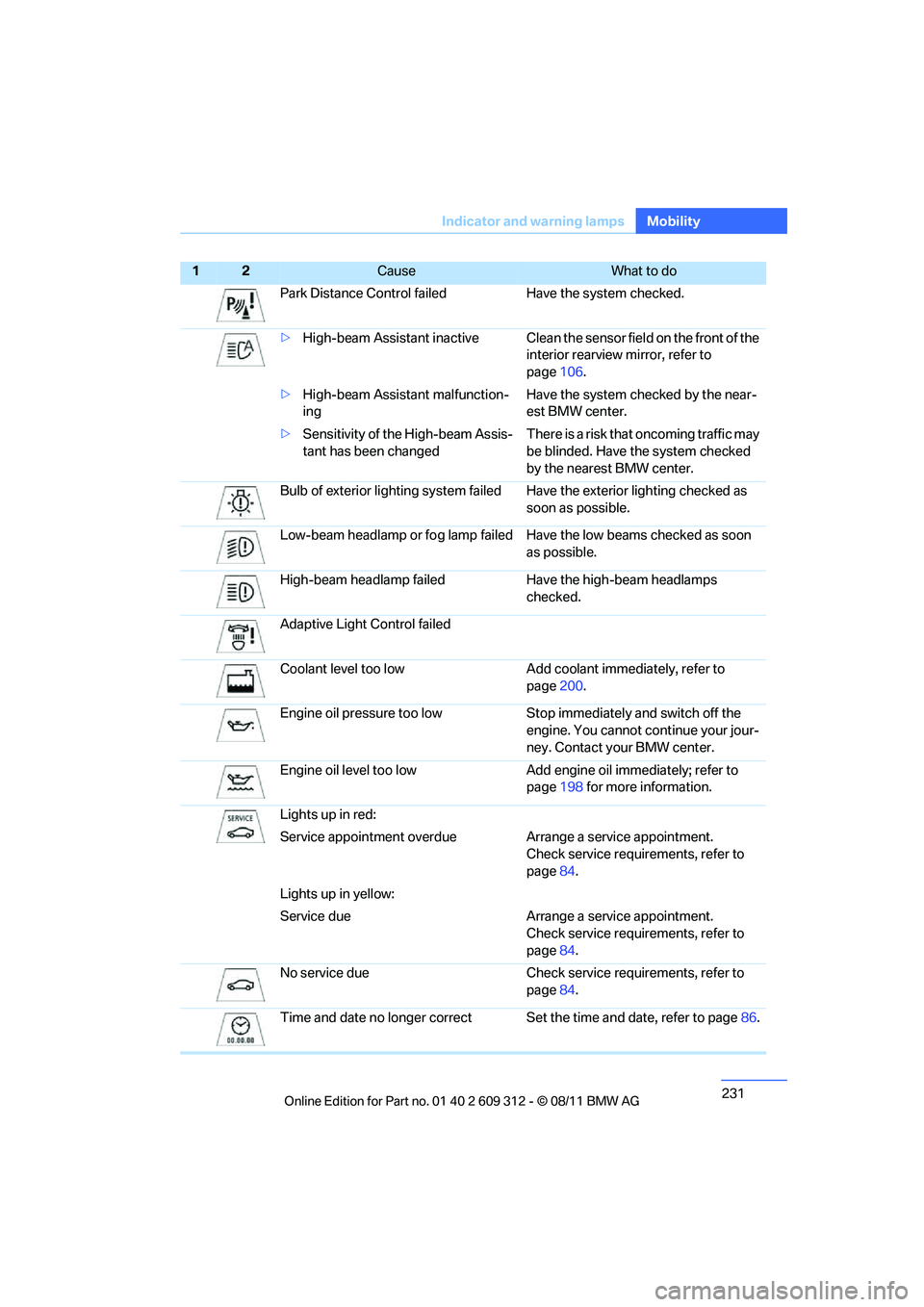
Park Distance Control faile
d Have the system checked.
> High-beam Assistant inactive Clean the sensor field on the front of the
interior rearview mirror, refer to
page 106.
> High-beam Assistant malfunction-
ing Have the system checked by the near-
est BMW center.
> Sensitivity of the High-beam Assis-
tant has been changed There is a risk that oncoming traffic may
be blinded. Have the system checked
by the nearest BMW center.
Bulb of exterior lighting system failed Have the exterior lighting checked as soon as possible.
Low-beam headlamp or fo g lamp failed Have the low beams checked as soon
as possible.
High-beam headlamp failed Hav e the high-beam headlamps
checked.
Adaptive Light Control failed
Coolant level too low Add coolant immediately, refer to page200.
Engine oil pressure too low Stop immediately and switch off the
engine. You cannot co ntinue your jour-
ney. Contact your BMW center.
Engine oil level too low Add engi ne oil immediately; refer to
page 198 for more information.
Lights up in red:
Service appointment overdue Arr ange a service appointment.
Check service requirements, refer to
page 84.
Lights up in yellow:
Service due Arrange a service appointment.
Check service requirements, refer to
page 84.
No service due Check servic e requirements, refer to
page 84.
Time and date no longer correct Set the time and date, refer to page86.
12Cause What to do
Online Edition for Part no. 01 40 2 609 312 - \251 08/11 BMW AG
Page 243 of 255
242
ReferenceEverything from A to Z
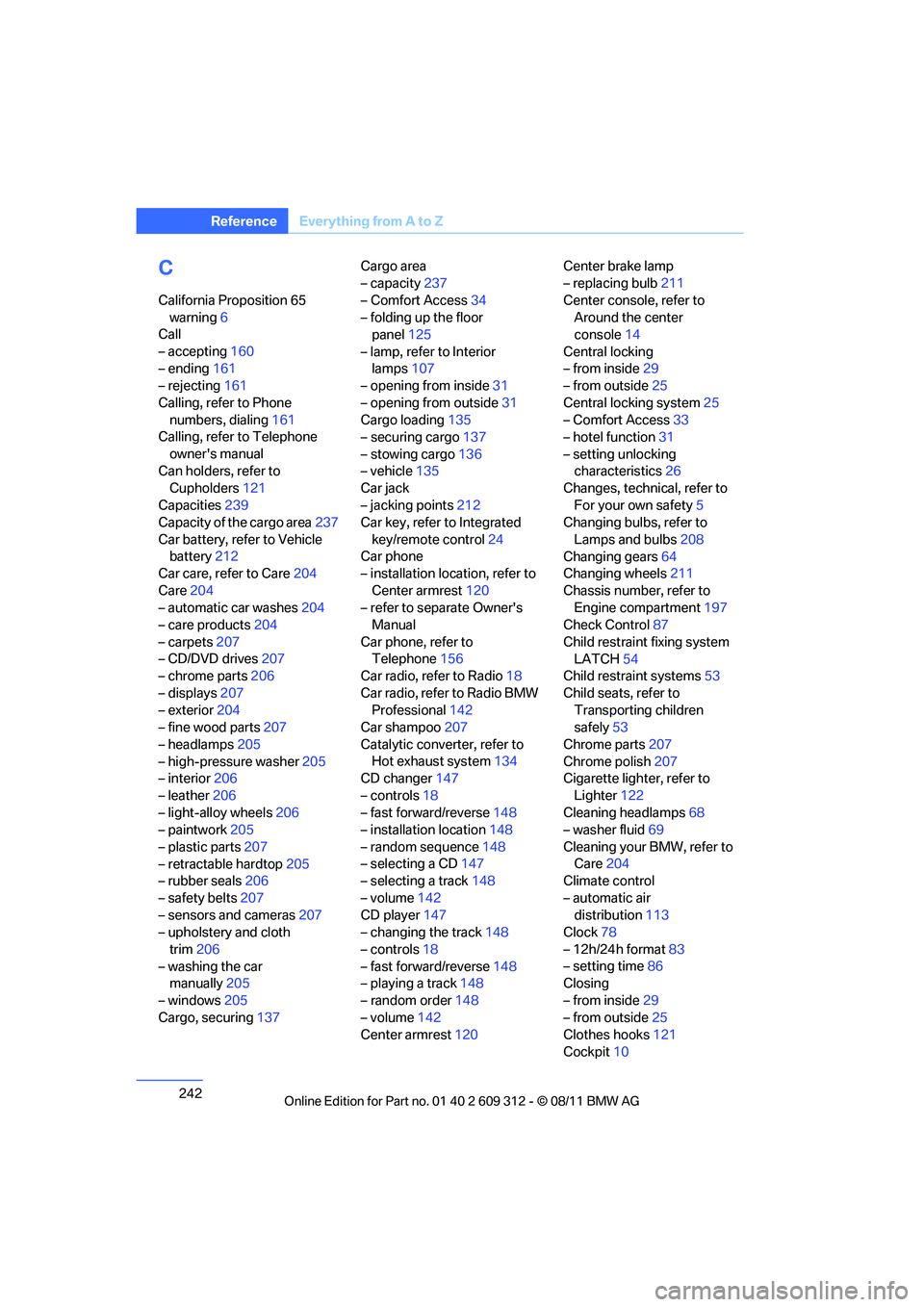
C
California Proposition 65
warning 6
Call
– accepting 160
– ending 161
– rejecting 161
Calling, refer to Phone numbers, dialing 161
Calling, refer to Telephone
owner's manual
Can holders, refer to Cupholders 121
Capacities 239
Capacity of the cargo area 237
Car battery, refer to Vehicle battery 212
Car care, refer to Care 204
Care 204
– automatic car washes 204
– care products 204
– carpets 207
– CD/DVD drives 207
– chrome parts 206
– displays 207
– exterior 204
– fine wood parts 207
– headlamps 205
– high-pressure washer 205
– interior 206
– leather 206
– light-alloy wheels 206
– paintwork 205
– plastic parts 207
– retractable hardtop 205
– rubber seals 206
– safety belts 207
– sensors and cameras 207
– upholstery and cloth
trim 206
– washing the car manually 205
– windows 205
Cargo, securing 137 Cargo area
– capacity
237
– Comfort Access 34
– folding up the floor panel 125
– lamp, refer to Interior lamps 107
– opening from inside 31
– opening from outside 31
Cargo loading 135
– securing cargo 137
– stowing cargo 136
– vehicle 135
Car jack
– jacking points 212
Ca
r key, refer to Integrated
key/remote control 24
Car phone
– installation location, refer to
Center armrest 120
– refer to separate Owner's Manual
Car phone, refer to Telephone 156
Car radio, refer to Radio 18
Car radio, refer to Radio BMW Professional 142
Car shampoo 207
Catalytic converter, refer to Hot exhaust system 134
CD changer 147
– controls 18
– fast forward/reverse 148
– installation location 148
– random sequence 148
– selecting a CD 147
– selecting a track 148
– volume 142
CD player 147
– changing the track 148
– controls 18
– fast forward/reverse 148
– playing a track 148
– random order 148
– volume 142
Center armrest 120 Center brake lamp
– replacing bulb
211
Center console, refer to Around the center
console 14
Central locking
– from inside 29
– from outside 25
Central locking system 25
– Comfort Access 33
– hotel function 31
– setting unlocking characteristics 26
Changes, technical, refer to
For your own safety 5
Changing bulbs, refer to
Lamps and bulbs 208
Changing gears 64
Changing wheels 211
Chassis number, refer to Engine compartment 197
Check Control 87
Child restraint fixing system LATCH 54
Child restraint systems 53
Child seats, refer to Transporting children
safely 53
Chrome parts 207
Chrome polish 207
Cigarette lighter, refer
to
Lighter 122
Cleaning headlamps 68
– washer fluid 69
Cleaning your BMW, refer to Care 204
Climate control
– automatic air distribution 113
Clock 78
– 12h/24h format 83
– setting time 86
Closing
– from inside 29
– from outside 25
Clothes hooks 121
Cockpit 10
Online Edition for Part no. 01 40 2 609 312 - \251 08/11 BMW AG
Page 251 of 255
250
ReferenceEverything from A to Z
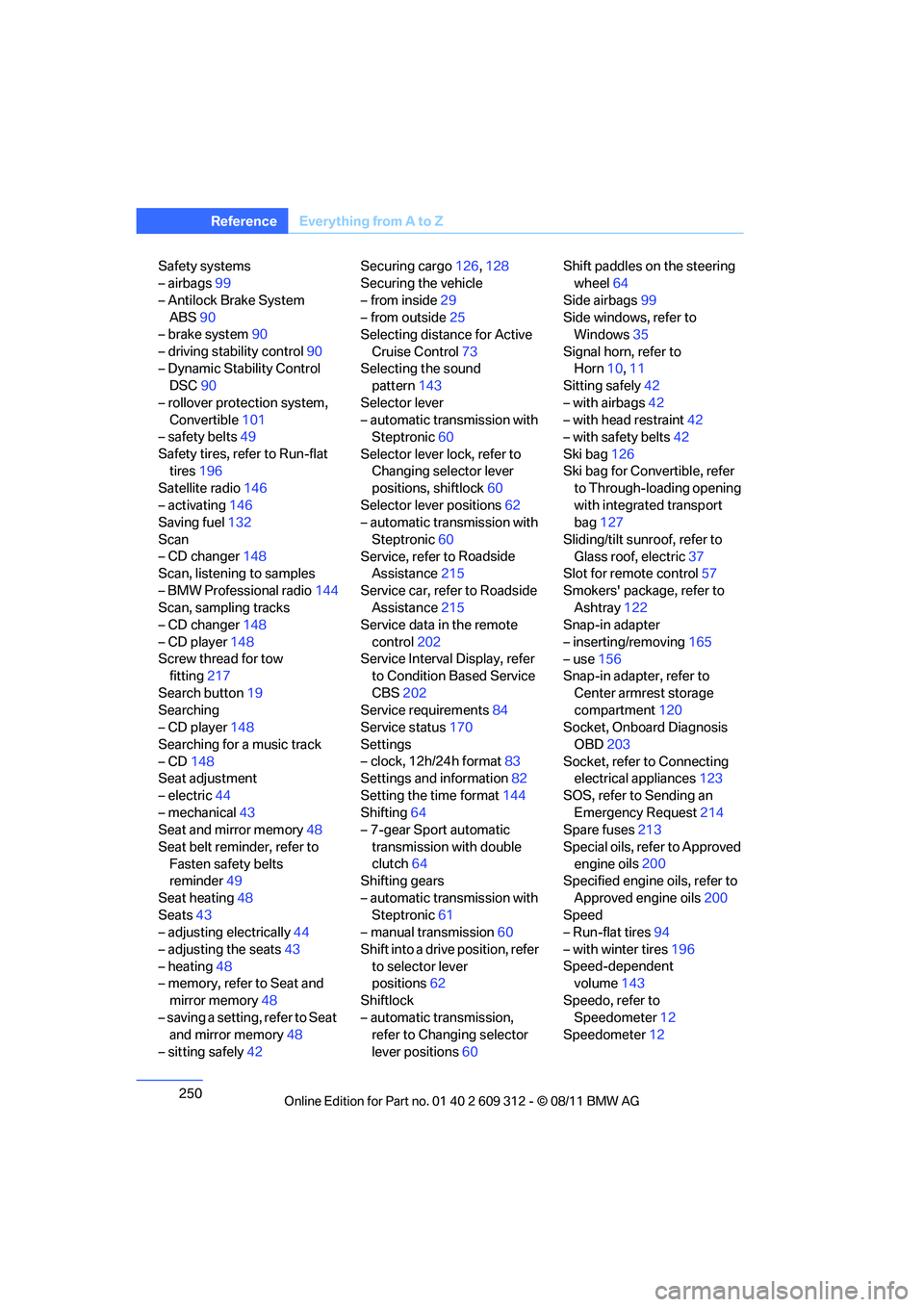
Safety systems
– airbags99
– Antilock Brake System ABS 90
– brake system 90
– driving stability control 90
– Dynamic Stability Control DSC 90
– rollover protection system, Convertible 101
– safety belts 49
Safety tires, refer to Run-flat tires 196
Satellite radio 146
– activating 146
Saving fuel 132
Scan
– CD changer 148
Scan, listening to samples
– BMW Professional radio 144
Scan, sampling tracks
– CD changer 148
– CD player 148
Screw thread for tow fitting 217
Search button 19
Searching
– CD player 148
Searching for a music track
– CD 148
Seat adjustment
– electric 44
– mechanical 43
Seat and mirror memory 48
Seat belt reminder, refer to Fasten safety belts
reminder 49
Seat heating 48
Seats 43
– adjusting electrically 44
– adjusting the seats 43
– heating 48
– memory, refer to Seat and
mirror memory 48
– saving a setting, refer to Seat and mirror memory 48
– sitting safely 42 Securing cargo
126,128
Securing the vehicle
– from inside 29
– from outside 25
Selecting distance for Active
Cruise Control 73
Selecting the sound pattern 143
Selector lever
– automatic transmission with Steptronic 60
Selector lever lock, refer to Changing selector lever
positions, shiftlock 60
Selector lever positions 62
– automatic transmission with
Steptronic 60
Service, refer to
Roadside
Assistance 215
Service car, refer to Roadside Assistance 215
Service data in the remote
control 202
Service Interval Display, refer to Condition Based Service
CBS 202
Service requirements 84
Service status 170
Settings
– clock, 12h/24h format 83
Settings and information 82
Setting the time format 144
Shifting 64
– 7-gear Sport automatic
transmission with double
clutch 64
Shifting gears
– automatic transmission with Steptronic 61
– manual transmission 60
Shift into a drive position, refer to selector lever
positions 62
Shiftlock
– automatic transmission, refer to Changing selector
lever positions 60 Shift paddles on the steering
wheel 64
Side airbags 99
Side windows, refer to Windows 35
Signal horn, refer to Horn 10,11
Sitting safely 42
– with airbags 42
– with head restraint 42
– with safety belts 42
Ski bag 126
Ski bag for Convertible, refer to Through-loading opening
with integrated transport
bag 127
Sliding/tilt sunroof, refer to Glass roof, electric 37
Slot for remote control 57
Smokers' package, refer to Ashtray 122
Snap-in adapter
– inserting/removing 165
– use 156
Snap-in adapter, refer to
Center armrest storage
compartment 120
Socket, Onboard Diagnosis
OBD 203
Socket, refer to Connecting electrical appliances 123
SOS, refer to Sending an Emergency Request 214
Spare fuses 213
Special oils, refer to Approved engine o
ils200
Specified engine oils, refer to
Approved engine oils 200
Speed
– Run-flat tires 94
– with winter tires 196
Speed-dependent volume 143
Speedo, refer to Speedometer 12
Speedometer 12
Online Edition for Part no. 01 40 2 609 312 - \251 08/11 BMW AG
Page 252 of 255
251
Everything from A to Z
Reference
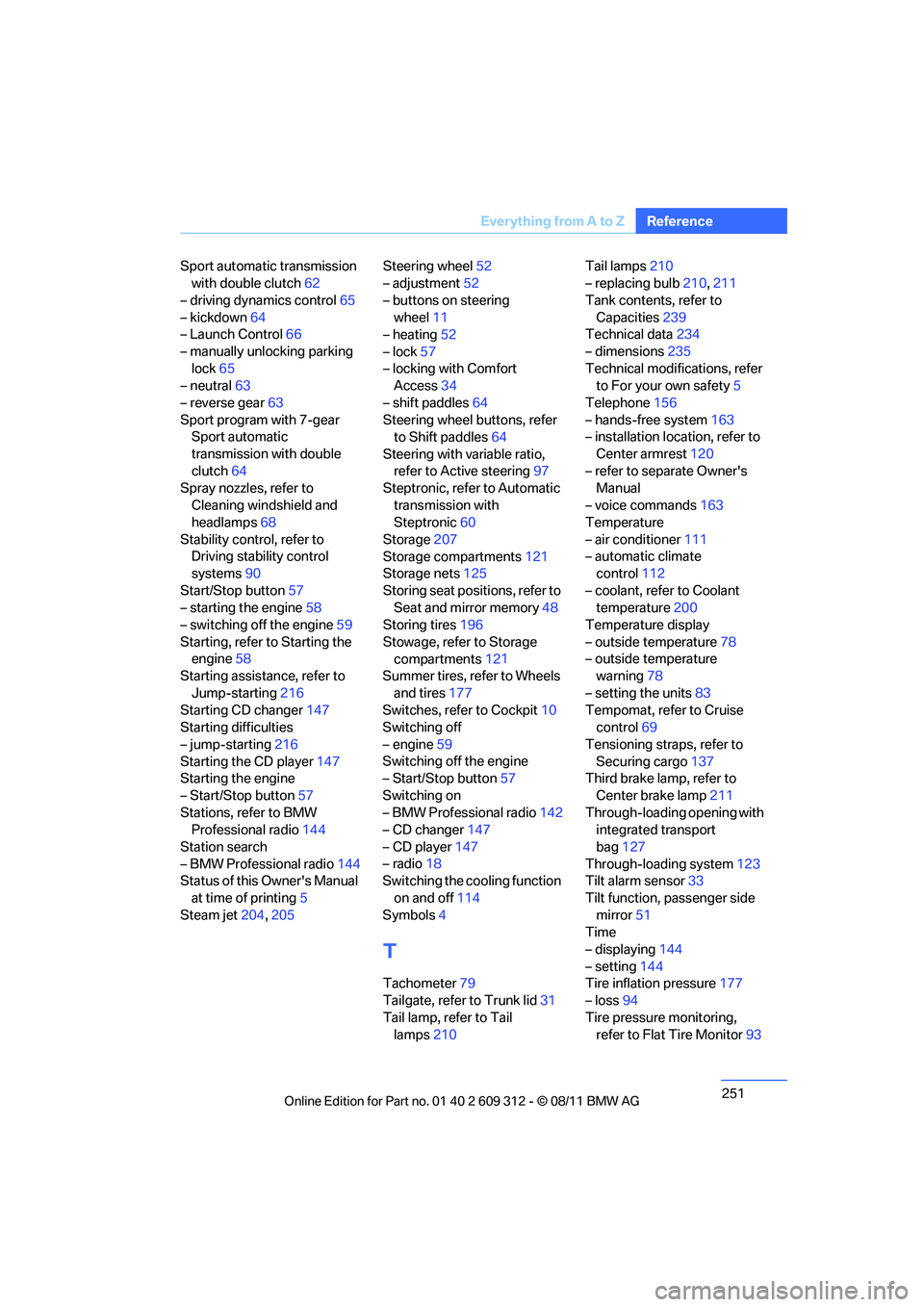
Sport automatic transmission
with double clutch 62
– driving dynamics control 65
– kickdown 64
– Launch Control 66
– manually unlocking parking lock 65
– neutral 63
– reverse gear 63
Sport program with 7-gear Sport automatic
transmission with double
clutch 64
Spray nozzles, refer to
Cleaning windshield and
headlamps 68
Stability control, refer to Driving stability control
systems 90
Start/Stop button 57
– starting the engine 58
– switching off the engine 59
Starting, refer to Starting the engine 58
Starting assistance, refer to
Jump-starting 216
Starting CD changer 147
Starting difficulties
– jump-starting 216
Starting the CD player 147
Starting the engine
– Start/Stop button 57
Stations, refer to BMW Professional radio 144
Station search
– BMW Professional radio 144
Status of this Owner's Manual
at time of printing 5
Steam jet 204,205 Steering wheel
52
– adjustment 52
– buttons on steering wheel 11
– heating 52
– lock 57
– locking with Comfort Access 34
– shift paddles 64
Steering wheel buttons, refer to Shift paddles 64
Steering with variable ratio, refer to Active steering 97
Steptronic, refer to Automatic
transmission with
Steptronic 60
Storage 207
Storage compartments 121
Storage nets 125
Storing seat positions, refer to Seat and mirror memory 48
Storing tires 196
Stowage, refer to Storage compartments 12
1
Summer tires, refer to Wheels
and tires 177
Switches, refer to Cockpit 10
Switching off
– engine 59
Switching off the engine
– Start/Stop button 57
Switching on
– BMW Professional radio 142
– CD changer 147
– CD player 147
– radio 18
Switching the cooling function
on and off 114
Symbols 4
T
Tachometer 79
Tailgate, refer to Trunk lid 31
Tail lamp, refer to Tail lamps 210 Tail lamps
210
– replacing bulb 210,211
Tank contents, refer to Capacities 239
Technical data 234
– dimensions 235
Technical modifications, refer to For your own safety 5
Telephone 156
– hands-free system 163
– installation location, refer to
Center armrest 120
– refer to sepa rate Owner's
Manual
– voice commands 163
Temperature
– air conditioner 111
– automatic climate control 112
– coolant, refer to Coolant temperature 200
Temperature display
– outside temperature 78
– outside temperature warning 78
– setting the units 83
Tempomat, refer to Cruise control 69
Tensioning straps, refer to Securing cargo 137
Third brake lamp, refer to
Center brake lamp 211
Through-loading opening with integrated transport
bag 127
Through-loading system 123
Tilt alarm sensor 33
Tilt function, passenger side mirror 51
Time
– displaying 144
– setting 144
Tire inflation pressure 177
– loss 94
Tire pressure monitoring, refer to Flat Tire Monitor 93
Online Edition for Part no. 01 40 2 609 312 - \251 08/11 BMW AG