roof BMW M3 CONVERTIBLE 2013 E93 User Guide
[x] Cancel search | Manufacturer: BMW, Model Year: 2013, Model line: M3 CONVERTIBLE, Model: BMW M3 CONVERTIBLE 2013 E93Pages: 311, PDF Size: 6.89 MB
Page 142 of 311
137
Things to remember when driving
Driving tips
Check tire inflation pressure regularly
Check the tire inflation pr
essure at least twice a
month and before embarking on a long journey,
and correct it if necessary.
Low tire inflation pressure causes higher rolling
resistance and thus increases fuel consumption
and tire wear.
Set off immediately
Do not let the engine wa rm up while the car is
still standing, but set off immediately at moder-
ate engine speed. This is the fastest way for the
cold engine to reach its operating temperature.
Drive defensively
Avoid unnecessary acceleration and braking
maneuvers. To do so, keep an adequate dis-
tance between you and th e vehicle in front of
you. A defensive and smooth driving style
keeps fuel consumption down.
Avoid high engine speeds
Only use first gear when setting off. In second
and higher gears, accele rate without hesitation
or pauses. When accelera ting, shift up before
reaching high engine speeds.
When you reach the desi red speed, shift into
the highest applicable ge ar and drive with the
engine speed as low as possible and at a
constant speed.
As a rule: driving at low engine speeds lowers
fuel consumption and reduces wear.
Coasting
When approaching a red lig ht, take your foot off
the accelerator and coast to a stop in the high-
est applicable gear.
On a downhill slope, take your foot off the
accelerator and coast in a suitable gear.
The fuel supply is interrupted when coasting.
Switch off the engine during lengthy
stops
Switch off the engine when stopping for lengthy
periods, e.g. at traffic lights, railroad crossings
or in traffic congestions.
Switch off functions you do not need at
the moment
Functions such as the air conditioner, seat
heating or rear window defroster draw large
amounts of power and consume additional fuel.
Especially in city traffic and in stop-and-go driv-
ing they have a considerable impact. Therefore,
switch these functions off when they are not
really needed.
Have the vehicle serviced
Have the vehicle serviced regularly to achieve
good economy and a long vehicle life. BMW
recommends having the vehicle serviced at
your BMW center. Also note the BMW Mainte-
nance System, refer to page 260.
General driving notes
Close the trunk lid
Only drive with the trunk closed. Failure to
do so may endanger passengers or other
road users or may damage the vehicle in the
event of an accident or a braking and evasive
maneuver. In addition, exhaust gas may flow
into the passenger compartment. <
If special circumstance s make it absolutely
necessary to drive wi th the trunk open:
1. Close all windows and the glass roof.
2. Greatly increase the air volume of the
automatic climate cont rol system, refer to
page 117.
3. Drive cautiously.
00320051004F004C00510048000300280047004C0057004C005200510003
Page 146 of 311
141
Things to remember when driving
Driving tips
Securing cargo
>
Secure smaller and lighter items using
retaining straps, a trunk net, or draw straps.
> Heavy-duty cargo straps for securing larger
and heavier objects are available at your
BMW center. Four lashing eyes are pro-
vided for attaching the cargo straps. Two
are located on the side walls of the trunk 1
and two additional ones are located on the
inside wall of the trunk 2.
Comply with the information enclosed with
the load-securing devices.
Convertible: before opening the hardtop,
fold down the trunk pa rtition. Make sure
the trunk is loaded corre ctly; otherwise parts of
the hardtop can be damaged, refer to
page 128.<
Always position and secure the cargo as
described above, so that it cannot endan-
ger the car's occupants, for example if sudden
braking or swerving is necessary.
Never exceed either the approved gross vehicle
weight or either of the approved axle loads, refer
to page 281, as excessive loads can pose a
safety hazard, and may also place you in viola-
tion of traffic safety laws.
Heavy or hard objects should not be carried
loose inside the car, sinc e they could be thrown
around, for example as a result of heavy braking,
sudden swerves, etc., and endanger the
occupants.
Only attach the cargo st raps using the lashing
eyes shown in the illust ration. Do not secure
cargo with the anchors fo r tether straps, refer
to page 60, ; otherwise, these could be
damaged. <
Coupe: roof-mounted
luggage rack
A special rack system is available as an option
f o r y o u r B M W . C o m p l y w i t h t h e d i r e c t i o n s g i v e n
in the installation instructions.
Mounting points
The mounting points are located in the roof.
Loading roof-mounted luggage rack
Because roof racks raise the vehicle's center of
gravity when loaded, they have a major effect on
vehicle handling and steering response.
You should therefore always remember not to
exceed the approved roof load capacity, the
approved gross vehicle we ight or the axle loads
when loading the rack.
You can find the applicable data under Weights
on page 281.
The roof load must be distributed uniformly and
should not be too larg e in area. Heavy items
should always be placed at the bottom. Be sure
that adequate clearance is maintained for tilting
the glass roof, and that objects do not project
into the opening path of the trunk lid.
Fasten roof-mounted cargo correctly and
securely to prevent it fr om shifting or falling off
during the trip.
Drive smoothly. Avoid sudden acceleration and
braking maneuvers. Take corners gently.
00320051004F004C00510048000300280047004C0057004C005200510003
Page 216 of 311
211
Te l e p h o n e
Communications
Selecting an entry
Adjusting volume
Turn knob during announcement.
>
The volume remains the same, even if the
volume of other audio sources is changed.
> The volume is stored for the remote control
currently in use.
Notes
Notes on Emergency Requests
Do not use the voice operation system to ini-
tiate an emergency call. In stressful situations,
the voice and vocal pitch can change. This can
unnecessarily delay the establishment of a tele-
phone connection.
Instead, use the SOS button, refer to page 272,
in the vicinity of the interior rearview mirror.
Ambient conditions
> Say the commands, nu mbers and letters
smoothly and with normal volume, empha-
sis and speed.
> Always say the commands in the language
of the system. The language of the voice
operation of the mobile phone is preset and
cannot be changed via the Control Display.
> Keep the doors, windows, glass roof, and
convertible top closed to prevent interfer-
ence from outside noise.
> Avoid ambient noise in the vehicle while
speaking.
Snap-in adapter
General information
Detailed information on snap-in adapters that
compatibly support mobile phone functions can
be found at your BMW center.
Notes
At high temperatures, the charging function of
the mobile phone may be limited and some
functions may no longer be carried out.
When using the mobile phone via the vehicle,
follow the operating instru ctions of the mobile
phone.
Installation location
In the center armrest.
Inserting snap-in adapter
1. Press the button and remove the cover.
2. Insert the snap-in adapter at the front,
arrow 1, and press downward, arrow 2, until
it clicks into place.
1.
{Dial name }.
2. Say the name when prompted.
3. Confirm request: {Yes }
00320051004F004C00510048000300280047004C0057004C005200510003
Page 269 of 311
264
MobilityCare
Use BMW Premium Leather Care since dirt and
grease will otherwise slowly affect the protec-
tive layer of the leather.
Suitable care products are available at your
BMW center.
Upholstery care
Regularly vacuum with a vacuum cleaner.
To remove severe spots such as beverage
stains, use a soft sponge or lint-free microfiber
cloth and suitable interior cleaners.
Clean the upholstery down to the seams using a
sweeping motion. Avoid strong rubbing.
Opened Velcro fasteners on pants or
other articles of clothing can damage the
seat covers. Ensure that Velcro fasteners are
closed. <
Care of special parts
Light-alloy wheels
When cleaning on the vehicle, use only neutral
rim cleaner with a pH value of 5 to 9. Do not use
coarse cleansers and do not use steam clean-
ers at temperatures greater than 140 7/60 6.
Follow manufacturer's instructions.
Aggressive, acid-containin g, or strongly alka-
line cleaning agents can destroy the protective
coating of nearby components such as the
brake discs.
Chrome look surfaces
Carefully clean vehicle parts such as the radia-
tor grill or door handles with copious quantities
of water and possibly a shampoo additive, par-
ticularly when roads are treated with deicing
salt.
Rubber parts
Treat only with water or rubber care products.
Do not use silicon-contain ing care products on
rubber seals; otherwise, noise and damage
could occur.
Fine wood parts
Clean fine wood trim and fine wood parts only
with a damp cloth. Wipe dry with a soft cloth.
Plastic parts
These include:
> Imitation leather surfaces
> Roofliner
> Lamp glasses
> Display pane of instrument cluster
> Parts spray painted matte black
> Painted parts in the passenger
compartment
Use a microfibre cloth for cleaning.
Moisten the cloth slightly with water.
Do not soak the roofliner.
Do not use any cleaners that contain alco-
hol or solvents such as lacquer thinner,
cold cleaning agents, fuel, and the like; other-
wise, you may damage the surfaces. <
Safety belts
Dirty belt straps impede the reeling action and
thus have a negative impact on safety.
Do not clean chemically, as this may
destroy the webbing. <
Only clean with a mild soap solution in the
installed state.
Only reel in seat be lts when they are dry.
Carpet and floor mats
Keep floor mats, carpet, and other objects
out of the movement range of the pedals;
otherwise, they may inhi bit the function of the
pedals during driving.
Do not place additional floor mats onto an
existing one or onto other objects.
Only use floor mats that have been approved for
the vehicle and can be appropriately fastened.
Make sure that the floo r mats are securely fas-
tened again after they ha ve been removed, e.g.
for cleaning. <
00320051004F004C00510048000300280047004C0057004C005200510003
Page 275 of 311
270
MobilityReplacing components
When mounting new tires or changing over
from summer to winter tires and vice versa,
mount run-flat tires for your own safety. In the
event of a flat, no spare wheel is available. Your
BMW center will be glad to advise you. Refer
also to New wheels and tires, page 252.
The tools for changing wheels are avail-
able as optional accessories from your
BMW center. <
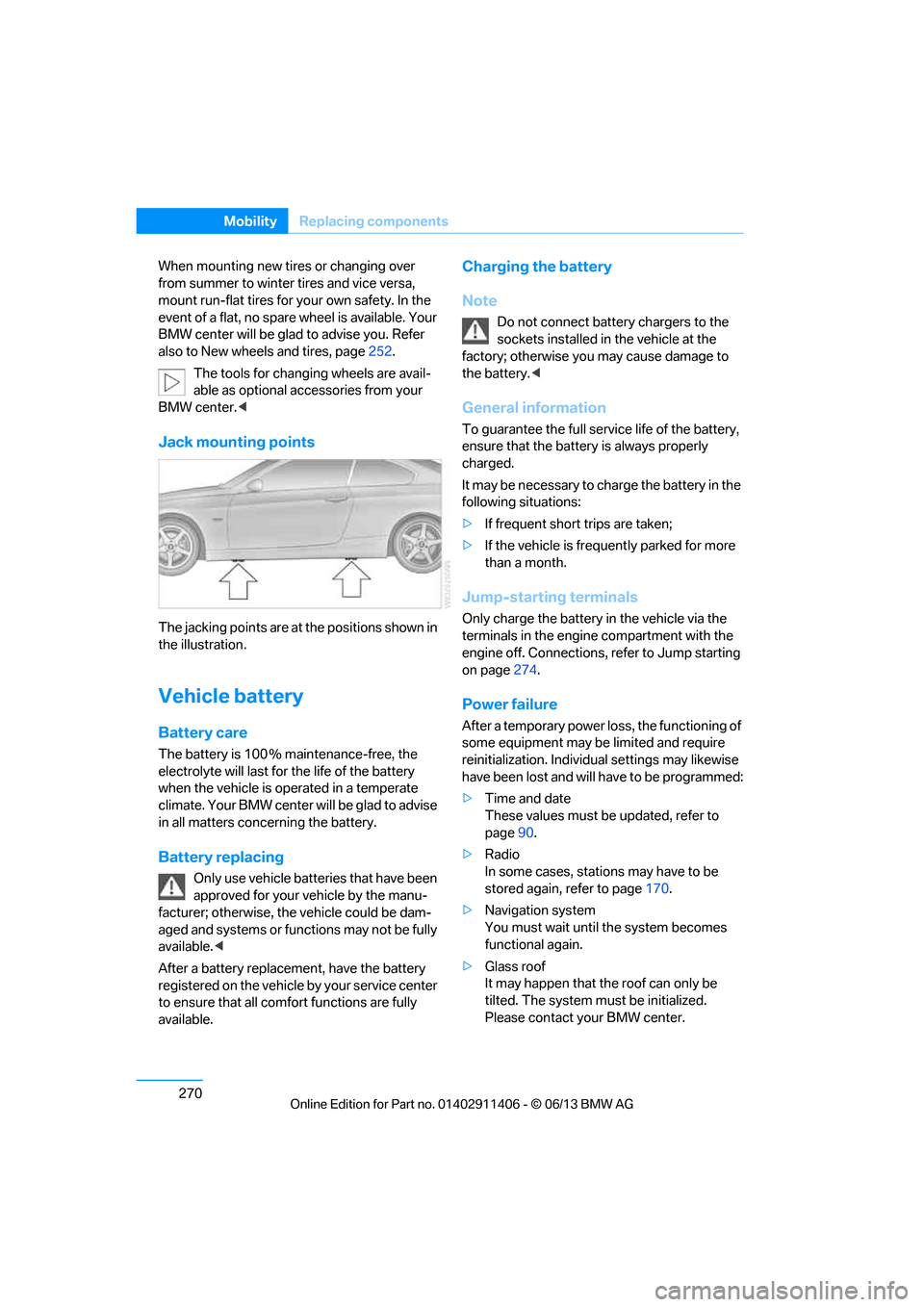
Jack mounting points
The jacking points are at the positions shown in
the illustration.
Vehicle battery
Battery care
The battery is 100 % maintenance-free, the
electrolyte will last for the life of the battery
when the vehicle is operated in a temperate
climate. Your BMW center will be glad to advise
in all matters conc erning the battery.
Battery replacing
Only use vehicle batteries that have been
approved for your vehicle by the manu-
facturer; otherwise, the vehicle could be dam-
aged and systems or functions may not be fully
available. <
After a battery replacem ent, have the battery
registered on the vehicle by your service center
to ensure that all comfort functions are fully
available.
Charging the battery
Note
Do not connect battery chargers to the
sockets installed in the vehicle at the
factory; otherwise you may cause damage to
the battery. <
General information
To guarantee the full serv ice life of the battery,
ensure that the battery is always properly
charged.
It may be necessary to ch arge the battery in the
following situations:
> If frequent short trips are taken;
> If the vehicle is frequently parked for more
than a month.
Jump-starting terminals
Only charge the battery in the vehicle via the
terminals in the engine compartment with the
engine off. Connections, refer to Jump starting
on page 274.
Power failure
After a temporary power lo ss, the functioning of
some equipment may be limited and require
reinitialization. Individual settings may likewise
have been lost and will have to be programmed:
> Time and date
These values must be updated, refer to
page 90.
> Radio
In some cases, statio ns may have to be
stored again, refer to page 170.
> Navigation system
You must wait until the system becomes
functional again.
> Glass roof
It may happen that the roof can only be
tilted. The system must be initialized.
Please contact your BMW center.
00320051004F004C00510048000300280047004C0057004C005200510003
Page 286 of 311
281
Te c h n i c a l d a t a
Reference
Weights
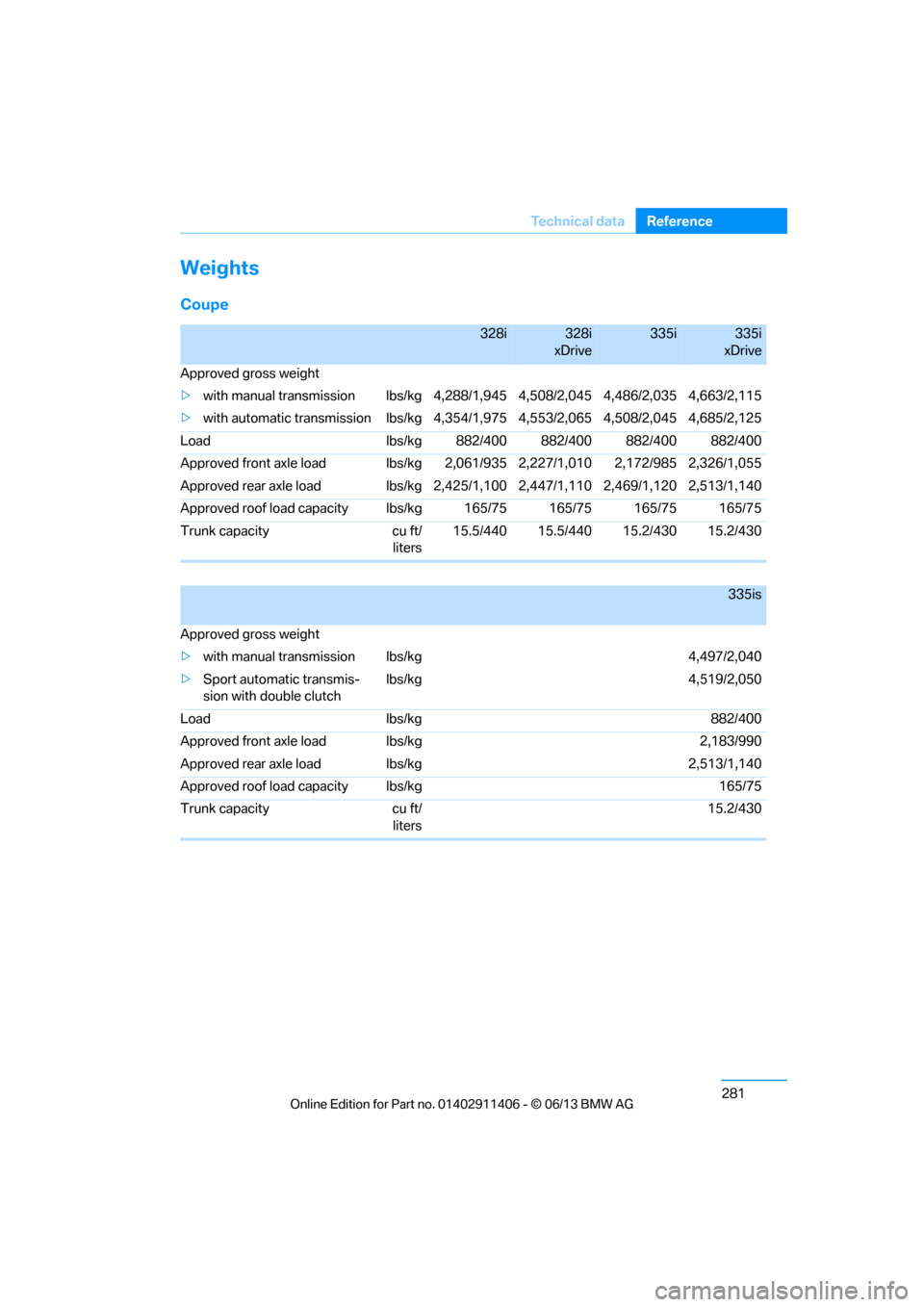
Coupe
328i328i
xDrive335i335i
xDrive
Approved gross weight
> with manual transmission lbs/kg 4, 288/1,945 4,508/2,045 4,486/2,035 4,663/2,115
> with automatic transmission lbs/kg 4, 354/1,975 4,553/2,065 4,508/2,045 4,685/2,125
Load lbs/kg 882/400 882/400 882/400 882/400
Approved front axle load lbs/kg 2,061/935 2,227/1,010 2,172/985 2,326/1,055
Approved rear axle load lbs/kg 2, 425/1,100 2,447/1,110 2,469/1,120 2,513/1,140
Approved roof load capacity lbs/kg 165/75 165/75 165/75 165/75
Trunk capacity cu ft/ liters15.5/440 15.5/440 15.2/430 15.2/430
335is
Approved gross weight
> with manual transmission lbs/kg 4,497/2,040
> Sport automatic transmis-
sion with double clutch lbs/kg 4,519/2,050
Load lbs/kg 882/400
Approved front axle load lbs/kg 2,183/990
Approved rear axle load lbs/kg 2,513/1,140
Approved roof load capacity lbs/kg 165/75
Trunk capacity cu ft/ liters 15.2/430
00320051004F004C00510048000300280047004C0057004C005200510003
Page 287 of 311
282
ReferenceTechnical data
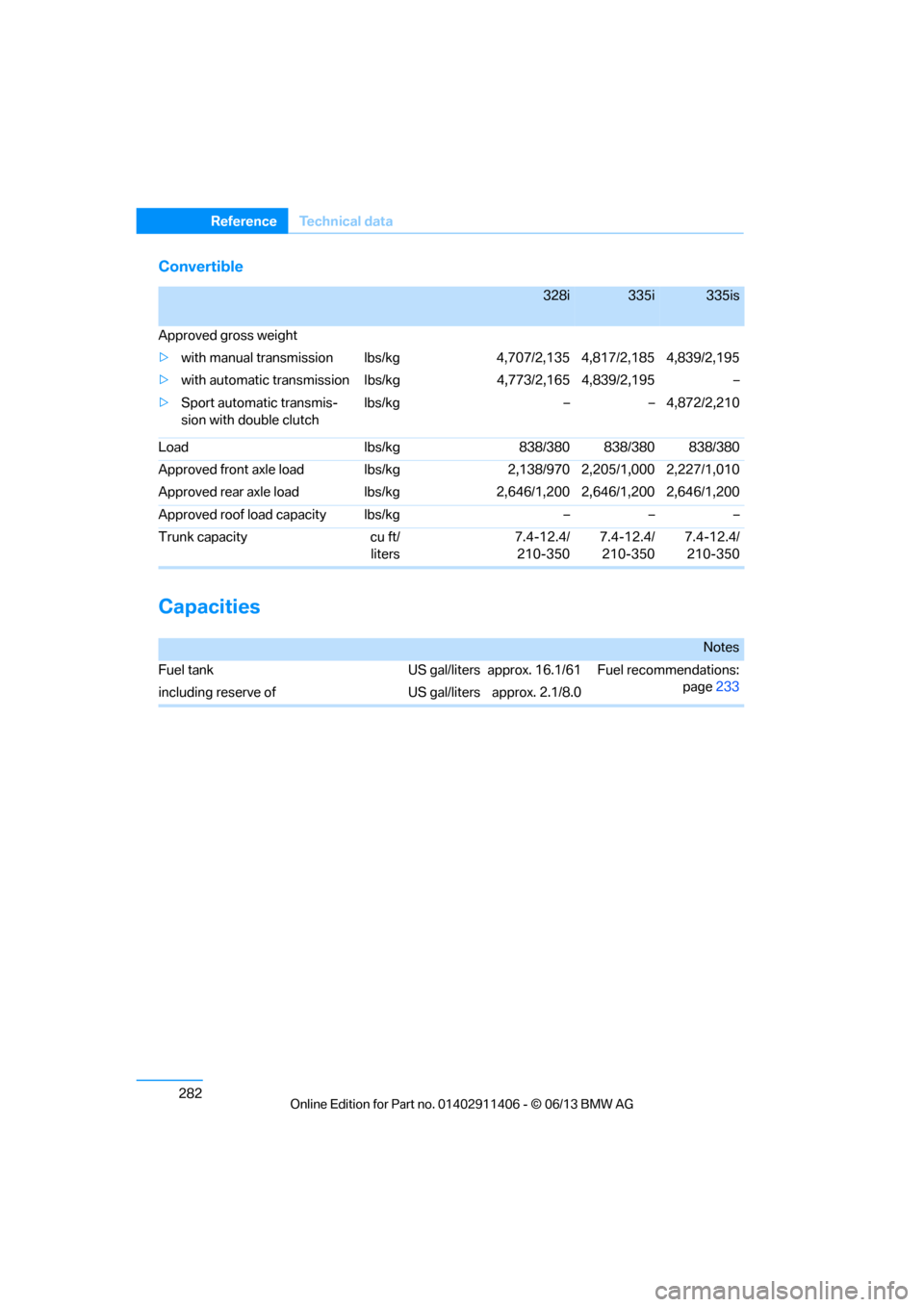
Convertible
Capacities
328i335i335is
Approved gross weight
> with manual transmission lbs/kg 4,707/2,135 4,817/2,185 4,839/2,195
> with automatic transmission lbs/kg 4,773/2,165 4,839/2,195 –
> Sport automatic transmis-
sion with double clutch lbs/kg – – 4,872/2,210
Load lbs/kg 838/380 838/380 838/380
Approved front axle load lbs/kg 2,138/970 2,205/1,000 2,227/1,010
Approved rear axle load lbs/kg 2,646/1,200 2,646/1,200 2,646/1,200
Approved roof load capacity lbs/kg – – –
Trunk capacity cu ft/ liters7.4-12.4/
210-350 7.4-12.4/
210-350 7.4-12.4/
210-350
Notes
Fuel tank US gal/liters approx. 16.1/61 Fuel recommendations:
page233
including reserve of US gal/liters approx. 2.1/8.0
00320051004F004C00510048000300280047004C0057004C005200510003
Page 298 of 311
293
Everything from A to Z
Reference
Computer
85
– displays on Control
Display 85
Computer, refer to iDrive 20
Concierge service 225
Condensation, refer to When the vehicle is parked 139
Condition Based Service
CBS 260
Configuring settings, refer to Personal Profile 32
Confirmation signals for locking/unlocking the
vehicle 35
ConnectedDrive 224
Connecting a music player,
AUX-In connection 189
Connecting a music player, USB audio interface 190
Connecting an iPod, refer to AUX-In connection 189
Connecting an iPod, refer to
USB audio interface 190
Connecting an MP3 player, refer to AUX-In
connection 189
Connecting an MP3 player, refer to USB audio
interface 190
Connecting vacuum cleaner, refer to Connecting
electrical appliances 127
Consumption, refer to Average fuel
consumption 85
Contacts 214
– deleting 216,223
– exporting/importing 223
– new contact 215
Control Center, refer to
iDrive 20
Control Display 21
– switching off 21
Control Display, refer to iDrive 20
– adjusting brightness 95Controller, refer to iDrive
20
Controls and displays 12
Control unit, refer to iDrive 20
Convenient loading in Convertible 35
Convenient opening and closing
– glass roof 34
– glass roof with Comfort Access 40
– retractable hardtop 34
– windows 34
– windows with Comfort Access 40
– with Comfort Access 40
Convertible
– bag holder 129
– convenient loading 35
– enlarging trunk 128
– folding down rear
backres
t128
– retractable hardtop 44
– rollover protection system 109
– securing cargo 140
– stowing cargo 140
Coolant 259
– checking level 259
Coolant temperature 259
Cooling, maximum 116
Cooling fluid, refer to
Coolant 259
Cooling system, refer to Coolant 259
Copyright 2
Corner-illuminating lamps
– replacing bulbs 267
Cornering light, refer to Adaptive Light Control 111
Correct tires 252
Courtesy lamps, refer to Interior lamps 114
Criteria for route 155
Cross-hairs in navigation151
Cruise control 74
– active 76
– malfunction 76 Cruise control, refer to Active
Cruise Control 76
Cruising range 85
Cupholders 125
Curb weight, refer to
Weights 281
Current playback
– external devices 191
– in music collection 186
Customer Relations 227
D
Dashboard, refer to
Cockpit 12
Dashboard lighting, refer to
Instrument lighting 114
Data, technical
– capacities 282
– dimensions 280
– weights 281
Data memory 7
Data transfer 228
Date
– date format 92
– setting 92
Daytime running lights 111
– replacing bulbs 267
DBC Dynamic Brake Control 97
Deactivating front passenger
airbags 107
Deadlocking, refer to Locking 34
Defect
– door lock 36
– fuel filler flap 232
Defining a home address 215
Deleting the music collection 188
Destination, entering by town/ city name 146
Destination address
– entering 146,152
Destination entry via BMW Assist 151
00320051004F004C00510048000300280047004C0057004C005200510003
Page 301 of 311
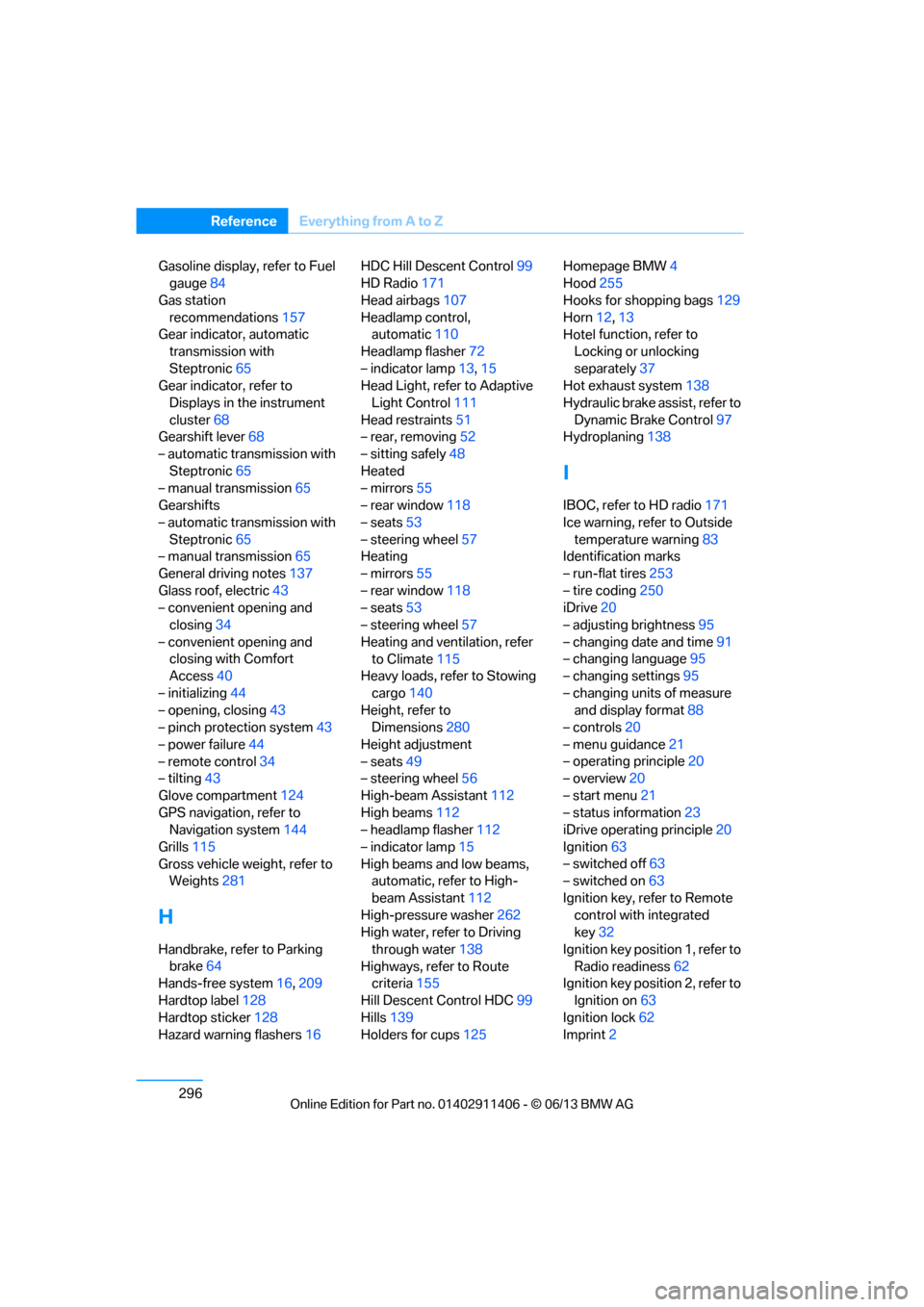
296
ReferenceEverything from A to Z
Gasoline display, refer to Fuel
gauge 84
Gas station recommendations 157
Gear indicator, automatic
transmission with
Steptronic 65
Gear indicator, refer to
Displays in the instrument
cluster 68
Gearshift lever 68
– automatic transmission with Steptronic 65
– manual transmission 65
Gearshifts
– automatic transmission with Steptronic 65
– manual transmission 65
General driving notes 137
Glass roof, electric 43
– convenient opening and closing 34
– convenient opening and closing with Comfort
Access 40
– initializing 44
– opening, closing 43
– pinch protection system 43
– power failure 44
– remote control 34
– tilting 43
Glove compartment 124
GPS navigation, refer to Navigation system 144
Grills 115
Gross vehicle weight, refer to Weights 281
H
Handbrake, refer to Parking
brake 64
Hands-free system 16,209
Hardtop label 128
Hardtop sticker 128
Hazard warning flashers 16HDC Hill Descent Control
99
HD Radio 171
Head airbags 107
Headlamp control, automatic 110
Headlamp flasher 72
– indicator lamp 13,15
Head Light, refer to Adaptive
Light Control 111
Head restraints 51
– rear, removing 52
– sitting safely 48
Heated
– mirrors 55
– rear window 118
– seats 53
– steering wheel 57
Heating
– mirrors 55
– rear window 118
– seats 53
– steering wheel 57
Heating and ventilation, refer to Climate 115
Heavy loads, refer to Stowing
cargo 140
Height, refer to Dimensions 280
Height adjustment
– seats 49
– steering wheel 56
High-beam Assistant 112
High beams 112
– headlamp flasher 112
– indicator lamp 15
High beams and low beams, automatic, refer to High-
beam Assistant 112
High-pressure washer 262
High water, refer to Driving
through water 138
Highways, refer to Route criteria 155
Hill Descent Control HDC 99
Hills 139
Holders for cups 125Homepage BMW
4
Hood 255
Hooks for shopping bags 129
Horn 12,
13
Hotel function, refer to
Locking o
r unlocking
separately 37
Hot exhaust system 138
Hydraulic brake assist, refer to Dynamic Brake Control 97
Hydroplaning 138
I
IBOC, refer to HD radio 171
Ice warning, refer to Outside
temperature warning 83
Identification marks
– run-flat tires 253
– tire coding 250
iDrive 20
– adjusting brightness 95
– changing date and time 91
– changing language 95
– changing settings 95
– changing units of measure and display format 88
– controls 20
– menu guidance 21
– operating principle 20
– overview 20
– start menu 21
– status information 23
iDrive operating principle 20
Ignition 63
– switched off 63
– switched on 63
Ignition key, refer to Remote control with integrated
key 32
Ignition key position 1, refer to Radio readiness 62
Ignition key position 2, refer to
Ignition on 63
Ignition lock 62
Imprint 2
00320051004F004C00510048000300280047004C0057004C005200510003
Page 302 of 311
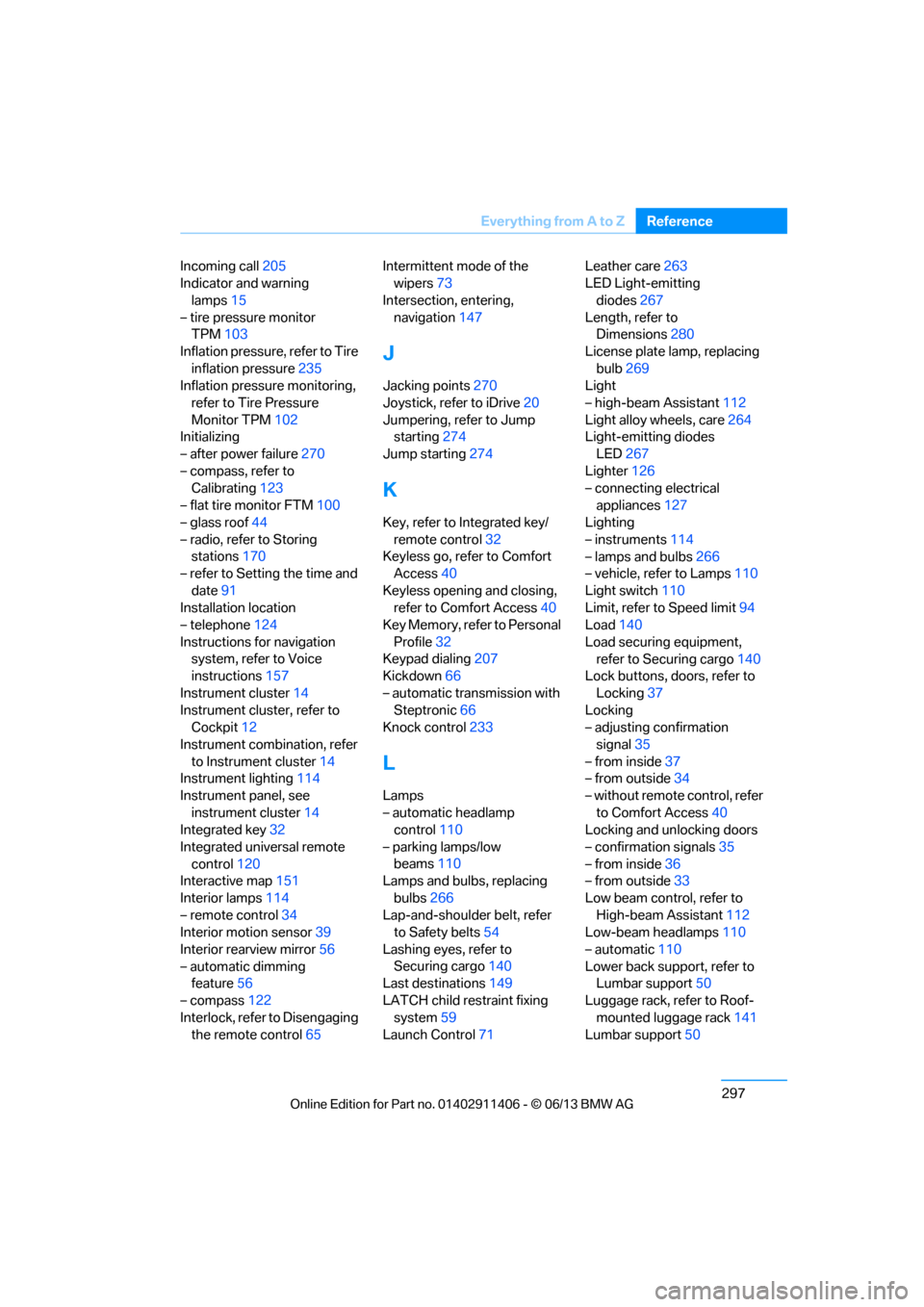
297
Everything from A to Z
Reference
Incoming call
205
Indicator and warning
lamps 15
– tire pressure monitor TPM 103
Inflation pressure, refer to Tire inflation pressure 235
Inflation pressure monitoring,
refer to Tire Pressure
Monitor TPM 102
Initializing
– after power failure 270
– compass, refer to Calibrating 123
– flat tire monitor FTM 100
– glass roof 44
– radio, refer to Storing stations 170
– refer to Setting the time and
date 91
Installation location
– telephone 124
Instructions for navigation system, refer to Voice
instructions 157
Instrument cluster 14
Instrument cluster, refer to Cockpit 12
Instrument combination, refer to Instrument cluster 14
Instrument lighting 114
Instrument panel, see instrument cluster 14
Integrated key 32
Integrated universal remote control 120
Interactive map 151
Interior lamps 114
– remote control 34
Interior motion sensor 39
Interior rearview mirror 56
– automatic dimming feature 56
– compass 122
Interlock, refer to Disengaging the remote control 65Intermittent mode of the
wipers 73
Intersection, entering, navigation 147
J
Jacking points 270
Joystick, refer to iDrive 20
Jumpering, refer to Jump starting 274
Jump starting 274
K
Key, refer to Integrated key/
remote control 32
Keyless go, refer to Comfort Access 40
Keyless opening and closing, refer to Comfort Access 40
Key Memory, refer to Personal
Profile 32
Keypad dialing 207
Kickdown 66
– automatic transmission with Steptronic 66
Knock control 233
L
Lamps
– automatic headlamp
control 110
– parking lamps/low beams 110
Lamps and bulbs, replacing
bulbs 266
Lap-and-shoulder belt, refer
to Safety belts 54
Lashing eyes, refer to Securing cargo 140
Last destinations 149
LATCH child restraint fixing system 59
Launch Control 71 Leather care
263
LED Light-emitting
diodes 267
Length, refer to Dimensions 280
License plate lamp, replacing bulb 269
Light
– high-beam Assistant 112
Light alloy wheels, care 264
Light-emitting diodes
LED 267
Lighter 126
– connecting electrical
appliances 127
Lighting
– instruments 114
– lamps and bulbs 266
– vehicle, refer to Lamps 110
Light switch 110
Limit, refer to Speed limit 94
Load 140
Load securing equipment, refer to Securing cargo 140
Lock buttons, doors, refer to
Locking 37
Locking
– adjusting confirmation
signal 35
– from inside 37
– from outside 34
– without remote control, refer to Comfort Access 40
Locking and unlocking doors
– confirmation signals 35
– from inside 36
– from outside 33
Low beam control, refer to High-beam Assistant 112
Low-beam headlamps 110
– automatic 110
Lower back support, refer to Lumbar support 50
Luggage rack, refer to Roof- mounted luggage rack 141
Lumbar support 50
00320051004F004C00510048000300280047004C0057004C005200510003