service BMW M3 CONVERTIBLE 2013 E93 User Guide
[x] Cancel search | Manufacturer: BMW, Model Year: 2013, Model line: M3 CONVERTIBLE, Model: BMW M3 CONVERTIBLE 2013 E93Pages: 311, PDF Size: 6.89 MB
Page 82 of 311
77
Driving
Controls
mission your vehicle is equipped with, to main-
tain the distance setting
selected. If the vehicle
ahead speeds up or when the lane ahead
becomes clear, your vehi cle will accelerate to
the speed you have selected by increasing the
throttle setting and shifting gears automatically
or by the driver as needed. Your selected speed
will be held when driving downhill, too.
Since this Active Cruise Control system is a
new technology and operates differently from
conventional cruise co ntrol systems which you
may be accustomed to, you are strongly urged
to read all of the pages relating to this system
before use. Pay special attention to the System
limitations section beginning on page 81.
Braking sensation
>If you step on the brake pedal while the sys-
tem is braking, peda l sensation will be
slightly different from the usual.
> Possible noises during automatic braking
are normal.
Manual transmission
You can shift gears while cruise control is acti-
vated. The system is deactivated when you
drive at very low engine speeds for an extended
period.
Range of applications
The minimum desired speed is 20 mph or
30 km/h, the maximum desired speed is
110 mph or 180 km/h.
As with conventional cruise control sys-
tems, Active Cruise Control in no way
diminishes or substitutes for the driver’s own
personal responsibility, alertness and aware-
ness in adjusting speed, braking or otherwise
controlling the vehicle. The driver should
decide when to use the system on the basis of
road, traffic, visibility, and weather conditions.
Active Cruise Control is intended for use on
highway-type roadways wh ere traffic is moving
relatively smoothly. Do not use this system in
city driving; heavy traffic such as during rush hour; on curvy, winding ro
ads, slippery roads or
roads with sharp curves such as highway off-
ramps; during inclement weather such as snow,
strong rain or fog; or when entering inter-
changes, service/parkin g areas or toll booths.
It is also important to regulate your vehicle's
speed and distance setti ng within applicable
legal limits. Always be re ady to take action or
apply the brakes if necessary, especially when
the system is actively fo llowing a vehicle in front
of you. Otherwise, driving situations could
result that pose the risk of accidents. <
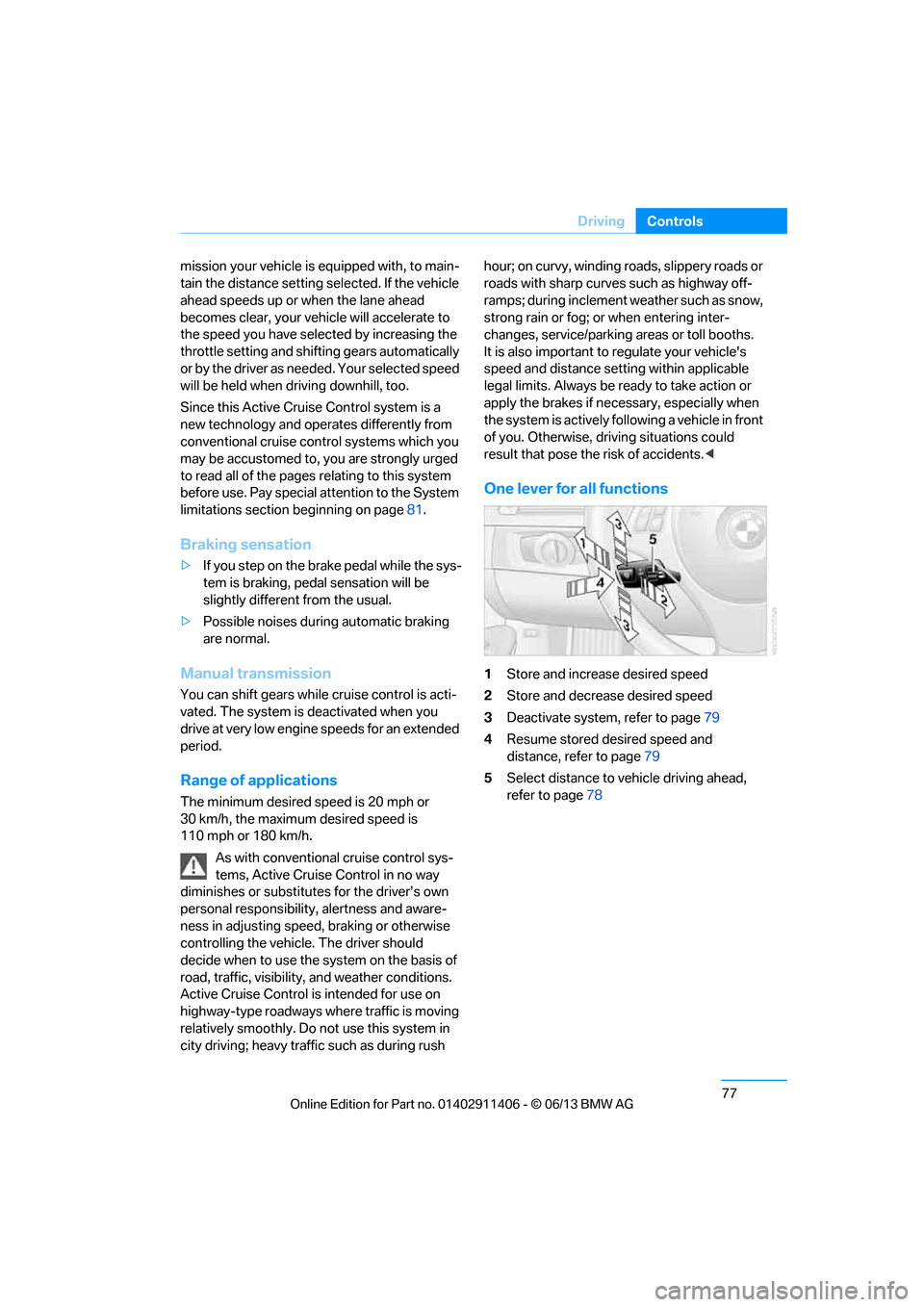
One lever for all functions
1Store and increase desired speed
2 Store and decrease desired speed
3 Deactivate system, refer to page 79
4 Resume stored desired speed and
distance, refer to page 79
5 Select distance to vehicle driving ahead,
refer to page 78
00320051004F004C00510048000300280047004C0057004C005200510003
Page 92 of 311
87
Controls overview
Controls
Settings and information
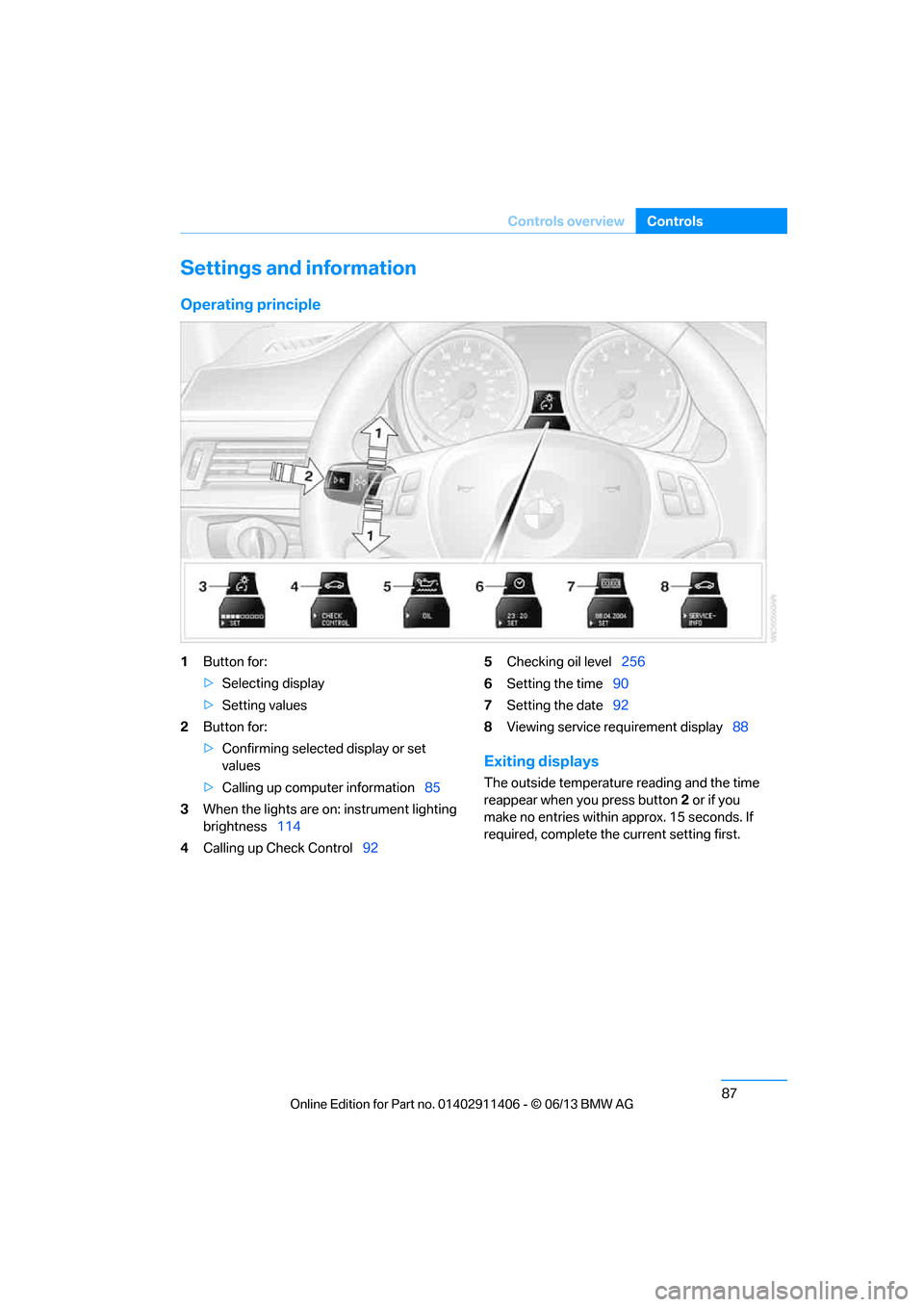
Operating principle
1
Button for:
>Selecting display
> Setting values
2 Button for:
>Confirming selected display or set
values
> Calling up computer information 85
3 When the lights are on: instrument lighting
brightness 114
4 Calling up Check Control 925
Checking oil level 256
6 Setting the time 90
7 Setting the date 92
8 Viewing service re quirement display 88
Exiting displays
The outside temperature reading and the time
reappear when you press button 2 or if you
make no entries within approx. 15 seconds. If
required, complete the current setting first.
00320051004F004C00510048000300280047004C0057004C005200510003
Page 93 of 311
88
ControlsControls overview
Units of measure
You can change the units for fuel consumption,
route/distance, temperature and pressure.
1."Settings"
2. "Language/Units"
3. Select the desired menu item.
4. Select the desired unit.
The settings are stored for the remote control
currently in use.
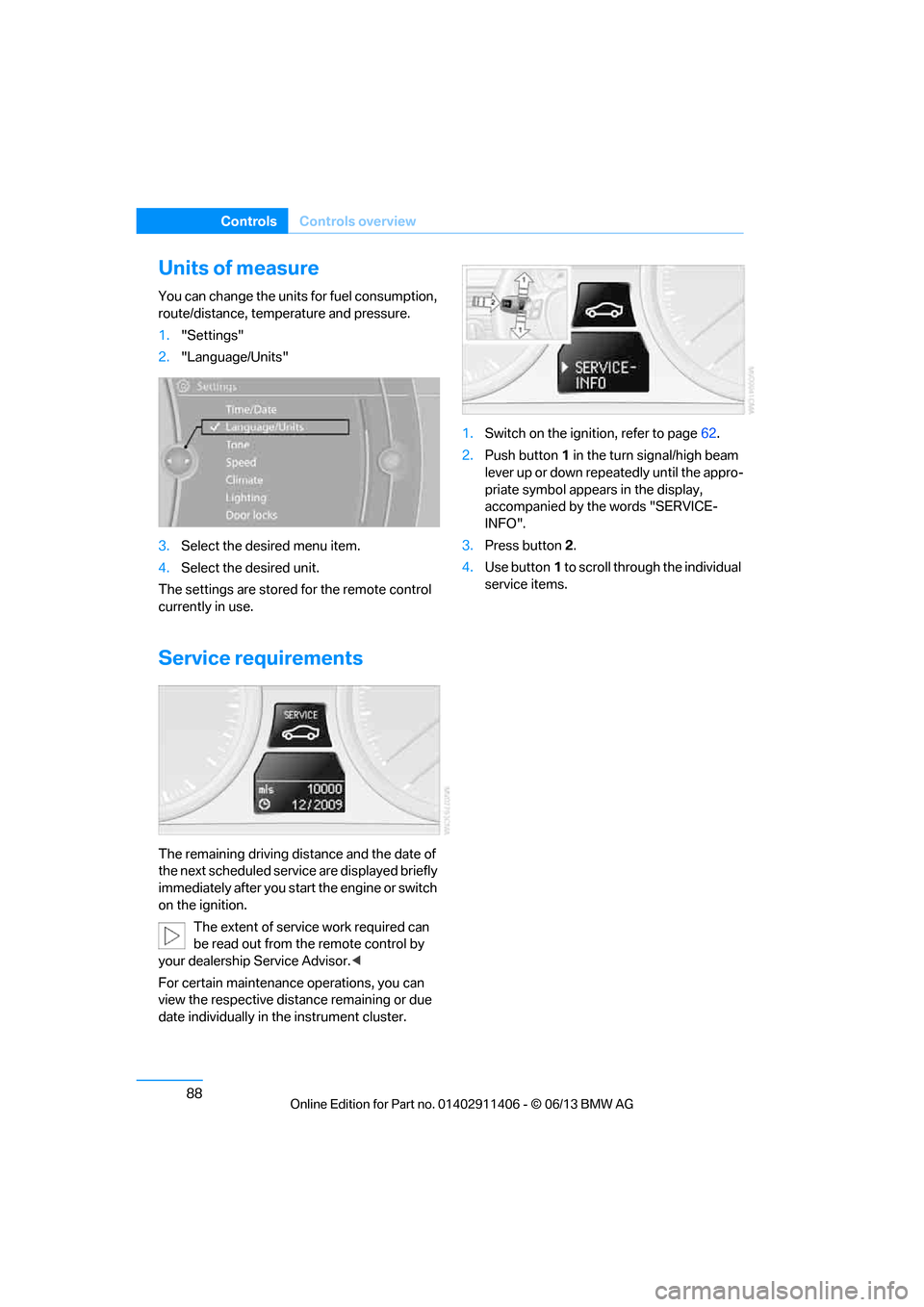
Service requirements
The remaining driving distance and the date of
the next scheduled servic e are displayed briefly
immediately after you start the engine or switch
on the ignition.
The extent of service work required can
be read out from the remote control by
your dealership Service Advisor. <
For certain maintenance operations, you can
view the respective distance remaining or due
date individually in the instrument cluster. 1.
Switch on the ignition, refer to page 62.
2. Push button 1 in the turn signal/high beam
lever up or down repe atedly until the appro-
priate symbol appear s in the display,
accompanied by the words "SERVICE-
INFO".
3. Press button 2.
4. Use button 1 to scroll through the individual
service items.
00320051004F004C00510048000300280047004C0057004C005200510003
Page 94 of 311
89
Controls overview
Controls
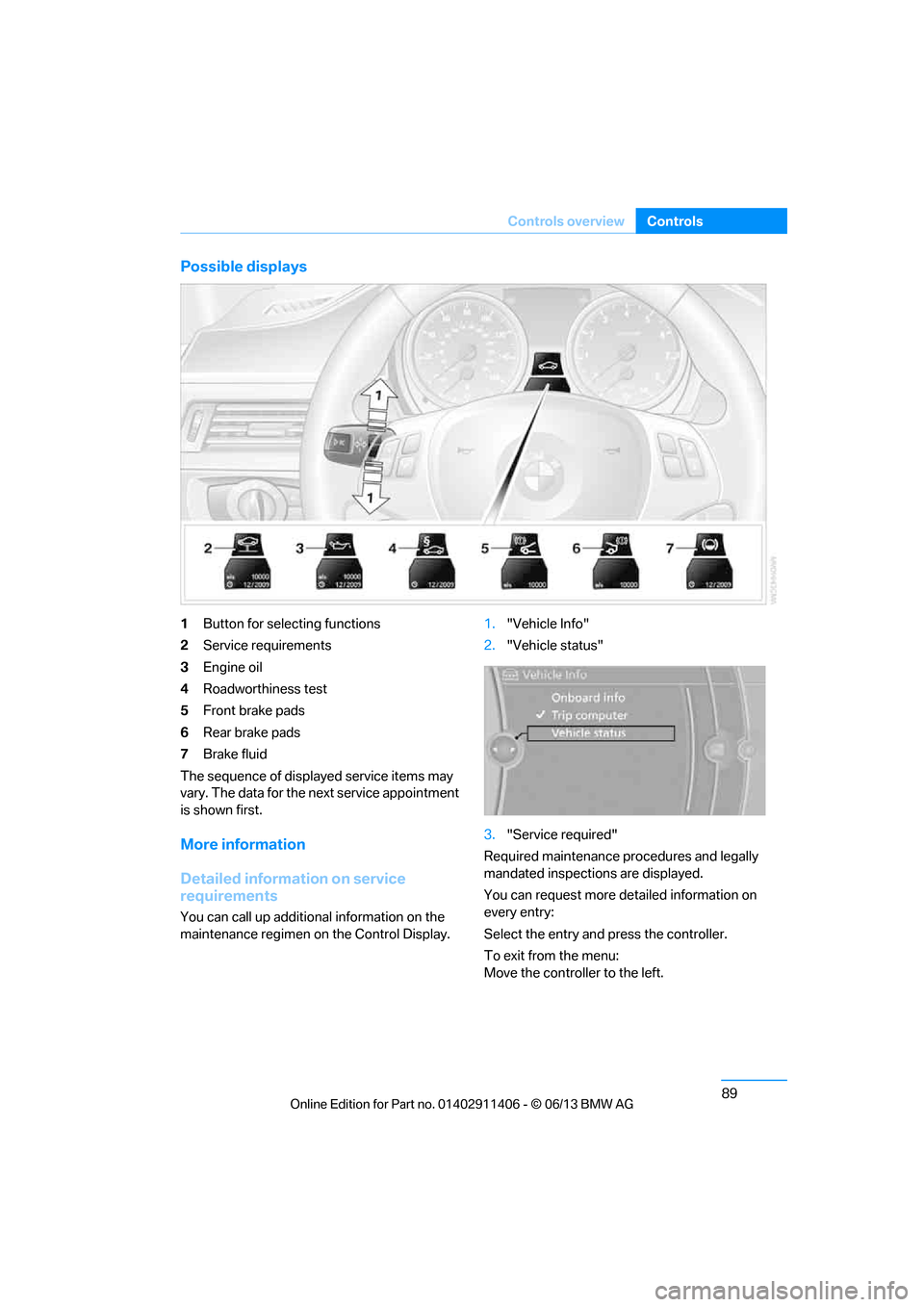
Possible displays
1
Button for selecting functions
2 Service requirements
3 Engine oil
4 Roadworthiness test
5 Front brake pads
6 Rear brake pads
7 Brake fluid
The sequence of displayed service items may
vary. The data for the ne xt service appointment
is shown first.
More information
Detailed information on service
requirements
You can call up additional information on the
maintenance regimen on the Control Display. 1.
"Vehicle Info"
2. "Vehicle status"
3. "Service required"
Required maintenance pr ocedures and legally
mandated inspections are displayed.
You can request more de tailed information on
every entry:
Select the entry and press the controller.
To exit from the menu:
Move the controller to the left.
00320051004F004C00510048000300280047004C0057004C005200510003
Page 95 of 311
90
ControlsControls overview
Symbols
No service is cu rrently required.
The deadline for serv ice or a legally
mandated inspection is approaching.
The service deadline has already passed.
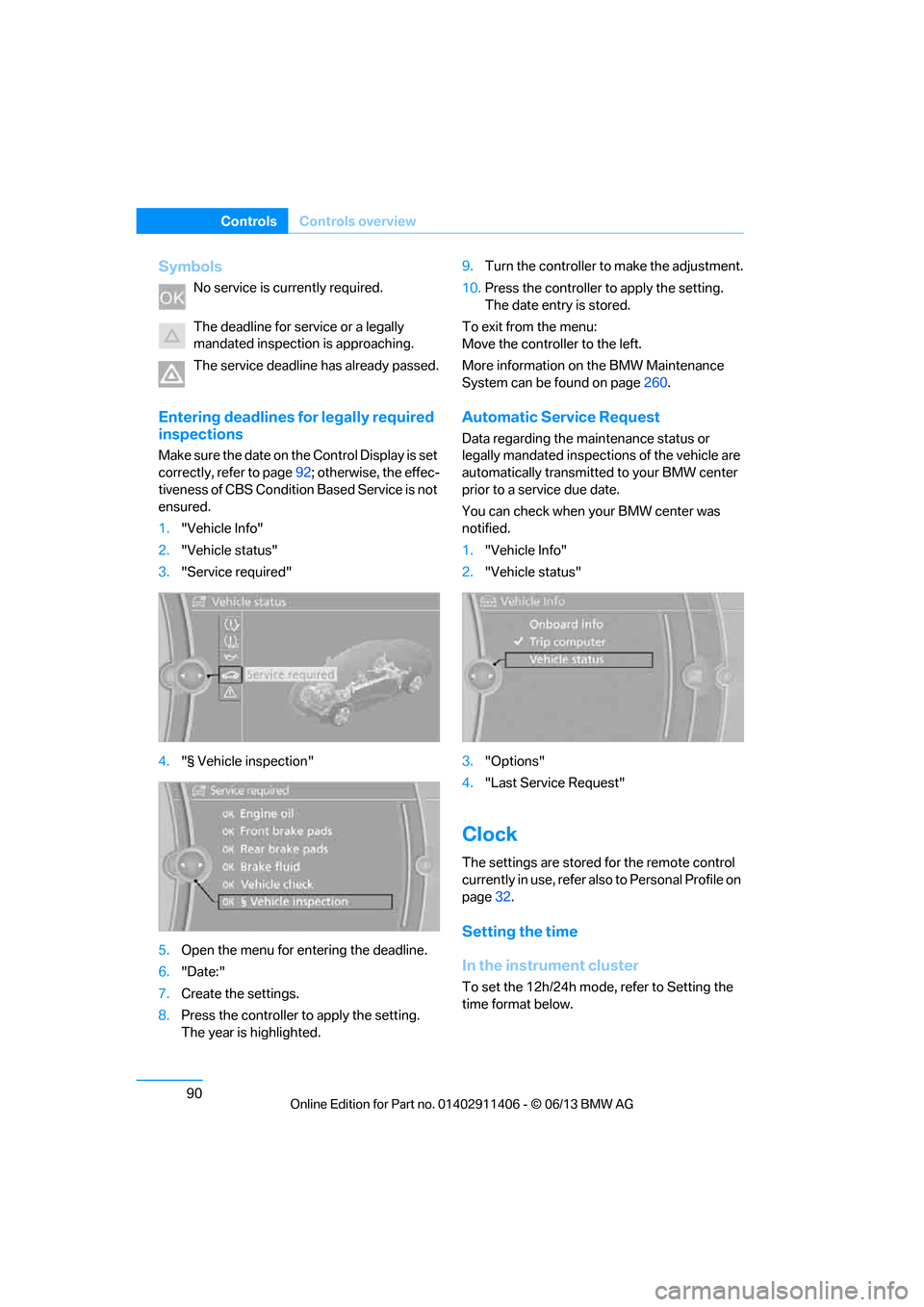
Entering deadlines for legally required
inspections
Make sure the date on the Control Display is set
correctly, refer to page 92; otherwise, the effec-
tiveness of CBS Condition Based Service is not
ensured.
1. "Vehicle Info"
2. "Vehicle status"
3. "Service required"
4. "§ Vehicle inspection"
5. Open the menu for entering the deadline.
6. "Date:"
7. Create the settings.
8. Press the controller to apply the setting.
The year is highlighted. 9.
Turn the controller to make the adjustment.
10. Press the controller to apply the setting.
The date entry is stored.
To exit from the menu:
Move the controller to the left.
More information on the BMW Maintenance
System can be found on page 260.
Automatic Service Request
Data regarding the ma intenance status or
legally mandated inspecti ons of the vehicle are
automatically transmitted to your BMW center
prior to a service due date.
You can check when your BMW center was
notified.
1. "Vehicle Info"
2. "Vehicle status"
3. "Options"
4. "Last Service Request"
Clock
The settings are stored for the remote control
currently in use, refer also to Personal Profile on
page 32.
Setting the time
In the instrument cluster
To set the 12h/24h mode , refer to Setting the
time format below.
00320051004F004C00510048000300280047004C0057004C005200510003
Page 98 of 311
93
Controls overview
Controls
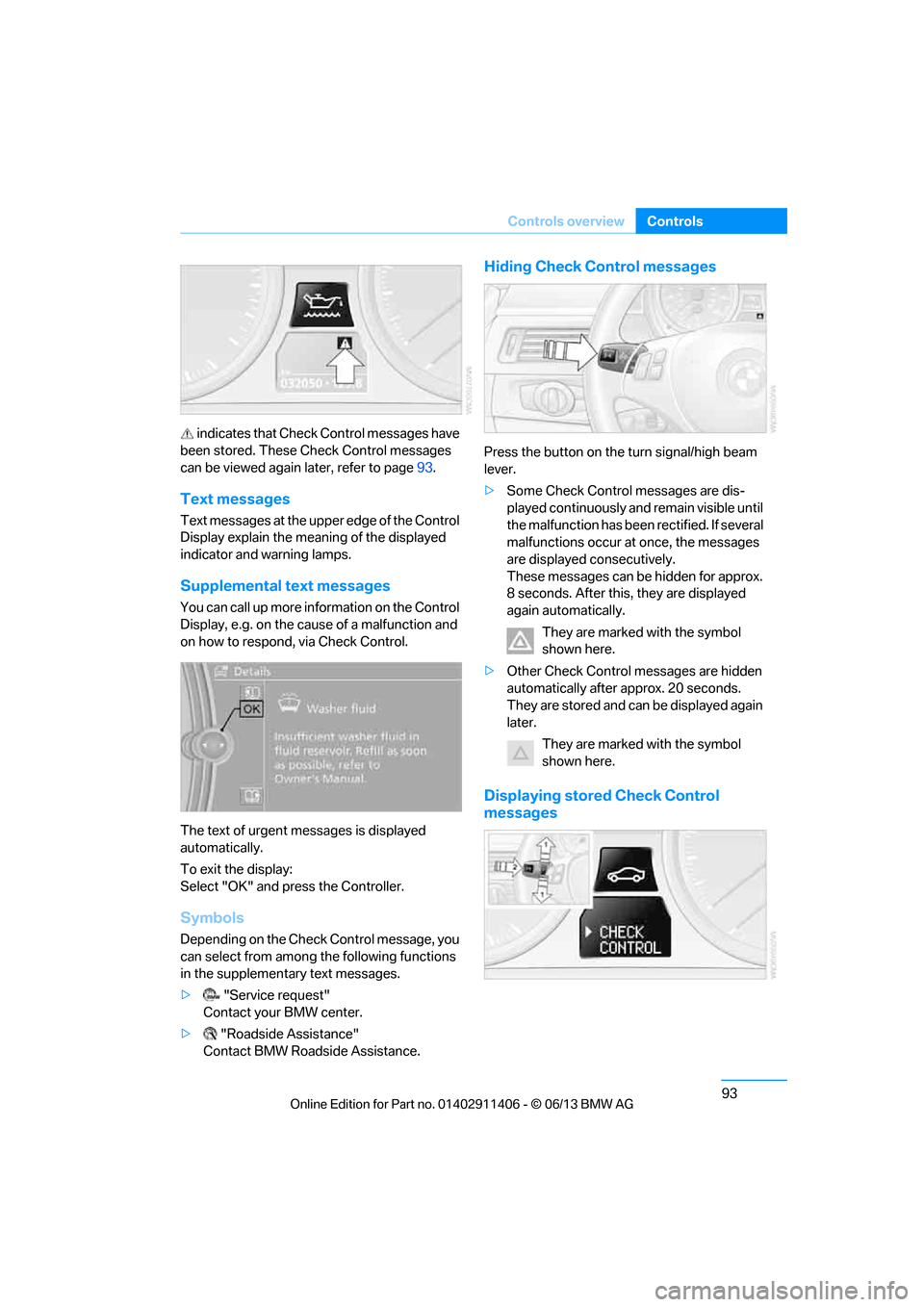
indicates that Check Control messages have
been stored. These Check Control messages
can be viewed again later, refer to page93.
Text messages
Text messages at the uppe r edge of the Control
Display explain the meaning of the displayed
indicator and warning lamps.
Supplemental text messages
You can call up more information on the Control
Display, e.g. on the cause of a malfunction and
on how to respond, via Check Control.
The text of urgent messages is displayed
automatically.
To exit the display:
Select "OK" and press the Controller.
Symbols
Depending on the Check Control message, you
can select from among the following functions
in the supplementary text messages.
> "Service request"
Contact your BMW center.
> "Roadside Assistance"
Contact BMW Roadside Assistance.
Hiding Check Control messages
Press the button on the turn signal/high beam
lever.
> Some Check Control messages are dis-
played continuously an d remain visible until
the malfunction has been rectified. If several
malfunctions occur at once, the messages
are displayed consecutively.
These messages can be hidden for approx.
8 seconds. After this, they are displayed
again automatically.
They are marked with the symbol
shown here.
> Other Check Control messages are hidden
automatically after approx. 20 seconds.
They are stored and can be displayed again
later.
They are marked with the symbol
shown here.
Displaying stored Check Control
messages
00320051004F004C00510048000300280047004C0057004C005200510003
Page 114 of 311
109
Technology for driving comfort and safety
Controls
In the event of a fault in the airbag system,
have it checked without delay; otherwise,
there is the risk that the system will not function
as intended even if a su fficiently severe acci-
dent occurs. <
Convertible: rollover
protection system
The rollover protection system is activated
automatically in the event of an accident of suf-
ficient severity or an extreme tilt in the car's lon-
gitudinal axis. The protection bars behind the
rear head restraints depl oy within fractions of a
second.
As a supplementary system to the reinforced
windshield frame, the rollover protection
system increases the safety of the vehicle
occupants.
Always keep the area of movement of the
rollover protection system clear.
In minor accidents, you are protected by the
fastened safety belt and, depending on acci-
dent severity, by the sa fety belt tensioner and
multi-phase airbag retention system. <
Resetting
If the rollover protection system was not
impacted after being automatically activated, it
can be reset by lowering the protection bars to
their original positions. This does not require
tools.
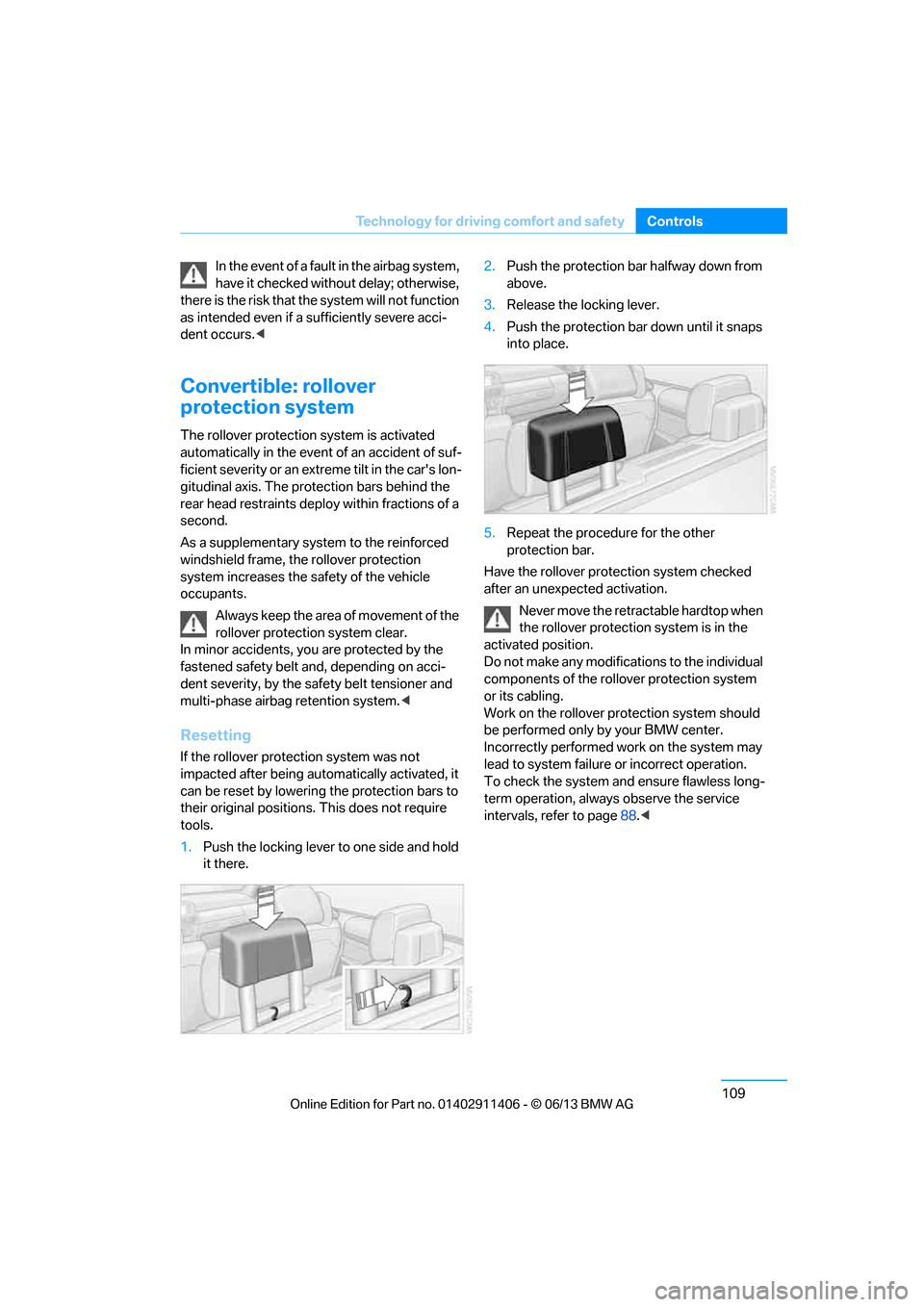
1. Push the locking lever to one side and hold
it there. 2.
Push the protection bar halfway down from
above.
3. Release the locking lever.
4. Push the protection bar down until it snaps
into place.
5. Repeat the procedure for the other
protection bar.
Have the rollover protection system checked
after an unexpected activation.
Never move the retrac table hardtop when
the rollover protection system is in the
activated position.
Do not make any modifica tions to the individual
components of the rollover protection system
or its cabling.
Work on the rollover protection system should
be performed only by your BMW center.
Incorrectly performed work on the system may
lead to system failure or incorrect operation.
To check the system and ensure flawless long-
term operation, always observe the service
intervals, refer to page 88.<
00320051004F004C00510048000300280047004C0057004C005200510003
Page 141 of 311
136
Driving tipsThings to remember when driving
Things to remember when driving
Vehicle equipment
In this chapter, all pr oduction, country, and
optional equipment that is offered in the model
range is described. For this reason, descrip-
tions will be given of some equipment that may
not be available in a vehi cle, for example due to
the special options or national-market version
selected. This also app lies to safety related
functions and systems.
Break-in period
Moving parts need breaking-in time to adjust to
each other. Please follo w the instructions below
in order to achieve the optimal service life and
economy of operation for your vehicle.
Engine and differential
Always obey all official speed limits.
Up to 1,200 miles/2,000 km
Drive at varying engine and road speeds, but do
not exceed an engine speed of 4,500 rpm or a
road speed of 100 mph/160 km/h.
Avoid full-throttle operation and use of the
transmission's kickdown mode.
After driving 1,200 miles/2,000 km
Engine and vehicle speeds can be gradually
increased.
Tires
Due to technical factors associated with their
manufacture, tires do not achieve their full
traction potential until af ter an initial break-in
period. Therefore, drive cautiously during the
first 200 miles/300 km.
Brake system
Brakes require an initial break-in period of
approx. 300 miles/500 km to achieve optimized
contact and wear patterns between brake pads
and rotors. Drive cautiously during this break-in
period.
Clutch
The function of the clut ch reaches its optimal
level only after a distance driven of approx.
300 miles/500 km. During this break-in period,
engage the clutch gently.
Following part replacement
The same break-in procedures should be
observed if any of the components mentioned
above have to be renewe d in the course of the
vehicle's operating life.
Saving fuel
The fuel consumption of your vehicle depends
on several factors. You can lower fuel consump-
tion and the environmental impact by taking
certain measures, adjusting your driving style
and having the vehicl e serviced regularly.
Remove any unneeded cargo
Additional weight increases fuel consumption.
Remove any mounted parts after you
have finished using them
Remove unneeded additional mirrors, the roof
rack and the rear luggage rack after use.
Mounted parts affect th e vehicle's aerodynam-
ics and increase fuel consumption.
Close the windows and glass roof
An open glass roof or window causes higher
air resistance and thus increases fuel
consumption.
00320051004F004C00510048000300280047004C0057004C005200510003
Page 142 of 311
137
Things to remember when driving
Driving tips
Check tire inflation pressure regularly
Check the tire inflation pr
essure at least twice a
month and before embarking on a long journey,
and correct it if necessary.
Low tire inflation pressure causes higher rolling
resistance and thus increases fuel consumption
and tire wear.
Set off immediately
Do not let the engine wa rm up while the car is
still standing, but set off immediately at moder-
ate engine speed. This is the fastest way for the
cold engine to reach its operating temperature.
Drive defensively
Avoid unnecessary acceleration and braking
maneuvers. To do so, keep an adequate dis-
tance between you and th e vehicle in front of
you. A defensive and smooth driving style
keeps fuel consumption down.
Avoid high engine speeds
Only use first gear when setting off. In second
and higher gears, accele rate without hesitation
or pauses. When accelera ting, shift up before
reaching high engine speeds.
When you reach the desi red speed, shift into
the highest applicable ge ar and drive with the
engine speed as low as possible and at a
constant speed.
As a rule: driving at low engine speeds lowers
fuel consumption and reduces wear.
Coasting
When approaching a red lig ht, take your foot off
the accelerator and coast to a stop in the high-
est applicable gear.
On a downhill slope, take your foot off the
accelerator and coast in a suitable gear.
The fuel supply is interrupted when coasting.
Switch off the engine during lengthy
stops
Switch off the engine when stopping for lengthy
periods, e.g. at traffic lights, railroad crossings
or in traffic congestions.
Switch off functions you do not need at
the moment
Functions such as the air conditioner, seat
heating or rear window defroster draw large
amounts of power and consume additional fuel.
Especially in city traffic and in stop-and-go driv-
ing they have a considerable impact. Therefore,
switch these functions off when they are not
really needed.
Have the vehicle serviced
Have the vehicle serviced regularly to achieve
good economy and a long vehicle life. BMW
recommends having the vehicle serviced at
your BMW center. Also note the BMW Mainte-
nance System, refer to page 260.
General driving notes
Close the trunk lid
Only drive with the trunk closed. Failure to
do so may endanger passengers or other
road users or may damage the vehicle in the
event of an accident or a braking and evasive
maneuver. In addition, exhaust gas may flow
into the passenger compartment. <
If special circumstance s make it absolutely
necessary to drive wi th the trunk open:
1. Close all windows and the glass roof.
2. Greatly increase the air volume of the
automatic climate cont rol system, refer to
page 117.
3. Drive cautiously.
00320051004F004C00510048000300280047004C0057004C005200510003
Page 156 of 311
151
Destination entry
Navigation
Destination entry via BMW Assist
A connection to the BMW Concierge service is
established, refer to page
225.
1. "Navigation"
2. "Enter address"
3. Open "Options".
4. "BMW Assist dest. entry"
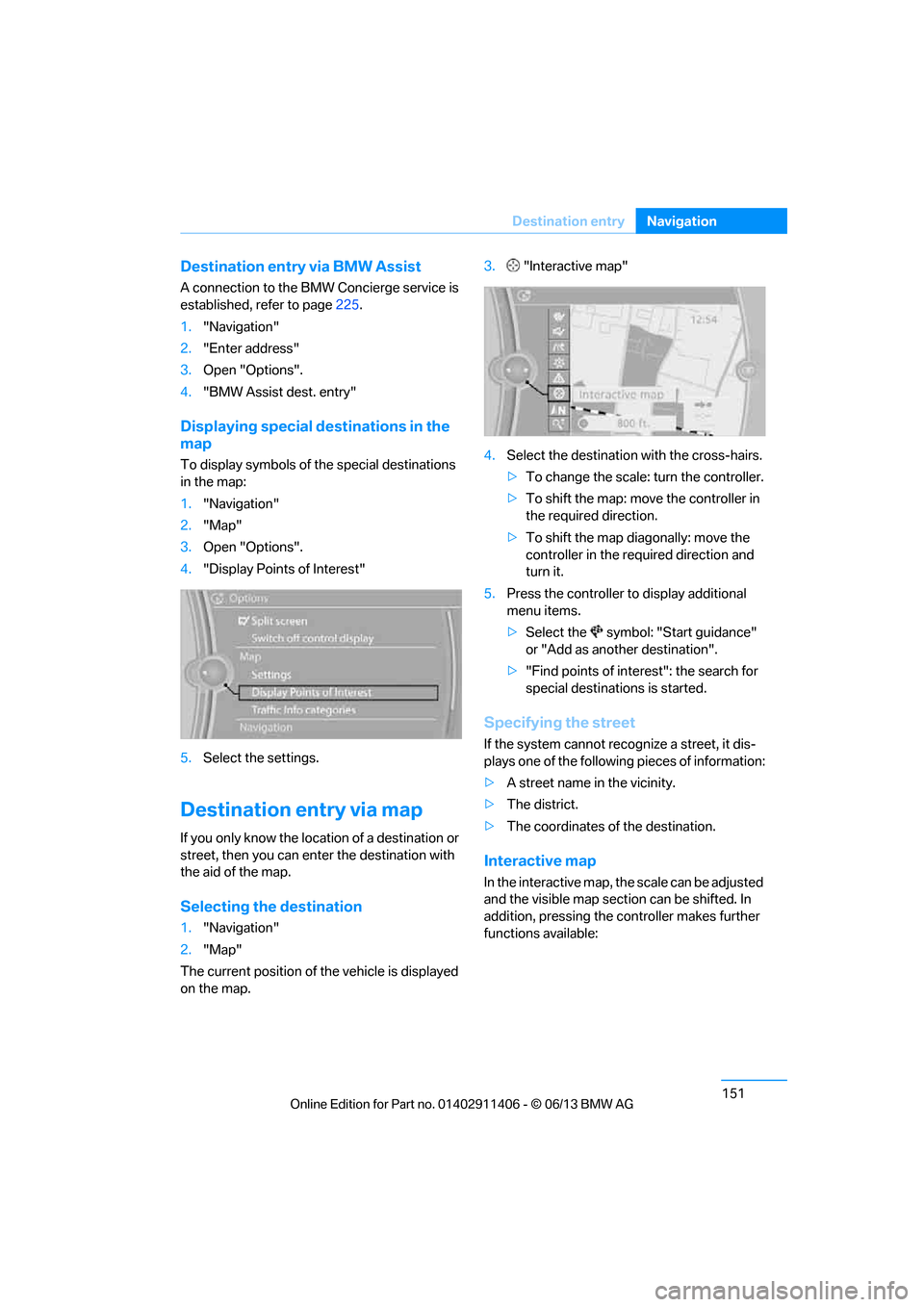
Displaying special destinations in the
map
To display symbols of the special destinations
in the map:
1."Navigation"
2. "Map"
3. Open "Options".
4. "Display Points of Interest"
5. Select the settings.
Destination entry via map
If you only know the location of a destination or
street, then you can ente r the destination with
the aid of the map.
Selecting the destination
1. "Navigation"
2. "Map"
The current position of the vehicle is displayed
on the map. 3.
"Interactive map"
4. Select the destination with the cross-hairs.
> To change the scale: turn the controller.
> To shift the map: move the controller in
the required direction.
> To shift the map diagonally: move the
controller in the required direction and
turn it.
5. Press the controller to display additional
menu items.
>Select the symbol: "Start guidance"
or "Add as another destination".
> "Find points of interest": the search for
special destinations is started.
Specifying the street
If the system cannot recognize a street, it dis-
plays one of the following pieces of information:
> A street name in the vicinity.
> The district.
> The coordinates of the destination.
Interactive map
In the interactive map, th e scale can be adjusted
and the visible map section can be shifted. In
addition, pressing the controller makes further
functions available:
00320051004F004C00510048000300280047004C0057004C005200510003