reset BMW M3 COUPE 2009 E92 User Guide
[x] Cancel search | Manufacturer: BMW, Model Year: 2009, Model line: M3 COUPE, Model: BMW M3 COUPE 2009 E92Pages: 256, PDF Size: 12.03 MB
Page 89 of 256
Controls
87Reference
At a glance
Driving tips
Communications
Navigation
Entertainment
Mobility
1.Reduce your speed and carefully stop the
car. Avoid sudden braking and steering
maneuvers.
2.If all four wheels are shown in yellow, iden-
tify the damaged wheel on the vehicle.
3.Repair the flat tire with the M Mobility Sys-
tem, refer to page217.
Have the tire replaced by a BMW center or a
workshop that is informed in the handling of
TPM and that works according to BMW repair
procedures with correspondingly trained per-
sonnel.
Malfunction
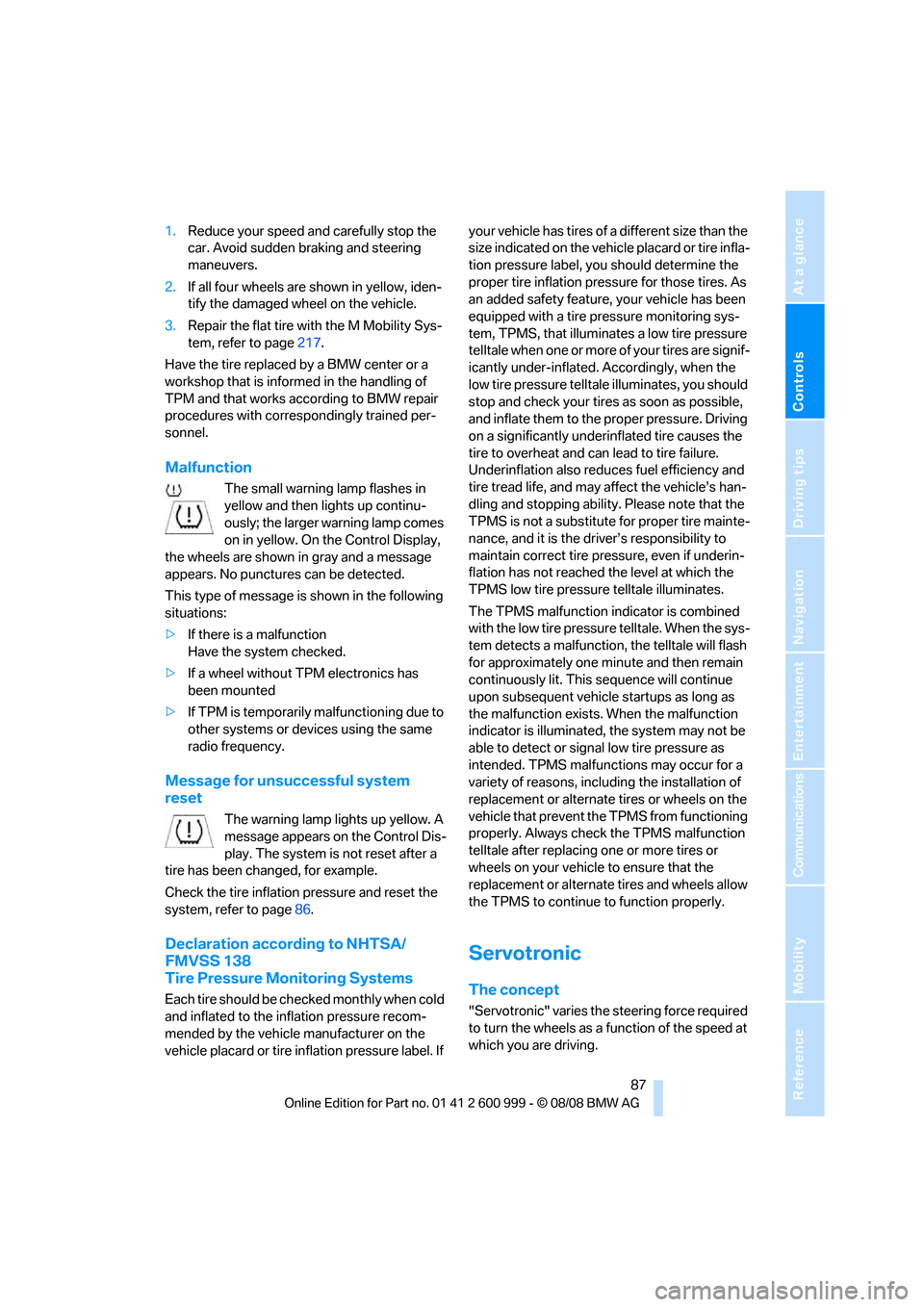
The small warning lamp flashes in
yellow and then lights up continu-
ously; the larger warning lamp comes
on in yellow. On the Control Display,
the wheels are shown in gray and a message
appears. No punctures can be detected.
This type of message is shown in the following
situations:
>If there is a malfunction
Have the system checked.
>If a wheel without TPM electronics has
been mounted
>If TPM is temporarily malfunctioning due to
other systems or devices using the same
radio frequency.
Message for unsuccessful system
reset
The warning lamp lights up yellow. A
message appears on the Control Dis-
play. The system is not reset after a
tire has been changed, for example.
Check the tire inflation pressure and reset the
system, refer to page86.
Declaration according to NHTSA/
FMVSS 138
Tire Pressure Monitoring Systems
Each tire should be checked monthly when cold
and inflated to the inflation pressure recom-
mended by the vehicle manufacturer on the
vehicle placard or tire inflation pressure label. If your vehicle has tires of a different size than the
size indicated on the vehicle placard or tire infla-
tion pressure label, you should determine the
proper tire inflation pressure for those tires. As
an added safety feature, your vehicle has been
equipped with a tire pressure monitoring sys-
tem, TPMS, that illuminates a low tire pressure
telltale when one or more of your tires are signif-
icantly under-inflated. Accordingly, when the
low tire pressure telltale illuminates, you should
stop and check your tires as soon as possible,
and inflate them to the proper pressure. Driving
on a significantly underinflated tire causes the
tire to overheat and can lead to tire failure.
Underinflation also reduces fuel efficiency and
tire tread life, and may affect the vehicle’s han-
dling and stopping ability. Please note that the
TPMS is not a substitute for proper tire mainte-
nance, and it is the driver’s responsibility to
maintain correct tire pressure, even if underin-
flation has not reached the level at which the
TPMS low tire pressure telltale illuminates.
The TPMS malfunction indicator is combined
with the low tire pressure telltale. When the sys-
tem detects a malfunction, the telltale will flash
for approximately one minute and then remain
continuously lit. This sequence will continue
upon subsequent vehicle startups as long as
the malfunction exists. When the malfunction
indicator is illuminated, the system may not be
able to detect or signal low tire pressure as
intended. TPMS malfunctions may occur for a
variety of reasons, including the installation of
replacement or alternate tires or wheels on the
vehicle that prevent the TPMS from functioning
properly. Always check the TPMS malfunction
telltale after replacing one or more tires or
wheels on your vehicle to ensure that the
replacement or alternate tires and wheels allow
the TPMS to continue to function properly.
Servotronic
The concept
"Servotronic" varies the steering force required
to turn the wheels as a function of the speed at
which you are driving.
ba8_E9293M3_cic.book Seite 87 Dienstag, 19. August 2008 12:01 12
Page 92 of 256
Technology for driving comfort and safety
90 seat.
The front and side airbags for the front pas-
senger are activated.
>The indicator lamp does not come on if the
seat is empty.
The front and side airbags for the front pas-
senger are not activated.
Operational readiness of airbag system
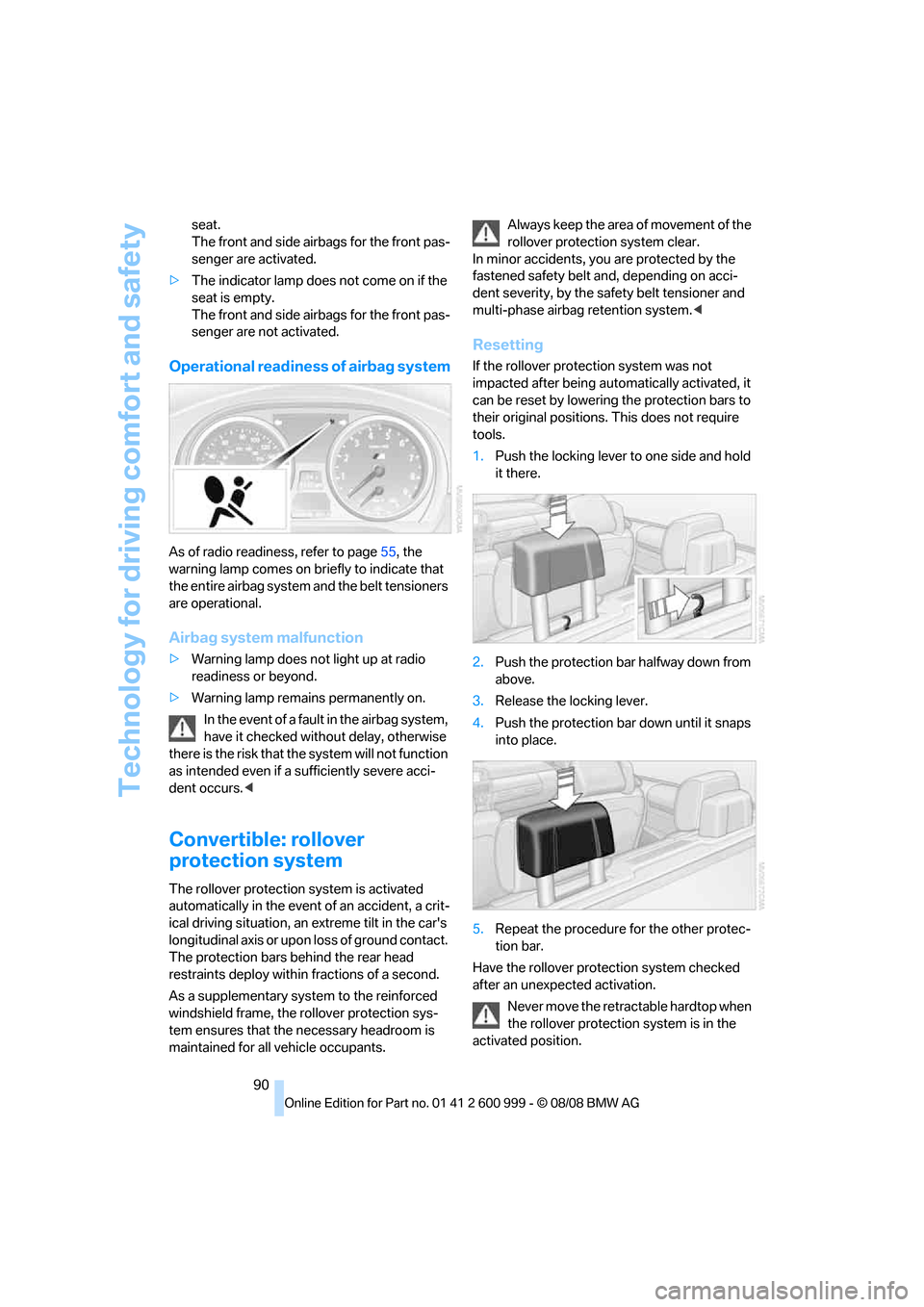
As of radio readiness, refer to page55, the
warning lamp comes on briefly to indicate that
the entire airbag system and the belt tensioners
are operational.
Airbag system malfunction
>Warning lamp does not light up at radio
readiness or beyond.
>Warning lamp remains permanently on.
In the event of a fault in the airbag system,
have it checked without delay, otherwise
there is the risk that the system will not function
as intended even if a sufficiently severe acci-
dent occurs.<
Convertible: rollover
protection system
The rollover protection system is activated
automatically in the event of an accident, a crit-
ical driving situation, an extreme tilt in the car's
longitudinal axis or upon loss of ground contact.
The protection bars behind the rear head
restraints deploy within fractions of a second.
As a supplementary system to the reinforced
windshield frame, the rollover protection sys-
tem ensures that the necessary headroom is
maintained for all vehicle occupants.Always keep the area of movement of the
rollover protection system clear.
In minor accidents, you are protected by the
fastened safety belt and, depending on acci-
dent severity, by the safety belt tensioner and
multi-phase airbag retention system.<
Resetting
If the rollover protection system was not
impacted after being automatically activated, it
can be reset by lowering the protection bars to
their original positions. This does not require
tools.
1.Push the locking lever to one side and hold
it there.
2.Push the protection bar halfway down from
above.
3.Release the locking lever.
4.Push the protection bar down until it snaps
into place.
5.Repeat the procedure for the other protec-
tion bar.
Have the rollover protection system checked
after an unexpected activation.
Never move the retractable hardtop when
the rollover protection system is in the
activated position.
ba8_E9293M3_cic.book Seite 90 Dienstag, 19. August 2008 12:01 12
Page 150 of 256
On/off and tone
148
Adjustments
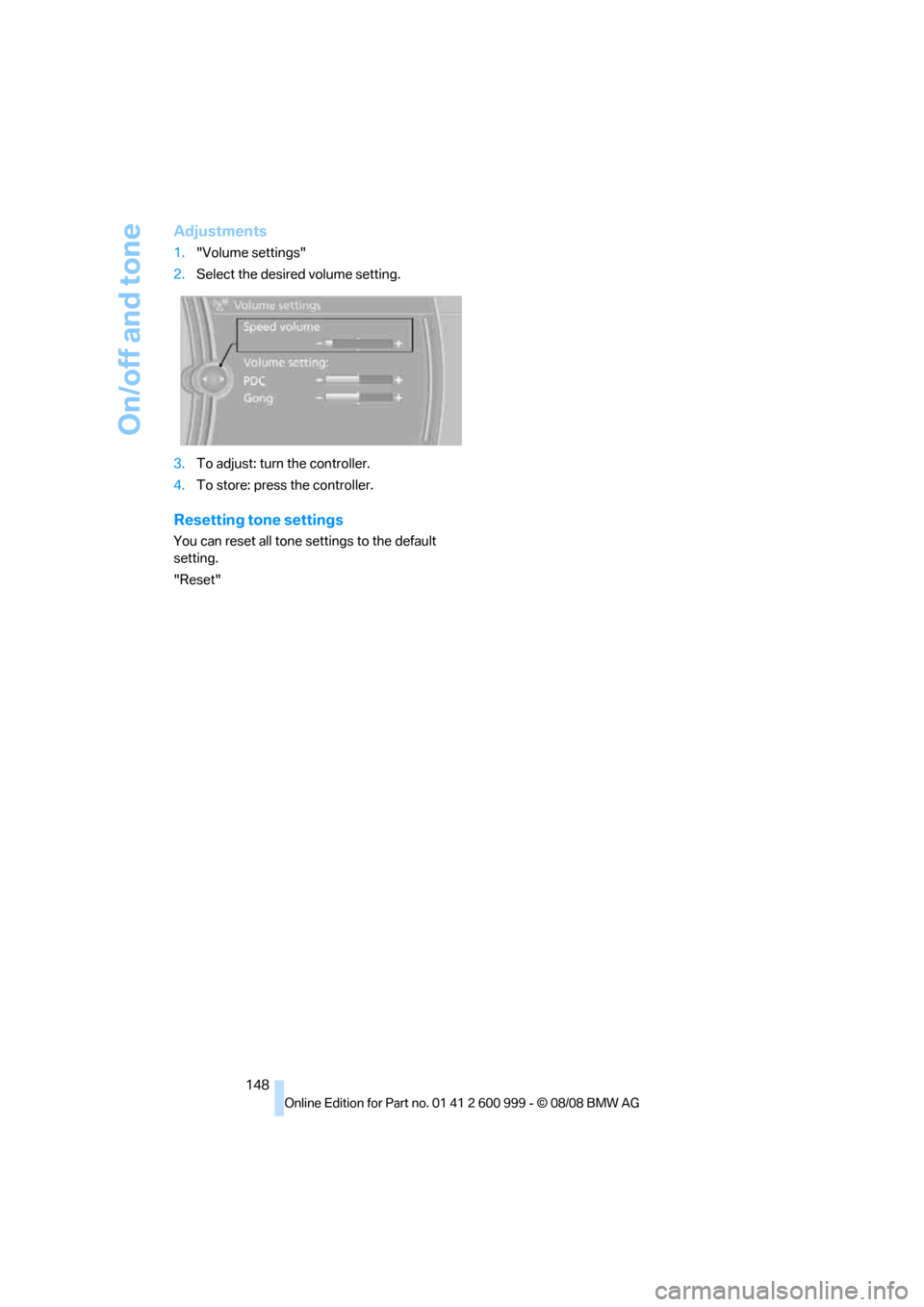
1."Volume settings"
2.Select the desired volume setting.
3.To adjust: turn the controller.
4.To store: press the controller.
Resetting tone settings
You can reset all tone settings to the default
setting.
"Reset"
ba8_E9293M3_cic.book Seite 148 Dienstag, 19. August 2008 12:01 12
Page 153 of 256
Navigation
Entertainment
Driving tips
151Reference
At a glance
Controls
Communications
Mobility
Stored stations
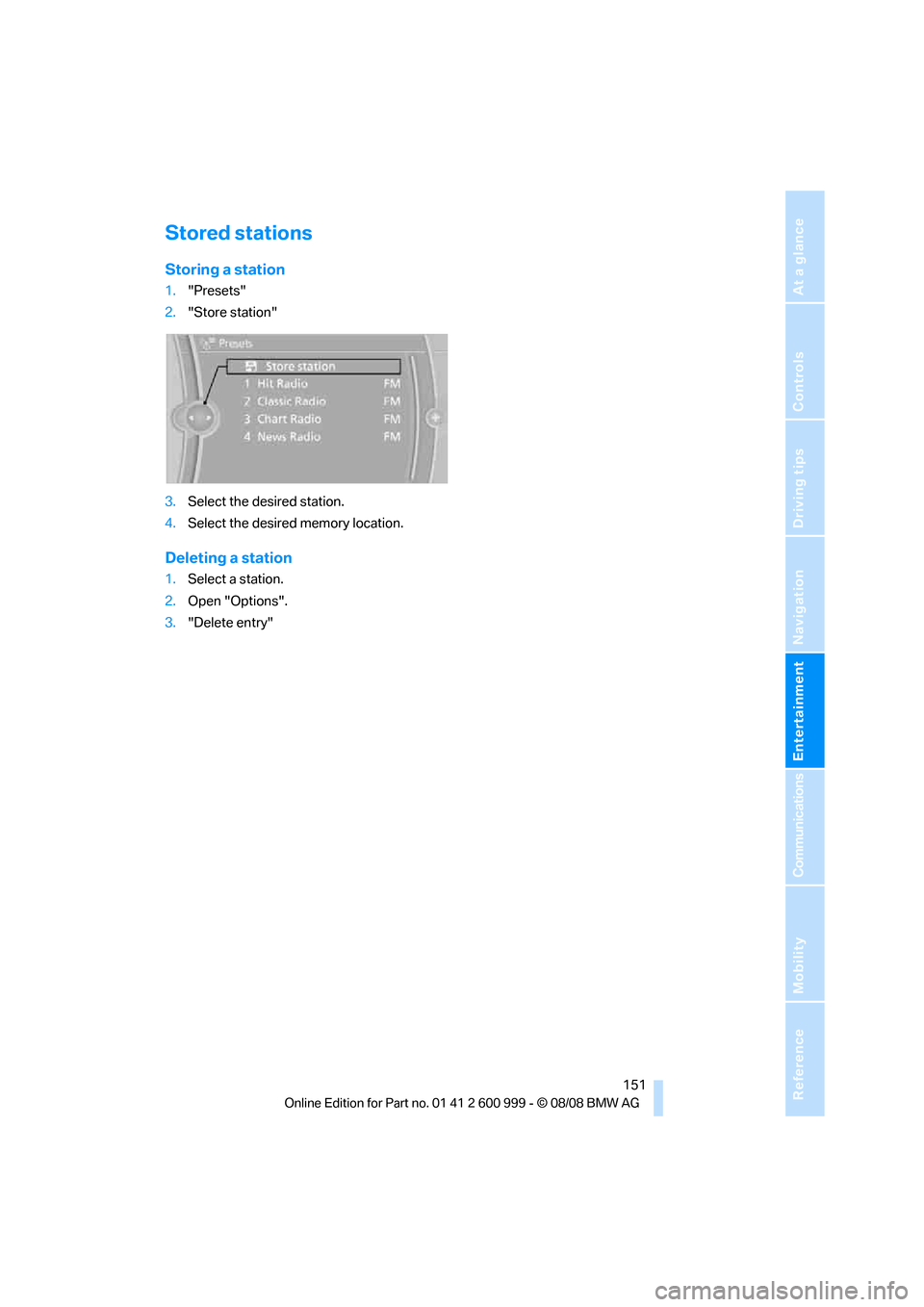
Storing a station
1."Presets"
2."Store station"
3.Select the desired station.
4.Select the desired memory location.
Deleting a station
1.Select a station.
2.Open "Options".
3."Delete entry"
ba8_E9293M3_cic.book Seite 151 Dienstag, 19. August 2008 12:01 12
Page 198 of 256
Wheels and tires
196
Wheels and tires
Tire inflation pressures
Information for your safety
It is not merely the tires' service life, but also
driving comfort and, to a great extent, driving
safety that depend on the condition of the tires
and the maintenance of the specified tire pres-
sure.
Checking pressure
Only check tire inflation pressure when the
tires are cold. This means after a maximum of
1.25 miles/2 km driving or when the vehicle has
been parked for at least 2 hours. When tires are
warm, the tire inflation pressure is higher.
Check the tire inflation pressure regularly
and correct it, if necessary: at least twice a
month and before starting long trips. If you fail
to observe this precaution you may be driving
on tires with incorrect tire pressures, a condi-
tion that can not only compromise your vehi-
cle's driving stability, but also lead to tire dam-
age and the risk of an accident. Do not drive on
a flat tire. A flat tire will seriously impair your
vehicle's handling and braking response.
Attempts to drive on a flat tire can lead to loss of
control over the vehicle.<
After correcting the tire inflation pressure,
reinitialize the Flat Tire Monitor, refer to
page84, or reset the Tire Pressure Monitor,
refer to page85.<
Inflation pressure specifications
The table below provides all the correct inflation
pressures for the specified tire sizes at ambient
temperature.
The inflation pressures apply to the tire
sizes approved and tire brands recom-
mended by BMW; a list of these is available
from your BMW center.<
For correct identification of the right tire infla-
tion pressures, observe the following:
>Tire sizes for your vehicle>Load conditions
>Maximum allowable driving speed
Tire inflation pressures for driving up to
100 mph or 160 km/h
For normal driving up to 100 mph or 160 km/h
and to achieve optimum driving comfort, adjust
pressures to the respective tire inflation pres-
sures listed on the following page in the col-
umns for traveling speeds up to a maximum of
100 mph or 160 km/h.
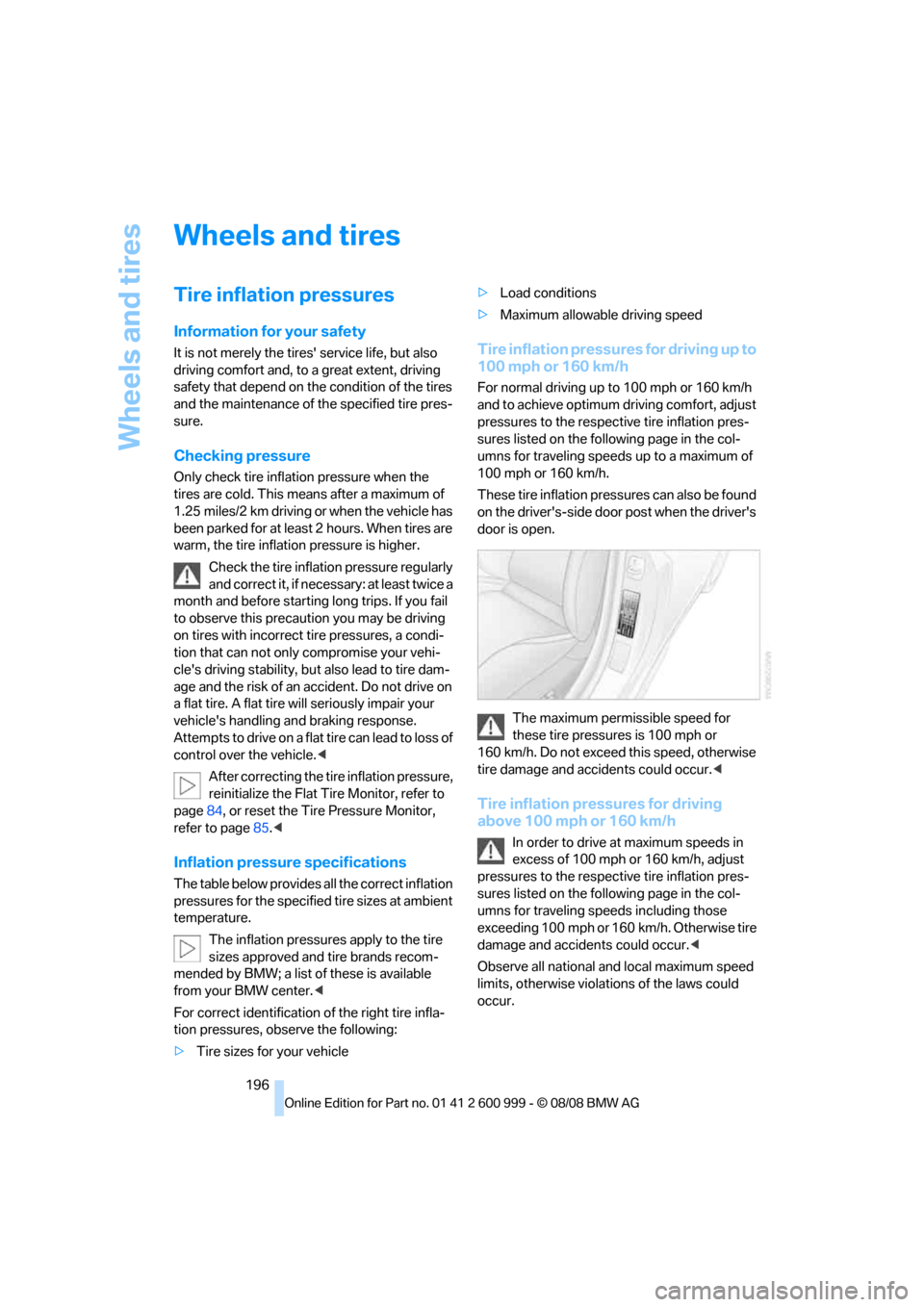
These tire inflation pressures can also be found
on the driver's-side door post when the driver's
door is open.
The maximum permissible speed for
these tire pressures is 100 mph or
160 km/h. Do not exceed this speed, otherwise
tire damage and accidents could occur.<
Tire inflation pressures for driving
above 100 mph or 160 km/h
In order to drive at maximum speeds in
excess of 100 mph or 160 km/h, adjust
pressures to the respective tire inflation pres-
sures listed on the following page in the col-
umns for traveling speeds including those
exceeding 100 mph or 160 km/h. Otherwise tire
damage and accidents could occur.<
Observe all national and local maximum speed
limits, otherwise violations of the laws could
occur.
ba8_E9293M3_cic.book Seite 196 Dienstag, 19. August 2008 12:01 12
Page 236 of 256
Short commands for the voice activation system
234
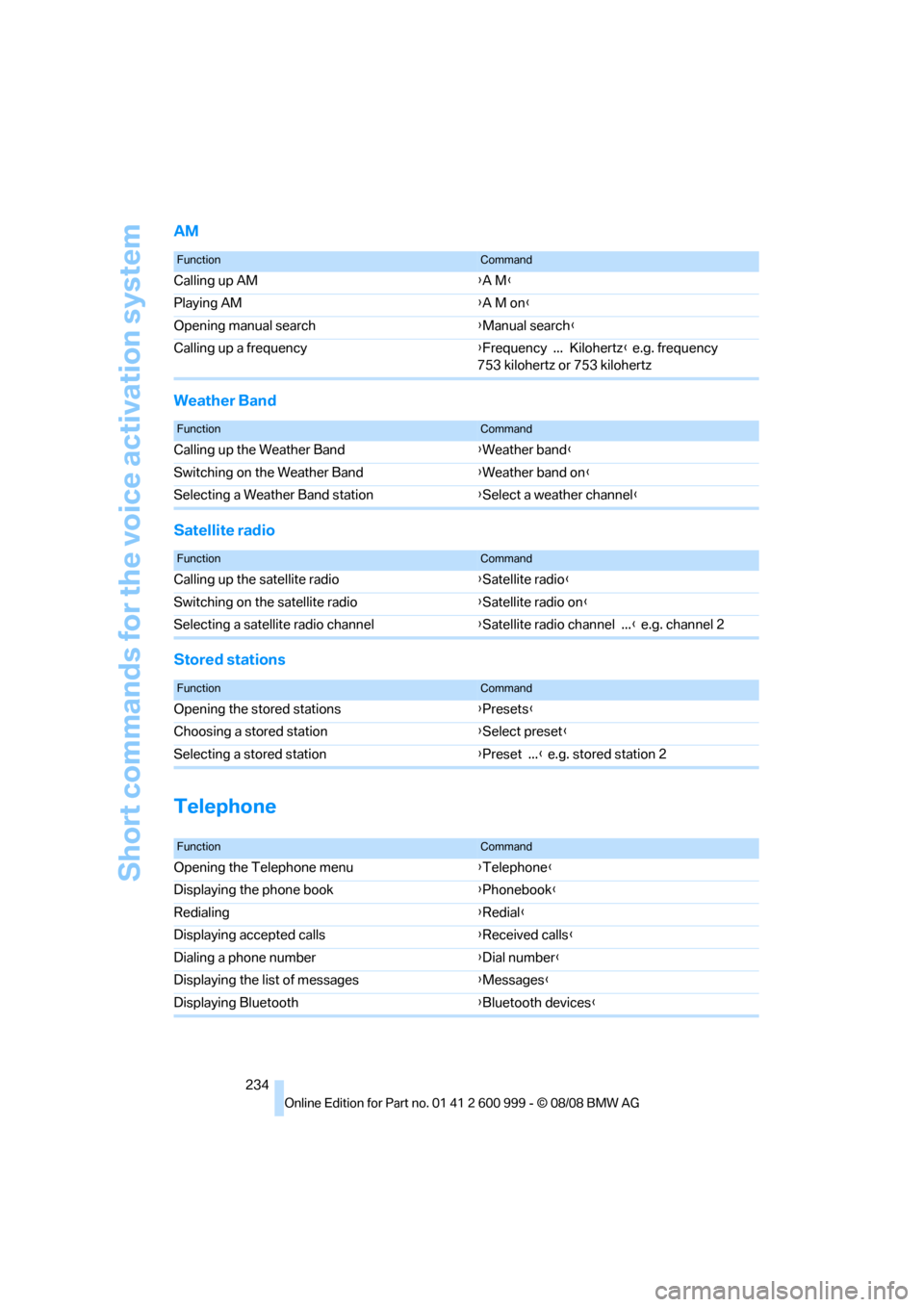
AM
Weather Band
Satellite radio
Stored stations
Telephone
FunctionCommand
Calling up AM{A M}
Playing AM{A M on}
Opening manual search{Manual search}
Calling up a frequency{Frequency ... Kilohertz} e.g. frequency
753 kilohertz or 753 kilohertz
FunctionCommand
Calling up the Weather Band{Weather band}
Switching on the Weather Band{Weather band on}
Selecting a Weather Band station{Select a weather channel}
FunctionCommand
Calling up the satellite radio{Satellite radio}
Switching on the satellite radio{Satellite radio on}
Selecting a satellite radio channel{Satellite radio channel ...} e.g. channel 2
FunctionCommand
Opening the stored stations{Presets}
Choosing a stored station{Select preset}
Selecting a stored station{Preset ...} e.g. stored station 2
FunctionCommand
Opening the Telephone menu{Telephone}
Displaying the phone book{Phonebook}
Redialing{Redial}
Displaying accepted calls{Received calls}
Dialing a phone number{Dial number}
Displaying the list of messages{Messages}
Displaying Bluetooth{Bluetooth devices}
ba8_E9293M3_cic.book Seite 234 Dienstag, 19. August 2008 12:01 12
Page 249 of 256
Reference 247
At a glance
Controls
Driving tips
Communications
Navigation
Entertainment
Mobility
P
Paintwork care210
Park assistant, refer to Park
Distance Control81
Park Distance Control PDC81
Parked car ventilation99
– preselecting switch-on
times100
– switching on and off
directly100
Parking
– vehicle56
Parking aid, refer to Park
Distance Control PDC81
Parking brake57
– indicator lamp57
Parking lamps92
Parking lamps/low beams92
Passenger-side mirror tilt
function49
Pathway lighting93
Personal Profile26
Phone book175
Phone numbers
– dialing176
Pinch protection system
– glass roof, electric37
– windows36
Placing a call, refer to
telephone owner's manual
Polish211
Pollen
– refer to Microfilter/activated-
charcoal filter for automatic
climate control99
Position, refer to Current
position, displaying143
Postal code, entering for
navigation128
Power failure220
Power windows35
Power windows, refer to
Windows35
Pressure, tires196
Pressure monitoring, tires84
– Flat Tire Monitor84Pressure monitoring of tires,
refer to Tire Pressure
Monitor TPM85
Programmable buttons on the
steering wheel11
Protection function, refer to
Pinch protection system
– glass roof, electric37
– windows36
Providing medical assistance,
refer to First aid pouch222
Puncture
– Flat Tire Monitor84
R
Radio
– controls146
– High Definition Radio150
– satellite radio152
– selecting a waveband149
– storing stations149
– switching on/off146
– tone control146
– volume146
Radio-operated key, refer to
Remote control26
Radio position, refer to Radio
readiness55
Radio readiness55
– switched off56
– switched on55
Rain sensor65
Reading lamps95
Rear lamps, refer to Tail
lamps215
– replacing bulb215
Rear seats
– adjusting head restraints45
– folding down backrests108
Rear turn signals
– replacing bulb215
Rear ventilation99
Rearview mirror, refer to
Mirrors48
Rear window defroster99
Rear window roller blind, refer
to Roller sun blinds104Receiving level of mobile
phone, refer to Status
information19
Reception
– quality150
– radio station150
Recirculated-air mode98
Recirculation of air, refer to
Recirculated-air mode98
Reclining seat, refer to
Backrest43
Refueling194
Releasing
– hood202
Remaining distance, refer to
Cruising range70
Remote control26
– battery renewal35
– convenient access34
– garage door opener101
– luggage compartment lid28
– malfunction29,35
– removing from the ignition
lock55
– service data207
Replacement remote
control
26
Replacing bulbs, refer to
Lamps and bulbs213
Replacing tires199
Replacing tires, refer to New
wheels and tires199
Reporting safety defects6
Reserve warning, refer to Fuel
gauge69
Reset, refer to Resetting tone
settings148
Residual heat98
Restraint systems
– for children53
– refer to Safety belts47
Retractable hardtop38
– convenient operation28
– opening and closing39
– remote control28
Reverse
– CD changer156
– CD player156
ba8_E9293M3_cic.book Seite 247 Dienstag, 19. August 2008 12:01 12
Page 250 of 256
Everything from A - Z
248 Reverse gear59
– manual transmission58
Road map139
Roadside
Assistance185,221
Roadside parking lamps94
Roadworthiness test, refer to
Service requirements72
Roller sun blinds104
Rollover protection system,
convertible90
– resetting90
Roof load capacity231
Roof-mounted luggage
rack120
Rope, refer to Tow-starting,
towing away225
Rotary/pushbutton, refer to
iDrive16
Route137,138
– bypassing sections138
– changing137,138
– changing criteria137
– displaying streets or towns/
cities138
– map display139
– selecting137
Route instructions, refer to
Destination guidance
through voice
instructions138
Route map, refer to Map
display139
Route section, changing138
Route selection137
S
Safety-belt height
adjustment47
Safety belts47
– belt hand-over48
– damage48
– indicator/warning lamp48
– reminder48
– sitting safely42Safety systems
– airbags88
– Antilock Brake System
ABS82
– brake system82
– driving stability control
systems82
– Dynamic Stability Control
DSC82
– rollover protection system,
convertible90
– safety belts47
Satellite radio152
– enabling channel152
– selecting channel153
– storing channel153
Screen, refer to iDrive
controls16
Screw thread for tow
fitting224
SDARS, refer to Satellite
radio152
Sealant, filling218
Seat adjustment
– electric43
– mechanical43
Seat and mirror memory46
Seat belt reminder, refer to
'Fasten safety belts'
reminder48
Seat heating46
Seats42
– adjusting electrically43
– adjusting the seats43
– heating46
– memory, refer to Seat and
mirror memory46
– saving a setting, refer to Seat
and mirror memory46
– sitting safely42
Securing cargo110,112
Securing the vehicle
– from inside30
– from outside27
Selecting new scale for
navigation139
Selector lever positions58Sequential M Gearbox with
Drivelogic
– Drivelogic drive programs61
Sequential mode59
Service, refer to Roadside
Assistance221
Service car, refer to Roadside
Assistance221
Service data in the remote
control207
Service Interval Display, refer
to Condition Based Service
CBS207
Service Request189
Service requirement display,
refer to Condition Based
Service CBS207
Service requirements72
Services status190
Settings
– changing settings on the
Control Display79
– clock, 12h/24h format75
– configuring, refer to
MDrive50
– DVD157
– language79
Settings and information71
Setting times, refer to
Preselecting switch-on
times100
Shifting60
Shifting gears
– manual transmission57
Shift lever58
Shift Lights62
Shiftlock59
Shift paddles on steering
wheel60
Shift-up display, refer to Shift
Lights62
Shock absorber control, refer
to Electronic Damper
Control EDC83
Short commands for the voice
activation system232
Short route in navigation, refer
to Selecting route137
ba8_E9293M3_cic.book Seite 248 Dienstag, 19. August 2008 12:01 12
Page 252 of 256
Everything from A - Z
250 Temperature
– automatic climate control97
– changing unit of measure71
– coolant, refer to Coolant
temperature69
Temperature display
– outside temperature68
– outside temperature
warning68
– setting the units71
Tempomat, refer to Cruise
control66
Tensioning straps, refer to
Securing cargo119
The individual vehicle5
Third brake lamp, refer to
Center brake lamp217
Through-loading opening with
integrated transport
bag111
Through-loading system108
Tilt alarm sensor33
Tilt function, passenger-side
mirror49
Timer, refer to Preselecting
switch-on times100
Tire inflation pressure196
– loss85,86
Tire pressure monitoring,
refer to Flat Tire Monitor84
Tire Pressure Monitor
TPM85
– resetting the system86
– system limitations85
– warning lamp86
Tire puncture, refer to Flat Tire
Monitor85
Tire Quality Grading198Tires
– age198
– air loss86
– breaking in116
– changing, refer to Changing
wheels219
– condition199
– damage199
– inflation pressure196
– labels198
– minimum tread depth199
– new wheels and tires199
– pressure monitoring, refer to
Flat Tire Monitor84
– pressure monitoring, refer to
Tire Pressure Monitor
TPM85
– puncture85
– replacing199
– size198
– storage
200
– tread depth199
– wear indicators, refer to
Minimum tread depth199
– wheel/tire combination, refer
to Correct wheels and
tires200
– winter tires200
TMC station, refer to
Traffic bulletins140
Tone
– control146
– middle setting148
Tools, refer to Onboard tool
kit213
Top, refer to Retractable
hardtop38
Top 50 of music
collection163
Torque, refer to Engine
data228
Tow bar224
Tow fitting224
– screw thread224
Tow fittings for tow-starting
and towing away224Towing223
– with manual
transmission224
– with M dual clutch
transmission224
Towing and tow-starting223
Towing methods224
Town/city, for navigation127
Tow rope225
Tow-starting223,225
TPM, refer to Tire Pressure
Monitor85
Track
– selecting on CD154
Traction control, refer to
Dynamic Stability Control
DSC82
Traffic bulletins
– categories141
Traffic bulletins, filtering141
Traffic bulletins for
navigation140
– during destination
guidance141
– in map display141
Traffic jam
– displaying traffic
bulletins140
Transmission
– Drivelogic61
– Launch Control63
– manual transmission57
– reverse gear59
– Shift Lights62
– unlocking transmission lock
manually60
Transmission lock, unlocking
manually60
Transporting children
safely53
Transport securing devices,
refer to Securing cargo119
Travel instructions,
refer to Voice
instructions138
Tread depth, refer to Minimum
tire tread199
Trip-distance counter, refer to
Trip odometer68
ba8_E9293M3_cic.book Seite 250 Dienstag, 19. August 2008 12:01 12