navigation BMW M3 COUPE 2009 E92 Owner's Guide
[x] Cancel search | Manufacturer: BMW, Model Year: 2009, Model line: M3 COUPE, Model: BMW M3 COUPE 2009 E92Pages: 256, PDF Size: 12.03 MB
Page 45 of 256
Controls
43Reference
At a glance
Driving tips
Communications
Navigation
Entertainment
Mobility
accident.
On the front passenger seat as well, do not
incline the backrest too far to the rear while the
vehicle is being driven, otherwise there is a dan-
ger in the event of an accident of sliding under
the safety belt, eliminating the protection nor-
mally provided by the belt.<
Comply with the instructions on head restraint
height on page44, and on damaged safety
belts on page48.
Manual adjustment
Observe the adjustment instructions
above to ensure the best possible per-
sonal protection.<
Thigh support
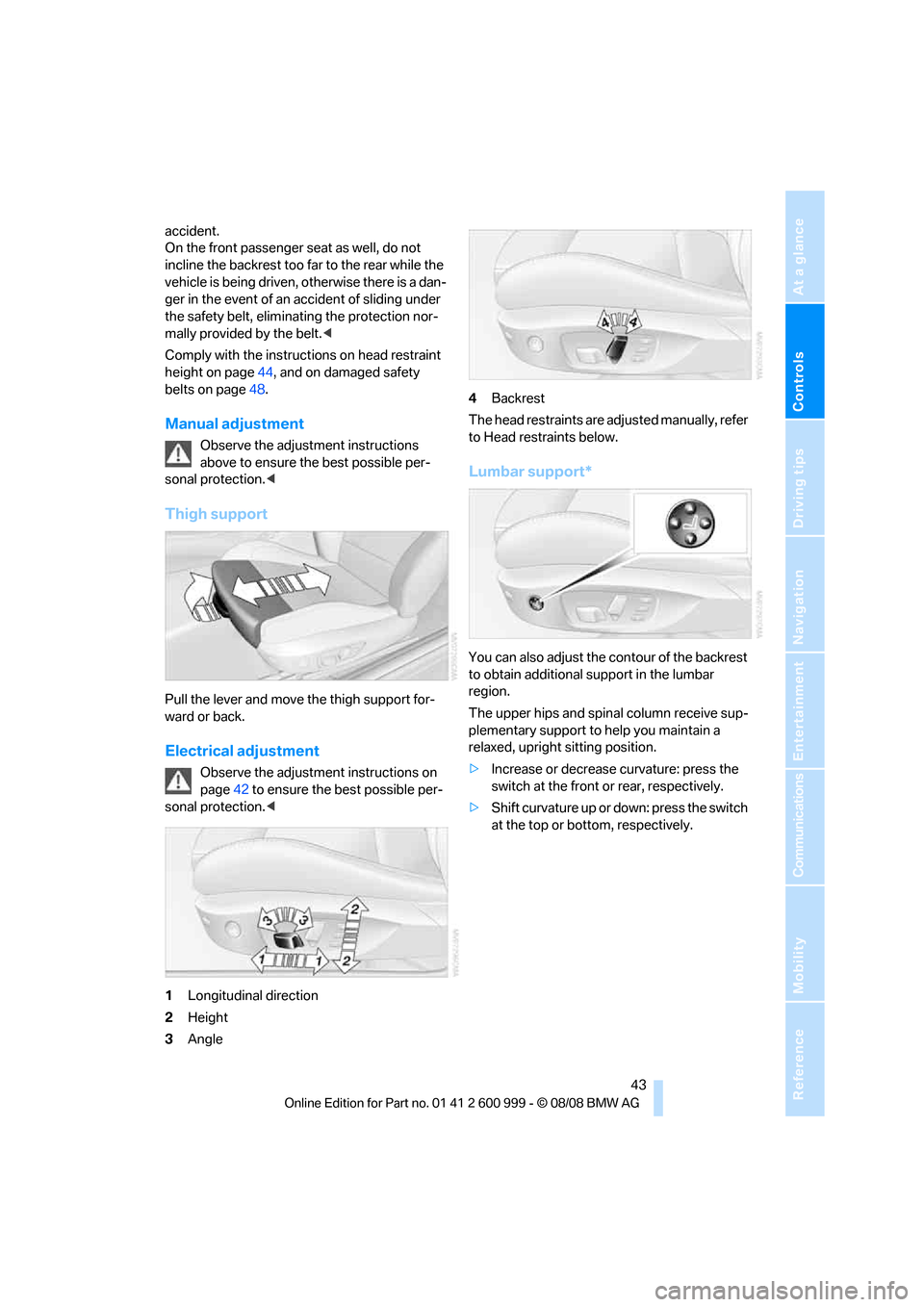
Pull the lever and move the thigh support for-
ward or back.
Electrical adjustment
Observe the adjustment instructions on
page42 to ensure the best possible per-
sonal protection.<
1Longitudinal direction
2Height
3Angle4Backrest
The head restraints are adjusted manually, refer
to Head restraints below.
Lumbar support*
You can also adjust the contour of the backrest
to obtain additional support in the lumbar
region.
The upper hips and spinal column receive sup-
plementary support to help you maintain a
relaxed, upright sitting position.
>Increase or decrease curvature: press the
switch at the front or rear, respectively.
>Shift curvature up or down: press the switch
at the top or bottom, respectively.
ba8_E9293M3_cic.book Seite 43 Dienstag, 19. August 2008 12:01 12
Page 47 of 256
Controls
45Reference
At a glance
Driving tips
Communications
Navigation
Entertainment
Mobility
Convertible front seats
Height adjustment
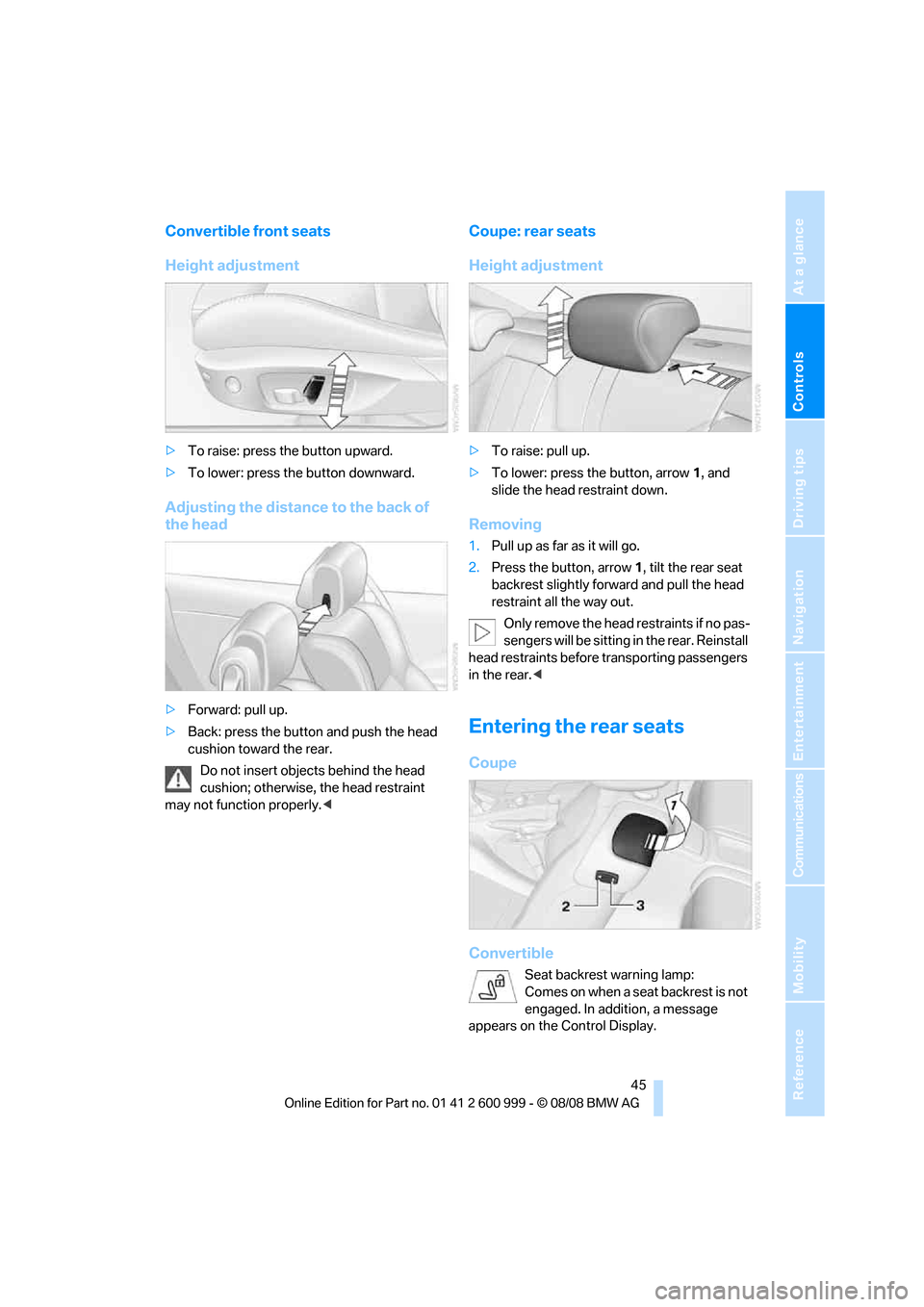
>To raise: press the button upward.
>To lower: press the button downward.
Adjusting the distance to the back of
the head
>Forward: pull up.
>Back: press the button and push the head
cushion toward the rear.
Do not insert objects behind the head
cushion; otherwise, the head restraint
may not function properly.<
Coupe: rear seats
Height adjustment
>To raise: pull up.
>To lower: press the button, arrow1, and
slide the head restraint down.
Removing
1.Pull up as far as it will go.
2.Press the button, arrow 1, tilt the rear seat
backrest slightly forward and pull the head
restraint all the way out.
Only remove the head restraints if no pas-
sengers will be sitting in the rear. Reinstall
head restraints before transporting passengers
in the rear.<
Entering the rear seats
Coupe
Convertible
Seat backrest warning lamp:
Comes on when a seat backrest is not
engaged. In addition, a message
appears on the Control Display.
ba8_E9293M3_cic.book Seite 45 Dienstag, 19. August 2008 12:01 12
Page 49 of 256
Controls
47Reference
At a glance
Driving tips
Communications
Navigation
Entertainment
Mobility
Convenience mode
1.Unlock and open the driver's door or switch
on radio readiness, refer to page55.
2.Briefly press the desired memory button1
or 2.
The adjusting procedure is halted immediately
when you touch a seat adjustment switch or
one of the memory buttons.
Safety feature
1.Close the driver's door and switch the igni-
tion on or off, refer to page55.
2.Press the desired memory button1 or2
and keep it pressed until the adjustment
process has been completed.
If the button was pressed accidentally:
Press the button again; the LED goes out.
Call-up with the remote control
The driver's seat position last stored is stored
for the remote control currently in use.
You can select the occasion on which the seat is
reset to that position.
>Call-up when the vehicle is unlocked.
>Call-up when the driver's door is opened.
When this Personal Profile function is
used, first make sure that the footwell
behind the driver's seat is free of obstacles.
Failure to do so could cause injury to persons or
damage to objects as a result of a rearward
movement of the seat.<
The adjusting procedure is halted immediately
when you touch a seat adjustment switch or
one of the memory buttons.
Selecting automatic call-up
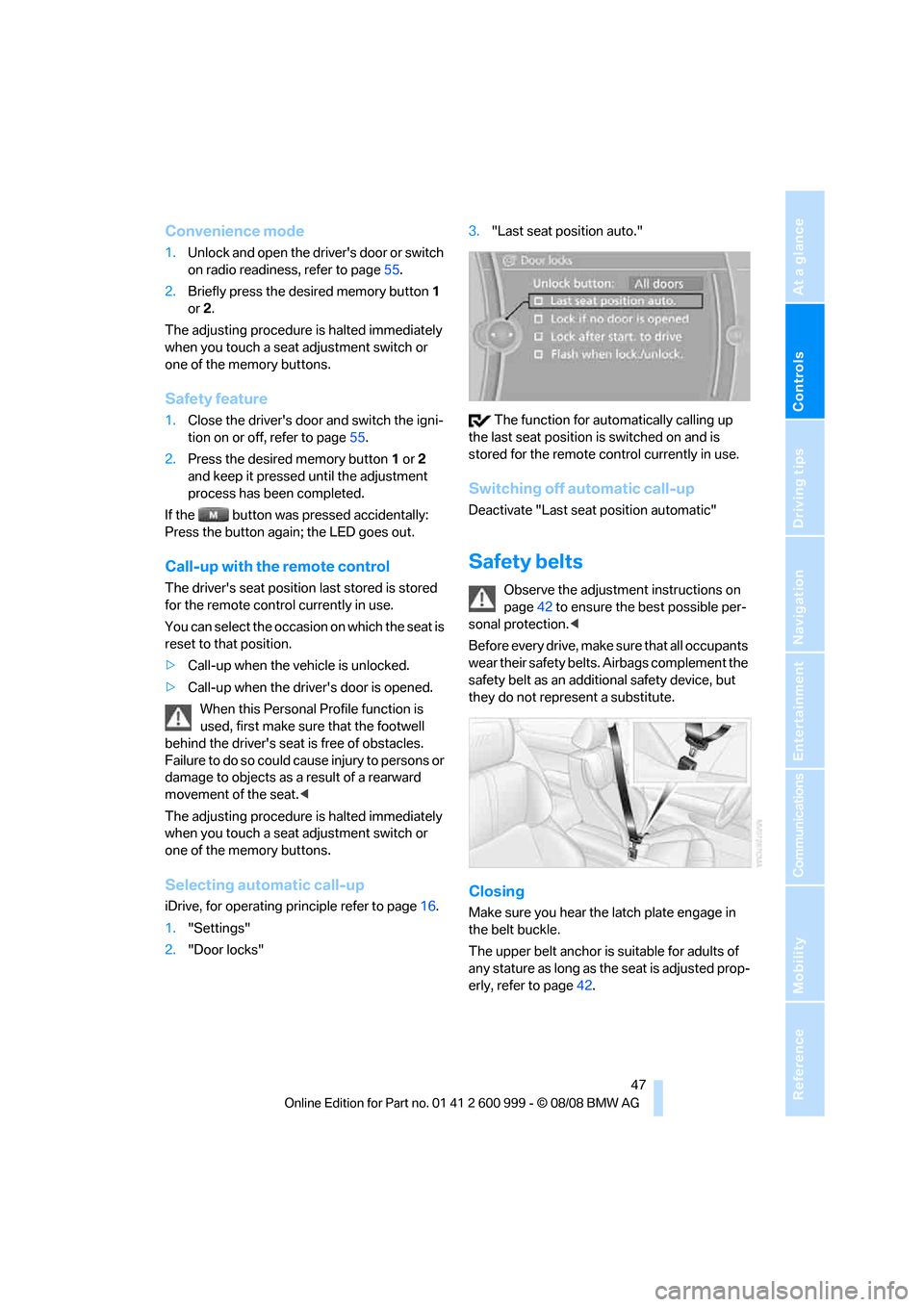
iDrive, for operating principle refer to page16.
1."Settings"
2."Door locks"3."Last seat position auto."
The function for automatically calling up
the last seat position is switched on and is
stored for the remote control currently in use.
Switching off automatic call-up
Deactivate "Last seat position automatic"
Safety belts
Observe the adjustment instructions on
page42 to ensure the best possible per-
sonal protection.<
Before every drive, make sure that all occupants
wear their safety belts. Airbags complement the
safety belt as an additional safety device, but
they do not represent a substitute.
Closing
Make sure you hear the latch plate engage in
the belt buckle.
The upper belt anchor is suitable for adults of
any stature as long as the seat is adjusted prop-
erly, refer to page42.
ba8_E9293M3_cic.book Seite 47 Dienstag, 19. August 2008 12:01 12
Page 51 of 256
Controls
49Reference
At a glance
Driving tips
Communications
Navigation
Entertainment
Mobility
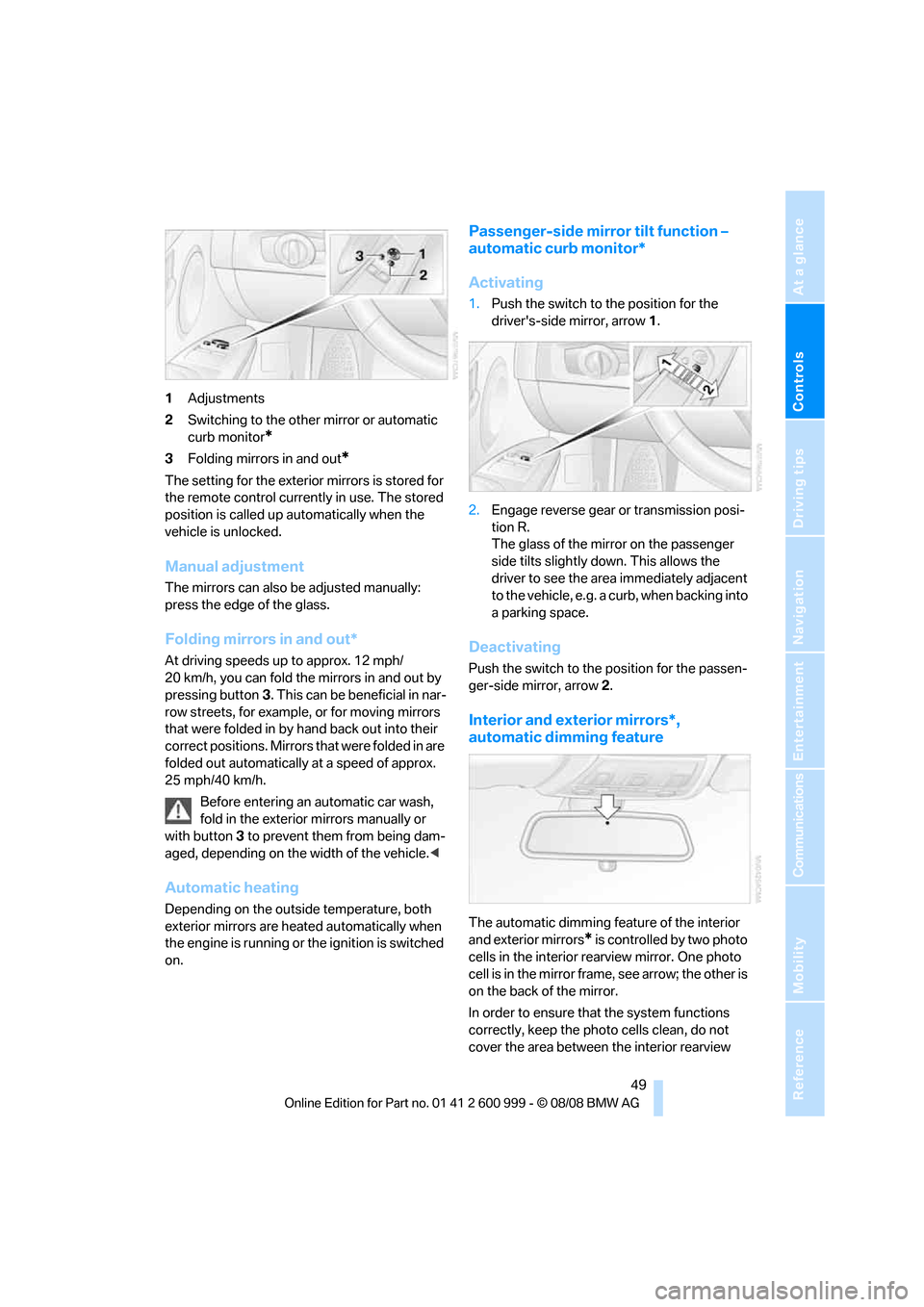
1Adjustments
2Switching to the other mirror or automatic
curb monitor
*
3Folding mirrors in and out*
The setting for the exterior mirrors is stored for
the remote control currently in use. The stored
position is called up automatically when the
vehicle is unlocked.
Manual adjustment
The mirrors can also be adjusted manually:
press the edge of the glass.
Folding mirrors in and out*
At driving speeds up to approx. 12 mph/
20 km/h, you can fold the mirrors in and out by
pressing button3. This can be beneficial in nar-
row streets, for example, or for moving mirrors
that were folded in by hand back out into their
correct positions. Mirrors that were folded in are
folded out automatically at a speed of approx.
25 mph/40 km/h.
Before entering an automatic car wash,
fold in the exterior mirrors manually or
with button3 to prevent them from being dam-
aged, depending on the width of the vehicle.<
Automatic heating
Depending on the outside temperature, both
exterior mirrors are heated automatically when
the engine is running or the ignition is switched
on.
Passenger-side mirror tilt function –
automatic curb monitor*
Activating
1.Push the switch to the position for the
driver's-side mirror, arrow 1.
2.Engage reverse gear or transmission posi-
tion R.
The glass of the mirror on the passenger
side tilts slightly down. This allows the
driver to see the area immediately adjacent
to the vehicle, e.g. a curb, when backing into
a parking space.
Deactivating
Push the switch to the position for the passen-
ger-side mirror, arrow 2.
Interior and exterior mirrors*,
automatic dimming feature
The automatic dimming feature of the interior
and exterior mirrors
* is controlled by two photo
cells in the interior rearview mirror. One photo
cell is in the mirror frame, see arrow; the other is
on the back of the mirror.
In order to ensure that the system functions
correctly, keep the photo cells clean, do not
cover the area between the interior rearview
ba8_E9293M3_cic.book Seite 49 Dienstag, 19. August 2008 12:01 12
Page 53 of 256
Controls
51Reference
At a glance
Driving tips
Communications
Navigation
Entertainment
Mobility
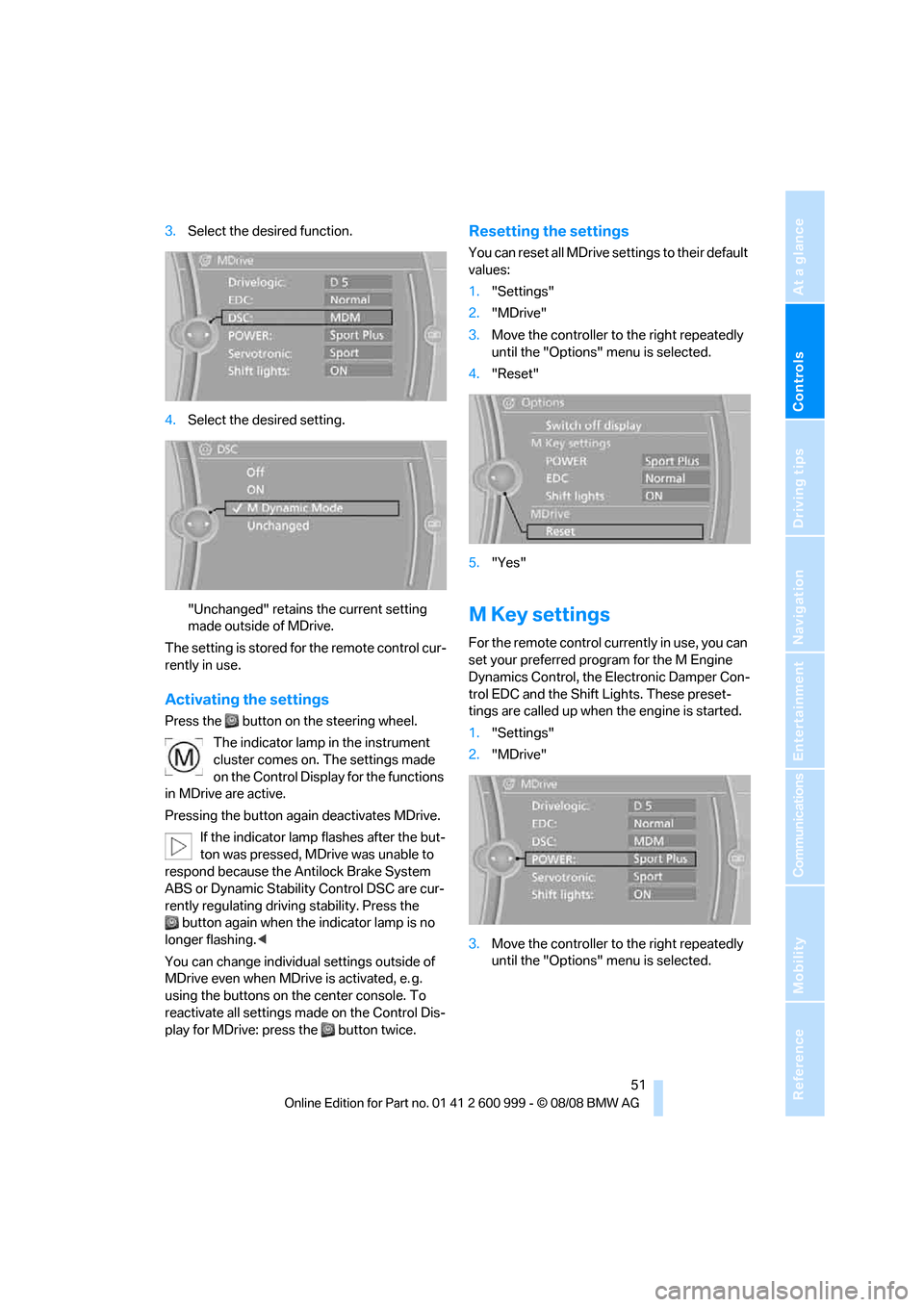
3.Select the desired function.
4.Select the desired setting.
"Unchanged" retains the current setting
made outside of MDrive.
The setting is stored for the remote control cur-
rently in use.
Activating the settings
Press the button on the steering wheel.
The indicator lamp in the instrument
cluster comes on. The settings made
on the Control Display for the functions
in MDrive are active.
Pressing the button again deactivates MDrive.
If the indicator lamp flashes after the but-
ton was pressed, MDrive was unable to
respond because the Antilock Brake System
ABS or Dynamic Stability Control DSC are cur-
rently regulating driving stability. Press the
button again when the indicator lamp is no
longer flashing.<
You can change individual settings outside of
MDrive even when MDrive is activated, e. g.
using the buttons on the center console. To
reactivate all settings made on the Control Dis-
play for MDrive: press the button twice.
Resetting the settings
You can reset all MDrive settings to their default
values:
1."Settings"
2."MDrive"
3.Move the controller to the right repeatedly
until the "Options" menu is selected.
4."Reset"
5."Yes"
M Key settings
For the remote control currently in use, you can
set your preferred program for the M Engine
Dynamics Control, the Electronic Damper Con-
trol EDC and the Shift Lights. These preset-
tings are called up when the engine is started.
1."Settings"
2."MDrive"
3.Move the controller to the right repeatedly
until the "Options" menu is selected.
ba8_E9293M3_cic.book Seite 51 Dienstag, 19. August 2008 12:01 12
Page 55 of 256
Controls
53Reference
At a glance
Driving tips
Communications
Navigation
Entertainment
Mobility
Transporting children safely
The right place for children
Do not leave children unattended in the
vehicle, otherwise they could endanger
themselves and/or other persons by opening
the doors, for example.<
Children always in the rear
Accident research has shown that the safest
place for children is on the rear seat.
Children under the age of 13 or smaller
than 5 ft/150 cm may be transported only
in the rear in suitable child-restraint systems
appropriate for their age, weight and size. Oth-
erwise there is an increased risk of injury in the
event of an accident.<
Children 13 years of age or older must be buck-
led in with a safety belt as soon as there no
longer is any child-restraint system that is
appropriate for their age, size and weight.
Exception for front passenger seat
Should it be necessary to use a child-
restraint system on the front passenger
seat, the front and side airbags for the front pas-
senger must be deactivated. Otherwise, a child
traveling on that seat will face a significant risk
of injury if the airbags are triggered off, even
with a child-restraint system.<
For more information on automatic deactivation
of the front passenger airbags refer to page89.
Installing child-restraint
systems
Observe the child-restraint system man-
ufacturer's instructions when selecting,
installing and using child-restraint systems.
Otherwise the protective effect may be dimin-
ished.<
Standard child-restraint systems are designed
to be secured with a lap belt or with the lap-belt
section of a lap-and-shoulder belt. Incorrectly or improperly installed child-restraint systems
can increase the risk of injury to children.
Always follow the installation instructions for
the system with the greatest care.
On the front passenger seat
After installing a child-restraint system on
the front passenger seat, make sure that
the front and side airbags for the front passen-
ger are deactivated, otherwise there is an
increased risk of injury if the airbags deploy.<
Backrest width*
The backrest width of the front passen-
ger's seat must be at its widest possible
setting. Do not change the setting after install-
ing the child seat. Otherwise the child seat's
stability on the front passenger's seat is lim-
ited.<
1.Adjust the backrest width to its widest set-
ting, refer to page44.
2.Install the child seat.
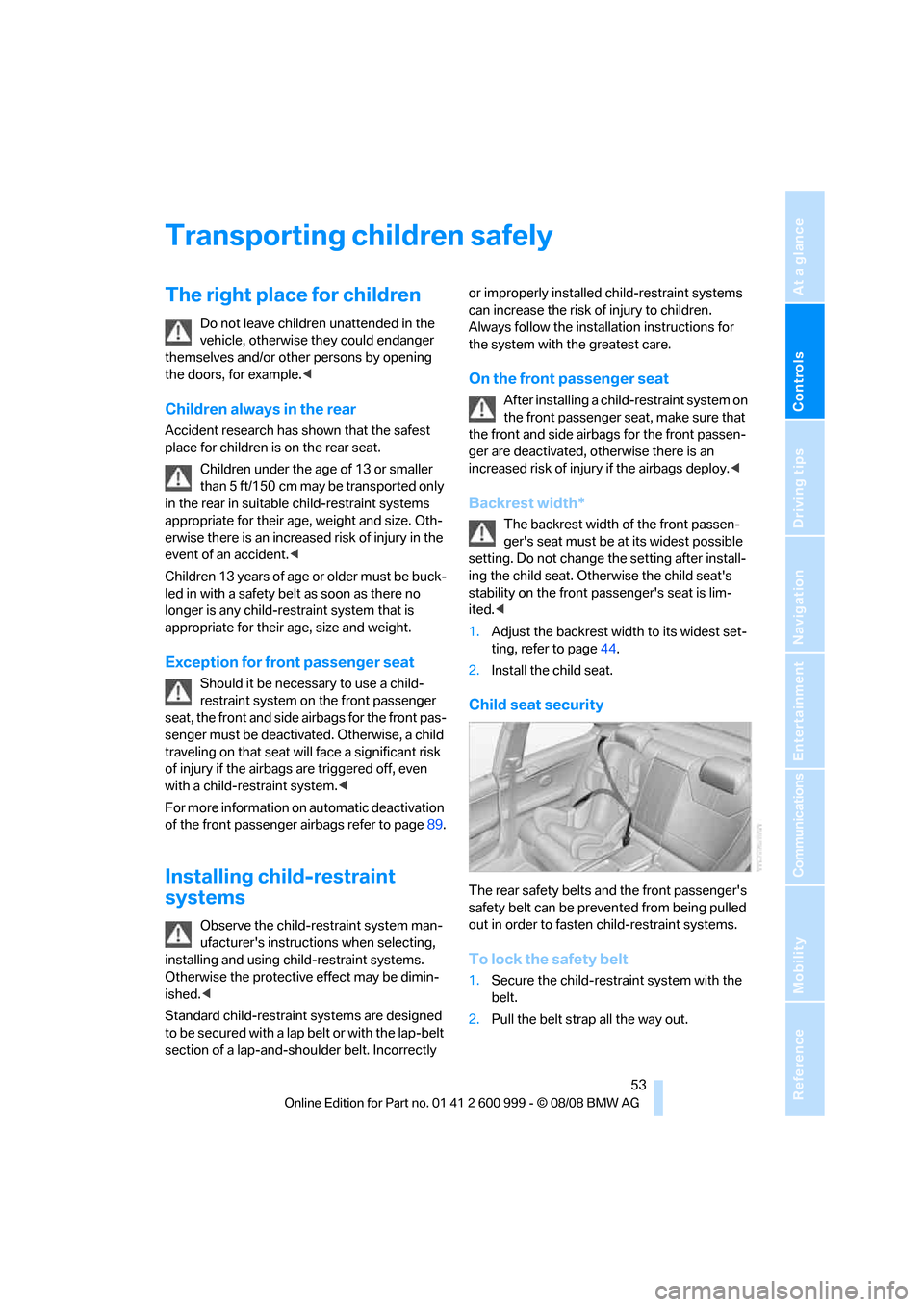
Child seat security
The rear safety belts and the front passenger's
safety belt can be prevented from being pulled
out in order to fasten child-restraint systems.
To lock the safety belt
1.Secure the child-restraint system with the
belt.
2.Pull the belt strap all the way out.
ba8_E9293M3_cic.book Seite 53 Dienstag, 19. August 2008 12:01 12
Page 57 of 256
Controls
55Reference
At a glance
Driving tips
Communications
Navigation
Entertainment
Mobility
Driving
Ignition lock
Insert the remote control into the
ignition lock
Insert the remote control all the way into the
ignition lock.
>Radio readiness is switched on.
Individual electrical consumers can operate.
Convenient access*
If the car is equipped with convenient access,
only insert the remote control into the ignition
lock under special circumstances, refer to
page34.
Removing the remote control from the
ignition lock
Do not forcibly pull the remote control out
of the ignition lock as this may cause
damage.<
Before removing the remote control, push it all
the way in to release the locking mechanism.
>The ignition is switched off if it was on.
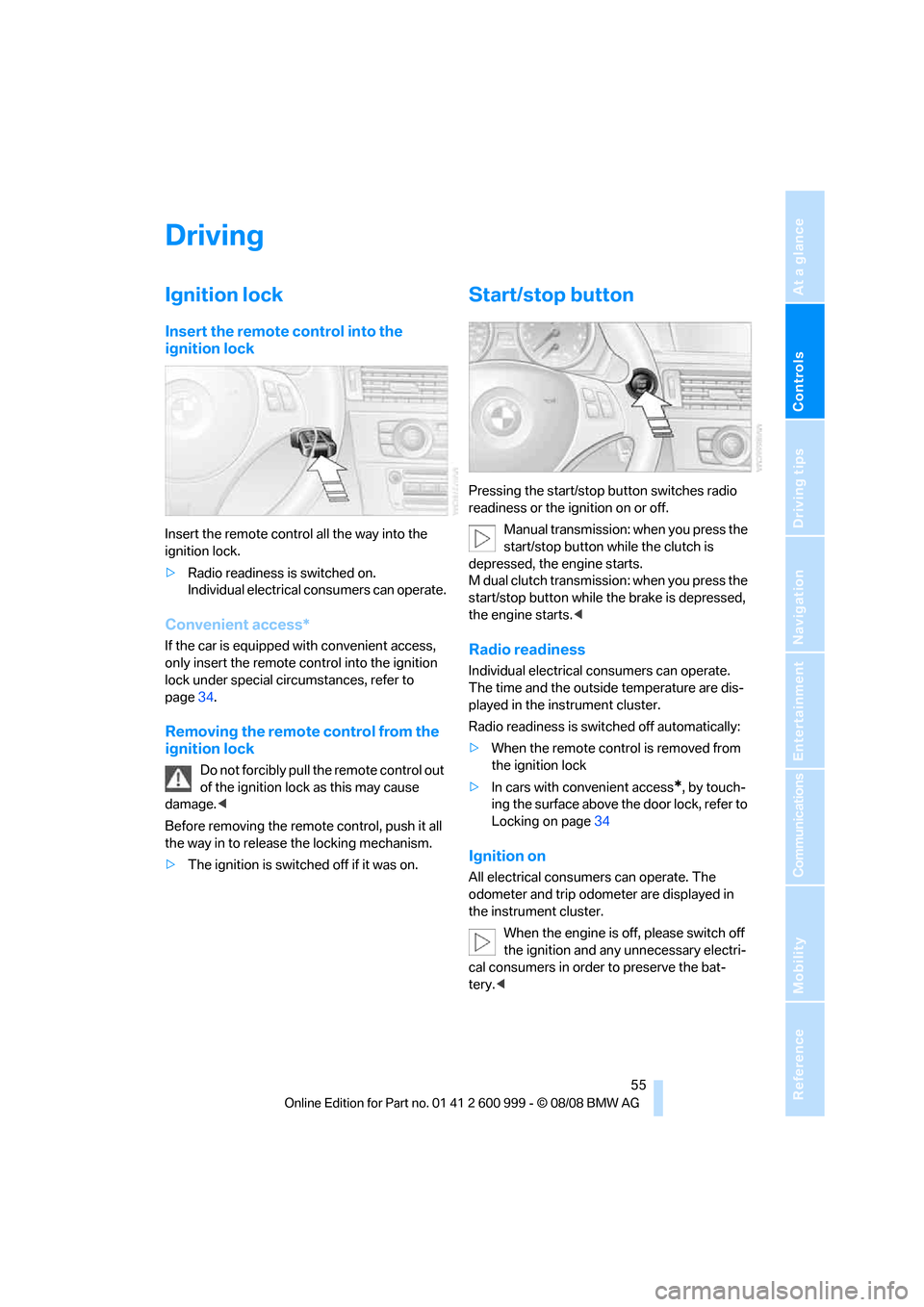
Start/stop button
Pressing the start/stop button switches radio
readiness or the ignition on or off.
Manual transmission: when you press the
start/stop button while the clutch is
depressed, the engine starts.
M dual clutch transmission: when you press the
start/stop button while the brake is depressed,
the engine starts.<
Radio readiness
Individual electrical consumers can operate.
The time and the outside temperature are dis-
played in the instrument cluster.
Radio readiness is switched off automatically:
>When the remote control is removed from
the ignition lock
>In cars with convenient access
*, by touch-
ing the surface above the door lock, refer to
Locking on page34
Ignition on
All electrical consumers can operate. The
odometer and trip odometer are displayed in
the instrument cluster.
When the engine is off, please switch off
the ignition and any unnecessary electri-
cal consumers in order to preserve the bat-
tery.<
ba8_E9293M3_cic.book Seite 55 Dienstag, 19. August 2008 12:01 12
Page 59 of 256
Controls
57Reference
At a glance
Driving tips
Communications
Navigation
Entertainment
Mobility
3.Remove the remote control from the igni-
tion lock, refer to page55. This automati-
cally engages transmission position P.
Before driving into a car wash
The vehicle is able to roll when you perform the
following steps:
1.Insert the remote control, even with conve-
nient access, into the ignition lock.
2.Depress the brake.
3.Engage transmission position N.
4.Switch off the engine.
Transmission position P is engaged:
>Automatically after approx. 30 minutes
>When you remove the remote control from
the ignition lock
Parking brake
The parking brake is primarily intended to pre-
vent the vehicle from rolling while parked; it
brakes the rear wheels.
Indicator lamp
The indicator lamp is lit, and when you
drive off an acoustic signal sounds in
addition. The parking brake is still
applied.
Indicator lamp for Canadian models.
Applying
The lever locks in position automatically.
Releasing
Pull slightly upwards, press the button and
lower the lever.
In exceptional cases, if the parking brake
has to be used to slow or stop the car, do
not pull the lever up too hard. In doing so, con-
tinuously press the button of the parking brake
lever.
Otherwise, excessive force on the parking
brake can lock up the rear wheels and cause the
rear of the car to swerve.<
To prevent corrosion and one-sided brak-
ing action, occasionally apply the parking
brake lightly when the vehicle is slowly coming
to a stop if the traffic conditions are suitable.
The brake lamps do not light up when the park-
ing brake is applied.<
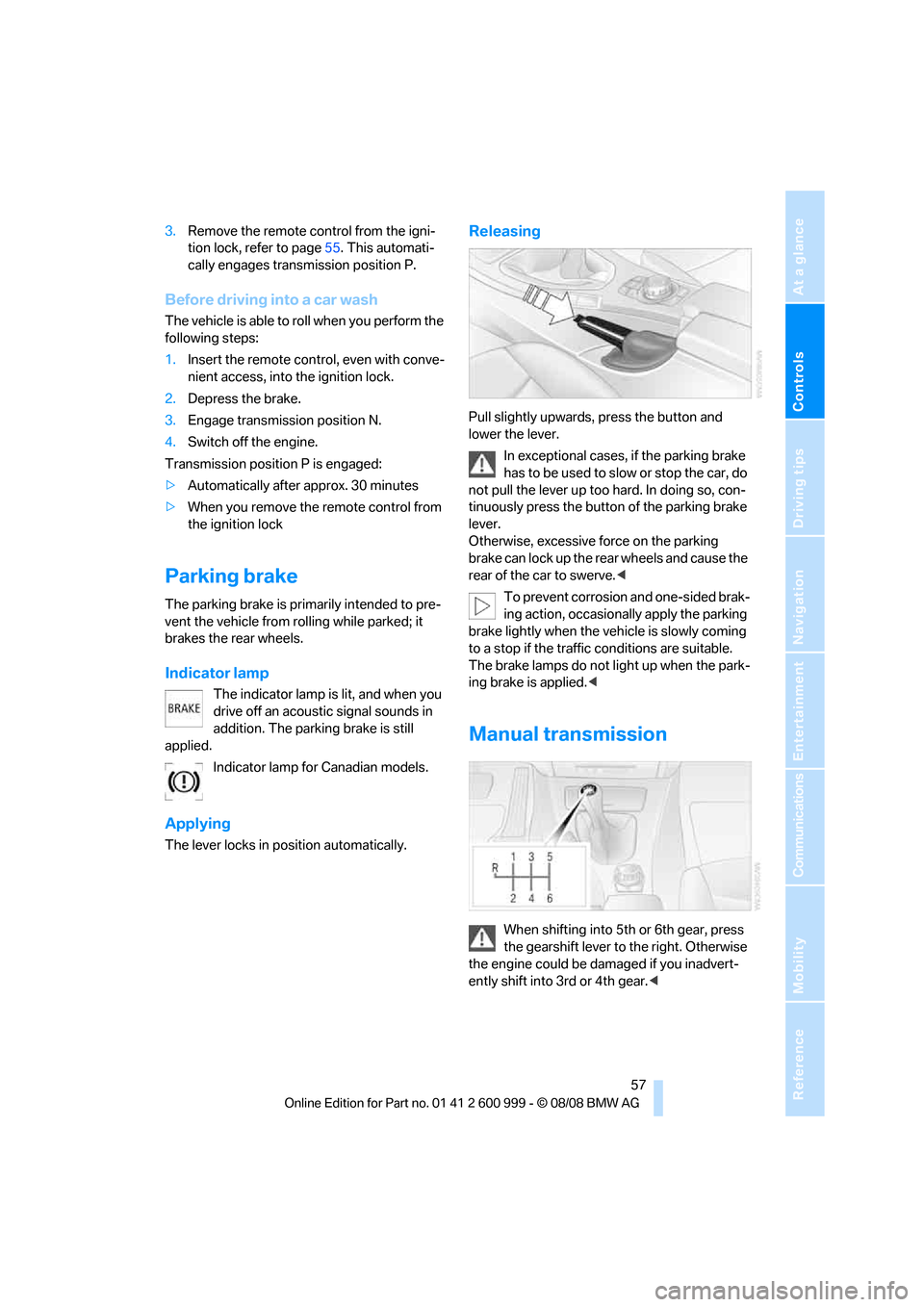
Manual transmission
When shifting into 5th or 6th gear, press
the gearshift lever to the right. Otherwise
the engine could be damaged if you inadvert-
ently shift into 3rd or 4th gear.<
ba8_E9293M3_cic.book Seite 57 Dienstag, 19. August 2008 12:01 12
Page 61 of 256
Controls
59Reference
At a glance
Driving tips
Communications
Navigation
Entertainment
Mobility
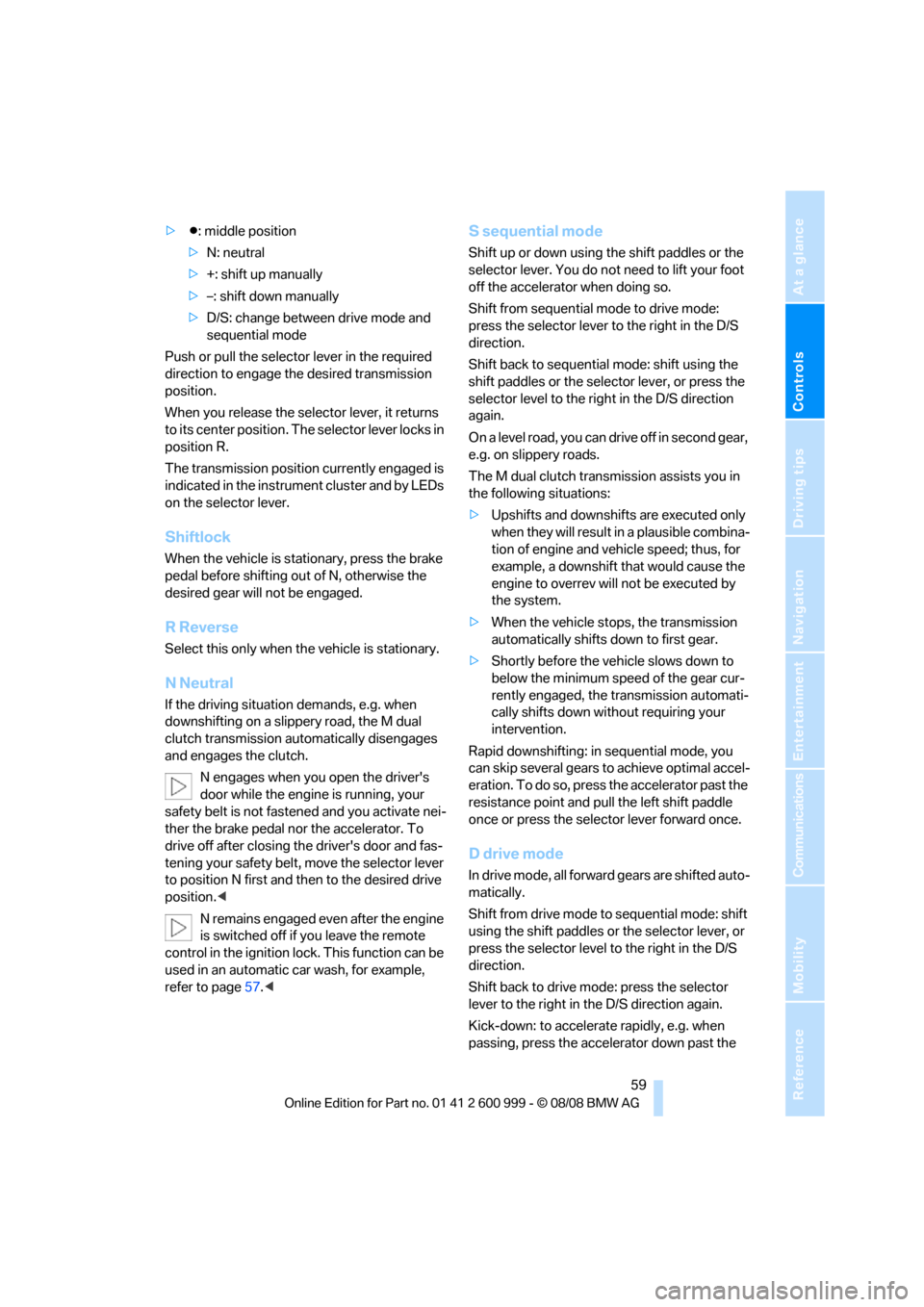
>Β: middle position
>N: neutral
>+: shift up manually
>–: shift down manually
>D/S: change between drive mode and
sequential mode
Push or pull the selector lever in the required
direction to engage the desired transmission
position.
When you release the selector lever, it returns
to its center position. The selector lever locks in
position R.
The transmission position currently engaged is
indicated in the instrument cluster and by LEDs
on the selector lever.
Shiftlock
When the vehicle is stationary, press the brake
pedal before shifting out of N, otherwise the
desired gear will not be engaged.
R Reverse
Select this only when the vehicle is stationary.
N Neutral
If the driving situation demands, e.g. when
downshifting on a slippery road, the M dual
clutch transmission automatically disengages
and engages the clutch.
N engages when you open the driver's
door while the engine is running, your
safety belt is not fastened and you activate nei-
ther the brake pedal nor the accelerator. To
drive off after closing the driver's door and fas-
tening your safety belt, move the selector lever
to position N first and then to the desired drive
position.<
N remains engaged even after the engine
is switched off if you leave the remote
control in the ignition lock. This function can be
used in an automatic car wash, for example,
refer to page57.<
S sequential mode
Shift up or down using the shift paddles or the
selector lever. You do not need to lift your foot
off the accelerator when doing so.
Shift from sequential mode to drive mode:
press the selector lever to the right in the D/S
direction.
Shift back to sequential mode: shift using the
shift paddles or the selector lever, or press the
selector level to the right in the D/S direction
again.
On a level road, you can drive off in second gear,
e.g. on slippery roads.
The M dual clutch transmission assists you in
the following situations:
>Upshifts and downshifts are executed only
when they will result in a plausible combina-
tion of engine and vehicle speed; thus, for
example, a downshift that would cause the
engine to overrev will not be executed by
the system.
>When the vehicle stops, the transmission
automatically shifts down to first gear.
>Shortly before the vehicle slows down to
below the minimum speed of the gear cur-
rently engaged, the transmission automati-
cally shifts down without requiring your
intervention.
Rapid downshifting: in sequential mode, you
can skip several gears to achieve optimal accel-
eration. To do so, press the accelerator past the
resistance point and pull the left shift paddle
once or press the selector lever forward once.
D drive mode
In drive mode, all forward gears are shifted auto-
matically.
Shift from drive mode to sequential mode: shift
using the shift paddles or the selector lever, or
press the selector level to the right in the D/S
direction.
Shift back to drive mode: press the selector
lever to the right in the D/S direction again.
Kick-down: to accelerate rapidly, e.g. when
passing, press the accelerator down past the
ba8_E9293M3_cic.book Seite 59 Dienstag, 19. August 2008 12:01 12
Page 63 of 256
Controls
61Reference
At a glance
Driving tips
Communications
Navigation
Entertainment
Mobility
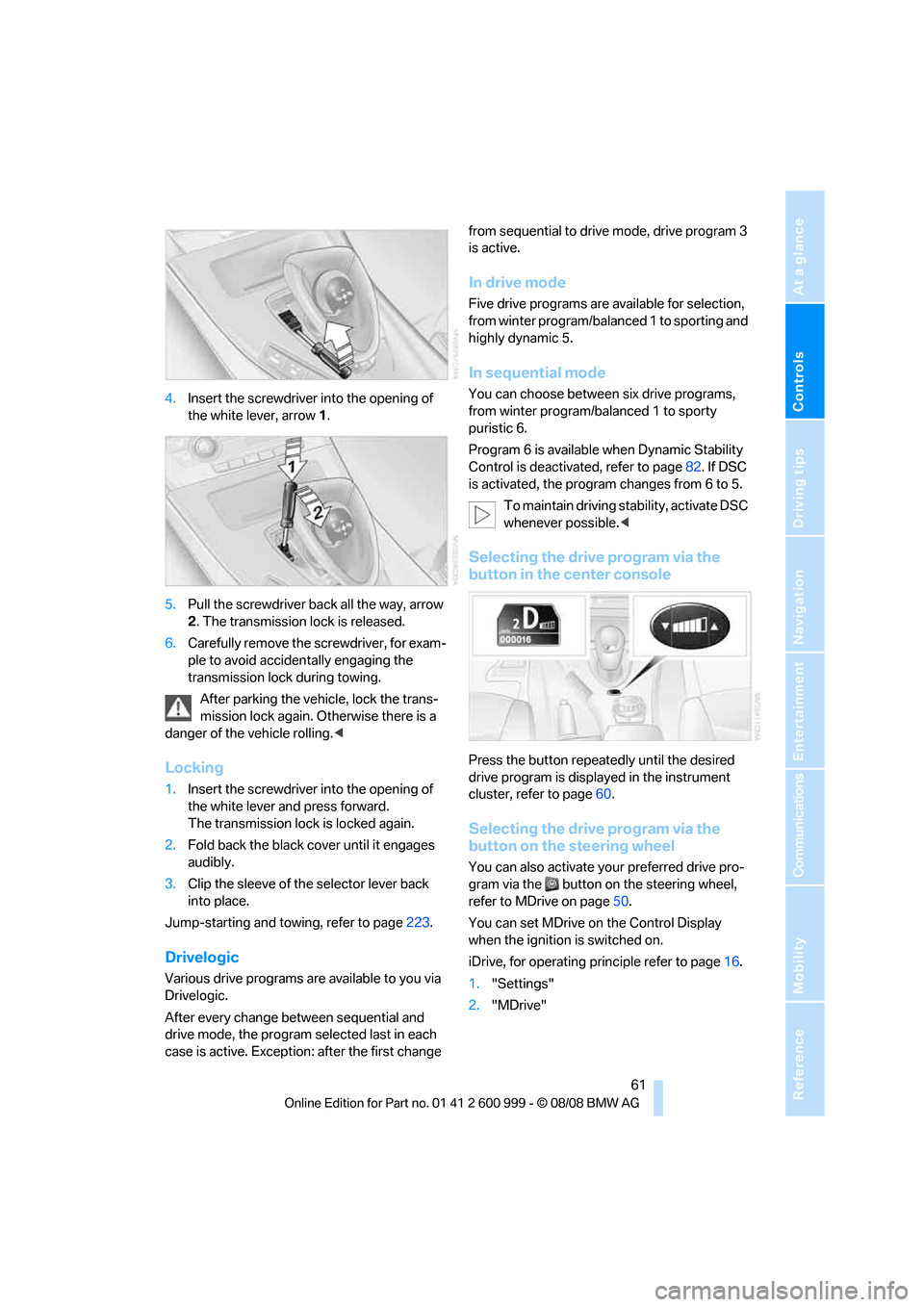
4.Insert the screwdriver into the opening of
the white lever, arrow 1.
5.Pull the screwdriver back all the way, arrow
2. The transmission lock is released.
6.Carefully remove the screwdriver, for exam-
ple to avoid accidentally engaging the
transmission lock during towing.
After parking the vehicle, lock the trans-
mission lock again. Otherwise there is a
danger of the vehicle rolling.<
Locking
1.Insert the screwdriver into the opening of
the white lever and press forward.
The transmission lock is locked again.
2.Fold back the black cover until it engages
audibly.
3.Clip the sleeve of the selector lever back
into place.
Jump-starting and towing, refer to page223.
Drivelogic
Various drive programs are available to you via
Drivelogic.
After every change between sequential and
drive mode, the program selected last in each
case is active. Exception: after the first change from sequential to drive mode, drive program 3
is active.
In drive mode
Five drive programs are available for selection,
from winter program/balanced 1 to sporting and
highly dynamic 5.
In sequential mode
You can choose between six drive programs,
from winter program/balanced 1 to sporty
puristic 6.
Program 6 is available when Dynamic Stability
Control is deactivated, refer to page82. If DSC
is activated, the program changes from 6 to 5.
To maintain driving stability, activate DSC
whenever possible.<
Selecting the drive program via the
button in the center console
Press the button repeatedly until the desired
drive program is displayed in the instrument
cluster, refer to page60.
Selecting the drive program via the
button on the steering wheel
You can also activate your preferred drive pro-
gram via the button on the steering wheel,
refer to MDrive on page50.
You can set MDrive on the Control Display
when the ignition is switched on.
iDrive, for operating principle refer to page16.
1."Settings"
2."MDrive"
ba8_E9293M3_cic.book Seite 61 Dienstag, 19. August 2008 12:01 12