steering wheel BMW M3 COUPE 2009 E92 Owner's Guide
[x] Cancel search | Manufacturer: BMW, Model Year: 2009, Model line: M3 COUPE, Model: BMW M3 COUPE 2009 E92Pages: 256, PDF Size: 12.03 MB
Page 151 of 256
Navigation
Entertainment
Driving tips
149Reference
At a glance
Controls
Communications
Mobility
Radio
Your radio provides reception of the FM and AM
wavebands.
Selecting a station
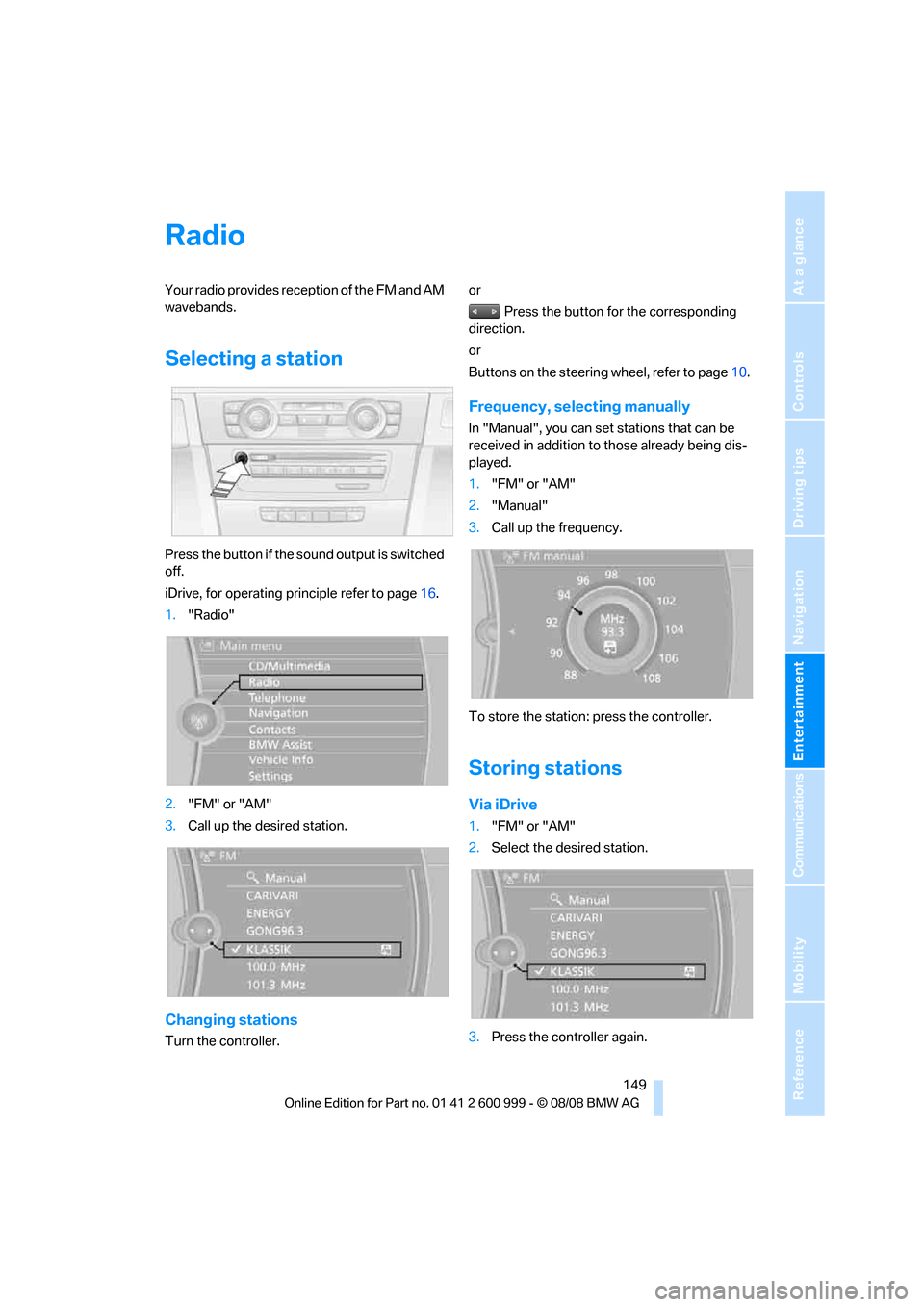
Press the button if the sound output is switched
off.
iDrive, for operating principle refer to page16.
1."Radio"
2."FM" or "AM"
3.Call up the desired station.
Changing stations
Turn the controller.or
Press the button for the corresponding
direction.
or
Buttons on the steering wheel, refer to page10.
Frequency, selecting manually
In "Manual", you can set stations that can be
received in addition to those already being dis-
played.
1."FM" or "AM"
2."Manual"
3.Call up the frequency.
To store the station: press the controller.
Storing stations
Via iDrive
1."FM" or "AM"
2.Select the desired station.
3.Press the controller again.
ba8_E9293M3_cic.book Seite 149 Dienstag, 19. August 2008 12:01 12
Page 174 of 256
Telephone
172
Telephone
The concept
Your BMW is equipped with a Full preparation
package mobile phone. After pairing a suitable
mobile phone with the vehicle once, you can
operate the mobile phone via iDrive, the buttons
on the steering wheel or via voice commands.
Once a mobile phone has been paired with your
vehicle, it is automatically recognized as soon
as it is inside the vehicle while the engine is run-
ning or the ignition is switched on. You can
store the pairing data for up to four mobile
phones simultaneously. If several mobile
phones are detected at the same time, the
mobile phone last paired can be operated via
the vehicle.
Using the telephone inside
the vehicle
Using the snap-in adapter*
The so-called snap-in adapter, a holder for
mobile phones, allows you to charge the mobile
phone's battery and connect the mobile phone
to your vehicle's outside antenna. This ensures
better network reception and consistent repro-
duction quality. Please contact your
BMW center to find out for which mobile
phones there are snap-in adapters available.
For your safety
A car phone makes life more convenient in
many ways, and can even save lives in an emer-
gency. While you should consult your mobile
phone's separate operating instructions for a
detailed description of safety precautions and
information, we request that you direct your
particular attention to the following:
Only make entries when the traffic situa-
tion allows you to do so. Do not hold the
mobile phone in your hand while you are driving;
use the hands-free system instead. If you do
not observe this precaution, your being dis-tracted can endanger vehicle occupants and
other road users.<
Suitable mobile phones
Please ask your BMW center which mobile
phones with Bluetooth interface are supported
by the mobile phone preparation package and
which mobile phones are compatible with the
snap-in adapter. By virtue of their particular
software versions, these mobile phones sup-
port the functions described in this Owner's
Manual. Malfunctions may occur with other
mobile phones.
Operating options
You can operate the mobile phone* using:
>Buttons on the steering wheel, refer to
page10
>iDrive, refer to page16
>Voice commands, refer to page179
>Programmable memory keys, refer to
page20
Avoid operating a mobile phone recognized by
the vehicle via the mobile phone's keypad, oth-
erwise malfunctions may result.
Start-up
Pairing the mobile phone with the
vehicle
The following prerequisites must be met:
>Compatible mobile phone: the mobile
phone is supported by the Full preparation
package mobile phone. You can obtain
information on the Internet at:
www.bmw.com
>The mobile phone is ready to operate.
*
ba8_E9293M3_cic.book Seite 172 Dienstag, 19. August 2008 12:01 12
Page 177 of 256
175
Entertainment
Reference
At a glance
Controls
Driving tips Communications
Navigation
Mobility
can be used in combination with the mobile
phone, e.g. a laptop.<
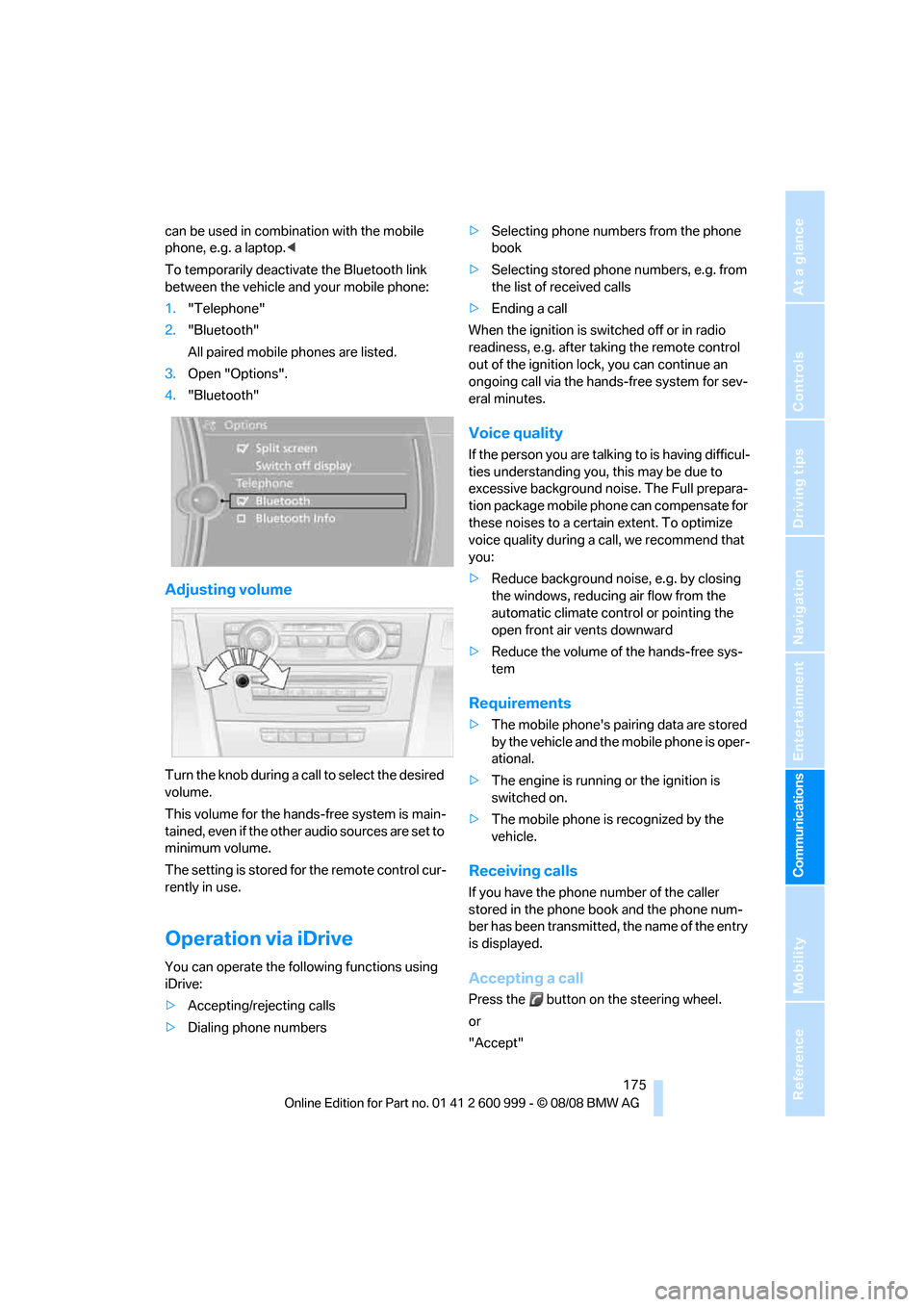
To temporarily deactivate the Bluetooth link
between the vehicle and your mobile phone:
1."Telephone"
2."Bluetooth"
All paired mobile phones are listed.
3.Open "Options".
4."Bluetooth"
Adjusting volume
Turn the knob during a call to select the desired
volume.
This volume for the hands-free system is main-
tained, even if the other audio sources are set to
minimum volume.
The setting is stored for the remote control cur-
rently in use.
Operation via iDrive
You can operate the following functions using
iDrive:
>Accepting/rejecting calls
>Dialing phone numbers>Selecting phone numbers from the phone
book
>Selecting stored phone numbers, e.g. from
the list of received calls
>Ending a call
When the ignition is switched off or in radio
readiness, e.g. after taking the remote control
out of the ignition lock, you can continue an
ongoing call via the hands-free system for sev-
eral minutes.
Voice quality
If the person you are talking to is having difficul-
ties understanding you, this may be due to
excessive background noise. The Full prepara-
tion package mobile phone can compensate for
these noises to a certain extent. To optimize
voice quality during a call, we recommend that
you:
>Reduce background noise, e.g. by closing
the windows, reducing air flow from the
automatic climate control or pointing the
open front air vents downward
>Reduce the volume of the hands-free sys-
tem
Requirements
>The mobile phone's pairing data are stored
by the vehicle and the mobile phone is oper-
ational.
>The engine is running or the ignition is
switched on.
>The mobile phone is recognized by the
vehicle.
Receiving calls
If you have the phone number of the caller
stored in the phone book and the phone num-
ber has been transmitted, the name of the entry
is displayed.
Accepting a call
Press the button on the steering wheel.
or
"Accept"
ba8_E9293M3_cic.book Seite 175 Dienstag, 19. August 2008 12:01 12
Page 178 of 256
Telephone
176
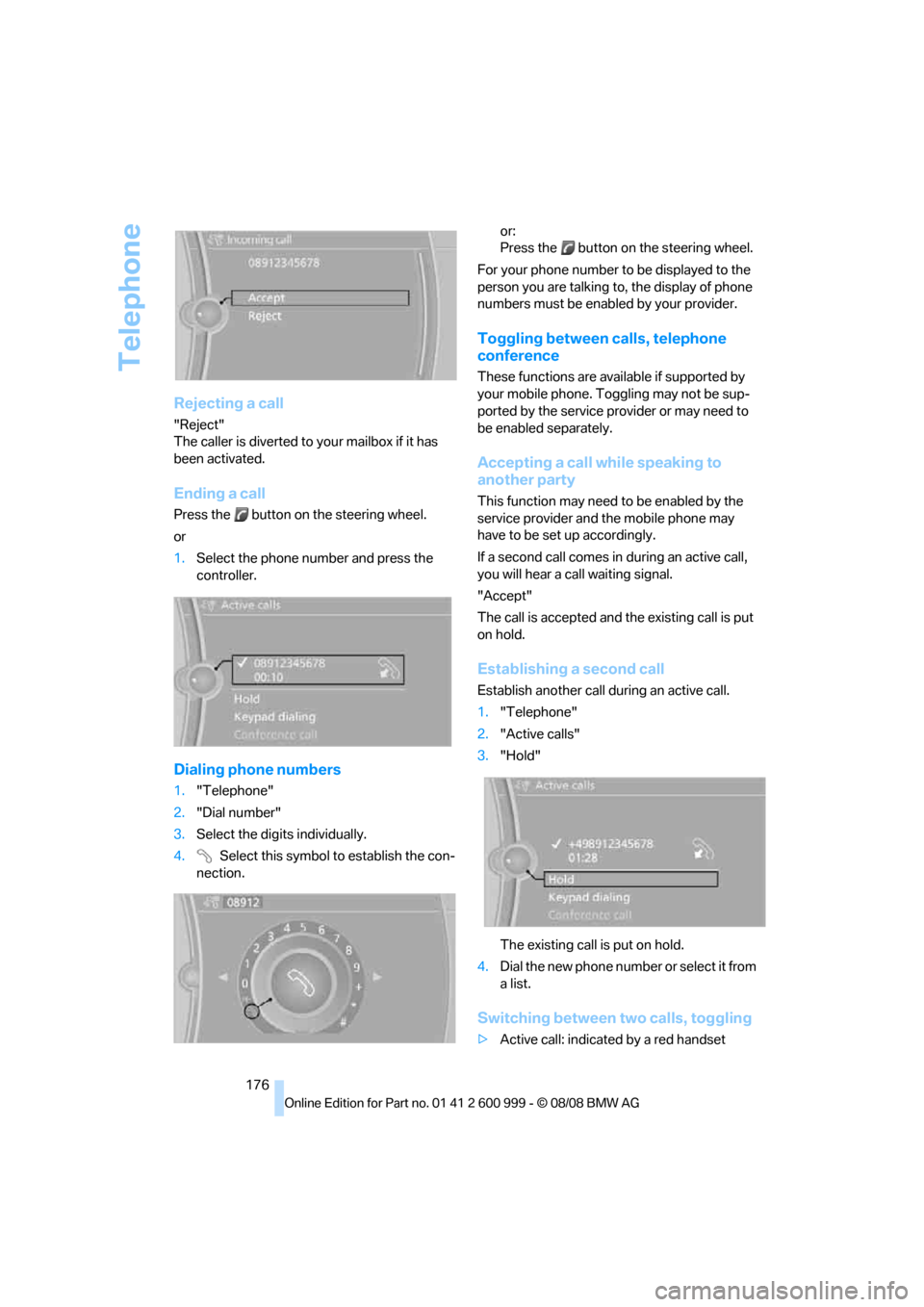
Rejecting a call
"Reject"
The caller is diverted to your mailbox if it has
been activated.
Ending a call
Press the button on the steering wheel.
or
1.Select the phone number and press the
controller.
Dialing phone numbers
1."Telephone"
2."Dial number"
3.Select the digits individually.
4. Select this symbol to establish the con-
nection.or:
Press the button on the steering wheel.
For your phone number to be displayed to the
person you are talking to, the display of phone
numbers must be enabled by your provider.
Toggling between calls, telephone
conference
These functions are available if supported by
your mobile phone. Toggling may not be sup-
ported by the service provider or may need to
be enabled separately.
Accepting a call while speaking to
another party
This function may need to be enabled by the
service provider and the mobile phone may
have to be set up accordingly.
If a second call comes in during an active call,
you will hear a call waiting signal.
"Accept"
The call is accepted and the existing call is put
on hold.
Establishing a second call
Establish another call during an active call.
1."Telephone"
2."Active calls"
3."Hold"
The existing call is put on hold.
4.Dia l the ne w pho ne numbe r o r sele ct it from
a list.
Switching between two calls, toggling
>Active call: indicated by a red handset
ba8_E9293M3_cic.book Seite 176 Dienstag, 19. August 2008 12:01 12
Page 181 of 256
179
Entertainment
Reference
At a glance
Controls
Driving tips Communications
Navigation
Mobility
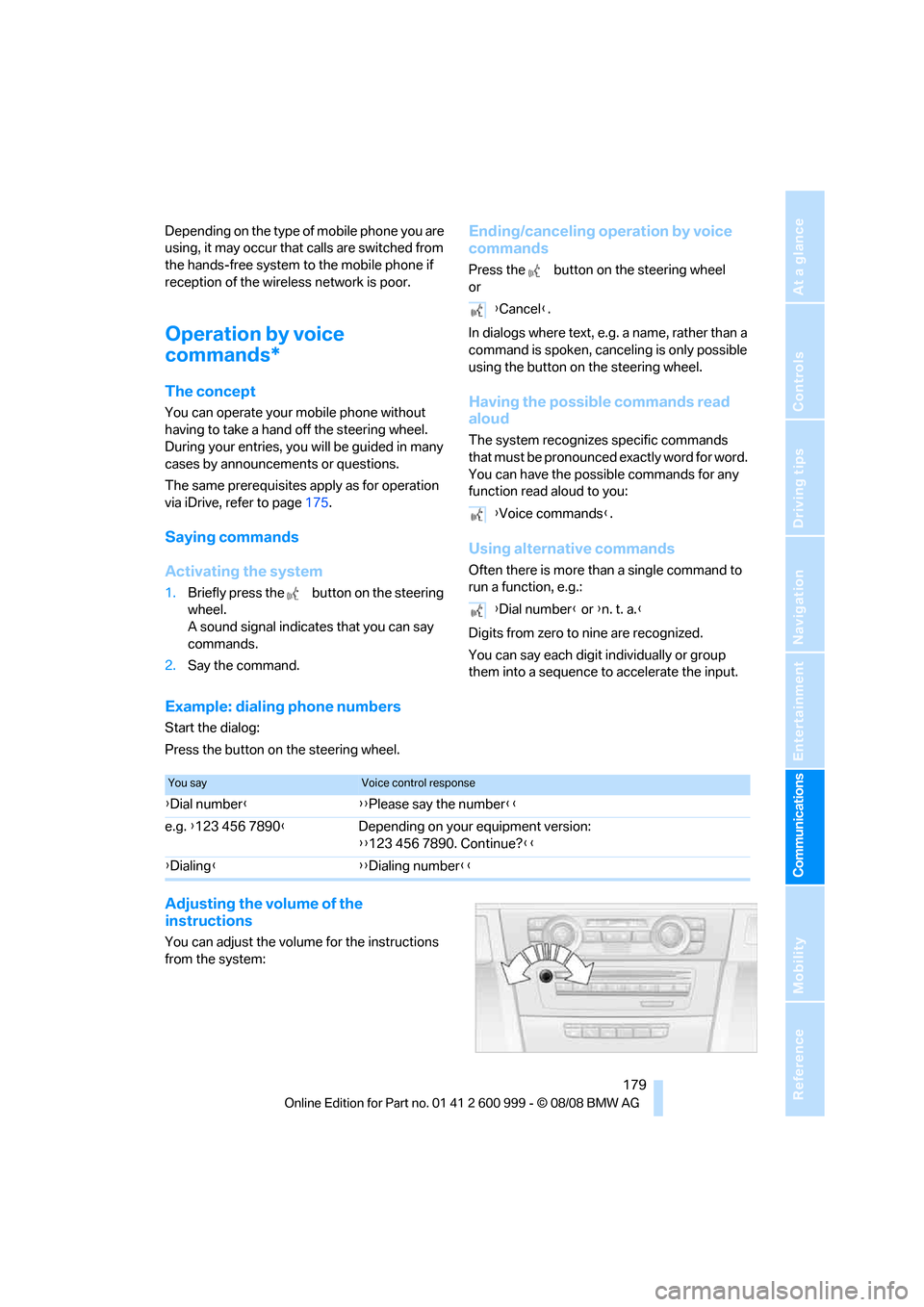
Depending on the type of mobile phone you are
using, it may occur that calls are switched from
the hands-free system to the mobile phone if
reception of the wireless network is poor.
Operation by voice
commands*
The concept
You can operate your mobile phone without
having to take a hand off the steering wheel.
During your entries, you will be guided in many
cases by announcements or questions.
The same prerequisites apply as for operation
via iDrive, refer to page175.
Saying commands
Activating the system
1.Briefly press the button on the steering
wheel.
A sound signal indicates that you can say
commands.
2.Say the command.
Ending/canceling operation by voice
commands
Press the button on the steering wheel
or
In dialogs where text, e.g. a name, rather than a
command is spoken, canceling is only possible
using the button on the steering wheel.
Having the possible commands read
aloud
The system recognizes specific commands
that must be pronounced exactly word for word.
You can have the possible commands for any
function read aloud to you:
Using alternative commands
Often there is more than a single command to
run a function, e.g.:
Digits from zero to nine are recognized.
You can say each digit individually or group
them into a sequence to accelerate the input.
Example: dialing phone numbers
Start the dialog:
Press the button on the steering wheel.
Adjusting the volume of the
instructions
You can adjust the volume for the instructions
from the system:
{Cancel}.
{Voice commands}.
{Dial number} or {n. t. a.}
You sayVoice control response
{Dial number}{{Please say the number}}
e.g. {123 456 7890}Depending on your equipment version:
{{123 456 7890. Continue?}}
{Dialing}{{Dialing number}}
ba8_E9293M3_cic.book Seite 179 Dienstag, 19. August 2008 12:01 12
Page 226 of 256
Giving and receiving assistance
224
Using a tow fitting
The screw-in tow fitting must always be carried
in the car. It can be screwed in at the front or
rear of the BMW.
Coupe: it is stored in the onboard tool kit under-
neath the cover on the right-hand side of the
cargo bay, refer to page213.
Convertible: it is stored in the onboard tool kit
underneath the cargo bay floor, refer to
page213.
Use only the tow fitting provided with the
vehicle and screw it all the way in. Use the
tow fitting for towing on paved roads only. Avoid
lateral loading of the tow fitting, e.g. do not lift
the vehicle by the tow fitting. Otherwise the tow
fitting and the vehicle could be damaged.<
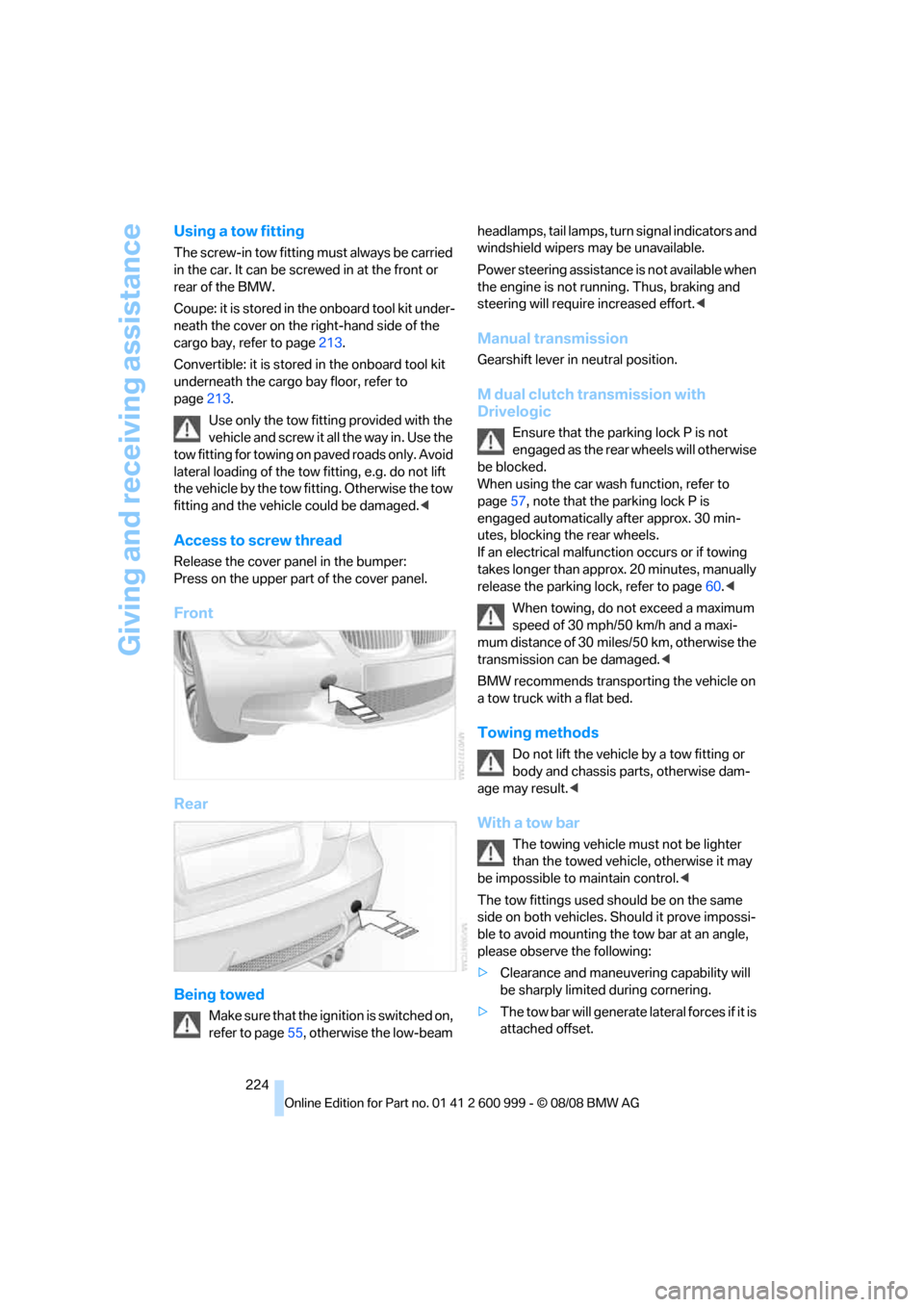
Access to screw thread
Release the cover panel in the bumper:
Press on the upper part of the cover panel.
Front
Rear
Being towed
Make sure that the ignition is switched on,
refer to page55, otherwise the low-beam headlamps, tail lamps, turn s i g n a l i n d i c a t o r s a n d
windshield wipers may be unavailable.
Power steering assistance is not available when
the engine is not running. Thus, braking and
steering will require increased effort.<
Manual transmission
Gearshift lever in neutral position.
M dual clutch transmission with
Drivelogic
Ensure that the parking lock P is not
engaged as the rear wheels will otherwise
be blocked.
When using the car wash function, refer to
page57, note that the parking lock P is
engaged automatically after approx. 30 min-
utes, blocking the rear wheels.
If an electrical malfunction occurs or if towing
takes longer than approx. 20 minutes, manually
release the parking lock, refer to page60.<
When towing, do not exceed a maximum
speed of 30 mph/50 km/h and a maxi-
mum distance of 30 miles/50 km, otherwise the
transmission can be damaged.<
BMW recommends transporting the vehicle on
a tow truck with a flat bed.
Towing methods
Do not lift the vehicle by a tow fitting or
body and chassis parts, otherwise dam-
age may result.<
With a tow bar
The towing vehicle must not be lighter
than the towed vehicle, otherwise it may
be impossible to maintain control.<
The tow fittings used should be on the same
side on both vehicles. Should it prove impossi-
ble to avoid mounting the tow bar at an angle,
please observe the following:
>Clearance and maneuvering capability will
be sharply limited during cornering.
>The tow bar will generate lateral forces if it is
attached offset.
ba8_E9293M3_cic.book Seite 224 Dienstag, 19. August 2008 12:01 12
Page 241 of 256
Reference 239
At a glance
Controls
Driving tips
Communications
Navigation
Entertainment
Mobility
B
Backrest contour, refer to
Lumbar support43
Backrests, refer to Seat
adjustment43
Backrest width adjustment44
Back seats
– refer to Rear seats45
Backup lamps
– replacing bulb215
Backup lamps, refer to Tail
lamps215
Bag holder109
Band-aids, refer to First-aid
pouch222
Bar, refer to Towing
methods224
Base plate for telephone or
mobile phone
– refer to Snap-in adapter181
– refer to Snap-in adapter in
the center armrest storage
compartment105
Bass, tone setting146
Battery219
– charging219
– disposal35,219
– jump starting222
– remote control26
– temporary power failure220
Battery for mobile phone181
Battery renewal
– remote control35
– remote control for vehicle35
Being towed224
Belt hand-over48
Belts, refer to Safety belts47
Belt tensioner, refer to Safety
belts47
Beverage holders, refer to
Cup holders106
Blinds, refer to Roller sun
blinds104
Blower, refer to Air flow
rate98
Bluetooth, activating/
deactivating174Bluetooth, refer to separate
Owner's Manual
BMW
– car shampoo211
BMW Assist, activating186
BMW Assist185
BMW center190
BMW Homepage4
BMW Maintenance
System207
BMW Search186
BMW webpage4
Bottle holders, refer to Cup
holders106
Brake assist82
Brake fluid, refer to Service
requirements72
Brake force display88
– bulb change216
Brake lamps
– replacing bulb215
Brake lights
– brake force display88
Brake pads116
– breaking in116
Brake rotors117
– brakes116
– breaking in116
Brakes
– ABS82
– BMW Maintenance
System207
– brake force display88
– breaking in116
– parking brake57
– service requirements72
Brakes, refer to Braking
safely117
Brake system116
– BMW Maintenance
System207
– breaking in116
– disc brakes117
Breakdown services, refer to
Roadside Assistance221
Breaking in the clutch116
Breaking in the differential,
refer to Engine and
differential116Break-in period116
Brightness of the Control
Display79
Bulb changing, refer to Lamps
and bulbs213
Button for starting the engine,
refer to Start/stop button55
Buttons on the steering
wheel11
C
California Proposition 65
warning6
Call
– accepting175
– ending176
– rejecting176
Calling, refer to Phone
numbers, dialing176
Can holders, refer to Cup
holders106
Capacities231
Capacity of the cargo bay231
Car battery, refer to Vehicle
battery219
Car care, refer to Care209
ba8_E9293M3_cic.book Seite 239 Dienstag, 19. August 2008 12:01 12
Page 244 of 256
Everything from A - Z
242 Displacement, refer to Engine
data228
Display, refer to iDrive
controls16
Display lighting, refer to
Instrument lighting94
Displays
– on the Control Display16
Displays, refer to Instrument
cluster12
Displays and controls10
Disposal
– coolant206
– remote control battery35
– vehicle battery219
Distance remaining to service,
refer to Service
requirements72
Distance warning, refer to
Park Distance Control
PDC81
Door key, refer to Remote
control26
Door lock30
Doors, emergency
operation30
DOT Quality Grades198
Draft-free ventilation99
Drinks holders, refer to Cup
holders106
Drivelogic61
Drive mode59
Drive-off assistance, refer to
Dynamic Stability Control
DSC82
Drive-off assistant84
Drive position, engaging, refer
to Selector lever
positions58
Drive programs, refer to
Drivelogic61
Driving lamps, refer to Parking
lamps/low beams92
Driving notes116
Driving off on hills, refer to
Drive-off assistant84
Driving stability control
systems82
Driving through water117Driving tips, refer to Driving
notes116
Dry air, refer to Cooling
function99
DSC Dynamic Stability
Control82
DVD
– country codes156
– settings157
– video playback156
DVD menu157
DVD video156
Dynamic Stability Control
DSC
– indicator/warning lamp83
– M Dynamic Mode MDM82
E
EDC, refer to Electronic
Damper Control83
Eject button, refer to Buttons
on the CD player146
Electric
– seat adjustment43
Electrical malfunction
– door lock30
– driver's door30
– fuel filler door194
– glass roof37
– M dual clutch transmission
with Drivelogic60
Electric seat43
Electric seat adjustment43
Electric steering wheel lock
– with convenient access34
Electronic brake-force
distribution82
Electronic Damper Control
EDC83
Electronic oil level check203
Electronic Stability Program
ESP, refer to Dynamic
Stability Control DSC82
Emergency operation
– fuel filler door, manual
release194Emergency operation, refer to
Closing manually
– glass roof37
Emergency operation, refer to
Manual operation
– door lock30
Emergency release
– luggage compartment lid
from inside32
Emergency Request221
Emergency services, refer to
Roadside Assistance221
Engine
– breaking in116
– data228
– overheated, refer to Coolant
temperature69
– speed228
– starting56
– starting, convenient
access34
– switching off56
Engine compartment203
Engine coolant, refer to
Coolant206
Engine oil
– adding205
– BMW Maintenance
System207
– checking level203
– intervals between changes,
refer to Service
requirements72
– possible displays204
Engine output, refer to Engine
data228
Engine speed, refer to Engine
data228
Engine starting, refer to
Starting the engine56
Entry lamps, refer to Interior
lamps94
Entry map for destination132
Equalizer, tone setting147
Error messages, refer to
Check Control76
Event data recorders208
Exhaust system, refer to Hot
exhaust system116
ba8_E9293M3_cic.book Seite 242 Dienstag, 19. August 2008 12:01 12
Page 246 of 256
Everything from A - Z
244 Heated
– mirrors49
– rear window99
– seats46
Heating
– mirrors49
– rear window99
– residual heat98
– seats46
Heating and ventilation, refer
to Climate96
Heating while at a standstill,
refer to Using residual
heat98
Heavy loads, refer to Stowing
cargo119
Height, refer to
Dimensions229
Height adjustment
– seats43
– steering wheel50
High beams94
– headlamp flasher94
– indicator lamp13
High Definition Radio150
High-pressure
washer209,210
High water, refer to Driving
through water117
Highways, refer to Route
criteria137
Hills117
Holders for cups106
Homepage BMW4
Hood202
Hooks for shopping bags109
Horn10,11
Hotel function31
Hot exhaust system116
Hydraulic brake assist, refer to
Brake assist82
Hydroplaning117
I
IBOC, refer to High Definition
Radio150
Ice warning, refer to Outside
temperature warning68ID3 tag, refer to Information
about the track155
ID3 tags, refer to Album
information163
Identification marks, tire
coding198
iDrive16
– adjusting brightness79
– changing language79
– changing units of measure
and display format71
– controls16
– menu guidance17
– operating principle16
– overview16
– setting the date and time75
– start menu17
– status information19
iDrive operating principle16
Ignition55
– switched off56
– switched on55
Ignition key, refer to Remote
control26
Ignition key position 1, refer to
Radio readiness55
Ignition key position 2, refer to
Ignition on55
Ignition lock55
Imprint2
Indicator and warning
lamps13
– MDrive51
– M Dynamic Mode83
– Tire Pressure Monitor
TPM86
Inflation pressure, refer to Tire
inflation pressure196
Inflation pressure monitoring,
refer to Tire Pressure
Monitor TPM85Initializing
– after power failure220
– compass, refer to Digital
compass, calibrating103
– Flat Tire Monitor FTM84
– glass roof37
– radio, refer to Station,
storing149
– refer to Setting the time and
date75
Installation location
– CD changer158
– navigation DVD drive126
– telephone105
Instructions for navigation
system, refer to Voice
instructions138
Instrument cluster12
Instrument lighting94
Instrument panel, refer to
Cockpit10
Integrated key26
Integrated universal remote
control101
Interior lamps94
– remote control28
Interior motion sensor33
Interior rearview mirror49
– automatic dimming
feature49
– compass103
Intermittent mode of the
wipers65
Intersection, entering,
navigation128
iPod, connecting, refer to
AUX-IN port165
iPod, connecting, refer to
USB-audio interface166
J
Jacking points219
Joystick, refer to iDrive16
Jumpering, refer to Jump
starting222
Jump starting222
ba8_E9293M3_cic.book Seite 244 Dienstag, 19. August 2008 12:01 12
Page 248 of 256
Everything from A - Z
246 Mirror dimming feature49
Mirrors48
– automatic curb monitor49
– exterior mirrors48
– heating49
– interior rearview mirror49
– memory, refer to Seat and
mirror memory46
Mirrors, folding in before
entering a car wash49
M Mobility System217
Mobile phone
– adjusting volume175
– connecting, refer to Mobile
phone, pairing172
– installation location, refer to
Center armrest105
– operation via iDrive175
– pairing172
– refer to separate Owner's
Manual
Mobile phone, installation
location, refer to Center
armrest105
Mobile phone, refer to
Telephone172
Mobile phone, refer to the
separate Owner's Manual
Modifications, technical, refer
to For your own safety5
Monitor, refer to iDrive
controls16
Monitoring system for tire
pressures, refer to Flat Tire
Monitor84
MP3 player, connecting, refer
to AUX-IN port165
MP3 player, connecting, refer
to USB-audio interface166
Multifunctional steering
wheel, refer to Buttons on
the steering wheel11
Multifunction switch
– refer to Turn signals/
headlamp flasher64
– refer to Wiper system65
Multimedia screen, refer to
iDrive16
Music, playing162Music collection161
– backup164
– importing164
Music player, connecting,
refer to AUX-IN port165
Music player, connecting,
refer to USB-audio
interface166
Music search162
N
Navigation announcements,
refer to Switching voice
instructions on/off138
Navigation data126
Navigation drive, location126
Navigation DVD126
Navigation system126
– address book129
– bypassing a route
section138
– continuing destination
guidance137
– destination entry127
– displaying current
position143
– entering a destination by
voice133
– entering a destination
manually127
– route list138
– selecting destination via
map132
– selecting route criteria137
– special destinations130
– starting destination
guidance137
– terminating destination
guidance137
– voice instructions138
– volume adjustment139
Neck support, refer to Head
restraints44
Nets, refer to Storage
compartments105
Neutral59
New tires199
North-facing map139Nozzles96
Number of cylinders, refer to
Engine data228
Nylon rope, refer to Tow
rope225
O
OBD socket, refer to Socket
for On-Board Diagnosis208
Octane ratings, refer to Fuel
specifications195
Odometer68
Oil, refer to Engine oil203
Oil consumption203
Oil level203
Old batteries, refer to
Disposal219
Onboard tool kit213
Opening and closing
– convenient access34
– from inside30
– from outside27
– using the door lock30
– via the remote control27
Options, selecting for
navigation137
Orientation menu, refer to
Start menu17
Outlets
– refer to Ventilation99
Output, refer to Engine
data228
Outside-air mode
– automatic climate control98
Outside temperature
display68
– changing units of
measure71
– in computer71
Outside temperature
warning68
Overheated engine, refer to
Coolant temperature69
Overview
– radio control146
ba8_E9293M3_cic.book Seite 246 Dienstag, 19. August 2008 12:01 12