check oil BMW M3 COUPE 2009 E92 Owner's Manual
[x] Cancel search | Manufacturer: BMW, Model Year: 2009, Model line: M3 COUPE, Model: BMW M3 COUPE 2009 E92Pages: 256, PDF Size: 12.03 MB
Page 14 of 256
Cockpit
12
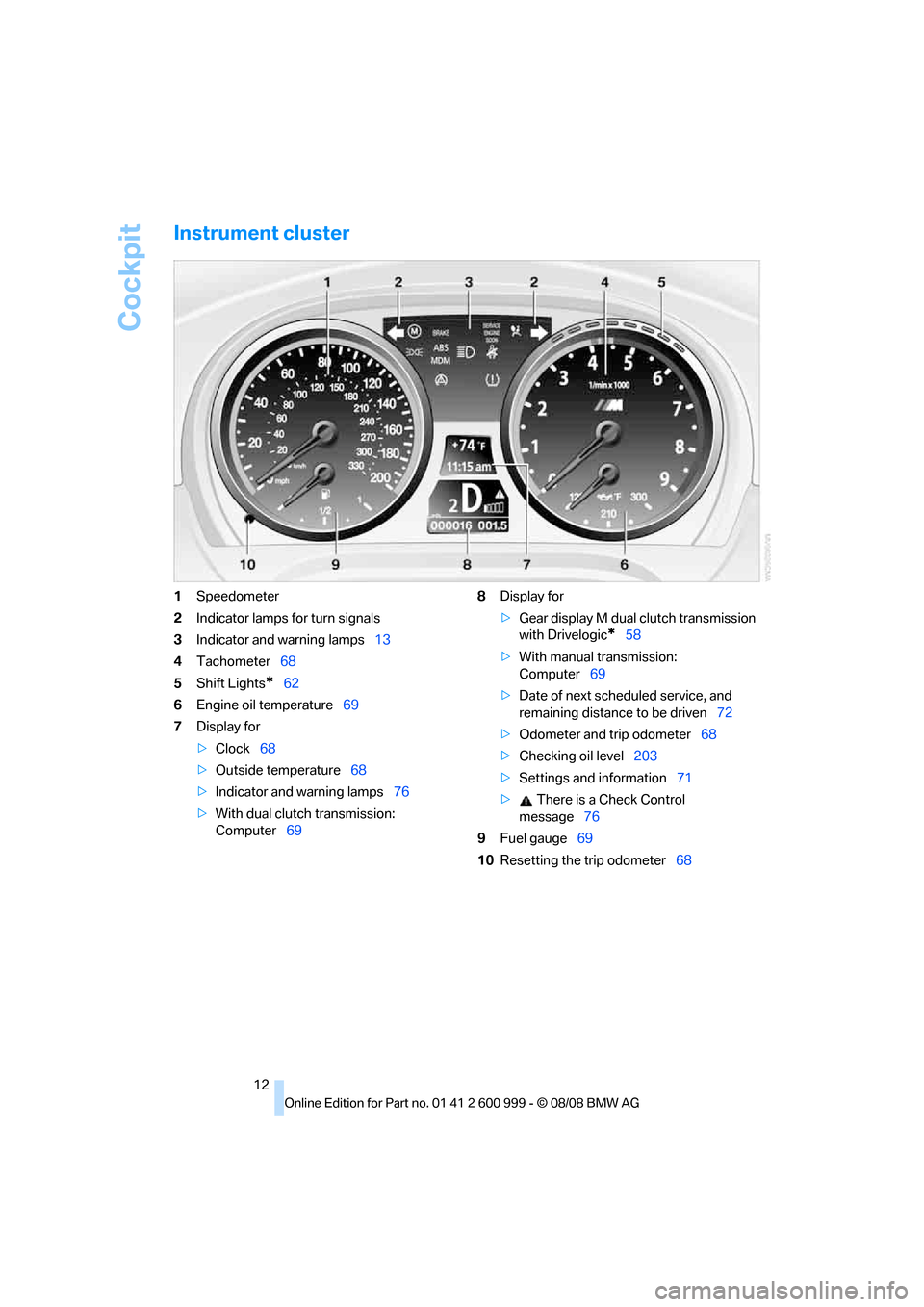
Instrument cluster
1Speedometer
2Indicator lamps for turn signals
3Indicator and warning lamps13
4Tachometer68
5Shift Lights
*62
6Engine oil temperature69
7Display for
>Clock68
>Outside temperature68
>Indicator and warning lamps76
>With dual clutch transmission:
Computer698Display for
>Gear display M dual clutch transmission
with Drivelogic
*58
>With manual transmission:
Computer69
>Date of next scheduled service, and
remaining distance to be driven72
>Odometer and trip odometer68
>Checking oil level203
>Settings and information71
> There is a Check Control
message76
9Fuel gauge69
10Resetting the trip odometer68
ba8_E9293M3_cic.book Seite 12 Dienstag, 19. August 2008 12:01 12
Page 71 of 256
Controls
69Reference
At a glance
Driving tips
Communications
Navigation
Entertainment
Mobility
Never drive at engine speeds in the red warning
field. In this range, the engine speed is limited to
protect the engine.
Coolant temperature
A warning lamp will come on if the coolant, and
therefore the engine, becomes too hot. In addi-
tion, a message will appear on the Control Dis-
play.
Check coolant level, refer to page206.
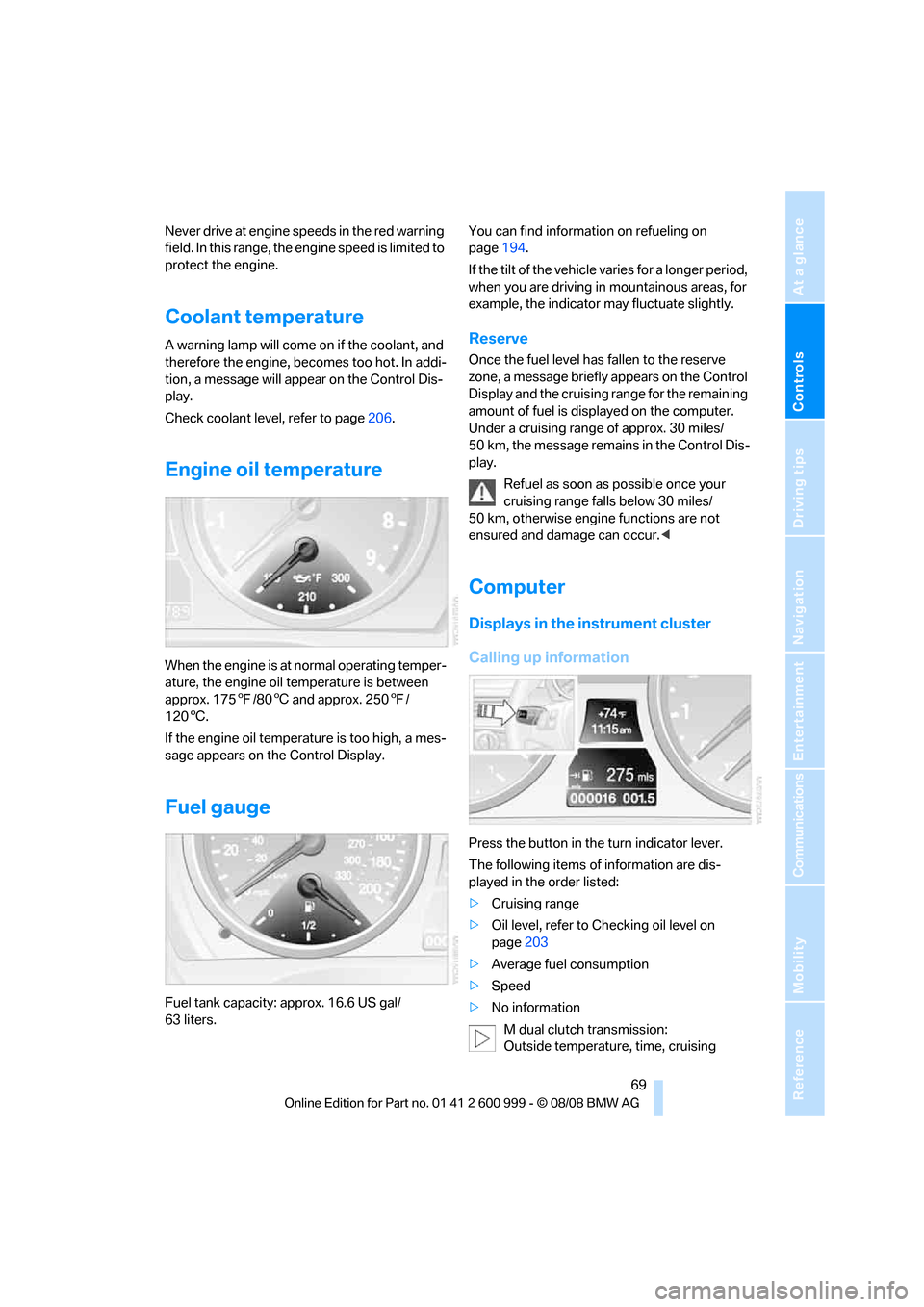
Engine oil temperature
When the engine is at normal operating temper-
ature, the engine oil temperature is between
approx. 1757/806 and approx. 2507/
1206.
If the engine oil temperature is too high, a mes-
sage appears on the Control Display.
Fuel gauge
Fuel tank capacity: approx. 16.6 US gal/
63 liters.You can find information on refueling on
page194.
If the tilt of the vehicle varies for a longer period,
when you are driving in mountainous areas, for
example, the indicator may fluctuate slightly.
Reserve
Once the fuel level has fallen to the reserve
zone, a message briefly appears on the Control
Display and the cruising range for the remaining
amount of fuel is displayed on the computer.
Under a cruising range of approx. 30 miles/
50 km, the message remains in the Control Dis-
play.
Refuel as soon as possible once your
cruising range falls below 30 miles/
50 km, otherwise engine functions are not
ensured and damage can occur.<
Computer
Displays in the instrument cluster
Calling up information
Press the button in the turn indicator lever.
The following items of information are dis-
played in the order listed:
>Cruising range
>Oil level, refer to Checking oil level on
page203
>Average fuel consumption
>Speed
>No information
M dual clutch transmission:
Outside temperature, time, cruising
ba8_E9293M3_cic.book Seite 69 Dienstag, 19. August 2008 12:01 12
Page 205 of 256
Mobility
203Reference
At a glance
Controls
Driving tips
Communications
Navigation
Entertainment
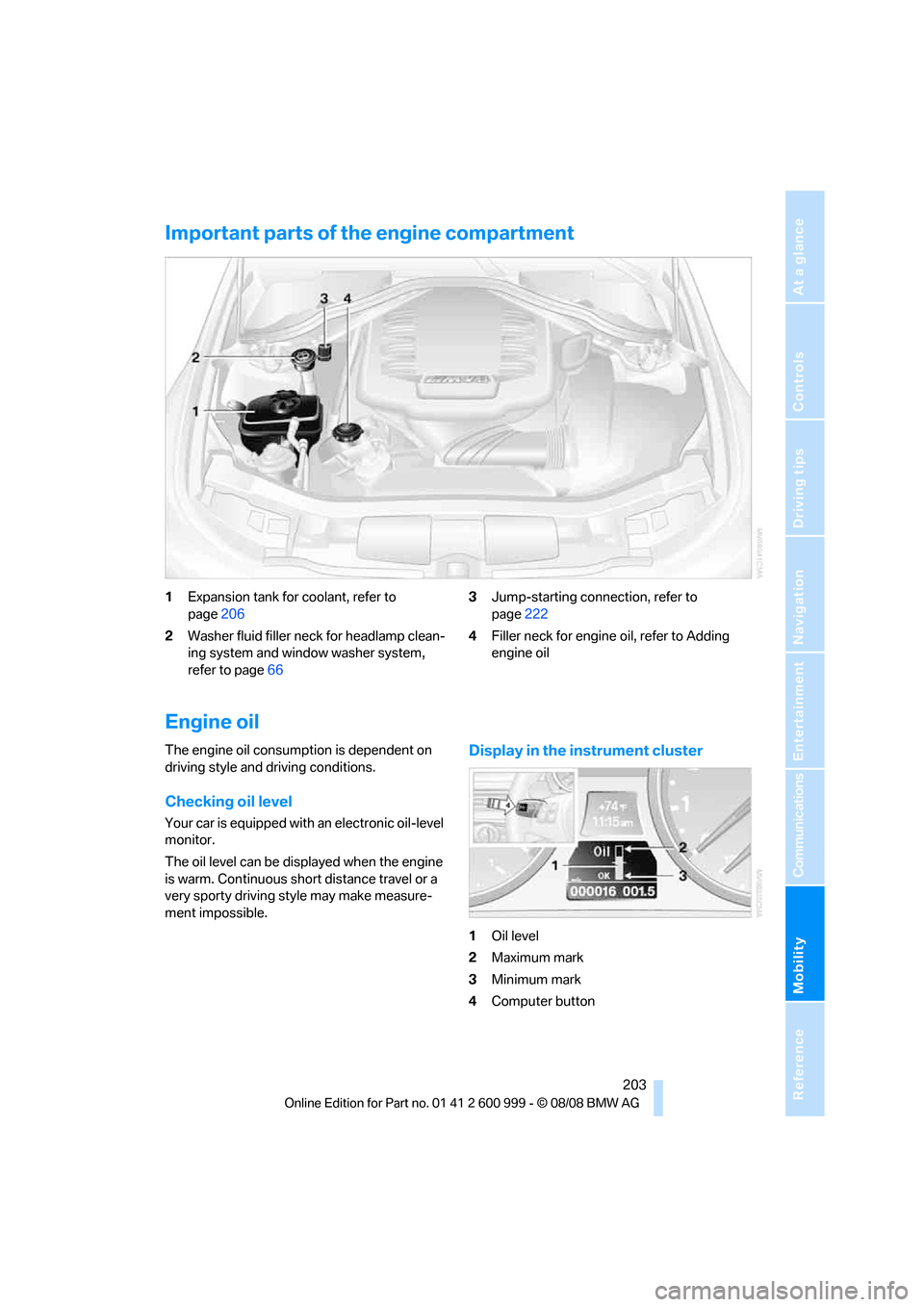
Important parts of the engine compartment
1Expansion tank for coolant, refer to
page206
2Washer fluid filler neck for headlamp clean-
ing system and window washer system,
refer to page663Jump-starting connection, refer to
page222
4Filler neck for engine oil, refer to Adding
engine oil
Engine oil
The engine oil consumption is dependent on
driving style and driving conditions.
Checking oil level
Your car is equipped with an electronic oil-level
monitor.
The oil level can be displayed when the engine
is warm. Continuous short distance travel or a
very sporty driving style may make measure-
ment impossible.
Display in the instrument cluster
1Oil level
2Maximum mark
3Minimum mark
4Computer button
ba8_E9293M3_cic.book Seite 203 Dienstag, 19. August 2008 12:01 12
Page 206 of 256
Under the hood
204 Press button 4 in the turn indicator lever repeat-
edly until the oil level display appears in the
instrument cluster.
M dual clutch transmission
*: the oil level
appears in the top display.<
The oil level must be between the two mark-
ings.
A new measurement is taken automatically
each time the engine is started.
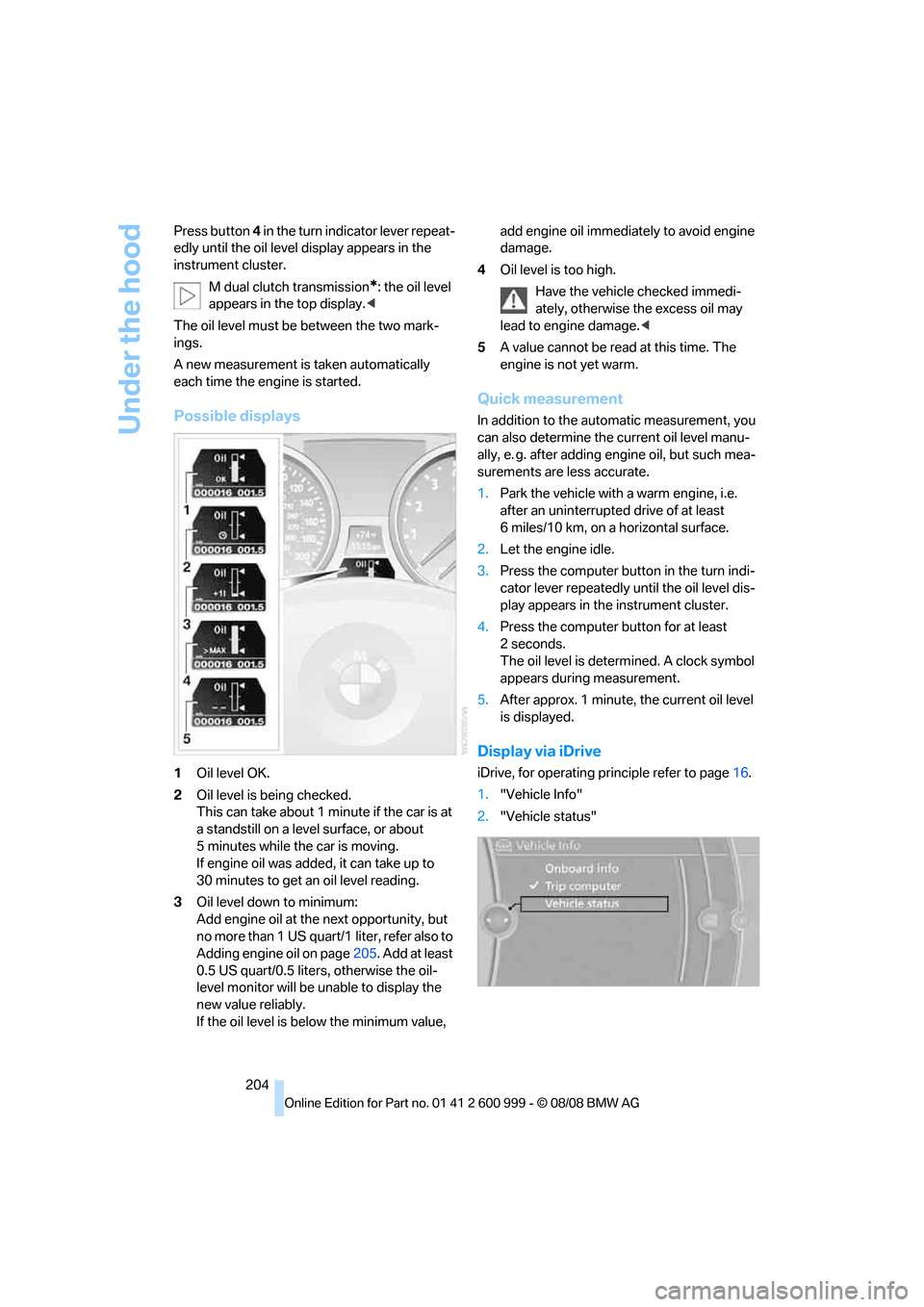
Possible displays
1Oil level OK.
2Oil level is being checked.
This can take about 1 minute if the car is at
a standstill on a level surface, or about
5 minutes while the car is moving.
If engine oil was added, it can take up to
30 minutes to get an oil level reading.
3Oil level down to minimum:
Add engine oil at the next opportunity, but
no more than 1 US quart/1 liter, refer also to
Adding engine oil on page205. Add at least
0.5 US quart/0.5 liters, otherwise the oil-
level monitor will be unable to display the
new value reliably.
If the oil level is below the minimum value, add engine oil immediately to avoid engine
damage.
4Oil level is too high.
Have the vehicle checked immedi-
ately, otherwise the excess oil may
lead to engine damage.<
5A value cannot be read at this time. The
engine is not yet warm.
Quick measurement
In addition to the automatic measurement, you
can also determine the current oil level manu-
ally, e. g. after adding engine oil, but such mea-
surements are less accurate.
1.Park the vehicle with a warm engine, i.e.
after an uninterrupted drive of at least
6 miles/10 km, on a horizontal surface.
2.Let the engine idle.
3.Press the computer button in the turn indi-
cator lever repeatedly until the oil level dis-
play appears in the instrument cluster.
4.Press the computer button for at least
2seconds.
The oil level is determined. A clock symbol
appears during measurement.
5.After approx. 1 minute, the current oil level
is displayed.
Display via iDrive
iDrive, for operating principle refer to page16.
1."Vehicle Info"
2."Vehicle status"
ba8_E9293M3_cic.book Seite 204 Dienstag, 19. August 2008 12:01 12
Page 207 of 256
Mobility
205Reference
At a glance
Controls
Driving tips
Communications
Navigation
Entertainment
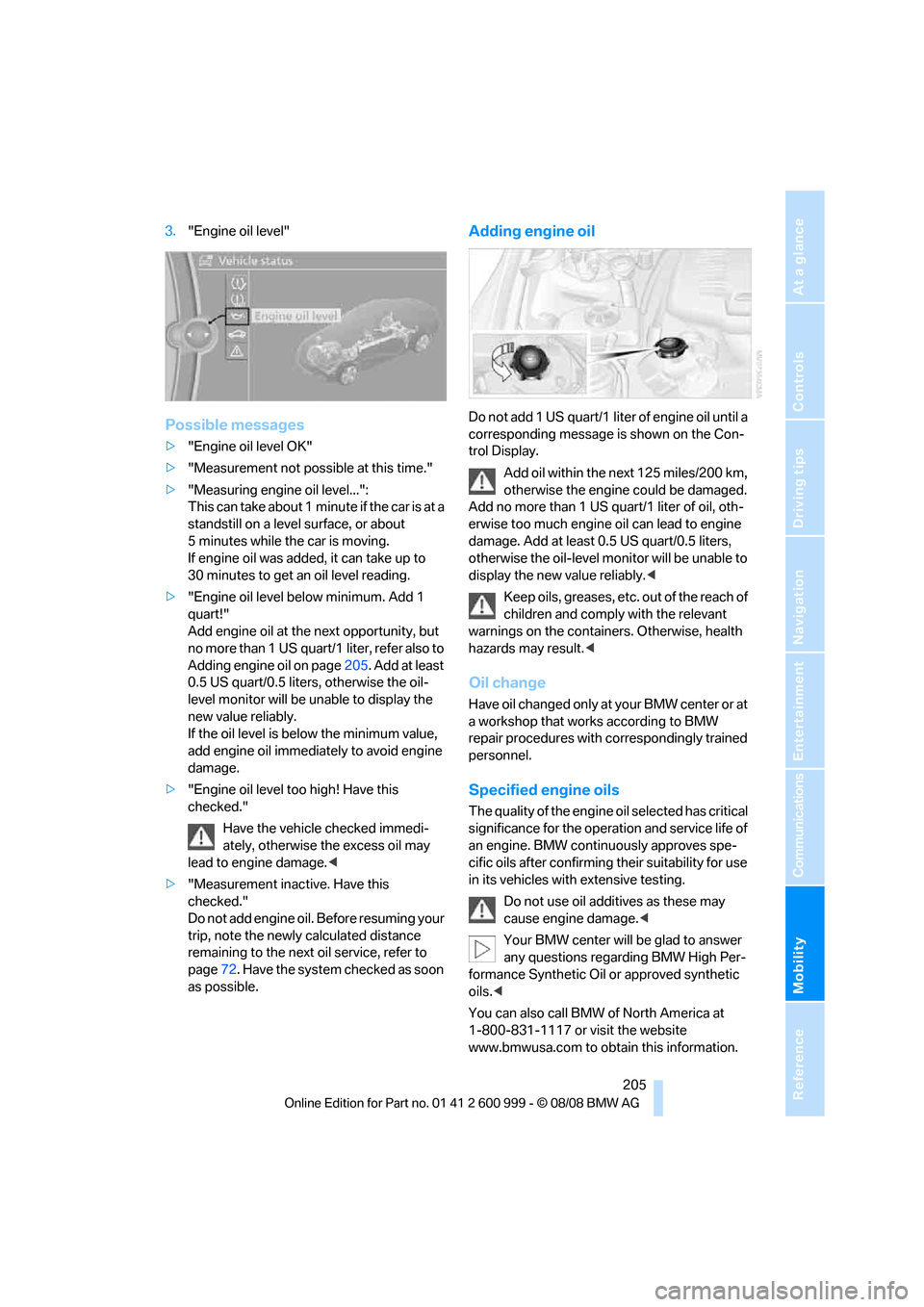
3."Engine oil level"
Possible messages
>"Engine oil level OK"
>"Measurement not possible at this time."
>"Measuring engine oil level...":
This can take about 1 minute if the car is at a
standstill on a level surface, or about
5 minutes while the car is moving.
If engine oil was added, it can take up to
30 minutes to get an oil level reading.
>"Engine oil level below minimum. Add 1
quart!"
Add engine oil at the next opportunity, but
no more than 1 US quart/1 liter, refer also to
Adding engine oil on page205. Add at least
0.5 US quart/0.5 liters, otherwise the oil-
level monitor will be unable to display the
new value reliably.
If the oil level is below the minimum value,
add engine oil immediately to avoid engine
damage.
>"Engine oil level too high! Have this
checked."
Have the vehicle checked immedi-
ately, otherwise the excess oil may
lead to engine damage.<
>"Measurement inactive. Have this
checked."
Do not add engine oil. Before resuming your
trip, note the newly calculated distance
remaining to the next oil service, refer to
page72. Have the system checked as soon
as possible.
Adding engine oil
Do not add 1 US quart/1 liter of engine oil until a
corresponding message is shown on the Con-
trol Display.
Add oil within the next 125 miles/200 km,
otherwise the engine could be damaged.
Add no more than 1 US quart/1 liter of oil, oth-
erwise too much engine oil can lead to engine
damage. Add at least 0.5 US quart/0.5 liters,
otherwise the oil-level monitor will be unable to
display the new value reliably.<
Keep oils, greases, etc. out of the reach of
children and comply with the relevant
warnings on the containers. Otherwise, health
hazards may result.<
Oil change
Have oil changed only at y our B MW c ente r o r a t
a workshop that works according to BMW
repair procedures with correspondingly trained
personnel.
Specified engine oils
The quality of the engine oil selected has critical
significance for the operation and service life of
an engine. BMW continuously approves spe-
cific oils after confirming their suitability for use
in its vehicles with extensive testing.
Do not use oil additives as these may
cause engine damage.<
Your BMW center will be glad to answer
any questions regarding BMW High Per-
formance Synthetic Oil or approved synthetic
oils.<
You can also call BMW of North America at
1-800-831-1117 or visit the website
www.bmwusa.com to obtain this information.
ba8_E9293M3_cic.book Seite 205 Dienstag, 19. August 2008 12:01 12
Page 208 of 256
Under the hood
206
Viscosity ratings
Viscosity is a measure of an oil's flow rating and
is categorized in SAE classes.
Approved oils belong to the 10W-60 SAE
class.<
Alternative oil types
If BMW High Performance Synthetic Oil is not
available, you can add small quantities of other
synthetic oils in between oil changes. Only use
oils with the following specifications:
>Viscosity:
preferred: SAE 10W-60;
alternative: SAE 10W-40, SAE 5W-50 or
SAE 10W-50
>Specification:
API SJ/CF, API SK/CF or higher
Low ambient temperatures
The oils used at BMW factories for your vehicle
type are suitable for virtually any ambient tem-
perature. However, if the vehicle is operated at
temperatures below –47/–206 for extended
periods, your BMW center will be glad to rec-
ommend an optimal oil.
Coolant
Do not add coolant to the cooling system
when the engine is hot. Escaping coolant
can cause burns.<
Coolant consists of half water and half additive.
Not all commercially available additives are suit-
able for your BMW. Ask your BMW center for
suitable additives.
Only use suitable additives, otherwise
engine damage may result. Because
additives are harmful to your health, it is impor-
tant to follow the instructions on the contain-
ers.<
Comply with the appropriate environ-
mental protection regulations when dis-
posing of coolant additives.<
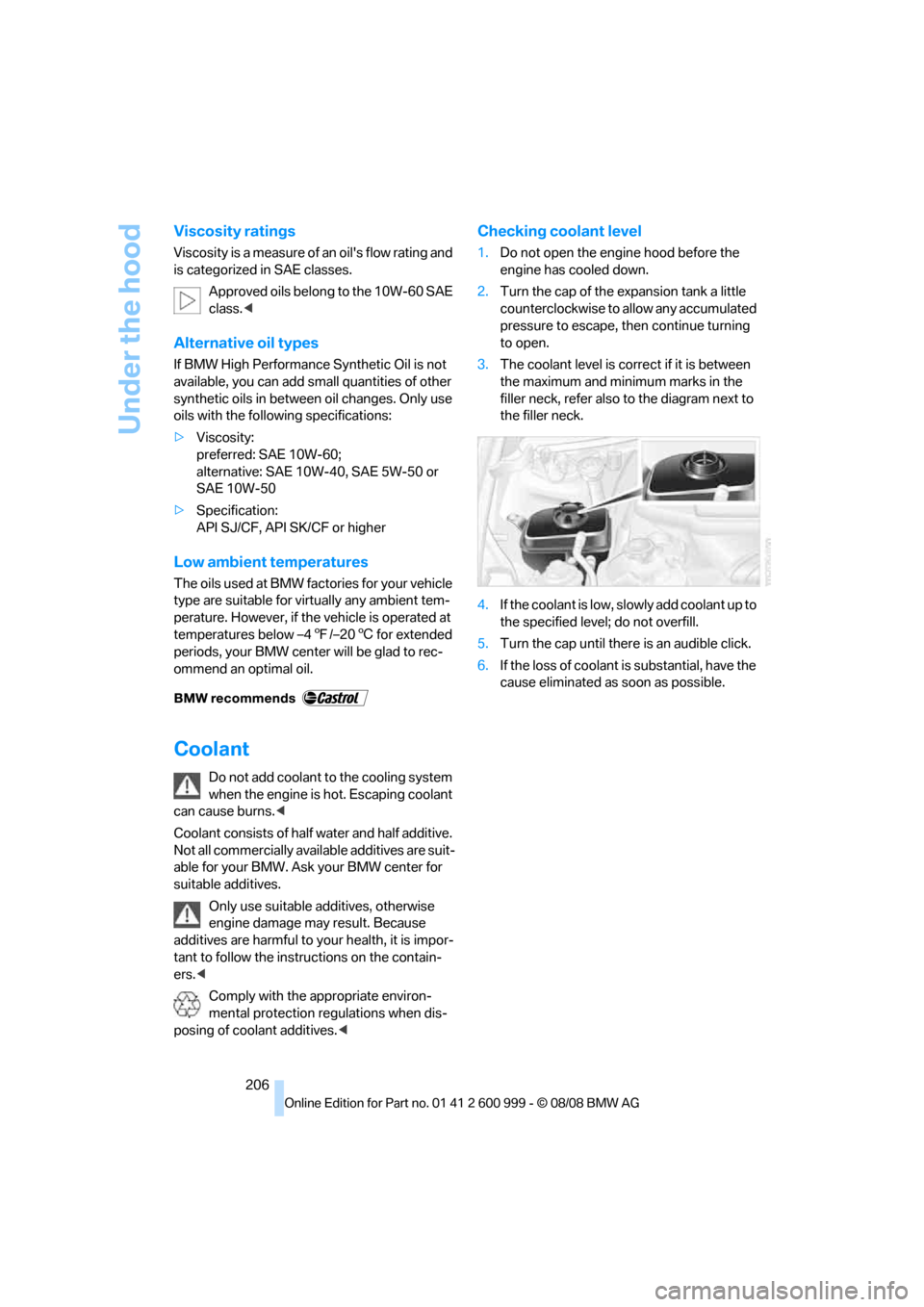
Checking coolant level
1.Do not open the engine hood before the
engine has cooled down.
2.Turn the cap of the expansion tank a little
counterclockwise to allow any accumulated
pressure to escape, then continue turning
to open.
3.The coolant level is correct if it is between
the maximum and minimum marks in the
filler neck, refer also to the diagram next to
the filler neck.
4.If the coolant is low, slowly add coolant up to
the specified level; do not overfill.
5.Turn the cap until there is an audible click.
6.If the loss of coolant is substantial, have the
cause eliminated as soon as possible.
ba8_E9293M3_cic.book Seite 206 Dienstag, 19. August 2008 12:01 12
Page 209 of 256
Mobility
207Reference
At a glance
Controls
Driving tips
Communications
Navigation
Entertainment
Maintenance
BMW Maintenance System
The BMW Maintenance System supports the
preservation of the traffic and operating safety
of your BMW. The objective is to optimize
efforts with respect to minimal vehicle mainte-
nance costs.
If and when you come to sell your BMW, a com-
prehensive record of servicing will prove a sig-
nificant benefit.
Condition Based Service CBS
Sensors and special algorithms take the differ-
ent driving conditions of your BMW into
account. Condition Based Service uses this to
determine the current and future service
requirements. By letting you define a service
and maintenance regimen that reflects your
own individual requirements, the system builds
the basis for trouble-free driving.
On the Control Display, you can have the
remaining times or distances for selected main-
tenance tasks and any legally prescribed dates
displayed, refer to page72:
>Engine oil
>Brake pads: separately for front and rear
>Brake fluid
>Vehicle check
>Legally mandated inspections depending
on local regulations
Service data in the remote control
Your vehicle continuously stores service-
requirement information in the remote control
while you are driving. Your BMW Service Advi-
sor can read out this data from the remote con-
trol unit, and propose an optimized mainte-
nance approach. Whenever you take your car in
for servicing you should therefore hand your
BMW Service Advisor the remote control unit
that you last used.
Make sure that the date is always set cor-
rectly, refer to page75; otherwise the
effectiveness of Condition Based Service CBS
is not assured.<
Service and Warranty Information
Booklet for US models and Warranty
and Service Guide Booklet for
Canadian models
Please consult your Service and Warranty Infor-
mation Booklet for US models and Warranty
and Service Guide Booklet for Canadian models
for additional information on service require-
ments.
BMW recommends that you have service
and repair operations performed at your
BMW center.
Take the time to ensure that these service pro-
cedures are confirmed by entries in your vehi-
cle's Service and Warranty Information Booklet
for US models and Warranty and Service Guide
Booklet for Canadian models. These entries
verify that your vehicle has received the speci-
fied regular maintenance.<
ba8_E9293M3_cic.book Seite 207 Dienstag, 19. August 2008 12:01 12
Page 211 of 256
Mobility
209Reference
At a glance
Controls
Driving tips
Communications
Navigation
Entertainment
Care
Care products
Regular cleaning and care contributes signifi-
cantly to the value retention of your BMW.
BMW recommends cleaning and caring for your
vehicle with products that are approved by
BMW for this purpose.
Your BMW center will be happy to advise you on
the products and services available for cleaning
and caring for your BMW.
Original BMW CareProducts have been
material tested, laboratory checked and
proven in the field, and offer optimal care and
protection for your vehicle.<
Do not use cleaners that contain alcohol
or solvents as these may result in dam-
age.<
Cleaning agents can contain substances
that are dangerous or hazardous to your
health. Therefore, follow the warning and safety
instructions on the packaging. When cleaning
inside the vehicle, always open the doors or
windows of the vehicle. In enclosed areas, pro-
vide for sufficient ventilation. Only use products
designed for cleaning vehicles.<
Exterior care
Washing the vehicle
Especially during the winter months,
ensure that the vehicle is washed more
frequently. Heavy soiling and road salt can lead
to vehicle damage.<
After washing the vehicle, apply the
brakes briefly to dry them, otherwise
water can reduce braking efficiency over the
short term and the brake discs can corrode.<
Automatic car washes
Preference should be given to cloth car washes.Do not use high-pressure car washes,
otherwise water may drip into the vehicle
around the windows.<
Before driving into a car wash, ensure that it is
suitable for your BMW. Check the following:
>Dimensions of your vehicle, refer to
page229
>If necessary: fold in the exterior mirrors,
refer to page49
>Maximum permissible tire width
Preparations before driving into an automatic
car wash:
>Deactivate the rain sensor
* to prevent unin-
tentional wiping.
>Remove additional attachments, e.g.
spoiler or telephone antennas, if there is a
possibility that they could be damaged.
M dual clutch transmission
Before driving into an automatic car wash, per-
form the following steps to ensure that the vehi-
cle can roll:
1.Insert the remote control, even with conve-
nient access, into the ignition lock.
2.Engage transmission position N.
3.Release the parking brake.
4.Switch off the engine.
5.Leave the remote control in the ignition lock
so that the vehicle can roll.
Steam jets / high-pressure washers
When using steam jets or high-pressure
washers, ensure that you maintain suffi-
cient clearance to the vehicle and do not exceed
a temperature of 1407/606.
Insufficient clearance or excessive pressure or
temperature can lead to component damage or
water penetration. Follow the operating instruc-
tions of the high-pressure washer.<
When using high-pressure washers, do
not spray against the sensors and cam-
ba8_E9293M3_cic.book Seite 209 Dienstag, 19. August 2008 12:01 12
Page 244 of 256
Everything from A - Z
242 Displacement, refer to Engine
data228
Display, refer to iDrive
controls16
Display lighting, refer to
Instrument lighting94
Displays
– on the Control Display16
Displays, refer to Instrument
cluster12
Displays and controls10
Disposal
– coolant206
– remote control battery35
– vehicle battery219
Distance remaining to service,
refer to Service
requirements72
Distance warning, refer to
Park Distance Control
PDC81
Door key, refer to Remote
control26
Door lock30
Doors, emergency
operation30
DOT Quality Grades198
Draft-free ventilation99
Drinks holders, refer to Cup
holders106
Drivelogic61
Drive mode59
Drive-off assistance, refer to
Dynamic Stability Control
DSC82
Drive-off assistant84
Drive position, engaging, refer
to Selector lever
positions58
Drive programs, refer to
Drivelogic61
Driving lamps, refer to Parking
lamps/low beams92
Driving notes116
Driving off on hills, refer to
Drive-off assistant84
Driving stability control
systems82
Driving through water117Driving tips, refer to Driving
notes116
Dry air, refer to Cooling
function99
DSC Dynamic Stability
Control82
DVD
– country codes156
– settings157
– video playback156
DVD menu157
DVD video156
Dynamic Stability Control
DSC
– indicator/warning lamp83
– M Dynamic Mode MDM82
E
EDC, refer to Electronic
Damper Control83
Eject button, refer to Buttons
on the CD player146
Electric
– seat adjustment43
Electrical malfunction
– door lock30
– driver's door30
– fuel filler door194
– glass roof37
– M dual clutch transmission
with Drivelogic60
Electric seat43
Electric seat adjustment43
Electric steering wheel lock
– with convenient access34
Electronic brake-force
distribution82
Electronic Damper Control
EDC83
Electronic oil level check203
Electronic Stability Program
ESP, refer to Dynamic
Stability Control DSC82
Emergency operation
– fuel filler door, manual
release194Emergency operation, refer to
Closing manually
– glass roof37
Emergency operation, refer to
Manual operation
– door lock30
Emergency release
– luggage compartment lid
from inside32
Emergency Request221
Emergency services, refer to
Roadside Assistance221
Engine
– breaking in116
– data228
– overheated, refer to Coolant
temperature69
– speed228
– starting56
– starting, convenient
access34
– switching off56
Engine compartment203
Engine coolant, refer to
Coolant206
Engine oil
– adding205
– BMW Maintenance
System207
– checking level203
– intervals between changes,
refer to Service
requirements72
– possible displays204
Engine output, refer to Engine
data228
Engine speed, refer to Engine
data228
Engine starting, refer to
Starting the engine56
Entry lamps, refer to Interior
lamps94
Entry map for destination132
Equalizer, tone setting147
Error messages, refer to
Check Control76
Event data recorders208
Exhaust system, refer to Hot
exhaust system116
ba8_E9293M3_cic.book Seite 242 Dienstag, 19. August 2008 12:01 12
Page 245 of 256
Reference 243
At a glance
Controls
Driving tips
Communications
Navigation
Entertainment
Mobility
Exterior mirrors48
– adjusting48
– automatic dimming
feature49
– automatic heating49
– folding in and out49
External audio device105
Eyes
– for tow-starting and towing
away224
– for tying down loads119
F
Failure messages, refer to
Check Control76
Failure of an electrical
consumer220
False alarm
– avoiding unintentional
alarm33
– switching off an alarm33
Fastening safety belts, refer to
Safety belts47
Fastest route for
navigation137
Fast forward
– CD changer156
– CD player156
Filter
– refer to Microfilter/activated-
charcoal filter for automatic
climate control99
First aid pouch222
Fixture for remote control,
refer to Ignition lock55
Flash when locking/
unlocking29
Flat tire
– Tire Pressure Monitor
TPM85
Flat tire, repairing217
Flat Tire Monitor FTM84
– indicating a flat tire85
– indicator/warning lamp85
– initializing the system84
– malfunction85
– snow chains84,201
– system limits84Flat tires, refer to Tire
condition199
Fluid reservoir, refer to
Washer fluid reservoir66
FM, waveband149
Folding up the floor panel110
Footbrake, refer to Braking
safely117
Footwell lamps, refer to
Interior lamps94
Forward position, engaging,
refer to Selector lever
positions58
For your own safety5
Free memory capacity, music
collection164
Front airbags88
FTM, refer to Flat Tire
Monitor84
Fuel195
– average consumption70
– gauge69
– high-quality brands195
– quality195
– specifications195
– tank contents, refer to
Capacities231
Fuel clock, refer to Fuel
gauge69
Fuel display, refer to Fuel
gauge69
Fuel filler door194
– releasing in the event of
electrical malfunction194
Fuses220
G
Garage door opener, refer to
Integrated universal remote
control101
Gasoline
– refer to Average
consumption70
Gasoline, refer to Required
fuel195
Gasoline display, refer to Fuel
gauge69Gasoline engine, checking
engine oil level203
Gear
– neutral59
Gear display, refer to Displays
in the instrument cluster60
Gearshift lever
– manual transmission57
Gearshifts
– manual transmission57
General driving notes116
Glass roof, electric37
– closing after electrical
malfunction37
– convenient operation28,30
– initializing37
– opening, closing37
– operation with convenient
access34
– pinch protection system37
– power failure37
– raising37
– remote control28
Glove compartment104
GPS navigation, refer to
Navigation system126
Grills96
Gross vehicle weight, refer to
Weights231
H
Handbrake, refer to Parking
brake57
Hands-free system14
Hazard warning flashers14
HD radio, refer to High
Definition Radio150
Head airbags88
Headlamp control,
automatic92
Headlamp flasher64
– indicator lamp11,13
Head restraints44
– rear, removing45
– sitting safely42
ba8_E9293M3_cic.book Seite 243 Dienstag, 19. August 2008 12:01 12