Lighting BMW M3 COUPE 2011 E92 User Guide
[x] Cancel search | Manufacturer: BMW, Model Year: 2011, Model line: M3 COUPE, Model: BMW M3 COUPE 2011 E92Pages: 278, PDF Size: 8.18 MB
Page 107 of 278
Controls
105Reference
At a glance
Driving tips
Communications
Navigation
Entertainment
Mobility
If the automatic headlamp control is acti-
vated, the low beams will come on auto-
matically when you switch on the fog lamps.<
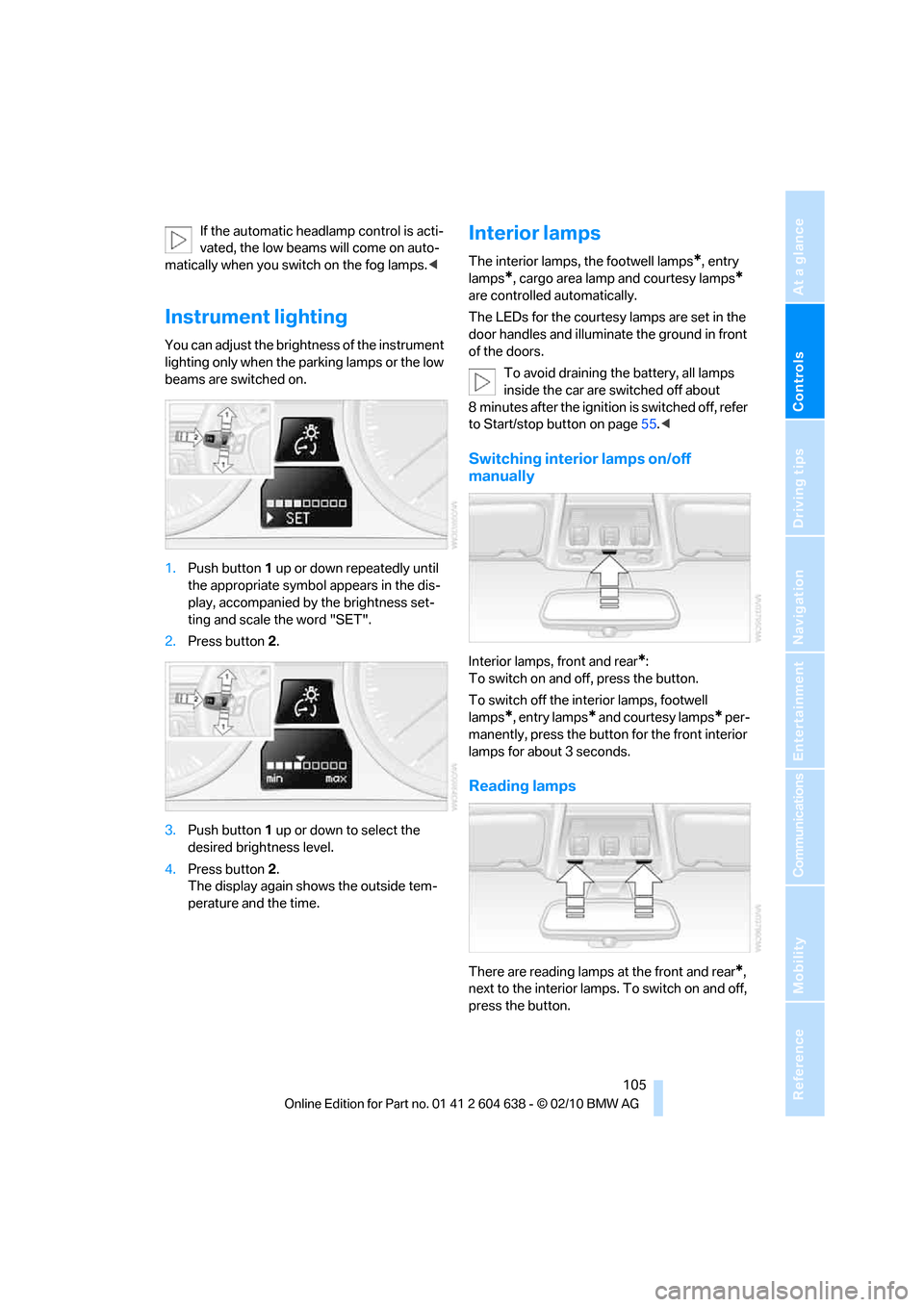
Instrument lighting
You can adjust the brightness of the instrument
lighting only when the parking lamps or the low
beams are switched on.
1.Push button 1 up or down repeatedly until
the appropriate symbol appears in the dis-
play, accompanied by the brightness set-
ting and scale the word "SET".
2.Press button 2.
3.Push button 1 up or down to select the
desired brightness level.
4.Press button 2.
The display again shows the outside tem-
perature and the time.
Interior lamps
The interior lamps, the footwell lamps*, entry
lamps
*, cargo area lamp and courtesy lamps*
are controlled automatically.
The LEDs for the courtesy lamps
are set in the
door handles and illuminate the ground in front
of the doors.
To avoid draining the battery, all lamps
inside the car are switched off about
8 minutes after the ignition is switched off, refer
to Start/stop button on page55.<
Switching interior lamps on/off
manually
Interior lamps, front and rear*:
To switch on and off, press the button.
To switch off the interior lamps, footwell
lamps
*, entry lamps* and courtesy lamps* per-
manently, press the button for the front interior
lamps for about 3 seconds.
Reading lamps
There are reading lamps at the front and rear*,
next to the interior lamps. To switch on and off,
press the button.
Page 113 of 278
Controls
111Reference
At a glance
Driving tips
Communications
Navigation
Entertainment
Mobility
Practical interior accessories
Integrated universal remote
control*
The concept
The integrated universal remote control can
replace as many as three hand-held transmit-
ters for various remote-controlled devices,
such as garage doors and gates or lighting sys-
tems. The integrated universal remote control
registers and stores signals from the original
hand-held transmitters.
The signal of an original hand-held transmitter
can be programmed on one of the three mem-
ory buttons1. After this, the programmed
memory button1 will operate the system in
question. The LED2 flashes to confirm trans-
mission of the signal.
Should you sell your vehicle one day, be sure to
delete the stored programs beforehand for your
safety, refer to page112.
To prevent possible damage or injury,
before programming or using the inte-
grated universal remote control, always inspect
the immediate area to make certain that no peo-
ple, animals or objects are within the pivoting or
travel range of the device being operated. Com-
ply also with the safety instructions supplied
with the original hand-held transmitter.<
Checking compatibility
If this symbol appears on the package
or in the instructions supplied with the
original hand-held transmitter, you can
assume that the radio remote control device will
be compatible with the integrated universal
remote control.
For additional information, please contact your
BMW center or call: 1-800-355-3515.
You can also obtain information on the Internet
at:
www.bmwusa.com or
www.homelink.com.
HomeLink is a registered trademark of Johnson
Controls, Inc.<
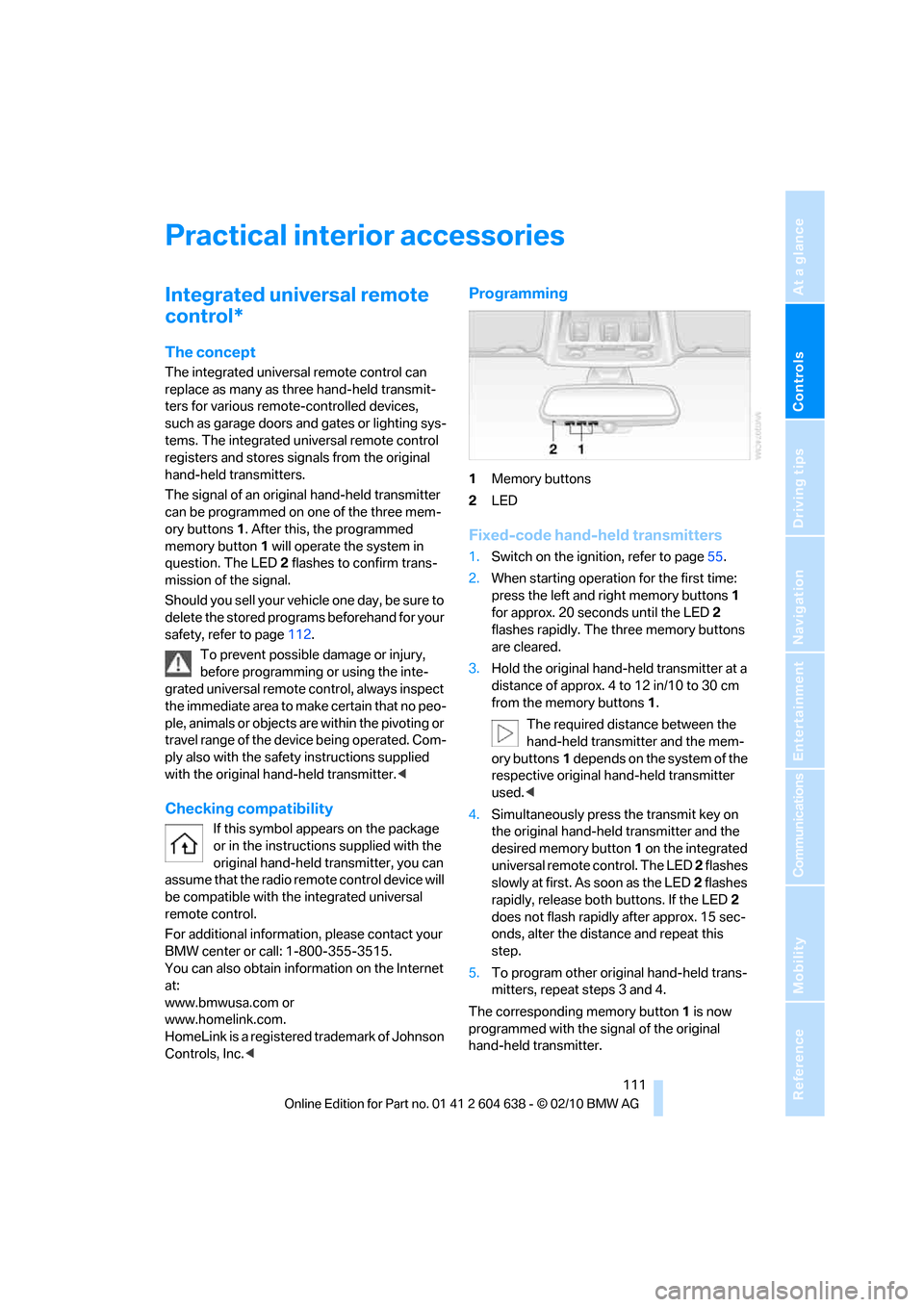
Programming
1Memory buttons
2LED
Fixed-code hand-held transmitters
1.Switch on the ignition, refer to page55.
2.When starting operation for the first time:
press the left and right memory buttons1
for approx. 20 seconds until the LED2
flashes rapidly. The three memory buttons
are cleared.
3.Hold the original hand-held transmitter at a
distance of approx. 4 to 12 in/10 to 30 cm
from the memory buttons1.
The required distance between the
hand-held transmitter and the mem-
ory buttons1 depends on the system of the
respective original hand-held transmitter
used.<
4.Simultaneously press the transmit key on
the original hand-held transmitter and the
desired memory button 1 on the integrated
universal remote control. The LED 2 flashes
slowly at first. As soon as the LED2 flashes
rapidly, release both buttons. If the LED2
does not flash rapidly after approx. 15 sec-
onds, alter the distance and repeat this
step.
5.To program other original hand-held trans-
mitters, repeat steps 3 and 4.
The corresponding memory button 1 is now
programmed with the signal of the original
hand-held transmitter.
Page 256 of 278
Short commands for the voice activation system
254
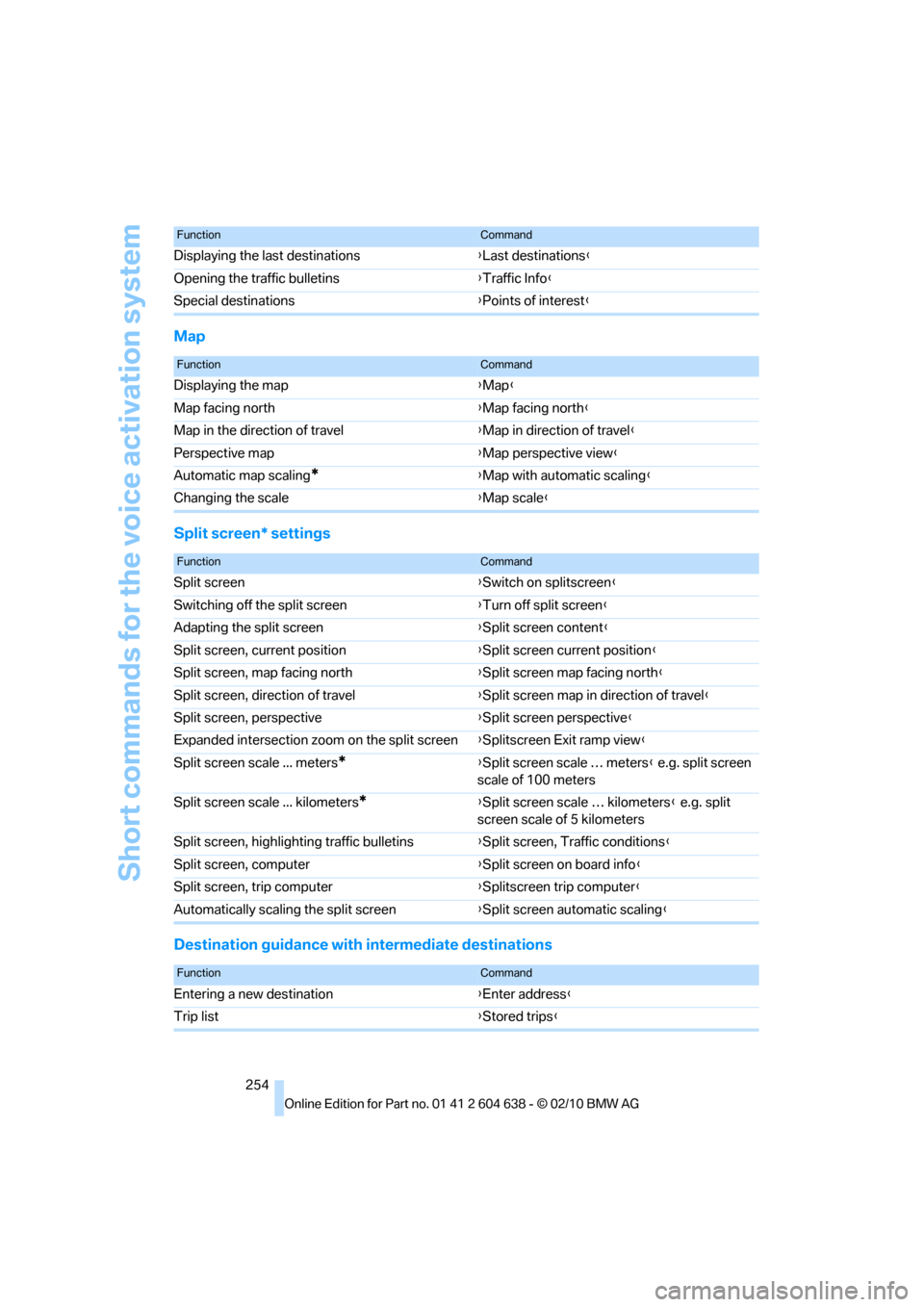
Map
Split screen* settings
Destination guidance with intermediate destinations
Displaying the last destinations{Last destinations}
Opening the traffic bulletins{Traffic Info}
Special destinations{Points of interest}
FunctionCommand
FunctionCommand
Displaying the map{Map}
Map facing north{Map facing north}
Map in the direction of travel{Map in direction of travel}
Perspective map{Map perspective view}
Automatic map scaling
*{Map with automatic scaling}
Changing the scale{Map scale}
FunctionCommand
Split screen{Switch on splitscreen}
Switching off the split screen{Turn off split screen}
Adapting the split screen{Split screen content}
Split screen, current position{Split screen current position}
Split screen, map facing north{Split screen map facing north}
Split screen, direction of travel{Split screen map in direction of travel}
Split screen, perspective{Split screen perspective}
Expanded intersection zoom on the split screen{Splitscreen Exit ramp view}
Split screen scale ... meters
*{Split screen scale … meters} e.g. split screen
scale of 100 meters
Split screen scale ... kilometers
*{Split screen scale … kilometers} e.g. split
screen scale of 5 kilometers
Split screen, highlighting traffic bulletins{Split screen, Traffic conditions}
Split screen, computer{Split screen on board info}
Split screen, trip computer{Splitscreen trip computer}
Automatically scaling the split screen{Split screen automatic scaling}
FunctionCommand
Entering a new destination{Enter address}
Trip list{Stored trips}
Page 258 of 278
Short commands for the voice activation system
256
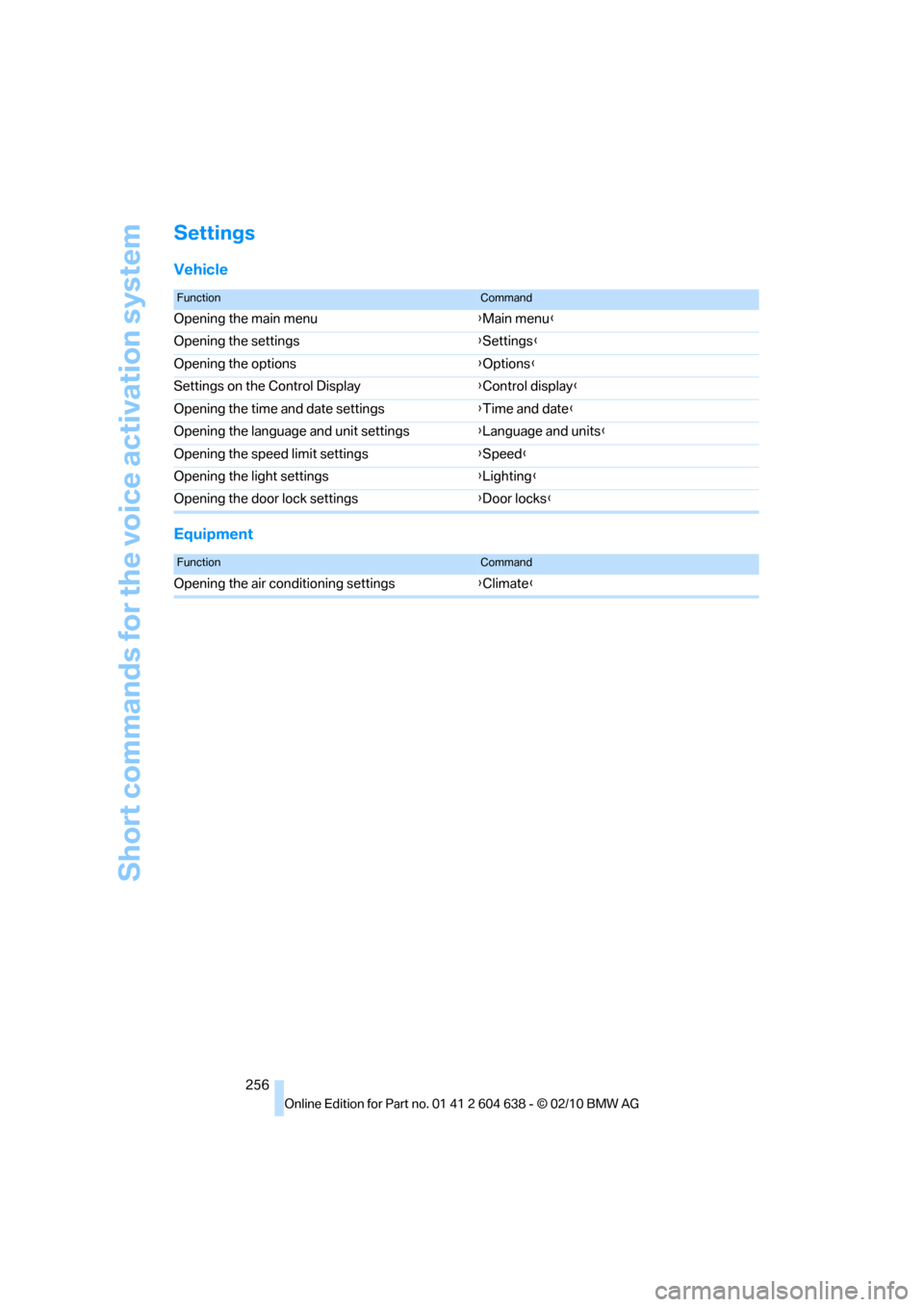
Settings
Vehicle
Equipment
FunctionCommand
Opening the main menu{Main menu}
Opening the settings{Settings}
Opening the options{Options}
Settings on the Control Display{Control display}
Opening the time and date settings{Time and date}
Opening the language and unit settings{Language and units}
Opening the speed limit settings{Speed}
Opening the light settings{Lighting}
Opening the door lock settings{Door locks}
FunctionCommand
Opening the air conditioning settings{Climate}
Page 263 of 278
Reference 261
At a glance
Controls
Driving tips
Communications
Navigation
Entertainment
Mobility
Condition Based Service
CBS227
Configuring settings, refer to
Personal Profile26
Confirmation signals for
locking/unlocking the
vehicle29
Congestion
– refer to Route, bypassing
sections145
Connecting vacuum cleaner,
refer to Connecting
electrical appliances118
Consumption, refer to
Average fuel
consumption77
Contacts
– creating196
Control Center, refer to
iDrive16
Control Display, refer to
iDrive16
– adjusting brightness87
– switching on/off19
Controller, refer to iDrive16
Controls and displays10
Control unit, refer to iDrive16
Convenient loading in
Convertible28
Convenient operation
– glass roof28
– glass roof with Comfort
Access34
– retractable hardtop28
– windows28
– windows with Comfort
Access34
Convertible
– bag holder119
– convenient loading28
– enlarging cargo area119
– folding down rear
backrest119
– retractable hardtop38
– rollover protection
system100
– securing cargo130
– stowing cargo130Coolant226
– checking level226
Coolant temperature76
Cooling, maximum107
Cooling fluid, refer to
Coolant226
Cooling system, refer to
Coolant226
Copyright2
Corner-illuminating lamps
– replacing bulbs234
Corner-illuminating lamps,
refer to Adaptive light
control102
Cornering lamps, refer to
Adaptive light control102
Correct tires220
Country codes DVD167
Courtesy lamps, refer to
Interior lamps105
Criteria for route144
Cross-hairs in navigation140
Cruise control66
– active68
– malfunction68
Cruise control, refer to Active
cruise control68
Cruising range77
Cupholders116
Curb weight, refer to
Weights249
Current playback
– external devices180
– of music collection174
Customer Relations201
D
Dashboard, refer to
Cockpit10
Dashboard, refer to
instrument cluster12
Dashboard lighting, refer to
Instrument lighting105
Data, technical246
– capacities250
– dimensions247
– engine246
– weights249Data memory228
Data transfer202
Date
– date format84
– setting84
Daytime running lights102
– replacing bulbs234
DBC Dynamic Brake
Control89
Deactivating front passenger
airbags98
Deadlocking, refer to
Locking28
Defect
– door lock30
– fuel filler flap206
– glass roof38
Destination, entering by town/
city name135
Destination address
– entering135,141
Destination entry via BMW
Assist140
Destination for navigation
– entering by voice141
– entering via map140
– entry135
– home address138
– manual entry135
Destination guidance144
– bypassing a route
section145
– changing specified
route144
– continuing144
– starting144
– voice instructions146
– volume of voice
instructions146
Digital clock75
Digital compass113
Digital radio, refer to HD
Radio158
Dimensions247
Directional indicators, refer to
Turn signals64
Direction instructions, refer to
Voice instructions146
Page 264 of 278
Everything from A to Z
262 Directory for navigation, refer
to Address book137
Displacement, refer to Engine
data246
Display, refer to iDrive
controls16
Display lighting, refer to
Instrument lighting105
Displays
– on the Control Display16
Displays, refer to Instrument
cluster12
Displays and controls10
Disposal
– coolant226
– remote control battery35
– vehicle battery237
Distance remaining to service,
refer to Service
requirements80
Distance warning, refer to
Park Distance Control
PDC88
Door key, refer to Remote
control with integrated
key26
Door lock29
Doors, emergency
operation30
DOT Quality Grades218
Draft-free ventilation109
Drinks holders, refer to
Cupholders116
Drive mode61
Drive-off assistance, refer to
Dynamic Stability Control
DSC89
Drive-off assistant92
Driving dynamics control62
Driving lamps, refer to Parking
lamps/low beams101
Driving notes126
Driving off on hills, refer to
Drive-off assistant92
Driving stability control
systems89
Driving through water128
Driving tips, refer to Driving
notes126Dry air, refer to Cooling
function108
DSC Dynamic Stability
Control89
DTC Dynamic Traction
Control90
– indicator/warning lamp90
DVD
– country codes167
– settings168
– video playback167
DVD menu168
DVD player, refer to CD
player165
DVD video167
Dynamic Brake Control
DBC89
Dynamic destination
guidance145
Dynamic Stability Control
DSC89
– indicator/warning lamp90
Dynamic Traction Control
DTC
– indicator/warning lamp90
E
EBV Electronic brake-force
distribution89
Eject button, refer to Buttons
on the CD/DVD player154
Electrical defect
– 7-gear Sports automatic
transmission with double
clutch63
Electrical malfunction
– door lock30
– driver's door30
– fuel filler flap206
– glass roof38
Electric seat adjustment44
Electric steering wheel lock
– with Comfort Access34
Electronic brake-force
distribution EBV89
Electronic oil level check223Electronic Stability Program
ESP, refer to Dynamic
Stability Control DSC89
Emergency actuation,
automatic transmission,
refer to Overriding selector
lever lock59
Emergency operation
– fuel filler flap, manual
release206
Emergency operation, refer to
Closing manually
– glass roof38
Emergency operation, refer to
Manual operation
– door lock30
Emergency release
– trunk lid from inside32
Emergency Request238
Emergency services, refer to
Roadside Assistance238
Energy, saving
– saving fuel126
Engine
– breaking in126
– data246
– overheated, refer to Coolant
temperature76
– speed246
– starting56
– starting, Comfort Access33
– switching off56
Engine compartment223
Engine coolant, refer to
Coolant226
Engine oil
– adding225
– alternative oil types225
– BMW Maintenance
System227
– capacity250
– checking level223
– intervals between changes,
refer to Service
requirements80
Engine output, refer to Engine
data246
Page 267 of 278
Reference 265
At a glance
Controls
Driving tips
Communications
Navigation
Entertainment
Mobility
Instructions for navigation
system, refer to Voice
instructions146
Instrument cluster12
Instrument combination, refer
to Instrument cluster12
Instrument lighting105
Instrument panel, refer to
Cockpit10
Integrated key26
Integrated universal remote
control111
Interactive map141
Interior lamps105
– remote control28
Interior motion sensor33
Interior rearview mirror51
– automatic dimming
feature51
– compass113
Interlock, refer to Disengaging
the remote control58
Intermittent mode of the
wipers65
Intersection, entering,
navigation136
iPod, connecting, refer to
AUX-IN port177
iPod, connecting, refer to USB
audio interface178
J
Jacking points236
Joystick, refer to iDrive16
Jumpering, refer to Jump-
starting239
Jump-starting239
K
Key, refer to Integrated key/
remote control26
Keyless go, refer to Comfort
Access33
Keyless opening and closing,
refer to Comfort Access33
Key Memory, refer to Personal
Profile26Kickdown58
– automatic transmission with
Steptronic58
Knock control207
L
Lamps
– automatic headlamp
control101
– parking lamps/low
beams101
Lamps and bulbs, replacing
bulbs233
Lap-and-shoulder belt, refer
to Safety belts49
Lashing eyes, refer to
Securing cargo130
Last destinations138
LATCH child restraint fixing
system53
Launch Control64
Leather care231
LED Light-emitting
diodes233
Length, refer to
Dimensions247
License plate lamp, replacing
bulb235
Light
– high-beam assistant103
Light-alloy wheels231
Light-emitting diodes
LED233
Lighter117
– connecting electrical
appliances118
Lighting
– instruments105
– lamps and bulbs233
– vehicle, refer to Lamps101
Light switch101
Limit, refer to Speed limit86
Load129
Load securing equipment,
refer to Securing cargo130
Lock buttons, doors, refer to
Locking31Locking
– adjusting confirmation
signal29
– from inside31
– from outside28
– without remote control, refer
to Comfort Access33
Locking and unlocking doors
– confirmation signals29
– from inside30
– from outside27
Low beam control, refer to
High-beam assistant103
Low-beam headlamps101
– automatic101
Lower back support, refer to
Lumbar support44
Luggage rack, refer to Roof-
mounted luggage rack131
Lumbar support44
M
M+S tires, refer to Winter
tires221
Maintenance, refer to Service
Booklet
Maintenance system227
Malfunction
– automatic transmission with
Steptronic59
– tires93
Malfunction warnings, refer to
Check Control84
Manual car wash230
Manually unlocking parking
lock63
Manual mode, automatic
transmission with
Steptronic59
Manual operation
– door lock30
– driver's door30
– fuel filler flap206
– glass roof38
– parking lock63
– parking lock, automatic
transmission59
Page 269 of 278
Reference 267
At a glance
Controls
Driving tips
Communications
Navigation
Entertainment
Mobility
Neck support, refer to Head
restraints45
Nets, refer to Storage
compartments116
Neutral61
New tires220
Next Service indicator, refer to
Condition Based Service
CBS227
North-facing map146
Nozzles106
Number of cylinders, refer to
Engine data246
Nylon rope, refer to Tow
rope242
O
OBD socket, refer to Socket
for Onboard Diagnosis228
Octane ratings, refer to Fuel
specifications207
Odometer75
Oil, refer to Engine oil223
Oil consumption223
Oil level223
Old batteries, refer to
Disposal237
Onboard vehicle tool kit233
Opening and closing
– Comfort Access33
– from inside30
– from outside27
– using the door lock29
– using the remote control27
Options, selecting for
navigation144
Orientation menu, refer to
Start menu17
Outlets
– refer to Ventilation109
Output, refer to Engine
data246
Outside-air mode
– automatic climate
control108Outside temperature
display75
– changing unit of measure80
– in computer80
Outside temperature
warning75
Overheated engine, refer to
Coolant temperature76
Overriding selector lever
lock59
Overview
– radio control154
P
Paintwork care230
Park assistant, refer to Park
Distance Control88
Park Distance Control PDC88
Parked car ventilation110
– preselecting switch-on
times110
– switching on and off
directly110
Parking
– vehicle56
Parking aid, refer to Park
Distance Control PDC88
Parking brake57
– indicator lamp57
Parking lamps101
– replacing bulbs234
Parking lamps/low beams101
Passenger side mirror tilt
function50
Pathway lighting102
Personal Profile26
Phone book187
Phone numbers
– dialing188
Pinch protection system
– glass roof, electric37
– windows36
Playing music173
Polish232
Pollen
– refer to Microfilter/activated-
charcoal filter for automatic
climate control109Power failure237
Power windows36
Power windows, refer to
Windows35
Pressure, tires208
Pressure monitoring, tires92
– Flat Tire Monitor92
Pressure monitoring of tires,
refer to Tire Pressure
Monitor TPM94
Programmable buttons on the
steering wheel11
Protection function, refer to
Pinch protection system
– glass roof, electric37
– windows36
Providing medical assistance,
refer to First aid pouch239
Puncture
– Flat Tire Monitor92
R
Radio
– controls154
– HD Radio158
– satellite radio160
– selecting waveband157
– storing stations157
– switching on/off154
– tone control154
– volume154
Radio position, refer to Radio
readiness55
Radio readiness55
– switched off56
– switched on55
Radio-remote key, refer to
Remote control with
integrated key26
Rain sensor65
Random sequence
– external devices180
– music collection175
Reading lamps105
Rear lamps, refer to Tail
lamps235