trunk BMW M3 COUPE 2011 E92 User Guide
[x] Cancel search | Manufacturer: BMW, Model Year: 2011, Model line: M3 COUPE, Model: BMW M3 COUPE 2011 E92Pages: 278, PDF Size: 8.18 MB
Page 41 of 278
Controls
39Reference
At a glance
Driving tips
Communications
Navigation
Entertainment
Mobility
>If you open the hardtop while it is wet, e.g.
after driving in the rain, water may drip into
the cargo area. If necessary, remove items
from the cargo area beforehand to avoid
water stains or soiling.
Do not place any objects on the retract-
able hardtop or on the trunk lid; other-
wise, they could fall during movements of the
retractable hardtop and cause damage or injury.
Never move the retractable hardtop when the
rollover protection system is in the activated
position.
Driving when the hardtop is not fully opened or
closed may result in damage or injury.
Do not reach into the mechanism during the
opening or closing procedure. Keep children
away from the swiveling area of the retractable
hardtop.<
The retractable hardtop cannot be moved
at temperatures below + 147/–106. A
message appears on the Control Display.<
The retractable hardtop can only be
opened and closed when the vehicle is
stationary. To avoid causing damage, do not
drive off until the hardtop has stopped mov-
ing.<
Before opening and closing
>Comply with the safety precautions
described above.
>Ensure that the cargo area partition is
folded down and engaged on both sides,
refer to page119; otherwise, it will not be
possible to open the retractable hardtop.
>Do not place any objects next to or on the
cargo area partition and close the storage
compartment on the left side of the cargo
area.
>Do not exceed the maximum loading height
under the cargo area partition; refer to the
label in the cargo area showing a line indi-
cating the maximum height.
>Ensure that the trunk lid is closed.
>The vehicle should be parked on fairly
level ground. Excessive angle is indicated
by a lamp.
Opening and closing
When the vehicle is stationary and at radio
readiness or beyond, refer to page55:
If possible, conserve the battery by only
operating the retractable hardtop when
the engine is running.
Before closing the retractable hardtop, remove
all foreign objects from the windshield frame as
these could prevent the hardtop from closing
properly.<
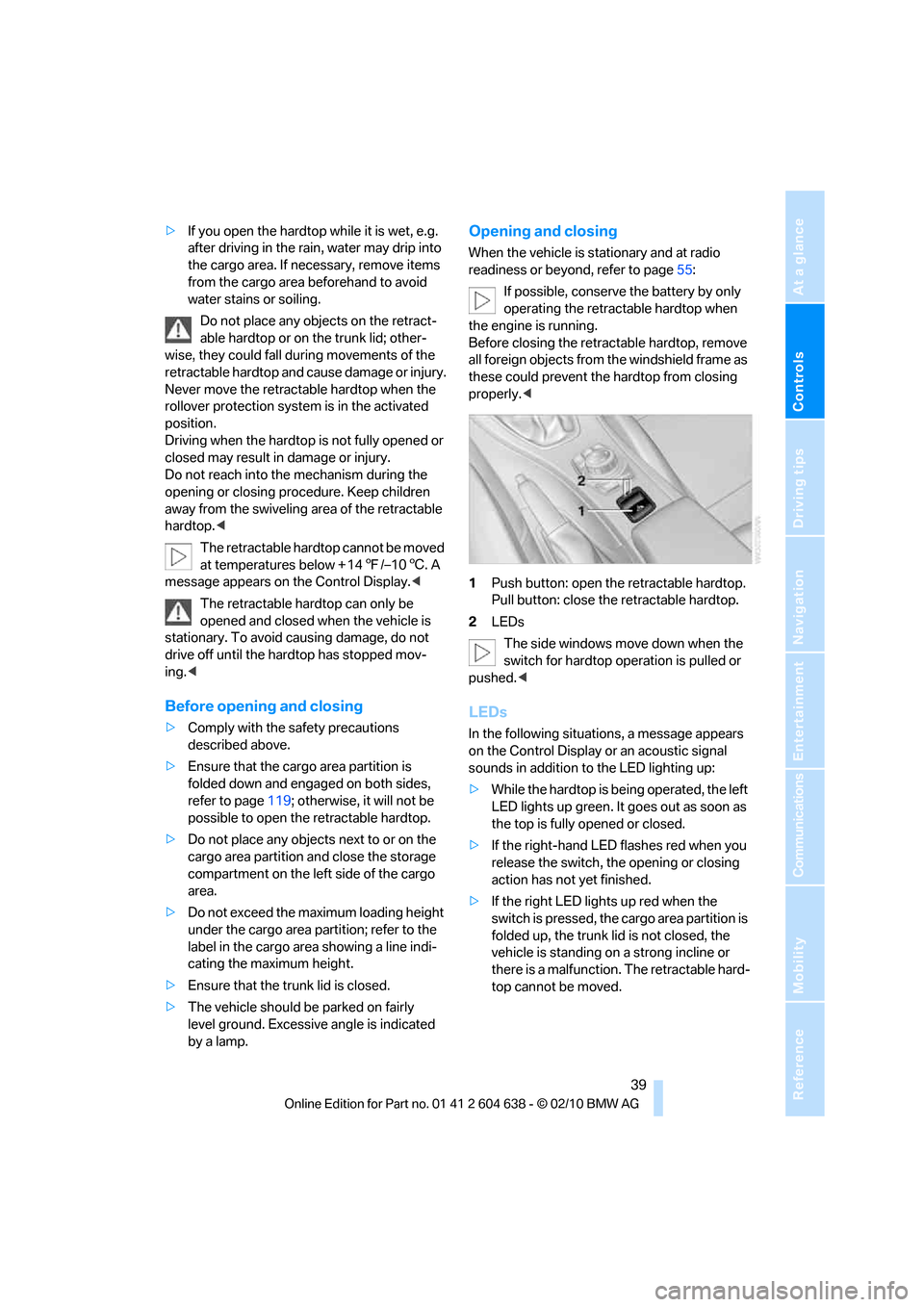
1Push button: open the retractable hardtop.
Pull button: close the retractable hardtop.
2LEDs
The side windows move down when the
switch for hardtop operation is pulled or
pushed.<
LEDs
In the following situations, a message appears
on the Control Display or an acoustic signal
sounds in addition to the LED lighting up:
>While the hardtop is being operated, the left
LED lights up green. It goes out as soon as
the top is fully opened or closed.
>If the right-hand LED flashes red when you
release the switch, the opening or closing
action has not yet finished.
>If the right LED lights up red when the
switch is pressed, the cargo area partition is
folded up, the trunk lid is not closed, the
vehicle is standing on a strong incline or
there is a malfunction. The retractable hard-
top cannot be moved.
Page 42 of 278
Opening and closing
40
Interruption
The automatic sequence of movements is
interrupted if the switch for hardtop operation is
released. The sequence can be continued in
the desired direction by pushing or pulling the
switch.
A hardtop that is not fully opened or
closed is a safety hazard.
Do not interrupt and resume the closing proce-
dure several times in close succession as this
could damage the mechanism.<
If the hardtop is not fully opened or
closed, the trunk lid cannot be opened
and the windows cannot be moved.<
Convenient operation with remote
control or via door lock
Refer to pages28 and30.
Wind deflector*
The wind deflector keeps air movements in the
passenger compartment to a minimum when
the hardtop is open and provides an even more
comfortable ride, particularly at high speeds.
Installation
The wind deflector is stored in a protective
cover in the cargo area. Brief instructions for
operation can be found on the protective cover.
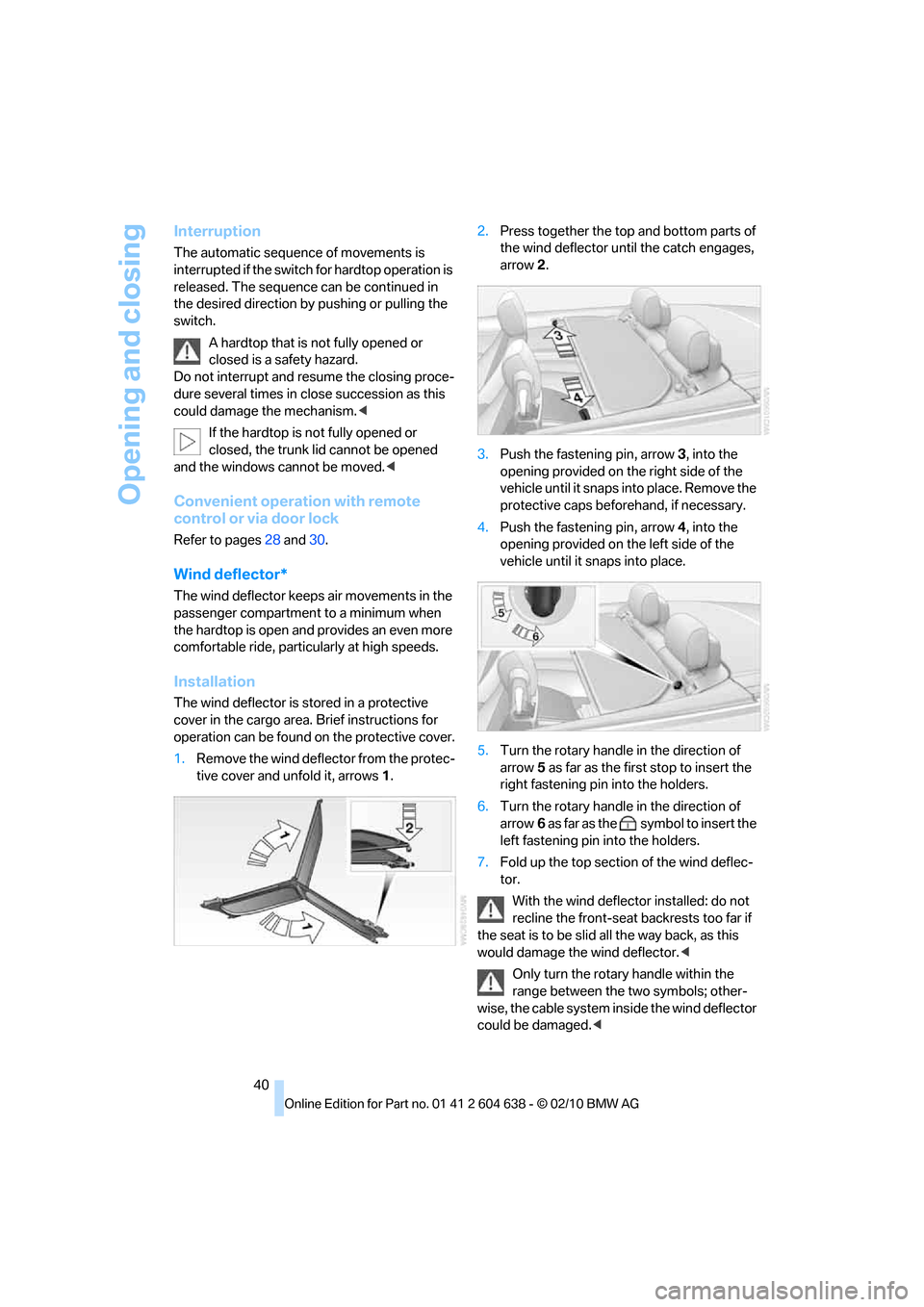
1.Remove the wind deflector from the protec-
tive cover and unfold it, arrows1.2.Press together the top and bottom parts of
the wind deflector until the catch engages,
arrow 2.
3.Push the fastening pin, arrow3, into the
opening provided on the right side of the
vehicle until it snaps into place. Remove the
protective caps beforehand, if necessary.
4.Push the fastening pin, arrow4, into the
opening provided on the left side of the
vehicle until it snaps into place.
5.Turn the rotary handle in the direction of
arrow5 as far as the first stop to insert the
right fastening pin into the holders.
6.Turn the rotary handle in the direction of
arrow6 as far as the symbol to insert the
left fastening pin into the holders.
7.Fold up the top section of the wind deflec-
tor.
With the wind deflector installed: do not
recline the front-seat backrests too far if
the seat is to be slid all the way back, as this
would damage the wind deflector.<
Only turn the rotary handle within the
range between the two symbols; other-
wise, the cable system inside the wind deflector
could be damaged.<
Page 129 of 278
Driving tips
127Reference
At a glance
Controls
Communications
Navigation
Entertainment
Mobility
Drive defensively
Avoid unnecessary acceleration and braking
maneuvers. To do so, keep an adequate dis-
tance between you and the vehicle in front of
you. A defensive and smooth driving style
keeps fuel consumption down.
Avoid high engine speeds
Only use first gear when setting off. In second
and higher gears, accelerate without hesitation
or pauses. When accelerating, shift up before
reaching high engine speeds.
When you reach the desired speed, shift into
the highest applicable gear and drive with the
engine speed as low as possible and at a con-
stant speed.
As a rule: driving at low engine speeds lowers
fuel consumption and reduces wear.
Coasting
When approaching a red light, take your foot off
the accelerator and coast to a stop in the high-
est applicable gear.
On a downhill slope, take your foot off the accel-
erator and coast in a suitable gear.
The fuel supply is interrupted when coasting.
Switch off the engine during lengthy
stops
Switch off the engine when stopping for lengthy
periods, e.g. at traffic lights, railroad crossings
or in traffic congestions. You achieve fuel sav-
ings even if standing time is as short as approx.
4 seconds.
Switch off functions you do not need at
the moment
Functions such as the air conditioner, seat
heating or rear window defroster draw large
amounts of power and consume additional fuel.
Especially in city traffic and in stop and go driv-
ing they have a considerable impact. Therefore,
switch these functions off when they are not
really needed.
Have the vehicle serviced
Have the vehicle serviced regularly to achieve
good economy and a long vehicle life. BMW
recommends having the vehicle serviced at a
BMW center. Also note the BMW service sys-
tem, refer to page227.
General driving notes
Close the trunk lid
Operate the vehicle only when the trunk
lid is closed. Otherwise, exhaust fumes
could enter the interior of the vehicle.<
If the vehicle must be driven with the trunk lid
open:
1.Close all windows and the glass roof.
2.Greatly increase the air volume of the auto-
matic climate control system, refer to
page108.
Hot exhaust system
In all vehicles, extremely high tempera-
tures are generated in the exhaust sys-
tem. Do not remove the heat shields installed
adjacent to various sections of the exhaust sys-
tem, and never apply undercoating to them.
When driving, standing at idle and while park-
ing, take care to avoid possible contact
between the hot exhaust system and any highly
flammable materials such as hay, leaves, grass,
etc. Such contact could lead to a fire, with the
risk of serious personal injuries and property
damage. Do not touch hot exhaust tail pipes.
Otherwise, there is a risk of burns.<
Hydroplaning
When driving on wet or slushy roads,
reduce road speed. If you do not, a wedge
of water can form between tires and road sur-
face. This situation, known as hydroplaning,
means that the tire can completely lose contact
with the road surface, so that neither the car can
be steered nor the brake be properly applied.<
The risk of hydroplaning increases with declin-
ing tread depth on the tires, refer also to Mini-
mum tread depth on page219.
Page 133 of 278
Driving tips
131Reference
At a glance
Controls
Communications
Navigation
Entertainment
Mobility
Always position and secure the cargo as
described above, so that it cannot endan-
ger the car's occupants, for example if sudden
braking or swerving is necessary.
Never exceed either the approved gross vehicle
weight or either of the approved axle loads, refer
to page249; otherwise, excessive loads can
pose a safety hazard, and may also place you in
violation of traffic safety laws.
Heavy or hard objects should not be carried
loose inside the car, since they could be thrown
around, for example as a result of heavy braking,
sudden swerves, etc., and endanger the occu-
pants.
Only attach the cargo straps using the lashing
eyes shown in the illustration. Do not secure
cargo with the anchors for tether straps, refer to
page53; otherwise, these could be damaged.
A special rack system is available as an option
for your BMW. Comply with the directions given
in the installation instructions.
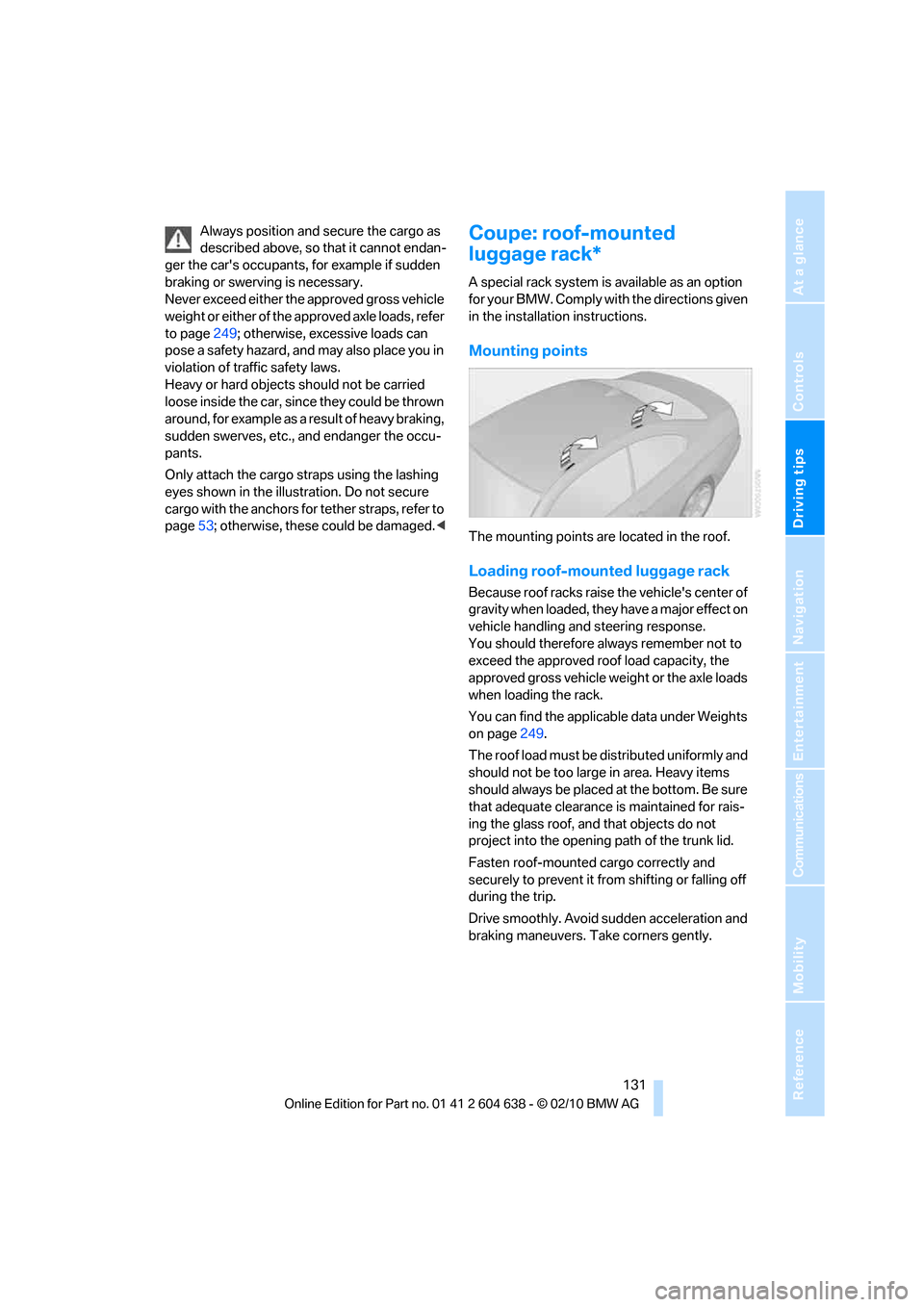
Mounting points
The mounting points are located in the roof.
Loading roof-mounted luggage rack
Because roof racks raise the vehicle's center of
gravity when loaded, they have a major effect on
vehicle handling and steering response.
You should therefore always remember not to
exceed the approved roof load capacity, the
approved gross vehicle weight or the axle loads
when loading the rack.
You can find the applicable data under Weights
on page249.
The roof load must be distributed uniformly and
should not be too large in area. Heavy items
should always be placed at the bottom. Be sure
that adequate clearance is maintained for rais-
ing the glass roof, and that objects do not
project into the opening path of the trunk lid.
Fasten roof-mounted cargo correctly and
securely to prevent it from shifting or falling off
during the trip.
Drive smoothly. Avoid sudden acceleration and
braking maneuvers. Take corners gently.
Page 237 of 278
Mobility
235Reference
At a glance
Controls
Driving tips
Communications
Navigation
Entertainment
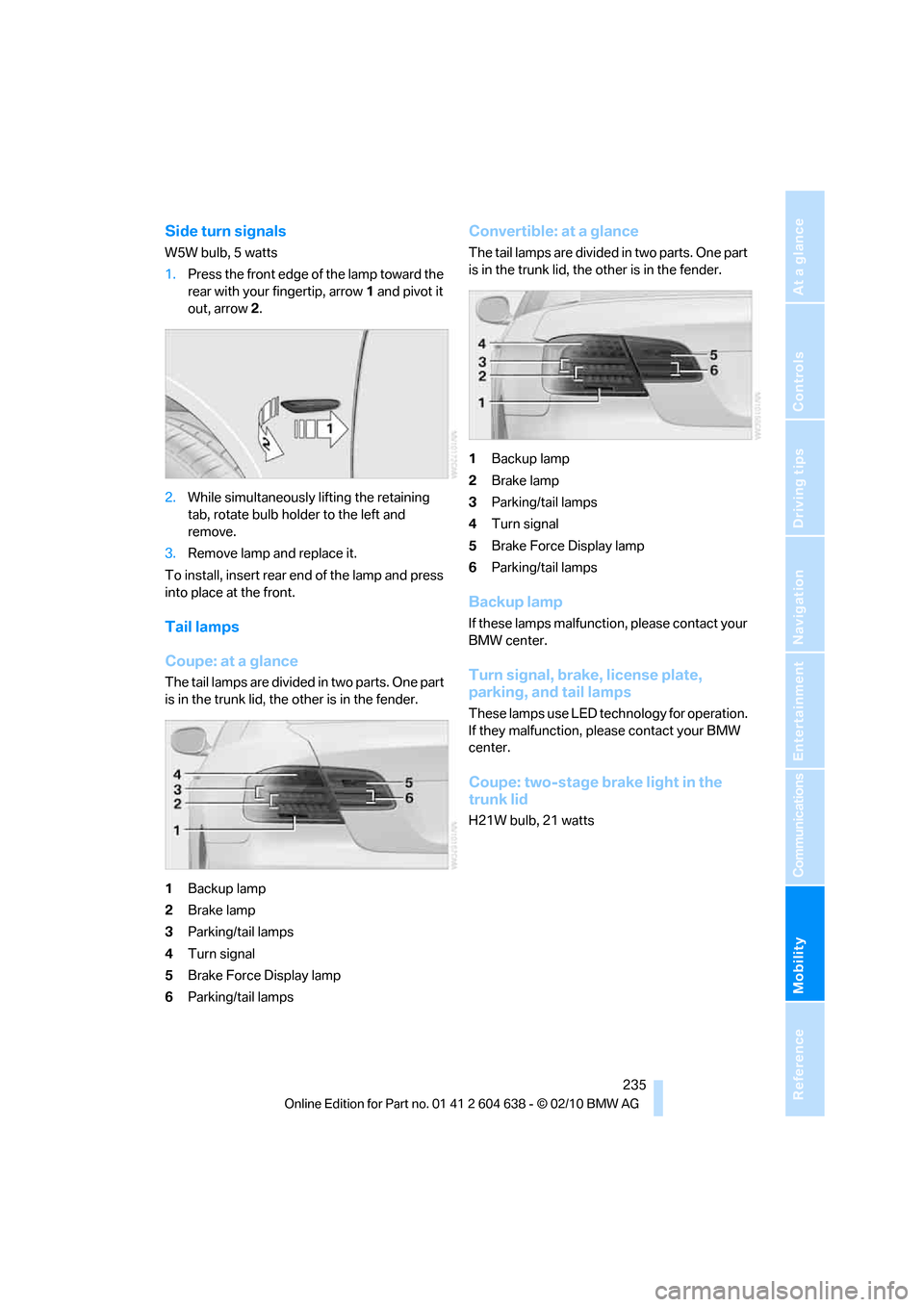
Side turn signals
W5W bulb, 5 watts
1.Press the front edge of the lamp toward the
rear with your fingertip, arrow1 and pivot it
out, arrow2.
2.While simultaneously lifting the retaining
tab, rotate bulb holder to the left and
remove.
3.Remove lamp and replace it.
To install, insert rear end of the lamp and press
into place at the front.
Tail lamps
Coupe: at a glance
The tail lamps are divided in two parts. One part
is in the trunk lid, the other is in the fender.
1Backup lamp
2Brake lamp
3Parking/tail lamps
4Turn signal
5Brake Force Display lamp
6Parking/tail lamps
Convertible: at a glance
The tail lamps are divided in two parts. One part
is in the trunk lid, the other is in the fender.
1Backup lamp
2Brake lamp
3Parking/tail lamps
4Turn signal
5Brake Force Display lamp
6Parking/tail lamps
Backup lamp
If these lamps malfunction, please contact your
BMW center.
Turn signal, brake, license plate,
parking, and tail lamps
These lamps use LED technology for operation.
If they malfunction, please contact your BMW
center.
Coupe: two-stage brake light in the
trunk lid
H21W bulb, 21 watts
Page 238 of 278
Replacing components
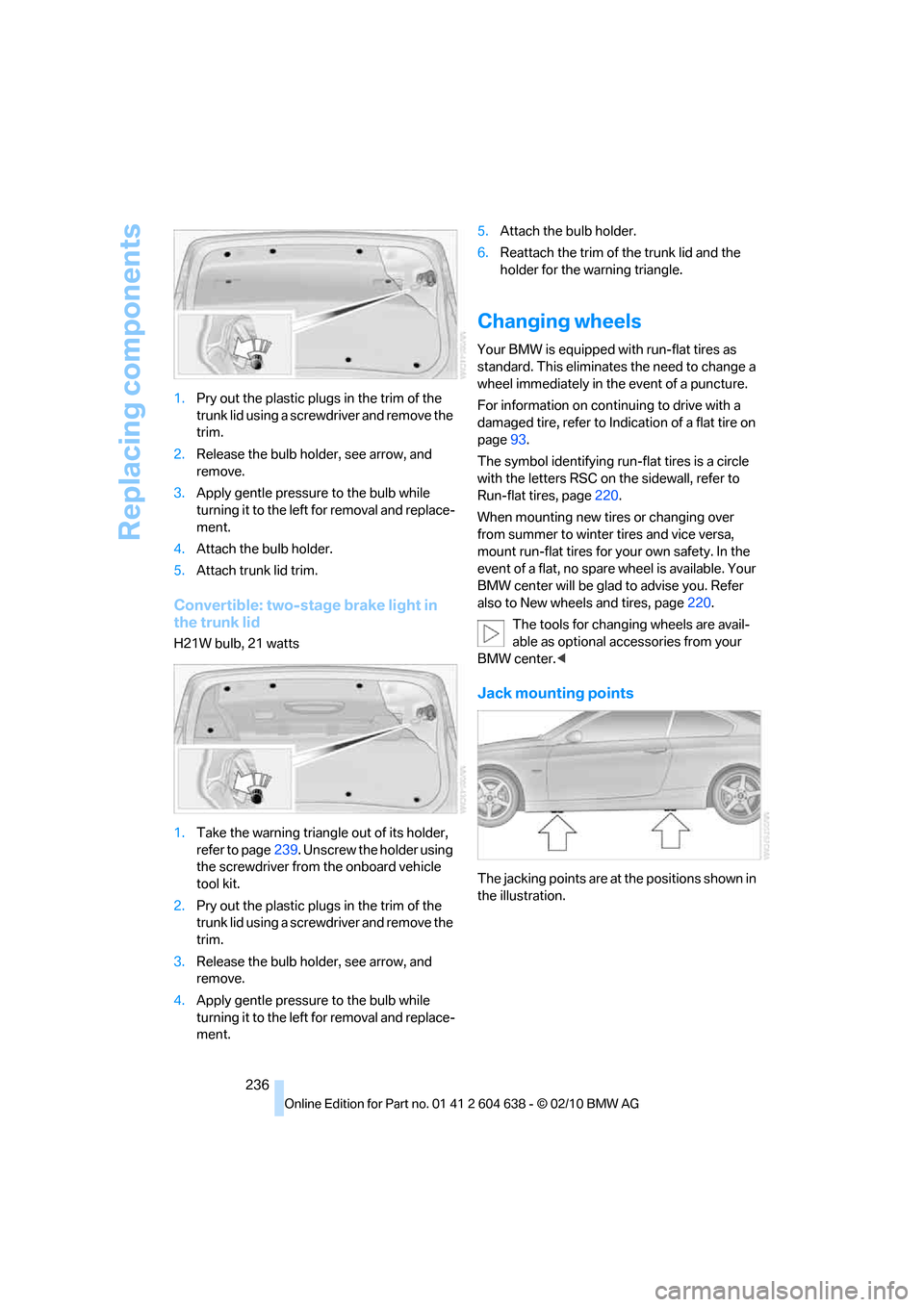
236 1.Pry out the plastic plugs in the trim of the
trunk lid using a screwdriver and remove the
trim.
2.Release the bulb holder, see arrow, and
remove.
3.Apply gentle pressure to the bulb while
turning it to the left for removal and replace-
ment.
4.Attach the bulb holder.
5.Attach trunk lid trim.
Convertible: two-stage brake light in
the trunk lid
H21W bulb, 21 watts
1.Take the warning triangle out of its holder,
refer to page239. Unscrew the holder using
the screwdriver from the onboard vehicle
tool kit.
2.Pry out the plastic plugs in the trim of the
trunk lid using a screwdriver and remove the
trim.
3.Release the bulb holder, see arrow, and
remove.
4.Apply gentle pressure to the bulb while
turning it to the left for removal and replace-
ment.5.Attach the bulb holder.
6.Reattach the trim of the trunk lid and the
holder for the warning triangle.
Changing wheels
Your BMW is equipped with run-flat tires as
standard. This eliminates the need to change a
wheel immediately in the event of a puncture.
For information on continuing to drive with a
damaged tire, refer to Indication of a flat tire on
page93.
The symbol identifying run-flat tires is a circle
with the letters RSC on the sidewall, refer to
Run-flat tires, page220.
When mounting new tires or changing over
from summer to winter tires and vice versa,
mount run-flat tires for your own safety. In the
event of a flat, no spare wheel is available. Your
BMW center will be glad to advise you. Refer
also to New wheels and tires, page220.
The tools for changing wheels are avail-
able as optional accessories from your
BMW center.<
Jack mounting points
The jacking points are at the positions shown in
the illustration.
Page 241 of 278
Mobility
239Reference
At a glance
Controls
Driving tips
Communications
Navigation
Entertainment
First aid pouch*
Some of the articles contained in the first aid
pouch have a limited service life. Therefore,
check the expiration dates of the contents reg-
ularly and replace any items in good time, if nec-
essary.
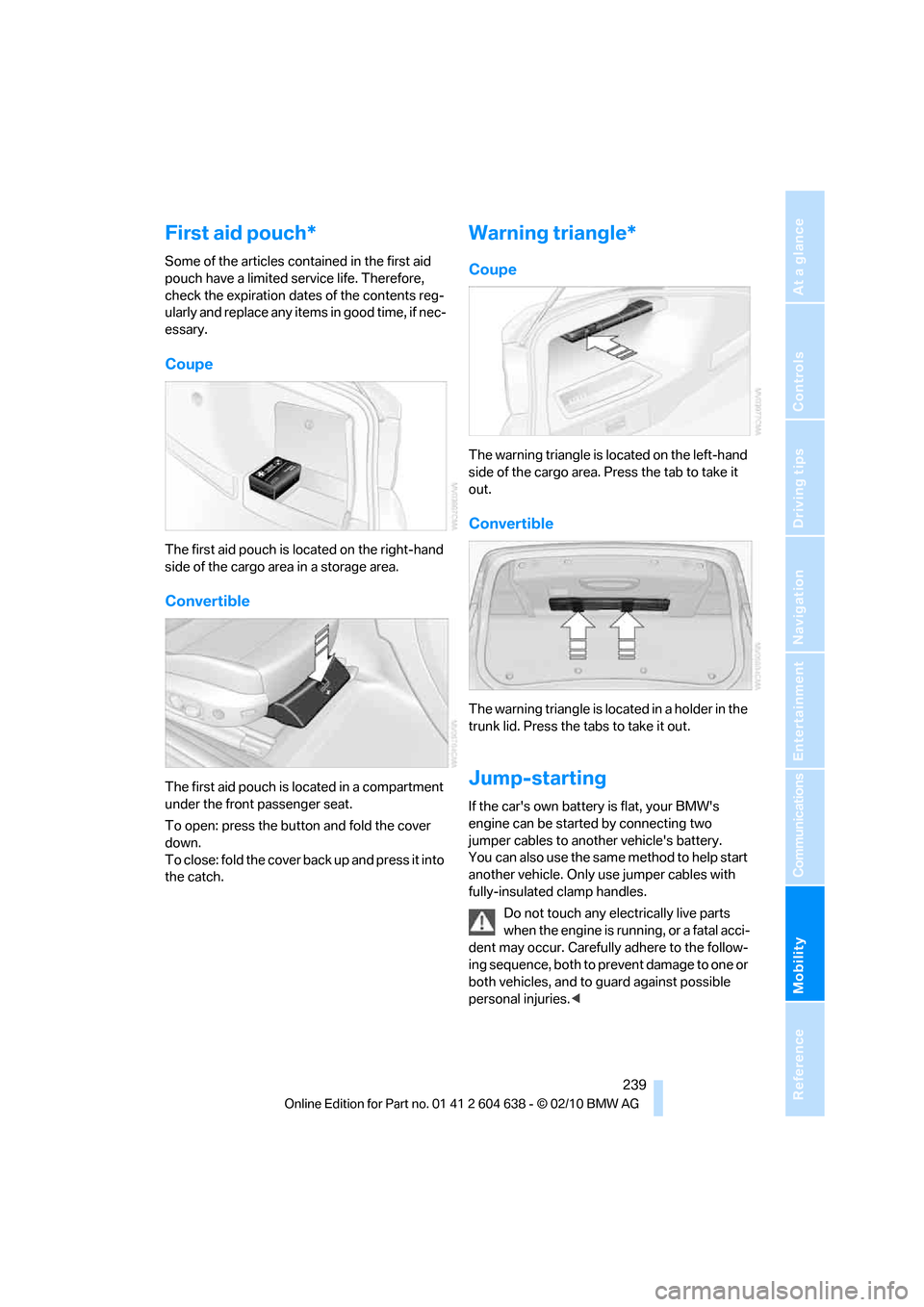
Coupe
The first aid pouch is located on the right-hand
side of the cargo area in a storage area.
Convertible
The first aid pouch is located in a compartment
under the front passenger seat.
To open: press the button and fold the cover
down.
To close: fold the cover back up and press it into
the catch.
Warning triangle*
Coupe
The warning triangle is located on the left-hand
side of the cargo area. Press the tab to take it
out.
Convertible
The warning triangle is located in a holder in the
trunk lid. Press the tabs to take it out.
Jump-starting
If the car's own battery is flat, your BMW's
engine can be started by connecting two
jumper cables to another vehicle's battery.
You can also use the same method to help start
another vehicle. Only use jumper cables with
fully-insulated clamp handles.
Do not touch any electrically live parts
when the engine is running, or a fatal acci-
dent may occur. Carefully adhere to the follow-
ing sequence, both to prevent damage to one or
both vehicles, and to guard against possible
personal injuries.<
Page 264 of 278
Everything from A to Z
262 Directory for navigation, refer
to Address book137
Displacement, refer to Engine
data246
Display, refer to iDrive
controls16
Display lighting, refer to
Instrument lighting105
Displays
– on the Control Display16
Displays, refer to Instrument
cluster12
Displays and controls10
Disposal
– coolant226
– remote control battery35
– vehicle battery237
Distance remaining to service,
refer to Service
requirements80
Distance warning, refer to
Park Distance Control
PDC88
Door key, refer to Remote
control with integrated
key26
Door lock29
Doors, emergency
operation30
DOT Quality Grades218
Draft-free ventilation109
Drinks holders, refer to
Cupholders116
Drive mode61
Drive-off assistance, refer to
Dynamic Stability Control
DSC89
Drive-off assistant92
Driving dynamics control62
Driving lamps, refer to Parking
lamps/low beams101
Driving notes126
Driving off on hills, refer to
Drive-off assistant92
Driving stability control
systems89
Driving through water128
Driving tips, refer to Driving
notes126Dry air, refer to Cooling
function108
DSC Dynamic Stability
Control89
DTC Dynamic Traction
Control90
– indicator/warning lamp90
DVD
– country codes167
– settings168
– video playback167
DVD menu168
DVD player, refer to CD
player165
DVD video167
Dynamic Brake Control
DBC89
Dynamic destination
guidance145
Dynamic Stability Control
DSC89
– indicator/warning lamp90
Dynamic Traction Control
DTC
– indicator/warning lamp90
E
EBV Electronic brake-force
distribution89
Eject button, refer to Buttons
on the CD/DVD player154
Electrical defect
– 7-gear Sports automatic
transmission with double
clutch63
Electrical malfunction
– door lock30
– driver's door30
– fuel filler flap206
– glass roof38
Electric seat adjustment44
Electric steering wheel lock
– with Comfort Access34
Electronic brake-force
distribution EBV89
Electronic oil level check223Electronic Stability Program
ESP, refer to Dynamic
Stability Control DSC89
Emergency actuation,
automatic transmission,
refer to Overriding selector
lever lock59
Emergency operation
– fuel filler flap, manual
release206
Emergency operation, refer to
Closing manually
– glass roof38
Emergency operation, refer to
Manual operation
– door lock30
Emergency release
– trunk lid from inside32
Emergency Request238
Emergency services, refer to
Roadside Assistance238
Energy, saving
– saving fuel126
Engine
– breaking in126
– data246
– overheated, refer to Coolant
temperature76
– speed246
– starting56
– starting, Comfort Access33
– switching off56
Engine compartment223
Engine coolant, refer to
Coolant226
Engine oil
– adding225
– alternative oil types225
– BMW Maintenance
System227
– capacity250
– checking level223
– intervals between changes,
refer to Service
requirements80
Engine output, refer to Engine
data246
Page 270 of 278
Everything from A to Z
268 Rear seats
– adjusting head restraints46
– folding down backrests118
Rear ventilation109
Rearview mirror, refer to
Mirrors50
Rear window defroster108
Rear window roller blind, refer
to Roller sun blinds114
Receiving level of mobile
phone, refer to Status
information19
Reception
– quality158
– radio station158
Recirculated-air mode108
Recirculation of air, refer to
Recirculated-air mode108
Reclining seat, refer to
Backrest43
Refueling206
Releasing
– hood222
Remaining distance, refer to
Cruising range77
Remote control26
– battery renewal35
– Comfort Access33
– garage door opener111
– malfunction29,35
– removing from the ignition
lock55
– service data227
– trunk lid28
Replacement fuses, refer to
Fuses237
Replacement remote
control26
Replacing bulbs, refer to
Lamps and bulbs233
Replacing tires220
Replacing tires, refer to New
wheels and tires220
Reporting safety defects7
Reserve warning, refer to Fuel
gauge76Reset, refer to Resetting tone
settings156
Restraint systems
– for children52
– refer to Safety belts49
Retractable hardtop38
– care, refer to Caring for your
vehicle brochure
– convenient operation28
– opening and closing39
– remote control28
Reverse
– CD changer167
– CD player
167
Reverse gear61
– automatic transmission with
Steptronic58
– manual transmission58
Road map146
Roadside
Assistance199,238
Roadside parking lamps103
– replacing bulbs234
Roadworthiness test, refer to
Service requirements80
Roller sun blinds114
Rollover protection system,
Convertible100
– resetting100
Roof load capacity249
Roof-mounted luggage
rack131
Rope, refer to Tow-starting,
towing away242
Rotary/pushbutton, refer to
iDrive16
Route144,145
– bypassing sections145
– changing144,145
– changing criteria144
– displaying streets or towns/
cities145
– map view146
– selecting144
Route instructions, refer to
Destination guidance
through voice
instructions146Route map, refer to Map
view146
Route section, changing145
Route selection144
RSC Runflat System
Component, refer to Run-
flat tires220
Runflat System Component
RSC, refer to Run-flat
tires220
Run-flat tires220
– continuing driving with a
damaged tire93
– flat tire93
– Flat Tire Monitor93
– Inflation pressure208
– new tires220
– tire replacement220
– winter tires221
Runflat tyres, refer to Run-flat
tires220
S
Safety-belt height
adjustment49
Safety belts49
– belt hand-over49
– damage49
– indicator/warning lamp49
– reminder49
– sitting safely42
Safety systems
– airbags98
– Antilock Brake System
ABS89
– brake system89
– driving stability control89
– Dynamic Stability Control
DSC89
– rollover protection system,
Convertible100
– safety belts49
Safety tires, refer to Run-flat
tires220
Page 272 of 278
Everything from A to Z
270 Speed limit86
Speed limit warning, refer to
Speed limit86
Speedometer12
Speed reading, refer to
Speedometer12
Speed Volume155
Split screen, refer to Control
Display, switching on/off19
Split screen content, refer to
Display for split screen
content, selecting20
Sport program with 7-gear
Sports automatic
transmission with double
clutch61
Sports automatic
transmission with double
clutch60
– driving dynamics control62
– Kick-down61
– Launch Control64
– manually unlocking parking
lock63
– neutral61
– reverse gear61
Spray nozzles, refer to
Cleaning windshield and
headlamps66
Stability control, refer to
Driving stability control
systems89
Start/stop button55
– starting the engine56
– switching off the engine56
Starting, refer to Starting the
engine56
Starting assistance, refer to
Jump-starting239
Starting difficulties
– jump-starting239
Starting the engine
– start/stop button55
Start menu17State/province, for
navigation135
Station, selecting
– radio157
Status of this Owner's Manual
at time of printing5
Steam jet229,230
Steering wheel51
– adjustment51
– buttons on steering
wheel11
– heating51
– lock55
– locking with Comfort
Access34
– shift paddles62
Steering wheel buttons, refer
to Shift paddles62
Steering with variable ratio,
refer to Active steering
96
Steptronic, refer to Automatic
transmission with
Steptronic58
Storage232
Storage compartments116
Storage nets120
Stored trip, calling up143
Storing a destination in the
address book137
Storing music172
Storing seat positions, refer to
Seat and mirror memory48
Storing tires221
Stowage, refer to Storage
compartments116
Street, entering,
navigation136
Summer tires, refer to Wheels
and tires208
Surround155
SVCD167
SW, waveband157
Switches, refer to Cockpit10
Switching off
– engine56Switching off the engine
– start/stop button55
Switching on
– audio154
– CD changer154
– CD player154
– radio154
Switching the cooling function
on and off108
Switch-on times of parked car
ventilation, preselecting110
Symbols4
– status information19
T
Tachometer75
Tailgate, refer to Trunk lid31
Tail lamp
– replacing bulb235
Tail lamp, refer to Tail
lamps235
Tail lamps235
– replacing bulb235,236
Tank contents, refer to
Capacities250
Technical data246
– dimensions247
Technical modifications, refer
to For your own safety5
Telephone184
– installation location, refer to
Center armrest115
– refer to separate Owner's
Manual
– voice commands192
TeleService199
TeleService Diagnosis200
TeleService Help200
Temperature
– automatic climate
control107
– changing unit of measure80
– coolant, refer to Coolant
temperature76