radio controls BMW M3 COUPE 2012 User Guide
[x] Cancel search | Manufacturer: BMW, Model Year: 2012, Model line: M3 COUPE, Model: BMW M3 COUPE 2012Pages: 314, PDF Size: 7.72 MB
Page 109 of 314
108
ControlsTechnology for driving comfort and safety
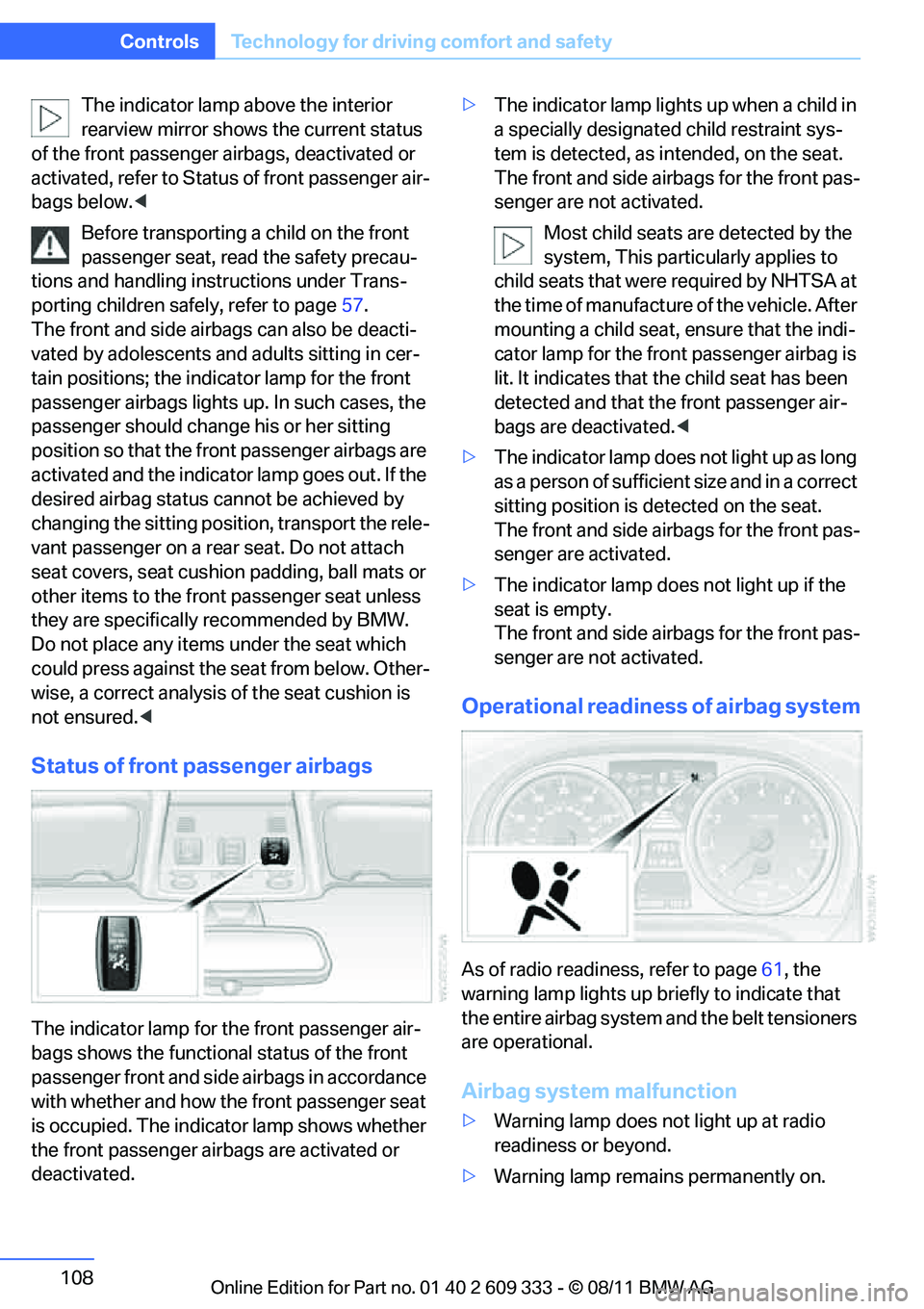
The indicator lamp above the interior
rearview mirror shows the current status
of the front passenger airbags, deactivated or
activated, refer to Status of front passenger air-
bags below. <
Before transporting a child on the front
passenger seat, read the safety precau-
tions and handling inst ructions under Trans-
porting children safely, refer to page 57.
The front and side airbags can also be deacti-
vated by adolescents and adults sitting in cer-
tain positions; the indi cator lamp for the front
passenger airbags lights up. In such cases, the
passenger should change his or her sitting
position so that the fr ont passenger airbags are
activated and the indicator lamp goes out. If the
desired airbag status cannot be achieved by
changing the sitting position, transport the rele-
vant passenger on a rear seat. Do not attach
seat covers, seat cushion padding, ball mats or
other items to the front passenger seat unless
they are specifically recommended by BMW.
Do not place any items under the seat which
could press against the seat from below. Other-
wise, a correct analysis of the seat cushion is
not ensured. <
Status of front passenger airbags
The indicator lamp for the front passenger air-
bags shows the functional status of the front
passenger front and side airbags in accordance
with whether and how the front passenger seat
is occupied. The indicator lamp shows whether
the front passenger airbags are activated or
deactivated. >
The indicator lamp light s up when a child in
a specially designated child restraint sys-
tem is detected, as in tended, on the seat.
The front and side airbags for the front pas-
senger are not activated.
Most child seats are detected by the
system, This partic ularly applies to
child seats that were required by NHTSA at
the time of manufacture of the vehicle. After
mounting a child seat, ensure that the indi-
cator lamp for the fron t passenger airbag is
lit. It indicates that th e child seat has been
detected and that the front passenger air-
bags are deactivated. <
> The indicator lamp does not light up as long
as a person of sufficient size and in a correct
sitting position is detected on the seat.
The front and side airbags for the front pas-
senger are activated.
> The indicator lamp does not light up if the
seat is empty.
The front and side airbags for the front pas-
senger are not activated.
Operational readine ss of airbag system
As of radio readiness, refer to page 61, the
warning lamp lights up br iefly to indicate that
the entire airbag system and the belt tensioners
are operational.
Airbag system malfunction
> Warning lamp does not light up at radio
readiness or beyond.
> Warning lamp remains permanently on.
Online Edition for Part no. 01 40 2 609 333 - \251 08/11 BMW AG
Page 116 of 314
115
Lamps
Controls
To reduce the drain
on the battery, a few
minutes after the radio readiness is
switched off, refer to Start/Stop button on
page 61, all lights in the vehicle's passenger
compartment are switched off. <
Switching interior lamps on/off
manually
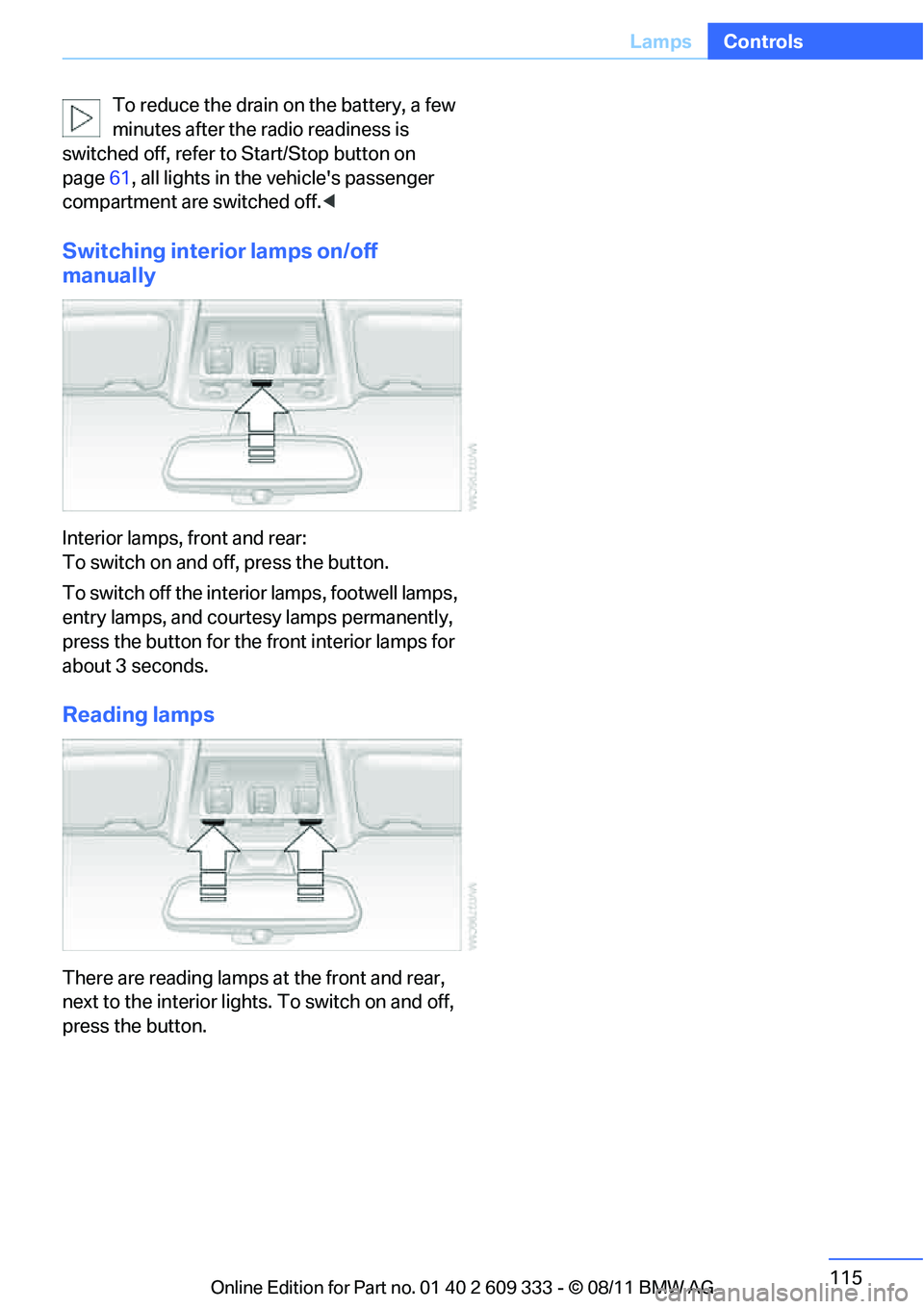
Interior lamps, front and rear:
To switch on and off, press the button.
To switch off the interior lamps, footwell lamps,
entry lamps, and courtesy lamps permanently,
press the button for the front interior lamps for
about 3 seconds.
Reading lamps
There are reading lamps at the front and rear,
next to the interior lights. To switch on and off,
press the button.
Online Edition for Part no. 01 40 2 609 333 - \251 08/11 BMW AG
Page 121 of 314
120
ControlsClimate
Draft-free ventilation
Set the vent outlets so that the air flows past
you and not straight at you.
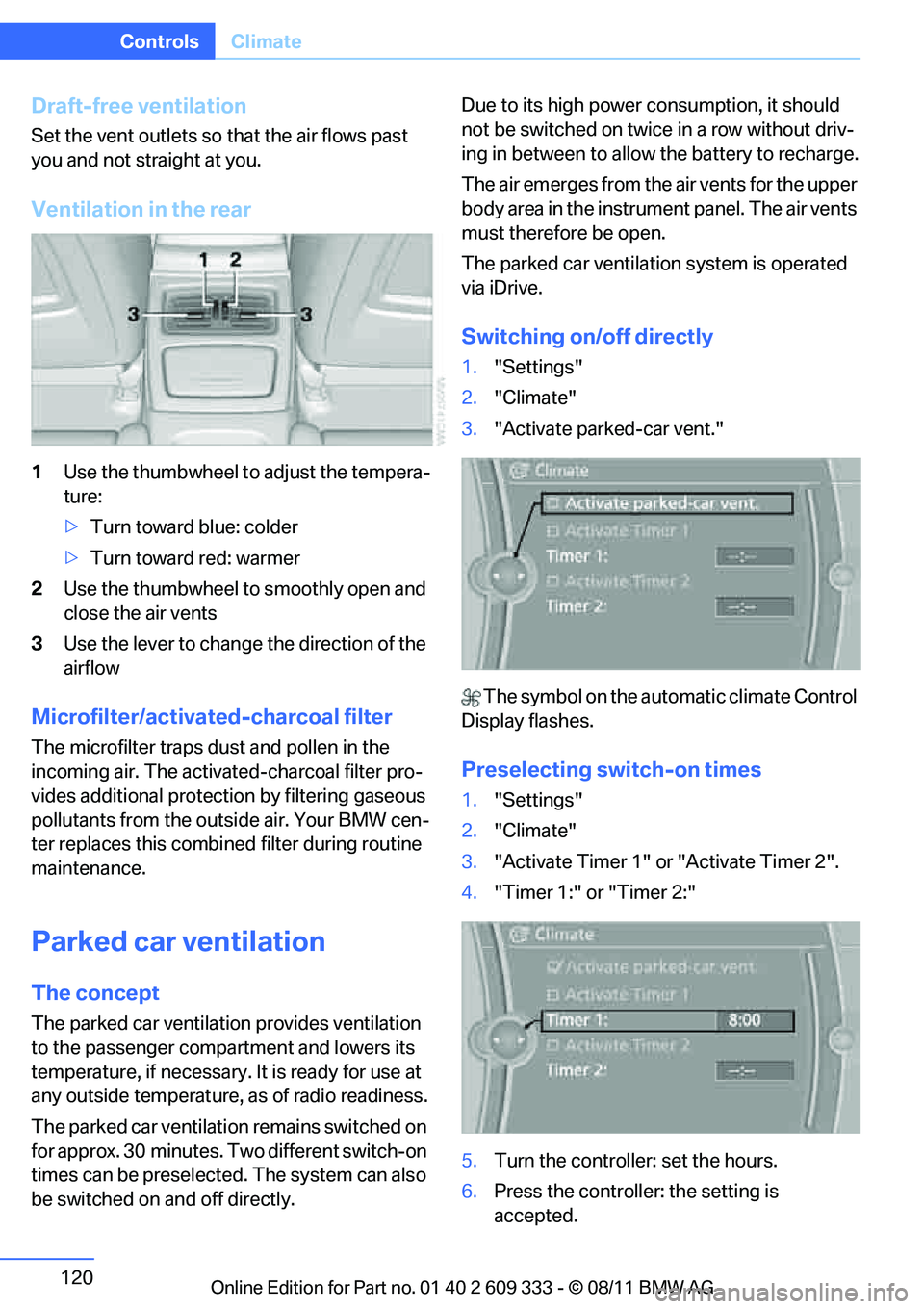
Ventilation in the rear
1Use the thumbwheel to adjust the tempera-
ture:
> Turn toward blue: colder
> Turn toward red: warmer
2 Use the thumbwheel to smoothly open and
close the air vents
3 Use the lever to change the direction of the
airflow
Microfilter/activate d-charcoal filter
The microfilter traps dust and pollen in the
incoming air. The activated-charcoal filter pro-
vides additional protecti on by filtering gaseous
pollutants from the outside air. Your BMW cen-
ter replaces this combined filter during routine
maintenance.
Parked car ventilation
The concept
The parked car ventilation provides ventilation
to the passenger compartment and lowers its
temperature, if necessary. It is ready for use at
any outside temperature, as of radio readiness.
The parked car ventilation remains switched on
for approx. 30 minutes. Two different switch-on
times can be preselected. The system can also
be switched on and off directly. Due to its high power consumption, it should
not be switched on twice in a row without driv-
ing in between to allow
the battery to recharge.
The air emerges from the air vents for the upper
body area in the instrument panel. The air vents
must therefore be open.
The parked car ventilation system is operated
via iDrive.
Switching on/off directly
1. "Settings"
2. "Climate"
3. "Activate parked-car vent."
The symbol on the automatic climate Control
Display flashes.
Preselecting switch-on times
1. "Settings"
2. "Climate"
3. "Activate Timer 1" or "Activate Timer 2".
4. "Timer 1:" or "Timer 2:"
5. Turn the controller: set the hours.
6. Press the controller: the setting is
accepted.
Online Edition for Part no. 01 40 2 609 333 - \251 08/11 BMW AG
Page 125 of 314
124
ControlsPractical interior accessories
by means of the hand-held transmitter was
interrupted, hold down the button on the
inside mirror and then press and release the
button on the hand-hel d transmitter several
times, holding it down for 2 seconds each
time.
Operation
To prevent possible damage or injury,
before programming or using the inte-
grated universal remote control to operate a
device, always inspect the immediate area to
make certain that no people, animals or objects
are within the pivoting or travel range of the
device being operated.
Also follow the safety in structions supplied with
the hand-held transmitter. <
The button on the inside mirror can be used to
operate the device, for example the garage
door, if the engine is running or the ignition is
switched on. To do so, within the reception
range of the device, press the button of the
device until the function is triggered. The LED
on the inside mirror remains lit during transmis-
sion of the radio signal.
Deleting stored functions
Simultaneously hold down the right and left
buttons on the inside mi rror for approx. 20 sec-
onds until the LED on the inside mirror flashes
rapidly. All stored functions are deleted. The
functions cannot be deleted individually.
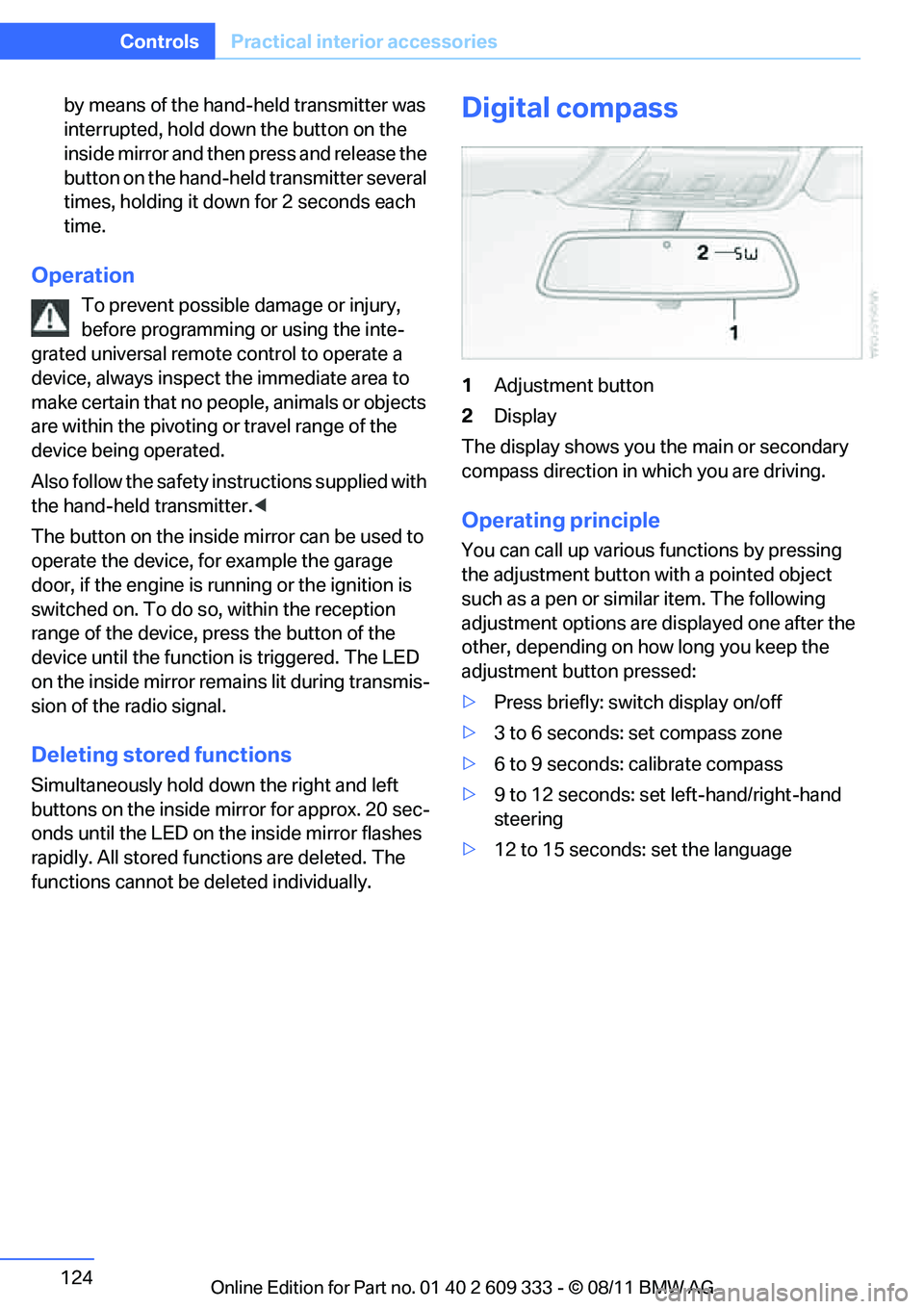
Digital compass
1 Adjustment button
2 Display
The display shows you the main or secondary
compass direction in which you are driving.
Operating principle
You can call up various functions by pressing
the adjustment button with a pointed object
such as a pen or similar item. The following
adjustment options are displayed one after the
other, depending on how long you keep the
adjustment button pressed:
> Press briefly: switch display on/off
> 3 to 6 seconds: set compass zone
> 6 to 9 seconds: calibrate compass
> 9 to 12 seconds: set left-hand/right-hand
steering
> 12 to 15 seconds: set the language
Online Edition for Part no. 01 40 2 609 333 - \251 08/11 BMW AG
Page 171 of 314
170
EntertainmentOn/off and tone
On/off and tone
Vehicle equipment
In this chapter, all pr oduction, country, and
optional equipment that is offered in the model
range is described. Equipment is also described
that is not available because of, for example,
selected options or country version. This also
applies to safety related functions and systems.
General information
The following audio and video sources share
the same control elements and adjustments:
> Radio
> CD/DVD player
> CD changer
> Video
> External devices, e.g. MP3 player
Controls
The audio and video sources can be controlled
using the:
>Buttons near th e CD/DVD player
> iDrive
> Buttons on the steering wheel, refer to
page 11
> Programmable memory keys, refer to
page 23
> Voice activation system
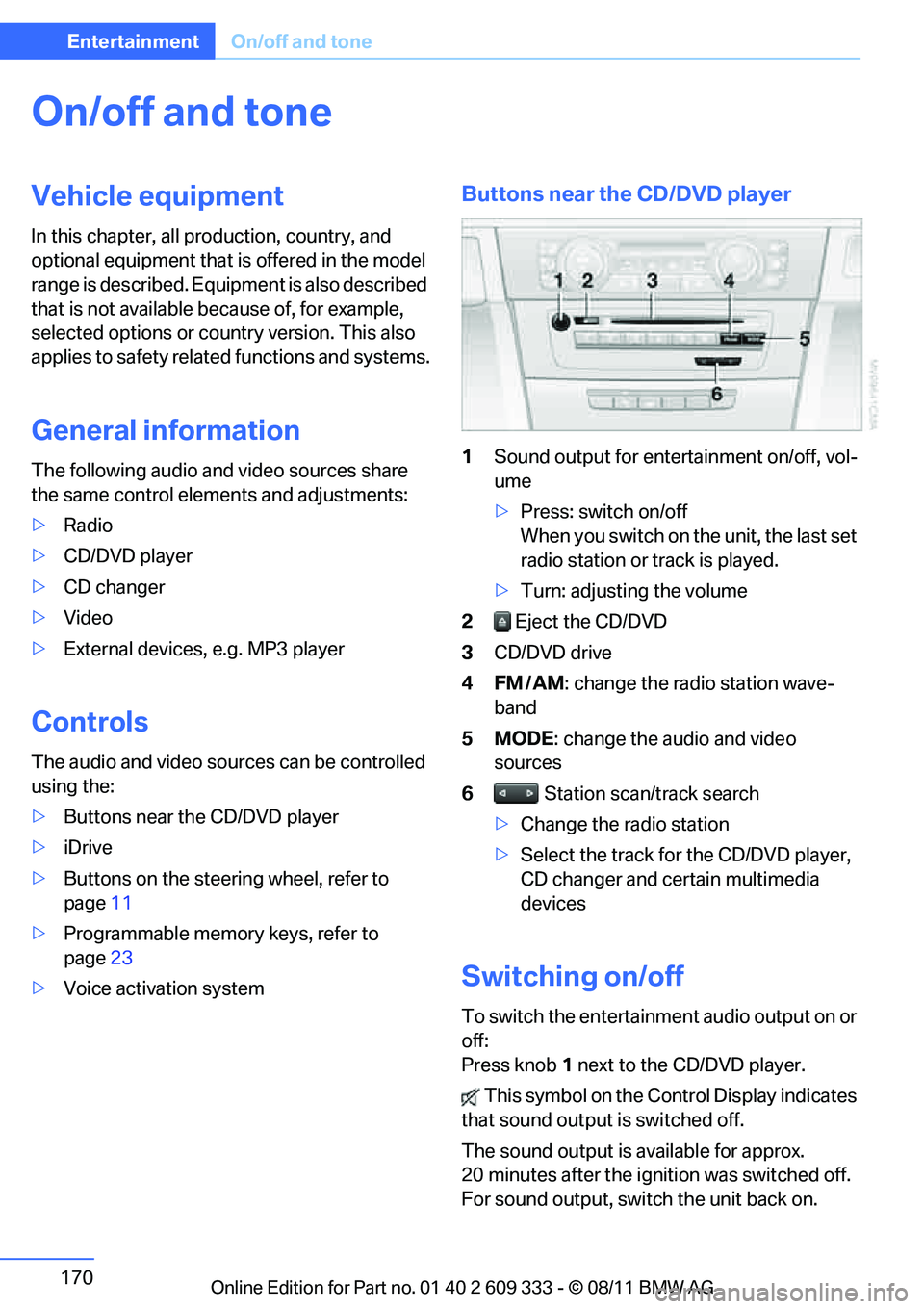
Buttons near the CD/DVD player
1Sound output for entertainment on/off, vol-
ume
>Press: switch on/off
When you switch on the unit, the last set
radio station or track is played.
> Turn: adjusting the volume
2 Eject the CD/DVD
3 CD/DVD drive
4FM/AM : change the radio station wave-
band
5MODE : change the audio and video
sources
6 Station scan/track search
> Change the radio station
> Select the track for the CD/DVD player,
CD changer and certain multimedia
devices
Switching on/off
To switch the entertainment audio output on or
off:
Press knob 1 next to the CD/DVD player.
This symbol on the Co ntrol Display indicates
that sound output is switched off.
The sound output is available for approx.
20 minutes after the ignition was switched off.
For sound output, switch the unit back on.
Online Edition for Part no. 01 40 2 609 333 - \251 08/11 BMW AG
Page 172 of 314
171
On/off and tone
Entertainment
Adjusting volume
Turn knob
1 next to the CD/DVD player until the
desired volume is obtained.
You can also adjust the volume with buttons on
the steering wheel, refer to page 11.
Setting tone controls
You can alter various tone settings, e.g. treble
and bass or the speed-dependent volume
increase.
The tone settings are set for all audio sources at
once.
The settings are stored for the remote control
currently in use.
Treble, bass, balance, fader
> "Treble": treble adjustment.
> "Bass": bass adjustment.
> "Balance": left/right volume distribution
> "Fader": front/rear volume distribution
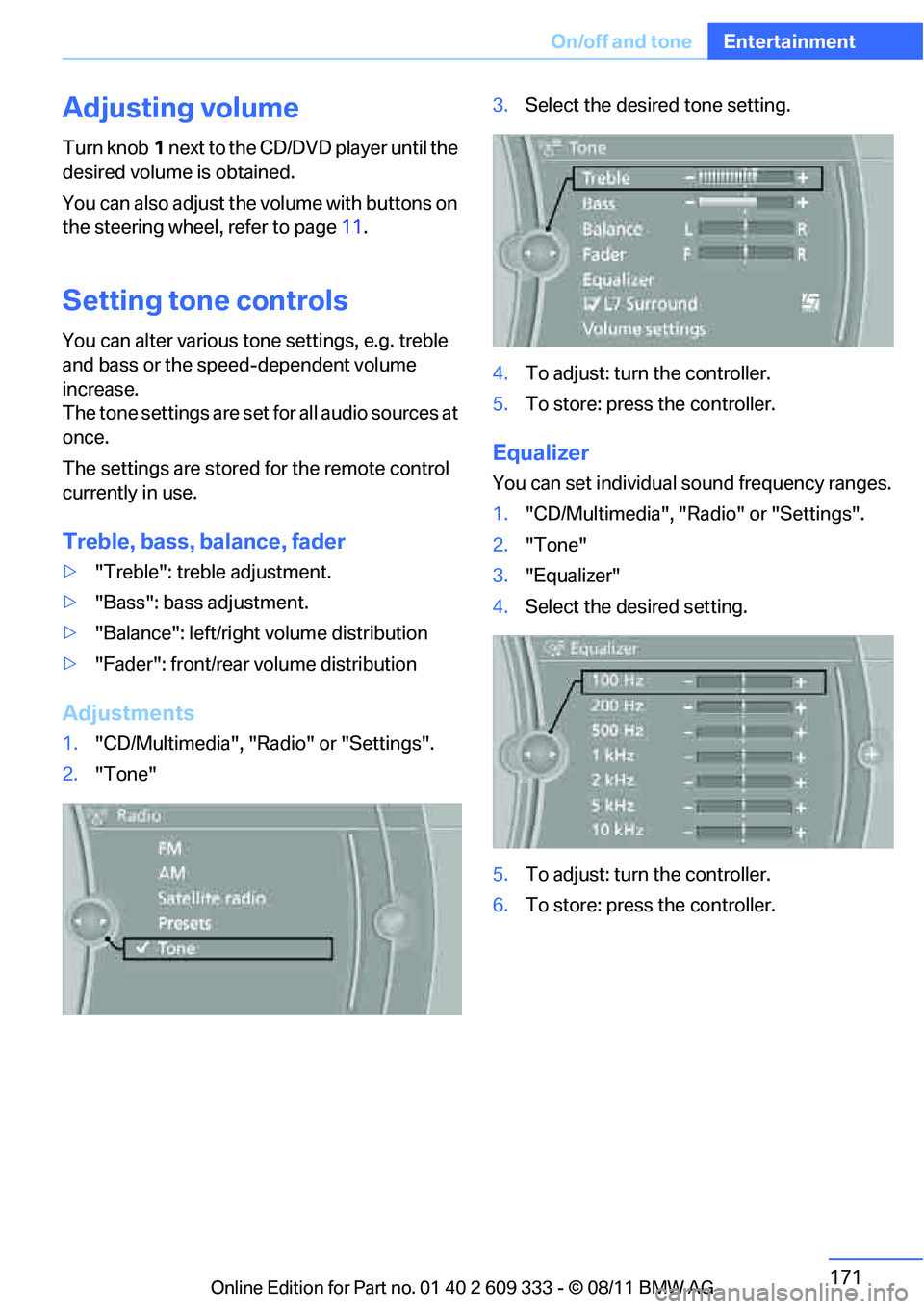
Adjustments
1."CD/Multimedia", "Radio" or "Settings".
2. "Tone" 3.
Select the desired tone setting.
4. To adjust: turn the controller.
5. To store: press the controller.
Equalizer
You can set individual sound frequency ranges.
1."CD/Multimedia", "Radio" or "Settings".
2. "Tone"
3. "Equalizer"
4. Select the desired setting.
5. To adjust: turn the controller.
6. To store: press the controller.
Online Edition for Part no. 01 40 2 609 333 - \251 08/11 BMW AG
Page 305 of 314
304
ReferenceEverything from A to Z
Grills116
Gross vehicle weight, refer to
Weights 287
H
Handbrake, refer to Parking
brake 63
Hands-free system 14,213
Hazard warning flashers 14
HDC Hill Descent Control 99
Head airbags 107
Headlamp control, automatic 110
Headlamp flasher 71
– indicator lamp 11,13
Head Light, refer to Adaptive Light Control 112
Head restraints 50
– rear, removing 51
– sitting safely 47
Heated
– mirrors 55
– rear window 119
– seats 53
– steering wheel 56
Heating
– mirrors 55
– rear window 119
– seats 53
– steering wheel 56
Heating and ventilation, refer to Climate 116
Heavy loads, refer to Stowing
cargo 142
Height, refer to Dimensions 285
Height adjustment
– seats 48
– steering wheel 56
High-beam Assistant 113
High beams 112
– headlamp flasher 112
– indicator lamp 13
High beams and low beams, automatic, refer to High-
beam Assistant 113High-pressure
washer 266,267
High water, refer to Driving through water 140
Highways, refer to Route
criteria 159
Hill Descent Control HDC 99
Hills 141
Holders for cups 128
Homepage BMW 4
Hood 260
Hooks for shopping bags 131
Horn 10,11
Hotel function, refer to
Lo
cking or unlocking
separately 36
Hot exhaust system 140
Hydraulic brake assist, refer to Dynamic Brake Control 97
Hydroplaning 140
I
Ice warning, refer to Outside
temperature warning 82
Identification marks
– Run-flat tires 258
– tire coding 255
iDrive 18
– adjusting brightness 94
– changing date and time 90
– changing language 94
– changing settings 94
– changing units of measure
and display format 87
– controls 18
– menu guidance 19
– operating principle 18
– overview 18
– start menu 19
– status information 21
iDrive operating principle 18
Ignition 62
– switched off 62
– switched on 62 Ignition key, refer to Remote
control with integrated
key 30
Ignition key position 1, refer to Radio readiness 61
Ignition key position 2, refer to Ignition on 62
Ignition lock 61
Imprint 2
Incoming call 209
Indicator and warning
lamps 13
– Tire Pressure Monitor TPM 103
Inflation pressure, refer to Tire inflation pressure 239
Inflation pressure monitoring, refer to Tire Pressure
Monitor TPM 102
Initializing
– after power failure 274
– compass, refer to
Calibrating 125
– Flat Tire Monitor FTM 100
– glass roof 42
– refer to Setting the time and
date 90
Installation location
– telephone 126
Instructions for navigation system, refer to Voice
instructions 161
Instrument cluster 12
Instrument cluster, refer to
Cockpit 10
Instrument combination, refer to Instrument cluster 12
Instrument lighting 114
Integrated key 30
Integr
ated universal remote
control 122
Interactive map 155
Interior lamps 114
– remote control 33
Interior motion sensor 38
Online Edition for Part no. 01 40 2 609 333 - \251 08/11 BMW AG