mirror BMW M3 COUPE 2013 E92 User Guide
[x] Cancel search | Manufacturer: BMW, Model Year: 2013, Model line: M3 COUPE, Model: BMW M3 COUPE 2013 E92Pages: 311, PDF Size: 6.89 MB
Page 125 of 311
120
ControlsPractical interior accessories
Practical interior accessories
Vehicle equipment
In this chapter, all pr oduction, country, and
optional equipment that is offered in the model
range is described. For this reason, descrip-
tions will be given of some equipment that may
not be available in a vehi cle, for example due to
the special options or national-market version
selected. This also app lies to safety related
functions and systems.
Integrated universal remote
control
The concept
The Integrated universal remote control can be
used to operate up to 3 functions of remote-
controlled devices such as garage door open-
ers or lighting systems. The Integrated univer-
sal remote control thus replaces as many as
three different hand-held transmitters. To oper-
ate them, the buttons on the interior rearview
mirror must be programmed with the desired
functions. Programming requires the hand-held
transmitter for the respective device.
To prevent possible damage or injury,
before programming or using the inte-
grated universal remote control to operate a
device, always inspect the immediate area to
make certain that no people, animals or objects
are within the pivoting or travel range of the
device being operated.
Also follow the safety in structions supplied with
the hand-held transmitter. <
For security reasons, ma ke sure to delete the
stored functions before selling the vehicle, refer
to page 122.
Compatibility
If this symbol appears on the package
or in the instructions supplied with the
device to be operated, you can gener-
ally assume that the devi ce is compatible with
the Integrated univer sal remote control.
For additional questions, please consult:
> Your BMW center.
> www.homelink.com on the Internet.
HomeLink is a registered trademark of Johnson
Controls, Inc.
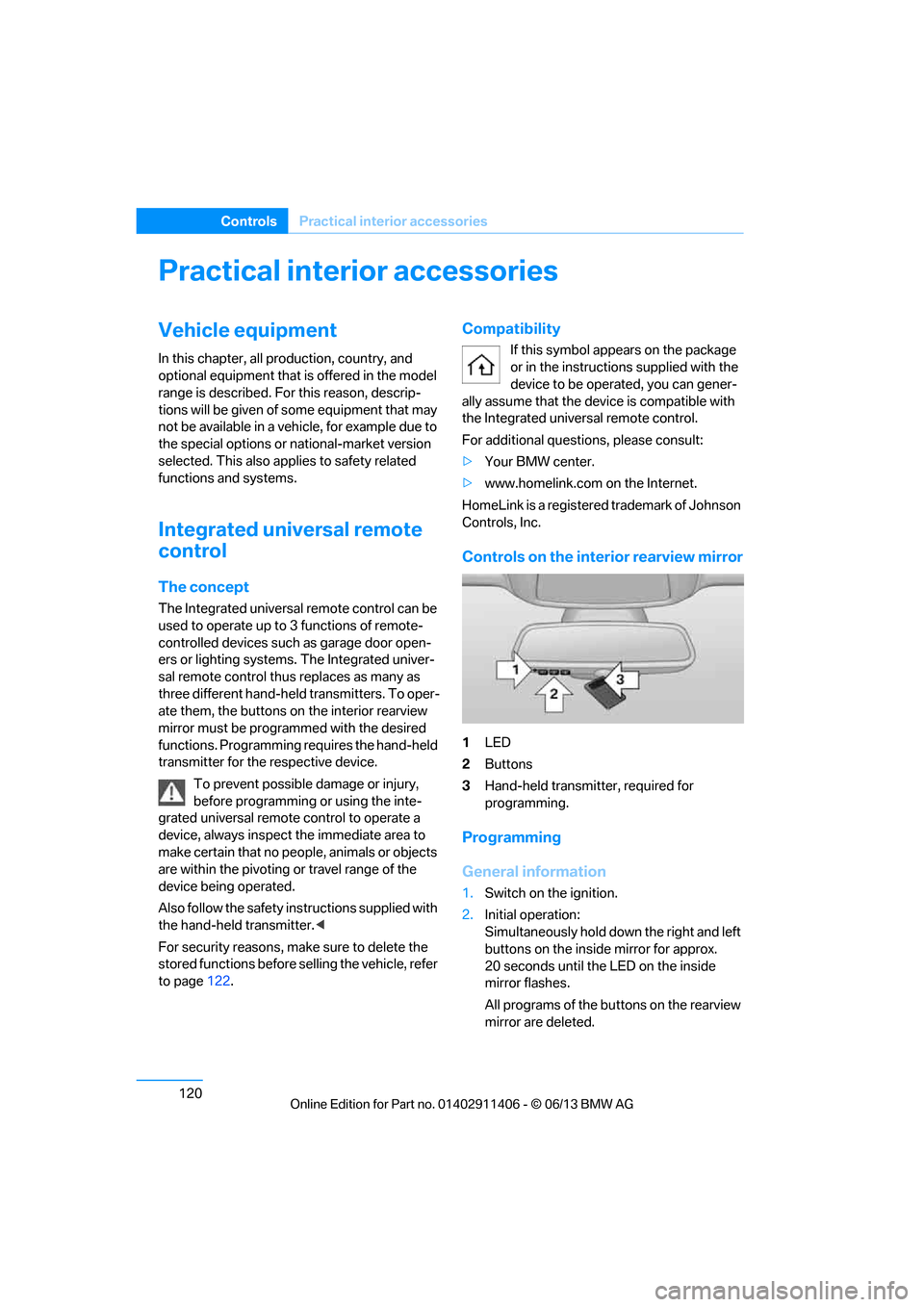
Controls on the interior rearview mirror
1 LED
2 Buttons
3 Hand-held transmitter, required for
programming.
Programming
General information
1.Switch on the ignition.
2. Initial operation:
Simultaneously hold down the right and left
buttons on the inside mirror for approx.
20 seconds until the LED on the inside
mirror flashes.
All programs of the bu ttons on the rearview
mirror are deleted.
00320051004F004C00510048000300280047004C0057004C005200510003
Page 126 of 311
121
Practical interior accessories
Controls
3.
Hold the hand-held transmitter of the
device to be controlled approx. 1 in/2.5 cm
to 3 in/8 cm away from the buttons on the
inside mirror.
The required distance depends on the
hand-held transmitter.
4. Simultaneously press and hold the button
of the desired function on the hand-held
transmitter and the button to be pro-
grammed on the inside mirror.
The LED on the inside mirror will flash
slowly at first.
5. As soon as the LED flashes rapidly, release
both buttons. The rapid flashing indicates
that the button on the inside mirror has
been programmed.
If the LED does not flash rapidly within
60 seconds, change the distance between
the inside mirror and the hand-held trans-
mitter and repeat this step. This may
require several attemp ts. Allow at least
15 seconds between attempts.
6. To program additional functions on the
other buttons of the inside mirror, repeat
steps 3 through 5.
The buttons on the inside mirror can be used to
operate the devices if the ignition is switched
on.
Special procedure with alternating-
code systems
If the device fails to func tion even after repeated
programming, check whether the device to be
controlled uses an alte rnating-code system.
To do so, either read the instructions for the
device or hold down the programmed button on
the inside mirror. If the LED on the inside mirror
flashes quickly at first and then remains lit for
2 seconds, the device uses an alternating-code
system. The LED flashes and lights up repeat-
edly for approx. 20 seconds.
In devices with an alternating-code system, the
Integrated universal re mote control and the
device must also be synchronized. For information about synchronizing can also
be found in the operating instructions for the
device to be set.
Programming will be easier with the aid of a
second person.
Synchronizing:
1.
Park your vehicle with in the range of the
remote-controlled device.
2. Program the Integrated universal remote
control as described above.
3. Locate and press the synchronization
button on the device to be set. You have
approx. 30 seconds to perform the next
step.
4. Hold down the programmed button on the
inside mirror for approx. 3 seconds and then
release it. Repeat this operation, up to three
times if necessary, to complete the syn-
chronization. If the synchronization has
succeeded, the programmed function is
performed.
Reprogramming individual buttons
1. Switch on the ignition.
2. Hold the hand-held transmitter of the
device to be controlled approx. 1 in/2.5 cm
to 3 in/8 cm away from the buttons on the
inside mirror.
The required distance depends on the
hand-held transmitter.
3. Press the desired button on the inside
mirror.
4. If the LED on the inside mirror flashes
slowly after approx. 20 seconds, press the
transmit key of the hand-held transmitter.
5. As soon as the LED flashes rapidly, release
both buttons.
If the LED does not flash rapidly after
approx. 60 seconds, alter the distance and
repeat the step.
00320051004F004C00510048000300280047004C0057004C005200510003
Page 127 of 311
122
ControlsPractical interior accessories
Canada: if the LED does not flash rapidly
after approx. 60 seconds, alter the distance
and repeat this step or, if the programming
by means of the hand-held transmitter was
interrupted, hold down the button on the
inside mirror and then press and release the
button on the hand-hel d transmitter several
times, holding it down for 2 seconds each
time.
Operation
To prevent possible damage or injury,
before programming or using the inte-
grated universal remote control to operate a
device, always inspect the immediate area to
make certain that no people, animals or objects
are within the pivoting or travel range of the
device being operated.
Also follow the safety in structions supplied with
the hand-held transmitter. <
The button on the inside mirror can be used to
operate the device, for example the garage
door, if the engine is running or the ignition is
switched on. To do so, within the reception
range of the device, press the button of the
device until the function is triggered. The LED
on the inside mirror remains lit during transmis-
sion of the radio signal.
Deleting stored functions
Simultaneously hold down the right and left
buttons on the inside mi rror for approx. 20 sec-
onds until the LED on the inside mirror flashes
rapidly. All stored functions are deleted. The
functions cannot be de leted individually.
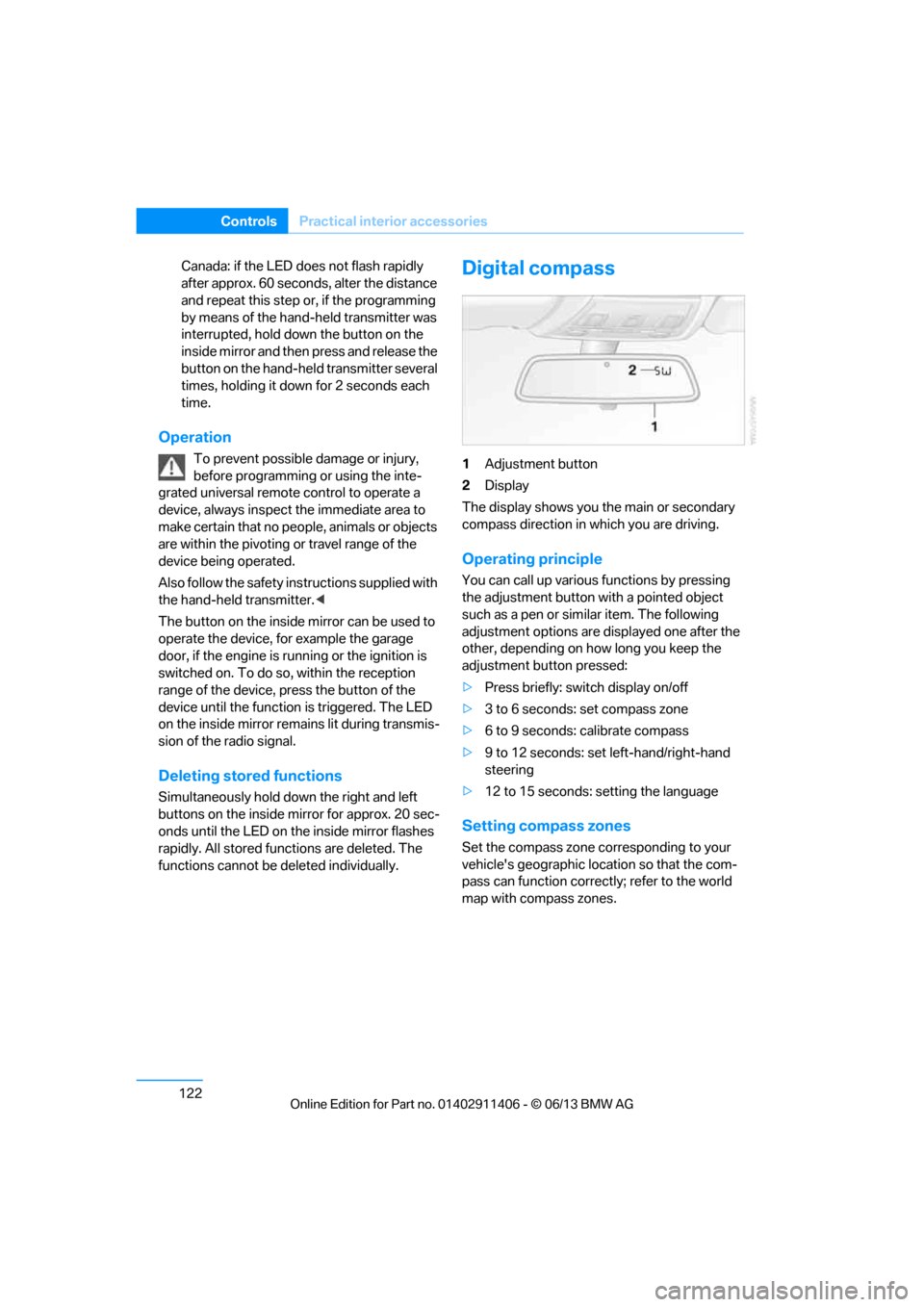
Digital compass
1Adjustment button
2 Display
The display shows you the main or secondary
compass direction in which you are driving.
Operating principle
You can call up various functions by pressing
the adjustment button with a pointed object
such as a pen or similar item. The following
adjustment options are displayed one after the
other, depending on how long you keep the
adjustment button pressed:
> Press briefly: switch display on/off
> 3 to 6 seconds: set compass zone
> 6 to 9 seconds: calibrate compass
> 9 to 12 seconds: set left-hand/right-hand
steering
> 12 to 15 seconds: setting the language
Setting compass zones
Set the compass zone corresponding to your
vehicle's geographic loca tion so that the com-
pass can function correctly; refer to the world
map with compass zones.
00320051004F004C00510048000300280047004C0057004C005200510003
Page 141 of 311
136
Driving tipsThings to remember when driving
Things to remember when driving
Vehicle equipment
In this chapter, all pr oduction, country, and
optional equipment that is offered in the model
range is described. For this reason, descrip-
tions will be given of some equipment that may
not be available in a vehi cle, for example due to
the special options or national-market version
selected. This also app lies to safety related
functions and systems.
Break-in period
Moving parts need breaking-in time to adjust to
each other. Please follo w the instructions below
in order to achieve the optimal service life and
economy of operation for your vehicle.
Engine and differential
Always obey all official speed limits.
Up to 1,200 miles/2,000 km
Drive at varying engine and road speeds, but do
not exceed an engine speed of 4,500 rpm or a
road speed of 100 mph/160 km/h.
Avoid full-throttle operation and use of the
transmission's kickdown mode.
After driving 1,200 miles/2,000 km
Engine and vehicle speeds can be gradually
increased.
Tires
Due to technical factors associated with their
manufacture, tires do not achieve their full
traction potential until af ter an initial break-in
period. Therefore, drive cautiously during the
first 200 miles/300 km.
Brake system
Brakes require an initial break-in period of
approx. 300 miles/500 km to achieve optimized
contact and wear patterns between brake pads
and rotors. Drive cautiously during this break-in
period.
Clutch
The function of the clut ch reaches its optimal
level only after a distance driven of approx.
300 miles/500 km. During this break-in period,
engage the clutch gently.
Following part replacement
The same break-in procedures should be
observed if any of the components mentioned
above have to be renewe d in the course of the
vehicle's operating life.
Saving fuel
The fuel consumption of your vehicle depends
on several factors. You can lower fuel consump-
tion and the environmental impact by taking
certain measures, adjusting your driving style
and having the vehicl e serviced regularly.
Remove any unneeded cargo
Additional weight increases fuel consumption.
Remove any mounted parts after you
have finished using them
Remove unneeded additional mirrors, the roof
rack and the rear luggage rack after use.
Mounted parts affect th e vehicle's aerodynam-
ics and increase fuel consumption.
Close the windows and glass roof
An open glass roof or window causes higher
air resistance and thus increases fuel
consumption.
00320051004F004C00510048000300280047004C0057004C005200510003
Page 216 of 311
211
Te l e p h o n e
Communications
Selecting an entry
Adjusting volume
Turn knob during announcement.
>
The volume remains the same, even if the
volume of other audio sources is changed.
> The volume is stored for the remote control
currently in use.
Notes
Notes on Emergency Requests
Do not use the voice operation system to ini-
tiate an emergency call. In stressful situations,
the voice and vocal pitch can change. This can
unnecessarily delay the establishment of a tele-
phone connection.
Instead, use the SOS button, refer to page 272,
in the vicinity of the interior rearview mirror.
Ambient conditions
> Say the commands, nu mbers and letters
smoothly and with normal volume, empha-
sis and speed.
> Always say the commands in the language
of the system. The language of the voice
operation of the mobile phone is preset and
cannot be changed via the Control Display.
> Keep the doors, windows, glass roof, and
convertible top closed to prevent interfer-
ence from outside noise.
> Avoid ambient noise in the vehicle while
speaking.
Snap-in adapter
General information
Detailed information on snap-in adapters that
compatibly support mobile phone functions can
be found at your BMW center.
Notes
At high temperatures, the charging function of
the mobile phone may be limited and some
functions may no longer be carried out.
When using the mobile phone via the vehicle,
follow the operating instru ctions of the mobile
phone.
Installation location
In the center armrest.
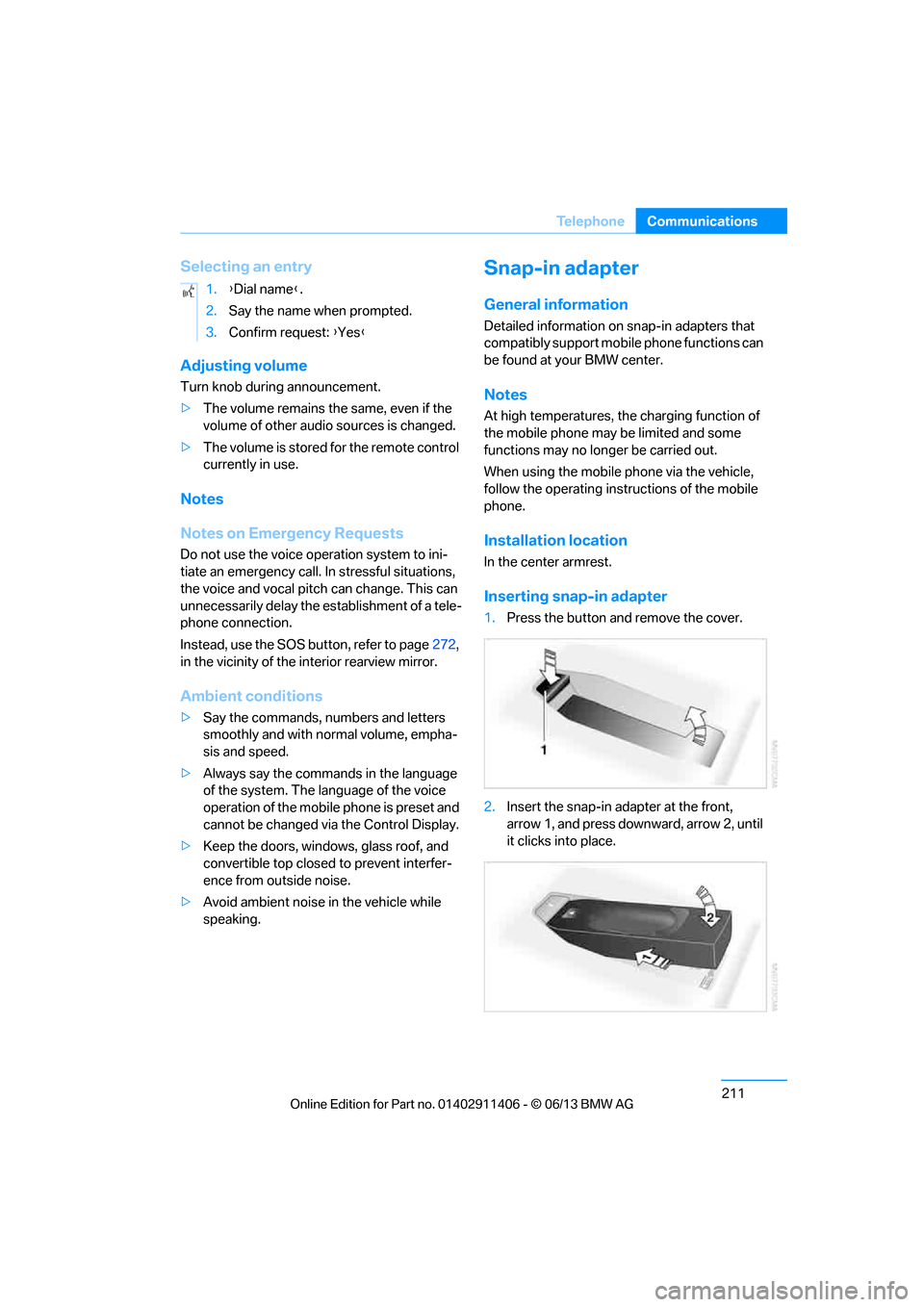
Inserting snap-in adapter
1. Press the button and remove the cover.
2. Insert the snap-in adapter at the front,
arrow 1, and press downward, arrow 2, until
it clicks into place.
1.
{Dial name }.
2. Say the name when prompted.
3. Confirm request: {Yes }
00320051004F004C00510048000300280047004C0057004C005200510003
Page 267 of 311
262
MobilityCare
Care
Vehicle equipment
In this chapter, all pr oduction, country, and
optional equipment that is offered in the model
range is described. For this reason, descrip-
tions will be given of some equipment that may
not be available in a vehi cle, for example due to
the special options or national-market version
selected. This also app lies to safety related
functions and systems.
Washing the vehicle
Notes
When using steam cleaners or high-pres-
sure cleaning jets, ma ke sure to maintain
a sufficient distance and stay below a maximum
temperature of 140 °F/60 6.
Too close a distance, too high a pressure, or too
high a temperature may cause damage or pre-
liminary damage that can then lead to long-term
damage.
Follow the operating instructions for the steam
jet or high-pressure washer. <
When using high-pressure washers, do
not spray the sensors, e.g. of the Park
Distance Control, for an extended period and
maintain a distance of at least 1 ft/30 cm from
them. <
Regularly remove foreign objects, e.g. leaves, in
the vicinity of the windshield when the hood is
open.
Wash the vehicle more frequently, particularly
in winter.
Heavy soiling and road salt can lead to vehicle
damage.
Automatic car washes
Notes
In car washes with high pressures and
nozzle positions, wate r may drip into the
vehicle around the windows. <
Please note the following:
> Give preference to car washes that use
cloth or soft brushes in order to avoid paint
damage.
> Wheels and tires must not be damaged by
transport devices.
> Fold in exterior mirror, refer to page 55; oth-
erwise, they can be damaged due to the
width of the vehicle.
> Deactivate the rain sensor, refer to page 73,
to prevent undesired wiper operation.
> Remove additional add-on parts, e.g. spoil-
ers or phone antennas, if they could be
damaged.
> Unscrew the rod antenna.
> Leave the remote control in the ignition
lock.
Avoid car washes with guide rail heights
over 4 in/10 cm, otherwise there is
danger of damaging chassis parts. <
Convertible: retractable hardtop
Proceed as you would in a normal car wash.
When you open a wet hardtop, water
drops may run into the trunk. If necessary,
remove items from the trunk beforehand to
avoid water stains or soiling. <
00320051004F004C00510048000300280047004C0057004C005200510003
Page 276 of 311
271
Replacing components
Mobility
>
Seat and mirror memory
The positions must be stored again, refer to
page 53.
> Inside rearview mirror with digital compass
The system must be calibrated, refer to
page 123.
> Active steering
The system automatically initializes itself
briefly during a trip. The system is deacti-
vated during this time, refer to page 105.
> xDrive
The system automatically initializes itself
during a trip. Indicator lamps light up during
this time. If the lamps do not go out during
the current trip, have the system checked.
Disposal of old battery
Have old batteries disposed of by your
BMW center or bring them to a recycling
center. Maintain the ba ttery in an upright
position for transport and storage. Always
secure the battery against tipping over during
transport.<
Fuses
Never attempt to repair a blown fuse and
do not replace a defective fuse with a
substitute of another co lor or amperage rating;
otherwise, this could lead to a circuit overload,
ultimately resulting in a fire in the vehicle. <
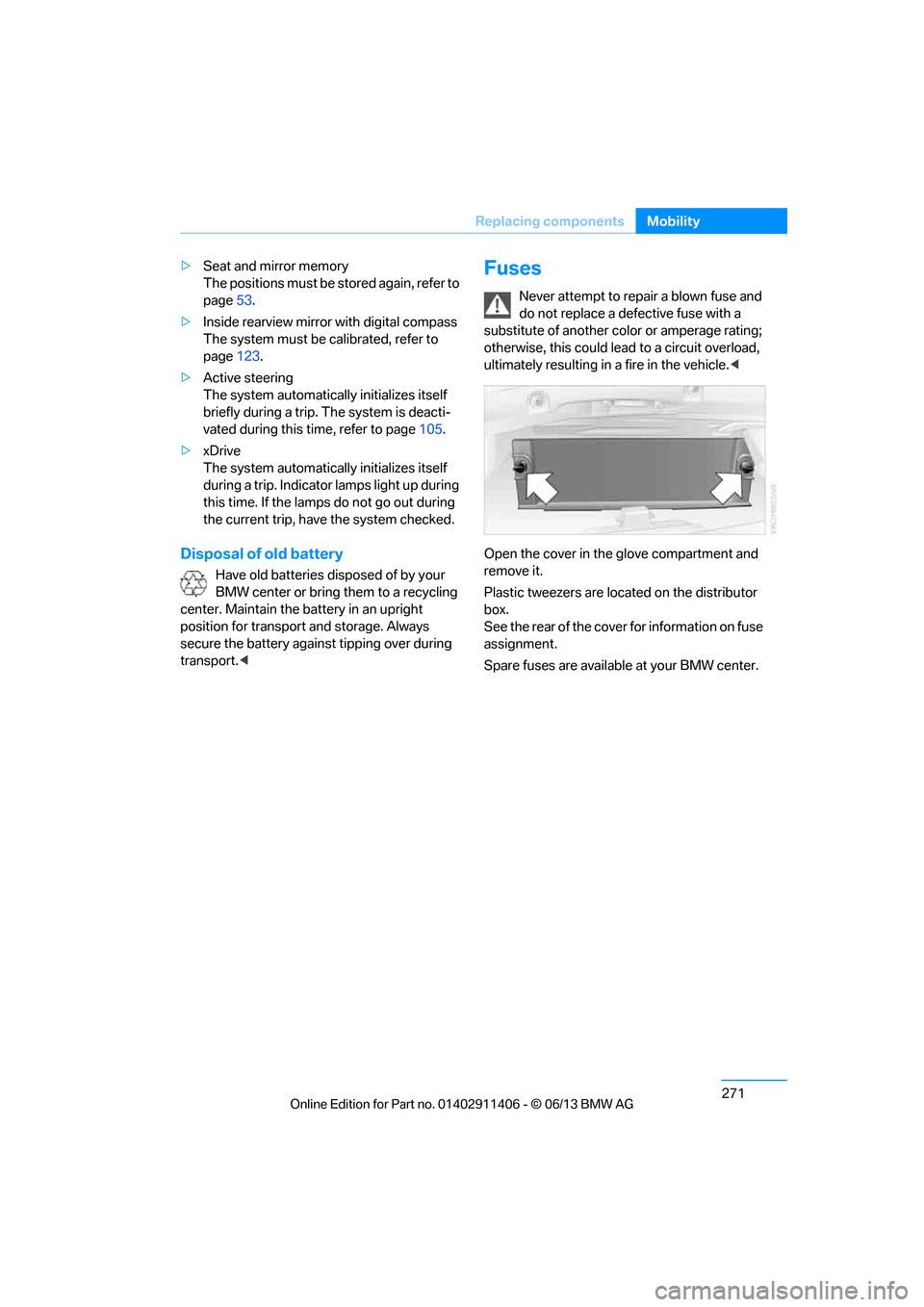
Open the cover in the glove compartment and
remove it.
Plastic tweezers are loca ted on the distributor
box.
See the rear of the cover for information on fuse
assignment.
Spare fuses are available at your BMW center.
00320051004F004C00510048000300280047004C0057004C005200510003
Page 285 of 311
280
ReferenceTechnical data
Technical data
Vehicle equipment
In this chapter, all pr oduction, country, and
optional equipment that is offered in the model
range is described. For this reason, descrip- tions will be given of some equipment that may
not be available in a vehi
cle, for example due to
the special options or national-market version
selected. This also app lies to safety related
functions and systems.
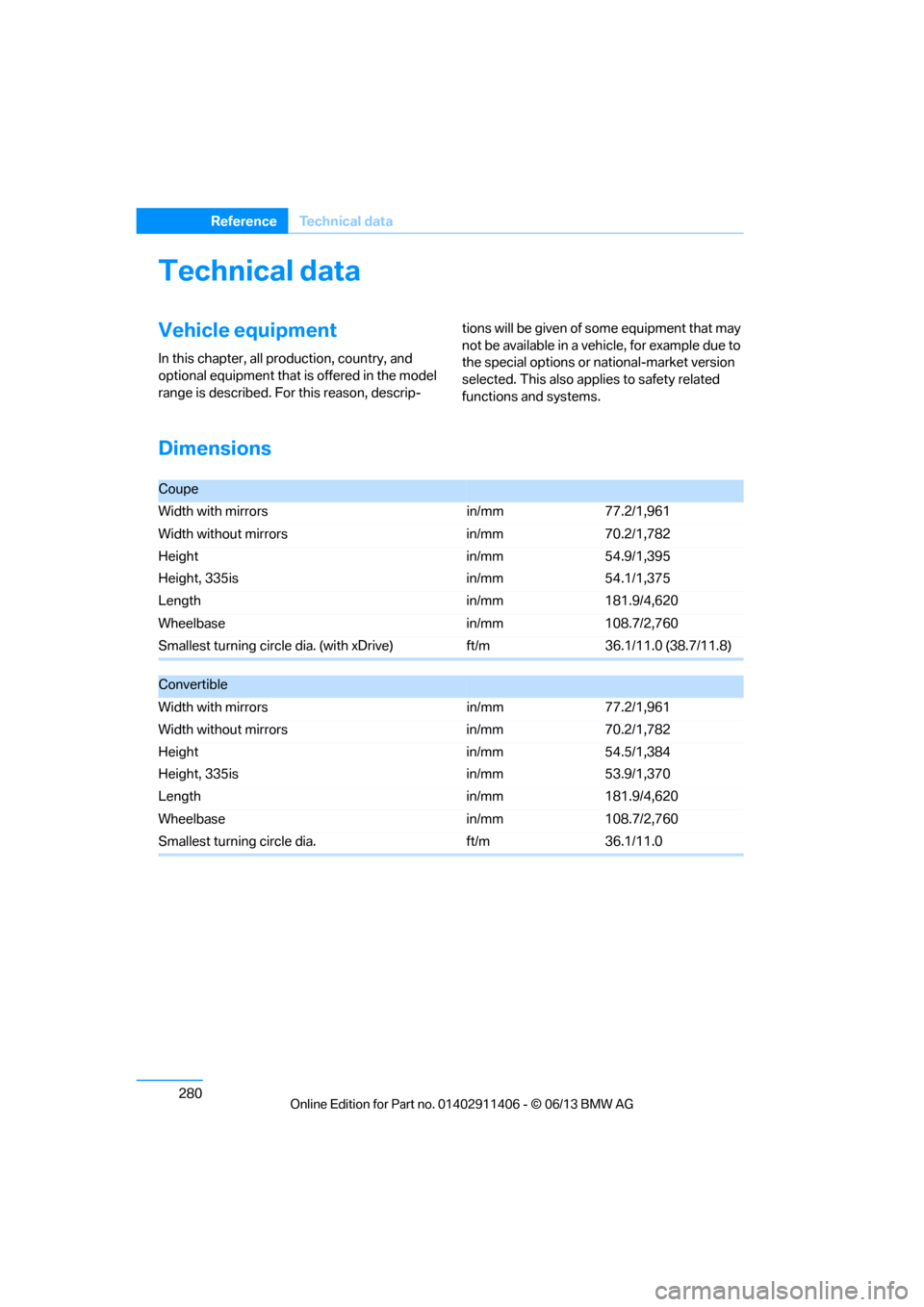
Dimensions
Coupe
Width with mirrors in/mm77.2/1,961
Width without mirrors in/mm70.2/1,782
Height
Height, 335is in/mm
in/mm54.9/1,395
54.1/1,375
Length in/mm181.9/4,620
Wheelbase in/mm108.7/2,760
Smallest turning circle dia. (with xDrive) ft/m36.1/11.0 (38.7/11.8)
Convertible
Width with mirrors in/mm77.2/1,961
Width without mirrors in/mm70.2/1,782
Height
Height, 335is in/mm
in/mm54.5/1,384
53.9/1,370
Length in/mm181.9/4,620
Wheelbase in/mm108.7/2,760
Smallest turning circle dia. ft/m36.1/11.0
00320051004F004C00510048000300280047004C0057004C005200510003
Page 300 of 311
295
Everything from A to Z
Reference
Emergency services, refer to
Roadside Assistance 273
Energy, saving
– saving fuel 136
Engine
– breaking in 136
– overheated, refer to Coolant temperature 259
– starting 63
– starting, Comfort Access 40
– switching off 64
Engine compartment 255
Engine coolant, refer to Coolant 259
Engine oil
– adding 258
– additives, refer to Approved engine oils 258
– alternative oil types 258
– approved engine oils 258
– BMW Maintenance System 260
– capacity 282
– checking level 256
– intervals between changes,
refer to Service
requirements 88
Engine starting, refer to
Starting the engine 63
Entering the postal code for navigation 147
Entry lamps, refer to Interior lamps 114
Entry map for destination 151
Equalizer, tone control 167
ESP Electronic Stability Program, refer to Dynamic
Stability Control DSC 97
Exhaust system, refer to Hot exhaust system 138
Exterior mirrors 55
– adjusting 55
– automatic dimming
feature 56
– automatic heating 55
– folding in and out 55External audio device
125
External devices 189
– random sequence 192
Eyes
– for tow-starting and towing
away 275
– for tying down loads 140
F
Failure messages, refer to
Check Control 92
Failure of an electrical consumer 271
False alarm
– avoiding unintentional alarm 39
– switching off an alarm 39
Fastening safety belts, refer to
Safety belts 54
Fastest route for navigation 155
Fast forward
– CD player 180
Fault messages, refer to
Check Control 92
Filter
– refer to Microfilter/activated-
charcoal filter for automatic
climate control 119
First aid pouch 273
Fixture for remote control, refer to Ignition lock 62
Flash when locking/
unlocking 35
Flat tire
– run-flat tires 253
– tire pressure monitor TPM 102
Flat Tire Monitor FTM 100
– indicating a flat tire 101
– indicator/warning lamp 101
– initialization 100
– snow chains 100,254
– system limits 100
Flat tires, refer to Tire
condition 251 Fluid reservoir, refer to
Washer fluid reservoir 74
FM, waveband 169
Fog lamps 113
– indicator lamp 15,113
Folding up the floor panel 130
Footwell lamps, refer to Interior lamps 114
For your own safety 5
Four-wheel drive, refer to xDrive 99
Free memory ca pacity, music
collection 188
Front airbags 107
FTM, refer to Flat Tire Monitor 100
Fuel 233
– average consumption 85
– gauge 84
– high-quality brands 233
– quality 233
– specifications 233
– tank contents, refer to Capacities 282
Fuel
clock, refer to Fuel
gauge 84
Fuel consumption indicator
– average fuel
consumption 85
Fuel display, refer to Fuel gauge 84
Fuel filler flap 232
– releasing in the event of electrical malfunction 232
Fuses 271
G
Garage door opener, refer to
Integrated universal remote
control 120
Gasoline
– refer to Average
consumption 85
Gasoline, refer to Required fuel 233
00320051004F004C00510048000300280047004C0057004C005200510003
Page 301 of 311
296
ReferenceEverything from A to Z
Gasoline display, refer to Fuel
gauge 84
Gas station recommendations 157
Gear indicator, automatic
transmission with
Steptronic 65
Gear indicator, refer to
Displays in the instrument
cluster 68
Gearshift lever 68
– automatic transmission with Steptronic 65
– manual transmission 65
Gearshifts
– automatic transmission with Steptronic 65
– manual transmission 65
General driving notes 137
Glass roof, electric 43
– convenient opening and closing 34
– convenient opening and closing with Comfort
Access 40
– initializing 44
– opening, closing 43
– pinch protection system 43
– power failure 44
– remote control 34
– tilting 43
Glove compartment 124
GPS navigation, refer to Navigation system 144
Grills 115
Gross vehicle weight, refer to Weights 281
H
Handbrake, refer to Parking
brake 64
Hands-free system 16,209
Hardtop label 128
Hardtop sticker 128
Hazard warning flashers 16HDC Hill Descent Control
99
HD Radio 171
Head airbags 107
Headlamp control, automatic 110
Headlamp flasher 72
– indicator lamp 13,15
Head Light, refer to Adaptive
Light Control 111
Head restraints 51
– rear, removing 52
– sitting safely 48
Heated
– mirrors 55
– rear window 118
– seats 53
– steering wheel 57
Heating
– mirrors 55
– rear window 118
– seats 53
– steering wheel 57
Heating and ventilation, refer to Climate 115
Heavy loads, refer to Stowing
cargo 140
Height, refer to Dimensions 280
Height adjustment
– seats 49
– steering wheel 56
High-beam Assistant 112
High beams 112
– headlamp flasher 112
– indicator lamp 15
High beams and low beams, automatic, refer to High-
beam Assistant 112
High-pressure washer 262
High water, refer to Driving
through water 138
Highways, refer to Route criteria 155
Hill Descent Control HDC 99
Hills 139
Holders for cups 125Homepage BMW
4
Hood 255
Hooks for shopping bags 129
Horn 12,
13
Hotel function, refer to
Locking o
r unlocking
separately 37
Hot exhaust system 138
Hydraulic brake assist, refer to Dynamic Brake Control 97
Hydroplaning 138
I
IBOC, refer to HD radio 171
Ice warning, refer to Outside
temperature warning 83
Identification marks
– run-flat tires 253
– tire coding 250
iDrive 20
– adjusting brightness 95
– changing date and time 91
– changing language 95
– changing settings 95
– changing units of measure and display format 88
– controls 20
– menu guidance 21
– operating principle 20
– overview 20
– start menu 21
– status information 23
iDrive operating principle 20
Ignition 63
– switched off 63
– switched on 63
Ignition key, refer to Remote control with integrated
key 32
Ignition key position 1, refer to Radio readiness 62
Ignition key position 2, refer to
Ignition on 63
Ignition lock 62
Imprint 2
00320051004F004C00510048000300280047004C0057004C005200510003